AWS Data Movement Decision Guide - DataSync, Transfer Family, Storage Gateway, and Data Transfer Terminal
First Published:
Last Updated:
This guide is a decision hub for that question. It starts from the constraints you already have — how much data, by when, over which protocol, with what integrity guarantee, over what network — and narrows from there to a mechanism. It deliberately does not start from a list of service names, because starting from service names is what produces the two most common failures in this space: using a bulk transfer tool for a workload that needs continuous synchronization, and treating a hybrid file-access appliance as if it were a migration tool.
A note on timing, because it changes the answer. The offline half of this decision looks nothing like it did two years ago. AWS Snow Family devices are no longer orderable by new customers, and support for AWS Snowball ends on December 31, 2026 in all AWS commercial Regions. Most published migration guidance — including material that is otherwise current — still routes large offline transfers to Snowball. Section 7 covers what replaced it and what existing Snow customers need to do. All service availability statements in this article were confirmed against AWS official documentation on 2026-08-04; availability changes, so re-confirm before you commit a design.
Scope. This article is about moving data: files, objects, and the file systems that hold them. It is not about pricing — the trade-offs below are expressed in time, bandwidth contention, integrity guarantees, operational surface, and security properties, and the official pricing pages are the right source for anything else. It also does not estimate how long your transfer will take; Section 3 gives you the reasoning, not a number, because a number that does not account for your effective throughput, small-file overhead, and retransmissions is worse than no number at all.
What this article delegates. Server migration — replicating running machines and cutting them over — belongs to Summary of AWS Application Migration Service (AWS MGN) Architecture and Lifecycle Relationships, Usage Notes. Choosing the network path between your facility and AWS belongs to the AWS Hybrid Connectivity Decision Guide and the AWS VPC Connectivity Decision Guide. Choosing which storage service the data lands in is Section 11 and its delegation targets. Database migration is out of scope entirely: moving a database onto a different engine belongs to Heterogeneous Database Migration on AWS, and keeping an analytical copy of database rows in step without building a pipeline belongs to Zero-ETL Integrations on AWS. Continuous ingestion of event streams is a different problem with a different toolchain, covered in the AWS Real-Time Streaming Data Pipeline Architecture Guide.
Table of Contents
- Why Moving the Data Is Its Own Design Decision
- Decision Inputs Before Service Names
- Online and Offline Transfer
- AWS DataSync
- AWS Transfer Family
- AWS Storage Gateway
- Offline Transfer Today
- Choosing in Practice
- Integrity, Validation, and Cutover
- Security and Compliance Considerations
- Where the Data Lands
- Common Pitfalls and Anti-Patterns
- Frequently Asked Questions
- Summary
- References
1. Why Moving the Data Is Its Own Design Decision
When people say "we are migrating to AWS," they usually picture the destination. The transfer itself gets treated as plumbing — something a script and a weekend can handle. That framing survives contact with a 200 GB pilot and then collapses.It collapses for reasons that are structural rather than accidental:
- Data does not hold still. The file server you are copying is being written to while you copy it. A transfer that takes four days across a dataset with a 2% daily change rate has drifted meaningfully by the time it finishes. If your design has no mechanism for a second, third, and final incremental pass, you do not have a migration plan — you have a backup.
- The bottleneck is usually not the link speed. Small files, deep directory trees, and metadata-heavy filesystems can put the constraint on operations per second rather than bits per second. A tool that reports "10 Gbps capable" says nothing about a dataset of 300 million 8 KB files.
- The transfer competes with production. The circuit carrying your migration is usually the same circuit carrying your business. Whether the tool can be throttled, and whether it can be scheduled into off-peak windows, is a first-class requirement, not a nice-to-have.
- "It copied successfully" is not a guarantee. Different tools verify different things at different times. Knowing exactly what was checked — every object, only the transferred objects, or nothing after the fact — is what lets you sign off on a cutover.
- Some of these choices are permanent-ish. A protocol endpoint you expose to external partners becomes an integration contract. A caching appliance you install on-premises becomes a permanent operational dependency. These are not the same kind of decision as "run a copy job."
The mental model that resolves most of this in one step: decide first whether you are performing a transfer that ends, or establishing an access path that persists. DataSync, Transfer Family, and the offline options all perform transfers. Storage Gateway establishes an access path. Confusing the two is the single most common design error in this area, and Section 6.4 is devoted to it.
2. Decision Inputs Before Service Names
Before any service is named, seven inputs determine the shape of the answer. Write these down for your actual workload; the rest of the guide is a function of them.2.1 Volume, shape, and deadline
Total size matters less than the pair (total size, object count). A 50 TB dataset of large media files and a 50 TB dataset of small documents are different problems: the first is bandwidth-bound, the second is operations-bound. Record both, plus the date the destination has to be authoritative.Object count also has a hard consequence in tooling. AWS DataSync Basic mode tasks are subject to a quota of 50 million files, objects, and directories per task execution between on-premises, self-managed, or other cloud storage and AWS storage services, and 25 million between AWS storage services; AWS notes that S3 prefixes count as directories toward that quota, so
s3://bucket/foo/bar.txt counts as two directories and one object. Enhanced mode tasks are documented as working with virtually unlimited numbers of objects per execution. If your object count is in the hundreds of millions, that fact alone constrains the design before anything else does.2.2 One-time or continuing
This is the input that most often gets answered incorrectly, because the honest answer is usually "both, in sequence." Most migrations need a bulk seed followed by repeated incremental passes until the delta is small enough to absorb in a maintenance window. A few need indefinite ongoing synchronization — for example, keeping a cloud copy warm while an on-premises system remains authoritative. And a few genuinely are one-shot.If the answer is "one-time," ask whether the source will be frozen for the whole transfer. If it will not, the answer is not one-time.
2.3 The protocol the source speaks
The source system's protocol narrows the field faster than any other single input, because it determines which mechanisms can even see the data:- NFS or SMB file shares — DataSync reads these natively through an agent. Storage Gateway can also present them, but in the other direction (see Section 6).
- HDFS — DataSync supports Hadoop Distributed File System locations, connecting as an HDFS client.
- S3-compatible object storage, including other clouds — DataSync supports self-managed object storage and a documented list of other cloud providers.
- Azure Blob Storage and Azure Files — Azure Blob Storage is a dedicated DataSync location type, because Azure Blob does not expose an S3-compatible endpoint; an Azure Files SMB share is configured as an SMB location.
- SFTP, FTPS, FTP, or AS2, pushed by someone else — this is Transfer Family's domain, and it is a fundamentally different pattern: you are not pulling data, you are operating an endpoint that others push to.
- iSCSI block volumes — Storage Gateway's Volume Gateway is the only option here, and it is a hybrid access pattern rather than a migration.
2.4 Integrity and validation requirements
Ask what evidence you will need at the end. "The tool said it finished" is sufficient for a scratch dataset and insufficient for a regulated archive. Concretely: do you need per-object checksum comparison across the whole dataset, or only across the objects this run touched? Do you need a machine-readable report? Section 9 maps these requirements onto the actual options.2.5 Network availability and contention
"Do we have enough bandwidth" is three questions wearing one coat: what is the effective throughput, measured rather than assumed from the circuit's rated speed; how much of it can you take without harming production, and during which hours; and is the path reliable enough that a multi-day transfer will not spend its time retrying. Section 3.1 turns these into the arithmetic. The third is the quiet killer — a link that drops for ninety seconds twice a day is fine for interactive traffic and hostile to a long-running bulk copy, unless the tool resumes cleanly.2.6 Security, residency, and custody
Enumerate: must the data avoid the public internet entirely? Who must hold the encryption keys? Is there a jurisdictional constraint on where the bytes may physically travel? Does the transfer itself need an audit trail? For offline options, add: who has physical custody of the media, and for how long?2.7 Who operates it
An agent-based transfer requires someone to run a virtual machine on-premises, patch it, and give it network access. A protocol endpoint requires someone to manage users and credentials. A gateway appliance requires someone to own it permanently. If the answer to "who" is "nobody, really," prefer the option with the smallest on-premises footprint, even at some cost in flexibility.3. Online and Offline Transfer
3.1 How to reason about whether the network is enough
The classic formulation — data volume divided by bandwidth — is the right starting point and a bad stopping point. The honest version has four correction terms:- Effective, not rated, throughput. Measure a representative sample transfer over the actual path at the actual time of day. Rated circuit speed is an upper bound you will not reach.
- The share you can actually take. If production needs 60% of the link during business hours, your migration has 40% during business hours and possibly more overnight. AWS DataSync exposes a bandwidth limit for exactly this reason, and the limit can be changed on a running execution, taking effect within 60 seconds.
- Per-object overhead. Small files amortize protocol and metadata overhead badly. This is where object-count-heavy datasets diverge sharply from the naive estimate.
- Retransmission and restart behavior. Interruptions cost more than their duration if the tool restarts work rather than resuming it.
Then compare the result against the deadline — and against the second deadline that people forget: the date by which the source system must be decommissioned, which is frequently earlier than the date the destination must be live.
This guide will not tell you how many days your transfer will take. Any figure produced without measuring your effective throughput and your object-size distribution is fiction, and publishing fiction as an estimate is how migration plans acquire schedules that cannot be met. Measure, then compute, then add margin for the incremental passes in Section 9.2.
If the computed window fits comfortably inside the deadline with production untouched, the answer is online. If it does not, the sequence to work through is: can the effective throughput be raised (a dedicated circuit provisioned for the duration of the project is a documented option), can the dataset be reduced by filtering, can the transfer be parallelized across multiple tasks, and only then — is this an offline transfer?
3.2 The options at a glance
The table below is the field. It is sortable in the browser.* You can sort the table by clicking on the column name.
| Mechanism | What moves | Direction | Interface at the source | One-time or continuing | On-premises component | Availability as of 2026-08-04 |
|---|---|---|---|---|---|---|
| AWS DataSync | Files and objects, with metadata | You pull, or push, on a schedule you control | NFS, SMB, HDFS, object storage, Azure Blob, Azure Files, and AWS storage services | Both. Tasks can be scheduled and re-run incrementally | Agent VM or EC2 instance, for most source types | Generally available |
| AWS Transfer Family | Files, arriving over a standard protocol | Others push to you, or you pull from a remote server via connectors | SFTP, FTPS, FTP, AS2 | Continuing, by nature. It is an endpoint, not a job | None. It is a managed endpoint | Generally available |
| AWS Storage Gateway | Not a transfer. A cached access path | Applications read and write through the gateway | NFS, SMB, iSCSI, iSCSI VTL | Continuing and permanent | Gateway appliance on a VM or EC2 instance (the hardware appliance has not been offered since 2025-05-12) | Generally available. Amazon FSx File Gateway is closed to new customers since 2024-10-28 |
| AWS Data Transfer Terminal | Whatever is on the devices you bring | You upload, in person, at a reserved slot | Your own storage devices, connected at the facility | One-time by nature | Your own portable storage devices | Generally available. Limited to AWS Enterprise Support customers |
| AWS Partner offline services | Vendor-dependent | Vendor-dependent | Vendor-dependent | One-time by nature | Vendor-supplied device | Available through AWS Marketplace |
| AWS Snow Family | Files and objects, on a shipped device | You load, ship, AWS ingests | NFS and S3-compatible interfaces on the device | One-time by nature | The device itself | Closed to new customers since 2025-11-07. Support ends 2026-12-31 in all AWS commercial Regions |
Two attributes in that table decide more designs than the rest combined.
The first is "one-time or continuing." DataSync is the only entry that comfortably does both, and that is why it is the default answer for migration. Transfer Family and Storage Gateway are structurally continuing — they are things you operate, not jobs you run. The offline options are structurally one-time.
The second is "on-premises component." Transfer Family is the only mechanism in the list that requires nothing on your side, which is precisely why it is the right answer when the other side of the transfer is a third party you do not control.
3.3 The decision flow
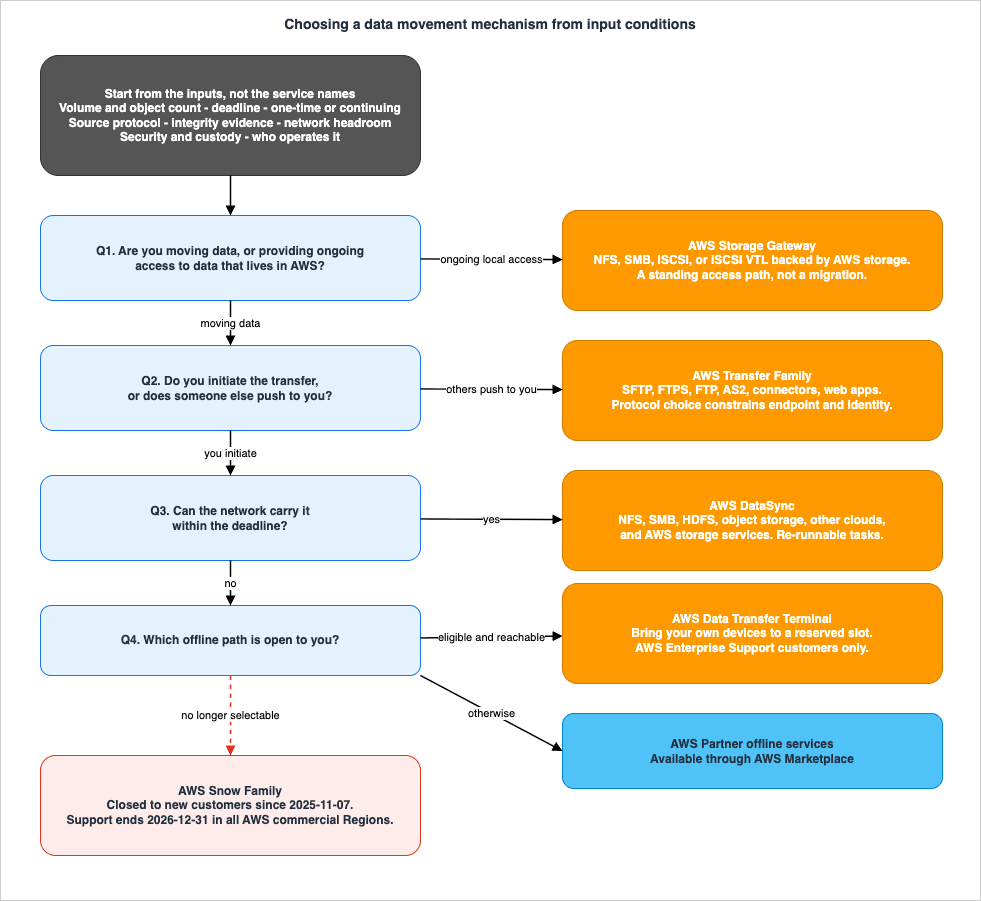
Question 1: Are you moving data, or providing ongoing access to data that lives in AWS? If on-premises applications need to keep reading and writing through a local file or block interface indefinitely, with the authoritative copy in AWS, that is Storage Gateway, and it is not a migration. Go to Section 6. If you are moving data from A to B with an end state where the source no longer matters, continue.
Question 2: Do you initiate the transfer, or does someone else? If external parties push files to you over a standard file transfer protocol — partners, suppliers, customers, business-to-business exchanges — you are operating an endpoint. That is Transfer Family, Section 5. If you control both ends and pull the data, continue.
Question 3: Can the network carry it within the deadline? Apply Section 3.1. If yes, DataSync, Section 4. If no, continue.
Question 4: What are the current offline options? Section 7. The short version is that the answer changed recently, and the answer you remember is probably wrong.
A cross-cutting note. Questions 1 and 2 are not mutually exclusive with Question 3 in practice. A very common shape is DataSync for the bulk seed, followed by Storage Gateway to preserve on-premises file access to the migrated data — AWS documents exactly this combination. Sections 8.5 and 8.6 walk through the combined patterns.
4. AWS DataSync
AWS DataSync is an online data movement service for transferring file and object data to, from, and between AWS storage services. For most migrations it is the default, and the rest of this section is about the parameters that decide whether it fits and how to configure it when it does.The property that makes it a migration tool rather than a copy script is that a task is a durable, re-runnable definition. You point it at a source location and a destination location, and each run reconciles the two. That is what makes the incremental cutover pattern in Section 9.2 possible.
4.1 Locations and directions
A DataSync location is one endpoint of a task; every task has exactly two. On the on-premises and third-party side, DataSync works with Network File System (NFS), Server Message Block (SMB), Hadoop Distributed File Systems (HDFS), and object storage. On the AWS side it works with Amazon S3, Amazon EFS, Amazon FSx for Windows File Server, Amazon FSx for Lustre, Amazon FSx for OpenZFS, and Amazon FSx for NetApp ONTAP.It also works with a documented list of other clouds: Google Cloud Storage, Microsoft Azure Blob Storage, Microsoft Azure Files, Wasabi Cloud Storage, DigitalOcean Spaces, Oracle Cloud Infrastructure Object Storage, Cloudflare R2 Storage, Backblaze B2 Cloud Storage, NAVER Cloud Object Storage, Alibaba Cloud Object Storage Service, IBM Cloud Object Storage, and Seagate Lyve Cloud. Azure Blob Storage gets a dedicated location type rather than being treated as S3-compatible object storage, because it does not offer an S3-compatible endpoint.
Direction is not symmetric in every combination, and neither is the agent requirement. The table below reproduces the supported same-account combinations from the DataSync documentation.
* You can sort the table by clicking on the column name.
| Source | Destination | Requires an agent | Supported task mode |
|---|---|---|---|
| NFS, SMB | Amazon S3 | Yes | Basic, Enhanced |
| NFS, SMB | Amazon EFS, Amazon FSx | Yes | Basic, Enhanced (FSx for Lustre and FSx for OpenZFS only) |
| HDFS, Object storage | Amazon S3, Amazon EFS, Amazon FSx | Yes | Basic, Enhanced (FSx for Lustre and FSx for OpenZFS only) |
| Other cloud storage | Amazon S3 | Only for Basic mode | Basic, Enhanced |
| Other cloud storage | Amazon EFS, Amazon FSx | Yes | Basic, Enhanced (FSx for Lustre and FSx for OpenZFS only) |
| Amazon S3 | Amazon S3 | No | Basic, Enhanced |
| Amazon S3 | Amazon EFS, Amazon FSx | No | Basic, Enhanced (FSx for Lustre and FSx for OpenZFS only) |
| Amazon S3 | NFS, SMB | Yes | Basic, Enhanced |
| Amazon S3 | HDFS, Object storage | Yes | Basic, Enhanced |
| Amazon EFS, Amazon FSx | Amazon S3 | No | Basic, Enhanced (FSx for Lustre and FSx for OpenZFS only) |
| Amazon EFS, Amazon FSx | Amazon EFS, Amazon FSx | No | Basic, Enhanced (FSx for Lustre and FSx for OpenZFS only) |
| S3 on Outposts | Amazon S3 in AWS Regions | Yes | Basic only |
| Amazon S3 in AWS Regions | S3 on Outposts | Yes | Basic only |
Two consequences worth internalizing. First, AWS-to-AWS transfers between S3, EFS, and FSx need no agent at all — which makes DataSync a reasonable answer to problems that are not migrations, such as consolidating buckets across accounts. Second, among the FSx file system types, Enhanced mode supports FSx for Lustre and, since 2026-10-13, FSx for OpenZFS; as of 2026-10-17, FSx for Windows File Server and FSx for NetApp ONTAP still require Basic mode.
Cross-Region behavior has its own constraints. When transferring between AWS storage services in different Regions, one of the two locations must be in the Region where you are using DataSync. And you cannot transfer across Regions with an NFS, SMB, HDFS, or object storage location at all — both locations must be in the Region where the agent is activated.
4.2 The agent, and where it lives
For anything that is not an AWS-native storage service, DataSync needs an agent: a virtual appliance that speaks the source protocol locally and the DataSync transfer protocol to AWS. AWS documents deployment on VMware ESXi 7.0 or 8.0, Linux KVM, Nutanix AHV using the KVM image, and Microsoft Hyper-V 2012 R2, 2016, or 2019, as well as on an Amazon EC2 instance from a provided AMI. Running KVM on Amazon EC2 is explicitly not supported for DataSync agents.Placement is a real design decision, not a formality. The guidance is to put the agent close to the storage system it reads, so that the local protocol conversation stays local and only the optimized, compressed transfer traffic crosses the wide-area link. For transfers between AWS accounts or between cloud storage systems, AWS documents that the agent must be in the same Region and account as the source file system.
For a Basic mode agent, sizing follows object count rather than data volume: AWS documents 64 GB of RAM for task executions working with more than 20 million files, objects, or directories. An Enhanced mode agent is listed with 32 GB of RAM regardless of the count, and the documentation says Enhanced mode agents don't have file quotas (as of October 18, 2026).
The network requirements are narrow and worth checking before anyone provisions a VM. Using a VPC service endpoint — which keeps agent-to-service communication inside your VPC via AWS PrivateLink — the agent needs outbound TCP 1024–1064 to the DataSync VPC service endpoint for control-plane traffic, TCP 443 to the task's network interfaces for data-plane traffic, and TCP 22 to the VPC service endpoint for the AWS Support channel, which is required only for Basic mode agents and not needed for normal operation. Port 80 is used only to obtain the activation key from a browser, and DataSync closes it once the agent is activated.
4.3 Task modes: Basic and Enhanced
DataSync tasks run in one of two modes, and the choice has consequences beyond throughput.* You can sort the table by clicking on the column name.
| Capability | Enhanced mode | Basic mode |
|---|---|---|
| Processing model | Lists, prepares, transfers, and verifies in parallel | Prepares, transfers, and verifies sequentially |
| Items per task execution | Virtually unlimited | 50 million between on-premises, self-managed, or other cloud storage and AWS storage services; 25 million between AWS storage services |
| Metrics and counters | More counters and metrics, including source object counts, per-execution prepared counts, and folder counters | Fewer counters and metrics |
| Logging | Structured logs in JSON format | Unstructured logs |
| Supported locations | Amazon S3, Amazon EFS, FSx for Lustre, FSx for OpenZFS, NFS, SMB, HDFS, Azure Blob, and object storage including other clouds | All DataSync location types |
| Verification default | Verifies only transferred data | Verifies all data by default |
| Unsupported object tags | Execution fails immediately when ObjectTags is unspecified or PRESERVE for locations that do not support tagging | Execution runs and reports per-object failures |
The failure-handling row is easy to skim past and expensive to discover at runtime. If you are transferring to or from a cloud storage location that does not support object tagging, an Enhanced mode task will fail immediately unless you set
ObjectTags appropriately, where a Basic mode task would have completed with per-object failures reported.Task mode also constrains the NFS version. DataSync uses NFS version 4.1 by default and also supports 4.2, 4.0, and 3.x, but NFS version 4.2 is supported only with Enhanced mode tasks, so a Basic mode task against an NFS server has to use 4.1, 4.0, or 3.x.
4.4 Narrowing what moves: filters and manifests
Two mechanisms restrict the scope of a task, and AWS documents that they cannot be used together.Filters are include and exclude patterns, evaluated at task creation, task update, or task start. Exclude filters define what not to transfer; include filters both select what to transfer and limit what DataSync scans at the source and destination — which matters, because scanning is itself a cost in time on a large tree. On the CLI, patterns are pipe-delimited within a single filter string, and the combined filter string is capped at 102,400 characters.
aws datasync create-task \
  --source-location-arn 'arn:aws:datasync:region:account-id:location/location-id' \
  --destination-location-arn 'arn:aws:datasync:region:account-id:location/location-id' \
  --excludes FilterType=SIMPLE_PATTERN,Value='*/temp|*/tmp'
DataSync also excludes some paths automatically: anything ending in
.snapshot, the /.aws-datasync and /.awssync folders it creates to facilitate transfers, and /.zfs, which appears with FSx for OpenZFS locations.Manifests take the opposite approach: a CSV file listing the specific file paths or object keys to transfer, with an optional S3 version ID per object when copying from S3. AWS documents manifests as supporting millions of entries, with a maximum manifest file size of 20 GB for Enhanced mode tasks. Manifests are the right tool when the set of objects to move is computed by something upstream — a database query, an inventory report, a reconciliation job — rather than expressible as a path pattern. Using a manifest requires the
iam:PassRole permission on the calling identity.4.5 Bandwidth control and scheduling
By default DataSync scales to use available bandwidth. A per-task bandwidth limit caps it. The limit can be set at task creation and changed on a running or queued execution via theBytesPerSecond parameter of UpdateTaskExecution, and AWS documents that the new limit takes effect within 60 seconds. That responsiveness is what makes "throttle it now, someone is complaining" a viable operational response rather than a task restart.Scheduling is the complementary control: a task can be configured to run on a schedule, including a custom schedule targeting off-peak hours. For a migration this is how you get the bulk of the work done overnight without a human staying up to start it.
The maximum throughput per task is quoted by AWS as 10 Gbps for transfers that use an agent and 5 Gbps for transfers that do not. These are documented ceilings, not expectations — treat them as an upper bound when deciding whether a single task can carry the load or whether you need to partition the dataset across several.
4.6 Quotas that shape the design
A handful of documented quotas will change your architecture if you are operating at scale, so they belong in the design phase rather than the troubleshooting phase.| Quota | Value | Adjustable |
|---|---|---|
| Tasks you can create | 100 | Yes |
| Queued executions for a single task | 50 | No |
| Concurrent Enhanced mode task executions | 120 | No |
| Task execution history retained | 30 days | No |
| Manifest file size, Enhanced mode | 20 GB | No |
| Characters in a task filter | 102,400 | No |
| Maximum total file path length | 4,096 bytes | Not applicable |
| Maximum file path component length | 255 bytes | Not applicable |
| Maximum Amazon S3 object name length | 1,024 UTF-8 characters | Not applicable |
The path-length limits deserve a specific warning. A Windows file server that has accumulated deeply nested project directories over fifteen years can contain paths that do not survive translation into S3 object keys within 1,024 UTF-8 characters. Discovering this at 3 a.m. during a cutover is avoidable: scan the source tree for over-length paths during planning. The 30-day execution history retention is the other one people meet late — if your audit evidence needs to outlive a month, export it as you go rather than relying on the console.
5. AWS Transfer Family
AWS Transfer Family solves a different problem from DataSync, and the difference is about who initiates. With DataSync you go and get the data. With Transfer Family you stand up an endpoint and other people put data on it — or, with connectors, you reach out to an endpoint someone else operates. It is the answer whenever the counterparty is outside your administrative control: partners, suppliers, customers, and business-to-business exchanges that have spoken SFTP for two decades and are not going to change.5.1 Protocols, and what each one constrains
Transfer Family servers support four protocols, and a single server can enable more than one:- SFTP — SSH File Transfer Protocol. AWS documents support for version 3 of the protocol.
- FTPS — file transfer with TLS encryption.
- FTP — unencrypted file transfer.
- AS2 — Applicability Statement 2, for transporting structured business-to-business data.
The protocol choice is not free. Each one carries configuration constraints that propagate into your network and identity design.
* You can sort the table by clicking on the column name.
| Protocol | Endpoint type constraint | Identity provider constraint | Storage domain | Other documented constraints |
|---|---|---|---|---|
| SFTP | Public, VPC internal, or VPC internet-facing | Any supported type: service managed, AWS Directory Service for Microsoft Active Directory, or custom | Amazon S3 or Amazon EFS | Protocol version 3. Maximum 10 concurrent multiplexed sessions per connection. SCP is not supported |
| FTPS | Must be VPC | Must be AWS_DIRECTORY_SERVICE, AWS_LAMBDA, or API_GATEWAY | Amazon S3 or Amazon EFS | Explicit mode only. PROT C is not supported, so the client must issue PROT P. Passive mode, STREAM mode, and Image or Binary mode only |
| FTP | Must be VPC | Must be AWS_DIRECTORY_SERVICE, AWS_LAMBDA, or API_GATEWAY | Amazon S3 or Amazon EFS | AddressAllocationIds cannot be associated. Passive mode, STREAM mode, and Image or Binary mode only. Credentials travel in clear text |
| AS2 | Must be VPC | Not applicable in the same sense; AS2 uses trading partner profiles and certificates | Must be Amazon S3 | Designed for structured B2B data exchange |
The FTP row contains the security decision. AWS's own guidance is explicit: because FTP transmits credentials in clear text, if you must enable FTP alongside SFTP or FTPS on the same server, maintain separate credentials for FTP so that exposure of an FTP credential does not compromise the encrypted protocols. The stronger position is not to enable FTP at all; enable it only when a counterparty genuinely cannot do otherwise, and then isolate it.
Idle and unresponsive connections time out on documented schedules: 1800 seconds (30 minutes) of inactivity for all of SFTP, FTP, and FTPS; 300 seconds (5 minutes) when an SFTP client is completely unresponsive; and approximately 10 minutes for FTPS and FTP unresponsive connections, handled by the underlying library. If a partner's automation opens a session and then thinks for 40 minutes, that is a design problem you will discover as intermittent failures.
One encoding constraint applies to both storage domains: Amazon S3 and Amazon EFS (because of NFSv4) require filenames to be in UTF-8 encoding, and other encodings can produce unexpected results.
5.2 Endpoint types and network exposure
Where the endpoint lives determines who can reach it and whether you can pin an address. AWS documents three practical shapes:- Public endpoint — reachable over the internet with no VPC configuration, SFTP only. AWS provides the IP addresses and they are subject to change, so a client-side firewall allowlist must be built on the server's DNS name rather than on addresses. Source-IP allowlisting is not supported.
- VPC endpoint with internal access — reachable from within the VPC and from VPC-connected environments such as an on-premises data center over AWS Direct Connect or VPN. Private IP addresses do not change. Access is controlled with security groups on the endpoint and network ACLs on its subnet.
- VPC endpoint with internet access — reachable both from the internet and from VPC-connected environments, with Elastic IP addresses attachable, including addresses you bring yourself. Both the Elastic IP addresses and the private addresses are stable.
The legacy
VPC_ENDPOINT endpoint type is discontinued and cannot be used to create new servers.The practical decision rule: if any counterparty needs to allowlist a fixed IP address on their side — and in business-to-business file exchange, many do — you need a VPC endpoint with internet access and Elastic IP addresses. A public endpoint cannot satisfy that requirement, and discovering this after publishing connection details to twenty partners is a painful correction.
For guidance on the underlying VPC endpoint and private connectivity mechanics, see the AWS VPC Connectivity Decision Guide.
5.3 Identity providers
Three identity provider types are documented:- Service managed, using SSH keys held by Transfer Family. Simple, and appropriate when the user population is small and stable.
- AWS Directory Service for Microsoft Active Directory, which lets you grant access based on your existing Microsoft Active Directory groups.
- A custom identity provider, implemented behind AWS Lambda or Amazon API Gateway, which is how you integrate an existing credential store or authentication provider.
Note the interaction with Section 5.1: FTP and FTPS rule out the service-managed option entirely. If your requirement set includes FTPS, you have already committed to Active Directory or a custom provider before you have written a line of configuration.
5.4 What happens after the file lands
An endpoint that only deposits files is rarely sufficient; something has to notice and act. Transfer Family offers two documented mechanisms.Managed workflows define a linear sequence of file-processing steps that run after a transfer over SFTP, FTPS, or FTP. Predefined steps include copying, tagging, deleting, and decrypting; a custom step invokes a Lambda function for anything else. Two properties make workflows more than syntactic sugar over an S3 event:
- You can specify one workflow for files uploaded in full and a different workflow for files that were only partially uploaded because of a premature session disconnect. Partial uploads are a real and frequently unhandled failure mode in file transfer, and having a first-class hook for them is genuinely useful.
- Built-in exception handling branches to an exception workflow on step failure, and each step produces detailed logs you can audit to trace data lineage.
Copy steps can parameterize the destination prefix with
${Transfer:UserName} or ${Transfer:UploadDate}, and each step can take either the previous step's output (${previous.file}, the default) or the originally uploaded file (${original.file}) as input. The OverwriteExisting flag defaults to FALSE, and when it is FALSE and a same-named file exists, AWS documents that nothing happens and workflow processing stops — a silent-stop behavior worth knowing before you rely on it.EventBridge notifications are the alternative. Transfer Family publishes events to Amazon EventBridge on completion of a file transfer operation, which you consume however you like. AWS positions managed workflows as the fit when all uploaded files need the same processing steps without conditional logic, and EventBridge as the general-purpose path.
5.5 The other direction: SFTP connectors
An SFTP connector inverts the relationship: instead of hosting a server that partners connect to, Transfer Family acts as a managed SFTP client against a remote server that someone else operates. Documented operations are sending files from Amazon S3 to the remote server, retrieving files from it into S3, listing a remote directory, and deleting, renaming, or moving files and directories on the remote server.Two configuration facts matter for design. Credentials for the remote server are retrieved from AWS Secrets Manager rather than held in the connector, and the connector supports two egress types: service managed, using AWS-managed infrastructure, and VPC, routing through your VPC. This is the clean answer to "we need to push a nightly file to a partner's SFTP server" — a requirement that otherwise turns into a maintained EC2 instance with a cron job and a private key on disk.
5.6 Web apps, for the humans
Transfer Family web apps are a no-code, fully managed browser interface over specific S3 buckets, for authenticated users to list, upload, download, copy, and delete files. Authentication is through AWS IAM Identity Center, and authorization through S3 Access Grants. AWS documents support for uploading and downloading files up to 160 GiB, using multipart uploads for large files, over TLS-protected HTTPS with automatic retries and a CRC32 end-to-end integrity check.Two constraints shape whether this fits. AWS documents that the web interface currently requires the Identity Center identities to live in the same AWS account as the S3 buckets, which is awkward if your organization separates identity and data accounts; and each bucket needs careful cross-origin resource sharing configuration. It is also, by design, a human interface — it is not the right mechanism for machine-to-machine automation, which is what connectors and server endpoints are for.
6. AWS Storage Gateway
AWS Storage Gateway is in this guide for two reasons: it genuinely solves a problem adjacent to migration, and it is the single most commonly misapplied service in this space. Section 6.4 is the important part; read it even if you skip the rest.6.1 The gateway types
* You can sort the table by clicking on the column name.| Gateway type | Protocol presented on-premises | Where the data actually lives | Availability as of 2026-08-04 |
|---|---|---|---|
| Amazon S3 File Gateway | NFS or SMB | Amazon S3, one file to one object | Generally available |
| Amazon FSx File Gateway | SMB | Amazon FSx for Windows File Server | No longer available to new customers since 2024-10-28. Existing customers can continue to use it normally |
| Volume Gateway | iSCSI block volumes | Amazon S3, with point-in-time copies stored as Amazon EBS snapshots | Generally available |
| Tape Gateway | iSCSI virtual tape library | Amazon S3, with archive to S3 Glacier or S3 Glacier Deep Archive | Generally available. Hosting Tape Gateway on Snowball Edge was deprecated on 2024-03-14 |
Amazon S3 File Gateway presents a file interface over S3 with a one-to-one mapping between a file and an object, which is the property that makes it usable as a bridge: objects written through the gateway are directly accessible as native S3 objects, and bucket policies apply to them.
Amazon FSx File Gateway is the one to be careful about. It is still documented and still works for existing customers, but it has been closed to new customers since 2024-10-28. AWS's stated rationale is that with increased bandwidth availability many customers can now use FSx for Windows File Server from on-premises without a gateway or local cache, and that customers who still need a local cache can use Amazon FSx for NetApp ONTAP with FlexCache or Global File Cache. Do not design a new architecture around FSx File Gateway. If you read a guide that recommends it, check its date.
Volume Gateway runs in one of two modes, and the distinction is which copy is authoritative. In cached mode, primary data is written to S3 and frequently accessed data is retained locally in a cache for low-latency access. In stored mode, primary data is stored locally and the entire dataset is available locally, while being asynchronously backed up to AWS. In either mode you can take point-in-time snapshots stored as EBS snapshots.
Tape Gateway presents an iSCSI-based virtual tape library — a virtual media changer, virtual tape drives, and virtual tapes — to an existing backup application, so that a tape-based backup workflow can write to S3 without changing the workflow. It is a drop-in replacement for a physical tape library, and that framing is exactly right: it is a backup destination, not a migration mechanism.
6.2 Where the gateway runs
A gateway is deployed as a virtual machine in a VMware ESXi, Microsoft Hyper-V, or Linux KVM environment, as an Amazon EC2 instance inside your VPC, or, until May 12, 2025, as a pre-configured standalone hardware appliance. The Storage Gateway documentation says the hardware appliance is no longer offered as of that date and that existing customers can continue to use it and receive support until May 2028. Whichever form you choose, you own it: patching, capacity, and monitoring are yours for as long as the gateway exists.6.3 Cache semantics, and the consistency trap
The gateway keeps a local cache for low-latency access. That cache is what makes the service useful, and it is also the source of its most reliably surprising behavior.Writes that go through the gateway update the cache. Writes that go directly to S3 do not. AWS states this plainly: when you use the file share to locally write files, Storage Gateway automatically updates the file share cache, but when you upload a file directly to Amazon S3, you must perform a
RefreshCache operation to see the change on the file share.RefreshCache refreshes the cached inventory of objects — finding objects added, removed, or replaced since the gateway last listed the bucket — and AWS is explicit that it does not import files into the cache storage; it only updates the inventory. Its operational constraints are tight and documented:- The operation is asynchronous. A success response means the refresh was initiated, not that it completed. AWS recommends subscribing to the refresh-complete CloudWatch event to know when it is actually done.
- The gateway accepts no more than two refreshes at a time.
- Wait at least 60 seconds between consecutive
RefreshCacherequests. Invoking it while two requests are already processing returnsInvalidGatewayRequestException.
The alternative to calling it explicitly is an automatic refresh driven by a time-to-live:
CacheStaleTimeoutInSeconds in the file share's CacheAttributes, configurable through UpdateNFSFileShare or UpdateSMBFileShare, with documented valid values from 300 to 2,592,000 seconds. AWS notes that after the TTL expires the gateway invokes ListObjects at the folder level, so a very low TTL increases S3 API request volume.There is one more cached-mode caveat that catches people. For cached volumes, AWS recommends avoiding processes that read or write all data on the entire volume — a full-volume virus scan, for example, causes all data stored in S3 to be downloaded locally for scanning, producing high bandwidth usage. Real-time scanning as data is read or written is the recommended alternative. Related: resizing a volume is not supported; to change the size you snapshot and create a new volume from the snapshot.
6.4 Why this is hybrid access, not a migration tool
Storage Gateway can move data into AWS. It is not designed to be the mechanism by which you move a dataset into AWS. The distinction matters because using it that way produces a design that works in the pilot and disappoints at scale.AWS's own positioning is unambiguous: use DataSync to migrate existing data to Amazon S3, and subsequently use the File Gateway configuration of Storage Gateway to retain access to the migrated data and for ongoing updates from your on-premises file-based applications. The two are documented as complementary, in that order.
The concrete reason shows up in production accounts of the pattern. Storage Gateway is optimized for the access pattern of an application working with a file share — it makes S3 API calls per file operation. A migration is a very large number of file operations compressed into a short window, and the per-file API call profile that is fine for an application is not what you want for bulk movement. AWS's published customer accounts describe exactly this: a Storage Gateway approach that worked well for a small number of large files daily, but did not meet performance requirements for roughly a million small files per day, which was solved by moving that workload to DataSync.
The rule. If the end state is "the data is in AWS and on-premises applications no longer need it," Storage Gateway does not belong in the design. If the end state is "the data is in AWS and on-premises applications still need local-latency file or block access to it," Storage Gateway is exactly right — installed after the bulk migration, not as the bulk migration.
7. Offline Transfer Today
This is the section where the answer has changed, and where most current guidance on the internet is out of date. Everything in it was confirmed against AWS official documentation on 2026-08-04.7.1 AWS Data Transfer Terminal
AWS Data Transfer Terminal is a network-ready physical location you bring your own storage devices to, in order to upload data over a high-throughput connection. The workflow is: reserve a time slot at a facility from the AWS Management Console, arrive at the scheduled time, connect your devices, and upload to AWS public endpoints such as Amazon S3 or Amazon EFS. After the reservation completes and you leave, the facility is re-secured for the next reservation.Three facts determine whether it is available to you at all:
- AWS documents that Data Transfer Terminal is available only to AWS Enterprise Support customers at this time. If you are not on Enterprise Support, AWS directs you to contact AWS Support for access. This is the gate that most often disqualifies the option, and it is worth checking first rather than last.
- The facility locations are provided once a reservation is made in the console. Announced locations include Los Angeles, New York City, and the San Francisco Bay Area (CoreSite SV8, Santa Clara) in the United States, Munich (Equinix MU1) in Germany, and — announced in February 2026 — Seattle and Phoenix in the United States, London, Paris, Sydney, and Tokyo. Geography is a real constraint: this option requires physically transporting your media to one of these facilities.
- You bring the devices. Unlike a shipped-appliance model, the media is yours throughout, which changes the chain-of-custody analysis in Section 10.5 — usually favorably, since your media never leaves your organization's control.
The use cases AWS documents for it are recognizable: media and entertainment production data, automotive advanced driver-assistance system training data, financial services legacy data migration, and industrial and agricultural sensor data — in general, data that is created or collected on portable storage in the field and then needs to reach the cloud.
7.2 AWS Partner offline services
AWS points to partner offline data transfer services available through AWS Marketplace, naming Seagate and Tsecond as examples. This is the path when Data Transfer Terminal's geography or Enterprise Support requirement does not fit, and it is the closest structural equivalent to the shipped-device model. Evaluate partner options on the same axes as everything else in this guide: chain of custody, encryption and key handling, verification evidence, and the ingest path at the AWS end.7.3 The AWS Snow Family wind-down
AWS Snow Family devices were, for roughly a decade, the default answer to "the network cannot carry it." They are no longer an option for new work, and the timeline below is the reason.| Date | Change |
|---|---|
| 2024-03-14 | Hosting Tape Gateway on Snowball Edge devices deprecated |
| 2024-10-28 | Amazon FSx File Gateway closed to new customers (related, and often confused with the Snow changes) |
| 2024-11-12 | AWS Snowcone discontinued, including Snowcone SSD and Snowcone HDD. Three previous-generation Snowball Edge models also discontinued: Storage Optimized 80 TB, Compute Optimized with 52 vCPUs, and Compute Optimized with GPU. Support for these continued until 2025-11-12 |
| 2025-11-07 | AWS Snowball Edge Storage Optimized and Compute Optimized moved to maintenance: no longer available to new customers. AWS states that with this change it will no longer offer any AWS Snow Family devices for new customers to order |
| 2026-12-31 | End of support for AWS Snowball devices in all AWS commercial Regions, covering both Storage Optimized and Compute Optimized. After this date the AWS Snow Console and AWS Snowball resources are no longer accessible. AWS states this does not affect GovCloud or ADC Region customers who have active Snow jobs today |
For anyone reading a design document written before the change: the two configurations that remained available to existing customers after the 2024 consolidation are the Snowball Edge storage-optimized 210 TB and the Snowball Edge compute-optimized with AMD EPYC Gen2, both with 104 vCPUs and 416 GB of usable memory, differing in storage — 210 TB of NVMe versus 28 TB of dedicated NVMe SSD. That is historical context, not a recommendation. The operative facts are the last two rows of the table.
7.4 If you are an existing Snow customer
The end-of-support date is the one to plan against, not the closed-to-new-customers date. Three things follow from it:- Complete and return active jobs. AWS has consistently recommended completing jobs and returning devices ahead of each transition. After 2026-12-31, console and resource access in commercial Regions goes away.
- Re-plan any recurring offline workflow now. If your organization has a standing quarterly bulk-ingest process built on Snowball, it needs a replacement design, and the replacement is not a like-for-like swap — Data Transfer Terminal requires travel to a facility and Enterprise Support, and partner devices have their own operational model.
- Separate the data-migration use case from the edge-compute use case. These had a common answer in Snowball Edge and no longer do. For data migration, AWS directs you to DataSync for online transfers and Data Transfer Terminal or partner solutions for physical transfers. For edge computing, AWS directs you to AWS Outposts, available in 2U server and 42U rack form factors, and documented as able to operate without AWS connectivity for up to 7 days in denied, disrupted, intermittent, and limited environments.
8. Choosing in Practice
8.1 The four data paths, compared
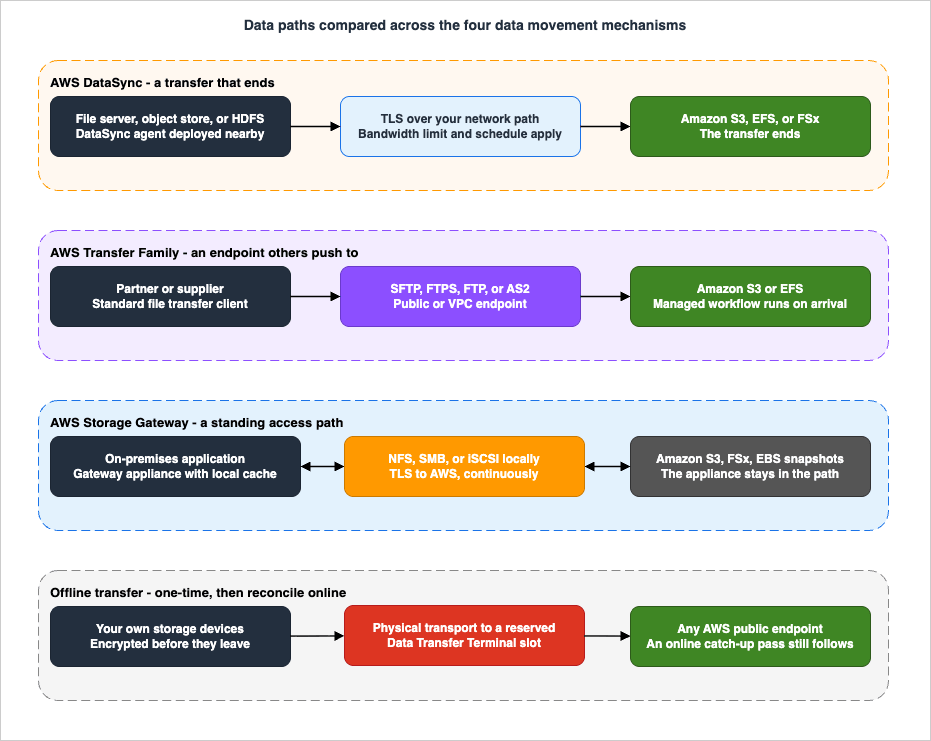
8.2 One-time bulk migration of a file server
Inputs: an NFS or SMB file server, tens of terabytes, source remains in use during the transfer, network available, deadline measured in weeks.Answer: DataSync with an agent placed next to the file server. Configure a bandwidth limit and an off-peak schedule so the transfer does not compete with production. Use include and exclude filters to drop what does not need to move — temporary directories, build artifacts, stale user profiles — because the cheapest bytes to transfer are the ones you do not transfer. Run the task repeatedly: the first run is the bulk seed, subsequent runs carry only the delta.
Watch for: object count against the Basic mode quotas, Basic mode agent RAM if the count exceeds 20 million, and path lengths that will not fit S3 object key limits. If the source is NFS or SMB going to S3 and the object count is very large, Enhanced mode is the better fit.
8.3 Continuous synchronization through a phased cutover
Inputs: the same file server, but the application cannot be stopped for more than a short window, and teams migrate in waves over a quarter.Answer: the same DataSync task, scheduled, running continuously. Each run reconciles source and destination. As the delta shrinks toward steady state, the final cutover window becomes the time for one last run plus verification rather than the time for a full copy. Section 9.2 details the pattern.
Watch for: deletion semantics. Decide explicitly whether files deleted at the source should be deleted at the destination, and set the task option accordingly — the wrong choice here is either a destination that accumulates garbage forever or a destination that loses data you meant to keep.
8.4 Receiving files from external partners
Inputs: a dozen external organizations send you files daily; they use SFTP; two of them can only allowlist fixed IP addresses; the files need to be validated and routed on arrival.Answer: Transfer Family with a VPC endpoint with internet access and Elastic IP addresses, so the fixed-address requirement is satisfiable. Choose the identity provider based on where the partner credentials should live — service-managed if the population is small and static, a custom provider behind Lambda or API Gateway if you already have a credential store. Attach a managed workflow for the arrival processing, and configure a distinct workflow for partial uploads.
Watch for: whether anyone asks for FTP. If they do, isolate it with separate credentials as AWS advises, and revisit whether the requirement is real. Also note that enabling FTPS or FTP forces the VPC endpoint type and rules out service-managed identities — a constraint that should surface in design, not in implementation.
8.5 Keeping on-premises access after the data has moved
Inputs: the data must live in S3 for analytics, but an on-premises application that nobody is going to rewrite reads it over SMB.Answer: DataSync for the migration, then Amazon S3 File Gateway for the ongoing access. This is the combination AWS explicitly documents, and the order matters: migrate first, then install the gateway over the migrated data. When migrating NFS shares with DataSync, POSIX metadata from the source is preserved, and those permissions apply when the files are accessed through File Gateway.
Watch for: the cache consistency behavior in Section 6.3. If analytics jobs write new objects directly into the bucket, the file share will not see them until a
RefreshCache or a TTL expiry. Design that refresh deliberately rather than discovering it as "the file isn't there."8.6 The network genuinely cannot carry it
Inputs: the arithmetic in Section 3.1 does not fit the deadline, and raising effective throughput is not available.Answer, in order:
- Re-examine the dataset. Filters and manifests routinely remove a surprising fraction. Cold data that is being migrated only because it exists may belong in a different plan.
- Re-examine the link. AWS documents provisioning an AWS Direct Connect hosted connection from a Delivery Partner for the duration of a data transfer project, and states that Direct Connect can significantly improve the reliability and speed of large migrations when used with DataSync. A circuit that exists only for the project changes the arithmetic. See the AWS Hybrid Connectivity Decision Guide for the mechanics.
- Re-examine the deadline. Sometimes the constraint that has to move is the date.
- Then go offline. AWS Data Transfer Terminal if you are an Enterprise Support customer and can reach a facility; an AWS Partner offline service otherwise. Section 7.
Watch for: the assumption that offline is simply faster. It is not a throughput improvement, it is a different topology — and it has its own latency, made of scheduling, travel, and ingest, plus the fact that data written to the media stops being current the moment it is written. An offline bulk seed almost always needs an online incremental pass afterward to catch up the delta, which means you need both mechanisms, not one.
9. Integrity, Validation, and Cutover
A migration is not finished when the bytes arrive. It is finished when you can demonstrate that what arrived is what left, and when the authoritative copy has changed hands cleanly. This section is the part most commonly skipped and most commonly regretted.9.1 What DataSync verifies, and when
DataSync always performs integrity checks during a transfer. What is configurable is the additional check at the end, and there are three documented options.* You can sort the table by clicking on the column name.
| Option | Console label | What it checks | When to use it |
|---|---|---|---|
ONLY_FILES_TRANSFERRED | Verify only transferred data | The data this execution transferred | The recommended default. Correct for repeated incremental runs, where re-verifying the entire dataset every run is wasted work |
POINT_IN_TIME_CONSISTENT | Verify all data | The entire dataset in both locations | The final cutover run, and any periodic full-dataset reconciliation. Documented as potentially taking a significant amount of time for large datasets |
NONE | Don't verify data after transfer | Nothing beyond the in-transfer checks | Intermediate runs against a source that is actively changing, where end-of-run comparison is guaranteed to report differences that are not errors |
When checking data integrity, DataSync calculates and compares the checksum and metadata of the files, objects, or directories in the two locations, and verification fails with an error such as
Checksum failure, Metadata failure, Files were added, or Files were removed when it finds differences. The option is set with the VerifyMode parameter on CreateTask, UpdateTask, or StartTaskExecution — which means it can be varied per execution, and that is exactly how it should be used. Those checksums are computed by the transfer service. Which checksum an AWS SDK or the AWS CLI puts on an ordinary upload, and which algorithm it chooses when you name none, is the subject of Default Checksums and Data Integrity in Amazon S3.Task mode changes the picture too. In Enhanced mode, DataSync verifies each object as it is transferred to the destination and verifies only transferred data. In Basic mode, verification happens at the end of the transfer and all data is verified by default.
The practical pattern: run intermediate passes with
ONLY_FILES_TRANSFERRED, or NONE if the source is churning enough to make end-of-run comparison meaningless, and run the final cutover pass with POINT_IN_TIME_CONSISTENT against a frozen source. That last run is your evidence.One combination has a documented constraint: if
VerifyMode is used together with manifests, ONLY_FILES_TRANSFERRED is required, because the intent is to verify only the files the manifest identified and transferred.9.2 The incremental-sync cutover pattern
The pattern that makes large migrations survivable has four phases, and it works because a DataSync task is re-runnable against the same pair of locations.- Seed. Run the task once against the full dataset. This is the long run. Throttle and schedule it so it does not harm production. Verification here can be minimal, because the result is going to be superseded.
- Converge. Run the task repeatedly — nightly, or on a schedule matched to the change rate. Each run carries only what changed. Track the run duration and the transferred volume: both should trend down and then flatten. The point at which they flatten is your steady state, and the flattened duration is the floor on your cutover window.
- Cut over. In a maintenance window, stop writes at the source, run the task one final time, and run it with full verification. This is the only run that has to fit inside the window, which is why phase 2 exists.
- Switch. Point the applications at the destination. Keep the source read-only rather than deleting it.
The lesson embedded in phase 2 is that the cutover window is determined by the change rate, not by the dataset size — provided you did phase 2. Teams that skip straight from seed to cutover end up sizing the window against the whole dataset, which is why cutover plans fail.
9.3 Reconciling after the switch
Verification proves the transfer was faithful. It does not prove the destination is usable. Add checks for the things that transfer correctly and still break applications:- Permissions and ownership. DataSync preserves POSIX metadata for NFS sources, and that metadata is what File Gateway later presents. Confirm that identities resolve on the destination side, especially where an on-premises directory and a cloud directory do not have identical identity mappings.
- Path and name translation. Re-check the over-length paths and non-UTF-8 filenames you scanned for in planning. Confirm they were handled, not silently skipped.
- Object key layout. A directory tree translated naively into object keys can produce a prefix distribution that behaves poorly under load. If the destination is S3 and the workload is high-throughput, see Amazon S3 Object Key Design Best Practices.
- Encryption at the destination. Confirm that objects landed with the encryption configuration you intended, not the bucket default you forgot to change.
- The application's own view. Have the application team confirm the data is correct from the application's perspective. Checksums do not catch "we migrated the wrong share."
Also note the 30-day retention on DataSync task execution history. If your change-management process needs the transfer record to persist longer than that, export it during the migration rather than after.
9.4 Keeping a way back
Plan the rollback before the cutover, not during the incident. The cheapest insurance is leaving the source in place and read-only for a defined period after the switch, with a documented decision date for decommissioning it. Deleting the source on cutover day converts every post-cutover surprise into an emergency. For the broader framing of recovery objectives and fallback design, see the AWS Disaster Recovery Strategies Guide.10. Security and Compliance Considerations
10.1 Encryption in transit
Each mechanism has a documented in-transit posture, and they are not identical.DataSync requires TLS 1.2 and recommends TLS 1.3 for API access, with cipher suites offering perfect forward secrecy. For the transfer itself, the TLS cipher depends on the service endpoint type: public and VPC service endpoints use one of
TLS_ECDHE_RSA_WITH_AES_256_GCM_SHA384, TLS_ECDHE_RSA_WITH_CHACHA20_POLY1305_SHA256, or TLS_ECDHE_RSA_WITH_AES_128_GCM_SHA256, all with ecdh_x25519; FIPS service endpoints use TLS_AES_128_GCM_SHA256 with secp256r1. If a FIPS-validated cryptographic path is a requirement, the endpoint choice is where you express it.Transfer Family in-transit protection is a direct function of the protocol, which is why Section 5.1's table matters as a security document and not only a compatibility one. SFTP and FTPS encrypt; FTP does not, and it transmits credentials in clear text. AS2 has its own signing and encryption model for business-to-business exchange. For SFTP, the key exchange, cipher, and MAC algorithms that a Transfer Family server or SFTP connector negotiates are set by the security policy attached to it; the policies, the default policies that the documentation gives for each creation route, and where the sources disagree on those defaults, are compared in SSH Algorithms on AWS Endpoints.
Storage Gateway uses SSL/TLS to encrypt data transferred between the gateway appliance and AWS storage.
Offline transfer has no in-transit encryption in the network sense, because there is no network hop. The equivalent control is encryption at rest on the media plus physical custody — Section 10.5.
10.2 Encryption at rest, and who holds the key
| Mechanism | Default at rest | Customer-managed key option | Notable constraint |
|---|---|---|---|
| DataSync | Determined by the destination service. DataSync supports the destination bucket's default encryption, and AWS documents that data is never persisted in DataSync itself | Yes, via the destination service's encryption configuration | The relevant key policy is the destination's, so the transfer role needs the right AWS KMS permissions or writes fail partway |
| Transfer Family | Determined by the destination, Amazon S3 or Amazon EFS | Yes, via the destination service | Same as above |
| Storage Gateway | Amazon S3-managed keys (SSE-S3) for all data it stores in S3 | Yes, SSE-KMS via the Storage Gateway API; S3 File Gateway file shares also document DSSE-KMS | Symmetric KMS keys only; asymmetric keys are not supported. For cached and stored volumes and for virtual tapes, the key cannot be changed after the volume or tape is created |
| Data Transfer Terminal | Determined by the destination endpoint you upload to | Yes, via the destination service | Media encryption before you arrive is your responsibility |
Two of those cells are design constraints rather than trivia. The immutability of the KMS key on a Storage Gateway volume or tape means the key decision is made at creation time and is not revisable — plan key rotation strategy accordingly. And the requirement for a symmetric key rules out designs that assume an asymmetric key can be used here. For the underlying key-management design patterns, see AWS KMS Envelope Encryption and Data Key Caching Patterns.
10.3 Keeping the transfer off the public internet
For DataSync, a VPC service endpoint — provided by AWS PrivateLink — keeps all communication between the agent and the DataSync service inside your VPC, using private IP addresses accessible only from within it. Combined with AWS Direct Connect or a VPN for the on-premises leg, this gives a transfer path that does not traverse the public internet.For Transfer Family, the equivalent control is the endpoint type: a VPC endpoint with internal access is reachable only from the VPC and VPC-connected environments such as an on-premises data center over Direct Connect or VPN.
For Storage Gateway, the appliance communicates with AWS service endpoints, and private connectivity is arranged the same way as for any other service.
If the requirement is absolute — no bytes on the public internet at any point — write it down as a requirement and verify it per hop, because the default configuration of several of these options does not satisfy it.
10.4 Audit trail
Decide up front what evidence the transfer must leave behind, because the retention characteristics differ.DataSync integrates with Amazon CloudWatch for task execution and file-level error logging, and with Amazon EventBridge for events; Enhanced mode produces structured JSON logs while Basic mode logs are unstructured. Task execution history is retained for 30 days. Transfer Family managed workflows produce detailed per-step logs that AWS positions explicitly as auditable for data lineage, and workflow errors are troubleshot through CloudWatch. Storage Gateway integrates with AWS CloudTrail and CloudWatch.
For consolidating any of this across accounts into something a compliance team can actually query, see Centralized Logging and Audit Architecture on AWS.
10.5 Physical custody, and where the bytes travel
Offline transfer replaces a network threat model with a physical one, and the substitution is not automatically favorable.The questions to answer are the same regardless of which offline path you take: who physically holds the media, from when to when; is the data encrypted on the media before it leaves your facility, and who holds that key; is there a documented chain of custody; and does the physical route stay within any jurisdiction your data is bound to.
AWS Data Transfer Terminal has a specific and generally favorable shape here: you bring your own devices and take them away again. The media never enters a third-party logistics chain, and the transfer happens in a facility that AWS documents as re-secured between reservations. The residual questions are the transport between your facility and the terminal, which is entirely yours to control, and the fact that the terminal's physical location is a fixed point that your data has to travel to — which is a data-residency question if the nearest facility is in a different country than your data is permitted to be in.
Partner offline services should be evaluated against exactly these questions, with the answers in writing.
11. Where the Data Lands
This guide stops at the boundary. Choosing the destination is a separate decision with its own inputs, and it is worth making deliberately rather than defaulting to "S3, because everything goes in S3."For shared file storage — the natural destination for a migrated NFS or SMB file server that must remain a file system — the choice is among the Amazon FSx family and Amazon EFS, which is its own decision guide — see Amazon FSx Family Decision Guide. Once EFS is the destination, what the file system will sustain afterwards is a separate question, and the throughput modes, ceilings, and burst credits that answer it are covered in Amazon EFS Performance Engineering.
For object storage, the destination is S3, and three follow-on decisions matter more than the migration did:
- Access control. The permissions model at the destination is not the permissions model at the source, and a migration is the moment when an over-broad bucket policy gets written and never revisited. See Amazon S3 Security and Access Control Guide.
- Key design. How the source directory structure maps to object keys affects performance under load. See Amazon S3 Object Key Design Best Practices.
- What the durability and consistency guarantees actually are, which is what you are implicitly relying on when you decommission the source. See How Amazon S3 Achieves Strong Consistency and Durability.
If the data is landing in order to be queried and governed rather than merely stored, the destination design continues into AWS Data Lakehouse Architecture Guide.
Two further things belong in the landing plan and are routinely forgotten. Tagging: migrated data arrives without the tags your cost-allocation, access-control, and automation systems expect, and retrofitting tags across a few hundred million objects is unpleasant — see AWS Tagging Strategy: Complete Guide. Backup: the migrated copy is not backed up merely because it is in AWS, and the moment the source is decommissioned is the moment the destination needs a real data protection plan — see AWS Backup Data Protection and Governance.
Related sibling guides for adjacent storage decisions: block storage performance design, and fleet-wide agent distribution and operations, which is the practical answer to "who installs and patches the DataSync agents across 40 sites".
12. Common Pitfalls and Anti-Patterns
These recur across reviews. Each one is a symptom of choosing a mechanism without matching it to the inputs in Section 2.- Designing a one-shot transfer for a dataset that keeps changing. The most common and most expensive error. If the source is live, the design needs the converge phase in Section 9.2 from the beginning. Adding it afterward means re-planning the cutover under time pressure.
- Using Storage Gateway as the migration mechanism. It is a hybrid access layer. AWS's documented sequence is DataSync to migrate, then File Gateway to retain access. Inverting that order produces a design that works at pilot scale and fails at production scale, particularly on datasets dominated by small files.
- Skipping verification, or verifying the wrong thing. Running every pass with full verification wastes hours on a churning dataset; running the final pass without it means you have no evidence. Vary
VerifyModeper execution: light during convergence,POINT_IN_TIME_CONSISTENTon the frozen final run. - Not throttling, and taking out the business. DataSync will use the bandwidth that is available. A migration that saturates the link during business hours is an incident, not a milestone. Set a bandwidth limit and a schedule before the first bulk run, not after the first complaint.
- Publishing a schedule built on an unmeasured estimate. Rated circuit speed is not effective throughput, and neither accounts for small-file overhead or retransmissions. Measure a representative sample first. A migration plan whose dates came from dividing terabytes by megabits per second is a plan that will slip.
- Designing around a service that is no longer available. As of 2026-08-04, AWS Snow Family devices cannot be ordered by new customers and Snowball support ends 2026-12-31; Amazon FSx File Gateway has been closed to new customers since 2024-10-28. Both still appear as live recommendations in current-looking material. Confirm availability at design time, and prefer official documentation over secondary sources for this specific class of fact.
- Discovering the network and permission requirements last. DataSync agents need specific outbound ports and, for private paths, a VPC service endpoint. Transfer Family's protocol choice constrains the endpoint type and the identity provider. Manifests need
iam:PassRole. Every one of these is a conversation with a different team, and every one of them is a week of calendar time if it starts during implementation. - Ignoring the boring limits. Path length, object name length, object count against task-mode quotas, and non-UTF-8 filenames are individually unglamorous and collectively responsible for a large share of failed cutovers. Scan for them during planning.
13. Frequently Asked Questions
Q. What is the default choice for migrating a file server to AWS?A. AWS DataSync, with an agent placed next to the source file server, run repeatedly rather than once. It handles NFS and SMB natively, preserves metadata, supports bandwidth limits and scheduling so it does not compete with production, and its re-runnable task model is what makes an incremental cutover possible. The alternatives are answers to different questions: Transfer Family is for endpoints other people push to, and Storage Gateway is for ongoing hybrid access rather than migration.
Q. Can I still use AWS Snowball for a large offline migration?
A. Not as a new customer. As confirmed on 2026-08-04, AWS Snowball Edge has been unavailable to new customers since 2025-11-07, AWS states it will no longer offer any Snow Family devices for new customers to order, and support for AWS Snowball devices in all AWS commercial Regions ends on 2026-12-31. AWS directs new customers to DataSync for online transfers, AWS Data Transfer Terminal for secure physical transfers, or AWS Partner solutions, and to AWS Outposts for edge computing. Existing customers should plan against the 2026-12-31 date.
Q. What replaced Snow Family for offline transfer?
A. AWS Data Transfer Terminal is AWS's own answer: a reservable physical facility where you bring your own storage devices and upload over a high-throughput connection to AWS endpoints such as Amazon S3 and Amazon EFS. Two constraints govern whether it fits: AWS documents it as available only to AWS Enterprise Support customers at this time, and it requires traveling to one of the announced facility locations. Where those do not fit, AWS points to partner offline data transfer services in AWS Marketplace.
Q. Do I need a DataSync agent?
A. It depends on the pair of locations. Transfers between Amazon S3, Amazon EFS, and Amazon FSx in the same account need no agent. Transfers involving NFS, SMB, HDFS, object storage, or S3 on Outposts do. Transfers from other cloud storage to Amazon S3 require an agent only for Basic mode. Section 4.1 has the full matrix.
Q. How long will my transfer take?
A. This guide will not give you a number, and you should be suspicious of any source that gives you one without your measurements. The method: measure effective throughput over the actual path at the actual time of day, determine what share you can take without harming production, account for per-object overhead on small files, and add margin for retransmissions. Then compare against both the date the destination must be live and the date the source must be gone. AWS publishes a documented maximum of 10 Gbps per DataSync task with an agent and 5 Gbps without, which is a ceiling to design against, not a throughput you should assume.
Q. Should I use Storage Gateway to migrate data into S3?
A. No, as the primary mechanism. AWS documents the intended sequence as DataSync to migrate the data, then S3 File Gateway to retain on-premises access to it. Storage Gateway makes S3 API calls per file operation, which suits an application's access pattern and does not suit bulk movement — the difference shows up sharply on datasets with very large numbers of small files.
Q. What is the difference between DataSync Basic mode and Enhanced mode?
A. Enhanced mode lists, prepares, transfers, and verifies in parallel, works with virtually unlimited numbers of objects per execution, and produces structured JSON logs with richer metrics; Basic mode does those steps sequentially and is subject to per-execution quotas of 50 million items between on-premises or other cloud storage and AWS, and 25 million between AWS storage services. Enhanced mode is currently limited to Amazon S3, Amazon EFS, FSx for Lustre, FSx for OpenZFS, NFS, SMB, HDFS, Azure Blob, and object storage locations; Basic mode supports every DataSync location type. Note also that Enhanced mode verifies only transferred data while Basic mode verifies all data by default.
Q. My file share does not show a file I uploaded directly to S3. Why?
A. Storage Gateway automatically updates the file share cache for writes made through the file share, but not for objects written directly to Amazon S3. You need a
RefreshCache operation, or an automatic refresh driven by the CacheStaleTimeoutInSeconds value on the file share, which accepts values from 300 to 2,592,000 seconds. RefreshCache is asynchronous, accepts no more than two concurrent refreshes, and requires at least 60 seconds between consecutive requests.Q. How do I keep the whole transfer off the public internet?
A. For DataSync, use a VPC service endpoint, which is provided by AWS PrivateLink and keeps agent-to-service communication inside your VPC on private IP addresses, and pair it with Direct Connect or a VPN for the on-premises leg. For Transfer Family, use a VPC endpoint with internal access, which is reachable from the VPC and from VPC-connected environments such as an on-premises data center over Direct Connect or VPN. Verify the requirement hop by hop rather than assuming it.
Q. Can Transfer Family push files out to a partner's server, rather than receiving them?
A. Yes, using SFTP connectors, which act as a managed SFTP client against a remote server. Documented operations are sending files from S3 to the remote server, retrieving files into S3, listing a remote directory, and deleting, renaming, or moving files there. Credentials are retrieved from AWS Secrets Manager, and egress can be service managed or routed through your VPC.
Q. Should I still consider Amazon FSx File Gateway?
A. Not for new designs. It has been unavailable to new customers since 2024-10-28. AWS's stated alternatives are using FSx for Windows File Server directly from on-premises, or, where a local cache is genuinely required, Amazon FSx for NetApp ONTAP with FlexCache or Global File Cache. Existing customers can continue to use it normally.
Q. Does this guide cover moving databases?
A. No. Database migration has different consistency, downtime, and schema-conversion requirements and belongs to a separate toolchain. Likewise, migrating running servers belongs to AWS MGN, and continuous ingestion of event streams belongs to the AWS Real-Time Streaming Data Pipeline Architecture Guide.
14. Summary
Deciding how to move data into AWS is a question about your constraints, not about a catalog of services. Working through it in order:- Write down the inputs before naming a service — volume and object count, deadline, one-time or continuing, source protocol, integrity requirements, network availability and contention, security and custody, and who will operate it.
- Separate "a transfer that ends" from "an access path that persists." DataSync, Transfer Family, and the offline options do the former. Storage Gateway does the latter, and using it for the former is the most common design error in this area.
- Determine who initiates. If external parties push to you over a standard protocol, you are operating an endpoint, and that is Transfer Family — with the protocol choice cascading into endpoint type and identity provider constraints.
- Do the network arithmetic honestly. Effective throughput, the share you can take, per-object overhead, and retransmission behavior. Measure rather than assume, and do not publish a schedule built on a number nobody measured.
- Default to DataSync when you control both ends and the network suffices, and configure it deliberately: task mode against object count, filters or a manifest to reduce scope, a bandwidth limit and schedule to protect production, and a verification mode that varies by run.
- Know that the offline answer changed. As of 2026-08-04, AWS Snow Family is closed to new customers and Snowball support ends 2026-12-31. The current options are AWS Data Transfer Terminal, subject to Enterprise Support eligibility and facility geography, and AWS Partner offline services.
- Plan the cutover as seed, converge, cut over, switch, and remember that the window is set by the change rate rather than the dataset size — provided you actually run the converge phase.
- Finish the job at the destination: reconcile permissions and paths, confirm encryption landed as intended, apply tagging, establish backup, and keep the source read-only until a documented decommission date.
The two facts most likely to be missing from other material on this topic are that Storage Gateway is not a migration tool, and that the offline landscape has changed. Both are documented by AWS; both are still widely misstated. Re-confirm availability before committing a design, because the only thing this article can guarantee is what was true on 2026-08-04.
15. References
- What is AWS DataSync? - AWS DataSync
- Where can I transfer my data with AWS DataSync? - AWS DataSync
- Choosing a task mode for your data transfer - AWS DataSync
- Configuring AWS DataSync transfers with an NFS file server - AWS DataSync
- How AWS DataSync works - AWS DataSync
- Configuring how AWS DataSync verifies data integrity - AWS DataSync
- Transferring specific files, objects, and folders by using filters - AWS DataSync
- Setting bandwidth limits for your AWS DataSync task - AWS DataSync
- Requirements for AWS DataSync agents - AWS DataSync
- Deploying your AWS DataSync agent - AWS DataSync
- AWS DataSync network requirements - AWS DataSync
- Choosing a service endpoint for your AWS DataSync agent - AWS DataSync
- AWS DataSync encryption in transit - AWS DataSync
- Infrastructure security in AWS DataSync - AWS DataSync
- AWS DataSync quotas - AWS DataSync
- Configuring an SFTP, FTPS, or FTP server endpoint - AWS Transfer Family
- Transferring files over a server endpoint using a client - AWS Transfer Family
- AWS Transfer Family managed workflows - AWS Transfer Family
- AWS Transfer Family SFTP connectors - AWS Transfer Family
- Configure your identity provider for Transfer Family web apps - AWS Transfer Family
- What type of endpoint is appropriate for my AWS Transfer Family server? - AWS re:Post
- Announcing AWS Transfer Family web apps for fully managed Amazon S3 file transfers - AWS News Blog
- AWS Storage Gateway FAQs
- Data encryption using AWS KMS - Amazon S3 File Gateway
- Data encryption using AWS KMS - Volume Gateway
- Managing Your Volume Gateway - AWS Storage Gateway
- RefreshCache - AWS Storage Gateway API Reference
- How do I automate the RefreshCache operation on Storage Gateway? - AWS re:Post
- What is Amazon FSx File Gateway - Amazon FSx File Gateway
- Document history for the Amazon FSx File Gateway User Guide
- Document history for the Volume Gateway User Guide - AWS Storage Gateway
- Switch your file share access from Amazon FSx File Gateway to Amazon FSx for Windows File Server - AWS Storage Blog
- AWS Snowball Edge availability change - AWS Snowball Edge Developer Guide
- AWS Snowball - Secure Edge Computing and Offline Data Transfer
- AWS Snowball Edge device hardware information - AWS Snowball Edge Developer Guide
- AWS Snow device updates - AWS Storage Blog
- AWS Service Availability Updates - AWS What's New
- What is Data Transfer Terminal? - AWS Data Transfer Terminal
- On-demand data transfer - AWS Data Transfer Terminal
- New physical AWS Data Transfer Terminals let you upload to the cloud faster - AWS News Blog
- AWS announces 6 new locations for AWS Data Transfer Terminal - AWS What's New
- AWS DataSync Enhanced mode now supports FSx for OpenZFS, NFS 4.2, and object metadata controls - AWS What's New
- AWS DataSync FAQs
- CME Group accelerates cloud migration with AWS Storage Gateway - AWS Storage Blog
Related Articles
- AWS History and Timeline regarding Amazon FSx - Overview, File Systems, Features, Summary of Updates, and Introduction
When each of the four file systems that appear here as a destination became generally available, and which family-wide updates reached all four. - Summary of AWS Application Migration Service (AWS MGN) Architecture and Lifecycle Relationships, Usage Notes
Server migration rather than data movement — the delegation target whenever the thing being moved is a running machine. - AWS Hybrid Connectivity Decision Guide - Direct Connect, Site-to-Site VPN, and Resilient On-Premises Integration
Choosing and designing the network path that a migration runs over, including provisioning capacity for the duration of a project. - AWS VPC Connectivity Decision Guide - VPC Peering, Transit Gateway, PrivateLink, VPC Lattice, and Cloud WAN
The private connectivity mechanics behind VPC service endpoints and VPC-hosted transfer endpoints. - Amazon S3 Security and Access Control Guide - Bucket Policies, IAM, Access Points, Block Public Access, and Encryption
What to get right at the destination once the data has landed. - Amazon S3 Object Key Design Best Practices - Performance and Partitioning
How a migrated directory tree should map onto object keys. - How Amazon S3 Achieves Strong Consistency and Durability - The Architecture Behind the Guarantees
The guarantees you are relying on when you decommission the source. - AWS Backup Data Protection and Governance - Backup Plans, Vault Lock, and Cross-Account Copy Design
Protecting the migrated copy once it becomes the only copy. - AWS Disaster Recovery Strategies Guide - Backup and Restore, Pilot Light, Warm Standby, and Multi-Site Active-Active
Recovery objectives and fallback design, including how long to keep a way back after cutover. - AWS Data Lakehouse Architecture Guide - Building a Governed Lakehouse with S3, Lake Formation, Glue, Athena, and Apache Iceberg
Where the destination design continues when the data is landing to be queried and governed. - AWS Real-Time Streaming Data Pipeline Architecture Guide - Ingestion, Processing, and Delivery with Kinesis, Managed Service for Apache Flink, and OpenSearch
Continuous ingestion of event streams, which is a different problem with a different toolchain. - Centralized Logging and Audit Architecture on AWS - Multi-Account Log Aggregation, Detection, and Query with CloudTrail, Config, Security Hub, and OpenSearch
Consolidating the transfer's audit trail into something a compliance team can query. - AWS Tagging Strategy: Complete Guide for Operations, Automation, and Security
Applying the tags that migrated data arrives without. - AWS KMS Envelope Encryption and Data Key Caching Patterns - Design Decisions for the AWS Encryption SDK and Multi-Region Keys
Key management design behind the encryption-at-rest choices in Section 10.2. - AWS History and Timeline regarding Amazon EFS
When each storage class, throughput mode, and mount path was added to the file system that these transfers write into.
References:
Tech Blog with curated related content
Written by Hidekazu Konishi