AWS Real-Time Streaming Data Pipeline Architecture Guide - Ingestion, Processing, and Delivery with Kinesis, Managed Service for Apache Flink, and OpenSearch
First Published:
Last Updated:
1. Introduction
A real-time data pipeline looks deceptively simple on a whiteboard: events come in on the left, dashboards light up on the right. The hard part is everything in between — keeping ingestion, processing, and delivery consistent when traffic is bursty, when one consumer falls behind, when a bad record poisons a batch, and when the schema changes underneath a running job. Getting any one service right is a Level 300 exercise. Getting four or five of them to behave as a single, observable, recoverable pipeline is the Level 400 problem this guide is about.This article walks one named reference architecture end to end: producers publish to Amazon Kinesis Data Streams, Amazon Managed Service for Apache Flink performs stateful windowed processing, and the results fan out two ways — Amazon Data Firehose lands raw and aggregated data in Amazon S3 for the lake, while a real-time path indexes events into Amazon OpenSearch Service for search and visualization. Failed records are quarantined to a dead-letter queue or an S3 error prefix, and the stream's retention window doubles as a replay buffer.
This is an implementation guide, not a selection guide. The question "should this be a stream, a queue, or an event bus?" is a real and important one, but it is answered elsewhere: see the AWS Messaging and Event Routing Decision Guide for the full streaming-versus-messaging decision, and the Amazon EventBridge Pipes and Event-Driven Architecture Patterns guide for point-to-point event plumbing. Here we assume you have already decided you need a stream, and we focus on making the stream work in production.
Throughout, current service names and limits are stated as confirmed against AWS documentation at the time of writing. Two names matter especially because they changed: Amazon Data Firehose was formerly Amazon Kinesis Data Firehose, and Amazon Managed Service for Apache Flink was formerly Amazon Kinesis Data Analytics for Apache Flink. The older names still appear in many SDK namespaces and IAM identifiers, which is itself a source of bugs we will call out. No prices appear in this article; for cost, follow the official Pricing links in the References.
What makes this a Level 400 topic rather than a tour of five services is that the interesting behavior lives between the components: how ordering survives a reshard, how backpressure in one stage shows up as a metric in another, how a single poison record is contained instead of stalling a shard, and how a failure is recovered by replaying a log rather than asking producers to resend. We will set up each service well enough to be reproducible, but the emphasis is on those seams — the flow, the failure modes, and the cross-cutting concerns that only appear once the pieces are wired together.
2. The Reference Architecture at a Glance
The pipeline has three stages — ingest, process, deliver — and the delivery stage branches into a lake path and a real-time path.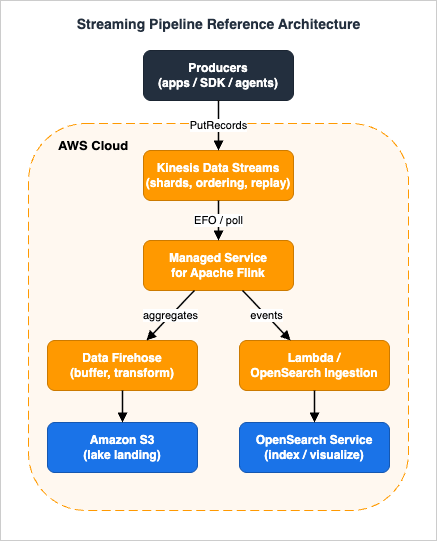
| Stage | Service | Role in this architecture |
|---|---|---|
| Ingest | Amazon Kinesis Data Streams | Durable, ordered, replayable buffer between producers and processing; absorbs bursts; preserves per-shard order |
| Process | Amazon Managed Service for Apache Flink | Stateful stream processing: windowed aggregation, event-time semantics, checkpointed exactly-once state |
| Deliver (lake) | Amazon Data Firehose + Amazon S3 | Buffer, optionally transform and dynamically partition records, and land them as objects in S3 for the lakehouse |
| Deliver (real-time) | AWS Lambda or OpenSearch Ingestion + Amazon OpenSearch Service | Index events for low-latency search and dashboards |
| Govern | AWS Glue Schema Registry | Shared producer/consumer contract that lets the schema evolve safely |
| Recover | DLQ (Amazon SQS), S3 error prefix, stream retention | Quarantine poison records; replay from the retention window |
A useful mental model: Kinesis Data Streams is the source of truth for "what happened, in order, for a while," and everything downstream is a materialized view of it. Because the stream retains records (24 hours by default, up to 365 days), every downstream consumer is independent and can be rebuilt by re-reading. That single property — a replayable log — is what makes the rest of the architecture recoverable.
The two delivery branches are deliberately different in character. The lake path (Firehose to S3) is throughput-oriented and tolerant of seconds-to-minutes latency; it optimizes for cheap, partitioned, queryable storage and hands off to the AWS Data Lakehouse Architecture Guide. The real-time path (Lambda or OpenSearch Ingestion to OpenSearch Service) is latency-oriented and optimizes for fresh, searchable indexes. Splitting them lets each side scale and fail independently.
3. Ingestion with Kinesis Data Streams
Ingestion is where ordering, capacity, and replay are decided. Get the shard model and partition keys right here and the rest of the pipeline becomes much easier.3.1 Shards, partition keys, and ordering
A Kinesis data stream is a set of shards. Each record carries a partition key; Kinesis applies an MD5 hash to that key to produce a 128-bit value and routes the record to the shard whose hash-key range contains it. Within a shard, records are strictly ordered and assigned monotonically increasing sequence numbers. Across shards there is no global order.This has a direct design consequence: order is only guaranteed for records that share a shard, which means records that share a partition key. If you need per-customer ordering, use the customer ID as the partition key. If you only need throughput and order does not matter, use a high-cardinality key (or a random one) to spread load evenly. The partition key is therefore both your ordering boundary and your load-distribution lever — choosing it well is the single most important ingestion decision. This holds for the default record distribution (
USER_PARTITION_KEY). Since 2026-09-23, an on-demand stream can be switched to service-managed record distribution (AUTO), which ignores the partition key and gives no ordering guarantee; this guide assumes the default.3.2 On-demand versus provisioned capacity
Kinesis Data Streams offers two capacity modes, and you can switch between them up to twice in a 24-hour window per stream.| On-demand | Provisioned | |
|---|---|---|
| Capacity unit | Managed automatically | You set the shard count |
| Throughput | Starts at 4 MB/s write, 8 MB/s read; scales up to 10 GB/s write / 20 GB/s read in US East (N. Virginia), US West (Oregon), and Europe (Ireland), or 200 MB/s / 400 MB/s in other Regions | Per shard: up to 1 MB/s or 1,000 records/s write, and up to 2 MB/s or 2,000 records/s read |
| Scaling | Automatic, based on observed traffic | Manual via UpdateShardCount, or your own automation |
| Best for | Spiky or unknown traffic, or when you would rather not capacity-plan | Predictable traffic where you want explicit control and the lowest steady-state cost |
For most new pipelines, on-demand is the pragmatic default: it removes a whole class of "we under-provisioned and got throttled" incidents. Move to provisioned when traffic is predictable and you want to manage shard count explicitly.
A single record's data payload can be up to 10 MiB before base64 encoding, and
PutRecords writes up to 500 records — and up to 10 MiB total — in one call. Critically, PutRecords can partially fail: the response array maps one-to-one with the request, and individual records may be rejected (for example, on throttling) while others succeed. Ordering is not guaranteed across a PutRecords batch, so if strict order matters use PutRecord per partition key, and always inspect FailedRecordCount and retry only the failed entries.On the producer side, two libraries reduce friction. The Kinesis Producer Library (KPL) batches and aggregates many small user records into fewer Kinesis records so you use the 1,000-records/s-per-shard limit efficiently, and the Kinesis Client Library (KCL) de-aggregates them transparently on the consumer side. Whatever library you use, treat throttling as normal rather than exceptional: catch
ProvisionedThroughputExceededException, retry the failed subset with exponential backoff and jitter, and never block the whole batch on one rejected record. Producers also own ordering at the source — if two events for the same entity must stay ordered, the same producer has to send them with the same partition key, in order, and must not retry them out of order.# Create an on-demand stream (no shard math required)
aws kinesis create-stream \
--stream-name orders-stream \
--stream-mode-details StreamMode=ON_DEMAND
# Producer side: batch writes, partition key = entity that defines ordering
aws kinesis put-records \
--stream-name orders-stream \
--records \
'Data=eyJvcmRlcklkIjoiMTAwMSJ9,PartitionKey=customer-42' \
'Data=eyJvcmRlcklkIjoiMTAwMiJ9,PartitionKey=customer-42'Resources:
OrdersStream:
Type: AWS::Kinesis::Stream
Properties:
Name: orders-stream
StreamModeDetails:
StreamMode: ON_DEMAND
RetentionPeriodHours: 168 # 7 days of replay; default is 24h, max is 8760h (365 days)
StreamEncryption:
EncryptionType: KMS
KeyId: alias/aws/kinesis3.3 Consumers: shared throughput versus enhanced fan-out
By default, all consumers of a shard share that shard's 2 MB/s read budget via the pull-basedGetRecords API (which returns up to 10 MB or 10,000 records per call, with up to five read transactions per second per shard). With one consumer, message propagation delay averages around 200 ms; add more consumers contending for the same shard and that delay climbs toward 1,000 ms.Enhanced fan-out (EFO) changes the model. Each registered EFO consumer gets its own dedicated 2 MB/s per shard, and Kinesis pushes records over HTTP/2 via
SubscribeToShard rather than making consumers poll. Propagation delay drops to roughly 70 ms regardless of how many consumers you add. You can register up to 20 EFO consumers per stream on On-demand Standard and Provisioned streams, or up to 50 on On-demand Advantage mode (available in a subset of Regions).Registering an EFO consumer is a one-time API call (
RegisterStreamConsumer); the consumer then holds an HTTP/2 subscription via SubscribeToShard that lasts up to five minutes and is renewed automatically by the KCL or the Flink connector, so a dropped subscription self-heals rather than losing the consumer's place in the shard.The rule of thumb: use shared throughput when you have one or two consumers and latency is not critical; use EFO when you have multiple independent consumers (a Flink job, a lake loader, and an alerting function all reading the same stream) or when you need consistently low latency. EFO has its own cost dimension — see the official Pricing.
3.4 Hot shards and resharding
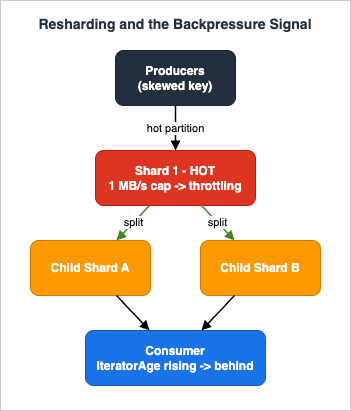
A hot shard happens when one partition key (or a small set of them) receives a disproportionate share of traffic — a single "whale" customer, or a poorly chosen key like a constant string. Because a shard caps at 1 MB/s or 1,000 records/s for writes, a hot shard throttles (WriteProvisionedThroughputExceeded) even while the rest of the stream is idle.Mitigations, in order of preference:
- Fix the partition key. Add a suffix to spread a whale across N synthetic keys (
customer-42#0…customer-42#7) when you do not need strict per-customer order, or when you can re-aggregate downstream. - Reshard. In provisioned mode,
UpdateShardCountsplits or merges shards to add capacity; in on-demand mode, Kinesis reshards automatically in response to traffic. Resharding is online — producers and consumers keep working — but it creates parent/child shard lineage that consumers must traverse in order, which is handled for you by the Kinesis Client Library (KCL) and by Flink's connector. - Switch to on-demand if hotspotting is unpredictable and you would rather not manage shard counts.
4. Stateful Processing with Managed Service for Apache Flink
Once records are in the stream, Amazon Managed Service for Apache Flink (MSF) turns the raw event log into something useful: per-window aggregates, enriched records, sessionized activity, anomaly signals. MSF runs open-source Apache Flink as a fully managed service — it provisions and scales the cluster, manages checkpoints, and integrates with CloudWatch and IAM, so you write Flink application code rather than operating Flink infrastructure. It supports Apache Flink 1.20 and 2.2; default to 2.2 for new applications.4.1 The KPU resource model
MSF measures capacity in Kinesis Processing Units (KPUs). Each KPU provides 1 vCPU, 4 GB of memory, and 50 GB of running application storage. You do not pick instance types. Instead you configure two service-level numbers:Parallelism— total task slots for the application.ParallelismPerKPU— slots per KPU (default 1, maximum 8).
MSF then derives
Allocated KPUs = Parallelism / ParallelismPerKPU. With auto-scaling enabled, MSF adjusts parallelism within your bounds based on throughput and backpressure. The default per-application KPU quota is 64 (raise via Service Quotas, up to 250), and the default is 100 applications per Region.A subtle but important rule: in MSF, checkpointing and parallelism are service-level configuration, not application code. When migrating a self-managed Flink job, remove
enableCheckpointing(...) and explicit parallelism calls from your code; set them on the application instead.4.2 State, checkpoints, and snapshots
Flink is stateful: a windowed aggregation keeps partial results in state until the window fires. MSF persists that state with checkpoints — periodic, consistent snapshots written to an MSF-managed S3 bucket using the RocksDB state backend. The default checkpoint interval is 60 seconds (minimum 1 second). If a task fails, MSF restarts the application and restores from the latest checkpoint, so processing resumes without losing state.Snapshots (Flink savepoints) are the manual counterpart: you trigger them via the console or API before a code change or version upgrade, and restore from one to redeploy without reprocessing history. Keep per-key state small (low single-digit MB) for good RocksDB performance; large state inflates checkpoint duration, which is itself a failure mode (Section 9).
Two state types beyond simple window accumulators come up constantly. Keyed state with TTL lets you hold per-key context (a running total, a last-seen timestamp, a deduplication marker) and expire it automatically, so unbounded keys — every customer that ever appeared — do not grow state without limit. Broadcast state distributes a small, slowly changing dataset (feature flags, lookup tables, thresholds) to every parallel subtask, so you can enrich or gate the main stream without an external call on the hot path. Both are checkpointed like any other state, so they survive restarts; the discipline is bounding their size so checkpoints stay fast.
4.3 Windows, event time, and watermarks
The heart of stream processing is the window — the bounded slice of an unbounded stream over which you aggregate:- Tumbling: fixed, non-overlapping (e.g., count per 1-minute window).
- Sliding: fixed size, overlapping by a slide interval (e.g., 5-minute window every 1 minute).
- Session: dynamic, closed by a gap of inactivity (e.g., user sessions ending after 30 minutes idle).
Windows can be keyed by event time (the timestamp inside the record, when the event actually happened) or processing time (when Flink sees it). Real pipelines use event time, because records arrive late and out of order — a mobile client buffers offline, a shard replays after a hiccup — and you want the 12:00–12:01 window to contain events that happened in that minute, not events that merely arrived then. In Flink 2.x event time with watermarks is the default time characteristic.
A watermark is Flink's estimate of "event-time progress": a watermark of 12:01:05 asserts "I believe I have seen all events up to 12:01:05." When the watermark passes a window's end, the window fires. Watermarks trade latency for completeness: a generous out-of-orderness bound (say 5 seconds) waits longer but captures more late events; a tight bound fires sooner but may drop stragglers.
Two related knobs handle the stragglers that arrive after the watermark has already passed a window's end. Allowed lateness keeps a fired window's state for an extra grace period and re-fires it for each late event that still falls within that period, trading more retained state for more completeness. Anything later than that is dropped by default, but a side output can divert those very-late records to a separate stream — route it to the same DLQ or error bucket as poison records so nothing disappears silently. The right settings are data-dependent: telemetry from intermittently connected devices needs generous lateness, whereas a fraud signal that is useless once delayed needs tight bounds plus a side output for the remainder.
The DataStream API expresses this directly:
// Source: read the orders stream with an event-time watermark strategy
KinesisStreamsSource<Order> source = KinesisStreamsSource.<Order>builder()
        .setStreamArn("arn:aws:kinesis:ap-northeast-1:123456789012:stream/orders-stream")
        .setSourceConfig(sourceConfig)               // EFO can be enabled here
        .setDeserializationSchema(new OrderSchema())
        .build();

DataStream<OrderAgg> aggregated = env
    .fromSource(
        source,
        WatermarkStrategy.<Order>forBoundedOutOfOrderness(Duration.ofSeconds(5))
            .withTimestampAssigner((order, ts) -> order.getEventTimeMillis())
            .withIdleness(Duration.ofSeconds(10)),   // don't let an idle shard stall watermarks
        "Kinesis Source")
    .keyBy(Order::getCustomerId)                      // ordering/aggregation boundary
    .window(TumblingEventTimeWindows.of(Duration.ofMinutes(1)))
.aggregate(new OrderAggregator());CREATE TABLE orders (
customer_id STRING,
amount DOUBLE,
event_time TIMESTAMP(3),
WATERMARK FOR event_time AS event_time - INTERVAL '5' SECOND
) WITH (
'connector' = 'kinesis',
'stream' = 'orders-stream',
'aws.region'= 'ap-northeast-1',
'format' = 'json'
);
-- 1-minute tumbling aggregate per customer
INSERT INTO orders_per_minute
SELECT customer_id,
window_start,
window_end,
COUNT(*) AS order_count,
SUM(amount) AS revenue
FROM TABLE(
TUMBLE(TABLE orders, DESCRIPTOR(event_time), INTERVAL '1' MINUTE))
GROUP BY customer_id, window_start, window_end;4.4 The kinesisanalytics versus kinesisanalyticsv2 trap
MSF carries its old "Kinesis Data Analytics" identity in places that bite teams writing IAM policies. The control-plane API and CLI/SDK usekinesisanalyticsv2 (for example, aws kinesisanalyticsv2 create-application), but the IAM action prefix is kinesisanalytics: (no v2), the service trust principal is kinesisanalytics.amazonaws.com (no v2), and the CloudWatch namespace is AWS/KinesisAnalytics. Mixing these up is the most common cause of AssumeRole and permission failures on MSF.{
"Version": "2012-10-17",
"Statement": [{
"Effect": "Allow",
"Principal": { "Service": "kinesisanalytics.amazonaws.com" },
"Action": "sts:AssumeRole"
}]
}kinesis:SubscribeToShard, GetRecords, GetShardIterator, DescribeStreamSummary, plus RegisterStreamConsumer for EFO), to the sink, and to CloudWatch Logs. Grant only the specific stream and sink ARNs — never Resource: "*".4.5 Scaling and safe redeployment
Two operational realities shape day-two life with MSF: it has to scale with load, and you have to ship new code without losing state.Scaling. With auto-scaling enabled, MSF watches throughput and backpressure and adjusts
CurrentParallelism within the bounds your KPU configuration allows — adding KPUs when operators report sustained backpressure and removing them when load subsides. Because each KPU is a fixed 1 vCPU / 4 GB unit, capacity planning reduces to choosing Parallelism, ParallelismPerKPU (1–8), and the maximum-KPU ceiling; the default per-application ceiling is 64 and can be raised to 250 via Service Quotas. A useful invariant is to keep source parallelism aligned with shard count — one subtask per shard is the natural mapping, and parallelizing past the shard count simply leaves subtasks idle.Redeployment. A stateful job cannot simply be replaced; that would discard in-flight window state. The safe pattern is snapshot-driven: take a snapshot (savepoint), deploy the new application version, and restore from the snapshot so windows, watermarks, and keyed state continue uninterrupted. Keep operator UIDs stable across versions so Flink can map saved state back to the correct operators — a renamed or re-ordered operator can orphan its state and silently reset a window, which looks exactly like data loss in the output.
5. Delivery to the Lake with Data Firehose and S3
The lake branch uses Amazon Data Firehose to land data in Amazon S3. Firehose is the path of least resistance from a stream to durable, partitioned storage: it is fully managed, requires no consumer code, buffers automatically, and can transform and repartition data on the way.5.1 Sources, buffering, and delivery
Firehose can take its input from Direct PUT, a Kinesis data stream, or Amazon MSK. In this architecture, point a Firehose stream at the Kinesis data stream (or have Flink write its aggregates to a second stream that Firehose drains). Firehose buffers incoming records by size and interval hints and delivers a batched object to S3 when either threshold is reached, whichever comes first. Larger buffers mean fewer, bigger objects (better for query engines) at the cost of higher latency.Firehose can deliver to many destinations — S3, Amazon Redshift (staged in S3, then
COPY), OpenSearch Service and OpenSearch Serverless (batched as bulk index requests), Splunk, Snowflake, generic HTTP endpoints, and several third-party platforms. For the lake we use S3.5.2 Transformation and dynamic partitioning
Two Firehose features matter for a well-organized lake.Lambda transformation. Firehose can invoke a Lambda function to transform each buffered batch before delivery — normalize formats, drop or redact fields, convert to a consistent JSON shape, or tag records for partitioning. The Lambda buffering size hint ranges from 0.2 MB to 3 MB (default 1 MB) and the interval hint from 0 to 900 seconds (default 60 s). Invocation is synchronous with a 6 MB payload limit on both request and response, and a maximum function duration of 5 minutes. Your function must return every record with a status of
Ok, Dropped, or ProcessingFailed; ProcessingFailed records are delivered to the S3 error prefix rather than silently lost.Dynamic partitioning. Instead of a single time-based prefix, Firehose can route each record to an S3 prefix derived from its content —
customer_id, event_type, region — so the lake is partitioned the way queries actually filter. Keys are extracted either by inline parsing (a built-in jq parser for JSON) or by a Lambda function (for compressed, encrypted, or non-JSON data). Two caveats: dynamic partitioning cannot be disabled once enabled on a stream, and there is a default limit of 500 active partitions per stream (raisable to 2,500 by request); records that exceed the active-partition limit go to the S3 error prefix. End-to-end delivery delay with dynamic partitioning can be up to 1.5× the buffering hint because of multi-stage internal buffering.aws firehose create-delivery-stream \
--delivery-stream-name orders-to-s3 \
--delivery-stream-type KinesisStreamAsSource \
--kinesis-stream-source-configuration \
'KinesisStreamARN=arn:aws:kinesis:ap-northeast-1:123456789012:stream/orders-stream,RoleARN=arn:aws:iam::123456789012:role/firehose-role' \
--extended-s3-destination-configuration '{
"RoleARN": "arn:aws:iam::123456789012:role/firehose-role",
"BucketARN": "arn:aws:s3:::my-data-lake",
"Prefix": "orders/customer_id=!{partitionKeyFromQuery:customer_id}/dt=!{timestamp:yyyy-MM-dd}/",
"ErrorOutputPrefix": "errors/!{firehose:error-output-type}/dt=!{timestamp:yyyy-MM-dd}/",
"BufferingHints": { "SizeInMBs": 128, "IntervalInSeconds": 300 },
"DynamicPartitioningConfiguration": { "Enabled": true },
"ProcessingConfiguration": {
"Enabled": true,
"Processors": [{
"Type": "MetadataExtraction",
"Parameters": [
{ "ParameterName": "MetadataExtractionQuery", "ParameterValue": "{customer_id:.customerId}" },
{ "ParameterName": "JsonParsingEngine", "ParameterValue": "JQ-1.6" }
]
}]
}
}'customer_id=.../dt=...) is deliberately Hive-style so query engines can prune partitions. The deeper design of S3 keys — prefix entropy, partition granularity, and the request-rate implications — is covered in Amazon S3 Object Key Naming and Design Best Practices. From here the data is the lake's responsibility; cataloging, table formats (Apache Iceberg), and governed query access continue in the AWS Data Lakehouse Architecture Guide. For when the AWS Glue Data Catalog and the Glue Schema Registry each arrived, see AWS History and Timeline regarding AWS Glue.5.3 Columnar format conversion for the lake
Landing raw JSON in S3 works, but query engines run far faster and cheaper over columnar formats. Firehose can convert records from JSON to Apache Parquet or Apache ORC before delivery, reading the schema from an AWS Glue Data Catalog table and writing Snappy-compressed output in a Hadoop-compatible layout. The conversion needs three pieces: a deserializer to read the input JSON, the Glue table to interpret columns, and a serializer to write the columnar output.Two constraints matter operationally. First, when record format conversion is enabled, Amazon S3 is the only supported destination (not OpenSearch, Redshift, or Splunk), so this is a lake-path-only feature. Second, the API enforces a minimum buffer size of 64 MB and requires
CompressionFormat to be UNCOMPRESSED because Firehose applies Snappy itself; non-JSON inputs such as CSV must first be turned into JSON by a transformation Lambda. With conversion in place, the objects Firehose writes are already in the format the lakehouse query layer expects, which removes a separate ETL-to-Parquet step downstream.6. Real-Time Indexing into OpenSearch
The real-time branch makes events searchable within seconds in Amazon OpenSearch Service. There are three viable paths from the stream to an index; pick by how much transformation you need and whether you want to write code.- Flink sink. The same MSF job can write its aggregates straight to an OpenSearch sink. Best when the indexed data is the processed output (per-minute rollups, enriched records), because it reuses the processing you already do.
- Lambda consumer. A Lambda function with a Kinesis event source mapping reads batches and issues OpenSearch
_bulkrequests. Best when you need lightweight per-record shaping and full control over the index request, and when the indexed data is close to the raw event. - Amazon Data Firehose. A Firehose stream with OpenSearch Service as its destination batches records into bulk index requests with no code. Best when you want managed delivery and the same buffering/retry behavior as the lake path.
For sources that OpenSearch Ingestion (OSI) supports natively — Amazon S3, Amazon DynamoDB, Apache Kafka, OpenTelemetry — an OSI pipeline is a fourth, no-code option. OSI is a Data Prepper service whose sink is always an OpenSearch domain or Serverless collection, and it adds persistent buffering, dead-letter queues, end-to-end acknowledgement, and source backpressure handling.
A Lambda consumer with partial-batch failure reporting (Section 7) and idempotent indexing looks like this:
import json, base64
from opensearchpy import OpenSearch, RequestsHttpConnection, helpers

client = OpenSearch(
    hosts=[{"host": "search-orders.ap-northeast-1.es.amazonaws.com", "port": 443}],
    http_auth=auth, use_ssl=True, verify_certs=True,
    connection_class=RequestsHttpConnection,
)

def handler(event, context):
    failures = []                      # Kinesis sequence numbers to retry
    actions, action_seqs = [], []      # kept index-aligned with each other
    for record in event["Records"]:
        seq = record["kinesis"]["sequenceNumber"]
        try:
            payload = json.loads(base64.b64decode(record["kinesis"]["data"]))
            actions.append({
                "_op_type": "index",
                "_index": "orders",
                "_id": payload["orderId"],   # deterministic id => indexing is idempotent
                "_source": payload,
            })
            action_seqs.append(seq)          # pair this action with its sequence number
        except Exception:
            failures.append({"itemIdentifier": seq})   # un-parseable record

    # streaming_bulk yields one result per action, in order, so zip maps a
    # failed document straight back to its Kinesis sequence number.
    for (ok, _info), seq in zip(
            helpers.streaming_bulk(client, actions, raise_on_error=False),
            action_seqs):
        if not ok:
            failures.append({"itemIdentifier": seq})   # indexing failed -> retry

    # Lambda checkpoints at the lowest returned sequence number and retries from there
return {"batchItemFailures": failures}_id = orderId: indexing the same document twice overwrites rather than duplicates, so the at-least-once delivery model of the stream produces an exactly-once effect in the index. That principle generalizes, and Section 7 makes it the backbone of correctness.For the event source mapping itself, prefer EFO if this consumer shares the stream with Flink, and turn on partial-batch responses:
aws lambda create-event-source-mapping \
  --function-name index-orders \
  --event-source-arn arn:aws:kinesis:ap-northeast-1:123456789012:stream/orders-stream \
  --starting-position LATEST \
  --batch-size 500 \
  --maximum-retry-attempts 5 \
  --bisect-batch-on-function-error \
  --function-response-types ReportBatchItemFailures \
  --destination-config '{"OnFailure":{"Destination":"arn:aws:sqs:ap-northeast-1:123456789012:orders-dlq"}}'
6.1 Index design and lifecycle
Indexing throughput in OpenSearch is governed by shard strategy. AWS recommends keeping shard sizes between 10 and 50 GiB — 10–30 GiB for search-heavy workloads and 30–50 GiB for logs and time series — and keeping no more than 25 shards per GiB of JVM heap, or 1,000 shards per data node. For the continuously growing index a streaming pipeline produces, manage size with rollover: write through an alias and let an Index State Management (ISM) policy roll to a new backing index when the current one hits a size or age threshold, then transition older indices to cheaper storage or delete them. This keeps individual shards in the healthy range without manual intervention, and choosing shard counts as multiples of the data node count keeps data evenly distributed so no single node becomes a hotspot.6.2 A no-code path with OpenSearch Ingestion
When the source is one OSI supports natively, a pipeline removes the consumer code entirely. This is especially handy for backfilling an index from the S3 lake you already populated (Section 5), or for ingesting from DynamoDB or Kafka. A pipeline is a YAML definition with a source, optional processors, and an OpenSearch sink, with persistent buffering and a dead-letter queue built in:version: "2"
orders-pipeline:
source:
s3:
acknowledgments: true
sqs:
queue_url: "https://sqs.ap-northeast-1.amazonaws.com/123456789012/orders-events"
aws:
region: "ap-northeast-1"
sts_role_arn: "arn:aws:iam::123456789012:role/osis-pipeline-role"
processor:
- parse_json:
sink:
- opensearch:
hosts: [ "https://search-orders.ap-northeast-1.es.amazonaws.com" ]
index: "orders-%{yyyy.MM.dd}"
dlq:
s3:
bucket: "my-osi-dlq"
region: "ap-northeast-1"acknowledgments: true setting enables end-to-end acknowledgement so the source only advances once records are durably indexed, and the dlq block captures documents that fail indexing — the same isolation principle as the Lambda path, with no function code to maintain.7. Backpressure, Ordering, and Exactly-Once
This is the section where the pipeline either holds together under stress or falls apart. Three properties — backpressure handling, ordering, and exactly-once effects — are cross-cutting concerns that no single service owns.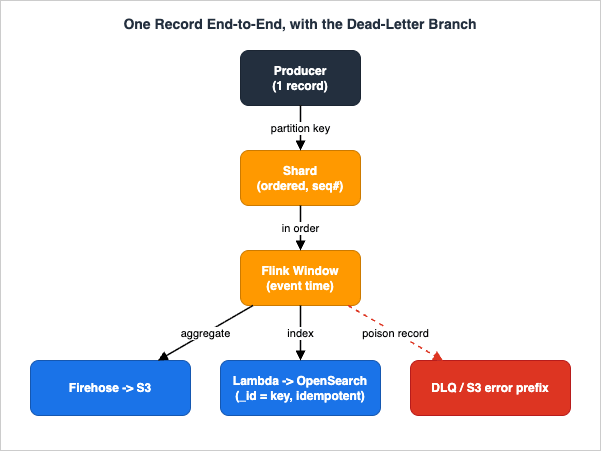
PutRecords with customer-42 as the partition key; Kinesis hashes the key and appends the record to one shard, assigning a sequence number. (2) The Flink source reads it — over EFO if registered — assigns the event-time timestamp from the payload, and routes it by keyBy(customerId) into the 12:00–12:01 tumbling window. (3) When the watermark passes 12:01, the window fires and emits an aggregate. (4a) On the lake branch, Firehose buffers the aggregate and writes it to a partitioned S3 prefix. (4b) On the real-time branch, the consumer indexes it into OpenSearch under a deterministic _id. (5) If parsing or processing throws at any consumer, that one record is reported as a batch-item failure and ultimately routed to the DLQ or S3 error prefix while the rest of the batch proceeds. The value of tracing it this way is that every hop has exactly one place the record can go wrong, and exactly one place it lands when it does — which is what makes the failure modes in the next subsections tractable.7.1 Backpressure and the IteratorAge signal
Backpressure is what happens when a downstream stage cannot keep up with an upstream one. In a Kinesis pipeline the canonical signal isGetRecords.IteratorAgeMilliseconds (often just "iterator age"): the age of the last record a consumer read, i.e., how far behind the tip of the shard the consumer is. A steadily rising iterator age means the consumer is falling behind and latency is growing; left unchecked, records can age out of the retention window before they are read, which is silent data loss.Responses to rising iterator age, roughly in order:
- Speed up the consumer. Optimize the slow path (a synchronous downstream call inside the processor is the usual culprit), increase Lambda memory, or raise the parallelization factor.
- Add read capacity. Move the consumer to enhanced fan-out so it stops contending for the shared 2 MB/s.
- Add shards. If the write side is the bottleneck (
WriteProvisionedThroughputExceeded), reshard or switch to on-demand.
Flink surfaces its own backpressure through
busyTimeMsPerSecond and backPressuredTimeMsPerSecond per operator, and MSF auto-scaling reacts to it by adding KPUs. The point is that backpressure is observable at every stage — the failure mode is ignoring it, not lacking a signal.7.2 Ordering across the pipeline
Ordering guarantees are only as strong as the weakest link:- Kinesis preserves order per shard (per partition key, with the default record distribution). It does not order across shards.
- Flink preserves keyed order when you
keyBythe same field used as the partition key; parallel subtasks process different keys independently. - Firehose batches do not guarantee order across a batch or across partitions; a Lambda consumer processes records in each shard in order by default, but does not order across shards;
PutRecordsexplicitly does not guarantee order.
So end-to-end ordering exists only along a single partition key, processed by a single keyed Flink operator, and consumed by logic that does not reorder. If your correctness depends on order, keep the key consistent from producer to processor — and if it does not, do not pay for ordering you will not use.
For Kinesis and a Lambda consumer, the sentence in which the documentation makes each ordering promise, and what breaks it (
PutRecords, resharding, a higher ParallelizationFactor, discarding records at the retry limit, and service-managed record distribution), are lined up in What Breaks Ordering, Service by Service on AWS.7.3 Exactly-once, honestly
"Exactly-once" is the most over-promised phrase in streaming. The honest decomposition:- Exactly-once state (processing) is real and provided by Flink: checkpointing ensures each record affects internal state exactly once, even across failures and restarts. MSF manages the checkpointing that makes this work.
- Exactly-once delivery to an external sink is much harder and generally not what you get. The Kinesis sink and most OpenSearch/S3 write paths are at-least-once: after a checkpoint restart, Flink may re-emit records it already wrote, producing duplicates. (Setting the Kinesis sink's
failOnError(true)makes the job fail and recover from a checkpoint rather than silently drop records on write errors — it favors completeness, which is what you usually want.)
The practical pattern, therefore, is at-least-once delivery plus idempotent effects = exactly-once outcome. You saw it already with OpenSearch (
_id = a deterministic business key, so re-indexing overwrites). The same idea applies elsewhere:- S3: write deterministic object keys so a replayed batch overwrites the same object instead of creating a duplicate.
- DynamoDB: use conditional writes keyed by an idempotency token.
- Downstream APIs: pass an idempotency key the receiver deduplicates on.
Build the pipeline to deliver at least once and make every side effect idempotent, and you get exactly-once behavior that survives the failures that genuine exactly-once delivery cannot promise. The same idempotency techniques underpin the Event-Driven Serverless Architecture on AWS guide's treatment of saga and compensation patterns.
8. Schema Evolution and Poison Records
Two slow-motion failure modes break pipelines weeks after launch: the schema changes, and a single malformed record jams a consumer. Both are preventable.8.1 Schema evolution with the Glue Schema Registry
The naive approach — producers and consumers agreeing on a JSON shape by convention — works until a producer adds a field, removes one, or changes a type, and a consumer that expected the old shape starts throwing. The AWS Glue Schema Registry turns that implicit convention into an enforced contract. It is a free, serverless registry that stores schemas in AVRO, JSON Schema, or Protobuf, versions them, and enforces a compatibility mode at registration time so an incompatible change is rejected before it reaches the stream. It integrates with Kinesis Data Streams, Amazon MSK, Apache Kafka, and AWS Lambda, with optional ZLIB compression of the wire format.Compatibility modes map directly to who you are protecting:
| Mode | Guarantees | Use when |
|---|---|---|
BACKWARD (and BACKWARD_ALL) | New schema can read data written with the previous (or all previous) schema | Consumers upgrade first — the common default |
FORWARD (and FORWARD_ALL) | Previous schema can read data written with the new schema | Producers upgrade first |
FULL (and FULL_ALL) | Both backward and forward compatible | Producers and consumers upgrade independently |
NONE | No checks | Never, in production |
aws glue create-registry --registry-name streaming-contracts

aws glue create-schema \
  --registry-id RegistryName=streaming-contracts \
  --schema-name orders \
  --data-format AVRO \
  --compatibility BACKWARD \
--schema-definition file://order.avscorders schema is rejected at deploy time — the breaking change never makes it into the stream, and the consumer never sees a record it cannot parse.8.2 Poison records, dead-letter queues, and replay
Even with schema enforcement, some records will fail processing — a downstream dependency is briefly unavailable, a value is out of range, a record was written before the registry existed. The danger with ordered streams is that the default behavior is to block: a Lambda Kinesis consumer, by default, retries a failing batch and stops processing that shard until the batch succeeds or expires, so one poison record stalls everything behind it.The toolkit to avoid that:
- Partial batch responses (
ReportBatchItemFailures). Instead of failing the whole batch, the function returns the sequence numbers of only the failed records in abatchItemFailureslist. Lambda checkpoints at the lowest returned sequence number and retries from there, so good records ahead of the failure are not reprocessed endlessly. BisectBatchOnFunctionError. On error, Lambda splits the batch in half and retries each half, narrowing in on the offending record so it does not take healthy records down with it.MaximumRetryAttemptsandMaximumRecordAgeInSeconds. Bound how long a poison record blocks progress.- On-failure destination (DLQ). When a record exhausts retries, Lambda sends metadata about the failed batch to an SQS queue or SNS topic, so the shard can advance while you investigate out of band. (Firehose's analog is the S3 error prefix, where
ProcessingFailedand undeliverable records land.)
{
  "batchItemFailures": [
    { "itemIdentifier": "49590338271490256608559692538361571095921575989136588898" }
  ]
}TRIM_HORIZON or at a specific timestamp (AT_TIMESTAMP) and let it re-derive the downstream view. This is how you recover from a bug in the Flink job (fix it, restore from a snapshot or replay from a known-good point), backfill a new index, or rebuild a corrupted S3 partition — all without asking producers to resend anything. The retention period you chose in Section 3 is precisely your replay budget; size it to the longest outage or bug-investigation window you want to be able to recover from.Replay comes in two flavors worth distinguishing. Stateful replay rewinds the Flink job itself: restore from a snapshot taken before the bad deploy and let the source re-read from the position the snapshot recorded, so state and output resume consistently. Stateless backfill spins up a separate, throwaway consumer that reads the retention window from
TRIM_HORIZON or a timestamp and rebuilds a single downstream view — a new OpenSearch index, a repaired S3 partition — without touching the live job. Backfill is safer for surgical fixes because it never disturbs the running pipeline; stateful replay is the right tool when the processing logic itself was wrong. Either way, the at-least-once-plus-idempotency discipline from Section 7.3 is what makes replay safe to run, because reprocessed records overwrite rather than duplicate.9. Observability and Failure Modes
A streaming pipeline fails across service boundaries, so observability has to span them. Each stage emits CloudWatch metrics; the skill is knowing which metric is the leading indicator for each failure mode, and how to triage symptom to root cause.* You can sort the table by clicking on the column name.
| Stage | Leading metric(s) | What it tells you |
|---|---|---|
| Kinesis (consume) | GetRecords.IteratorAgeMilliseconds | Consumer falling behind; risk of aging out of retention |
| Kinesis (produce) | WriteProvisionedThroughputExceeded, IncomingBytes/IncomingRecords | Hot shard or under-provisioned write capacity |
| Kinesis (read) | ReadProvisionedThroughputExceeded | Too many shared-throughput consumers; move to EFO |
| MSF / Flink | numberOfFailedCheckpoints, lastCheckpointDuration, numRestarts, backPressuredTimeMsPerSecond | Checkpoint health, restart loops, and backpressure |
| Firehose | DeliveryToS3.DataFreshness, DeliveryToS3.Success, ThrottledRecords | Delivery latency and failures to the lake |
| OpenSearch | Indexing latency/rate, ClusterStatus (red/yellow), FreeStorageSpace, JVMMemoryPressure | Indexing throughput and cluster health |
Kinesis pushes stream-level metrics every minute at no charge and retains them for two weeks; shard-level metrics require enabling enhanced monitoring (
EnableEnhancedMonitoring).9.1 Symptom → root cause → remediation
Iterator age is climbing. The consumer is slower than the producer. Profile the per-record path first (a synchronous downstream call is the usual cause), then add read capacity (EFO) or parallelism. If it is the write side throttling, reshard or go on-demand. The alarm:aws cloudwatch put-metric-alarm \
--alarm-name orders-iterator-age-high \
--namespace AWS/Kinesis \
--metric-name GetRecords.IteratorAgeMilliseconds \
--dimensions Name=StreamName,Value=orders-stream \
--statistic Maximum --period 60 --evaluation-periods 5 \
--threshold 60000 --comparison-operator GreaterThanThresholdWriteProvisionedThroughputExceeded > 0). A shard is hot. Confirm with shard-level metrics, then fix the partition key or add capacity (Section 3.4).Flink checkpoints are failing (
numberOfFailedCheckpoints rising, lastCheckpointDuration near the interval). State is too large or a sink is too slow, so checkpoints cannot complete within the interval. Reduce per-key state, increase parallelism/KPUs, or lengthen the checkpoint interval. A restart loop (numRestarts climbing) usually points to a single original failure that then re-triggers; find the first fault in the logs rather than chasing the loop.Firehose delivery is failing or stale (
DeliveryToS3.DataFreshness rising). Check the destination IAM role, the S3 error prefix for ProcessingFailed records, and the active-partition count if dynamic partitioning is on (records over the limit go to the error prefix).OpenSearch indexing is rejecting (HTTP 429 / cluster yellow or red). The cluster is under-provisioned or out of storage; scale the domain, fix shard sizing, or reduce indexing pressure by buffering through Firehose. Deep cross-service incident triage and SLO-based alarming are the subject of a dedicated observability architecture; this section covers the streaming-specific signals.
9.2 Correlation IDs, encryption, and least privilege
Three cross-cutting concerns run the length of the pipeline and are easiest to add at the start.Correlation IDs. Stamp each record with a trace identifier at the producer and carry it unchanged through Flink, Firehose, and the indexers. With the ID in the record envelope and in structured logs at every stage, one CloudWatch Logs Insights query can reconstruct a record's whole journey, and AWS X-Ray can tie the producer, the Lambda consumer, and downstream calls into a single trace. Diagnosing a cross-service incident without a correlation ID means guessing which log lines belong together; with one it is a lookup.
Encryption. Enable encryption at every hop: server-side encryption with AWS KMS on the stream, encryption at rest on the S3 lake and the OpenSearch domain, and TLS in transit throughout. Because the same data flows through four services, the weakest link sets the security posture — encrypting the stream but leaving the error bucket unencrypted just relocates the exposure to your poison records.
Least privilege per hop. Each component should hold only the permissions for its own edge of the graph: the Flink role reads the source stream and writes its sinks; the Firehose role writes only its target bucket prefix; the Lambda or OSI role indexes only its domain. Scoping every role to specific stream, bucket, and domain ARNs — rather than wildcards — contains the blast radius if any single component is compromised, and makes an over-broad permission visible in review.
10. Variations: When SQS/EventBridge Is Enough, and Batch vs Stream
A streaming pipeline is the right tool for high-volume, ordered, replayable data with multiple independent consumers. It is overkill for many workloads, and choosing it reflexively is a common architecture smell. A few signposts (the full selection logic lives in the AWS Messaging and Event Routing Decision Guide):- Amazon SQS is enough when you need a durable work queue with at-least-once delivery and no need for replay, multiple independent readers, or ordering beyond FIFO. If the answer to "do I need to re-read this data later?" is no, you probably want a queue.
- Amazon EventBridge is the better fit for routing discrete domain events to many targets by content-based rules, rather than processing a high-throughput ordered firehose of records.
- Batch beats streaming when latency in hours is acceptable and the data is naturally bounded (nightly files); paying for always-on stream processing to serve a daily report is waste.
- Apache Kafka via Amazon MSK is the alternative to Kinesis when you need the Kafka ecosystem (Kafka Connect, broad client tooling, very long retention, or topic-level semantics) or are migrating existing Kafka workloads. The architecture in this guide maps onto MSK with few changes — Flink reads a
KafkaSourceinstead of aKinesisStreamsSource— but the operational model differs, and MSK warrants its own treatment rather than a deep dive here. That treatment is Amazon MSK Broker Types and Storage Tiers, which works through what Standard brokers, Express brokers, and MSK Serverless each take away.
It is also worth naming the two architectural styles this pipeline can take. A Lambda architecture runs a streaming layer for fresh-but-approximate results alongside a batch layer that periodically recomputes exact results over the lake — two code paths to keep in sync. A Kappa architecture drops the separate batch layer and treats the stream as the single source of truth, recomputing history by replaying the log through the same streaming code. The replay-centric design in this guide leans Kappa: because Kinesis retains records and the processing is idempotent, you can rebuild any downstream view by re-reading rather than maintaining a parallel batch pipeline. Reach for a batch layer only when reprocessing volumes exceed what the retention window can economically hold.
The deeper point: most of the patterns in this guide — at-least-once plus idempotency, DLQs, partial-batch handling, replay — are not Kinesis-specific. They are how you build any reliable asynchronous system on AWS, and they recur in the Event-Driven Serverless Architecture on AWS guide with different building blocks.
11. Frequently Asked Questions
How many shards do I need?In on-demand mode you do not decide — Kinesis scales for you. In provisioned mode, divide your peak write throughput by 1 MB/s (or 1,000 records/s) per shard and add headroom, then watch
WriteProvisionedThroughputExceeded and reshard if it appears. Start on-demand unless you have a strong reason not to.Kinesis Data Streams or Data Firehose for ingestion?
They solve different problems. Kinesis Data Streams is a replayable, multi-consumer log with sub-second access and custom processing. Data Firehose is a delivery service that buffers and lands data in a destination with minimal code and no replay. A common pattern uses both: producers write to a stream, Flink processes it, and Firehose drains a stream into S3.
Do I really get exactly-once?
You get exactly-once processing of state from Flink's checkpointing. You generally get at-least-once delivery to sinks. Combine at-least-once delivery with idempotent writes (deterministic keys, conditional writes) for an exactly-once outcome. See Section 7.3.
What stops one bad record from blocking a shard?
Turn on
ReportBatchItemFailures and BisectBatchOnFunctionError, bound retries with MaximumRetryAttempts/MaximumRecordAgeInSeconds, and configure an on-failure destination (DLQ). The shard then advances past poison records instead of stalling. See Section 8.2.How do I reprocess data after fixing a bug?
Replay. Because the stream retains records, restart a consumer at
TRIM_HORIZON or a timestamp and re-derive the downstream view; restore the Flink app from a snapshot first if its state was affected. Your retention period is your replay budget. See Section 8.2.How do I keep producers and consumers from breaking each other on a schema change?
Put the schema in the AWS Glue Schema Registry with a compatibility mode (
BACKWARD is the usual default), so incompatible changes are rejected at registration rather than discovered in production. See Section 8.1.Is Managed Service for Apache Flink the same as Kinesis Data Analytics?
Yes — it is the renamed service. The control-plane API/SDK is still
kinesisanalyticsv2, but IAM actions, the trust principal, and the CloudWatch namespace use kinesisanalytics without the v2. See Section 4.4.12. Summary
A production streaming pipeline is not a single service; it is a contract between several. Amazon Kinesis Data Streams gives you an ordered, replayable log whose retention window is also your recovery budget. Amazon Managed Service for Apache Flink turns that log into windowed, event-time-correct aggregates with checkpointed exactly-once state. Amazon Data Firehose lands data in Amazon S3 for the lake, optionally transformed and dynamically partitioned, while a real-time path through AWS Lambda or OpenSearch Ingestion indexes events into Amazon OpenSearch Service. The properties that make it trustworthy live between the services: per-shard ordering carried through a consistent partition key, at-least-once delivery made exactly-once by idempotent writes, poison-record isolation through partial-batch responses and dead-letter queues, schema safety through the Glue Schema Registry, and a single backpressure signal — iterator age — that tells you when any stage is falling behind.Build the pipeline to deliver at least once, make every effect idempotent, retain enough to replay, and instrument every boundary, and you have a streaming architecture that degrades gracefully instead of failing silently.
From here, the data you landed in S3 becomes a governed, queryable lakehouse in the AWS Data Lakehouse Architecture Guide; the same reliability patterns recur in the Event-Driven Serverless Architecture on AWS guide; and the deeper selection of streaming versus messaging is in the AWS Messaging and Event Routing Decision Guide.
13. References
- Amazon Kinesis Data Streams Developer Guide
- Amazon Kinesis Data Streams — Quotas and Limits
- Amazon Kinesis Data Streams — Enhanced Fan-Out Consumers
- Amazon Kinesis Data Streams — Change the Data Retention Period
- Amazon Kinesis Data Streams API — PutRecords
- Amazon Kinesis Data Streams — Monitoring with Amazon CloudWatch
- Amazon Managed Service for Apache Flink Developer Guide
- Using AWS Lambda with Amazon Kinesis Data Streams
- AWS Lambda — Configuring Partial Batch Response with Kinesis
- Amazon Data Firehose Developer Guide
- Amazon Data Firehose — Transform Source Data
- Amazon Data Firehose — Dynamic Partitioning
- Amazon OpenSearch Ingestion — Pipeline Features Overview
- AWS Glue Schema Registry
- Amazon Kinesis Data Streams Pricing
- Amazon Data Firehose Pricing
Related Articles
- AWS Messaging and Event Routing Decision Guide
The full streaming-versus-messaging selection: when to choose SQS, SNS, EventBridge, or Kinesis Data Streams. - Amazon EventBridge Pipes and Event-Driven Architecture Patterns
Point-to-point event plumbing with filtering, enrichment, and targets. - AWS Lambda Concurrency and Scaling Guide
The Lambda poller model, parallelization factor, and concurrency interactions for Kinesis consumers. - Amazon S3 Object Key Naming and Design Best Practices
Prefix entropy, partition granularity, and request-rate implications for the lake landing zone. - AWS Data Lakehouse Architecture Guide
The continuation of the lake path: catalog, Apache Iceberg tables, and governed query access. - Event-Driven Serverless Architecture on AWS
The same reliability patterns — idempotency, DLQs, replay — applied to a serverless event-driven system.
References:
Tech Blog with curated related content
Written by Hidekazu Konishi