EventBridge Pipes Event-Driven Architecture Implementation Patterns
First Published:
Last Updated:
Amazon EventBridge Pipes, generally available since December 2022, was designed to remove that glue. A Pipe is a managed point-to-point integration with four sequential stages — Source, Filter, Enrichment, and Target — and each stage can be configured declaratively without writing application code.
In this article I summarize what Pipes is, walk through concrete implementation patterns that previously required Lambda glue, and finish with practical notes on filtering, enrichment, error handling, cost, migration, and pitfalls.
This article is a companion piece to the EventBridge timeline I wrote previously, with a narrower focus on the Pipes feature.
AWS History and Timeline regarding Amazon EventBridge - Overview, Functions, Features, Summary of Updates, and Introduction
Table of Contents:
- Introduction — What Changed When Pipes Shipped
- Pipes Anatomy — The Four Stages and Supported Services
- Pattern 1 — SQS to Step Functions
- Pattern 2 — DynamoDB Streams to EventBridge Bus
- Pattern 3 — Kinesis to Firehose with Filtering
- Pattern 4 — SQS → Lambda+Bedrock Enrichment → Step Functions
- Pattern 5 — MSK to Lambda with API Gateway Enrichment
- Filter Expression — Event-Pattern Syntax
- Enrichment Step — Lambda vs Step Functions vs API Destinations vs API Gateway
- Error Handling — DLQ, Retries, and Metrics
- Cost Considerations
- Migration from Lambda Glue — A Recipe
- When NOT to Use Pipes — Decision Guide
- Common Pitfalls
- InputTemplate Cookbook
- CDK Considerations
- Summary
- References
1. Introduction — What Changed When Pipes Shipped
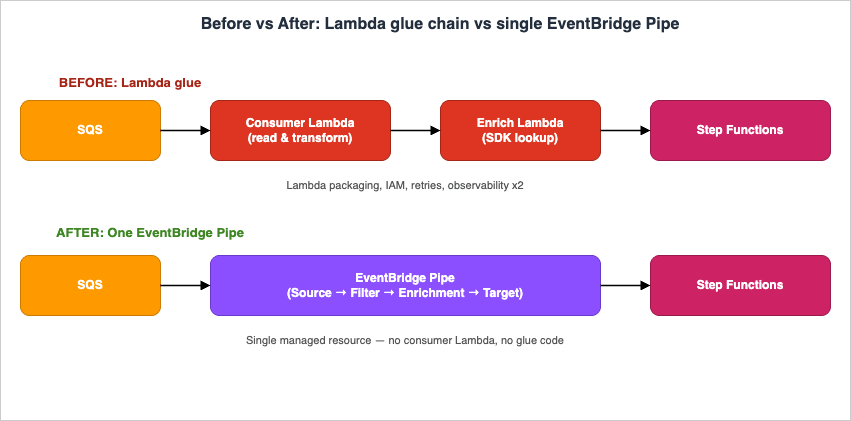
Before Pipes, every "stream-to-something" or "queue-to-something" integration on AWS that needed any conditional logic, transformation, or auxiliary lookup was implemented in one of three ways:- A Lambda function as the source consumer that explicitly calls the target SDK
- A Lambda function fronted by an EventBridge rule that re-publishes events
- A Step Functions state machine started by a Lambda trigger
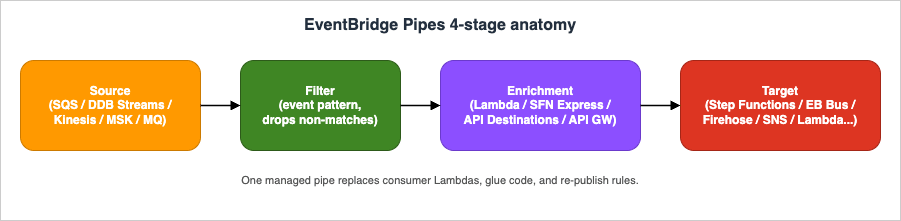
- Source — pulls or polls events from a streaming or queuing service
- Filter — drops events that do not match an event pattern
- Enrichment — optionally transforms or augments the payload via Lambda, Step Functions Express, EventBridge API Destinations, or API Gateway
- Target — delivers the (possibly enriched) event to one of many AWS services
2. Pipes Anatomy — The Four Stages and Supported Services
The Source stage supports polling-based event sources only: Amazon SQS (standard and FIFO), Amazon DynamoDB Streams, Amazon Kinesis Data Streams, Amazon MSK, self-managed Apache Kafka, and Amazon MQ (RabbitMQ and ActiveMQ). Pipes does not accept push sources such as EventBridge buses themselves — that role is filled by EventBridge rules.The Filter stage uses the same content-based event-pattern syntax as EventBridge rules (prefix, suffix, numeric, anything-but, exists, IP-address matchers). The
FilterCriteria.Filters array accepts up to 5 Filter entries; each entry holds a JSON pattern matching the source event shape (verified 2026-04 on docs.aws.amazon.com/eventbridge/latest/pipes-reference/API_FilterCriteria.html). Any event that fails to match is dropped before invoking Enrichment or Target.The Enrichment stage is optional and supports four service types: AWS Lambda, AWS Step Functions Express Workflows (synchronous), EventBridge API Destinations, and Amazon API Gateway (REST and HTTP).
The Target stage supports a much wider list — 16 target types as of April 2026 (verified on aws.amazon.com/eventbridge/pipes/) — AWS Batch job queues, CloudWatch log groups, ECS tasks, EventBridge event buses, Firehose delivery streams, Inspector Classic assessment templates (the legacy Inspector v1 service; superseded by Amazon Inspector v2, which is not a Pipes Target), Kinesis Data Streams, Lambda functions (sync or async), Amazon Redshift Data API, SageMaker Pipelines, SNS topics, SQS queues, Step Functions state machines (Standard or Express), Timestream for LiveAnalytics, EventBridge API destinations (third-party HTTP), and Amazon API Gateway (REST or HTTP).
3. Pattern 1 — SQS to Step Functions (Per-Message State Machine)
A common Lambda-glue pattern is "pull a message from SQS, then callStartExecution on a state machine with the message body as input". With Pipes this becomes a single resource with no code:PipeSqsToStepFunctions:
Type: AWS::Pipes::Pipe
Properties:
Name: order-to-fulfillment
RoleArn: !GetAtt PipeRole.Arn
Source: !GetAtt OrderQueue.Arn
SourceParameters:
SqsQueueParameters:
BatchSize: 1
Target: !GetAtt FulfillmentStateMachine.Arn
TargetParameters:
StepFunctionStateMachineParameters:
InvocationType: FIRE_AND_FORGET
InputTemplate: |
{
"orderId": <$.body.orderId>,
"items": <$.body.items>
}
BatchSize: 1 is recommended when the target is a Standard Workflow — it must be 1 to ensure one Standard Workflow execution per record. For Express Workflows, larger batches are allowed.Idempotency note: When using
InvocationType: FIRE_AND_FORGET with a Standard Workflow and an SQS source, SQS's at-least-once delivery semantics mean that the same message can be delivered more than once, causing Step Functions to start duplicate executions. To prevent duplicate processing, pass the SQS message ID as the Name parameter in StepFunctionStateMachineParameters (using InputTemplate to inject <$.messageId>): Step Functions rejects a StartExecution call with a duplicate Name for any execution that is still running or completed within 90 days, making the call idempotent.FIFO SQS as a Pipe source: When the upstream queue is an SQS FIFO queue rather than a Standard queue, Pipes processes messages in order within each
MessageGroupId, and only one batch per message group is in flight at a time. This serialization guarantees ordering for correlated events (e.g., all events for a given tenant or order ID sharing the same MessageGroupId) but limits throughput proportionally to the number of distinct message groups; plan your MessageGroupId cardinality to match both your ordering requirements and your desired concurrency level.4. Pattern 2 — DynamoDB Streams to EventBridge Bus (Table Mutation Events)
Turning DynamoDB item changes into domain events on an EventBridge bus used to require a stream-consumer Lambda that re-published. With Pipes:resource "aws_pipes_pipe" "ddb_to_bus" {
name = "user-table-events"
role_arn = aws_iam_role.pipe.arn
source = aws_dynamodb_table.users.stream_arn
source_parameters {
dynamodb_stream_parameters {
starting_position = "LATEST"
batch_size = 10
}
}
target = aws_cloudwatch_event_bus.domain.arn
target_parameters {
eventbridge_event_bus_parameters {
detail_type = "user.updated"
source = "com.example.user-service"
}
input_template = <<EOT
{
"userId": <$.dynamodb.Keys.userId.S>,
"before": <$.dynamodb.OldImage>,
"after": <$.dynamodb.NewImage>,
"eventName":<$.eventName>
}
EOT
}
}
5. Pattern 3 — Kinesis to Firehose with Filtering
When you want to keep only a subset of Kinesis records and persist them to S3 via Firehose, the Lambda transform on Firehose was the historical answer. Pipes lets you do the filtering before Firehose, so the Firehose ingest count itself drops:{
"data": {
"eventType": ["purchase", "refund"],
"amount": [{ "numeric": [">=", 100] }]
}
}
data.eventType is purchase or refund and whose data.amount is at least 100 ever reach Firehose.Prerequisite for Kinesis filtering: Pipes attempts to JSON-decode the Kinesis record's
Data field automatically and exposes the parsed object under the data key for filter evaluation. Records that are not valid JSON (for example, raw protobuf, Avro, or arbitrary binary frames) cannot be matched against a content-based filter pattern; Pipes treats them as non-matching and drops them silently before the Target stage. If you must retain such records, omit FilterCriteria entirely and perform discrimination inside an Enrichment Lambda where you can decode the binary payload yourself, then drop unwanted records by returning an empty array from the Lambda.PipeKinesisToFirehose:
Type: AWS::Pipes::Pipe
Properties:
Name: high-value-events-to-s3
RoleArn: !GetAtt PipeRole.Arn
Source: !GetAtt EventStream.Arn
SourceParameters:
KinesisStreamParameters:
StartingPosition: LATEST
BatchSize: 100
MaximumBatchingWindowInSeconds: 5
FilterCriteria:
Filters:
- Pattern: '{"data":{"eventType":["purchase","refund"],"amount":[{"numeric":[">=",100]}]}}'
Target: !GetAtt ArchiveDeliveryStream.Arn
TargetParameters:
InputTemplate: |
{
"ts": <$.approximateArrivalTimestamp>,
"type": <$.data.eventType>,
"amount": <$.data.amount>,
"userId": <$.data.userId>
}
6. Pattern 4 — SQS → Lambda+Bedrock Enrichment → Step Functions
Architecture clarification: The Pipe’s Source is SQS. The Enrichment is a Lambda that calls Amazon Bedrock with retrieved context to produce a richer event. The Target is a Step Functions state machine that processes the enriched event — Bedrock is not a Pipes Target; Lambda invokes it from inside the Enrichment stage.A queue receives raw user inquiries; the Enrichment Lambda calls Amazon Bedrock with the inquiry plus retrieved context; the model’s response is then delivered to a Step Functions state machine that handles human handoff.
PipeInquiryToBedrock:
  Type: AWS::Pipes::Pipe
  Properties:
    Source: !GetAtt InquiryQueue.Arn
    SourceParameters:
      SqsQueueParameters:
        BatchSize: 1
    Enrichment: !GetAtt BedrockInvokerFunction.Arn
    Target: !GetAtt HandoffStateMachine.Arn
    TargetParameters:
      StepFunctionStateMachineParameters:
        InvocationType: FIRE_AND_FORGET
7. Pattern 5 — MSK to Lambda with API Gateway Enrichment
When the source is a Kafka topic on Amazon MSK and you need to enrich each record with a synchronous lookup against an internal REST API before invoking a Lambda processor, all three concerns can be expressed in one pipe:PipeMskToLambda:
Type: AWS::Pipes::Pipe
Properties:
Source: !Ref MskClusterArn
SourceParameters:
ManagedStreamingKafkaParameters:
TopicName: clickstream
StartingPosition: LATEST
BatchSize: 100
Enrichment: !Sub "arn:aws:execute-api:${AWS::Region}:${AWS::AccountId}:${ApiId}/prod/POST/lookup"
EnrichmentParameters:
HttpParameters:
HeaderParameters:
Content-Type: application/json
Target: !GetAtt ProcessorFunction.Arn
MSK to Lambda — Operational Notes. Several MSK-specific behaviors require attention before production deployment:
- (1) Synchronous Lambda Target ceiling. EventBridge Pipes invokes Lambda synchronously by default (
InvocationType: REQUEST_RESPONSE) when Lambda is the Target, and the synchronous integration is bounded by a 5-minute Pipes-side ceiling regardless of the Lambda function's own configured timeout (which can be up to 15 minutes); switchLambdaFunctionParameters.InvocationTypetoFIRE_AND_FORGETif you want async semantics and need to escape the 5-minute window. If your per-batch processing can exceed 5 minutes, either reduceBatchSize, split the work into smaller units, or use Step Functions as the target so the long-running portion runs outside the synchronous invocation window. - (2) Batch-as-array semantics. Batch behavior differs from a raw Kafka consumer: Pipes delivers records as a JSON array in the Lambda event, and the entire batch is retried if the function returns a non-200 response — there is no per-record partial success, so your handler must be idempotent.
- (3) Limited retry knobs and no source-side DLQ. MSK source retry semantics differ fundamentally from Kinesis or DynamoDB Streams:
ManagedStreamingKafkaParametersexposes onlyBatchSize,ConsumerGroupID,Credentials,MaximumBatchingWindowInSeconds,StartingPosition(limited toLATESTorTRIM_HORIZON—AT_TIMESTAMPwith aStartingPositionTimestampis supported only on the self-managed Apache Kafka source,SelfManagedKafkaParameters), andTopicName— there is noMaximumRetryAttempts, noBisectBatchOnFunctionError, and no source-side DLQ. A persistent Target failure will therefore retry indefinitely and block offset progress for the affected partition; the only escape hatches are a successful invocation or operator intervention (manual offset commit, topic re-partition, or pipe disable). Idempotent handlers and aggressive monitoring are not optional. - (4) Stalled-partition observability. Monitor the
ExecutionFailedmetric with theStagedimension set toTARGETin theAWS/Pipesnamespace and set an alarm to detect stalled partitions early; pair it with the consumer-group lag fromAWS/Kafka(OffsetLag,EstimatedTimeLag) since Pipes' own metrics will not surface a "frozen partition" condition by themselves. - (5) IAM permissions and execution logging. MSK IAM authentication requires the Pipe's execution role to include — at minimum —
kafka-cluster:Connecton the cluster ARN,kafka-cluster:DescribeGroupandkafka-cluster:AlterGroupon the consumer group ARN, andkafka-cluster:DescribeTopic,kafka-cluster:DescribeTopicDynamicConfiguration, andkafka-cluster:ReadDataon the topic ARN. Missing any of these causes connection-level failures that surface only when execution logging is enabled atERRORor higher (LogConfigurationdefaults toOFF); enable at leastERROR-level logging to a CloudWatch log group before troubleshooting.
These notes take the cluster as given. Which broker type backs that cluster, and which storage tier it can use, are decided when the cluster is created and not all of it can be changed afterwards; Amazon MSK Broker Types and Storage Tiers works through those choices.
8. Filter Expression — Event-Pattern Syntax
The Filter stage uses content-based event patterns identical to EventBridge rules. The most useful matchers in pipe contexts are:- Exact match:
"eventType": ["order.created"] - Prefix match:
"source": [{ "prefix": "com.example." }] - Numeric range:
"amount": [{ "numeric": [">", 0, "<=", 10000] }] - Anything-but:
"region": [{ "anything-but": ["us-east-1"] }] - Existence:
"correlationId": [{ "exists": true }]
eventName, dynamodb.NewImage, etc.), so you can filter at the operation level (e.g. "eventName": ["MODIFY"]) before any compute is invoked.9. Enrichment Step — Lambda vs Step Functions vs API Destinations vs API Gateway
The four enrichment service types differ along three axes — synchronous-vs-async semantics, where business logic lives, and pricing model.* You can sort the table by clicking on the column name.
| Service | Best for | Code? | Notes |
|---|---|---|---|
| AWS Lambda | Free-form transformation, calling AWS SDKs | Yes | Default choice for arbitrary logic |
| Step Functions Express (SYNC) | Orchestrating multiple AWS API calls | No (state language) | Useful when enrichment itself is a small workflow |
| EventBridge API Destinations | Calling a third-party HTTP API with built-in auth | No | Connection object handles credentials |
| Amazon API Gateway | Calling your own REST/HTTP API | No | Auth and throttling handled by API GW |
The enrichment response, regardless of type, replaces the event payload that flows into the Target stage (subject to your
InputTemplate). Important timeout constraint: the Enrichment stage is invoked synchronously, and Pipes enforces a 5-minute end-to-end ceiling on every synchronous integration (Lambda Enrichment, Step Functions Express, API Destinations, and API Gateway). The 5-minute window is shared by the request, processing, and response; it is independent of the Lambda function's own timeout setting. If your enrichment logic — for example, a Bedrock inference call with a large context window — can approach this ceiling, either reduce the payload size, switch to a Step Functions Express Workflow for finer-grained observability (it shares the same 5-minute cap), or move the long-running work to the Target stage where async invocation is possible.10. Error Handling — DLQ, Retries, and Metrics
Pipes inherits per-source retry semantics: SQS visibility timeouts, DynamoDB Streams / Kinesis bisect-on-error, and Kafka offset behavior all carry over. On top of that, you configure a Pipe-level dead-letter queue for messages that exceed the retry budget:# SQS source — no DeadLetterConfig in CloudFormation for this source type;
# rely on the SQS queue's own redrive policy for DLQ handling.
SourceParameters:
SqsQueueParameters:
BatchSize: 10
MaximumBatchingWindowInSeconds: 5
# Kinesis or DynamoDB Streams source — DeadLetterConfig IS available here
# (verified 2026-04-26: SourceParameters.KinesisStreamParameters.DeadLetterConfig
# and SourceParameters.DynamoDBStreamParameters.DeadLetterConfig are the only
# supported placements; there is no top-level Pipe DeadLetterConfig in CloudFormation).
SourceParameters:
KinesisStreamParameters:
StartingPosition: LATEST
DeadLetterConfig:
Arn: !GetAtt PipeDlq.Arn
AWS/Pipes namespace, dimensioned by PipeName. The core counter metrics are Invocations (count of source events that entered the pipe), ExecutionFailed (events that failed end-to-end), ExecutionThrottled, ExecutionTimeout, and ExecutionPartiallyFailed (a batch where some but not all records failed). Stage-level visibility is exposed not as separate metric names but through the Stage dimension — filter the same metric (for example ExecutionFailed) by Stage set to SOURCE, FILTER, ENRICHMENT, or TARGET to localize where failures originate. Pipe execution logging is opt-in and supports four levels — OFF (default), ERROR, INFO, and TRACE — configured via the LogConfiguration property with destinations of CloudWatch Logs, S3, or Firehose. TRACE includes the full event payload at every stage and can be selectively disabled with IncludeExecutionData; reserve it for debugging and revert to ERROR for steady-state operation to keep storage cost down.VPC, KMS, and X-Ray notes. Three operational concerns recur in production deployments. (1) KMS-encrypted sources. If the Source SQS queue, Kinesis stream, or DynamoDB Stream is encrypted with a customer managed KMS key, the Pipe's execution role must include
kms:Decrypt (and kms:GenerateDataKey for write-side targets such as encrypted SQS Target) on that key, and the key policy must permit the role — missing this manifests as silent zero-throughput because Pipes cannot read the source records. (2) VPC connectivity. Pipes itself runs in the AWS service plane and is not deployed into a customer VPC; however, when the Source is MSK or self-managed Kafka in a private subnet, MSK / Kafka must expose IAM-auth or SASL/SCRAM listeners that Pipes can reach via the cluster's bootstrap endpoint, and AWS PrivateLink or VPC peering applies on the cluster side, not on the Pipe side. For Enrichment via API Gateway in a private VPC, use the regional or private REST API with appropriate resource policy; Pipes does not assume VPC interface endpoint resolution. (3) AWS X-Ray. EventBridge Pipes is not currently integrated with AWS X-Ray as a traced service — trace IDs do not propagate through the Filter or InputTemplate stages. To preserve causality, enable Active Tracing on Enrichment Lambda functions and Target Lambda / Step Functions, and inject a correlation ID via InputTemplate (for example "correlationId": <$.messageId>) so downstream segments can be reassembled in CloudWatch Logs Insights or via OpenTelemetry collectors.11. Cost Considerations
Pipes is billed per request processed by the pipe itself. The current price is $0.40 per million requests, where each 64 KB chunk of payload (rounded up) counts as one request — a 200 KB record therefore costs ⌈200 / 64⌉ = 4 requests, not one (verified 2026-04 on aws.amazon.com/eventbridge/pricing/). The per-request charge is applied once per pipe execution, not per stage; Source / Filter / Enrichment / Target traversal of the same record is a single billable request, regardless of how many stages are configured. There is no idle cost. Beyond that, you pay for whatever the Source, Enrichment, and Target services charge. The savings vs Lambda glue come from three places: no Lambda invocation cost for the consumer side, no provisioned concurrency to keep cold starts down, and no Lambda execution time spent on transformations that theInputTemplate handles for free.Worked example — 30 million events / month, 4 KB each:
- Pipes-only (transformation in
InputTemplate, no Enrichment): 30M requests × $0.40 / 1M = $12.00 for the pipe layer. - Equivalent Lambda glue (1.5M consumer invocations after batching at 20 records/invocation, 200 ms average duration, 256 MB): 1.5M × $0.20 / 1M = $0.30 invocation cost; 1.5M × 0.2 s × 0.25 GB × $0.0000166667 = $1.25 compute cost; total ~$1.55 for Lambda alone.
The exception is enrichment: if you keep an Enrichment Lambda, that cost stays. The win is that you only pay for compute that does business work, not for consumer plumbing.
12. Migration from Lambda Glue — A Recipe
When refactoring an existing Lambda-glue integration to a Pipe, the following order minimizes risk:- Identify the source — confirm it is one of SQS, DynamoDB Streams, Kinesis, MSK, self-managed Kafka, or Amazon MQ. If not, Pipes does not apply.
- Extract the parts of the Lambda that are pure transformation (no side effects, no external calls). These become the Pipe's
InputTemplate. - Extract the parts that call a downstream service. Match them to a Pipe Target.
- Whatever remains — auxiliary lookups, third-party API calls — becomes the Enrichment stage if necessary.
- Cut over by deploying the Pipe disabled, then enabling it while disabling the source mapping on the old Lambda. Roll back is simply re-enabling the old mapping.
13. When NOT to Use Pipes — Decision Guide
Pipes is not the right tool for every event-integration problem. Reach for an alternative when any of the following holds:- Source is a push service. EventBridge Bus events, S3 event notifications, AWS Config compliance changes, CloudTrail events, and SaaS partner events are push-style and cannot be wired as a Pipe Source. Use an EventBridge rule with the same Filter and Target options instead — rules cover this surface natively, and Pipes adds nothing.
- 1:1 integration with no transformation. If your goal is simply "deliver every SQS message to a single Lambda" or "stream every Kinesis record into Firehose without filtering or shaping", a direct Lambda Event Source Mapping or the native Kinesis → Firehose subscription is operationally simpler and cheaper than introducing a Pipe layer. Pipes earns its keep when Filter or InputTemplate is doing real work.
- Async fan-out to many subscribers. Pipes targets a single downstream service per pipe. When one event must reach an unbounded set of consumers, prefer SNS or an EventBridge bus with multiple rules — running N Pipes in parallel from the same source is both inefficient (each pipe is billed separately) and architecturally noisy.
- Payload exceeds 256 KB and claim-check is impractical. Most Targets cap at 256 KB; Lambda is the notable exception at 6 MB synchronous. If you cannot stash large payloads in S3 and pass references, a bespoke Lambda consumer that streams the payload to its destination remains the pragmatic choice.
- Sub-second end-to-end latency requirement. Pipes is throughput-oriented and adds tens to low-hundreds of milliseconds of internal queuing. For tight sub-second SLOs (e.g. real-time bidding), a direct Kinesis Enhanced Fan-Out consumer or in-process Kafka client is more appropriate.
- Complex multi-step orchestration. If the integration needs branching, retries with backoff, parallel maps, or human-in-the-loop, the orchestration belongs in Step Functions Standard, with the Pipe (if any) reduced to "deliver the trigger event into the workflow".
14. Common Pitfalls
- Batch size mismatch: a Pipe to a Standard Step Functions Workflow must use
BatchSize: 1, otherwise only the first record of each batch starts an execution. - InputTemplate JSON escaping: the
<$.path>syntax substitutes values verbatim from the source event. The substituted value already carries its JSON type, so quoting depends on context — see the InputTemplate Cookbook below for concrete patterns. - IAM trust scope: the pipe's IAM role needs both source-read and target-invoke permissions. Splitting these into two managed policies makes auditing easier.
- Ordering across stages: Filter runs before Enrichment, and Enrichment can change values that Filter already evaluated. There is no second filter pass after enrichment.
- Maximum payload size: per-record limits are bounded by both the source and the target. Source-side: SQS message body up to 256 KB, Kinesis Data Streams record up to 1 MB, DynamoDB Streams item up to 400 KB, MSK / self-managed Kafka record configurable up to several MB. Target-side: EventBridge event buses cap at 256 KB per
PutEventsentry, Step FunctionsStartExecutioninput at 256 KB (applies to both Standard and Express Workflows), SQS at 256 KB, SNS at 256 KB, Lambda at 6 MB synchronous request payload, and Firehose record at 1 MB. The effective end-to-end limit is whichever component is smallest; theInputTemplatemust reshape payloads to fit. When the source record is larger than the target accepts, store the original in S3 and pass a reference (claim-check pattern) instead.
15. InputTemplate Cookbook
TheInputTemplate is where most Pipes integrations live or die in production. Four patterns cover the majority of cases:Scalar passthrough (string). When the source value is already a string,
<$.path> emits it without quotes — you must add the surrounding quotes in the template:{
"userId": "<$.body.userId>",
"action": "<$.body.action>"
}
Object or array passthrough. When the source value is itself a JSON object or array, omit the quotes — the value is inserted as-is, preserving structure. This is the only way to forward nested DynamoDB
NewImage payloads or unparsed Kinesis records:{
"userId": "<$.dynamodb.Keys.userId.S>",
"snapshot": <$.dynamodb.NewImage>,
"tags": <$.dynamodb.NewImage.tags.L>
}
Numeric and boolean values. The substitution preserves the JSON type, so numerics flow without quotes:
{
  "amount":    <$.body.amount>,
  "isPriority":<$.body.priority>,
  "currency":  "<$.body.currency>"
}
Constants and literals. Anything that is not a
<$.path> token is emitted verbatim — useful for stamping a fixed detail-type or schemaVersion:{
"schemaVersion": "1.0",
"domain": "orders",
"payload": <$.body>
}
Two final notes. First, when an
InputTemplate path does not resolve against the (enriched) event, that variable is not created and the corresponding key is omitted from the output entirely — not a JSON null, not the literal string "null", just an absent property. If the Target requires the field unconditionally, default it upstream in the source application or in the Enrichment stage rather than relying on Pipes' silent omission. Second, the InputTemplate is evaluated after Enrichment, so substitutions reference the enriched event shape, not the raw source — design the Enrichment output schema with the Target's InputTemplate in mind.16. CDK Considerations
As of April 2026, the AWS CDK ships only the L1 (CloudFormation-level) construct for EventBridge Pipes (aws_pipes.CfnPipe in aws-cdk-lib). There is no opinionated L2 construct yet, so CDK users hand-author the same property tree as a CloudFormation template — including SourceParameters, FilterCriteria, EnrichmentParameters, TargetParameters, and RoleArn. The official @aws-cdk/aws-pipes-alpha module exists for higher-level constructs but remains in developer preview; pin its version explicitly and re-review on each CDK upgrade. For production stacks today, prefer the L1 with helper functions to assemble the parameter tree, or use aws-pipes-alpha with the alpha caveat documented in your README.17. Summary
EventBridge Pipes earns its place in an EDA toolbox the moment a Lambda glue function exists only to read from one polling source, optionally filter or transform a payload, and forward it to a single downstream service. In that role, a Pipe replaces the consumer Lambda's invocation cost, IAM surface, cold-start latency, observability boilerplate, and DLQ wiring with a declarative four-stage resource (Source → Filter → Enrichment → Target) whose only mandatory free-form code lives in an Enrichment Lambda — and even that is optional.The five patterns walked through in sections 3 through 7 cover the practical surface most teams encounter: SQS to Step Functions for per-message orchestration; DynamoDB Streams to an EventBridge bus for table-mutation domain events; Kinesis to Firehose with content-based filtering to drop ingest cost before persistence; SQS to a Bedrock-calling Enrichment Lambda to a Step Functions handoff for AI-augmented routing; and MSK to Lambda with API Gateway Enrichment for Kafka-driven HTTP synchronous lookups. The same primitives compose to far more cases — the operative test is whether your source is one of the six polling-style integrations Pipes supports and whether your downstream is a single target.
Three constraints decide whether Pipes fits: the 5-minute synchronous ceiling on Enrichment / Lambda Targets / Step Functions Express / API Destinations / API Gateway invocations, the per-target payload limits (most caps at 256 KB; Lambda is the 6 MB outlier), and the single-target-per-pipe rule. When any of those fails — long-running enrichment, oversized payloads, fan-out to many subscribers, push-style sources like S3 events or EventBridge buses, or sub-second SLOs — reach for Step Functions Standard, an EventBridge bus with rules, SNS, or a direct Lambda Event Source Mapping instead. Pipes is a sharp tool, not a universal hammer.
Operationally, the wins compound when you commit to
InputTemplate for transformation, source-side FilterCriteria to short-circuit before compute, and stage-dimensioned ExecutionFailed alarms to localize failures. Migration from existing Lambda glue is low-risk if you cut over by deploying the Pipe disabled, swapping source mappings, and keeping the rollback path of re-enabling the old Lambda — the staged approach in section 12 avoids the dual-delivery hazard that haunts in-place rewrites.18. References
- Amazon EventBridge Pipes — User Guide
- Filtering events in Amazon EventBridge Pipes
- Enrichment in Amazon EventBridge Pipes
- Targets in Amazon EventBridge Pipes
- aws-samples/serverless-patterns — Pipes examples
- AWS History and Timeline regarding Amazon EventBridge - Overview, Functions, Features, Summary of Updates, and Introduction
- How to Add an Approval Flow to AWS Step Functions Workflow (AWS CodePipeline and Amazon EventBridge Edition)
- EventBridge Pattern Tester Tool
- EventBridge Cron/Rate Validator Tool
Related Articles in This Series
- AWS Step Functions Distributed Map — Practical Patterns and Pitfalls for Large-Scale Parallel Workloads
Patterns and pitfalls when fanning out work that previously went through a Pipe-and-Lambda chain. Pipes are the input side; Distributed Map is what you reach for when each event must in turn fan out into thousands of child executions. - AWS History and Timeline regarding Amazon EventBridge
Chronological context for how Pipes fits into the broader EventBridge feature set, including the rule-based bus, scheduler, and event archives that complement Pipes. - How to Add an Approval Flow to AWS Step Functions Workflow (AWS CodePipeline and Amazon EventBridge Edition)
A worked example of the Pipes → Step Functions → EventBridge pattern in a CI/CD context, showing how the same plumbing applies beyond raw event integration.
References:
Tech Blog with curated related content
Written by Hidekazu Konishi