AWS Messaging and Event Routing Decision Guide - Choosing Between SQS, SNS, EventBridge, and Kinesis
First Published:
Last Updated:
This guide is a decision hub. It does not re-teach every detail of every service; it gives you one framework for choosing among them, then deep-dives the internals, the failure modes, and the observability you need to run them in production. AWS publishes an official decision guide that compares SQS, SNS, and EventBridge feature-by-feature; this article deliberately goes further — it adds the streaming axis (Kinesis), the ordering/idempotency decision, the official combination patterns, and the positioning of Pipes and Scheduler, and it delegates per-service mechanics to focused articles. For the event-driven plumbing patterns built on Pipes, see the EventBridge Pipes and Event-Driven Architecture Patterns guide; for orchestration (the workflow side of the same coin), see the AWS Step Functions Distributed Map Guide. For when each capability launched, the timelines for Amazon SQS, Amazon SNS, and Amazon EventBridge track the evolution.
This article answers three questions:
- What is each option actually for? Queue, pub/sub, event bus, or stream — what model of delivery does it implement?
- How do I choose from requirements? Given coupling, fan-out, routing, ordering, throughput, and replay needs, which primitive fits?
- How do I combine, observe, and operate them? Real architectures chain these services. How do they stack, what do you monitor, and where do they fail?
Scope note. This is a decision and operations guide, not a cost guide. These services differ significantly in cost characteristics (per-request, per-payload, per-shard-hour, per-event), and those differences matter to a final design — but pricing changes frequently and is per-Region, so this article describes cost qualitatively and links to the official pricing pages instead of quoting numbers. Amazon MSK, Amazon Data Firehose, and Amazon Managed Service for Apache Flink are positioned where they intersect a decision but are not explored in depth. All quantitative limits below were verified against AWS official documentation in 2026; always confirm current quotas in the Service Quotas console for your account and Region.
1. Why the Messaging Choice Became a Design Decision
In a single service calling another, you do not need any of this — a direct synchronous API call works. The need for a messaging or event layer appears the moment you want to decouple producers from consumers: to absorb traffic spikes, to retry independently, to fan a single fact out to many teams, or to react to changes you do not control. AWS grew four primitives because no single model solves all of those well.- Amazon SQS is a pull-based queue. A producer enqueues a message; one consumer group polls and processes it; the message is deleted on success. It buffers and decouples exactly one logical sender from one logical receiver, and it is the workhorse for load-leveling and retry isolation.
- Amazon SNS is push-based pub/sub. A publisher sends one message to a topic, and SNS pushes a copy to every subscriber. It exists for fan-out — delivering the same fact to many independent destinations at once.
- Amazon EventBridge is a serverless event bus. Events from AWS services, your own apps, and SaaS partners arrive on a bus; rules match them by content and route to targets (the Custom Event Bus added in September 2026 uses subscribers instead of rules; see Section 6.6). It exists for content-based routing across many loosely related sources, with filtering, transformation, archive/replay, and scheduling.
- Amazon Kinesis Data Streams is a shard-based stream. Records are appended to an ordered, replayable log partitioned into shards; many consumers read independently and can reprocess history. It exists for ordered, high-throughput streaming where the sequence of records and the ability to re-read them matter.
The single most useful mental model is to decide, first, what shape the delivery is:
- one-to-one with a buffer → queue (SQS);
- one-to-many copies → pub/sub (SNS);
- many-to-many by content, with routing and filtering → event bus (EventBridge);
- an ordered, replayable record log read by many → stream (Kinesis).
Everything else — ordering, deduplication, throughput, retries — refines that first choice. Picking the wrong shape is expensive to undo: a stream pressed into service as a work queue, a queue used where fan-out was needed, or an event bus treated as a high-throughput pipe are all recurring, costly mistakes this guide is built to prevent.
A second framing helps once you know the shape: messaging (SQS, SNS) moves discrete messages whose payload the producer and consumer agree on; eventing (EventBridge) moves notifications of state changes that the producer publishes without knowing who consumes them; streaming (Kinesis) moves an ordered log of records that consumers replay at their own pace. The boundaries blur in practice — and the combination patterns in Section 8 exist precisely because real systems straddle them — but the three intentions are distinct.
2. The Options at a Glance
Before the flowchart, it helps to see all four primitives on one axis. The deepest divide is delivery model: SQS holds messages until a consumer pulls them; SNS and EventBridge push to subscribers/targets the moment an event arrives; Kinesis keeps an ordered log that consumers replay. The second divide is persistence and replay: SQS and Kinesis retain data (a queue until consumed/expired, a stream as a re-readable log), whereas SNS and EventBridge are delivery routers that do not retain delivered messages (EventBridge can optionally archive for replay; the Custom Event Bus added in September 2026 retains every event, as Section 6.6 describes).The table below summarizes the attributes that drive selection. It is sortable in the browser.
* You can sort the table by clicking on the column name.
| Service | Delivery model | Consumers per message | Ordering | Content filtering | Persistence / replay | Scale unit | Best fit |
|---|---|---|---|---|---|---|---|
| Amazon SQS | Pull queue | One consumer group (competing consumers) | FIFO queues only | No (consumer-side) | Retains until consumed or expires (max 14 days); no replay | Automatic (Standard) | Decoupling and load-leveling between two components |
| Amazon SNS | Push pub/sub | Many subscribers | FIFO topics only | Yes (subscription filter policy) | None (delivery router); DLQ for failures | Automatic | Fan-out of one message to many destinations |
| Amazon EventBridge | Push event bus | Up to 5 targets per rule, many rules (one target per subscriber on the Custom Event Bus) | Not guaranteed on rules; FIFO per subscriber on the Custom Event Bus (Section 6.6) | Yes (event pattern on content) | Optional archive and replay; built-in retention on the Custom Event Bus | Automatic | Content-based routing across many AWS/SaaS/custom sources |
| Amazon Kinesis Data Streams | Ordered stream (pull or push EFO) | Many independent consumers | Per shard (by partition key) | No (consumer-side) | Re-readable log, default 24 h up to 365 days | Shards (or on-demand) | Ordered, high-throughput streaming with replay |
A few attributes are decisive in practice:
- Who receives each message. A queue delivers each message to exactly one member of a competing-consumer group; that is how it load-balances work. Pub/sub and the event bus deliver a copy to every interested subscriber; that is fan-out. A stream lets every registered consumer read every record independently. Confusing "load-balance the work" with "tell everyone" is the most common modeling error.
- Ordering. SQS Standard, SNS Standard, and EventBridge rules make no ordering guarantee; their FIFO variants (SQS FIFO, SNS FIFO) preserve order within a message group, Kinesis preserves order within a shard, and the EventBridge Custom Event Bus added in September 2026 delivers in FIFO order within an event group, per subscriber (Section 6.6). Ordering always costs throughput or parallelism, so you opt into it deliberately (Section 9).
- Filtering location. SNS and EventBridge filter before delivery — a subscriber/target only receives matching messages, so unwanted traffic never reaches your code. SQS and Kinesis have no server-side content filter; consumers receive everything and discard what they do not need.
- Replay. Only Kinesis (re-read the log) and EventBridge (archive and replay) can reprocess past events natively. SQS messages are gone once deleted; SNS does not retain delivered messages. If "reprocess the last N hours" is a requirement, that alone narrows the field.
Two services that are out of scope here but belong on the mental map: Amazon MSK (managed Apache Kafka) is the streaming choice when you need the Kafka ecosystem, protocol, or tooling rather than Kinesis; Amazon Data Firehose is not a bus at all but a delivery pipeline that batches and loads streaming data into stores (Amazon S3, Amazon Redshift, Amazon OpenSearch Service, and others); Amazon Managed Service for Apache Flink is the stream processing layer (windowing, aggregations) that sits on top of a stream. When this guide says "use a stream," Kinesis Data Streams is the default; MSK, Firehose, and Flink are the adjacent specializations. Once MSK is the answer, the cluster-side choice that follows — broker type and storage tier — belongs to Amazon MSK Broker Types and Storage Tiers.
3. The Decision Flowchart
The flowchart below is the heart of this guide. Walk it top to bottom; each question narrows the field until one primitive remains. The questions are ordered so the most decisive distinction — the shape of the delivery — comes first.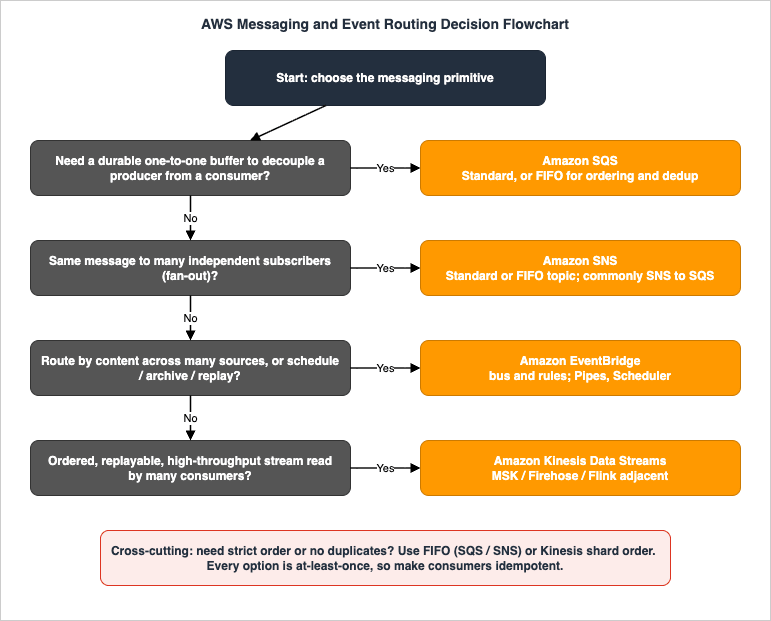
3.1 Question 1: Do you need a durable buffer between one producer and one consumer?
If the requirement is "component A hands work to component B, and B should process it at its own pace, retrying on failure without losing anything," you want a queue: Amazon SQS. The queue absorbs spikes (load-leveling), isolates B's failures from A (A keeps producing while B retries), and delivers each message to exactly one worker in B's consumer group. Choose SQS Standard unless you need strict ordering or exactly-once-style deduplication, in which case choose SQS FIFO (Section 4). If the answer is "many different parties each need this fact," that is not a queue — go to Question 2.3.2 Question 2: Does the same message need to reach many independent subscribers?
If one fact must reach several destinations at once — email and an audit queue and a downstream service — you want fan-out: Amazon SNS. A publisher sends once; SNS delivers a copy to every subscriber. In practice the most durable form is SNS to SQS fan-out: each subscriber is its own SQS queue, so each consumer gets its own buffered, independently retryable copy (Section 8.1). Use SNS FIFO when fan-out must preserve order and avoid duplicates. If, instead of "tell these specific subscribers," the need is "route by what the event is, across many unrelated sources," go to Question 3.3.3 Question 3: Do you need content-based routing, scheduling, or archive and replay?
If events come from many loosely related sources — AWS services, your own applications, SaaS partners — and you want to route each to different targets based on its content, with the producer not knowing who consumes it, you want an event bus: Amazon EventBridge. Its rules match on the event body and route to up to five targets each; subscribers receive only matching events. EventBridge is also the answer when you need schema discovery, archive and replay of past events, point-to-point integration with filtering and enrichment (EventBridge Pipes), or time-based invocation (EventBridge Scheduler). If the events form an ordered, high-volume stream that consumers must replay and process in sequence, go to Question 4.3.4 Question 4: Is it an ordered, replayable, high-throughput stream read by many consumers?
If the data is a continuous, high-rate feed — clickstreams, IoT telemetry, application logs, change records — where order matters, where multiple independent consumers each read the whole feed, and where the ability to replay recent history is essential, you want a stream: Amazon Kinesis Data Streams. Order is preserved per shard (chosen by partition key), the log is re-readable within the retention window, and each consumer reads at its own position. Reach for Amazon MSK instead when you need the Apache Kafka protocol or ecosystem; pair the stream with Amazon Data Firehose to land data in stores, or Managed Service for Apache Flink to process it. If none of these shapes fit — for example you only need a single buffered hand-off — fall back to Question 1; the queue is the simplest tool.3.5 The cross-cutting questions: ordering and idempotency
Two questions cut across all four branches and are easy to forget:- Do you need strict ordering or duplicate suppression? If yes, you are constrained to SQS FIFO / SNS FIFO (ordered within a message group, deduplicated within a 5-minute window) or Kinesis (ordered within a shard), or to a FIFO subscriber on the EventBridge Custom Event Bus (ordered within an event group, deduplicated at publish time within a 5-minute window; Section 6.6). Standard SQS, Standard SNS, and EventBridge rules do not order. Ordering narrows your options before the shape questions in edge cases — answer it early.
- What happens on a duplicate or a retry? Every one of these services delivers at least once under normal operation (FIFO reduces but operational realities still favor defensive design). That means consumers must be idempotent. This is not optional polish; it is the price of using any of these services (Section 9).
4. Amazon SQS
Amazon SQS is a fully managed message queue. A producer callsSendMessage; the message is stored redundantly; a consumer calls ReceiveMessage, processes, and calls DeleteMessage. Until it is deleted (or expires), the message is retained — SQS never silently drops a stored message. There are two queue types, and the choice between them is the first SQS decision.4.1 Standard versus FIFO
Standard queues offer nearly unlimited throughput (a very high number of API calls per second per action), at-least-once delivery, and best-effort ordering. Because the system is massively parallel, a message can occasionally be delivered more than once and messages can arrive out of order. This is the default and the right choice for the large majority of decoupling workloads, where consumers are idempotent and exact order does not matter.FIFO queues (
.fifo suffix, up to 80 characters in the name) add strict ordering within a message group and exactly-once processing by suppressing duplicates within a deduplication interval. The trade is throughput: a FIFO queue handles 300 transactions per second per API action without batching, or up to 3,000 messages per second with batching (10 messages per batch). For higher rates, high throughput mode raises the ceiling substantially by partitioning on the message group; enabling it requires setting the deduplication scope to message group and the throughput limit to per message group ID (Section 9).# Standard queue with a dead-letter queue after 5 failed receives
aws sqs create-queue --queue-name orders-dlq
DLQ_ARN=$(aws sqs get-queue-attributes \
--queue-url "$(aws sqs get-queue-url --queue-name orders-dlq --query QueueUrl --output text)" \
--attribute-names QueueArn --query 'Attributes.QueueArn' --output text)
aws sqs create-queue --queue-name orders \
--attributes "{\"VisibilityTimeout\":\"60\",\"MessageRetentionPeriod\":\"1209600\",\"ReceiveMessageWaitTimeSeconds\":\"20\",\"RedrivePolicy\":\"{\\\"deadLetterTargetArn\\\":\\\"$DLQ_ARN\\\",\\\"maxReceiveCount\\\":\\\"5\\\"}\"}"
# CloudFormation: FIFO queue with content-based deduplication and a DLQ
Resources:
  OrdersDLQ:
    Type: AWS::SQS::Queue
    Properties:
      QueueName: orders.fifo-dlq.fifo
      FifoQueue: true
  OrdersQueue:
    Type: AWS::SQS::Queue
    Properties:
      QueueName: orders.fifo
      FifoQueue: true
      ContentBasedDeduplication: true     # SHA-256 of the body as the dedup ID
      DeduplicationScope: messageGroup     # required for high throughput
      FifoThroughputLimit: perMessageGroupId
      VisibilityTimeout: 60
      RedrivePolicy:
        deadLetterTargetArn: !GetAtt OrdersDLQ.Arn
        maxReceiveCount: 5
4.2 The visibility timeout and in-flight messages
The mechanism that makes a queue safe for competing consumers is the visibility timeout. When a consumer receives a message, it is not deleted — it becomes invisible to other consumers for the duration of the visibility timeout (default 30 seconds, adjustable per queue or per message, maximum 12 hours). The consumer is expected to process and thenDeleteMessage before the timer expires. If it does not — the worker crashed, or the work took too long — the message becomes visible again and another consumer picks it up. This is the heart of at-least-once delivery: nothing is lost, but a slow consumer can cause a redelivery.Messages that have been received but not yet deleted are in flight. A Standard queue allows approximately 120,000 in-flight messages; exceeding it returns an
OverLimit error on further receives until some are deleted. For FIFO queues, the in-flight ceiling is governed by active message groups. Two practical consequences follow:- Set the visibility timeout to match real processing time. Too short and you get duplicate processing as messages reappear mid-flight; too long and a genuinely failed message takes that long to retry. For variable workloads, start conservative and extend programmatically with
ChangeMessageVisibilitywhile a long task runs. - A rising in-flight count is a symptom, not a setting. It usually means consumers are receiving faster than they delete — slow processing, crashes before delete, or a visibility timeout shorter than processing time. Section 10 turns this into a diagnostic.
4.3 Dead-letter queues and redrive
A dead-letter queue (DLQ) is an ordinary SQS queue you designate as the failure destination via a redrive policy with amaxReceiveCount. Each time a message is received and not deleted (the consumer failed), SQS increments its receive count; once it exceeds maxReceiveCount, SQS moves the message to the DLQ instead of redelivering it forever. This converts an infinite retry loop into a bounded one and quarantines "poison" messages — malformed payloads that will never succeed — for inspection. The companion redrive allow policy controls which source queues may use a given queue as their DLQ. When you have diagnosed and fixed the cause, the DLQ redrive feature moves messages back to the source queue for reprocessing. A queue without a DLQ is the single most common production gap in SQS designs (Section 12).4.4 Long polling
ReceiveMessage supports short polling (returns immediately, sampling a subset of servers — it can return empty even when messages exist) and long polling (waits up to ReceiveMessageWaitTimeSeconds, maximum 20 seconds, for a message to arrive, querying all servers). Long polling reduces empty responses and the number of API calls, and is the recommended default. Set the wait time on the queue (ReceiveMessageWaitTimeSeconds) or per request. The other message-size facts worth committing to memory: a payload is up to 1 MiB (the maximum message size was raised from the long-standing 256 KB); for payloads larger than 1 MiB, the Extended Client Library stores the body in Amazon S3 (up to 2 GB) and sends only a reference. Retention is 4 days by default, configurable from 60 seconds to 14 days.5. Amazon SNS
Amazon SNS is fully managed pub/sub. A publisher sends a message to a topic; SNS pushes a copy to every subscription on that topic. The subscribers are independent — they do not poll, they do not see each other, and one slow subscriber does not hold up the others. This is the fan-out primitive.5.1 Subscriber types and the fan-out model
A single topic can deliver to a heterogeneous set of endpoints, which is what makes SNS more than a notification service:- Amazon SQS queues — the durable fan-out target; each queue buffers its own copy (Section 8.1).
- AWS Lambda functions — invoked asynchronously per message.
- HTTP/HTTPS endpoints — your own webhooks or services.
- Email and email-JSON, SMS, and mobile push — application-to-person delivery.
- Amazon Data Firehose — through which SNS can land messages in S3, Redshift, OpenSearch, and other stores.
This split is worth naming: application-to-application (A2A) delivery to SQS, Lambda, HTTP, and Firehose carries your system's internal events; application-to-person (A2P) delivery to email, SMS, and push reaches humans. Many designs use both from the same topic.
5.2 Standard versus FIFO topics, and message filtering
Like SQS, SNS comes in Standard (maximum throughput, best-effort ordering, possible duplicates) and FIFO (strict ordering within a message group, deduplication) flavors. SNS FIFO topics pair naturally with SQS FIFO queues to preserve order through a fan-out.The feature that prevents SNS fan-out from becoming a firehose every subscriber must filter in code is the subscription filter policy. Each subscription can carry a JSON policy that matches against message attributes or the message body; SNS evaluates it before delivery, so a subscriber receives only the subset it cares about. This pushes routing into the managed layer and is supported on both Standard and FIFO topics.
{
  "event_type": ["order_placed", "order_cancelled"],
  "region": ["ap-northeast-1"],
  "amount": [{ "numeric": [">=", 100] }]
}
5.3 Delivery retries and failure handling
SNS does not just try once. Its delivery policy drives a four-phase retry sequence on server-side errors — immediate retry, a pre-backoff phase, an exponential-backoff phase with jitter, and a post-backoff phase — and the retry budget depends on the endpoint:- AWS-managed endpoints (SQS, Lambda) retry up to 100,015 times over 23 days.
- Customer-managed endpoints (SMTP/email, SMS, mobile push) retry up to 50 times over 6 hours.
- HTTP/S endpoints are the only ones that accept a custom delivery policy, with a hard ceiling of 3,600 seconds of total retry time.
After the retries are exhausted, the message is discarded — unless a dead-letter queue is attached to the subscription, in which case the undeliverable message lands there. As with SQS, an SNS subscription without a DLQ silently drops messages it cannot deliver; attaching one is the default for any subscription you cannot afford to lose. SNS payloads are capped at 256 KB (unlike SQS, this limit was not raised), with the Extended Client Library offloading up to 2 GB to S3.
6. Amazon EventBridge
Amazon EventBridge is a serverless event bus. Events — JSON objects describing a change — arrive on a bus; rules evaluate each event and route matches to targets. Where SNS asks the publisher to name the topic its subscribers watch, EventBridge lets producers emit events without knowing who consumes them, and lets consumers subscribe by what the event is. That inversion is why EventBridge is the routing-by-content tool.6.1 Buses, rules, and event pattern matching
Every account has a default event bus that receives events from AWS services. You create custom buses for your own applications and connect partner buses for SaaS sources (so a third party's events flow straight onto your bus). A rule belongs to a bus and is either event-pattern (match on content) or scheduled (legacy — see Scheduler below). An event-pattern rule routes matching events to up to five targets.The pattern is the core mechanic. It mirrors the structure of the event and matches field-by-field; an event matches only if every field named in the pattern matches. Values are always arrays of allowed values, and EventBridge supports content filters (prefix, suffix, numeric ranges,
exists, anything-but, and more):{
"source": ["com.myapp.orders"],
"detail-type": ["OrderPlaced"],
"detail": {
"region": ["ap-northeast-1"],
"amount": [{ "numeric": [">=", 100] }],
"channel": [{ "anything-but": ["test"] }]
}
}
# A custom bus, a rule that matches the pattern above, and an SQS target
aws events create-event-bus --name myapp-bus

aws events put-rule --event-bus-name myapp-bus --name high-value-orders \
  --event-pattern '{"source":["com.myapp.orders"],"detail-type":["OrderPlaced"],"detail":{"amount":[{"numeric":[">=",100]}]}}'

aws events put-targets --event-bus-name myapp-bus --rule high-value-orders \
  --targets "Id"="to-sqs","Arn"="arn:aws:sqs:ap-northeast-1:111122223333:high-value-orders"
6.2 Archive, replay, and the schema registry
Two capabilities set EventBridge apart from SNS for event-driven systems. Archive and replay lets you persist events that match a pattern into an archive and later replay them onto a bus — to recover from a downstream bug, to seed a new consumer with history, or to test. The schema registry discovers and stores the structure of events flowing through a bus (it can infer schemas automatically) and generates code bindings, so producers and consumers can agree on shape. Neither has an equivalent in SQS or SNS, and either one — "I need to reprocess past events" or "I need a contract for event shape" — can be the deciding factor for EventBridge.6.3 EventBridge Pipes — point-to-point with filtering and enrichment
EventBridge Pipes is a distinct capability for point-to-point integration: a single source connected to a single target, with optional filtering, enrichment, and transformation in between, and no glue code. Sources include SQS, Kinesis Data Streams, DynamoDB Streams, Amazon MQ, and Amazon MSK; the filter step means you are charged only for events that match; the enrichment step can call a Lambda function, an API destination, or a Step Functions workflow to augment the event before it reaches the target. A canonical pipe connects an SQS queue to a Step Functions state machine, enriching each order with customer data from an API along the way. Pipes is the right tool when you are wiring one source to one target and would otherwise write a Lambda just to poll, filter, reshape, and forward. The deep patterns — including how Pipes complements an event bus for fan-out — are covered in the EventBridge Pipes and Event-Driven Architecture Patterns guide; this section positions it, and Section 8.3 shows it in a combination.6.4 EventBridge Scheduler — time-based invocation
EventBridge Scheduler is a separate, serverless scheduler for invoking a target at a time or on a recurrence (one-time, cron, or rate), with flexible time windows, configurable retries, and a wide set of target API operations. AWS now recommends Scheduler over the legacy scheduled rules on the event bus, which remain supported but offer fewer features. If your requirement is "run this at 02:00, or every 15 minutes," Scheduler is the modern answer and keeps schedules out of your rule set. For the orchestration of multi-step workflows that schedules often kick off, see the AWS Step Functions Distributed Map Guide.6.5 Quotas worth knowing
EventBridge default quotas include 100 event buses and 300 rules per event bus, withPutEvents throughput (transactions per second) that varies by Region and is adjustable through Service Quotas. API destinations and connections default to 3,000 each. The practical takeaway for the decision: EventBridge scales for routing flexibility and event variety, not for the sustained, ordered, multi-megabyte-per-second throughput that defines a stream — which is exactly the line to Question 4 and Kinesis.6.6 The Custom Event Bus (added September 2026)
On September 24, 2026, EventBridge added a second kind of custom bus. In the console, the bus type is shown as Custom Event Bus for the new bus and Custom Event Bus - Classic for the buses that use rules and targets. The default bus and Sections 6.1 to 6.5 describe the rules-and-targets model. The two products share theevents: IAM namespace and the events.amazonaws.com service principal, and both remain available. This section was verified against the EventBridge User Guide on September 25, 2026.The new bus changes several answers in this guide:
- Routing resource. Consumers create subscribers instead of rules. A subscriber filters events, optionally transforms them, and delivers each match to exactly one target; a rule on a Classic bus can have up to five targets.
- Retention and replay. The bus retains every event for 1 to 365 days. A subscriber can start from a point in the past and can pause and resume without losing events, which takes the place of an archive and replay.
- Ordering. FIFO delivery within an event group, per subscriber. The Classic bus does not offer it.
- Deduplication. At publish time, by content or by a key that you supply, within a 5-minute window.
- Publishing.
PutEventsfor JSON andPutRawEventsfor any format, including Avro and Protobuf. - Cross-account use. The bus is shared with other accounts through AWS RAM, and each consumer account creates and owns its own subscribers on it. A resource policy on the bus is the alternative when you need an explicit
Denyor a condition key.
Where the rest of this guide says that EventBridge does not order, does not deduplicate, or does not retain delivered events, it refers to rules on the default bus and on Custom Event Bus - Classic. What maps from rules to subscribers when you move to the Custom Event Bus, which defaults change (retries, batch delivery, and retention among them), and what stays on Custom Event Bus - Classic are covered in Amazon EventBridge Custom Event Bus and the Classic Bus.
7. Amazon Kinesis Data Streams
Amazon Kinesis Data Streams is a managed, ordered, replayable record log. ProducersPutRecord/PutRecords with a partition key; the key is hashed to assign the record to a shard; within a shard, records are strictly ordered. Consumers read from a position they control and can re-read within the retention window. This is the streaming primitive: order, replay, and many independent readers.7.1 Shards, partition keys, and ordering
A shard is the unit of capacity and the unit of ordering. In provisioned mode each shard supports up to 1 MB/s or 1,000 records/s of writes and 2 MB/s or 2,000 records/s of reads; you add shards to add capacity. The partition key determines which shard a record lands on, and therefore what is ordered relative to what: all records sharing a partition key go to the same shard and are read in order. Choosing the partition key is the central design decision — use an attribute that both distributes load evenly across shards and groups together the records that must stay ordered (for example, partition bycustomer_id so each customer's events are ordered, while load spreads across customers). A poorly chosen key creates a hot shard that throttles while others sit idle (Section 12). This describes the default record distribution (USER_PARTITION_KEY). Since September 23, 2026, an on-demand stream can be switched to service-managed record distribution (AUTO), which ignores the partition key and gives no ordering guarantee; where the rest of this guide ties order to a shard or to the partition key, it refers to the default.7.2 Capacity modes
Kinesis Data Streams offers three capacity modes, and the set has grown recently — verify current details for your Region:- On-demand Standard — automatically scales shard capacity to traffic with no capacity planning. New on-demand streams start at 4 MB/s write and 8 MB/s read and scale up (to 10 GB/s write and 20 GB/s read in the largest Regions; lower elsewhere). Ideal for unpredictable or spiky traffic.
- On-demand Advantage — a newer account-level on-demand mode with proactive warm-up and a lower price point than On-demand Standard (consult the official pricing page), and the only mode that allows up to 50 enhanced fan-out consumers per stream.
- Provisioned — you specify and manage the shard count, best for predictable, steady throughput where you want direct control. Up to 20 enhanced fan-out consumers per stream.
You can switch a stream between capacity modes up to twice in a 24-hour period, so the choice is not permanent.
7.3 Shared throughput versus enhanced fan-out
How consumers read is the other major Kinesis decision. With shared throughput (the classicGetRecords model), all consumers of a shard share its fixed 2 MB/s of read throughput; add a second consumer and they split it, and propagation delay rises (around 200 ms with one consumer, up to around 1,000 ms with five). With enhanced fan-out (EFO), each registered consumer gets its own dedicated 2 MB/s per shard, and records are pushed over an HTTP/2 connection (SubscribeToShard) rather than polled, cutting typical propagation delay to about 70 ms regardless of the number of consumers. EFO is the choice when several consumers need the full feed with low latency; the trade is added cost (a data-retrieval charge) and a registration ceiling of 20 consumers (On-demand Standard/Provisioned) or 50 (On-demand Advantage).import boto3
kinesis = boto3.client("kinesis")
# Producer: partition by customer_id so each customer's records stay ordered
kinesis.put_record(
StreamName="events",
Data=b'{"customer_id":"c-42","type":"page_view","ts":1718500000}',
PartitionKey="c-42",
)
# Register an enhanced fan-out consumer (dedicated 2 MB/s per shard, push delivery)
stream = kinesis.describe_stream_summary(StreamName="events")["StreamDescriptionSummary"]
kinesis.register_stream_consumer(
StreamARN=stream["StreamARN"],
ConsumerName="realtime-fraud",
)
7.4 Retention and replay
A stream retains records for 24 hours by default, extendable up to 365 days (8,760 hours) withIncreaseStreamRetentionPeriod. Within that window, any consumer can start reading from a chosen position — the trim horizon, a timestamp, or a sequence number — which is what makes replay native to Kinesis: a new analytics job can reprocess the last week, or a fixed consumer can rewind after a bug. Retention beyond 24 hours incurs additional charges (see the official pricing). When you need the stream's data landed in a store rather than processed in place, attach Amazon Data Firehose; when you need windowed aggregations or stream SQL, attach Managed Service for Apache Flink; when the requirement is the Kafka API specifically, choose Amazon MSK over Kinesis. These boundaries keep Kinesis Data Streams focused on what it does best: the ordered, replayable transport.8. Combining Services
Production architectures rarely use one primitive in isolation. The official combination patterns below stack the planes — fan-out on top of buffering, routing in front of queues, point-to-point in between — and most real event-driven systems are a composition of two or three of them.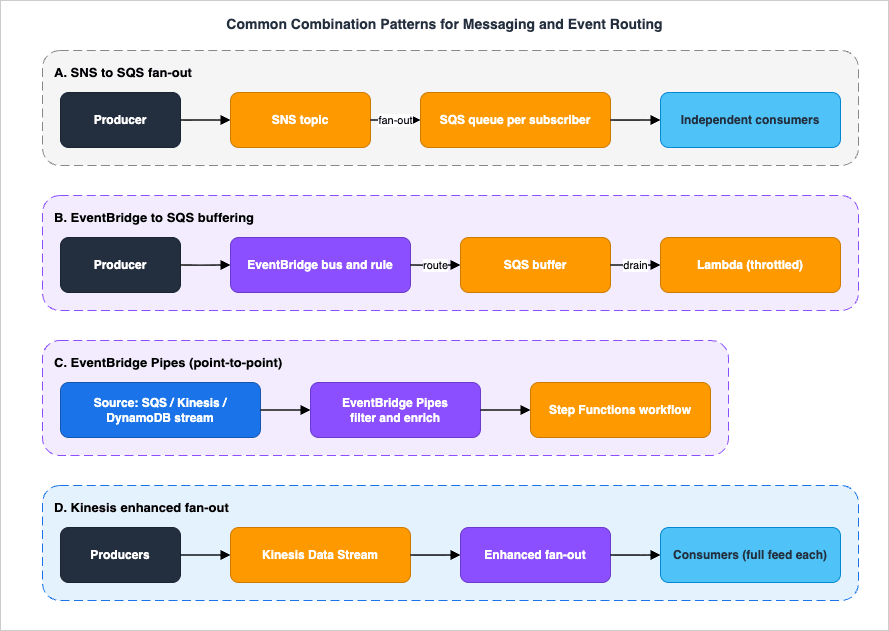
8.1 SNS to SQS fan-out
The most important pattern in AWS messaging: a single SNS topic with several SQS queues subscribed to it. The publisher sends once; SNS pushes a copy to each queue; each consumer drains its own queue at its own pace, retries independently, and has its own DLQ. This combines fan-out (SNS) with durable buffering and independent retry (SQS) — strictly better than subscribing Lambda functions directly to SNS when consumers can be slow or fail, because the queue absorbs bursts and isolates failures. Subscribe with raw message delivery so consumers receive the original payload rather than the SNS envelope, and apply per-subscription filter policies so each queue only receives its subset.Resources:
OrdersTopic:
Type: AWS::SNS::Topic
AnalyticsQueue:
Type: AWS::SQS::Queue
FulfillmentQueue:
Type: AWS::SQS::Queue
AnalyticsSub:
Type: AWS::SNS::Subscription
Properties:
TopicArn: !Ref OrdersTopic
Protocol: sqs
Endpoint: !GetAtt AnalyticsQueue.Arn
RawMessageDelivery: true # deliver the original payload
FulfillmentSub:
Type: AWS::SNS::Subscription
Properties:
TopicArn: !Ref OrdersTopic
Protocol: sqs
Endpoint: !GetAtt FulfillmentQueue.Arn
RawMessageDelivery: true
FilterPolicy: # only fulfilment-relevant events
event_type: ["order_placed"]
8.2 EventBridge to SQS buffering
When an EventBridge rule routes to a target that can be overwhelmed by bursts — a Lambda function with limited concurrency, or a downstream API with a rate limit — put an SQS queue between the rule and the worker. The rule delivers to the queue; the worker drains it at a controlled rate. This adds durability and throttling to event routing: if the worker is down, events accumulate in the queue instead of failing delivery, and the worker catches up when it recovers. The same buffer also gives you a DLQ and a retry budget you control. This pattern — a queue absorbing the difference between a bursty router and a rate-limited consumer — is the event-bus analogue of SNS to SQS.8.3 EventBridge Pipes connecting a source to a workflow
When the requirement is "take items from this queue or stream, filter and enrich them, and start a workflow," EventBridge Pipes replaces the Lambda you would otherwise write. A pipe reads from an SQS queue (or Kinesis stream, or DynamoDB stream), drops non-matching events in the filter step, calls an enrichment Lambda or API to augment each event, and delivers to a Step Functions state machine — all declaratively. Pipes and the event bus complement each other: a pipe can even target an event bus to fan a filtered, enriched stream of events out to many rules. Use Pipes for the one source, one target, with shaping leg, and the bus for the one event, many consumers leg.8.4 EventBridge to SNS or to Kinesis
The planes interconnect in both directions. An EventBridge rule can target an SNS topic (route by content, then fan that subset out to many subscribers) or a Kinesis Data Stream (route selected events into an ordered, replayable stream for analytics). A common shape is EventBridge as the front-door router that classifies heterogeneous events, fanning operational alerts to an SNS topic while teeing a high-volume subset into Kinesis for downstream processing. Choosing where each plane begins — bus for routing, topic for fan-out, queue for buffering, stream for ordered replay — is the whole art, and the flowchart in Section 3 is the guide to it.9. Ordering, Idempotency, and Delivery Guarantees
Three properties — ordering, duplication, and delivery semantics — cut across every service and cause most of the subtle bugs in event-driven systems. Decide them explicitly.9.1 At-least-once is the default everywhere
Under normal operation, SQS Standard, SNS Standard, EventBridge, and Kinesis all deliver at least once: a message or event can be processed more than once. SQS Standard can duplicate because of its distributed nature; a redelivery happens whenever a visibility timeout expires before delete; SNS can deliver twice; EventBridge can invoke a target more than once; a Kinesis consumer that restarts re-reads from its last checkpoint. The correct response is not to fight duplicates but to make consumers idempotent — processing the same message twice produces the same result as processing it once. Common techniques: a deduplication table keyed by a business idempotency key (write conditionally, ignore if present), idempotent upserts, or natural idempotency (setting a value rather than incrementing it). Idempotency is the load-bearing assumption of the entire architecture.9.2 FIFO ordering and deduplication
When order or duplicate suppression is a hard requirement, the FIFO variants provide it within bounds you must understand:- Ordering is per message group, not global. In SQS FIFO and SNS FIFO, the
MessageGroupIddefines an ordered sequence; messages within a group are strictly ordered, while different groups are processed in parallel. Choose the group ID the way you choose a Kinesis partition key — fine-grained enough to spread load (for example, per customer or per entity), coarse enough to keep what must be ordered together. One global group means one ordered, serial pipeline and the lowest throughput. - Deduplication is a 5-minute window. SQS FIFO suppresses a duplicate
SendMessagewithin a 5-minute deduplication interval, identified either by an explicitMessageDeduplicationId(up to 128 characters) or, with content-based deduplication enabled, a SHA-256 hash of the body. A message with a deduplication ID already seen in the window is acknowledged but not delivered again. Note the boundary: this is "exactly-once processing" against retries inside five minutes, not a global dedup over all time — beyond the window, idempotency (Section 9.1) is still your backstop. - High throughput mode raises FIFO's ceiling by partitioning on the message group; it requires the deduplication scope set to message group and the throughput limit set to per message group ID. Changing either setting back reverts the queue to normal throughput.
9.3 Kinesis ordering
Kinesis preserves order within a shard, and the partition key decides which records share a shard. Two consequences: records with the same partition key are always read in order; records with different keys may be read in parallel across shards with no cross-shard order. When a stream reshards (split or merge), sequence numbers continue to increase but the shard topology changes — consumers (the Kinesis Client Library handles this) must finish a parent shard before its children to preserve order across the reshard. As with FIFO message groups, ordering and parallelism trade against each other: more shards (or more partition keys) mean more parallelism and less global order.9.4 A quick reference
| Requirement | SQS | SNS | EventBridge | Kinesis |
|---|---|---|---|---|
| Strict ordering | FIFO (per group) | FIFO (per group) | Rules: not guaranteed; Custom Event Bus: FIFO per subscriber (per event group) | Per shard (by partition key) |
| Duplicate suppression | FIFO (5-min window) | FIFO | Rules: no (idempotency); Custom Event Bus: at publish time (5-min window) | No (idempotency) |
| Default delivery | At-least-once | At-least-once | At-least-once | At-least-once (replayable) |
| Consumer must be idempotent | Yes | Yes | Yes | Yes |
This table names only the unit of each promise. The sentence in which the documentation makes each promise, the conditions under which the documentation says it breaks, and where along the path between services the promise ends are lined up in What Breaks Ordering, Service by Service on AWS.
10. Observability and Diagnostics
You cannot operate what you cannot see. Each service publishes CloudWatch metrics that turn vague symptoms ("messages are slow," "events disappear") into specific diagnoses. Below are the metrics that matter and how to read them.10.1 SQS: is the queue draining?
The single most important SQS metric isApproximateAgeOfOldestMessage — the age of the oldest message still in the queue. A steadily rising age means consumers are not keeping up (or are failing before delete); a flat, low age means healthy drainage. Read it alongside:ApproximateNumberOfMessagesVisible— the backlog waiting to be picked up. Rising backlog plus rising age confirms under-capacity or stuck consumers.ApproximateNumberOfMessagesNotVisible— in-flight messages (received, not yet deleted). If this climbs toward the ~120,000 ceiling, consumers are receiving without deleting — crashes mid-processing, or a visibility timeout shorter than real processing time.NumberOfMessagesSent/NumberOfMessagesReceived/NumberOfMessagesDeleted— a received-far-exceeding-deleted gap signals processing failures or redeliveries.- DLQ depth (
ApproximateNumberOfMessagesVisibleon the DLQ) — any non-zero value is a stack of messages that exhaustedmaxReceiveCount; alarm on it. A growing DLQ is poison messages or a persistent downstream failure.
The classic diagnostic chain: oldest-message age climbs → check whether visible backlog or in-flight count is rising. If in-flight is rising while deletes lag, the consumer is failing or timing out mid-processing — inspect the visibility timeout against actual processing time and look for crashes. If visible backlog is rising while in-flight is normal, you simply lack consumer capacity — scale out.
10.2 SNS: are deliveries succeeding?
SNS publishesNumberOfMessagesPublished, NumberOfNotificationsDelivered, and the diagnostic pair NumberOfNotificationsFailed (deliveries that failed after retries) and NumberOfNotificationsFilteredOut (messages a filter policy excluded — expected, not an error). A rising NumberOfNotificationsFailed points at a broken endpoint (an unreachable HTTP target, a misconfigured queue policy on a subscribed SQS queue, or a Lambda erroring). Confirm a DLQ is attached to the subscription so those failures are captured rather than dropped, and check the DLQ for the actual payloads and delivery-failure context.10.3 EventBridge: are events reaching targets?
EventBridge publishes per-rule metrics:TriggeredRules (rules that matched), Invocations (target invocations attempted), FailedInvocations (target invocations that failed permanently), ThrottledRules (rules throttled against quota), and DeadLetterInvocations (events sent to a rule's DLQ after exhausting retries). The first thing to check when "an event didn't fire a target" is whether TriggeredRules even incremented — if not, the event pattern did not match, which is a pattern bug, not a delivery bug (test the pattern against a sample event, and watch for the array-of-values requirement). If TriggeredRules fired but FailedInvocations rose, the target rejected the event (permissions, a target-side error); configure a rule DLQ so those events are retained in DeadLetterInvocations rather than lost. ThrottledRules indicates you are hitting a quota — request an increase or smooth the input rate.10.4 Kinesis: are consumers keeping up?
The defining Kinesis metric isGetRecords.IteratorAgeMilliseconds (or SubscribeToShard.MillisBehindLatest for EFO) — how far behind the tip of the stream a consumer is reading. A rising iterator age means the consumer is falling behind and will eventually hit the retention edge and lose data if it cannot catch up; it is the stream equivalent of SQS's oldest-message age. Pair it with:WriteProvisionedThroughputExceeded— producers being throttled, usually a hot shard from a skewed partition key (a few keys taking most traffic) rather than genuine global over-capacity. Diagnose by checking whether throttling concentrates on specific shards; fix by improving partition-key distribution or resharding.ReadProvisionedThroughputExceeded— consumers exceeding the shared 2 MB/s per shard; the fix is enhanced fan-out (dedicated throughput) or fewer/faster consumers.IncomingBytes/IncomingRecords— load trend, to anticipate scaling (or, in provisioned mode, resharding).
A rising iterator age with healthy write metrics means the consumer is too slow or under-parallelized; a rising iterator age with read throttling means you need EFO or more read capacity.
11. End-to-End Architecture Walkthrough
To see how the planes combine in one realistic system, walk an order-processing pipeline end to end. A public API ingests orders, the events are routed by content, buffered for resilience, processed asynchronously, and a high-volume analytics copy is teed into a stream — with failures isolated at every hop.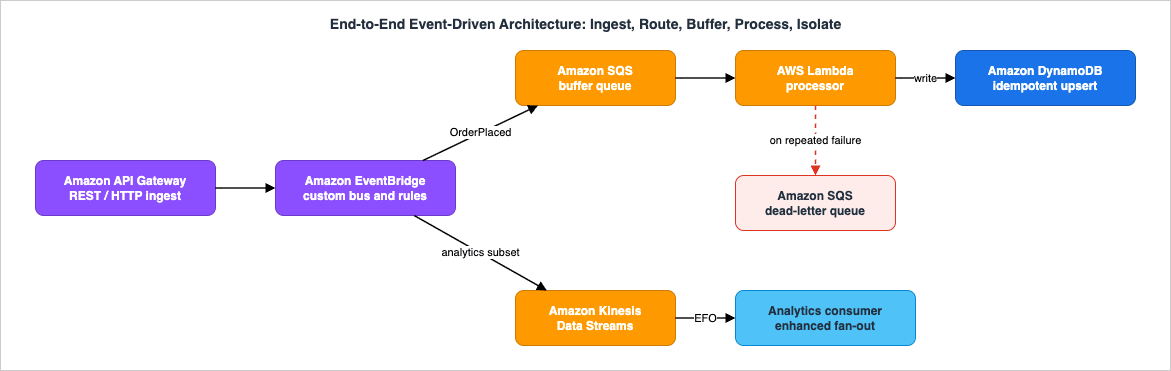
11.1 The flow, hop by hop
- Ingest — Amazon API Gateway. A client POSTs an order. API Gateway can integrate directly with EventBridge (a service integration that calls
PutEvents), so the order becomes an event on a custom bus without a Lambda in the ingest path. The API responds immediately; processing is asynchronous from here. - Route — Amazon EventBridge. The order event lands on the custom bus. One rule matches
detail-type: OrderPlacedand routes to the processing path; a second rule matches a high-volume subset (say, all order events for analytics) and routes to the stream. Routing is by content, and the producer (API Gateway) does not know about either consumer. - Buffer — Amazon SQS. The processing rule targets an SQS queue rather than the Lambda directly. The queue absorbs spikes (a flash sale), throttles delivery to the Lambda's concurrency, and — crucially — gives the work a DLQ and a retry budget. If the processor is briefly down, orders queue up rather than failing.
- Process — AWS Lambda to Amazon DynamoDB. The Lambda drains the queue and writes each order to DynamoDB with an idempotent conditional write keyed by order ID, so a redelivered message (at-least-once) does not create a duplicate order. On success it deletes the message; on repeated failure the message exhausts
maxReceiveCountand moves to the DLQ for inspection — isolating poison messages from healthy traffic. - Stream — Amazon Kinesis Data Streams. The analytics rule tees order events into a stream, partitioned by
customer_idso each customer's events stay ordered. A downstream analytics consumer reads via enhanced fan-out for low latency, and because the stream retains records, the analytics job can replay the last hours after a deployment without touching the transactional path.
11.2 Where it fails, and what you watch
Each hop has a failure mode and a metric:- API Gateway to EventBridge can throttle if
PutEventsexceeds the Region's TPS quota — watchThrottledRulesand the account's PutEvents throttling, and request an increase if sustained. - EventBridge rule to SQS fails silently if the rule's IAM permissions or the pattern are wrong — the tell is
TriggeredRulesnot incrementing (pattern miss) versusFailedInvocationsrising (delivery/permission error). A rule DLQ captures the latter. - SQS to Lambda backs up if the processor is slow or failing —
ApproximateAgeOfOldestMessageand the DLQ depth are the alarms; rising in-flight points at timeouts or crashes mid-processing. - Kinesis consumer falling behind shows as a rising
GetRecords.IteratorAgeMilliseconds; a skewedcustomer_iddistribution shows asWriteProvisionedThroughputExceededon a hot shard.
The design's resilience comes from the separation of planes: routing (EventBridge) is independent of buffering (SQS), which is independent of processing (Lambda), which is independent of the analytics stream (Kinesis). A failure or slowdown in one plane is absorbed by the buffer in front of it rather than cascading. That separation — not any single service — is what makes the architecture robust, and it is the practical payoff of choosing each primitive deliberately.
12. Common Pitfalls
The mistakes below recur across reviews and incidents. Each is a symptom of choosing or operating a primitive without matching it to the requirement.- Using SQS Standard where ordering or deduplication was actually required. Standard queues do not order and can duplicate. If the requirement is "process these strictly in sequence" or "never act on a duplicate," you need FIFO (with a sensible message group) plus idempotent consumers — discovering this in production means reworking the consumer.
- Shipping a queue or subscription without a DLQ. Without a DLQ and a
maxReceiveCount, a poison message redelivers forever (SQS) or a failed delivery is silently dropped (SNS subscription, EventBridge rule). Always pair a queue with a DLQ, attach a DLQ to SNS subscriptions and EventBridge rules you cannot afford to lose, and alarm on DLQ depth. - Using EventBridge as a high-throughput stream. EventBridge is built for flexible, content-based routing of varied events, not sustained, ordered, multi-megabyte-per-second throughput with replay. Pushing a firehose of homogeneous records through it hits quotas and misses the ordering and replay you actually wanted — that is Kinesis's job (Question 4).
- Using a single SQS queue where fan-out was needed. A queue delivers each message to one consumer. If several independent systems each need every message, one queue cannot do it — you need SNS (or EventBridge) fan-out, typically SNS to SQS so each consumer keeps its own buffer.
- Subscribing Lambda directly to SNS for work that can fail or burst. Direct SNS-to-Lambda has no buffer: a burst can throttle the function and a failure relies solely on SNS retries. Putting an SQS queue between SNS and the consumer (Section 8.1) adds buffering, independent retry, and a DLQ.
- A skewed Kinesis partition key (hot shard). Partitioning by a low-cardinality or skewed key sends most records to one shard, which throttles (
WriteProvisionedThroughputExceeded) while other shards idle. Choose a key that distributes evenly and groups what must stay ordered. - A visibility timeout that does not match processing time. Too short causes duplicate processing as messages reappear mid-flight; too long delays retries of genuine failures. Set it to your real processing time and extend programmatically for long tasks.
- Forgetting idempotency. Because every option is at-least-once, a consumer that is not idempotent will eventually double-process. This is the most common root cause of "mystery duplicate" bugs and the cheapest to prevent up front.
13. Frequently Asked Questions
Q. SQS vs SNS vs EventBridge — is there a quick rule?A. Yes. SQS when one consumer group should pull and process work at its own pace (decoupling and buffering). SNS when the same message must be pushed to many subscribers at once (fan-out). EventBridge when events from many sources must be routed by their content to different targets, or you need filtering, schema discovery, archive/replay, or scheduling. The shape of the delivery — one-to-one buffer, one-to-many copies, or many-to-many by content — is the deciding factor.
Q. When do I need Kinesis instead of SQS?
A. When you need an ordered, replayable record log read by multiple independent consumers, at high throughput. SQS delivers each message to one consumer and deletes it after processing — no ordering across the queue, no replay, no second reader. Kinesis keeps an ordered (per shard) log that several consumers each read in full and can re-read within the retention window. If you only need a single buffered hand-off, SQS is simpler; if you need order, replay, and fan-out reads, use Kinesis.
Q. How do I fan out one message to multiple consumers?
A. Publish to an SNS topic and subscribe each consumer. For durability and independent retry, use SNS to SQS fan-out: subscribe an SQS queue per consumer (with raw message delivery and per-subscription filter policies). EventBridge is the alternative when consumers should subscribe by event content rather than by being named subscribers. For many consumers that each need the whole ordered stream, Kinesis with enhanced fan-out is the streaming form of fan-out.
Q. SNS FIFO or EventBridge for ordered routing?
A. SNS FIFO preserves order within a message group across a fan-out to subscribers you name (typically SQS FIFO queues). EventBridge rules do not guarantee ordering, but they route by content across many sources, and EventBridge offers archive/replay and schema discovery. Since September 2026, a FIFO subscriber on the EventBridge Custom Event Bus delivers in order within an event group (Section 6.6). If your need is "ordered fan-out to known subscribers," use SNS FIFO; if it is "route by content with filtering and replay," use EventBridge and design consumers to tolerate reordering.
Q. When should I use EventBridge Pipes instead of a rule or a Lambda?
A. Use Pipes for point-to-point integration: one source (SQS, Kinesis, DynamoDB stream, MQ, MSK) to one target, with optional filtering, enrichment, and transformation, when you would otherwise write a Lambda just to poll, filter, reshape, and forward. Use an event-bus rule when one event should fan out to several targets by content. The two compose — a pipe can target a bus. See the EventBridge Pipes patterns guide.
Q. Do these services guarantee exactly-once delivery?
A. No service guarantees exactly-once delivery. SQS FIFO guarantees exactly-once processing against retries within a 5-minute deduplication window; everything else is at-least-once. The durable answer is idempotent consumers so reprocessing the same message is harmless — treat at-least-once as the contract and design for it.
Q. Should I put a queue between EventBridge and my Lambda?
A. Often, yes. If the Lambda has limited concurrency or calls a rate-limited downstream, an SQS buffer between the rule and the function absorbs bursts, throttles delivery, and gives you a DLQ and a retry budget you control (Section 8.2). For low-volume, spiky-but-tolerant targets, a direct rule-to-Lambda target with a rule DLQ is simpler.
Q. How do I choose a Kinesis partition key or an SQS FIFO message group ID?
A. The same way for both: pick an attribute that distributes load evenly across shards/partitions and groups together the records that must stay ordered. Partition or group by an entity such as
customer_id so each entity's events are ordered while load spreads across entities. A single global key/group serializes everything and caps throughput; an over-fine key/group loses the ordering you needed.14. Summary
The growth of AWS's producer-to-consumer options turned "how do I send this?" into a genuine design decision. The way through is one ordered set of questions:- What shape is the delivery? One-to-one buffer → SQS; one-to-many copies → SNS; many-to-many by content → EventBridge; ordered, replayable log read by many → Kinesis.
- Do you need ordering or deduplication? If so, SQS FIFO / SNS FIFO (per message group, 5-minute dedup), Kinesis (per shard), or a FIFO subscriber on the EventBridge Custom Event Bus (per event group) — and idempotent consumers regardless.
- Do you need filtering, schema discovery, archive/replay, or scheduling? That is EventBridge (with Pipes for point-to-point and Scheduler for time-based).
- How do the pieces combine? Fan-out on buffers (SNS to SQS), buffers in front of routers (EventBridge to SQS), point-to-point with shaping (Pipes), and ordered tees into a stream (EventBridge to Kinesis).
- How do you operate it? Watch
ApproximateAgeOfOldestMessage(SQS),NumberOfNotificationsFailed(SNS),FailedInvocations/DeadLetterInvocations(EventBridge), andGetRecords.IteratorAgeMilliseconds(Kinesis); put a DLQ on everything you cannot lose.
Then remember that real systems combine these planes, and that the resilience comes from keeping them separate — routing, buffering, processing, and streaming each absorbing the others' bursts and failures. For the patterns built on Pipes, continue with the EventBridge Pipes and Event-Driven Architecture Patterns guide; for orchestrating the workflows these events trigger, the AWS Step Functions Distributed Map Guide; for the API front door that ingests them, the Amazon API Gateway Decision Guide; and for the Lambda consumers that process them, the AWS Lambda Concurrency and Scaling Guide. For when each capability launched, the timelines for Amazon SQS, Amazon SNS, and Amazon EventBridge trace the evolution of this part of AWS.
15. References
- Amazon SQS, Amazon SNS, or Amazon EventBridge? - AWS Decision Guide
- Amazon SQS quotas - Amazon SQS Developer Guide
- Amazon SQS visibility timeout - Amazon SQS Developer Guide
- Exactly-once processing in Amazon SQS - Amazon SQS Developer Guide
- Enabling high throughput for FIFO queues in Amazon SQS - Amazon SQS Developer Guide
- Amazon SNS message delivery retries - Amazon SNS Developer Guide
- Amazon SNS message filtering - Amazon SNS Developer Guide
- Event bus concepts in Amazon EventBridge - Amazon EventBridge User Guide
- What is the EventBridge Custom Event Bus? - Amazon EventBridge User Guide
- Sharing a Custom Event Bus with other accounts - Amazon EventBridge User Guide
- Amazon EventBridge Pipes - Amazon EventBridge User Guide
- What is Amazon EventBridge Scheduler? - EventBridge Scheduler User Guide
- Amazon EventBridge quotas - Amazon EventBridge User Guide
- Develop enhanced fan-out consumers with dedicated throughput - Amazon Kinesis Data Streams Developer Guide
- Quotas and limits - Amazon Kinesis Data Streams Developer Guide
- Choose the right mode to stream in - Amazon Kinesis Data Streams Developer Guide
- Changing the data retention period - Amazon Kinesis Data Streams Developer Guide
- Choosing between messaging services for serverless applications - AWS Compute Blog
- Building resilient serverless patterns by combining messaging services - AWS Compute Blog
Related Articles
- EventBridge Pipes and Event-Driven Architecture Patterns
The deep dive on point-to-point integration with filtering and enrichment — the delegation target for Section 6.3 and 8.3. - AWS Step Functions Distributed Map Guide
The orchestration side of event-driven design, for the workflows these events trigger. - Amazon API Gateway Decision Guide
The API front door that ingests events into this architecture. - AWS Lambda Concurrency and Scaling Guide
How the Lambda consumers behind these queues and streams scale and throttle. - AWS History and Timeline regarding Amazon SQS
When each SQS capability launched. - AWS History and Timeline regarding Amazon EventBridge
The evolution of the event bus.
References:
Tech Blog with curated related content
Written by Hidekazu Konishi