Amazon API Gateway Decision Guide - REST, HTTP, and WebSocket APIs and Integration Patterns
First Published:
Last Updated:
This guide is a decision hub for that whole problem. It does not re-teach every screen of the console; instead it gives you one framework for choosing the API type, then a second for choosing authorization, then a third for choosing integrations, and finally a path for migrating between them. AWS publishes an official feature table that compares REST APIs and HTTP APIs, and this guide deliberately does not duplicate it — that table is linked in the References. What you get here is the reasoning around it: the WebSocket option the table omits, the internal mechanics of each authorizer, the integration patterns that actually wire your backend, and the failure modes you will meet in production.
For the history of how these capabilities arrived, see the AWS History and Timeline regarding Amazon API Gateway. For deep dives that this guide hands off to, see the MCP Server on AWS Lambda Complete Guide for Lambda-backed APIs, the Amazon Cognito Federation Complete Implementation Guide for identity-provider details, and AWS WAF for Generative AI for web-ACL design. For the longer lineage that REST and HTTP APIs sit inside, see API Design Paradigms History and Timeline.
Scope and cost note. This is a decision and mechanics guide, not a pricing guide. The three API types differ in cost characteristics, and those differences matter to a real design — but prices change frequently and vary by Region, so this article describes cost only qualitatively and links to the official pricing page. Every quota and limit cited below was verified against AWS documentation at the time of writing; always confirm current values in the Service Quotas console for your account and Region.
1. Introduction
A modern API on AWS forces four sequential decisions, and getting the order right keeps you out of expensive rework:- Which API type? Do you need bidirectional real-time messaging (WebSocket), the full management surface of REST APIs, or the lean, low-latency HTTP APIs?
- Which authorization? IAM (SigV4), Amazon Cognito, a JWT authorizer, a Lambda authorizer, or mutual TLS — each has different reach across the three types and different internal behavior.
- Which integration? Lambda proxy, a custom (non-proxy) integration with mapping templates, a direct AWS-service integration, an HTTP integration, a mock, or a private integration through a VPC Link.
- How do I migrate? REST APIs and HTTP APIs are different products under one service, so moving from one to the other is a project, not a flag.
These decisions are coupled. The API type constrains the authorization options; the authorization choice shapes the integration's request context; the integration pattern dictates your error modes and your latency floor. This guide walks them in order: the entry (sections 2–3) compresses the selection into a flowchart, and the body (sections 4–13) goes deep on each type's internals, the authorizers, the integrations, throttling, observability, migration, and the production pitfalls. Section 12 ties everything together in an end-to-end architecture.
What this guide intentionally delegates: the history of API Gateway features (to the timeline article), the identity-provider specifics of Cognito federation (to the Cognito guide), web-ACL rule design (to the WAF guide), and the messaging backends behind asynchronous integrations (to the messaging decision guide). Those are linked where they intersect a decision.
2. The Three API Types at a Glance
Before the flowchart, put all three options on one axis. The deepest divide is what kind of communication the API models: REST APIs and HTTP APIs are both request-response RESTful products, while WebSocket APIs maintain a stateful, two-way connection. Among the two RESTful products, REST APIs carry a much larger feature set, and HTTP APIs are a deliberately minimal redesign optimized for latency and simplicity.The table below summarizes the practical attributes that drive selection. It is sortable in the browser.
* You can sort the table by clicking on the column name.
| Attribute | REST API | HTTP API | WebSocket API |
|---|---|---|---|
| Communication model | Request-response | Request-response | Bidirectional, stateful |
| Underlying protocol | HTTPS | HTTPS | WSS (WebSocket) |
| Relative latency / surface | Largest feature set | Lowest latency, minimal features | Persistent connection |
| Endpoint types | Edge-optimized, Regional, private | Regional only | Regional |
| API keys / usage plans | Yes | No | No |
| AWS WAF (direct) | Yes | No (front with CloudFront) | No |
| Resource policy / private endpoint | Yes | No | No |
| JWT authorizer | No (use Lambda authorizer) | Yes | No |
| IAM / Lambda authorizer | Yes / Yes | Yes / Yes | Yes (on $connect) |
| Mutual TLS | Yes | Yes | No |
| Request validation / body transform | Yes | No (parameter mapping only) | No |
| Execution logs / X-Ray | Yes | No (metrics + access logs) | Access logs |
| Best fit | Rich management, public APIs needing WAF/keys | Lean Lambda/HTTP proxies, JWT-secured | Chat, live dashboards, streaming updates |
Three attributes decide most cases:
- Management surface. API keys, usage plans, per-client throttling, request validation, AWS WAF, resource policies, and private endpoints live on REST APIs. If your requirement names any of those, you are choosing REST.
- Authorization shape. A native JWT authorizer — validating an OIDC/OAuth 2.0 token without writing code — exists only on HTTP APIs. On REST APIs you reach the same outcome with a Cognito authorizer or a Lambda authorizer.
- Direction. Only WebSocket APIs let the server push to the client. If the backend must initiate messages (notifications, presence, live feeds), nothing else in this list qualifies.
Everything below turns these attributes into a step-by-step decision and then into per-type mechanics.
3. The Decision Flowchart
The flowchart below is the heart of the selection. Walk it top to bottom; each question is ordered so the most decisive distinction comes first.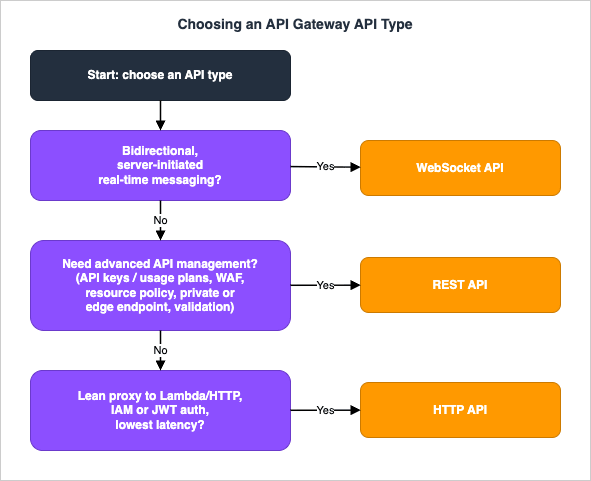
- Do you need bidirectional, server-initiated messaging? If the backend must push data to connected clients — chat, collaborative editing, live scores, market data, IoT command channels — choose a WebSocket API. None of the request-response options can initiate a message to the client.
- Do you need advanced API management or edge/private networking? If you need API keys and usage plans, per-client rate limiting, request validation, AWS WAF attached directly, resource policies, an edge-optimized endpoint, or a fully private endpoint reachable only from a VPC, choose a REST API. These features have no equivalent on HTTP APIs.
- Otherwise, prefer the lean option. If you mainly proxy to Lambda or an HTTP backend, want the lowest added latency, and your authorization is IAM or an OIDC/OAuth JWT, choose an HTTP API.
Two refinements keep this honest. First, the questions are about requirements, not preferences — "it would be nice to have WAF later" is not the same as needing it now, and you can front an HTTP API with Amazon CloudFront and attach WAF there if edge protection is the only gap. Second, the three types are not mutually exclusive in one system: a single product often exposes an HTTP API for its CRUD surface and a WebSocket API for its live channel, sharing the same Lambda and DynamoDB backend.
A concrete shape makes that tangible. An e-commerce platform might expose its product catalog and shopping cart through an HTTP API (high volume, simple Lambda proxies, JWT-secured, chosen for low latency and cost), push live order-status and delivery updates over a WebSocket API, and serve its partner and admin surface through a REST API that needs API keys, usage-plan tiers, AWS WAF, and a private endpoint. All three can share one Cognito user pool, one DynamoDB table, and one set of Lambda functions. Choosing per surface — rather than forcing the whole system onto one type — is usually the right call once an application grows past a single API.
4. REST APIs in Depth
A REST API models your interface as a tree of resources (path segments) each carrying methods (HTTP verbs). A request flows through four configurable stages: the method request (authorization, validation, and the parameters API Gateway accepts), the integration request (how API Gateway calls the backend), the integration response (how it maps the backend's reply), and the method response (what the client finally sees). Proxy integrations collapse the two middle stages; custom integrations let you shape each one with mapping templates (section 8).You publish a snapshot of the configuration to a stage by creating a deployment. Stages (such as
dev, test, prod) carry their own variables, throttling, caching, and logging settings, and REST APIs support user-controlled deployments and canary releases that shift a percentage of traffic to a new deployment before promoting it.4.1 What only REST APIs give you
The reason to accept the slightly higher latency and price of REST APIs is the management surface:- API keys and usage plans — issue keys to clients and bind them to a usage plan that enforces a throttling rate, a burst, and a request quota per day/week/month. This is the standard way to expose a tiered, multi-tenant API. (See section 9 for how the throttling math works.)
- Request validation — reject malformed requests at the gateway, before they reach the backend, by validating required parameters and the body against a JSON Schema model.
- AWS WAF — associate a web ACL directly with a REST API stage to filter SQL injection, cross-site scripting, rate-based floods, and bot traffic. (Rule design is covered in the AWS WAF for Generative AI guide.)
- Resource policies — attach an IAM-style policy to the API itself to allow or deny by source VPC, VPC endpoint, source IP, or AWS account. This is how you lock a private API to specific callers.
- Caching — enable a dedicated stage cache with a default TTL of 300 seconds, configurable between 0 and 3600 seconds, with a per-item response cap of about 1 MB.
4.2 Endpoint types
REST APIs are the only type that offers all three endpoint types, and the choice affects routing, latency, and reachability:- Edge-optimized (the historical default for REST) fronts the API with an Amazon CloudFront distribution so clients connect at the nearest point of presence. Best for geographically dispersed public clients. The integration timeout for edge-optimized APIs is fixed and cannot be raised.
- Regional serves directly from the Region. Best when callers are in the same Region (or you want to put your own CloudFront distribution in front and control caching and WAF yourself).
- Private is reachable only from within a VPC through an interface VPC endpoint powered by AWS PrivateLink, gated by a resource policy. This is the building block for internal-only APIs with no public exposure.
A minimal Regional REST API with a Lambda proxy integration, created with the AWS CLI:
# Create the API as a Regional endpoint
api_id=$(aws apigateway create-rest-api \
  --name "orders-api" \
  --endpoint-configuration types=REGIONAL \
  --query 'id' --output text)

# Get the root resource id, then add /orders
root_id=$(aws apigateway get-resources --rest-api-id "$api_id" \
  --query 'items[?path==`/`].id' --output text)

res_id=$(aws apigateway create-resource --rest-api-id "$api_id" \
  --parent-id "$root_id" --path-part orders \
  --query 'id' --output text)

# ANY method with a Lambda proxy integration
aws apigateway put-method --rest-api-id "$api_id" --resource-id "$res_id" \
  --http-method ANY --authorization-type NONE

aws apigateway put-integration --rest-api-id "$api_id" --resource-id "$res_id" \
  --http-method ANY --type AWS_PROXY --integration-http-method POST \
  --uri "arn:aws:apigateway:ap-northeast-1:lambda:path/2015-03-31/functions/arn:aws:lambda:ap-northeast-1:111122223333:function:orders/invocations"

# Deploy to a stage
aws apigateway create-deployment --rest-api-id "$api_id" --stage-name prod{proxy+} paths), 10 stages per API, 10 authorizers per API, and a 10 MB request payload limit. Confirm current values for your account before committing to a structure.4.3 Resource policies and request validation
Two REST-only controls deserve a concrete look because they are how you harden a serious API. A resource policy is an IAM-style document attached to the API that API Gateway evaluates alongside any identity-based authorization. The classic use is locking a private API to a single VPC endpoint, denying everything else even before an authorizer runs:{
"Version": "2012-10-17",
"Statement": [
{
"Effect": "Allow",
"Principal": "*",
"Action": "execute-api:Invoke",
"Resource": "arn:aws:execute-api:ap-northeast-1:111122223333:abcd1234/*"
},
{
"Effect": "Deny",
"Principal": "*",
"Action": "execute-api:Invoke",
"Resource": "arn:aws:execute-api:ap-northeast-1:111122223333:abcd1234/*",
"Condition": {
"StringNotEquals": { "aws:SourceVpce": "vpce-0a1b2c3d4e5f6a7b8" }
}
}
]
}Deny with the aws:SourceVpce condition is what makes the API truly private: a request arriving through any other path is denied regardless of its credentials. Request validation is the second control. You attach a JSON Schema model to a method and turn on a validator that checks required query/header parameters and the body shape, so malformed requests are rejected at the gateway with a 400 before they ever reach (and bill) your backend. Neither control exists on HTTP APIs, which is one of the most common reasons a security-sensitive API stays on REST.5. HTTP APIs in Depth
HTTP APIs are a ground-up redesign that AWS made generally available in 2020 to deliver lower latency and lower cost than REST APIs for the common case: proxying to Lambda or an HTTP backend with OIDC/OAuth authorization. They drop most of the REST management surface in exchange for a smaller, faster runtime.Structurally, HTTP APIs are simpler. Instead of the resource-and-method tree with four configurable stages, you define routes of the form
METHOD /path (for example GET /orders/{id}, or the catch-all $default) and attach an integration to each. There is no integration-response/method-response mapping layer; you can shape headers and query strings with lightweight parameter mapping, but there is no Velocity Template Language (VTL) body transformation and no request validation. HTTP APIs also support automatic deployments, so changes go live on a stage without an explicit deploy step (you can disable this for controlled releases).5.1 The JWT authorizer
The signature feature of HTTP APIs is the built-in JWT authorizer, which validates OpenID Connect / OAuth 2.0 access tokens with no code. You point it at an issuer and an audience, and API Gateway does the rest. Its internal verification flow (section 7 covers the decision among authorizers) is:- Extract the token from the configured
identitySource(typically theAuthorizationheader, with or without theBearerprefix). - Decode the token.
- Verify the algorithm and signature using the public key fetched from the issuer's
jwks_uri. Only RSA-based algorithms are supported, and API Gateway caches the public key for up to two hours — so when you rotate signing keys, keep the old and new keys both valid for a grace period. The developer guide does not say which RSA-based values this covers; JWT Signing Algorithms on AWS Endpoints lines the developer guide's sentence up against thealgvalues that other AWS JWT receivers list. - Validate claims: the
kidmust match a key in the JWKS;issmust match the configured issuer;aud(orclient_idwhenaudis absent) must match a configured audience;exp,nbf, andiatmust be consistent with the current time; and if the route declares scopes, the token must carry at least one of them.
On success, API Gateway forwards the token claims to the integration. A Lambda integration reads them from the event, for example
event.requestContext.authorizer.jwt.claims.sub. Because Amazon Cognito user pools issue standard OIDC tokens, "Cognito on an HTTP API" is simply a JWT authorizer pointed at the user pool — there is no separate Cognito authorizer type on HTTP APIs.A SAM template for an HTTP API with a JWT authorizer and a Lambda integration:
AWSTemplateFormatVersion: '2010-09-09'
Transform: AWS::Serverless-2016-10-31
Resources:
  OrdersHttpApi:
    Type: AWS::Serverless::HttpApi
    Properties:
      Auth:
        Authorizers:
          CognitoJwt:
            IdentitySource: "$request.header.Authorization"
            JwtConfiguration:
              issuer: "https://cognito-idp.ap-northeast-1.amazonaws.com/ap-northeast-1_abcd1234"
              audience:
                - "5xxxxexampleclientid"
        DefaultAuthorizer: CognitoJwt
  OrdersFunction:
    Type: AWS::Serverless::Function
    Properties:
      Runtime: python3.12
      Handler: app.handler
      Events:
        GetOrders:
          Type: HttpApi
          Properties:
            ApiId: !Ref OrdersHttpApi
            Method: GET
Path: /orders5.2 CORS, IAM authorization, and parameter mapping
HTTP APIs make a few everyday tasks noticeably simpler than REST. CORS is configured declaratively on the API rather than wired as anOPTIONS method per resource — you set the allowed origins, methods, and headers once and API Gateway answers preflight requests for you:aws apigatewayv2 update-api --api-id aabbccddee \
--cors-configuration \
AllowOrigins="https://app.example.com",AllowMethods="GET,POST,OPTIONS",AllowHeaders="authorization,content-type",MaxAge=300AWS_IAM and callers sign requests with SigV4, exactly as on REST APIs. Where HTTP APIs are deliberately leaner is transformation: there is no VTL and no request body transformation, only parameter mapping that copies, overwrites, or removes individual request and response headers and query-string parameters (for example, injecting a fixed header before forwarding to the integration). If your reshaping needs go beyond header and query manipulation — rewriting a body, merging fields, conditional mapping — that work belongs in the backend function or on a REST API. This is the trade you accept for the lower latency.6. WebSocket APIs in Depth
A WebSocket API is a stateful front end. The client opens a persistent connection, and from then on either side can send messages; API Gateway maintains the connection and routes inbound messages to backends based on their content.6.1 Routes and the route selection expression
Routing is driven by a route selection expression defined at the API level, evaluated against each inbound JSON message. The expression is usually a JSONPath such as$request.body.action. There are three predefined routes plus any custom routes you add:$connect— invoked when a client initiates the connection. This is where you authenticate (IAM or a Lambda authorizer attach to$connect), persist theconnectionId, and accept or reject the handshake.$disconnect— invoked on a best-effort basis when either side disconnects; use it to clean up the storedconnectionId. It is not guaranteed to run, so treat stored connections as potentially stale.$default— invoked when the evaluated route key matches no custom route, or when the message is not valid JSON.- Custom routes (for example
sendMessage,join) — selected when the evaluated expression equals the route key exactly.
For an inbound message like
{"action":"sendMessage","data":"hi"} with a route selection expression of $request.body.action, API Gateway evaluates sendMessage and invokes the integration on the sendMessage route; if no such route exists and a $default route is defined, it uses $default; if neither matches, it returns an error.6.2 Sending data back: route responses and the @connections API
There are two ways the backend returns data to clients:- Route responses — the integration's reply is returned to the calling client on the same connection (two-way mode).
- The
@connectionscallback API — a backend (often a separate Lambda triggered by an event) sends a message to any connected client out of band. You call it with SigV4-signed HTTP requests tohttps://{api-id}.execute-api.{region}.amazonaws.com/{stage}/@connections/{connection_id}:POSTto send a message,GETto fetch connection status,DELETEto disconnect. This is what powers server-initiated pushes — a notification service storesconnectionIds in DynamoDB and posts to each one when an event arrives.
A Lambda that fans a message out to a stored connection using the Management API:
import boto3

def push(event, context):
    domain = event["requestContext"]["domainName"]
    stage = event["requestContext"]["stage"]
    connection_id = event["requestContext"]["connectionId"]

    client = boto3.client(
        "apigatewaymanagementapi",
        endpoint_url=f"https://{domain}/{stage}",
    )
    client.post_to_connection(
        ConnectionId=connection_id,
        Data=b'{"type":"update","payload":"hello"}',
    )
    return {"statusCode": 200}
6.3 Connection lifecycle and limits
Two limits shape every WebSocket design. A connection is closed when the client is idle for 10 minutes, and every connection has a maximum lifetime of 2 hours. Long-lived clients must therefore reconnect transparently, and your$connect/$disconnect handlers must tolerate churn. WebSocket APIs also do not support binary media types (close code 1003) — design around text/JSON frames. Because $disconnect is best-effort, a robust design periodically prunes stale connectionIds rather than trusting that cleanup always fired.6.4 Creating the API and persisting connections
A WebSocket API is created with theapigatewayv2 API family, and the route selection expression is set at creation time:aws apigatewayv2 create-api \
--name orders-ws \
--protocol-type WEBSOCKET \
--route-selection-expression '$request.body.action'$connect handler records the connectionId (and any session context, such as the authenticated user) so that an out-of-band process can later find it and push to it:import boto3, os
table = boto3.resource("dynamodb").Table(os.environ["TABLE"])
def connect(event, context):
table.put_item(Item={
"connectionId": event["requestContext"]["connectionId"],
"userId": event["requestContext"].get("authorizer", {}).get("userId", "anon"),
})
return {"statusCode": 200}
def disconnect(event, context):
table.delete_item(Key={"connectionId": event["requestContext"]["connectionId"]})
return {"statusCode": 200}$connect writes the row, the notifier reads the rows and calls @connections POST (section 6.2), and $disconnect deletes the row — with the periodic prune as a backstop because $disconnect is best-effort.7. Authorization Options and How They Work
Authorization is the decision most teams get subtly wrong, because the options overlap and their internals differ. The figure below maps the most common caller types to the authorization method that fits; the text then explains how each one actually validates a caller.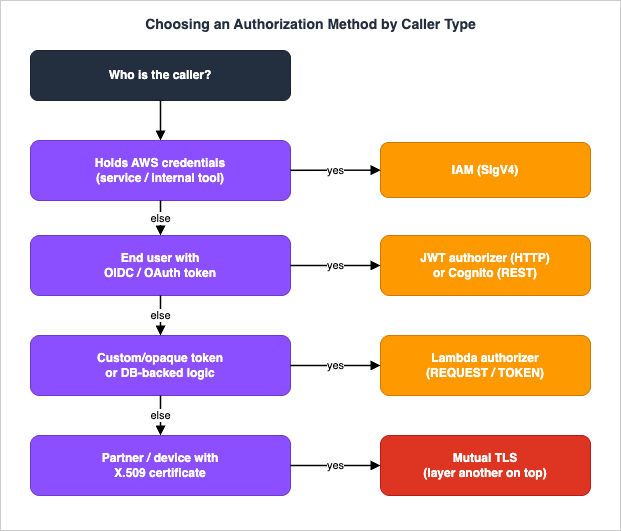
7.1 IAM authorization (SigV4)
With IAM authorization, the caller signs the request with AWS Signature Version 4 and API Gateway verifies the signature and evaluates the caller's IAM identity againstexecute-api:Invoke permissions (and any resource policy). This is the right choice for service-to-service calls inside AWS, for internal tools, and for any caller that already holds AWS credentials. It works on REST APIs, HTTP APIs, and WebSocket $connect. It is a poor fit for end-user browser or mobile clients, which do not hold IAM credentials.7.2 Cognito and JWT authorizers
For end users authenticated by an identity provider, you validate a token rather than an AWS signature:- On REST APIs, a Cognito authorizer validates a Cognito user-pool token directly; or a Lambda authorizer validates any JWT.
- On HTTP APIs, the native JWT authorizer validates any OIDC/OAuth token (including Cognito's) using the flow in section 5.1 — decode, verify signature against the issuer's
jwks_uri(RSA only, key cached up to two hours), validateiss/aud/exp/nbf/iat/scopes.
The federation details — wiring Google, Apple, Microsoft, generic OIDC, or SAML into a user pool — are covered in the Amazon Cognito Federation Complete Implementation Guide. This guide stops at "which authorizer validates the token."
7.3 Lambda authorizers and their cache
A Lambda authorizer runs your own code to make the allow/deny decision and is the most flexible option — use it for custom token formats, opaque tokens that need introspection, database-backed permissions, or per-request context decisions. It exists on REST and HTTP APIs (and WebSocket$connect). On REST APIs it returns an IAM policy plus a principal identifier; API Gateway evaluates that policy to allow or deny.There are two flavors, and the difference is mostly about the cache:
- A
REQUESTauthorizer receives identity from a combination of headers, query strings, stage variables, and$contextvariables. When caching is on, the cache key is built from the configured identity sources in order, and if any configured identity source is missing, null, or empty, API Gateway returns401 Unauthorizedwithout invoking your function. AWS recommendsREQUESTauthorizers because they can key the cache on multiple sources for finer-grained decisions. - A
TOKENauthorizer receives a bearer token in one header. Its cache key is that header's value, and it additionally supports anIdentityValidationExpressionregex that API Gateway checks before invoking your function — failing the regex short-circuits to a denial and saves an invocation.
The cache is the part people misconfigure. Authorization results are cached with a TTL that defaults to 300 seconds and can be set up to 3600 seconds. With a coarse cache key, a cached allow can be reused for a request that should have been denied — for example, caching only on a tenant header while the real decision depends on the path. The IAM policy your authorizer returns is also cached, so it must be applicable across the methods that share a cache entry. A
REQUEST authorizer Lambda for an HTTP API, returning the simple boolean response format:def handler(event, context):
# HTTP API simple response format
token = event["headers"].get("authorization", "")
is_authorized = token == "Bearer let-me-in" # replace with real validation
return {
"isAuthorized": is_authorized,
"context": {"tenant": "acme"}, # passed to the integration
}{
"principalId": "user-123",
"policyDocument": {
"Version": "2012-10-17",
"Statement": [
{
"Action": "execute-api:Invoke",
"Effect": "Allow",
"Resource": "arn:aws:execute-api:ap-northeast-1:111122223333:abcd1234/prod/GET/orders"
}
]
},
"context": { "tenant": "acme" }
}context object rides along to the integration (and into access logs), so an authorizer can hand the backend a resolved tenant or user id without a second lookup. Because the policy is cached, scope the Resource to what the cache entry should cover — a wildcard is convenient but means one cached allow opens every method.7.4 Mutual TLS
Mutual TLS (mTLS) authenticates the client at the transport layer: the client presents an X.509 certificate that API Gateway validates against a truststore you host in Amazon S3. It is available on REST and HTTP APIs (with a custom domain name) and is the standard for B2B, partner, and device APIs where each caller holds a provisioned certificate. mTLS authenticates the connection; you still layer IAM, a JWT, or a Lambda authorizer on top to authorize the specific operation.Publicly trusted certificate authorities are increasingly removing the
clientAuth extended key usage from the certificates they issue. Which dates apply to which CA, and the finding that no statement about the extended key usage of client certificates was found on the API Gateway mutual TLS pages for incoming requests, are covered in When Public Certificates Stop Carrying clientAuth - Where AWS Sends or Accepts Client Certificates, and What Each Path Says About Extended Key Usage, which also covers the client certificate that API Gateway presents to a backend.8. Integration Patterns
An integration is how API Gateway calls your backend. REST APIs expose five integration types —AWS_PROXY (Lambda proxy), AWS (Lambda custom, or a direct AWS-service action), HTTP_PROXY, HTTP, and MOCK — and the proxy-versus-custom distinction is the one that shapes your code and your error handling.8.1 Proxy versus custom (non-proxy)
In a proxy integration (AWS_PROXY for Lambda, HTTP_PROXY for HTTP backends), API Gateway passes the request through almost untouched and expects the backend to return a specific response shape. For a Lambda proxy on a REST API, the function must return statusCode, headers, and a body string:import json
def handler(event, context):
# event carries path, headers, queryStringParameters, body, requestContext
order_id = event["pathParameters"]["id"]
return {
"statusCode": 200,
"headers": {"Content-Type": "application/json"},
"body": json.dumps({"orderId": order_id, "status": "shipped"}),
}body), API Gateway returns 502 Bad Gateway — a very common first-deploy error. Proxy integrations are the recommended default because they evolve with the backend: adding a field needs no gateway change.In a custom (non-proxy) integration (
AWS / HTTP), you explicitly map the request and response using Velocity Template Language (VTL) mapping templates, with $input (the incoming request) and $context (request metadata like identity and stage). This buys you transformation power — reshaping payloads, injecting values, decoupling the wire contract from the backend — at the cost of template maintenance. A mapping template that builds a backend payload from selected inputs:{
"orderId": "$input.params('id')",
"caller": "$context.identity.sourceIp",
"stage": "$context.stage",
"body": $input.json('$')
}8.2 AWS-service integrations
Both REST and HTTP APIs can call AWS services directly, with API Gateway signing the call with SigV4 — no Lambda in the middle. This is how you build, for example, aPUT /items route that writes straight to DynamoDB, or a route that drops a message onto SQS. It removes a hop and a cold start, at the cost of pushing request/response shaping into mapping templates (REST) or the integration's parameter mapping (HTTP). On a REST API, the integration request template translates the HTTP request into the target service's API shape — here, a DynamoDB PutItem built from a path parameter and the caller's IP:{
"TableName": "Orders",
"Item": {
"orderId": { "S": "$input.params('id')" },
"createdBy": { "S": "$context.identity.sourceIp" },
"createdAt": { "S": "$context.requestTimeEpoch" }
}
}dynamodb:PutItem on the table, and a response template maps the service reply back to the client. The win is one fewer moving part to operate and pay for; the cost is that the mapping template becomes code you must test. For choosing the messaging backend behind an asynchronous route — SQS, SNS, EventBridge, or Kinesis — see the AWS Messaging and Event Routing Decision Guide.8.3 Private integrations and VPC Links
To reach a backend inside a VPC that has no public endpoint, you use a VPC Link. The mechanics differ by type. REST APIs historically required a VPC Link (v1) to a Network Load Balancer; the newer VPC link V2 — now the recommended approach for REST APIs — connects directly to an Application Load Balancer (or an NLB), removing the extra NLB hop and adding Layer 7 request routing and HTTP/HTTPS health checks. HTTP APIs support VPC Links to a Network Load Balancer, an Application Load Balancer, or AWS Cloud Map service discovery. This is the pattern for fronting an ECS, EKS, or EC2 service privately. Note the quota — VPC Links are limited per account per Region (20 by default for REST APIs, 10 for HTTP APIs, both raisable), which matters when many APIs each need private connectivity.8.4 Synchronous versus asynchronous
A proxy or AWS-service integration that waits for a reply is synchronous, and it is bounded by the integration timeout — 29 seconds on REST APIs (raisable on Regional and private APIs only), 30 seconds and fixed on HTTP APIs. Apart from response streaming on REST APIs (see the 29-second wall in section 13), any backend that may run longer must become asynchronous: the API accepts the request, enqueues work (to SQS, EventBridge, or Step Functions), returns202 Accepted immediately, and the client polls or receives a push (over a WebSocket API, closing the loop with section 6). The Lambda-side scaling of those consumers is covered in the AWS Lambda Concurrency and Scaling Guide.8.5 HTTP API payload format versions
A subtlety that trips up REST-to-HTTP moves is the payload format version of an HTTP API Lambda integration. Version1.0 mirrors the REST proxy event — httpMethod, multiValueHeaders, requestContext.identity — while the default 2.0 restructures it: version becomes "2.0", the method and path move under requestContext.http, duplicate headers and query strings are comma-joined, and a cookies array and a rawPath field appear. The response side differs too. Format 1.0 requires the familiar statusCode/headers/body envelope, but with 2.0 API Gateway will infer the response: if your function returns valid JSON without a statusCode, it assumes 200, a content-type of application/json, and uses the return value as the body. A 2.0 function can therefore simply return an object:def handler(event, context):
# HTTP API payload format 2.0: method and path are under requestContext.http
order_id = event["pathParameters"]["id"]
return {"orderId": order_id, "status": "shipped"} # inferred 200 + application/jsonevent["httpMethod"] and returning the full envelope — will not behave correctly behind a 2.0 HTTP API without changes. When you port a function, pin the payload format version explicitly so the event and response shapes are the ones your code expects.9. Throttling, Quotas, and Caching
API Gateway protects backends with throttling implemented as a token bucket: a steady-state rate sets how fast tokens refill, and a burst sets the bucket's capacity — the maximum concurrent requests it will absorb before throttling. When submissions exceed what the bucket allows, callers receive429 Too Many Requests and should retry with backoff.9.1 The account-level limits and the order of application
By default, the account-level throttle is 10,000 requests per second with a burst bucket capacity of 5,000, shared across all HTTP, REST, WebSocket, and WebSocket callback traffic in an account per Region (a set of newer Regions defaults to 2,500 RPS / 1,250 burst instead — confirm yours). The burst value is set by the service team and is not directly customer-tunable. These are best-effort targets, not hard ceilings.API Gateway applies throttling settings in a fixed order, from most specific to least:
- Per-client / per-method limits set in a usage plan (REST APIs).
- Per-method limits set on a stage.
- Account-level per-Region limits.
- AWS Regional limits (set by AWS, not changeable).
No tier can exceed the tier above it. This ordering is why a per-method stage limit can shield a sensitive backend even when the account has plenty of headroom — and why a single noisy tenant can still consume the whole account budget if you have not set per-client limits.
9.2 Usage plans for multi-tenant fairness
On REST APIs, a usage plan binds API keys to a throttling rate, a burst, and a request quota over a period. This is the supported way to offer tiers — a free tier with a low quota, a paid tier with a higher one — and to contain the "noisy neighbor" problem. The whole arrangement is declarative; a CloudFormation fragment for a low tier, an API key, and the link between them:Resources:
FreeTierPlan:
Type: AWS::ApiGateway::UsagePlan
Properties:
UsagePlanName: free-tier
Throttle: { RateLimit: 10, BurstLimit: 20 } # requests/sec, not currency
Quota: { Limit: 10000, Period: DAY }
ApiStages:
- { ApiId: !Ref OrdersRestApi, Stage: prod }
ClientKey:
Type: AWS::ApiGateway::ApiKey
Properties: { Enabled: true, Name: client-acme }
LinkKeyToPlan:
Type: AWS::ApiGateway::UsagePlanKey
Properties:
KeyId: !Ref ClientKey
KeyType: API_KEY
UsagePlanId: !Ref FreeTierPlanx-api-key header, and API Gateway meters and throttles per key. HTTP APIs have no usage plans or API keys; if you need per-client metering on an HTTP API, you implement it yourself (for example, a Lambda authorizer that checks a counter) or front it differently.9.3 Caching
REST-API stage caching (section 4.1) cuts backend load and latency for read-heavy endpoints, with the 300-second default TTL (0–3600 configurable) and the roughly 1 MB per-item cap. Cost note: the cache is a provisioned capacity you choose, so size it to the working set rather than the whole keyspace, and treat cost qualitatively against the official pricing page. HTTP APIs have no built-in cache; put CloudFront in front if you need edge caching.10. Observability and Diagnostics
The observability surface differs sharply by type, and that difference is itself a selection input: REST APIs offer the richest telemetry, HTTP APIs a lean subset.10.1 Logs
- Access logs (REST and HTTP) record one line per request to CloudWatch Logs with a customizable format — capture
$context.requestId,$context.status,$context.integration.latency,$context.authorizer.error, and the identity fields you need for triage. REST APIs can additionally stream access logs to Amazon Data Firehose. - Execution logs (REST only) record API Gateway's internal processing — authorizer results, mapping template evaluation, integration request/response — at INFO or ERROR level per stage. This is the single most useful tool for debugging a REST API, and HTTP APIs do not have it, which is a real trade-off for deep troubleshooting.
- AWS X-Ray tracing is available on REST APIs (not HTTP APIs), letting you see the gateway-to-integration segment alongside downstream Lambda and service segments.
A useful access-log format captures exactly the fields you reach for during triage — the request id to correlate across services, the status, and the two latency numbers that separate gateway time from backend time:
{
  "requestId": "$context.requestId",
  "ip": "$context.identity.sourceIp",
  "routeKey": "$context.routeKey",
  "status": "$context.status",
  "integrationLatency": "$context.integration.latency",
  "responseLatency": "$context.responseLatency",
  "authorizerError": "$context.authorizer.error"
}
10.2 Metrics that matter
The CloudWatch metrics to alarm on:4XXError— client errors; a spike usually means auth failures (401/403) or throttling (429). Correlate with the access log status.5XXError— gateway/integration errors; a spike of502points at proxy response-format problems,503/504at backend saturation or timeouts.Count— request volume, your baseline for everything else.LatencyversusIntegrationLatency—Latencyis the total API Gateway round trip;IntegrationLatencyis just the backend portion. IfLatencyis high butIntegrationLatencyis low, the time is in API Gateway itself (often an authorizer); if both are high, the backend is slow.CacheHitCount/CacheMissCount— whether your REST cache is actually earning its keep.
WebSocket APIs expose their own metrics —
ConnectCount, MessageCount, IntegrationError, ExecutionError, and ClientError — for watching connection churn and message-handling failures.10.3 A triage workflow
When an API misbehaves, read the signals in this order: the metric that moved (4XXError vs 5XXError vs Latency), then the access log for the failing requestId, then — on a REST API — the execution log for that request to see whether the authorizer, the mapping template, or the integration failed. The split between Latency and IntegrationLatency tells you which side of the gateway to look at before you open any backend dashboard.11. Migrating from REST to HTTP
The pull toward HTTP APIs is real — lower latency, lower cost, a simpler model — but a migration is a project because the two are different products. Start by checking the feature gap, because HTTP APIs lack several REST capabilities and there is no in-place "convert" button.11.1 The feature-gap checklist
Before migrating, confirm you do not depend on any REST-only feature, or have an alternative for each:| REST feature you may rely on | Alternative on HTTP API |
|---|---|
| API keys and usage plans | Implement metering yourself (e.g., Lambda authorizer + counter) or keep REST for the metered surface |
| AWS WAF (direct) | Front the HTTP API with CloudFront and attach WAF there |
| Resource policy / private endpoint | Keep REST for private/edge needs |
| Request validation / body (VTL) transform | Validate in the backend; use parameter mapping for headers/query only |
| Execution logs / X-Ray | Rely on access logs + backend tracing |
| Edge-optimized endpoint | Regional + your own CloudFront |
| Cognito authorizer | JWT authorizer pointed at the user pool (equivalent) |
11.2 Phased migration
Because there is no conversion, migrate by building the HTTP API alongside the REST API and shifting traffic with DNS or a custom domain:- Recreate the routes on a new HTTP API, mapping each REST resource/method to a route and reusing the same Lambda integrations.
- Replace REST authorizers with the JWT authorizer (for OIDC tokens) or a Lambda authorizer (ported to the HTTP API event/response format — note the simpler
isAuthorizedshape). - Move backend-side request validation out of the gateway and into the function.
- Use a custom domain with weighted API mappings (or Route 53 weighted records) to shift a small percentage of traffic, watch
4XXError/5XXError/Latency, and ramp. - Decommission the REST API once the HTTP API holds 100% with stable error rates.
The honest default: migrate when the HTTP feature set clearly covers your needs and latency/cost matter; otherwise keep REST. A mixed estate — HTTP for the hot, simple paths and REST for the ones needing keys, WAF, or private access — is a perfectly good end state.
12. End-to-End Architecture Walkthrough
To see how the pieces combine, here is a realistic Level-400 composition for a public, authenticated API with both a synchronous backend and an internal private service. It is built on a Regional REST API specifically so it can carry AWS WAF, request validation, and a private integration — the features that justify REST.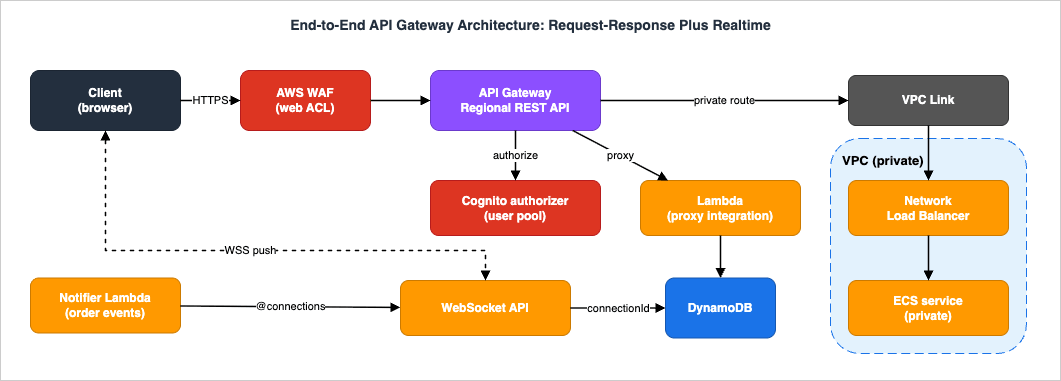
- A browser client signs in to an Amazon Cognito user pool and obtains an ID/access token.
- The client calls the API; an AWS WAF web ACL on the REST stage filters injection, XSS, and rate-based floods before anything else runs.
- API Gateway invokes the Cognito authorizer, which validates the token. On success the principal and claims flow into the request context; on failure the caller gets
401/403and the backend is never touched. - Request validation rejects malformed bodies at the gateway against a JSON Schema model, so the integration only ever sees well-formed input.
- The public route uses an
AWS_PROXYLambda integration; the Lambda returns thestatusCode/headers/bodyenvelope. A second, internal route uses a VPC Link to a Network Load Balancer fronting an ECS service that never sees the public internet. - Access logs and execution logs go to CloudWatch Logs, and X-Ray stitches the gateway segment to the Lambda and downstream segments.
For the live channel — order status pushed to the browser as it changes — a separate WebSocket API stores each
connectionId in DynamoDB on $connect, and a notifier Lambda (triggered by the order events) calls the @connections POST endpoint to push updates. The synchronous REST API and the push-based WebSocket API share the same DynamoDB table and the same Cognito identities, which is the canonical "request-response plus realtime" serverless shape.Where it fails, and what you watch: a token-rotation gap shows up as a burst of
401 in 4XXError and authorizer errors in the execution log; a malformed Lambda response shows up as 502 in 5XXError; a slow ECS service shows up as rising IntegrationLatency on the private route while Latency minus IntegrationLatency stays flat; and WebSocket churn shows up as a high ConnectCount-to-MessageCount ratio with stale connectionIds that the @connections POST returns 410 Gone for.Operating this as one system rather than three is what keeps it maintainable. The REST API, the WebSocket API, and their Lambda functions deploy from one infrastructure-as-code template, so a change ships atomically and a rollback reverts every surface together. They share one Cognito user pool, so a token minted at sign-in works against the REST routes and the WebSocket
$connect handshake alike, and a single set of CloudWatch dashboards — 5XXError and Latency on the REST stage, IntegrationError and ConnectCount on the WebSocket stage, plus the shared DynamoDB and Lambda metrics — gives one operational pane for the whole request-plus-realtime experience. The reusable lesson is that API Gateway's value compounds when the API tier is treated as a single tier with several front doors: the same identity, the same backend, and the same observability, with each front door chosen for the traffic it actually serves rather than for uniformity.13. Common Pitfalls
- Expecting REST-only features on an HTTP API. Teams pick HTTP APIs for latency, then need API keys, usage plans, AWS WAF (direct), resource policies, request validation, or execution logs — none of which exist there. Decide the management surface before the type, using section 3.
- Coarse authorizer cache keys. Caching a Lambda authorizer's result on too few identity sources lets a cached allow serve a request that should be denied. Key the cache on every input the decision depends on, and keep the returned IAM policy valid across all methods that share a cache entry. Remember a
REQUESTauthorizer returns401without invoking your function if a configured identity source is missing. - Proxy response-format errors (
502). A Lambda proxy integration that returns a bare object instead of{ "statusCode", "headers", "body" }, or a non-stringbody, yields502 Bad Gateway. This is the most common first-deploy failure; check it before suspecting the network. - Misreading throttling and usage plans. A
429is the token bucket doing its job. Without per-client usage plans (REST) or self-built metering (HTTP), one tenant can exhaust the account-level budget. Set per-method or per-client limits for anything multi-tenant. - WebSocket idle and lifetime cutoffs. Connections drop after 10 minutes idle or 2 hours total. Clients must reconnect transparently, and because
$disconnectis best-effort, prune staleconnectionIds proactively rather than trusting cleanup. - The 29-second wall. Synchronous integrations time out at 29 seconds (REST, raisable on Regional/private) or 30 seconds (HTTP, fixed), surfacing as
504. Anything that can run longer must be asynchronous (202 Acceptedplus a poll or a WebSocket push), not a longer wait. The documented exception is response streaming on REST APIs: the developer guide says a streamed response can exceed the 29-second limit without an integration timeout increase and can stream for up to 15 minutes, subject to idle timeouts (5 minutes on Regional and private endpoints, 30 seconds on edge-optimized). - CORS misconfiguration. A browser app calling the API from another origin fails with an opaque CORS error when the API does not return the right
Access-Control-Allow-Originresponse. On HTTP APIs, configure CORS on the API (section 5.2) rather than emitting headers from the integration; on REST APIs, enable CORS so theOPTIONSpreflight method and the response headers are generated. A proxy integration that returns its own CORS headers while CORS is also configured separately will conflict — pick one source of truth.
14. Frequently Asked Questions
Should I use an HTTP API or a REST API?Default to HTTP APIs for lean Lambda/HTTP proxies that need only IAM or OIDC/OAuth (JWT) authorization and benefit from lower latency. Choose REST APIs when you need API keys/usage plans, request validation, AWS WAF attached directly, resource policies, private or edge-optimized endpoints, execution logs, or X-Ray. The decision is about the management surface, not preference — walk section 3.
Which authorization should I use?
IAM (SigV4) for callers that hold AWS credentials (service-to-service, internal tools). A JWT authorizer (HTTP API) or Cognito/Lambda authorizer (REST API) for end users carrying OIDC/OAuth tokens. A Lambda authorizer when you need custom logic, opaque-token introspection, or database-backed decisions. Mutual TLS to authenticate partner/device clients by certificate, layered with one of the above for operation-level authorization.
Can I do real-time with API Gateway?
Yes — that is exactly what WebSocket APIs are for. The client opens a persistent connection, you route inbound messages with the route selection expression, and the backend pushes to clients with the
@connections API. Mind the 10-minute idle and 2-hour lifetime limits and reconnect transparently.How do I make an API private?
Use a REST API with the private endpoint type, reachable only through an interface VPC endpoint (AWS PrivateLink) and gated by a resource policy that allows your VPC or VPC endpoint. HTTP APIs do not offer a private endpoint type; for private backends, both types use a VPC Link, which is a different concern from a private front door.
Can I raise the 29-second integration timeout?
On REST APIs, yes — but only for Regional and private endpoints (not edge-optimized), and raising it may require a reduction in your Region-level throttle quota. HTTP APIs are fixed at 30 seconds. For genuinely long work, prefer an asynchronous pattern over a longer synchronous timeout.
Do I need a custom domain name?
Not to function — every API receives a default
execute-api hostname — but you will want one for a stable, branded URL and for features that depend on it, notably mutual TLS (configured on a custom domain) and clean versioning through API mappings. Custom domains are available on both REST and HTTP APIs; for a fully private REST API, custom-domain support requires additional setup rather than the built-in custom-domain feature.15. Summary
API Gateway is one service with three products, and the durable skill is choosing among them deliberately. Decide the type first — WebSocket for server-initiated realtime, REST for the rich management and networking surface, HTTP for lean low-latency proxies. Then choose authorization by caller shape — IAM for AWS-credentialed callers, JWT/Cognito for OIDC end users, Lambda authorizers for custom logic, mTLS for certificate-bearing clients — and configure its cache so a cached allow is never wrong. Then choose integrations — proxy for evolvability, custom/VTL when you must transform, AWS-service to drop a hop, VPC Link for private backends — and keep synchronous work under the timeout, pushing the rest to asynchronous patterns. Finally, let observability lead diagnosis: the metric that moved, then the access log, then the execution log, then theLatency/IntegrationLatency split.From here, the serverless cluster continues with the AWS Messaging and Event Routing Decision Guide for the asynchronous backends behind your routes, and the AWS Lambda Concurrency and Scaling Guide for how the Lambda functions behind those integrations scale. For Lambda-backed API design end to end, see the MCP Server on AWS Lambda Complete Guide; for identity, the Amazon Cognito Federation Complete Implementation Guide; for edge protection, AWS WAF for Generative AI; and for how these capabilities arrived, the AWS History and Timeline regarding Amazon API Gateway.
16. References
- Amazon API Gateway Documentation
- Choose between REST APIs and HTTP APIs
- Amazon API Gateway use cases (REST, HTTP, WebSocket)
- API endpoint types for REST APIs in API Gateway
- Use API Gateway Lambda authorizers
- Control access to HTTP APIs with JWT authorizers
- Choose an API Gateway API integration type
- Set up Lambda proxy integrations for REST APIs
- Create routes for WebSocket APIs in API Gateway
- Overview of WebSocket APIs in API Gateway
- Use @connections commands in your backend service
- Throttle requests to your REST APIs
- Amazon API Gateway quotas (account-level)
- Quotas for configuring and running a REST API
- Amazon API Gateway pricing
References:
Tech Blog with curated related content
Written by Hidekazu Konishi