MCP Server on AWS Lambda Complete Guide - Building Model Context Protocol Servers with Streamable HTTP and OAuth 2.1
First Published:
Last Updated:
1. Introduction
The Model Context Protocol (MCP) is an open standard that lets large language models (LLMs) discover and invoke external tools, fetch resources, and reuse server-provided prompt templates over a uniform JSON-RPC 2.0 interface. After the initial release on 2024-11-05 the spec was rewritten in March 2025 (revision 2025-03-26) to introduce the Streamable HTTP transport and tool annotations, then refined in 2025-06-18 with hardened OAuth 2.1 (RFC 9728 Protected Resource Metadata and RFC 8707 audience binding). This article targets the 2025-06-18 revision throughout; verify the latest revision against modelcontextprotocol.io/specification before depending on any newer feature. By early 2026, MCP has become the de facto integration layer for Claude Desktop, Claude Code, Anthropic's API, Amazon Bedrock AgentCore Gateway, and the broader agent SDK ecosystem.This article is a hands-on guide to building and operating a production-grade MCP server on AWS Lambda. It covers the Streamable HTTP transport that replaced HTTP+SSE in the 2025-03-26 revision, OAuth 2.1 authorization (including the 2025-06-18 Protected Resource Metadata and resource-binding requirements), the deployment patterns documented by the
awslabs/run-model-context-protocol-servers-with-aws-lambda library, the advanced server capabilities (sampling, roots, logging) and protocol mechanics (progress, pagination, cancellation), and the integration paths to Claude Desktop and AgentCore Gateway.The complete sample uses Python 3.12 on Lambda (
arm64), API Gateway HTTP API as the front door, and Lambda Web Adapter for HTTP applications that prefer a conventional web framework. The companion awslabs library is used as the Lambda transport implementation so that we do not need to re-implement JSON-RPC framing from scratch.For background on agent runtimes that complement MCP, see Amazon Bedrock AgentCore Implementation Guide Part 1: Runtime, Memory, and Code Interpreter Patterns and Amazon Bedrock AgentCore Implementation Guide Part 4: Multi-Agent Orchestration. For the lineage of Lambda itself, see AWS History and Timeline of Amazon Lambda.
2. MCP Architecture Recap
MCP defines three roles and two standard transports.2.1 Roles and Primitives
- Host: The application the user interacts with (Claude Desktop, Claude Code, an in-house agent, or an AgentCore Runtime).
- Client: A protocol client embedded inside the host that maintains one connection per remote server.
- Server: The MCP server that exposes capabilities. Capabilities fall into three primitives:
- Tools: Functions the model can invoke (
tools/list,tools/call). - Resources: Read-only data the host or model can fetch (
resources/list,resources/read). - Prompts: Reusable, server-provided prompt templates (
prompts/list,prompts/get).
- Tools: Functions the model can invoke (
id, responses echo it, and notifications carry no id and produce no reply.2.2 Transports
| Transport | Where it shines | Lambda fit |
|---|---|---|
| stdio | Local-only servers launched by the host as a subprocess | Not directly usable from a remote Lambda — the awslabs library wraps stdio servers behind a remote transport |
| Streamable HTTP | Remote servers, multi-tenant SaaS | Native fit. A single HTTPS endpoint accepts POST for requests and GET for an optional Server-Sent Events (SSE) stream |
Streamable HTTP supersedes the older HTTP+SSE transport from spec 2024-11-05. The server exposes one endpoint such as
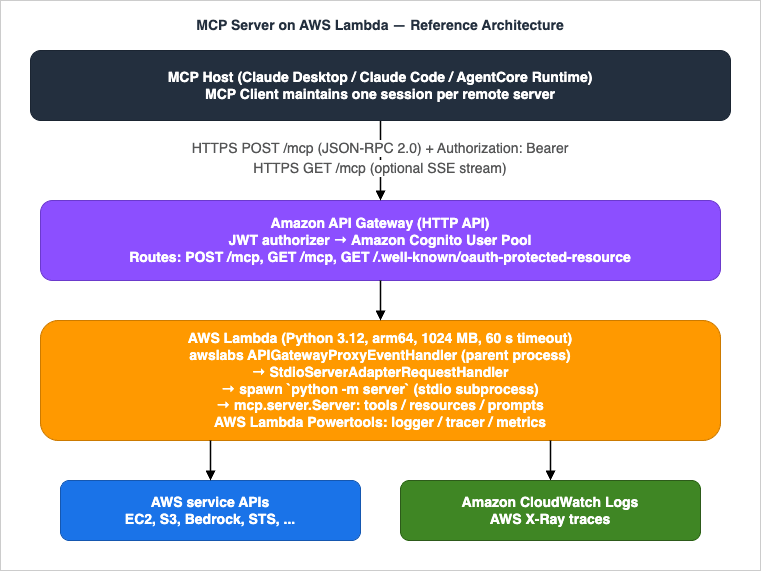
https://example.com/mcp. POST bodies carry JSON-RPC payloads; the server may answer with Content-Type: application/json for a single response or with Content-Type: text/event-stream to stream multiple messages. The transport also supports an optional Mcp-Session-Id response header that the client must echo on subsequent requests when the server elects to maintain a session — on Lambda we deliberately disable this and run stateless (see §5). That header belongs to revisions 2025-03-26 through 2025-11-25. The current revision, 2026-07-28, removed protocol-level sessions altogether, along with the standalone GET stream and Last-Event-ID resumption, so the stateless shape this article recommends is what the protocol itself now specifies. What else changes on the way there is covered in Migrating to the Stateless Model Context Protocol.Reference architecture — MCP server on AWS Lambda fronted by API Gateway HTTP API
3. Why AWS Lambda
Lambda is an unusually good host for MCP servers. The protocol's request/response shape — short JSON-RPC calls with optional streaming — maps cleanly onto Lambda's invocation model, while Lambda's operational characteristics solve three problems that would otherwise dominate server design.- Pay-per-use economics. MCP servers see bursty, agent-driven traffic (a single prompt may issue 5–50 tool calls). Lambda bills per millisecond, so an idle server costs nothing.
- Concurrency without manual scaling. Lambda scales out by up to 1,000 new execution environments per 10 seconds per function (default), absorbing the parallel tool calls that modern agents emit.
- Managed isolation per tenant. By keying invocations on the OAuth subject, each tenant gets a fresh isolated execution environment, which is hard to reproduce on a shared long-lived process.
4. Setting Up the Project
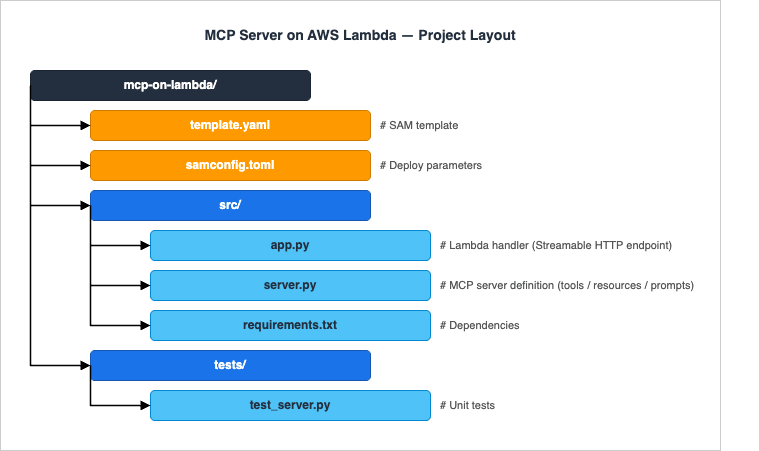
We use AWS SAM (Serverless Application Model) with Python 3.12. SAM is the lowest-friction option for a single-function MCP server; for fleets of servers, switch to CDK or Terraform — the function code remains identical.4.1 Project Layout
4.2 requirements.txt
mcp>=1.6.0
run-mcp-servers-with-aws-lambda
boto3>=1.34.0
aws-lambda-powertools>=3.0.0
Pin run-mcp-servers-with-aws-lambda to the latest release published on PyPI at the time you build — the package is on a pre-1.0 cadence and adapter APIs evolve quickly. The version range >=0.4.0 covers the handler set referenced in this guide.
mcp is the official Python SDK; run-mcp-servers-with-aws-lambda is the package shipped by awslabs/run-model-context-protocol-servers-with-aws-lambda (importable as mcp_lambda) that adapts existing stdio MCP servers to Lambda's invocation model. The adapter exposes event handlers that translate Lambda invocation events into MCP requests — APIGatewayProxyEventV2Handler for HTTP API (API Gateway V2 events) in front of Streamable HTTP (APIGatewayProxyEventHandler is the handler for V1 events from REST APIs), LambdaFunctionURLEventHandler for Function URL deployments, and BedrockAgentCoreGatewayTargetHandler for AgentCore Gateway targets — plus StdioServerAdapterRequestHandler, which takes a StdioServerParameters command spec and spawns the configured stdio MCP server as a subprocess to receive each JSON-RPC request. AWS Lambda Powertools provides structured logging and tracing helpers used in §15.4.3 Minimal SAM Template (Excerpt)
AWSTemplateFormatVersion: "2010-09-09"
Transform: AWS::Serverless-2016-10-31

Globals:
  Function:
    Runtime: python3.12
    Architectures: [arm64]
    MemorySize: 1024
    Timeout: 60
    Tracing: Active
    LoggingConfig:
      LogFormat: JSON

Resources:
  McpFunction:
    Type: AWS::Serverless::Function
    Properties:
      CodeUri: src/
      Handler: app.lambda_handler
      Events:
        Mcp:
          Type: HttpApi
          Properties:
            Path: /mcp
            Method: POST
        McpStream:
          Type: HttpApi
          Properties:
            Path: /mcp
            Method: GET

Outputs:
  Endpoint:
Value: !Sub "https://${ServerlessHttpApi}.execute-api.${AWS::Region}.amazonaws.com/mcp"/mcp route accepts both POST (JSON-RPC requests) and GET. The awslabs adapter answers GET with HTTP 405 (Method Not Allowed: SSE streaming not supported), which the Streamable HTTP transport allows for a server that does not offer an SSE stream, and the HTTP API in front does not support response streaming either (§12).5. Implementing Tools — tools/list and tools/call
The Python MCP SDK provides a high-levelServer class. Tools are registered with decorators; the SDK takes care of the JSON-RPC framing, schema validation, and content type negotiation.# src/server.py
from mcp.server import Server
from mcp.types import Tool, TextContent
import boto3
server = Server("hidekazu-aws-tools")
ec2 = boto3.client("ec2")
@server.list_tools()
async def list_tools() -> list[Tool]:
return [
Tool(
name="list_ec2_instances",
description="List EC2 instances in the current account and region.",
inputSchema={
"type": "object",
"properties": {
"state": {
"type": "string",
"enum": ["running", "stopped", "terminated", "any"],
"default": "running",
}
},
},
),
]
@server.call_tool()
async def call_tool(name: str, arguments: dict) -> list[TextContent]:
if name != "list_ec2_instances":
raise ValueError(f"Unknown tool: {name}")
state = arguments.get("state", "running")
filters = [] if state == "any" else [{"Name": "instance-state-name", "Values": [state]}]
response = ec2.describe_instances(Filters=filters)
instances = [
{
"id": inst["InstanceId"],
"type": inst["InstanceType"],
"az": inst["Placement"]["AvailabilityZone"],
"state": inst["State"]["Name"],
}
for reservation in response["Reservations"]
for inst in reservation["Instances"]
]
return [TextContent(type="text", text=str(instances))]
# server.py is also runnable directly as a stdio MCP server. The awslabs
# adapter spawns this entry point as a subprocess for each Lambda invocation
# (see src/app.py below) and pipes JSON-RPC frames over its stdin/stdout.
if __name__ == "__main__":
import asyncio
from mcp.server.stdio import stdio_server
async def _run() -> None:
async with stdio_server() as (read, write):
await server.run(read, write, server.create_initialization_options())
asyncio.run(_run())# src/app.py
import sys
from mcp.client.stdio import StdioServerParameters
from mcp_lambda import APIGatewayProxyEventV2Handler, StdioServerAdapterRequestHandler
# StdioServerAdapterRequestHandler takes a stdio server *command spec*
# (StdioServerParameters), not an in-process Server instance. For each Lambda
# invocation it spawns the command as a subprocess, hands it the JSON-RPC
# request over stdin, reads the response from stdout, and tears the subprocess
# down. APIGatewayProxyEventV2Handler adapts API Gateway HTTP API v2 events to
# MCP Streamable HTTP messages, honoring Content-Type negotiation
# (application/json vs text/event-stream) per the 2025-03-26 transport contract.
server_params = StdioServerParameters(command=sys.executable, args=["-m", "server"])
request_handler = StdioServerAdapterRequestHandler(server_params)
event_handler = APIGatewayProxyEventV2Handler(request_handler)
def lambda_handler(event, context):
return event_handler.handle(event, context)- Per-invocation subprocess. The awslabs adapter spawns the stdio MCP server defined above as a fresh subprocess for every Lambda invocation. Module-scope initialization (boto3 client construction, JSON Schema compilation, model loading) therefore happens once per request rather than once per warm container — keep that initialization cheap, and lazy-init anything heavy on first tool call.
- Stateless by construction. Because the subprocess is recreated every invocation, no in-memory session state survives between requests. Persist anything that needs to outlive a single tool call in DynamoDB, S3, or AgentCore Memory. If you later move to the high-level
FastMCPclass behind Lambda Web Adapter (§12), setstateless_http=Trueandjson_response=Trueon the constructor — the two flags together turn off theMcp-Session-Idsession negotiation and prefer plain JSON responses where the client did not specifically request SSE. - Custom transport, dropped client notifications. The awslabs adapter is documented to ignore client→server JSON-RPC notifications (including
notifications/cancelledfrom §10.3), and standard MCP clients require its custom client transport to dial in. For interoperability with arbitrary clients (Claude Desktop's Custom Connectors flow, the Inspector over HTTP, third-party agents) and for end-to-end cancellation, expose the server through FastMCP + Lambda Web Adapter (§12) instead.
6. Tool Annotations and Behavior Hints
The 2025-03-26 spec introduced tool annotations — non-binding metadata that hints at a tool's behavior so hosts can decide whether to confirm with the user, batch-execute, cache, or refuse without ever calling the tool. These are advisory, never trusted from an unverified server (the 2025-06-18 spec made this explicit), but well-behaved hosts honor them.| Field | Default | Meaning |
|---|---|---|
title | none | Human-friendly label distinct from the tool's machine name |
readOnlyHint | false | The tool does not mutate any external state — safe to retry and parallelize |
destructiveHint | true | The tool may perform destructive updates — the host should require confirmation |
idempotentHint | false | Repeated calls with identical arguments produce the same effect — safe for retries |
openWorldHint | true | The tool reaches into systems beyond the server's control (the open Internet, third-party APIs) — cache hits cannot be assumed |
Annotate the EC2 listing tool from §5 to declare it read-only, idempotent, and bounded to AWS:
from mcp.types import Tool, ToolAnnotations

Tool(
    name="list_ec2_instances",
    description="List EC2 instances in the current account and region.",
    inputSchema={
        "type": "object",
        "properties": {
            "state": {
                "type": "string",
                "enum": ["running", "stopped", "terminated", "any"],
                "default": "running",
            }
        },
    },
    annotations=ToolAnnotations(
        title="List EC2 instances",
        readOnlyHint=True,
        destructiveHint=False,
        idempotentHint=True,
        openWorldHint=False,
    ),
)destructiveHint=True at the framework layer and require an explicit opt-out per tool — this matches the spec's safe defaults and forces authors to think about side effects.7. Implementing Resources
Resources let the host expose read-only data — files, database rows, dashboards — to the model on demand. Each resource is identified by a URI.from mcp.types import Resource, ReadResourceResult, TextResourceContents
@server.list_resources()
async def list_resources() -> list[Resource]:
return [
Resource(
uri="aws://ec2/regions",
name="EC2 Regions",
description="List of regions where EC2 is available.",
mimeType="application/json",
),
]
@server.read_resource()
async def read_resource(uri: str) -> ReadResourceResult: # ReadResourceResult is the confirmed return type for the low-level @server.read_resource() handler (mcp.types.ReadResourceResult wraps contents: list[TextResourceContents | BlobResourceContents])
if uri == "aws://ec2/regions":
regions = ec2.describe_regions()["Regions"]
body = [r["RegionName"] for r in regions]
return ReadResourceResult(contents=[TextResourceContents(uri=uri, mimeType="application/json", text=str(body))])
raise ValueError(f"Unknown resource: {uri}")8. Implementing Prompts
Prompts are reusable templates. The host can list them and let the user pick one — for example, a "summarize this CloudWatch log group" prompt that the host fills in with the user's pick of log group.from mcp.types import Prompt, PromptArgument, PromptMessage, GetPromptResult
@server.list_prompts()
async def list_prompts() -> list[Prompt]:
return [
Prompt(
name="summarize_log_group",
description="Summarize errors in a CloudWatch Logs group over the last hour.",
arguments=[
PromptArgument(name="log_group", description="CloudWatch Logs group name", required=True),
],
),
]
@server.get_prompt()
async def get_prompt(name: str, arguments: dict) -> GetPromptResult:
if name == "summarize_log_group":
log_group = arguments["log_group"]
return GetPromptResult(
description=f"Summarize errors in {log_group}",
messages=[
PromptMessage(
role="user",
content=TextContent(
type="text",
text=f"Read the last hour of logs from {log_group} and summarize the top 5 error patterns with counts.",
),
),
],
)
raise ValueError(f"Unknown prompt: {name}")9. Advanced Server Capabilities — Sampling, Roots, Elicitation, and Logging
Beyond the three primitives, MCP defines a set of capabilities that flow in either direction at runtime. Hosts and servers advertise what they support during theinitialize handshake; missing capabilities make the corresponding methods unavailable.9.1 Sampling — Server-Initiated LLM Calls
Sampling lets the server ask the client to run an LLM completion on its behalf viasampling/createMessage. The host stays in control of the model, the cost, and the user's consent — the server never holds an API key. Typical uses are summarization helpers ("ask the host's model to compress this 50 KB document before I store it"), validation steps, and recursive agent patterns.from mcp.types import CreateMessageRequestParams, SamplingMessage, TextContent
@server.call_tool()
async def call_tool(name: str, arguments: dict):
if name == "summarize_document":
text = arguments["text"]
result = await server.request_context.session.create_message(
CreateMessageRequestParams(
messages=[SamplingMessage(role="user", content=TextContent(
type="text", text=f"Summarize in 3 bullets:\n\n{text}"
))],
maxTokens=300,
)
)
return [TextContent(type="text", text=result.content.text)]
9.2 Roots — Client-Declared Filesystem or URL Boundaries
Roots are a client-side capability: the host declares one or more URI prefixes (filesystem paths, S3 prefixes, repo URLs) that the server is allowed to operate on. Servers queryroots/list to discover them and must restrict their tools to those boundaries. For a remote, multi-tenant Lambda server, roots are how you let each tenant scope what their MCP server can touch (for example, "this tenant can only read from s3://tenant-42/*").@server.call_tool()
async def call_tool(name: str, arguments: dict):
if name == "read_s3_object":
roots = await server.request_context.session.list_roots()
allowed_prefixes = [r.uri for r in roots.roots if r.uri.startswith("s3://")]
target = arguments["uri"]
if not any(target.startswith(p) for p in allowed_prefixes):
raise PermissionError(f"{target} is outside declared roots")
# ... fetch from S3 ...
9.3 Elicitation — Server-Initiated User Input Requests
Elicitation is the third client capability defined alongside Sampling and Roots, added in the 2025-06-18 revision. The server issues anelicitation/create request and the host renders a structured form to the user; the response carries the user's input back to the server. Use it for missing parameters that the model alone cannot supply — an OAuth scope choice, a confirmation before a destructive operation, a free-text justification for an audit log.# Elicitation is most ergonomically called through FastMCP's Context object,
# which wires up the elicitation/create JSON-RPC request and validates the
# response against a Pydantic schema. The low-level Server can issue the same
# request through server.request_context.session, but FastMCP is the
# documented entry point.
from mcp.server.fastmcp import FastMCP, Context
from pydantic import BaseModel
mcp = FastMCP("hidekazu-aws-tools", stateless_http=True, json_response=True)
class ConfirmDelete(BaseModel):
confirm: bool
reason: str | None = None
@mcp.tool()
async def delete_s3_object(bucket: str, key: str, ctx: Context) -> str:
result = await ctx.elicit(
message=f"Delete s3://{bucket}/{key}? This cannot be undone.",
response_type=ConfirmDelete,
)
if result.action != "accept" or not result.data.confirm:
return "Deletion cancelled by user."
# ... proceed with delete, recording result.data.reason in CloudTrail
return f"Deleted s3://{bucket}/{key}"
action field returns one of accept (the user submitted the form), decline (the user explicitly refused), or cancel (the user dismissed without choosing). Treat anything other than accept as a refusal. Clients without elicitation support omit the capability during initialize; in that case ctx.elicit() raises and you should fall back to refusing the destructive operation outright. The 2025-06-18 spec also restricts requestedSchema to flat objects with primitive types only (string, number, boolean, enum) — no nested objects or arrays of objects — to keep client-side form rendering tractable.9.4 Logging — Server-Emitted Log Notifications
Thelogging/setLevel request and the notifications/message notification let the server emit structured log lines that surface in the host's UI (for example, the Inspector's log panel or Claude Desktop's connector debug view). Levels follow RFC 5424 (debug, info, notice, warning, error, critical, alert, emergency).await server.request_context.session.send_log_message(
level="warning",
data={"event": "tool_throttled", "tool": name, "remaining_quota": 7},
)
10. Protocol Mechanics — Progress, Pagination, Cancellation, and Errors
The four mechanics in this section are what separates a toy MCP server from one a production agent can rely on.10.1 Progress Notifications
For tool calls that take more than a couple of seconds, attach aprogressToken in the request _meta field; the server then emits notifications/progress with monotonically increasing progress values (and an optional total). The host typically renders a progress bar.@server.call_tool()
async def call_tool(name: str, arguments: dict):
if name == "scan_s3_bucket":
token = server.request_context.meta.progressToken
bucket = arguments["bucket"]
keys = list_keys(bucket)
for i, key in enumerate(keys):
await scan_object(bucket, key)
if token is not None:
await server.request_context.session.send_progress_notification(
progress_token=token, progress=i + 1, total=len(keys)
)
return [TextContent(type="text", text=f"scanned {len(keys)} objects")]
10.2 Pagination
tools/list, resources/list, resources/templates/list, and prompts/list all accept an optional cursor request parameter and may return a nextCursor in the response. Cursors are opaque, server-defined strings — do not assume offsets or hashes. For Lambda servers that expose dozens of tools or thousands of resources, paginate to keep each response under the 6 MB streaming threshold and to give the host a chance to filter early.PAGE_SIZE = 50
@server.list_resources()
async def list_resources(cursor: str | None = None):
start = int(cursor) if cursor else 0
items = ALL_RESOURCES[start : start + PAGE_SIZE]
next_cursor = str(start + PAGE_SIZE) if start + PAGE_SIZE < len(ALL_RESOURCES) else None
return ListResourcesResult(resources=items, nextCursor=next_cursor)
10.3 Cancellation
The host can sendnotifications/cancelled with the original request's id to abort an in-flight call (user dismissed the prompt, the agent supervisor pivoted, etc.). On Lambda, cancellation is racy by nature — the invocation will keep running until the function returns — but acting on the notification lets you skip downstream side effects, return early, and avoid charging the user for work nobody is waiting on.import anyio
# Low-level Server pattern: accumulate partials and return them on completion.
# The await checkpoint inside the loop is what makes cancellation cooperative -
# anyio raises the cancellation exception at the next checkpoint when the host
# sends notifications/cancelled with this request's id.
@server.call_tool()
async def call_tool(name: str, arguments: dict) -> list[TextContent]:
if name == "long_running_scan":
partials: list[TextContent] = []
try:
async for partial in stream_scan(arguments["bucket"]):
partials.append(partial)
await anyio.sleep(0) # cooperative cancellation checkpoint
except anyio.get_cancelled_exc_class():
# Triggered by notifications/cancelled from the host.
logger.info("scan_cancelled",
extra={"bucket": arguments["bucket"], "partial_count": len(partials)})
raise
return partials
raise ValueError(f"Unknown tool: {name}")
streamable_http_app() is what bridges async iteration to the SSE wire format. The cancellation handling pattern above is unchanged — the only difference is that partials.append(...) becomes yield partial.Note: When the MCP server is reached through the awslabs
StdioServerAdapterRequestHandler from §5, the adapter does not propagate notifications/cancelled into the spawned stdio subprocess, so the cooperative cancellation handler above never fires. End-to-end cancellation requires either the FastMCP + Lambda Web Adapter deployment in §12 (the host talks to the ASGI server directly over Streamable HTTP) or a local Inspector session that wires up to mcp.server.stdio without the adapter in between.10.4 JSON-RPC Error Codes
Errors travel as JSON-RPC error objects. MCP reuses the standard JSON-RPC 2.0 codes and reserves a small range for protocol-specific errors:| Code | Meaning | When to return |
|---|---|---|
-32700 | Parse error | Body is not valid JSON |
-32600 | Invalid request | Not a valid JSON-RPC envelope |
-32601 | Method not found | Unknown method (handled by the SDK automatically) |
-32602 | Invalid params | Schema validation failed for the tool / prompt arguments |
-32603 | Internal error | Catch-all for unexpected exceptions |
-32002 | Resource not found | MCP-reserved — resources/read for an unknown URI |
For tool execution failures that should reach the model (rather than the protocol layer), return a successful
tools/call response with isError: true in the result. The model can then reason about the failure and retry with different arguments — emitting a JSON-RPC error short-circuits this and is reserved for genuine protocol violations.from mcp.types import CallToolResult, TextContent
from botocore.exceptions import ClientError
@server.call_tool()
async def call_tool(name: str, arguments: dict) -> CallToolResult:
if name == "list_ec2_instances":
try:
response = ec2.describe_instances(...)
return CallToolResult(
content=[TextContent(type="text", text=str(response["Reservations"]))],
isError=False,
)
except ClientError as e:
# Surface to the model so it can retry with different arguments
# (e.g. a different region) instead of blowing up the JSON-RPC layer.
return CallToolResult(
content=[TextContent(
type="text",
text=f"AWS API call failed: {e.response['Error']['Code']} - {e.response['Error']['Message']}",
)],
isError=True,
)
-32602), unknown methods (-32601), and irrecoverable internal failures (-32603).11. Authentication — OAuth 2.1
The 2025-06-18 MCP authorization profile classifies the MCP server as an OAuth 2.1 Resource Server (not the authorization server itself). Concretely the server must:- Reject unauthenticated requests with
HTTP 401 Unauthorizedand aWWW-Authenticate: Bearer resource_metadata="<url>"header. - Publish Protected Resource Metadata per RFC 9728 at
/.well-known/oauth-protected-resource, advertising at minimum theresourceURL and the list of trustedauthorization_servers. - Each advertised authorization server must in turn expose RFC 8414 Authorization Server Metadata at
/.well-known/oauth-authorization-server(or RFC 8615 OpenID discovery at/.well-known/openid-configuration). - Validate Bearer tokens on every request —
Authorization: Bearer <token>. Tokens must never appear in query strings. - Enforce audience binding per RFC 8707: reject any token whose
audclaim does not include the canonical resource identifier the client requested. - Require PKCE (S256) for public clients and support both Authorization Code (with PKCE) and Client Credentials grants.
11.1 Cognito as the Authorization Server
For Lambda, the lowest-friction production setup is Amazon Cognito as the authorization server fronted by an API Gateway HTTP API JWT authorizer.# template.yaml (HTTP API authorizer excerpt)
Resources:
ServerlessHttpApi:
Type: AWS::Serverless::HttpApi
Properties:
Auth:
DefaultAuthorizer: CognitoJwt
Authorizers:
CognitoJwt:
JwtConfiguration:
issuer: !Sub "https://cognito-idp.${AWS::Region}.amazonaws.com/${UserPoolId}"
audience:
- !Ref UserPoolClientId
IdentitySource: "$request.header.Authorization"11.2 Protected Resource Metadata Endpoint
The 2025-06-18 spec made this endpoint required: an MCP client that cannot fetch/.well-known/oauth-protected-resource has no way to discover which authorization servers are acceptable. Cognito does not publish this resource-side metadata for you, so wire a small Lambda or API Gateway mock integration into the same HTTP API:def well_known_handler(event, _ctx):
region = os.environ["AWS_REGION"]
pool = os.environ["USER_POOL_ID"]
body = {
"resource": f"https://{event['requestContext']['domainName']}/mcp",
"authorization_servers": [f"https://cognito-idp.{region}.amazonaws.com/{pool}"],
"bearer_methods_supported": ["header"],
"resource_documentation": "https://hidekazu-konishi.com/entry/mcp_server_aws_lambda_complete_guide.html",
}
return {"statusCode": 200, "headers": {"Content-Type": "application/json"},
"body": json.dumps(body)}GET /.well-known/oauth-protected-resource in the same HTTP API and leave it open (no JWT authorizer) — clients must be able to read it before they have a token.11.3 Audience Binding (RFC 8707) and the resource Parameter
A naive setup hands the same access token to any MCP server the client trusts — a confused-deputy waiting to happen. RFC 8707 requires the client to send aresource parameter on the authorization and token requests, naming the canonical URL of the MCP server it intends to call. The authorization server then mints a token whose aud claim is exactly that resource, and the MCP server must reject anything else.def validate_audience(claims: dict, expected_resource: str) -> None:
aud = claims.get("aud")
audiences = aud if isinstance(aud, list) else [aud]
if expected_resource not in audiences:
raise PermissionError(f"token audience {audiences!r} does not include {expected_resource!r}")client_id rather than aud. The API Gateway HTTP API JWT authorizer falls back to validating client_id when aud is absent, so the configuration in §11.1 still rejects tokens minted for a different app client — this provides a practical audience check at the API Gateway layer for client-credentials flows. For strict RFC 8707 audience binding (where the canonical MCP server URL must appear in aud), define a Cognito Resource Server whose identifier is the MCP endpoint URL and request its custom scope on the token endpoint. Cognito then issues access tokens whose aud claim equals the resource server identifier, which the validate_audience helper above can enforce per request. For Authorization Code flows where multiple resources share an identity provider, expose distinct Cognito app clients per MCP server and have the authorization request include the right resource parameter.The audience checks in the MCP TypeScript SDK (
expectedResource) and the Python SDK (validate_token_resource) are off in the SDK defaults. How they compare with the specification's requirement is covered in What the MCP TypeScript and Python SDKs Ask of Server Authors - One Server per Request, Token Audience Checks That Are Off by Default, and Tool Input Limits.11.4 Dynamic Client Registration
The MCP spec revision2025-06-18, which this guide follows, says that authorization servers and MCP clients SHOULD support RFC 7591 Dynamic Client Registration, so a host such as Claude Desktop can connect to a brand-new MCP server without the user manually creating an OAuth app. Later revisions moved away from it: 2025-11-25 makes OAuth Client ID Metadata Documents SHOULD and Dynamic Client Registration MAY, and 2026-07-28 deprecates Dynamic Client Registration, keeping it for backward compatibility with authorization servers that do not support Client ID Metadata Documents. When this guide was written, Cognito did not natively expose a DCR endpoint — the standard pattern was a small registration Lambda that creates a new Cognito app client per registration request and returns the credentials. As of October 10, 2026, the Amazon Cognito console help panel describes dynamic client registration for user pools: "With dynamic client registration, you can let your applications and AI agents register their own OAuth app clients in your user pool at runtime, by calling the registration endpoint of your user pool domain." The same panel says the feature is available with the Essentials and Plus feature plans. This guide did not find when it launched, and the developer guide page that the panel links to was not available on that date. Until you ship a registration mechanism, document the manual app-client creation flow in the connector's setup instructions. Which MCP clients a remote MCP server lets in through Client ID Metadata Documents, pre-registration, or Dynamic Client Registration, and the allowlists layered on top, is covered in Which MCP Clients a Remote MCP Server Lets In.11.5 Smoke-Testing the OAuth Wiring
Before pointing a real client at the deployed server, walk through the discovery chain from the command line. Each step rules out a separate failure mode and the Claude Desktop connector flow hangs silently when any of them is broken:curl -i -X POST https://<api>/mcp -H 'Content-Type: application/json' -d '{}'
ExpectHTTP/1.1 401 Unauthorizedwith aWWW-Authenticate: Bearer resource_metadata="https://<api>/.well-known/oauth-protected-resource"header. Anything other than 401, or a missingresource_metadatahint, means the JWT authorizer in §11.1 is misconfigured.curl https://<api>/.well-known/oauth-protected-resource
Expect a JSON document withresourceequal to the canonical MCP URL andauthorization_serverslisting the Cognito issuer. The endpoint must be reachable with noAuthorizationheader (clients hit it before they have a token).- For each entry in
authorization_servers, fetch<auth-server>/.well-known/openid-configuration(Cognito) or/.well-known/oauth-authorization-server(RFC 8414).
Confirmtoken_endpoint,jwks_uri, andcode_challenge_methods_supportedincludeS256; if PKCE/S256 is missing, the 2025-06-18 spec's mandatory PKCE check fails on the client side. - Mint a token for a known-good client (
aws cognito-idp initiate-authfor Authorization Code, or a client-credentialsPOST /oauth2/tokenwithclient_id/client_secret) and replay the firstPOST /mcpwithAuthorization: Bearer <token>.
Expect a JSON-RPC response (or, for an unsupported method, a-32601error). A 401 here means the audience binding from §11.3 is rejecting the token — check that theaud/client_idon the JWT matches what the API Gateway authorizer expects.
12. Streaming Response with Lambda Web Adapter
Long tool runs (Bedrock invocations, S3 multipart inventories) benefit from streaming partial output back to the host. Lambda response streaming has a 200 MB payload limit (raised from 20 MB in July 2025); the first 6 MB are sent at line rate, after which the per-stream throughput is capped at 2 MBps per the official Lambda quotas documentation.For an MCP server written as a conventional ASGI/WSGI app (FastAPI, Starlette), the cleanest path is Lambda Web Adapter (LWA) with response streaming enabled. LWA is a Rust-based extension that runs the conventional HTTP app inside the Lambda runtime, translating Lambda invocations into local HTTP requests against the app on
localhost:8080.Migrating from the low-level Server class. Sections 5–10 implemented tools, resources, prompts, and protocol mechanics on the low-level
mcp.server.Server class fronted by the awslabs APIGatewayProxyEventV2Handler. To switch to streaming, replace the entrypoint with a FastMCP application: FastMCP("hidekazu-aws-tools").streamable_http_app() exposes an ASGI app that LWA can serve directly. Tool, resource, and prompt registrations port over with minor decorator renames (FastMCP uses @mcp.tool(), @mcp.resource(), @mcp.prompt()) and accept the same JSON Schema definitions. Set FastMCP("...", stateless_http=True, json_response=True) to keep the function stateless across invocations.McpFunction:
Type: AWS::Serverless::Function
Properties:
PackageType: Image
ImageConfig:
Command: ["run.sh"]
Environment:
Variables:
AWS_LWA_INVOKE_MODE: response_stream
PORT: "8080"
FunctionUrlConfig:
AuthType: AWS_IAM
InvokeMode: RESPONSE_STREAMFROM public.ecr.aws/lambda/python:3.12
COPY --from=public.ecr.aws/awsguru/aws-lambda-adapter:0.9.0 \
/lambda-adapter /opt/extensions/lambda-adapter
COPY src/ /var/task/
RUN pip install -r /var/task/requirements.txt
# server.py exposes `app` as the FastMCP ASGI application:
# from mcp.server.fastmcp import FastMCP
# app = FastMCP("hidekazu-aws-tools").streamable_http_app()
CMD ["python", "-m", "uvicorn", "server:app", "--host", "0.0.0.0", "--port", "8080"]AWS_LWA_INVOKE_MODE=response_stream and a Lambda Function URL configured for RESPONSE_STREAM, SSE chunks emitted by the ASGI app are streamed back to the MCP client in near real time. The API Gateway HTTP API used as this guide's front door does not support response streaming, and an Application Load Balancer takes a Lambda response as a single JSON object (up to 1 MB), computes Content-Length before sending it, and does not honor Transfer-Encoding, so neither passes SSE chunks through as they are produced; that is why Function URLs are the recommended front-end for streaming MCP traffic. API Gateway REST APIs have supported response streaming since November 2025, but only for integrations whose response transfer mode is STREAM; a standard Lambda proxy integration (BUFFERED) still waits for the complete response. The API Gateway MCP Proxy feature (GA December 2025, available in 9 regions) provides protocol translation of existing REST APIs into the MCP format via Amazon Bedrock AgentCore Gateway — it is a separate feature from REST API response streaming and does not change the HTTP API front door used here. (MCP Proxy verified 2026-04 at AWS What’s New: API Gateway MCP Proxy; REST API response streaming: AWS What’s New, 2025-11-19 and the HTTP API vs REST API comparison.)Since 2026-10-12, Lambda has also offered Web Functions, a separate primitive that runs an HTTP server listening on a port without an event-to-HTTP adapter; the Lambda Web Adapter setup above runs on the function model that Lambda now calls Event Functions. For what a Web Functions endpoint fixes at creation, how it authenticates requests, and what it returns when a limit is hit, see AWS Lambda Web Functions as a Contract.
13. Local Testing — mcp dev and the Inspector
Before deploying, validate the server end-to-end with the official MCP Inspector. The Inspector is an independent open-source tool maintained by the modelcontextprotocol organization (not bundled with any vendor SDK); it ships as the@modelcontextprotocol/inspector npm package and exposes a browser UI that speaks every transport defined in the spec.# Run the Python server locally over Streamable HTTP via FastMCP
uv run mcp dev src/server.py
# Or, when using the FastMCP ASGI app shown in section 12:
uv run uvicorn server:app --host 127.0.0.1 --port 8080
# In another terminal: launch the Inspector against http://localhost:8080/mcp
npx @modelcontextprotocol/inspectorFor unit tests, the
mcp Python SDK ships an in-memory client that connects directly to the Server instance without going through any transport. This is ideal for CI:from mcp.client.session import ClientSession
from mcp.shared.memory import create_connected_server_and_client_session
async def test_list_tools():
async with create_connected_server_and_client_session(server) as (_, client):
tools = await client.list_tools()
assert any(t.name == "list_ec2_instances" for t in tools.tools)14. Connecting to Claude Desktop and Bedrock AgentCore
Claude Code reads MCP server configuration from a JSON file (~/.claude.json or per-project .mcp.json). For a remote server, register it with the HTTP transport via claude mcp add --transport http aws-tools https://abc123.execute-api.us-east-1.amazonaws.com/mcp, which produces:{
"mcpServers": {
"aws-tools": {
"type": "http",
"url": "https://abc123.execute-api.us-east-1.amazonaws.com/mcp",
"headers": {
"Authorization": "Bearer <token-from-cognito>"
}
}
}
}claude_desktop_config.json historically only supported stdio servers, and remote HTTP servers are added through the in-app Custom Connectors flow (Settings → Connectors → Add custom connector). Paste the HTTPS URL there and Claude Desktop walks through the OAuth Authorization Code flow with PKCE, discovering the authorization server through the Protected Resource Metadata endpoint configured in §11.2.Amazon Bedrock AgentCore Gateway takes the integration one step further: instead of pointing each agent runtime at a single MCP server, AgentCore Gateway acts as a translation layer that converts agent requests into MCP, API, or Lambda invocations and exposes them as a unified MCP endpoint. For our Lambda MCP server, register it as a Gateway target:
import boto3
agentcore = boto3.client("bedrock-agentcore-control")

agentcore.create_gateway_target(
    gatewayIdentifier="my-gateway",
    name="aws-tools",
    targetConfiguration={
        "mcp": {
            "endpoint": "https://abc123.execute-api.us-east-1.amazonaws.com/mcp",
            "authorizerConfiguration": {
                "customJWTAuthorizer": {
                    "discoveryUrl": "https://cognito-idp.us-east-1.amazonaws.com/<pool-id>/.well-known/openid-configuration",
                    "allowedClients": ["<app-client-id>"],
                }
            },
        }
    },
)aws-tools___list_ec2_instances), so multiple MCP servers can coexist behind a single endpoint without renaming downstream code.15. Observability — CloudWatch Logs and X-Ray
Two observability patterns matter for MCP servers.Structured JSON logs. Log every tool call with the JSON-RPC
id, the tool name, the OAuth sub, and the latency. AWS Lambda Powertools makes this trivial:from aws_lambda_powertools import Logger, Tracer
logger = Logger()
tracer = Tracer()
@tracer.capture_method
async def call_tool(name: str, arguments: dict):
logger.append_keys(tool=name, sub=current_sub())
logger.info("tool_call_start")
result = await _dispatch(name, arguments)
logger.info("tool_call_end", extra={"result_chars": sum(len(c.text) for c in result)})
return resultTracing: Active on the SAM Function resource (already shown in section 4). Each MCP method becomes a sub-segment, and each AWS SDK call appears as a downstream segment. Combined with the JSON-RPC id propagated to log keys, you get end-to-end latency attribution across the host, MCP, and the underlying AWS service.A useful CloudWatch Logs Insights query for triaging slow tool calls:
fields @timestamp, sub, tool, @duration
| filter ispresent(tool)
| stats avg(@duration), pct(@duration, 95), count(*) by tool
| sort by avg(@duration) descsub claim and assume a tenant-specific IAM role before issuing AWS API calls. This keeps blast radius scoped to one tenant even if a tool implementation is buggy.import os
import boto3
from functools import lru_cache
sts = boto3.client("sts")
# JWT claim extraction depends on the deployment chosen:
#
# Path A (awslabs StdioServerAdapterRequestHandler from §5):
# The adapter spawns the stdio subprocess for each invocation and does
# not forward Lambda event context into it. Wrap the Lambda handler so
# the sub claim is copied from the API Gateway event into the process
# environment *before* the adapter spawns the subprocess; the subprocess
# then inherits MCP_TENANT_SUB at fork time.
#
# Path B (FastMCP + Lambda Web Adapter from §12):
# API Gateway -> LWA -> ASGI puts the original event under
# starlette.requests.Request.scope["aws.event"]. A Starlette middleware
# reads requestContext.authorizer.jwt.claims["sub"] and stashes it on a
# contextvars.ContextVar that current_sub() then reads from.
#
# The Path A wrapper is shown below; Path B replaces it with middleware.
def lambda_handler(event, context): # Path A wrapper around event_handler from §5
claims = event["requestContext"]["authorizer"]["jwt"]["claims"]
os.environ["MCP_TENANT_SUB"] = claims["sub"]
return event_handler.handle(event, context)
def current_sub() -> str:
return os.environ["MCP_TENANT_SUB"]
@lru_cache(maxsize=128)
def tenant_session(sub: str) -> boto3.Session:
creds = sts.assume_role(
RoleArn=f"arn:aws:iam::123456789012:role/mcp-tenant-{sub}",
RoleSessionName=f"mcp-{sub}",
DurationSeconds=900,
)["Credentials"]
return boto3.Session(
aws_access_key_id=creds["AccessKeyId"],
aws_secret_access_key=creds["SecretAccessKey"],
aws_session_token=creds["SessionToken"],
)lru_cache reuses STS credentials across warm invocations of the same tenant; pair it with a TTL check (compare creds["Expiration"] against datetime.now(tz=timezone.utc)) for short-lived sessions. In Path A the cache only holds for the single invocation that spawned the stdio subprocess — if you need cross-invocation caching, store the credentials in a DynamoDB cache keyed on sub with the Expiration as a TTL attribute.Alarms that page on real failures. Two CloudWatch alarms cover most production incidents:
# template.yaml (excerpt)
McpErrorAlarm:
  Type: AWS::CloudWatch::Alarm
  Properties:
    AlarmName: mcp-server-error-rate
    Metrics:
      - Id: errorRate
        Expression: "(errors / invocations) * 100"
        Label: "Error rate (%)"
        ReturnData: true
      - Id: errors
        MetricStat:
          Metric: { Namespace: AWS/Lambda, MetricName: Errors,
                    Dimensions: [{ Name: FunctionName, Value: !Ref McpFunction }] }
          Period: 60
          Stat: Sum
        ReturnData: false
      - Id: invocations
        MetricStat:
          Metric: { Namespace: AWS/Lambda, MetricName: Invocations,
                    Dimensions: [{ Name: FunctionName, Value: !Ref McpFunction }] }
          Period: 60
          Stat: Sum
        ReturnData: false
    Threshold: 1
    ComparisonOperator: GreaterThanThreshold
    EvaluationPeriods: 5
    DatapointsToAlarm: 3
    TreatMissingData: notBreaching
    AlarmActions: [!Ref AlarmTopic]

McpP95LatencyAlarm:
  Type: AWS::CloudWatch::Alarm
  Properties:
    AlarmName: mcp-server-p95-latency
    Namespace: AWS/Lambda
    MetricName: Duration
    Dimensions: [{ Name: FunctionName, Value: !Ref McpFunction }]
    ExtendedStatistic: p95   # mutually exclusive with Statistic; use ExtendedStatistic for percentiles
    Period: 60
    EvaluationPeriods: 5
    Threshold: 5000              # 5 seconds
    ComparisonOperator: GreaterThanThreshold
AlarmActions: [!Ref AlarmTopic]16. Cost and Scaling
Five Lambda parameters dominate MCP server cost and behavior.| Parameter | Default | Recommendation for MCP |
|---|---|---|
| Memory | 128 MB | 1,024 MB (CPU scales with memory; faster cold starts) |
| Timeout | 3 s | 60 s for tools, 300 s+ for Bedrock invocations |
| Architecture | x86_64 | arm64 (~20% cheaper, identical runtime support) |
| Reserved Concurrency | none | Cap per-tenant via separate functions, not per-tool |
| Provisioned Concurrency / SnapStart | off | Enable on the latency-sensitive function once traffic is steady |
A back-of-envelope calculation: 1 M tool calls/month × 200 ms average × 1,024 MB on
arm64 works out to 200,000 GB-seconds at $0.0000133334 per GB-second ≈ USD 2.67 in compute, plus 1 M Lambda request charges at $0.20 per million ≈ USD 0.20, plus 1 M HTTP API requests at $1.00 per million ≈ USD 1.00 — total about USD 3.87/month. For comparable always-on ECS Fargate hosting (1 vCPU × 1 GB), the same workload idles at roughly USD 32/month before any request comes in (730 hours × ($0.04048 per vCPU-hour + $0.004445 per GB-hour)).For cold starts, two mitigations are worth knowing about. SnapStart (verify availability for your runtime at Lambda SnapStart documentation) restores the function from a pre-initialized snapshot, eliminating the INIT phase. Provisioned Concurrency keeps environments warm — appropriate for a small, predictable baseline of an interactive product.
Noisy-neighbor controls. For multi-tenant deployments, deploy a separate function per tenant and set Reserved Concurrency on each one rather than per tool — this bounds the blast radius of a runaway agent loop to a single tenant's quota. Watch the account-level concurrency limit too (default 1,000 in each region, shared across every Lambda function in the account); the
ClaimedAccountConcurrency metric in the AWS/Lambda namespace tracks how close the account is to that ceiling, and an alarm at ~70% gives time to request a quota increase before unrelated workloads start throttling.17. Common Pitfalls
- Re-implementing JSON-RPC framing. Use the awslabs
run-mcp-servers-with-aws-lambdaadapter or the official SDK; rolling your own framing leaks edge cases (batch requests, content-type negotiation, SSE keep-alives, theMcp-Session-Idhandshake). Note that the awslabs adapter requires its custom MCP client transport — standard MCP clients such as Claude Desktop's Custom Connectors flow cannot dial into a Lambda fronted by it directly. For interoperability with arbitrary MCP clients, expose the server through FastMCP + Lambda Web Adapter (§12) where the public endpoint is plain Streamable HTTP. - Stateful sessions that outlive a Lambda invocation. Either run via the awslabs handlers (which collapse each invocation into a single request/response) or set
stateless_http=Truewhen using FastMCP. Persist any necessary state in DynamoDB or AgentCore Memory. - Missing Protected Resource Metadata. Under the 2025-06-18 spec, clients require
/.well-known/oauth-protected-resourceto discover the authorization servers — without it, Claude Desktop's connector flow will hang. - Skipping the resource parameter (RFC 8707). If the client omits
resourceon the token request and the server does not enforceaud, a token issued for one MCP server can be replayed against another. Validate audience on every request. - Putting tokens in query strings. The spec forbids it. Use the
Authorization: Bearerheader. - Confusing the HTTP API front door with a streaming front door. The HTTP API from §4 does not support response streaming; for SSE/streaming, use a Lambda Function URL with
InvokeMode: RESPONSE_STREAM. API Gateway REST APIs can stream only when the integration's response transfer mode isSTREAM(§12). - Tool names that collide across servers. AgentCore Gateway prefixes them as
<target>___<tool>with three underscores; raw MCP clients do not prefix at all. Pick descriptive, server-scoped names (aws_ec2_list_instances) over generic ones (list). - Ignoring the 6 MB streaming bandwidth knee. Past 6 MB the per-stream throughput is capped at 2 MBps. For large outputs, paginate (§10.2) with multiple smaller messages instead of one giant payload.
- Returning protocol errors for tool failures. JSON-RPC errors short-circuit the model's reasoning. For "the API call failed but the model should still see why", return a normal
tools/callresponse withisError: true.
18. Summary
This guide walked end-to-end through what it takes to ship a production-grade MCP server on AWS Lambda against the 2025-06-18 spec revision. The Streamable HTTP transport (§2, §4) maps cleanly onto Lambda's stateless invocation model, and the awslabsrun-mcp-servers-with-aws-lambda adapter (§5) removes the JSON-RPC plumbing so the server code is just tools (§5–§6), resources (§7), and prompts (§8). On top of those primitives, the four advanced capabilities — sampling, roots, elicitation, and logging (§9) — together with the four protocol mechanics — progress, pagination, cancellation, and JSON-RPC error semantics (§10) — are what separate an Inspector demo from a server an agent supervisor can rely on.On the AWS side, three architectural decisions matter most. First, OAuth 2.1 with Cognito as the authorization server, RFC 9728 Protected Resource Metadata published from the same HTTP API, and RFC 8707 audience binding enforced per request (§11) — skipping any of these turns the server into a confused-deputy waiting to happen. Second, choose the right front door for the workload: API Gateway HTTP API for ordinary request/response (§4), Lambda Function URL with
RESPONSE_STREAM and Lambda Web Adapter when the tool genuinely needs progressive streaming (§12). Third, treat observability as a feature: structured JSON logs keyed on the JWT sub and the JSON-RPC id, X-Ray tracing, per-tenant role assumption, and metric-math alarms on error rate and p95 latency (§15) — combined with the cost shape sketched in §16 (about USD 4/month for 1 M tool calls vs USD 32/month idle on Fargate), this is what makes Lambda a defensible long-term host for MCP rather than just a quick prototype platform.Finally, integration: Claude Code via
claude mcp add, Claude Desktop via the Custom Connectors OAuth flow, and Amazon Bedrock AgentCore Gateway as a translation layer that fans the same Lambda-hosted server out to any number of agents (§14). The pitfalls in §17 are the failure modes I have most frequently seen in practice — re-implementing JSON-RPC, leaking session state across invocations, missing Protected Resource Metadata, replaying tokens across resources, returning protocol errors instead of tool-call errors. Avoid those, follow the patterns in §5–§16, and the resulting server is ready for real agents to call.19. References
Official documentation- Model Context Protocol Specification 2026-07-28 (current)
- Model Context Protocol Specification 2025-06-18 (the revision this article follows)
- MCP Authorization 2025-06-18 (RFC 9728 Protected Resource Metadata, RFC 8707 audience binding)
- MCP Specification 2025-03-26 (Streamable HTTP, tool annotations introduced)
- modelcontextprotocol/inspector — the MCP testing UI
- awslabs/run-model-context-protocol-servers-with-aws-lambda
- Amazon Bedrock AgentCore Gateway Documentation
- AgentCore Gateway Tool Naming (target prefix convention)
- AWS Lambda Response Streaming Developer Guide
- AWS Lambda Quotas (200 MB payload, 6 MB / 2 MBps streaming)
- AWS Lambda Response Streaming (200 MB) — What’s New 2025-07
- Amazon API Gateway Response Streaming for REST APIs — What’s New 2025-11
- Choose between REST APIs and HTTP APIs (API Gateway Developer Guide)
- Quotas for configuring and running an HTTP API in API Gateway (API Gateway Developer Guide)
- AWS Lambda Web Adapter
- RFC 8414 — OAuth 2.0 Authorization Server Metadata
- RFC 8707 — Resource Indicators for OAuth 2.0
- RFC 9728 — OAuth 2.0 Protected Resource Metadata
- RFC 7591 — OAuth 2.0 Dynamic Client Registration
- Introducing Amazon Bedrock AgentCore Gateway: Transforming Enterprise AI Agent Tool Development (2025-08-15)
- Transform Your MCP Architecture: Unite MCP Servers Through AgentCore Gateway (2025-11-06)
- Amazon API Gateway Adds MCP Proxy Support (2025-12-02)
Related Articles on This Site
- Amazon Bedrock AgentCore Implementation Guide Part 1: Runtime, Memory, and Code Interpreter Patterns
The agent runtime that consumes MCP servers like the one in this guide. - Amazon Bedrock AgentCore Implementation Guide Part 4: Multi-Agent Orchestration
Supervisor/sub-agent patterns where each sub-agent has its own MCP toolset. - AWS History and Timeline of Amazon Lambda
The platform evolution that made low-latency MCP servers practical. - Amazon Bedrock AgentCore Production Guide
How AgentCore Runtime hosts the agents that consume MCP servers in production — observability, cost governance, and incident response patterns that complement §15–§16 of this guide.
References:
Tech Blog with curated related content
Written by Hidekazu Konishi