Amazon Bedrock AgentCore Implementation Guide Part 4: Multi-Agent Orchestration
First Published:
Last Updated:
1. Introduction
Trying to handle all workloads with a single agent introduces several problems.System prompt bloat: As tools and instructions accumulate, the LLM's decision-making accuracy degrades. An agent with more than 20 tools has a lower probability of selecting the right one.
Loss of specialization: A "do-everything agent" tends to produce mediocre answers across the board. Breaking responsibilities into specialized agents — each with a small number of tools and a clearly defined scope — allows you to optimize both prompts and tools for each domain.
Scalability limits: A single agent depends on one LLM call, making it impossible to run independent tasks in parallel.
Reduced maintainability: Monolithic agents have wide blast radii when changed and are difficult to test.
Multi-agent architecture addresses these problems by deploying specialized agents independently on AgentCore Runtime and coordinating them via API. This article covers five orchestration patterns as well as the implementation of Browser Use, LangGraph multi-agent workflows, and Guardrails Shadow Mode.
2. Prerequisites
- Familiarity with the content of Part 1 of this series, "Runtime, Memory, and Code Interpreter Implementation Patterns" (Runtime, Memory, and Streaming fundamentals)
- An understanding of the Identity concepts from Part 2, "Multi-Layer Security with Identity, Gateway, and Policy," is recommended
3. Architecture Overview
In a multi-agent configuration, each agent is deployed as an independent AgentCore Runtime and communicates with others via API. The diagram below shows the overall structure of the patterns covered in this article.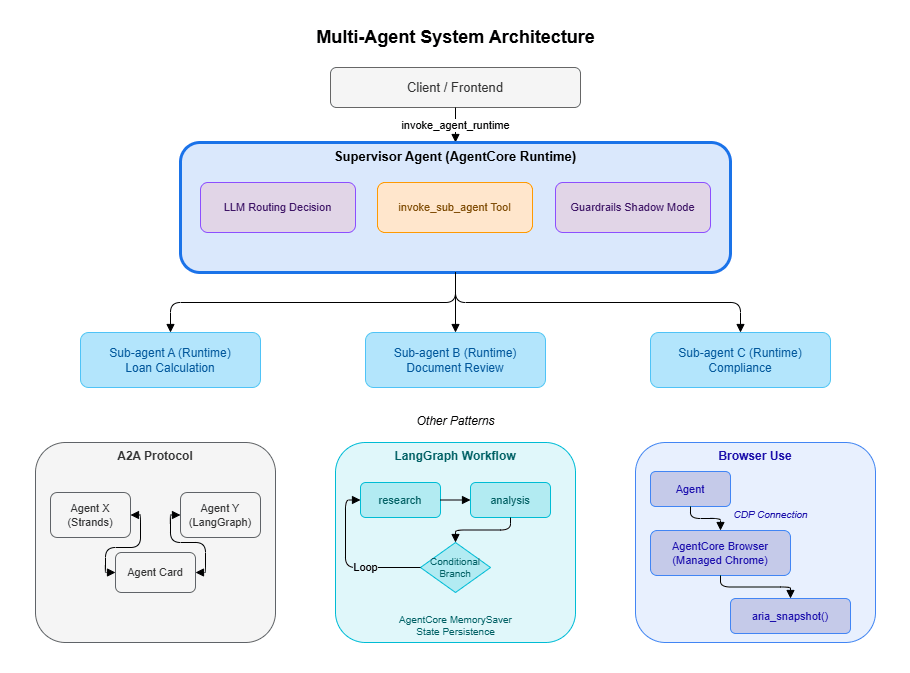
- Supervisor + Sub-agent: LLM-based dynamic routing that coordinates multiple specialized agents
- A2A Protocol: A framework-agnostic standard for agent-to-agent communication
- LangGraph: Declarative workflow graphs with AgentCore Memory for state persistence
- Browser Use: Automated interaction with web applications that lack APIs
- Guardrails Shadow Mode: Input/output quality monitoring across the entire multi-agent system
4. Pattern Selection Guide
The following table compares the five orchestration patterns available in AgentCore.| Pattern | Communication | Coupling | Best fit |
|---|---|---|---|
| A2A Protocol | Standardized protocol | Loose | Agents owned by different teams or organizations |
| Supervisor + Sub-agent | Hierarchical invocation | Medium | LLM-based dynamic routing |
| boto3 direct invocation | invoke_agent_runtime | Loose | Lightweight orchestration from Lambda |
| Skill System | Progressive disclosure | Medium | Exposing features based on user proficiency |
| Voice Mode | Audio stream | Medium | Call centers, voice assistants |
Selection guidance
- Coordinating AgentCore agents within the same organization → Use the Supervisor + Sub-agent pattern. The LLM handles routing based on context, eliminating the need to write complex conditional logic manually.
- Integrating with agents from external teams or different platforms → Use A2A Protocol to exchange standardized Agent Cards.
- Invoking a specific agent from Lambda or Step Functions → Use
invoke_agent_runtimefor direct invocation. No framework dependency, minimal overhead. - Progressively evolving the user experience → Use the Skill System to unlock tools based on user proficiency.
- Building a voice interaction interface → Use Voice Mode with Nova Sonic 2's bidirectional streaming. Note that WebSocket/WebRTC infrastructure must be set up separately.
5. Pattern 1: A2A Protocol (Agent-to-Agent Communication)
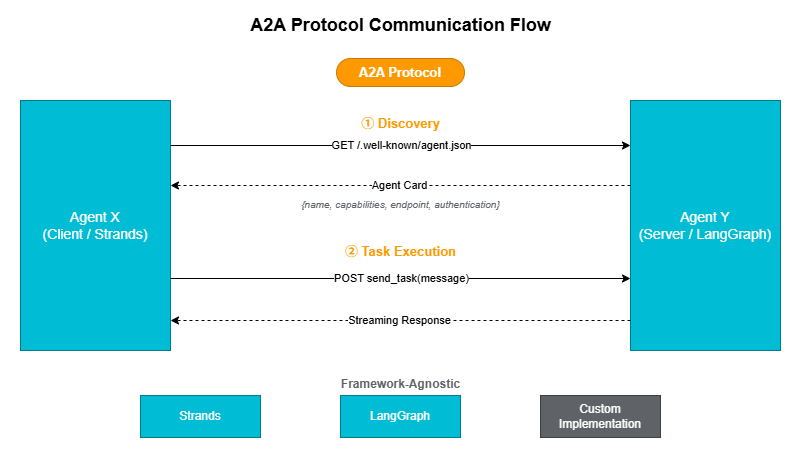
5.1 What is A2A Protocol?
The A2A (Agent-to-Agent) Protocol is an open standard for inter-agent communication proposed by Google in 2025. Each agent publishes a self-describing metadata document called an Agent Card at/.well-known/agent.json, allowing other agents to discover and invoke it.The key advantage of this approach is that agents can interoperate regardless of their underlying implementation technology (Strands, LangGraph, or a custom framework).
5.2 Designing an Agent Card
An Agent Card is a JSON document that describes an agent's capabilities, authentication scheme, and endpoint.AGENT_CARD = {
"name": "travel-agent",
"description": "Agent responsible for travel planning and booking",
"capabilities": {
"streaming": True,
"tools": ["search_flights", "book_hotel", "get_weather"],
},
"endpoint": "https://bedrock-agentcore.us-west-2.amazonaws.com/runtimes/...",
"authentication": {
"type": "bearer",
"scheme": "cognito-jwt",
},
}5.3 Implementing an A2A Client
The following client retrieves an Agent Card and invokes the corresponding endpoint. It supports streaming and encapsulates the A2Asend_task and get_agent_card operations.import httpx
from typing import AsyncGenerator
class A2AClient:
"""Client for invoking agents via A2A Protocol"""
def __init__(self, agent_card: dict, auth_token: str):
self.endpoint = agent_card["endpoint"]
self.auth_token = auth_token
self.capabilities = agent_card.get("capabilities", {})
async def send_task(
self, message: str, session_id: str
) -> AsyncGenerator[str, None]:
"""Send a task and receive a streaming response"""
async with httpx.AsyncClient() as client:
async with client.stream(
"POST",
self.endpoint,
headers={
"Authorization": f"Bearer {self.auth_token}",
"Content-Type": "application/json",
"X-Amzn-Bedrock-AgentCore-Runtime-Session-Id": session_id,
},
json={"prompt": message},
timeout=300,
) as response:
async for line in response.aiter_lines():
if line.strip():
yield line
async def get_agent_card(self) -> dict:
"""Retrieve the Agent Card (discovery)"""
async with httpx.AsyncClient() as client:
response = await client.get(
f"{self.endpoint}/.well-known/agent.json",
headers={"Authorization": f"Bearer {self.auth_token}"},
)
return response.json()5.4 Registering an A2A Client as a Tool
Wrapping the A2A client as a Strands@tool makes it available as a tool for a Supervisor agent.from strands import tool
@tool(name="ask_travel_agent", description="Ask the travel agent a question")
async def ask_travel_agent(question: str, session_id: str = "") -> str:
"""Forward a question to the travel agent via A2A Protocol"""
client = A2AClient(
agent_card=TRAVEL_AGENT_CARD,
auth_token=get_auth_token(), # Identity pattern from Part 2
)
result = ""
async for chunk in client.send_task(question, session_id):
result += chunk
return result6. Pattern 2: Supervisor + Sub-agent
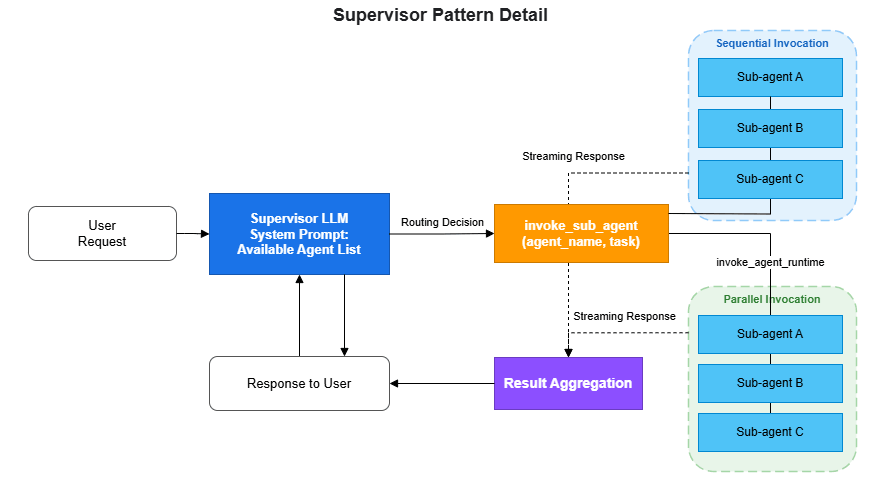
6.1 Overview
The Supervisor pattern is one of the most widely used designs in multi-agent architecture. A parent agent (Supervisor) analyzes the user's request using an LLM and delegates tasks to the appropriate child agents (Sub-agents).The core principle of this pattern is to let the LLM decide routing logic rather than coding it by hand. By describing in the Supervisor's system prompt which agent is responsible for which domain, the LLM selects the right Sub-agent based on context. It can also invoke multiple Sub-agents in sequence and synthesize their results.
6.2 Implementation
The following example shows a Supervisor coordinating three specialized agents: loan calculation, document review, and compliance checking. Each Sub-agent is deployed as an independent AgentCore Runtime and invoked via theinvoke_agent_runtime API.from strands import Agent, tool
import boto3
import json
from io import BytesIO
# Sub-agent Runtime ARNs
SUB_AGENTS = {
"mortgage_calculator": {
"arn": "arn:aws:bedrock-agentcore:us-west-2:ACCOUNT_ID:runtime/mortgage-calc",
"description": "Mortgage loan calculation agent",
},
"document_reviewer": {
"arn": "arn:aws:bedrock-agentcore:us-west-2:ACCOUNT_ID:runtime/doc-review",
"description": "Document review agent",
},
"compliance_checker": {
"arn": "arn:aws:bedrock-agentcore:us-west-2:ACCOUNT_ID:runtime/compliance",
"description": "Compliance checking agent",
},
}
@tool(name="invoke_sub_agent", description="Delegate a task to a specialized agent")
def invoke_sub_agent(agent_name: str, task: str, session_id: str = "") -> str:
"""
Forward a task to the specified specialized agent.
Args:
agent_name: Agent name
(mortgage_calculator, document_reviewer, compliance_checker)
task: Description of the task to delegate
session_id: Session ID (for sharing conversation context)
"""
if agent_name not in SUB_AGENTS:
return f"Error: '{agent_name}' does not exist. Available: {list(SUB_AGENTS.keys())}"
agent_config = SUB_AGENTS[agent_name]
client = boto3.client('bedrock-agentcore')
payload = json.dumps({"prompt": task}).encode('utf-8')
response = client.invoke_agent_runtime(
agentRuntimeArn=agent_config["arn"],
runtimeSessionId=session_id or f"supervisor-{agent_name}",
payload=BytesIO(payload),
)
# Read response (handles both bytes and dict)
result = ""
for chunk in response.get('response', []):
if isinstance(chunk, bytes):
result += chunk.decode('utf-8')
elif isinstance(chunk, dict) and 'chunk' in chunk:
data = chunk['chunk']
if isinstance(data, dict):
result += data.get('bytes', b'').decode('utf-8')
return resultExample output:
[Supervisor] Analyzing user request...
  Input: "What would be the monthly payment for a 30M yen mortgage over 35 years?"
[Supervisor] Routing decision: mortgage_calculator
  Reason: Question about mortgage loan calculation
[Supervisor] invoke_sub_agent(agent_name="mortgage_calculator", task="Calculate monthly payment for 30M yen, 35 years, 1.5% interest rate")
[invoke_agent_runtime] ARN: arn:aws:bedrock-agentcore:us-west-2:123456789012:runtime/mortgage-calc
[invoke_agent_runtime] Session: supervisor-mortgage_calculator
[invoke_agent_runtime] Receiving streaming response...
  chunk[0]: "The monthly payment would be approximately 91,855 yen"
  chunk[1]: "(level payment method, 1.5% interest rate, 35-year loan term)"
[Supervisor] Sub-agent response integration complete
[Supervisor] Generating response for user
6.3 Designing the Supervisor System Prompt
The Supervisor's system prompt should clearly describe the domain each Sub-agent is responsible for. The LLM uses this information to make routing decisions.supervisor = Agent(
model="us.anthropic.claude-sonnet-4-20250514-v1:0",
system_prompt="""You are a supervisor for a mortgage loan advisor system.
Analyze the user's request and delegate it to the appropriate specialized agent.
Available specialized agents:
- mortgage_calculator: Loan calculations, interest rate simulations, repayment planning
- document_reviewer: Review of required documents, deficiency checks, document list generation
- compliance_checker: Regulatory compliance verification, explanation of regulatory requirements
Invoke multiple agents in sequence as needed to provide a comprehensive answer.
If a single question requires multiple agents, call them one by one.""",
tools=[invoke_sub_agent],
)7. Pattern 3: Direct boto3 Invocation
This is the simplest multi-agent pattern. It invokes AgentCore Runtime directly via boto3, with no dependency on Strands or LangGraph.7.1 Parallel and Sequential Execution
import boto3
import json
from io import BytesIO
from concurrent.futures import ThreadPoolExecutor

client = boto3.client('bedrock-agentcore')

def invoke_agent(runtime_arn: str, prompt: str, session_id: str) -> str:
    """Invoke a single agent"""
    response = client.invoke_agent_runtime(
        agentRuntimeArn=runtime_arn,
        runtimeSessionId=session_id,
        payload=BytesIO(json.dumps({"prompt": prompt}).encode()),
    )

    # Read response (handles both bytes and dict)
    result = ""
    for chunk in response.get('response', []):
        if isinstance(chunk, bytes):
            result += chunk.decode('utf-8')
        elif isinstance(chunk, dict) and 'chunk' in chunk:
            data = chunk['chunk']
            if isinstance(data, dict):
                result += data.get('bytes', b'').decode('utf-8')
    return result


def orchestrate_parallel(tasks: list[dict]) -> list[str]:
    """Execute multiple agents in parallel"""
    with ThreadPoolExecutor(max_workers=len(tasks)) as executor:
        futures = [
            executor.submit(invoke_agent, t["arn"], t["prompt"], t["session_id"])
            for t in tasks
        ]
        return [f.result() for f in futures]


def orchestrate_sequential(tasks: list[dict]) -> str:
    """Sequential execution: pass the previous agent's result to the next"""
    context = ""
    for task in tasks:
        prompt = task["prompt"]
        if context:
            prompt = f"Previous step result:\n{context}\n\nTask: {prompt}"
        context = invoke_agent(task["arn"], prompt, task["session_id"])
    return context
7.2 When to Use Each Approach
- Parallel execution: Use when tasks are independent of each other (e.g., fetching cost estimates from multiple regions simultaneously).
- Sequential execution: Use when the output of one agent feeds into the next (e.g., data collection → analysis → report generation).
8. Pattern 4: Skill System (Progressive Feature Disclosure)
The Skill System is not strictly a multi-agent pattern — it is an approach for dynamically switching the tool set of a single agent based on the user's proficiency level. When combined with AgentCore Memory, the agent can automatically determine skill level from the user's interaction history.SKILL_LEVELS = {
"beginner": {
"tools": ["search", "explain"],
"description": "Basic search and explanation",
},
"intermediate": {
"tools": ["search", "explain", "calculate", "compare"],
"description": "Can perform calculations and comparisons",
},
"advanced": {
"tools": ["search", "explain", "calculate", "compare", "deploy", "modify"],
"description": "Can perform deployments and modifications",
},
}
def get_tools_for_user(user_id: str, memory_client=None) -> list:
"""Select tools based on the user's skill level"""
skill_level = "beginner"
if memory_client:
memories = memory_client.retrieve_memories(
memory_id=MEMORY_ID,
namespace=f"/users/{user_id}/preferences",
query="user skill level",
top_k=1,
)
if memories:
content = memories[0].get('content', {}).get('text', '')
if "advanced" in content.lower():
skill_level = "advanced"
elif "intermediate" in content.lower():
skill_level = "intermediate"
allowed_tools = SKILL_LEVELS[skill_level]["tools"]
return [t for t in ALL_TOOLS if t.tool_name in allowed_tools]Beginners are limited to safe operations (search and explain), while advanced users gain access to higher-risk operations such as deploy and modify. This approach balances safety and usability without compromising either.
9. Pattern 5: Voice Mode (Nova Sonic 2)
Amazon Nova Sonic 2 is a multimodal model with voice input and output support, enabling the construction of voice-driven agents. It uses the same tool definitions as text-based agents, but replaces text I/O with bidirectional audio streams. This makes it well-suited for call center automation and voice assistant use cases.Voice Mode requires bidirectional streaming via WebSocket or WebRTC rather than the standard request-response model. In Strands, this is implemented using the experimental
BidiNovaSonicModel. (The implementation is based on 01-tutorials/01-AgentCore-runtime/06-bi-directional-streaming/strands/websocket/server.py in the amazon-bedrock-agentcore-samples repository.)# Strands bidirectional streaming model (experimental API)
from strands.experimental.bidi.models.nova_sonic import BidiNovaSonicModel
from strands.experimental.bidi.agent import BidiAgent
# Initialize the model (including audio input/output configuration)
voice_model = BidiNovaSonicModel(
model_id="amazon.nova-2-sonic-v1:0",
region="us-west-2",
provider_config={
"audio": {
"input_sample_rate": 16000,
"output_sample_rate": 16000,
"voice": "matthew",
}
},
tools=[calculator], # Standard tool definitions can be used as-is
)
# Manage bidirectional session with BidiAgent
agent = BidiAgent(
model=voice_model,
tools=[calculator],
system_prompt="You are a voice assistant. Respond in natural conversational language.",
)
# Run inside a WebSocket handler
# inputs: async generator that receives audio chunks from the client
# outputs: callback that sends audio chunks to the client
await agent.run(inputs=[handle_websocket_input], outputs=[websocket.send_json])Note: Voice Mode is an experimental API located in the
strands.experimental namespace. The code above must be hosted within infrastructure such as a FastAPI WebSocket endpoint. Two implementation patterns are available: WebSocket and WebRTC. Refer to the official sample repository linked above for details.10. Integration with Code Interpreter
In a multi-agent configuration, sharing a Code Interpreter session allows the Supervisor to decide: "run this task as code, and delegate specialized judgment to a Sub-agent." Apply the session lifecycle management pattern from Part 1 usingtry/finally.from bedrock_agentcore.tools.code_interpreter_client import CodeInterpreter
from strands import Agent, tool
# Create a Code Interpreter session (region specified as positional argument)
code_session = CodeInterpreter("us-west-2")
code_session.start()
try:
@tool(name="run_code", description="Execute Python code in a secure sandbox")
def run_code(code: str) -> str:
"""Execute Python code with executeCode and return stdout"""
response = code_session.invoke(
"executeCode",
{"code": code, "language": "python", "clearContext": False},
)
# Response retrieves stdout from structuredContent inside the stream array
stdout_parts = []
for event in response.get("stream", []):
result = event.get("result", {})
if result.get("isError", False):
return f"Error: {result.get('structuredContent', {}).get('stderr', 'Unknown error')}"
stdout = result.get("structuredContent", {}).get("stdout", "")
if stdout:
stdout_parts.append(stdout)
return "".join(stdout_parts)
# Give the Supervisor both Code Interpreter and Sub-agent invocation capabilities
agent = Agent(
model="us.anthropic.claude-sonnet-4-20250514-v1:0",
tools=[run_code, invoke_sub_agent],
system_prompt="Solve problems by combining code execution and specialized agents.",
)
# Run the agent (invoke while the session is active)
result = agent("Analyze the sales data and generate a report")
finally:
code_session.stop()Example output:
[Code Interpreter] Session started (region=us-west-2)
[Agent] Tool selected: run_code
[run_code] Executing executeCode...
  language: python
  code: |
    import json
    data = [120, 150, 180, 200, 170, 220, 250]
    months = ["Jan", "Feb", "Mar", "Apr", "May", "Jun", "Jul"]
    total = sum(data)
    avg = total / len(data)
    max_month = months[data.index(max(data))]
    print(f"Total sales: {total}M yen")
    print(f"Monthly average: {avg:.1f}M yen")
    print(f"Best month: {max_month} ({max(data)}M yen)")
[run_code] stdout:
  Total sales: 1290M yen
  Monthly average: 184.3M yen
  Best month: Jul (250M yen)
[Agent] Tool selected: invoke_sub_agent (document_reviewer)
[Agent] Integrating sub-agent analysis results with code execution results to generate response
[Code Interpreter] Session stopped
11. LangGraph Multi-Agent
LangGraph's graph structure is well-suited for expressing iterative multi-agent workflows. Branches and loops in the workflow are defined declaratively as a directed graph, with routing conditions set viaadd_conditional_edges. The graph loops automatically until the termination condition is satisfied.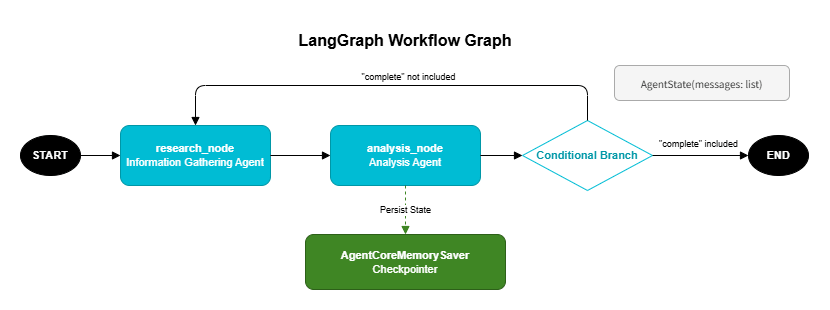
11.1 Declarative Workflows with StateGraph
The following example repeatedly cycles through a research node → analysis node loop until the analysis result is deemed sufficient.# pip install langgraph langchain-aws
from langgraph.graph import StateGraph, END
from langchain_aws import ChatBedrock
from typing import TypedDict, Annotated
from langgraph.graph.message import add_messages
# Workflow state definition
class AgentState(TypedDict):
messages: Annotated[list, add_messages]
# Information gathering node
def research_node(state):
"""Information gathering agent"""
model = ChatBedrock(model_id="us.anthropic.claude-sonnet-4-20250514-v1:0")
result = model.invoke(state["messages"])
return {"messages": [result]} # add_messages handles the append
# Analysis node
def analysis_node(state):
"""Analysis agent"""
model = ChatBedrock(model_id="us.anthropic.claude-sonnet-4-20250514-v1:0")
result = model.invoke(state["messages"])
return {"messages": [result]} # add_messages handles the append
# Routing condition
def router(state):
"""Determine whether analysis is sufficient"""
last_message = state["messages"][-1]
if "complete" in last_message.content.lower():
return END
return "research"
# Build the graph
graph = StateGraph(AgentState)
graph.add_node("research", research_node)
graph.add_node("analysis", analysis_node)
graph.add_edge("research", "analysis")
graph.add_conditional_edges("analysis", router, {
"research": "research",
END: END,
})
graph.set_entry_point("research")11.2 Persisting Workflow State with AgentCoreMemorySaver
UsingAgentCoreMemorySaver as a checkpointer saves intermediate workflow state to AgentCore Memory, enabling workflows to resume after interruption. The two-tier Memory architecture introduced in Part 1 serves here as the persistence layer for workflow state.# pip install langgraph-checkpoint-aws
from langgraph_checkpoint_aws import AgentCoreMemorySaver
# Use Memory as a checkpointer
checkpointer = AgentCoreMemorySaver(
memory_id=MEMORY_ID,
region_name="us-west-2",
)
app = graph.compile(checkpointer=checkpointer)
# Run the workflow (specify thread_id and actor_id)
result = app.invoke(
{"messages": [{"role": "user", "content": "Please perform a cost analysis for EC2"}]},
config={"configurable": {"thread_id": session_id, "actor_id": user_id}},
)12. Browser Use — Automating Systems Without APIs

12.1 Overview of AgentCore Browser
Many business applications do not expose APIs and can only be operated through a web browser. AgentCore Browser provides an AWS-managed Chrome session that Playwright connects to via CDP (Chrome DevTools Protocol) to interact with web pages.The live view feature lets you monitor browser activity in real time from the AWS Console, making debugging straightforward.
12.2 Basic Browser Session
Playwright must be installed before use.pip install playwright
playwright install chromiumbrowser_session() starts a managed session and returns a CDP WebSocket URL for Playwright to connect to. When the with block exits, the session is automatically cleaned up.from bedrock_agentcore.tools.browser_client import browser_session
from playwright.sync_api import sync_playwright
region = "us-west-2"
with browser_session(region) as client:
ws_url, headers = client.generate_ws_headers()
print(f"Session ID: {client.session_id}")
print(f"Console: https://{region}.console.aws.amazon.com"
"/bedrock-agentcore/builtInTools")
with sync_playwright() as playwright:
browser = playwright.chromium.connect_over_cdp(ws_url, headers=headers)
context = browser.contexts[0]
page = context.pages[0]
try:
page.goto("https://example.com", wait_until="networkidle", timeout=30000)
print(page.title())
finally:
page.close()
browser.close()Example output:
Session ID: bs-a1b2c3d4e5f6
Console: https://us-west-2.console.aws.amazon.com/bedrock-agentcore/builtInTools
[browser_session] CDP WebSocket URL retrieved successfully
[browser_session] Connecting via Playwright... chromium.connect_over_cdp()
[browser_session] Browser context acquired (contexts=1, pages=1)
[browser_session] Navigating to page: https://example.com (wait_until=networkidle, timeout=30000ms)
Example Domain
[browser_session] Session ended. Resources cleaned up.
12.3 Implementing a Generic Form Auto-Fill Pattern
This approach enables automatic form submission even when the form structure is not known in advance. It consists of three steps.Step 1: Dynamic field discovery with
aria_snapshot()Use Playwright's accessibility tree to retrieve form element types and names.
def discover_form_fields(page) -> str:
    """Detect form fields from the accessibility tree"""
    return page.locator("body").aria_snapshot()
    # Example output:
    #   - textbox "Name"
    #   - textbox "Email"
    #   - radio "Strongly Agree"
    #   - button "Submit"
Step 2: Field value mapping with a Bedrock LLM
Pass the accessibility snapshot and input data to an LLM to generate the field values as JSON.
import boto3
import json
import re

def generate_form_values(
    data_text: str,
    form_snapshot: str,
    region: str,
    extra_context: str = "",
) -> dict:
    """Have the LLM generate values for form fields"""
    bedrock_runtime = boto3.client("bedrock-runtime", region_name=region)

    prompt = (
        "You are given a web form's accessibility tree and input data.\n"
        "Map the data to the appropriate form fields.\n\n"
        f"Form accessibility tree:\n{form_snapshot}\n\n"
        f"Input data:\n{data_text}\n"
        f"{extra_context}\n\n"
        "Return JSON in the following format:\n"
        '- "textboxes": object with accessible names as keys and values as values (max 50 chars each)\n'
        '- "radios": object with accessible names as keys and true if the option should be selected\n\n'
        "Use the accessible names exactly as they appear in the tree as keys.\n"
        "Return JSON only, no markdown code blocks."
    )

    response = bedrock_runtime.converse(
        modelId="us.anthropic.claude-sonnet-4-20250514-v1:0",
        messages=[{"role": "user", "content": [{"text": prompt}]}],
        inferenceConfig={"maxTokens": 2000, "temperature": 0.0},
    )
    generated = response["output"]["message"]["content"][0]["text"]

    # Remove markdown code blocks
    cleaned = re.sub(r"^```(?:json)?\s*", "", generated.strip())
    cleaned = re.sub(r"\s*```$", "", cleaned)

    return json.loads(cleaned)
Step 3: Input via CDP (chunked with delay)
When typing large text over CDP, sending it all at once can cause characters to be dropped. Reliability is ensured by splitting input into 20-character chunks and inserting a 300ms delay between each chunk.
import time

CHUNK_SIZE = 20  # Small chunk size for CDP reliability

def type_into_field(page, locator, value: str) -> None:
    """Reliably type text into a field"""
    locator.scroll_into_view_if_needed()
    locator.click()
    page.keyboard.press("Control+a")  # Clear existing text

    for start in range(0, len(value), CHUNK_SIZE):
        chunk = value[start: start + CHUNK_SIZE]
        page.keyboard.type(chunk)
        time.sleep(0.3)  # Stabilize CDP transfer

    time.sleep(0.3)
12.4 Form Fill and Submit with Retry Logic
Because CDP input can be unreliable, the implementation includes pre-submission verification that re-enters any field whose value is missing.import time
def fill_and_submit_form(page, form_values: dict) -> bool:
"""Fill in form data and submit (verify values before submitting)"""
textbox_values = form_values.get("textboxes", {})
radio_values = form_values.get("radios", {})
# Fill text fields
for field_name, value in textbox_values.items():
value = value[:50] # Maximum characters per field
textbox = page.get_by_role("textbox", name=field_name)
if textbox.count() > 0:
type_into_field(page, textbox.first, value)
# Select radio buttons
for option_label, should_select in radio_values.items():
if not should_select:
continue
radio = page.get_by_role("radio", name=option_label)
if radio.count() > 0:
radio.first.scroll_into_view_if_needed()
radio.first.click()
# Pre-submission verification: re-enter any fields with missing values
for field_name, value in textbox_values.items():
value = value[:50]
textbox = page.get_by_role("textbox", name=field_name)
if textbox.count() > 0:
confirmed = textbox.first.input_value()
if confirmed != value:
type_into_field(page, textbox.first, value)
# Submit the form
time.sleep(0.5)
submit_btn = page.get_by_role("button", name="Submit")
submit_btn.scroll_into_view_if_needed()
submit_btn.click()
# Verify submission result
time.sleep(3)
body_text = page.locator("body").inner_text()
return "thank" in body_text.lower()Example output:
[fill_and_submit_form] Filling text fields...
[type_into_field] "Name": "John Smith" (10 chars, 1 chunk)
[type_into_field] "Email": "john@example.com" (16 chars, 1 chunk)
[type_into_field] "Phone": "555-1234-5678" (13 chars, 1 chunk)
[fill_and_submit_form] Selecting radio buttons...
[fill_and_submit_form] Selecting "Agree to Terms"
[fill_and_submit_form] Running pre-submission verification...
[fill_and_submit_form] WARNING: "Phone" value missing (confirmed="", expected="555-1234-5678")
[type_into_field] "Phone": re-entering "555-1234-5678"
[fill_and_submit_form] Verification complete. All fields OK.
[fill_and_submit_form] Clicking Submit button...
[fill_and_submit_form] Verifying submission result... (waiting 3 seconds)
[fill_and_submit_form] Result: "thank" detected → Submission successful
13. Quality Monitoring for Multi-Agent Systems: Guardrails Shadow Mode
In a multi-agent configuration, monitoring the input and output of each agent with guardrails is especially important. However, enabling blocking mode in production immediately carries the risk of erroneously blocking legitimate interactions.13.1 The Shadow Mode Concept
Shadow Mode is an operational mode in which guardrails evaluate content but do not block messages when a violation is detected — they only log it.Phased rollout:
1. Shadow Mode (testing period) → log violations, do not block
2. Analyze logs and verify false positive rate
3. Once false positives are within acceptable range, switch to ENFORCE mode13.2 Implementing Shadow Mode as a HookProvider
Implement Shadow Mode as a StrandsHookProvider. The register_hooks method registers callbacks for MessageAddedEvent (evaluating user input) and AfterInvocationEvent (evaluating assistant responses). Any violations are recorded as WARNING log entries. (The implementation is based on agent/guardrails.py in the sample-strands-agentcore-starter repository.)from strands.hooks import (
AfterInvocationEvent,
HookProvider,
HookRegistry,
MessageAddedEvent,
)
import boto3
import logging
logger = logging.getLogger(__name__)
class NotifyOnlyGuardrailsHook(HookProvider):
"""
Shadow Mode Guardrails: logs violations without blocking.
Ideal for testing before production deployment.
"""
def __init__(self, guardrail_id: str, guardrail_version: str, region: str):
self.client = boto3.client('bedrock-runtime', region_name=region)
self.guardrail_id = guardrail_id
self.guardrail_version = guardrail_version
self.pending_violations: list = []
def register_hooks(self, registry: HookRegistry) -> None:
"""Register hooks: evaluate user input and assistant responses separately"""
registry.add_callback(MessageAddedEvent, self.check_user_input)
registry.add_callback(AfterInvocationEvent, self.check_assistant_response)
def _evaluate(self, text: str, source: str) -> None:
"""Run guardrail evaluation and log any violations"""
try:
response = self.client.apply_guardrail(
guardrailIdentifier=self.guardrail_id,
guardrailVersion=self.guardrail_version,
source=source,
content=[{"text": {"text": text}}],
)
if response.get("action") == "GUARDRAIL_INTERVENED":
violation = {
"source": source,
"assessments": response.get("assessments", []),
}
self.pending_violations.append(violation)
logger.warning(f"Guardrail violation (shadow): {violation}")
except Exception:
pass # Guardrail failures should not affect the agent
def check_user_input(self, event: MessageAddedEvent) -> None:
"""Evaluate as INPUT when a user message is added"""
message = event.message
if message.get("role") != "user":
return
content = message.get("content", [])
text = " ".join(
b.get("text", "") for b in content
if isinstance(b, dict) and "text" in b
)
if text:
self._evaluate(text, "INPUT")
def check_assistant_response(self, event: AfterInvocationEvent) -> None:
"""Evaluate as OUTPUT when an assistant response is complete"""
for msg in reversed(event.agent.messages):
if msg.get("role") == "assistant":
content = msg.get("content", [])
text = " ".join(
b.get("text", "") for b in content
if isinstance(b, dict) and "text" in b
)
if text:
self._evaluate(text, "OUTPUT")
break
def get_and_clear_violations(self) -> list:
"""Retrieve and clear detected violations"""
violations = self.pending_violations.copy()
self.pending_violations.clear()
return violations13.3 Usage Example
# Shadow Mode Guardrails hook
shadow_guardrails = NotifyOnlyGuardrailsHook(
    guardrail_id="abc123",
    guardrail_version="1",
    region="us-west-2",
)

# Apply to the Supervisor agent
supervisor = Agent(
    model="us.anthropic.claude-sonnet-4-20250514-v1:0",
    system_prompt=SUPERVISOR_PROMPT,
    tools=[invoke_sub_agent],
    hooks=[shadow_guardrails],  # Evaluate all messages in Shadow Mode
)
Example output (no violations):
[Shadow Guardrails] Evaluating INPUT... source=INPUT
[Shadow Guardrails] Result: action=NONE, no violations
[Supervisor] Routing to: mortgage_calculator
[Shadow Guardrails] Evaluating OUTPUT... source=OUTPUT
[Shadow Guardrails] Result: action=NONE, no violations
Example output (violation detected):
[Shadow Guardrails] Evaluating INPUT... source=INPUT
[Shadow Guardrails] Result: action=NONE, no violations
[Supervisor] Routing to: compliance_checker
[Sub-agent] Generating response...
[Shadow Guardrails] Evaluating OUTPUT... source=OUTPUT
[Shadow Guardrails] WARNING: Violation detected (no block)
  action: GUARDRAIL_INTERVENED
  assessments:
    - contentPolicy:
        filters:
          - type: HATE
            confidence: HIGH
            action: BLOCKED
          - type: VIOLENCE
            confidence: MEDIUM
            action: BLOCKED
[Shadow Guardrails] Violation logged. Message passed through without blocking.
For details on the CDK configuration for Guardrails, see Part 3 of this series, "Building a 4-Stack CDK Architecture with an Observability Pipeline."
14. Design Considerations
Controlling the Number of Agents
Start with two or three specialized agents and scale up as needed. If you exceed five agents, verify that the Supervisor's routing accuracy does not degrade.Session ID Design
To share context across Sub-agents, pass the samesession_id. To isolate contexts, intentionally use different IDs.# Shared context: use the same session ID as the Supervisor
session_id = f"supervisor-{user_id}-{timestamp}"
# Isolated context: separate session per Sub-agent
sub_session = f"supervisor-{agent_name}-{session_id}"Error Propagation Strategy
Decide in advance how the Supervisor should handle Sub-agent errors.- Retry: For transient errors
- Fallback to another agent: When a specific agent is unavailable
- Report to the user: For unrecoverable errors
Cost Management
Multi-agent systems increase the number of LLM calls, which drives up costs proportionally. A single Supervisor decision plus one Sub-agent invocation already requires at least two LLM calls. Use the Firehose usage logging pipeline described in Part 3 to track costs per agent.Multi-Agent Deployment with IaC
In a multi-agent configuration, the standard pattern is to deploy each Sub-agent as an independent Runtime and have the Supervisor reference their ARNs via environment variables. The following Terraform example demonstrates this setup. (Refer to04-infrastructure-as-code/terraform/multi-agent-runtime/ in amazon-bedrock-agentcore-samples.)# Sub-agent: Loan calculation
resource "aws_bedrockagentcore_agent_runtime" "mortgage_calc" {
agent_runtime_name = "mortgage_calculator" # Use underscores, not hyphens
role_arn = aws_iam_role.execution.arn
network_configuration { network_mode = "PUBLIC" }
agent_runtime_artifact {
container_configuration {
container_uri = "${aws_ecr_repository.mortgage_calc.repository_url}:latest"
}
}
}
# Sub-agent: Document review
resource "aws_bedrockagentcore_agent_runtime" "doc_review" {
agent_runtime_name = "document_reviewer"
role_arn = aws_iam_role.execution.arn
network_configuration { network_mode = "PUBLIC" }
agent_runtime_artifact {
container_configuration {
container_uri = "${aws_ecr_repository.doc_review.repository_url}:latest"
}
}
}
# Supervisor: inject Sub-agent ARNs via environment variables
resource "aws_bedrockagentcore_agent_runtime" "supervisor" {
agent_runtime_name = "loan_supervisor"
role_arn = aws_iam_role.execution.arn
network_configuration { network_mode = "PUBLIC" }
agent_runtime_artifact {
container_configuration {
container_uri = "${aws_ecr_repository.supervisor.repository_url}:latest"
}
}
environment_variables = {
AWS_REGION = data.aws_region.current.id
AWS_DEFAULT_REGION = data.aws_region.current.id
MORTGAGE_CALC_ARN = aws_bedrockagentcore_agent_runtime.mortgage_calc.agent_runtime_arn
DOC_REVIEW_ARN = aws_bedrockagentcore_agent_runtime.doc_review.agent_runtime_arn
}
# Explicitly declare deployment order (ARNs are implicitly referenced via
# environment_variables, but depends_on is added for readability)
depends_on = [
aws_bedrockagentcore_agent_runtime.mortgage_calc,
aws_bedrockagentcore_agent_runtime.doc_review,
]
}
# IAM policy allowing the Supervisor to invoke Sub-agents
resource "aws_iam_role_policy" "supervisor_invoke_sub_agents" {
name = "invoke-sub-agents"
role = aws_iam_role.execution.id
policy = jsonencode({
Version = "2012-10-17"
Statement = [{
Effect = "Allow"
Action = "bedrock-agentcore:InvokeAgentRuntime"
Resource = "arn:aws:bedrock-agentcore:${data.aws_region.current.name}:${data.aws_caller_identity.current.account_id}:runtime/*"
}]
})
}Avoiding Circular Dependencies
Keep agent dependencies strictly unidirectional to prevent routing loops such as Agent A → Agent B → Agent A.Troubleshooting
| Symptom | Likely cause | Resolution |
|---|---|---|
| Sub-agent response is empty | Incomplete streaming chunk handling | Handle both text/event-stream and JSON based on contentType |
| Session context not shared | Different session_id values passed | Pass the same session_id used by the Supervisor to each Sub-agent |
| Throttling during parallel execution | Bedrock rate limits | Use cross-region inference (us.* model IDs) |
| A2A authentication errors | Expired token | Retrieve a fresh token each time, or shorten the cache TTL |
| Supervisor does not invoke Sub-agents | Unclear tool description | Write more specific descriptions in the @tool description field |
Key Limits and Quotas
The following summarizes limits relevant to multi-agent configurations, divided into multi-agent-specific constraints and individual service constraints.Multi-Agent-Specific Constraints
| Resource | Limit | Notes |
|---|---|---|
| Recommended Sub-agent count per Supervisor | Start with 2-3; validate beyond 5 | Routing accuracy may degrade if the Supervisor manages more than 5 Sub-agents |
| Tools per agent | Accuracy degrades beyond ~20 (soft limit) | Split into specialized Sub-agents when the tool count is high |
| Token consumption multiplier | Minimum 2x (1 Supervisor + 1 Sub-agent call) | Increases further with parallel calls or multiple sequential Sub-agent invocations. Use the Firehose log pipeline to track costs per agent. |
agent_runtime_name naming convention | Alphanumeric and underscores only; hyphens not allowed | Constraint applied by the Terraform aws_bedrockagentcore_agent_runtime resource |
Concurrent invoke_agent_runtime calls | See official documentation | For parallel execution, use cross-region inference (us.* model IDs) to mitigate throttling |
| Circular dependencies | Must be avoided at design time | Keep dependencies unidirectional to prevent routing loops |
Individual Service Constraints
| Resource | Limit | Notes |
|---|---|---|
| Minimum session ID length | 16 characters | AgentCore Runtime requirement; shorter IDs cause errors |
BedrockModel read_timeout | Recommended: 900 seconds | Required for Code Interpreter or multi-step tool calls that take a long time |
| Bedrock cross-region inference rate limit | Relaxed with us.* prefix | Throttling mitigation for parallel calls; see official documentation for specific rate values |
| Maximum Browser Use session duration | See official documentation | Sessions become invalid outside the with browser_session() block |
| Concurrent Browser Use sessions | See official documentation | — |
| Browser CDP input chunk size | 20 characters/chunk, 300ms interval | Stability constraint for type_into_field |
| Browser form field max characters | 50 characters (MAX_FIELD_CHARS) | Field values are automatically truncated in fill_and_submit_form |
| Concurrent Code Interpreter sessions | See official documentation | Use try/finally to manage session lifecycle when sharing across a multi-agent system |
| LangGraph StateGraph maximum node count | See official documentation | — |
AgentCoreMemorySaver checkpoint size | See official documentation | — |
apply_guardrail API call rate | See official documentation | Shadow Mode calls the API once each for INPUT and OUTPUT, requiring a rate of message count x 2 |
| A2A Agent Card size | See official documentation | Size of the metadata published at /.well-known/agent.json |
| Voice Mode (Nova Sonic 2) concurrent streams | See official documentation | — |
15. Summary
This article covered multi-agent orchestration patterns for AgentCore.Five orchestration patterns: Each pattern — A2A Protocol (standardized communication between heterogeneous agents), Supervisor + Sub-agent (LLM-based dynamic routing), direct boto3 invocation (lightweight orchestration), Skill System (progressive feature disclosure), and Voice Mode (bidirectional audio stream) — has its own optimal use case.
LangGraph multi-agent: Declarative workflow definitions using StateGraph, combined with workflow state persistence via AgentCoreMemorySaver, enable iterative analytical workflows.
Browser Use: Combining
aria_snapshot() for form field discovery, Bedrock LLM-based field mapping, and CDP chunked input (CHUNK_SIZE=20, 300ms delay) makes it possible to automate systems that expose no APIs.Guardrails Shadow Mode: The recommended approach is to apply
NotifyOnlyGuardrailsHook during a pre-production testing period, verify the false positive rate, and then gradually transition to ENFORCE mode.Multi-agent architectures are powerful, but starting with two or three specialized agents and scaling incrementally is the most reliable path to success.
16. References
- Amazon Bedrock AgentCore Documentation
- Strands Agents SDK
- A2A Protocol
- LangGraph
- langgraph-checkpoint-aws — AgentCoreMemorySaver package
- Playwright
Sample Repositories Referenced in This Article
- amazon-bedrock-agentcore-samples — Voice Mode, Terraform multi-agent IaC
- sample-strands-agentcore-starter — NotifyOnlyGuardrailsHook implementation
Related Articles in This Series
- Part 1 "Runtime, Memory, and Code Interpreter Implementation Patterns" — Memory two-tier architecture, Code Interpreter fundamentals
- Part 2 "Multi-Layer Security with Identity, Gateway, and Policy" — Identity-based authentication for A2A Protocol
- Part 3 "Building a 4-Stack CDK Architecture with an Observability Pipeline" — Guardrails CDK configuration, Firehose cost tracking pipeline
References:
Tech Blog with curated related content
Written by Hidekazu Konishi