Amazon Bedrock AgentCore Implementation Guide Part 2: Multi-Layer Security with Identity, Gateway, and Policy
First Published:
Last Updated:
1. Introduction
AI agent security presents unique challenges that differ from traditional web application security.Token leakage: When an agent holds access tokens to call external APIs, there is a risk that the LLM will include those token strings in its responses. You must design your system under the assumption that anything that enters the LLM's context window can potentially appear in its output.
Privilege escalation: Giving an agent a large set of tools creates a risk that users could exploit prompt injection to invoke unintended tools (such as sending emails or deleting data). You need a mechanism at the application layer to control which users can use which tools.
Impersonation: If you blindly trust a
userId included in a request from a web frontend, a malicious client can impersonate any user and access other users' memory or sessions.Amazon Bedrock AgentCore addresses these three challenges with a defense-in-depth architecture that combines three services: Identity (authentication layer), Gateway (tool exposure layer), and Policy (authorization layer). This article explains how to build this multi-layer security system based on implementation patterns extracted from nine official sample projects.
2. Prerequisites
- Familiarity with the content of Part 1 of this series — "Implementation Patterns for Runtime, Memory, and Code Interpreter" — including the
BedrockAgentCoreAppRuntime and the fundamental concepts of Memory - Bedrock model access enabled in your AWS account
- Python 3.11 or later, uv, and the AWS CLI available
- Basic understanding of IAM and Amazon Cognito concepts
3. Architecture Overview
Three-Layer Security Architecture
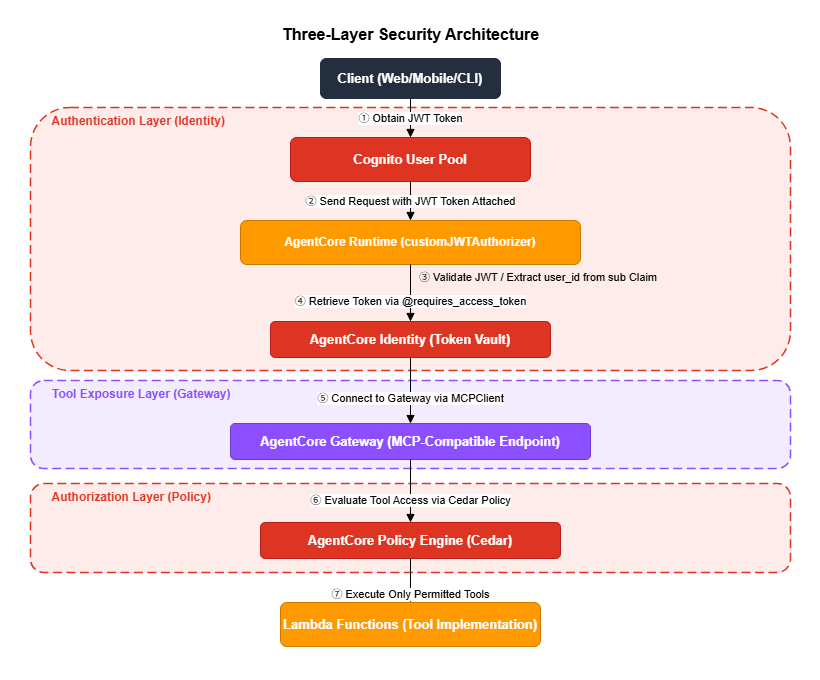
Responsibilities of Each Layer
| Layer | Service | Responsibility | Threat Mitigated |
|---|---|---|---|
| Authentication | Identity + Cognito | Verify who is accessing the system | Impersonation, token leakage |
| Tool Exposure | Gateway | Manage which tools are available | Unauthorized tool invocation |
| Authorization | Policy (Cedar) | Control who can use which tools | Privilege escalation |
4. Authentication Layer: Identity and Token Vault
AgentCore Identity is an OAuth 2.0 token management service. It automates token acquisition, caching, and refresh, and uses the@requires_access_token decorator to make API calls without exposing tokens to the agent's code — or to the LLM's context. The lifecycle around those tokens — registering the agent identity in the first place, reviewing the delegation afterward, and retiring it — is covered in Identity Lifecycle for AI Agents - Registration, Delegated Authorization, Access Review, and What Retirement Leaves Behind.4.1 JWT Authentication Setup Flow
Setting up JWT authentication consists of the following five steps.- Create a Cognito User Pool and an M2M app client.
- Confirm the OIDC endpoint is available (this can take up to 10 minutes).
- Create an AgentCore OAuth2 Credential Provider.
- Create a Runtime with JWT authentication.
- Use
@requires_access_tokento call services securely from the agent.
4.2 Setting Up a Cognito User Pool
The Cognito User Pool serves as the JWT authentication foundation for AgentCore. Using the helper methods onGatewayClient, you can create a User Pool, resource server, and M2M client all at once.from bedrock_agentcore_starter_toolkit.operations.gateway.client import GatewayClient
import boto3
region = boto3.Session().region_name
gateway_client = GatewayClient(region_name=region)
# Create Cognito User Pool + resource server + M2M client in one call
cognito_result = gateway_client.create_oauth_authorizer_with_cognito(
"MyAgentIdentityAuthorizer"
)
# Values available from the result
client_id = cognito_result['client_info']['client_id']
client_secret = cognito_result['client_info']['client_secret']
token_endpoint = cognito_result['client_info']['token_endpoint']
scope = cognito_result['client_info']['scope']
user_pool_id = cognito_result['client_info']['user_pool_id']
# Build the OIDC Discovery URL
discovery_url = (
f"https://cognito-idp.{region}.amazonaws.com/{user_pool_id}"
"/.well-known/openid-configuration"
)4.3 Waiting for the OIDC Endpoint
After creation, Cognito's OIDC Discovery URL can take 5–10 minutes to become available due to DNS propagation. Your setup script must include a polling loop with a maximum wait of 600 seconds. Skipping this wait will cause subsequent Runtime or Gateway creation steps to fail with cryptic errors.import time
import requests
def wait_for_oidc_endpoint(
discovery_url: str,
max_wait: int = 600,
interval: int = 30
) -> bool:
"""
Wait until the OIDC Discovery URL becomes available.
DNS propagation can take 5 minutes or more.
A max_wait of 600 seconds (10 minutes) is recommended.
"""
start_time = time.time()
attempt = 1
while time.time() - start_time < max_wait:
try:
response = requests.get(discovery_url, timeout=10)
if response.status_code == 200:
data = response.json()
if 'issuer' in data:
elapsed = time.time() - start_time
print(f"OIDC endpoint available ({elapsed:.1f}s)")
return True
except requests.exceptions.RequestException:
pass
remaining = max_wait - (time.time() - start_time)
print(f"Waiting... ({remaining:.0f}s remaining, attempt {attempt})")
time.sleep(interval)
attempt += 1
return False$ python setup_identity.py
Waiting... (570.0s remaining, attempt 1)
Waiting... (540.0s remaining, attempt 2)
Waiting... (510.0s remaining, attempt 3)
Waiting... (480.0s remaining, attempt 4)
Waiting... (450.0s remaining, attempt 5)
Waiting... (420.0s remaining, attempt 6)
Waiting... (390.0s remaining, attempt 7)
Waiting... (360.0s remaining, attempt 8)
Waiting... (330.0s remaining, attempt 9)
Waiting... (300.0s remaining, attempt 10)
Waiting... (270.0s remaining, attempt 11)
OIDC endpoint available (342.7s)4.4 Creating an OAuth2 Credential Provider
The Credential Provider is the central component of AgentCore Identity. It encapsulates the OAuth 2.0 token acquisition logic, and the@requires_access_token decorator uses this provider to automatically obtain tokens.import boto3
def create_oauth2_credential_provider(
provider_name: str,
client_id: str,
client_secret: str,
discovery_url: str,
region: str
) -> str:
"""Create an OAuth2 Credential Provider in AgentCore Identity."""
identity_client = boto3.client('bedrock-agentcore-control', region_name=region)
response = identity_client.create_oauth2_credential_provider(
name=provider_name,
credentialProviderVendor='CustomOauth2',
oauth2ProviderConfigInput={
'customOauth2ProviderConfig': {
'clientId': client_id,
'clientSecret': client_secret,
'oauthDiscovery': {
'discoveryUrl': discovery_url
}
}
}
)
return response['credentialProviderArn']4.5 Two-Layer Function Structure for Token Hiding
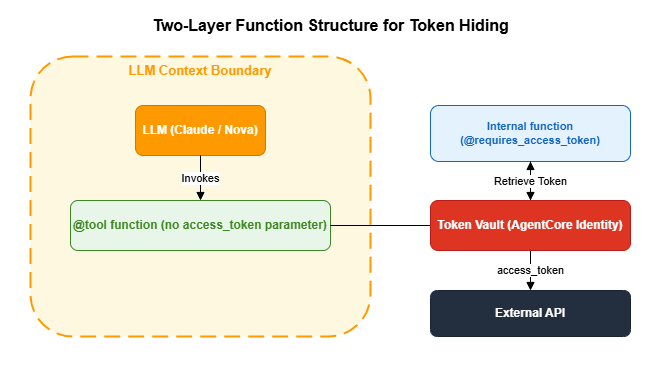
@requires_access_token decorator and the @tool decorator in a two-layer structure, you completely hide access tokens from the LLM's context.The core principle: The
@tool function that the LLM calls has no access_token parameter. Token acquisition and injection happen in an inner function that the LLM is never aware of.from bedrock_agentcore.identity.auth import requires_access_token
from strands import tool
import requests
# Configuration
OAUTH_PROVIDER = "my-oauth-provider"
OAUTH_SCOPE = "my-resource-server/invoke"
RUNTIME_URL = "https://bedrock-agentcore.us-west-2.amazonaws.com/runtimes/..."
# Inner function: @requires_access_token automatically injects the token
@requires_access_token(
provider_name=OAUTH_PROVIDER,
scopes=[OAUTH_SCOPE],
auth_flow="M2M",
force_authentication=False # Cache the token (default behavior)
)
async def _call_api_with_auth(
user_input: str,
access_token: str = None # Automatically injected by AgentCore Identity
) -> str:
"""Call the Runtime using an access token."""
import datetime
session_id = f"runtime-{datetime.datetime.now().strftime('%Y%m%dT%H%M%S')}"
headers = {
"Authorization": f"Bearer {access_token}",
"Content-Type": "application/json",
"X-Amzn-Bedrock-AgentCore-Runtime-Session-Id": session_id,
}
response = requests.post(
RUNTIME_URL,
headers=headers,
json={"prompt": user_input}
)
response.raise_for_status()
return response.text
# Public tool: the access_token parameter is hidden from the LLM
@tool(
name="call_remote_agent",
description="Query a remote agent"
)
async def call_remote_agent(user_input: str) -> str:
"""
The tool that the LLM calls.
The access_token is hidden inside _call_api_with_auth
and is never exposed in the agent's context.
"""
return await _call_api_with_auth(user_input)| Approach | Token Exposed to LLM | Risk |
|---|---|---|
| Direct reference via environment variable | Yes (appears in code) | LLM may include the token in a response |
Token as a @tool argument | Yes (visible as a parameter) | LLM may infer or output the token value |
| Two-layer function structure | No | The LLM is not even aware the token exists |
4.6 Creating a Runtime with JWT Authentication
ConfiguringcustomJWTAuthorizer on a Runtime requires a valid JWT token for every request. List the Cognito client IDs in allowedClients so that only tokens issued by those clients are accepted. How a remote MCP server decides which clients to let in, including client ID lists such as allowedClients layered on top of client registration, is covered in Which MCP Clients a Remote MCP Server Lets In.import boto3
import urllib.parse
def create_runtime_with_jwt_auth(
agent_name: str,
execution_role: str,
artifact_config: dict,
discovery_url: str,
allowed_client_ids: list[str],
region: str
) -> dict:
"""Create an AgentCore Runtime with JWT authentication."""
deploy_client = boto3.client('bedrock-agentcore-control', region_name=region)
authorizer_config = {
"customJWTAuthorizer": {
"discoveryUrl": discovery_url,
"allowedClients": allowed_client_ids
}
}
response = deploy_client.create_agent_runtime(
agentRuntimeName=agent_name,
agentRuntimeArtifact=artifact_config,
networkConfiguration={"networkMode": "PUBLIC"},
roleArn=execution_role,
authorizerConfiguration=authorizer_config,
# Required for Anti-Impersonation: forward the Authorization header to agent code
requestHeaderConfiguration={
"requestHeaderAllowlist": ["Authorization"]
}
)
runtime_arn = response['agentRuntimeArn']
# URL-encode the ARN to construct the invocation endpoint
escaped_arn = urllib.parse.quote(runtime_arn, safe='')
url = (
f"https://bedrock-agentcore.{region}.amazonaws.com"
f"/runtimes/{escaped_arn}/invocations?qualifier=DEFAULT"
)
return {"id": response['agentRuntimeId'], "arn": runtime_arn, "url": url}4.7 Debugging JWT Tokens
When investigating authentication issues, a utility to inspect the JWT token payload is helpful.import base64
import json
def decode_jwt_payload(access_token: str) -> dict:
"""
Decode and log the JWT token payload.
Note: This decodes without verification. Verification is required in production.
"""
parts = access_token.split(".")
if len(parts) < 2:
return {}
payload_b64 = parts[1]
# Add Base64 padding (JWTs often omit the '=' padding characters)
padding = 4 - (len(payload_b64) % 4)
if padding != 4:
payload_b64 += '=' * padding
decoded = base64.b64decode(payload_b64)
return json.loads(decoded.decode('utf-8'))
# Usage
payload = decode_jwt_payload(access_token)
print(f"Issuer: {payload.get('iss')}")
print(f"Scope: {payload.get('scope')}")
print(f"Expiration: {payload.get('exp')}")$ python debug_jwt.py
Issuer: https://cognito-idp.us-west-2.amazonaws.com/us-west-2_Ab12CdEfG
Scope: my-resource-server/invoke my-resource-server/manager
Expiration: 1753012800
Subject: abc123def456ghi789
Token type: access
Client ID: 1a2b3c4d5e6f7g8h9i0j
Issued at: 17530092004.8 Choosing an Authentication Method
AgentCore Runtime supports three authentication methods. Choose the one that best fits your use case.| Method | Auth Header | Configuration | Best For |
|---|---|---|---|
| SigV4 (IAM) | AWS Signature V4 | No authorizerConfiguration needed | Server-to-server, CLI, boto3 |
| Cognito JWT | Authorization: Bearer <JWT> | customJWTAuthorizer | Web apps, mobile |
| API Key | Custom header | API Key Credential Provider | External partner integrations |
4.9 Three-Legged OAuth (3LO)
M2M authentication is used for service-to-service communication, but when you need to access external services (GitHub, Slack, Google Drive, etc.) on behalf of a user, use 3LO. Once the user grants consent, the agent can call external APIs using the user's permissions. AgentCore's Token Vault securely stores per-user refresh tokens.import requests
from bedrock_agentcore.identity.auth import requires_access_token
# 3LO: User delegation flow
@requires_access_token(
provider_name="github-oauth",
scopes=["repo", "read:user"],
auth_flow="USER_FEDERATION", # User delegation, not M2M
user_id=user_id, # Required for per-user token management
)
async def call_github_api(endpoint: str, access_token: str = None) -> str:
"""Call the GitHub API using the user's permissions."""
headers = {"Authorization": f"Bearer {access_token}"}
response = requests.get(f"https://api.github.com{endpoint}", headers=headers)
return response.json()5. Tool Exposure Layer: MCP Gateway
5.1 MCP (Model Context Protocol) and the Role of Gateway
MCP is a tool protocol for agents developed by Anthropic that standardizes tool discovery (list_tools) and tool invocation (call_tool). AgentCore Gateway is a managed service that exposes Lambda functions and other AWS services as MCP-compatible tools.Using the Gateway provides the following benefits:
- Standardized interface: Tools can be consumed uniformly by MCP clients such as the Strands SDK's
MCPClient - Centralized authentication: Configure OAuth 2.0 JWT authentication at the Gateway level without writing auth logic in individual Lambda functions
- Policy-based access control: Cedar policies (described below) provide fine-grained, per-tool permission control
- Automatic OpenAPI conversion: Existing REST APIs with OpenAPI specifications are automatically converted to MCP tools
5.2 Implementing a Lambda Target
Implement the Lambda function to register as a Gateway tool. When the Gateway invokes a Lambda, it passes the tool name viacontext.client_context.custom['bedrockAgentCoreToolName']. A common pattern is to implement multiple tools within a single Lambda function and route based on the tool name.# src/app.py
import json
import os
import boto3
import markdown as md
def lambda_handler(event, context):
"""
Lambda handler invoked by AgentCore Gateway.
Tool name format: "TargetName___ToolName" (triple underscore)
"""
# Retrieve the tool name
tool_name = ""
if context.client_context and context.client_context.custom:
tool_name = context.client_context.custom.get(
'bedrockAgentCoreToolName', ''
)
# Strip the prefix using the triple underscore separator
if '___' in tool_name:
tool_name = tool_name.split('___')[-1]
# Route based on tool name
if tool_name == "markdown_to_email":
return handle_markdown_to_email(event)
elif tool_name == "format_report":
return handle_format_report(event)
else:
return {"error": f"Unknown tool: {tool_name}"}
def handle_markdown_to_email(event: dict) -> dict:
"""Convert Markdown text to HTML email and send via SES."""
markdown_content = event.get("markdown_content", "")
recipient_email = event.get("recipient_email", "")
subject = event.get("subject", "Report")
# Markdown → HTML conversion
html_content = md.markdown(
markdown_content, extensions=['tables', 'nl2br']
)
# Send email via SES
ses_client = boto3.client('ses')
ses_client.send_email(
Source=os.environ.get('SES_SENDER_EMAIL'),
Destination={'ToAddresses': [recipient_email]},
Message={
'Subject': {'Data': subject},
'Body': {'Html': {'Data': html_content}}
}
)
return {"status": "success", "message": f"Email sent to {recipient_email}"}TargetName___, use split('___')[-1] to strip the prefix before routing.5.3 Creating a Gateway and Registering a Target
Create the Gateway and register a Lambda function as a Target.import boto3
import time
from bedrock_agentcore_starter_toolkit.operations.gateway.client import GatewayClient
def create_mcp_gateway(
gateway_name: str,
discovery_url: str,
allowed_client_ids: list[str],
region: str
) -> dict:
"""Create an MCP Gateway with JWT authentication."""
gateway_client = GatewayClient(region_name=region)
gateway_response = gateway_client.create_mcp_gateway(
name=gateway_name,
authorizer_config={
"customJWTAuthorizer": {
"discoveryUrl": discovery_url,
"allowedClients": allowed_client_ids
}
},
enable_semantic_search=False
)
gateway_id = gateway_response['gatewayId']
gateway_url = gateway_response['gatewayUrl']
# Wait for IAM role propagation (~15 seconds)
# Gateway creation automatically creates AgentCoreGatewayExecutionRole,
# but a short wait is needed before it can invoke Lambda.
print("Waiting for IAM role propagation (15 seconds)...")
time.sleep(15)
return {"id": gateway_id, "url": gateway_url}description for each tool is used by the LLM to decide which tool to select, so it is important to write it clearly and specifically.def create_gateway_target(
gateway_id: str,
lambda_arn: str,
target_name: str,
region: str
) -> str:
"""Register a Lambda function as a Gateway Target."""
control_client = boto3.client('bedrock-agentcore-control', region_name=region)
# toolSchema is placed inside targetConfiguration.mcp.lambda
# inlinePayload is a list of tool definitions (a Python list, not a JSON string)
response = control_client.create_gateway_target(
gatewayIdentifier=gateway_id,
name=target_name,
description="Lambda target providing Markdown email sending tools",
targetConfiguration={
"mcp": {
"lambda": {
"lambdaArn": lambda_arn,
"toolSchema": {
"inlinePayload": [
{
"name": "markdown_to_email",
"description": (
"Converts Markdown text to HTML and sends it as an email. "
"Use this when you want to send a report or notification via email."
),
"inputSchema": {
"type": "object",
"properties": {
"markdown_content": {
"type": "string",
"description": "The Markdown content to send"
},
"recipient_email": {
"type": "string",
"description": "The recipient email address"
},
"subject": {
"type": "string",
"description": "The email subject line"
}
},
"required": ["markdown_content", "recipient_email"]
}
}
]
}
}
}
},
credentialProviderConfigurations=[{
"credentialProviderType": "GATEWAY_IAM_ROLE"
}]
)
return response['targetId']5.4 Using Tools via MCPClient
To use the tools registered in the Gateway from an agent, connect to the Gateway using the StrandsMCPClient. Important: Use MCPClient inside a with block and run the agent within that block. Exiting the block closes the MCP connection and makes the tools unavailable.from strands import Agent
from strands.tools.mcp import MCPClient
from mcp.client.streamable_http import streamablehttp_client
def run_agent_with_gateway(
gateway_url: str,
access_token: str,
local_tools: list,
prompt: str
):
"""Run an agent combining Gateway tools with local tools."""
def create_transport():
return streamablehttp_client(
gateway_url,
headers={"Authorization": f"Bearer {access_token}"}
)
# Create MCPClient in the constructor and manage the connection with a with block
mcp_client = MCPClient(create_transport)
with mcp_client:
# Fetch all tools with pagination support
all_tools = list(local_tools)
pagination_token = None
while True:
tools_result = mcp_client.list_tools_sync(
pagination_token=pagination_token
)
# tools_result is a PaginatedList: iterable with a pagination_token attribute
all_tools.extend(tools_result)
if tools_result.pagination_token is None:
break
pagination_token = tools_result.pagination_token
# Run the agent inside the with block
agent = Agent(
system_prompt="You are a solutions architect.",
tools=all_tools
)
return agent(prompt)5.5 Triple-Underscore Naming Convention
When routing through the Gateway, tool names take the formTargetName___ToolName (triple underscore ___). This prevents name collisions when multiple Targets registered on the same Gateway have tools with identical names.AWSCostEstimatorGatewayTarget___markdown_to_email
↑ ↑
Gateway Target name Tool name defined in Lambdasplit('___')[-1] to strip the prefix before matching tool names in your routing logic.5.6 Automatic OpenAPI-to-MCP Conversion
If you have an existing REST API, you can automatically generate MCP tools from an OpenAPI specification file. Each API endpoint becomes a separate MCP tool, and parameter schemas are mapped automatically. This is the fastest way to make an existing API available to an agent without writing a new Lambda function.# Create a Gateway Target from an OpenAPI specification
control_client = boto3.client('bedrock-agentcore-control')
control_client.create_gateway_target(
gatewayIdentifier=gateway_id,
name="openapi-tools",
targetConfiguration={
"mcp": {
"openapi": {
"specUri": "s3://my-bucket/api-spec.yaml",
}
}
},
credentialProviderConfigurations=[{
"credentialProviderType": "GATEWAY_IAM_ROLE"
}],
)6. Authorization Layer: Cedar Policy
6.1 Three Core Principles of the Cedar Language
AgentCore Policy uses the Cedar language to declaratively define access control. Cedar is an open-source policy language developed by Amazon and is also used in AWS Verified Permissions.Cedar operates on three core principles.
Principle 1: Default deny
Access is always denied unless a
permit rule matches. Only explicitly permitted actions are allowed. This is the same philosophy as IAM policies, but Cedar specializes in application-layer control — permitting or denying at the individual tool level.Principle 2:
forbid overrides permitExplicit denials always take the highest priority. If both a
permit and a forbid rule match, forbid wins. This lets you safely express exception rules such as "this user is an admin but is still prohibited from specific dangerous operations."Principle 3: JWT claims as attributes
Scopes and custom claims included in the Cognito JWT token can be referenced in Cedar using
principal.getTag("scope"), with wildcard matching supported via the like operator.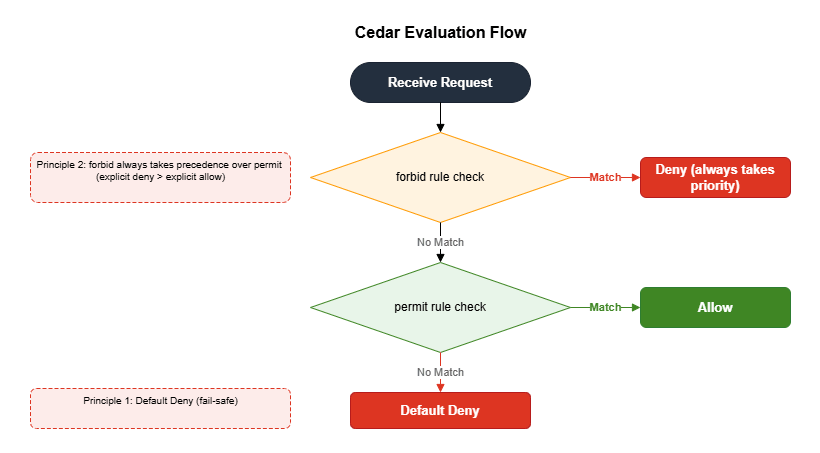
6.2 Cedar Entity Mapping
A Cedar policy is composed of three elements: Principal, Action, and Resource. The corresponding AgentCore formats are as follows.| Cedar Entity | Format in AgentCore | Example |
|---|---|---|
| Principal | AgentCore::OAuthUser::"<client_id>" | The client that issued the JWT |
| Action | AgentCore::Action::"<TargetName>___<ToolName>" | The tool being invoked |
| Resource | AgentCore::Gateway::"<gateway_arn>" | The Gateway being protected |
6.3 Creating Role-Specific Cognito Clients
To maximize the effectiveness of Cedar policies, create separate Cognito M2M clients for each role (such as manager and developer), each with different scopes. Each client obtains a JWT token with role-specific scopes via theclient_credentials flow.import boto3
def create_role_clients(
user_pool_id: str,
resource_server_id: str,
gateway_id: str,
discovery_url: str,
existing_client_ids: list[str],
region: str
) -> dict:
"""Create M2M clients for manager and developer roles."""
cognito_client = boto3.client('cognito-idp', region_name=region)
control_client = boto3.client('bedrock-agentcore-control', region_name=region)
# Add role-specific scopes to the resource server
cognito_client.update_resource_server(
UserPoolId=user_pool_id,
Identifier=resource_server_id,
Name="AgentCoreGatewayResource",
Scopes=[
{"ScopeName": "invoke", "ScopeDescription": "Invoke permission"},
{"ScopeName": "manager", "ScopeDescription": "Manager permission"},
{"ScopeName": "developer", "ScopeDescription": "Developer permission"},
]
)
clients = {}
for role in ["manager", "developer"]:
response = cognito_client.create_user_pool_client(
UserPoolId=user_pool_id,
ClientName=f"AgentCore-{role}",
GenerateSecret=True,
AllowedOAuthFlows=["client_credentials"],
AllowedOAuthScopes=[
f"{resource_server_id}/invoke",
f"{resource_server_id}/{role}"
],
AllowedOAuthFlowsUserPoolClient=True
)
clients[role] = {
"client_id": response['UserPoolClient']['ClientId'],
"client_secret": response['UserPoolClient']['ClientSecret'],
"scopes": f"{resource_server_id}/invoke {resource_server_id}/{role}"
}
# Update the Gateway's allowedClients
# Important: update_gateway requires all fields to be provided — omitted fields are reset
all_client_ids = existing_client_ids + [
c["client_id"] for c in clients.values()
]
# Retrieve the existing Gateway configuration
gateway = control_client.get_gateway(gatewayIdentifier=gateway_id)
# Update allowedClients while preserving required fields
update_request = {
"gatewayIdentifier": gateway_id,
"name": gateway["name"],
"roleArn": gateway["roleArn"],
"protocolType": gateway["protocolType"],
"authorizerType": gateway["authorizerType"],
"authorizerConfiguration": {
"customJWTAuthorizer": {
"discoveryUrl": discovery_url,
"allowedClients": all_client_ids
}
},
}
# Preserve optional fields (all must be re-sent, as omitting them causes a reset)
for field in ["description", "policyEngineConfiguration",
"protocolConfiguration", "interceptorConfigurations",
"kmsKeyArn", "customTransformConfiguration", "exceptionLevel"]:
if field in gateway:
update_request[field] = gateway[field]
control_client.update_gateway(**update_request)
return clients6.4 Writing Cedar Policies
Cedar policies can be created in two ways: NL2Cedar (automatic generation from natural language) and manual authoring. Because NL2Cedar uses LLM-based generation, results are not always accurate. In practice, an effective workflow is to use NL2Cedar to generate a draft and then have a human review and refine it.Manually Authoring Cedar Policies
The following is an example policy that permits access to the email-sending tool only for users with the manager scope.// Permit only users with manager scope
permit(
principal,
action == AgentCore::Action::"MyTarget___markdown_to_email",
resource == AgentCore::Gateway::"arn:aws:bedrock-agentcore:us-west-2:ACCOUNT_ID:gateway/GATEWAY_ID"
) when {
principal.hasTag("scope") &&
principal.getTag("scope") like "*manager*"
};forbid rule always takes precedence over permit.// Always deny developers from the sensitive tool (overrides any permit)
forbid(
principal,
action == AgentCore::Action::"MyTarget___sensitive_tool",
resource == AgentCore::Gateway::"arn:aws:bedrock-agentcore:us-west-2:ACCOUNT_ID:gateway/GATEWAY_ID"
) when {
principal.hasTag("scope") &&
principal.getTag("scope") like "*developer*"
};Automatic Generation with NL2Cedar
from bedrock_agentcore_starter_toolkit.operations.policy.client import PolicyClient

def generate_cedar_policy_with_nl2cedar(
    policy_client: PolicyClient,
    policy_engine_id: str,
    gateway_arn: str,
    target_name: str,
    tool_name: str
) -> str:
    """Automatically generate a Cedar policy from a natural language description."""
    nl_description = (
        f"Only allow users with 'manager' scope in their JWT token "
        f"to access the {tool_name} tool on target {target_name} "
        f"for gateway {gateway_arn}"
    )

    try:
        generated = policy_client.generate_policy(
            policy_engine_id,
            name=f"nl2cedar-{tool_name}",
            content={"rawText": nl_description},
            resource={"arn": gateway_arn},
            fetch_assets=True  # Automatically retrieve tool information from the Gateway
        )

        # NL2Cedar may generate a permit/forbid pair
        policies = generated.get("generatedPolicies", [])
        for asset in policies:
            cedar_def = asset.get("definition", {}).get("cedar", {})
            statement = cedar_def.get("statement", "")
            if statement:
                print(f"NL2Cedar generated policy:\n{statement}")
                return statement

        print("NL2Cedar: No valid policy was generated.")
        return None
    except Exception as e:
        # ConflictException: a generation with the same name already exists (on re-run)
        print(f"NL2Cedar failed: {e}. Please write the policy manually.")
return None6.5 Setting Up a Policy Engine and Attaching It to the Gateway
After creating a Policy Engine and registering Cedar policies, attach the engine to the Gateway to activate the policies.from bedrock_agentcore_starter_toolkit.operations.policy.client import PolicyClient
from bedrock_agentcore_starter_toolkit.operations.gateway.client import GatewayClient
def setup_policy_engine(
engine_name: str,
cedar_policy_text: str,
gateway_id: str,
region: str,
mode: str = "ENFORCE"
):
"""Create a Policy Engine, register a policy, and attach it to the Gateway."""
# Create the Policy Engine (idempotent: returns the existing one if it already exists)
policy_client = PolicyClient(region_name=region)
engine = policy_client.create_or_get_policy_engine(
name=engine_name,
description=f"Policy engine for {engine_name}"
)
engine_id = engine["policyEngineId"]
engine_arn = engine["policyEngineArn"]
# Register the Cedar policy (idempotent: returns the existing one if it already exists)
policy_client.create_or_get_policy(
policy_engine_id=engine_id,
name="manager-email-policy",
definition={
"cedar": {
"statement": cedar_policy_text
}
},
description="Manager-only email access policy",
)
# Attach to the Gateway
gateway_client = GatewayClient(region_name=region)
gateway_client.update_gateway_policy_engine(
gateway_identifier=gateway_id,
policy_engine_arn=engine_arn,
mode=mode # "ENFORCE" or "LOG_ONLY"
)
return engine_id$ python setup_policy.py
Policy Engine created: pe-a1b2c3d4e5f6
Cedar policy registered: manager-email-policy (pol-f6e5d4c3b2a1)
Policy Engine pe-a1b2c3d4e5f6 attached to Gateway gw-1234abcd5678efgh in ENFORCE mode| Mode | Behavior | Use Case |
|---|---|---|
| LOG_ONLY | Log violations without denying access | Testing, dry runs |
| ENFORCE | Completely remove violating tools from the tool list | Production |
list_tools results. Users have no way of knowing the tool exists.6.6 Verification: Testing Tool Visibility by Role
Verify that the Cedar policy is working as expected.import requests
from strands.tools.mcp import MCPClient
from mcp.client.streamable_http import streamablehttp_client
def get_token_for_role(
token_endpoint: str,
client_id: str,
client_secret: str,
scopes: str
) -> str:
"""Obtain an access token via the Cognito client_credentials flow."""
response = requests.post(
token_endpoint,
data={
"grant_type": "client_credentials",
"client_id": client_id,
"client_secret": client_secret,
"scope": scopes,
},
headers={"Content-Type": "application/x-www-form-urlencoded"},
timeout=30,
)
response.raise_for_status()
return response.json()["access_token"]
def test_policy_enforcement(gateway_url: str, role_config: dict, role: str):
"""
Verify tool visibility in ENFORCE mode.
- manager: markdown_to_email tool is visible (Cedar PERMIT)
- developer: markdown_to_email tool is not visible (Cedar DEFAULT-DENY)
"""
access_token = get_token_for_role(
token_endpoint=role_config["token_endpoint"],
client_id=role_config["client_id"],
client_secret=role_config["client_secret"],
scopes=role_config["scopes"]
)
def create_transport():
return streamablehttp_client(
gateway_url,
headers={"Authorization": f"Bearer {access_token}"}
)
mcp_client = MCPClient(create_transport)
with mcp_client:
tools = []
pagination_token = None
while True:
result = mcp_client.list_tools_sync(
pagination_token=pagination_token
)
tools.extend(result)
if result.pagination_token is None:
break
pagination_token = result.pagination_token
tool_names = [t.tool_name for t in tools]
has_email = any("markdown_to_email" in n for n in tool_names)
if role == "manager":
assert has_email, "manager should have access to markdown_to_email"
print(f"manager: markdown_to_email is accessible (Cedar PERMIT)")
else:
assert not has_email, "developer should not have access to markdown_to_email"
print(f"developer: markdown_to_email excluded from tool list (Cedar DEFAULT-DENY)")$ python test_policy.py --role both
=== Testing with manager role ===
Token obtained: my-resource-server/invoke my-resource-server/manager
Gateway tools: ['MyTarget___markdown_to_email', 'MyTarget___format_report']
manager: markdown_to_email is accessible (Cedar PERMIT)
=== Testing with developer role ===
Token obtained: my-resource-server/invoke my-resource-server/developer
Gateway tools: ['MyTarget___format_report']
developer: markdown_to_email excluded from tool list (Cedar DEFAULT-DENY)7. Cross-Cutting Security Patterns
7.1 Anti-Impersonation
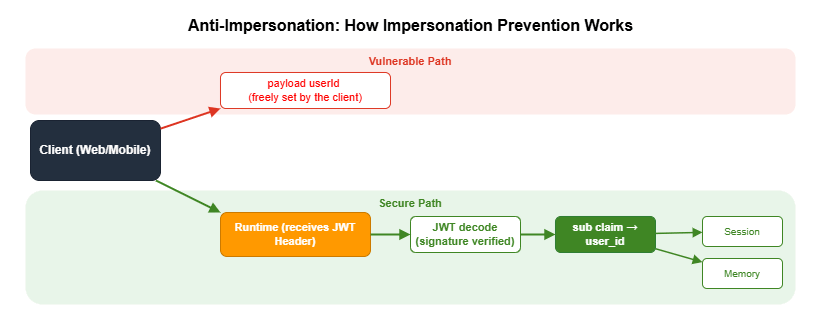
userId included in the request body. A malicious client can send an arbitrary userId to access another user's memory or session. By prioritizing the sub claim from the JWT (an authenticated identifier guaranteed by Cognito) over any value in the request payload, you prevent impersonation.Prerequisite: For this pattern to work, you must include
"Authorization" in the requestHeaderAllowlist when creating the Runtime (see Section 4.6). Without this setting, the Authorization header will not be forwarded to context.request_headers, and JWT extraction will silently fail.import jwt # pip install PyJWT
from strands import Agent
from bedrock_agentcore.runtime import BedrockAgentCoreApp, RequestContext
app = BedrockAgentCoreApp()
def extract_user_id_from_context(context: RequestContext) -> str:
"""
Extract the user ID from the JWT sub claim.
Because AgentCore Runtime has already validated the JWT signature,
re-verification on the agent side is not required.
Retrieves the JWT from the Authorization header and returns the sub claim.
"""
request_headers = context.request_headers
if not request_headers:
raise ValueError("Request headers not found")
auth_header = request_headers.get("Authorization", "")
if not auth_header.startswith("Bearer "):
raise ValueError("No Bearer token in Authorization header")
token = auth_header.replace("Bearer ", "")
# Skip signature verification (AgentCore Runtime has already verified it)
claims = jwt.decode(
jwt=token,
options={"verify_signature": False},
algorithms=["RS256"],
)
user_id = claims.get("sub")
if not user_id:
raise ValueError("JWT does not contain a sub claim")
return user_id
@app.entrypoint
async def invoke(payload, context):
# Get the user ID from the JWT sub claim (do not trust the payload)
try:
user_id = extract_user_id_from_context(context)
except ValueError:
# Fallback when no JWT is present (e.g., SigV4 authentication)
user_id = payload.get("userId", "anonymous")
# Use this user_id for Memory access and audit logging
agent = Agent(
system_prompt=SYSTEM_PROMPT,
tools=tools,
state={"user_id": user_id, "session_id": context.session_id},
)
async for event in agent.stream_async(payload.get("prompt", "")):
yield eventAuthorization header from context.request_headers, decode the JWT, and extract the sub claim. Because AgentCore Runtime has already validated the JWT signature, re-verification on the agent side is unnecessary. When no JWT is present — for example, with SigV4 authentication — fall back to payload.get("userId"). With SigV4, IAM policies separately control access, so trusting the userId in the payload is safe.7.2 confused deputy Mitigation
The trust policy for the IAM role used by AgentCore Runtime must includeaws:SourceAccount and aws:SourceArn conditions. This prevents a confused deputy attack in which another AWS account exploits your AgentCore role.{
"Version": "2012-10-17",
"Statement": [
{
"Effect": "Allow",
"Principal": {
"Service": "bedrock-agentcore.amazonaws.com"
},
"Action": "sts:AssumeRole",
"Condition": {
"StringEquals": {
"aws:SourceAccount": "ACCOUNT_ID"
},
"ArnLike": {
"aws:SourceArn": "arn:aws:bedrock-agentcore:REGION:ACCOUNT_ID:*"
}
}
}
]
}aws:SourceAccount alone is not sufficient. Also specifying aws:SourceArn restricts access from unintended resources within the same account. Setting both conditions together is an AWS security best practice.7.3 IAM Role Design
In an AgentCore environment, you primarily design two types of IAM roles.Runtime execution role: The role that AgentCore Runtime assumes to run the agent. The
bedrock-agentcore.amazonaws.com service principal calls AssumeRole.The role is named
AgentCoreRole-{agent_name} and needs the following permissions.| Action | Why the role needs it |
|---|---|
bedrock:InvokeModel, bedrock:InvokeModelWithResponseStream | Invoke the LLM. |
ecr:BatchGetImage, ecr:GetDownloadUrlForLayer | Pull the container image. |
ecr:GetAuthorizationToken (Resource: "*" required) | Authenticate to Amazon ECR. |
logs:CreateLogGroup, logs:CreateLogStream, logs:PutLogEvents | Write logs. |
xray:PutTraceSegments, xray:PutTelemetryRecords | Send traces. |
cloudwatch:PutMetricData (namespace: bedrock-agentcore) | Publish metrics. |
bedrock-agentcore:GetWorkloadAccessToken* | Obtain Identity tokens. |
bedrock-agentcore:*CodeInterpreter* | Use the Code Interpreter. |
| Action | Resource scope | Purpose |
|---|---|---|
bedrock-agentcore:*, bedrock-agentcore-control:* | — | All AgentCore operations. |
iam:CreateRole, iam:PutRolePolicy, iam:PassRole | arn:aws:iam::*:role/AgentCoreRole-* | Role management. |
cognito-idp:* | — | Cognito operations. |
ecr:* | — | Container registry. |
s3:GetObject, s3:PutObject | arn:aws:s3:::bedrock-agentcore-* | Deployment artifacts. |
lambda:CreateFunction, lambda:InvokeFunction | — | Gateway tools. |
ses:SendEmail, ses:SendRawEmail | — | Email sending. |
ecr:GetAuthorizationToken does not support resource-level scoping, so "Resource": "*" is required. This is a common point of confusion when attempting to restrict the resource scope.CDK code for building IAM roles will be covered in Part 3 of this series, "Building a 4-Stack CDK Architecture with an Observability Pipeline."
8. Best Practices and Caveats
Phased Introduction of Security Controls
Enabling all features in ENFORCE mode at once in a production environment carries risk. The following phased approach is recommended.- Deploy the Runtime with SigV4 authentication only and verify basic operation
- Add Cognito JWT authentication to enable end-user authentication
- Test Cedar policies with Gateway + LOG_ONLY mode (log without denying)
- Analyze logs, confirm there are no false positives, then switch to ENFORCE mode
Designing Gateway Target Descriptions
A tool'sdescription is used by the LLM to decide which tool to select. Specifying not only "what it does" but also "when to use it" improves the LLM's decision accuracy.# Bad: vague description
"description": "Email sending tool"
# Good: specific description
"description": "Converts Markdown text to HTML and sends it as an email. "
"Use this when you want to send a report or notification via email."Anti-Patterns to Avoid with Token Vault
| Anti-Pattern | Risk | Recommendation |
|---|---|---|
| Storing access tokens in environment variables | Manual token rotation burden, leakage risk | Token Vault + @requires_access_token |
Including the token as a @tool argument | Token is exposed in the LLM's context | Two-layer function structure |
Trusting userId in the payload | Opens the door to impersonation attacks | Prioritize the JWT sub claim |
| No conditions in the IAM trust policy | Vulnerable to confused deputy attacks | Add SourceAccount + SourceArn conditions |
Idempotent Setup Scripts
AgentCore security setup involves creating multiple AWS resources in sequence (Cognito, Provider, Runtime, Gateway, Policy Engine), so a mid-run failure requires manual recovery. Save the result of each step to a JSON file and skip completed steps on re-runs to ensure idempotency.from pathlib import Path
import json
CONFIG_FILE = Path("setup_config.json")
def save_config(updates: dict):
config = json.loads(CONFIG_FILE.read_text()) if CONFIG_FILE.exists() else {}
config.update(updates)
CONFIG_FILE.write_text(json.dumps(config, indent=2))
def setup():
config = json.loads(CONFIG_FILE.read_text()) if CONFIG_FILE.exists() else {}
if "cognito" not in config:
save_config({"cognito": create_cognito()})
if "provider" not in config:
config = json.loads(CONFIG_FILE.read_text())
save_config({"provider": create_provider(config["cognito"])})
if "gateway" not in config:
config = json.loads(CONFIG_FILE.read_text())
save_config({"gateway": create_gateway(config["cognito"])})
# ... continue the same pattern for subsequent stepsKey Limits and Quotas
The following are key limits and quotas to be aware of when setting up security-related components.| Resource | Limit | Notes |
|---|---|---|
| Wait time for OIDC endpoint availability | Up to ~10 minutes (600 seconds recommended) | Delay due to DNS propagation. Use max_wait=600, interval=30 in setup scripts (see Section 4.3) |
| Recommended wait time for IAM role propagation | ~15 seconds | Propagation of the IAM role auto-created during Gateway creation. Sample projects use time.sleep(15) |
| Cognito M2M access token validity period | Default 3600 seconds (1 hour) | Cognito default when AccessTokenValidity is not explicitly set in create_user_pool_client |
| Maximum number of Credential Providers | See official documentation | Per account and region |
| Maximum number of Gateway Targets per Gateway | See official documentation | |
| Maximum number of tools per Gateway Target | See official documentation | Size limit for the inlinePayload tool definition list |
| Maximum number of Cedar policies per Policy Engine | See official documentation | |
| Maximum Cedar policy size | See official documentation | Character limit per policy |
Maximum number of client IDs in allowedClients | See official documentation | Configuration value for customJWTAuthorizer |
9. Summary
This article walked through the implementation of a multi-layer security architecture combining AgentCore Identity, Gateway, and Policy.Authentication layer (Identity): JWT authentication via a Cognito User Pool, combined with a two-layer function structure using the
@requires_access_token decorator for token hiding, forms the core pattern. This design — which ensures that tokens are never exposed in the LLM's context — is AgentCore's answer to the security requirements unique to AI agents.Tool exposure layer (Gateway): MCP-compatible endpoints expose Lambda functions as standardized tools. Centralized authentication management and automatic OpenAPI-to-MCP conversion significantly lower the barrier to making existing services available to agents.
Authorization layer (Policy): Cedar's default-deny design combined with
forbid-priority rules lets you declaratively define access control that fails safe. The recommended approach is to validate policies in LOG_ONLY mode before switching to ENFORCE.In addition, applying Anti-Impersonation (prioritizing the JWT
sub claim) and confused deputy mitigation (IAM conditions) as cross-cutting concerns allows you to meet the security standards required for AI agent environments.10. References
- Amazon Bedrock AgentCore Official Documentation
- Strands Agents SDK
- Cedar Policy Language Specification
- AWS Verified Permissions
- Model Context Protocol (MCP)
Related Articles in This Series
- Part 1 "Implementation Patterns for Runtime, Memory, and Code Interpreter" — Runtime fundamentals and SigV4 authentication
- Part 3 "Building a 4-Stack CDK Architecture with an Observability Pipeline" — CDK code for Cognito and IAM, full-stack deployment patterns
- Part 4 "Multi-Agent Orchestration" — A2A Protocol authentication using Identity, Guardrails Shadow Mode
References:
Tech Blog with curated related content
Written by Hidekazu Konishi