Amazon Bedrock AgentCore Implementation Guide Part 1: Runtime, Memory, and Code Interpreter Patterns
First Published:
Last Updated:
1. Introduction
Amazon Bedrock AgentCore (referred to as AgentCore throughout this article) is a managed platform for running AI agents in production. It is designed to bridge the gap between building an AI agent and operating that agent safely and at scale.
This article focuses on three foundational AgentCore services:
- Runtime: A managed service that hosts your agent in the cloud and exposes it as an HTTPS endpoint
- Memory: A memory layer that manages short-term conversation history and long-term knowledge
- Code Interpreter: A secure sandbox environment that executes LLM-generated code
In addition, this article covers streaming implementation patterns that deliver real-time responses to end users.
The goal of this article is to help you understand how these services work internally and to give you practical, runnable code examples. The code samples primarily use the Strands Agents SDK (referred to as Strands) as the agent framework, and present real-world implementation patterns and architecture decisions drawn from nine official AWS sample projects.
Security topics (Identity, Gateway, and Policy) are covered in Part 2, "Multi-Layer Security with Identity, Gateway, and Policy." CDK-based infrastructure provisioning is covered in Part 3, "Building a 4-Stack CDK Architecture with an Observability Pipeline."
2. Prerequisites
You need the following environment to work through the examples in this article.
| Requirement | Version | Verification Command |
|---|---|---|
| Python | 3.11 or later (3.12 recommended) | python --version |
| uv | Latest | uv --version |
| AWS CLI | Latest | aws --version |
| AWS credentials | Appropriate permissions | aws sts get-caller-identity |
Enabling Bedrock Model Access
In the AWS Console, navigate to Amazon Bedrock → Model access and enable the following models.
# Recommended model ID
DEFAULT_MODEL = "us.anthropic.claude-sonnet-4-20250514-v1:0"

# us. prefix = Cross-region inference within US regions (relaxed rate limits)
# global. prefix = Global cross-region inference
pyproject.toml (Minimal Configuration)
AgentCore projects use uv to manage dependencies. The following is a minimal configuration.
[project]
name = "my-agentcore-project"
version = "0.1.0"
requires-python = ">=3.11"
dependencies = [
    "bedrock-agentcore>=1.0.0",
    "strands-agents>=1.0.1",
    "strands-agents-tools>=0.2.1",
    "boto3>=1.39.9",
]

# If using LangGraph integration, also add the following
# Add "langgraph-checkpoint-aws" to dependencies
# Install dependencies
uv sync
# Set the region
export AWS_DEFAULT_REGION=us-west-23. Runtime — The Agent Hosting Foundation
3.1 BedrockAgentCoreApp and the @app.entrypoint Pattern
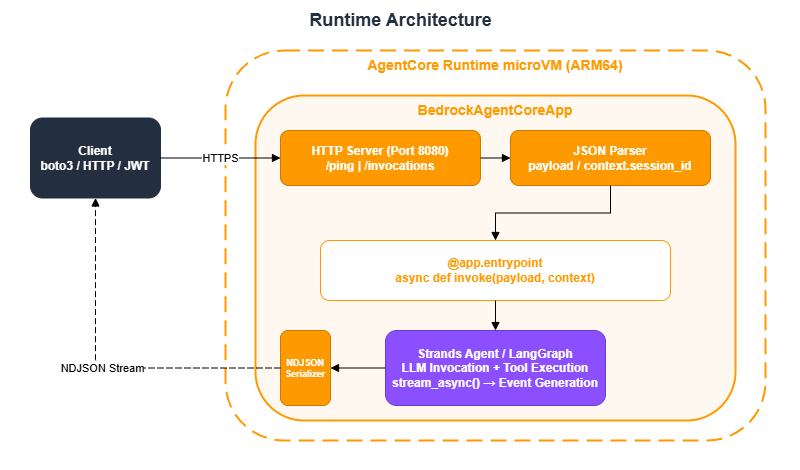
Running an agent that you can call locally with agent("Hello") in a production environment normally requires building an HTTP server, containerizing the application, configuring autoscaling, handling authentication, and instrumenting logs. AgentCore Runtime provides all of this as a managed service.
Developers only need to write a function decorated with @app.entrypoint inside a BedrockAgentCoreApp, and the underlying infrastructure is automatically provisioned. BedrockAgentCoreApp handles the following automatically:
- Starting an HTTP server on port 8080
- Responding to
/pinghealth checks - Parsing the JSON payload
- Providing
context.session_id(extracted from request headers) - Serializing streaming responses as NDJSON
Key design principle: The entrypoint code is identical regardless of the deployment method (direct_code_deploy, container CDK, ZIP, or Terraform). You can take code that works as a prototype and deploy it directly to production without modification.
Synchronous Entrypoint (for Simple Responses)
Use this when a short response is sufficient.
import os
from bedrock_agentcore.runtime import BedrockAgentCoreApp

app = BedrockAgentCoreApp()

@app.entrypoint
def invoke(payload):
    user_input = payload.get("prompt")
    agent = MyAgent(region=os.environ.get('AWS_REGION', 'us-west-2'))
    return agent.run(user_input)  # Returns a string

if __name__ == "__main__":
    app.run()
Asynchronous Streaming Entrypoint (Recommended)
Because most agents take time to generate responses, the recommended approach is to stream responses back to the client incrementally. Using async def with yield sends chunks to the client as text is generated.
from bedrock_agentcore.runtime import BedrockAgentCoreApp
from strands import Agent

app = BedrockAgentCoreApp()

@app.entrypoint
async def invoke(payload, context):
    """
    context.session_id: Session ID automatically provided by the Runtime
    payload: JSON payload sent by the client
    """
    session_id = context.session_id
    user_message = payload.get("prompt", "")
    user_id = payload.get("userId", "anonymous")
    model_id = payload.get("modelId", "us.anthropic.claude-sonnet-4-20250514-v1:0")

    agent = Agent(
        model=model_id,
        system_prompt="You are an AWS Solutions Architect.",
        tools=tools,
        state={"session_id": session_id, "user_id": user_id},
    )

    async for event in agent.stream_async(user_message):
        yield event

if __name__ == "__main__":
    app.run()
context.session_id is an important identifier used for session grouping in CloudWatch and for associating events in Memory. It must be at least 16 characters long — shorter values will fail validation.
The recommended pattern for generating session IDs is as follows:
import datetime

def make_session_id(user_id: str = "user", purpose: str = "chat") -> str:
    """Generate a session ID with at least 16 characters"""
    ts = datetime.datetime.now().strftime("%Y%m%dT%H%M%S")
    session_id = f"{user_id}_{ts}_{purpose}"
    assert len(session_id) >= 16, f"Session ID is too short: {len(session_id)}"
    return session_id
3.2 Choosing a Deployment Method
AgentCore Runtime supports four deployment methods. Choose based on the maturity of your project.
| Method | Docker | IaC | Best For |
|---|---|---|---|
direct_code_deploy (CLI) | Not required | Not required | Start here. Prototypes and individual development |
container (CDK) | Required | CDK TypeScript | Production environments. Centrally manage env vars, IAM, and Cognito with CDK |
| ZIP deploy (Lambda Packager) | Not required | CDK | When you want CDK management without Docker |
container (Terraform) | Required | Terraform | Integrating into an existing Terraform workflow |
Guidance: The typical path is to quickly validate a prototype with direct_code_deploy, then migrate to container (CDK) when moving to production.
Deploying with direct_code_deploy (CLI)
This is the quickest deployment method. Create an IAM role and deploy using the CLI command.
When creating the IAM role, always set the SourceAccount and SourceArn conditions as confused deputy protection.
import json
import boto3
from botocore.exceptions import ClientError

def create_agentcore_role(agent_name: str, region: str) -> dict:
    """Create an IAM role for AgentCore Runtime"""
    iam_client = boto3.client('iam', region_name=region)
    sts_client = boto3.client('sts', region_name=region)
    account_id = sts_client.get_caller_identity()['Account']
    role_name = f"AgentCoreRole-{agent_name}"

    trust_policy = {
        "Version": "2012-10-17",
        "Statement": [{
            "Effect": "Allow",
            "Principal": {"Service": "bedrock-agentcore.amazonaws.com"},
            "Action": "sts:AssumeRole",
            "Condition": {
                "StringEquals": {"aws:SourceAccount": account_id},
                "ArnLike": {
                    "aws:SourceArn": f"arn:aws:bedrock-agentcore:{region}:{account_id}:*"
                }
            }
        }]
    }

    try:
        response = iam_client.get_role(RoleName=role_name)
        role_arn = response['Role']['Arn']
    except ClientError:
        response = iam_client.create_role(
            RoleName=role_name,
            AssumeRolePolicyDocument=json.dumps(trust_policy),
            Description=f'AgentCore execution role for {agent_name}'
        )
        role_arn = response['Role']['Arn']

    # Attach the execution policy (idempotent: put_role_policy overwrites existing policies)
    iam_client.put_role_policy(
        RoleName=role_name,
        PolicyName=f'{role_name}-ExecutionPolicy',
        PolicyDocument=json.dumps({
            "Version": "2012-10-17",
            "Statement": [
                {
                    "Effect": "Allow",
                    "Action": ["bedrock:InvokeModel", "bedrock:InvokeModelWithResponseStream"],
                    "Resource": "*"
                },
                {
                    "Effect": "Allow",
                    "Action": ["ecr:BatchGetImage", "ecr:GetDownloadUrlForLayer",
                               "ecr:GetAuthorizationToken"],
                    "Resource": "*"
                },
                {
                    "Effect": "Allow",
                    "Action": ["logs:CreateLogGroup", "logs:CreateLogStream",
                               "logs:PutLogEvents", "logs:DescribeLogStreams"],
                    "Resource": [f"arn:aws:logs:{region}:{account_id}:log-group:/aws/bedrock-agentcore/*"]
                },
                {
                    "Effect": "Allow",
                    "Action": ["xray:PutTraceSegments", "xray:PutTelemetryRecords",
                               "xray:GetSamplingRules", "xray:GetSamplingTargets"],
                    "Resource": "*"
                },
            ]
        })
    )

    return {"role_name": role_name, "role_arn": role_arn}
To deploy using the CLI, follow these steps:
# 1. Generate configuration file
uv run agentcore configure \
  --entrypoint ./deployment/invoke.py \
  --name my_agent \
  --execution-role arn:aws:iam::ACCOUNT_ID:role/AgentCoreRole-my_agent \
  --requirements-file ./deployment/requirements.txt \
  --non-interactive \
  --deployment-type direct_code_deploy \
  --disable-memory \
  --region us-west-2

# 2. Deploy
uv run agentcore deploy

# 3. Verify operation
uv run agentcore invoke '{"prompt": "Hello"}'
Example output:
$ uv run agentcore deploy
Deploying agent: my_agent
Packaging source code...
Uploading to S3: s3://bedrock-agentcore-codebuild-sources-123456789012-us-west-2/my_agent/...
Starting CodeBuild build...
Build status: IN_PROGRESS
Build status: SUCCEEDED
Creating runtime: my_agent
Runtime ARN: arn:aws:bedrock-agentcore:us-west-2:123456789012:runtime/my_agent-a1b2c3d4e5
Runtime status: CREATING
Runtime status: ACTIVE

Agent deployed successfully!
Agent ID: my_agent-a1b2c3d4e5
Endpoint: arn:aws:bedrock-agentcore:us-west-2:123456789012:runtime/my_agent-a1b2c3d4e5

$ uv run agentcore invoke '{"prompt": "Hello"}'
Hello! How can I help you today?
3.3 Choosing an Authentication Method
Two authentication methods are available for accessing the Runtime.
| Method | Use Case | Configuration |
|---|---|---|
| SigV4 (IAM) | Server-to-server communication, CLI, boto3 | No authorizerConfiguration needed |
| Cognito JWT | Web applications, mobile apps | Configure customJWTAuthorizer |
For server-to-server communication, boto3 is the simplest approach.
import boto3
import json
from io import BytesIO

def invoke_with_boto3(runtime_arn: str, session_id: str, prompt: str) -> str:
    """Invoke the Runtime with SigV4 authentication via boto3 (recommended)"""
    client = boto3.client('bedrock-agentcore')

    payload = json.dumps({
        "prompt": prompt,
        "userId": "user-001",
        "sessionId": session_id,
    }).encode('utf-8')

    response = client.invoke_agent_runtime(
        runtimeSessionId=session_id,
        agentRuntimeArn=runtime_arn,
        payload=BytesIO(payload),
    )

    # Read the streaming response (for non-streaming use)
    # For streaming processing, see invoke_stream in Section 6.3
    result = ""
    for chunk in response.get('response', []):
        if isinstance(chunk, bytes):
            result += chunk.decode('utf-8')
        elif isinstance(chunk, dict) and 'chunk' in chunk:
            chunk_data = chunk['chunk']
            if isinstance(chunk_data, dict):
                result += chunk_data.get('bytes', b'').decode('utf-8')
    return result
JWT authentication details — including Cognito User Pool setup and Token Vault configuration — are covered in Part 2, "Multi-Layer Security with Identity, Gateway, and Policy."
4. Memory — Conversation History and Long-Term Knowledge
4.1 Two-Layer Architecture: Events (Short-Term) and Memories (Long-Term)
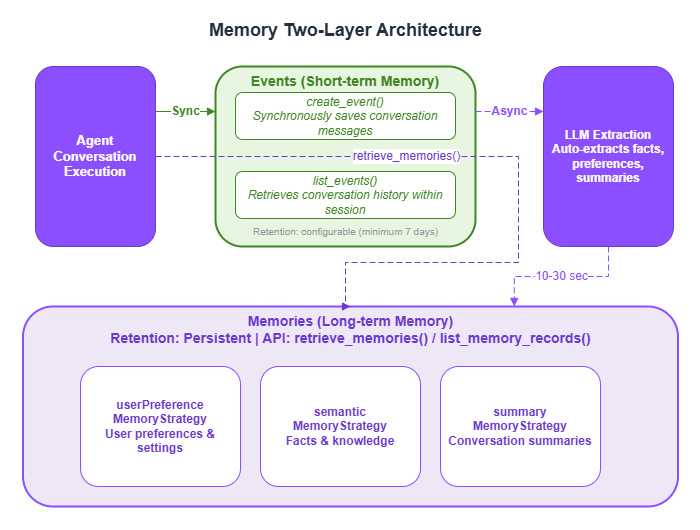
LLMs are stateless — each invocation is independent, with no memory of previous conversations. AgentCore Memory addresses this with two layers.
| Layer | API | Purpose | Retention | Processing |
|---|---|---|---|---|
| Events (short-term memory) | create_event / list_events | Conversation history within a session | Configurable (minimum 7 days) | Synchronous |
| Memories (long-term memory) | retrieve_memories / list_memory_records | User preferences, facts, and summaries | Persistent | Asynchronous |
Events are conversation logs saved synchronously via create_event. They enable continuous conversation — for example, "About that EC2 question from earlier..."
Memories are structured knowledge asynchronously extracted from Events. After create_event is called, a background LLM process analyzes the conversation and automatically extracts facts, preferences, and summaries. Note that these are not immediately available via retrieve_memories — they are typically accessible 10–30 seconds after the event is saved.
Three Memory Strategies
| Strategy | Namespace | What Gets Extracted |
|---|---|---|
userPreferenceMemoryStrategy | /users/{userId}/preferences | User preferences and settings |
semanticMemoryStrategy | /users/{userId}/facts | Facts and knowledge |
summaryMemoryStrategy | /summaries/{userId}/{sessionId} | Conversation summaries |
Namespaces directly affect memory retrieval accuracy and security. Using separate namespaces per user prevents one user's memories from leaking to another.
Create a Memory using the Python SDK:
from bedrock_agentcore.memory import MemoryClient

memory_client = MemoryClient(region_name="us-west-2")

memory = memory_client.create_memory_and_wait(
    name="my_agent_memory",
    strategies=[
        {
            "userPreferenceMemoryStrategy": {
                "name": "UserPreferenceExtractor",
                "description": "Extract user preferences and decision-making patterns",
                "namespaces": [f"/users/{user_id}/preferences"]
            }
        },
        {
            "semanticMemoryStrategy": {
                "name": "SemanticFacts",
                "description": "Accumulate factual information",
                "namespaces": [f"/users/{user_id}/facts"]
            }
        },
        {
            "summaryMemoryStrategy": {
                "name": "ConversationSummary",
                "description": "Conversation summaries",
                "namespaces": [f"/summaries/{user_id}"]
            }
        },
    ],
    event_expiry_days=7,
)
memory_id = memory.get('memoryId')
Example output:
>>> memory = memory_client.create_memory_and_wait(
...     name="my_agent_memory",
...     strategies=[...],
...     event_expiry_days=7,
... )
Creating memory: my_agent_memory
Memory status: CREATING
Memory status: CREATING
Memory status: ACTIVE
>>> memory.get('memoryId')
'mem-xxxxxxxxxxxxxxxxxxxx'
>>> memory.get('status')
'ACTIVE'
>>> [s.get('name') for strategies in memory.get('memoryStrategies', [])
...  for s in strategies.values() if isinstance(s, dict)]
['UserPreferenceExtractor', 'SemanticFacts', 'ConversationSummary']
4.2 Comparing the Five Integration Patterns
AgentCore Memory offers five integration patterns.
| Pattern | Framework | Characteristics | Best For |
|---|---|---|---|
| Strands Hooks API | Strands | Full control over when and what gets saved | When you need to customize memory operations |
| AgentCoreMemorySessionManager | Strands | Automatic save and restore with minimal configuration | Recommended starting point |
| CompactingSessionManager | Strands | Automatically compresses context via checkpointing when token count exceeds a threshold | Long conversations where input token count grows large |
| AgentCoreMemorySaver | LangGraph | Used as a LangGraph checkpointer | LangGraph-based agents |
| Direct MemoryClient | Any | Direct access via the boto3 wrapper | Non-Strands backends |
Pattern 1: Strands Hooks API (Most Customizable)
This pattern implements Strands' HookProvider to hook into agent lifecycle events. It gives you complete control over what gets saved and when.
Register callbacks via register_hooks, restore previous conversations in on_agent_initialized, and save new messages in on_message_added. You can implement fine-grained control such as skipping toolUse / toolResult messages and saving only text content, or stripping <thinking> tags before writing to memory.
from strands.hooks import HookProvider, HookRegistry, AgentInitializedEvent, MessageAddedEvent
from bedrock_agentcore.memory import MemoryClient
import re

class MemoryHook(HookProvider):
    """Hook for saving and loading conversation history"""

    def __init__(self, memory_id: str, region: str):
        self.memory_client = MemoryClient(region_name=region)
        self.memory_id = memory_id

    def register_hooks(self, registry: HookRegistry):
        """Register hooks with the registry"""
        registry.add_callback(AgentInitializedEvent, self.on_agent_initialized)
        registry.add_callback(MessageAddedEvent, self.on_message_added)

    def on_agent_initialized(self, event):
        """On agent initialization: inject past conversation history into the system prompt"""
        agent = event.agent
        session_id = agent.state.get("session_id", "")
        user_id = agent.state.get("user_id", "")

        if not session_id or not user_id:
            return

        events = self.memory_client.list_events(
            memory_id=self.memory_id,
            actor_id=user_id,
            session_id=session_id,
            max_results=50,
            include_payload=True,
        )

        if not events:
            return

        context_lines = []
        for evt in events:
            for payload in evt.get('payload', []):
                conv = payload.get('conversational', {})
                if conv:
                    role = conv.get('role', 'user')
                    text = conv.get('content', {}).get('text', '')
                    if text:
                        context_lines.append(f"[{role}]: {text}")

        if context_lines:
            context = "\n".join(context_lines)
            agent.system_prompt += f"\n\nPrevious conversation history:\n{context}"

    def on_message_added(self, event):
        """On message added: save only text content to memory"""
        agent = event.agent
        message = event.message
        session_id = agent.state.get("session_id", "")
        user_id = agent.state.get("user_id", "")

        if not session_id or not user_id:
            return

        role = message.get("role", "user").upper()
        content = message.get("content", [])

        # Extract text content only (skip toolUse/toolResult)
        text_parts = []
        for block in content:
            if isinstance(block, dict) and "text" in block:
                text = block["text"]
                # Remove <thinking> tags
                text = re.sub(r'<thinking>[\s\S]*?</thinking>', '', text).strip()
                if text:
                    text_parts.append(text)

        if not text_parts:
            return

        text_content = "\n".join(text_parts)
        self.memory_client.create_event(
            memory_id=self.memory_id,
            actor_id=user_id,
            session_id=session_id,
            messages=[(text_content, role)],
        )

# Usage
agent = Agent(
    model=model_id,
    system_prompt="You are an AWS Solutions Architect.",
    hooks=[MemoryHook(memory_id=memory_id, region="us-west-2")],
    tools=tools,
    state={"session_id": session_id, "user_id": user_id},
)
Pattern 2: AgentCoreMemorySessionManager (Recommended Starting Point)
This is the simplest way to integrate memory. Simply pass a session manager to the session_manager parameter, and conversation history is saved and restored automatically.
from bedrock_agentcore.memory.integrations.strands.session_manager import AgentCoreMemorySessionManager
from bedrock_agentcore.memory.integrations.strands.config import AgentCoreMemoryConfig

agentcore_memory_config = AgentCoreMemoryConfig(
    memory_id=memory_id,
    session_id=session_id,
    actor_id=user_id,
)

session_manager = AgentCoreMemorySessionManager(
    agentcore_memory_config=agentcore_memory_config,
    region_name="us-west-2",
)

agent = Agent(
    model=model_id,
    system_prompt="You are an AWS Solutions Architect.",
    tools=tools,
    session_manager=session_manager,
)

# Conversations are automatically saved and restored by the session manager
result = agent("What is the cost of EC2 t3.micro?")
Pattern 3: CompactingSessionManager (For Long Conversations)
LLMs have a fixed context window size. As a conversation grows, the input token count increases — eventually causing errors or causing important context to be lost. CompactingSessionManager extends AgentCoreMemorySessionManager and is a custom implementation pattern that automatically summarizes and compresses older messages via checkpointing when the input token count exceeds a threshold.
Note: CompactingSessionManager is not a standard SDK class — it is a custom implementation provided in the sample-strands-agent-with-agentcore sample project. It persists checkpoint state in DynamoDB and handles automatic tool output truncation and summary generation. If you want to use this in your project, refer to the implementation in that sample.
from bedrock_agentcore.memory.integrations.strands.session_manager import AgentCoreMemorySessionManager
from bedrock_agentcore.memory.integrations.strands.config import AgentCoreMemoryConfig

# CompactingSessionManager extends AgentCoreMemorySessionManager
# and adds token-based context compression capabilities (custom class)
# Reference implementation: sample-strands-agent-with-agentcore/chatbot-app/agentcore/src/agent/session/
from agent.session.compacting_session_manager import CompactingSessionManager

agentcore_memory_config = AgentCoreMemoryConfig(
    memory_id=memory_id,
    session_id=session_id,
    actor_id=user_id,
)

session_manager = CompactingSessionManager(
    agentcore_memory_config=agentcore_memory_config,
    region_name="us-west-2",
    token_threshold=100_000,   # Compression starts when input token count exceeds this value
    protected_turns=2,         # Protect the most recent N turns from truncation
    max_tool_content_length=500,  # Maximum characters for tool output (excess is truncated)
)

agent = Agent(
    model=model_id,
    tools=tools,
    session_manager=session_manager,
)
Pattern 4: LangGraph + AgentCoreMemorySaver
If you are using LangGraph, configure AgentCoreMemorySaver as the checkpointer. This preserves LangGraph workflow state across sessions.
from langgraph.graph import StateGraph
from langgraph_checkpoint_aws import AgentCoreMemorySaver

checkpointer = AgentCoreMemorySaver(
    memory_id=memory_id,
    region_name="us-west-2",
)

graph = StateGraph(AgentState)
graph.add_node("agent", agent_node)
graph.add_node("tools", tool_node)
graph.add_edge("agent", "tools")
graph.add_edge("tools", "agent")

app = graph.compile(checkpointer=checkpointer)

config = {
    "configurable": {
        "thread_id": session_id,
        "actor_id": user_id,
    }
}
result = app.invoke({"messages": [{"role": "user", "content": prompt}]}, config)
LangGraph multi-agent combinations are covered in Part 4, "Multi-Agent Orchestration."
Pattern 5: Direct MemoryClient
This pattern directly manipulates Memory from any framework without using Strands or LangGraph.
from bedrock_agentcore.memory import MemoryClient

memory_client = MemoryClient(region_name="us-west-2")

# Short-term memory: create an event (record a conversation)
memory_client.create_event(
    memory_id=memory_id,
    actor_id="user123",
    session_id="session-001",
    messages=[
        ("User's question text", "USER"),
        ("Agent's response text", "ASSISTANT"),
    ]
)

# Short-term memory: retrieve events
events = memory_client.list_events(
    memory_id=memory_id,
    actor_id="user123",
    session_id="session-001",
    max_results=50,
    include_payload=True,
)

# Long-term memory: semantic search
memories = memory_client.retrieve_memories(
    memory_id=memory_id,
    namespace=f"/users/{user_id}/facts",
    query="User preferences for architecture selection",
    top_k=3,
)
4.3 Polling Pattern for Asynchronous Memory Extraction
Because long-term memories are asynchronously extracted from Events, they are not available immediately after create_event(). The following utility is useful when you need to verify that a memory has been saved — for example, in tests or demos.
import time

def wait_for_memories(
    memory_client, memory_id: str, namespace: str, query: str,
    max_wait: int = 60, poll_interval: int = 5,
) -> list:
    """
    Poll and wait until asynchronous long-term memory extraction completes.
    Extraction typically takes 10-30 seconds.
    """
    elapsed = 0
    while elapsed < max_wait:
        memories = memory_client.retrieve_memories(
            memory_id=memory_id, namespace=namespace,
            query=query, top_k=3,
        )
        if memories:
            return memories
        time.sleep(poll_interval)
        elapsed += poll_interval
    return []
Example output:
>>> memories = wait_for_memories(
...     memory_client, memory_id,
...     namespace="/users/user123/facts",
...     query="User preferences for architecture",
... )
# Polling... (elapsed: 5s)
# Polling... (elapsed: 10s)
# Polling... (elapsed: 15s)
# Memory retrieval successful (elapsed: 15s)
>>> for m in memories:
...     print(m.get('content', {}).get('text', ''))
User prefers serverless architecture
Primarily uses the us-west-2 region
>>> len(memories)
2
5. Code Interpreter — Secure Sandbox Execution
5.1 Why a Sandbox Is Necessary
For an AI agent to perform calculations or process data, it needs to actually execute code. However, running LLM-generated code directly on the host environment can lead to unintended file operations or network access. AgentCore Code Interpreter executes code inside an isolated container that has no impact on the host environment. Data science libraries such as NumPy, Pandas, and Matplotlib are pre-installed.
Typical use cases:
- Fetch data via the AWS Pricing API, then calculate monthly costs with Code Interpreter
- Perform statistical processing on CSV data and generate charts with Matplotlib
- Aggregate and reformat JSON from external API responses
5.2 Session-Based Lifecycle
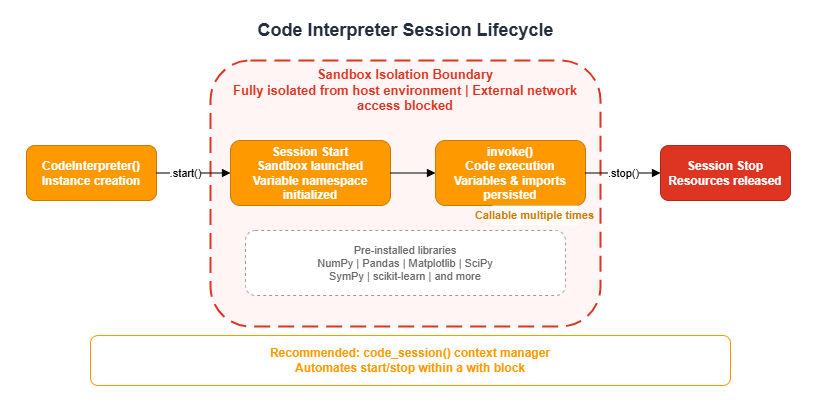
Code Interpreter operates on a session basis. Variables and imports persist for the duration of the session, enabling multi-step data processing across multiple invoke() calls.
from bedrock_agentcore.tools.code_interpreter_client import CodeInterpreter

# Start session
code_interpreter = CodeInterpreter(region="us-west-2")
code_interpreter.start()

# Execute code
response = code_interpreter.invoke("executeCode", {
    "language": "python",
    "code": "print(2 + 2)"
})

# Always stop the session
code_interpreter.stop()
Example output:
>>> response = code_interpreter.invoke("executeCode", {
...     "language": "python",
...     "code": "import math\nresult = math.factorial(10)\nprint(f'10! = {result}')"
... })
>>> response
{
  "stream": [
    {
      "result": {
        "content": [
          {
            "type": "text",
            "text": "10! = 3628800"
          }
        ]
      }
    }
  ]
}
>>> extract_text_from_response(response)
'10! = 3628800'
For more concise code, use the code_session context manager provided by the SDK, which automates session start and stop.
from bedrock_agentcore.tools.code_interpreter_client import code_session

with code_session("us-west-2") as code_client:
    response = code_client.invoke("executeCode", {
        "language": "python",
        "code": "print(2 + 2)"
    })
# stop() is called automatically when exiting the with block
Define a helper function to extract text from the response:
def extract_text_from_response(response: dict) -> str:
    """Extract text results from a Code Interpreter response"""
    results = []
    for event in response.get("stream", []):
        if "result" in event:
            result = event["result"]
            if "content" in result:
                for content_item in result["content"]:
                    if content_item.get("type") == "text":
                        results.append(content_item["text"])
    return "\n".join(results)
5.3 Resource Management with Context Managers
Code Interpreter sessions consume cloud resources. You must reliably call stop() when agent execution completes — including when exceptions occur. Using Python's @contextmanager provides a clean declarative approach to resource management.
from contextlib import contextmanager
from typing import Generator
from strands import Agent, tool
from bedrock_agentcore.tools.code_interpreter_client import CodeInterpreter

class CostEstimatorAgent:
    def __init__(self, region: str):
        self.region = region
        self.code_interpreter = None

    def _setup_code_interpreter(self) -> None:
        self.code_interpreter = CodeInterpreter(self.region)
        self.code_interpreter.start()

    @tool
    def execute_calculation(self, code: str, description: str = "") -> str:
        """Execute Python code in a secure sandbox"""
        if not self.code_interpreter:
            return "Code Interpreter has not been initialized"

        response = self.code_interpreter.invoke("executeCode", {
            "language": "python",
            "code": code
        })

        results = []
        for event in response.get("stream", []):
            if "result" in event:
                for content_item in event["result"].get("content", []):
                    if content_item.get("type") == "text":
                        results.append(content_item["text"])
        return "\n".join(results)

    @contextmanager
    def _agent_context(self) -> Generator[Agent, None, None]:
        """Context manager for proper resource management"""
        try:
            self._setup_code_interpreter()
            agent = Agent(
                tools=[self.execute_calculation],
                system_prompt="You are an AWS cost estimation expert."
            )
            yield agent
        finally:
            if self.code_interpreter:
                try:
                    self.code_interpreter.stop()
                except Exception:
                    pass
                self.code_interpreter = None

    def run(self, prompt: str) -> str:
        with self._agent_context() as agent:
            result = agent(prompt)
            return "".join(
                b["text"] for b in result.message.get("content", [])
                if isinstance(b, dict) and "text" in b
            )
5.4 Integration Pattern with MCP Tools
Combining Code Interpreter with MCP (Model Context Protocol) tools enables a separation of concerns: external data retrieval and computational processing.
Important constraint: MCP tools cannot be called from inside Code Interpreter, because outbound network access from the sandbox is blocked. You must follow the ordering rule of fetching data with MCP first, then calculating with Code Interpreter.
Enforce this ordering explicitly in the system prompt:
SYSTEM_PROMPT = """You are an AWS Cost Estimation Expert Agent.

PROCESS:
1. Parse the architecture to identify every AWS service mentioned
2. For EACH service:
   - Call get_pricing to fetch REAL pricing data
   - ALWAYS include output_options to keep responses manageable:
     "output_options": {"pricing_terms": ["OnDemand"], "exclude_free_products": true}
   - Use max_results: 5 as a safety net
3. After collecting all pricing data, use execute_cost_calculation
   to compute monthly costs with Python code
4. Present results in a clear markdown cost breakdown table

CRITICAL RULES:
- NEVER skip get_pricing — always fetch real data before calculating
- NEVER call MCP tools from inside Code Interpreter (architectural constraint)
- NEVER estimate prices from memory — always use get_pricing data
"""
6. Streaming
6.1 NDJSON Streaming from the Runtime
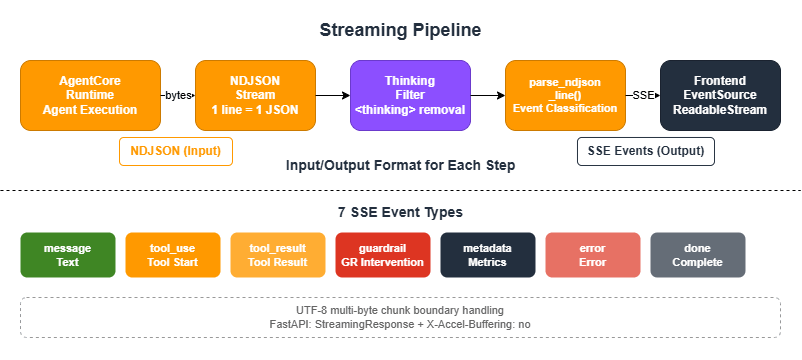
AgentCore Runtime streams responses in NDJSON (Newline-Delimited JSON) format. The standard pattern is to parse this on the backend and deliver it to the frontend as SSE (Server-Sent Events).
The SSE events delivered to the frontend fall into seven types: message (text chunk), tool_use (tool call started), tool_result (tool execution result), guardrail (guardrail intervention), metadata (metrics), error, and done.
6.2 NDJSON-to-SSE Conversion
The following shows the core of a parser that reads each NDJSON line and converts it to an event. It handles both the Bedrock streaming format (contentBlockDelta) and the Strands direct format. Pass an instance of the ThinkingFilter described in Section 6.4 to the thinking_filter parameter.
import json
from dataclasses import dataclass, field
from typing import Any

@dataclass
class MessageEvent:
    """Text message chunk"""
    content: str
    def to_sse_format(self) -> str:
        return f"event: message\ndata: {self.content}\n\n"

@dataclass
class ToolUseEvent:
    """Tool invocation started"""
    tool_name: str
    tool_input: Any
    tool_use_id: str
    status: str = "started"
    def to_sse_format(self) -> str:
        data = json.dumps({"tool_name": self.tool_name, "tool_input": self.tool_input,
                           "tool_use_id": self.tool_use_id, "status": self.status})
        return f"event: tool_use\ndata: {data}\n\n"

@dataclass
class ToolResultEvent:
    """Tool execution result"""
    tool_name: str
    tool_result: Any
    tool_use_id: str
    status: str = "completed"
    def to_sse_format(self) -> str:
        data = json.dumps({"tool_name": self.tool_name, "tool_use_id": self.tool_use_id,
                           "tool_result": str(self.tool_result)[:500], "status": self.status})
        return f"event: tool_result\ndata: {data}\n\n"

@dataclass
class MetadataEvent:
    """Metrics (token counts, latency)"""
    data: dict
    def to_sse_format(self) -> str:
        return f"event: metadata\ndata: {json.dumps(self.data)}\n\n"

@dataclass
class GuardrailEvent:
    """Guardrail intervention"""
    source: str
    action: str
    assessments: list = field(default_factory=list)
    def to_sse_format(self) -> str:
        return f"event: guardrail\ndata: {json.dumps({'source': self.source, 'action': self.action})}\n\n"

@dataclass
class ErrorEvent:
    """Error"""
    message: str
    details: str = ""
    def to_sse_format(self) -> str:
        return f"event: error\ndata: {json.dumps({'message': self.message, 'details': self.details})}\n\n"

@dataclass
class DoneEvent:
    """Stream completed"""
    def to_sse_format(self) -> str:
        return "event: done\ndata: {}\n\n"

def parse_ndjson_line(line: str, thinking_filter):
    """Parse a single NDJSON line and convert it to an event"""
    if not line.strip():
        return None

    try:
        json_str = line[6:] if line.startswith('data: ') else line
        data = json.loads(json_str)

        # ContentBlockDelta (Bedrock streaming format)
        delta_text = (data.get('event', {}).get('contentBlockDelta', {})
                      .get('delta', {}).get('text'))
        if delta_text:
            filtered = thinking_filter.filter(delta_text)
            return MessageEvent(content=filtered) if filtered else None

        # TextStreamEvent (Strands format)
        if data.get('type') == 'TextStreamEvent' and data.get('text'):
            filtered = thinking_filter.filter(data['text'])
            return MessageEvent(content=filtered) if filtered else None

        # ToolUse (Strands direct format)
        if data.get('type') == 'tool_use':
            return ToolUseEvent(
                tool_name=data.get('tool_name') or data.get('name') or 'unknown',
                tool_input=data.get('tool_input') or data.get('input'),
                tool_use_id=data.get('tool_use_id') or data.get('id', ''),
                status=data.get('status', 'started'),
            )

        # ToolResult (Strands direct format)
        if data.get('type') == 'tool_result':
            return ToolResultEvent(
                tool_name=data.get('tool_name') or 'unknown',
                tool_result=data.get('tool_result') or data.get('result'),
                tool_use_id=data.get('tool_use_id') or data.get('id', ''),
                status=data.get('status', 'completed'),
            )

        # Guardrail event
        if data.get('type') == 'guardrail':
            return GuardrailEvent(
                source=data.get('source', 'INPUT'),
                action=data.get('action', 'NONE'),
                assessments=data.get('assessments', []),
            )

        # Bedrock nested format (toolUse / toolResult)
        for block in data.get('content', []):
            if isinstance(block, dict):
                if block.get('toolUse'):
                    tu = block['toolUse']
                    return ToolUseEvent(tool_name=tu['name'], tool_input=tu.get('input'),
                                        tool_use_id=tu.get('toolUseId', ''), status='started')
                if block.get('toolResult'):
                    tr = block['toolResult']
                    return ToolResultEvent(tool_name=tr.get('name', 'unknown'),
                                            tool_result=tr.get('content'),
                                            tool_use_id=tr.get('toolUseId', ''),
                                            status=tr.get('status', 'completed'))

        # Metrics (token consumption, latency)
        usage = data.get('usage', {})
        metrics = data.get('metrics', {})
        if usage or metrics:
            return MetadataEvent(data={
                'inputTokens': usage.get('inputTokens', 0),
                'outputTokens': usage.get('outputTokens', 0),
                'totalTokens': usage.get('totalTokens', 0),
                'latencyMs': metrics.get('latencyMs', 0),
            })

        return None
    except (json.JSONDecodeError, Exception):
        return None
6.3 Streaming Client Implementation (invoke_stream)
The following is a complete implementation of a streaming client that combines the NDJSON parser and event types to invoke the Runtime. It uses codecs.getincrementaldecoder to handle the UTF-8 multi-byte character splitting problem that can occur at chunk boundaries.
import codecs, json, boto3
from io import BytesIO

async def invoke_stream(runtime_arn: str, session_id: str, prompt: str, user_id: str):
    """Invoke AgentCore Runtime with streaming"""
    client = boto3.client('bedrock-agentcore')
    thinking_filter = ThinkingFilter()

    payload = json.dumps({
        "prompt": prompt, "userId": user_id, "sessionId": session_id,
    }).encode('utf-8')

    response = client.invoke_agent_runtime(
        runtimeSessionId=session_id,
        agentRuntimeArn=runtime_arn,
        payload=BytesIO(payload),
    )

    stream = response.get('response', [])
    buffer = ''
    utf8_decoder = codecs.getincrementaldecoder('utf-8')('replace')

    for chunk in stream:
        # Decode byte sequences (handles multi-byte character splitting at chunk boundaries)
        if isinstance(chunk, bytes):
            buffer += utf8_decoder.decode(chunk, final=False)
        elif isinstance(chunk, dict) and 'chunk' in chunk:
            raw = chunk['chunk']
            if isinstance(raw, dict):
                buffer += utf8_decoder.decode(raw.get('bytes', b''), final=False)
            elif isinstance(raw, bytes):
                buffer += utf8_decoder.decode(raw, final=False)

        # Process complete lines
        lines = buffer.split('\n')
        buffer = lines.pop()

        for line in lines:
            if not line.strip():
                continue
            event = parse_ndjson_line(line, thinking_filter)
            if event:
                yield event

            # Emit Nova XML tool calls as events
            for tool in thinking_filter.get_extracted_tools():
                yield ToolUseEvent(
                    tool_name=tool['tool_name'],
                    tool_input=tool['tool_input'],
                    tool_use_id=tool['tool_use_id'],
                    status='started',
                )

    # Process remaining buffer
    final_text = utf8_decoder.decode(b'', final=True)
    if final_text:
        buffer += final_text
    if buffer.strip():
        event = parse_ndjson_line(buffer, thinking_filter)
        if event:
            yield event

    yield DoneEvent()
6.4 ThinkingFilter (Removing thinking Blocks from Nova Models)
When using Amazon Nova models, responses may contain <thinking>...</thinking> tags representing the model's internal reasoning process. These should not be displayed to end users. Because these tags can span chunk boundaries during streaming, a simple string replacement is not sufficient.
ThinkingFilter acts as a stateful filter that uses a regular expression to remove tags from the full accumulated text, returning only the delta since the last sent position.
import re
import json
from typing import Optional

class ThinkingFilter:
    """
    Stateful filter that removes <thinking> tags and
    Nova tool XML from streaming content.

    Handles partial tags spanning multiple chunks.
    When using Nova models, _extract_tool_calls() also extracts tool invocations.
    """

    def __init__(self):
        self._full_content = ""
        self._sent_length = 0
        self._extracted_tools = []
        self._seen_tool_ids = set()

    def filter(self, text: str) -> Optional[str]:
        """Apply filter. Returns new content if available."""
        self._full_content += text

        # Remove completed <thinking> blocks
        filtered = re.sub(r'<thinking>[\s\S]*?</thinking>', '', self._full_content)

        # Extract Nova tool XML, then remove it
        self._extract_tool_calls(self._full_content)

        # Remove <__function=name>...</__function>
        filtered = re.sub(r'<__function=[^>]*>[\s\S]*?</__function>', '', filtered)
        # Also remove partial tags
        filtered = re.sub(r'<__function=[^>]*>[^<]*$', '', filtered)
        filtered = re.sub(r'<__function=[^>]*$', '', filtered)

        # Remove <__parameter=name>...</__parameter>
        filtered = re.sub(r'<__parameter=[^>]*>[\s\S]*?</__parameter>', '', filtered)
        filtered = re.sub(r'</__parameter>', '', filtered)

        # Remove incomplete <thinking> blocks (handles chunk boundary splitting)
        open_tag_match = re.search(r'<thinking>[\s\S]*$', filtered)
        if open_tag_match:
            filtered = filtered[:len(filtered) - len(open_tag_match.group(0))]

        # Check for partial opening tags
        partial_match = re.search(r'<[^>]*$', filtered)
        if partial_match:
            partial = partial_match.group(0)
            if '<thinking>'.startswith(partial) or '<__function'.startswith(partial):
                filtered = filtered[:len(filtered) - len(partial)]

        # Return only new content
        if len(filtered) > self._sent_length:
            new_content = filtered[self._sent_length:]
            self._sent_length = len(filtered)
            return new_content
        return None

    def _extract_tool_calls(self, content: str):
        """Extract tool calls in Nova XML format"""
        pattern = r'<__function=([^>]+)>([\s\S]*?)</__function>'
        for tool_name, params_block in re.findall(pattern, content):
            tool_id = f"nova-{tool_name}-{hash(params_block) & 0xFFFFFFFF}"
            if tool_id in self._seen_tool_ids:
                continue
            self._seen_tool_ids.add(tool_id)
            tool_input = {}
            for param_name, param_value in re.findall(
                r'<__parameter=([^>]+)>([^<]*)</__parameter>', params_block
            ):
                try:
                    if param_value.strip().startswith(('{', '[', '"')):
                        tool_input[param_name] = json.loads(param_value)
                    else:
                        tool_input[param_name] = param_value
                except json.JSONDecodeError:
                    tool_input[param_name] = param_value
            self._extracted_tools.append({
                'tool_name': tool_name, 'tool_input': tool_input, 'tool_use_id': tool_id,
            })

    def get_extracted_tools(self) -> list:
        """Get extracted tool calls and clear the list"""
        tools = self._extracted_tools.copy()
        self._extracted_tools.clear()
        return tools
6.5 Delta Calculation (Extracting Incremental Diffs from Cumulative Text)
Strands' stream_async() may return cumulative text in each event. For example, three consecutive events might return "Hello", "Hello World", "Hello World!" — sending these as-is would produce duplicates on the client.
async def stream_with_delta(agent, prompt: str):
    """Streaming without duplicates — yields only the delta"""
    previous_output = ""

    async for event in agent.stream_async(prompt):
        if "data" in event:
            current = str(event["data"])
            if current.startswith(previous_output):
                delta = current[len(previous_output):]
                if delta:
                    previous_output = current
                    yield {"data": delta}
            else:
                previous_output = current
                yield {"data": current}
        else:
            yield event
6.6 FastAPI SSE Endpoint Example
The following shows an implementation pattern for a FastAPI endpoint that receives NDJSON from the backend and delivers it as SSE. ChatRequest is a Pydantic model with prompt, session_id, and user_id fields. stream_chat_response is an async generator that uses invoke_stream from Section 6.3 to yield SSE event strings.
from fastapi import APIRouter
from fastapi.responses import StreamingResponse
from pydantic import BaseModel

class ChatRequest(BaseModel):
    prompt: str
    session_id: str
    user_id: str

router = APIRouter()

@router.post("/api/chat")
async def chat(body: ChatRequest):
    """SSE streaming chat endpoint"""
    return StreamingResponse(
        stream_chat_response(
            prompt=body.prompt,
            session_id=body.session_id,
            user_id=body.user_id,
        ),
        media_type="text/event-stream",
        headers={
            "Cache-Control": "no-cache, no-store, no-transform",
            "Connection": "keep-alive",
            "X-Accel-Buffering": "no",  # Disable nginx buffering
        },
    )

async def stream_chat_response(prompt: str, session_id: str, user_id: str):
    """Convert each invoke_stream event to SSE format and yield"""
    async for event in invoke_stream(
        runtime_arn=RUNTIME_ARN, session_id=session_id,
        prompt=prompt, user_id=user_id,
    ):
        yield event.to_sse_format()
6.7 Receiving SSE Events in the Frontend (JavaScript)
The following implementation receives SSE events delivered by the backend and updates the UI based on event type. It uses ReadableStream, splitting events on \n\n separators and parsing each one.
async function sendMessage(prompt, sessionId, userId) {
  const response = await fetch('/api/chat', {
    method: 'POST',
    headers: { 'Content-Type': 'application/json' },
    body: JSON.stringify({ prompt, session_id: sessionId, user_id: userId }),
  });

  const reader = response.body.getReader();
  const decoder = new TextDecoder();
  let buffer = '';

  while (true) {
    const { done, value } = await reader.read();
    if (done) break;

    buffer += decoder.decode(value, { stream: true });
    const events = buffer.split('\n\n');
    buffer = events.pop();

    for (const eventStr of events) {
      if (!eventStr.trim()) continue;
      const lines = eventStr.split('\n');
      let eventType = '', data = '';

      for (const line of lines) {
        if (line.startsWith('event: ')) eventType = line.slice(7);
        if (line.startsWith('data: ')) data = line.slice(6);
      }

      switch (eventType) {
        case 'message': appendToChat(data); break;
        case 'tool_use': showToolIndicator(JSON.parse(data)); break;
        case 'tool_result': hideToolIndicator(JSON.parse(data)); break;
        case 'guardrail': handleGuardrail(JSON.parse(data)); break;
        case 'error': showError(JSON.parse(data)); break;
        case 'done': finishMessage(); break;
      }
    }
  }
}
7. Best Practices and Gotchas
Session IDs Must Be at Least 16 Characters
Session IDs that are too short will fail validation. The recommended format is {user_id}_{timestamp}_{purpose}.
Configure BedrockModel Timeouts
When using Code Interpreter or multi-step tool calls, LLM processing can take several minutes. Default timeouts are not sufficient — set them explicitly to a larger value.
from strands.models import BedrockModel
from botocore.config import Config

model = BedrockModel(
    model_id="us.anthropic.claude-sonnet-4-20250514-v1:0",
    boto_client_config=Config(
        read_timeout=900,      # 15 minutes
        connect_timeout=10,
        retries=dict(max_attempts=3, mode="adaptive"),
    )
)
Design for Asynchronous Memory Extraction
Calling retrieve_memories immediately after create_event returns empty results. For flows that require long-term memories, either incorporate a polling wait (wait_for_memories) or design around the asynchronous extraction model — for example, using memories from the previous session in the current session.
Prevent Code Interpreter Session Leaks
Always release sessions using try/finally or @contextmanager. Leaked sessions continue consuming cloud resources.
Centralize Configuration with the AgentConfig Dataclass
To prevent environment variables from being scattered throughout your code, consolidate them in a dataclass.
from dataclasses import dataclass
import os

@dataclass
class AgentConfig:
    memory_id: str = ""
    aws_region: str = "us-west-2"
    model_id: str = "us.anthropic.claude-sonnet-4-20250514-v1:0"
    guardrail_id: str = ""
    guardrail_version: str = "DRAFT"

    @classmethod
    def from_env(cls) -> "AgentConfig":
        return cls(
            memory_id=os.environ.get("BEDROCK_AGENTCORE_MEMORY_ID", ""),
            aws_region=os.environ.get("AWS_REGION", "us-west-2"),
            model_id=os.environ.get("MODEL_ID", "us.anthropic.claude-sonnet-4-20250514-v1:0"),
            guardrail_id=os.environ.get("GUARDRAIL_ID", ""),
            guardrail_version=os.environ.get("GUARDRAIL_VERSION", "DRAFT"),
        )
Troubleshooting
| Issue | Solution |
|---|---|
Timeout after deploy | The build takes a few minutes. Check status with agentcore status |
ImportError on Runtime | Add the missing package to requirements.txt |
uvx not found on Runtime | Add uv to requirements.txt, or resolve the full path with find_uv_bin() |
| Session ID too short | Minimum 16 characters required |
Runtime in FAILED state | Check CloudWatch Logs at /aws/bedrock-agentcore/runtimes/* |
| IAM role propagation delay | Wait 15 seconds after role creation before deploying |
retrieve_memories returns empty | Asynchronous extraction is not yet complete. Poll for up to 60 seconds |
| Code Interpreter session leak | Clean up in a finally block or use the code_session context manager |
| MCP tools not usable inside Code Interpreter | Architectural constraint. Separate data retrieval and code execution |
<thinking> tags appearing in the frontend | Apply ThinkingFilter |
| Text getting cut off | UTF-8 multi-byte characters split at chunk boundaries. Use codecs.getincrementaldecoder('utf-8') |
| SSE being buffered by nginx | Set the X-Accel-Buffering: no header |
Key Limits and Quotas
| Resource | Limit | Notes |
|---|---|---|
| Minimum session ID length | 16 characters | Using the {user_id}_{timestamp}_{purpose} format typically produces a sufficient length |
| Maximum trace ID length | 128 characters | Upper limit when used as an X-Ray trace ID |
Memory event_expiry_days minimum | 7 days (Python SDK) / 604,800 seconds (CDK) | CDK's eventExpiryDuration is specified in seconds — note the difference in units |
| Memory strategy types | 3 types: userPreferenceMemoryStrategy / semanticMemoryStrategy / summaryMemoryStrategy | Each strategy can have multiple namespaces |
| Long-term memory extraction delay | Typically 10–30 seconds (recommend waiting up to 60 seconds) | Calling retrieve_memories() immediately after create_event() returns empty results |
| Code Interpreter session timeout | Default 3,600 seconds (1 hour), maximum 28,800 seconds (8 hours) | Adjust the timeout value for long-running computations |
| Code Interpreter pre-installed libraries | NumPy, Pandas, Matplotlib, SciPy, SymPy, scikit-learn, etc. | Available without additional configuration. Custom library installation is not supported |
| Code Interpreter external communication | Blocked (MCP tools cannot be called from inside) | Outbound network access from the sandbox is blocked by design |
| Runtime container architecture | ARM64 only | CodeBuild must also use an ARM64 build image (AMAZON_LINUX_2_STANDARD_3_0) |
| Runtime health check | Must respond to /ping on port 8080 | If not responding, the Runtime enters a FAILED state |
| BedrockModel recommended timeout | read_timeout=900 (15 minutes), connect_timeout=10 | Default timeouts are insufficient for multi-step tool calls |
| IAM role propagation delay | Recommend waiting 15 seconds after creation | Deploying without waiting can result in AccessDenied errors |
| Streaming maximum response size | Refer to official documentation | When using CloudFront, you may need to increase the origin timeout |
8. Summary
This article covered implementation patterns for three foundational AgentCore services and streaming.
- Runtime: The
BedrockAgentCoreApp+@app.entrypointpattern provides a unified entrypoint that is independent of the deployment method. The recommended path is to validate a prototype withdirect_code_deploy, then migrate to CDK-basedcontainerdeployment for production. - Memory: The two-layer architecture (Events + Memories) and three memory strategies support everything from short-term conversation continuity to long-term user knowledge accumulation. Among the five integration patterns, start with
AgentCoreMemorySessionManagerand migrate to the Hooks API orCompactingSessionManageras your requirements evolve. - Code Interpreter: The most important design considerations are session-based lifecycle management and the ordering constraint when integrating with MCP tools. Use
@contextmanagerfor resource management. - Streaming: Three technical elements are required for production-quality streaming: NDJSON-to-SSE conversion,
ThinkingFilterfor removing Nova model reasoning blocks, and delta calculation to eliminate duplicate output.
9. References
Official AWS Sample Repositories
- sample-amazon-bedrock-agentcore-onboarding — Foundational workshop (Runtime / Memory / Gateway / Policy)
- sample-strands-agentcore-starter — Full-stack starter (ECS Express / Lambda / CDK / Cognito / Guardrails)
- sample-strands-agent-with-agentcore — CompactingSessionManager / CDK L2
- sample-amazon-bedrock-agentcore-prototype-to-production — Code Interpreter / MCP Gateway + Cognito
Other Articles in This Series
- Part 2: Multi-Layer Security with Identity, Gateway, and Policy — Covers Cognito JWT authentication, exposing tools via MCP Gateway, and access control with Cedar policies
- Part 3: Building a 4-Stack CDK Architecture with an Observability Pipeline — Covers production CDK infrastructure, CloudWatch / X-Ray / Firehose pipelines, and full-stack deployment patterns
- Part 4: Multi-Agent Orchestration — Covers the A2A Protocol, Supervisor pattern, LangGraph, and Browser Use
References:
Tech Blog with curated related content