Amazon Bedrock AgentCore Implementation Guide Part 3: Building a 4-Stack CDK Architecture with an Observability Pipeline
First Published:
Last Updated:
1. Introduction
The direct_code_deploy approach for prototype development covered in Part 1 is effective for rapid validation, but it presents the following challenges when transitioning to production:
- Environment reproducibility: Manually recreating IAM roles, Cognito User Pools, Memory, and Guardrails in a different account is difficult.
- Dependency management: A Runtime must be created only after the ECR image build completes, but enforcing this order manually is error-prone.
- Automated configuration injection: Passing environment variables such as Memory ID, Guardrail ID, and Model ID to the Runtime is tedious and a common source of misconfiguration.
- Lack of observability: Without a log, metric, and trace collection pipeline in place, diagnosing production issues becomes extremely difficult.
By managing all infrastructure as code with CDK (Cloud Development Kit), you can achieve fully reproducible environments — create all resources with a single cdk deploy and tear them down completely with cdk destroy. This article explains how to structure an AgentCore project across four CDK stacks, and how to build an observability pipeline using CloudWatch, X-Ray, and Firehose.
Example output — deploying all 4 stacks sequentially with cdk deploy --all:
$ npx cdk deploy --all --require-approval never

FoundationStack: deploying... [1/4]
 ✅  FoundationStack (42s)
Outputs:
  FoundationStack.UserPoolId = us-west-2_aBcDeFgHi
  FoundationStack.ExecutionRoleArn = arn:aws:iam::123456789012:role/AgentCoreExecutionRole
  FoundationStack.UsageTableArn = arn:aws:dynamodb:us-west-2:123456789012:table/agentcore-usage

BedrockStack: deploying... [2/4]
 ✅  BedrockStack (38s)
Outputs:
  BedrockStack.GuardrailId = abc123def456
  BedrockStack.GuardrailVersion = 1
  BedrockStack.MemoryId = mem-xxxxxxxxxxxx

AgentStack: deploying... [3/4]
  -- CodeBuild build started (ARM64 Docker image)...
  -- Lambda Waiter: polling for build completion (30-second intervals)...
  -- Build complete: SUCCEEDED (elapsed time: 2 min 57 sec)
  -- Creating Runtime...
 ✅  AgentStack (485s)
Outputs:
  AgentStack.AgentRuntimeArn = arn:aws:bedrock-agentcore:us-west-2:123456789012:runtime/rt-xxxxxxxxxxxx

ChatAppStack: deploying... [4/4]
 ✅  ChatAppStack (124s)
Outputs:
  ChatAppStack.ServiceUrl = https://d1234567890.cloudfront.net

 ✨  Total time: 689s (~11 min)
2. Prerequisites
- Understanding of Part 1 "Implementation Patterns for Runtime, Memory, and Code Interpreter"
- Familiarity with the IAM design from Part 2 "Multi-Layer Security with Identity, Gateway, and Policy" is recommended
- Basic knowledge of AWS CDK v2 + TypeScript
- Docker installed (for container builds)
3. Choosing CDK Constructs
AgentCore CDK constructs come in two levels: L1 (direct CloudFormation wrappers) and L2 (higher-level abstractions).
| Level | Package | Example | Characteristics |
|---|---|---|---|
| L1 | aws-cdk-lib/aws-bedrockagentcore | CfnRuntime, CfnMemory | Full access to all properties |
| L2 | @aws-cdk/aws-bedrock-agentcore-alpha | agentcore.Runtime | Concise, with sensible defaults |
L1 constructs are direct CloudFormation wrappers — verbose, but allowing explicit control over all properties (environment variables, authentication settings, network configuration, etc.). L2 provides a type-safe API for the Runtime construct through factory methods such as RuntimeNetworkConfiguration.usingPublicNetwork() and AgentRuntimeArtifact.fromAsset(), and automatically handles ECR and CodeBuild setup internally. Note that other resources such as Memory and Gateway may still be L1-only. L1 (CfnRuntime) is recommended for production, while L2 is a reasonable choice for prototyping.
4. The 4-Stack Architecture Pattern
Why Split into Multiple Stacks?
The resources that make up an AgentCore project have very different deployment frequencies. The Foundation Stack (Cognito, DynamoDB) is configured once at project inception and rarely changes, while the Agent Stack (agent code) is deployed with every code change. Splitting stacks ensures that changes to agent code do not affect the authentication infrastructure or database.
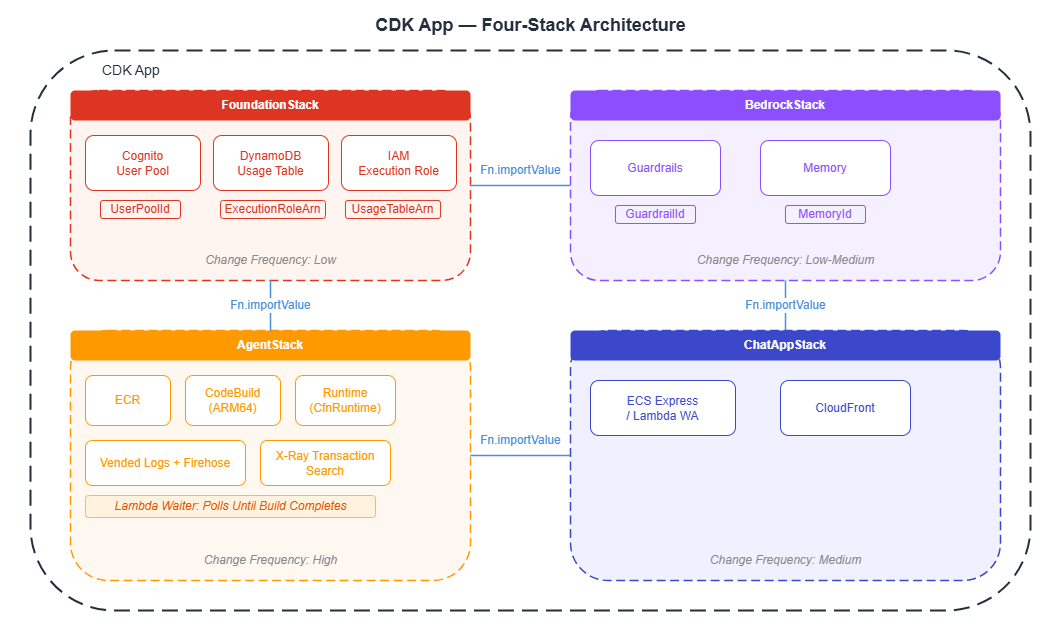
Pass values between stacks using CfnOutput + Fn.importValue. For example, the Agent Stack can reference the IAM role ARN created in the Foundation Stack.
5. Foundation Stack: Authentication, Database, and IAM
5.1 Cognito User Pool
This establishes the JWT authentication foundation for both end-user authentication from the web application and server-to-server (M2M) communication. This implements in CDK the JWT authentication design described in Part 2.
import * as cognito from 'aws-cdk-lib/aws-cognito';
import * as cdk from 'aws-cdk-lib';

const userPool = new cognito.UserPool(this, 'AgentUserPool', {
  userPoolName: 'agentcore-users',
  selfSignUpEnabled: true,
  signInAliases: { email: true },
  autoVerify: { email: true },
  passwordPolicy: {
    minLength: 8,
    requireUppercase: true,
    requireDigits: true,
    requireSymbols: true,
  },
  removalPolicy: cdk.RemovalPolicy.DESTROY,
});

// Web application client
const userPoolClient = userPool.addClient('WebAppClient', {
  authFlows: { userSrp: true, userPassword: true },
  oAuth: {
    flows: { authorizationCodeGrant: true },
    scopes: [cognito.OAuthScope.OPENID, cognito.OAuthScope.EMAIL],
    callbackUrls: ['http://localhost:3000/callback'],
  },
  generateSecret: true,
});

// M2M client (for server-to-server communication)
const m2mClient = userPool.addClient('M2MClient', {
  authFlows: { custom: true },
  oAuth: {
    flows: { clientCredentials: true },
    scopes: [cognito.OAuthScope.custom('agentcore/invoke')],
  },
  generateSecret: true,
});
5.2 DynamoDB Table (Usage Tracking)
Create a table to track vCPU time and memory usage per session. This table serves as the destination for data written by the Firehose pipeline (described in Section 8.3).
import * as dynamodb from 'aws-cdk-lib/aws-dynamodb';

const usageTable = new dynamodb.Table(this, 'UsageTable', {
  tableName: 'agentcore-usage',
  partitionKey: { name: 'session_id', type: dynamodb.AttributeType.STRING },
  sortKey: { name: 'timestamp', type: dynamodb.AttributeType.NUMBER },
  billingMode: dynamodb.BillingMode.PAY_PER_REQUEST,
  removalPolicy: cdk.RemovalPolicy.DESTROY,
});
5.3 IAM Execution Role
Create the IAM role that the AgentCore Runtime assumes when executing agents. The trust policy must always include the confused deputy protection (SourceAccount + SourceArn conditions) described in Part 2.
import * as iam from 'aws-cdk-lib/aws-iam';

const executionRole = new iam.Role(this, 'AgentExecutionRole', {
  roleName: 'AgentCoreExecutionRole',
  assumedBy: new iam.ServicePrincipal('bedrock-agentcore.amazonaws.com', {
    conditions: {
      StringEquals: { 'aws:SourceAccount': this.account },
      ArnLike: {
        'aws:SourceArn': `arn:aws:bedrock-agentcore:${this.region}:${this.account}:*`,
      },
    },
  }),
});

// Bedrock model invocation
executionRole.addToPolicy(new iam.PolicyStatement({
  actions: ['bedrock:InvokeModel', 'bedrock:InvokeModelWithResponseStream'],
  resources: ['*'],
}));

// ECR (for container deployments)
// ecr:GetAuthorizationToken does not support resource-level scoping, so "*" is required
executionRole.addToPolicy(new iam.PolicyStatement({
  actions: ['ecr:BatchGetImage', 'ecr:GetDownloadUrlForLayer',
            'ecr:GetAuthorizationToken'],
  resources: ['*'],
}));

// CloudWatch Logs
executionRole.addToPolicy(new iam.PolicyStatement({
  actions: ['logs:CreateLogGroup', 'logs:CreateLogStream', 'logs:PutLogEvents',
            'logs:DescribeLogStreams', 'logs:DescribeLogGroups'],
  resources: [
    `arn:aws:logs:${this.region}:${this.account}:log-group:/aws/bedrock-agentcore/*`,
  ],
}));

// X-Ray tracing
executionRole.addToPolicy(new iam.PolicyStatement({
  actions: ['xray:PutTraceSegments', 'xray:PutTelemetryRecords',
            'xray:GetSamplingRules', 'xray:GetSamplingTargets'],
  resources: ['*'],
}));

// CloudWatch metrics (allow only the bedrock-agentcore namespace)
executionRole.addToPolicy(new iam.PolicyStatement({
  actions: ['cloudwatch:PutMetricData'],
  resources: ['*'],
  conditions: {
    StringEquals: { 'cloudwatch:namespace': 'bedrock-agentcore' },
  },
}));

// Memory
executionRole.addToPolicy(new iam.PolicyStatement({
  actions: ['bedrock-agentcore:CreateEvent', 'bedrock-agentcore:ListEvents',
            'bedrock-agentcore:RetrieveMemories', 'bedrock-agentcore:ListMemoryRecords'],
  resources: ['*'],
}));
6. Bedrock Stack: Guardrails and Memory
6.1 Guardrails
Define content filtering guardrails in CDK. Use CfnGuardrail to specify the rules and CfnGuardrailVersion to create a version. The version ID is passed to the Agent Stack as a Runtime environment variable.
import * as bedrock from 'aws-cdk-lib/aws-bedrock';

const guardrail = new bedrock.CfnGuardrail(this, 'AgentGuardrail', {
  name: 'agent-content-filter',
  blockedInputMessaging: 'This input cannot be processed.',
  blockedOutputsMessaging: 'This response cannot be provided.',
  contentPolicyConfig: {
    filtersConfig: [
      { type: 'HATE', inputStrength: 'HIGH', outputStrength: 'HIGH' },
      { type: 'VIOLENCE', inputStrength: 'HIGH', outputStrength: 'HIGH' },
      { type: 'SEXUAL', inputStrength: 'HIGH', outputStrength: 'HIGH' },
      { type: 'INSULTS', inputStrength: 'HIGH', outputStrength: 'HIGH' },
      { type: 'MISCONDUCT', inputStrength: 'HIGH', outputStrength: 'HIGH' },
    ],
  },
});

const guardrailVersion = new bedrock.CfnGuardrailVersion(this, 'GuardrailVersion', {
  guardrailIdentifier: guardrail.attrGuardrailId,
});
6.2 Memory (3 Strategies)
Build the two-tier Memory architecture described in Part 1 using CDK. Note that eventExpiryDuration is specified in seconds (the Python SDK uses days, which is a common point of confusion). The memoryExecutionRoleArn specifies the IAM role that the Memory service uses to invoke Bedrock models — this is a separate role from the executionRole in Section 5.3, but uses the same structure trusting bedrock-agentcore.amazonaws.com.
import * as bedrockagentcore from 'aws-cdk-lib/aws-bedrockagentcore';

const memory = new bedrockagentcore.CfnMemory(this, 'AgentMemory', {
  name: 'agent-memory',
  memoryExecutionRoleArn: memoryRole.roleArn,
  eventExpiryDuration: 604800,  // 7 days (in seconds)
  memoryStrategies: [
    {
      summaryMemoryStrategy: {
        name: 'ConversationSummary',
        description: 'Summarize conversation context',
        namespaces: ['/summaries'],
      },
    },
    {
      userPreferenceMemoryStrategy: {
        name: 'UserPreferences',
        description: 'Track user preferences',
        namespaces: ['/users'],
      },
    },
    {
      semanticMemoryStrategy: {
        name: 'SemanticFacts',
        description: 'Store factual knowledge',
        namespaces: ['/users'],
      },
    },
  ],
});
7. Agent Stack: ECR + CodeBuild + Runtime
The Agent Stack is the most frequently deployed stack. It builds the agent code into ECR, then waits for the CodeBuild job to complete before creating the Runtime.
7.1 ECR Repository
Create an ECR repository to store the agent container image. Use lifecycleRules to automatically remove old images and keep storage costs in check.
import * as ecr from 'aws-cdk-lib/aws-ecr';

const ecrRepo = new ecr.Repository(this, 'AgentRepo', {
  repositoryName: 'agentcore-agent',
  removalPolicy: cdk.RemovalPolicy.DESTROY,
  emptyOnDelete: true,
  lifecycleRules: [{ maxImageCount: 5 }],  // Automatically delete old images
});
7.2 CodeBuild (ARM64)
Important: Because AgentCore Runtime runs on ARM64, CodeBuild must also use LinuxArmBuildImage to match. Building with x86 will cause the container to crash on the Runtime.
import * as codebuild from 'aws-cdk-lib/aws-codebuild';
import * as s3 from 'aws-cdk-lib/aws-s3';
import * as s3deploy from 'aws-cdk-lib/aws-s3-deployment';

// Upload source code to S3
const sourceBucket = new s3.Bucket(this, 'AgentSource', {
  removalPolicy: cdk.RemovalPolicy.DESTROY,
  autoDeleteObjects: true,
});

new s3deploy.BucketDeployment(this, 'DeployAgentSource', {
  sources: [s3deploy.Source.asset('../agent')],
  destinationBucket: sourceBucket,
});

const buildProject = new codebuild.Project(this, 'AgentBuild', {
  projectName: 'agentcore-agent-build',
  source: codebuild.Source.s3({
    bucket: sourceBucket,
    path: '',
  }),
  environment: {
    buildImage: codebuild.LinuxArmBuildImage.AMAZON_LINUX_2_STANDARD_3_0,
    computeType: codebuild.ComputeType.SMALL,
    privileged: true,  // Required for Docker builds
  },
  buildSpec: codebuild.BuildSpec.fromObject({
    version: '0.2',
    phases: {
      pre_build: {
        commands: [
          'aws ecr get-login-password --region $AWS_DEFAULT_REGION | '
          + 'docker login --username AWS --password-stdin $REPOSITORY_URI',
        ],
      },
      build: {
        commands: [
          'docker build --platform linux/arm64 -t $REPOSITORY_URI:latest .',
          'docker push $REPOSITORY_URI:latest',
        ],
      },
    },
  }),
  environmentVariables: {
    REPOSITORY_URI: { value: ecrRepo.repositoryUri },
    AWS_DEFAULT_REGION: { value: this.region },
    AWS_ACCOUNT_ID: { value: this.account },
  },
});

ecrRepo.grantPullPush(buildProject);
Example output — CodeBuild build logs (viewable in the AWS Console or via aws codebuild batch-get-builds):
[Container] 2026/03/22 12:02:15.123 Running command aws ecr get-login-password ...
Login Succeeded

[Container] 2026/03/22 12:02:18.456 Running command docker build --platform linux/arm64 -t 123456789012.dkr.ecr.us-west-2.amazonaws.com/agentcore-agent:latest .
#1 [internal] load build definition from Dockerfile
#2 [internal] load .dockerignore
#3 [1/6] FROM ghcr.io/astral-sh/uv:python3.11-bookworm-slim@sha256:...
#4 [2/6] WORKDIR /app
#5 [3/6] COPY requirements.txt .
#6 [4/6] RUN uv pip install -r requirements.txt
#7 [5/6] RUN useradd -m -u 1000 bedrock_agentcore
#8 [6/6] COPY . .
#9 exporting to image
=> exporting layers                                                    2.1s
=> writing image sha256:a1b2c3d4...                                   0.0s

[Container] 2026/03/22 12:04:45.789 Running command docker push ...
latest: digest: sha256:e5f6g7h8... size: 3456

[Container] 2026/03/22 12:05:12.012 Phase complete: BUILD State: SUCCEEDED
[Container] 2026/03/22 12:05:12.034 Total duration: 2 min 57 sec
7.3 Lambda Waiter Pattern (Waiting for Build Completion)
CDK does not wait for a CodeBuild build to complete by default. The sample project (sample-strands-agentcore-starter) separates the build trigger and the completion wait into two Custom Resources. An AwsCustomResource starts CodeBuild and passes the returned BuildId to a Lambda Waiter, which polls for completion. Without this, the Runtime creation would fail because no image would be present in ECR yet.
import * as lambda from 'aws-cdk-lib/aws-lambda';
import * as cr from 'aws-cdk-lib/custom-resources';

// Step 1: Start CodeBuild via AwsCustomResource
// Define both onCreate and onUpdate to re-trigger builds on redeployment
const triggerBuild = new cr.AwsCustomResource(this, 'TriggerBuild', {
  onCreate: {
    service: 'CodeBuild',
    action: 'startBuild',
    parameters: { projectName: buildProject.projectName },
    physicalResourceId: cr.PhysicalResourceId.fromResponse('build.id'),
  },
  onUpdate: {
    service: 'CodeBuild',
    action: 'startBuild',
    parameters: { projectName: buildProject.projectName },
    physicalResourceId: cr.PhysicalResourceId.fromResponse('build.id'),
  },
  policy: cr.AwsCustomResourcePolicy.fromStatements([
    new iam.PolicyStatement({
      actions: ['codebuild:StartBuild'],
      resources: [buildProject.projectArn],
    }),
  ]),
});

// Step 2: Poll for build completion with a Lambda Waiter
const waiterFn = new lambda.Function(this, 'BuildWaiterFn', {
  runtime: lambda.Runtime.PYTHON_3_12,
  handler: 'index.handler',
  timeout: cdk.Duration.minutes(14),  // Lambda max is 15 min; set to 14 min for safety margin
  code: lambda.Code.fromInline(`
import boto3, time
import cfnresponse

def handler(event, context):
    if event['RequestType'] == 'Delete':
        cfnresponse.send(event, context, cfnresponse.SUCCESS, {})
        return
    try:
        build_id = event['ResourceProperties']['BuildId']
        codebuild = boto3.client('codebuild')
        max_attempts = 28  # 30 sec × 28 = max 14 min

        for attempt in range(max_attempts):
            response = codebuild.batch_get_builds(ids=[build_id])
            status = response['builds'][0]['buildStatus']

            if status == 'SUCCEEDED':
                cfnresponse.send(event, context, cfnresponse.SUCCESS,
                    {'BuildId': build_id, 'Status': status})
                return
            elif status in ('FAILED', 'STOPPED', 'FAULT', 'TIMED_OUT'):
                cfnresponse.send(event, context, cfnresponse.FAILED,
                    {}, reason=f'Build {status}: {build_id}')
                return

            time.sleep(30)

        cfnresponse.send(event, context, cfnresponse.FAILED,
            {}, reason='Build timed out')
    except Exception as e:
        cfnresponse.send(event, context, cfnresponse.FAILED,
            {}, reason=str(e))
  `),
});

waiterFn.addToRolePolicy(new iam.PolicyStatement({
  actions: ['codebuild:BatchGetBuilds'],
  resources: [buildProject.projectArn],
}));

const buildWaiterProvider = new cr.Provider(this, 'BuildWaiterProvider', {
  onEventHandler: waiterFn,
});

const buildWaiter = new cdk.CustomResource(this, 'BuildWaiter', {
  serviceToken: buildWaiterProvider.serviceToken,
  properties: {
    BuildId: triggerBuild.getResponseField('build.id'),
    Timestamp: Date.now().toString(),  // Trigger rebuild on source changes
  },
});
buildWaiter.node.addDependency(triggerBuild);
Example output — Lambda Waiter polling logs (viewable in CloudWatch Logs):
2026-03-22T12:05:30.123Z [INFO] Polling build status: agentcore-agent-build:xxxxxxxx-xxxx-xxxx-xxxx-xxxxxxxxxxxx
2026-03-22T12:05:30.456Z [INFO] Attempt 1/28: buildStatus=IN_PROGRESS
2026-03-22T12:06:00.789Z [INFO] Attempt 2/28: buildStatus=IN_PROGRESS
2026-03-22T12:06:31.012Z [INFO] Attempt 3/28: buildStatus=IN_PROGRESS
2026-03-22T12:07:01.234Z [INFO] Attempt 4/28: buildStatus=IN_PROGRESS
2026-03-22T12:07:31.456Z [INFO] Attempt 5/28: buildStatus=IN_PROGRESS
2026-03-22T12:08:01.678Z [INFO] Attempt 6/28: buildStatus=SUCCEEDED
2026-03-22T12:08:01.890Z [INFO] Build completed successfully: agentcore-agent-build:xxxxxxxx
7.4 Creating the Runtime with CfnRuntime (L1)
Once all required resources are in place, create the Runtime. Use node.addDependency to explicitly enforce that the CodeBuild job has completed first.
const runtime = new bedrockagentcore.CfnRuntime(this, 'AgentRuntime', {
  agentRuntimeName: 'my-agent',
  roleArn: executionRole.roleArn,
  networkConfiguration: {
    networkMode: 'PUBLIC',
  },
  protocolConfiguration: 'HTTP',
  agentRuntimeArtifact: {
    containerConfiguration: {
      containerUri: `${ecrRepo.repositoryUri}:latest`,
    },
  },
  environmentVariables: {
    AWS_REGION: this.region,
    BEDROCK_AGENTCORE_MEMORY_ID: memory.attrMemoryId,
    GUARDRAIL_ID: guardrail.attrGuardrailId,
    GUARDRAIL_VERSION: guardrailVersion.attrVersion,
    MODEL_ID: 'us.anthropic.claude-sonnet-4-20250514-v1:0',
  },
  // JWT authentication (see Part 2)
  authorizerConfiguration: {
    customJwtAuthorizer: {
      discoveryUrl: `https://cognito-idp.${this.region}.amazonaws.com/${userPool.userPoolId}/.well-known/openid-configuration`,
      allowedClients: [userPoolClient.userPoolClientId],
    },
  },
});

// Create the Runtime after CodeBuild completes
runtime.node.addDependency(buildWaiter);
7.5 L2 Runtime Construct
Using the L2 construct (@aws-cdk/aws-bedrock-agentcore-alpha) makes the code significantly more concise. Factory methods allow you to specify network configuration and artifact settings in a type-safe manner. AgentRuntimeArtifact.fromAsset() automatically handles ECR repository creation and CodeBuild internally, so you do not need to define the resources in Sections 7.1 through 7.3 individually. That said, L1 gives you direct control over all properties, so L1 is recommended for production.
import * as agentcore from '@aws-cdk/aws-bedrock-agentcore-alpha';

// Cognito OIDC Discovery URL (references the userPool created in Section 5.1)
const discoveryUrl = `https://cognito-idp.${this.region}.amazonaws.com/${userPool.userPoolId}/.well-known/openid-configuration`;

const runtime = new agentcore.Runtime(this, 'AgentRuntime', {
  runtimeName: 'my-agent',
  executionRole: executionRole,
  networkConfiguration: agentcore.RuntimeNetworkConfiguration.usingPublicNetwork(),
  protocolConfiguration: agentcore.ProtocolType.HTTP,
  agentRuntimeArtifact: agentcore.AgentRuntimeArtifact.fromAsset('../agent'),
  environmentVariables: {
    MODEL_ID: 'us.anthropic.claude-sonnet-4-20250514-v1:0',
  },
  authorizerConfiguration: agentcore.RuntimeAuthorizerConfiguration.usingJWT(
    discoveryUrl, [userPoolClient.userPoolClientId]
  ),
});
8. Observability Pipeline: CloudWatch + X-Ray + Firehose
Note: Observability resources (Vended Logs delivery, the Firehose pipeline, and X-Ray configuration) belong in the Agent Stack. Since they depend on the Runtime ARN, it is natural to define them in the same stack as the Runtime.
AI agent observability has different requirements from traditional application monitoring. Agent behavior is non-deterministic — for the same input, the agent may follow different tool-call paths. Without the ability to trace "why this response was produced," debugging and improvement are impossible.
8.1 CloudWatch Vended Logs
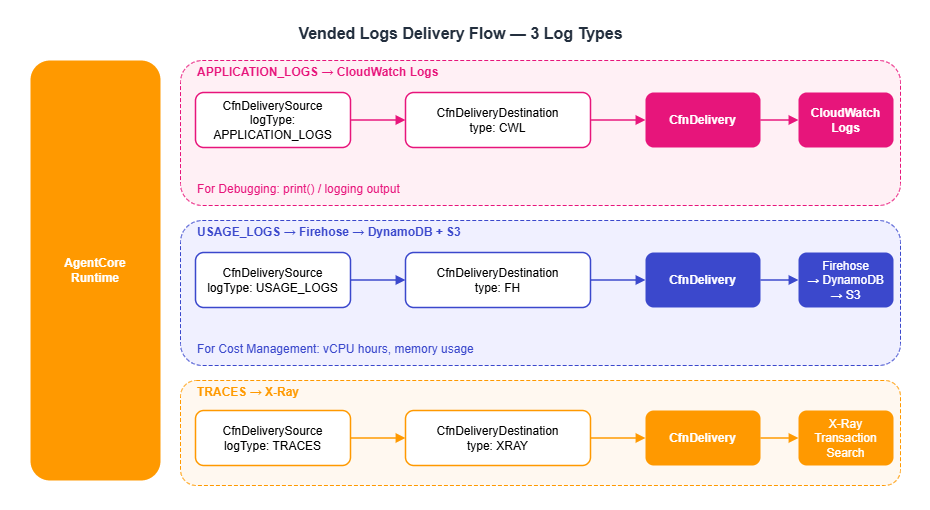
The AgentCore Runtime can deliver three types of logs. The destination differs by log type.
| Log Type | Content | Destination | Use Case |
|---|---|---|---|
| APPLICATION_LOGS | print() / logging output | CloudWatch Logs | Debugging |
| USAGE_LOGS | vCPU time, memory usage, session ID | Firehose → DynamoDB | Cost management |
| TRACES | X-Ray-compatible trace data | X-Ray | Performance analysis |
Configuring Vended Logs delivery requires three resources: CfnDeliverySource (source), CfnDeliveryDestination (destination), and CfnDelivery (the connection between the two). Without all three, no logs are delivered. Note that not only the Runtime but also Memory supports APPLICATION_LOGS and TRACES delivery. By adding a CfnDeliverySource with the Memory resourceArn, you can also debug and trace memory extraction processing in CloudWatch and X-Ray.
The following example delivers APPLICATION_LOGS to CloudWatch Logs. The log group name must use the /aws/vendedlogs/ prefix.
import * as logs from 'aws-cdk-lib/aws-logs';

const runtimeId = runtime.attrAgentRuntimeId;

// Log group for application logs
const appLogGroup = new logs.LogGroup(this, 'AppLogs', {
  logGroupName: `/aws/vendedlogs/bedrock-agentcore/runtime/${runtimeId}`,
  retention: logs.RetentionDays.ONE_MONTH,
  removalPolicy: cdk.RemovalPolicy.DESTROY,
});

// 1. DeliverySource: Specify the log source (Runtime) and log type
const appLogSource = new logs.CfnDeliverySource(this, 'AppLogSource', {
  name: `${runtimeId}-logs-source`,
  resourceArn: runtime.attrAgentRuntimeArn,
  logType: 'APPLICATION_LOGS',
});

// 2. DeliveryDestination: Specify the destination type and ARN
const appLogDestination = new logs.CfnDeliveryDestination(this, 'AppLogDestination', {
  name: `${runtimeId}-logs-destination`,
  deliveryDestinationType: 'CWL',  // CloudWatch Logs
  destinationResourceArn: appLogGroup.logGroupArn,
});

// 3. Delivery: Connect the source to the destination
const appLogDelivery = new logs.CfnDelivery(this, 'AppLogDelivery', {
  deliverySourceName: appLogSource.name,
  deliveryDestinationArn: appLogDestination.attrArn,
});
appLogDelivery.addDependency(appLogSource);
appLogDelivery.addDependency(appLogDestination);
Example output — APPLICATION_LOGS delivered to CloudWatch Logs:
$ aws logs tail "/aws/vendedlogs/bedrock-agentcore/runtime/rt-xxxxxxxxxxxx" \
    --follow --region us-west-2
2026-03-22T12:00:15.234Z [INFO] Agent initialized with model: us.anthropic.claude-sonnet-4-20250514-v1:0
2026-03-22T12:00:15.456Z [INFO] Memory loaded: 3 previous events for session user123_20260322T120000_chat
2026-03-22T12:00:16.789Z [INFO] Tool call: search_knowledge_base(query="EC2 pricing")
2026-03-22T12:00:18.012Z [INFO] Tool result: 3 documents retrieved (score > 0.5)
2026-03-22T12:00:22.345Z [INFO] Tool call: calculate_cost(instance_type="t3.micro", region="us-east-1")
2026-03-22T12:00:23.567Z [INFO] Response completed: 567 output tokens, 2 tool calls
TRACES are delivered to X-Ray. Set deliveryDestinationType to 'XRAY'; destinationResourceArn is not required.
// TRACES → X-Ray
const tracesSource = new logs.CfnDeliverySource(this, 'TracesSource', {
  name: `${runtimeId}-traces-source`,
  resourceArn: runtime.attrAgentRuntimeArn,
  logType: 'TRACES',
});

const tracesDestination = new logs.CfnDeliveryDestination(this, 'TracesDestination', {
  name: `${runtimeId}-traces-destination`,
  deliveryDestinationType: 'XRAY',
  // destinationResourceArn is not needed for the X-Ray type
});

const tracesDelivery = new logs.CfnDelivery(this, 'TracesDelivery', {
  deliverySourceName: tracesSource.name,
  deliveryDestinationArn: tracesDestination.attrArn,
});
tracesDelivery.addDependency(tracesSource);
tracesDelivery.addDependency(tracesDestination);
USAGE_LOGS are delivered to Firehose (detailed in Section 8.3). Set deliveryDestinationType to 'FH' and provide the ARN of the Firehose Delivery Stream.
8.2 Instrumentation with OpenTelemetry
In addition to the CloudWatch integration built into AgentCore, you can use OpenTelemetry (OTel) to send traces to your existing APM infrastructure. The Strands SDK provides the StrandsTelemetry class, which automatically generates spans for LLM calls and tool executions.
The recommended pattern for enabling OTel auto-instrumentation in a Dockerfile is shown below. Installing the aws-opentelemetry-distro package makes the opentelemetry-instrument command available, which automatically applies ADOT (AWS Distro for OpenTelemetry) configuration. Connection settings such as OTEL_EXPORTER_OTLP_ENDPOINT are automatically injected by the AgentCore Runtime, so you do not need to set them explicitly in the Dockerfile or in the CDK environmentVariables.
FROM ghcr.io/astral-sh/uv:python3.11-bookworm-slim

WORKDIR /app

ENV UV_SYSTEM_PYTHON=1 \
    UV_COMPILE_BYTECODE=1 \
    PYTHONUNBUFFERED=1

# Install dependencies first (layer cache optimization)
# Include aws-opentelemetry-distro in requirements.txt
COPY requirements.txt .
RUN uv pip install -r requirements.txt

# Create non-root user
RUN useradd -m -u 1000 bedrock_agentcore

COPY . .

USER bedrock_agentcore

EXPOSE 8080
# slim images don't include curl, so use Python's urllib instead
HEALTHCHECK --interval=30s --timeout=3s --start-period=40s --retries=3 \
  CMD python -c "import urllib.request; urllib.request.urlopen('http://localhost:8080/ping', timeout=3)" || exit 1

# Auto-instrument with ADOT via opentelemetry-instrument (uv run not needed)
CMD ["opentelemetry-instrument", "python", "-m", "my_agent"]
Observability data is structured in a three-tier hierarchy: Session → Trace → Span.
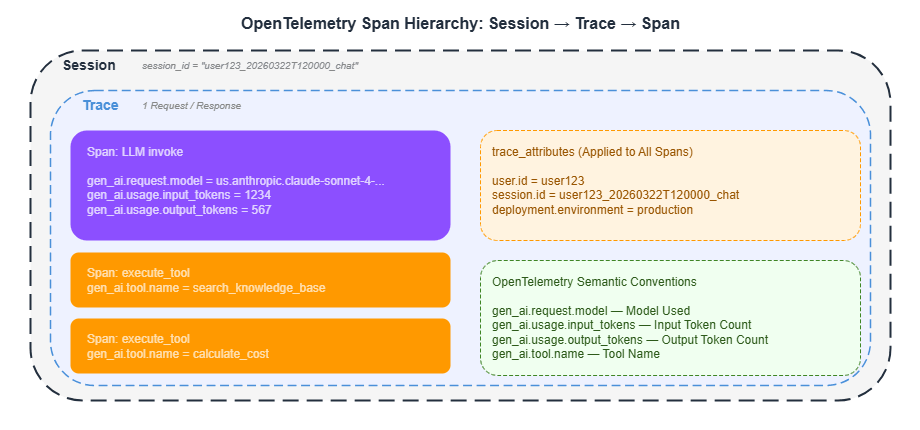
Setting trace_attributes on the agent attaches custom attributes to every span, making it easy to filter in CloudWatch and X-Ray.
agent = Agent(
    model=model_id,
    tools=tools,
    trace_attributes={
        "user.id": user_id,
        "session.id": session_id,
        "deployment.environment": "production",
    },
)
8.3 Firehose Usage Log Pipeline
USAGE_LOGS are the foundation for cost management. Deliver them directly to Firehose via CfnDelivery, transform them with a Lambda function, and write the results to DynamoDB. Data is also stored in S3 as a backup.
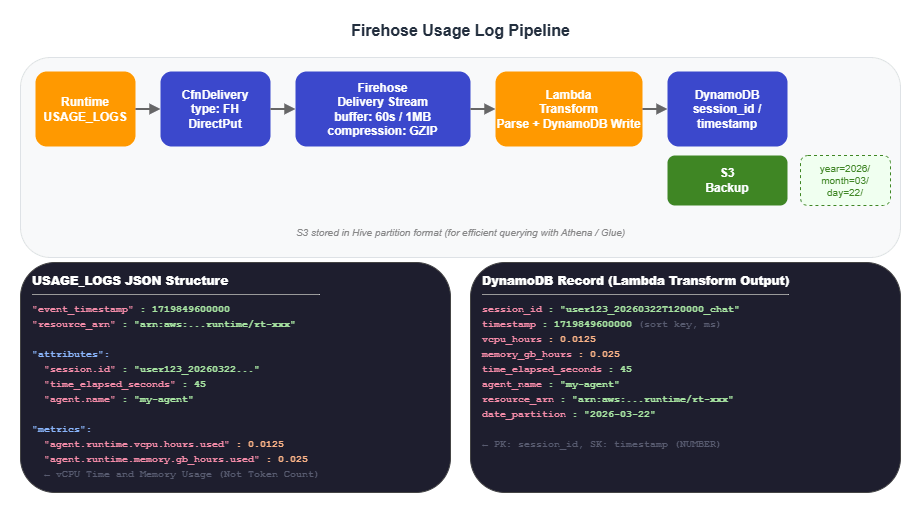
The actual data structure of USAGE_LOGS is shown below. Note that vCPU time and memory usage are recorded — not token consumption.
{
  "event_timestamp": 1719849600000,
  "resource_arn": "arn:aws:bedrock-agentcore:us-west-2:123456789012:runtime/rt-xxx",
  "attributes": {
    "session.id": "user123_20260322T120000_chat",
    "time_elapsed_seconds": 45,
    "agent.name": "my-agent",
    "region": "us-west-2"
  },
  "metrics": {
    "agent.runtime.vcpu.hours.used": 0.0125,
    "agent.runtime.memory.gb_hours.used": 0.025
  }
}
Example output — a record written to DynamoDB:
$ aws dynamodb query --table-name agentcore-usage \
    --key-condition-expression "session_id = :sid" \
    --expression-attribute-values '{":sid": {"S": "user123_20260322T120000_chat"}}' \
    --region us-west-2
{
  "Items": [
    {
      "session_id": {"S": "user123_20260322T120000_chat"},
      "timestamp": {"N": "1719849600000"},
      "vcpu_hours": {"N": "0.0125"},
      "memory_gb_hours": {"N": "0.025"},
      "time_elapsed_seconds": {"N": "45"},
      "agent_name": {"S": "my-agent"},
      "region": {"S": "us-west-2"},
      "resource_arn": {"S": "arn:aws:bedrock-agentcore:us-west-2:123456789012:runtime/rt-xxxxxxxxxxxx"}
    }
  ]
}
The CDK implementation for the Lambda Transform and Firehose follows (runtimeId was defined in Section 8.1).
import * as firehose from 'aws-cdk-lib/aws-kinesisfirehose';

// Lambda Transform: Parse USAGE_LOGS and write to DynamoDB
const transformFn = new lambda.Function(this, 'UsageTransform', {
  runtime: lambda.Runtime.PYTHON_3_12,
  handler: 'index.handler',
  timeout: cdk.Duration.minutes(1),
  code: lambda.Code.fromInline(`
import json, base64, boto3, os
from decimal import Decimal

dynamodb = boto3.resource('dynamodb')
table = dynamodb.Table(os.environ['TABLE_NAME'])

def handler(event, context):
    output = []
    for record in event['records']:
        payload = base64.b64decode(record['data']).decode('utf-8')
        try:
            data = json.loads(payload)
            attributes = data.get('attributes', {})
            metrics = data.get('metrics', {})

            # Normalize event_timestamp to milliseconds (sort key is NUMBER type)
            ts = data.get('event_timestamp', 0)
            if ts < 1e10:  # Convert to milliseconds if value is in seconds
                ts = int(ts * 1000)

            table.put_item(Item={
                'session_id': attributes.get('session.id', 'unknown'),
                'timestamp': int(ts),
                'vcpu_hours': Decimal(str(metrics.get('agent.runtime.vcpu.hours.used', 0))),
                'memory_gb_hours': Decimal(str(metrics.get('agent.runtime.memory.gb_hours.used', 0))),
                'time_elapsed_seconds': Decimal(str(attributes.get('time_elapsed_seconds', 0))),
                'agent_name': attributes.get('agent.name', ''),
                'region': attributes.get('region', ''),
                'resource_arn': data.get('resource_arn', ''),
            })
        except Exception as e:
            print(f'Error: {e}')

        output.append({
            'recordId': record['recordId'],
            'result': 'Ok',
            'data': record['data'],
        })
    return {'records': output}
  `),
  environment: { TABLE_NAME: usageTable.tableName },
});

usageTable.grantWriteData(transformFn);

// Firehose Delivery Stream (S3 backup + Lambda Transform)
// Firehose needs permission to invoke Lambda (not auto-granted with L1)
const usageBucket = new s3.Bucket(this, 'UsageBucket', {
  removalPolicy: cdk.RemovalPolicy.DESTROY,
  autoDeleteObjects: true,
});

const firehoseRole = new iam.Role(this, 'FirehoseRole', {
  assumedBy: new iam.ServicePrincipal('firehose.amazonaws.com'),
});
usageBucket.grantReadWrite(firehoseRole);
transformFn.grantInvoke(firehoseRole);

const usageFirehose = new firehose.CfnDeliveryStream(this, 'UsageFirehose', {
  deliveryStreamName: 'agentcore-usage-stream',
  deliveryStreamType: 'DirectPut',
  extendedS3DestinationConfiguration: {
    bucketArn: usageBucket.bucketArn,
    roleArn: firehoseRole.roleArn,
    bufferingHints: { intervalInSeconds: 60, sizeInMBs: 1 },
    compressionFormat: 'GZIP',
    // Hive-format partitioning: optimizes cost analysis queries in Athena / Glue
    prefix: 'usage-logs/year=!{timestamp:yyyy}/month=!{timestamp:MM}/day=!{timestamp:dd}/',
    errorOutputPrefix: 'errors/!{firehose:error-output-type}/year=!{timestamp:yyyy}/month=!{timestamp:MM}/',
    processingConfiguration: {
      enabled: true,
      processors: [{
        type: 'Lambda',
        parameters: [
          { parameterName: 'LambdaArn', parameterValue: transformFn.functionArn },
          { parameterName: 'BufferSizeInMBs', parameterValue: '1' },
          { parameterName: 'BufferIntervalInSeconds', parameterValue: '60' },
        ],
      }],
    },
  },
});

// Connect USAGE_LOGS → Firehose via CfnDelivery
const usageSource = new logs.CfnDeliverySource(this, 'UsageLogSource', {
  name: `${runtimeId}-usage-logs-source`,
  resourceArn: runtime.attrAgentRuntimeArn,
  logType: 'USAGE_LOGS',
});

const usageDestination = new logs.CfnDeliveryDestination(this, 'UsageLogDestination', {
  name: `${runtimeId}-usage-firehose-destination`,
  deliveryDestinationType: 'FH',  // Firehose
  destinationResourceArn: usageFirehose.attrArn,
});

const usageDelivery = new logs.CfnDelivery(this, 'UsageLogDelivery', {
  deliverySourceName: usageSource.name,
  deliveryDestinationArn: usageDestination.attrArn,
});
usageDelivery.addDependency(usageSource);
usageDelivery.addDependency(usageDestination);
8.4 X-Ray Transaction Search
Enabling X-Ray Transaction Search lets you search across traces using a session ID as the key. Two settings are required.
1. CloudWatch Resource Policy: Grants X-Ray permission to write trace data to CloudWatch Logs.
new logs.CfnResourcePolicy(this, 'XRayTracingPolicy', {
  policyName: 'AgentCoreTracingPolicy',
  policyDocument: JSON.stringify({
    Version: '2012-10-17',
    Statement: [{
      Sid: 'TransactionSearchXRayAccess',
      Effect: 'Allow',
      Principal: { Service: 'xray.amazonaws.com' },
      Action: 'logs:PutLogEvents',
      Resource: [
        `arn:aws:logs:${this.region}:${this.account}:log-group:aws/spans:*`,
        `arn:aws:logs:${this.region}:${this.account}:log-group:/aws/application-signals/data:*`,
      ],
      Condition: {
        ArnLike: { 'aws:SourceArn': `arn:aws:xray:${this.region}:${this.account}:*` },
        StringEquals: { 'aws:SourceAccount': this.account },
      },
    }],
  }),
});
2. Lambda-backed Custom Resource: Configures the X-Ray trace destination and indexing rules.
const xraySetupFn = new lambda.Function(this, 'XRaySetupFn', {
  runtime: lambda.Runtime.PYTHON_3_12,
  handler: 'index.handler',
  timeout: cdk.Duration.minutes(2),
  code: lambda.Code.fromInline(`
import boto3
import cfnresponse

def handler(event, context):
    if event['RequestType'] == 'Delete':
        cfnresponse.send(event, context, cfnresponse.SUCCESS, {})
        return
    try:
        xray = boto3.client('xray')
        # Set trace destination to CloudWatch Logs
        xray.update_trace_segment_destination(Destination='CloudWatchLogs')
        # Set sampling rate to 100% (index all traces)
        xray.update_indexing_rule(
            Name='Default',
            Rule={'Probabilistic': {'DesiredSamplingPercentage': 100}}
        )
        cfnresponse.send(event, context, cfnresponse.SUCCESS,
            {'TransactionSearch': 'Enabled'})
    except Exception as e:
        cfnresponse.send(event, context, cfnresponse.FAILED,
            {'Error': str(e)})
  `),
});

xraySetupFn.addToRolePolicy(new iam.PolicyStatement({
  actions: [
    'xray:GetTraceSegmentDestination', 'xray:UpdateTraceSegmentDestination',
    'xray:GetIndexingRules', 'xray:UpdateIndexingRule',
  ],
  resources: ['*'],
}));

// Required to enable Application Signals (to make Transaction Search work on new accounts)
xraySetupFn.addToRolePolicy(new iam.PolicyStatement({
  actions: ['application-signals:StartDiscovery'],
  resources: ['*'],
}));
xraySetupFn.addToRolePolicy(new iam.PolicyStatement({
  actions: ['iam:CreateServiceLinkedRole'],
  resources: [
    `arn:aws:iam::${this.account}:role/aws-service-role/application-signals.cloudwatch.amazonaws.com/AWSServiceRoleForCloudWatchApplicationSignals`,
  ],
  conditions: {
    StringEquals: {
      'iam:AWSServiceName': 'application-signals.cloudwatch.amazonaws.com',
    },
  },
}));

const xrayProvider = new cr.Provider(this, 'XRaySetupProvider', {
  onEventHandler: xraySetupFn,
});

new cdk.CustomResource(this, 'XRaySetup', {
  serviceToken: xrayProvider.serviceToken,
});
9. Full-Stack Deployment Pattern Comparison
The full-stack web application architecture placed in front of the AgentCore Runtime is chosen based on project scale and cost requirements.
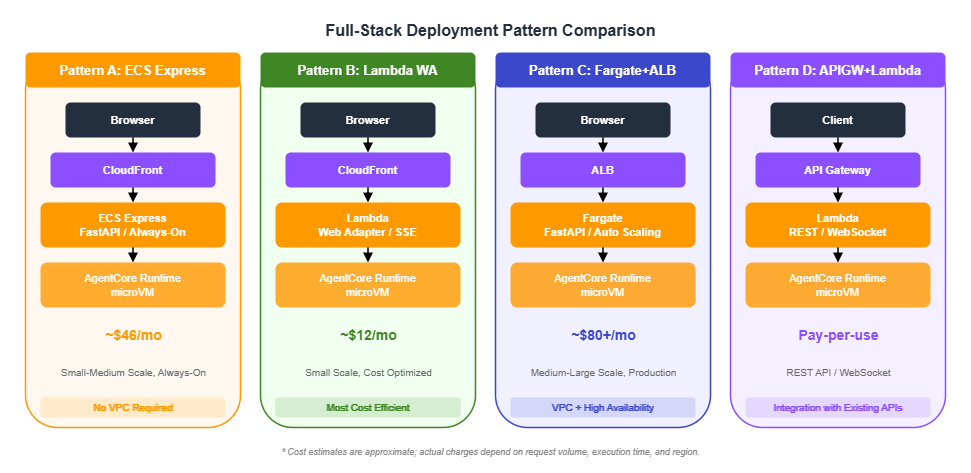
Pattern Comparison
| Pattern | Estimated Monthly Cost | Scalability | Best For |
|---|---|---|---|
| A: ECS Express | ~$46/month | Auto-scaling | Small to medium, always-on |
| B: Lambda Web Adapter | ~$12/month | Scale to zero | Small scale, cost-optimized |
| C: Fargate + ALB | ~$80+/month | High | Medium to large, production |
| D: API Gateway + Lambda | Pay-per-use | High | REST APIs, WebSocket |
Pattern A: ECS Express Mode
Best suited for always-on workloads that require consistent response times. Uses Express Gateway mode for public access without requiring a VPC.
Pattern B: Lambda Web Adapter
The most cost-efficient option. Runs FastAPI or Express.js applications directly on Lambda. Use RESPONSE_STREAM mode for SSE streaming.
Note: When connecting CloudFront to a Lambda Function URL using AWS_IAM authentication, a PayloadSigner Lambda@Edge function is required to perform SHA256 payload signing. Without it, IAM authentication will fail with a signature mismatch.
Because Lambda container image functions cannot use Lambda Layers, include the Lambda Web Adapter in the chatapp Dockerfile.
# chatapp/Dockerfile.lambda (excerpt)
# Include Lambda Web Adapter in the image via multi-stage COPY
COPY --from=public.ecr.aws/awsguru/aws-lambda-adapter:0.9.1 /lambda-adapter /opt/extensions/lambda-adapter
Use CDK to create a container image-based Lambda function and enable SSE streaming via a Function URL.
const webAppFunction = new lambda.Function(this, 'WebApp', {
  runtime: lambda.Runtime.FROM_IMAGE,
  handler: lambda.Handler.FROM_IMAGE,
  code: lambda.Code.fromAssetImage('../chatapp', {
    cmd: ['python', '-m', 'uvicorn', 'app.main:app',
          '--host', '0.0.0.0', '--port', '8080'],
  }),
  timeout: cdk.Duration.minutes(5),
  memorySize: 1024,
  environment: {
    PORT: '8080',
    AGENTCORE_RUNTIME_ARN: runtimeArn,
  },
  architecture: lambda.Architecture.ARM_64,
});

// SSE streaming support
const functionUrl = webAppFunction.addFunctionUrl({
  authType: lambda.FunctionUrlAuthType.AWS_IAM,
  invokeMode: lambda.InvokeMode.RESPONSE_STREAM,
});
Pattern C: Fargate + ALB
Designed for large-scale production environments. Provides Auto Scaling and high availability.
import * as ecs_patterns from 'aws-cdk-lib/aws-ecs-patterns';

const service = new ecs_patterns.ApplicationLoadBalancedFargateService(
  this, 'AppService', {
    cluster,
    taskImageOptions: {
      image: ecs.ContainerImage.fromAsset('../chatapp'),
      containerPort: 8000,
      environment: { AGENTCORE_RUNTIME_ARN: runtimeArn },
    },
    desiredCount: 2,
    publicLoadBalancer: true,
    circuitBreaker: { rollback: true },
  }
);

const scaling = service.service.autoScaleTaskCount({
  minCapacity: 2, maxCapacity: 10,
});
scaling.scaleOnCpuUtilization('CpuScaling', {
  targetUtilizationPercent: 70,
});
Decision Guide
- "Just get it running": Start with Lambda Web Adapter (Pattern B) and migrate to ECS as traffic grows.
- "Consistent response times required": ECS Express (Pattern A) — no cold starts.
- "Enterprise production environment": Fargate + ALB (Pattern C) — Auto Scaling and high availability.
- "Already have an API Gateway": Choose Pattern D and integrate with your existing API.
10. Agent Quality Evaluation
AgentCore provides an evaluation framework centered on the LLM-as-a-Judge pattern. Three evaluation modes are available, each suited to a different phase of the development cycle.
| Mode | Where It Runs | Use Case |
|---|---|---|
| Local | Developer machine | Fast feedback during development |
| On-demand | AgentCore API | Quality gates in CI/CD pipelines |
| Online | On the Runtime | Continuous quality monitoring of production traffic |
On-Demand Evaluation (for CI/CD Pipelines)
On-demand evaluation sits between local and online evaluation. Test cases are submitted to the AgentCore Evaluate API, which runs the evaluation in the cloud. This can be used as a quality gate in CI/CD pipelines. A convert_strands_to_adot utility is provided to convert Strands span data into ADOT (AWS Distro for OpenTelemetry) format.
Configuring Online Evaluation
In production, online evaluation is valuable: it samples requests sent to the Runtime, automatically scores them, and records the results in CloudWatch.
from bedrock_agentcore_starter_toolkit import Evaluation

def setup_online_evaluation(agent_id: str, evaluator_id: str):
    """Create an online evaluation configuration"""
    eval_client = Evaluation()

    resp = eval_client.create_online_config(
        config_name="production-quality-monitor",
        agent_id=agent_id,
        sampling_rate=10.0,  # Production: 10% sampling
        evaluator_list=[
            "Builtin.Correctness",  # Output correctness
            evaluator_id,            # Custom: tool usage check
        ],
        auto_create_execution_role=True,
        enable_on_create=True,
    )
    return resp["onlineEvaluationConfigId"]
Adjust the sampling rate based on the environment. A common guideline is 100% for development and 10–30% for production.
11. Best Practices and Gotchas
CDK-Specific Gotchas
- CodeBuild must target ARM64: Use
LinuxArmBuildImage.AMAZON_LINUX_2_STANDARD_3_0. Building for x86 will cause crashes on the Runtime. - Lambda Waiter timeout: Because CodeBuild builds take 5–15 minutes, set the Lambda timeout to 14 minutes (the Lambda maximum is 15 minutes).
RemovalPolicy.DESTROY: Set this on all resources in development environments so thatcdk destroyperforms a complete cleanup. ConsiderRETAINfor production.eventExpiryDurationunits: Specified in seconds with CDK (L1), but in days with the Python SDK. Do not mix these up.
Observability Design
- Session ID design: Use the format
{user_id}_{timestamp}_{purpose}with a minimum of 16 characters. This serves as the cross-cutting search key in CloudWatch. trace_attributes: Includinguser.id,session.id, anddeployment.environmentmakes filtering in X-Ray straightforward (use the OpenTelemetry semantic convention dot notation).- Firehose S3 bucket: Configure lifecycle policies to automatically transition old logs to Glacier or delete them.
- Transaction Search: Must be explicitly enabled. Automating this with a CDK Custom Resource is the recommended approach.
Terraform Support
Terraform is also available as an alternative to CDK.
resource "aws_bedrockagentcore_agent_runtime" "agent" {
  agent_runtime_name = "my-agent"
  role_arn           = aws_iam_role.execution.arn

  network_configuration {
    network_mode = "PUBLIC"
  }

  agent_runtime_artifact {
    container_configuration {
      container_uri = "${aws_ecr_repository.agent.repository_url}:latest"
    }
  }

  environment_variables = {
    AWS_REGION                    = var.region
    BEDROCK_AGENTCORE_MEMORY_ID = aws_bedrockagentcore_memory.agent.memory_id
  }
}
Key Limits and Quotas
The table below summarizes the key limits relevant to the resources covered in this article. Service quotas are subject to change; refer to the official documentation for the latest values.
| Resource | Limit | Notes |
|---|---|---|
| CodeBuild maximum build duration | 480 minutes (8 hours) | Sample projects set this to 30 minutes. AgentCore Docker builds typically complete in 3–10 minutes. |
| Lambda maximum timeout | 15 minutes (900 seconds) | The Waiter Lambda is set to 14 minutes to leave a safety margin. |
eventExpiryDuration units | CDK (L1): seconds; Python SDK: days | 7 days in CDK = 604800; 7 days in Python SDK = 7. Mixing these up causes events to expire immediately or be retained far longer than intended. |
| Firehose buffering | intervalInSeconds: 60–900 s; sizeInMBs: 1–128 MB | Samples use 60 s / 1 MB (low-latency priority). Increase buffer size for higher throughput to optimize costs. |
| CloudWatch Logs log group name | Vended Logs require the /aws/vendedlogs/ prefix | Creating a CfnDeliveryDestination without this prefix causes a deployment error. |
| CfnDelivery | One delivery destination per CfnDeliverySource | To send the same log type to multiple destinations, create multiple CfnDeliverySource resources. |
| X-Ray indexing rule | DesiredSamplingPercentage: 0–100 | 100% is recommended to maximize Transaction Search accuracy. Be aware of cost implications. |
| Runtime environment variables | See official documentation | Sample projects configure 6–12 environment variables. Key and value length limits apply. |
ECR maxImageCount | No hard limit (controlled by lifecycle rules) | Samples use 5. Recommended: 3–5 for development, 10–20 for production. |
| CDK stack count | 2,000 stacks per Region (CloudFormation limit) | The 4-stack configuration has ample headroom. |
| Cost estimate disclaimer | — | The cost estimates in this article (~$12/month, ~$46/month, ~$80+/month) are approximations. Actual costs depend on request volume, execution duration, data transfer, and Region. |
12. Summary
This article explained the 4-stack CDK architecture for AgentCore projects and how to build the observability pipeline needed for production operations.
4-stack architecture: Separating Foundation (authentication, database, IAM), Bedrock (Guardrails, Memory), Agent (ECR, CodeBuild, Runtime), and ChatApp (frontend) allows resources with different change frequencies to be deployed independently.
Lambda Waiter pattern: Using a CDK Custom Resource to wait for CodeBuild completion is the solution to one of the most common pitfalls in CDK-based AgentCore deployments.
Observability pipeline: The three types of CloudWatch Vended Logs — APPLICATION_LOGS to CloudWatch Logs, USAGE_LOGS to Firehose to DynamoDB, and TRACES to X-Ray — provide the foundation for debugging, cost management, and performance analysis. X-Ray Transaction Search enables session-level trace search.
Choosing a deployment pattern: Lambda Web Adapter (~$12/month) for cost optimization, ECS Express (~$46/month) for consistent response times, and Fargate + ALB (~$80+/month) for enterprise production environments.
13. References
- AWS CDK v2 Documentation
- Amazon Bedrock AgentCore Official Documentation
- @aws-cdk/aws-bedrock-agentcore-alpha — L2 constructs (Section 7.5)
- Generative AI CDK Constructs — A collection of CDK constructs for generative AI workloads
- OpenTelemetry Python SDK
- Strands Agents SDK
- sample-strands-agentcore-starter — Primary reference for the code examples in this article (4-stack architecture, Vended Logs, Firehose pipeline)
- amazon-bedrock-agentcore-samples / 04-infrastructure-as-code — Example usage of L2 constructs (replaces the removed
fullstack-solution-template-for-agentcorerepository)
Related Articles in This Series
- Part 1 "Implementation Patterns for Runtime, Memory, and Code Interpreter" — Fundamentals of
BedrockAgentCoreAppand@app.entrypoint - Part 2 "Multi-Layer Security with Identity, Gateway, and Policy" — Detailed IAM policy design and confused deputy protection
- Part 4 "Multi-Agent Orchestration" — Guardrails Shadow Mode, LangGraph multi-agent
References:
Tech Blog with curated related content