Amazon Cognito Federation Complete Implementation Guide - Google, Apple, Microsoft, OIDC, and SAML
First Published:
Last Updated:
The article assumes you are already comfortable with the basics of Cognito User Pool but want a single reference that covers the federation surface end to end with concrete parameter names, endpoint paths, and Lambda event shapes.
For background on how Amazon Cognito itself has evolved, see AWS History and Timeline regarding Amazon Cognito.
Table of Contents:
- Introduction — User Pool vs Identity Pool
- Architecture — Authorization Code Grant + PKCE Flow
- Google Sign-In Integration
- Sign in with Apple Integration
- Microsoft / Azure AD (Entra ID) Integration
- Generic OIDC Provider Integration
- SAML 2.0 Integration
- Attribute Mapping — sub, email, name
- Pre Token Generation Trigger — Custom Claim Injection
- Pre Sign-up Trigger — Auto-Confirm and Domain Allow-List
- User Migration Trigger — Onboarding Existing Users from a Legacy System
- Token Refresh and Revoke
- App Client Configuration in Depth
- AWS Amplify JS and Custom Authentication Flows
- boto3 Pool Management Examples
- Troubleshooting — The Errors You Will Hit
- Cost and Scaling — MAU Pricing
- Summary
- References
1. Introduction — User Pool vs Identity Pool
Amazon Cognito has two distinct services that are often confused. Understanding the split is the prerequisite for everything that follows.User Pool is an OIDC-compliant identity provider and user directory. It handles sign-up, sign-in, MFA, federation, and issues three JWTs to your application: an ID token (who the user is), an access token (what the user can do, with scopes), and a refresh token. This is the right surface for application authentication and for protecting your own APIs through API Gateway authorizers.
Identity Pool (also called Federated Identities) is an AWS credential broker. It exchanges an external token — typically a User Pool ID token, but also raw Google, Apple, Microsoft, or SAML assertions — for short-lived AWS credentials via STS
AssumeRoleWithWebIdentity. This is the right surface when the browser or mobile app needs to call AWS services (S3, DynamoDB, Kinesis) directly under an IAM role.The canonical pattern is to chain them: User Pool authenticates the user and issues tokens, then the app sends the ID token to an Identity Pool to obtain AWS credentials. This article focuses on User Pool federation; Identity Pool is mentioned only where it is part of the same flow.
2. Architecture — Authorization Code Grant + PKCE Flow
The Hosted UI (now also branded "Managed Login") is the front door for federation. Your app redirects the user to the Cognito-hosted authorization endpoint, the user is bounced once to the upstream IdP, the IdP redirects back to Cognito's/oauth2/idpresponse, and Cognito then redirects back to your app's callback URL with an authorization code. The app exchanges the code for tokens at the token endpoint.The full sequence with PKCE looks like this:
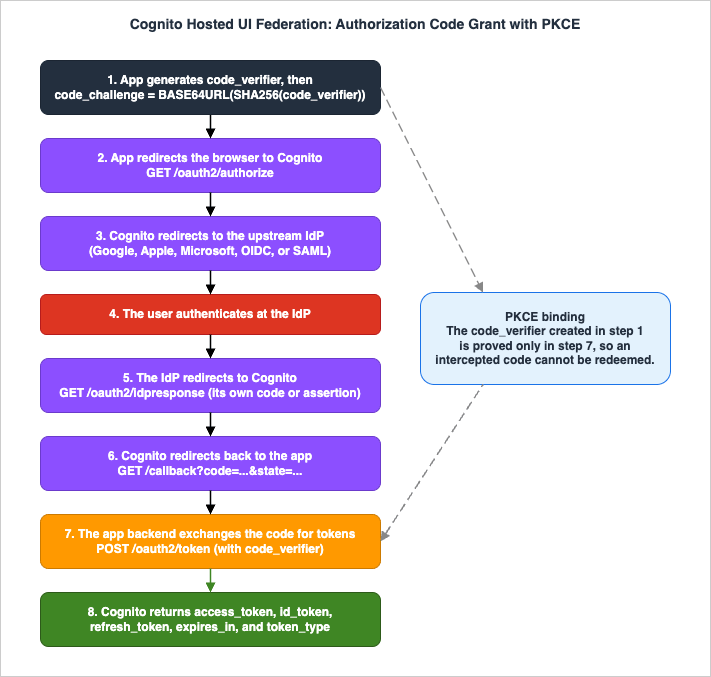
GET https://<domain>/oauth2/authorize
    ?response_type=code
    &client_id=<app_client_id>
    &redirect_uri=https://app.example.com/callback
    &scope=openid+email+profile
    &code_challenge_method=S256
    &code_challenge=<challenge>
    &identity_provider=Google   # optional - skips the Hosted UI chooser
POST https://<domain>/oauth2/token
Content-Type: application/x-www-form-urlencoded
grant_type=authorization_code
&code=<auth_code>
&client_id=<app_client_id>
&redirect_uri=https://app.example.com/callback
&code_verifier=<original_verifier>access_token, id_token, refresh_token, expires_in, and token_type.The five Hosted UI endpoints worth memorizing are:
GET /oauth2/authorize— start the flow, acceptsresponse_type,client_id,redirect_uri,scope,code_challenge,code_challenge_method, optionallyidentity_provider.POST /oauth2/token— exchangeauthorization_code,refresh_token, orclient_credentialsfor tokens.GET /oauth2/userInfo— return claims for the bearer of an access token.POST /oauth2/revoke— revoke a refresh token (and any tokens derived from it).GET /logout— clear the Cognito session and optionally redirect tologout_uriorredirect_uri.
PKCE is mandatory for public clients (SPAs, mobile apps) and recommended for confidential clients. Cognito only accepts
code_challenge_method=S256 — plain is not supported.3. Google Sign-In Integration
3.1 Google Cloud Console steps
In the Google Cloud Console for your project:- Open
APIs & Services→OAuth consent screen. Addamazoncognito.com(and your custom domain root, if you use one) to Authorized domains. - Open
APIs & Services→Credentials→Create Credentials→OAuth client ID. Choose Web application. - Authorized JavaScript origins:
https://<domain>.auth.<region>.amazoncognito.com. - Authorized redirect URIs:
https://<domain>.auth.<region>.amazoncognito.com/oauth2/idpresponse(this is the Cognito callback, not your application's callback). - Save and copy the Client ID and Client secret.
The redirect URI string here is the single most common cause of
redirect_uri_mismatch errors. Match it character-for-character with your Cognito domain — including the region segment.3.2 Cognito side
In the Cognito console under your User Pool, go toSign-in experience → Federated identity provider sign-in → Add identity provider → Google:
- Client ID / Client secret: paste the Google values.
- Authorized scopes:
profile email openid(space-separated). - Attribute mapping: at minimum, map Google
emailto Cognitoemail, and Googlesubto a username attribute. The Googlesubis automatically mapped to the Cognitousernamefield asGoogle_<sub>.
Then, on each app client, enable Google under Identity providers so it appears on the Hosted UI.
3.3 Triggering Google directly
To skip the Hosted UI provider chooser and send the user straight to Google:GET https://<domain>/oauth2/authorize
?response_type=code
&client_id=<app_client_id>
&redirect_uri=<app_callback>
&scope=openid+email+profile
&identity_provider=Google
&code_challenge_method=S256
&code_challenge=<challenge>4. Sign in with Apple Integration
Apple's flow has more moving parts than the others because Apple does not issue a permanent client secret. You must create three artifacts in the Apple Developer portal and let Cognito assemble a signed JWT secret on every token call.4.1 Apple Developer portal artifacts
- App ID: under
Certificates, Identifiers & Profiles→Identifiers→App IDs, enable the Sign in with Apple capability for your bundle ID. - Services ID: create a new identifier of type
Services IDs. This Services ID is the value Cognito sends to Apple as the OIDCclient_id. Under its Sign in with Apple configuration, set Return URLs tohttps://<domain>.auth.<region>.amazoncognito.com/oauth2/idpresponse. - Sign in with Apple key: under
Keys, create a new key, enable Sign in with Apple, configure the primary App ID, then download the.p8private key file. The file is downloadable only once — store it immediately. Note the Key ID shown next to the key. - Team ID: the 10-character identifier shown at the top right of your Apple Developer account.
4.2 Cognito side
In Cognito add aSign in with Apple identity provider with these fields:
- Services ID: from step 2 above.
- Team ID: from step 4.
- Key ID: from step 3.
- Private key: paste the contents of the
.p8file (including the-----BEGIN PRIVATE KEY-----headers). - Authorized scopes:
email name.
4.3 The "name only on first authorization" caveat
Apple returns thename claim only on the very first authorization for a given Apple ID. If your app calls Apple a second time (for example because you deleted the Cognito user and the user signs in again, or because you added the name scope after the user already authorized your app), Apple will not re-send the name. There is a separate path on the user's iCloud settings page where they can revoke the app, after which the name is returned again on next sign-in.The practical implication: persist the
name, given_name, and family_name claims into your Cognito user attributes on first sign-in via the Pre Sign-up trigger or a post-confirmation lookup. Do not rely on Apple to re-deliver them.5. Microsoft / Azure AD (Entra ID) Integration
Entra ID is registered as a generic OIDC provider in Cognito. The Microsoft identity platform v2 endpoints are well-known and stable.5.1 Entra ID app registration
In the Entra admin center underApp registrations → New registration:
- Redirect URI (Web platform):
https://<domain>.auth.<region>.amazoncognito.com/oauth2/idpresponse. - After registration, under Certificates & secrets, create a new client secret and copy its value.
- Under API permissions, add Microsoft Graph delegated permissions:
openid,email,profile.
5.2 Cognito side — generic OIDC
In Cognito, add an identity provider of typeOpenID Connect (OIDC):
- Provider name: a unique label, e.g.,
Microsoft. - Client ID: the Application (client) ID from Entra.
- Client secret: the secret value created above.
- Authorized scopes:
openid email profile. - Attributes request method:
GET(Microsoft Graph userInfo accepts both, but GET is fine). - Setup method:
Auto fill through issuer URL. - Issuer URL:
https://login.microsoftonline.com/<tenant-id>/v2.0.
The four endpoints Cognito will auto-fill from the discovery document are:
- Authorize:
https://login.microsoftonline.com/<tenant>/oauth2/v2.0/authorize - Token:
https://login.microsoftonline.com/<tenant>/oauth2/v2.0/token - UserInfo:
https://graph.microsoft.com/oidc/userinfo - JWKs:
https://login.microsoftonline.com/<tenant>/discovery/v2.0/keys
Use the actual tenant GUID for the issuer URL when you want to scope to a single tenant. Use
common to allow both work/school accounts and personal Microsoft accounts. Use organizations to allow any work/school tenant.5.3 Microsoft claim notes
The claim names that matter for attribute mapping:oid(GUID): the user's immutable object ID within the tenant. This is the stable identifier. Map it to a Cognito user attribute as the canonical user ID.tid(GUID): the tenant ID. The value9188040d-6c67-4c5b-b112-36a304b66dadindicates a personal Microsoft account.preferred_username: human-readable, typically email-shaped, but mutable. Do not use it for authorization decisions.sub: pairwise per-application identifier; differs across applications even for the same user.
Cognito requires the OIDC IdP to support
client_secret_post token endpoint authentication, which Microsoft does.6. Generic OIDC Provider Integration
Any OIDC-compliant IdP — Auth0, Okta, Keycloak, your in-house Hydra deployment — can be registered the same way as Microsoft. The required Cognito fields are:| Field | Description |
|---|---|
Provider name | Unique label shown in the Hosted UI and used as identity_provider=<name> on /oauth2/authorize. |
Client ID | OAuth 2.0 client ID issued by the IdP. |
Client secret | Corresponding client secret. Cognito stores it encrypted. |
Authorized scopes | Space-separated scopes Cognito requests. openid is mandatory. |
Attributes request method | GET or POST for the userInfo call. Some IdPs require POST. |
Issuer URL (Auto) | HTTPS URL with no trailing slash. Cognito appends /.well-known/openid-configuration. |
Authorize / Token / UserInfo / JWKs URI (Manual) | Required only if auto-discovery is unavailable. All HTTPS, no trailing slash. |
Cognito requires the IdP to:
- Sign ID tokens with HMAC-SHA, ECDSA, or RSA algorithms. Cognito may not surface mismatches by reading the IdP's
id_token_signing_alg_values_supportedclaim at the discovery endpoint, so independently confirm the IdP signs with one of these algorithm families before going live. - Publish
kidvalues in the JWKs and includekidin token headers. - Support
client_secret_postclient authentication. Cognito has historically usedclient_secret_postexclusively for external OIDC IdPs and does not negotiateclient_secret_basicautomatically; verify the current Cognito Developer Guide for your region before relying on any other auth method.
The OIDC
sub claim is automatically mapped to the Cognito username, formatted as <provider_name>_<sub>.7. SAML 2.0 Integration
SAML federation is preferred for enterprise IdPs (ADFS, Shibboleth, PingFederate, Okta SAML, Entra ID Enterprise SAML). Cognito supports SAML 2.0 only — SAML 1.1 is not accepted. The lineage of the Microsoft products named here, and the dates on which AD FS and Microsoft Entra ID took their current shape, are set out in Microsoft Identity History and Timeline.7.1 IdP-side configuration
Provide the IdP with two values:- SP Entity ID / Audience URN:
urn:amazon:cognito:sp:<userPoolId>. Example:urn:amazon:cognito:sp:us-east-1_EXAMPLE123. - Assertion Consumer Service (ACS) URL:
https://<domain>.auth.<region>.amazoncognito.com/saml2/idpresponse. The/saml2/idpresponsepath is identical for both Cognito-prefixed domains and custom domains.
The IdP issues a metadata XML document. Either upload that XML to Cognito, or supply a metadata URL that Cognito will fetch.
7.2 NameID stability
The SAMLNameID element must be case-consistent and stable across sign-ins. Map it to a persistent identifier in your IdP — typically objectGUID for ADFS or oid for Entra. Do not map NameID to email address: if a user changes email, their NameID changes, and Cognito will not be able to match them to their existing profile. Recovering from this requires deleting the user and recreating it.7.3 SAML attribute mapping
In Cognito, map SAML assertion attribute names (case-sensitive) to User Pool attributes. A typical mapping:<saml:Attribute Name="email"> -> email
<saml:Attribute Name="givenName"> -> given_name
<saml:Attribute Name="surname"> -> family_name
<saml:Attribute Name="department"> -> custom:department8. Attribute Mapping — sub, email, name
Cognito attribute mapping has three layers worth keeping straight:- Reserved standard attributes: OIDC standard claims (
email,email_verified,phone_number,name,given_name,family_name,locale,picture,address). These map directly between IdP claims and User Pool attributes. - Custom attributes: prefixed with
custom:in the User Pool. They must be declared on the User Pool before mapping. - The
subclaim: the IdP'ssubis not copied to the Cognitosub. Cognito always generates its ownsub(a UUID) for each user profile. The federated IdP'ssubis captured in the Cognitousernamefield as<provider_name>_<idpsub>and in theidentitiesarray claim of the ID token.
This last point is what makes account-linking tricky. If a user signs in with Google one day and Microsoft the next, by default they end up as two separate Cognito profiles:
Google_117... and Microsoft_b8e..., each with a different Cognito sub. Linking them requires the AdminLinkProviderForUser API (covered in §10).Note: mark
email_verified as required-and-mapped only if the upstream IdP actually sets it. Google does. Apple sets it but only because Apple verifies all Apple IDs by definition. Some self-hosted OIDC providers omit it, in which case mapping it without a default leads to sign-in failures.9. Pre Token Generation Trigger — Custom Claim Injection
The Pre Token Generation (PreTGT) Lambda trigger is the clean way to add tenant IDs, role names, feature flags, or anything else your application needs in the JWT without round-tripping to a database on every API call.There are three event versions:
- V1_0: ID token only. String values only. Available on all tiers.
- V2_0: Adds access token customization for human user flows. Supports complex types (objects, arrays, numbers, booleans). Requires the
EssentialsorPlustier. (Some pools configured under the pre-November 2024 pricing model may retain V2_0 access depending on their existing configuration; for any new pool, select Essentials or higher to enable V2_0.) - V3_0: Adds the
TokenGeneration_ClientCredentialstrigger source for M2M flows.EssentialsorPlustier only — not available on Lite, even with Advanced Security.
V2_0 is what most production apps want — the access token is what API Gateway and resource servers actually verify.
9.1 V2_0 event shape
{
  "version": "2",
  "triggerSource": "TokenGeneration_HostedAuth",
  "userPoolId": "us-east-1_EXAMPLE",
  "userName": "Google_1078431...",
  "request": {
    "userAttributes": {
      "email": "user@example.com",
      "custom:tenant_id": "tenant-42"
    },
    "groupConfiguration": {
      "groupsToOverride": ["admins"],
      "iamRolesToOverride": [],
      "preferredRole": null
    },
    "scopes": ["openid", "email", "profile"]
  },
  "response": {}
}
The event also carries an optional
request.clientMetadata map when the client passes ClientMetadata into InitiateAuth / RespondToAuthChallenge. Use it to feed per-request context (correlation IDs, tenant hints) into the Lambda without persisting them on the user record.9.2 Sample Lambda — adding a tenant claim to the access token
def lambda_handler(event, context):
    tenant_id = event["request"]["userAttributes"].get("custom:tenant_id", "default")
    roles = ["reader"]
    # On the request side, request.groupConfiguration.groupsToOverride contains the user's
    # currently resolved Cognito group memberships at trigger time -- the same field name is
    # reused on the response side to *override* group membership for the issued tokens.
    # Treat the request value as read-only group membership; do not confuse it with the
    # response field of the same name.
    if "admins" in event["request"]["groupConfiguration"].get("groupsToOverride", []):
        roles.append("admin")

    event["response"] = {
        "claimsAndScopeOverrideDetails": {
            "idTokenGeneration": {
                "claimsToAddOrOverride": {
                    "tenant_id": tenant_id,
                    "roles": roles
                }
            },
            "accessTokenGeneration": {
                "claimsToAddOrOverride": {
                    "tenant_id": tenant_id,
                    "roles": roles
                },
                "scopesToAdd": ["custom-resource-server/read"]
            }
        }
    }
    return event
Trigger sources you should handle:
TokenGeneration_HostedAuth— Hosted UI / Managed Login sign-in.TokenGeneration_Authentication— API-drivenInitiateAuthflows.TokenGeneration_RefreshTokens— every refresh. Custom claims must be re-added on refresh, otherwise they vanish.TokenGeneration_NewPasswordChallenge— admin-created users on first sign-in.TokenGeneration_AuthenticateDevice— end of a device authentication flow (when device tracking is enabled on the User Pool).TokenGeneration_ClientCredentials— V3_0 only, M2M flows.
Reserved claims (
sub, iss, aud, exp, iat, auth_time, jti, token_use, cognito:username, client_id) cannot be modified or suppressed.10. Pre Sign-up Trigger — Auto-Confirm and Domain Allow-List
The Pre Sign-up trigger fires for self-serviceSignUp, first federated sign-in via an external IdP (this is the surprising one), and AdminCreateUser.For federated sign-ins, this is your hook to:
- Auto-confirm the user.
- Restrict by domain (corporate allow-list).
- Link a fresh federated identity to a pre-existing native Cognito profile, avoiding the "two profiles for the same human" problem.
10.1 Auto-confirm + domain allow-list
ALLOWED_DOMAINS = {"example.com", "example.co.jp"}

def lambda_handler(event, context):
    email = event["request"]["userAttributes"].get("email", "")
    domain = email.split("@")[-1].lower() if "@" in email else ""
    if domain not in ALLOWED_DOMAINS:
        raise Exception("Sign-up not permitted from this email domain")

    if event["triggerSource"] == "PreSignUp_ExternalProvider":
        event["response"]["autoConfirmUser"] = True
        event["response"]["autoVerifyEmail"] = True

    return event
10.2 Linking a federated user to an existing native account
When a user previously signed up with email/password and later tries to federate with the same email through Google, Cognito by default creates a second profile (Google_<sub>). To merge them, call AdminLinkProviderForUser from the Pre Sign-up trigger:
import boto3

cognito = boto3.client("cognito-idp")

def lambda_handler(event, context):
    if event["triggerSource"] != "PreSignUp_ExternalProvider":
        return event

    email = event["request"]["userAttributes"]["email"]
    # Cognito sets userName = "<provider_name>_<idp_sub>" for federated sign-ins.
    # Use rsplit so a provider name that contains underscores (e.g., "Corp_OIDC") still
    # parses correctly, on the assumption that the IdP sub itself does not contain "_".
    # If you allow OIDC IdPs whose sub may contain underscores, look the value up in
    # event["request"]["userAttributes"]["identities"] (a JSON-encoded string holding
    # an array of provider/userId pairs -- json.loads() it before lookup) instead of
    # parsing userName.
    provider_name, provider_sub = event["userName"].rsplit("_", 1)

    # Cognito Filter values are wrapped in double quotes; if your IdP can deliver an
    # email containing a literal '"', escape (or reject) it before interpolation to
    # avoid both filter-syntax breakage and injection-style confusion.
    existing = cognito.list_users(
        UserPoolId=event["userPoolId"],
        Filter=f'email = "{email}"',
        Limit=1
    )["Users"]
    if existing:
        cognito.admin_link_provider_for_user(
            UserPoolId=event["userPoolId"],
            DestinationUser={
                "ProviderName": "Cognito",
                "ProviderAttributeValue": existing[0]["Username"]
            },
            SourceUser={
                "ProviderName": provider_name,
                "ProviderAttributeName": "Cognito_Subject",
                "ProviderAttributeValue": provider_sub
            }
        )
        event["response"]["autoConfirmUser"] = True
        event["response"]["autoVerifyEmail"] = True

    return event
A few details about the call worth flagging:
DestinationUser.ProviderName="Cognito"identifies the existing native Cognito user as the merge target.ProviderAttributeValuemust be the Cognitousername(the UUID-shaped value), not the email.SourceUser.ProviderAttributeName="Cognito_Subject"is a fixed magic string that tells Cognito to match the source identity by its OIDCsub(or SAMLNameID). Other values likeemailare not accepted here.- Up to 5 federated identities can be linked to one user profile. Each link counts as 1 MAU when used.
- The link is recorded in the
identitiesarray claim of the resulting ID token, so downstream services can see which IdP the current session originated from.
11. User Migration Trigger — Onboarding Existing Users from a Legacy System
The User Migration Lambda trigger is the path for cutting over from an existing authentication system (Active Directory, an in-house user table, Auth0, a homegrown JWT issuer) without forcing every user to re-register. When a user signs in to Cognito with a username that does not yet exist in the pool, Cognito invokes this trigger; if it returns successfully, Cognito creates the user, sets the supplied attributes, and issues tokens in the same call.Two trigger sources:
UserMigration_Authentication— fires on a sign-in attempt for an unknown username. The user-supplied password is available inevent.request.password— validate it against your legacy system.UserMigration_ForgotPassword— fires on the forgot-password flow for an unknown username. No password is supplied; you typically just confirm that the user exists in the legacy system and let Cognito handle the verification code.
11.1 Sample Lambda — authenticating against a legacy DB
def lambda_handler(event, context):
    username = event["userName"]
    password = event["request"].get("password", "")

    if event["triggerSource"] == "UserMigration_Authentication":
        profile = legacy_authenticate(username, password)  # returns dict or None
        if profile is None:
            raise Exception("Bad credentials")
        event["response"] = {
            "userAttributes": {
                "email": profile["email"],
                "email_verified": "true",
                "given_name": profile["given_name"],
                "family_name": profile["family_name"],
            },
            "finalUserStatus": "CONFIRMED",   # skip the e-mail verification step
            "messageAction": "SUPPRESS",      # do not send a welcome message
        }
    elif event["triggerSource"] == "UserMigration_ForgotPassword":
        profile = legacy_lookup(username)
        if profile is None:
            raise Exception("User not found")
        event["response"] = {
            "userAttributes": {
                "email": profile["email"],
                "email_verified": "true",
            },
            "messageAction": "SUPPRESS",
        }
    return event
11.2 Constraints worth knowing up front
- The Lambda must respond within Cognito's short synchronous-trigger window (commonly observed at around 5 seconds and well below the general Lambda 15-minute limit). If your legacy lookup is slow, front it with a cache (DynamoDB, ElastiCache) or run the validation against a fast read replica. Treat any cold-start risk as a real failure mode and budget for it with provisioned concurrency or warm-keep traffic.
- The app client must have
ALLOW_USER_PASSWORD_AUTH(orALLOW_ADMIN_USER_PASSWORD_AUTHfor admin-driven flows) enabled. WithALLOW_USER_SRP_AUTHonly, Cognito performs SRP first, decides the user is unknown, and never invokes the trigger. - The trigger fires once per user. After migration, the user is in the pool and subsequent sign-ins go through the normal SRP/password path without re-invoking the migration Lambda.
- Returning
finalUserStatus: "CONFIRMED"skips the post-sign-up confirmation step. Use"RESET_REQUIRED"instead if you want the user to set a new Cognito-managed password on first sign-in — useful when you cannot or do not want to verify legacy passwords directly. - Federation users do not hit this trigger — federated sign-ups go through Pre Sign-up (§10) instead.
12. Token Refresh and Revoke
12.1 Refresh
POST https://<domain>/oauth2/token
Content-Type: application/x-www-form-urlencoded

grant_type=refresh_token
&refresh_token=<refresh_token>
&client_id=<app_client_id>
Without refresh token rotation enabled, the response contains a fresh
access_token and id_token but no new refresh_token. With rotation enabled, a new refresh token is issued and the old one is immediately revoked.Validity defaults and ranges:
| Token | Default | Min | Max |
|---|---|---|---|
| Access token | 1 hour | 5 minutes | 24 hours |
| ID token | 1 hour | 5 minutes | 24 hours |
| Refresh token | 30 days | 60 minutes | 10 years |
12.2 Revoke
POST https://<domain>/oauth2/revoke
Content-Type: application/x-www-form-urlencoded
Authorization: Basic BASE64(client_id:client_secret)   (only for confidential clients)

token=<refresh_token>
&client_id=<app_client_id>
Submitting an access token returns HTTP 400
unsupported_token_type. Successful revocation returns HTTP 200 with an empty body. The endpoint is idempotent — revoking an already-revoked token also returns 200.12.3 The revocation caveat every team gets wrong
When you revoke a refresh token, Cognito marks the refresh token and all access/ID tokens derived from it as revoked inside Cognito. However, the JWTs that have already been handed out remain cryptographically valid until they expire naturally. From the AWS docs:Revoked tokens can't be used with any Amazon Cognito API calls that require a token. However, revoked tokens will still be valid if they are verified using any JWT library that verifies only the signature and expiration of the token.
If your resource servers verify access tokens locally with a JWKs cache and the standard
iss / exp / aud checks (the typical pattern), revocation does not stop them from accepting the token until it expires. To enforce revocation in real time you must either call /oauth2/userInfo on every request (expensive) or shorten access token lifetime to a value the business can tolerate. Most teams settle on 5–15 minute access tokens and accept the gap.For a true global sign-out, use
GlobalSignOut (user-side) or AdminUserGlobalSignOut (admin side) — these revoke all refresh tokens for the user across all sessions.12.4 Local JWT verification with JWKs caching
The pattern below is the production-grade counterpart to §12.3: verify the token's signature against the User Pool's published JWKs, and validate every standard claim that matters. This is what an API Gateway custom authorizer or a service-side middleware should do on every request — subject to the revocation gap noted above."""Local Cognito JWT verification.
pip install pyjwt[crypto] requests
"""
from functools import lru_cache
from typing import Any
import jwt
import requests
from jwt.algorithms import RSAAlgorithm
REGION = "us-east-1"
USER_POOL_ID = "us-east-1_EXAMPLE"
APP_CLIENT_ID = "2abc3defgh4ijklmn5opqrstuvwx"
ISSUER = f"https://cognito-idp.{REGION}.amazonaws.com/{USER_POOL_ID}"
@lru_cache(maxsize=1)
def _jwks() -> dict[str, Any]:
"""Fetch the JWKs once per process. Rotate by restarting or by adding a TTL."""
response = requests.get(f"{ISSUER}/.well-known/jwks.json", timeout=2)
response.raise_for_status()
return {key["kid"]: key for key in response.json()["keys"]}
def _public_key_for(token: str):
headers = jwt.get_unverified_header(token)
kid = headers["kid"]
jwk = _jwks().get(kid)
if jwk is None:
# The signing key rotated; clear the cache and try once more before failing.
_jwks.cache_clear()
jwk = _jwks().get(kid)
if jwk is None:
raise jwt.InvalidTokenError(f"Unknown kid: {kid}")
return RSAAlgorithm.from_jwk(jwk)
def verify_token(token: str, expected_use: str) -> dict[str, Any]:
"""Verify signature + standard claims. expected_use is "id" or "access"."""
public_key = _public_key_for(token)
# PyJWT validates exp/iat/nbf and signature for us. We add iss + aud/client_id + token_use.
options = {"require": ["exp", "iat", "iss", "sub"]}
decoded = jwt.decode(
token,
public_key,
algorithms=["RS256"],
issuer=ISSUER,
# ID tokens carry the app client ID in `aud`; access tokens carry it in `client_id`
# and have no `aud`, so we verify `aud` only for ID tokens.
audience=APP_CLIENT_ID if expected_use == "id" else None,
options=options,
leeway=30, # tolerate small clock skew between Cognito and the verifier
)
if decoded.get("token_use") != expected_use:
raise jwt.InvalidTokenError(
f"token_use mismatch: expected {expected_use}, got {decoded.get('token_use')}"
)
if expected_use == "access" and decoded.get("client_id") != APP_CLIENT_ID:
raise jwt.InvalidTokenError("Access token client_id does not match app client")
return decoded
# Usage in an API Gateway Lambda authorizer:
def lambda_handler(event, context):
token = event["authorizationToken"].removeprefix("Bearer ").strip()
try:
claims = verify_token(token, expected_use="access")
except jwt.PyJWTError as e:
raise Exception("Unauthorized") from e # API Gateway maps this to 401
return {
"principalId": claims["sub"],
"policyDocument": {
"Version": "2012-10-17",
"Statement": [{
"Action": "execute-api:Invoke",
"Effect": "Allow",
"Resource": event["methodArn"],
}],
},
"context": {
"tenant_id": claims.get("tenant_id", ""),
"scope": claims.get("scope", ""),
},
}
Two operational reminders that flow from §12.3:
- This verifier does not consult Cognito at request time, so a revoked token continues to pass until
exp. Pair short access-token lifetimes (5–15 minutes) with revocation if revocation matters to your threat model. - The JWKs cache must survive across requests but must also self-heal on key rotation. The
cache_clear()retry above handles the rare case where Cognito has rotated keys since the cache was populated. For higher-volume services, replacelru_cachewith a TTL cache (e.g.,cachetools.TTLCachewith a 1–6 hour TTL) so rotation propagates without restarts.
13. App Client Configuration in Depth
Every Cognito User Pool app client is the trust boundary that governs how tokens are requested, which identity providers are available, what scopes are allowed, and how long tokens live. The Cognito console exposes these as a set of checkboxes and fields; this section maps each one to the underlying behavior and explains when to change the defaults.13.1 OAuth 2.0 allowed flows
Each app client declares which grant types it accepts on the/oauth2/token endpoint:| Flow | When to use | Notes |
|---|---|---|
Authorization code (code) |
SPAs, web apps, mobile apps — any flow where a human logs in through the Hosted UI. | Mandatory for PKCE. The only flow compatible with federation. Always enable this. |
Implicit (token) |
Legacy SPAs that cannot perform a back-channel code exchange. | Tokens are returned directly in the fragment, bypassing PKCE. Deprecated by OAuth 2.1. Use authorization code instead. Do not enable unless interoperating with an existing legacy client you cannot change. |
Client credentials (client_credentials) |
Machine-to-machine (M2M) service accounts: background workers, server-to-server API calls. | No user involved. Requires a client secret. Cannot be used with the Hosted UI. The app client must have a resource server scope assigned. Incompatible with federation (there is no user to federate). |
13.2 Allowed scopes
Scopes on a Cognito app client fall into four categories:| Scope | What it grants |
|---|---|
openid | Required to receive an ID token. Without it, /oauth2/token returns only an access token. |
email | Adds the email and email_verified claims to the ID token and the /oauth2/userInfo response. |
profile | Adds standard OIDC profile claims: name, given_name, family_name, picture, locale, updated_at, etc. |
phone | Adds phone_number and phone_number_verified. |
aws.cognito.signin.user.admin | Allows the bearer of the access token to call Cognito API operations that require a user token rather than IAM credentials — GetUser, UpdateUserAttributes, ChangePassword, etc. Enable only for app clients where your application code calls these APIs on behalf of the signed-in user. |
<resource-server-identifier>/<scope-name> | Custom scopes you define on a resource server. These appear in the access token and are consumed by your API. They are the correct mechanism for M2M client credentials flows. |
The set of scopes on the app client is a maximum allowed list, not the set that every token will contain. The actual scopes in a token are the intersection of what the client allowed and what the client requested on
/oauth2/authorize.13.3 Callback URL rules
Cognito enforces strict redirect URI matching. The rules:- The URI sent as
redirect_urion/oauth2/authorizemust be an exact byte-for-byte match with one entry in the app client's callback URL list. Case matters. Trailing slashes matter. - Wildcards are not supported. There is no prefix matching or glob syntax. Each URL must be registered individually.
- All production URLs must use
https://. The single exception:http://localhost(any port) is accepted for local development. - Fragment identifiers (
#...) in callback URLs are not allowed. PKCE relies on the authorization code being delivered as a query parameter, not a fragment. - Custom URI schemes (e.g.,
myapp://callback) are supported for mobile apps. - Up to 100 callback URLs are allowed per app client.
The same rules apply to the sign-out URL list. The
GET /logout endpoint accepts a logout_uri (for OIDC-style logout) or a redirect_uri (for the legacy logout endpoint). The supplied value must match one entry in the sign-out URL list exactly. If no match, Cognito redirects to the Hosted UI instead of your URL.13.4 PKCE and the S256 requirement
For public clients (SPAs and mobile apps), PKCE is the mechanism that prevents authorization code interception. Cognito only acceptscode_challenge_method=S256. The plain method is not supported. The PKCE flow produces a code_verifier (a high-entropy random string, 43–128 characters, Base64URL characters only) and a code_challenge = BASE64URL(SHA256(ASCII(code_verifier))).For confidential clients (server-side web apps with a back-channel), PKCE is optional but still recommended as defense in depth. The app client should have a generated secret, which must be sent as
Authorization: Basic BASE64(client_id:client_secret) on each /oauth2/token request.Deciding whether to generate a client secret:
- Generate a secret (confidential client): server-side web apps where the secret is never sent to a browser, M2M client credentials clients.
- No secret (public client): SPAs, native mobile apps. The secret cannot be stored safely in JavaScript running in a browser or in a distributed mobile binary. Use PKCE as the equivalent protection.
13.5 Token validity periods
The table in §12.1 shows the defaults and ranges. Some operational guidance:- Set access token lifetime to the shortest duration that users will accept. Five minutes is aggressive but dramatically reduces the revocation gap. Fifteen minutes is a common compromise.
- ID token lifetime should match access token lifetime unless your app has a specific reason to differ. They are issued together and both carry user identity claims.
- Refresh token lifetime reflects session length. A web app used during business hours might use 8 hours (so users sign in once per workday). A consumer mobile app might use 30 days. Do not set it longer than the business requires — every active refresh token is a standing session.
- With refresh token rotation enabled, each
refresh_tokengrant issues a new refresh token and immediately revokes the old one. This gives you a record of all active sessions through your token usage, and a stolen refresh token becomes detectable if both the legitimate client and the attacker try to use it (the second use fails withinvalid_grant). Enable rotation for any app that touches sensitive data.
13.6 Read and write attribute permissions
Each app client has an independent set of read and write permissions per User Pool attribute. A common hardening step is to make sensitive attributes — such ascustom:admin_role or custom:verified_at — read-only from the app client so that a user's own access token cannot be used to self-elevate. Only an administrator using IAM credentials can write those attributes via AdminUpdateUserAttributes.13.7 Full CloudFormation resource example
Resources:
  AppClient:
    Type: AWS::Cognito::UserPoolClient
    Properties:
      UserPoolId: !Ref UserPool
      ClientName: my-spa-client
      GenerateSecret: false                   # public client (SPA)
      AllowedOAuthFlows:
        - code
      AllowedOAuthScopes:
        - openid
        - email
        - profile
        - aws.cognito.signin.user.admin
      AllowedOAuthFlowsUserPoolClient: true   # required to enable OAuth 2.0
      CallbackURLs:
        - https://app.example.com/callback
        - http://localhost:3000/callback      # dev only
      LogoutURLs:
        - https://app.example.com/logout
        - http://localhost:3000/logout
      SupportedIdentityProviders:
        - COGNITO
        - Google
        - Microsoft                           # the provider name you used in Cognito
      ExplicitAuthFlows:
        - ALLOW_REFRESH_TOKEN_AUTH
        - ALLOW_USER_SRP_AUTH
        - ALLOW_CUSTOM_AUTH
      PreventUserExistenceErrors: ENABLED  # YAML scalar, parsed as the literal string "ENABLED" by CloudFormation. Quotes are optional.
      EnableTokenRevocation: true
      TokenValidityUnits:
        AccessToken: minutes
        IdToken: minutes
        RefreshToken: days
      AccessTokenValidity: 15
      IdTokenValidity: 15
      RefreshTokenValidity: 30
      ReadAttributes:
        - email
        - email_verified
        - given_name
        - family_name
        - custom:tenant_id
      WriteAttributes:
        - email
        - given_name
        - family_name
AllowedOAuthFlowsUserPoolClient: true is a field that the console sets automatically but that CloudFormation requires you to set explicitly. Omitting it causes the OAuth flow to silently fail.13.8 Custom domain — serving the Hosted UI from your own domain
By default, the Hosted UI is served fromhttps://<domain-prefix>.auth.<region>.amazoncognito.com. For a production deployment you usually want your own subdomain (auth.example.com) so that users see your brand on the sign-in screen, and so that cookies stay first-party with your application. Cognito supports a custom domain that maps to that prefix domain.Hard requirements that catch first-time users:
- The ACM certificate must be in
us-east-1— regardless of which region your User Pool lives in. Cognito custom domains terminate at a CloudFront distribution that AWS provisions on your behalf, and CloudFront only reads ACM certs fromus-east-1. If you create the cert in your pool's region, thecreate_user_pool_domaincall fails withInvalidParameterException. - The custom domain must be a subdomain — an apex domain (
example.com) cannot be used. Pick something likeauth.example.com. - The parent domain must already have an A or AAAA record in public DNS before you call
create_user_pool_domain. Cognito performs an ownership check by resolving the parent at the time the domain is created. If the parent has no record yet, the call fails. - You cannot change the domain prefix or the custom domain after creation — you must delete the domain and re-create it. Plan the name carefully.
Wiring it up:
- Request or import an ACM certificate for
auth.example.cominus-east-1. Validate it via DNS. - Call
create_user_pool_domainwithDomain="auth.example.com"andCustomDomainConfig={"CertificateArn": "arn:aws:acm:us-east-1:<account>:certificate/..."}. The response includes aCloudFrontDomainliked1abc2def3ghij.cloudfront.net. - Create a Route 53 (or third-party DNS) Alias / CNAME record from
auth.example.comto that CloudFront domain. - Update each app client's callback URLs and the IdP redirect URIs (Google, Apple, Microsoft, SAML ACS) to point to the new
https://auth.example.com/oauth2/idpresponse— the IdP-side redirect target moves with the domain.
cognito.create_user_pool_domain(
    UserPoolId=user_pool_id,
    Domain="auth.example.com",
    CustomDomainConfig={
        "CertificateArn": "arn:aws:acm:us-east-1:123456789012:certificate/abc123...",
    },
)
The Cognito-prefixed domain (
<prefix>.auth.<region>.amazoncognito.com) and a custom domain are mutually exclusive on the same User Pool — you can have one or the other, not both. Migrating an existing pool from prefix to custom requires a brief cutover where the prefix domain is deleted, the custom domain is created, and all IdP redirect URIs are updated; plan a maintenance window or run the new domain in parallel in a second pool until cut-over.The cutover also breaks active Hosted UI sessions. Cognito session cookies are scoped to the domain that issued them, so once the user-facing host changes, every in-flight session is effectively logged out and users are forced to re-authenticate at the new domain. This is benign but visible — communicate the timing and expect a one-time spike of sign-in events.
14. AWS Amplify JS and Custom Authentication Flows
Scope note: The Amplify JS v6 examples below were verified againstaws-amplify@6.x (Amplify Gen 2) as of April 2026. Frontend SDKs evolve faster than this article will, so for production code, follow the official Amplify documentation linked in each subsection — the API surface here is illustrative, not authoritative.14.1 AWS Amplify Auth v6 (Gen 2)
The AWS Amplify library v6 wraps the Cognito endpoint calls behind a typed TypeScript API that handles PKCE, token storage, and refresh automatically. The top-level functions you interact with:import {
signIn,
signInWithRedirect,
signOut,
getCurrentUser,
fetchAuthSession,
} from "aws-amplify/auth";
import { Amplify } from "aws-amplify";Before calling any Auth function, configure Amplify with your pool identifiers once at application startup:
Amplify.configure({
  Auth: {
    Cognito: {
      userPoolId: "us-east-1_EXAMPLE",
      userPoolClientId: "2abc3defgh4ijklmn5opqrstuvwx",
      loginWith: {
        oauth: {
          domain: "auth.example.com",
          scopes: ["openid", "email", "profile"],
          redirectSignIn: ["https://app.example.com/callback"],
          redirectSignOut: ["https://app.example.com/logout"],
          responseType: "code",           // always use "code" (PKCE)
        },
        google: true,                     // enables signInWithRedirect({ provider: "Google" })
      },
    },
  },
});
14.2 Federated sign-in via Hosted UI / Managed Login
The simplest path: redirect the browser to the Hosted UI so it handles the IdP chooser, then catch the callback.// Redirect to Cognito Hosted UI; user picks provider there
async function loginWithHostedUI(): Promise<void> {
await signInWithRedirect();
}
// Redirect directly to Google, skipping the Hosted UI chooser
async function loginWithGoogle(): Promise<void> {
await signInWithRedirect({ provider: "Google" });
}
// For a custom OIDC provider registered as "Microsoft" in Cognito.
// Always confirm the latest signature in the official Amplify Auth API reference:
// https://docs.amplify.aws/react/build-a-backend/auth/concepts/external-identity-providers/
async function loginWithMicrosoft(): Promise<void> {
await signInWithRedirect({
provider: { custom: "Microsoft" },
});
}
// In your callback route, retrieve the session after redirect
async function handleCallback(): Promise<void> {
const user = await getCurrentUser(); // { userId, username }
const session = await fetchAuthSession(); // { tokens, credentials, identityId }
const idToken = session.tokens?.idToken?.toString();
const accessToken = session.tokens?.accessToken?.toString();
console.log("Signed in as", user.username, "tenant:", session.tokens?.idToken?.payload["tenant_id"]);
}
async function logout(): Promise<void> {
// global: true calls Cognito's GlobalSignOut to revoke all refresh tokens for the user.
// The browser is redirected to the configured oauth.redirectSignOut only when OAuth is
// configured on Amplify; without OAuth, signOut just clears the local token store and
// returns without navigation. Drive your own router after the promise resolves if you
// need to land the user on a specific page in either case.
await signOut({ global: true });
}fetchAuthSession() returns the cached tokens if they are still valid. Pass { forceRefresh: true } to force a refresh token call regardless of expiry. The library stores tokens in the localStorage by default; set Auth.Cognito.tokenProvider to use sessionStorage or an in-memory store if you need stricter isolation.14.3 API-driven sign-in (custom UI, no Hosted UI redirect)
When you build your own login form instead of using the Hosted UI, callsignIn with the username and password directly. The function returns a SignInOutput that describes whether sign-in is complete or requires a next step:import { signIn, confirmSignIn } from "aws-amplify/auth";
import type { SignInOutput } from "aws-amplify/auth";
async function handleLogin(username: string, password: string): Promise<void> {
const output: SignInOutput = await signIn({ username, password });
switch (output.nextStep.signInStep) {
case "DONE":
// Sign-in complete; tokens are stored by Amplify
break;
case "CONFIRM_SIGN_IN_WITH_SMS_MFA_CODE":
case "CONFIRM_SIGN_IN_WITH_EMAIL_CODE": {
const code = await promptUserForCode(); // your UI collects the MFA code
await confirmSignIn({ challengeResponse: code });
break;
}
case "CONFIRM_SIGN_IN_WITH_TOTP_CODE": {
const totpCode = await promptUserForTOTP();
await confirmSignIn({ challengeResponse: totpCode });
break;
}
case "CONFIRM_SIGN_IN_WITH_NEW_PASSWORD_REQUIRED": {
const newPassword = await promptForNewPassword();
await confirmSignIn({ challengeResponse: newPassword });
break;
}
case "CONFIRM_SIGN_IN_WITH_CUSTOM_CHALLENGE": {
const answer = await promptForCustomChallenge(
output.nextStep.additionalInfo // parameters returned by CreateAuthChallenge
);
await confirmSignIn({ challengeResponse: answer });
break;
}
default:
console.warn("Unhandled sign-in step:", output.nextStep.signInStep);
}
}14.4 Custom Authentication Challenge flow
Cognito's Custom Authentication challenge flow lets you replace or augment the password check with any verification logic: a one-time passcode delivered by a different channel, a CAPTCHA, a hardware token, or a magic link. Three Lambda triggers drive the flow in sequence:| Trigger | Responsibility |
|---|---|
DefineAuthChallenge |
Called first. Decides which challenge to issue (or to pass / fail the sign-in) based on the session state. Returns challengeName (CUSTOM_CHALLENGE, PASSWORD_VERIFIER, or SRP_A) and issueTokens / failAuthentication flags. |
CreateAuthChallenge |
Called when DefineAuthChallenge issues a challenge. Generates the challenge artifact (e.g., creates a one-time code, stores it in DynamoDB) and returns publicChallengeParameters (sent to the client) and privateChallengeParameters (kept server-side for verification). |
VerifyAuthChallengeResponse |
Called when the client returns an answer. Compares the answer against privateChallengeParameters and returns answerCorrect: true or false. DefineAuthChallenge is called again after this with the full session array so it can decide whether to issue tokens or re-challenge. |
A minimal email OTP example:
import boto3
import os
import random
import string

dynamodb = boto3.resource("dynamodb")
ses = boto3.client("ses")
TABLE = os.environ["OTP_TABLE"]


# --- DefineAuthChallenge ---
def define_auth_challenge(event, context):
    session = event["request"]["session"]
    if len(session) == 0:
        # First call: issue custom challenge
        event["response"]["challengeName"] = "CUSTOM_CHALLENGE"
        event["response"]["failAuthentication"] = False
        event["response"]["issueTokens"] = False
    elif (
        len(session) == 1
        and session[0]["challengeName"] == "CUSTOM_CHALLENGE"
        and session[0]["challengeResult"] is True
    ):
        # Challenge was answered correctly: issue tokens
        event["response"]["issueTokens"] = True
        event["response"]["failAuthentication"] = False
    elif len(session) >= 3:
        # Hard cap on attempts. Cognito itself stops after the third RespondToAuthChallenge
        # call by returning NotAuthorizedException, but failing explicitly here makes the
        # intent obvious and avoids relying on undocumented behavior.
        event["response"]["issueTokens"] = False
        event["response"]["failAuthentication"] = True
    else:
        # Wrong answer but attempts remaining: re-issue the challenge.
        event["response"]["challengeName"] = "CUSTOM_CHALLENGE"
        event["response"]["issueTokens"] = False
        event["response"]["failAuthentication"] = False
    return event


# --- CreateAuthChallenge ---
def create_auth_challenge(event, context):
    if event["request"]["challengeName"] != "CUSTOM_CHALLENGE":
        return event
    email = event["request"]["userAttributes"]["email"]
    otp = "".join(random.choices(string.digits, k=6))
    # Store OTP with TTL
    dynamodb.Table(TABLE).put_item(Item={
        "username": event["userName"],
        "otp": otp,
        "ttl": int(__import__("time").time()) + 300,  # 5 minutes
    })
    ses.send_email(
        Source="no-reply@example.com",
        Destination={"ToAddresses": [email]},
        Message={
            "Subject": {"Data": "Your sign-in code"},
            "Body": {"Text": {"Data": f"Your code: {otp}"}},
        },
    )
    event["response"]["publicChallengeParameters"] = {"delivery": "email"}
    event["response"]["privateChallengeParameters"] = {"otp": otp}
    event["response"]["challengeMetadata"] = "EMAIL_OTP"
    return event


# --- VerifyAuthChallengeResponse ---
def verify_auth_challenge_response(event, context):
    expected = event["request"]["privateChallengeParameters"]["otp"]
    actual = event["request"]["challengeAnswer"]
    event["response"]["answerCorrect"] = (actual == expected)
    return event
14.5 Hosted UI vs. custom Amplify-driven UI — when to use which
| Criterion | Hosted UI / Managed Login | Custom UI (Amplify signIn / custom auth) |
|---|---|---|
| Time to first working login | Minutes (just configure the app client) | Hours to days (build, test, and accessibility-harden all screens) |
| Federation support | All configured IdPs with no extra code | Only native Cognito flows; for federation you must still redirect to Hosted UI via signInWithRedirect |
| Branding / UX control | Limited to Managed Login theme editor (colors, logo, CSS overrides) | Full control over every pixel |
| Custom authentication challenges | Not possible — Hosted UI only shows SMS/TOTP MFA challenges | Full custom challenge flow (email OTP, magic link, hardware token) |
| Compliance (e.g., WCAG) | AWS manages accessibility; verify against your requirements | Your responsibility |
| Cognito tier requirement | Managed Login requires Essentials or Plus | Custom UI uses API flows; Lite tier is sufficient for basic cases |
The most common pattern in production is a hybrid: use
signInWithRedirect for all federated flows (Google, Apple, SAML) and a custom form for the native username/password path. This avoids building your own OAuth client while still giving you full UX control for the direct login experience.15. boto3 Pool Management Examples
This section covers the operational Python patterns most frequently needed after initial deployment: creating users programmatically, managing group membership, querying the user directory, and handling errors robustly.15.1 Create a User Pool programmatically
import boto3

cognito = boto3.client("cognito-idp", region_name="us-east-1")

response = cognito.create_user_pool(
    PoolName="my-app-users",
    Policies={
        "PasswordPolicy": {
            "MinimumLength": 12,
            "RequireUppercase": True,
            "RequireLowercase": True,
            "RequireNumbers": True,
            "RequireSymbols": True,
            "TemporaryPasswordValidityDays": 7,
        }
    },
    AutoVerifiedAttributes=["email"],
    MfaConfiguration="OPTIONAL",           # "OFF" | "OPTIONAL" | "ON"
    Schema=[
        {
            "Name": "tenant_id",
            "AttributeDataType": "String",
            "Mutable": True,
            "Required": False,
            "StringAttributeConstraints": {"MinLength": "1", "MaxLength": "128"},
        }
    ],
    AccountRecoverySetting={
        "RecoveryMechanisms": [
            {"Priority": 1, "Name": "verified_email"},
        ]
    },
    EmailConfiguration={
        "EmailSendingAccount": "DEVELOPER",         # use SES
        "SourceArn": "arn:aws:ses:us-east-1:123456789012:identity/no-reply@example.com",
        "From": "no-reply@example.com",
    },
    UserPoolTier="ESSENTIALS",   # Added with the November 2024 pricing transition;
                                  # requires boto3 1.35.x or newer. On older SDKs the
                                  # parameter is silently rejected and the pool is created
                                  # in the legacy default tier.
)

user_pool_id = response["UserPool"]["Id"]
print("Created:", user_pool_id)
15.2 Register an OIDC identity provider on an existing pool
cognito.create_identity_provider(
    UserPoolId=user_pool_id,
    ProviderName="Microsoft",
    ProviderType="OIDC",
    ProviderDetails={
        "client_id": "xxxxxxxx-xxxx-xxxx-xxxx-xxxxxxxxxxxx",
        "client_secret": "<from-secrets-manager>",
        "attributes_request_method": "GET",
        "oidc_issuer": "https://login.microsoftonline.com/<tenant-id>/v2.0",
        "authorize_scopes": "openid email profile",
    },
    AttributeMapping={
        "email": "email",
        "given_name": "given_name",
        "family_name": "family_name",
        "custom:tenant_id": "tid",          # map Entra tenant ID to a custom attribute
    },
    IdpIdentifiers=["microsoft"],
)
For a SAML provider, change
ProviderType to "SAML" and supply either MetadataFile (XML string) or MetadataURL in ProviderDetails:cognito.create_identity_provider(
UserPoolId=user_pool_id,
ProviderName="CorpADFS",
ProviderType="SAML",
ProviderDetails={
"MetadataURL": "https://adfs.corp.example.com/FederationMetadata/2007-06/FederationMetadata.xml",
"IDPSignout": "true", # enable SLO (single log-out) if the IdP supports it
},
AttributeMapping={
"email": "http://schemas.xmlsoap.org/ws/2005/05/identity/claims/emailaddress",
"given_name": "http://schemas.xmlsoap.org/ws/2005/05/identity/claims/givenname",
"family_name": "http://schemas.xmlsoap.org/ws/2005/05/identity/claims/surname",
},
)15.3 Admin user operations
import secrets

# Create a user and force a password reset on first sign-in
cognito.admin_create_user(
    UserPoolId=user_pool_id,
    Username="alice@example.com",
    UserAttributes=[
        {"Name": "email", "Value": "alice@example.com"},
        {"Name": "email_verified", "Value": "true"},
        {"Name": "custom:tenant_id", "Value": "tenant-42"},
    ],
    TemporaryPassword=secrets.token_urlsafe(16),
    MessageAction="SUPPRESS",              # do not send welcome email; you will send your own
    DesiredDeliveryMediums=["EMAIL"],
)

# Set a permanent password (useful in automated tests)
cognito.admin_set_user_password(
    UserPoolId=user_pool_id,
    Username="alice@example.com",
    Password="Correct-Horse-Battery-Staple-42",
    Permanent=True,
)

# Add the user to a group
cognito.admin_add_user_to_group(
    UserPoolId=user_pool_id,
    Username="alice@example.com",
    GroupName="admins",
)

# Look up a user's attributes and status
user = cognito.admin_get_user(
    UserPoolId=user_pool_id,
    Username="alice@example.com",
)
attrs = {a["Name"]: a["Value"] for a in user["UserAttributes"]}
print("Email:", attrs.get("email"), "Status:", user["UserStatus"])

# Disable a user (blocks all sign-in; existing tokens remain valid until expiry)
cognito.admin_disable_user(
    UserPoolId=user_pool_id,
    Username="alice@example.com",
)

# Re-enable
cognito.admin_enable_user(
    UserPoolId=user_pool_id,
    Username="alice@example.com",
)
15.4 Paginating users
list_users returns at most 60 users per call and requires pagination for large directories:def list_all_users(cognito_client, user_pool_id: str, filter_expr: str = ""):
"""Yield all users matching filter_expr (e.g., 'email ^= "alice"')."""
paginator = cognito_client.get_paginator("list_users")
kwargs = {"UserPoolId": user_pool_id}
if filter_expr:
kwargs["Filter"] = filter_expr
for page in paginator.paginate(**kwargs):
yield from page["Users"]
# Example: collect all users with a verified email
verified_users = [
u for u in list_all_users(cognito, user_pool_id)
if any(
a["Name"] == "email_verified" and a["Value"] == "true"
for a in u["Attributes"]
)
]
print(f"Verified users: {len(verified_users)}")The Cognito
list_users filter syntax supports =, ^= (starts with), and a handful of standard attributes. You cannot filter on custom attributes directly; instead filter on a supported attribute and post-filter the result in your code.15.5 Error handling patterns
The Cognitocognito-idp client raises botocore.exceptions.ClientError with an error code in e.response["Error"]["Code"]. The errors you encounter most often in user management code:from botocore.exceptions import ClientError
def safe_create_user(cognito_client, user_pool_id: str, username: str, email: str):
try:
cognito_client.admin_create_user(
UserPoolId=user_pool_id,
Username=username,
UserAttributes=[{"Name": "email", "Value": email}],
MessageAction="SUPPRESS",
)
print("Created:", username)
except ClientError as e:
code = e.response["Error"]["Code"]
if code == "UsernameExistsException":
print("User already exists:", username)
elif code == "InvalidParameterException":
print("Invalid parameter (check attribute constraints):", e.response["Error"]["Message"])
elif code == "LimitExceededException":
print("Request rate limit hit; back off and retry")
raise
else:
raise
def safe_authenticate(cognito_client, user_pool_id: str, client_id: str,
username: str, password: str) -> dict:
try:
return cognito_client.admin_initiate_auth(
UserPoolId=user_pool_id,
ClientId=client_id,
AuthFlow="ADMIN_USER_PASSWORD_AUTH",
AuthParameters={"USERNAME": username, "PASSWORD": password},
)["AuthenticationResult"]
except ClientError as e:
code = e.response["Error"]["Code"]
if code == "UserNotFoundException":
raise ValueError(f"No user found: {username}") from e
elif code == "NotAuthorizedException":
raise ValueError("Incorrect username or password") from e
elif code == "UserNotConfirmedException":
raise ValueError("Account not confirmed; check email for verification link") from e
elif code == "PasswordResetRequiredException":
raise ValueError("Password reset required before sign-in") from e
else:
raiseKey error codes in the
cognito-idp surface:| Error code | Meaning |
|---|---|
UserNotFoundException | The username does not exist in the pool. Note: Cognito suppresses this into NotAuthorizedException for public InitiateAuth calls when PreventUserExistenceErrors is enabled (to prevent user enumeration). You will only see UserNotFoundException on admin-plane calls. |
UsernameExistsException | Returned by SignUp and AdminCreateUser when the username is already taken. |
NotAuthorizedException | Authentication failed. Also returned (instead of UserNotFoundException) for public sign-in calls when user existence protection is on. |
InvalidPasswordException | Password does not satisfy the pool's password policy. |
TooManyRequestsException | API throttle limit exceeded. Implement exponential backoff. |
LimitExceededException | A resource limit was hit (e.g., too many attribute writes in a short window). |
CodeMismatchException | Verification or confirmation code is wrong. |
ExpiredCodeException | Verification code has expired (default TTL is 24 hours for email confirmation). |
16. Troubleshooting — The Errors You Will Hit
| Error | Root cause and fix |
|---|---|
redirect_uri_mismatch |
The redirect_uri sent to Google/Apple/Microsoft does not match the value registered in their console. For Cognito-fronted federation, the value registered with the IdP must be https://<domain>/oauth2/idpresponse, NOT your app's callback URL. Match case, scheme, host, port, and path exactly. |
invalid_grant |
One of: (1) the authorization code was already used (codes are single-use); (2) the code is older than 5 minutes (Cognito's documented authorization code lifetime); (3) code_verifier does not match the original code_challenge; (4) the refresh token has been revoked or expired. |
invalid_client |
Wrong client_id or client_secret, or the app client uses a secret but the request omitted the Authorization: Basic header. Confidential clients require Basic auth on /oauth2/token. |
Already found an entry for username Google_xxx |
A federated profile already exists for that IdP sub. Happens when retrying account linking against a user that already federated. Either delete the shadow profile, or move AdminLinkProviderForUser into the Pre Sign-up trigger so linking happens before duplicate creation (§10.2). |
Apple name claim missing |
Apple only returns name on the very first authorization. Persist it on first sign-in. To force re-issuance, the user must remove your app from iCloud Settings → Sign in with Apple. |
SAML NameID mismatch |
NameID changed between sessions (e.g., mapped to email and the email changed). Re-map NameID to an immutable attribute (objectGUID / oid), delete the affected user, and have them sign in again. |
UserLambdaValidationException on Pre Sign-up |
The Lambda raised an exception (intentional or not). The original exception message from your code is wrapped inside the Message field of UserLambdaValidationException. For domain allow-list logic, this is the desired path; for the federation linking case, log event and check that the list_users filter syntax is correct (Cognito requires double quotes around the value: email = "x@y.com"). |
17. Cost and Scaling — MAU Pricing
Cognito User Pool pricing changed materially on November 22, 2024. There are now three tiers:| Tier | Capabilities | Direct Sign-In MAU (US East) | SAML/OIDC MAU |
|---|---|---|---|
| Lite | Password auth, social federation (no Managed Login, no passwordless, no V2/V3 PreTGT). | First 10K MAU free; $0.0055 / MAU from 10,001 to 100,000; $0.0046 / MAU beyond 100K. (Confirm current rates at aws.amazon.com/cognito/pricing/ before sizing.) | $0.015 / MAU. 50 free MAU. |
| Essentials (default for new pools) | Lite + Managed Login, passkeys, email/SMS passwordless, V2 access token customization. | $0.015 / MAU flat. 10K free MAU. | $0.015 / MAU. 50 free MAU. |
| Plus | Essentials + adaptive authentication, compromised credentials detection, advanced security event logging. | $0.020 / MAU flat. No free tier. | $0.015 / MAU. 50 free MAU. |
What counts as an MAU: a user counted once per calendar month if Cognito performs any identity operation for them — sign-up, sign-in, sign-out, token refresh, password change, attribute update, or attribute query. A user linked to multiple federated identities via
AdminLinkProviderForUser still counts as one MAU.Identity Pool credential vending is free.
Two practical takeaways:
- If your app uses only password and social login at low volume, the Lite tier is significantly cheaper.
- The PreTGT V2 access-token customization that most production apps want requires Essentials or Plus.
18. Summary
Cognito federation only works once you internalize the User Pool / Identity Pool split (§1) and accept that Authorization Code Grant + PKCE on the Hosted UI is the single entry point that supports federation (§2). Every other flow — Implicit, Client Credentials — either bypasses PKCE or has no user to federate, so the production checklist starts with "code flow only, S256 PKCE only, redirect URIs registered byte-for-byte at both Cognito and the upstream IdP."Each upstream IdP brings its own quirks that the AWS console does not surface: Apple returns the user's
name claim only on the very first authorization (§4.3), Microsoft Entra's oid is the only stable per-tenant identifier worth mapping (§5.3), SAML NameID must map to an immutable attribute or the next email rename will orphan the user (§7.2), and any external OIDC IdP must publish client_secret_post token endpoint authentication because Cognito does not support client_secret_basic (§6). Bake those four constraints into your IdP-side configuration review and you avoid most of the §16 troubleshooting table in production.Custom claims and account linking are the production seam where most teams diverge from the defaults. The Pre Token Generation V2_0 trigger is the right surface for tenant IDs, role lists, and feature flags on the access token (§9), and the Pre Sign-up trigger combined with
AdminLinkProviderForUser is the right surface for collapsing duplicate profiles when the same human signs in through multiple IdPs (§10). V2_0 access token customization requires the Essentials tier or higher under the November 2024 pricing model (§17), so plan tier selection alongside the trigger design rather than after it.The two operational realities to size for from day one are the token revocation gap (revoked JWTs remain cryptographically valid until
exp, so pair revocation with 5–15 minute access token lifetimes — §12.3) and the custom domain ACM-in-us-east-1 requirement (the certificate must live in us-east-1 regardless of where the User Pool is — §13.8). Both bite first-time deployments and both are cheap to address if planned upfront. Pair this guide with the workforce-identity companion (AWS IAM Identity Center Complete Setup Guide) when your architecture spans both customer-facing applications and AWS console access for human operators.19. References
- Amazon Cognito Developer Guide — User Pools
- Authorize endpoint
- Token endpoint
- Revocation endpoint
- Adding social identity providers
- Adding OIDC identity providers
- Adding SAML identity providers
- Pre Token Generation Lambda Trigger
- Pre Sign-up Lambda Trigger
- Token revocation
- Amazon Cognito pricing
- Sign in with Apple — incorporating into other platforms
- Microsoft identity platform — OpenID Connect
Internal References
- AWS History and Timeline regarding Amazon Cognito
- Passkeys and WebAuthn in Practice — the two WebAuthn ceremonies behind the passkey capability listed in the Essentials tier, and what account recovery has to answer once a key can sync between devices
- JWT Decoder Tool — decode and inspect JWT claims and headers
- JWT Encoder Tool — create and sign JWTs for testing
- AWS IAM Identity Center Complete Setup Guide — Multi-Account SSO Design Patterns from Organization Structure to ABAC (companion article) — the workforce-identity counterpart to this customer-identity guide. Use IAM Identity Center for human operators logging into AWS, and Cognito federation (this article) for application end users.
References:
Tech Blog with curated related content
Written by Hidekazu Konishi