AWS IAM Identity Center Complete Setup Guide - Multi-Account SSO Design Patterns from Organization Structure to ABAC
First Published:
Last Updated:
The deeper background on AWS-native identity and federation is covered in The History and Timeline of Amazon Cognito. Where Cognito handles end-user (consumer / customer) identity, IAM Identity Center handles workforce identity for the AWS console, CLI, and managed applications — the two complement each other rather than overlap.
Table of Contents:
- Introduction — The Position of IAM Identity Center
- Prerequisites
- Initial Setup
- Permission Set Design Patterns
- Account Assignment — Automation with IaC
- Multi-Account Strategy — Mapping OUs to Permission Sets
- ABAC — Tag-Based Permissions Inside One Permission Set
- Application Access — SAML and AWS-Managed Apps
- Auditing and Monitoring
- Migration from IAM Users
- Common Pitfalls
- Pre-Production Checklist
- Summary
- References
1. Introduction — The Position of IAM Identity Center
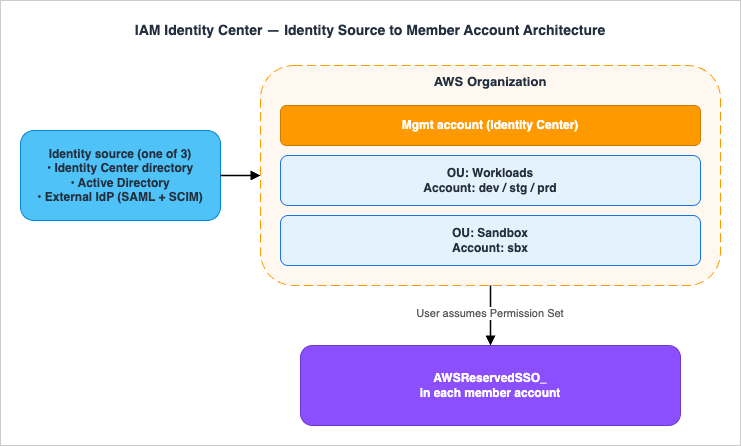
AWS published the service originally as AWS Single Sign-On (AWS SSO) in 2017 and renamed it to AWS IAM Identity Center on July 26, 2022 to clarify that it is the recommended way to provide human access to AWS, and to align it with the IAM family of identity services. The legacy namespaces are intentionally unchanged: the CLI continues to usesso, sso-admin, sso-oidc, and identitystore; the CloudFormation prefix is still AWS::SSO::*; and the service-linked role is still AWSServiceRoleForSSO. Existing IaC keeps working without any rename of its own.What IAM Identity Center actually delivers, in one sentence: a single sign-on hub that issues short-term, role-based credentials into every account in your AWS Organization for both human users and AWS-managed applications, sourcing identities from any of three identity stores you choose.
Concretely it solves four problems that grow with account count:
- Long-lived IAM access keys: every IAM user added to a member account is a long-term credential surface. Identity Center sessions are temporary by construction.
- Per-account user duplication: with raw IAM, the same engineer needs an IAM user (or a per-account role) in every account. Identity Center centralizes the user once and projects roles outward.
- Permission sprawl: ad-hoc IAM policies multiply per account. Permission Sets are templates that provision identical IAM roles into every assigned account.
- Audit fragmentation: CloudTrail events from per-account IAM users are hard to attribute to a real human. Identity Center sessions carry the corporate identity and surface in CloudTrail under predictable event sources.
2. Prerequisites
Before you click Enable you should make four decisions, because two of them are difficult to reverse.- Instance type: An organization instance (recommended) is created from the management account of an AWS Organization and is the only instance type that can manage cross-account permissions. An account instance is bound to a single account and is intended for AWS-managed application access only. You should not use an account instance for workforce console access.
- Home Region: The organization instance is created in one home Region. Replication to additional Regions is supported for resiliency, but the original home Region selection is operationally sticky — pick a Region that aligns with your data residency story and your CloudTrail/Organization Trail Region.
- Identity source: One of Identity Center directory (default), Active Directory, or External IdP via SAML 2.0 + SCIM v2. Switching between sources later deletes existing users and groups and removes all assignments, which means everyone, including admins, loses SSO access until reprovisioned. Decide early.
- Delegated administrator: After enablement, register one member account as the delegated administrator so that day-to-day Identity Center operations do not require the management account. The delegated administrator can do almost everything except modify Permission Sets that grant access to the management account.
- An AWS Organization with all features enabled, in the same management account where you will enable Identity Center.
- An IAM principal in the management account with permission to enable IAM Identity Center. AWS publishes recommended managed policies for administrative access (for example
AWSSSOMemberAccountAdministratorfor delegated admin operations), plus the service-linked roleAWSServiceRoleForSSOthat is created automatically at enablement. The legacyAWSSSOMasterAccountAdministratormanaged policy is no longer published, and AWS-managed policy names in this space have been refactored more than once — do not hard-code the policy name in production IaC. Verify the current set of recommended managed policies at IAM Identity Center authentication and access control, and prefer a narrower, custom-authored least-privilege policy for the management account so future renames do not silently expand or revoke admin reach. - If you plan to use Active Directory, an existing AWS Managed Microsoft AD directory or AD Connector in AWS Directory Service in the same Region. The same directory is what Windows Server instances join, and joining it is a separate decision with its own prerequisites; Running Windows Server Workloads on AWS sets out the paths in and what each one needs.
- If you plan to use an external IdP, an account on that IdP with permission to create a SAML 2.0 application and (optionally) configure SCIM provisioning.
2.1 Cost Reference
IAM Identity Center itself has no charge. The cost lives in your identity-source choice and in any AWS-managed application that propagates identity. Concrete numbers below are list prices inap-northeast-1 as of 2026-04 and round to two decimal places — always check the AWS Directory Service pricing page and your IdP vendor's pricing page (linked below) for current values before sizing.- AWS Managed Microsoft AD — Standard edition: approximately $0.146 / directory-hour (~$108 / month per directory) in
ap-northeast-1. Enterprise edition: approximately $0.40 / directory-hour (~$292 / month). Multi-Region replication is billed under a separate "additional region" SKU per replicated Region (priced at parity with the primary directory hour, but accounted independently). Verify current values on the AWS Directory Service pricing page. - AD Connector — Small: approximately $0.05 / directory-hour (~$36 / month). Large: approximately $0.20 / directory-hour (~$144 / month). Network egress to on-prem AD is metered separately.
- External IdPs — billed by the vendor; reference list prices below are starting tiers and may change. Confirm with the vendor before commitment:
- Okta Workforce Identity from approximately $2 / user / month (Okta pricing)
- Microsoft Entra ID P1 from approximately $6 / user / month (Microsoft Entra ID pricing)
- Google Cloud Identity Premium from approximately $6 / user / month (Google Cloud Identity pricing)
- JumpCloud from approximately $2 / user / month for SSO-only (JumpCloud pricing)
- SCIM provisioning calls and CloudTrail management events for Identity Center are not separately metered. CloudTrail data events and downstream services (S3 storage, Athena queries on the trail) are billed normally.
- Trusted identity propagation does not introduce a separate charge for Identity Center, but the downstream service (Amazon Q Business per-user, Redshift per-cluster) bills as usual.
3. Initial Setup
3.1 Enable IAM Identity Center (Console)
From the management account:- Open the IAM Identity Center console in your chosen home Region.
- Choose Enable. AWS creates the organization instance and the service-linked role
AWSServiceRoleForSSOin the management account. - Note the AWS access portal URL (format
https://d-xxxxxxxxxx.awsapps.com/start). You can replace the random subdomain with a vanity alias on the Settings page. - Open Settings → Identity source and pick one of the three sources described in 3.3.
3.2 Enable IAM Identity Center (CLI)
The Identity Center service has no single "enable" API call — enablement is performed by the AWS Organizations service when you opt in to the trusted-service integration.Register trusted-service integration (CLI). Enabling AWS Organizations service access alone does not create the Identity Center instance — instance creation must be performed once via the Identity Center console (or via
AWS::SSO::Instance CFn). The CLI snippets below cover the trusted-service integration step only.# Run from the management account
aws organizations enable-aws-service-access \
--service-principal sso.amazonaws.com
# Verify the instance and capture its ARN + Identity Store ID
aws sso-admin list-instances
# {
# "Instances": [
# {
# "InstanceArn": "arn:aws:sso:::instance/ssoins-xxxxxxxxxxxxxxxx",
# "IdentityStoreId": "d-xxxxxxxxxx"
# }
# ]
# }
# Register a delegated administrator (member account ID)
aws organizations register-delegated-administrator \
--account-id 111122223333 \
--service-principal sso.amazonaws.com
aws sso-admin list-instances.The Instance ARN and Identity Store ID are the two values every subsequent CLI / CloudFormation / Terraform command needs.
3.3 Choose the Identity Source
* You can sort the table by clicking on the column name.| Identity source | Best for | User and group sync | MFA enforcement |
|---|---|---|---|
| Identity Center directory (default) | Small orgs with no existing IdP; greenfield AWS-only environments | Manual create / API | Built-in (TOTP, WebAuthn / passkeys) |
| Active Directory (AWS Managed Microsoft AD or AD Connector) | Existing on-prem AD; want AD as source of truth | Identity Center reads AD; no SCIM; group filter required | Configured in AD / via RADIUS. Independently, Identity Center can layer its own context-aware MFA (TOTP, WebAuthn / passkeys) on top of AD authentication; configure under Settings → Authentication. |
| External IdP (SAML 2.0 + SCIM v2) | Most enterprises; existing Okta / Microsoft Entra ID / Google Workspace / Ping | Automatic via SCIM v2 (push from IdP) | Enforced by the IdP |
This article does not cover IdP-specific click paths because each IdP publishes its own tutorial and they evolve quickly. AWS hosts dedicated tutorials for Okta, Microsoft Entra ID, Google Workspace, OneLogin, JumpCloud, Ping, and CyberArk in the IAM Identity Center documentation. For the product lineage behind the Microsoft option — what Active Directory, AD FS, and Microsoft Entra ID each are, and when the names changed — see Microsoft Identity History and Timeline.
3.4 Multi-Factor Authentication Posture
Identity Center exposes two MFA modes that you select under Settings → Authentication:- Context-aware (default): Identity Center prompts for MFA only when sign-in context changes — new device, new browser, unfamiliar IP, or trust expiry. Trusted devices are remembered for up to 30 days (configurable under Settings → Authentication → Standard authentication). Lower friction; appropriate for the majority of workforces.
- Always-on: every sign-in requires MFA. Use for environments with regulatory requirements (FedRAMP High, PCI DSS, HIPAA-aligned controls) or as a temporary hardening posture during incident response.
For Active-Directory-backed instances, the AD-side MFA (RADIUS, smart card) authenticates the password step, and Identity Center can layer its own context-aware MFA on top — the user is challenged twice in adversarial contexts, only once in trusted contexts. For external-IdP-backed instances, MFA enforcement should live in the IdP and Identity Center should be configured to require MFA upstream so authentication does not silently downgrade if the IdP MFA policy is relaxed.
4. Permission Set Design Patterns
A Permission Set is a template that bundles one or more IAM policies (AWS-managed, customer-managed, inline, plus optional permissions boundary). It is not an IAM role itself. When you assign a user or group + a Permission Set to a target account, Identity Center provisions an IAM role in that account named:arn:aws:iam::<account-id>:role/aws-reserved/sso.amazonaws.com/<region>/AWSReservedSSO_<PermissionSetName>_<16-hex-suffix>ARN format variant. The
<region> path segment is present only when the Identity Center instance has Multi-Region replication enabled. In single-Region (home-Region-only) deployments the role ARN collapses to arn:aws:iam::<account-id>:role/aws-reserved/sso.amazonaws.com/AWSReservedSSO_<PermissionSetName>_<16-hex-suffix> with no Region segment. CloudTrail-event regular expressions, IAM trust-policy aws:PrincipalArn conditions, and OPA / Cedar policies that match these roles must therefore accept both shapes; pin to the trailing AWSReservedSSO_<PermissionSetName>_ token rather than the leading path.Constraints to design around (defaults, per Permission Set):
- Up to 1 inline policy per Permission Set, with a documented quota of 32,768 characters (verified 2026-04 at IAM Identity Center quotas); the AWS-managed and customer-managed policies you also attach count against the IAM role's separate per-policy limits, so factor in both ceilings when sizing
- Up to 10 attached managed policies (the underlying IAM role limit; can be raised per account via IAM service quotas)
- Session duration: default 1 hour, configurable up to 12 hours (PT12H) per Permission Set (verified 2026-04 at Set session duration)
- One permissions boundary (AWS-managed or customer-managed) optional but strongly recommended for non-admin sets
4.1 Three Layered Patterns
In practice three Permission Set patterns cover almost every workforce need:- Job-Function (predefined): pick one AWS-managed job-function policy —
AdministratorAccess,PowerUserAccess,ViewOnlyAccess,Billing,DatabaseAdministrator,DataScientist. Fast for sandboxes. Too broad for production. For break-glass specifically, do not reuseAdministratorAccessfor ordinary admin work — create a dedicatedBreakGlassAdminPermission Set assigned to a 2–3-person group, and pair it with a CloudTrail metric filter that pages security on everyAssumeRoleWithSAMLtargeting that role. - Custom Single-Purpose: one or more managed policies + a tight inline policy + a permissions boundary. Use for the ~10 named roles your platform actually needs (e.g.,
AppDeveloper,ReadOnlyAuditor,FinOpsViewer,SecOpsResponder). - Tenant × Function (the matrix you should avoid expanding):
AppDeveloper-TeamA,AppDeveloper-TeamB, ... — tempting and quickly explodes. Solve this with ABAC instead (section 7) so you keep oneAppDeveloperset and let the user'sTeamattribute scope the access.
4.2 A Starter Custom Permission Set (Inline Snippet)
This is a typical "Application Developer in non-prod" Permission Set: developers can deploy their own services but cannot touch IAM, KMS administration, or networking, and their session is capped at 4 hours. Treat this as a starter shape — section 7 (ABAC) shows how to scopeResource down with aws:ResourceTag for production use, and section 4.3 shows how to layer customer managed policy references on top.{
"Version": "2012-10-17",
"Statement": [
{ "Sid": "AllowAppPlane",
"Effect": "Allow",
"Action": [
"lambda:*", "apigateway:*", "states:*",
"dynamodb:*", "s3:*",
"logs:*", "cloudwatch:*", "xray:*"
],
"Resource": "*" },
{ "Sid": "DenySensitiveControls",
"Effect": "Deny",
"Action": [
"iam:CreateUser", "iam:CreateAccessKey",
"iam:Put*Policy", "iam:DeleteRole",
"kms:ScheduleKeyDeletion", "kms:Disable*",
"ec2:*Vpc*", "ec2:*RouteTable*", "ec2:*Subnet*"
],
"Resource": "*" }
]
}
ReadOnlyAccess for break-glass observability, and you have one Permission Set you can assign to every non-prod account without per-team forking.Note on
Resource: "*". The snippet above uses Resource: "*" as a starting point so the example fits in one screen. In production, scope each Allow statement to the resource ARNs the role legitimately needs (e.g., arn:aws:s3:::app-${aws:PrincipalTag/Department}-*), and pair with aws:ResourceTag conditions as shown in section 7. Wide-open Resource + Action together is what makes Permission Sets accidentally over-permissioned.4.3 Customer Managed Policy References
The most subtle Permission Set feature is the ability to reference a customer managed policy (CMP) by name rather than embed its body. The CMP must already exist in each target account — with the same name — before the Permission Set is assigned. At assignment time, Identity Center looks up the named CMP in the target account and attaches it to the AWSReservedSSO role.This indirection lets the same Permission Set adapt to per-account specifics. A
SecOpsResponder Permission Set can reference a CMP named SecOpsResponderActions; in the security audit account that CMP allows full GuardDuty / Detective access, in workload accounts the same-named CMP allows only read-only forensic actions. The Permission Set definition stays in one place; the policy body diverges per account, where it belongs. SecOpsResponderPS:
Type: AWS::SSO::PermissionSet
Properties:
Name: SecOpsResponder
InstanceArn: !Ref InstanceArn
SessionDuration: PT2H
ManagedPolicies:
- arn:aws:iam::aws:policy/SecurityAudit
CustomerManagedPolicyReferences:
- Name: SecOpsResponderActions
Path: /security/
- Name: BoundaryForSecOps
Path: /boundaries/
PermissionsBoundary:
CustomerManagedPolicyReference:
Name: BoundaryForSecOps
Path: /boundaries/
5. Account Assignment — Automation with IaC
Manually clicking through the Console for assignments breaks down past a handful of accounts. The two operations you automate are:- Permission Set definition (lives in the management account or delegated admin account)
- Account Assignment: (group OR user) × Permission Set × target account
aws sso-admin create-account-assignment. It is asynchronous — you must poll describe-account-assignment-creation-status to confirm the IAM role was provisioned in the target account. There is a hard, non-adjustable cap of 15 outstanding async calls per Identity Center instance (verified 2026-04 at IAM Identity Center quotas), so high-throughput onboarding scripts must batch and back off.Default to
PrincipalType: GROUP; treat USER as a documented exception, not a normal pattern. Group memberships propagate via SCIM (or AD lookup) and unwind cleanly on offboarding; per-user assignments do not, and they linger as orphan IAM roles after the user is removed from the IdP. Narrow exceptions where PrincipalType: USER is acceptable include break-glass principals, short-lived external auditors who do not belong to any managed group, and bootstrap windows where SCIM has not yet propagated the target group. Every such assignment should carry an explicit owner, an expiry date, and an entry in your offboarding runbook so the orphan-assignment reconciliation in section 9 can detect it when the date passes.5.1 CloudFormation Sample
AWSTemplateFormatVersion: "2010-09-09"
Description: Permission Set + Account Assignment for AppDeveloper

Parameters:
  InstanceArn:
    Type: String
    Description: arn:aws:sso:::instance/ssoins-xxxx
  GroupId:
    Type: String
    Description: Identity Store group ID for "AppDevelopers"
  TargetAccountId:
    Type: String

Resources:
  AppDeveloperPS:
    Type: AWS::SSO::PermissionSet
    Properties:
      Name: AppDeveloper
      InstanceArn: !Ref InstanceArn
      Description: Application developers in non-prod accounts
      SessionDuration: PT4H
      ManagedPolicies:
        - arn:aws:iam::aws:policy/ReadOnlyAccess
      InlinePolicy: |
        {
          "Version": "2012-10-17",
          "Statement": [
            { "Effect": "Allow",
              "Action": ["lambda:*", "logs:*", "states:*"],
              "Resource": "*" }
          ]
        }
      Tags:
        - Key: ManagedBy
          Value: cloudformation

  AppDeveloperAssignment:
    Type: AWS::SSO::Assignment
    Properties:
      InstanceArn: !Ref InstanceArn
      PermissionSetArn: !GetAtt AppDeveloperPS.PermissionSetArn
      PrincipalType: GROUP
      PrincipalId: !Ref GroupId
      TargetType: AWS_ACCOUNT
      TargetId: !Ref TargetAccountId
5.2 Terraform Sample
data "aws_ssoadmin_instances" "this" {}

locals {
  instance_arn = tolist(data.aws_ssoadmin_instances.this.arns)[0]
}

resource "aws_ssoadmin_permission_set" "app_developer" {
  name             = "AppDeveloper"
  instance_arn     = local.instance_arn
  session_duration = "PT4H"
}

resource "aws_ssoadmin_managed_policy_attachment" "ro" {
  instance_arn       = local.instance_arn
  managed_policy_arn = "arn:aws:iam::aws:policy/ReadOnlyAccess"
  permission_set_arn = aws_ssoadmin_permission_set.app_developer.arn
}

resource "aws_ssoadmin_account_assignment" "dev_team_a" {
  for_each           = toset(var.nonprod_account_ids)
  instance_arn       = local.instance_arn
  permission_set_arn = aws_ssoadmin_permission_set.app_developer.arn
  principal_id       = var.app_developers_group_id
  principal_type     = "GROUP"
  target_id          = each.value
  target_type        = "AWS_ACCOUNT"
}
AWS::SSO::Instance is limited to creating standalone account-level instances, and a member account that already has an organization instance projected into it cannot create an additional account instance — organization instances must still be enabled manually from the management account (verified 2026-04 at AWS::SSO::Instance CloudFormation reference).5.3 AWS Control Tower and Account Factory Integration
For organizations using AWS Control Tower, Identity Center is enabled and configured as part of landing-zone setup. Account Factory (Service Catalog product or Account Factory for Terraform / AFT) provisions a new account, places it in the chosen OU, and triggers downstream automation:- Account Factory creates the account in the target OU.
- The new account inherits all SCPs attached to the OU and its ancestors.
- A CloudFormation StackSet with OU-based auto-deployment fans out the Permission Set Assignment resources from section 5.1 to the new account within minutes.
- If you use customer managed policy references (section 4.3), a separate StackSet first creates the named CMPs in the new account so the Assignment can resolve them.
aft-account-customizations repository defines per-OU Terraform modules that include the aws_ssoadmin_account_assignment blocks for that OU's standard groups, so a new account in Workloads/NonProd automatically receives AppDeveloper, ReadOnlyAuditor, and BreakGlass assignments wired to the right IdP groups — no manual touch.Caveat: Control Tower's own service-managed Identity Center Permission Sets (
AWSPowerUserAccess, AWSReadOnlyAccess, AWSAdministratorAccess etc., prefixed AWS) are managed by Control Tower itself. Do not edit or delete them with your IaC; create your own custom Permission Sets alongside them.5.4 Event-Driven Automation
For HR-driven onboarding (joiners / movers / leavers), the canonical pattern chains five steps, each one triggered by the artifact the previous step produces:- A joiner, mover, or leaver change lands in the HRIS or IdP.
- SCIM pushes the resulting user and group change into IAM Identity Center.
- IAM Identity Center emits an
identitystore.amazonaws.comevent, which AWS CloudTrail records. - An Amazon EventBridge rule matches that event and invokes a Lambda function.
- The function calls
sso-admin:CreateAccountAssignmentorsso-admin:DeleteAccountAssignmentto reconcile permissions.
6. Multi-Account Strategy — Mapping OUs to Permission Sets
Permission Sets are not bound to OUs natively, but the assignment fabric you build with StackSets or Terraform should be. The pattern that scales:- Define Permission Sets by function, not by team:
Admin,PowerUser,AppDeveloper,ReadOnlyAuditor,BillingViewer,SecOpsResponder,BreakGlass. - Define groups by team and seniority in your IdP:
aws-team-a-engineers,aws-team-a-leads,aws-platform-admins. - Map (Group, Permission Set) to OU: a YAML matrix that StackSets / Terraform consume. Example:
assignments:
  - group: aws-team-a-engineers
    permission_set: AppDeveloper
    ous: [Workloads/NonProd]
  - group: aws-team-a-leads
    permission_set: PowerUser
    ous: [Workloads/NonProd]
  - group: aws-platform-admins
    permission_set: Admin
    ous: [Workloads, Security, Sandbox]
  - group: aws-finops
    permission_set: BillingViewer
    ous: [_root_]
7. ABAC — Tag-Based Permissions Inside One Permission Set
The pattern in section 6 still produces one Permission Set per function. ABAC removes the urge to fork by team. The mechanism:- The user has attributes in the identity source (e.g.,
Department=AppA,CostCenter=1234). - In Identity Center, on Settings → Attributes for access control, you map those attributes to session tags (key:
Department, value:${path:enterprise.department}or, for external IdPs, the SAML attribute path). - Resources in member accounts are tagged with the same key (e.g., S3 bucket tag
Department=AppA). - The Permission Set's policy uses
aws:PrincipalTag/<Key>to scope the action to matching resources.
7.1 Inline Policy Snippet
{
  "Version": "2012-10-17",
  "Statement": [
    { "Sid": "TeamScopedS3",
      "Effect": "Allow",
      "Action": ["s3:GetObject", "s3:PutObject", "s3:ListBucket"],
      "Resource": "*",
      "Condition": {
        "StringEquals": {
          "aws:ResourceTag/Department": "${aws:PrincipalTag/Department}"
        }
      }
    }
  ]
}
AppDeveloper Permission Set now scopes every developer's access to resources tagged with their own Department. Move a developer from AppA to AppB in the IdP, and the next session automatically targets AppB resources. No reassignment, no new Permission Set.7.2 Where ABAC Falls Short
ABAC presupposes consistent resource tagging. Untagged resources fall outside theaws:ResourceTag condition and become invisible to ABAC-scoped users. Pair ABAC with an AWS Config rule (e.g., required-tags) and an SCP that denies tag deletion of governance tags so the model holds at scale.8. Application Access — SAML and AWS-Managed Apps
IAM Identity Center is also the front door to two flavours of application access:- Customer-managed SAML 2.0 apps: any third-party SaaS that supports SAML 2.0 SP-initiated or IdP-initiated flows. You add the application in the Identity Center console, exchange metadata, and define attribute mappings (e.g.,
Subject NameID = email). - AWS-managed applications: Amazon Q (Business and Developer), Amazon QuickSight, Amazon Redshift Query Editor v2, AWS IoT SiteWise Monitor, and others. These are configured from inside the application's own console; Identity Center supplies the user identity transparently.
8.1 Trusted Identity Propagation
A 2024-era addition that crystallized the architecture: an AWS-managed application (e.g., Amazon Q Business) can propagate the end user's identity to a downstream AWS service (e.g., Amazon S3 via Lake Formation, Amazon Redshift) so authorization runs against the real human rather than the application's IAM role. CloudTrail can then record the originating user's identity in anonBehalfOf element rather than only the calling service principal — narrowing a long-standing audit gap for analytics workloads. AWS qualifies this rather than guaranteeing it: services may log the user identifier, and the documentation directs you to each service's own page. Which services record it, and what a recorded identity does and does not prove about the authorization decision, is worked through in Identity-Aware Data Access on AWS - Propagating Workforce Identity from IAM Identity Center to Lake Formation and S3 Access Grants. Trusted identity propagation went GA at re:Invent 2023 (November–December 2023); Amazon Athena support followed on December 11, 2023. Currently supported propagation targets include: Amazon Redshift, Amazon EMR (EMR Studio), Amazon Athena, AWS Lake Formation, AWS Glue (via Lake Formation), Amazon S3 Access Grants, Amazon SageMaker Studio, Amazon Q Business, Amazon Q Developer, Amazon OpenSearch Service, and AWS Transfer Family (verified 2026-04 at IAM Identity Center trusted identity propagation use cases). Amazon SageMaker notebooks were added on August 19, 2026 (Amazon SageMaker notebooks now support trusted identity propagation), which the use cases page above had not yet picked up at the time of writing.When to choose TIP over a service IAM role: use TIP when authorization must run against the human — Lake Formation row / column rules, Amazon Q Business document ACLs, OpenSearch fine-grained access, Athena workgroup quotas attributed per analyst. Stay with a service IAM role when only the application identity matters and the human's identity is not a security boundary (e.g., scheduled report jobs, ETL pipelines).
8.2 Trusted Token Issuers (OAuth 2.0 / OIDC)
Trusted Identity Propagation as described above runs against AWS-native applications. For third-party OAuth 2.0 / OIDC clients — Snowflake, Databricks, Tableau, custom internal portals — Identity Center supports a trusted token issuer (TTI) construct: an external IdP that has been pre-registered as a token authority, with its issuer URL (iss), audience claim (aud), and JWKS endpoint declared.The flow:
- The third-party application authenticates the user against the external IdP and receives an OIDC ID token.
- The application calls Identity Center's
CreateTokenWithIAMAPI, presenting the IdP token. - Identity Center validates the token's
issagainst the registered TTI, theaudagainst the registered audience, and the signature against the JWKS endpoint. The IAM Identity Center User Guide also requires the token to be signed withRS256; JWT Signing Algorithms on AWS Endpoints lines this requirement up with what other AWS JWT receivers accept. - Identity Center maps the IdP claim (typically
emailor a custom claim likeaws-uid) to a SCIM-mirrored Identity Center user, then issues an Identity Center access token bound to that user. - The application uses that Identity Center token to call AWS services that participate in TIP (e.g., Lake Formation queries, Q Business indices) on behalf of the human, with full attribution in CloudTrail.
sub is a UUID but SCIM provisioned userName is the email), the lookup silently fails and the user appears unauthorized. Test with one user before rolling out, and watch CloudTrail identitystore.amazonaws.com for UserNotFound exceptions.9. Auditing and Monitoring
CloudTrail is the primary observability surface. Three event sources matter:sso.amazonaws.com— admin APIs (Permission Sets, Assignments, settings)identitystore.amazonaws.com— user / group create / update / deleteidentitystore-scim.amazonaws.com— SCIM-driven provisioning from the IdP
IAM Access Analyzer for IAM Identity Center analyzes Permission Sets against actual usage and recommends a least-privilege policy by extracting the actions actually called from CloudTrail. The recommended workflow:
- Roll out a new Permission Set with a broad starter policy (e.g.,
PowerUserAccess). - Wait 30–90 days while CloudTrail captures real usage.
- Use Access Analyzer to generate a policy reflecting only the actions actually used.
- Review, tighten further if needed, and replace the broad policy with the generated one.
list-accounts-for-provisioned-permission-set and list-account-assignments per Permission Set, diff against the source-of-truth assignment YAML described in section 6, and either reconcile by removing the drift or updating the YAML. This is the most common audit gap teams discover only after a security review.9.1 Permission Set Provisioning State and Bulk Re-Provisioning
When you edit a Permission Set, Identity Center does not automatically push the new policy to every IAM role it has projected into member accounts. Each provisioned role enters anOUT_OF_SYNC state until the new policy is reconciled. Until then, users continue to receive the old policy when they assume the role — the silent root cause of the troubleshooting symptom in section 11.1.To inspect state:
# Which accounts have a given Permission Set provisioned?
aws sso-admin list-accounts-for-provisioned-permission-set \
  --instance-arn arn:aws:sso:::instance/ssoins-xxxx \
  --permission-set-arn arn:aws:sso:::permissionSet/ssoins-xxxx/ps-yyyy \
  --provisioning-status LATEST_PERMISSION_SET_NOT_PROVISIONED

# Provisioning status of recent reconciliations
aws sso-admin list-permission-set-provisioning-status \
  --instance-arn arn:aws:sso:::instance/ssoins-xxxx
aws sso-admin provision-permission-set \
  --instance-arn arn:aws:sso:::instance/ssoins-xxxx \
  --permission-set-arn arn:aws:sso:::permissionSet/ssoins-xxxx/ps-yyyy \
  --target-type ALL_PROVISIONED_ACCOUNTS

# Returns RequestId; poll status:
aws sso-admin describe-permission-set-provisioning-status \
  --instance-arn arn:aws:sso:::instance/ssoins-xxxx \
  --provision-permission-set-request-id <RequestId>
provision-permission-set --target-type ALL_PROVISIONED_ACCOUNTS and poll until Status=SUCCEEDED before declaring the deployment complete. Without this step, behavior drift between deploy time and the next manual re-provision is the kind of bug that takes hours to triage.10. Migration from IAM Users
The migration is intentionally gradual — you should never flip a switch on a Friday afternoon. The sequencing that has the lowest risk:- Inventory existing IAM users in every member account:
aws iam list-usersper account, dump access-key age withaws iam list-access-keys. Anything older than 90 days is a candidate for early rotation. - Map each IAM user to (group, function): which team are they on, what do they do? This becomes the input to the section 6 matrix.
- Stand up Identity Center alongside IAM users: do not delete anything yet. Have everyone log in via the AWS access portal in parallel for two weeks.
- Switch CLI users to
aws configure sso: short-term credentials with automatic refresh. AWS SDKs in v2 / boto3 read the SSO profile transparently. A minimal~/.aws/configexample:
The day-to-day developer profile resolves to[sso-session my-org] sso_start_url = https://my-org.awsapps.com/start sso_region = ap-northeast-1 sso_registration_scopes = sso:account:access [profile dev-power] sso_session = my-org sso_account_id = 111111111111 sso_role_name = PowerUserAccess region = ap-northeast-1PowerUserAccess(or a customAppDeveloperPermission Set) rather thanAdministratorAccess— the latter is reserved for the dedicatedBreakGlassAdminPermission Set described in section 4.1, and should never be assigned to a routine CLI profile.
- Disable (not delete) IAM user passwords and access keys. Wait at least one billing cycle for stragglers.
- Delete IAM users once CloudTrail confirms zero activity for the disabled credentials.
11. Common Pitfalls
The failure modes are quiet — almost none of them raise an error. They surface as a missing role in an account, a user who can't see the AWS access portal, or a CloudTrail event that points at the wrong identity.- Wrong home Region: the home Region selection at first enablement is sticky. Replication helps, but you cannot move the primary freely. Pick a Region that aligns with the Region of your CloudTrail Organization Trail and your data-residency requirements.
- Identity-source switch wipes assignments: switching from "Identity Center directory" to "Active Directory" or to an external IdP deletes all users / groups and removes every assignment. Plan it as a maintenance event, not an incremental change.
- Provisioning lag:
CreateAccountAssignmentis async. The IAM role appears in the target account seconds-to-minutes after the API call. Onboarding scripts that call AWS APIs immediately after assigning will fail intermittently — pollDescribeAccountAssignmentCreationStatus. - SCP collisions: Permission Sets project ordinary IAM roles into member accounts, and SCPs apply on top. A user with
AdministratorAccessat the Permission Set level can still be denied by a Deny SCP at the OU level. Always test new Permission Sets against the SCPs of the target OU. - Permission set quota: defaults of 3,500 Permission Sets per organization instance and 500 provisioned Permission Sets per account are generous, but the "tenant × function" anti-pattern (section 4.1) burns through them fast. ABAC is the cure.
- 10-managed-policies-per-role limit: the Permission Set role inherits the IAM ceiling of 10 attached managed policies. To stack more, raise the IAM service quota in each member account, or consolidate into a customer-managed policy.
- Inline policy size: 32,768 characters per Permission Set inline policy. Once you cross even half of that, refactor into a customer-managed policy (or a customer managed policy reference per section 4.3) so the policy body is reviewable in IAM and inheritable across accounts.
- AD assignments don't auto-clean: when an AD user is deleted, IAM Identity Center does not automatically remove their account assignments. Your offboarding runbook must handle this explicitly. (The Identity Center directory and SCIM-driven external IdPs do clean up automatically.)
- Cross-Region inference for managed apps: AWS-managed applications often live in specific Regions; users may need to switch the AWS access portal Region context to see them. This is a UX papercut, not an outage, but support tickets pile up if it isn't documented internally.
- Permission Set role ARN format depends on the Multi-Region replication setting: when replication is enabled the role path includes a
<region>segment, and when replication is off it does not (see section 4). CloudTrail filters, trust-policy regexes, and policy-as-code rules that pattern-match these roles must accept both shapes — the most reliable anchor is the literal tokenAWSReservedSSO_<PermissionSetName>_rather than any preceding path.
11.1 Troubleshooting Quick Reference
The same problems surface repeatedly across organizations. Triage the four below before opening a support case:- "User signs into the access portal but sees no accounts." Check the assignment exists (
aws sso-admin list-account-assignmentsfor the user's group), the SCIM sync ran (CloudTrail event sourceidentitystore-scim.amazonaws.comwithin the last sync interval), and the Permission Set is inProvisionedstate for the target account (aws sso-admin describe-permission-set-provisioning-status). One of the three is almost always the culprit. - "IAM role exists in the account but
AssumeRoleWithSAMLfails / shows the old policy." After editing a Permission Set, the IAM role entersOUT_OF_SYNCand continues to evaluate against the prior policy until re-provisioned (see section 9.1). Runaws sso-admin provision-permission-set --permission-set-arn ... --target-id <account> --target-type AWS_ACCOUNT, or use--target-type ALL_PROVISIONED_ACCOUNTSfor a fleet-wide reconcile. - "CloudTrail shows the role but I can't tell which human did it." Read
userIdentity.sessionContext.sessionIssuer.arnfor the Permission Set role, then read the role-session-name — it equals the Identity Center username. The chain is session-name → Identity Center user → IdP user. - "Adding a user to a group in the IdP doesn't grant access." Confirm SCIM push fired (CloudTrail
identitystore-scim.amazonaws.com), confirm the Permission Set assignment targets the group not the user, and confirm the group ID in Identity Store matches the assignment'sPrincipalId. Group renames in the IdP can leave the SCIM-mirrored group with a stale display name but the same ID — this is fine.
12. Pre-Production Checklist
Run through this list before you announce the rollout. Each line maps to a section above.- Home Region aligned with the CloudTrail Organization Trail Region and data-residency policy (section 2).
- Identity source finalized; switch path documented as a maintenance event, not a runtime change (section 3.3).
- Delegated administrator registered; management-account login is a break-glass-only path (section 2).
- MFA posture selected (context-aware vs always-on) and tested for at least one user from each authenticator type (section 3.4).
- Break-glass Permission Set (
BreakGlassAdmin) provisioned and assigned to a 2–3-person group; credential retrieval drill from the password vault rehearsed; CloudTrail metric filter onAssumeRoleWithSAMLagainst this role wired to a paging channel (section 4.1). - SCP compatibility: every new Permission Set tested against the SCPs of every target OU before announcement (section 11).
- StackSet auto-deployment enabled for the Assignment StackSet and (if used) the customer managed policy StackSet, with target-OU filters reviewed (sections 5.1, 4.3).
- Bulk re-provisioning hook wired into the Permission Set CI/CD pipeline (section 9.1).
- SCIM bearer token rotation calendar entry created (maximum lifetime 1 year, with automatic expiry-warning emails 30/15/3 days before expiry) and the procedure to rotate without service interruption documented.
- IAM Access Analyzer for IAM Identity Center enabled in the management or delegated admin account; 30–90-day baseline period scheduled before policy tightening (section 9).
- Orphan-assignment reconciliation job scheduled (cron, EventBridge, or CI) to compare live assignments against the source-of-truth YAML (section 9).
- ABAC tag governance: AWS Config
required-tagsrule deployed; SCP denying tag deletion of governance keys (e.g.,Department,CostCenter) attached to the relevant OUs (section 7.2). - Legacy IAM users inventory dumped, access-key age recorded, deactivation calendar entry set; one full billing cycle planned between deactivation and deletion (section 10).
- Read-only auditor Permission Set available for short-lived external auditor access without standing up a new IAM user.
- Internal documentation — AWS access portal URL, vanity alias, supported MFA methods, contact for break-glass — published to the team wiki and linked from the IdP launchpad.
13. Summary
IAM Identity Center is the cheapest and lowest-risk way to retire long-lived IAM access keys and centralize workforce access across an AWS Organization. Three takeaways:- Decide the home Region and identity source before you click Enable: both are operationally sticky, especially the identity source whose change wipes assignments.
- Design Permission Sets by function, not by team: pair a small set of functions with ABAC session tags driven by the identity source, and the Permission Set count stays flat as the org grows.
- Automate Assignment via IaC + StackSets: the (Group × Permission Set × OU) matrix is the unit of policy. Code review it; do not click it.
14. References
- What is IAM Identity Center? — AWS IAM Identity Center User Guide
- IAM Identity Center renamed (formerly AWS Single Sign-On)
- Manage your identity source — considerations
- Automatic provisioning (SCIM v2)
- Permission sets — concepts
- Configure session duration for permission sets
- Referencing permission sets in IAM policies
- Attribute-based access control
- Attributes for access control
- Customer managed policies and permissions boundaries
- Trusted identity propagation overview
- Using applications with a trusted token issuer
- AWS Control Tower and IAM Identity Center
- AWS Directory Service pricing (AWS Managed Microsoft AD, AD Connector)
- Logging IAM Identity Center API calls with AWS CloudTrail
- IAM Identity Center quotas
- AWS::SSO resource type reference (CloudFormation)
- IAM best practices — require human users to use federation with an identity provider
- The History and Timeline of Amazon Cognito (related article)
- Amazon Cognito Federation Complete Implementation Guide — Google, Apple, Microsoft, OIDC, and SAML (companion article) — the customer-identity counterpart to this workforce-identity guide; pair both when designing an end-to-end identity architecture for an AWS account.
- IAM Policy Simulator Tool — simulate and validate IAM policy evaluation before applying Permission Sets in production.
- IAM Policy Analyzer Tool — analyze IAM policies for overly permissive actions to support least-privilege Permission Set design.
References:
Tech Blog with curated related content
Written by Hidekazu Konishi