AWS Lambda Concurrency and Scaling Guide - Reserved and Provisioned Concurrency, Throttling, and Event Source Scaling
First Published:
Last Updated:
429 TooManyRequestsException under real traffic, an SQS queue silently backs up while the function sits well below its limit, or a Lambda fleet scales beautifully and then takes down the relational database behind it. Every one of these is a concurrency or scaling problem, and every one is preventable once you understand the model.This article is the operational companion to my AWS Lambda Cold Start Mitigation Guide. That guide owns startup latency — the Init phase, SnapStart, per-language profiles, and the warm-up role of Provisioned Concurrency. This one owns everything after a request is admitted: how Lambda counts concurrency, how reserved and provisioned concurrency carve up the account pool, how fast a function is allowed to scale, exactly when and why you get throttled, and how each event source (SQS, Kinesis, DynamoDB Streams) drives concurrency differently. Where the two overlap — Provisioned Concurrency — I cover the capacity side here and defer the cold-start elimination side to the pair article.
Cost numbers are deliberately out of scope. Concurrency settings have real cost consequences (Provisioned Concurrency and SQS provisioned mode are billed features), but pricing changes too often to commit to a blog post. The Lambda pricing page is the authoritative reference. What I give you instead is the design judgment: which control to reach for, what it protects, and how to measure that it is working.
1. Introduction — Concurrency Is the Real Scaling Limit
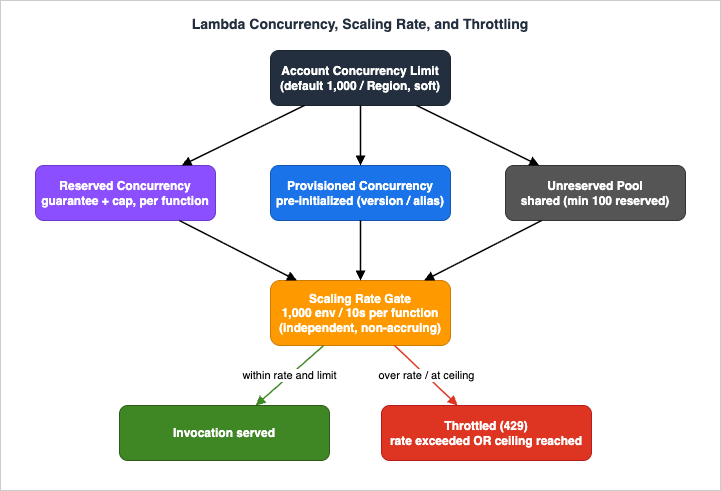
Lambda's marketing promise is "automatic scaling," and it is largely true: you do not manage servers, threads, or autoscaling groups. But "automatic" does not mean "unbounded" or "instant." Three limits govern every function, and confusing them is the root of most incidents:- The account concurrency limit — the total number of execution environments your account can run at once in a Region.
- The concurrency scaling rate — how fast a function is allowed to add new execution environments.
- Per-function controls — reserved and provisioned concurrency, which slice the account pool and change scaling behavior for an individual function.
For the history of how Lambda's execution model evolved into this, see AWS History and Timeline of Amazon Lambda. For where these account-level limits live alongside every other AWS quota, see the AWS Service Quotas Practical Cheat Sheet.
Out of scope (delegated): cold-start anatomy, SnapStart, and Init-phase tuning (→ the cold-start guide); Lambda fundamentals such as event sources, IAM, and packaging (→ the timeline guide); long-running orchestration patterns (→ AWS Lambda Durable Functions Practical Guide); and all pricing.
2. Concurrency Fundamentals
Concurrency is the number of in-flight requests your function is handling at the same instant — not the number of requests per second. This single distinction resolves most confusion.Lambda runs each concurrent request in its own execution environment (a Firecracker microVM with your code loaded). One environment handles exactly one request at a time; when it finishes, it is reused for the next request. To handle N simultaneous requests, Lambda needs N environments. The number of environments active at any moment is your concurrency.
The relationship to throughput is a simple application of Little's Law:
Concurrency = (average requests per second) x (average request duration in seconds)- 100 req/s x 1.0 s = 100 concurrency.
- 100 req/s x 0.5 s = 50 concurrency (faster functions need fewer environments for the same throughput).
- 200 req/s x 0.25 s = 50 concurrency.
- 5,000 req/s x 0.2 s = 1,000 concurrency.
2.1 The Account Concurrency Limit and the Unreserved Pool
Every account starts with a default limit of 1,000 concurrent executions per Region. This is a soft limit — you can request an increase through Service Quotas. All functions in a Region share this pool on an on-demand basis. When the pool is exhausted, further invocations are throttled.By default the entire 1,000 is unreserved concurrency — a shared pool any function can draw from. The moment you start reserving concurrency for specific functions (Section 3), the unreserved pool shrinks, and AWS enforces a floor: at least 100 units of unreserved concurrency must always remain for the functions that have no reservation of their own. You cannot reserve the account down to zero shared capacity. Concretely, with a default account, you can reserve at most 900 units across all functions; raise the account limit to 2,000 and you can reserve up to 1,900 — the 100-unit floor is constant.
Inspect both numbers directly:
aws lambda get-account-settings{
"AccountLimit": {
"ConcurrentExecutions": 1000,
"UnreservedConcurrentExecutions": 900
},
"AccountUsage": { "FunctionCount": 8 }
}ConcurrentExecutions is your total account quota; UnreservedConcurrentExecutions is how much you can still reserve at the function level. When the second number approaches zero, you have reserved almost everything and new reservations (or unreserved spikes) will start failing.2.2 The Requests-Per-Second Limit (the limit behind sub-100 ms throttles)
Concurrency is not the only ceiling. Lambda also enforces a requests-per-second (RPS) limit equal to 10x your account concurrency — 10,000 RPS by default. This limit applies everywhere concurrency does: on-demand, provisioned concurrency, and the scaling rate. For most functions it is invisible, but it dominates for very short functions (sub-100 ms), where you hit the RPS wall long before the concurrency wall.Worked example: a function averaging 50 ms at 20,000 RPS needs only
20,000 x 0.05 = 1,000 concurrency — which looks fine for a default account. But 20,000 RPS exceeds the 10,000 RPS limit, so half the requests throttle. The fix is not more concurrency per se; it is a higher account quota: raising the limit to 2,000 lifts the RPS cap to 20,000.A second example to internalize the trap: a 20 ms function at 30,000 RPS computes to
30,000 x 0.02 = 600 concurrency. The default 1,000-unit account seems more than enough — yet the 10,000 RPS limit throttles two-thirds of the traffic. To serve 30,000 RPS you must raise the account quota to 3,000 even though you only need 600 concurrency. For short-duration, high-throughput functions, size on RPS, not on concurrency.2.3 Concurrency Is Per-Region, Per-Account
The limit is scoped to one Region in one account. A function deployed tous-east-1 and ap-northeast-1 has an independent 1,000-unit pool in each. This has two design implications: multi-Region active-active deployments multiply your effective ceiling, and account isolation is a concurrency blast-radius control — noisy workloads in a separate account cannot consume your production pool. For account-level isolation patterns, see AWS Multi-Account Operational Patterns.3. Reserved Concurrency
Reserved concurrency carves out a dedicated portion of the account pool for one function. The current AWS framing is precise and worth internalizing: reserved concurrency acts as both a lower bound and an upper bound.- Lower bound (guarantee): the reserved units belong exclusively to that function. No other function can consume them, so the function can always scale up to its reservation even when the rest of the account is saturated.
- Upper bound (cap): the function can never exceed its reservation. It cannot borrow from the unreserved pool or from another function's reservation.
function-a removes 200 units from the pool every other function shares — even during the hours function-a is idle. Unused reserved concurrency is wasted concurrency.3.1 The Two Reasons to Reserve
Reason 1 — protect a critical function. If a low-priority batch job and a customer-facing API share the default pool, a runaway batch can starve the API. Reserving concurrency for the API guarantees it the headroom it needs regardless of what else misbehaves.Reason 2 — protect a downstream dependency. This is the more important and more overlooked use. Lambda scales far faster than most databases, third-party APIs, or legacy systems can accept connections. Reserved concurrency is the simplest throttle: cap the function at a number the downstream can survive. A function capped at 50 reserved concurrency will never open more than ~50 simultaneous database connections, no matter how big the spike.
The arithmetic is worth doing explicitly. If your database accepts 200 connections and you reserve 80 connections for other clients, the Lambda function can safely use ~120. If each execution environment holds one connection, set reserved concurrency to 120 and the function physically cannot exceed the database's budget — the spike becomes a queue or a 429, not an outage. This is a hard, declarative guardrail that needs no application code, which is why it is the first control to reach for when an elastic function fronts an inelastic backend (and the foundation of the end-to-end design in Section 9). When you later add connection pooling with RDS Proxy, reserved concurrency still bounds how many connections the proxy is ever asked to hand out.
3.2 Configuring Reserved Concurrency
aws lambda put-function-concurrency \
    --function-name my-function \
--reserved-concurrent-executions 100PutFunctionConcurrency, GetFunctionConcurrency, and DeleteFunctionConcurrency. In AWS SAM (or CloudFormation) it is a single property on the function:Resources:
OrderProcessor:
Type: AWS::Serverless::Function
Properties:
Handler: app.handler
Runtime: python3.13
ReservedConcurrentExecutions: 50 # both the floor and the ceilingConcurrentExecutions (MAX) over a representative window and round up; if you cannot tolerate dropped requests, set reserved concurrency at or above the observed peak (Section 7).3.3 The Kill Switch: Reserved Concurrency = 0
Setting reserved concurrency to 0 throttles the function completely — it stops processing all events until you remove or raise the limit.# Emergency stop: drain nothing new into a misbehaving function
aws lambda put-function-concurrency \
--function-name my-function \
--reserved-concurrent-executions 04. Provisioned Concurrency
Reserved concurrency reserves capacity but none of it is pre-warmed; the first request to each environment still pays an Init-phase cold start. Provisioned concurrency (PC) pre-initializes a set number of execution environments so they are ready to serve immediately with double-digit-millisecond response times.The cold-start mechanics of why this helps — and how it compares to SnapStart and code-level techniques — are covered in the cold-start guide. Here I focus on PC as a capacity and scaling control.
4.1 Key Constraints
- PC is configured on a published version or an alias — never
$LATEST. Your event sources (API Gateway, event source mappings) must invoke that version/alias, or they will bypass the warm environments entirely. - PC incurs additional charges (it is billed for the time environments are kept warm).
- PC counts against the account limit, like reserved concurrency.
- If a function has both reserved and provisioned concurrency, PC cannot exceed RC.
- PC and SnapStart cannot both be enabled on the same function version. SnapStart is the no-extra-charge alternative for supported runtimes; choose one per version.
- PC environments are still recycled in the background, and you can still see an occasional cold start if Lambda resets an environment — PC reduces cold starts dramatically but does not mathematically eliminate them.
4.2 How Reserved and Provisioned Interact
Three configurations, each with distinct scaling behavior:| Configuration | Behavior when demand exceeds the warm/reserved amount |
|---|---|
| PC only (e.g. 400 PC, no RC) | Requests beyond 400 spill onto unreserved concurrency with normal cold starts. No throttling until the account limit is hit. |
| RC only (e.g. 400 RC, no PC) | Requests up to 400 are served (with cold starts as environments spin up). Beyond 400 → throttled, even if the account has spare capacity. |
| RC + PC (e.g. 200 PC inside 400 RC) | First 200 served warm; 201–400 served on reserved capacity with cold starts; beyond 400 → throttled (cannot use unreserved). |
The RC+PC combination is the precise tool for a function with a predictable weekday baseline (cover it with PC) and bounded weekend spikes (cap the total with RC). Concretely: a checkout API that runs at ~150 concurrency on weekdays and bursts to ~350 on sale weekends might carry 200 provisioned concurrency (warm baseline, no cold starts for normal traffic) inside 400 reserved concurrency (hard ceiling that both guarantees room for the burst and protects the payment gateway behind it). Weekday traffic is entirely warm; weekend bursts above 200 take cold starts but stay served up to 400; anything beyond 400 throttles rather than overrunning the gateway. One subtle trap: if PC equals RC on a function, then all invocations run on provisioned concurrency and the
$LATEST version is effectively throttled to zero — useful occasionally, surprising if unintended.4.3 Automating Provisioned Concurrency with Application Auto Scaling
Static PC is rarely optimal because traffic is rarely flat. Register the alias as a scalable target and let Application Auto Scaling adjust PC on a schedule or by utilization.# 1) Register the alias as a scalable target
aws application-autoscaling register-scalable-target \
--service-namespace lambda \
--resource-id function:my-function:live \
--scalable-dimension lambda:function:ProvisionedConcurrency \
--min-capacity 2 \
--max-capacity 100
# 2) Target-tracking policy on PC utilization (target 0.10-0.90; 0.70 shown)
aws application-autoscaling put-scaling-policy \
--service-namespace lambda \
--resource-id function:my-function:live \
--scalable-dimension lambda:function:ProvisionedConcurrency \
--policy-name pc-utilization-target \
--policy-type TargetTrackingScaling \
--target-tracking-scaling-policy-configuration '{
"TargetValue": 0.7,
"PredefinedMetricSpecification": {
"PredefinedMetricType": "LambdaProvisionedConcurrencyUtilization"
}
}'LambdaProvisionedConcurrencyUtilization exceeds the target, and one to scale down when it falls below 90% of the target (e.g. below 63% for a 0.70 target). Configure an initial PC value first — if the function has no PC, Application Auto Scaling may not manage it correctly.The burst caveat that bites everyone: the alarms use the Average statistic by default and require the load to be sustained for about 3 minutes (3 data points) before they fire. A function that runs in 20–100 ms with traffic arriving in tight bursts can complete the entire burst before scaling reacts. For such workloads, switch the policy to the Maximum statistic, or use scheduled scaling tied to known peaks instead of reactive target tracking. AWS itself recommends a roughly 10% buffer over the concurrency you expect to need.
One billing footgun:
LambdaProvisionedConcurrencyUtilization is only emitted while the function is receiving requests. During idle periods the alarms enter INSUFFICIENT_DATA and Application Auto Scaling cannot scale down — you can keep paying for PC you are not using. Pair PC autoscaling with an idle-aware schedule for spiky-then-quiet workloads.4.4 Detecting, Logging, and Billing of Provisioned Concurrency
When traffic exceeds your allocated PC, Lambda spills over onto on-demand environments with normal cold starts. Your code can tell which kind of environment it is running in by reading the immutableAWS_LAMBDA_INITIALIZATION_TYPE environment variable, whose value is either provisioned-concurrency or on-demand. This is the cleanest way to emit a "ran on PC vs cold" dimension to your metrics:import os
INIT_TYPE = os.environ.get("AWS_LAMBDA_INITIALIZATION_TYPE", "on-demand")
def handler(event, context):
# Tag a custom metric/log field so you can see PC hit-rate in production.
# INIT_TYPE == "provisioned-concurrency" means this environment was pre-warmed.
...platform-initReport log event (visible at JSON log level INFO or via the Telemetry API), so you can confirm initialization is actually happening ahead of time rather than inline.There is also a subtle measurement trap called a suppressed init: if a PC environment is not ready in time to serve a request, Lambda may run the Init phase inline at invocation. The
REPORT line then folds Init time into Duration without a separate Init Duration field — so naive cold-start dashboards that filter on initDuration > 0 undercount these. The cold-start guide covers the log queries that catch them; for concurrency purposes, treat a rising ProvisionedConcurrencySpilloverInvocations as the signal that your PC allocation is too low.5. Scaling Behavior and Throttling
Having capacity is not the same as being allowed to use it instantly. Lambda deliberately rate-limits how fast a function adds environments, to protect both your downstream systems and the platform from runaway bursts.5.1 The Concurrency Scaling Rate (the modern model)
In each Region, and for each function, the concurrency scaling rate is 1,000 execution environment instances every 10 seconds (equivalently, 10,000 requests per second every 10 seconds). Two properties matter enormously:- It is per-function. Each function scales independently. One function's spike no longer steals scaling headroom from its neighbors. This eliminated the old "noisy neighbor" account-wide burst pool.
- It does not accrue. Unused scaling capacity is not banked. At any instant the rate is at most 1,000 units per 10 seconds; idling for a minute does not let you suddenly add 6,000. (In practice Lambda refills continuously rather than in one lump every 10 seconds.)
For most workloads you never touch this ceiling. It becomes relevant for extreme step-function-of-traffic events: flash sales, breaking-news fan-out, or a queue that suddenly releases tens of thousands of messages.
To make the rate concrete, picture a function idle at zero that suddenly needs 30,000 concurrent executions (account limit raised to match). It cannot jump there. In the first 10 seconds Lambda adds up to 1,000 environments; after 20 seconds up to ~2,000; after 30 seconds up to ~3,000 — reaching 30,000 takes roughly five minutes of sustained demand even though the account has the capacity. During that ramp, requests beyond the environments available so far are throttled (synchronous) or queued and retried (asynchronous and event-source). This is precisely why a queue in front of a spiky workload turns throttles into a tolerable, draining backlog, and why provisioned concurrency exists for latency-critical paths that cannot wait out the ramp.
Observing that ramp on your own function means running a load test that can actually hold the arrival rate, and the generator is usually what gives out first. Which AWS policy governs such a run, what limits the generator side, and why the generator's numbers and CloudWatch's numbers disagree are covered in Load Testing on AWS.
5.2 The Two Throttling Paths (both surface as 429)
A request is throttled —429, TooManyRequestsException — for one of two distinct reasons, and the fix differs:- Rate throttle: requests arrived faster than the 1,000-per-10-seconds scaling rate could add environments. The function is not at its concurrency ceiling; it simply cannot grow fast enough this instant. Fix: smooth the arrival rate (a queue), pre-warm with PC, or accept brief throttling and retry.
- Ceiling throttle: the function hit its maximum concurrency — its reserved concurrency, or the account's unreserved pool is exhausted. Fix: raise reserved concurrency, raise the account limit, or reduce per-request duration.
ConcurrentExecutions near the limit points to a ceiling throttle; ConcurrentExecutions well below the limit while Throttles climbs points to a rate throttle.5.3 Throttling Behavior Differs by Invocation Model
What happens after a throttle depends entirely on how the function was invoked.| Invocation model | On throttle (429) |
|---|---|
Synchronous (API Gateway, ALB, Function URL, direct Invoke) | The 429 is returned to the caller. Retry is the caller's responsibility. API Gateway surfaces it as a 429/502/504 depending on integration; the AWS SDK retries a few times with backoff by default. |
Asynchronous (S3, SNS, EventBridge, async Invoke) | Lambda holds the event in its internal queue and retries automatically: function errors are retried up to 2 more times; throttling and system errors are retried for up to 6 hours with exponential backoff. Events can still be dropped if capacity stays insufficient. |
| Event source mapping (poll-based) (SQS, Kinesis, DynamoDB Streams, MSK) | Lambda's pollers back off and retry; messages stay in the source until processed or expired. Behavior is source-specific (Section 6). |
The synchronous case deserves emphasis because it surprises teams migrating from always-on servers: Lambda does not queue or retry a throttled synchronous invocation for you. The AWS SDKs retry a few times with exponential backoff and jitter, and API Gateway returns the throttle to the client (typically as a 5xx for proxy integrations) — but if the caller does not retry, the request is simply lost. For synchronous user-facing paths, that means either provisioning enough warm capacity to avoid throttles in the first place, or putting an asynchronous buffer (a queue) between the entry point and the function so retries become the platform's job rather than the user's.
5.4 Asynchronous Retries, DLQs, and Destinations
For asynchronous invocations, configure where failures go so they are never silently lost:- Maximum retry attempts (0–2) and maximum event age (up to 6 hours) via
PutFunctionEventInvokeConfig. - On-failure / on-success destinations — route discarded or processed events to an SQS queue, SNS topic, Lambda function, or EventBridge bus. Destinations carry richer context than a DLQ (including the response/error) and are the modern recommendation.
- Dead-letter queue (DLQ) — the older SQS/SNS target for discarded events; still supported.
aws lambda put-function-event-invoke-config \
    --function-name my-function \
    --maximum-retry-attempts 1 \
    --maximum-event-age-in-seconds 3600 \
    --destination-config '{
      "OnFailure": {"Destination": "arn:aws:sqs:ap-northeast-1:111122223333:async-failures"}
}'6. Event Source Scaling
When Lambda is driven by a poll-based event source, Lambda (not your traffic) decides the concurrency, and each source has its own scaling algorithm. This is where "I have plenty of account concurrency but the queue is backing up" comes from. Event source scaling is configured on the event source mapping (ESM), not on the function.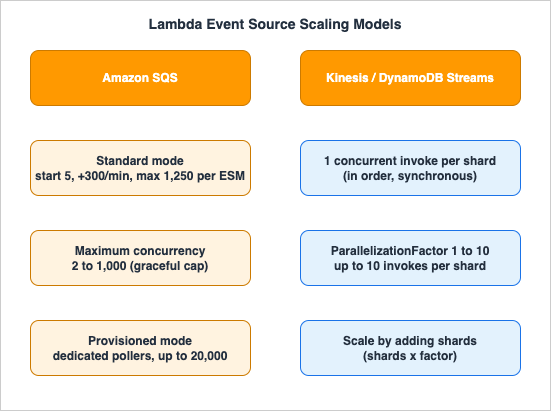
6.1 Amazon SQS — Standard Mode
By default (standard mode), Lambda long-polls the queue and, when messages appear, starts with 5 concurrent invocations (5 batches at a time). While messages remain, it adds up to 300 more concurrent invocations per minute, ramping to a maximum of 1,250 concurrent invocations per event source mapping. When the backlog drains, it scales back toward 5 and can optimize down to as few as 2 concurrent invocations to reduce SQS API calls (this optimization is disabled when you set maximum concurrency).If you have raised your account concurrency above the default, note that an SQS ESM still scales to up to 1,250 concurrent invocations by default; going higher requires an AWS Support request.
Two batch-level settings shape both throughput and your effective concurrency. Batch size (up to 10,000 for standard queues, with a payload cap) and the batching window (up to 300 seconds) control how many messages each invocation handles; larger batches mean fewer, busier invocations and therefore lower concurrency for the same message rate. More importantly, enable partial batch responses so one bad message does not force the whole batch to be retried. With
ReportBatchItemFailures enabled on the ESM, the function returns only the IDs of the messages it failed to process:def handler(event, context):
failures = []
for record in event["Records"]:
try:
process(record) # your work
except Exception:
failures.append({"itemIdentifier": record["messageId"]})
return {"batchItemFailures": failures} # only these are retriedbatchItemFailures mechanism works for Kinesis and DynamoDB Streams (Section 6.4).6.2 Amazon SQS — Maximum Concurrency
Before this setting existed, the only way to cap an SQS-driven function was reserved concurrency — which has an ugly failure mode: when the function throttles, messages return to the queue, consume receive counts, and can be pushed to a DLQ or expire prematurely. Maximum concurrency solves this gracefully at the ESM level.- It limits how many concurrent function instances one SQS event source can invoke. Each ESM on a function has its own setting.
- Valid range: 2 to 1,000.
- It is independent of reserved concurrency. Best practice: keep the function's reserved concurrency ≥ the sum of maximum concurrency across all its SQS ESMs, or you will throttle anyway.
- There is no charge for it.
aws lambda update-event-source-mapping \
    --uuid a1b2c3d4-5678-90ab-cdef-11111EXAMPLE \
--scaling-config '{"MaximumConcurrency": 5}'AWS::Lambda::EventSourceMapping → ScalingConfig → MaximumConcurrency (an integer 2–1,000). For FIFO queues, effective concurrency is capped by the number of active message group IDs or by maximum concurrency, whichever is lower — six message groups with a maximum concurrency of 10 yields at most six concurrent invocations.6.3 Amazon SQS — Provisioned Mode
For mission-critical, latency-sensitive queues, provisioned mode allocates dedicated event pollers instead of relying on Lambda's automatic poller management. It is generally available and mutually exclusive with the maximum concurrency setting.- You set a minimum and maximum number of event pollers (a unit of dedicated polling capacity).
- Each event poller handles up to 1 MB/s of throughput, up to 10 concurrent invocations, or up to 10 SQS polling API calls per second.
- It delivers 3x faster scaling (up to 1,000 concurrency added per minute) and up to 16x higher concurrency (up to 20,000 concurrent requests) compared with standard mode.
- It incurs additional Lambda and SQS API costs (the pollers run continuously).
ProvisionedPollerConfig (CLI --provisioned-poller-config, or the ProvisionedPollerConfig property in CloudFormation/CDK). For SQS the poller count defaults to a minimum of 2 and a maximum of 200:aws lambda update-event-source-mapping \
--uuid a1b2c3d4-5678-90ab-cdef-11111EXAMPLE \
--provisioned-poller-config '{"MinimumPollers": 5, "MaximumPollers": 100}'MinimumPollers sets a warm processing floor and MaximumPollers the ceiling. Use standard mode for ordinary queues, maximum concurrency when you need a graceful cap, and provisioned mode only when a queue must absorb sudden large spikes with low latency and the added cost is justified.6.4 Kinesis Data Streams and DynamoDB Streams
Stream sources scale by shards, not by message volume, and they preserve order — a fundamentally different model from SQS.- Lambda processes one batch at a time per shard, in order, invoking the function synchronously. By default this means one concurrent invocation per shard: a 10-shard stream drives up to 10 concurrent Lambda invocations.
- More shards = more parallelism. Adding shards is the primary throughput lever for streams.
- A failing batch stops processing on that shard (head-of-line blocking) until it succeeds, is bisected, ages out, or is routed to an on-failure destination — by design, to preserve order.
ParallelizationFactor = 10 can drive up to 100 concurrent invocations.aws lambda create-event-source-mapping \
--function-name my-stream-processor \
--event-source-arn arn:aws:kinesis:ap-northeast-1:111122223333:stream/my-stream \
--starting-position LATEST \
--batch-size 100 \
--parallelization-factor 10 \
--maximum-retry-attempts 3 \
--bisect-batch-on-function-errorRegisterStreamConsumer). Enhanced fan-out changes read latency and per-consumer throughput, not the concurrency math above — concurrency is still shards x parallelization factor.Because a failed batch blocks its shard, stream error handling is really concurrency hygiene: a stuck shard is a shard contributing zero useful concurrency while
IteratorAge climbs. The ESM-level knobs that keep a poison record from stalling a shard indefinitely are:BisectBatchOnFunctionError— on failure, split the batch in two and retry each half, isolating the offending record instead of failing the whole batch repeatedly.MaximumRetryAttempts(0–10,000 or until expiry) andMaximumRecordAgeInSeconds— bound how long a bad record blocks the shard before it is skipped.- On-failure destination (
DestinationConfig→ SQS or SNS) — capture metadata about discarded batches so nothing is lost silently. - Partial batch responses (
ReportBatchItemFailures) and custom checkpoints — return the sequence number of the first failed record so the stream resumes from exactly there rather than reprocessing the whole batch. - Tumbling windows — for stateful aggregation across batches without breaking the per-shard ordering guarantee.
6.5 Other Sources Worth Knowing
Amazon MQ event sources have low default concurrency caps that surprise people: Apache ActiveMQ defaults to a maximum of 5 concurrent instances and RabbitMQ to 1, and setting reserved or provisioned concurrency does not change these — raising them requires an AWS Support request. For self-managed and Amazon MSK (Kafka) sources, concurrency tracks the number of partitions.For choosing among SQS, SNS, EventBridge, and Kinesis in the first place, see the AWS Messaging and Event Routing Decision Guide.
6.6 Event Source Scaling at a Glance
* You can sort the table by clicking on the column name.| Source | Concurrency unit | Default scaling | Primary control | Ordering |
|---|---|---|---|---|
| SQS standard | invocations per ESM | start 5, +300/min, max 1,250 | maximum concurrency (2 to 1,000) | none |
| SQS provisioned mode | event pollers | up to 1,000/min, up to 20,000 | min/max pollers (default 2/200) | none |
| SQS FIFO | invocations | capped by message group IDs | message groups / max concurrency | per message group |
| Kinesis / DynamoDB Streams | invocations per shard | 1 per shard | shards x ParallelizationFactor (1 to 10) | per shard / partition key |
| Amazon MQ (ActiveMQ / RabbitMQ) | invocations | 5 / 1 (default cap) | AWS Support increase | source-dependent |
| Self-managed / Amazon MSK (Kafka) | invocations | per partition | partitions / provisioned pollers | per partition |
For the SQS FIFO, Kinesis, DynamoDB Streams, and Kafka sources, the sentence in which the documentation promises order, and what breaks that order (such as the retry limit, a higher
ParallelizationFactor, which keeps order per partition key but not per shard, and a Kinesis stream switched to service-managed record distribution, which ignores the partition key), are lined up in What Breaks Ordering, Service by Service on AWS.7. Sizing and Monitoring
You cannot size concurrency from intuition; you size it from metrics. All concurrency metrics have 1-minute granularity.7.1 The Metrics That Matter
| Metric | Read with | What it tells you |
|---|---|---|
ConcurrentExecutions | MAX | Active concurrent invocations (per function, version, alias, or account). The primary capacity signal. |
UnreservedConcurrentExecutions | MAX | Concurrency in use from the shared unreserved pool (Region-wide). |
ClaimedAccountConcurrency | MAX | How much account concurrency is unavailable for new on-demand work. This — not ConcurrentExecutions — is what Lambda uses to decide availability. |
Throttles | SUM | Throttled invocation count. Persistent non-zero values demand action. |
ProvisionedConcurrentExecutions | MAX | Environments actively serving on PC. |
ProvisionedConcurrencyUtilization | MAX | Fraction of allocated PC in use. Consistently low ⇒ over-provisioned. |
ProvisionedConcurrencySpilloverInvocations | SUM | Invocations that overflowed PC onto standard concurrency (with cold starts). High ⇒ add PC. |
IteratorAge | MAX | For Kinesis/DynamoDB Streams: how far behind the consumer is. Rising ⇒ under-scaled stream processing. |
7.2 Why ClaimedAccountConcurrency Beats ConcurrentExecutions for Capacity Planning
ConcurrentExecutions measures actual usage. But reserved and provisioned concurrency claim capacity whether or not it is used. Lambda computes:ClaimedAccountConcurrency = UnreservedConcurrentExecutions
+ (total reserved concurrency across the Region)
+ (total provisioned concurrency on functions that don't also use reserved)ClaimedAccountConcurrency sits at 800 even when actual concurrency is near zero — and only 200 units remain for every other on-demand function. Alarm on ClaimedAccountConcurrency approaching your account limit, not on ConcurrentExecutions. When it crosses your threshold, that is the signal to either reclaim over-reserved capacity or request a quota increase.7.3 A Practical Sizing Procedure
- Run the function under representative load and read
ConcurrentExecutions(MAX) over a typical window. - For a critical function you cannot allow to throttle, set reserved concurrency ≥ observed peak (round up). For latency-critical paths, set PC ≈ expected peak + 10%.
- Cross-check with
Concurrency = rps x durationusing theInvocationsandDurationmetrics. - Track
ClaimedAccountConcurrencyto confirm the Region still has on-demand headroom. - For streams, watch
IteratorAge; if it climbs, add shards or raiseParallelizationFactor.
7.4 Diagnosing Throttles with CloudWatch
Throttles are a service-level event: a synchronous 429 never appears in the function's own CloudWatch Logs (the caller sees it, and the function simply was not invoked). So you diagnose throttling from metrics, not logs. Two derived signals are worth building as metric math.Throttle rate — the fraction of attempts that were rejected. Alarm when it stays non-zero:
throttle_rate = Throttles / (Invocations + Throttles)ClaimedAccountConcurrency against your known account limit (1,000 by default):aws cloudwatch put-metric-alarm \
--alarm-name lambda-account-concurrency-headroom \
--namespace AWS/Lambda \
--metric-name ClaimedAccountConcurrency \
--statistic Maximum \
--period 60 \
--evaluation-periods 5 \
--threshold 800 \
--comparison-operator GreaterThanOrEqualToThresholdThrottles (SUM) alongside ConcurrentExecutions (MAX) and your limit. If ConcurrentExecutions is pinned near the function's reserved concurrency or the account limit, it is a ceiling throttle — raise reserved/account capacity or shorten duration. If Throttles is climbing while ConcurrentExecutions sits well below the limit, it is a rate throttle — smooth arrivals with a queue or pre-warm with provisioned concurrency. For stream sources, pair this with IteratorAge (MAX): a rising iterator age with flat concurrency means a blocked shard, not a capacity shortage.8. Common Pitfalls
Each pitfall below is framed as symptom → root cause → fix, the way you actually meet them in production.8.1 Reserved Concurrency Starves the Whole Account
Symptom: unrelated functions start throttling even though traffic is normal. Root cause: someone reserved a large block of concurrency for one function; that block left the unreserved pool, andClaimedAccountConcurrency is near the account limit. Fix: audit reservations against actual ConcurrentExecutions peaks, reclaim unused reservations, and alarm on ClaimedAccountConcurrency. Remember reservations cost you headroom even while idle.8.2 Downstream Database Connection Exhaustion
Symptom: the function scales fine, then the RDS/Aurora instance reports "too many connections," and latency collapses. Root cause: Lambda opened one (or more) connection per environment and scaled past what the database accepts. Fix: put Amazon RDS Proxy between Lambda and the database to pool and reuse connections, and cap the function with reserved concurrency or SQS maximum concurrency so the proxy is never asked for more than the database can sustain. This is the canonical Lambda-meets-relational-database problem; the database side is covered in the Amazon RDS and Aurora High Availability Guide. The end-to-end design is in Section 9.8.3 SQS Without Concurrency Control Drains the Pool
Symptom: a message spike on one queue throttles every other function in the account. Root cause: an SQS ESM in standard mode scaled toward 1,250 concurrent invocations and consumed the shared pool. Fix: set maximum concurrency on the ESM (Section 6.2). If you instead used reserved concurrency and saw messages land in the DLQ during the spike, that is the exact failure mode maximum concurrency was built to remove. Two supporting settings matter here: keep the queue's visibility timeout at least 6x the function timeout so in-flight messages are not redelivered while still being processed, and give the DLQ amaxReceiveCount of at least 5 so transient throttles do not prematurely dead-letter recoverable messages.8.4 Provisioned Concurrency Over- or Under-Allocated
Symptom: either a surprising bill with low PC utilization, or persistent cold starts despite PC configured. Root cause: static PC that doesn't match the traffic curve, or invoking$LATEST/the wrong alias so PC is bypassed. Fix: confirm the event source targets the PC-configured version/alias; watch ProvisionedConcurrencyUtilization (low ⇒ reduce) and ProvisionedConcurrencySpilloverInvocations (high ⇒ increase); automate with Application Auto Scaling using the Maximum statistic for bursty traffic (Section 4.3).8.5 Assuming the Old Burst Limits
Symptom: capacity plans built around "500 per minute" produce wrong throttle predictions. Root cause: using the retired account-wide burst model instead of the current per-function 1,000-per-10-seconds rate. Fix: re-plan against the current scaling-behavior documentation; remember the rate is per-function and non-accruing.8.6 Forgetting the Event-Source Default Caps
Symptom: an Amazon MQ-triggered function refuses to scale past 5 (ActiveMQ) or 1 (RabbitMQ) no matter how much concurrency you reserve. Root cause: these are built-in ESM defaults independent of function concurrency. Fix: request an increase through AWS Support; do not expect reserved/provisioned settings to change them.8.7 Sizing on Concurrency When the Real Limit Is RPS
Symptom: a very short function (sub-100 ms) throttles even thoughConcurrentExecutions never approaches the account limit. Root cause: the account's requests-per-second limit — 10x the concurrency quota — is the binding constraint, not concurrency (Section 2.2). A 30 ms function at 15,000 RPS needs only ~450 concurrency but exceeds the default 10,000 RPS cap. Fix: size on RPS for short functions, and request an account concurrency increase to lift the RPS ceiling proportionally (concurrency x 10). Watch Throttles against Invocations rather than ConcurrentExecutions for these workloads.9. End-to-End Architecture Walkthrough — A Spiky Queue in Front of a Relational Database
The most instructive concurrency design is the one where Lambda's elasticity meets a component that has none. Consider an order-ingestion pipeline: a producer drops bursts of orders into SQS, a Lambda function validates and writes each order to an Amazon Aurora database, and the database can accept only a bounded number of connections.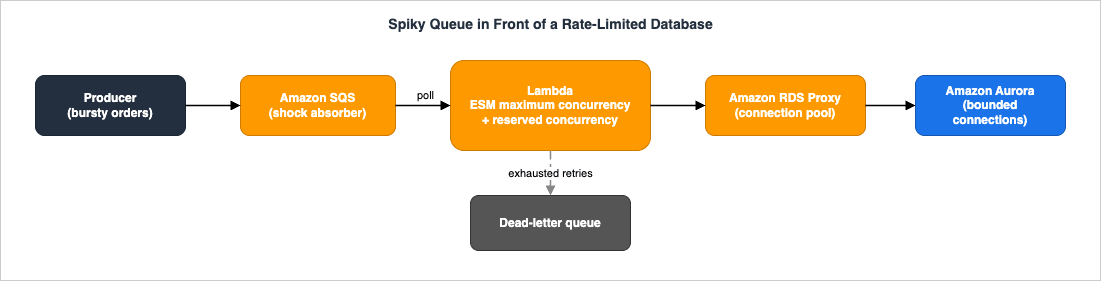
The flow and the control points:
- Producer → SQS standard queue. The queue is the shock absorber. It decouples a bursty producer from a rate-limited consumer and turns a synchronous flood into a backlog Lambda can drain at a controlled pace. A redrive policy points to a DLQ for poison messages.
- SQS → Lambda (event source mapping with maximum concurrency). This is the critical throttle. The database tolerates, say, a bounded connection count; we set the ESM maximum concurrency below that so the function never opens more connections than the database can serve — without the reserved-concurrency side effect of bouncing messages back to the queue. The function also carries reserved concurrency ≥ the ESM maximum concurrency so it is never throttled by the shared pool and always has the capacity it was promised.
- Lambda → RDS Proxy → Aurora. Even capped, each cold environment would otherwise open its own connection and re-authenticate. RDS Proxy pools and multiplexes connections, absorbs the connect/disconnect churn as environments cycle, and fails over transparently if the database does. Lambda talks to the proxy endpoint; the proxy owns the small, stable set of real database connections.
- Failures → DLQ + alarms. Messages that exhaust retries land in the DLQ; backlog (SQS
ApproximateAgeOfOldestMessage),Throttles, and AuroraDatabaseConnectionsare alarmed.
Where it fails if you skip a control: drop maximum concurrency and the ESM races to 1,250, starving the account and exhausting database connections. Drop RDS Proxy and connection setup latency plus max-connection limits become the bottleneck. Drop the queue and a synchronous spike throttles at the source. Each control defends a different limit; together they make a non-elastic backend safe behind an elastic compute layer.
What to watch in production: instrument the whole chain, not just the function. On the queue, alarm on
ApproximateNumberOfMessagesVisible (backlog growing faster than it drains) and ApproximateAgeOfOldestMessage (latency budget being eaten). On the function, alarm on Throttles and graph ConcurrentExecutions against the ESM maximum concurrency to confirm the pacing is holding. On the proxy and database, watch DatabaseConnections and RDS Proxy's ClientConnections/DatabaseConnectionsBorrowLatency for borrow contention that signals the pool is the new bottleneck. The healthy steady-state signature during a burst is: queue depth rising then falling, function concurrency flat at the cap, database connections flat and well under the limit. If concurrency is flat but DatabaseConnectionsBorrowLatency climbs, the function cap is too high for the pool; if queue age climbs while concurrency sits below the cap, the cap is too low.This pattern generalizes to any rate-limited downstream — a third-party payment API, a legacy SOAP service, a search cluster. The shape is always the same: queue to absorb, maximum concurrency to pace, reserved concurrency to guarantee, and a pool to amortize connection cost. For the database-side resilience (Multi-AZ, read replicas, Proxy failover, Global Database), see the Amazon RDS and Aurora High Availability Guide.
10. Frequently Asked Questions
Reserved vs provisioned concurrency — what's the actual difference?Reserved concurrency reserves a quantity of the account pool for a function (both a guaranteed floor and a hard cap) at no charge, but the environments are not pre-warmed. Provisioned concurrency pre-initializes a number of environments so they respond without a cold start, at additional cost, on a specific version/alias. Reserved controls how much concurrency; provisioned controls how ready it is. You can use both together (PC ≤ RC).
Why am I getting throttled (429) when I'm below my limit?
You are likely hitting the scaling rate, not the ceiling. Lambda adds at most 1,000 environments per 10 seconds per function; if requests arrive faster than that, you get 429s even with account capacity to spare. Check
ConcurrentExecutions against your limit: near the limit ⇒ ceiling throttle (raise reserved/account limit); well below ⇒ rate throttle (smooth arrivals with a queue, or pre-warm with PC).How does Lambda scale when SQS is the trigger?
In standard mode Lambda starts at 5 concurrent invocations and adds up to 300 per minute, up to 1,250 per event source mapping. Set maximum concurrency (2–1,000) to cap it gracefully, or enable provisioned mode (dedicated pollers, 3x faster scaling, up to 20,000 concurrent) for spiky mission-critical queues. The two are mutually exclusive.
How is stream (Kinesis/DynamoDB) scaling different from SQS?
Streams scale by shard, preserve order, and invoke synchronously: one concurrent invocation per shard by default, up to 10 with
ParallelizationFactor. You scale by adding shards or raising the parallelization factor, not by message volume. A failed batch blocks its shard until resolved — order before throughput.Does setting reserved concurrency cost money?
No. Reserved concurrency has no charge, but it removes capacity from the shared unreserved pool whether or not the function uses it. Provisioned concurrency does incur charges. For all pricing specifics, consult the official Lambda pricing page.
How do I stop a misbehaving function immediately?
Set its reserved concurrency to 0. It will throttle all new invocations until you raise the limit — the standard incident "off switch."
What is
ClaimedAccountConcurrency and why should I alarm on it?It is the amount of account concurrency that is unavailable for new on-demand work (unreserved usage plus all reserved and provisioned allocations). Lambda uses it — not
ConcurrentExecutions — to determine availability, so it is the right signal for "am I about to run out of account concurrency?"Is SQS "provisioned mode" the same as "provisioned concurrency"?
No — and the similar names cause real confusion. Provisioned concurrency is a function setting that pre-initializes execution environments to remove cold starts. Provisioned mode is an SQS event source mapping setting that allocates dedicated event pollers for faster, higher-throughput polling. One warms the compute; the other accelerates the ingestion. They are configured on different resources, billed separately, and can be used together if both problems apply.
Can one function use the entire account's concurrency?
Almost. Without reservations, any function can scale into the full unreserved pool, so a single runaway function can starve the rest. That is exactly why you reserve concurrency for critical functions and cap risky ones — and why the 100-unit unreserved floor exists, so functions without a reservation are never fully locked out.
11. Summary
Lambda scales automatically, but within three limits you must design around: the account concurrency limit (default 1,000/Region, shared and soft), the per-function scaling rate (1,000 environments per 10 seconds, independent and non-accruing), and the per-function controls that reshape both. Reserved concurrency is your guarantee-and-cap, free but pool-consuming, and the simplest way to protect a critical function or a fragile downstream. Provisioned concurrency is your warm capacity, billed, version-scoped, and best automated with Application Auto Scaling. Throttling always surfaces as 429 but arrives by two paths — rate and ceiling — that you diagnose withConcurrentExecutions versus the limit, and that behave differently for synchronous, asynchronous, and poll-based invocations. Event sources each impose their own concurrency model: SQS with standard/maximum-concurrency/provisioned modes, streams with shards and ParallelizationFactor. And when elastic compute meets a non-elastic backend, the durable pattern is queue-to-absorb, maximum-concurrency-to-pace, reserved-concurrency-to-guarantee, and a connection pool to amortize.Pair this with the AWS Lambda Cold Start Mitigation Guide for the startup-latency half of Lambda performance, the AWS Lambda Durable Functions Practical Guide for long-running orchestration, and the AWS Service Quotas Practical Cheat Sheet for where these limits sit among every other AWS quota.
12. References
- Understanding Lambda function scaling (concurrency) — AWS Lambda Developer Guide
- Lambda scaling behavior (concurrency scaling rate) — AWS Lambda Developer Guide
- Configuring reserved concurrency for a function — AWS Lambda Developer Guide
- Configuring provisioned concurrency for a function — AWS Lambda Developer Guide
- Monitoring concurrency (ClaimedAccountConcurrency and PC metrics) — AWS Lambda Developer Guide
- Configuring scaling behavior for SQS event source mappings — AWS Lambda Developer Guide
- Using Lambda to process records from Amazon Kinesis Data Streams — AWS Lambda Developer Guide
- How Lambda handles errors and retries with asynchronous invocation — AWS Lambda Developer Guide
- AWS::Lambda::EventSourceMapping ScalingConfig — AWS CloudFormation Template Reference
- AWS Lambda functions now scale 12 times faster when handling high-volume requests — AWS News Blog
- Introducing maximum concurrency of AWS Lambda functions when using Amazon SQS as an event source — AWS Compute Blog
- AWS Lambda enhances SQS processing with new provisioned mode (3x faster scaling, 16x higher capacity) — AWS News Blog
- Understanding AWS Lambda scaling and throughput — AWS Compute Blog
- New AWS Lambda scaling controls for Kinesis and DynamoDB event sources — AWS Compute Blog
- AWS Lambda pricing — official pricing reference
References:
Tech Blog with curated related content
Written by Hidekazu Konishi