Amazon RDS and Aurora High Availability Guide - Multi-AZ, Read Replicas, RDS Proxy, and Global Database Failover
First Published:
Last Updated:
That question is harder than it looks because the options overlap in name but differ sharply in mechanism. "Multi-AZ" means two different topologies. A read replica is sometimes a failover target and sometimes not. RDS Proxy is described as both a connection pooler and an availability feature. Aurora Global Database has two cross-Region promotion operations with deliberately different guarantees. Choosing well requires understanding what each one does under the hood.
This guide is the single decision-and-mechanism entry point for relational high availability on AWS. It is deliberately scoped to the high-availability and failover machinery of RDS and Aurora: Multi-AZ instance deployments versus Multi-AZ DB clusters, read replicas, Aurora's storage-and-replica model, RDS Proxy connection management, and Aurora Global Database cross-Region failover. Region-wide disaster-recovery strategy patterns (backup-and-restore, pilot light, warm standby, multi-site active/active) are a separate, larger topic covered in the companion AWS Disaster Recovery Strategies Guide. The quorum mathematics behind Aurora's storage layer is delegated to Comparison of AWS Databases Using the Quorum Model, and the chronological feature history to AWS History and Timeline of Amazon RDS and AWS History and Timeline of Amazon Aurora.
Throughout, this guide intentionally avoids price figures; high-availability options have meaningfully different cost profiles, and you should size them against the current official AWS Pricing pages and your own availability requirements.
1. Introduction: What "High Availability" Has to Survive
Start by naming the failures a relational database must survive, because each high-availability building block targets a different one:- A single DB instance failing (host hardware, a crash, a stuck process) — the most common event.
- An entire Availability Zone becoming unavailable — rarer, but the canonical reason Multi-AZ exists.
- A Region-wide impairment — rare and high-impact; the reason cross-Region replication and Aurora Global Database exist.
- Read capacity running out — not a "failure," but it degrades availability from the application's point of view, and it is where read replicas and reader endpoints belong.
- Connection exhaustion and slow failover recovery — an application-layer availability problem that RDS Proxy targets.
Two metrics frame every decision: RTO (recovery time objective — how long you can be down) and RPO (recovery point objective — how much recently committed data you can afford to lose). Synchronous replication targets RPO near zero within a Region; asynchronous cross-Region replication trades a small nonzero RPO for geographic separation. The whole point of this guide is that you pick building blocks by mapping them onto specific failures and specific RTO/RPO targets — not by reaching for "Multi-AZ" as a reflex.
The rest of the guide compresses selection into one section (Section 2) and then spends the bulk of its length on how each mechanism actually works, how it fails, and how you observe it.
2. Choosing an HA Topology
Before the mechanics, here is the decision compressed into a single flow. The branches map directly onto the failures in Section 1.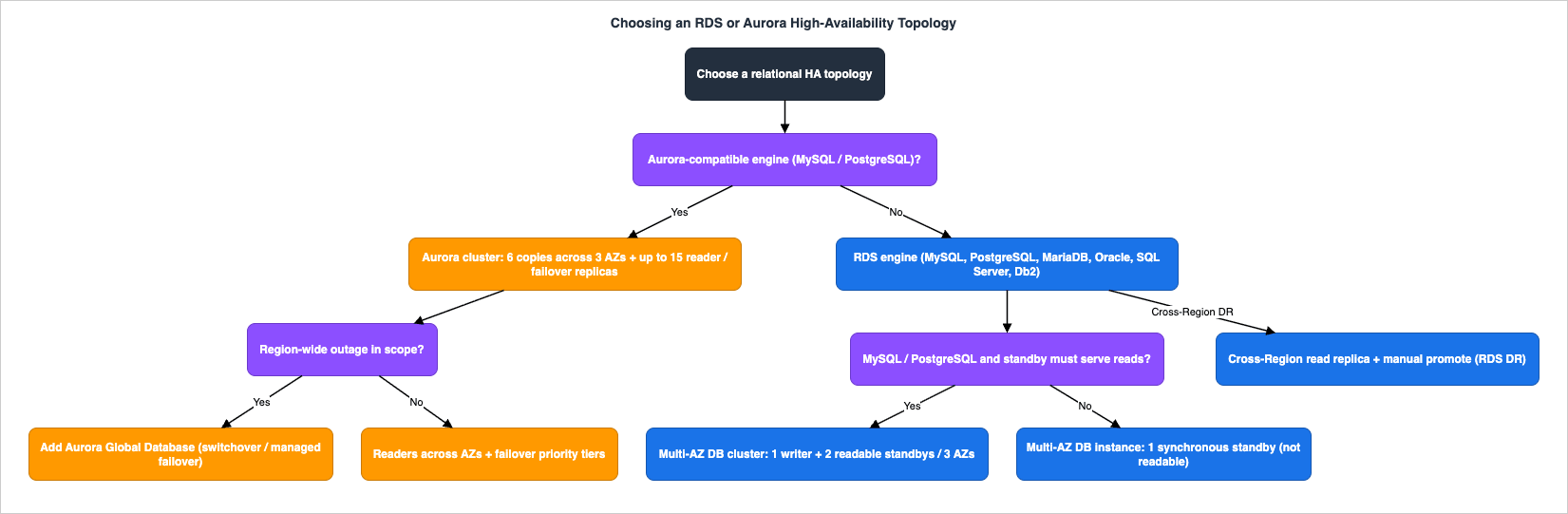
- If you need or already run Amazon Aurora (MySQL- or PostgreSQL-compatible), its HA model is built into the cluster: a shared storage volume replicated six ways across three AZs plus up to 15 reader instances. You scale availability by adding readers in more AZs and, for cross-Region resilience, by adding an Aurora Global Database.
- If you run RDS for a community or commercial engine (MySQL, PostgreSQL, MariaDB, Oracle, SQL Server, Db2), you choose between Multi-AZ DB instance and, for MySQL/PostgreSQL only, Multi-AZ DB cluster.
The second fork is what you need beyond failover:
* You can sort the table by clicking on the column name.
| Requirement | RDS Multi-AZ instance | RDS Multi-AZ DB cluster | Aurora |
|---|---|---|---|
| Automatic AZ-failure failover | Yes | Yes | Yes |
| Standby also serves reads | No | Yes (2 readers) | Yes (up to 15 readers) |
| Synchronous / near-synchronous within Region | Synchronous | Semisynchronous | Synchronous to storage |
| Engines | All RDS engines | MySQL, PostgreSQL only | Aurora MySQL / PostgreSQL |
| Typical failover time | ~60–120 s | typically under 35 s | typically under 60 s, often under 30 s |
| Cross-Region managed failover | Via cross-Region read replica (manual promote) | Via cross-Region read replica (manual promote) | Aurora Global Database (managed) |
The third fork is cross-Region: if a Region-wide outage is in scope, Aurora Global Database provides managed cross-Region replication and promotion; for RDS engines you build it from cross-Region read replicas and promotion, accepting a more manual recovery.
Read the comparison as an entry point, not the whole story — the failover-time numbers and the "serves reads" column hide mechanics that determine whether they hold under your workload. Those mechanics are the rest of this guide.
3. RDS High Availability: Multi-AZ Instance vs Multi-AZ DB Cluster
The single most common point of confusion in RDS HA is that "Multi-AZ" names two different deployment topologies with different replication, different engine support, and different failover behavior.3.1 Multi-AZ DB instance deployment (one standby)
A Multi-AZ DB instance deployment provisions one primary and one standby in a different Availability Zone. The standby is not readable — it exists purely for failover. For MariaDB, MySQL, Oracle, and PostgreSQL, RDS maintains the standby with a block-level synchronous replication layer: every write is committed to storage in two AZs before the write is acknowledged, which is what gives this topology an effective RPO of zero for an AZ failure. (RDS for SQL Server instead uses native Database Mirroring or Always On availability groups.)Because writes wait for the second AZ, Multi-AZ adds some commit latency versus a single-AZ instance — a deliberate trade of latency for durability. A useful operational side effect: automated backups and snapshots are taken from the standby, so they don't cause an I/O pause on the primary.
Failover is DNS-based. Each DB instance has a CNAME-style endpoint. When RDS detects the primary is unhealthy, it promotes the standby and repoints the endpoint's DNS record (with a low TTL) to the new primary. Clients reconnect to the same endpoint name and land on the new instance. Typical failover completes in roughly 60 seconds; the critical implication is that your clients must actually re-resolve DNS — more on the JVM DNS-cache trap in Section 9.
# Create a Multi-AZ DB instance deployment (one standby) for RDS for PostgreSQL.
aws rds create-db-instance \
  --db-instance-identifier app-prod \
  --engine postgres \
  --db-instance-class db.r6g.large \
  --allocated-storage 200 \
  --multi-az \
  --master-username appadmin \
  --manage-master-user-password \
--backup-retention-period 7--multi-az flag is the whole switch. --manage-master-user-password hands credential storage to AWS Secrets Manager, which pairs naturally with RDS Proxy later.The single-standby topology also quietly improves routine operations: because the standby is a hot, synchronized copy, RDS performs OS patching and many maintenance actions on the standby first and then fails over, and it takes automated backups from the standby so the primary's I/O isn't suspended. You can convert an existing Single-AZ instance to Multi-AZ online by modifying it (
aws rds modify-db-instance --multi-az --apply-immediately); RDS builds the standby and begins synchronous replication without recreating the instance. The trade-off to remember is the one in the name: protection is at the AZ level — a Multi-AZ DB instance is not a cross-Region or a read-scaling feature.RDS triggers an automatic failover for a defined set of events: loss of the primary's Availability Zone, loss of network connectivity to the primary, a compute or storage failure on the primary, and certain planned operations such as an instance-class change or OS patching (performed on the standby first, then failed over). You can also trigger one deliberately for testing with a reboot-with-failover (
aws rds reboot-db-instance --force-failover). Knowing the trigger list matters operationally, because it tells you which routine maintenance actions will briefly move your endpoint to the other AZ — and therefore which ones your application's reconnect logic (Section 9) must tolerate gracefully.3.2 Multi-AZ DB cluster deployment (two readable standbys)
A Multi-AZ DB cluster deployment is a newer topology: one writer and two reader DB instances spread across three Availability Zones, available for RDS for MySQL and RDS for PostgreSQL only. Unlike the single-standby topology, the two readers also serve read traffic, so a Multi-AZ DB cluster gives you failover and read scaling without separate read replicas.The replication is semisynchronous: a transaction commits on the writer once at least one of the two readers acknowledges the change. It does not wait for both readers to fully apply and commit. This is the key mechanical difference from a single standby (fully synchronous to exactly one copy) and from Aurora (synchronous to the storage layer). Semisynchronous commit, combined with local NVMe-backed storage, is why Multi-AZ DB clusters advertise lower write latency than the single-standby topology.
That storage requirement is also why instance-class choice is constrained: Multi-AZ DB clusters run only on NVMe-equipped classes such as
db.m5d, db.m6gd, db.m6id, db.r6gd, db.r6id, db.r8gd, db.x2iedn, and a few others. You also need a Region with at least three Availability Zones and a DB subnet group covering them.# Create a Multi-AZ DB cluster (1 writer + 2 readable standbys / 3 AZs) for RDS for MySQL.
aws rds create-db-cluster \
--db-cluster-identifier app-cluster \
--engine mysql \
--engine-version 8.0 \
--db-cluster-instance-class db.r6gd.large \
--allocated-storage 400 \
--storage-type io1 \
--iops 12000 \
--db-subnet-group-name three-az-subnet-group \
--master-username appadmin \
--manage-master-user-passwordReplicaLag CloudWatch metric (Section 8) is a first-class signal for this topology, not just a performance gauge.Note: A Multi-AZ DB cluster is not an Aurora DB cluster. They share vocabulary ("writer," "reader," "cluster") but Aurora uses a shared distributed storage volume, while a Multi-AZ DB cluster uses engine-native replication to local instance storage in each AZ.
3.3 Picking between the two
Use a Multi-AZ DB instance when you run any engine other than MySQL/PostgreSQL, when you don't need the standby to serve reads, or when you want the simplest fully-synchronous AZ-failure protection. Use a Multi-AZ DB cluster when you are on MySQL or PostgreSQL, want faster failover and lower write latency, and want the standbys to absorb read traffic. If your read scaling needs exceed two readers, or you want Region-level resilience and a shared-storage failover model, that is the boundary where Aurora (Section 5) becomes the better fit.4. Read Replicas
Read replicas address a different axis than Multi-AZ: read scaling and, secondarily, disaster recovery — not automatic AZ failover.4.1 RDS DB instance read replicas
When you create an RDS read replica, RDS snapshots the source, builds a read-only instance from the snapshot, and then keeps it current using the DB engine's native asynchronous replication. Because replication is asynchronous, a replica can lag, and its data can be slightly stale — an acceptable trade for read scaling and reporting, but something to account for in application logic.# Create an asynchronous read replica in the same Region.
aws rds create-db-instance-read-replica \
--db-instance-identifier app-prod-replica-1 \
--source-db-instance-identifier app-prod \
--db-instance-class db.r6g.large# Promote a read replica to a standalone writable instance (manual DR action).
aws rds promote-read-replica \
--db-instance-identifier app-prod-replica-1Two operational details matter when you lean on read replicas. First, a read replica can itself be configured as Multi-AZ, so the replica you might promote in a DR scenario can have its own standby — a sensible pattern for a cross-Region DR replica you intend to make the new primary. Second, monitor replication health, not just instance health: the engine-native
ReplicaLag (or AuroraReplicaLag for Aurora) tells you how stale a replica's reads are and, for promotion-based DR, how much data a promote-now action would surface. Cascading replicas (a replica of a replica) are supported on some engines for fan-out reads, but each hop adds lag — keep the topology shallow if recency matters.4.2 Cross-Region read replicas
RDS supports cross-Region read replicas: an asynchronous replica in a different AWS Region. This is the RDS-engine building block for Region-level resilience — you replicate continuously to the second Region, and if the primary Region is impaired you promote the cross-Region replica to a standalone primary and redirect traffic. The recovery is more manual than Aurora Global Database's managed failover (Section 7), and the RPO is whatever the replica's lag was at the moment of failure, but it works for every engine RDS supports.4.3 Read replicas vs Multi-AZ DB cluster readers
Don't conflate the two reader concepts. The readers inside a Multi-AZ DB cluster are failover targets maintained by semisynchronous replication. A DB-instance read replica created from a Multi-AZ DB cluster is a different object: it replicates asynchronously from one of the cluster's readers, is not a failover target, can have a different configuration, and can be promoted to standalone. Keep "reader = built-in HA member" separate from "read replica = asynchronous scale-out/DR copy."A third object belongs to neither column: an Aurora MySQL cluster acting as a replica over the binary log, where the inbound channels are created by stored procedure and the applier can be held behind its source on purpose. That is replication you operate rather than replication the service maintains, and it is covered by Replication Topologies on Amazon Aurora MySQL - Multi-Source Channels, Delayed Replicas, and the Window You Build Yourself.
5. Aurora High Availability
Aurora's HA model is structurally different from RDS because storage and compute are separated. Understanding that split explains nearly every Aurora HA behavior.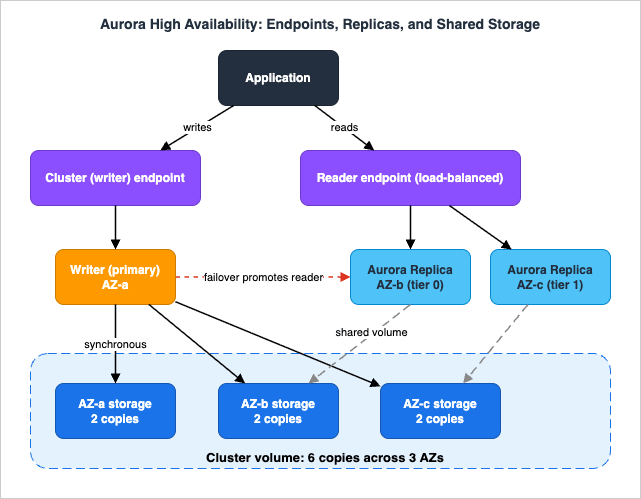
5.1 The shared storage layer
When you write to the Aurora primary, Aurora synchronously replicates the data across Availability Zones to six storage nodes that make up the cluster volume — six copies across three AZs. The compute instances do not own the data; they attach to this distributed, self-healing storage volume. This is why an Aurora cluster "can tolerate a failure of an Availability Zone without any loss of data and only a brief interruption of service," and why adding a reader instance does not add storage cost or a write penalty — readers attach to the same volume rather than holding their own copy.The exact quorum read/write math (how many of the six copies must acknowledge, how Aurora repairs lost copies) is its own topic; this guide delegates it to Comparison of AWS Databases Using the Quorum Model. The HA-relevant takeaway is simpler: durability lives in the storage layer, independent of how many compute instances you run.
5.2 Reader instances and failover
On top of that storage you create the primary (writer) and up to 15 Aurora Replicas (readers). Because readers share the writer's storage volume, they replicate asynchronously at the log level with very low lag — typically under 100 milliseconds — and they serveSELECT traffic. Crucially, readers are also failover targets: if the writer fails, Aurora promotes a reader, typically completing in under 60 seconds and often under 30 seconds. If the cluster has no readers, Aurora instead recreates the primary, which is much slower (it can take up to ten minutes) — so running at least one reader in another AZ is the single highest-leverage Aurora HA decision.Readers don't all have to be provisioned instances of the same size: an Aurora cluster can run a mixed configuration that combines provisioned instances and Aurora Serverless v2 readers, which scale capacity automatically between a minimum and maximum number of Aurora Capacity Units (ACUs). For HA this is useful when read load is spiky — a Serverless v2 reader absorbs surges without you pre-sizing it — while you keep a right-sized provisioned reader in failover tier 0 so a promotion lands on predictable write capacity. How a Serverless v2 reader's promotion tier also affects its scaling (readers in tiers 0 and 1 are kept at least as large as the writer), and which capacity values you set and which Aurora decides, are covered in How Amazon Aurora serverless Decides Its Capacity - What You Set, What Aurora Decides Within Your Range, What the Maximum ACU Fixes, and Where Each Shows Up, which uses the current name, Aurora serverless, for Aurora Serverless v2.
5.3 Failover priority tiers
You control which reader is promoted with failover priority tiers from 0 (highest) to 15 (lowest). On failure, Aurora promotes the reader in the highest-priority (lowest-numbered) tier. Ties are broken deterministically: among replicas sharing a tier, Aurora promotes the largest instance; if they also match in size, it picks an arbitrary one in that tier. One operational caveat from the documentation: after five unsuccessful failover attempts, promotion tiers are no longer considered. Set tiers so that an appropriately-sized reader is first in line — for example, put your full-size readers in tier 0–1 and a smaller "read-only reporting" reader in a higher tier so it isn't promoted to writer.# Add a reader and pin its failover priority (tier 1) and AZ.
aws rds create-db-instance \
--db-instance-identifier app-aurora-reader-2 \
--db-cluster-identifier app-aurora \
--engine aurora-postgresql \
--db-instance-class db.r7g.xlarge \
--promotion-tier 1 \
--availability-zone us-east-1c5.4 Endpoints are part of the HA design
Aurora exposes several managed endpoints, and choosing the right one is an availability decision, not just a convenience:- Cluster (writer) endpoint — always points to the current primary. Use it for writes and read/write connections; after a failover it automatically tracks the new primary.
- Reader endpoint — load-balances read-only connections across the available Aurora Replicas. Use it for read traffic so a single reader's loss doesn't take down your read path.
- Instance endpoint — points at one specific instance. It does not follow failover, so use it only for diagnosis or tuning, never as an application's primary connection string.
- Custom endpoint — a named subset of instances (for example, a group sized for analytics), useful when instances have different capacities.
The writer and reader endpoints "manage DB instance failover better than instance endpoints do" precisely because they automatically change which instance they resolve to when an instance becomes unavailable. A common Aurora MySQL nuance: during failover Aurora restarts only the writer and the reader being promoted, while other readers stay available through the reader endpoint — so applications that read through the reader endpoint see minimal disruption.
5.5 Testing failover before you depend on it
An HA topology you've never failed over is a hypothesis, not a guarantee. Aurora gives you two complementary ways to test. Fault injection queries are SQL commands (master privileges required) that simulate failures from inside the database:ALTER SYSTEM CRASH forces an instance crash, ALTER SYSTEM SIMULATE READ REPLICA FAILURE blocks replication to one or all replicas for a chosen duration and percentage, and there are disk-failure and disk-congestion simulations — useful for exercising your application's reconnect logic against a real crash. For end-to-end drills, AWS Fault Injection Service (FIS) runs managed experiments such as an Aurora cluster failover as a controlled, observable action with guardrails, which is the cleaner choice for CI/CD-driven resilience testing.-- Aurora MySQL: crash the writer instance to exercise failover and client reconnect.
ALTER SYSTEM CRASH INSTANCE;6. Connection Management with RDS Proxy
RDS Proxy is frequently introduced as a "connection pooler," which undersells its role: it is also an availability feature that shortens failover recovery and protects the database from connection storms. It works with RDS and Aurora for MySQL and PostgreSQL engines.6.1 Why a proxy at all
Relational databases cap concurrent connections, and each connection costs memory and CPU. Serverless and autoscaling fleets — especially AWS Lambda, where each concurrent execution may open its own connection — can oversubscribe a database almost instantly. RDS Proxy maintains a pool of warm database connections and reuses them across application connections, absorbing surges. When demand exceeds limits, the proxy queues or throttles new application connections (adding latency) and sheds load only when configured limits are exceeded — degrading gracefully instead of letting the database fall over. The deep dive on Lambda-side connection exhaustion and concurrency lives in AWS Lambda Concurrency and Scaling Guide.6.2 Multiplexing and the pinning trap
The mechanism that makes pooling efficient is multiplexing (connection reuse): when a transaction ends and carries no leftover state, the proxy returns its underlying database connection to the pool for another client to use. Multiplexing breaks down when a client changes session state — a session variable, a configuration parameter, a prepared statement, a temporary table — because later statements may depend on it. To stay correct, RDS Proxy then pins the client connection to one database connection until the session ends (the client disconnects). A pinned connection can't be reused by anyone else, so heavy pinning quietly collapses your pool back toward one-connection-per-client.RDS Proxy avoids pinning for a known set of "safe" statements and variables it tracks. For MySQL and MariaDB, for example, it tracks changes to variables such as
AUTOCOMMIT, SQL_MODE, TIME_ZONE, and the USE statement, reusing those connections only among sessions with matching values. For PostgreSQL, by contrast, setting a variable generally pins the session. The practical mitigations:- Move per-connection initialization (the
SETstatements every client runs at startup) into the proxy's initialization query so the proxy applies them when it opens a pooled connection, instead of each client pinning itself. - For MySQL, apply a session pinning filter to exempt operations you know are safe.
- Set session variables consistently across clients so pooled connections remain reusable.
- Watch the
DatabaseConnectionsCurrentlySessionPinnedCloudWatch metric; if it's high relative to total connections, your pool is effectively pinned and you should hunt down the state changes causing it.
6.3 Faster failover and read-only endpoints
The availability payoff: because RDS Proxy holds the client connections and actively monitors the database, it routes clients to the new primary after a failover without waiting for DNS to propagate, and it keeps idle client connections alive instead of dropping them. AWS reports failover times reduced by up to 66%, with a database-team blog measuring client-recovery improvements of up to 79% for Aurora MySQL and up to 32% for RDS for MySQL. For a Multi-AZ DB cluster, the proxy can even cut minor-version-upgrade downtime to one second or less.# Create an RDS Proxy that authenticates clients via IAM and reads
# database credentials from AWS Secrets Manager.
aws rds create-db-proxy \
--db-proxy-name app-proxy \
--engine-family POSTGRESQL \
--auth '[{"AuthScheme":"SECRETS","SecretArn":"arn:aws:secretsmanager:us-east-1:111122223333:secret:app-db-XXXX","IAMAuth":"REQUIRED"}]' \
--role-arn arn:aws:iam::111122223333:role/rds-proxy-role \
--vpc-subnet-ids subnet-aaaa subnet-bbbb \
--require-tls6.4 Sizing and tuning the pool
The behavior that makes RDS Proxy protect (rather than starve) the database is governed by a few settings worth knowing by name:MaxConnectionsPercent— the ceiling on database connections the proxy opens, expressed as a percentage of the database'smax_connections. AWS guidance is to keep meaningful headroom (around 30% above observed peak) because the proxy also needs connections for its own internal operations and redistribution. Note that the effective limit moves when you resize the instance, since the defaultmax_connectionsis derived from instance memory. For Aurora Serverless v2, that default is calculated from the maximum ACU, not the current capacity, so it does not move as the instance scales; according to the Aurora user guide, after the maximum changes, the default value is reset when the DB instance is rebooted.MaxIdleConnectionsPercent— how many idle database connections the proxy keeps warm for reuse; higher values reduce connection-establishment overhead, lower values free database resources faster.ConnectionBorrowTimeout— how long a client waits to borrow a pooled connection when the pool is fully busy before the request fails; this is the knob that decides whether a surge queues or errors.IdleClientTimeout— how long an idle client connection stays open before the proxy closes it.
A practical baseline: leave
MaxConnectionsPercent at its default when all traffic flows through the proxy and reduce it only if some clients also connect to the database directly. RDS Proxy also has quotas to design around — a default of 20 proxies per account and up to 20 additional endpoints per proxy — so plan endpoint topology (one read/write default endpoint plus read-only endpoints) within those limits.6.5 Authentication and security
RDS Proxy also centralizes credential handling, which removes a quiet class of availability risk. In the standard configuration, clients authenticate to the proxy with IAM — generating a short-lived token withgenerate-db-auth-token — while the proxy uses credentials stored in AWS Secrets Manager to open the actual database connections. Application code therefore never holds a long-lived database password, and rotating that secret in Secrets Manager doesn't force an application redeploy. You can go further with end-to-end IAM authentication, where both the client-to-proxy and proxy-to-database hops use IAM: the proxy's IAM role is granted rds-db:connect, IAM authentication is enabled on the database, and the database user is mapped to the role. Client code is unchanged because the generate-db-auth-token flow stays the same.Pair this with
--require-tls so connections to the proxy are encrypted in transit. The HA payoff is operational rather than cosmetic: short-lived tokens and managed-secret rotation mean credentials are far less likely to be the cause of an outage or an emergency rotation, and the proxy keeps serving connections through a secret rotation rather than dropping them.One caution when reading the user guide: the same page that describes end-to-end IAM authentication (Connecting to a database through RDS Proxy) also carries a Tip stating that RDS Proxy always connects to the database using password authentication through Secrets Manager. IAM Authentication to Databases, Caches, and Streams on AWS sets the two sentences side by side, and lines up what the documentation does and does not say about open connections when a token expires or the
rds-db:connect permission is revoked.7. Cross-Region Resilience with Aurora Global Database
When "an entire Region is impaired" is in scope, Aurora Global Database is the managed answer for Aurora workloads. It spans up to eleven AWS Regions: one primary (read/write) Region and up to ten secondary (read-only) Regions. Replication happens at the storage layer — Aurora asynchronously ships changes from the primary Region's storage to each secondary Region — which keeps cross-Region lag low and keeps the replication work off the database engines themselves.# Create a global cluster, then attach a secondary Region cluster.
aws rds create-global-cluster \
--global-cluster-identifier app-global \
--source-db-cluster-identifier arn:aws:rds:us-east-1:111122223333:cluster:app-aurora
aws rds create-db-cluster \
--db-cluster-identifier app-aurora-eu \
--global-cluster-identifier app-global \
--engine aurora-postgresql \
--region eu-west-17.1 Switchover vs failover — two operations, two guarantees
Aurora Global Database deliberately separates planned from unplanned cross-Region promotion, and the distinction is the heart of designing with it:- Global Database Switchover (planned) — for controlled events such as Region rotations or DR drills. It is coordinated so that no data is lost (RPO zero): the primary stops accepting writes, secondaries catch up, and a chosen secondary becomes primary. This operation was formerly called "Managed Planned Failover" and was renamed in August 2023.
- Global Database Failover (unplanned) — for an actual Region impairment. It promotes a secondary to primary in a managed way, typically in about a minute, while keeping the rest of the global topology intact. Because it's used when the primary Region may be unreachable, it can incur some loss of recently committed writes (nonzero RPO), bounded by replication lag at the moment of failure.
# Planned: lossless switchover to a secondary cluster.
aws rds switchover-global-cluster \
  --global-cluster-identifier app-global \
  --target-db-cluster-identifier arn:aws:rds:eu-west-1:111122223333:cluster:app-aurora-eu

# Unplanned: managed failover during a Regional outage (may lose in-flight writes).
aws rds failover-global-cluster \
  --global-cluster-identifier app-global \
  --target-db-cluster-identifier arn:aws:rds:eu-west-1:111122223333:cluster:app-aurora-eu \
--allow-data-loss7.2 Write forwarding
By default, secondary-Region clusters are read-only. Write forwarding lets a secondary cluster accept write statements and forward them to the primary Region, which applies them and replicates the result back to all secondaries. Aurora handles the cross-Region networking, session context, and transaction context, so you don't build a custom write-routing layer for "mostly local reads, occasional writes" applications in secondary Regions.# Enable write forwarding on a secondary cluster.
aws rds modify-db-cluster \
--db-cluster-identifier app-aurora-eu \
--enable-global-write-forwardingaurora_replica_read_consistency, set per session for Aurora MySQL). Treat it as a convenience for write-light secondary workloads, not as a way to turn a single-writer global database into a multi-writer one. Where this gets people into trouble — assuming a secondary can take writes without enabling forwarding — is covered in Section 10.7.3 How it relates to DR strategy
Aurora Global Database gives you a low-RPO, low-RTO foundation for a warm-standby or multi-Region posture, but the strategy — how you fail traffic over, how you handle the rest of the stack (DNS, compute, caches), how you test, and how you fail back — is a broader topic. This guide stops at the database tier; the end-to-end DR patterns are in AWS Disaster Recovery Strategies Guide, and the DNS-failover side is covered in Route 53 Health Check and Failover Pitfalls.8. Observability and Diagnostics
High availability you can't observe is high availability you can't trust. The signals below are what tell you a topology is healthy, lagging, or about to make a failover slow.8.1 Replica lag is a failover-time signal
For both Multi-AZ DB clusters and Aurora, replica lag is not just a performance metric — it bounds failover time, because a promoted reader must apply outstanding transactions before it can serve writes. Watch:ReplicaLag— for RDS read replicas and Multi-AZ DB cluster readers, the time between the writer's latest transaction and the reader's latest applied transaction.AuroraReplicaLag— for Aurora readers, typically well under 100 ms; sustained spikes indicate a reader struggling to keep up.AuroraGlobalDBReplicationLag— for Aurora Global Database, the cross-Region replication lag; this is effectively your live RPO for an unplanned Region failover, so alarm on it.
# Alarm when a Multi-AZ DB cluster reader lags more than 1 second,
# since lag directly extends failover time.
aws cloudwatch put-metric-alarm \
  --alarm-name app-cluster-replica-lag \
  --namespace AWS/RDS \
  --metric-name ReplicaLag \
  --dimensions Name=DBInstanceIdentifier,Value=app-cluster-reader-1 \
  --statistic Maximum --period 60 --evaluation-periods 3 \
  --threshold 1 --comparison-operator GreaterThanThreshold
8.2 Connection and pinning metrics
For connection health and RDS Proxy:DatabaseConnections— open connections to the database; trending toward the engine'smax_connectionsis a connection-exhaustion warning.DatabaseConnectionsCurrentlySessionPinned(RDS Proxy) — if this is a large fraction of total connections, multiplexing is defeated by pinning (Section 6.2); investigate the session-state changes responsible.DatabaseConnectionsBorrowLatency(RDS Proxy) — how long clients wait to borrow a pooled connection; rising borrow latency means the pool is saturated and you're queueing.
8.3 Detecting and timing failovers
Failovers surface as RDS events, not just metric dips. Subscribe to RDS event notifications (via Amazon SNS) for the availability category so a failover pages you with the cause, and use them to measure real-world RTO.# Subscribe to RDS availability events (includes failover) via SNS.
aws rds create-event-subscription \
--subscription-name rds-failover-alerts \
--sns-topic-arn arn:aws:sns:us-east-1:111122223333:rds-ops \
--source-type db-instance \
--event-categories '["availability","failover","failure"]'8.4 Worked diagnostics
Two recurring incidents show how these signals combine into a diagnosis rather than a guess:- "Failover took far longer than the 30–60 seconds the docs promise." Look at
ReplicaLag/AuroraReplicaLagon the instance that was promoted, in the minutes before the event. Non-trivial lag means the promoted reader had to apply a backlog of outstanding transactions before it could accept writes — the root cause is usually a heavy write burst or a long-running transaction on the old writer. Cross-check the RDS event stream for the failover timestamp and Performance Insights for the pre-failover load spike. Fix: keep transactions short, alarm on lag, and make sure the failover-tier-0 reader has enough capacity to stay caught up. - "The application throws connection-timeout errors under load even though RDS Proxy is in front of the database." Read three metrics together:
DatabaseConnectionsBorrowLatency(clients are waiting for a pooled connection),DatabaseConnectionsCurrentlySessionPinned(pinning is consuming the pool), andDatabaseConnections(the database itself is nearmax_connections). High borrow latency with high pinning means session-state changes are defeating multiplexing (Section 6.2); high borrow latency with a healthy pin count means an undersizedMaxConnectionsPercentor a genuine capacity shortfall. Fix: remove the pinning triggers (or move them into the proxy initialization query), or raise the connection ceiling within the database's headroom.
9. Failover Behavior and Application Design
A correctly configured Multi-AZ or Aurora cluster can still produce a long, ugly outage if the application mishandles failover. The database side recovers in tens of seconds; whether your users notice depends on client behavior.9.1 Connect through managed endpoints, never instance endpoints
Always connect through the cluster/writer endpoint for writes and the reader endpoint for reads (Aurora), or through the single DNS endpoint of an RDS Multi-AZ deployment. These endpoints are what track failover. Hardcoding an instance endpoint — or worse, a resolved IP address — means your application keeps trying to reach a dead instance after promotion.9.2 The DNS-cache trap
Because RDS and Aurora failover works by changing low-TTL DNS records, clients must re-resolve DNS to find the new primary. The classic failure mode is the JVM, which by default can cache a hostname-to-IP mapping far longer than the record's TTL — in some configurations effectively forever until the JVM restarts. AWS's explicit guidance is to set the JVM'snetworkaddress.cache.ttl to no more than 60 seconds so applications pick up the new IP after a failover. Other runtimes have analogous DNS-cache settings; verify yours respects TTL.9.3 Retry, backoff, and idempotency
During the failover window, in-flight transactions fail and connections drop. Robust applications:- Catch connection errors and reconnect through the same endpoint, with bounded retries and exponential backoff with jitter so a thundering herd doesn't hammer the freshly promoted instance.
- Validate connections before use (a pool's "test on borrow") so stale connections are discarded.
- Design writes to be idempotent where possible, because a write that times out may or may not have committed; idempotency (or a transactional outbox / dedupe key) lets you safely retry.
- Keep transactions short — long-running transactions enlarge the set of work that must be replayed and can lengthen failover.
9.4 Let RDS Proxy absorb the reconnection
This is where RDS Proxy earns its place in the architecture: by holding client connections and steering them to the new primary, it removes most of the client-side reconnection logic and the DNS-cache hazard from the critical path. If your stack is Lambda or a large connection-churning fleet, a proxy is close to mandatory rather than optional.9.5 Client connection-pool settings that interact with failover
If your application keeps its own connection pool (most server frameworks do), a few pool settings determine whether a failover is invisible or painful. Enable test-on-borrow (a lightweight validation query before a connection is handed out) so the pool discards connections that were silently severed by a failover instead of returning them to application code. Set a bounded maximum connection lifetime so the pool periodically recycles connections and re-resolves DNS, which prevents a pool full of connections pinned to a now-demoted instance. Keep the pool's connection-acquire timeout short enough that a stalled acquisition fails fast and retries (with backoff) rather than blocking a request thread for the entire failover window. When RDS Proxy is in front of the database, you still want these client-side settings, but the proxy absorbs most of the churn — so size the client pool for steady-state concurrency and let the proxy handle the surge and the failover reconnection.10. Common Pitfalls
The following are the recurring, avoidable mistakes — each shown as symptom → cause → fix.- Treating Multi-AZ as read scaling. Symptom: the standby sits idle while the primary is CPU-bound on reads. Cause: a Multi-AZ DB instance standby is not readable — only Multi-AZ DB clusters and read replicas/Aurora readers serve reads. Fix: add read replicas, move to a Multi-AZ DB cluster (MySQL/PostgreSQL), or use Aurora readers behind the reader endpoint.
- Stale DNS after failover. Symptom: the database recovered in under a minute but the application stays broken for minutes. Cause: the client (often a JVM) cached the old IP past the record TTL. Fix: set
networkaddress.cache.ttl≤ 60 s (Section 9.2), connect through managed endpoints, and consider RDS Proxy. - Connection exhaustion without a proxy. Symptom:
too many connectionserrors under load spikes, especially from Lambda. Cause: every concurrent client opens its own database connection and oversubscribesmax_connections. Fix: front the database with RDS Proxy and pool connections; see AWS Lambda Concurrency and Scaling Guide. - Pool defeated by pinning. Symptom: RDS Proxy is in place but connection counts to the database are still high. Cause: session-state changes pin client connections (Section 6.2). Fix: move setup into the proxy initialization query, apply a session pinning filter (MySQL), and watch
DatabaseConnectionsCurrentlySessionPinned. - Forgetting write forwarding (or assuming multi-writer). Symptom: writes against a secondary Aurora Global Database Region fail, or developers expect both Regions to accept writes. Cause: secondary clusters are read-only unless write forwarding is enabled, and even then a single primary Region owns writes. Fix: enable write forwarding for write-light secondary workloads, and route real write throughput to the primary Region's writer endpoint.
- No reader, slow Aurora failover. Symptom: an Aurora failover takes minutes instead of seconds. Cause: the cluster had no Aurora Replica, so Aurora had to recreate the primary. Fix: run at least one reader in a second AZ; set failover priority tiers so an appropriately-sized reader is promoted first.
- Reporting reader promoted to writer. Symptom: after failover, an undersized reporting instance becomes the writer and the application is slow. Cause: all readers shared the default tier. Fix: assign the small reporting reader a higher (lower-priority) tier so it's last in line.
- Ignoring replica lag as a failover risk. Symptom: failover is slower than expected. Cause: a promoted reader had to apply a large backlog first. Fix: alarm on
ReplicaLag/AuroraReplicaLagand keep transactions short and writes within reader apply capacity. - Assuming the HA design covers what happens inside the tables. Symptom: every RTO and RPO target is met and the database still gets slower, and on PostgreSQL transaction age keeps climbing toward the point where the engine acts to protect itself against wraparound. Cause: autovacuum is not keeping up with the write rate, so dead tuples, table and index bloat, and stale planner statistics accumulate on the writer — none of which a standby, a reader, or a second Region does anything about. Fix: tune autovacuum and alarm on transaction age; see PostgreSQL Autovacuum, Bloat, and Planner Statistics on Aurora and RDS - Why the Defaults Stop Being Enough, and What to Tune First.
11. End-to-End Architecture Walkthrough: Cross-Region DR for Aurora
To see how the pieces compose, here is a realistic two-Region, highly-available Aurora architecture that survives an instance failure, an AZ failure, and a Region failure — combining Aurora Global Database + RDS Proxy + Amazon Route 53.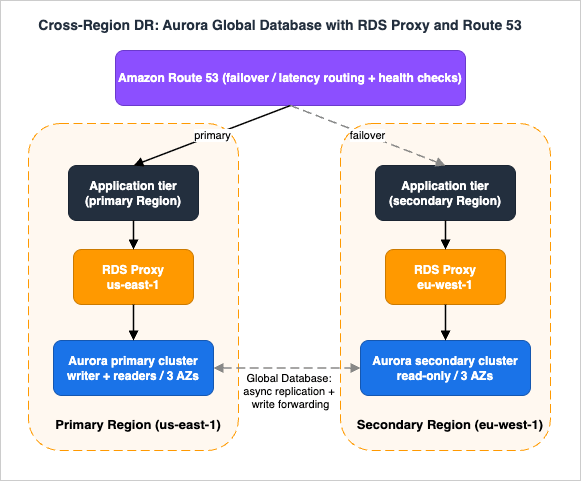
us-east-1) runs an Aurora cluster with a writer and two readers spread across three AZs, fronted by an RDS Proxy (default endpoint to the writer, a read-only proxy endpoint to the readers). A secondary Region (eu-west-1) runs a secondary Aurora Global Database cluster — read-only, kept current by storage-level replication, with its own readers and proxy. Application tiers in each Region connect to their local proxy. Amazon Route 53 fronts the application tier with a latency or failover routing policy and health checks.Steady state. Writes go to the primary Region's RDS Proxy default endpoint → Aurora writer → cluster storage, which replicates synchronously to six storage nodes across three AZs and asynchronously to the secondary Region. Local reads in each Region hit the read-only proxy endpoint, which pools connections across that Region's Aurora Replicas. The
AuroraGlobalDBReplicationLag metric is alarmed so the team always knows the live cross-Region RPO. If a secondary-Region service occasionally needs to write, write forwarding sends those statements to the primary Region.Instance failure (within the primary Region). The Aurora writer fails; Aurora promotes the highest-priority-tier reader, typically in under 30 seconds. RDS Proxy holds the application's connections and routes them to the new writer without waiting for DNS, so the application sees a brief blip rather than a multi-minute outage. No human action required.
AZ failure. Because the storage volume already spans three AZs and readers are distributed across AZs, the loss of one AZ removes at most the writer and/or some readers; Aurora promotes a surviving reader and the reader endpoint stops routing to the lost AZ. RPO remains zero. Again, no human action.
Region failure. The primary Region becomes unreachable. The operator (or automation) triggers an Aurora Global Database failover to
eu-west-1 (accepting the small RPO bounded by replication lag), or, for a planned rotation, a lossless switchover. The global writer endpoint automatically repoints to the now-primary eu-west-1 cluster, so the application's write connection string is unchanged. Route 53 health checks detect the primary Region's application tier as unhealthy and shift user traffic to eu-west-1, where the local RDS Proxy is already pooling connections to the freshly promoted writer. The DNS-failover mechanics, health-check design, and the rest-of-stack considerations are detailed in Route 53 Health Check and Failover Pitfalls and AWS Disaster Recovery Strategies Guide.Failback. Once the original Region recovers, you don't have to stay in the secondary Region. Because the failed-over topology is still a managed Aurora Global Database, you reattach the recovered Region as a secondary, let storage-level replication catch it up, and then perform a planned, lossless switchover back to it during a maintenance window — the global writer endpoint repoints again and Route 53 shifts traffic back. Treating failback as a routine switchover (not a second emergency) is what makes a multi-Region posture sustainable rather than a one-way escape hatch, and it is the step most often skipped in DR runbooks.
Where it can still fail. The architecture is only as good as its weakest assumption: clients that cache DNS past TTL won't follow the Route 53 or endpoint change; an un-drilled failover may surface IAM, security-group, or parameter-group drift between Regions; write forwarding doesn't make the secondary a co-writer; and a large replication lag at the moment of failure means a larger RPO. Each of these maps back to a pitfall in Section 10 — which is why observability (Section 8) and regular failover drills are part of the design, not an afterthought.
12. Frequently Asked Questions
Multi-AZ DB instance or Multi-AZ DB cluster — which should I choose?Choose a Multi-AZ DB instance if you run any engine other than MySQL/PostgreSQL, or you simply want fully-synchronous AZ-failure protection with one standby and don't need the standby to serve reads. Choose a Multi-AZ DB cluster (MySQL/PostgreSQL only) if you want faster failover (typically under 35 s), lower write latency via semisynchronous commit, and two readers that also serve read traffic. Remember a Multi-AZ DB cluster is not an Aurora cluster.
Does Multi-AZ give me read scaling?
Only the Multi-AZ DB cluster topology does (its two standbys are readable). A Multi-AZ DB instance standby is not readable — it exists for failover only. For read scaling on a single-standby deployment, add read replicas; on Aurora, add readers and use the reader endpoint.
When do I actually need RDS Proxy?
When you have many short-lived or bursty connections (classically AWS Lambda or autoscaling fleets) that can exhaust database connections, or when you want to shrink failover recovery time and remove client-side reconnection complexity. RDS Proxy pools connections, throttles surges instead of failing, and routes clients to the new primary after failover without waiting for DNS. Watch for pinning, which can defeat the pool.
How do I do cross-Region DR for Aurora?
Use Aurora Global Database: one primary Region plus up to ten read-only secondary Regions, replicated at the storage layer. For planned events use switchover (no data loss); for an actual Region outage use Global Database Failover (managed, about a minute, possibly a small RPO). The global writer endpoint automatically repoints to the new primary Region. For RDS engines, the equivalent is a cross-Region read replica that you promote manually.
Is a read replica a failover target?
An RDS DB-instance read replica is not an automatic failover target — it's an asynchronous read-scaling and DR copy you promote manually. The readers inside a Multi-AZ DB cluster and Aurora Replicas are failover targets. Keep the two concepts distinct.
What's the difference between Aurora's reader endpoint and an RDS Proxy read-only endpoint?
The Aurora reader endpoint load-balances connections across replicas at connection time. An RDS Proxy read-only endpoint adds connection pooling/multiplexing and graceful failover on top of routing to the replicas. For connection-heavy read workloads, the proxy endpoint can use database resources more efficiently than the built-in reader endpoint.
Why is my failover slower than the advertised numbers?
Most often replica lag: a promoted reader must apply outstanding transactions before serving writes, so a lagging reader lengthens failover. For Aurora, a cluster with no reader is the worst case because Aurora must recreate the primary. Keep transactions short, alarm on lag metrics, and always run at least one reader.
13. Summary
Relational high availability on AWS is a set of composable building blocks, each aimed at a specific failure:- Multi-AZ DB instance — one synchronous, non-readable standby in another AZ; DNS-based failover (~60–120 s); every RDS engine.
- Multi-AZ DB cluster — one writer plus two readable standbys across three AZs; semisynchronous commit; faster failover (typically under 35 s); MySQL/PostgreSQL only.
- Read replicas — asynchronous, manually promotable read-scaling and cross-Region DR copies; not automatic failover targets.
- Aurora — shared six-copy/three-AZ storage with up to 15 reader/failover-target replicas, failover priority tiers, and managed writer/reader endpoints.
- RDS Proxy — connection pooling that doubles as an availability feature, shrinking failover recovery and shielding the database from connection storms (mind pinning).
- Aurora Global Database — up to eleven Regions with storage-level replication, lossless switchover vs managed failover, write forwarding, and an auto-repointing global writer endpoint.
Pick by mapping each block onto the failures and RTO/RPO targets in Section 1, then make the choice trustworthy with the observability and application-design practices in Sections 8 and 9. From here, continue to the companion AWS Disaster Recovery Strategies Guide for the Region-level strategy patterns, to Amazon DynamoDB Capacity and Global Tables Guide for the NoSQL multi-Region counterpart, and to Amazon Aurora DSQL Design Decision Guide and the AWS Database Glossary for adjacent database decisions.
14. References
- Amazon RDS Multi-AZ deployments (overview)
- Multi-AZ DB instance deployments for Amazon RDS
- Multi-AZ DB cluster deployments for Amazon RDS
- Failing over a Multi-AZ DB cluster for Amazon RDS
- Working with DB instance read replicas
- High availability for Amazon Aurora
- Amazon Aurora endpoint connections
- Replication with Amazon Aurora
- Using Amazon Aurora Global Database
- Using write forwarding in an Amazon Aurora global database
- Amazon RDS Proxy
- Avoiding pinning an RDS Proxy
- RDS Proxy connection considerations
- Testing Amazon Aurora MySQL using fault injection queries
- Amazon RDS Multi-AZ (feature page)
- Amazon RDS Proxy (feature page)
- Readable standby instances in Amazon RDS Multi-AZ deployments (AWS Database Blog)
- Improving application availability with Amazon RDS Proxy (AWS Database Blog)
- Introducing Aurora Global Database Failover (AWS Database Blog)
- Amazon Aurora Global Database introduces Global Database Failover (What's New)
- Additional Failover Control for Amazon Aurora (AWS News Blog)
- Amazon RDS Pricing
References:
Tech Blog with curated related content
Written by Hidekazu Konishi