Amazon Aurora DSQL Design Decision Guide - Distributed SQL Between Amazon DynamoDB and Aurora PostgreSQL
First Published:
Last Updated:
This guide is a design decision guide, not a tutorial. It answers three questions: (1) what is actually new in Aurora DSQL's architecture, (2) where exactly the limits of its PostgreSQL compatibility lie — the deciding factor for most adoption decisions, and (3) how to choose among DynamoDB, Aurora DSQL, and Aurora PostgreSQL for a given workload. All service facts — region availability (20 AWS Regions as of this writing in August 2026), architecture descriptions, the PostgreSQL compatibility surface, and quota values — were verified against the official AWS documentation, the Aurora DSQL release notes, What's New announcements, and official AWS blog posts as of August 2026 (partial indexes: September 15, 2026). This article does not discuss pricing figures; consult the official Aurora DSQL pricing page for current numbers.
Quick Reference Index
- 1. Introduction — The Gap Between Two Defaults
- 2. The Road to Aurora DSQL — From RDS to Distributed SQL
- 3. Architecture — How Aurora DSQL Achieves Active-Active
- 4. PostgreSQL Compatibility and Its Limits
- 5. When to Choose Aurora DSQL over DynamoDB
- 6. When to Choose Aurora DSQL over Aurora PostgreSQL
- 7. Multi-Region Patterns
- 8. The Decision Framework
- 9. Common Pitfalls
- 10. Frequently Asked Questions
- 11. Summary
- 12. References
1. Introduction — The Gap Between Two Defaults
Every AWS database decision review eventually reaches the same fork. If the team can enumerate its access patterns and live without joins, DynamoDB offers operational characteristics nothing else matches: no instances, no patching, no connection limits to babysit, global tables, and predictable single-digit-millisecond latency at any scale. If the team needs the relational model — normalized schemas, ad-hoc queries, multi-row transactions across entities, the SQL ecosystem — Aurora PostgreSQL is the default, and it brings the operational world of instances, failover, version upgrades, and read replicas with it.The trouble is the workloads that sit in between. Consider a payments ledger, an inventory system, or a multi-tenant SaaS control plane with these requirements:
- The data model is genuinely relational: entities reference each other, the team needs joins and aggregations, and the schema evolves as the product grows.
- Writes must be accepted in more than one AWS Region, with strong consistency rather than eventual convergence and conflict resolution.
- The team wants DynamoDB-style operations: no instances to size, no failover runbooks, no capacity planning for spiky traffic.
DynamoDB satisfies the second and third requirements but not the first. Aurora PostgreSQL satisfies the first but offers neither multi-Region active-active writes (Aurora Global Database has a single writable Region with cross-Region replication measured in seconds, and the old single-Region Aurora Multi-Master was discontinued in 2023) nor instance-free operations. Aurora DSQL was built for exactly this middle zone.
Three questions this guide answers:
- What is new: Aurora DSQL is not "Aurora with a different storage layer." It is a different architecture — disaggregated components, optimistic concurrency control instead of locks, and a journal-based commit path that makes active-active multi-Region writes strongly consistent. Section 3 explains how, and what those choices cost.
- Where compatibility ends: "PostgreSQL-compatible" is doing a lot of work in the marketing sentence. Aurora DSQL runs a real PostgreSQL engine, and the compatibility surface is widening quickly — foreign key constraints, the longest-standing gap of them all, landed on August 26, 2026 — but triggers, PL/pgSQL, temporary tables, custom types, and extensions are still not available. Section 4 catalogs the limits from the current official documentation, because this list, more than anything else, decides whether your application can move — and because it moves fast enough that a cached answer is worth re-checking.
- Which database for which workload: Sections 5 through 8 turn the comparison into a decision framework, including a three-way decision tree.
A note on scope. This article deliberately avoids cross-vendor comparisons with other distributed SQL systems; the concepts are mentioned only where they clarify Aurora DSQL itself. It also avoids benchmark numbers — none are published here because none were independently measured. Finally, historical background on the services discussed is delegated by links to my AWS History and Timeline articles on Amazon RDS, Amazon Aurora, and Amazon DynamoDB, and terminology follows my AWS Database Glossary.
2. The Road to Aurora DSQL — From RDS to Distributed SQL
Aurora DSQL is easiest to understand as the fourth step in a progression in which AWS has, step by step, disaggregated the relational database. (Full version-by-version history is in the linked timeline articles; this section keeps only what is needed to position DSQL.)Step 1 — Managed instances (Amazon RDS, 2009). RDS took the existing single-node relational database and made it managed: provisioning, backups, patching, and Multi-AZ failover became API calls. But the unit of scaling remained the instance, and the architecture remained a primary with replicas.
Step 2 — Disaggregated storage (Amazon Aurora, 2014-2015). Aurora separated compute from a purpose-built distributed storage layer that keeps six copies of data across three Availability Zones and acknowledges writes using a quorum model (four of six for writes). This bought durability, fast recovery, and read scale-out — but the write path still ran through a single writer instance per cluster, and the cluster remained a regional construct. I analyzed this quorum design in detail in my comparison of AWS database services using the quorum model.
Step 3 — Serverless compute (Aurora Serverless v1 in 2018, v2 in 2022). Aurora Serverless made the compute layer elastic, scaling capacity up and down against the same storage. It removed instance sizing, but not the single-writer topology, and not the regional boundary. For multi-Region designs, Aurora Global Database (one writable primary Region, read-only secondaries with replication lag measured in seconds, manual or managed failover) remained the pattern. Aurora Multi-Master, the one attempt at intra-Region active-active writes, reached GA for Aurora MySQL in 2019 and was discontinued as of February 28, 2023.
Step 4 — Distributed SQL (Aurora DSQL, 2024-2025). Aurora DSQL disaggregates the rest: the transaction-processing path itself. There is no writer instance; SQL execution, transaction adjudication, durability, and storage are separate, independently scaling fleets. The result is a database that is serverless in the DynamoDB sense (no instances at all, usage-based billing — see the official pricing page for the model and numbers) while remaining PostgreSQL-compatible and strongly consistent, and that supports two Regional endpoints that both accept reads and writes.
The dates that matter for the decision context:
| Date | Milestone |
|---|---|
| December 3, 2024 | Aurora DSQL announced in preview at re:Invent 2024 |
| May 27, 2025 | General availability. GA added support for AWS Backup, AWS PrivateLink, AWS CloudFormation, AWS CloudTrail, AWS KMS customer managed keys, and PostgreSQL views |
| July 2025 | Region expansion (Asia Pacific (Seoul)) and multi-Region cluster support within the Asia Pacific and European Region sets |
| February 2026 | Region expansion to 14 Regions (added Melbourne, Sydney, Canada (Central), Calgary) |
| May 2026 | Region expansion to 19 Regions (added Hong Kong, Mumbai, Singapore, Stockholm, Sao Paulo). JSON data type with compression (May 4) |
| June 8, 2026 | JSONB data type with compression |
| July 2026 | Change data capture generally available (July 8). Multi-Region clusters extended to Europe (Stockholm), Europe (Spain), Asia Pacific (Mumbai), and Asia Pacific (Singapore) (July 31) |
| August 2026 | ALTER TABLE ... DROP COLUMN and ADD CONSTRAINT ... NOT VALID (August 3), indexes on expressions (August 13), Aurora DSQL Database Insights (August 17), expanded SELECT ... FOR UPDATE (August 24), SELECT ... FOR KEY SHARE and wider numeric limits (August 25), foreign key constraints and character-data compression (August 26) |
| September 2026 | Partial indexes (September 15) |
Two readings of this table are relevant to adoption decisions. First, the service is young and the compatibility surface in Section 4 moves fast: PostgreSQL views arrived only at GA, identity columns and sequences in February 2026,
JSONB in June 2026, and foreign key constraints — for more than a year the single most cited reason not to adopt — on August 26, 2026. A compatibility verdict written six months ago is not a compatibility verdict today. Second, AWS is expanding it quickly — from a handful of launch Regions to 20 in roughly 15 months — which is the usual signal that AWS considers the service strategic rather than experimental.3. Architecture — How Aurora DSQL Achieves Active-Active
3.1 Disaggregated Components
The official GA announcement describes the design in one sentence: unlike most traditional databases, Aurora DSQL is disaggregated into multiple independent components such as a query processor, adjudicator, journal, and crossbar, which communicate through well-specified APIs and scale independently. The official documentation groups them as: relay and connectivity; compute and databases; transaction log, concurrency control, and isolation; and storage — coordinated by a control plane, with each component redundant across three Availability Zones.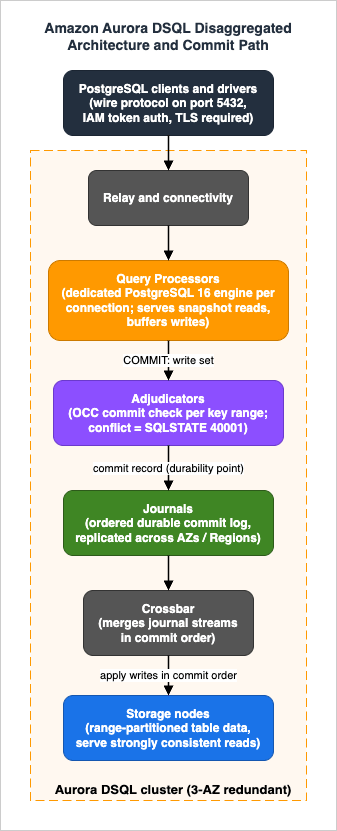
- Query processors (compute): each connection gets a dedicated PostgreSQL engine that parses, plans, and executes SQL. This is genuine PostgreSQL code (currently based on PostgreSQL 16), which is why the compatibility story in Section 4 is as good as it is. Query processors scale horizontally with connections, not as a fixed-size writer instance.
- Adjudicators: the commit-time arbiters. When a read-write transaction commits, adjudicators — each responsible for a range of keys — decide whether it conflicts with any concurrently committed transaction. This is where isolation is enforced.
- Journals: ordered, durable transaction streams. A commit is durable when it is written to the journal, which replicates across Availability Zones and, for multi-Region clusters, across Regions.
- Crossbar / storage: storage nodes hold range-partitioned table data and serve reads; the crossbar merges journal streams in order and routes committed writes to the storage nodes that need them.
The contrast with classic Aurora is sharp. Classic Aurora disaggregated durability (the six-copy, quorum-based storage layer) but kept a monolithic write path: one writer instance holds locks, orders transactions, and ships redo records. Aurora DSQL disaggregates the write path itself — SQL execution (query processors), transaction ordering and conflict detection (adjudicators), and durability (journals) are separate services. There is no single writer to fail over, which is why the service has no failover concept at all.
3.2 Optimistic Concurrency Control
Aurora DSQL uses optimistic concurrency control (OCC) rather than locks. Per the official documentation, this lock-free approach prevents transactions from blocking one another and eliminates deadlocks. The mechanics matter for application design:- During a transaction, reads come from a consistent snapshot and writes are buffered locally at the query processor. No row locks are taken, and other transactions are never blocked waiting for yours.
- At COMMIT, the transaction's write set is checked by the adjudicators against transactions that committed after the snapshot was taken. If another transaction modified the same rows, the commit is rejected with a PostgreSQL serialization failure, SQLSTATE
40001(Aurora DSQL distinguishes data conflicts, errorOC000, from schema/catalog conflicts,OC001). - The application is expected to retry rejected transactions. This is not an error to fix; it is the designed behavior of the system under contention.
Two consequences follow. First, long-running or high-contention read-modify-write transactions that would queue politely behind row locks in PostgreSQL will instead fail and retry under OCC — hotspots (a single counter row, a "last writer wins" status row) are an anti-pattern. Second, abandoned or idle transactions cannot wedge the system the way an idle-in-transaction session holding locks can in classic PostgreSQL; the blast radius of a misbehaving client is its own transaction. Section 4.3 shows the retry pattern, and Section 9 catalogs the migration pitfalls.
The transaction isolation level is fixed: Aurora DSQL provides snapshot isolation, exposed as PostgreSQL REPEATABLE READ, and that is the only isolation level offered. There is no READ COMMITTED and no SERIALIZABLE. What that name buys against the other AWS engines, and why snapshot isolation and REPEATABLE READ are not the same guarantee even where they share a name, is compared engine by engine in Transaction Isolation on AWS Databases.
3.3 Strong Consistency and Synchronized Time
Aurora DSQL provides ACID transactions with strong consistency: per the official documentation, all reads and writes to any Regional endpoint are strongly consistent and durable. Reads always observe committed data — there are no stale replicas to read from, because storage is updated from the same journal stream that defines commit order.The piece that makes this work across Regions without a coordination bottleneck is time. Aurora DSQL orders transactions using hybrid logical clocks built on the Amazon Time Sync Service, which delivers microsecond-accurate time (synchronized via atomic clocks and GPS) to the underlying EC2 infrastructure. Accurate physical time lets components agree on transaction ordering with far less cross-component (and cross-Region) chatter than classic consensus on every operation would require — the official deep-dive on clocks describes this as the foundation of the service's global strong consistency. Which body defines the second that service distributes, and what happens to that clock when a leap second is inserted, is the subject of Computer Time and Leap Seconds History and Timeline - UT1, TAI, UTC, Leap Smearing, and Who Decides When a Second Is Added.
For readers of my quorum-model comparison article: classic Aurora's consistency story is built on storage-level write quorums (4 of 6 copies across three AZs) beneath a single writer. Aurora DSQL replaces that with journal-based commit replication plus OCC adjudication on top, with synchronized time as the ordering primitive. Both achieve "committed means durable across AZs"; only DSQL extends the write path itself across Regions.
3.4 Life of a Transaction
Putting the components together, here is the path a read-write transaction takes, following the official component deep-dive:- Connect: the client connects (PostgreSQL wire protocol, through the relay/connectivity layer) and is attached to a query processor — a dedicated PostgreSQL engine for that connection. There is no shared writer process whose capacity all sessions contend for.
- Read: the transaction's reads are served from storage as of the transaction's snapshot time. Because every storage node applies the same journal-ordered stream of committed writes, a snapshot timestamp fully defines a consistent view — no locks, no read latches, no coordination with concurrent writers.
- Write (buffered): UPDATE/INSERT/DELETE statements execute in the query processor, and the resulting write set is buffered at the query processor rather than applied in place. Other transactions cannot see it and are not blocked by it.
- Commit (adjudicate, then journal): at COMMIT, the write set goes to the adjudicators responsible for the affected key ranges. They verify that no conflicting transaction has committed since this transaction's snapshot. On success, the transaction is written to a journal — the durability point — and the client receives commit acknowledgment. On conflict, the client receives SQLSTATE
40001and nothing is written. - Apply: the crossbar merges journal streams in commit order and distributes the writes to the storage nodes that own the affected ranges, which is what makes subsequent reads (from any endpoint) observe the new data.
Notice what is absent: there is no point in this path where a transaction waits for another transaction. Work that lock-based engines do during the transaction (conflict prevention) moves to a single decision at commit time. That is the trade Aurora DSQL makes everywhere: maximum concurrency during execution, paid for by the possibility of rejection at commit.
3.5 What the Architecture Costs
A design decision guide owes you the costs, and they follow directly from the design:- Commit-time conflict failures replace lock waits. Applications must implement retries (Section 4.3).
- Transactions are bounded: at most 3,000 rows modified and 10 MiB of data per transaction, and a 5-minute transaction duration limit (Section 4.4). Bulk loads and large batch updates must be chunked.
- Connections are bounded in time: a connection lasts at most 60 minutes, so pools must be configured to recycle.
- A reduced PostgreSQL surface: the disaggregated engine does not (yet) support everything single-node PostgreSQL can do — the subject of Section 4.
4. PostgreSQL Compatibility and Its Limits
This section is the core of the adoption decision. Aurora DSQL is PostgreSQL-compatible in a precise sense: it is currently based on PostgreSQL 16, speaks the standard PostgreSQL v3 wire protocol, and works with standard clients and drivers (psql, JDBC, psycopg, and so on). The query processor is real PostgreSQL code — parser, planner, type system. But the distributed architecture removes or changes a meaningful set of features. Everything below reflects the official documentation and the Aurora DSQL release notes as of August 2026, with partial indexes (September 15, 2026) added later; because the list changes over releases — views arrived at GA, foreign key constraints on August 26, 2026 — always re-check the current PostgreSQL compatibility and migration guidance and the release notes before a final decision.4.1 What Works
- Core SQL and types: standard DDL (CREATE/ALTER/DROP TABLE), INSERT (including
ON CONFLICT), UPDATE, DELETE, SELECT with joins, CTEs, set operations, and window functions. Common types are covered: integers, numeric (maximum precision 1000, with scale between -1000 and 1000), text/varchar/bpchar, date/time types includingtimestamptz, boolean, bytea, UUID, and JSON/JSONB (up to 1 MiB per value measured after automatic compression, and JSON/JSONB columns cannot be indexed). - Constraints: PRIMARY KEY, UNIQUE, NOT NULL, CHECK, and — since August 26, 2026 — FOREIGN KEY, with the
NO ACTION,RESTRICT,CASCADE,SET NULL, andSET DEFAULTreferential actions, theMATCH FULLandMATCH SIMPLEmatch types, and deferrable constraints driven bySET CONSTRAINTS(Section 4.2). - Views and sequences: CREATE/ALTER/DROP VIEW (since GA), sequences, and IDENTITY/GENERATED columns (sequence values are cached and should be treated as unique, not gapless or strictly ordered).
- Indexes: primary keys and secondary indexes, including unique indexes,
INCLUDEcolumns, indexes on immutable expressions, and partial indexes (aWHEREclause onCREATE INDEX, since September 15, 2026) — but index creation is asynchronous (Section 4.3). - Schema evolution:
ALTER TABLEnow covers ADD and DROP COLUMN, SET and DROP DEFAULT, DROP NOT NULL, ADD and DROP IDENTITY, SET STORAGE, RENAME, SET SCHEMA, OWNER TO, and ADD and DROP CONSTRAINT — enough that most migration tooling no longer has to fall back on table recreation. Dropping a primary key column is still unsupported. - Roles and privileges: CREATE ROLE and GRANT/REVOKE for in-database authorization, including
ALTER DEFAULT PRIVILEGES, layered under IAM-based authentication (Section 7.3). - SQL functions and domains: CREATE FUNCTION with
LANGUAGE SQL, and CREATE DOMAIN. - Tooling basics: EXPLAIN; ANALYZE on a named relation (the service also runs analyze automatically).
- Row-level locking syntax, reinterpreted:
SELECT ... FOR UPDATEandSELECT ... FOR KEY SHAREare both accepted, and since August 24, 2026FOR UPDATEno longer requires equality predicates on every primary key column and works across queries that span multiple tables. Neither clause takes a lock: they declare an intent that the adjudicators settle at commit, so the losing transaction fails withOC000instead of waiting (Section 4.2).FOR SHAREandFOR NO KEY UPDATEare not supported.
Worth highlighting for schema designers: numeric/decimal still defaults to
numeric(18,6) when declared without precision, JSON/JSONB values are limited to 1 MiB of compressed size (Aurora DSQL compresses large values automatically, so values that compress below the limit can exceed 1 MiB uncompressed) and JSON/JSONB columns cannot be indexed, large text, varchar, and bpchar values are compressed the same way — but never in primary key columns or in the key columns of a secondary index, and the STORAGE clause turns compression off where you need the raw bytes — and sequence/IDENTITY values are cached for performance: they are unique, but applications must not assume they are gapless or strictly ordered across connections.4.2 What Does Not Work — and What Recently Started Working
The table below consolidates the unsupported or changed features that most often decide a migration, from the current official compatibility documentation. Note that AWS no longer publishes a standalone "unsupported PostgreSQL features" page — that URL now redirects to the migration guide — so the list has to be assembled from the supported-SQL, supported-data-types, and migration pages together with the release notes.| Feature | Status in Aurora DSQL | Standard mitigation |
|---|---|---|
| Triggers | Not supported | Move trigger logic into application code or downstream processing |
| PL/pgSQL (and other procedural languages) | Not supported; functions are LANGUAGE SQL only | Re-implement stored procedures in the application tier |
| Temporary tables | Not supported | Use CTEs, subqueries, or regular tables |
| TRUNCATE | Not supported | Use DELETE (within the per-transaction row limit, i.e. chunked) |
| Synchronous CREATE INDEX | Not supported; use CREATE INDEX ASYNC | Build indexes asynchronously and monitor the job to completion |
FOR SHARE and FOR NO KEY UPDATE | Not supported (FOR UPDATE and FOR KEY SHARE are) | Express the dependency with FOR KEY SHARE, and expect a commit-time conflict instead of a wait |
| Mixed DDL and DML in one transaction | Not allowed; one DDL statement per transaction | Run schema migrations as separate, sequential transactions |
| Custom types (CREATE TYPE) | Not supported | Use built-in types or DOMAINs over built-in types |
| Multiple databases per cluster | One database (postgres) per cluster | Use schemas (up to 10) for namespacing, or separate clusters |
| Isolation levels other than REPEATABLE READ | Fixed at snapshot isolation (REPEATABLE READ) | Design for OCC; do not rely on READ COMMITTED semantics |
| Collations other than C | C collation only (UTF-8 encoding, UTC timezone) | Sort/compare locale-sensitively in the application if needed |
| VACUUM / manual maintenance | Not applicable — managed by the service | Nothing to do (this one is a benefit) |
Two items deserve explicit caution because the documentation is silent rather than explicit:
- PostgreSQL extensions (PostGIS, pgvector, pg_cron, and the rest of the ecosystem): the current documentation does not list extension support. If your application depends on any extension, treat it as unavailable on Aurora DSQL unless the official documentation for the current release states otherwise, and verify before committing to a migration.
- Materialized views: regular views are supported; materialized views do not appear in the supported-features list. Plan as if they are unavailable and verify against the current documentation.
Foreign keys: the item that left this table. Until August 26, 2026 the answer to "can I keep my FK constraints?" was no, and that single answer disqualified more migrations than every other row above combined. Aurora DSQL now supports foreign key constraints as both column constraints (
REFERENCES) and table constraints (FOREIGN KEY (...) REFERENCES ...), including composite and self-referential keys, so an ORM that emits REFERENCES clauses is no longer a finding by itself. Three properties decide whether you should actually declare them:- Enforcement is optimistic, not locked. A transaction verifies the referenced key against its own start-time snapshot, and at commit Aurora DSQL implicitly applies
KEY SHAREto the referenced rows to detect whether a concurrent transaction invalidated that snapshot. A conflict surfaces as a serialization error (OC000), not as a wait — so referential integrity joins the list of things your retry layer has to cover (Section 4.3). Because the check reads a snapshot instead of taking a lock, other transactions keep modifying both tables in parallel. - Every constrained DML statement costs extra reads. The official guidance is explicit: all DML on referenced or referencing tables incurs extra reads to guarantee referential integrity, and you should benchmark the workload before adding a constraint to a hot table. The
FkExistenceCheckwait event in Aurora DSQL Database Insights (Section 7.4) is how you see that cost in production. - Cascades count against the 3,000-row transaction limit.
CASCADE,SET NULL, andSET DEFAULTmodify referencing rows inside your transaction, so a delete against a parent with unbounded child cardinality can fail on the row limit rather than on the constraint. AWS recommendsNO ACTIONorRESTRICTwherever child-row counts are unpredictable.
Adding a constraint to an existing table follows the two-step shape borrowed from PostgreSQL's own online-migration practice, with one Aurora DSQL twist: the
NOT VALID option is not an optimization, it is the only accepted form. ALTER TABLE ... ADD CONSTRAINT ... NOT VALID registers the constraint so it applies immediately to new rows and updates without scanning the table, and ALTER TABLE ASYNC ... VALIDATE CONSTRAINT then checks the existing rows as an asynchronous DDL job you monitor through the sys.jobs view.-- New table: declare the constraint inline, exactly as in PostgreSQL.
CREATE TABLE orders (
order_id uuid PRIMARY KEY,
customer_id uuid REFERENCES customers ON DELETE RESTRICT,
placed_at timestamptz NOT NULL
);
-- Existing table: register first, validate afterwards.
ALTER TABLE order_items
ADD CONSTRAINT fk_order_items_order
FOREIGN KEY (order_id) REFERENCES orders NOT VALID;
ALTER TABLE ASYNC order_items VALIDATE CONSTRAINT fk_order_items_order;
-- Block until the validation job finishes, or poll sys.jobs instead.
SELECT sys.wait_for_job('<job_id>');
The pattern behind what remains is consistent: features that need session-scoped state, or that run procedural code inside the engine's commit path (trigger execution, PL/pgSQL, temporary tables, custom types), are the ones still missing. Features that can be expressed as a distributed decision taken at commit time — including, as of August 2026, referential integrity — have been arriving one release at a time. That is the strongest argument for re-running this audit against the release notes rather than trusting a verdict your team reached last quarter.
4.3 The Application Contract: Retries and Index Builds
Beyond feature lists, Aurora DSQL changes two day-to-day developer workflows.Every write transaction needs a retry path. Under OCC, a concurrency conflict surfaces as SQLSTATE
40001 at COMMIT. Standard PostgreSQL drivers expose this cleanly; the pattern is a bounded retry loop with backoff:import time
from psycopg.errors import SerializationFailure
MAX_RETRIES = 5
def transfer(conn_factory, src, dst, amount):
for attempt in range(MAX_RETRIES):
try:
with conn_factory() as conn:
with conn.transaction():
conn.execute(
"UPDATE accounts SET balance = balance - %s "
"WHERE account_id = %s",
(amount, src),
)
conn.execute(
"UPDATE accounts SET balance = balance + %s "
"WHERE account_id = %s",
(amount, dst),
)
return
except SerializationFailure:
# OCC conflict (SQLSTATE 40001): another transaction
# modified the same rows after our snapshot. Retry.
time.sleep((2 ** attempt) * 0.05)
raise RuntimeError("transfer failed after retries")
If you already run PostgreSQL at SERIALIZABLE or REPEATABLE READ with retry handling, this is familiar. If your application has only ever run at READ COMMITTED with lock-based behavior, this is new mandatory work — and it belongs in a shared data-access layer, not scattered across call sites.
Index creation is a job, not a statement. Aurora DSQL builds indexes asynchronously:
-- Returns immediately with a job identifier; the index builds in the background.
CREATE INDEX ASYNC idx_orders_customer_id ON orders (customer_id);
Schema migration tooling that assumes CREATE INDEX completes synchronously (most migration frameworks) needs adaptation: issue the ASYNC statement, then poll the job status until the build completes before depending on the index. Constraint validation has the same shape —
ALTER TABLE ASYNC ... VALIDATE CONSTRAINT returns a job identifier rather than a verdict (Section 4.2) — so a migration framework that has been taught to wait for one has been taught to wait for both.4.4 Quotas That Shape Design
Selected limits from the official quotas page that directly shape schema and application design (these are the values as of August 2026; some are adjustable — check the quotas page for the authoritative current list):| Limit | Value |
|---|---|
| Rows modified per transaction | 3,000 |
| Data modified per transaction | 10 MiB |
| Maximum transaction duration | 5 minutes |
| Maximum connection duration | 60 minutes |
| Connections per cluster | 10,000 (adjustable) |
| New connections per second | 100, with burst capacity of 1,000 |
| Columns per table | 255 active (1,600 including dropped columns, over the table's lifetime) |
| Indexes per table | 24 |
| Maximum row size | 2 MiB |
| Primary key size / columns | 1 KiB combined, up to 8 columns |
| Tables per database | 1,000 |
| Schemas per database | 10 |
| Databases per cluster | 1 |
| Cluster storage | 10 TiB by default (up to 256 TiB with an approved limit increase) |
The transaction limits are the ones that surprise teams. A nightly batch job that updates a million rows in one transaction does not port; it must be restructured into chunks of at most 3,000 modified rows, each committed (and each retryable). An ETL load works the same way — or better, lands in batches sized well under the limits.
4.5 How to Run the Compatibility Audit
For a real adoption decision, turn this section into a checklist executed against your actual codebase rather than a judgment call in a meeting:- Schema scan: dump the candidate schema and search for the hard stops — CREATE TRIGGER, CREATE TYPE, non-default collations, more than one database, TEMP TABLE usage in code paths. FOREIGN KEY clauses are no longer a stop, but they remain a finding of a different kind: inventory them, and decide per constraint whether to keep it and pay the extra reads, paying particular attention to
ON DELETE CASCADEon parents whose child-row counts are unbounded (Section 4.2). - Code scan: search the application for PL/pgSQL (
CREATE FUNCTION ... plpgsql,CREATE PROCEDURE),SELECT ... FOR UPDATEandSELECT ... FOR KEY SHAREused as queueing primitives rather than as commit-time conflict declarations,FOR SHAREandFOR NO KEY UPDATE, advisory lock calls (pg_advisory_lock), TRUNCATE, andSET TRANSACTION ISOLATION LEVEL. Each hit is either a redesign item or a disqualifier. - Extension inventory: list installed extensions in the current database and classify each as removable, replaceable in the application tier, or load-bearing. Any load-bearing extension is a stop (Section 4.2).
- Transaction profiling: identify the largest and longest transactions in production (rows modified, bytes, duration) and compare against the 3,000-row / 10 MiB / 5-minute bounds. Anything over the line needs chunking design before, not after, the pilot.
- Contention review: find rows that many writers touch (counters, status singletons, queue-like tables) — the hotspots that will convert from lock waits into
40001retry storms under OCC. - Prototype against the real service: run the schema (minus findings) and the top queries on an actual cluster, with the retry layer in place, before writing the decision document. The wire-level compatibility makes this cheap; use that.
A clean audit plus a passed prototype is a green light. A short findings list is a project plan. A long one is the answer to the decision question — stay on Aurora PostgreSQL.
5. When to Choose Aurora DSQL over DynamoDB
DynamoDB and Aurora DSQL now overlap substantially on operations: both are serverless, both scale without capacity planning, both offer multi-Region deployments. The decision between them is therefore almost entirely about the data model and consistency semantics.5.1 Signals That Favor Aurora DSQL
- The query patterns are not enumerable up front. DynamoDB's single-table design works precisely when you can list every access pattern before writing the schema — as I put it in my DynamoDB single-table design guide, there are no ad-hoc joins later. If your product is young, your queries exploratory, or your tenants ask unpredictable questions, SQL's ad-hoc flexibility is the feature you are buying.
- Joins and multi-entity transactions are core, not edge cases. In that same guide, the first "skip single-table design" signal is business logic that joins customer + invoice + line items + payments with ad-hoc filters. DynamoDB caps transactions at 100 actions per
TransactWriteItemscall and offers no server-side joins; Aurora DSQL gives you real SQL joins and multi-row ACID transactions (within the 3,000-row/10 MiB bounds). - The schema evolves continuously. Adding a column or a secondary index in SQL is routine; reshaping a DynamoDB single-table key design after launch is a migration project.
- Strongly consistent multi-Region writes. DynamoDB global tables in their long-standing form are multi-active with asynchronous replication and last-writer-wins conflict resolution — readers in another Region can briefly observe older data, and concurrent writes are resolved, not prevented. Aurora DSQL's multi-Region clusters make every read and write strongly consistent at both endpoints: a committed write is immediately visible from the other Region's endpoint, and conflicting concurrent writes cannot both commit (one fails with
40001and retries). If your correctness argument currently includes the phrase "and then we reconcile," DSQL removes that paragraph. - The team's skills and tooling are relational. ORMs, SQL migrations, BI tools that speak PostgreSQL — the ecosystem mostly just connects (subject to Section 4).
5.2 Signals That Favor DynamoDB
- Access patterns are known, stable, and key-shaped. Get-by-key, query-by-partition workloads are what DynamoDB is built for, and single-table design converts them into predictable low latency at any scale.
- Extreme scale on a single hot path. DynamoDB's operational track record at millions of requests per second is unmatched; Aurora DSQL is young, and its per-transaction and per-cluster quotas (Section 4.4) are real bounds.
- Item-level TTL, streams-driven architectures, DAX-style caching — if your design leans on DynamoDB's surrounding feature set (TTL, DynamoDB Streams fan-out, integrated caching), those have no direct DSQL equivalent.
- Write-conflict semantics you have already engineered around. Mature global-tables deployments that have already accepted eventual consistency and idempotent, conflict-tolerant writes do not necessarily gain from moving.
5.3 A Worked Contrast: the Order System
The difference is most concrete in the workload both databases plausibly serve: orders. In DynamoDB single-table design, you model the access patterns — "get customer with recent orders" becomes a partition holding a customer item and order items under the same partition key, queried in one request; "orders by status across customers" becomes a GSI projected for exactly that question. This is fast and scales indefinitely — and every new question (orders by SKU and month? customers whose refund total exceeds X?) is a design change: a new GSI, a backfill, or an export to an analytical store.The same system in Aurora DSQL is four normalized tables (customers, orders, order_items, payments) with real FOREIGN KEY constraints on the obvious columns and secondary indexes to match — a sentence that would have read differently before August 26, 2026, when referential integrity still had to live in the application (Section 4.2). "Customer with recent orders" is a two-table join on an indexed key: an OLTP query the engine is built for. The unanticipated questions are just SQL. The cost side of the trade: you give up DynamoDB's flat, predictable per-request performance model and its proven behavior at extreme request rates, and you accept DSQL's quotas and young operational track record.
The honest summary heuristic: choose by data model first (relational model and joins → Aurora DSQL; enumerable key-based access → DynamoDB), and only then check that the winner's scale and feature envelope fits your numbers.
6. When to Choose Aurora DSQL over Aurora PostgreSQL
Against Aurora PostgreSQL, the decision flips: the data model is identical in kind (both are PostgreSQL), so the decision is about compatibility depth, topology, and operations.6.1 Signals That Favor Aurora DSQL
- Multi-Region active-active is a requirement, not a nice-to-have. This is the headline capability. Aurora Global Database gives you one writable Region; writes from other Regions must travel to the primary (or use write forwarding), and Region failure means promotion. Aurora DSQL's peered multi-Region clusters expose two writable endpoints with strong consistency and no failover concept — availability is symmetric by design.
- You want zero infrastructure management. No instance class selection, no storage autoscaling thresholds, no minor-version maintenance windows, no failover testing. For teams that chose Aurora Serverless v2 to approximate this, DSQL is the version of that idea with no instances at all (the billing model is usage-based; see the official pricing page rather than this article for figures).
- Spiky, bursty, or sparse traffic. A connection-heavy, mostly-idle SaaS control plane or a workload with rare sharp peaks fits a database that scales with usage rather than with provisioned capacity.
- Your PostgreSQL usage is "core SQL". If the application uses tables, indexes, joins, transactions, views, sequences, and JSON — and does not depend on the items in Section 4.2 — compatibility is unlikely to block you.
6.2 Signals That Favor Aurora PostgreSQL
- You need the full PostgreSQL surface. Extensions (PostGIS, pgvector, and the wider ecosystem), PL/pgSQL stored procedures, triggers, temporary tables, custom types, multiple databases, non-C collations, SERIALIZABLE or READ COMMITTED isolation — any hard dependency here is a hard stop today (Section 4.2). Enforced foreign keys left this list on August 26, 2026, which is reason enough to check the date on whatever version of this argument your team is carrying.
- Blocking lock semantics are baked into the application. Systems built on
SELECT FOR UPDATEqueueing, advisory locks, or long transactions (more than 5 minutes, or more than 3,000 modified rows) require redesign, not just porting. DSQL'sFOR UPDATEis no longer syntactically restricted — the single-table and full-primary-key limits were lifted on August 24, 2026 — but the syntax was never the real obstacle: the clause still declares a conflict that the adjudicators settle at commit instead of making one worker wait behind another, so the queueing behavior has to be rebuilt around retries either way. - Steady, predictable, high-utilization load. A database that is busy 24/7 at a constant level is the case where provisioned Aurora capacity is at its best economically and DSQL's usage-based model has the least to offer — evaluate with the official pricing model rather than assumptions.
- Existing estate and ecosystem integration. Mature Aurora deployments with tuned parameter groups, Performance Insights workflows, blue/green upgrade processes, logical replication consumers, and battle-tested runbooks carry real switching costs. Aurora PostgreSQL also remains the only one of the two with the full RDS feature constellation around it.
- A single Region is genuinely enough. If your availability target is met by Multi-AZ within one Region plus restore-based DR, classic Aurora's regional design is not a deficiency.
A useful framing: Aurora DSQL is not "Aurora PostgreSQL v2." It is a different point on the trade-off curve — it exchanges PostgreSQL completeness for distributed-systems properties. Teams whose bottleneck is operations and topology should move toward DSQL; teams whose dependency is PostgreSQL depth should stay.
There is a third position on the same curve, and it is easy to miss because it carries the Aurora name too. Aurora PostgreSQL Limitless Database stays inside Aurora PostgreSQL and splits the data itself across shards behind a router, which is a different trade again: horizontal write capacity in exchange for a shard key you cannot change afterwards and a set of statements that will not push down to one shard. That route is covered in Sharding Aurora PostgreSQL with Limitless Database.
6.3 Adoption Paths That Do Not Require a Bet
Because the two systems speak the same wire protocol and core SQL, adoption does not have to be all-or-nothing, and the lowest-risk paths exploit that:- New service, new database. The cleanest fit: a new bounded context (a new microservice, a new product surface) gets Aurora DSQL from day one, with the OCC retry layer and chunked-write discipline built in from the start rather than retrofitted. Nothing existing moves.
- Strangler-style extraction. Carve one schema-sized domain out of an existing Aurora PostgreSQL estate — ideally one that already wants multi-Region symmetry, such as session state, user profiles, or a tenant control plane — and move it behind its own data-access layer. The compatibility audit (Section 4.5) runs against one domain's tables and queries, not the whole estate.
- Compatibility-first prototyping. Before any commitment, run the candidate schema and the top-N queries against a real DSQL cluster. Because clients and SQL carry over, a meaningful proof of concept is days of work, and it surfaces the two failure classes that matter — missing features and OCC contention — while they are still cheap to discover.
For full migrations of existing databases, treat tooling as a verification item of its own: confirm in the current official documentation which migration paths (export/import, replication-based tools, dual-write strategies at the application level) are supported for Aurora DSQL at the time you plan the cutover, since the answer is evolving along with the rest of the service.
7. Multi-Region Patterns
7.1 How Multi-Region Clusters Work
An Aurora DSQL multi-Region cluster is a pair of peered clusters in two Regions plus a witness Region:- Two Regional endpoints, both writable. The peered clusters present a single logical database. Per the official documentation, both endpoints support concurrent, strongly consistent read and write operations — this is active-active in the strict sense, not active-standby with fast failover, and not multi-active with conflict resolution.
- A witness Region receives the encrypted transaction log (a limited window of it) but hosts no client endpoints and serves no user data access. Its role is recovery and transactional quorum if a Region becomes unavailable: with three Regions holding the journal, the loss of any one Region leaves a majority. The witness Region must differ from the cluster's own Region; verify which Regions currently qualify for your Region set against the official documentation, because this constraint has been relaxed over time.
- Region sets, not arbitrary pairs. Multi-Region clusters must be created within a single Region set — as of August 2026: a North American set (N. Virginia, Ohio, Oregon, Canada (Central), Canada West (Calgary)), an Asia Pacific set (Mumbai, Osaka, Seoul, Singapore, Tokyo), and a European set (Frankfurt, Ireland, London, Paris, Spain, Stockholm). These sets have grown more than once — Canada joined the North American set and Mumbai, Singapore, Spain, and Stockholm were added in July 2026 — so re-check them rather than reusing a pairing you validated earlier. Cross-continent multi-Region clusters are still not supported. If your requirement is "active-active between Europe and Asia," DSQL does not provide it within one cluster today.
7.2 Design Patterns and Latency Reality
Strong consistency across Regions is not free: a committed write must be durable beyond its home Region before COMMIT returns. The official guidance and architecture imply a simple mental model — reads are in-Region fast; commits of write transactions pay one cross-Region round trip within the Region set. Three patterns follow:- Latency-symmetric active-active (the default). Route each user to the nearest endpoint of the pair; both sides read and write. Because consistency is strong, there is no "session stickiness to avoid stale reads" requirement — any endpoint always returns committed data. This is the pattern DSQL was built for: regional API stacks in two Regions, one logical database underneath.
- Active-active with single-writer discipline per aggregate. OCC conflicts occur when the same rows are written concurrently from both Regions. If your domain has natural ownership (a tenant's traffic lands in one Region under normal operation), conflicts become rare and retries cheap — you keep symmetric availability without paying contention costs.
- Read-local, write-anywhere for read-heavy workloads. Since reads are strongly consistent and in-Region, read-heavy multi-Region applications get the largest benefit: every read is local and correct, with no replica lag accounting anywhere in the application.
Operationally, batch most write traffic into transactions that touch disjoint rows, keep transactions short (Section 4.4 limits enforce this anyway), and treat
40001 retry rates as a first-class metric per Region.7.3 Connectivity and Authentication
Cluster access is PostgreSQL-standard at the wire level and AWS-native at the authentication level:- Wire protocol and port: standard PostgreSQL protocol on port 5432; existing drivers connect unchanged.
- IAM-based authentication, no passwords: clients present a short-lived token (generated via the AWS CLI/SDK or console) as the PostgreSQL password. Admin connections use the
dsql:DbConnectAdminIAM action; custom database roles map to IAM viadsql:DbConnect. Tokens default to a 15-minute validity window (configurable up to one week); an established connection survives token expiry, up to the 60-minute connection limit. - TLS is mandatory: the service rejects non-SSL connections and requires TLS 1.2 or later (set
sslmodetorequireorverify-full).
# Generate a short-lived IAM auth token and connect with psql.
export PGHOST="<your_cluster_endpoint>"
export PGSSLMODE=require
export PGPASSWORD=$(aws dsql generate-db-connect-admin-auth-token \
  --hostname "$PGHOST" \
  --region us-east-1)
psql --username admin --dbname postgres --host "$PGHOST"
For multi-Region clusters, generate the token against the endpoint of whichever Region you are connecting to; IAM policies and database GRANTs apply identically at both endpoints.
Token expiry and permission revocation are different events. What the Aurora DSQL documentation says happens to open connections when the admin role's
dsql:DbConnectAdmin permission is revoked, and how Aurora DSQL lines up with RDS, ElastiCache, DocumentDB, Neptune, MSK, and Redshift, are covered in IAM Authentication to Databases, Caches, and Streams on AWS.7.4 Operational Integration
The GA release rounded out the AWS-native operational surface, which matters for production readiness reviews:- AWS CloudFormation support means clusters are declarable infrastructure — multi-Region topology included — rather than console artifacts.
- AWS Backup integration covers backup and restore workflows under the same policies and vaults as the rest of the estate.
- AWS CloudTrail records control-plane activity for audit, and AWS KMS customer managed keys are supported for encryption at rest under customer-controlled key policies.
- AWS PrivateLink keeps client connectivity on private network paths, which is typically a hard requirement for the financial and multi-tenant workloads this service targets.
- No maintenance windows to schedule: there are no instances to patch or upgrade, no minor-version campaigns, and no failover drills — the operational checklist genuinely shrinks rather than just moving.
What to monitor changes accordingly: instead of CPU, freeable memory, and replica lag, the first-class signals are OCC conflict (retry) rates, transaction-limit rejections, connection churn against the 60-minute lifetime, and async index and constraint-validation job status during migrations.
Since August 17, 2026 there is also a native place to look. Aurora DSQL Database Insights samples every active session once per second — DSQL Active Session History, or DASH — and publishes per-minute average-active-sessions data to Amazon CloudWatch as the
db.active_sessions.avg metric, broken down by wait event and by normalized SQL statement. It is enabled automatically for every cluster at no additional cost, and it is reachable through the CloudWatch Database Insights console or through PromQL against the underlying OpenTelemetry metric. The wait events are few and specific to this architecture rather than borrowed from community PostgreSQL: Commit for the round trip to the commit service, SequentialScanRead and ScatteredBatchRead for storage reads, UniqueConstraintCheck and FkExistenceCheck for constraint validation, and ClientRead for sessions sitting idle inside an open transaction. Because Aurora DSQL scales CPU elastically, the diagnostic signal is the shape of the wait profile against your own baseline, not an absolute session count against a fixed vCPU ceiling.8. The Decision Framework
The preceding sections collapse into a decision tree across five axes: data model, access patterns, Region topology requirement, PostgreSQL-depth requirement, and operating model.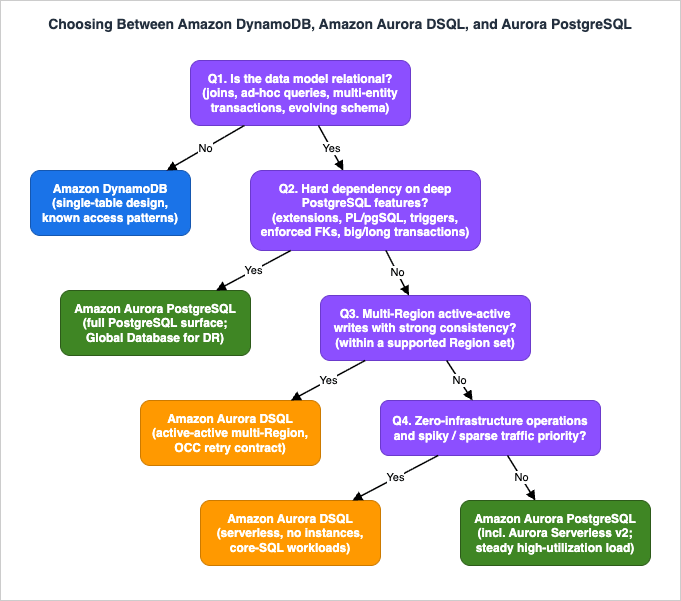
- Is the data model relational? Do you need joins, ad-hoc queries, multi-entity transactions, or an evolving normalized schema? If no — access patterns are enumerable and key-shaped — DynamoDB is the default, and its single-table design discipline applies. (Borderline workloads that are key-value today but trending relational: weigh Section 5.1.)
- Does the application depend on deep PostgreSQL features? Extensions, PL/pgSQL, triggers, temporary tables, custom types, non-REPEATABLE-READ isolation, blocking lock semantics, transactions beyond the size/duration bounds. Any hard dependency → Aurora PostgreSQL (with Global Database if you need multi-Region reads and DR). Enforced foreign keys used to belong on this line and no longer do (Section 4.2).
- Do you need multi-Region active-active writes with strong consistency? If yes — and your Region pair fits within a supported Region set — Aurora DSQL is the only one of the three that provides it. If your topology crosses continents within one logical database, none of the three offers strongly consistent active-active today; you are choosing between DSQL per continent with application-level partitioning, or DynamoDB global tables with eventual consistency.
- Is zero-infrastructure operation a priority? Spiky or sparse traffic, no appetite for instance management → Aurora DSQL (or DynamoDB if question 1 already pointed there). Steady high-utilization load with a strong DBA practice → provisioned Aurora PostgreSQL remains a deliberate, economical choice.
- Can the team adopt the OCC contract? Retry loops on
40001, chunked batch writes, async index builds and async constraint validation, and referential integrity that fails fast rather than waiting. If this contract is unacceptable to the codebase or the team, that is a vote for Aurora PostgreSQL regardless of topology desires.
Three compressed profiles:
| Profile | Choice |
|---|---|
| Known key-based access patterns, extreme scale, streams/TTL-driven design | DynamoDB |
| Relational model + multi-Region active-active and/or zero-ops, core-SQL PostgreSQL usage, team accepts OCC retries | Aurora DSQL |
| Deep PostgreSQL features, blocking lock semantics, big transactions, steady load, single-Region-plus-DR topology | Aurora PostgreSQL |
And the honest middle cases: a regional, core-SQL, spiky workload with no multi-Region requirement is a legitimate toss-up between Aurora DSQL and Aurora Serverless v2 — decide on feature depth (Section 6.2) and the pricing models. A global, conflict-tolerant, key-value workload at very large scale remains DynamoDB territory even though DSQL is multi-Region, because the data model fits and the operational envelope is proven.
Two worked walk-throughs of the tree:
- A payments ledger for a service operating in Tokyo and Osaka. Q1: relational — yes (accounts, entries, transfers; auditors ask ad-hoc questions). Q2: deep PostgreSQL dependencies — no (core SQL; the existing PL/pgSQL is thin and movable). Q3: multi-Region active-active — yes, and Tokyo/Osaka sits inside the Asia Pacific Region set. Q4-Q5: the team accepts retry-loop discipline and chunked batch postings. Result: Aurora DSQL — and notably, this workload had no good home before: DynamoDB failed Q1, Aurora PostgreSQL failed Q3.
- A geospatial asset-tracking backend. Q1: relational — yes. Q2: deep dependency — yes: PostGIS is load-bearing. Result: Aurora PostgreSQL (with Global Database if cross-Region reads/DR are needed); revisit only if extension support appears in the official documentation.
9. Common Pitfalls
- Porting a pessimistic-locking application unchanged. Code that relies on
SELECT FOR UPDATEto serialize workers, advisory locks, or "open transaction, hold it while the user edits" flows will not behave: locks do not queue, and the 5-minute transaction limit ends held-open transactions. Note thatFOR UPDATEin DSQL stopped being syntactically restricted on August 24, 2026, which makes this pitfall easier to walk into — the statement now compiles where it used to be rejected, but it still declares a commit-time conflict rather than taking a lock. Redesign around OCC: short transactions, idempotent retries, and explicit state machines for long-lived workflows. - No retry handling on
40001. The single most common migration defect. Under load, OCC conflicts are normal; without a shared retry layer, they surface as user-visible 500s. Implement retries centrally and monitor the retry rate as a health metric. - Quoting a compatibility verdict that has expired. This list moves every month. Foreign key constraints — for more than a year the most-cited blocker — became available on August 26, 2026, and identity columns,
JSONB, expression indexes, and most ofALTER TABLEall landed during 2026 as well. A "we evaluated DSQL and it did not fit" conclusion more than a couple of releases old should be re-run against the release notes before it is repeated in a design review. The mirror-image trap is just as real: now that FK constraints work, audit the ORM configuration forON DELETE CASCADEon parents with unbounded child cardinality, because cascades count against the 3,000-row transaction limit (Section 4.2). - Hot-row designs. A single counter row, a global "settings" row updated on every request, or a status row touched by every worker creates OCC conflict storms that lock-based engines would have serialized quietly. Shard counters, use append-style designs, or move high-frequency mutable state out of the contended row.
- Batch jobs that exceed transaction bounds. A one-statement UPDATE over a large table fails at 3,000 modified rows or 10 MiB. Chunk batch writes, commit per chunk, and make each chunk idempotent so retries are safe.
- Connection pools that assume immortal connections. With a 60-minute connection lifetime and IAM tokens as passwords, pools must recycle connections and regenerate tokens on reconnect. Configure max connection lifetime below 60 minutes and wire token generation into the pool's connection factory.
- Migration tooling that assumes synchronous DDL.
CREATE INDEX ASYNCplus the one-DDL-statement-per-transaction rule breaks naive migration scripts. Sequence DDL statements individually and poll async index jobs to completion before deploying dependent code. - Assuming arbitrary Region pairs. Multi-Region clusters work within a Region set (North America / Asia Pacific / Europe), and the membership of those sets has grown more than once — four Regions were added in July 2026 alone. Validate your exact Region pair and your witness Region against the current Multi-Region clusters documentation before committing the architecture, in both directions: a pairing that was unavailable last quarter may be available now.
- Treating DSQL as a drop-in cost replacement. The billing model is usage-based and structurally different from provisioned Aurora; model your workload against the official pricing page rather than assuming serverless is cheaper (or dearer) by default.
These pitfalls assume the source is already PostgreSQL. Arriving from a different engine adds schema conversion, a full load with change capture, and a cutover you can reverse on top of everything above; Heterogeneous Database Migration on AWS works through that part.
10. Frequently Asked Questions
Q1. Is Aurora DSQL a drop-in replacement for PostgreSQL?No. It is wire-compatible (standard clients and drivers connect unchanged, currently against a PostgreSQL 16 base) and core SQL is supported, but triggers, PL/pgSQL, temporary tables, custom types, extensions, synchronous index builds, and isolation levels other than REPEATABLE READ are among the differences (Section 4). Treat adoption as a compatibility audit plus an OCC redesign of contention-sensitive paths, not a connection-string change. Note that the list is shorter than it was: foreign key constraints, long the most consequential item on it, became available on August 26, 2026.
Q2. Can Aurora DSQL enforce foreign key constraints?
Yes, since August 26, 2026. Aurora DSQL supports foreign keys as column constraints (
REFERENCES) and table constraints (FOREIGN KEY (...) REFERENCES ...), with the NO ACTION, RESTRICT, CASCADE, SET NULL, and SET DEFAULT referential actions, the MATCH FULL and MATCH SIMPLE match types, and deferrable constraints. Existing tables take a constraint through ALTER TABLE ... ADD CONSTRAINT ... NOT VALID followed by ALTER TABLE ASYNC ... VALIDATE CONSTRAINT. Two caveats carry over from the architecture: enforcement is a commit-time adjudication rather than a lock, so a violated assumption surfaces as a serialization error your retry layer must handle; and DML against constrained tables performs extra reads, so benchmark before adding a constraint to a hot table (Section 4.2).Q3. How is Aurora DSQL different from DynamoDB global tables?
Both are serverless and multi-Region with multiple writable Regions. The differences: data model (relational SQL vs key-value/document), and consistency (DSQL multi-Region clusters are strongly consistent at both endpoints and reject conflicting concurrent commits; global tables in their long-standing form replicate asynchronously and resolve conflicts after the fact). If you need SQL or strict cross-Region correctness, DSQL; if you need a proven hyperscale key-value store with conflict-tolerant semantics, global tables.
Q4. Does Aurora DSQL support my PostgreSQL extensions (PostGIS, pgvector, and others)?
The current official documentation does not list support for PostgreSQL extensions. Plan as if extensions are unavailable, and verify against the current compatibility documentation before deciding — this is one of the sharpest differences from Aurora PostgreSQL, where the extension ecosystem is a first-class feature.
Q5. How does Aurora DSQL relate to Aurora Serverless v2?
Aurora Serverless v2 is classic Aurora (full PostgreSQL/MySQL engine, single-writer cluster, regional) with elastic compute capacity. Aurora DSQL is a separately branded, different architecture: no instances of any kind, OCC instead of locks, a reduced PostgreSQL surface, and multi-Region active-active. Serverless v2 scales the old architecture; DSQL replaces it. (See my Amazon Aurora timeline article for how the two lineages relate historically.)
Q6. What happens when two Regions write the same row at the same time?
One transaction commits; the other fails at commit with a serialization error (SQLSTATE
40001) and is expected to retry. Conflicts are prevented at commit time by the adjudicator layer, not resolved after the fact — there is no last-writer-wins and no reconciliation window.Q7. Is there a failover process to operate or test?
No. There is no writer instance and therefore no failover concept. In a single-Region cluster, components are redundant across three AZs. In a multi-Region cluster, each endpoint serves strongly consistent reads and writes; if one Region becomes unavailable, the witness Region's journal copy supports transactional quorum and recovery, and the surviving endpoint continues to operate.
Q8. Can I run analytics or large batch jobs on Aurora DSQL?
It is built for OLTP. The per-transaction bounds (3,000 modified rows, 10 MiB, 5 minutes) and the 128 MiB query-memory limit make it the wrong tool for heavy analytical scans or single-transaction bulk loads. Land data in chunks, and run analytics in a purpose-built analytical store fed from the operational database.
Q9. Which Regions can form a multi-Region cluster?
As of August 2026, pairs within a Region set — North America (N. Virginia, Ohio, Oregon, Canada (Central), Canada West (Calgary)), Asia Pacific (Mumbai, Osaka, Seoul, Singapore, Tokyo), or Europe (Frankfurt, Ireland, London, Paris, Spain, Stockholm) — plus a witness Region that differs from the cluster's own Region. Cross-continent clusters are not currently supported. Aurora DSQL itself is available in 20 Regions for single-Region clusters as of August 2026; because both the Region list and the Region sets have grown repeatedly, check the official Multi-Region clusters documentation for the current state.
11. Summary
Amazon Aurora DSQL fills a gap that has shaped AWS database architecture decisions for a decade: it offers the relational model and PostgreSQL wire compatibility with DynamoDB-class operations — no instances, no failover, usage-based scaling — plus a capability neither default ever had: strongly consistent, active-active multi-Region writes. The architecture that enables this (disaggregated query processors, adjudicators, journals, and storage; optimistic concurrency control; synchronized-time ordering) is also the source of its constraints: a reduced PostgreSQL surface, bounded transactions, and a mandatory retry contract.The decision discipline this article proposes: choose by data model first (relational → the SQL side; enumerable key access → DynamoDB), then test the two hard gates — PostgreSQL feature depth (Section 4's compatibility gaps decide DSQL vs Aurora PostgreSQL) and Region topology (active-active within a Region set is DSQL's unique territory) — and finally confirm the team can adopt the OCC application contract. The service is young and moving fast: 20 Regions within 15 months of GA, and a gap list that shrank far enough in 2026 to give up foreign key constraints, the item that had decided more of these evaluations than any other. Both gates therefore have a shelf life. Re-verify the compatibility pages, the release notes, and the region pages at decision time rather than inheriting a conclusion.
For the historical context that explains how AWS arrived here — and the architectural details of the systems DSQL is positioned between — see the companion articles linked throughout: the Amazon RDS, Amazon Aurora, and Amazon DynamoDB history and timeline articles, the quorum-model comparison, the DynamoDB single-table design guide, and the AWS Database Glossary.
12. References
- Amazon Aurora DSQL User Guide - What is Amazon Aurora DSQL?
- Amazon Aurora DSQL User Guide - SQL feature compatibility in Aurora DSQL
- Amazon Aurora DSQL User Guide - Supported SQL for Aurora DSQL
- Amazon Aurora DSQL User Guide - Supported data types in Aurora DSQL
- Amazon Aurora DSQL User Guide - Migrating from PostgreSQL to Aurora DSQL
- Amazon Aurora DSQL User Guide - Working with foreign key constraints in Aurora DSQL
- Amazon Aurora DSQL User Guide - CREATE TABLE
- Amazon Aurora DSQL User Guide - ALTER TABLE
- Amazon Aurora DSQL User Guide - Concurrency control in Aurora DSQL
- Amazon Aurora DSQL User Guide - Monitoring Aurora DSQL clusters with Aurora DSQL Database Insights
- Amazon Aurora DSQL User Guide - Release notes for Aurora DSQL
- Amazon Aurora DSQL User Guide - Cluster quotas and database limits in Amazon Aurora DSQL
- Amazon Aurora DSQL User Guide - Multi-Region clusters
- Amazon Aurora DSQL User Guide - Authentication and authorization for Aurora DSQL
- Amazon Aurora DSQL - Serverless distributed SQL database (product page)
- Amazon Aurora DSQL pricing
- AWS What's New - Amazon Aurora DSQL is now generally available
- AWS What's New - Amazon Aurora DSQL is now available in five additional AWS Regions
- AWS News Blog - Amazon Aurora DSQL is now generally available
- AWS Database Blog - Introducing Amazon Aurora DSQL
- AWS Database Blog - Everything you don't need to know about Amazon Aurora DSQL: Part 4 - DSQL components
- AWS Database Blog - Everything you don't need to know about Amazon Aurora DSQL: Part 5 - How the service uses clocks
Related Articles
- AWS History and Timeline regarding Amazon Aurora
The full version-by-version history of Amazon Aurora, including the storage disaggregation, Serverless, and the relationship between Aurora and Aurora DSQL. - AWS History and Timeline regarding Amazon RDS
How managed relational databases on AWS evolved from RDS through Aurora to Aurora DSQL. - AWS History and Timeline regarding Amazon DynamoDB
The history and feature evolution of DynamoDB, the other endpoint of the spectrum this article covers. - Summary of Differences and Commonalities in AWS Database Services using the Quorum Model
How classic Aurora, DocumentDB, and Neptune achieve availability with six-copy, three-AZ quorum storage - the consistency model Aurora DSQL departs from. - Amazon DynamoDB Single Table Design Complete Guide
Access-pattern-driven data modeling for DynamoDB, including the "when not to use it" signals this article contrasts with the relational model. - AWS Database Glossary
Definitions for the AWS database terminology used in this article, including Aurora DSQL itself.
References:
Tech Blog with curated related content
Written by Hidekazu Konishi