AWS Disaster Recovery Strategies Guide - Backup and Restore, Pilot Light, Warm Standby, and Multi-Site Active-Active
First Published:
Last Updated:
This guide is the resilience decision hub for that choice. It compresses the selection into an entry-level flow, then spends the bulk of its length on the mechanics that decide whether a DR plan actually works under load: how data replicates, why failover must rely on the data plane and not the control plane, how each strategy is built and promoted, how you test and measure real RTO/RPO, and an end-to-end Warm Standby across two Regions including fail-back. Database-specific high availability (Multi-AZ, read replicas, RDS Proxy, Aurora Global Database failover) and DNS-layer failover mechanics are deliberately delegated to their dedicated articles so this guide can stay focused on the DR framework itself.
Scope and cost note. The four strategies are fundamentally a trade-off between cost/complexity and recovery speed, and that trade-off is central to the whole decision. But pricing is per-Region and changes frequently, so this article describes cost qualitatively (relatively higher or lower) and links to the official pricing pages instead of quoting numbers. Every strategy definition, behavior, and limit below was checked against AWS official documentation; always confirm current quotas and behaviors for your account and Region.
1. Introduction: Disaster Recovery Is a Decision About Scope and Tolerance
Before any service or pattern, two questions frame everything: what counts as a disaster for this workload, and how much downtime and data loss can the business absorb? A "disaster" is any event that prevents the workload from functioning in its primary location — a natural disaster, a large-scale technical failure, a security event, or human error such as a bad deployment or an accidental mass deletion. The scope of the disasters you choose to survive is the single biggest driver of your strategy and its cost.The most important distinction to get right at the outset is high availability (HA) versus disaster recovery (DR). They are related but not the same:
- High availability keeps a workload running through the failure of a component or an Availability Zone within a single Region. You achieve it with redundancy: multiple AZs, Auto Scaling, multiple instances behind a load balancer, Multi-AZ databases. HA is about not going down in the first place, with little or no human action.
- Disaster recovery is how you recover the workload when something larger goes wrong — the impairment or loss of an entire Region, widespread data corruption, or a disaster whose blast radius exceeds what your in-Region redundancy was designed for. DR is defined by explicit objectives (RTO and RPO) and usually involves recovering in a different Region.
AWS states the relationship plainly in its disaster recovery whitepaper: for a disaster based on the disruption or loss of one physical data center in a well-architected, highly available workload, you may only need a Backup and Restore approach. If your definition of a disaster goes beyond a single data center to an entire Region, or if you are subject to regulatory requirements that demand it, then you should consider Pilot Light, Warm Standby, or Multi-Site Active-Active. In other words, HA across AZs handles the common case; DR across Regions handles the rare, severe case — and you only pay for cross-Region DR when your disaster definition requires it.
This article answers three questions in order:
- What RTO and RPO does the workload need? Objectives come first, because they constrain everything downstream (Section 2).
- Which strategy meets those objectives at the lowest justified cost and complexity? A compressed selection: a one-axis spectrum, an at-a-glance table, and a decision flowchart (Sections 3–4).
- How is it built, tested, and operated so it actually works? The bulk of the guide: replication and the data-plane principle, each strategy's mechanics, enabling services, observability and testing, and an end-to-end Warm Standby (Sections 5–13).
For the reliability-pillar context around these objectives, the AWS Well-Architected Practical Checklist covers where DR planning sits among the broader reliability practices. Database failover internals are covered in the Amazon RDS and Aurora High Availability Guide, and DNS-layer failover behavior in Route 53 Health Check and Failover Pitfalls.
2. RTO and RPO Fundamentals
Recovery objectives are the contract between the business and the technical team. AWS Well-Architected (REL13-BP01) defines them precisely:- Recovery Time Objective (RTO) is the maximum acceptable delay between the interruption of service and its restoration — how long can we be down?
- Recovery Point Objective (RPO) is the maximum acceptable amount of time since the last recoverable data point — how much data, measured in time, can we afford to lose?
Place a disaster at time T on a timeline. RPO is the window before T: if your last recovery point was 5 minutes before T, and the disaster destroys everything since, you lose up to 5 minutes of data — an RPO of 5 minutes. RTO is the window after T: the elapsed time from T until the workload is serving again. A workload might tolerate hours of RTO but only seconds of RPO (a system of record that must lose almost no data), or the reverse (a content site that must come back fast but whose data rarely changes). The two are independent and must be set independently.
2.1 Deriving objectives from business impact
Objectives are a business decision, not a technical one. They are derived from the impact of downtime and data loss — lost revenue, contractual penalties, regulatory exposure, reputational harm — weighed against the probability of disruption and the cost of recovery. REL13-BP01 names the recurring anti-patterns directly:- No defined objectives. Without explicit RTO/RPO, every architecture decision is unanchored and "as resilient as we can afford" becomes meaningless.
- Arbitrary or unrealistic targets. Declaring "zero RTO, zero RPO" for every workload is neither affordable nor honest; it usually means nobody did the impact analysis.
- Never testing whether the targets can be met. An RTO that has never been measured in a drill is an aspiration, not an objective.
2.2 The trade-off: objectives constrain cost and complexity
Tighter objectives cost more and add complexity, monotonically. A 24-hour RTO is satisfied by restoring from a nightly backup; a one-minute RTO requires a running, scaled environment in a second Region. This relationship is the spectrum that organizes the next section: as RTO and RPO fall, the standby environment must be more "ready," and readiness costs money and operational effort. The discipline is to pick the simplest, cheapest strategy that still meets the objectives — not the most impressive one.2.3 RPO is bounded by your replication mechanism
A crucial, frequently-missed constraint: your achievable RPO can never be better than the cadence of your data-protection mechanism. If you take backups every hour, your RPO floor is one hour, no matter what the policy document says. If you replicate continuously and asynchronously, your RPO is bounded by the replication lag — the delay between a write in the primary and its appearance in the copy. Declaring a five-second RPO while relying on hourly snapshots is incoherent. This is why Section 5 treats replication mechanics as the foundation of the whole topic: the mechanism you choose is your RPO ceiling, and the only way to know your real RPO is to measure replication lag (Section 11).3. The Four DR Strategies at a Glance
AWS organizes DR into four strategies that sit on a single spectrum from low cost / low complexity / slow recovery to high cost / high complexity / fast recovery. Two of them (Pilot Light, Warm Standby) are active/passive: an active site serves traffic while a passive site stands ready and only takes traffic on failover. Multi-Site is active/active: multiple Regions serve traffic simultaneously. The figure places them on the trade-off axis.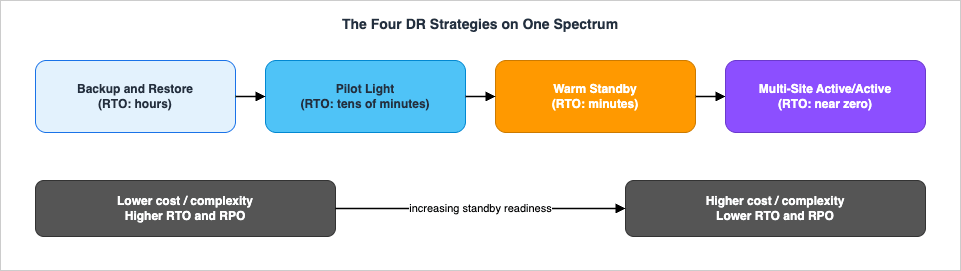
* You can sort the table by clicking on the column name.
| Strategy | Disaster scope it typically addresses | Standby readiness | RTO (relative) | RPO (relative) | Model | Cost / complexity |
|---|---|---|---|---|---|---|
| Backup and Restore | Data loss/corruption; Region (via cross-Region backup) | Nothing running; redeploy and restore on demand | Hours | Hours (backup cadence) | Passive | Lowest |
| Pilot Light | Region | Data replicated; core infra on, app tier off | Tens of minutes | Seconds–minutes (continuous replication) | Active/passive | Low–moderate |
| Warm Standby | Region | Scaled-down but fully functional, always on | Minutes | Seconds–minutes | Active/passive | Moderate–high |
| Multi-Site Active-Active | Region | Full environment serving in multiple Regions | Near zero | Near zero (async) | Active/active | Highest |
A few clarifications that matter for selection:
- Hot standby is a variant worth naming: an active/passive configuration with a full, statically stable environment in the recovery Region that does not take traffic until failover. It removes the scale-up step (and its control-plane dependency) that Warm Standby carries, at the cost of running full capacity idle. AWS notes that most customers who stand up a full second Region choose to use it active/active rather than leave it idle as hot standby.
- Data-corruption disasters always have a non-zero RPO. Replication propagates a corruption or malicious deletion to every copy almost instantly. Recovering from that class of event means restoring from a point-in-time backup taken before the corruption — so even Multi-Site Active-Active keeps backups, and its RPO for a data disaster is the age of the last clean backup, not zero.
- AZ vs Region scope. None of these four are needed to survive a single-AZ failure — that is the job of in-Region HA. The four DR strategies exist for Region-scope events and for data disasters.
4. The Decision Flowchart
The flowchart turns objectives and scope into a strategy. Walk it top to bottom; each branch narrows the field.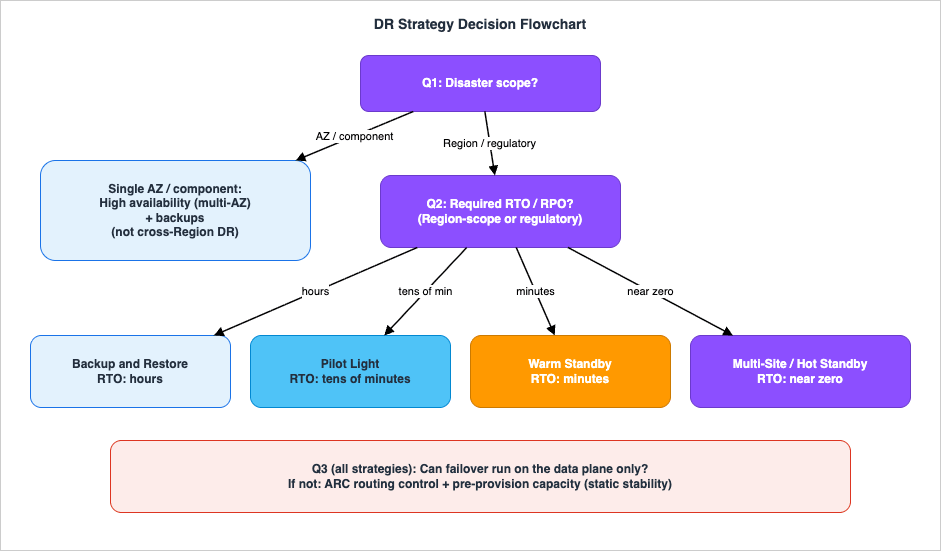
4.1 Question 1: What is the disaster scope?
- If the worst case you must survive is a single AZ or component failure, you need high availability, not cross-Region DR: multi-AZ redundancy plus backups for data protection. Cross-Region DR begins where your disaster definition reaches Region scope (or where regulation mandates a second Region). If you are at Region scope, continue.
- Regardless of scope, you also defend against data disasters (corruption, deletion) with point-in-time backups and versioning — this is orthogonal to the strategy you pick below.
4.2 Question 2: What RTO and RPO did Section 2 produce?
- Hours of RTO, and an RPO no tighter than your backup cadence are acceptable → Backup and Restore. Cheapest and simplest; you redeploy infrastructure with IaC and restore data on demand.
- Tens of minutes of RTO; you can keep core data replicated and a minimal core running → Pilot Light. Data and core infrastructure are always on; the application tier is switched on and scaled up at failover.
- Minutes of RTO; you want the recovery Region able to take traffic immediately at reduced capacity → Warm Standby. A scaled-down but functional copy runs continuously and is scaled out on failover.
- Near-zero RTO, and you want to serve from multiple Regions → Multi-Site Active-Active (or Hot Standby if you prefer active/passive with a statically stable full environment).
4.3 Question 3: Can failover be executed with data-plane operations only?
Whichever strategy you choose, validate that the act of failing over does not depend on control-plane operations that may be impaired during a Region event (Section 5). If your failover requires creating or scaling resources in the recovery Region at the moment of disaster, harden it: pre-provision capacity (move toward static stability) and shift traffic with a data-plane mechanism such as an Amazon Application Recovery Controller (ARC) routing control rather than editing DNS records by hand. This question is why Hot Standby exists as a hardening of Warm Standby.The governing principle across all three questions: choose the simplest strategy that meets the objectives, and keep the number of distinct recovery paths small — because, as Section 11 shows, the only recovery that reliably works is the one you test frequently.
5. Data Replication and the Data-Plane Principle
This section is the technical core. Every DR strategy is, underneath, a choice about how data gets to the recovery Region and how you flip traffic when the time comes. Two ideas govern both.5.1 Synchronous versus asynchronous replication
- Synchronous replication commits a write only after the copy acknowledges it. RPO is effectively zero — no acknowledged write is lost — but every write pays the round-trip latency to the copy, and an unavailable copy can stall or fail writes. Synchronous replication couples the availability of the two sites, so it is used within a Region (across AZs, where latency is low), not across distant Regions.
- Asynchronous replication acknowledges the write locally and ships it to the copy shortly after. Writes do not pay cross-site latency, but the copy trails the primary by the replication lag, and that lag is your RPO. Cross-Region replication is asynchronous by necessity (the speed of light over continental distances makes synchronous cross-Region commits impractical for most workloads).
The DR consequence is direct: cross-Region DR has a non-zero RPO equal to the replication lag at the moment of disaster. You minimize it by choosing low-lag mechanisms and you verify it by monitoring lag (Section 11) — you never assume it.
5.2 Storage replication: Amazon S3 Cross-Region Replication
For object data, Amazon S3 Cross-Region Replication (CRR) asynchronously copies objects to a bucket in the DR Region continuously, and combined with S3 Versioning lets you choose a restoration point. Two behaviors matter for DR design:- Delete-marker protection. By default, when an object is deleted in the source bucket, S3 adds a delete marker in the source only and does not replicate it. This protects the DR-Region copy from malicious or accidental deletions in the source Region — a deliberate safety property you usually want to keep.
- S3 Replication Time Control (S3 RTC) adds a predictable RPO to CRR: it replicates most objects within seconds and is designed to replicate 99.9% of objects within 15 minutes, backed by S3 Replication metrics in CloudWatch (pending bytes, replication latency, operations failing replication) and an S3 Event Notification when an object exceeds the 15-minute threshold. RTC turns "we replicate, probably" into a measurable, alarmable RPO.
Continuous replication gives the shortest RPO (near zero) but, as noted, propagates corruption and deletion; pair it with versioning and point-in-time backups.
5.3 Point-in-time backup versus continuous replication
These are complementary, not interchangeable:- Continuous replication (S3 CRR, database async replicas, block-level replication) minimizes RPO for infrastructure disasters but offers weak protection against data disasters, because the bad write replicates too.
- Point-in-time backup (snapshots, AWS Backup) protects against data disasters because you can roll back to a moment before the event, but its RPO is the backup cadence.
A complete DR posture uses both: replication for fast Region recovery, backups for clean rollback. AWS Backup centralizes backups and supports copying them cross-Region and cross-account, which matters for the next point.
5.4 The data plane / control plane principle and static stability
AWS divides every service into a data plane and a control plane:- The data plane delivers the service's real-time function — serving an S3 GET, routing a packet, answering a DNS query, running an EC2 instance that is already launched.
- The control plane configures the environment — creating, updating, scaling, and deleting resources.
The two have different availability characteristics by design: data planes are built to higher availability targets than control planes, because control planes do complex orchestration and tend to favor consistency over availability. The canonical example: Amazon Route 53's data plane for answering DNS queries is globally distributed and designed for a 100% availability SLA, while its control plane for changing DNS records runs in a single Region and is not covered by that SLA.
This yields the single most important operating rule in DR, stated by AWS in the whitepaper and in REL11-BP04: for maximum resiliency, use only data-plane operations as part of your failover operation.
The supporting principle is static stability: the data plane keeps operating on its existing state even if the control plane is impaired. Concretely:
- Don't depend on creating or scaling resources at failover time. Scaling an Auto Scaling group is a control-plane action; if the control plane is degraded during the very Region event you are failing away from, the scale-up may not happen. Pre-provisioning capacity (static stability) removes that dependency. This is exactly the Warm-Standby-vs-Hot-Standby trade-off (Section 8).
- Shift traffic with the data plane. Use ARC routing controls (highly available data-plane on/off switches) or pre-existing Route 53 failover records with health checks, rather than editing DNS or recreating infrastructure by hand during the incident.
- Treat restore as a control-plane operation. Restoring from backup is a control-plane action, so schedule periodic restores ahead of time (Section 6) — that way you already have operable data stores from a recent backup even if the restore path is unavailable during the disaster.
The lessons behind this principle — failovers that hung because they depended on a degraded control plane — are exactly the kind documented in the AWS Postmortem Case Studies and Design Lessons.
6. Backup and Restore
Backup and Restore is the lowest-cost, lowest-complexity strategy. It mitigates data loss or corruption, and it can mitigate a Region disaster by replicating backups to another Region (or a lack of redundancy for a single-AZ workload). Nothing runs in the recovery Region until you need it; you redeploy infrastructure and restore data on demand. That is why its RTO is measured in hours.6.1 You must back up more than data
A backup-and-restore plan that only backs up the database will fail at recovery, because there is nothing to restore into. You must be able to recreate the whole workload:- Infrastructure as Code (AWS CloudFormation or AWS CDK) so you can redeploy all resources reliably and repeatably into the recovery Region. Without IaC, restoring is slow and error-prone and will blow the RTO.
- Machine images. Back up EC2 instances as AMIs (created from snapshots of the root and attached EBS volumes); AMIs can be copied within or across Regions.
- Application code and configuration, with redeployment automated (for example via a CI/CD pipeline).
6.2 AWS Backup and the cross-Region / cross-account copy
AWS Backup provides a central place to configure, schedule, and monitor backups across EBS, EC2, RDS and Aurora, DynamoDB, EFS, Storage Gateway, and the FSx family, and it copies backups across Regions and across accounts. Cross-account copy is a meaningful DR control: it protects against disasters that include insider threats or account compromise, keeping a copy outside the blast radius of a single account. For EC2, AWS Backup also stores instance metadata — instance type, VPC, security group, IAM role, monitoring configuration, and tags — though that metadata is only applied when restoring to the same Region. The cross-account governance context for this lives in the AWS Multi-Account Operational Patterns.A minimal AWS Backup plan with a cross-Region copy, expressed in CloudFormation:
Resources:
  DrVault:
    Type: AWS::Backup::BackupVault
    Properties:
      BackupVaultName: primary-vault
  DrPlan:
    Type: AWS::Backup::BackupPlan
    Properties:
      BackupPlan:
        BackupPlanName: cross-region-dr
        BackupPlanRule:
          - RuleName: daily-with-dr-copy
            TargetBackupVault: !Ref DrVault
            ScheduleExpression: "cron(0 5 * * ? *)"   # daily 05:00 UTC
            Lifecycle:
              DeleteAfterDays: 35
            CopyActions:
              - DestinationBackupVaultArn: !Sub
                  "arn:aws:backup:us-west-2:${AWS::AccountId}:backup-vault:dr-vault"
                Lifecycle:
                  DeleteAfterDays: 35
CopyActions block is the DR-relevant part: each recovery point is copied to a vault in the recovery Region (here us-west-2). Selection of resources into the plan is done with an AWS::Backup::BackupSelection (by tag or ARN), kept short here.For immutability against accidental deletion, ransomware, or a malicious insider, apply AWS Backup Vault Lock to the destination vault. Governance mode still lets roles with sufficient permissions remove the lock; compliance mode is WORM — once the cooling-off period elapses, the lock cannot be removed by anyone (including the account root user), and recovery points cannot be deleted before their retention expires. A locked vault in the recovery Region keeps the DR copy tamper-proof.
6.3 Restore is a control-plane operation — so pre-stage it
AWS Backup offers restore but does not provide scheduled or automatic restore, and restore is a control-plane operation. The whitepaper's recommendation, following the data-plane principle (Section 5.4), is to automate periodic restores — for example, trigger an AWS Lambda function on backup completion (via Amazon SNS) to restore into the DR Region, or run it on a schedule. Implementing a scheduled periodic restore means that even if the restore control plane were unavailable during a disaster, you would still have operable data stores created from a recent backup. The same job doubles as your restore test (Section 11) — an unrestored backup is an unverified backup.For S3 data specifically, enable Object Versioning so the original version is retained before any deletion or modification, mitigating human-error and malicious-deletion disasters.
6.4 What drives the RTO
The RTO of Backup and Restore is dominated by two serial costs: redeploying infrastructure and restoring data. You shrink both by (1) keeping infrastructure fully expressed as IaC so redeploy is one command, (2) pre-baking AMIs and configuration so there is nothing to assemble by hand, and (3) pre-staging restores so the data is already present or restorable quickly. Done well, "hours" becomes "low single-digit hours"; done badly (manual rebuild), it becomes "days."7. Pilot Light
Pilot Light keeps the embers lit. You replicate data continuously from the primary Region to the recovery Region and provision a copy of your core infrastructure, while leaving the application tier dormant. The resources required to hold and replicate state — databases and object storage — are always on; the application servers are loaded with code and configuration but "switched off," used only during testing or at failover.7.1 "Switched off" should mean "not deployed"
A subtle best practice from the whitepaper: the most resilient interpretation of "switched off" is not deployed at all, with the configuration and automation in place to deploy ("switch on") on demand — rather than running stopped instances. Not-deployed costs nothing to run and cannot drift into a broken state; you rely on IaC to bring the tier up at failover. Either way, the defining property of Pilot Light is that core infrastructure is always available, so you can quickly provision and scale a full production environment when needed — a meaningful step up from Backup and Restore, where nothing exists in the recovery Region until you build it.7.2 Failover: switch on, deploy non-core, scale up, redirect
Because the application tier is dormant, a Pilot Light failover requires several actions before the Region can serve: turn on (deploy) the application servers, possibly deploy additional non-core infrastructure, scale the tier up to handle production load, and redirect traffic. That sequence is why Pilot Light's RTO is tens of minutes rather than minutes — there is real work to do at failover, even though the data and core are ready.7.3 AWS Elastic Disaster Recovery as the engine
For server-based workloads, AWS Elastic Disaster Recovery (AWS DRS) implements a Pilot-Light-like posture automatically. DRS continuously replicates block-storage volumes from source servers — on-premises, virtual, other clouds, or EC2 — into a low-cost staging area in the target Region that uses inexpensive storage and minimal compute. At failover it launches fully provisioned recovery instances in minutes, converting servers to run natively on AWS, and it supports non-disruptive drills and failback. This delivers RPOs measured in seconds and RTOs measured in minutes.One scoping fact that ties back to Section 5.4: DRS performs the recovery (launching instances), but the failover of traffic — redirecting users to the recovery Region — is handled outside DRS, via DNS or traffic-management services such as Route 53, ARC, or AWS Global Accelerator. DRS gets your servers running again; you still own the data-plane traffic shift.
8. Warm Standby
Warm Standby extends Pilot Light by keeping a scaled-down but fully functional copy of the production environment always running in the recovery Region. Because the workload is always on, recovery is faster and continuous testing is easier — you can send synthetic or even a slice of real traffic to the standby to keep confidence high.8.1 The official distinction from Pilot Light
The difference between Pilot Light and Warm Standby is easy to blur. AWS draws it sharply: both keep copies of primary-Region assets in the recovery Region, but Pilot Light cannot process requests without additional action first, whereas Warm Standby can handle traffic (at reduced capacity) immediately. Pilot Light requires you to turn on servers, possibly deploy non-core infrastructure, and scale up; Warm Standby requires only that you scale up — everything is already deployed and running. Use your RTO/RPO to choose between them: Warm Standby buys a lower RTO at a higher steady-state cost.8.2 Promotion is a scale-out
Failing over to a Warm Standby is fundamentally a scale-out of the already-running environment to full production capacity. AWS EC2 Auto Scaling scales EC2 instances (raise the Auto Scaling group's desired capacity), and the same idea applies to ECS task counts, DynamoDB throughput, and Aurora replicas. You can change desired capacity through the console, the SDK, or by redeploying a CloudFormation template with a new parameter value. A failover scale-out via the CLI is as direct as:aws autoscaling set-desired-capacity \
--region us-west-2 \
--auto-scaling-group-name app-tier-dr \
--desired-capacity 12 \
--honor-cooldown8.3 The control-plane dependency you are accepting
Here is the trade-off the data-plane principle (Section 5.4) puts front and center: Auto Scaling is a control-plane activity, so making your failover depend on scaling up lowers the resiliency of the recovery itself. The whitepaper spells out the options:- Accept the dependency and provision fewer resources, scaling up at failover — cheaper steady state, but you depend on the control plane working during the disaster.
- Provision enough to handle the full production load already — a statically stable configuration. That is Hot Standby: no scale-up needed, no control-plane dependency at failover, at the cost of running full capacity continuously.
- Split the difference: provision enough to absorb the initial traffic (ensuring a low RTO for the first wave), then rely on Auto Scaling to ramp for subsequent load.
Whichever you choose, make sure your Service Quotas in the recovery Region are high enough to scale to full production capacity. A failover that is throttled by an un-raised quota in the DR Region is a classic, avoidable failure (Section 13).
9. Multi-Site Active-Active and Hot Standby
At the top of the spectrum, you run the workload simultaneously in multiple Regions. Multi-Site Active-Active serves traffic from all Regions it is deployed to; Hot Standby is the active/passive cousin that runs a full environment in the recovery Region but serves from only one. Multi-Site is the most complex and costly approach, and it can reduce recovery time to near zero for most disasters — with one important exception below.9.1 There is no "failover" in active/active
When the workload already runs in more than one Region, there is no failover event to execute; users simply continue to be served by the surviving Regions. DR testing therefore changes shape: instead of practicing a failover, you test how the system reacts to losing a Region — is traffic routed away from the failed Region, and can the remaining Region(s) absorb the full load? (If they cannot, you did not actually have a working DR posture, just a more expensive one.) Backup and recovery for data disasters are still required and still tested.9.2 The hard part is data consistency
Routing traffic to multiple Regions is the easy half; keeping data consistent across them is the hard half. The standard pattern is read local (serve reads from the nearest Region) combined with one of three write strategies:- Write global. Route all writes to one Region; promote another Region if it fails. Amazon Aurora Global Database fits this model — it replicates to secondary Regions with typically sub-second latency and lets you promote a secondary to read/write quickly, and it supports write forwarding from secondaries to the primary. (Database internals are delegated to the Amazon RDS and Aurora High Availability Guide.)
- Write local. Accept writes in every Region. Amazon DynamoDB global tables enable this, replicating across Regions with a last-writer-wins reconciliation for concurrent updates — simple and highly available, but you must design around the possibility that concurrent conflicting writes resolve by timestamp rather than by business rule.
- Write partitioned. Assign each write to a specific Region by a partition key (such as user ID) to avoid conflicts. S3 replication configured bidirectionally supports this between two Regions; enable replica modification sync on both buckets and decide explicitly whether to replicate delete markers.
Across all of these, asynchronous replication means a near-zero but non-zero RPO, and — critically — a data-corruption event still requires restoring from a point-in-time backup taken before the event. Multi-Site removes infrastructure-failover time; it does not make data disasters free.
9.3 Traffic distribution and consistent deployment
Traffic across active Regions is steered with Amazon Route 53 (latency, geoproximity, weighted, or failover routing) or AWS Global Accelerator (which onboards traffic to the AWS backbone at the edge and offers a traffic dial to control the percentage sent to each endpoint group). Keeping the multiple Regions configuration-identical is itself a challenge; AWS CloudFormation StackSets deploys and updates stacks across many accounts and Regions in one operation, which is how you prevent the Regions from drifting apart (Section 11).A pragmatic note from AWS: most customers who are willing to stand up a full second Region find it makes sense to use it active/active rather than leave it idle. If you do not want both Regions taking user traffic, Warm Standby is usually the more economical and operationally simpler choice than Hot Standby.
10. Enabling Services and Building Blocks
The strategies above are assembled from a consistent set of AWS building blocks. This section maps them; the database-specific blocks are delegated to the RDS/Aurora guide, and the DNS-specific blocks to the Route 53 material.- AWS Backup — centralized backup scheduling and monitoring across many services, with cross-Region and cross-account copy. The foundation of Backup and Restore and the data-protection layer of every other strategy.
- AWS Elastic Disaster Recovery (AWS DRS) — continuous block-level replication of whole servers (on-premises, other clouds, or EC2) into a low-cost staging area, with rapid launch of recovery instances and non-disruptive drills. The engine for server-based Pilot Light / Warm Standby.
- Amazon Application Recovery Controller (ARC) — formerly Route 53 Application Recovery Controller. ARC is the failover-control layer and has several capabilities:
- Routing controls are highly available data-plane on/off switches, hosted on an ARC cluster, that integrate with Route 53 health checks to reroute traffic across AZs or Regions. Flipping a routing control is a data-plane operation — exactly what Section 5.4 prescribes.
- Safety rules prevent a routing-control change from causing an unintended outcome. Assertion rules enforce a condition during state changes (for example, "at least one routing control must remain On" so you cannot accidentally black-hole all traffic); gating rules act as an on/off switch governing changes to a group of routing controls.
- Recovery readiness continuously models your application as recovery groups, cells, resource sets, and readiness checks, and evaluates every minute whether the replicas across Regions/AZs are scaled and configured to handle failover traffic. (AWS has since closed recovery readiness to new customers — existing users keep it, but new deployments should rely on Region switch's built-in plan evaluation, below, for the equivalent readiness signal.)
- Region switch orchestrates a planned, multi-step switchover of a multi-Region application from one Region to another through recovery plans (workflows of steps and execution blocks, which can be nested); it re-evaluates each plan roughly every 30 minutes for permission, resource, and capacity issues, and tracks actual recovery time against your RTO. The plan structure, the graceful and ungraceful modes, and what a passing plan evaluation does not guarantee are worked through in Orchestrating Regional Failover with Amazon Application Recovery Controller Region Switch.
- Zonal shift / zonal autoshift temporarily move traffic away from an impaired Availability Zone for supported resources (Application/Network Load Balancers, EC2 Auto Scaling, EKS) — the AZ-scope counterpart to Region failover.
- Note an operational constraint: ARC recovery-control configuration and readiness resources are created in the US West (Oregon) Region, while routing-control state updates use highly available Regional data-plane endpoints.
- Amazon Route 53 failover routing and health checks — DNS-layer failover that directs clients to a healthy endpoint. The deep treatment of health-check design and its failure modes is delegated to Route 53 Health Check and Failover Pitfalls and the Amazon Route 53 DNS Architecture Guide.
- AWS Global Accelerator — anycast static IPs with a traffic dial and fast Region-level failover, an alternative or complement to Route 53 for steering traffic.
- AWS Resilience Hub — models an application, defines a resiliency policy with RTO/RPO targets, runs assessments that compare estimated achievable resiliency against the targets, and produces a resiliency score, drift detection, and recommendations (alarms, SOPs, tests) across disruption types (application, infrastructure, AZ, Region). It is how you continuously validate whether you are likely to meet your objectives, via
StartAppAssessment/DescribeAppAssessment. - AWS Config + Systems Manager Automation + CloudFormation drift detection — the toolset for managing configuration drift at the DR site (Section 11).
- Database DR building blocks (Multi-AZ, read replicas, RDS Proxy, Aurora Global Database) — delegated in full to the Amazon RDS and Aurora High Availability Guide; this guide uses them only as the RPO mechanism inside a strategy.
The through-line connecting these is the data-plane principle: prefer building blocks whose failover action is a data-plane operation (ARC routing controls, pre-existing Route 53 records, already-running capacity) over those that require control-plane work at the moment of disaster.
11. Observability, Testing, and Diagnostics
A DR strategy that has never been exercised is a hypothesis. This section is about turning it into a measured, operable capability — the operational core.11.1 Test the recovery path, and keep the number of paths small
AWS is blunt about this in the whitepaper: the only error recovery that works is the path you test frequently. A pattern to avoid is developing recovery paths that are rarely executed — the secondary you assume can take the load may have quietly lost the capacity or the Service Quota to do so since you last looked. Two consequences follow:- Keep a small number of recovery paths. Fewer, well-trodden paths are more reliable than many bespoke ones. This is also why Section 4 insists on choosing the simplest strategy that meets the objectives.
- Exercise critical paths in production, regularly — a game day. Run the actual failure (or a close, controlled approximation) and watch the system recover. The triage discipline for what to do when a drill surfaces a problem is in Incident Triage Flowcharts for Network, Database, and Application.
11.2 Measure real RTO and RPO
Objectives are only real if you measure them:- RTO is measured by timing a drill end to end: from the simulated disaster to the moment the workload serves correctly from the recovery Region. Break the timeline down and look specifically for control-plane steps (scale-up, restore, resource creation) that inflate it — those are your optimization and hardening targets.
- RPO is measured by monitoring replication lag against the target: S3 Replication metrics (and the RTC 15-minute event notification), DynamoDB global tables replication latency, and the Aurora Global Database replication-lag / RPO metrics. If measured lag exceeds the policy RPO, the policy is fiction until you fix the mechanism or the target.
AWS Resilience Hub automates much of this judgment: it estimates whether each application component meets its RTO/RPO policy targets across disruption types, scores resiliency, and flags drift — a continuous check that complements live drills.
11.3 Validate readiness continuously
Between drills, readiness checks watch for the silent regressions that break a failover:- ARC recovery readiness evaluates every minute whether replicas are scaled and configured symmetrically across Regions/AZs (for new deployments, ARC Region switch's plan evaluation provides the same continuous-readiness check).
- Resilience Hub assessments re-run after each application version to confirm the design still meets targets.
11.4 Manage configuration drift at the DR Region (REL13-BP04)
A recovery Region quietly diverges from production over time — stale AMIs, outdated Service Quotas, missing configuration. The whitepaper's guidance:- Use AWS Config to continuously monitor and record resource configurations; it can detect drift and trigger AWS Systems Manager Automation to fix it and raise alarms.
- Use CloudFormation drift detection to catch drift in deployed stacks.
- Explicitly check that AMIs and Service Quotas are current in the DR Region.
11.5 Automate recovery (REL13-BP05)
Manual failover steps are slow and error-prone under pressure, and they often are the control-plane dependencies you should be removing. Encode the failover as runbooks/SOPs and, where possible, as automation: ARC routing-control flips, pre-built restore Lambdas, and IaC redeploys. The goal is a failover that a small set of data-plane actions can trigger, not a long manual checklist.11.6 Common diagnostic signatures
When a drill or a real event goes wrong, the cause is usually one of a short list: a failover that hangs because it depends on a degraded control plane; a scale-up throttled by an un-raised Service Quota; measured replication lag exceeding RPO; or a backup that will not restore. Each maps directly to a pitfall in Section 13.12. End-to-End Architecture Walkthrough: Warm Standby Across Two Regions
This section ties everything together in one realistic build. The goal: a single workload — an internet-facing web/application tier over a relational database and object storage — surviving the loss of its primary Region with an RTO in minutes and an RPO in seconds, using Warm Standby.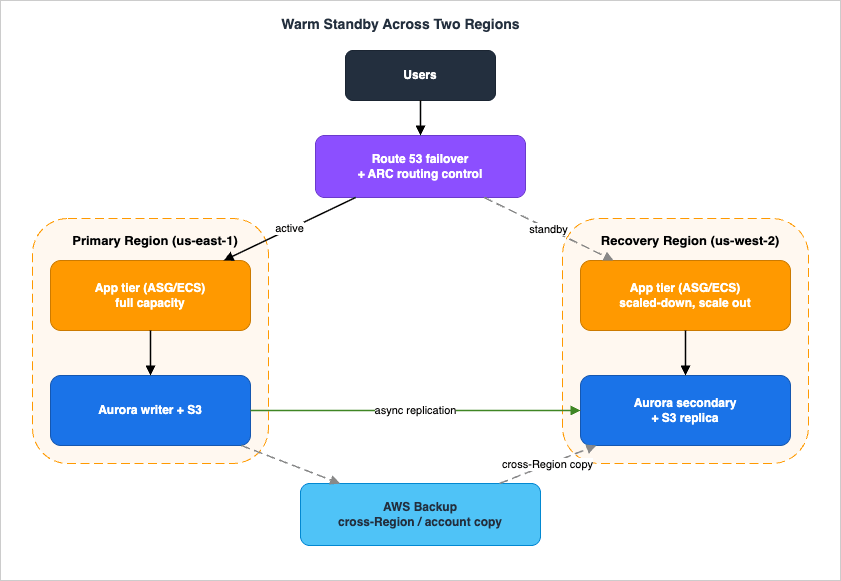
12.1 The topology
- Primary Region (e.g., us-east-1) runs the full production stack: an Application Load Balancer in front of an Auto Scaling group (or ECS service), an Aurora cluster as the writer, and an S3 bucket for object data. The workload is also multi-AZ here, so AZ failures are handled by HA without invoking DR.
- Recovery Region (e.g., us-west-2) runs a scaled-down but fully functional copy of the same stack — the same ALB + ASG + Aurora topology, deployed by the same CloudFormation StackSet so the two Regions cannot drift apart, but with a smaller desired capacity.
- The Region pair is illustrative; choose Regions by latency, data-residency, and quota considerations.
12.2 Data replication (the RPO mechanism)
- Database: an Aurora Global Database with the writer in the primary Region and a secondary cluster in the recovery Region, replicating asynchronously with typically sub-second lag. This is the dominant RPO contributor; its lag is monitored against the RPO target (Section 11.2). Database failover mechanics are delegated to the RDS/Aurora guide.
- Objects: S3 Cross-Region Replication (with S3 RTC) from the primary bucket to the recovery bucket, giving a measurable object RPO and CloudWatch replication metrics. Delete markers are not replicated, protecting the recovery copy from source-side deletions.
- Backups: AWS Backup runs in the primary Region with a cross-Region (and ideally cross-account) copy, providing the point-in-time rollback that replication cannot — the defense against data corruption.
12.3 Traffic and failover control (the data plane)
- An ARC cluster hosts a routing control for the workload; Route 53 failover records with health checks are associated so that the routing-control state — not a manual DNS edit — decides which Region receives traffic.
- A safety rule (assertion: at least one routing control must remain On) prevents an operator from accidentally directing traffic to neither Region.
- ARC recovery readiness continuously checks that the recovery Region is scaled and configured to take over.
12.4 The failover sequence (data-plane first)
When monitoring (health checks and CloudWatch alarms) indicates the primary Region is impaired:- Shift traffic by flipping the ARC routing control — a data-plane operation. Route 53 begins resolving the workload's records to the recovery Region. This is deliberately first: it is the highest-availability action and immediately stops sending users into the failed Region.
- Promote the database. Promote the Aurora Global Database secondary in the recovery Region to a standalone writer. In a planned drill this is a managed, low-RPO operation; in a real Region loss it is an unplanned promotion, and the RPO equals the replication lag at the moment of failure (seconds). Mechanics are delegated to the RDS/Aurora guide.
- Scale out the recovery Region's application tier to full production capacity by raising the Auto Scaling group's desired capacity (Section 8.2). Because the tier is already running at reduced capacity, the workload is already serving during this step; the scale-out is the one control-plane dependency, mitigated by pre-raised Service Quotas in the recovery Region.
- Validate with synthetic canaries and health checks that the recovery Region is serving correctly at full capacity.
The RTO is dominated by steps 2 and 3; because the environment is warm, it is minutes, not the tens of minutes a Pilot Light would need to also deploy and switch on the tier. If even that is too slow, hardening to Hot Standby (pre-provisioned full capacity, removing step 3's control-plane dependency) trades steady-state cost for a near-zero-action failover.
12.5 Fail-back
Returning to the primary Region after it recovers is a controlled, reverse operation — never a rushed flip back:- Re-establish replication from the now-authoritative recovery Region back to the restored primary (reverse the Aurora/S3 replication direction), and let it catch up. Verify lag is within RPO before proceeding.
- Reconcile and verify data integrity, and confirm the primary Region is fully redeployed and current (no configuration drift) via the StackSet and drift detection.
- Cut back during a low-traffic window by flipping the ARC routing control to the primary, then demote the temporary writer. Scale the recovery Region back down to its warm baseline.
12.6 What to watch throughout
ARC readiness (is the standby ready?), Aurora and S3 replication lag (is RPO being met?), ALB/ASG health and capacity (did the scale-out succeed within quota?), Resilience Hub assessment (does the design still meet targets?), and CloudWatch alarms on all of the above. These observation points are what turn the runbook from a document into a measured, trustworthy capability.13. Common Pitfalls
Each pitfall below is a recurring way DR plans fail in practice, mapped to its root cause and fix.- Never actually drilling DR. The plan exists on paper but the recovery path has never been executed, so its assumptions (capacity, quotas, configuration) silently rot. Fix: schedule regular game days and measure real RTO/RPO (Section 11.1).
- Unverified restores. Backups run, but no one has confirmed they restore — and restore is a control-plane operation that may be unavailable when you need it. Fix: automate periodic restores that double as tests; pre-stage data in the DR Region (Section 6.3).
- Control-plane-dependent failover. The failover depends on creating or scaling resources during the very Region event it is escaping, and the degraded control plane stalls it. Fix: shift traffic with data-plane controls (ARC routing controls), and move toward static stability (pre-provisioned capacity) for the failover path (Section 5.4).
- RPO / replication-lag mismatch. The policy promises a tighter RPO than the replication mechanism can deliver, or lag is never monitored, so the true RPO is unknown. Fix: measure lag against the target continuously and reconcile the policy with reality (Sections 2.3, 11.2).
- "Multi-Site means we're safe" overconfidence. Active/active removes infrastructure-failover time but replicates corruption and deletion instantly to every Region. Fix: keep point-in-time backups and versioning; a data disaster's RPO is the age of the last clean backup, not zero (Sections 3, 9.2).
- DR-Region quota throttling and stale images. Failover scale-up is throttled because Service Quotas in the recovery Region were never raised, or recovery uses stale AMIs. Fix: pre-raise quotas to full production capacity and keep AMIs current; manage drift with AWS Config and CloudFormation drift detection (Sections 8.3, 11.4).
- Too many bespoke recovery paths. Every special case is its own untested procedure. Fix: consolidate to a small number of well-tested paths (Section 11.1).
14. Frequently Asked Questions
Q. How do I choose between Pilot Light and Warm Standby?A. By RTO, and by how much steady-state cost you will pay for it. Both keep data replicated and assets in the recovery Region, but Pilot Light keeps only the core running with the application tier switched off — so failover must turn on servers, possibly deploy non-core infrastructure, and scale up (RTO in tens of minutes). Warm Standby keeps a scaled-down but fully functional copy running, so failover only has to scale out (RTO in minutes), at a higher always-on cost. If you need the recovery Region to take traffic immediately, choose Warm Standby; if a longer RTO is acceptable and you want to pay less, choose Pilot Light.
Q. What is the difference between high availability and disaster recovery?
A. High availability keeps a workload running through component or Availability Zone failure within a Region, using redundancy and automatic mechanisms, with little or no downtime. Disaster recovery is how you recover the workload after a larger disaster — Region impairment, data corruption — usually in a different Region, against explicit RTO and RPO objectives. AWS guidance: a single data-center (AZ) loss in a well-architected HA workload may need only Backup and Restore; Region-scope disasters (or regulation) are what justify Pilot Light, Warm Standby, or Multi-Site.
Q. How often should I test DR?
A. Regularly and frequently — "the only error recovery that works is the path you test frequently." Run game days that exercise the real failover, measure actual RTO and RPO each time, and manage configuration drift between tests with AWS Config and CloudFormation drift detection. Keep the number of distinct recovery paths small so each one is exercised often.
Q. Do I actually need multi-Region DR?
A. Only if your disaster definition includes Region-scope events, or regulation requires it. For many workloads, in-Region high availability plus cross-Region backups (Backup and Restore) is sufficient and far cheaper. Let RTO/RPO drive the decision: multi-Region active/active is the highest-cost, lowest-RTO end of the spectrum, justified when near-zero recovery time is a genuine business requirement, not a default.
Q. Doesn't continuous replication alone protect my data?
A. No. Continuous replication protects against infrastructure disasters (it makes a near-current copy available elsewhere), but it faithfully replicates data disasters too — a corruption or accidental deletion propagates to every copy almost immediately. Protection against data disasters requires point-in-time backups (and S3 versioning) you can roll back to a moment before the event. Use both: replication for Region recovery, backups for clean rollback.
15. Summary
Disaster recovery comes down to an ordered set of decisions:- Set RTO and RPO from business impact — objectives first, because they constrain everything, and because an untested objective is only an aspiration.
- Match the disaster scope — AZ-level failures are HA's job; cross-Region DR begins at Region scope or where regulation requires it, and data disasters need backups regardless of strategy.
- Pick the simplest strategy that meets the objectives — Backup and Restore (hours), Pilot Light (tens of minutes), Warm Standby (minutes), Multi-Site Active-Active or Hot Standby (near zero) — moving up the spectrum only as far as the objectives demand, because cost and complexity rise with readiness.
- Build the failover on the data plane, not the control plane — replicate appropriately, pre-provision toward static stability, and shift traffic with ARC routing controls or pre-existing Route 53 records rather than control-plane actions during the disaster.
- Test relentlessly and measure — exercise a small number of recovery paths in regular game days, measure real RTO/RPO, manage drift, and automate recovery.
The Warm Standby walkthrough in Section 12 shows the whole pattern in one build, including fail-back. For the per-domain depth this guide delegates, continue with the Amazon RDS and Aurora High Availability Guide for database failover, Route 53 Health Check and Failover Pitfalls and the Amazon Route 53 DNS Architecture Guide for DNS failover, the AWS Well-Architected Practical Checklist for the reliability-pillar context, AWS Multi-Account Operational Patterns for cross-account DR governance, and the AWS Postmortem Case Studies and Design Lessons and Incident Triage Flowcharts for the operational discipline that DR depends on.
16. References
- Disaster recovery options in the cloud - Disaster Recovery of Workloads on AWS (Whitepaper)
- Testing disaster recovery - Disaster Recovery of Workloads on AWS (Whitepaper)
- REL 13. How do you plan for disaster recovery (DR)? - AWS Well-Architected Framework
- REL11-BP04 Rely on the data plane and not the control plane during recovery - AWS Well-Architected
- Control plane and data plane - Reducing the Scope of Impact with Cell-Based Architecture
- What is AWS Elastic Disaster Recovery? - AWS DRS User Guide
- What is AWS Backup? - AWS Backup Developer Guide
- What is Amazon Application Recovery Controller (ARC)?
- Meeting compliance requirements with S3 Replication Time Control - Amazon S3
- What is AWS Resilience Hub?
- Using Amazon Aurora Global Database - Amazon Aurora User Guide
- Global tables - multi-Region replication for Amazon DynamoDB
- Choosing a routing policy - Amazon Route 53 Developer Guide
- Disaster Recovery (DR) Architecture on AWS, Part I: Strategies for Recovery in the Cloud
- Disaster Recovery (DR) Architecture on AWS, Part III: Pilot Light and Warm Standby
- Disaster Recovery (DR) Architecture on AWS, Part IV: Multi-site Active/Active
Related Articles
- Amazon RDS and Aurora High Availability Guide - Multi-AZ, Read Replicas, RDS Proxy, and Global Database Failover
The paired deep dive on database high availability and failover — the delegation target for the database mechanics referenced throughout this guide. - Route 53 Health Check and Failover Pitfalls
DNS-layer failover behavior, health-check design, and the failure modes that break automated failover. - AWS Well-Architected Practical Checklist
The reliability-pillar context for DR planning (REL11, REL13) among the broader best practices. - AWS Multi-Account Operational Patterns
Cross-account governance for cross-account backups and multi-account DR. - AWS Postmortem Case Studies and Design Lessons
Real-world lessons behind the data-plane failover principle and recovery design. - Incident Triage Flowcharts for Network, Database, and Application
The triage discipline for diagnosing failures surfaced during DR drills and real events.
References:
Tech Blog with curated related content
Written by Hidekazu Konishi