Amazon Route 53 DNS Architecture Guide - Routing Policies, Resolver, Private Hosted Zones, and Hybrid DNS
First Published:
Last Updated:
www.example.com from the public internet is the same service that resolves db.internal inside a VPC, forwards corp.example.com to an on-premises domain controller, and blocks a query to a malware command-and-control domain — and the design choices for those jobs are different.This guide treats Route 53 as a DNS architecture, not a record editor. It is the parent article for DNS design on AWS: where a routing policy is the right answer, how the VPC Resolver actually evaluates a name, how inbound and outbound Resolver endpoints make on-premises and AWS resolve each other's names, and how Route 53 Profiles let you manage all of that across an organization. The operational mechanics of health checks and DNS failover — the consensus rule, calculated checks, TTL caching traps, and failover testing — are owned by a dedicated companion article and are delegated there rather than repeated here.
Route 53 plays three distinct roles, and almost every design question is really a question about which role you are configuring:
- Authoritative DNS — it hosts your zones (public and private) and answers queries for the names you own.
- Traffic management — routing policies and Traffic Flow decide which answer a given client receives.
- Recursive resolution — the Route 53 Resolver inside every VPC, plus Resolver endpoints and rules, resolves names for your workloads, including across the hybrid boundary.
The sections below follow that arc: fundamentals and records, a compressed routing-policy decision, then the depth — routing-policy internals, public versus private zones, the VPC resolution path, DNS Firewall, Route 53 Profiles, DNSSEC, observability, and a full hybrid architecture walkthrough.
Scope note. This is a DNS architecture guide. Hands-on email-record setup (DKIM, SPF, DMARC) is delegated to the SES and Route 53 record-setup article, term-by-term definitions to the AWS Networking Glossary, and the chronological history of the service to the Route 53 history and timeline. Pricing is intentionally absent — query-tier and hosted-zone charges change, so this guide describes what is billed in principle and links to official pricing rather than quoting numbers.
1. Three Jobs of Route 53, and Why They Get Confused
The single most useful thing you can do before designing DNS on AWS is to separate the three jobs, because they live in different parts of the console and obey different rules.Authoritative DNS is Route 53 acting as the source of truth for a domain. When someone on the internet asks "what is the address of
www.example.com?", that query eventually reaches the four authoritative name servers that Route 53 assigned to your public hosted zone, and they return the answer you configured. Authoritative DNS does not "look anything up"; it answers from the records you stored.Recursive resolution is the opposite direction. When an EC2 instance asks "what is
s3.amazonaws.com?", something has to walk the DNS hierarchy on the instance's behalf — ask the root, then .com, then amazonaws.com — and return the result. Inside a VPC, that recursive resolver is the Route 53 Resolver, reachable at the VPC's base-of-CIDR-plus-two address (often written .2) and at the link-local 169.254.169.253. It was historically just "the VPC DNS server"; AWS later gave it the official name Route 53 Resolver and exposed it as a configurable service with endpoints and rules.Traffic management sits on top of authoritative DNS. Once you own the answer, routing policies let you give different clients different answers — by weight, by latency, by geography, by health. Traffic Flow is the visual policy editor that composes these into a single record.
The confusion that causes real incidents is treating these as one thing. "DNS isn't working in my VPC" is almost never an authoritative-DNS problem; it is a resolution-path problem (a missing private hosted zone association, a Resolver rule that does not match, or DNS attributes disabled on the VPC). "Users in Asia hit the US endpoint" is not a resolver problem; it is a routing-policy choice. Keeping the three jobs separate in your head is what lets you go straight to the right part of the service.
2. DNS Fundamentals on AWS — Zones, Records, and the Alias Extension
2.1 Hosted zones: public and private
A hosted zone is a container for the records of one domain (such asexample.com) and the subdomains under it. There are two kinds, and the difference is who can resolve the names:- A public hosted zone is answered by Route 53's internet-facing authoritative name servers. When you create one, Route 53 assigns a delegation set of four name servers; you make the zone authoritative by setting those name servers at your domain registrar.
- A private hosted zone (PHZ) is answered only inside the VPCs you associate it with (and, by extension, from on-premises networks that reach the VPC Resolver through an inbound endpoint). The same name —
example.com— can exist in both a public and a private hosted zone, returning different answers to internet clients and to in-VPC clients. That is split-horizon (or split-view) DNS, and it is one of the most useful and most misunderstood patterns on AWS; Section 5 covers it in depth.
2.2 Records, and the problem alias records solve
Standard DNS record types (A, AAAA, CNAME, MX, TXT, NS, SOA, SRV, CAA, and so on) behave on Route 53 exactly as the RFCs define them. The interesting AWS-specific behavior is the alias record, a Route 53 extension that exists because standard DNS has a hard limitation at the zone apex.RFC 1034 forbids a CNAME at the apex of a zone (you cannot put a CNAME on
example.com itself, because the apex must carry the zone's SOA and NS records, and a CNAME may not coexist with other records). But the apex is exactly where you want to point your root domain at a CloudFront distribution, an Application Load Balancer, or an S3 website endpoint — none of which give you a stable IP address.An alias record resolves this. Key behaviors, all of which matter when you design:
- An alias can sit at the zone apex, where a CNAME cannot.
- An alias can target a set of AWS resources (CloudFront, ELB, S3 website endpoints, API Gateway, VPC interface endpoints, AWS Global Accelerator, and others) and other records in the same hosted zone.
- You cannot set a custom TTL on an alias to an AWS resource or same-zone record; Route 53 uses the target's own TTL. This is a frequent source of "my TTL change didn't take effect" confusion.
- Route 53 automatically tracks IP-address changes in the aliased resource, so you never chase a moving load balancer address.
- Because an alias can point at another record in the same zone, you can layer routing policies: an apex alias can point to a record that itself uses latency or weighted routing, which is the mechanism behind controlled multi-Region migrations.
Choosing between alias and a CNAME is therefore not stylistic. Apex → alias. AWS resource you want IP-tracked → alias. A third-party host you want a literal CNAME to → CNAME (with a real TTL you control). The official "Choosing between alias and non-alias records" page is the authority on the target list.
3. Choosing a Routing Policy (the Compressed Decision)
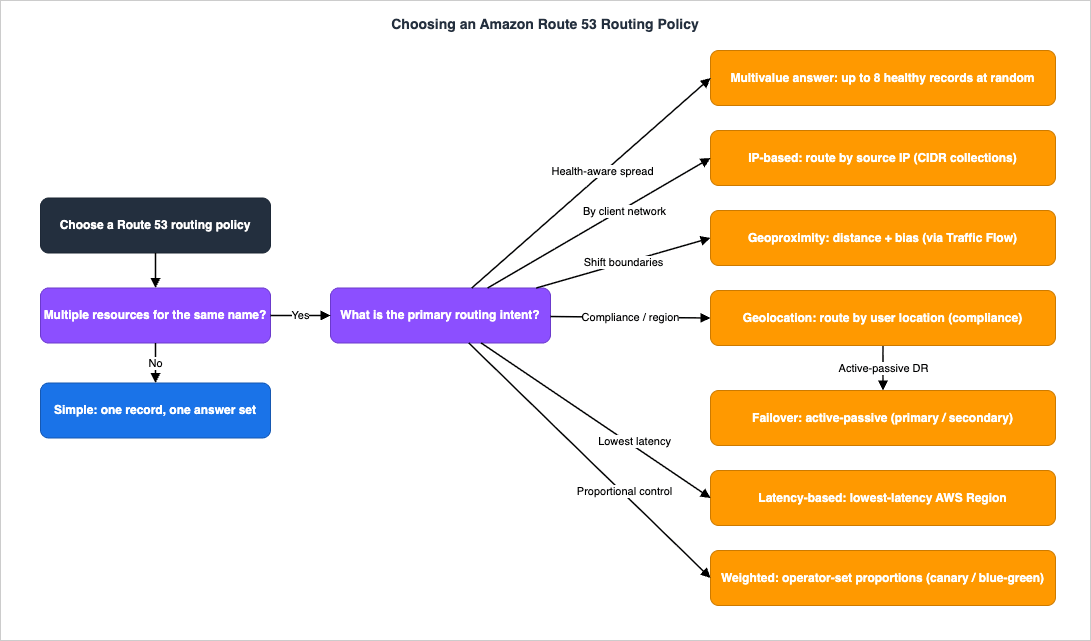
Route 53 offers eight routing policies. This section compresses the selection into one table and one flowchart; the internals of how each one behaves are the Level 300 material in Section 4. The names below are the official ones — do not invent variants.* You can sort the table by clicking on the column name.
| Routing policy | What it routes on | Health-check aware | Typical use |
|---|---|---|---|
| Simple | Nothing (one record, one answer set) | No | A single resource; static record |
| Weighted | Operator-set proportions | Yes | Blue/green, canary, A/B, gradual shift |
| Latency-based | Lowest network latency to an AWS Region | Yes | Multi-Region apps optimizing speed |
| Failover | Primary/secondary health | Yes | Active-passive DR for one endpoint |
| Geolocation | Location of the user | Yes | Compliance, localization, geo-blocking |
| Geoproximity | Distance between user and resource, with bias | Yes | Shift traffic gradually between Regions |
| IP-based | The user's source IP (CIDR collections) | Yes | Route by ISP/known client networks |
| Multivalue answer | Returns up to eight healthy records at random | Yes | Simple health-aware spreading (not a load balancer) |
The decision usually collapses to a few questions: Is there only one resource? → Simple. Do you want proportional control for a release? → Weighted. Is the goal lowest latency across Regions? → Latency-based (or Geoproximity if you want to tune the boundaries). Is this active-passive DR? → Failover. Is the requirement legal/regional? → Geolocation. Do you route by client network identity? → IP-based. The flowchart below encodes this.
4. Routing Policy Internals
Selection is the easy part. The reason DNS routing surprises people is that the policies make decisions from data you cannot see — latency tables, EDNS0 client subnets, geographic boundaries — and on a cache horizon measured in the record's TTL. This section explains how each one actually decides.4.1 How Route 53 estimates where a user is
Geolocation, geoproximity, latency-based, and IP-based all need to know something about the querying user, but Route 53 almost never sees the user directly. It sees the user's recursive resolver (their ISP's or their corporate resolver). To do better than "where is the resolver," Route 53 uses EDNS0 Client Subnet (ECS): cooperating resolvers attach a truncated portion of the client's IP to the upstream query, and Route 53 uses that subnet to estimate location. This is why two users behind the same public DNS service can still get geographically appropriate answers — and why results are estimates, occasionally wrong when a resolver does not forward ECS or when a client uses a resolver far from itself.4.2 Latency-based routing
Latency-based routing sends the user to the AWS Region that offers the lowest network latency for them. The crucial internal detail is that Route 53 does not measure latency at query time. It maintains latency tables built from continuous, ongoing measurements between requesting networks and AWS Regions, and answers from those tables. Two consequences follow: latency routing is keyed to AWS Regions (you attach each record to a Region), and the routing reflects measured network latency, not your application's response time. Ifus-east-1 is the lowest-latency Region for a user but your app there is degraded, latency routing still points there unless you attach a health check.4.3 Geolocation versus geoproximity
These two are constantly confused because both involve geography, but they answer different questions.Geolocation routes on the location of the user: you map continents, countries, or (for the United States) states to specific records, plus a default record for unmatched locations. It is the right tool for compliance ("EU users must hit the EU endpoint"), localization, and geo-blocking. The boundaries are political, not distance-based.
Geoproximity routes on the distance between the user and your resources, and — uniquely — lets you shift that boundary with a bias. You give each resource a location (an AWS Region or Local Zone Group for AWS resources, or an explicit latitude/longitude for non-AWS resources), and Route 53 routes each user to the closest one. A bias then expands or shrinks the geographic region a resource draws from:
- A positive bias from 1 to 99 expands the area routed to that resource (and shrinks adjacent ones).
- A negative bias from -1 to -99 shrinks it (and expands adjacent ones).
Geoproximity is what you reach for when you want to gradually move users between Regions by widening one resource's catchment over time. One hard requirement: geoproximity (and the visual boundary maps) require Traffic Flow — you configure it as a traffic policy, not as a plain record.
4.4 Weighted, IP-based, and multivalue
Weighted routing assigns each record a relative weight; Route 53 returns a record with probability proportional to its weight over the sum of weights. Setting a weight to zero stops sending traffic to that record (unless all are zero, in which case all are treated as usable). Weighted routing is the backbone of canary and blue/green releases at the DNS layer, and — because an alias can point at a weighted record — it composes with latency routing for staged multi-Region rollouts.IP-based routing lets you define CIDR collections (named groups of CIDR blocks) and map them to records, so you can route by the user's source network — useful when you know your users' ISPs or office ranges and want deterministic routing independent of geography.
Multivalue answer returns up to eight healthy records, chosen at random, and (unlike Simple with multiple values) it health-checks each one and only returns healthy answers. It improves availability for simple setups by spreading clients and removing unhealthy endpoints from responses, but, again, it is not a substitute for a load balancer.
Every non-Simple policy requires a set identifier to distinguish records that share a name and type, and most of these policies can also be used inside private hosted zones — a detail that matters when you bring routing logic into internal DNS.
5. Public versus Private Hosted Zones, and Split-Horizon DNS
5.1 Why split-horizon exists
The reason private hosted zones are a distinct concept is that the answer to a name often depends on where you are standing. From the internet,api.example.com should resolve to a public endpoint behind WAF and CloudFront. From inside the VPC, the same api.example.com might need to resolve to a private interface endpoint so traffic never leaves the AWS network. Split-horizon DNS gives you exactly that: a public hosted zone and a private hosted zone for the same domain, with different records.The mechanic that makes this work is precedence inside the VPC: when the Route 53 Resolver answers a query for a VPC that is associated with a private hosted zone for the queried name, the private hosted zone wins over the public one. That is desirable when intended and a debugging trap when not — if you associate a PHZ for
example.com to a VPC, every name under example.com now resolves from that PHZ inside the VPC, and any subdomain you forgot to recreate there will fail to resolve, even though it works fine on the public internet.5.2 Associating VPCs, including across accounts
A private hosted zone is associated with one or more VPCs. Two prerequisites are easy to miss: the VPC must have bothenableDnsSupport and enableDnsHostnames attributes enabled, or the Resolver will not use the PHZ at all. This single misconfiguration is behind a large share of "the private zone exists but nothing resolves" tickets.You can associate VPCs from different AWS accounts with the same PHZ. The cross-account flow uses an authorization handshake (
create-vpc-association-authorization on the zone owner's side, then associate-vpc-with-hosted-zone from the VPC owner's side). At small scale this is fine; at organization scale it becomes the exact pain that Route 53 Profiles (Section 8) was built to remove.5.3 Overlapping and conflicting namespaces
When more than one source could answer a name inside a VPC — a private hosted zone, an associated Profile's zone, a Resolver forwarding rule — Route 53 resolves the conflict by most-specific match. A PHZ foraccount1.infra.example.com beats a more general infra.example.com zone for names under account1. Understanding "most specific wins" is the key to reasoning about every multi-source resolution scenario in this guide, including Profiles precedence in Section 8.# Create a private hosted zone and associate a VPC (the VPC must have
# enableDnsSupport=true and enableDnsHostnames=true).
aws route53 create-hosted-zone \
--name internal.example.com \
--caller-reference "phz-internal-$(date +%s)" \
--hosted-zone-config Comment="internal split-horizon zone",PrivateZone=true \
--vpc VPCRegion=us-east-1,VPCId=vpc-0a1b2c3d4e5f60718
# Verify the VPC DNS attributes that the PHZ depends on.
aws ec2 describe-vpc-attribute --vpc-id vpc-0a1b2c3d4e5f60718 --attribute enableDnsSupport
aws ec2 describe-vpc-attribute --vpc-id vpc-0a1b2c3d4e5f60718 --attribute enableDnsHostnames
6. The Route 53 Resolver and the In-VPC Resolution Path
This is the core of the article. Almost every "DNS is broken in my VPC" incident is a misunderstanding of the order in which the Route 53 Resolver evaluates a name. Get the path right and most hybrid-DNS designs become obvious.6.1 What the VPC Resolver is
Every VPC has a recursive resolver, the Route 53 Resolver, reachable from instances at the VPC's CIDR base plus two and at169.254.169.253. By default it resolves: names in private hosted zones associated with the VPC, the internal AWS-assigned hostnames, and — for everything else — public DNS. You do not provision anything to get this; it is the default AmazonProvidedDNS. The Resolver becomes architecture the moment you need it to talk to a network outside the VPC, which is what endpoints and rules are for.6.2 The evaluation order
Conceptually, for a query originating in a VPC, the Resolver evaluates sources roughly in this order, with most-specific domain match as the tiebreaker across them:- Private hosted zones associated with the VPC (and zones brought in by an associated Profile).
- Resolver rules that match the queried domain. Rules come in three types:
- Forward rules send matching queries out through an outbound endpoint to DNS servers you specify (typically on-premises).
- System rules override a broader forward rule to keep a more specific subdomain resolving the AWS-default way (for example, forward
example.comon-premises, but keepcloud.example.comresolving inside AWS). - Delegation rules (type
DELEGATE) tell the Resolver to follow NS-based delegation through an outbound endpoint to reach the delegated name servers — for example, delegating a subdomain of a private hosted zone out to on-premises name servers.
- Public / recursive resolution for everything not matched above.
The most-specific-match rule is what makes layered designs predictable: a forward rule for
example.com and a system rule for cloud.example.com coexist because the longer name wins for queries under cloud. The diagram below traces a query through this path, including the hybrid hops.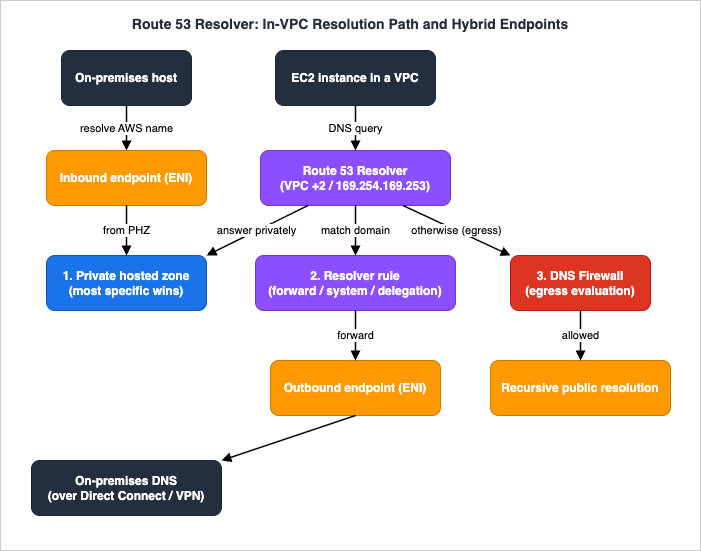
6.3 Inbound and outbound endpoints
Resolver endpoints are how the VPC Resolver crosses the network boundary. They are Regional, and each IP address you assign to an endpoint materializes as an elastic network interface (ENI) in your VPC. Plan capacity accordingly — there is a documented queries-per-second ceiling per ENI (on the order of ~10,000 QPS), so multi-AZ, multi-IP endpoints are both a resilience and a throughput decision.Outbound endpoints let the VPC Resolver forward selected queries to resolvers on your network. You create an outbound endpoint (its security group must allow outbound TCP and UDP on port 53), then create forwarding rules that name the domains to forward and the target resolver IPs, and associate those rules with the VPCs that should use them.
Inbound endpoints let DNS resolvers on your network forward queries into the VPC Resolver, so on-premises systems can resolve names in your private hosted zones and AWS-internal hostnames. There are two kinds, and the newer one matters:
- A default inbound endpoint forwards to the inbound endpoint's IP addresses; you point your on-premises conditional forwarders at those IPs.
- A delegation inbound endpoint lets on-premises resolvers reach a subdomain hosted in a Route 53 private hosted zone through standard NS-based DNS delegation — you point the on-premises NS (glue) records at the endpoint IPs — rather than conditional forwarding, which keeps a single unified namespace and lets teams manage subdomains independently.
One rule worth tattooing on the design doc: do not point on-premises forwarders at the VPC
+2 address directly — it is not supported across the boundary and produces unstable results. Use an inbound endpoint. The on-premises side of the connection (Direct Connect or VPN) is a prerequisite covered in the AWS Hybrid Connectivity Decision Guide; this article assumes the packets can flow and focuses on the DNS layer riding over them.# Outbound endpoint: forward an on-premises domain from the VPC to corp DNS.
aws route53resolver create-resolver-endpoint \
--name outbound-to-corp --direction OUTBOUND \
--security-group-ids sg-0resolveroutbound00 \
--ip-addresses SubnetId=subnet-0aaa,SubnetId=subnet-0bbb
aws route53resolver create-resolver-rule \
--name forward-corp --rule-type FORWARD \
--domain-name corp.example.com \
--resolver-endpoint-id rslvr-out-0123456789abcdef0 \
--target-ips Ip=10.10.0.10,Port=53 Ip=10.10.1.10,Port=53
aws route53resolver associate-resolver-rule \
--resolver-rule-id rslvr-rr-0123456789abcdef0 \
--vpc-id vpc-0a1b2c3d4e5f60718
ResolverEndpointType = IPV4, IPV6, or DUALSTACK). A dual-stack endpoint exposes both address families, so on-premises resolvers forward over whichever they run and the VPC Resolver can reach on-premises servers over IPv6. You can update an endpoint between IPV4 and DUALSTACK, but one created as IPV6 cannot be converted to another type — a real consideration for IPv6-only subnets, which have no IPv4 to forward over. (The in-VPC IPv6 Resolver itself answers at fd00:ec2::253.)Query encryption in transit. By default the Resolver forwards over plaintext port 53 (Do53). Endpoints also support DNS over HTTPS (DoH), which tunnels queries through an encrypted HTTPS session, and DoH-FIPS (FIPS 140-2 compliant), available on default inbound endpoints only. An inbound endpoint can run Do53, DoH, and/or DoH-FIPS (but not DoH and DoH-FIPS together); an outbound endpoint supports Do53 and DoH; a delegation inbound endpoint is Do53 only. Operational guardrail: you cannot flip an inbound endpoint straight from Do53-only to DoH-only — enable both, confirm from query logs that traffic has moved to DoH, then remove Do53, so in-flight resolvers are never cut off.
# A dual-stack inbound endpoint that accepts encrypted (DoH) and plaintext (Do53) queries.
aws route53resolver create-resolver-endpoint \
  --name inbound-dualstack --direction INBOUND \
  --resolver-endpoint-type DUALSTACK \
  --protocols Do53 DoH \
  --security-group-ids sg-0resolverinbound00 \
  --ip-addresses SubnetId=subnet-0aaa SubnetId=subnet-0bbb
6.4 Sharing rules at scale
In a multi-account network, you typically build the endpoints once in a central networking account and share the forwarding rules to spoke accounts with AWS Resource Access Manager (RAM). Each spoke associates the shared rules with its own VPCs. This is the classic hub-and-spoke DNS pattern — and the thing Route 53 Profiles later packages into a single shareable object.7. Route 53 Resolver DNS Firewall
DNS is a control channel attackers love because it is rarely inspected: security groups, network ACLs, and even AWS Network Firewall do not see the queries the Route 53 Resolver answers. Route 53 Resolver DNS Firewall closes that gap by filtering outbound DNS queries from your VPCs. What the in-VPC inspection layer did and did not gain the ability to see, year by year, is in AWS History and Timeline regarding AWS Network Firewall.The model is small and composable:
- A domain list is a reusable set of domain specifications. You can author custom lists or use AWS-managed domain lists (for known malware, botnet command-and-control, and similar threats) that AWS keeps current.
- A DNS Firewall rule references a domain list and an action:
ALLOW,BLOCK, orALERT.BLOCKcan return NODATA, an NXDOMAIN, or a specified override. - A rule group is an ordered collection of rules; you associate rule groups with VPCs. Rules are evaluated by priority, lowest number first, so a "walled garden" is just a high-priority allow rule for trusted domains followed by a low-priority block-everything (
*) rule.
Two design controls deserve emphasis. First, failure mode: you choose whether the firewall fails open (allow queries if the firewall cannot evaluate them) or fails closed (block them) — a real availability-versus-security decision. The default is fail closed (
FirewallFailOpen disabled), which favors security by returning SERVFAIL when the firewall cannot evaluate a query. Second, scope: DNS Firewall is the right tool for DNS-based data exfiltration and tunneling (and DGA-style domains), which traditional network controls cannot detect because they never parse the DNS query.At organization scale, AWS Firewall Manager centrally provisions and enforces DNS Firewall rule groups across accounts and VPCs (the date it gained that ability, along with the six other policy categories, is in AWS History and Timeline regarding AWS Shield and AWS Firewall Manager), and DNS Firewall actions are visible in Resolver query logs (Section 11). A caution to write into the design review: a permissive allow rule is not a security boundary by itself — pair allowlisting with query logging so you can see what is actually being asked.
# A minimal walled garden: allow trusted domains, block everything else.
aws route53resolver create-firewall-domain-list --name trusted-domains
aws route53resolver import-firewall-domains \
  --firewall-domain-list-id rslvr-fdl-trusted00 \
  --operation REPLACE --domains example.com example.org

aws route53resolver create-firewall-rule-group --name egress-dns-guard

# Higher priority (lower number) = evaluated first.
aws route53resolver create-firewall-rule \
  --firewall-rule-group-id rslvr-frg-0123 \
  --firewall-domain-list-id rslvr-fdl-trusted00 \
  --priority 100 --action ALLOW --name allow-trusted

aws route53resolver create-firewall-rule \
  --firewall-rule-group-id rslvr-frg-0123 \
  --firewall-domain-list-id rslvr-fdl-blockall00 \
  --priority 200 --action BLOCK --block-response-type NXDOMAIN --name block-all

aws route53resolver associate-firewall-rule-group \
  --firewall-rule-group-id rslvr-frg-0123 \
  --vpc-id vpc-0a1b2c3d4e5f60718 \
  --priority 101 --name guard-prod
8. Unifying DNS at Scale — Route 53 Profiles
Everything up to this point — private hosted zones, Resolver forwarding rules, DNS Firewall rule groups — is configured per VPC. In a single account with a couple of VPCs that is fine. Across dozens of accounts and hundreds of VPCs it is the orchestration nightmare that drove teams to build custom Lambda-and-RAM machinery just to keep DNS consistent. Route 53 Profiles (generally available since 2024) replaces that machinery.8.1 What a Profile contains and how it is shared
A Profile is a single object that bundles a standard DNS configuration: private hosted zone associations, Resolver forwarding rules, and DNS Firewall rule groups, all for one AWS Region. You attach a Profile to a VPC and that VPC inherits the whole configuration at once. Profiles are natively integrated with AWS Resource Access Manager, so you share a Profile across accounts or an entire AWS Organization, and with AWS CloudFormation, so newly provisioned accounts get consistent DNS from day one.RAM managed permissions control who can do what: by default the Profile owner (the network admin) can modify it, while recipients (VPC owners) get read-only access — they can associate the Profile to their VPCs but cannot edit the resources inside it unless the owner grants additional permissions.
8.2 The association model and limits
The association rules are deliberately simple, and you should design to them:- One Profile per VPC. A VPC can be associated with at most one Profile.
- Many VPCs per Profile. A single Profile can be associated with up to 1,000 VPCs by default, and that default is an adjustable quota you can request to raise. (Some launch-era material cites a higher figure; treat the current Service Quotas value as authoritative and check it before you design for very large fleets.)
8.3 Precedence — the part that surprises people
The question that decides whether a Profile rollout is safe is: when a VPC's own DNS settings and the Profile's settings both match a query, who wins? The official answer has two parts:- Exact-match conflicts: the local VPC setting wins. If a VPC is directly associated with a private hosted zone for
example.comand the Profile also contains a PHZ forexample.com, the VPC's local zone takes precedence. Profiles do not silently override what a VPC already has. - Overlapping names: most-specific wins. If the Profile contains a PHZ for
infra.example.comand the VPC is associated with one foraccount1.infra.example.com, the more specific name wins for queries underaccount1— the same rule that governs all multi-source resolution.
On top of that, each VPC association lets you choose the order of DNS evaluation between local and Profile settings — first VPC DNS then Profile DNS, or first Profile DNS then VPC DNS — giving you explicit control rather than guessing. A Profile association also exposes Region-wide toggles that are tedious to set per VPC: enabling recursive DNSSEC validation (without having to sign your own zones), choosing the DNS Firewall failure mode (fail open or fail closed), and disabling the auto-created reverse-DNS rules.
# Create a Profile, add a resource to it, and associate a VPC.
aws route53profiles create-profile --name org-standard-dns

aws route53profiles associate-resource-to-profile \
  --name attach-phz --profile-id rp-0123456789abcdef0 \
  --resource-arn arn:aws:route53:::hostedzone/Z0EXAMPLEPHZ

aws route53profiles associate-profile \
  --name prod-vpc --profile-id rp-0123456789abcdef0 \
  --resource-id vpc-0a1b2c3d4e5f60718
9. DNSSEC Signing and Validation
DNSSEC protects against DNS spoofing and cache poisoning by letting resolvers cryptographically verify that an answer really came from the zone's owner. On Route 53 there are two independent halves — signing (you, as the authoritative operator, proving your answers) and validation (a resolver checking signatures) — and conflating them causes most DNSSEC confusion.9.1 Signing a public hosted zone
Route 53 uses the standard two-key DNSSEC model, but splits responsibility in a way that is worth understanding:- The key-signing key (KSK) is backed by an asymmetric AWS KMS customer managed key using the
ECC_NIST_P256spec, inus-east-1. You own this key; it signs the zone's key set. A hosted zone can have at most two KSKs (which is what makes rotation possible without an outage). - The zone-signing key (ZSK) is managed by Route 53 itself; you do not create or rotate it.
You enable signing by creating the KSK and then enabling DNSSEC signing on the zone. The chain of trust is completed outside AWS: you take the Delegation Signer (DS) record Route 53 generates and add it at your domain registrar, which links your zone into the parent's chain. Until that DS record is in place at the parent, signing has no security effect. Key rotation is performed by adding a second KSK, swapping active status, and updating the DS record — doable with no downtime precisely because two KSKs are allowed.
# Enable DNSSEC signing on a public hosted zone (KMS key must be
# asymmetric ECC_NIST_P256 in us-east-1, with a Route 53 DNSSEC key policy).
aws route53 create-key-signing-key \
  --caller-reference "ksk-$(date +%s)" \
  --hosted-zone-id Z0EXAMPLEPUBLIC \
  --key-management-service-arn arn:aws:kms:us-east-1:111122223333:key/abcd1234-... \
  --name examplecom_ksk --status ACTIVE

aws route53 enable-hosted-zone-dnssec --hosted-zone-id Z0EXAMPLEPUBLIC
# Then add the generated DS record at your domain registrar to establish trust.
9.2 Validation inside the VPC
The other half is DNSSEC validation: having the resolver reject answers that fail signature checks. The Route 53 Resolver can perform recursive DNSSEC validation for a VPC, and — as noted in Section 8 — you can turn this on per VPC through a Route 53 Profile without signing any of your own zones. Signing protects your domain for everyone who validates; validation protects your workloads from forged answers for any domain. Mature designs do both. Because a DNSSEC misconfiguration (an expired or mismatched DS record) breaks resolution outright, pair signing with CloudWatch alarms on the DNSSEC status, which the official "Configuring DNSSEC signing and validation" guide walks through.10. Health Checks and Failover (Overview, with Delegation)
DNS failover is where Route 53 stops being a static directory and becomes part of your availability story: health-check-aware routing policies (failover, weighted, latency, multivalue, geolocation, geoproximity) return only healthy answers. At an architectural level you need three facts:- Health checks are a separate resource you attach to records. They come in three flavors — endpoint checks (Route 53's global checkers probe an endpoint), calculated checks (combine child checks with a logical threshold), and CloudWatch-alarm checks (driven by a metric).
- Failover routing is the explicit active-passive pattern: a primary record and a secondary, with traffic moving to the secondary when the primary's health check fails.
- The real failover time is dominated by DNS caching, not by detection — the record's TTL, and resolver caches that may ignore it, set how fast clients actually move.
That is the architecture. The operational depth — the consensus rule among Route 53's checkers, designing a health endpoint that does not lie, calculated-check composition traps, CloudWatch-alarm integration, and how to test failover under chaos — is owned by the Route 53 health check and failover pitfalls article, and DNS failover's role inside a wider recovery plan belongs to the AWS Disaster Recovery Strategies Guide. This guide deliberately stops at the overview to avoid duplicating them.
11. Observability and Diagnostics
You cannot operate DNS you cannot see. The single highest-leverage capability is Resolver query logging, and the most common diagnostic skill is reading the resolution path withdig.11.1 Resolver query logging
A Resolver query logging configuration records DNS queries (and responses) for the VPCs you choose. It captures:- Queries that originate in your VPCs and their responses.
- Queries arriving from on-premises through an inbound endpoint.
- Queries leaving through an outbound endpoint for recursive resolution.
- The action taken by DNS Firewall rules (block/allow/alert).
Each log record includes the originating VPC and instance, the query name and type, the response code (
NoError, ServFail, NXDOMAIN, …), and the response data. Logs can be delivered to Amazon CloudWatch Logs, an Amazon S3 bucket, or an Amazon Data Firehose delivery stream. One behavior trips people up: query logging records only unique queries — anything the Resolver answers from its cache within the TTL is not logged a second time. If a name is "missing" from the logs, the Resolver likely served it from cache; that is a feature, not a gap. How this source compares with public DNS query logging and with the other network log sources (the unit of a record, where it can deliver, and what it does not capture) is inventoried in Where the Logs Come From on AWS - The Network.# Log a VPC's DNS queries to CloudWatch Logs.
aws route53resolver create-resolver-query-log-config \
--name vpc-dns-audit \
--destination-arn arn:aws:logs:us-east-1:111122223333:log-group:/route53/resolver
aws route53resolver associate-resolver-query-log-config \
--resolver-query-log-config-id rqlc-0123456789abcdef0 \
--resource-id vpc-0a1b2c3d4e5f60718
11.2 Reading the resolution path with dig
When a name resolves "wrong" inside a VPC, the fastest triage is to ask the VPC Resolver directly and compare it to public DNS:# Ask the VPC Resolver (link-local) and a public resolver; compare answers.
dig @169.254.169.253 api.internal.example.com +short
dig @1.1.1.1 api.internal.example.com +short
# Inspect TTL and authority to tell a PHZ answer from a forwarded one.
dig api.internal.example.com +noall +answer +ttlid
# Confirm DNSSEC is being validated (look for the 'ad' flag).
dig example.com +dnssec | grep -E 'flags:|RRSIG'
enableDnsSupport/enableDnsHostnames are on. If a name that should forward on-premises resolves publicly instead, a forwarding rule is missing or not associated, or a more specific system rule is shadowing it. If queries vanish from logs, suspect caching. And if resolution fails only after enabling DNSSEC, suspect a stale DS record at the registrar. Beyond Route 53's own signals, the broader connectivity troubleshooting flow lives in the VPC network troubleshooting guide.11.3 What to watch
Useful CloudWatch signals include Resolver endpoint query volume against the per-ENI ceiling (Section 6), DNS Firewall rule-action counts (a spike in blocks can be an exfiltration attempt or a broken allowlist), and DNSSEC internal-failure metrics on signed zones. Health-check status metrics belong to the failover article.12. End-to-End Architecture Walkthrough — Centralized Hybrid DNS with Profiles
This is the deep, end-to-end section: a single realistic architecture that uses almost everything above, showing how a query flows and where it can fail. The scenario is a multi-account organization that wants one consistent DNS configuration for every workload VPC, bidirectional resolution with an on-premises data center, and egress DNS filtering — without per-VPC hand-configuration.12.1 The components
A central networking account owns the shared DNS plumbing:- An inbound Resolver endpoint (multi-AZ) so on-premises forwarders can resolve names in AWS private hosted zones.
- An outbound Resolver endpoint (multi-AZ) plus forward rules for the on-premises domains (
corp.example.com→ the data center's domain controllers). - The organization's private hosted zones (for example,
aws.example.comfor internal service names). - A DNS Firewall rule group (AWS-managed malicious-domain lists plus a custom allowlist) with a chosen failure mode.
- A Route 53 Profile that bundles the PHZ associations, the forward rules, and the DNS Firewall rule group, shared through AWS RAM to every workload account in the Organization.
Each workload VPC in every spoke account simply associates the shared Profile. It immediately inherits the internal zones, the on-premises forwarding, DNSSEC validation, and the firewall — one association instead of dozens of resource shares and rule attachments.
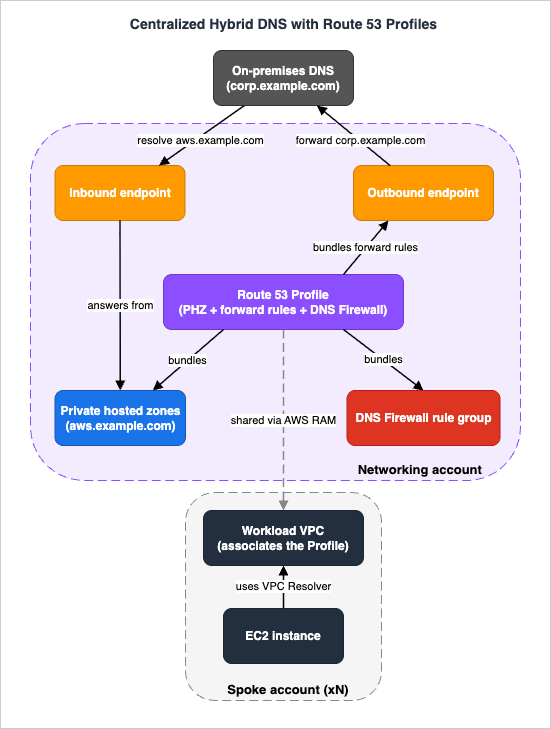
12.2 Following four queries
The design is best understood by tracing what happens to four representative queries from an EC2 instance in a spoke VPC:payments.aws.example.com(internal service). The Resolver checks zones available to the VPC; the Profile'saws.example.comprivate hosted zone matches and answers privately. The query never leaves AWS. (If the VPC also had a local PHZ foraws.example.com, the local zone would win per the precedence rule — a deliberate escape hatch for one-off overrides.)dc01.corp.example.com(on-premises). No private zone matches, but the Profile's forward rule forcorp.example.comdoes. The Resolver sends the query through the outbound endpoint over Direct Connect/VPN to the on-premises resolvers, which answer authoritatively. Most-specific match guarantees that a system rule for, say,aws.corp.example.comwould still resolve inside AWS.www.partner.com(public, allowed). No zone or forward rule matches, so the Resolver resolves it recursively — but first DNS Firewall evaluates it. It is on the allowlist (or not on any block list), so the query proceeds and returns the public answer.evil-c2.example.net(malicious). Recursive resolution is attempted, but the AWS-managed DNS Firewall domain list matches and the rule blocks it (returning NXDOMAIN), and the block is recorded in Resolver query logs. A would-be exfiltration channel is closed at the DNS layer, where no security group could have seen it.
Meanwhile, in the reverse direction, an on-premises host resolving
payments.aws.example.com forwards to the central inbound endpoint (or uses a delegation inbound endpoint), which answers from the private hosted zone. The result is a single, governed namespace that resolves correctly from both sides of the hybrid boundary.12.3 Where it fails, and what you watch
The instructive part of any architecture is its failure modes. If a spoke's resolution suddenly breaks for internal names, check whether the Profile association is intact and whether the spoke VPC has a conflicting local zone winning by precedence. If on-premises names stop resolving, suspect the outbound endpoint (ENI/AZ health or the per-ENI QPS ceiling) or a forward rule that lost its association. If on-premises cannot resolve AWS names, the inbound endpoint or the on-premises conditional forwarder is the culprit — never the+2 address, which is unsupported across the boundary. Every one of these is visible in Resolver query logs and CloudWatch endpoint metrics, which is why Section 11 is not optional for a design like this. For the network path that all of this rides on, see the AWS VPC Connectivity Decision Guide and, for the on-premises link, the hybrid connectivity guide referenced above.13. Common Pitfalls
The recurring DNS incidents on AWS cluster into a short list. Each is a symptom, a root cause, and a fix.- TTL set too high for a failover or migration. Symptom: traffic keeps hitting the old endpoint long after you changed the record. Cause: clients and resolvers cache for the TTL (and some ignore short TTLs). Fix: lower TTLs before a planned change; understand that real failover time is TTL-dominated — the failover article covers the caching traps in depth.
- Using a CNAME where an alias is required (or vice versa). Symptom: you cannot create a CNAME at the apex, or a TTL change on an alias "does nothing." Cause: CNAME is illegal at the apex; aliases to AWS targets inherit the target's TTL. Fix: apex and AWS resources → alias; literal external hostnames → CNAME.
- Private hosted zone associated but nothing resolves. Symptom: the PHZ exists, names fail inside the VPC. Cause: the VPC has
enableDnsSupportorenableDnsHostnamesdisabled, or the zone is not associated to that VPC. Fix: enable both attributes; confirm the association. - Split-horizon over-capture. Symptom: one subdomain under a domain fails in the VPC but works on the internet. Cause: associating a PHZ for the whole domain makes the VPC resolve everything under it from the PHZ, including names you forgot to recreate. Fix: scope the PHZ to the subdomain you actually need, or recreate the missing records.
- Missing or shadowed Resolver rule. Symptom: an on-premises name resolves publicly (or not at all). Cause: no forward rule matches, the rule is not associated to the VPC, or a more specific system rule shadows it. Fix: verify rule domain, type, and VPC association; remember most-specific wins.
- Pointing on-premises forwarders at the VPC
+2address. Symptom: intermittent resolution failures from on-premises. Cause: forwarding to the VPC+2across the boundary is unsupported. Fix: use an inbound endpoint (default or delegation). - Reverse DNS (PTR) that will not resolve across the boundary. Symptom: forward lookups work but
PTRlookups for on-premises IP ranges fail inside the VPC (or vice versa). Cause: the Resolver auto-creates system rules for the reverse zones (in-addr.arpa) so they resolve locally, which shadows a broad reverse-range forwarding rule you added for on-premises. Fix: forward the specificin-addr.arpazones you need to on-premises resolvers and, where they overlap the auto-created reverse zones, disable those autodefined reverse rules (per VPC, or centrally through a Route 53 Profile) so your forward rule is not overridden. - Treating multivalue answer as a load balancer. Symptom: uneven load, no affinity, surprising client behavior. Cause: multivalue returns up to eight random healthy records with no distribution logic. Fix: use Elastic Load Balancing for actual load balancing.
- Profile rollout that "overrides" a VPC unexpectedly — or fails to. Symptom: a workload resolves a name from the wrong source after attaching a Profile. Cause: precedence — local exact matches win, otherwise most-specific wins, and the per-association evaluation order matters. Fix: design names to avoid exact collisions; set the evaluation order explicitly.
- DNSSEC enabled without (or with a stale) DS record. Symptom: resolution breaks for the signed domain. Cause: the chain of trust at the registrar is missing or mismatched. Fix: add/correct the DS record at the parent; alarm on DNSSEC status.
14. Frequently Asked Questions
Q. Weighted versus latency-based — which do I use?A. They answer different questions. Use weighted when you want to control the proportions (canary, blue/green, A/B). Use latency-based when you want Route 53 to pick the lowest-latency AWS Region for each user automatically. They compose: an alias to a weighted record over latency records gives you a staged, Region-aware rollout.
Q. How do I resolve on-premises names from inside AWS?
A. Create a Resolver outbound endpoint and a forward rule for the on-premises domain pointing at your data center's DNS servers, then associate the rule with your VPCs (sharing it across accounts via RAM, or bundling it in a Route 53 Profile). The reverse direction — on-premises resolving AWS private names — uses an inbound endpoint.
Q. What problem do Route 53 Profiles actually solve?
A. Per-VPC DNS configuration does not scale to many accounts. A Profile bundles private hosted zones, Resolver forward rules, and DNS Firewall rule groups into one object you share via RAM/Organizations and attach to a VPC with a single association — so every VPC gets the same DNS without custom orchestration. Local VPC settings still win on exact matches; most-specific wins otherwise.
Q. Can the same domain return different answers inside and outside the VPC?
A. Yes — that is split-horizon DNS. Create a public hosted zone and a private hosted zone for the same domain; inside an associated VPC the private zone takes precedence, so in-VPC clients and internet clients get different records.
Q. Do I need DNSSEC signing and validation, or just one?
A. They are independent. Signing protects your domain for anyone who validates it; validation (which you can enable per VPC via a Profile, without signing anything) protects your workloads from forged answers for any domain. Production designs typically do both, with CloudWatch alarms on DNSSEC status.
Q. Is multivalue answer routing a replacement for a load balancer?
A. No. It returns up to eight randomly chosen healthy records and relies on the client to pick one. It improves availability for simple cases but has no load-distribution or session logic; use Elastic Load Balancing for real load balancing.
15. Summary
Route 53 is three services wearing one name: authoritative DNS, traffic management, and a recursive Resolver. Designing DNS on AWS well comes down to knowing which one you are configuring and how it decides.For traffic management, pick from eight routing policies by intent — Simple for one resource, Weighted for controlled rollout, Latency-based for speed, Failover for active-passive DR, Geolocation for compliance, Geoproximity (with bias, via Traffic Flow) to shift boundaries, IP-based for network-keyed routing, and Multivalue for simple health-aware spreading — and remember that the routing happens on a TTL-bounded cache horizon. For internal and hybrid DNS, the Resolver's evaluation order (private zones, then most-specific Resolver rules, then public) plus inbound and outbound endpoints make AWS and on-premises resolve each other's names; DNS Firewall filters the egress queries that no other control inspects. At organization scale, Route 53 Profiles collapse per-VPC DNS into one shareable configuration, with precedence that favors local exact matches and most-specific names. DNSSEC adds signing and validation as independent layers. And because none of this is debuggable blind, Resolver query logging and
dig are first-class tools, not afterthoughts.From here, the operational depth of health checks and DNS failover lives in the Route 53 health check and failover pitfalls article; the network paths that hybrid DNS rides on are in the AWS VPC Connectivity Decision Guide and the AWS Hybrid Connectivity Decision Guide; and DNS failover as part of a recovery plan is in the AWS Disaster Recovery Strategies Guide. For definitions of any term used here, see the AWS Networking Glossary.
16. References
- Amazon Route 53 Developer Guide - Choosing a routing policy
- Amazon Route 53 Developer Guide - Geoproximity routing and bias
- Amazon Route 53 Developer Guide - Choosing between alias and non-alias records
- Amazon Route 53 Developer Guide - Resolving DNS queries between VPCs and your network
- Amazon Route 53 Developer Guide - How Resolver endpoints forward DNS queries from your VPCs to your network
- Amazon Route 53 Developer Guide - Resolver query logging
- Amazon VPC User Guide - Filter DNS traffic using Route 53 Resolver DNS Firewall
- Amazon Route 53 Developer Guide - Getting started with Resolver DNS Firewall
- Amazon Route 53 Developer Guide - Working with shared Route 53 Profiles
- AWS News Blog - Unify DNS management using Amazon Route 53 Profiles with multiple VPCs and AWS accounts
- AWS Networking and Content Delivery Blog - Configuring DNSSEC signing and validation with Amazon Route 53
- Amazon Route 53 product page - Route 53 Resolver
- Amazon Route 53 product page - Traffic Flow
- Amazon Route 53 FAQs
- Amazon Route 53 Developer Guide - Quotas on Route 53 Resolver and capacity planning
- AWS Networking and Content Delivery Blog - Encrypt DNS queries using DNS-over-HTTPS (DoH) with Amazon Route 53 Resolver Endpoints
- AWS Networking and Content Delivery Blog - Introducing dual-stack and IPv6-only support for Amazon Route 53 Resolver Endpoints
Related Articles
- Route 53 Health Check and Failover - Common Pitfalls and Designs
The operational companion: consensus rule, calculated and CloudWatch-alarm checks, TTL/caching traps, and failover testing. - AWS VPC Connectivity Decision Guide - VPC Peering, Transit Gateway, PrivateLink, VPC Lattice, and Cloud WAN
The network paths that hybrid DNS resolution rides on. - AWS Networking Glossary - VPC, Transit Gateway, PrivateLink, and VPC Lattice Explained
Term-by-term definitions for everything used here. - Setting up DKIM, SPF, DMARC with Amazon SES and Amazon Route 53
A hands-on record-setup example in Route 53. - AWS History and Timeline regarding Amazon Route 53
How the service and its features evolved over time.
References:
Tech Blog with curated related content
Written by Hidekazu Konishi