AWS Networking Glossary - VPC, Transit Gateway, PrivateLink, and VPC Lattice Explained
First Published:
Last Updated:
This article is a single-page reference glossary that compiles 80 essential AWS networking terms across Virtual Private Cloud (VPC), hybrid connectivity (Transit Gateway, VPN, Direct Connect), AWS PrivateLink, VPC Lattice, edge services, and Amazon Route 53.
This glossary is designed both for engineers who land on this page from a search query like "what is a Transit Gateway attachment?" and for AI search agents that need a Reference Aggregation Page to fetch a complete, uniformly structured set of definitions in a single document.
Each term is presented with a short definition, related terms within this glossary for quick lateral navigation, and a link to the most directly relevant AWS official documentation. The terms are grouped into ten categories, but the A–Z Index at the top of the article lets you jump to any term alphabetically.
Note on freshness: AWS networking services evolve continuously — service quotas, per-attachment bandwidth ceilings, supported protocols, and IPv4 pricing all change over time. The definitions below reflect the state of AWS as of the Last Updated timestamp at the top of this article. Always cross-check the linked AWS official documentation when relying on a specific numeric limit or capability.
For practical, deeper coverage of individual topics, see my related articles:
- VPC Design Review Checklist
- AWS PrivateLink and VPC Endpoints Complete Guide
- Route 53 Health Check and Failover Pitfalls
- CloudFront KeyValueStore and Edge Functions Patterns
- AI and Machine Learning Glossary for AWS (sister glossary)
How to Use This Glossary
This glossary follows the Reference Aggregation Page pattern: every term is self-contained, uses the same fixed structure (Definition / Related / Source), and each entry has a stable anchor URL so it can be cited or linked individually.- Scope: AWS networking primitives (VPC and below), hybrid connectivity (TGW, VPN, Direct Connect), service-to-service connectivity (PrivateLink, VPC Lattice), edge and global services (CloudFront, Global Accelerator, Local Zones, Wavelength), and DNS (Route 53). Adjacent areas such as identity, WAF, Shield, and load balancing details that warrant their own glossaries are scoped narrowly here. The VLAN subnets and the VPC Route Server that an Amazon EVS environment places inside your own VPC are likewise out of scope here; they are covered in Running VMware Workloads on AWS with Amazon EVS. For how AWS WAF, AWS Shield, AWS Network Firewall, and AWS Firewall Manager sit on the same request path and what each one does not stop, see the AWS Network and Application Protection Decision Guide. AWS Interconnect, the managed family that presents multicloud and last mile capacity as a single object attached to a Direct Connect gateway, is likewise not given its own term here; it is covered in AWS Interconnect - What One Managed Object Replaces in Multicloud and Last Mile Connectivity.
- Out of scope: pricing, regional availability tables, and full API reference. These move too fast to keep stable in a glossary; refer to the linked AWS documentation for current values.
- Navigation: use the A–Z Index to jump to a specific term, or browse a category section. Each
Related:line links to other terms in this same glossary for lateral exploration. - Citation: each term has a stable anchor (e.g.
#term-transit-gateway). External pages and AI agents can deep-link directly to a single definition.
A–Z Index
Application Load Balancer (ALB) | Alias Record | Anycast | Auth Policy (VPC Lattice) | aws:SourceVpc and aws:SourceVpce | aws:VpceServiceName | BGP and ASN | BYOIP (Bring Your Own IP) | CIDR Block | AWS Client VPN | AWS Cloud WAN | Amazon CloudFront | CloudFront Functions | Customer Gateway | Default VPC | DHCP Options Set | AWS Direct Connect | DNS64 and NAT64 | Dual-Stack | Direct Connect Gateway | Egress-Only Internet Gateway | Elastic IP | Elastic Network Interface (ENI) | Endpoint Policy | Endpoint Service | Gateway Endpoint | AWS Global Accelerator | Gateway Load Balancer (GWLB) | Health Check (Route 53) | Internet Gateway | Interface Endpoint | IPAM (IP Address Manager) | IPv6 | Lambda@Edge | VPC Lattice | Listener (VPC Lattice) | Service (VPC Lattice) | Service Network (VPC Lattice) | Target Group (VPC Lattice) | AWS Local Zones | MACsec | Network ACL (NACL) | NAT Gateway | NAT Instance | AWS Network Firewall | AWS Network Manager | Network Load Balancer (NLB) | Origin Shield | Point of Presence (PoP) | Private Hosted Zone | Public Hosted Zone | VPC Reachability Analyzer | Reflexive Rule | Reserved IPv4 | Route 53 Resolver | Route 53 Resolver Endpoint | Resource Endpoint | Amazon Route 53 | Amazon Application Recovery Controller (ARC) | Route 53 Profile | Route Table | Routing Policy | Secondary CIDR | Security Group | AWS Site-to-Site VPN | SiteLink | Stateful vs Stateless | Subnet | Subnet Types (Public, Private, Isolated) | Transit Gateway | TGW Attachment | TGW Multicast | TGW Route Table | Traffic Mirroring | Virtual Private Gateway | VPC | VPC Endpoint | VPC Flow Logs | VPC Peering | AWS Wavelength
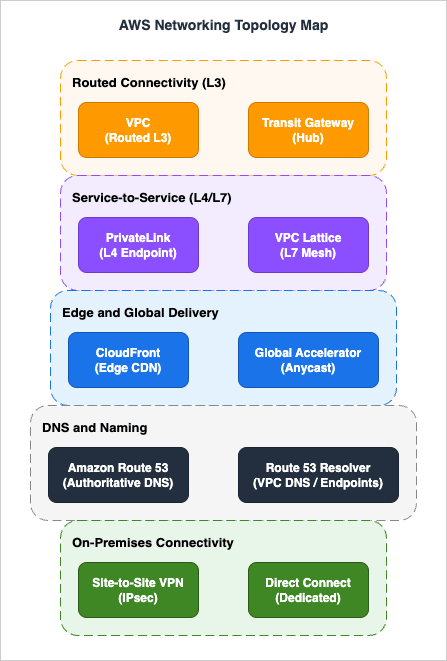
AWS Networking Topology Map
1. VPC Fundamentals
VPC
An Amazon Virtual Private Cloud (VPC) is a logically isolated virtual network you provision in an AWS Region. A VPC is scoped to one Region and can hold subnets in any Availability Zone (and in any associated Local Zone or Outpost) within that Region, with each subnet bound to a single AZ. Up to five IPv4 CIDR blocks per VPC (default quota; primary plus four secondary, raisable to 50) and optional Amazon-provided or BYOIP IPv6 blocks define its address space. It is the top-level container for almost every networking primitive in this glossary.Related: Subnet, CIDR Block, Route Table, Default VPC
Source: https://docs.aws.amazon.com/vpc/latest/userguide/what-is-amazon-vpc.html
Default VPC
A Default VPC is a pre-created VPC that AWS provisions in each Region of a new account, with a default subnet in each Availability Zone, an Internet Gateway, and a main route table that routes 0.0.0.0/0 to the IGW. It is convenient for quick experiments but is generally not recommended for production workloads, where an explicitly designed custom VPC is preferred.Related: VPC, Internet Gateway, Subnet
Source: https://docs.aws.amazon.com/vpc/latest/userguide/default-vpc.html
Subnet
A subnet is a range of IP addresses carved out of a VPC's CIDR block, scoped to a single Availability Zone (or a single Local Zone or Outpost). Each subnet has an associated Route Table that determines where its traffic goes, and each network interface placed in a subnet receives an address from that subnet's range.Related: VPC, Subnet Types, Route Table, CIDR Block
Source: https://docs.aws.amazon.com/vpc/latest/userguide/configure-subnets.html
Subnet Types (Public, Private, Isolated)
Subnets are classified by the egress path their Route Table provides, not by an explicit attribute. A "public" subnet has a route to an Internet Gateway, a "private" subnet routes 0.0.0.0/0 to a NAT Gateway or NAT Instance for outbound-only Internet, and an "isolated" subnet has no Internet route at all and reaches AWS services only via VPC Endpoints or hybrid links. The same terminology applies in reverse for IPv6 (Egress-Only IGW vs. IGW).Related: Internet Gateway, NAT Gateway, Egress-Only IGW, VPC Endpoint
Source: https://docs.aws.amazon.com/vpc/latest/userguide/configure-subnets.html#subnet-types
Route Table
A Route Table is an ordered set of routes (destination CIDR or prefix list → target) that determines where network traffic from a subnet or gateway is forwarded. Each subnet is associated with exactly one Route Table (the main table by default), and AWS evaluates routes by longest-prefix match. Route Tables are also attached to Internet Gateways and Virtual Private Gateways via "edge association" for ingress filtering.Related: Subnet, Internet Gateway, TGW Route Table
Source: https://docs.aws.amazon.com/vpc/latest/userguide/VPC_Route_Tables.html
CIDR Block
A Classless Inter-Domain Routing (CIDR) block expresses a range of IP addresses as a network address plus a prefix length, for example 10.0.0.0/16. In AWS, a VPC has a primary IPv4 CIDR (between /28 and /16) set at creation, and each subnet carves a smaller CIDR out of it. RFC 1918 private ranges (10/8, 172.16/12, 192.168/16) are the conventional choice; RFC 6598 carrier-grade NAT space (100.64/10) is supported for organizations that have exhausted RFC 1918. The smallest usable subnet in AWS is /28 because AWS reserves five addresses in every subnet (network, VPC router, DNS, future use, and broadcast).Related: Secondary CIDR, Subnet, IPAM
Source: https://docs.aws.amazon.com/vpc/latest/userguide/vpc-cidr-blocks.html
Secondary CIDR
A Secondary CIDR is an additional IPv4 (or IPv6) block associated with an existing VPC after creation, used to expand address space without rebuilding the VPC. AWS imposes block-size restrictions, disallows overlapping ranges within the same VPC, and limits secondary CIDRs to four additional IPv4 blocks per VPC by default (raisable so the VPC can hold up to 50 IPv4 CIDRs total). Secondary CIDRs are commonly used to add RFC 6598 100.64.0.0/10 space when private RFC 1918 ranges run out.Related: CIDR Block, VPC
Source: https://docs.aws.amazon.com/vpc/latest/userguide/configure-your-vpc.html#add-cidr-block-restrictions
Internet Gateway
An Internet Gateway (IGW) is a horizontally scaled, highly available VPC component that allows communication between resources in your VPC and the public Internet. It performs network address translation (NAT) for instances that have a public IPv4 address or Elastic IP, and provides direct routing for IPv6. Attaching an IGW and adding a 0.0.0.0/0 (or ::/0) route to it is what makes a subnet "public".Related: Egress-Only IGW, Subnet Types, Elastic IP
Source: https://docs.aws.amazon.com/vpc/latest/userguide/VPC_Internet_Gateway.html
NAT Gateway
A NAT Gateway is a managed AWS service that provides outbound Internet access for instances in private subnets while preventing unsolicited inbound connections from the Internet. It starts at 5 Gbps and automatically scales up to 100 Gbps within a single AZ, and you provision one NAT Gateway per AZ for AZ-isolated fault tolerance. Public NAT Gateways require an Elastic IP and route through an IGW, while private NAT Gateways forward port-translated traffic to a TGW or VGW for hybrid egress without using public IPv4. NAT Gateway supports up to 55,000 simultaneous connections to each unique destination (IP and port); exceeding that limit produces port-allocation errors and is the most common scaling pitfall.Related: NAT Instance, Internet Gateway, Elastic IP
Source: https://docs.aws.amazon.com/vpc/latest/userguide/vpc-nat-gateway.html
NAT Instance
A NAT Instance is the original EC2-based way to provide outbound Internet access from a private subnet, predating the managed NAT Gateway. It runs on a customer-managed EC2 instance whose throughput and availability are entirely the customer's responsibility, and the source/destination check on its ENI must be disabled. AWS now recommends NAT Gateway over NAT Instance for almost all production use cases, but NAT Instances remain relevant for unusual filtering, port forwarding, or for non-production workloads where avoiding the per-GB processing charge of NAT Gateway dominates the cost calculation.Related: NAT Gateway, ENI, Security Group
Source: https://docs.aws.amazon.com/vpc/latest/userguide/VPC_NAT_Instance.html
Egress-Only Internet Gateway
An Egress-Only Internet Gateway is the IPv6 analogue of the NAT Gateway pattern: it allows outbound IPv6 traffic from a VPC to the Internet while blocking unsolicited inbound IPv6 traffic. Unlike NAT, it does not translate addresses (since IPv6 is globally routable and has no need for NAT) — it is a stateful gateway that tracks outbound flows and admits the corresponding return traffic. It is the standard component for IPv6 private subnets that still need outbound connectivity.Related: IPv6, Internet Gateway
Source: https://docs.aws.amazon.com/vpc/latest/userguide/egress-only-internet-gateway.html
Elastic IP
An Elastic IP (EIP) is a public IPv4 address that you allocate to your AWS account and can attach to any ENI, instance, NAT Gateway, or Network Load Balancer. The address persists across instance restarts and re-attachments, which is useful for allowlisting. Since February 2024 AWS charges an hourly fee for every public IPv4 address — including in-use EIPs as well as unattached ones — which is one of the main drivers for IPv6 adoption and for moving public ingress behind CloudFront, ALB, or Global Accelerator.Related: ENI, BYOIP, Internet Gateway
Source: https://docs.aws.amazon.com/vpc/latest/userguide/vpc-eips.html
Reserved IPv4
In every IPv4 subnet, AWS reserves five addresses that cannot be assigned to a workload: the network address (network +0), the VPC router address (network +1), the Amazon-provided DNS address (network +2), an address reserved for future use (network +3), and the network broadcast address (the last address in the subnet, reserved even though VPCs do not actually carry broadcast traffic). This is why a /28 subnet contains 16 total addresses but only 11 usable ones. Plan subnet sizes accordingly when migrating workloads from on-premises ranges.Related: CIDR Block, Subnet
Source: https://docs.aws.amazon.com/vpc/latest/userguide/subnet-sizing.html
BYOIP (Bring Your Own IP)
Bring Your Own IP (BYOIP) lets you import a publicly routable IPv4 or IPv6 prefix that you already own into your AWS account. AWS advertises imported IPv4 prefixes no more specific than /24 and IPv6 prefixes no more specific than /48 to the public Internet. Once imported, you can allocate Elastic IPs out of the prefix and use it with services such as Global Accelerator. BYOIP requires a Route Origin Authorization (ROA) in the relevant RIR and is commonly used to preserve IP reputation during cloud migration.Related: Elastic IP, IPAM, Global Accelerator
Source: https://docs.aws.amazon.com/vpc/latest/ipam/tutorials-byoip-ipam.html
2. IP Addressing and Interfaces
IPv6
AWS supports IPv6 on VPCs by assigning either an Amazon-provided /56 IPv6 block or one imported via BYOIP, and then dividing it into /64 subnet blocks. IPv6 addresses in AWS are globally routable, so there is no NAT and outbound-only patterns use an Egress-Only Internet Gateway instead. IPv6-only VPCs eliminate IPv4-related charges but require dual-stack interop via DNS64/NAT64 for IPv4-only destinations.Related: Dual-Stack, Egress-Only IGW, DNS64 and NAT64
Source: https://docs.aws.amazon.com/vpc/latest/userguide/vpc-migrate-ipv6.html
Dual-Stack
A dual-stack VPC, subnet, or ENI has both IPv4 and IPv6 addresses simultaneously and can communicate over either protocol. Dual-stack is the typical migration step between IPv4-only and IPv6-only, and is required for clients or destinations that have not yet completed their IPv6 transition. Many AWS load balancers (ALB, NLB) and edge services have explicit "dualstack" DNS names to indicate dual-stack support.Related: IPv6, DNS64 and NAT64, ALB
Source: https://docs.aws.amazon.com/vpc/latest/userguide/vpc-ip-addressing.html
IPAM (IP Address Manager)
Amazon VPC IP Address Manager (IPAM) is a managed service that plans, allocates, monitors, and audits IP address space across multiple AWS accounts, Regions, and VPCs. IPAM organizes address space into hierarchical pools (scopes → top-level pools → regional pools → development pools), enforces allocation rules, and surfaces conflicts and unused space. It is the recommended way to manage IP space at organization scale instead of spreadsheets.Related: CIDR Block, BYOIP, Secondary CIDR
Source: https://docs.aws.amazon.com/vpc/latest/ipam/what-it-is-ipam.html
Elastic Network Interface (ENI)
An Elastic Network Interface (ENI) is the virtual network card that lives in a subnet and carries one or more private IPv4 addresses, optionally an IPv6 address, MAC address, security group memberships, and a source/destination check flag. Almost everything that has an IP in a VPC (EC2 instances, NAT Gateways, Interface Endpoints, ALB/NLB nodes, Fargate tasks, Lambda VPC-attached hyperplane ENIs that are pooled and shared across function invocations) is implemented as one or more ENIs. The maximum number of ENIs and secondary IPs per EC2 instance depends on the instance type. ENIs can be detached and re-attached across instances for failover.Related: Subnet, Security Group, Interface Endpoint
Source: https://docs.aws.amazon.com/AWSEC2/latest/UserGuide/using-eni.html
DNS64 and NAT64
DNS64 and NAT64 are interop mechanisms that let IPv6-only clients reach IPv4-only destinations. The VPC Route 53 Resolver synthesizes AAAA responses (using the 64:ff9b::/96 well-known prefix) for IPv4-only names, and a NAT Gateway in a 64:ff9b::/96 route translates those packets back into IPv4 when leaving the subnet. The combination removes the need to keep IPv4 endpoints inside otherwise IPv6-only workloads.Related: IPv6, NAT Gateway, Route 53 Resolver
Source: https://docs.aws.amazon.com/vpc/latest/userguide/vpc-nat-gateway.html#nat-gateway-nat64-dns64
3. In-VPC DNS Resolution
DHCP Options Set
A DHCP Options Set defines the DHCP parameters delivered to instances in a VPC: domain-name, domain-name-servers, ntp-servers, netbios-name-servers, and netbios-node-type. Each VPC has exactly one DHCP Options Set in effect; AWS provides a default that points to AmazonProvidedDNS and the local domain. Custom option sets are used to point at on-premises DNS servers or to inject specific NTP sources.Related: Route 53 Resolver, Route 53 Resolver Endpoint
Source: https://docs.aws.amazon.com/vpc/latest/userguide/VPC_DHCP_Options.html
Route 53 Resolver
The Route 53 Resolver is the VPC-internal recursive DNS service that answers queries from instances at the .2 address of the VPC CIDR (or the link-local 169.254.169.253). It resolves public DNS names, private hosted zone records, AWS service endpoints, and EC2-private hostnames. The Resolver is the entry point for both inbound queries from on-premises (via Inbound Endpoints) and outbound forwarding to on-premises (via Outbound Endpoints).Related: Route 53 Resolver Endpoint, Private Hosted Zone, DNS64 and NAT64
Source: https://docs.aws.amazon.com/Route53/latest/DeveloperGuide/resolver.html
Route 53 Resolver Endpoint
A Route 53 Resolver Endpoint is a set of ENIs in your VPC that exposes the Resolver as a DNS-over-port-53 target. Inbound Endpoints accept queries from on-premises DNS servers so they can resolve AWS private hosted zones, and Outbound Endpoints forward selected query patterns (via Resolver Rules) to on-premises DNS servers. Resolver Endpoints are billed per ENI per hour plus per query.Related: Route 53 Resolver, Private Hosted Zone, DHCP Options Set
Source: https://docs.aws.amazon.com/Route53/latest/DeveloperGuide/resolver.html
4. Security and Traffic Visibility
Security Group
A Security Group (SG) is a stateful packet filter attached to an ENI that permits or denies traffic by source/destination CIDR, prefix list, or other security group reference. Because SGs are stateful, return traffic for an allowed connection is automatically permitted. They support allow-rules only (no deny), and you can attach up to five SGs to a single ENI by default (the quota can be raised), with all rules effectively OR-ed together.Related: Network ACL, Stateful vs Stateless, ENI
Source: https://docs.aws.amazon.com/vpc/latest/userguide/vpc-security-groups.html
Network ACL (NACL)
A Network Access Control List (NACL) is a stateless packet filter attached at the subnet boundary. Because it is stateless, you must explicitly allow both directions of a flow, and you must allocate enough ephemeral port range on the return side. NACLs evaluate rules in number order with both allow and deny rules supported, making them suitable for blanket deny patterns that Security Groups cannot express.Related: Security Group, Stateful vs Stateless, Subnet
Source: https://docs.aws.amazon.com/vpc/latest/userguide/vpc-network-acls.html
Stateful vs Stateless
"Stateful" packet filtering tracks the state of each connection so that return traffic for an allowed outbound flow is automatically allowed; AWS Security Groups are stateful. "Stateless" filtering evaluates each packet independently with no connection table, so both directions must be allowed explicitly; AWS Network ACLs are stateless. The distinction matters most for NACLs, where the ephemeral port range used by the client (32768-60999 on modern Linux, 49152-65535 on Windows, with older clients ranging down to 1024) must be open for return traffic — a permissive 1024-65535 allow rule is the common pattern.Related: Security Group, Network ACL, Reflexive Rule
Source: https://docs.aws.amazon.com/vpc/latest/userguide/vpc-network-acls.html#nacl-basics
Reflexive Rule
A reflexive rule is a stateless rule that "remembers" the direction of an initial connection so that return traffic can be allowed without an explicit rule. AWS Network ACLs are not reflexive — they are purely stateless — so they cannot auto-allow the response of an outbound TCP connection. The term most often comes up by contrast: when migrating Cisco-style reflexive ACLs to AWS, the same effect is achieved by Security Groups, while a NACL configuration requires explicit ephemeral port rules.Related: Network ACL, Stateful vs Stateless
Source: https://docs.aws.amazon.com/vpc/latest/userguide/vpc-network-acls.html#nacl-rules
VPC Flow Logs
VPC Flow Logs capture IP-level metadata about flows in your VPC and deliver records to CloudWatch Logs, Amazon S3, or Amazon Data Firehose. Each record includes 5-tuple, packet and byte counts, action (ACCEPT/REJECT), and (in v3 and later custom formats) extended fields such as TCP flags, traffic path, Region/AZ, and AWS service identifiers. Transit Gateway Flow Logs apply the same model to TGW attachments. Flow Logs are the primary forensic and capacity-planning signal for VPC traffic, but they do not capture packet payload.Related: Traffic Mirroring, Reachability Analyzer, Network Firewall
Source: https://docs.aws.amazon.com/vpc/latest/userguide/flow-logs.html
Traffic Mirroring
Traffic Mirroring copies network packets from a source ENI to a target (another ENI, a Network Load Balancer, or a Gateway Load Balancer) so that out-of-band security and forensic tools can analyze the raw payload. Unlike Flow Logs, it captures full packets (subject to a configurable MTU), making it suitable for IDS/IPS, DPI, and packet capture pipelines. Mirroring is supported on Nitro-based instance types only.Related: VPC Flow Logs, GWLB, ENI
Source: https://docs.aws.amazon.com/vpc/latest/mirroring/what-is-traffic-mirroring.html
5. Hybrid Connectivity — Transit Gateway, VPN, and Direct Connect
VPC Peering
A VPC Peering Connection is a one-to-one, non-transitive route between two VPCs (same or different account, same or different Region) that lets traffic between them stay on the AWS backbone. Because peering is non-transitive, full-mesh growth is O(N²) and is the main reason Transit Gateway is preferred for more than a handful of VPCs. Inter-Region peering encrypts traffic in transit by default. Cross-VPC private DNS resolution requires explicitly enabling the DNS resolution from accepter/requester option on the peering connection — it is off by default and is a common cause of unreachable hostnames after peering is set up.Related: Transit Gateway, Cloud WAN, Route 53 Resolver, Private Hosted Zone
Source: https://docs.aws.amazon.com/vpc/latest/peering/what-is-vpc-peering.html
Transit Gateway
AWS Transit Gateway (TGW) is a regional network hub that interconnects VPCs, VPN connections, Direct Connect Gateways, and other TGWs across Regions. Each TGW supports thousands of attachments (default 5000 per TGW) and centralizes routing decisions in TGW Route Tables, eliminating the full-mesh growth problem of VPC Peering. Per-attachment bandwidth is up to 100 Gbps for VPC attachments and up to 50 Gbps for a transit VIF attachment over AWS Direct Connect; Site-to-Site VPN attachments are bound by the per-tunnel limit (1.25 Gbps) and scale by terminating multiple tunnels with ECMP. TGW also provides multicast support and integrates with AWS Network Manager and Cloud WAN for centralized observability.Related: TGW Attachment, TGW Route Table, Cloud WAN
Source: https://docs.aws.amazon.com/vpc/latest/tgw/what-is-transit-gateway.html
TGW Attachment
A Transit Gateway Attachment is the connection point between a TGW and another network element: a VPC, a Site-to-Site VPN, a Direct Connect Gateway, a Connect (GRE) tunnel, or a peering link to another TGW. For a VPC attachment you choose one subnet per AZ in which you want TGW reachable, AWS provisions one ENI in each chosen subnet, and every other subnet in those AZs reaches TGW through their Route Tables. Each attachment is associated with exactly one TGW Route Table for inbound traffic and can propagate routes into one or more route tables.Related: Transit Gateway, TGW Route Table
Source: https://docs.aws.amazon.com/vpc/latest/tgw/tgw-vpc-attachments.html
TGW Route Table
A TGW Route Table is the routing context applied to traffic arriving at the TGW from an attachment. Each attachment is associated with one route table (the source of routes) and can propagate routes into many route tables (the destinations that learn its CIDRs). This decoupling enables segmentation patterns such as production-vs-dev isolation, shared-services hub-and-spoke, and inspection through a centralized firewall VPC.Related: Transit Gateway, TGW Attachment, Network Firewall
Source: https://docs.aws.amazon.com/vpc/latest/tgw/tgw-route-tables.html
TGW Multicast
Transit Gateway Multicast extends an IP multicast group across VPCs attached to the same Transit Gateway within a single Region, without requiring PIM or a multicast-capable network underlay. You create a multicast domain on the TGW, register VPC subnets and ENIs as sources or members, and TGW replicates packets across attachments. Group membership can be static or managed dynamically via IGMPv2 from the workload side. Cross-Region multicast is not supported — multicast traffic does not traverse Transit Gateway peering attachments. This is the only native way to run IP multicast (used by some financial-market-data and media-encoding workloads) in a multi-VPC AWS environment.Related: Transit Gateway, TGW Attachment
Source: https://docs.aws.amazon.com/vpc/latest/tgw/tgw-multicast-overview.html
AWS Site-to-Site VPN
AWS Site-to-Site VPN provides IPsec tunnels between your on-premises gateway (the Customer Gateway) and either a Virtual Private Gateway on a single VPC or a Transit Gateway. Each VPN connection has two redundant tunnels (up to 1.25 Gbps per tunnel) for high availability, supports BGP or static routing, and is billed per VPN connection per hour plus data transfer. To exceed per-tunnel throughput, terminate multiple VPN connections on a Transit Gateway with Equal-Cost Multi-Path (ECMP) routing. Accelerated Site-to-Site VPN integrates with AWS Global Accelerator to route IPsec tunnels over the AWS global backbone for lower latency and reduced jitter.Related: Customer Gateway, Virtual Private Gateway, Transit Gateway
Source: https://docs.aws.amazon.com/vpn/latest/s2svpn/VPC_VPN.html
AWS Client VPN
AWS Client VPN is a managed OpenVPN-compatible service that allows individual user devices to connect to AWS VPCs, on-premises networks via TGW, or both. It supports mutual certificate authentication, AD-based authentication, and federated SAML authentication, and you control reachability through authorization rules and security groups. Client VPN endpoints are associated with subnets and are billed per associated subnet hour plus per connection hour.Related: Site-to-Site VPN, Transit Gateway
Source: https://docs.aws.amazon.com/vpn/latest/clientvpn-admin/what-is.html
Customer Gateway
A Customer Gateway (CGW) is the AWS-side representation of the physical or virtual device on the customer's end of a Site-to-Site VPN — typically an on-premises router or firewall. It records the public IP address and BGP ASN of the device, but does not itself terminate traffic; the actual tunnel terminates on a VGW or TGW attachment. Multiple VPN connections can reference the same Customer Gateway.Related: Site-to-Site VPN, Virtual Private Gateway, BGP and ASN
Source: https://docs.aws.amazon.com/vpn/latest/s2svpn/cgw-options.html
Virtual Private Gateway
A Virtual Private Gateway (VGW) is the AWS-managed VPN concentrator attached to a single VPC. It terminates Site-to-Site VPN tunnels and Direct Connect private VIFs for that VPC. VGW is the original (pre-TGW) way of giving a VPC hybrid connectivity, and is still used when only one or two VPCs need on-premises reachability and you do not want the additional cost of a Transit Gateway.Related: Site-to-Site VPN, Direct Connect, Customer Gateway
Source: https://docs.aws.amazon.com/vpn/latest/s2svpn/how_it_works.html
AWS Direct Connect
AWS Direct Connect (DX) is a dedicated physical link between an on-premises data center or colocation facility and an AWS Direct Connect location. Dedicated connections are ordered directly from AWS at 1, 10, 100, or 400 Gbps; hosted connections are provisioned through an AWS Partner at sub-rate speeds from 50 Mbps to 25 Gbps. DX provides predictable bandwidth, reduced data-egress pricing, and bypasses the public Internet entirely. Logically, DX is partitioned into Virtual Interfaces (VIFs) — public VIFs for AWS service endpoints, private VIFs for VPC reachability via a VGW or DX Gateway, and transit VIFs for TGW.Related: DX Gateway, MACsec, SiteLink
Source: https://docs.aws.amazon.com/directconnect/latest/UserGuide/Welcome.html
Direct Connect Gateway
A Direct Connect Gateway is a globally scoped, multi-Region object that lets a single Direct Connect connection reach VPCs in multiple Regions through their VGWs or through a Transit Gateway. It removes the need to provision a separate DX connection per Region. Default service quotas allow up to 30 Virtual Private Gateway associations or up to 6 Transit Gateway associations per DX Gateway, plus up to 8 transit VIFs (all adjustable).Related: Direct Connect, Transit Gateway, SiteLink
Source: https://docs.aws.amazon.com/directconnect/latest/UserGuide/direct-connect-gateways.html
SiteLink
AWS Direct Connect SiteLink lets you route traffic between Direct Connect locations directly over the AWS global backbone, bypassing AWS Regions entirely. You enable SiteLink on a VIF, and packets between two SiteLink-enabled VIFs travel office-to-office over AWS infrastructure. This is most useful as a wide-area-network replacement for organizations whose offices are already co-located with Direct Connect.Related: Direct Connect, DX Gateway
Source: AWS Direct Connect features (SiteLink) — AWS
MACsec
MACsec (IEEE 802.1AE) is link-layer encryption available on Direct Connect dedicated connections at 10 Gbps, 100 Gbps, and 400 Gbps. It encrypts the entire Ethernet frame between the customer router and the AWS Direct Connect router using AES-128-GCM or AES-256-GCM, with a pre-shared Connectivity Association Key (CAK) and Connectivity Key Name (CKN) configured statically on both ends. MACsec is required by certain regulated workloads to meet data-in-transit requirements on the physical link.Related: Direct Connect
Source: https://docs.aws.amazon.com/directconnect/latest/UserGuide/MACsec.html
BGP and ASN
Border Gateway Protocol (BGP) is the dynamic routing protocol used between AWS and customer networks across Site-to-Site VPN and Direct Connect. Each side announces prefixes tagged with its Autonomous System Number (ASN); AWS uses public ASN 7224 on the AWS side of Direct Connect virtual interfaces, and uses a configurable private ASN (default 64512) on the AWS side of Virtual Private Gateway or Transit Gateway VPN tunnels. Customers use their own public ASN or a private ASN (64512-65534 for 2-byte, 4200000000-4294967294 for 4-byte). BGP path attributes (AS_PATH, LOCAL_PREF, MED) control failover and active/standby tunnel choice.Related: Site-to-Site VPN, Direct Connect, Customer Gateway
Source: https://docs.aws.amazon.com/directconnect/latest/UserGuide/routing-and-bgp.html
AWS Cloud WAN
AWS Cloud WAN is a managed wide-area-network service that lets you define a single global network as code — including segments, regions, attachments, and routing policies — and have AWS provision the underlying TGW-like Core Network across all in-scope Regions. Segments isolate traffic similarly to TGW Route Tables but with global semantics, and a Cloud WAN policy is deployed as a JSON document via change sets. It is positioned as a successor pattern to manual hub-of-hubs TGW peering meshes.Related: Transit Gateway, AWS Network Manager
Source: https://docs.aws.amazon.com/network-manager/latest/cloudwan/what-is-cloudwan.html
6. PrivateLink and VPC Endpoints
For an end-to-end implementation walkthrough of this section, see AWS PrivateLink and VPC Endpoints Complete Guide.VPC Endpoint
A VPC Endpoint is a privately addressable connection from a VPC to an AWS service or to a third-party service exposed through AWS PrivateLink, without traversing the public Internet, a NAT Gateway, or a VPN. AWS exposes several types, including Interface Endpoints (ENI-based, used for most services), Gateway Endpoints (route-table-based, used for S3 and DynamoDB), Gateway Load Balancer Endpoints (used for in-line traffic inspection), Resource Endpoints (for an individual resource shared as a resource configuration), and Service-Network Endpoints. Since September 18, 2026, Tunnel Endpoints also reach a network segment (a list of CIDR ranges); see AWS PrivateLink Tunnel Endpoints.Related: Interface Endpoint, Gateway Endpoint, Endpoint Policy
Source: https://docs.aws.amazon.com/vpc/latest/privatelink/concepts.html
Interface Endpoint
An Interface Endpoint provisions ENIs in selected subnets of a VPC and exposes a service through PrivateLink at private IP addresses. DNS resolution is integrated so that the service's regional DNS name resolves to the private IPs from inside the VPC. Interface Endpoints are billed per ENI per hour plus per GB processed, and the underlying ENIs participate in security group evaluation.Related: VPC Endpoint, Endpoint Service, ENI
Source: https://docs.aws.amazon.com/vpc/latest/privatelink/create-interface-endpoint.html
Gateway Endpoint
A Gateway Endpoint installs a route in your VPC route tables that targets a managed prefix list for Amazon S3 or DynamoDB, allowing traffic to those services to stay on the AWS backbone without ENIs or hourly per-endpoint charges. Gateway Endpoints support endpoint policies and are limited to S3 and DynamoDB; all other services use Interface Endpoints. They are commonly used to reduce NAT Gateway data-processing charges for S3-heavy workloads.Related: VPC Endpoint, Endpoint Policy
Source: https://docs.aws.amazon.com/vpc/latest/privatelink/gateway-endpoints.html
Endpoint Service
An Endpoint Service is the producer side of AWS PrivateLink: you front your application with a Network Load Balancer (or Gateway Load Balancer) and publish it as a service that consumers connect to via Interface Endpoints in their own VPCs. The service has anallowedPrincipals list controlling which AWS accounts can connect, and you can require acceptance for each connection. Cross-Region Endpoint Services let consumers connect from a different Region than the producer.Related: Interface Endpoint, NLB, aws:VpceServiceName
Source: https://docs.aws.amazon.com/vpc/latest/privatelink/privatelink-share-your-services.html
Resource Endpoint
Resource VPC Endpoints (sometimes called "Resource Endpoints") let consumers access individual resources — such as an Amazon RDS DB instance or cluster, an Amazon Redshift cluster, or a custom ARN, IP address, or domain name — over PrivateLink without the resource owner having to front them with an NLB-based Endpoint Service. The producer registers the target with a Resource Configuration, optionally groups multiple configurations into a Resource Gateway, and shares whichever object the producer chooses cross-account via AWS RAM. Consumers create a VPC endpoint of typeResource that points to the shared configuration, and access can be further constrained with a Resource Configuration auth policy. Resource Endpoints are the PrivateLink alternative for services that do not fit the load-balancer model.Related: Endpoint Service, VPC Endpoint, VPC Lattice
Source: https://docs.aws.amazon.com/vpc/latest/privatelink/
Endpoint Policy
An Endpoint Policy is an IAM resource policy attached to a VPC Endpoint that restricts which API calls can be made through it and to which resources. The default endpoint policy allows all actions, but a tightened policy (for example, "only s3:GetObject on a specific bucket prefix") is one of the core perimeter controls in a zero-trust VPC design. The effective permission is the intersection of the endpoint policy, the caller's IAM identity policy, the target resource policy, and any applicable SCPs — an explicit Deny in any of them blocks the call.Related: VPC Endpoint, aws:SourceVpc and aws:SourceVpce
Source: https://docs.aws.amazon.com/vpc/latest/privatelink/vpc-endpoints-access.html
aws:SourceVpc and aws:SourceVpce
aws:SourceVpc and aws:SourceVpce are IAM condition keys that identify the VPC and the specific VPC Endpoint through which an API call entered AWS. Resource-based policies (for example, S3 bucket policies) commonly use these keys to deny access unless the request originates from a specific VPC or endpoint. They form the data-perimeter complement to identity-based policies, ensuring that even leaked credentials cannot reach the data from outside the approved network paths.Related: Endpoint Policy, VPC Endpoint, aws:VpceServiceName
Source: https://docs.aws.amazon.com/IAM/latest/UserGuide/reference_policies_condition-keys.html
aws:VpceServiceName
aws:VpceServiceName is an IAM condition key that identifies the PrivateLink service name being targeted by a VPC Endpoint operation. It is commonly used in Service Control Policies and identity policies to allow ec2:CreateVpcEndpoint only against an approved allow-list of service names. This prevents users from creating endpoints to unauthorized third-party services that could exfiltrate data.Related: Endpoint Service, aws:SourceVpc and aws:SourceVpce
Source: https://docs.aws.amazon.com/service-authorization/latest/reference/list_ec2.html
7. VPC Lattice
VPC Lattice
Amazon VPC Lattice is an application-networking service that lets you connect, secure, and observe service-to-service traffic across VPCs and accounts without managing load balancers, peering, or PrivateLink. Lattice operates at HTTP/HTTPS/gRPC and TLS layers, applies IAM-based auth policies for SigV4-signed requests, and gives each service a stable Lattice-managed DNS name (with optional custom domain) that resolves to a per-VPC private link-local address. It is positioned for microservice and multi-account architectures where the unit of connectivity is the service rather than the network.Related: Service Network, Service, Auth Policy
Source: https://docs.aws.amazon.com/vpc-lattice/latest/ug/what-is-vpc-lattice.html
Service Network (VPC Lattice)
A Service Network is the top-level grouping in VPC Lattice that joins together services (the producers) and VPCs (the clients). Associating a VPC with a Service Network lets every workload in that VPC reach every service registered to the network, subject to authorization policies. Service Networks are commonly shared across accounts via AWS Resource Access Manager (RAM) to create centralized service meshes.Related: VPC Lattice, Service, Auth Policy
Source: https://docs.aws.amazon.com/vpc-lattice/latest/ug/service-networks.html
Service (VPC Lattice)
A VPC Lattice Service represents a single logical application that consumers reach by name. A Service holds one or more Listeners that define ports and protocols, routes that map HTTP/gRPC paths to Target Groups, and an optional auth policy. Services can register multiple target types (Instance, IP, Lambda, ALB), and Lattice handles load balancing and TLS termination on the consumer's behalf.Related: Service Network, Listener, Target Group
Source: https://docs.aws.amazon.com/vpc-lattice/latest/ug/services.html
Listener (VPC Lattice)
A VPC Lattice Listener defines the protocol (HTTP, HTTPS, TLS pass-through) and port that a Service accepts, along with the default action when no route rules match. Multiple Listeners on the same Service let you expose plaintext and TLS on different ports. The Listener configuration is conceptually similar to an ALB listener, but with VPC Lattice's request-based routing semantics.Related: Service, Target Group
Source: https://docs.aws.amazon.com/vpc-lattice/latest/ug/listeners.html
Target Group (VPC Lattice)
A VPC Lattice Target Group is a registered backend pool of targets — EC2 instances, IP addresses, Lambda functions, or Application Load Balancers — that a Service routes requests to. Target Groups have type-specific health checks, support weighted routing across versions, and are independent of any specific Service so they can be reused across multiple Services and Listeners.Related: Service, Listener, ALB
Source: https://docs.aws.amazon.com/vpc-lattice/latest/ug/target-groups.html
Auth Policy (VPC Lattice)
An Auth Policy is an IAM-shaped JSON document attached to a VPC Lattice Service Network or Service that controls which principals (IAM users, roles, accounts, or even any authenticated SigV4 caller) may invoke which paths and methods. Combined withIAM_AUTH Listener configuration, this lets you express service-to-service authorization at the network layer rather than inside application code. Auth policies are the main reason teams choose Lattice over plain PrivateLink for service meshes.Related: Service Network, Service
Source: https://docs.aws.amazon.com/vpc-lattice/latest/ug/auth-policies.html
8. Load Balancing and Network Diagnostics
Application Load Balancer (ALB)
An Application Load Balancer (ALB) is a layer-7 load balancer that distributes HTTP/HTTPS and gRPC traffic across targets based on host header, path, query string, headers, or source IP. ALB supports HTTP/2, WebSockets, native AWS WAF integration, mutual TLS, and authentication via Cognito or OIDC. It is the default ingress for most web workloads in AWS.Related: NLB, GWLB, Target Group
Source: https://docs.aws.amazon.com/elasticloadbalancing/latest/application/introduction.html
Network Load Balancer (NLB)
A Network Load Balancer (NLB) is a layer-4 load balancer that handles TCP, UDP, and TLS at extreme scale with millisecond-level latency. NLB preserves the client source IP at the network layer — on by default for Instance-type and ALB-type targets, and configurable on IP-type targets — supports static IPs per AZ, and serves as the backend for PrivateLink Endpoint Services. It is the right choice for non-HTTP workloads, ultra-low-latency paths, and millions of concurrent flows.Related: ALB, Endpoint Service, Global Accelerator
Source: https://docs.aws.amazon.com/elasticloadbalancing/latest/network/introduction.html
Gateway Load Balancer (GWLB)
A Gateway Load Balancer (GWLB) distributes layer-3 traffic to a fleet of virtual network appliances (firewalls, IDS/IPS, DPI) via the GENEVE encapsulation protocol on UDP port 6081. GWLB Endpoints (one of the VPC endpoint types) let you redirect traffic from any subnet's Route Table into the appliance fleet, then back to its destination — making transparent inline inspection possible without forcing every workload through a single appliance. GWLB is the foundation of most third-party firewall integrations on AWS.Related: AWS Network Firewall, VPC Endpoint, Traffic Mirroring
Source: https://docs.aws.amazon.com/elasticloadbalancing/latest/gateway/introduction.html
AWS Network Firewall
AWS Network Firewall is a managed, deep-packet-inspection firewall that you deploy at strategic chokepoints — typically in a centralized inspection VPC reached via TGW or Cloud WAN. It combines a stateless rule engine (5-tuple matching) and a stateful rule engine with Suricata-compatible syntax for signature-based inspection, supports domain-name and TLS SNI filtering, and integrates with AWS Firewall Manager for organization-wide policy. Unlike Security Groups or NACLs, it can match application-layer content.Related: Security Group, GWLB, Transit Gateway
Source: https://docs.aws.amazon.com/network-firewall/latest/developerguide/what-is-aws-network-firewall.html
VPC Reachability Analyzer
VPC Reachability Analyzer is a static-configuration analyzer that determines whether a packet from a source ENI/IGW/TGW could reach a destination, given the current Route Tables, Security Groups, NACLs, and gateway configurations. It does not send actual packets; instead it reasons over the configuration graph and explains exactly which component blocks or allows the path. It can analyze cross-Region and cross-account paths when configurations are visible to a delegated administrator, and is the fastest tool to diagnose "why can't A talk to B?" without manual rule walking.Related: VPC Flow Logs, Security Group, Route Table
Source: https://docs.aws.amazon.com/vpc/latest/reachability/what-is-reachability-analyzer.html
AWS Network Manager
AWS Network Manager is the global console and API that lets you visualize, monitor, and operate your AWS global network — Transit Gateways, Cloud WAN core networks, Direct Connect, Site-to-Site VPN, and SD-WAN integrations — as a single object. It surfaces topology graphs, route propagation, attachment status, and event-driven alerts in CloudWatch. Network Manager and Cloud WAN are designed to be used together for organization-scale connectivity.Related: Cloud WAN, Transit Gateway, Direct Connect
Source: https://docs.aws.amazon.com/network-manager/latest/tgwnm/what-are-global-networks.html
9. Edge, Global Acceleration, and Zones
For CloudFront Functions and KeyValueStore design patterns, see CloudFront KeyValueStore and Edge Functions Patterns.Amazon CloudFront
Amazon CloudFront is the AWS content delivery network with hundreds of edge locations and regional edge caches worldwide. It accelerates HTTP/HTTPS delivery, terminates TLS at the edge, integrates natively with AWS Shield and WAF, locks down origins (Amazon S3, Lambda Function URLs, Elemental MediaStore/MediaPackage) via Origin Access Control (OAC), and offers programmable behavior via CloudFront Functions and Lambda@Edge. CloudFront is also the recommended ingress for static SPAs and for absorbing volumetric DDoS attack traffic at the Anycast edge.Related: Lambda@Edge, CloudFront Functions, Origin Shield, PoP
Source: https://docs.aws.amazon.com/AmazonCloudFront/latest/DeveloperGuide/Introduction.html
Lambda@Edge
Lambda@Edge runs Node.js or Python functions in response to four CloudFront triggers: viewer-side triggers (Viewer Request, Viewer Response) execute at the nearest CloudFront edge location, while origin-side triggers (Origin Request, Origin Response) execute at AWS Regional Edge Caches. Functions are authored in the us-east-1 Region and AWS replicates them automatically to every edge. They can transform requests and responses, perform A/B routing, authorize users, generate dynamic content, and access network resources, with a 30-second execution limit on origin events and a 5-second limit on viewer events. Lambda@Edge is the right choice when CloudFront Functions are too restrictive.Related: CloudFront, CloudFront Functions
Source: https://docs.aws.amazon.com/AmazonCloudFront/latest/DeveloperGuide/lambda-at-the-edge.html
CloudFront Functions
CloudFront Functions are JavaScript snippets that run on Viewer Request and Viewer Response triggers at every PoP, with sub-millisecond execution latency and very low cost. AWS offers two runtimes: JavaScript runtime 1.0 (ECMAScript 5.1) and the more recent JavaScript runtime 2.0 (ECMAScript 2017+ on QuickJS), which adds built-in modules for cryptography, KeyValueStore lookups, and richer string and array APIs. They are restricted to header/URL/cookie manipulation, simple redirects, basic A/B tests, and key/value lookups via KeyValueStore. For anything heavier, Lambda@Edge is the next step up.Related: CloudFront, Lambda@Edge
Source: https://docs.aws.amazon.com/AmazonCloudFront/latest/DeveloperGuide/cloudfront-functions.html
AWS Global Accelerator
AWS Global Accelerator provides two static Anycast IPv4 addresses (and dual-stack IPv6) advertised from AWS edge locations worldwide. Traffic arriving at these addresses enters the AWS global backbone at the nearest PoP and is routed to a healthy endpoint (ALB, NLB, EC2 instance, or Elastic IP) in the optimal Region. It improves latency, provides instant Regional failover, and exposes fixed IPs for firewall allowlisting in front of dynamic backends.Related: Anycast, PoP, CloudFront
Source: https://docs.aws.amazon.com/global-accelerator/latest/dg/what-is-global-accelerator.html
Anycast
Anycast is a routing technique in which the same IP address is advertised from multiple physical locations, and BGP routes each client to the topologically nearest one. AWS uses Anycast for CloudFront edge IPs, Global Accelerator static IPs, and Route 53 nameserver IPs, which is why a single name liked111111abcdef8.cloudfront.net can be answered from hundreds of PoPs. Anycast is also a structural defense against DDoS, because attack traffic is naturally spread across all PoPs.Related: Global Accelerator, CloudFront, PoP
Source: https://docs.aws.amazon.com/global-accelerator/latest/dg/introduction-how-it-works.html
Point of Presence (PoP)
A Point of Presence (PoP) is a physical edge location where AWS terminates client connections — CloudFront edge servers, Global Accelerator BGP advertisements, Route 53 nameservers, and AWS Shield mitigations all run from PoPs. There are several hundred PoPs worldwide, complemented by a smaller tier of Regional Edge Caches that sit between PoPs and origins to absorb cache misses, far more total edge surface than the ~30 commercial AWS Regions. PoP placement determines first-byte latency for end users.Related: CloudFront, Anycast, Route 53
Source: https://aws.amazon.com/cloudfront/features/
Origin Shield
Origin Shield is an extra caching layer at a single AWS Region that sits between CloudFront's Regional Edge Caches and your origin. By collapsing many edge-cache misses into a single origin request per object, it raises cache hit ratio, reduces origin load during traffic spikes, and lowers data-transfer costs from the origin. It is enabled per distribution and is most beneficial for caches with large libraries and dispersed viewers.Related: CloudFront, PoP
Source: https://docs.aws.amazon.com/AmazonCloudFront/latest/DeveloperGuide/origin-shield.html
AWS Local Zones
AWS Local Zones place compute, storage, and select networking services in metropolitan areas adjacent to high-population cities, providing single-digit-millisecond latency to local users. A Local Zone is logically a child of a parent Region and is reached via that Region's API. Subnets in Local Zones behave like AZ subnets but are routed via the parent Region's VPC; they extend a VPC's CIDR into the Local Zone.Related: Wavelength, Subnet, VPC
Source: https://docs.aws.amazon.com/local-zones/latest/ug/what-is-aws-local-zones.html
AWS Wavelength
AWS Wavelength deploys compute and storage inside telecommunications providers' 5G networks, so mobile-edge workloads avoid the public Internet hop entirely. Wavelength Zones are scoped to a single carrier and city pair, and a Carrier Gateway routes traffic between the Wavelength Zone and the carrier's mobile devices. Typical use cases include real-time gaming, AR/VR, and connected-vehicle workloads where last-mile latency dominates.Related: Local Zones, Subnet
Source: https://docs.aws.amazon.com/wavelength/latest/developerguide/what-is-wavelength.html
10. DNS and Route 53
For operational pitfalls and failover testing of Route 53, see Route 53 Health Check and Failover Pitfalls.Amazon Route 53
Amazon Route 53 is the AWS authoritative DNS service and domain registrar, named after TCP/UDP port 53 (DNS). It hosts public and private DNS zones, supports advanced routing policies, integrates with AWS Certificate Manager and CloudFront, and uses an Anycast nameserver fleet at hundreds of PoPs for low query latency worldwide. The Route 53 Resolver inside each VPC is a related but distinct service for recursive resolution.Related: Public Hosted Zone, Private Hosted Zone, Routing Policy
Source: https://docs.aws.amazon.com/Route53/latest/DeveloperGuide/Welcome.html
Public Hosted Zone
A Public Hosted Zone is a Route 53 container for DNS records that are visible to the public Internet. Each zone gets a delegation set of four authoritative nameservers (ns-*.awsdns-* family, advertised via Anycast for low latency worldwide) that you point your registrar at. Public zones support all of Route 53's routing policies, DNSSEC signing (with KSK stored in AWS KMS), and health-checked failover. A reusable delegation set lets you keep the same NS records across recreated zones to avoid registrar changes.Related: Route 53, Private Hosted Zone, Routing Policy
Source: https://docs.aws.amazon.com/Route53/latest/DeveloperGuide/AboutHZWorkingWith.html
Private Hosted Zone
A Private Hosted Zone is a Route 53 zone that is resolvable only from associated VPCs (and from on-premises networks via Route 53 Resolver Inbound Endpoints). It is the standard way to publish internal service names such asapi.internal.example.com without exposing them externally. Multiple VPCs across accounts can be associated with the same private zone via Resource Access Manager.Related: Route 53, Public Hosted Zone, Route 53 Resolver
Source: https://docs.aws.amazon.com/Route53/latest/DeveloperGuide/hosted-zones-private.html
Alias Record
An Alias record is a Route 53-specific record type that points a DNS name at an AWS resource (CloudFront distribution, ALB/NLB, S3 website endpoint, API Gateway, another Route 53 record) without the limitations of a CNAME. Unlike CNAME, an Alias works at the zone apex (e.g.,example.com with no www), is queried without an extra round trip, and incurs no per-query charge for hits within the alias target. Alias records are the default choice for pointing apex names at AWS resources.Related: Route 53, CloudFront, ALB
Source: https://docs.aws.amazon.com/Route53/latest/DeveloperGuide/resource-record-sets-choosing-alias-non-alias.html
Routing Policy
A Routing Policy determines how Route 53 chooses among multiple records with the same name and type. The eight policies are Simple, Weighted, Latency-based, Failover, Geolocation, Geoproximity (geographic distance with optional bias adjustment), Multivalue Answer, and IP-based. Each record set tagged with a non-Simple policy must have a unique set identifier and may reference a health check for automatic exclusion of unhealthy records. Geoproximity routing requires a Route 53 traffic policy (traffic flow).Related: Route 53, Health Check, Application Recovery Controller (ARC)
Source: https://docs.aws.amazon.com/Route53/latest/DeveloperGuide/routing-policy.html
Health Check (Route 53)
A Route 53 Health Check actively probes an endpoint (HTTP/HTTPS/TCP), the state of another health check (calculated), or a CloudWatch alarm. Failing health checks remove records from DNS responses, which combined with a Failover or Latency routing policy implements DNS-level disaster recovery. Probes are issued from a global fleet of health-checker locations across multiple AWS Regions, and an endpoint is declared unhealthy only when a configurable fraction of those locations agree, which avoids false flips from transient single-Region issues.Related: Routing Policy, Application Recovery Controller (ARC)
Source: https://docs.aws.amazon.com/Route53/latest/DeveloperGuide/dns-failover.html
Amazon Application Recovery Controller (ARC)
Amazon Application Recovery Controller (ARC), formerly Route 53 Application Recovery Controller, provides Routing Controls (manual on/off switches that map to Route 53 records via health checks) governed by Safety Rules (assertions that prevent unsafe state combinations), Region switch (an orchestrated, multi-step switchover of a multi-Region application), and zonal shift and zonal autoshift (moving traffic away from an impaired Availability Zone). Readiness Checks (a continuous audit that all Region resources are equivalent) are no longer open to new customers as of April 30, 2026, though existing customers can continue to use them. It is the right tool when you need explicit, auditable, human- or runbook-triggered failover rather than purely automatic DNS failover. The Region switch mechanism is worked through in Orchestrating Regional Failover with Amazon Application Recovery Controller Region Switch.Related: Health Check, Routing Policy, Route 53
Source: https://docs.aws.amazon.com/r53recovery/latest/dg/what-is-route53-recovery.html
Route 53 Profile
A Route 53 Profile bundles a set of DNS configurations — Private Hosted Zones, Resolver Rules, and Resolver Query Logging — into a single object that can be shared with multiple VPCs across accounts via Resource Access Manager. It removes the need to attach individual zones and rules to every VPC, which is the historical pain point for organization-scale DNS. Profiles are managed under Route 53 Resolver and are the recommended pattern for new multi-account environments.Related: Private Hosted Zone, Route 53 Resolver, Route 53 Resolver Endpoint
Source: https://docs.aws.amazon.com/Route53/latest/DeveloperGuide/profiles.html
Summary
This glossary collects the essential terms an engineer or architect repeatedly encounters when designing or operating an AWS network, spanning VPC fundamentals (subnets, route tables, CIDR planning), connectivity (Transit Gateway, Cloud WAN, Site-to-Site VPN, Direct Connect), service-to-service communication (PrivateLink, VPC Lattice), edge and global delivery (CloudFront, Global Accelerator), and DNS and naming (Route 53, Route 53 Resolver, Route 53 Profile). Each definition is short enough to read in one breath, each Related line maps the term to its neighbours, and each Source link goes to the canonical AWS documentation.For deeper context on specific connectivity patterns, the following companion articles extend individual terms with operational guidance: AWS VPC Lattice Complete Guide for Service Networks, Auth Policies, and Resource Configurations, and AWS History and Timeline regarding Amazon CloudFront for the evolution of edge delivery and origin protection. I will continue to update this glossary as the AWS networking surface evolves — new Transit Gateway features, new PrivateLink and VPC Lattice integrations, and new Route 53 Profile and Cloud WAN capabilities are exactly the kind of vocabulary worth keeping current in one place.
References
- Amazon VPC User Guide
- Amazon VPC IP Address Manager (IPAM) User Guide
- Amazon VPC Transit Gateways
- AWS Site-to-Site VPN User Guide
- AWS Client VPN Administrator Guide
- AWS Direct Connect User Guide
- AWS PrivateLink Guide
- Amazon VPC Lattice User Guide
- AWS Network Firewall Developer Guide
- Amazon VPC Reachability Analyzer
- Amazon VPC Network Access Analyzer
- AWS Cloud WAN Developer Guide
- Amazon CloudFront Developer Guide
- AWS Global Accelerator Developer Guide
- Amazon Route 53 Developer Guide
- Elastic Load Balancing User Guide
- AWS VPC Lattice Complete Guide - Service-to-Service Networking Across VPCs and Accounts
- AWS History and Timeline regarding Amazon CloudFront
- AWS History and Timeline regarding Amazon VPC
- AWS History and Timeline regarding Elastic Load Balancing
- AWS History and Timeline - Almost All AWS Services List, Announcements, General Availability(GA)
References:
Tech Blog with curated related content