AWS PrivateLink and VPC Endpoints Complete Guide - Interface, Gateway, and Resource Endpoint
First Published:
Last Updated:
The reason a refresh is overdue: the old "Gateway is for S3/DynamoDB, Interface is for everything else" mental model is no longer complete. Resource Endpoints went GA at re:Invent 2024 and let a VPC reach an Amazon RDS instance (or any TCP target by IP/domain) in another VPC or on-premises without an NLB. Cross-Region PrivateLink (XRPL) went GA in November 2025 and broke the long-standing rule that "VPC endpoints are regional." And a wave of new endpoint-policy condition keys (
aws:VpceAccount, aws:VpceOrgID, aws:VpceOrgPaths, aws:SourceVpcArn) shipped in 2024–2025 and finally make org-wide network perimeters tractable. The intersection is now wider than most teams' runbooks.Deeper background on the CloudFront / WAF / S3 hosting layer that sits in front of a private VPC is covered in AWS CloudFormation Templates for Associating ACM, Lambda@Edge, and WAF with S3 + CloudFront Cross-Region. For the workforce-identity layer that controls who may call those endpoints, see AWS IAM Identity Center Complete Setup Guide.
Table of Contents
- 1. Introduction — The "VPC needs to talk to AWS" problem
- 2. Three Endpoint Types — Side-by-Side
- 3. Gateway Endpoint
- 4. Interface Endpoint (PrivateLink)
- 5. Resource Endpoint
- 6. Endpoint Policy
- 7. DNS Resolution
- 8. Cross-Account / Cross-Region
- 9. Cost Comparison — A Worked Example
- 10. Architecture Patterns
- 11. Observability — What to Log and What to Watch
- 12. Infrastructure as Code — Minimal Examples
- 13. Common Pitfalls — A Field Checklist
- 14. Summary
- 15. References
1. Introduction — The "VPC needs to talk to AWS" problem
Every non-trivial VPC eventually needs to call AWS service APIs from instances that have no public IP and no NAT path to the internet. A Lambda function reading from S3, an EC2 worker pulling images from ECR, a Glue job calling Secrets Manager — each is an AWS API call that would default to the service's public regional endpoint (s3.us-east-1.amazonaws.com, secretsmanager.us-east-1.amazonaws.com, etc.) and would therefore require either an Internet Gateway, a NAT Gateway, or a proxy chain to reach. That default hostname is itself built by the SDK from the region name and a small number of settings; how it is assembled, and which setting wins when several are present, is the subject of Endpoint Resolution in the AWS SDKs and CLI — where “endpoint” means the URL the SDK resolves rather than the VPC entry point discussed here.The two practical pains of that default path are well known:
- Cost: NAT Gateway charges roughly USD 0.045 per hour per AZ plus USD 0.045 per GB processed. A workload that reads a few terabytes of S3 a day through NAT can outspend the data transfer itself.
- Security posture: traffic to AWS services that exits the VPC and re-enters via public endpoints is harder to constrain, harder to audit, and harder to defend in a compliance review than traffic that never leaves the AWS network at all.
Three endpoint families have accumulated since the feature first appeared in 2015 (Gateway endpoints, S3 only, then DynamoDB in 2017):
- Gateway endpoints — route-table-based, free, only S3 and DynamoDB. Local to the VPC.
- Interface endpoints (PrivateLink) — ENI-based, charged per hour and per GB, available for almost every AWS service and for third-party SaaS fronted by an NLB.
- Resource endpoints — ENI-based, integrated with VPC Lattice's Resource Configurations, no NLB required on the provider side, charged per resource per hour. Launched at re:Invent 2024.
2. Three Endpoint Types — Side-by-Side
The single table below collapses the most common decision matrix into one screen. Every later section expands one row.* You can sort the table by clicking on the column name.
| Property | Gateway Endpoint | Interface Endpoint (PrivateLink) | Resource Endpoint |
|---|---|---|---|
| GA | 2015 (S3), 2017 (DynamoDB) | 2017 | December 2024 — see the PrivateLink resource sharing documentation |
| Mechanism | Route-table prefix list | ENI per AZ + Private DNS | ENI per AZ on the consumer side; provider VPC fronts the resource with a Resource Gateway |
| Supported targets | S3, DynamoDB only | 130+ AWS services + own NLB-fronted services | RDS DB (by ARN), or any private IP / domain reachable in the resource VPC |
| Provider-side LB needed | No | Yes (NLB or GWLB) for own services; none for AWS services | No |
| On-premises access | No | Yes (via DX / VPN) | Yes |
| Cross-Region | No | Yes (XRPL, Nov 2025; select services) | No (regional) |
| Hourly cost | Free | USD 0.01 / ENI-AZ-hour | USD 0.01 / ENI-AZ-hour (consumer) + Resource Gateway hourly (provider, see §5.4) |
| Data processing | Free | USD 0.01 / GB tier 1 (down to 0.004 / GB) | USD 0.01 / GB tier 1 (down to 0.004 / GB) |
| Endpoint policy | Yes | Yes | Yes (via VPC Lattice auth policy) |
| Private DNS override | N/A (route-based) | Yes (managed PHZ) | Service Network DNS / Resource DNS |
| Sharing across accounts | No (per-VPC route table) | Via Endpoint Service principals allow-list | Via AWS RAM (Resource Configuration) |
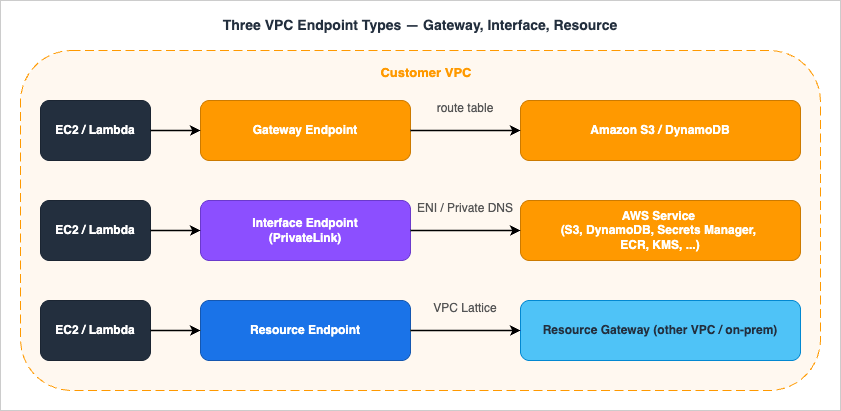
3. Gateway Endpoint
Gateway endpoints predate PrivateLink and remain the cheapest path to the only two services they support: Amazon S3 and Amazon DynamoDB. They do not use PrivateLink at all. They are route-table entries that AWS adds for you, pointing the service's prefix list (e.g.,pl-63a5400a for S3 in us-east-1) at a logical target named vpce-xxxxxxxx.3.1 Mechanism
When you create a Gateway endpoint and associate it with one or more route tables, AWS adds a managed route to those tables. Any subnet whose route table contains that managed route will resolves3.<region>.amazonaws.com (or dynamodb.<region>.amazonaws.com) to public IPs as before, but the traffic to those public IPs is intercepted at the route table and stays on the AWS backbone instead of egressing through the IGW or NAT.You cannot modify or delete the managed route by hand. You can only add or remove route-table associations on the endpoint itself.
3.2 What works and what does not
- Works: traffic from EC2, Lambda-in-VPC, ECS / EKS pods, anything inside the VPC and using a route table with the managed route.
- Does not work — on-premises: a Direct Connect or Site-to-Site VPN cannot push traffic through a Gateway endpoint. The route table that owns the prefix list is the VPC's, not the on-premises router's. On-prem clients calling S3 via DX still hit S3's public endpoints (or an Interface endpoint, if you create one — see §4).
- Does not work — cross-Region: the prefix list is regional. S3 buckets in another Region resolve to that other Region's public IPs, which the local prefix list does not match, so traffic falls back to the IGW / NAT path.
- Does not work — peered VPCs and TGW spokes: a Gateway endpoint is local to the VPC where you created it. Peered or TGW-attached VPCs do not "see" it. Each VPC needs its own Gateway endpoint (which is fine because it's free).
3.3 Cost
Free. No hourly charge. No per-GB processing charge. Even at petabyte-per-day S3 throughput, the Gateway endpoint itself contributes USD 0 to the bill. (Cross-AZ data transfer between EC2 and the endpoint is also free.)3.4 When to use
- Always, for S3 and DynamoDB, unless you specifically need on-premises clients to reach S3/DynamoDB privately, in which case combine Gateway + Interface (see §7.3 on
PrivateDnsOnlyForInboundResolverEndpoint). - Even in workloads that already have an S3 Interface endpoint for on-prem clients, keep the Gateway endpoint for in-VPC traffic — the per-GB cost difference at scale is significant.
4. Interface Endpoint (PrivateLink)
Interface endpoints are the workhorse: more than 130 AWS services plus any third-party or first-party service that the provider exposes as an Endpoint Service in front of an NLB (or, for inline middleboxes, a GWLB).4.1 Mechanism
Creating an Interface endpoint to, say,secretsmanager in us-east-1:1. AWS provisions an ENI in each subnet you specify (one per AZ; the ENI lives in your VPC and CIDR).
2. Each ENI gets a private IP in that subnet.
3. If you opt in to Private DNS (default for AWS services), AWS creates a managed Route 53 Private Hosted Zone in your VPC that resolves
secretsmanager.us-east-1.amazonaws.com to those private IPs. Your existing application code that calls the public DNS name now hits the endpoint without modification.4. AWS also exposes endpoint-specific DNS names that always resolve to the endpoint regardless of the Private DNS toggle:
- Regional:
vpce-0abcd1234.secretsmanager.us-east-1.vpce.amazonaws.com- Per-AZ (zonal):
use1-az1.vpce-0abcd1234.secretsmanager.us-east-1.vpce.amazonaws.comEach interface endpoint provides a baseline of 10 Gbps per Availability Zone and auto-scales up to 100 Gbps per AZ (per the AWS PrivateLink quotas documentation; verified 2026-04). Maximum throughput across a 3-AZ endpoint is therefore 300 Gbps. Workloads requiring sustained throughput beyond the auto-scaled ceiling can request a quota increase via AWS Support. For predictable headroom (large model artifacts pulled from S3, big Glue jobs hitting Secrets Manager at startup), spread the source instances across AZs so the load lands on different ENIs and avoid concentrating traffic on one AZ's ENI. Note also: the endpoint supports an MTU of 8500 bytes, and MSS clamping is enforced on traffic into the endpoint — relevant when tuning bulk-transfer workloads. Path MTU Discovery behavior over PrivateLink ENIs varies; if jumbo frames matter for your workload, validate with end-to-end packet captures rather than relying on PMTUD alone.
4.2 Pricing
Interface endpoint pricing (US regions; verify regional variation at the PrivateLink pricing page; tiers verified 2026-04-26 at aws.amazon.com/privatelink/pricing/):| Component | Price (us-east-1) |
|---|---|
| Per ENI per AZ per hour | USD 0.01 |
| Data processed, first 1 PB / month / Region | USD 0.01 / GB |
| Data processed, next 4 PB / month / Region | USD 0.006 / GB |
| Data processed, over 5 PB / month / Region | USD 0.004 / GB |
| Cross-AZ data transfer between EC2 and endpoint | Free (since 2022-04-01) |
3 × 0.01 = USD 0.03 / hour, or about USD 21.90 / month (730 hr) before data processing. Multiply by the number of distinct service endpoints — and a typical workload has Secrets Manager, KMS, ECR API, ECR DKR, STS, EC2, SSM, SSM Messages, and EC2 Messages, easily ten endpoints — and the bill becomes meaningful.4.3 PrivateLink for an AWS service vs PrivateLink for your own service
The same "Interface endpoint" wire format is used for two distinct flows:- AWS service Interface endpoint: the provider is AWS, the service name is published (e.g.,
com.amazonaws.us-east-1.secretsmanager), Private DNS overrides the public DNS for free. - Endpoint Service (a.k.a. PrivateLink for your own service): you, as the provider, register an NLB or GWLB as a service, allow-list consumer principals, and consumers create Interface endpoints to it. The DNS name is
vpce-<id>-<random>.<service>.<region>.vpce.amazonaws.com; you can also configure a custom domain via Route 53 PHZ if you want to project a friendly name. SaaS providers (Snowflake, Datadog, MongoDB Atlas, etc.) ship private connectivity this way.
aws ec2 create-vpc-endpoint, same per-ENI pricing — but the provider plumbing differs sharply, and the Resource Endpoint (next section) was introduced specifically to remove the NLB requirement for many "expose a private resource" use cases.4.4 Cross-Region PrivateLink (XRPL)
Until November 2025, the rule was simple: an Interface endpoint can only target services in its own Region. XRPL changed that for a select set of AWS services. As of 2026-04, the supported services are: Amazon S3, AWS IAM, Amazon ECR (ecr.api and ecr.dkr), AWS KMS, Amazon ECS, AWS Lambda, Amazon Data Firehose, Amazon Managed Service for Apache Flink, and Amazon Route 53 (verified 2026-04 at docs.aws.amazon.com/vpc/latest/privatelink/aws-services-cross-region-privatelink-support.html).To create a cross-Region endpoint:
- Grant the IAM principal the permission-only action
vpce:AllowMultiRegion(it is not callable; it is checked at endpoint-creation time). - Create the endpoint specifying the remote service name (
com.amazonaws.<remote-region>.<service>). - Only regional endpoint DNS records are generated; there are no zonal records for cross-Region endpoints.
- Add a new condition key,
aws:SourceVpcArn, to your endpoint or resource policies if you want to constrain which Regions can call you through PrivateLink.
When NOT to use XRPL: for bulk cross-Region data movement, S3 Replication, DataSync, or AWS Backup are usually a better fit. XRPL shines for control-plane calls that need to stay private (e.g., a multi-Region IAM admin pattern, ECR pulls in a primary-only registry).
4.5 IPv6 support
In November 2025, AWS announced IPv6 support for Amazon S3 Gateway and Interface VPC Endpoints (verified 2026-04 at aws.amazon.com/about-aws/whats-new/2025/11/ipv6-amazon-s3-gateway-interface-vpc-endpoints/). The feature is available at no additional cost across all Commercial and GovCloud (US) Regions. For VPCs that have adopted IPv6 dual-stack subnets, this removes the last "must keep an IPv4 path for the S3 endpoint" exception — both Gateway-routed in-VPC traffic and Interface-routed traffic from on-premises (via Route 53 inbound resolver over IPv6) can now flow without a parallel IPv4 plane.Other AWS services' Interface endpoints continue to expand IPv6 coverage on a per-service basis. Before assuming IPv6 reachability for a non-S3 service, confirm in that service's PrivateLink documentation; legacy services may still require an IPv4 endpoint or a dual-stack subnet on the consumer side. The
create-vpc-endpoint API exposes an --ip-address-type parameter (ipv4 | ipv6 | dualstack), but the chosen value must be supported both by the service and by the subnets the endpoint terminates in — specifying ipv6 against a service or subnet without IPv6 support fails at create time.4.6 AI/ML services over PrivateLink (Bedrock, SageMaker)
The fastest-growing class of Interface endpoint workloads in 2026 is generative AI. Both Amazon Bedrock and Amazon SageMaker publish multiple PrivateLink service names that often need to coexist in the same VPC.| Service | PrivateLink service name | Purpose |
|---|---|---|
| Bedrock control plane | com.amazonaws.us-east-1.bedrock | Model lifecycle, provisioned throughput |
| Bedrock runtime | com.amazonaws.us-east-1.bedrock-runtime | InvokeModel / Converse API |
| Bedrock Agents control plane | com.amazonaws.us-east-1.bedrock-agent | Agent / Knowledge Base configuration |
| Bedrock Agents runtime | com.amazonaws.us-east-1.bedrock-agent-runtime | Agent invocation, retrieval |
| SageMaker API | com.amazonaws.us-east-1.sagemaker.api | Control plane (training jobs, endpoints) |
| SageMaker Runtime | com.amazonaws.us-east-1.sagemaker.runtime | Real-time inference invocations |
| SageMaker FeatureStore Runtime | com.amazonaws.us-east-1.sagemaker.featurestore-runtime | Online feature lookups |
| SageMaker Notebook | aws.sagemaker.us-east-1.notebook | Notebook instance access (special namespace) |
- Endpoint count adds up fast. A single Bedrock + Knowledge Bases workload typically needs 4–6 endpoints (control + runtime + agent + agent runtime + S3 Gateway for source data + KMS for encrypted prompts). Across three AZs that is 18 ENIs ≈ USD 131 / month before data processing — a strong argument for Hub & Spoke centralization (§10.2) in any organization with more than two AI workload VPCs.
- Inference throughput vs. the 100 Gbps/AZ ceiling. Streaming responses from Bedrock or SageMaker Runtime are bursty and often coincident across many callers. The auto-scaling 100 Gbps/AZ limit (see §4.1) is comfortable for typical chat workloads but can be a real ceiling for batch inference or RAG pipelines that fan out hundreds of concurrent
Conversecalls. Monitor CloudWatchBytesProcessedand request a quota increase before reaching the ceiling. - Endpoint policy granularity. Bedrock's foundation-model resource ARNs (
arn:aws:bedrock:<region>::foundation-model/<model-id>) can be specified directly in the endpoint policy'sResourceelement and combined with the newaws:VpceOrgIDcondition key to enforce "only this org's VPCs may invoke these specific foundation models." Layer additional Bedrock-specific condition keys such asbedrock:GuardrailIdentifierandbedrock:InferenceProfileArn(verified 2026-04 at docs.aws.amazon.com/service-authorization/latest/reference/list_amazonbedrock.html) for guardrail / inference-profile enforcement. This is one of the cleanest patterns for tenant isolation in shared platform AI infrastructure. - Knowledge Base sources. Bedrock Knowledge Bases reading from S3 will use the S3 Gateway endpoint (free, in-VPC) for the data path while control-plane calls flow through the Bedrock Interface endpoint — design both into the same VPC.
5. Resource Endpoint
The Resource Endpoint, launched at re:Invent 2024 and integrated with VPC Lattice, is the single biggest addition to the endpoint family in years. The motivating use case: "my Lambda in VPC A needs to talk to an RDS instance in VPC B (or on-premises) without me standing up an NLB in front of the database." Before Resource Endpoints, this required either VPC peering (no IAM-style policy at the boundary), TGW (same), or a self-hosted NLB-fronted PrivateLink Endpoint Service (operational tax).5.1 The three new building blocks
- Resource Configuration — a VPC Lattice object that declares "this thing is shareable". Four types (a fifth,
CIDR, follows the list):ARN— an AWS-managed resource referenced by ARN. As of 2026-04 this is only Amazon RDS (non-publicly-accessible DB instance / cluster). ElastiCache and MSK are not supported as ARN resource-configuration types; they can be shared via IP-address or domain-name resource configurations instead (verified 2026-04 at docs.aws.amazon.com/vpc/latest/privatelink/resource-configuration.html).SINGLE— a single private IPv4, IPv6, or publicly-resolvable domain name reachable from the resource VPC.GROUP— a logical bundle ofCHILDconfigurations.CHILD— a member of aGROUP.
CIDR, represents a network segment (a list of CIDR ranges); a Resource VPC Endpoint cannot reach it, and the consumer reaches it only through a tunnel endpoint. - Resource Gateway — a set of ENIs in the resource VPC that act as the ingress for cross-VPC traffic. One Resource Gateway can front many Resource Configurations.
- Resource VPC Endpoint — the consumer-side construct (
type: "resource") that the consuming VPC creates against a Resource Configuration that has been shared with it (directly, or via RAM, or via a VPC Lattice Service Network).
5.2 Service Network vs. Resource Endpoint
The same Resource Configuration can be consumed in three ways. Knowing which to pick is the most common point of confusion.| Consumer construct | What it is | When to use |
|---|---|---|
Resource VPC Endpoint (type: resource) | A direct endpoint to one Resource Configuration | A single tightly scoped target — one RDS instance, one IP-bound app — where you want one-to-one wiring and one set of policies |
Service Network VPC Endpoint (type: service-network) | An endpoint to a VPC Lattice Service Network that aggregates many services and resources | A platform-style consumer that needs many resources from many providers behind one entry point |
| Service Network VPC Association | The VPC is associated with a Service Network without an endpoint | Pre-existing instances in the VPC can call any service in the network with no additional plumbing; opposite of "explicit endpoint per target" |
5.3 Difference from a "classic" PrivateLink Endpoint Service
Both expose a private resource across VPCs. The differences:| Aspect | Resource Endpoint | Endpoint Service (NLB-fronted) |
|---|---|---|
| Provider must run an NLB or GWLB | No | Yes |
| Provider-side construct | Resource Configuration + Resource Gateway | NLB / GWLB + Endpoint Service |
| AWS-managed resource by ARN | Yes (RDS today) | No |
| Cross-account sharing | AWS RAM | Allow-list of consumer principal ARNs |
| Auth policy enforcement | VPC Lattice auth policy at the resource | Endpoint policy on the consumer side only |
| Layer | TCP | TCP or UDP (a UDP listener on the Network Load Balancer) |
5.4 Pricing
Resource Endpoints split charges between the consumer (the VPC creating the endpoint) and the provider (the account that owns the Resource Configuration and Resource Gateway):- Consumer side — Resource VPC Endpoint: USD 0.01 / ENI-AZ-hour (the same per-AZ rate as an Interface endpoint). A three-AZ Resource Endpoint therefore costs roughly USD 21.90 / month per consumer VPC before data processing.
- Consumer side — data processing: same tiered rates as Interface endpoints (USD 0.01 / GB at tier 1, descending to USD 0.004 / GB at the highest tier).
- Provider side — Resource Gateway: charged per Resource-Gateway-AZ-hour (verify the current rate at the AWS PrivateLink pricing page; the Resource Gateway provisions one ENI per AZ in the resource VPC).
- Optional — VPC Lattice service charges: if you additionally front the resource with a VPC Lattice service (HTTP/HTTPS or gRPC layer), VPC Lattice service usage charges apply on top — see the Amazon VPC Lattice pricing page.
5.5 Minimal example — RDS by ARN
aws vpc-lattice create-resource-configuration \
  --name app-prod-rds \
  --type ARN \
  --resource-configuration-definition arn=arn:aws:rds:us-east-1:111111111111:db:app-prod-rds \
  --resource-gateway-identifier <resource-gateway-id> \
  --port-ranges 5432
Share via RAM, then on the consumer side:
aws ec2 create-vpc-endpoint \
  --vpc-id vpc-0aaa \
  --vpc-endpoint-type Resource \
  --resource-configuration-arn <shared-resource-config-arn> \
  --subnet-ids subnet-0aaa subnet-0bbb
The consumer's application keeps connecting to the original RDS endpoint hostname (
app-prod-rds.<random>.us-east-1.rds.amazonaws.com); the Resource Endpoint's managed PHZ resolves it to the local ENI. No application code change.6. Endpoint Policy
Endpoint policies are the network-side policy lever. They live on the endpoint, not on the calling identity, and they evaluate at the moment the traffic transits the endpoint. Critically, they are additive: an action through the endpoint is allowed only if the endpoint policy and the IAM identity-based policy and (where applicable) the resource-based policy all allow it.6.1 The default policy is wide open
If you do not attach a policy, AWS applies this default:
{
  "Version": "2012-10-17",
  "Statement": [
    {
      "Effect": "Allow",
      "Principal": "*",
      "Action": "*",
      "Resource": "*"
    }
  ]
}
This is deliberately additive — it does not grant anything by itself, because IAM and resource policies still apply — but teams reading the policy in the console often misread it as "the endpoint allows everything to anyone." It does not. The endpoint policy is the ceiling on what the endpoint will pass; identity and resource policies are the floor on what the caller is permitted.For Gateway endpoints, the
Principal field of the endpoint policy must be "*". To restrict callers, use aws:PrincipalArn, aws:PrincipalOrgID, or one of the new aws:Vpce* keys in the Condition block.6.2 Condition-key matrix
The most useful keys for endpoint policies — including the 2024–2025 additions:* You can sort the table by clicking on the column name.
| Key | Scope | Note |
|---|---|---|
aws:SourceVpc | VPC | Populated only when the call traverses an endpoint. Reflects the VPC of the endpoint, not the caller. |
aws:SourceVpce | Endpoint | Per-endpoint-ID; operationally heavy at scale. |
aws:SourceVpcArn | VPC ARN (Region + account + VPC ID) | New with XRPL; lets you constrain by Region and account. |
aws:PrincipalOrgID | Org | Does NOT match AWS service principals (e.g., CloudTrail, Config). |
aws:VpceAccount | Account | New 2024/2025; rejects calls from endpoints in unauthorized accounts. |
aws:VpceOrgID | Org | New; works with AWS service principals (unlike PrincipalOrgID). |
aws:VpceOrgPaths | OU path | New; granular org perimeter. |
aws:PrincipalIsAWSService | Bool | Use to exempt AWS service principals from a network deny. |
aws:Vpce* keys at launch covered S3, DynamoDB, KMS, and STS. Per-service support has expanded since launch but is not enumerated in a single canonical doc; consult the IAM service authorization reference for any non-listed service before relying on these keys (verified 2026-04 at docs.aws.amazon.com/service-authorization/latest/reference/reference_policies_condition-keys.html).6.3 A policy that restricts an S3 endpoint to one Org
{
  "Version": "2012-10-17",
  "Statement": [
    {
      "Effect": "Allow",
      "Principal": "*",
      "Action": [
        "s3:GetObject",
        "s3:PutObject",
        "s3:ListBucket"
      ],
      "Resource": [
        "arn:aws:s3:::company-prod-*",
        "arn:aws:s3:::company-prod-*/*"
      ],
      "Condition": {
        "StringEquals": {
          "aws:VpceOrgID": "o-xxxxxxxxxx"
        }
      }
    }
  ]
}
Three points worth calling out:- The policy denies implicitly anything not in the
Allow(no explicitDenyis needed at the endpoint layer for a basic perimeter). aws:VpceOrgID(notaws:PrincipalOrgID) is the right key here because AWS-service callers from inside the org (CloudTrail to its own log bucket, for example) need to be permitted as well.- Combine this with a bucket policy on the destination buckets that uses
aws:SourceVpceoraws:SourceVpcArnto refuse access from outside this endpoint, and you have a closed loop.
6.4 Policy size & propagation
- Maximum endpoint-policy size: 20,480 characters.
- Changes take a few minutes to propagate to the data plane. Plan deploys accordingly; do not chain a policy update with an immediate test.
- Some AWS services do not support endpoint policies at all. For those services the endpoint passes everything; restrict at the resource policy or IAM layer.
7. DNS Resolution
DNS is the single most common source of "the endpoint is created but nothing routes through it" tickets. The mental model below covers all paths.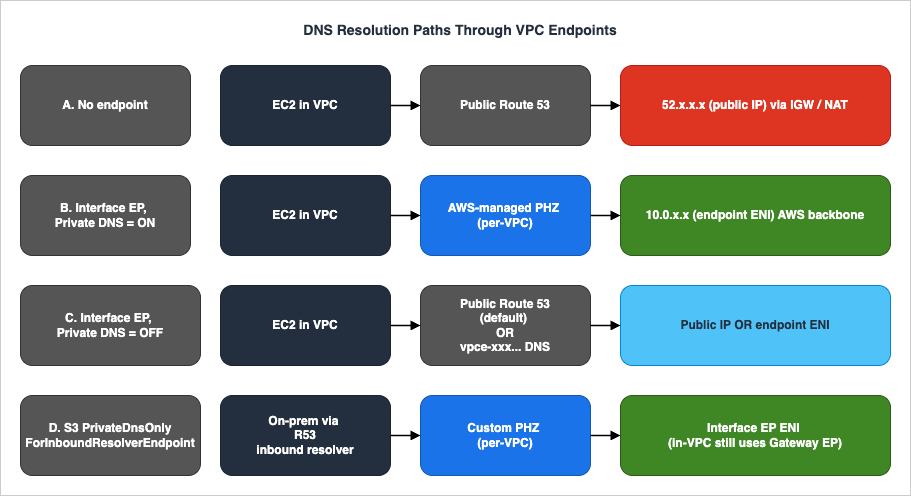
7.1 Private DNS (the default and easiest path)
When you create an Interface endpoint to an AWS service and leave the Enable DNS name checkbox on, AWS creates an AWS-managed Route 53 Private Hosted Zone in your VPC for that service's public hostname (e.g.,secretsmanager.us-east-1.amazonaws.com). Inside the VPC, that hostname resolves to the endpoint ENI's private IP. Outside the VPC, the public DNS name continues to resolve to AWS public IPs, untouched.Two prerequisites are easy to miss:
- VPC attribute
enableDnsSupportmust betrue(it is, by default). - VPC attribute
enableDnsHostnamesmust betrue(it is, by default for the default VPC; explicitly set it for new VPCs).
7.2 Endpoint-specific DNS names
Every Interface endpoint exposes two flavors of DNS names that resolve to the endpoint regardless of the Private DNS toggle:- Regional:
vpce-<id>.<service>.<region>.vpce.amazonaws.com - Zonal (per-AZ):
<az-id>.vpce-<id>.<service>.<region>.vpce.amazonaws.com
- Private DNS is intentionally off (because you are aggregating endpoints from multiple VPCs and managing your own PHZ).
- You explicitly want to pin traffic to a specific AZ for latency or AZ-affinity reasons.
- You are operating from on-premises through a Route 53 inbound resolver and need a stable, endpoint-bound name independent of the public hostname.
7.3 PrivateDnsOnlyForInboundResolverEndpoint (S3 only)
A clever flag specific to S3 Interface endpoints. The intent: "give me both the cheap Gateway path for in-VPC traffic and the on-premises-reachable Interface path, and be smart about which one wins for whom."Set it like this (after the endpoint exists):
aws ec2 modify-vpc-endpoint \
  --vpc-endpoint-id vpce-0abcd1234 \
  --dns-options PrivateDnsOnlyForInboundResolverEndpoint=true
Effect:
- In-VPC instances resolve
s3.<region>.amazonaws.comvia the Gateway endpoint (no per-GB Interface charge). - On-premises clients querying through Route 53 inbound resolver resolve to the Interface endpoint ENI (so they have a private path to S3 over DX/VPN).
- A Gateway endpoint for S3 must already exist in the same VPC. Otherwise the modify call fails.
- The Gateway endpoint cannot be deleted while the flag is
true. - Only S3 supports this flag. There is no general-purpose equivalent for other services.
7.4 Route 53 Profiles — modern multi-VPC DNS
Before Route 53 Profiles, sharing private DNS across VPCs and accounts meant manually associating each PHZ with each consumer VPC, often via cross-account CLI calls. Route 53 Profiles (2024) collapse that into a single shareable object: associate any number of PHZs, Resolver rules, and DNS Firewall rule groups to a Profile once, then share the Profile across accounts via AWS RAM and associate it to consumer VPCs.For PrivateLink at scale this is a major operational unlock. A typical Hub-and-Spoke pattern (covered in §10.2) used to require: (1) create Interface endpoint in a Network VPC with Private DNS off; (2) create a custom PHZ for
secretsmanager.us-east-1.amazonaws.com; (3) add an alias to the endpoint regional DNS; (4) associate the PHZ with every spoke VPC, in every account. Step 4 was the painful one. With Route 53 Profiles, steps 2–4 collapse to "add the PHZ to the Profile, share the Profile, attach the Profile to spoke VPCs."One subtle point when sharing via RAM: the default managed permission
AWSRAMPermissionRoute53ProfileAllowAssociationActions lets a consumer associate the Profile to its VPCs but does not include route53profiles:AssociateResourceToProfile. If you want consumer accounts to add their own resources (PHZs, endpoints) into a centrally shared Profile, create a custom RAM managed permission that adds those actions explicitly.8. Cross-Account / Cross-Region
8.1 Cross-account sharing
The mechanism depends on the endpoint family:- Gateway endpoint: not shareable. Each VPC has its own.
- Interface endpoint to an AWS service: not shareable per-endpoint, but the DNS resolution can be shared via Route 53 PHZ associations or Route 53 Profiles (§7.4). The endpoint itself stays in one VPC; spoke VPCs in other accounts simply resolve the shared PHZ to the endpoint ENI's private IP and, with the right routing (TGW), reach it.
- Endpoint Service (NLB-fronted PrivateLink for your own service): the provider lists allowed consumer principal ARNs (account, IAM user, IAM role); the consumer creates Interface endpoints to the published service name.
- Resource Configuration (Resource Endpoint): share via AWS RAM. The consumer creates a Resource VPC Endpoint (or Service Network VPC Endpoint) against the shared Resource Configuration ARN.
- Resource Configuration of type CIDR (tunnel endpoint, added September 18, 2026): also shared via AWS RAM, but the consumer creates a tunnel endpoint instead, and the configuration cannot be associated with a service network.
8.2 Cross-Region
Until 2025, the rule was firm: a VPC endpoint is regional. To call a service in another Region, you exited via the public internet (or built bespoke replication / TGW peering).That changed with Cross-Region PrivateLink (XRPL), which went GA in November 2025. As covered in §4.4, XRPL lets a local Interface endpoint target a remote-Region AWS service. For the full list of currently supported services, see §4.4.
Operational gotchas that bite teams adopting XRPL:
- The IAM permission
vpce:AllowMultiRegionis permission-only: you grant it, you do not call it. Without it, thecreate-vpc-endpointcall against a remote-Region service name simply fails. - Only regional DNS records are created for cross-Region endpoints, never zonal.
- Use
aws:SourceVpcArnin resource policies (e.g., S3 bucket policies) to constrain access to a specific (Region, account, VPC) triple. - Resource Endpoints are not cross-Region. If you need cross-Region access to an RDS in another Region, replicate the database or use the Region-local Resource Endpoint pattern within each Region.
8.3 Cross-Region traffic that isn't XRPL
For non-XRPL services, the historical pattern is still valid:- TGW peering between Regions, with VPC endpoints terminating in each Region.
- Public-internet egress with TLS and IAM signing (acceptable security posture for many control-plane calls).
- Service-specific replication (S3 Replication, DynamoDB Global Tables, ECR cross-Region replication) — usually preferable to XRPL for bulk data movement.
9. Cost Comparison — A Worked Example
A representative production VPC with three AZs and ten Interface endpoints inus-east-1, plus one Gateway endpoint for S3 and one Resource Endpoint to an RDS in another VPC.* You can sort the table by clicking on the column name.
| Component | Quantity | Unit price | Monthly cost |
|---|---|---|---|
| Gateway endpoint (S3) | 1 | Free | USD 0 |
| Interface endpoints, ENIs | 10 services × 3 AZs = 30 ENIs | USD 0.01 / hr | USD 219.00 |
| Interface endpoints, data processing | 5 TB / month tier-1 (5,000 GB) | USD 0.01 / GB | USD 50.00 |
| Resource Endpoint (RDS), ENIs | 1 endpoint × 3 AZs = 3 ENIs | USD 0.01 / hr | USD 21.90 |
| Resource Endpoint, data processing | 200 GB / month | USD 0.01 / GB | USD 2.00 |
| Total consumer-side endpoints subtotal | USD 292.90 |
- A three-AZ NAT Gateway deployment requires three independent NAT Gateways (one per AZ for AZ-isolated resilience), each charged hourly: 3 × USD 0.045 / hr × 730 hr ≈ USD 98.55 / month of fixed cost.
- 5 TB / month (5,000 GB) processed through NAT at USD 0.045 / GB = USD 225.00 / month of data processing.
- Cross-AZ traffic between EC2 in one AZ and a NAT Gateway in another AZ adds USD 0.01 / GB in each direction — one more reason to keep the NAT Gateway in the same AZ as the source.
- Public egress out of the Region (if reaching cross-Region services) at USD 0.09 / GB tier 1 — a separate large line item.
10. Architecture Patterns
10.1 Single VPC
The simplest pattern: every endpoint lives in the same VPC as its callers. Pros: zero DNS complexity, no TGW. Cons: every additional VPC repeats the cost. This is fine for prototypes, single-team workloads, and any case where the VPC count is small and stable.10.2 Hub & Spoke (Centralized VPC Endpoints)
For organizations with dozens of VPCs across multiple accounts, paying the per-ENI-per-AZ cost for ten endpoints in every VPC is wasteful. The Hub & Spoke pattern centralizes the endpoints in a Network VPC and lets spoke VPCs reach them via TGW.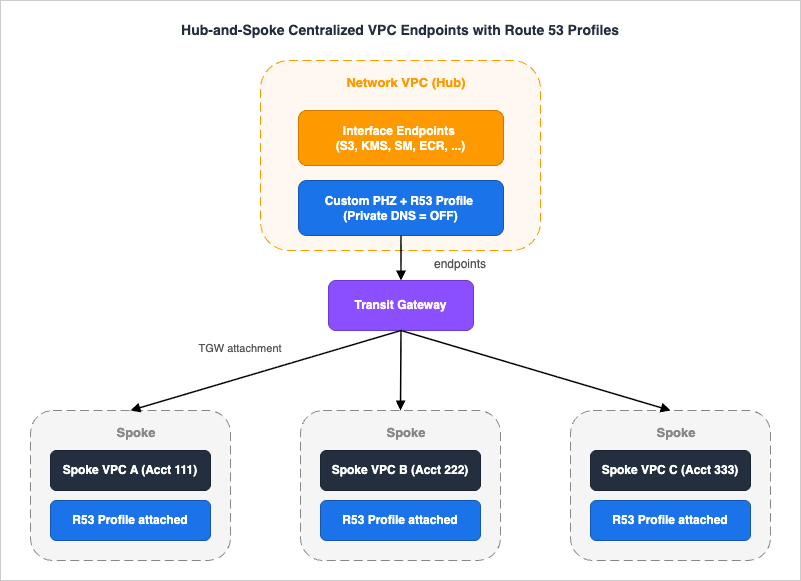
- Create Interface endpoints in the Network VPC with Private DNS turned off.
- Add the endpoints' regional DNS names as alias records in a custom Route 53 Private Hosted Zone (
secretsmanager.us-east-1.amazonaws.com,kms.us-east-1.amazonaws.com, etc.). Add the PHZ to a Route 53 Profile. - Share the Profile via RAM to all spoke accounts; attach it to all spoke VPCs.
- Wire spoke VPCs to the Network VPC via TGW with appropriate route tables.
- Optionally enforce egress from spokes to flow only through the Network VPC by removing local NAT from spokes.
Trade-offs:
- Single point of failure: the Network VPC becomes critical infrastructure. Plan its operations (deploys, IaC blast radius) accordingly.
- TGW data-processing charges: cross-VPC traffic via TGW costs USD 0.02 / GB. For workloads with very high in-VPC traffic to AWS services, the TGW charge can outweigh the per-ENI savings of centralization.
- DNS coupling: every spoke depends on the Profile / PHZ. A bad PHZ change ripples to all spokes simultaneously.
10.3 Centralized Inspection VPC
When compliance or security policy requires deep packet inspection of all private traffic (including to AWS services), insert an AWS Network Firewall inspection layer between spoke VPCs and the endpoints.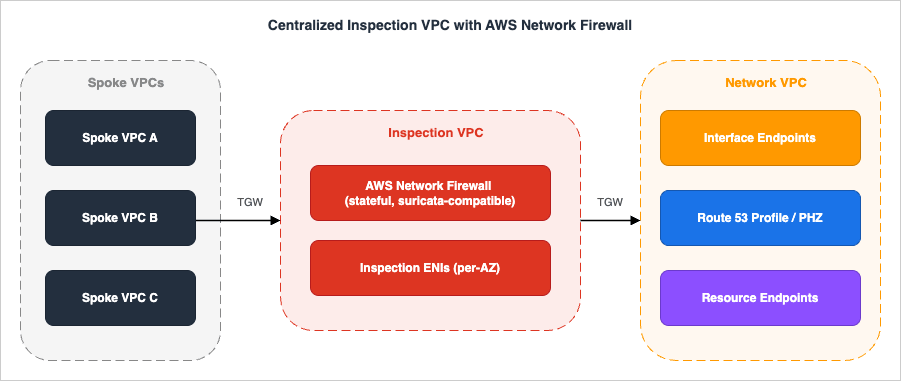
Trade-offs:
- AWS Network Firewall has its own hourly + processing charges (USD 0.395 / hr per firewall endpoint + USD 0.065 / GB processed in
us-east-1; confirm current rates and regional variation at the AWS Network Firewall pricing page). - Adds two TGW hops to every API call. Latency is small but measurable.
- Failure of the Inspection VPC blocks all spokes. Run the firewall across multiple AZs and have a documented break-glass route table.
10.4 Pattern selection cheat-sheet
* You can sort the table by clicking on the column name.| Symptom / requirement | Pattern |
|---|---|
| Single team, one or two VPCs | Single VPC |
| 10+ VPCs across many accounts | Hub & Spoke with Route 53 Profiles |
| Compliance requires DPI of all egress | Centralized Inspection VPC |
| Need to expose an existing RDS to other VPCs | Resource Endpoint (RDS by ARN) |
| Need to expose your own service to other accounts | Endpoint Service (NLB) or Resource Configuration (Group of IPs) |
| Need a service in another Region privately | XRPL (if supported) or per-Region endpoints with replication |
11. Observability — What to Log and What to Watch
A private endpoint is an opaque box until it is instrumented. The three layers worth covering before declaring a design complete are flow-level visibility, endpoint-level metrics, and policy correctness.11.1 VPC Flow Logs at the endpoint ENI
Each Interface or Resource endpoint provisions one ENI per AZ inside your VPC. Those ENIs participate in VPC Flow Logs exactly like any other ENI. Two practical scopes:- Subnet-level Flow Logs — cheapest to enable but mixes endpoint traffic with all other traffic in the subnet. Useful when endpoints sit in a dedicated "endpoint subnet."
- ENI-level Flow Logs on the endpoint ENI itself — create a Flow Log targeted at the endpoint's ENI ID (visible in
describe-vpc-endpoints→NetworkInterfaceIds). Cleanest for forensic queries like "who called Secrets Manager at 03:14 last Tuesday." The ENI ID is stable for the life of the endpoint, so the Flow Log subscription does not need rotation.
srcaddr, dstaddr, srcport, dstport, action, vpc-id, subnet-id, instance-id, and flow-direction. Sink them to S3 in Parquet for Athena, or to CloudWatch Logs if you want near-real-time alerting.11.2 CloudWatch metrics worth alerting on
PrivateLink Interface endpoints emit metrics under theAWS/PrivateLinkEndpoints namespace, dimensioned by VPC Endpoint Id, Service Name, VPC Id, and Endpoint Type:| Metric | What it tells you | Suggested alarm |
|---|---|---|
BytesProcessed | Total bytes through the endpoint (billing input) | Sudden 5x spike vs. 7-day baseline (cost / abuse signal) |
PacketsDropped | Packets dropped at the endpoint (security group, policy, or limit) | Any non-zero sustained rate (likely misconfiguration) |
NewConnections / ActiveConnections | Connection counts per minute | Connection-rate threshold for capacity planning |
RstPacketsReceived | Backend RST signal (target rejecting) | Sustained > 0 (often surfaces upstream failure) |
AWS/VpcLattice (RequestCount, HTTPCode_4XX/5XX, TargetResponseTime) become relevant. Pair with VPC Lattice access logs sunk to S3 / CloudWatch / Firehose for per-request visibility.11.3 Validating endpoint policies before they ship
Endpoint policies are evaluated at the moment of traffic, so an incorrect policy quietly black-holes calls instead of failing loudly at apply time. Two tools de-risk this:- IAM Access Analyzer for Custom Policy Checks — runs static checks against a draft endpoint policy and surfaces suspect grants (overly broad
Action, missingCondition) before deploy. Especially valuable when a CI pipeline produces the policy from a template. - IAM Policy Simulator — given an identity and an action, evaluates IAM + resource + endpoint policies together and reports the effective decision. Use it as a smoke test in change reviews ("would my admin role still be able to call
kms:Decryptthrough this endpoint after my change?").
12. Infrastructure as Code — Minimal Examples
Both CloudFormation and Terraform model all three endpoint families directly. The fragments below are the smallest production-ready forms; expand them with logging / KMS / tags as your standards require.12.1 CloudFormation
Gateway endpoint to S3:
S3GatewayEndpoint:
  Type: AWS::EC2::VPCEndpoint
  Properties:
    VpcId: !Ref Vpc
    ServiceName: !Sub com.amazonaws.${AWS::Region}.s3
    VpcEndpointType: Gateway
    RouteTableIds:
      - !Ref PrivateRouteTable
    PolicyDocument:
      Version: "2012-10-17"
      Statement:
        - Effect: Allow
          Principal: "*"
          Action:
            - s3:GetObject
            - s3:PutObject
            - s3:ListBucket
          Resource:
            - arn:aws:s3:::company-prod-*
            - arn:aws:s3:::company-prod-*/*
          Condition:
            StringEquals:
              aws:VpceOrgID: !Ref OrgId
Interface endpoint to Secrets Manager (with Private DNS, dedicated SG):
SecretsManagerInterfaceEndpoint:
  Type: AWS::EC2::VPCEndpoint
  Properties:
    VpcId: !Ref Vpc
    ServiceName: !Sub com.amazonaws.${AWS::Region}.secretsmanager
    VpcEndpointType: Interface
    SubnetIds: !Ref EndpointSubnetIds   # one per AZ
    SecurityGroupIds:
      - !Ref EndpointSecurityGroup
    PrivateDnsEnabled: true
    IpAddressType: ipv4
Resource Configuration + Resource Endpoint (RDS by ARN):
RdsResourceConfiguration:
  Type: AWS::VpcLattice::ResourceConfiguration
  Properties:
    Name: app-prod-rds
    Type: ARN
    ResourceConfigurationDefinition:
      ArnResource: !GetAtt RdsCluster.DBClusterArn
    ResourceGatewayId: !Ref ResourceGateway
    PortRanges:
      - "5432"

ConsumerResourceEndpoint:
  Type: AWS::EC2::VPCEndpoint
  Properties:
    VpcId: !Ref ConsumerVpc
    VpcEndpointType: Resource
    ResourceConfigurationArn: !GetAtt RdsResourceConfiguration.Arn
    SubnetIds: !Ref ConsumerSubnetIds
12.2 Terraform
# Interface endpoint with Private DNS
resource "aws_vpc_endpoint" "secretsmanager" {
  vpc_id              = aws_vpc.main.id
  service_name        = "com.amazonaws.${data.aws_region.current.name}.secretsmanager"
  vpc_endpoint_type   = "Interface"
  subnet_ids          = aws_subnet.endpoints[*].id
  security_group_ids  = [aws_security_group.endpoint.id]
  private_dns_enabled = true
  ip_address_type     = "ipv4"

  policy = data.aws_iam_policy_document.endpoint_policy.json
}

# Resource Configuration + Resource Endpoint
resource "aws_vpclattice_resource_configuration" "rds" {
  name                   = "app-prod-rds"
  type                   = "ARN"
  resource_gateway_identifier = aws_vpclattice_resource_gateway.this.id
  port_ranges            = ["5432"]

  resource_configuration_definition {
    arn_resource {
      arn = aws_rds_cluster.main.arn
    }
  }
}

resource "aws_vpc_endpoint" "rds_resource" {
  vpc_id                       = aws_vpc.consumer.id
  vpc_endpoint_type            = "Resource"
  resource_configuration_arn   = aws_vpclattice_resource_configuration.rds.arn
  subnet_ids                   = aws_subnet.consumer[*].id
}
A repo-wide pattern worth adopting: keep one IaC module per endpoint family (Gateway / Interface / Resource) parameterized by service name, and let consumers instantiate it with the list of services they need. This makes the centralized endpoints in a Hub VPC (§10.2) a one-line add per new service.13. Common Pitfalls — A Field Checklist
Checklist of failures observed often enough to be worth listing explicitly. Run through it before declaring an endpoint design "done."- Assuming Gateway endpoints reach on-premises. They do not. On-prem traffic to S3/DynamoDB via DX/VPN never traverses a Gateway endpoint. Use Interface (combined with
PrivateDnsOnlyForInboundResolverEndpointfor S3 to keep the cheap in-VPC path). - Assuming an Interface endpoint replaces the Gateway endpoint for S3. The Interface endpoint has per-GB charges; the Gateway endpoint is free. The two coexist by design.
- Forgetting
enableDnsHostnames. Private DNS silently does nothing without bothenableDnsSupportandenableDnsHostnamesset on the VPC. - Endpoint policy
Action: "*"mis-read as a deny gap. The default policy allows everything through the endpoint but does not bypass IAM or resource policies. Restricting at the endpoint is additive, not subtractive. aws:PrincipalOrgIDfailing for AWS service principals. Calls from CloudTrail, Config, or AWS Backup writing to a bucket through your endpoint will not matchaws:PrincipalOrgID. Useaws:VpceOrgIDinstead, or branch onaws:PrincipalIsAWSService.- Security group on the endpoint ENI too permissive by default. Newly created Interface endpoint ENIs typically allow inbound from anywhere in the VPC CIDR. Tighten to a dedicated security group that allows only TCP 443 from specific source SGs.
- Sharing Private DNS across peered VPCs accidentally. The managed PHZ is per-VPC. If a Lambda in a peered VPC resolves the public name through the Private DNS PHZ but has no route to the endpoint ENI, the call simply hangs. Either disable Private DNS on the endpoint and use a custom PHZ + Route 53 Profile, or build a separate endpoint per VPC.
- ENI quota exhaustion. Per-VPC ENI quota is 5,000 by default. Twenty endpoints across four AZs in a VPC with thousands of EC2 ENIs can quietly approach the limit. Monitor and request increases proactively.
aws:SourceVpcreflecting the wrong VPC. The condition key reflects the VPC of the endpoint handling the call, not the caller's VPC. In peered or TGW topologies this matters.- Resource Endpoint TCP-only assumption violated. Resource endpoints carry TCP only, and a tunnel endpoint accepts UDP in the inner packet only for DNS queries. A UDP-based service can still be offered as an endpoint service behind a Network Load Balancer with a UDP listener; interface endpoints have carried UDP to endpoint services since October 31, 2024.
- Endpoint policies that block STS unexpectedly. Workloads that call S3 through a Gateway endpoint often also call STS for credential refresh. STS is not a Gateway-supported service, so STS calls take a different network path. If the path is via an Interface endpoint with a too-narrow policy, those refreshes silently fail.
- Not enabling cross-AZ when you should. A single-AZ Interface endpoint costs less but loses an entire AZ on a single ENI failure. Always create endpoints in every AZ that hosts callers.
- Forgetting that Resource Endpoint shares are RAM-controlled. If you remove a RAM share, the Resource Endpoint on the consumer side enters a
pending-acceptanceorfailedstate — but existing connections remain until the endpoint actually disappears. Coordinate decommissioning carefully.
14. Summary
The three endpoint families now solve three distinct problems:- Gateway is the free, route-table path for the two services that have it (S3, DynamoDB) — and you should always create one in any VPC that talks to those services.
- Interface (PrivateLink) is the workhorse for the rest of the AWS service catalog and for own-service / SaaS connectivity, with the explicit cost trade-off of per-ENI-per-AZ-per-hour billing. As of November 2025, it can also reach across Regions.
- Resource Endpoint is the new way to expose a private resource — an RDS instance or any IP/domain target — across VPCs and accounts without standing up an NLB, integrated with VPC Lattice's Resource Configurations and Service Networks.
aws:Vpce* condition keys for an org-wide perimeter, and the operational and security wins are large enough that "default to private endpoints" is the correct posture for any serious workload.The internal companion piece on the front-end of the same architecture — CloudFront + WAF + Lambda@Edge + ACM in front of an S3 / Amplify origin — is at AWS CloudFormation Templates for Associating ACM, Lambda@Edge, and WAF with S3 + CloudFront Cross-Region; the workforce-identity layer that controls who calls these endpoints is at AWS IAM Identity Center Complete Setup Guide.
15. References
- AWS PrivateLink concepts
- Gateway endpoints for Amazon S3 and DynamoDB
- Resource configurations for VPC Lattice / Resource endpoints
- VPC endpoint policies — condition keys
- AWS PrivateLink pricing
- Amazon VPC Lattice pricing
- AWS PrivateLink extends cross-Region connectivity to AWS services (Nov 2025)
- Streamlining multi-VPC DNS management with Amazon Route 53 Profiles and Interface VPC endpoint integration
- Amazon S3 IPv6 support for Gateway and Interface VPC endpoints (Nov 2025)
- Centralized access to VPC private endpoints (whitepaper)
- Use scalable controls to help prevent access from unexpected networks (new aws:Vpce* keys)
- Introducing Private DNS support for Amazon S3 with AWS PrivateLink
- AWS CloudFormation Templates for Associating ACM, Lambda@Edge, and WAF with S3 + CloudFront Cross-Region
- AWS IAM Identity Center Complete Setup Guide
- AWS History and Timeline — Overview of AWS Services and Their Releases — broader chronology context for how PrivateLink and VPC endpoints emerged across the AWS service catalog.
- VPC CIDR Subnet Planner Tool
- Security Group Overlap Detector Tool
References:
Tech Blog with curated related content
Written by Hidekazu Konishi