AWS VPC Network Troubleshooting Guide - Decision Trees for Security Groups, NACLs, Route Tables, and Flow Logs
First Published:
Last Updated:
When a workload "cannot connect," the failure feels arbitrary until you remember a simple fact: a packet inside an Amazon VPC is evaluated by a fixed set of controls in a fixed order. If you know that order, connectivity troubleshooting stops being guesswork and becomes a mechanical walk down a decision tree — identify which layer is dropping the packet, confirm it with evidence, fix that layer, and move on.
This guide is the AWS-VPC-specific, post-incident companion to the broader, vendor-neutral triage flows in Incident Triage Flowcharts for Network, Database, and Application Failures. Where that article hands off at the node "the packet is being dropped somewhere in the network," this one picks up and goes deep on the VPC primitives — security groups, network ACLs, route tables, DNS resolution, VPC Flow Logs, and Reachability Analyzer. It is also the diagnosis-side mirror of the design-time guidance in the VPC Design Review Checklist, and the troubleshooting pair to the selection-focused AWS VPC Connectivity Decision Guide.
This article answers three questions:
- In what order, and against what, is a packet evaluated as it crosses a VPC?
- Given a symptom, which decision tree do I follow to localize the fault?
- How do I turn VPC Flow Logs and Reachability Analyzer into evidence rather than guesses?
Generic incident process — paging, severity, communications, postmortems — is intentionally out of scope and delegated to the parent article. The decision trees here are generalizations derived from the official AWS specifications cited in the References, not a retrospective of specific outages. Every spec claim — evaluation order, route priority, Flow Logs fields and statuses, Reachability Analyzer scope, the resolver addresses — was verified against the AWS documentation linked at the end.
1. Introduction — Connectivity Is a Layered Evaluation, Not a Mystery
Most VPC connectivity incidents reduce to one question: which control dropped the packet? Amazon VPC gives you a small, well-documented set of controls, and they are evaluated deterministically. A connection from instance A to instance B is gated by:
- the security group attached to each elastic network interface (ENI),
- the network ACL attached to each subnet,
- the route table associated with each subnet,
- the gateway or endpoint the route points at, and
- before any of that, DNS resolution that turns a name into the address you are trying to reach.
Each of these can independently break connectivity, and the symptoms overlap badly. A timeout can be a missing security-group rule, a one-directional network ACL, an absent or blackholed route, a NAT gateway in the wrong Availability Zone, or a name that never resolved. A Connection refused is different again — that is usually a host that received the packet but had nothing listening, which means the network actually worked. Without a method, engineers tend to re-check the one control they understand best, find it "looks fine," and stall. The method in this guide is to walk the controls in evaluation order, eliminate each as a suspect with a specific check, and use Flow Logs and Reachability Analyzer to confirm rather than assume.
There is a useful distinction to draw at the very start, before any tree. Separate the symptom classes, because they point at different layers:
- Timeout / hang on connect — the SYN left but no SYN-ACK came back. This is the classic "something in the path is silently dropping packets" case, and it is what most of this guide addresses: security groups, network ACLs, routes, gateways.
- Connection refused — the packet reached the destination host and the OS actively rejected it (nothing listening on that port, or a host firewall sent a reset). The VPC network is largely exonerated; look at the application, the listening port, and host-level firewalls.
- Name resolution failure —
Name or service not known,could not resolve host, or a long hang before any connection attempt. This is DNS, and no amount of security-group or routing work will fix it. Go straight to Section 7. - Intermittent or one-directional — works sometimes, or works outbound but the reply never lands. This is the signature of a stateless network ACL missing a return-path rule, or asymmetric routing across a peering or Transit Gateway.
Naming the symptom class first prunes the search before you open a single console. A Connection refused debugged as a security-group problem wastes an hour; a name-resolution hang debugged as a routing problem wastes two.
A note on vocabulary: this guide assumes you already know what a security group, network ACL, route table, ENI, and the Route 53 Resolver are. If a term is unfamiliar, the AWS Networking Glossary defines each with links to the primary documentation. Here we focus on diagnosis, not definitions, and on the small number of mechanisms that, once internalized, make the trees feel obvious.
2. How a Packet Traverses a VPC
Before any decision tree makes sense, you need the mental model of the data path. Consider a TCP connection from a source ENI to a destination ENI in the same Region. The packet is evaluated at a sequence of checkpoints on the way out and on the way back, and the connection only succeeds if every checkpoint permits both directions.
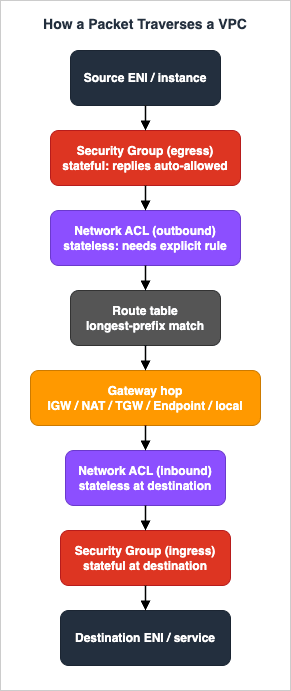
The three properties that cause the most confusion are statefulness, scope, and direction of evaluation. Get these three right and most incidents resolve themselves.
2.1 Security Groups Are Stateful and ENI-Scoped
Security groups attach to ENIs, which means they protect the instance (or the load balancer node, or the endpoint network interface) — not the subnet. Two properties matter for diagnosis:
- Stateful. If you allow a flow in one direction, the response is automatically allowed in the reverse direction, regardless of the rules in the opposite direction. Allow inbound TCP 443 and the response traffic leaves without any egress rule; initiate an outbound connection and the reply returns without any inbound rule. This is why "the egress rule is missing" is almost never the cause of a failed reply — the security group does not need one.
- Allow-only. Security groups have no deny rules. Everything not explicitly allowed is implicitly denied. The consequence during an incident is subtle: you cannot "block" something with a security group by adding a deny; you can only fail to allow it. And because an ENI can carry multiple security groups whose effective rule set is the union of all of them, a flow you think is blocked may be allowed by a second attached group you forgot about.
2.2 Network ACLs Are Stateless and Subnet-Scoped
Network ACLs attach to subnets, so they gate everything in that subnet uniformly. Their properties are almost the inverse of security groups:
- Stateless. The return traffic is evaluated independently against the rules. If you allow inbound TCP 443, you must also allow the outbound response — and because the client's side of the conversation uses an OS-assigned ephemeral source port, the response leaves to a high-numbered destination port. Forget the ephemeral outbound rule and the reply is silently dropped even though the request arrived perfectly.
- Numbered, first-match-wins. Rules are evaluated from the lowest number to the highest, and the first rule that matches the traffic decides allow or deny. A permissive rule at number 200 is dead if a deny at number 100 matches first.
- Allow and deny. Unlike security groups, network ACLs support explicit deny rules, which is why they are used for coarse blocks (an abusive CIDR, for instance). Every subnet is associated with exactly one network ACL; if you never assigned one, the subnet uses the VPC default network ACL, which allows all traffic.
2.3 Route Tables Select the Next Hop by Longest-Prefix Match
Once the packet is allowed out of the source, the route table associated with the source subnet decides where it goes. The selection rule is longest-prefix match: the most specific route wins, so a /32 beats a /24 beats 0.0.0.0/0. Two implications recur in incidents:
- The local route covering the VPC CIDR is always present and always wins for in-VPC destinations; it cannot be overridden by a less specific route. This is why same-VPC traffic never needs a route added — and why "I added a route but in-VPC traffic still goes local" is expected behavior, not a bug.
- When two routes have the same destination, AWS applies a fixed priority: static routes win over prefix-list routes, which win over propagated routes (Direct Connect BGP, then static VPN, then VPN BGP). You rarely need the full hybrid ordering for in-VPC troubleshooting, but you do need to know that a static route you added will beat a propagated route you forgot about.
Internalize the asymmetry between security groups (stateful) and network ACLs (stateless) first: it is the single most common reason a connection works in one direction's configuration but still fails in practice. The rest of the trees lean on this model, and Section 8 shows you how to see the asymmetry in Flow Logs.
3. The Master Decision Tree
Start every connectivity incident by classifying the scope of the attempted connection. The scope tells you which controls are even in the path, which prunes most of the search space immediately — there is no point inspecting a network ACL on a same-subnet flow where it is not in the path.

Read the tree as a router into the per-control trees in the following sections:
- Same subnet, same VPC. Network ACLs and route tables are effectively out of the path — the local route handles intra-VPC traffic, and both ENIs share one subnet and therefore one network ACL, which it either allows for both or blocks for both. Suspect security groups first, and remember that each ENI has its own. Section 4.
- Different subnet, same VPC. Now both subnets' network ACLs matter (each evaluated independently in each direction), in addition to the security groups on both ENIs. The route table still usually resolves via the local route, but a custom route can interfere. Walk Sections 4, 5, and 6.
- Across VPCs (peering / Transit Gateway / Cloud WAN). Routing must be correct on both sides, because a reply needs a route home just as much as the request needs a route out. Security-group references behave differently across the boundary. Section 6, plus the connectivity selection tradeoffs in the AWS VPC Connectivity Decision Guide.
- To the internet. Add a route to an internet gateway (public subnet) or NAT (private subnet), a public IP or Elastic IP where required, and outbound security-group rules. Section 6.
- To an AWS service. You are likely using a VPC endpoint or a NAT gateway; endpoint-specific failure modes (Private DNS prerequisites, endpoint policies, per-VPC private hosted zones) are deep in the PrivateLink and VPC Endpoints Complete Guide. Sections 7 and 10.
- A name will not resolve. This is a DNS problem, not a reachability problem — go straight to Section 7 before touching security groups or routes.
The discipline is to classify before you check. An engineer who jumps to "let me look at the security group" on an across-VPC problem will miss that the return route on the far side was never added; an engineer who edits a route table on a same-subnet problem is editing a control that is not even in the path.
4. Decision Tree: Security Groups
Security groups are the most frequent culprit because they are allow-only and stateful, and because their statefulness lulls people into forgetting that the other side also has a security group with its own rules.
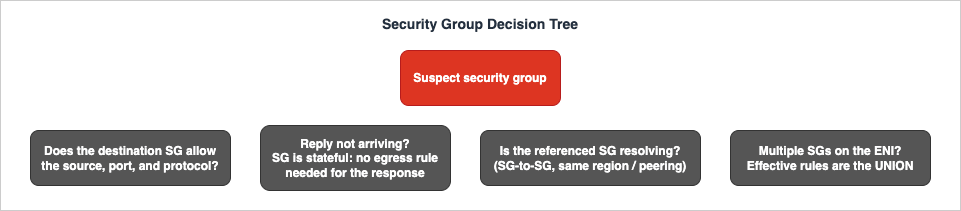
Walk these checks in order.
4.1 Does the destination's security group allow the source, port, and protocol?
The inbound rule on the destination ENI's security group must match the source (a CIDR, a referenced security group, or a prefix list), the protocol, and the destination port — all three. A rule that allows TCP 443 will not help an attempt on TCP 8443, and a rule scoped to one source CIDR will not help a caller arriving from another. Inspect the rules directly rather than reading the console summary, which collapses detail:
aws ec2 describe-security-group-rules \
  --filters Name=group-id,Values=sg-0abc123456def7890 \
  --query "SecurityGroupRules[].{Dir:IsEgress,Proto:IpProtocol,From:FromPort,To:ToPort,CIDR:CidrIpv4,RefSG:ReferencedGroupInfo.GroupId}" \
  --output table
Read the Dir (egress) column carefully: it is easy to add an outbound rule when you meant inbound. A protocol value of -1 means "all protocols," and a From/To of -1 means "all ports" — useful to recognize when a rule is broader or narrower than you intended.
4.2 Are you wrongly blaming egress for a reply?
Because security groups are stateful, the response to an allowed inbound connection is allowed back out automatically, even if no egress rule permits it. If a client receives the SYN-ACK but you suspect the server's egress rule is the problem, the security group is almost never the cause — look at the network ACL (Section 5), which is stateless and does evaluate the return path. The mirror image also holds: for a server initiating an outbound connection (calling an external API, reaching a database), the egress rule on the initiating ENI does matter, and the reply is auto-allowed back inbound. So the rule of thumb is: for the initiator's direction the relevant security-group rule is the one in that direction; the reply never needs its own rule.
4.3 Is a referenced security group resolving the way you think?
Referencing a security group by ID (SG-to-SG rules) is cleaner and more maintainable than CIDRs, but the reference only resolves within contexts AWS supports. Across a VPC peering connection, security-group references work only in the same Region and require the peering to be configured to allow it; if you reference a peer's security group where it cannot resolve, the rule silently matches nothing and the traffic is denied as if the rule were absent. When you are deep in an incident and suspect a reference, temporarily widen the rule to the source CIDR to confirm — if the connection then succeeds, the reference was the problem — and restore the tighter SG-to-SG rule once the root cause is documented.
4.4 Does the ENI have multiple security groups whose union you have not considered?
An ENI can carry several security groups, and the effective permission is the union of all of them — the most permissive combination wins. Two failure modes follow. First, a "deny" you expect from one group does not exist (security groups have no deny rules), so another attached group may be allowing traffic you believed was blocked. Second, you may be editing the wrong group entirely — adding an allow to a group that is attached to a different interface. List the groups actually on the interface before editing:
aws ec2 describe-network-interfaces \
  --network-interface-ids eni-0abc123456def7890 \
  --query "NetworkInterfaces[].Groups"
If you maintain large rule sets, the Security Group Overlap Detector helps spot redundant or conflicting rules before they cause confusion during an incident. The design-time discipline of keeping security groups small and purpose-scoped, plus the five common security-group and network-ACL anti-patterns, is covered on the prevention side in the VPC Design Review Checklist.
5. Decision Tree: Network ACLs
Network ACLs are the control people forget, precisely because the stateful security group usually "just works" for the return path and trains the habit of not thinking about replies. When a connection succeeds in one direction but the reply never arrives, the network ACL is the prime suspect.
5.1 Is the return traffic blocked on the ephemeral port range?
This is the classic network-ACL failure. Suppose a client connects to a server on TCP 443. The request is allowed inbound at the server's subnet. The server's response, however, goes back to the client's ephemeral source port — a high-numbered port assigned by the client's operating system. Because network ACLs are stateless, the outbound rule on the server's subnet (and the inbound rule on the client's subnet) must allow that ephemeral range, or the reply is silently dropped. The exact range depends on the client OS, so the practical fix is to allow outbound TCP across a broad ephemeral range for responses rather than guessing a single port.
The official documentation makes the asymmetry concrete with a ping example. Send ping from a home computer to an instance whose security group allows inbound ICMP but whose network ACL allows inbound ICMP and does not allow outbound ICMP. Because the security group is stateful, the response ping is allowed out by the security group; but because the network ACL is stateless, the response ping is dropped by the network ACL on the way out. In the flow log you see two records: an ACCEPT for the originating ping (allowed by both controls) and a REJECT for the response ping (denied by the stateless network ACL). If, instead, the network ACL permitted outbound ICMP, you would see two ACCEPT records; and if the security group denied inbound ICMP, you would see a single REJECT because the traffic never reached the instance. Learning to read that request/response pair tells you exactly which control fired.
5.2 Is a lower-numbered rule shadowing the rule you added?
Network ACL rules are evaluated from the lowest rule number to the highest, and the first match wins. If you add an allow rule at number 200 but a deny rule at number 100 matches the same traffic, the deny wins and your allow never executes. This is easy to do when teams reserve low numbers for broad blocks and high numbers for specific allows. Always read the full ordered rule set, not just the rule you just added:
aws ec2 describe-network-acls \
  --filters Name=association.subnet-id,Values=subnet-0abc123456def7890 \
  --query "NetworkAcls[].Entries[].{Num:RuleNumber,Egress:Egress,Proto:Protocol,Action:RuleAction,CIDR:CidrBlock,Ports:PortRange}" \
  --output table
Sort the output by Num within each direction and read top-down exactly as the network ACL does. Custom rule numbers run from 1 to 32766; the implicit catch-all is the rule shown as * (with action deny) that cannot be removed — anything not allowed by a lower-numbered rule falls through to that * deny.
5.3 Are you even looking at the right network ACL?
Each subnet is associated with exactly one network ACL. If a subnet was never explicitly associated, it uses the VPC default network ACL, which permits all inbound and outbound traffic — so a "default" subnet rarely blocks anything, and a custom network ACL is where over-restriction hides. Confirm which network ACL is associated with the subnet in question before editing rules, because editing the wrong custom ACL produces no effect on the traffic you care about and burns incident time. The describe-network-acls filter above keys off the subnet association precisely so you inspect the ACL that is actually in the path.
Designing network ACLs so these problems do not recur — tiered subnets, conservative deny rules, documented ephemeral ranges — is covered on the prevention side in the VPC Design Review Checklist.
6. Decision Tree: Routing
If security groups and network ACLs are clean, the packet may never be leaving for the right next hop. Routing failures dominate cross-subnet, cross-VPC, internet-bound, and service-bound flows.
6.1 Is the subnet associated with the route table you think it is?
A route table only affects a subnet if it is associated with that subnet. A brand-new subnet uses the main route table of the VPC unless you explicitly associate a custom one. A large share of "missing route" incidents are actually "right route, wrong table, wrong subnet association" — the route exists, but on a table the subnet is not using. Check the association first, then read the routes:
aws ec2 describe-route-tables \
  --filters Name=association.subnet-id,Values=subnet-0abc123456def7890 \
  --query "RouteTables[].{RT:RouteTableId,Routes:Routes[].{Dest:DestinationCidrBlock,Target:GatewayId||NatGatewayId||TransitGatewayId||VpcPeeringConnectionId,State:State}}"
If the query returns no route table for the subnet's explicit association, the subnet is using the main route table — inspect that one instead by filtering on association.main,Values=true.
6.2 Is there a matching route, and is it the most specific one?
Remember longest-prefix match: a more specific route wins. If traffic to 10.20.0.0/16 is going somewhere unexpected, look for a more specific route — say 10.20.5.0/24 — pointing elsewhere and stealing the traffic. Also watch for blackhole routes: a route whose target (a detached gateway, a deleted NAT gateway, a removed peering connection) is gone shows State: blackhole and silently discards traffic that matches it. A blackhole is one of the few cases where a route exists and still drops the packet, which makes it especially confusing — the console shows a route, but it leads nowhere. Deleting or repointing the blackhole route restores reachability.
6.3 Which gateway is in the path, and what is its typical failure?
The next-hop type determines the failure mode, so identify the gateway and match it to its signature:
- Internet gateway (IGW). Public-subnet traffic needs a
0.0.0.0/0route to the IGW and a public IPv4 address or Elastic IP on the instance. A route to the IGW without a public IP fails; a public IP without the route fails. Both are common, and both look like a generic timeout. - NAT gateway. Private-subnet egress to the internet needs a
0.0.0.0/0route to a NAT gateway that itself lives in a public subnet with a route to the IGW. Two recurring runtime failures: a NAT gateway in a different Availability Zone than the workload (it still works but adds a cross-AZ data path, and if that AZ degrades, the workload loses egress while same-AZ workloads do not); and a private subnet whose default route was never pointed at the NAT at all, so egress simply has nowhere to go. - Transit Gateway (TGW). Routing must be correct in the TGW route table and in each attached VPC's route table. A one-sided configuration — VPC A has a route to VPC B but B has no return route to A — produces a connection that establishes nothing, because the SYN-ACK has no path home. TGW troubleshooting is fundamentally a "check both directions and the middle" exercise.
- VPC peering. Peering is not transitive and requires routes on both VPCs plus security-group allowances. A missing return route on the peer is the most common cause of "the peering connection is active but nothing works." Active status means the connection exists, not that routes are in place.
- VPC endpoints. Gateway endpoints (Amazon S3, DynamoDB) install a prefix-list route in the route table; if that route is missing, traffic falls back to the public path or fails. Interface endpoints rely on DNS rather than routes (Section 7). Endpoint-specific failures live in the PrivateLink and VPC Endpoints Complete Guide.
Hybrid connectivity (Direct Connect and Site-to-Site VPN) introduces propagated-route priority and BGP nuances that are out of scope here; this guide notes only the priority rule that matters when destinations overlap: for the same destination, local beats static beats prefix-list beats propagated. CIDR planning to avoid the overlapping-range problems that cause this confusion in the first place is helped by the IP Subnet Calculator and the VPC CIDR Subnet Planner.
6.4 A worked routing example
Put the steps together on a concrete case: "An EC2 instance in a private subnet cannot reach an external API; the call times out." Classify the scope — internet-bound from a private subnet — then walk Section 6. Confirm the subnet's route table association (6.1). Confirm a 0.0.0.0/0 route exists and points at a NAT gateway, not a blackhole (6.2). Confirm the NAT gateway is in a public subnet, is in the available state, and ideally is in the same AZ as the instance (6.3). Only then drop to the security group's egress rule (the initiator's direction, Section 4.2) and the subnet's outbound network ACL plus the inbound ephemeral rule for the reply (Section 5.1). Most of the time the fault surfaces at 6.2 or 6.3 — and you reached it in four checks instead of randomly toggling rules.
7. Decision Tree: DNS Resolution
If a hostname does not resolve, no amount of security-group or routing work will help — you are debugging the wrong layer. Always confirm name resolution before reachability when the symptom is "host not found," "could not resolve," or a long hang before any connection attempt.
7.1 Are the VPC DNS attributes enabled?
Two VPC attributes govern DNS, and confusing them causes silent failures:
enableDnsSupport— whether DNS resolution through the Amazon-provided DNS server works for the VPC. Default is true. If this is somehowfalse, queries to the Amazon DNS server fail and nothing resolves through it.enableDnsHostnames— whether instances launched with public IP addresses receive public DNS hostnames. Default is false, except for the default VPC where it istrue.
Crucially, both attributes must be enabled for VPC interface endpoint Private DNS to function and for public DNS hostnames to be assigned. A disabled enableDnsHostnames is a frequent, silent cause of endpoint Private DNS "doing nothing" — the endpoint is healthy, but the friendly service name never resolves to the endpoint's private addresses. Check both attributes (only one can be queried per call):
aws ec2 describe-vpc-attribute --vpc-id vpc-0abc123456def7890 --attribute enableDnsSupport
aws ec2 describe-vpc-attribute --vpc-id vpc-0abc123456def7890 --attribute enableDnsHostnames
7.2 Are you querying the right resolver, and is that even possible to block?
The Amazon DNS server — also called the Route 53 Resolver or AmazonProvidedDNS — is built into each Availability Zone and is reachable at the link-local address 169.254.169.253 (IPv4), fd00:ec2::253 (IPv6), and at the VPC's primary IPv4 CIDR base address plus two (for example, 10.0.0.2 in a 10.0.0.0/16 VPC). It supports recursive queries only. Two consequences for troubleshooting follow directly from the documentation:
- You cannot filter DNS traffic to or from the Amazon DNS server with security groups or network ACLs. So "DNS is being blocked by a security group" is not a real failure mode for the VPC resolver — stop looking there. (A custom DNS server you run on an instance is a different story, and that traffic is subject to security groups and network ACLs.)
- If a DHCP options set points
domain-name-serversat a custom value instead ofAmazonProvidedDNS, resolution behaves according to that server, not the VPC default — a frequently overlooked cause of "resolution works in one VPC but not another."
From inside an instance, confirm what the resolver actually returns with dig/nslookup against 169.254.169.253 (or the VPC base-plus-two address) before assuming a reachability problem; the cross-layer tooling for this kind of probe is cataloged in the parent Incident Triage Flowcharts.
7.3 Is the private hosted zone associated with this VPC?
The Amazon DNS server resolves names from a Route 53 private hosted zone (PHZ) only when that PHZ is associated with the querying VPC. A name that resolves from one VPC but not another almost always means the PHZ is not associated with the second VPC — the records exist, but this VPC cannot see them. Associating the PHZ with the second VPC fixes it. Across a peering connection, resolving a peer's public DNS name to a private address additionally requires DNS resolution to be enabled on the peering connection itself, a separate toggle from the VPC attributes. Endpoint-specific private DNS nuances — managed zones that are per-VPC and not shared across peering, and the prerequisites for endpoint Private DNS — are detailed in the PrivateLink and VPC Endpoints Complete Guide. For Route 53 Resolver inbound and outbound endpoints used to bridge on-premises and VPC DNS, treat resolution failures the same way: confirm the rule associations and the forwarding direction before suspecting the network.
8. Evidence Gathering: VPC Flow Logs
Decision trees narrow the suspects; VPC Flow Logs confirm where the packet actually died. A flow log captures network flows on a per-ENI basis, aggregated over an interval. By default the maximum aggregation interval is 10 minutes; you can optionally set it to 1 minute, which produces a higher volume of records but tighter timing. On Nitro-based instances the interval is always 1 minute or less regardless of the configured maximum, so you generally get fresher data there.
8.1 Reading a record
In the default format, each record is a space-separated string of version 2 fields in a fixed order. The fields you read first are the 5-tuple (source address, destination address, source port, destination port, protocol), the action, and the log-status:
2 123456789010 eni-1235b8ca123456789 172.31.16.139 172.31.16.21 20641 22 6 20 4249 1418530010 1418530070 ACCEPT OKReading left to right: version 2, account 123456789010, interface eni-1235b8ca123456789, source 172.31.16.139, destination 172.31.16.21, source port 20641, destination port 22, protocol 6, packets 20, bytes 4249, start and end times in Unix seconds, then ACCEPT and OK. The protocol field is the IANA number: 6 is TCP, 17 is UDP, 1 is ICMP. The action is ACCEPT or REJECT, and the layer that decided it is implied by direction — an inbound REJECT typically means a security group or inbound network ACL dropped it, while a missing outbound ACCEPT for the reply points at a stateless network ACL return-path problem.
8.2 The stateful-versus-stateless signature
Flow Logs make the security-group/network-ACL asymmetry visible, which is why they are the fastest way to confirm a Section 5 hypothesis. Recall the official ping example from Section 5.1: a security group that allows inbound ICMP but a network ACL that allows inbound but not outbound ICMP yields two records — an ACCEPT for the request and a REJECT for the response, because the stateless network ACL dropped the reply on the way out. A single inbound REJECT instead would mean the security group blocked the request before it ever reached the instance. So the count and direction of records is itself a diagnostic:
- request
ACCEPT+ responseREJECT→ the request got in but the return path is blocked (suspect a stateless network ACL outbound rule, Section 5.1); - single inbound
REJECT→ the request never reached the host (suspect the inbound security group or inbound network ACL, Sections 4.1 and 5.2); - no record at all → the packet never reached this ENI (suspect routing or an upstream drop, Section 6).
8.3 When Flow Logs show nothing
The most confusing situation is an empty result, and it has three distinct causes you must tell apart:
- A record with
log-statusNODATAmeans no traffic was recorded for that ENI during the aggregation interval — the packets never reached the interface at all. That is itself a finding: routing or an upstream control dropped them earlier, so move to Section 6. - A record with
log-statusSKIPDATAmeans records were skipped during the interval because of an internal AWS capacity constraint or error, and a singleSKIPDATArecord can represent many uncaptured flows. The practical lesson: underSKIPDATA, absence of a record is not evidence of absence of traffic, so do not conclude "nothing was sent." - The traffic is never logged at all. Flow Logs deliberately exclude several categories: DNS queries to the Amazon DNS server, traffic to and from the instance metadata service (
169.254.169.254), traffic to the Amazon Time Sync Service (169.254.169.123), DHCP traffic, traffic to the reserved VPC router address, ARP traffic, Windows license activation, and traffic between an endpoint network interface and a Network Load Balancer network interface. If you are hunting a DNS or metadata problem in Flow Logs, you will find nothing because that traffic is excluded by design — switch to Route 53 Resolver query logging or the attribute checks in Section 7 instead.
This third case catches people repeatedly: a DNS resolution failure produces no Flow Logs evidence no matter how long you look, because resolver traffic is simply not captured.
The complete list of traffic that the VPC Flow Logs user guide says is not captured, what the other network log sources record in its place, and which traffic appears in none of them is inventoried in Where the Logs Come From on AWS - The Network.
8.4 Original versus translated addresses, and custom fields
When traffic passes through a NAT gateway, the srcaddr/dstaddr fields show the interface address while pkt-srcaddr/pkt-dstaddr show the original packet addresses before or after translation. If a flow "looks like it came from the NAT gateway," add the pkt-* fields to a custom format to recover the true origin — otherwise you will chase the NAT's address instead of the real client. To capture additional fields, define a custom format: you choose which fields appear and in what order, with a minimum of one field. The record's reported version becomes the highest version among the fields you select — mix version 2, 3, and 4 fields and the record reports version 4. Useful additions for troubleshooting include vpc-id, subnet-id, instance-id, tcp-flags (to see which side sent the SYN), flow-direction, and traffic-path.
For the query language itself — writing CloudWatch Logs Insights queries that aggregate REJECTs by source, surface top talkers, or isolate a single five-tuple — use the ready-made patterns in the CloudWatch Logs Insights Query Collection rather than reinventing query syntax mid-incident.
9. Evidence Gathering: Reachability Analyzer and Friends
Flow Logs tell you what did happen to real traffic. VPC Reachability Analyzer tells you what can happen, by modeling your configuration — it does not send packets and does not analyze the data plane. That distinction is the whole point: Reachability Analyzer will report that the configuration permits a path even when an application bug or an instance-level firewall is the real culprit, and conversely it finds misconfigurations without you having to reproduce live traffic. Use it to clear configuration as a suspect quickly, then correlate with Flow Logs for the data-plane reality.
9.1 Running an analysis
You define a path with a source, a destination, a protocol, and optionally a destination port, then start an analysis and read the result:
aws ec2 create-network-insights-path \
  --source eni-0source0000000000 \
  --destination eni-0dest00000000000 \
  --protocol tcp \
  --destination-port 443

aws ec2 start-network-insights-analysis \
  --network-insights-path-id nip-0abc123456def7890

aws ec2 describe-network-insights-analyses \
  --network-insights-analysis-ids nia-0abc123456def7890 \
  --query "NetworkInsightsAnalyses[].{Reachable:NetworkPathFound,Blocking:ForwardPathComponents[-1]}"
If the path is reachable, the analyzer returns the shortest path hop by hop, naming each component it traversed — route tables, security groups, network ACLs, gateways. If the path is not reachable, it identifies the component or combination of components blocking the path, and there may be more than one. That blocking component maps directly to the decision-tree section you should jump to: a blocking security group sends you to Section 4, a blocking network ACL to Section 5, a missing route to Section 6. You can re-run the analysis including or excluding an intermediate component (a load balancer, a NAT gateway) to explore an alternative path.
9.2 Supported sources, destinations, and the limits that bite
Reachability Analyzer supports these resource types as source and destination: EC2 instances, internet gateways, network interfaces, transit gateways, transit gateway attachments, virtual private gateways, VPC endpoint services, VPC endpoints, and VPC peering connections; it also supports IP addresses as destinations. Source and destination must be in the same Region, in the same VPC or VPCs connected by peering or a transit gateway, and may belong to different accounts within the same AWS Organization (with trusted access enabled for a delegated administrator).
Know the limits before you trust a green result:
- It analyzes IPv4 only — if a resource is dual-stack, only the IPv4 path is modeled, so an IPv6-only failure is invisible to it.
- Transit Gateway Connect attachments are not supported, and analysis stops at those attachments; for TCP through a transit gateway route table only the forward direction is analyzed.
- Paths through a Gateway Load Balancer endpoint exclude the Gateway Load Balancer and its targets — verify that segment with a separate analysis.
- It does not consider the health of registered targets, the advertised state of BYOIP ranges, or traffic mirroring.
- The packet header can differ between source and destination because intermediate components (internet gateways, NAT gateways) perform translation.
- An analysis is automatically deleted 120 days after its creation date, and your account has quotas on the number of paths and analyses.
9.3 Complementary tools and a question-to-tool map
Reachability Analyzer answers "can A reach B?" Its inverse, Network Access Analyzer, answers "what can reach B that should not?" — useful for confirming an over-permissive path during a security-flavored incident. For name-resolution problems, Route 53 Resolver query logging records the DNS questions that Flow Logs deliberately omit. The design-time use of Reachability Analyzer as a CI/CD gate, including the full set of explanation codes it returns, is covered in the VPC Design Review Checklist; here it is an incident-time instrument you reach for after the trees have narrowed the suspect.
A quick mapping of which tool answers which question:
| Question | Tool |
|---|---|
| Did this real traffic get accepted or rejected, and where? | VPC Flow Logs |
| Does the configuration permit A to reach B at all? | Reachability Analyzer |
| What can reach a sensitive resource that should not? | Network Access Analyzer |
| Why did this name fail to resolve? | Route 53 Resolver query logging |
| Is the host up but nothing listening (Connection refused)? | Host/application logs, not VPC tooling |
10. Service-Specific Gotchas
The trees above cover the primitives. Several AWS constructs add their own recurring failure modes; this section names them and points to the deep-dive article for each, rather than restating those guides.
10.1 Interface VPC endpoints (PrivateLink)
The most common endpoint failures are a too-permissive default endpoint security group (which by default allows the whole VPC CIDR and should be tightened to the specific ports and source security groups), Private DNS that silently does nothing because enableDnsHostnames and enableDnsSupport are not both enabled, a managed private hosted zone that is per-VPC and not shared across peering (so a peered VPC resolves the name but has no path to the endpoint), and endpoint policies that are additive, not subtractive. All are detailed in the PrivateLink and VPC Endpoints Complete Guide.
10.2 VPC Lattice
A consumer security group must allow inbound from the Lattice managed prefix list (not the caller's IP address), and an unsigned request returns a 403 even when the network path is perfect, because both the auth policy and the IAM identity policy must allow the invoke and the request must be SigV4-signed. A "403 with a clean network path" is the signature of an authorization problem, not a connectivity one. See the VPC Lattice Complete Guide.
10.3 Lambda in a VPC
A VPC-attached Lambda function has no internet route of its own — it needs a NAT gateway (for IPv4 egress to the internet) or the appropriate VPC endpoints, exactly like an instance in a private subnet. "My Lambda times out calling an external API" is almost always a missing NAT route or a missing endpoint, diagnosed with Section 6, not a Lambda configuration problem. The function's security group and the subnet's network ACL apply to its ENIs exactly as they would to an instance.
10.4 Amazon RDS
RDS connectivity failures are ordinary security-group and routing problems wearing a database costume: the DB security group must allow the client's security group or CIDR on the engine port (for example TCP 3306 or 5432), the client must sit in a subnet with a route to the DB subnet, and for cross-VPC access the same two-sided routing rules from Section 6 apply. A frequent confusion is blaming the database when a Connection refused actually means the network reached the instance and the engine rejected the credentials or was not listening — which is the symptom-class distinction from Section 1, not a VPC problem at all.
11. Common Pitfalls
These are the recurring mistakes that turn a five-minute fix into an hour:
- Checking the security group and stopping there. Because security groups are the control people know best, they get all the attention. When a connection works outbound but the reply never arrives, the stateless network ACL is far more likely the cause — Section 5.
- Forgetting the asymmetry of the return path. A stateful security group auto-allows replies; a stateless network ACL does not. A large fraction of "intermittent" or "one-way" connectivity is an ephemeral-port outbound network ACL rule that was never added.
- Editing the wrong route table or the default network ACL. A subnet uses the main route table and the default network ACL unless explicitly associated otherwise. Confirm the association before you edit, or you will change rules that affect nothing.
- Mistaking a blackhole route for a missing one. The console shows a route, so it "looks fine," but its target is gone and it silently discards traffic. Check the route
State, not just its presence. - Trusting a green Reachability Analyzer result as proof the app works. It models configuration, not the data plane or target health, and only IPv4. A reachable path with a crashed service still fails — correlate with Flow Logs and application logs.
- Hunting DNS or metadata traffic in Flow Logs. That traffic is excluded by design; you will find nothing and waste time. Use Resolver query logging and the Section 7 attribute checks instead.
- Leaving DNS as the last thing you check. If the name never resolved, every reachability check downstream is moot. When the symptom is "host not found" or a connect hang, verify DNS first.
- Assuming peering or Transit Gateway routing is symmetric. Routes are needed on both sides. A one-sided route produces a connection that establishes nothing because the reply has no path home.
- Treating
Connection refusedas a network problem. A reset means the packet arrived and the host rejected it — look at the listening service and host firewall, not the VPC controls.
12. Frequently Asked Questions
Should I check the security group or the network ACL first?Check the security group first for same-subnet and outbound-initiated flows, because it is allow-only and the most common cause. Switch to the network ACL the moment the symptom is one-directional — a request that succeeds but a reply that never returns — because the network ACL is stateless and evaluates the return path independently, while the security group does not. The Flow Logs request/response record pair (Section 8.2) confirms which one fired in seconds.
Why does VPC Flow Logs show nothing for my problem?
Three possibilities, and they mean different things. The record may carry
log-status NODATA, meaning no traffic reached that ENI during the interval — itself a routing or upstream-drop finding. It may carry SKIPDATA, meaning records were skipped due to an internal capacity constraint, so absence is not proof of no traffic. Or the traffic is never logged: DNS to the Amazon DNS server, instance metadata, Amazon Time Sync, DHCP, reserved-address traffic, ARP, Windows license activation, and endpoint-to-NLB traffic are all excluded by design. For DNS, use Route 53 Resolver query logging instead.Reachability Analyzer says the path is reachable, but the connection still fails. Why?
Reachability Analyzer models your configuration and does not send packets, so it cannot see a crashed service, an OS-level firewall on the instance, an unhealthy load-balancer target, or an application bug. It also analyzes IPv4 only and excludes Gateway Load Balancer targets and Transit Gateway Connect attachments. Use it to clear the configuration as a suspect, then correlate with Flow Logs and application or host logs for the data-plane reality.
My instance cannot reach the internet even though the security group allows outbound. What's wrong?
Security-group egress is necessary but not sufficient. A public-subnet instance also needs a route to an internet gateway and a public IP or Elastic IP; a private-subnet instance needs a route to a NAT gateway that itself sits in a public subnet with an internet-gateway route. Verify the route table association and the gateway in the path per Section 6 — and confirm the NAT gateway is in the
available state and not stranded in an impaired Availability Zone.Can a security group or network ACL block DNS resolution to the VPC resolver?
No. You cannot filter traffic to or from the Amazon DNS server (
169.254.169.253, fd00:ec2::253, or the VPC primary CIDR base address plus two) with security groups or network ACLs. If names are not resolving, the cause is the VPC DNS attributes, the DHCP options set, a private hosted zone that is not associated with the VPC, or the resolver configuration — not a security group. A custom DNS server you run on an instance is the exception: that traffic is ordinary and is subject to security groups and network ACLs.A name resolves from one VPC but not another. Why?
A Route 53 private hosted zone resolves only in VPCs it is associated with. Associate the PHZ with the second VPC. If you are resolving a peer's public DNS name to a private address across a peering connection, you must also enable DNS resolution on the peering connection itself, which is a separate setting from the VPC DNS attributes.
How do I tell a network problem from an application problem quickly?
Read the error. A timeout/hang points at the network path (security groups, network ACLs, routes, DNS) — work the trees. A
Connection refused means the packet reached a host that actively rejected it, so the network worked and the application or its listening port is the problem. A name-resolution error is DNS. This single triage — timeout versus refused versus resolution — sends you to the right layer before you open a console.13. Summary
VPC connectivity troubleshooting is deterministic once you commit the evaluation order to memory: a packet is gated by the source security group (stateful), the source subnet's network ACL (stateless), the route table (longest-prefix match), a gateway or endpoint, then the destination subnet's network ACL and the destination security group — with DNS resolution preceding all of it. The method is to name the symptom class (timeout, refused, or resolution), classify the connection scope (the master decision tree in Section 3), then walk the relevant per-control trees, eliminating each suspect with a specific check, and finally confirm with Flow Logs (what real traffic did) and Reachability Analyzer (what the configuration permits).
The two ideas that resolve most incidents are the stateful-versus-stateless asymmetry between security groups and network ACLs, and the discipline to check DNS before reachability when the symptom warrants. Build the trees into a runbook and the next "it cannot connect" page becomes a five-minute walk instead of an open-ended hunt. For the connectivity selection tradeoffs behind these paths, see the AWS VPC Connectivity Decision Guide; for preventing these failures by design, the VPC Design Review Checklist; and for the broader, vendor-neutral triage process, the parent Incident Triage Flowcharts.
14. References
- Control subnet traffic with network ACLs — network ACLs are stateless, subnet-level, and evaluate numbered rules lowest to highest with first-match-wins.
- Security groups for your VPC — security groups are stateful, ENI-level, allow-only, and combine as a union.
- Flow log records — default version 2 fields, custom format, aggregation interval, and the
action/log-statusfield definitions. - Flow log record examples — ACCEPT/REJECT, NODATA/SKIPDATA, and the stateful security group versus stateless network ACL ping example.
- Flow log limitations — traffic that is never logged: Amazon DNS, instance metadata, Amazon Time Sync, DHCP, ARP, Windows license activation, and endpoint-to-NLB traffic.
- How Reachability Analyzer works — static configuration modeling, supported source/destination resource types, and the considerations and limits.
- Troubleshoot reachability with Reachability Analyzer — hop-by-hop path details and blocking-component identification.
- How route priority works — longest-prefix match and the static / prefix-list / propagated priority order.
- Understanding Amazon DNS — the Route 53 Resolver addresses, recursive-only behavior,
enableDnsSupport/enableDnsHostnames, and private hosted zones. - View and update DNS attributes for your VPC — how to inspect and change the VPC DNS attributes.
- create-network-insights-path (AWS CLI reference) — defining a Reachability Analyzer path.
- Troubleshoot VPC Flow Logs — incomplete records, missing log groups, and delivery errors.
Related Articles in This Series
- Incident Triage Flowcharts for Network, Database, and Application Failures — the vendor-neutral, cross-layer triage process this guide hands off from (internal).
- AWS VPC Connectivity Decision Guide — the selection-side pair: VPC Peering, Transit Gateway, PrivateLink, VPC Lattice, and Cloud WAN (internal).
- VPC Design Review Checklist — the prevention side: CIDR planning, subnet layout, and Reachability Analyzer as a design gate (internal).
- AWS Networking Glossary — definitions for every primitive named in this guide (internal).
- PrivateLink and VPC Endpoints Complete Guide — interface and gateway endpoint failure modes (internal).
- VPC Lattice Complete Guide — Lattice-specific connectivity and authorization failures (internal).
- CloudWatch Logs Insights Query Collection — query patterns for analyzing Flow Logs (internal).
References:
Tech Blog with curated related content