AWS Multi-Account Operational Patterns - Control Tower, Organizations, SCPs
First Published:
Last Updated:
In this article I lay out the operational patterns I keep reaching for when I help organizations move from a single account to a properly governed multi-account setup. The article is organized by primitive: how
AWS Organizations, AWS Control Tower, Service Control Policies (SCPs), and Account Factory for Terraform (AFT) fit together, what an OU layout should look like at three different organization sizes, how the most common SCP patterns are written, how centralized logging and the network hub typically end up structured, and what a single-account → multi-account migration plan looks like in practice. I also include a periodic-review cadence at the end because the design decisions documented in this article only stay correct if someone re-checks them every quarter.This is meant to be a working reference, not a survey. Every section is pulled from things I have either built, reviewed, or migrated, and I have tried to call out the specific guardrails that would have saved me time if I had known them earlier.
As of 2026-05, all the limits, control names, and version numbers in this article are checked against current AWS documentation. The links in the References section are the canonical sources I verified against; if something has changed by the time you read this, those pages are where the correct answer lives.
Table of Contents:
- Why Multi-Account — Blast Radius, Compliance, Cost Allocation
- Organizations + Control Tower Mental Model
- OU Design Patterns by Organization Size
- SCP Patterns — Allow / Deny, Region Restriction, Service Limits
- Account Factory for Terraform (AFT) Workflow
- Identity Federation — IAM Identity Center Integration
- Centralized Logging and Audit (Log Archive Account)
- Network Hub — Transit Gateway and Network Firewall
- Migration Patterns — Single Account → Multi-Account
- Operational Cadence — Periodic Reviews
- Summary
- References
1. Why Multi-Account — Blast Radius, Compliance, Cost Allocation
The reasons to split workloads across multiple AWS accounts have shifted over the years. Early on, the dominant motivation was billing — separate accounts gave you separate bills, and that was the cleanest way to charge a workload back to a business unit. That motivation still exists, but it has been overtaken by three others that are harder to retrofit later: blast radius, compliance scope, and operational quota separation.Blast radius. An AWS account is the smallest unit AWS gives you that meaningfully isolates resources. Inside one account, an over-permissive IAM role, a misconfigured CloudFormation rollback, or a credential leak can touch every service and every region the account is allowed into. Putting production on its own account means a development-side mistake cannot reach production resources at all — the IAM trust boundary is the account, and a developer with full administrator in a sandbox account simply cannot call APIs in the production account. This is the single biggest reason I see teams adopt multi-account once they start running customer-facing workloads.
Compliance scope. When auditors ask for "all the resources in scope for this control," they want a clean enumeration. If production and development share an account, you either pull every dev-side resource into the audit (expensive and noisy) or you spend the audit explaining tag-based scoping (slow and error-prone). Putting the in-scope workload in its own account makes the answer mechanical: the account ID is the scope. This pattern compounds when you add multiple compliance regimes — you can keep PCI-scope, SOC-scope, and out-of-scope workloads in entirely separate accounts and let SCPs enforce that nothing crosses the boundary.
Operational quota separation. Each AWS account has its own service quotas. A noisy data-pipeline workload that exhausts the EC2 launch rate, S3 PUT request rate, or CloudWatch metrics ingestion in one account does not affect another account at all. This becomes critical when you have a long-running training job, a batch import, or an incident in one workload — without account separation, the side effects propagate to every other workload sharing the same account.
Cost allocation. Cost allocation is still a real reason, but I list it last because cost allocation tags can solve much of it within a single account. Where multi-account wins is when chargeback needs to be exact, automatic, and not depend on engineers remembering to tag resources at create time. The account ID is on every cost line item and never goes missing.
When does multi-account start paying for itself? My rule of thumb: if you have more than one production workload, more than five engineers with write access, or any external compliance audit, you should already be on multi-account. If you have none of those, a single-account setup with strong IAM hygiene is fine — premature account-splitting creates operational overhead without proportional benefit.
The rest of this article assumes you have decided to split. The remaining question is how to split.
2. Organizations + Control Tower Mental Model
The two services people confuse most often in this space areAWS Organizations and AWS Control Tower. They solve different problems, and treating them as interchangeable leads to operational pain. Here is how I keep them straight.AWS Organizations is the substrate. It is the AWS API for creating, organizing, and applying policies to accounts. Everything that happens at the multi-account level — creating an organization, grouping accounts into OUs, attaching SCPs, enabling trusted access for other AWS services, designating delegated administrators — is an Organizations API call. If you wrote your multi-account environment from scratch using only Organizations and IAM, you would still have a fully functional setup; it would just be all hand-built.AWS Control Tower is an opinionated landing zone built on top of Organizations. When you "set up Control Tower" in a fresh management account, what actually happens is: Organizations is enabled, a specific OU layout is created (Security OU with Log Archive and Audit accounts), several CloudFormation StackSets are deployed across all member accounts, several SCPs are attached, an IAM Identity Center instance is set up, and a CloudFormation-based account factory is provisioned. Control Tower also keeps a registry of "controls" — preventive, detective, and proactive — that you can enable on OUs.The mental model that has worked best for me is:
AWS Organizationsanswers "what accounts exist and what policies apply to them?"AWS Control Toweranswers "what is the opinionated baseline every account starts from?"
2.1 Primitives Map
The five Organizations primitives that matter for everyday operations:* You can sort the table by clicking on the column name.
| Primitive | What it represents | Where it lives |
|---|---|---|
| Organization | The top-level container; every Organizations API call references one | One per company |
| Management account | The account that owns the organization and pays the consolidated bill | One per organization |
| OU (Organizational Unit) | A folder for accounts; can be nested up to 5 levels deep | Many |
| Account | The IAM, billing, and quota boundary | Many |
| SCP (Service Control Policy) | A JSON policy that filters the maximum permissions in member accounts | Many; up to 5 attached to any single root/OU/account |
A few facts that often surprise people:
- The default account quota in a new organization is 10, but it is adjustable via Service Quotas. Substantial increases (well into the thousands) can be granted based on your qualifications and requirements; the request must come from the management account. AWS does not publish a single fixed maximum, so check the current quota page for the value at the time of your request. If you are a large enterprise migrating onto AWS, file the increase request early — provisioning runs much smoother when you do not have to wait on a quota request.
- OU nesting is capped at 5 levels under the root. In practice, going past 3 is uncommon and usually a sign that the OU layout is being asked to encode something that should be a tag instead.
- Up to 5 SCPs can be attached directly to a single root, OU, or account. A policy can be attached to any number of entities, but the limit applies per attachment point. The 5,120-character size limit per SCP is also strict — large policies need to be split.
2.2 When to Use Plain Organizations vs Control Tower
I use this short flow when deciding:- Are you starting from a brand-new AWS environment, or close to it? If yes, default to Control Tower. The opinionated landing zone — Log Archive account, Audit account, organization-trail CloudTrail, IAM Identity Center, default OUs — is not something you should rebuild by hand if you do not have to.
- Do you have a pre-existing organization with a custom OU structure that does not map onto Control Tower's defaults? If yes, you can either migrate (Control Tower has a "register existing OU/account" flow) or run plain Organizations + your own deployment automation. The migration path has improved significantly over time; the manual path is still common in shops with very specific requirements.
- Do you need fine-grained control over every detail of the landing zone (which CloudTrail destinations, which Config rules, which SCPs)? If yes, plain Organizations + a custom landing zone (Terraform, CloudFormation, or AFT) gives you more flexibility. Control Tower's controls catalog is opinionated and there are some baseline behaviors you cannot turn off without violating governance assumptions.
Recent Control Tower landing zone versions have moved toward more granular opt-in for individual integrations (Config, CloudTrail, Security Roles, Backup) instead of taking the full bundle, which is a meaningful improvement for organizations with existing centralized logging or backup setups. Verify the current landing zone version in the Control Tower console before planning an upgrade, and consult the landing zone version history for the per-version change list.
3. OU Design Patterns by Organization Size
The OU layout is the single most consequential design decision you make in a multi-account setup. It determines where SCPs apply, which accounts share defaults, how delegated administration works, and how reportable scope rolls up.The AWS multi-account whitepaper, Organizing Your AWS Environment Using Multiple Accounts, lays out a reference OU set that I anchor every design against. The whitepaper recommends OUs by function, not by business unit, environment, or geography. The reasoning is that functions change much less often than org charts do — Security still means Security after a reorganization, but "Sales" might not exist tomorrow.
What follows is three concrete templates: a small layout for organizations with 5–10 accounts, a medium layout for 20–50 accounts, and an enterprise layout for 100+ accounts. They are progressive — the medium layout is the small layout plus extensions, and the enterprise layout is the medium layout plus more.
3.1 Small Organization Pattern (5–10 accounts)
This is the layout I recommend for a startup or a single-product company on AWS. The goal is to get the security and operational benefits of multi-account without paying the cost of a complex OU structure.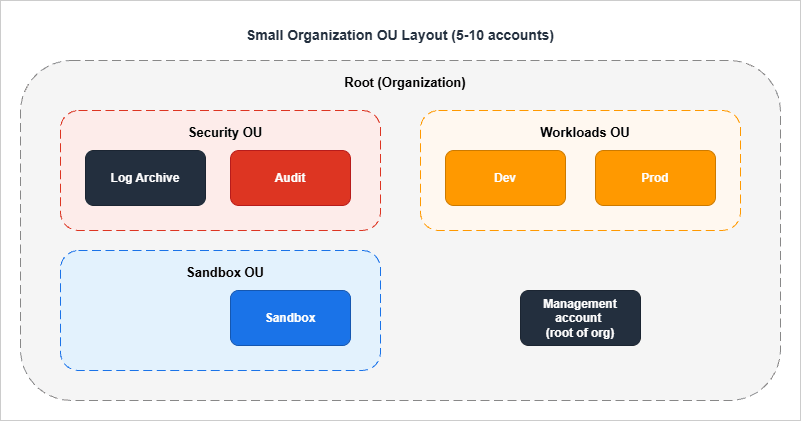
- Management account — created when you create the organization. Holds Organizations, the consolidated billing relationship, and not much else. The strongest rule for the management account is: nothing else lives here. No workloads, no shared services, no operational tooling. Treat it as you would a domain admin account in Active Directory.
- Log Archive account (Security OU) — receives CloudTrail logs and Config snapshots from every other account. No human ever logs in for routine work. SCPs on the Security OU prevent log deletion or modification by anyone other than a small set of break-glass roles.
- Audit account (Security OU) — runs Security Hub, GuardDuty, AWS Config aggregator, and the security tooling. Designated as a delegated administrator for those services so that the management account does not need to operate them.
- Dev / Prod accounts (Workloads OU) — where the actual application lives. Different from many other layouts in that there is no per-team or per-application split at this size; with one product, two environments are usually enough.
- Sandbox account (Sandbox OU) — the rapid-iteration / experimentation account. Strong SCPs deny long-running expensive resources (large EC2 instance types, RDS clusters, EKS) and allow only a generous developer freedom to spin things up and tear them down.
3.2 Medium Organization Pattern (20–50 accounts)
At 20–50 accounts, you have multiple product teams, multiple environments per product, and shared infrastructure that is no longer fitting cleanly into a workload account. This is when the layout grows.The medium layout adds:
- Infrastructure OU with at least:
Networkaccount — owns the Transit Gateway, the VPC IPAM pool, and (often) the Network Firewall.Shared Servicesaccount — central CI/CD, package mirrors, Active Directory connectors, internal DNS resolvers.
- Workloads OU subdivided into
Workloads/ProdandWorkloads/Non-Prodsub-OUs (still under one Workloads OU). Per-product accounts sit under one of those two. - Sandbox OU with multiple sandbox accounts, one per developer or per team, and a tight expiration policy enforced via tagging + automation.
- Suspended OU — an OU where accounts that are scheduled for deletion live for the 90 days during which AWS retains a closed account. SCPs on Suspended deny everything; the only thing that happens in those accounts is the timer ticking down.
3.3 Enterprise Pattern (100+ accounts)
The enterprise pattern is the small + medium layout plus more. It is what the AWS whitepaper actually documents, and what every Control Tower default landing zone moves toward.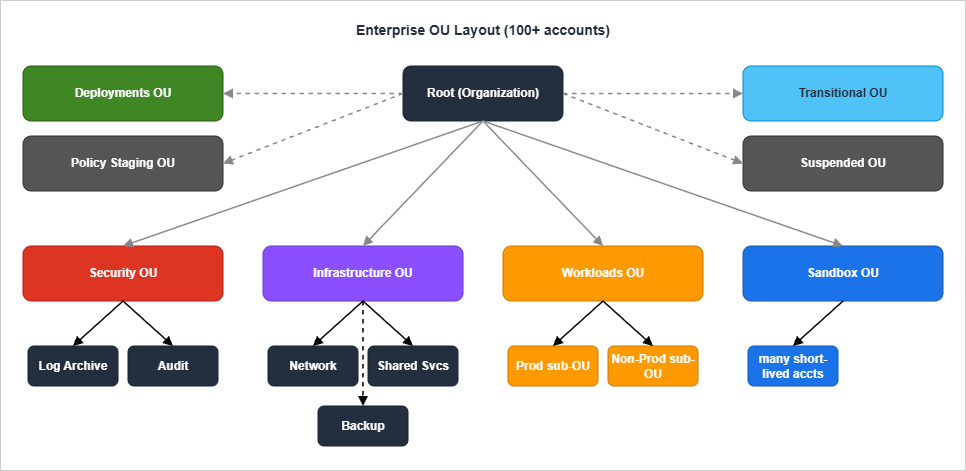
- Policy Staging OU — exists only so that you can attach a new SCP to a "real" OU before applying it to production accounts. Without this OU, the only safe place to test a new SCP is in a sandbox, but SCPs interact with the entire IAM resolution chain and the only way to find out a new SCP is too strict is to hit it from a real workload pattern. A staging OU with a couple of accounts that mirror real workloads is the cheapest insurance you can buy.
- Deployments OU — owns the cross-account CI/CD infrastructure. The AWS Architecture Blog has consistently recommended putting deployment runners (CodePipeline projects, self-hosted GitHub runners, GitLab runners) in their own accounts so that an over-permissive deployment role cannot escape into a workload account.
- Transitional OU — every account starts here when invited or created. An automation moves accounts from Transitional to their final OU after a set of baseline checks. This pattern stops the "we created the account but forgot to move it" failure mode.
- Backup account (under Infrastructure OU) — owns AWS Backup vaults from every other account. Cross-account backup vaults solve the "ransomware deletes the backups along with everything else" failure mode that single-account backup designs are vulnerable to.
4. SCP Patterns — Allow / Deny, Region Restriction, Service Limits
Service Control Policies (SCPs) are the most operationally important piece of Organizations. They are also the easiest to misconfigure — an SCP that is one character wrong can make a workload account silently unable to launch resources, and the error messages do not always make it obvious that an SCP is the cause.4.1 Allow vs Deny Strategy
The first decision in every SCP design is: do you start fromFullAWSAccess (the AWS-managed default that allows everything) and add deny statements, or do you replace FullAWSAccess with an explicit allow list?I almost always recommend deny-list on top of FullAWSAccess for the following reasons:
- It keeps the default "AWS adds a new service" behavior sensible. New services and new actions become available automatically; you opt out of the ones you do not want, rather than having to opt every new service in.
- It makes diagnostics easier. When something is denied, you know it is because of a specific deny statement you wrote. With an allow list, "you are not allowed to do X" can mean either "I forgot to include X in the allow list" or "I deliberately excluded X," and the difference matters during incidents.
- The 5,120-character SCP size limit is much harder to hit with deny statements than with explicit allow lists.
One critical detail about FullAWSAccess. When SCPs are enabled, AWS automatically attaches an AWS-managed
FullAWSAccess policy to every root, OU, and account. Removing this policy from a level without replacing it blocks all permissions for accounts at and below that level — because the SCP evaluation requires an explicit allow somewhere in the chain, and the default is the FullAWSAccess SCP providing that allow. This is the most common "I broke prod with an SCP" failure I have seen. Leave FullAWSAccess attached and add deny SCPs alongside it.4.2 Region Restriction SCP
The SCP I attach first, and the one that prevents the most expensive accidents, is a region restriction. It denies any action outside an approved list of regions.{
"Version": "2012-10-17",
"Statement": [
{
"Sid": "DenyOutsideApprovedRegions",
"Effect": "Deny",
"NotAction": [
"iam:*",
"organizations:*",
"cloudfront:*",
"route53:*",
"route53domains:*",
"support:*",
"sts:*",
"waf:*",
"wafv2:*",
"wellarchitected:*",
"globalaccelerator:*",
"shield:*",
"trustedadvisor:*",
"savingsplans:*",
"budgets:*",
"ce:*",
"account:*",
"artifact:*",
"health:*",
"signin:*",
"tag:*",
"billing:*",
"payments:*",
"tax:*",
"freetier:*",
"consolidatedbilling:*",
"invoicing:*"
],
"Resource": "*",
"Condition": {
"StringNotEquals": {
"aws:RequestedRegion": [
"ap-northeast-1",
"us-east-1"
]
}
}
}
]
}
The
NotAction block is critical and easy to miss. It exempts the AWS services that are global or that have to be reachable from us-east-1 regardless of where your workload runs. CloudFront, IAM, Organizations, Route 53, STS, WAF, the Account Management API (account:*), AWS Health (health:*), federated sign-in (signin:*), Resource Groups Tagging (tag:*), and a few others fall in this category. If you forget to exempt them, the first thing that breaks is your ability to manage your own organization — because Organizations API calls are made against us-east-1 and the SCP denies them. The list above is a defensive baseline; cross-check it against the AWS global services reference when you adopt a new AWS service that you suspect is global, since the boundary keeps shifting as services launch.I keep this SCP attached at the OU level (Workloads, Sandbox, Infrastructure) and not at the root, so the management account itself is unaffected. SCPs do not apply to the management account in any case, but I prefer not to rely on that fact for operational hygiene.
4.3 Deny Root-User Actions
The root user of an AWS account is not the same as the IAM user named "root" or the account owner — it is the email-and-password identity that owns the account. By the time you have a multi-account setup, the root user of every member account should never be used for routine work; access should be through IAM Identity Center or assumed roles. The SCP below denies any action made by a root user in a member account.{
"Version": "2012-10-17",
"Statement": [
{
"Sid": "DenyRootUserActions",
"Effect": "Deny",
"Action": "*",
"Resource": "*",
"Condition": {
"StringLike": {
"aws:PrincipalArn": "arn:aws:iam::*:root"
}
}
}
]
}
Root-user access is needed for a small number of operations (closing the account, certain billing actions). For those, I rely on a documented break-glass procedure that uses the
aws:CalledVia condition to allow root only when called via specific support channels. That is out of scope for a deny-only SCP — but if you have a strict zero-root policy, you also need an organization-level alarm that fires whenever a root user logs in.4.4 Restrict Expensive EC2 Instance Types
In non-production accounts, the most common cost surprises come from someone launching a very large EC2 instance type for testing and forgetting to shut it down. The SCP below denies launches outside a small approved set of instance families.{
"Version": "2012-10-17",
"Statement": [
{
"Sid": "DenyExpensiveEC2InstanceTypes",
"Effect": "Deny",
"Action": [
"ec2:RunInstances"
],
"Resource": "arn:aws:ec2:*:*:instance/*",
"Condition": {
"StringNotLike": {
"ec2:InstanceType": [
"t3.*",
"t4g.*",
"m6i.large",
"m6i.xlarge",
"c6i.large",
"c6i.xlarge"
]
}
}
}
]
}
The pattern matters more than the specific instance list. The
Resource is scoped to the instance ARN, the action is scoped to ec2:RunInstances, and the condition uses StringNotLike so that wildcards in the value list (t3.*) match any instance size. Attach this SCP to Workloads/Non-Prod and Sandbox; do not attach to Workloads/Prod, where the workload itself dictates the instance choice.The condition above looks only at the instance type, not at which AMI is being launched. When a particular image must run only on particular instance types, its owner can declare that on the AMI itself, as described in AMI Allowed Instance Types and Launch Governance on Amazon EC2.
4.5 Prevent Leaving the Organization
By default, an account in an organization can be removed from the organization by a sufficiently privileged user in that account. For most setups, this is the wrong default — once an account is in your organization, you want it to stay there until the central operations team removes it.{
"Version": "2012-10-17",
"Statement": [
{
"Sid": "DenyLeaveOrganization",
"Effect": "Deny",
"Action": [
"organizations:LeaveOrganization"
],
"Resource": "*"
}
]
}
This is a single-statement SCP that I attach at the Workloads OU level and not at the root (the management account does not need to leave its own organization, and SCPs do not apply to it anyway). Together with the cross-account deletion controls in Organizations, this SCP makes the account-removal flow exclusively a management-account decision. When sharing with AWS Organizations is enabled in AWS RAM, an account that does leave also loses, by default, access to the resources shared with it inside the organization, whether they were shared with the organization, an OU, or the account itself; Cross-Account Sharing by Service on AWS covers that default and the setting, available only for shares made to individual accounts, that keeps such access after the account leaves.
4.6 Allow vs Deny — Decision Reference
| Pattern | Use deny when | Use allow when |
|---|---|---|
| Region restriction | Always — deny outside approved regions | Never (allow lists collide with global services) |
| Service restriction | Most cases — deny services you do not use | Regulated industries with positive-list requirements |
| Action restriction | Most cases — deny dangerous actions | When the workload uses a well-defined, small action set |
| Resource restriction | Use Resource ARN scoping in deny | Rarely needed at SCP level |
The general rule: prefer deny statements alongside the AWS-managed
FullAWSAccess SCP. Reach for allow lists only when an external requirement forces it.4.7 SCP Pitfalls
A short list of failures I have seen more than once:- Removing FullAWSAccess from an OU "to clean up." This blocks every permission for accounts under that OU. The fix is to re-attach FullAWSAccess and audit the deny statements you intended to add.
- Forgetting that SCPs do not apply to the management account. A region-restriction SCP attached at the root is silently ignored for the management account, so do not assume it is enforced everywhere.
- Forgetting that SCPs do not affect service-linked roles.
aws-service-role/*roles are exempt by design. If you need to restrict what an AWS service does on your behalf, the controls are in the IAM-policy of the role itself, not in SCPs. - The 5,120-character size limit. Long deny lists cumulatively run out of space. The fix is to split into multiple SCPs and attach all of them — each attachment counts against the per-entity limit of 5, but you have more characters to work with.
- Testing SCPs in a sandbox account, then surprised by Production behavior. Sandbox accounts often have IAM roles that look nothing like production roles. The Policy Staging OU pattern (§3.3) exists exactly for this.
5. Account Factory for Terraform (AFT) Workflow
Account Factory for Terraform (AFT) is the open-source Terraform module from the aws-ia GitHub organization that automates account vending on top of Control Tower. Its alternative is the built-in Control Tower Account Factory (CloudFormation-based, console-driven). I default to AFT for organizations that already use Terraform for infrastructure — it keeps account requests in the same workflow as everything else and makes per-account customizations very natural.5.1 Why AFT Over the Built-in Factory
The built-in Control Tower Account Factory is fine for small organizations that do not need much customization. It is configured through the Service Catalog console; account requests are submitted via that console; customizations are limited to what Service Catalog offers. What listing something in that catalog does and does not constrain — narrowing the menu is not the same as narrowing anyone's permissions — is worked through in Internal Developer Platforms on AWS.AFT replaces this with a Git-driven flow:
- Account requests are Terraform module entries committed to a Git repository.
- When the request is merged, an AFT pipeline (running in the AFT management account) calls Control Tower's account vending API, then runs four customization pipelines in sequence.
- Customizations are themselves Terraform code, so you can apply org-wide IAM roles, Config rules, S3 bucket layouts, and so on, in a code-reviewed way.
5.2 The Four AFT Pipelines
When an account is vended, AFT runs four pipelines in order. Each is backed by a Git repository that you (the organization) own.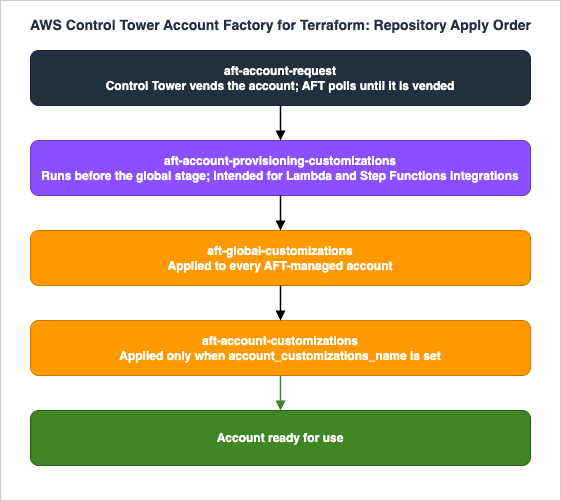
| Repository | When it runs | What it is for |
|---|---|---|
aft-account-request | When a request is merged | Submits the Control Tower account request and polls for completion |
aft-account-provisioning-customizations | After vending, before global customizations | Step Functions state machine for non-Terraform integrations (Lambda, ECS, custom validation) |
aft-global-customizations | After provisioning customizations | Customizations applied to every AFT-vended account (e.g., baseline IAM roles, monitoring) |
aft-account-customizations | If account_customizations_name is set in the request | Per-account customizations keyed by name |
5.3 Account Request Shape
An entry inaft-account-request looks like this:module "team_alpha_prod" {
source = "./modules/aft-account-request"
control_tower_parameters = {
AccountEmail = "aws-team-alpha-prod@example.com"
AccountName = "team-alpha-prod"
ManagedOrganizationalUnit = "Workloads/Prod"
SSOUserEmail = "team-alpha-leads@example.com"
SSOUserFirstName = "Team Alpha"
SSOUserLastName = "Leads"
}
account_tags = {
Environment = "prod"
Team = "alpha"
CostCenter = "1234"
DataClass = "internal"
}
change_management_parameters = {
change_reason = "Initial account creation for Team Alpha production workload"
change_requested_by = "platform-team"
}
custom_fields = {
workload_type = "web-application"
pii_present = "false"
}
account_customizations_name = "web-application"
}
A few notes:
- The fields under
control_tower_parametersare what Control Tower itself records (account name, email, OU, SSO user). These cannot be changed after the account is vended — at least not via AFT. To rename an account, you go to Control Tower directly. - The
account_tagsare applied to the account itself (not to its resources). They flow into Cost Explorer and the consolidated bill, which is how account-level cost allocation actually happens. - The
custom_fieldsare stored as SSM parameters at/aft/account-request/custom-fields/inside the vended account. Customization Terraform code reads them to make per-account decisions (e.g., "ifpii_presentistrue, attach a stricter S3 bucket policy"). - The
account_customizations_namereferences a directory insideaft-account-customizations. If you do not need per-account customizations, omit this field — global customizations alone are often enough.
5.4 Repository Layout
A typical AFT setup has four repositories. The layout below is what the AFT documentation suggests, with one or two adjustments I have found useful in practice.aft-account-request/
├── terraform/
│ ├── team_alpha_prod.tf
│ ├── team_alpha_dev.tf
│ ├── team_beta_prod.tf
│ └── ...
└── README.md
aft-global-customizations/
├── terraform/
│ ├── main.tf # baseline IAM roles, Config, GuardDuty, monitoring
│ ├── variables.tf
│ └── data.tf
├── api_helpers/
│ ├── pre-api-helpers.sh
│ └── post-api-helpers.sh
└── README.md
aft-account-customizations/
├── web-application/
│ └── terraform/
│ ├── alb.tf
│ └── waf.tf
├── data-platform/
│ └── terraform/
│ ├── glue.tf
│ └── athena.tf
└── README.md
aft-account-provisioning-customizations/
├── terraform/
│ ├── customizations.tf # Step Functions state machine
│ └── lambda/
└── README.md
The
api_helpers/ directory in aft-global-customizations is a feature I lean on heavily. It lets you run shell scripts before and after Terraform applies — useful for things you genuinely cannot express in Terraform yet, like waiting for an organization-level service to enable trusted access.5.5 AFT Pitfalls
- AFT requires an existing Control Tower landing zone. You cannot run AFT against a plain Organizations setup. If you are migrating from a custom landing zone, the order is: register the existing organization with Control Tower (or run a parallel CT landing zone), then deploy AFT.
- Provisioning customizations run before global customizations. This means the provisioning customization pipeline does not have access to the IAM roles or other resources that global customizations would create. It is intentional, but the first time you hit it (trying to assume a role that does not yet exist) it is confusing.
- AFT itself runs in a dedicated AFT management account. Do not deploy AFT into the Control Tower management account. The AFT account holds the AFT pipelines, the AFT Terraform state, and the cross-account roles that vend new accounts. Putting AFT in the management account violates the "nothing else in the management account" rule and complicates IAM design.
- The AFT module is versioned. The
aws-ia/terraform-aws-control_tower_account_factoryrepository follows semver. Pin to a specific tag — module upgrades have, on occasion, changed pipeline structure in ways that require coordinated updates across the four repositories.
6. Identity Federation — IAM Identity Center Integration
AWS IAM Identity Center (formerly AWS SSO) is the workforce-identity layer for an AWS organization. The pattern is: a single sign-on portal authenticates a workforce user once, and IAM Identity Center vends short-lived role-assumption credentials into whichever account and Permission Set the user has been authorized for.I have written a separate end-to-end setup guide for Identity Center; this section covers only how it interacts with the multi-account design.
6.1 Permission Set Model
A Permission Set in Identity Center is a packaged IAM policy. When you assign a Permission Set to a user (or group) for an account, IAM Identity Center provisions a role namedAWSReservedSSO_<PermissionSet>_<random-suffix> in that account, with the Permission Set's policy attached. The user assumes this role via the Identity Center portal and gets a console session or AWS CLI credentials.The thing to internalize: Permission Sets are templates, not roles. The role only exists in an account once an assignment connects a user/group to that account. Removing the assignment removes the role.
A common Permission Set layout I deploy:
| Permission Set | Attached policies | Used for |
|---|---|---|
AdministratorAccess | AWS-managed AdministratorAccess | Break-glass; assigned to a small number of senior engineers in production accounts |
PowerUser | AWS-managed PowerUserAccess minus IAM | Senior engineers in non-production |
Developer | Custom inline policy: full app-stack permissions, no IAM, no billing | Developers in dev accounts |
ReadOnly | AWS-managed ReadOnlyAccess | Auditors, occasional read-only engineers |
BillingViewer | AWS-managed Billing | Finance team |
The
Developer Permission Set is where most of the per-organization customization happens. The exact permission set varies by what the workload uses — but the pattern is "everything for the application stack, no IAM, no billing, no Organizations." That carve-out keeps developers productive without giving them tools to escalate privilege.6.2 Delegated Administration
Identity Center supports designating a member account as the delegated administrator. Once configured, that account can perform most Identity Center management operations (creating Permission Sets, managing assignments) without needing access to the management account.Two facts that surprise people:
- The Identity Center instance still lives in the management account. Delegated admin only extends management capability to a member account; the instance itself does not move.
- The delegated admin account is not the same as the Audit account. AWS recommends using a dedicated identity/security account or, for smaller setups, the Audit account itself. Either way, the management account should not be used for day-to-day Identity Center operations.
6.3 ABAC Patterns
Permission Sets can use Attribute-Based Access Control: instead of writing one Permission Set per environment, you write one Permission Set whose policy uses tags. The Permission Set is assigned to a group likeengineers, and the policy allows actions only on resources tagged with the user's department.A simplified example:
{
  "Version": "2012-10-17",
  "Statement": [
    {
      "Effect": "Allow",
      "Action": "ec2:*",
      "Resource": "*",
      "Condition": {
        "StringEquals": {
          "ec2:ResourceTag/Department": "${aws:PrincipalTag/Department}"
        }
      }
    }
  ]
}
This is powerful when you have a clean tagging strategy and a clean identity-source attribute mapping. It is brittle when either is missing — and the most common failure I see is "the ABAC policy worked in dev because everything was tagged, then broke in production because old resources were not tagged." Roll out ABAC progressively, with audit alarms on resources that lack the relevant tags.
For a complete walk-through of Identity Center setup including identity sources, Permission Set provisioning, and ABAC examples, see AWS IAM Identity Center Setup Guide.
7. Centralized Logging and Audit (Log Archive Account)
The Log Archive account is the most operationally important account in the Security OU, and the one with the strictest SCPs. Its job is to receive a copy of every log AWS produces in every other account, write it to immutable storage, and never lose it.7.1 Log Aggregation Flow
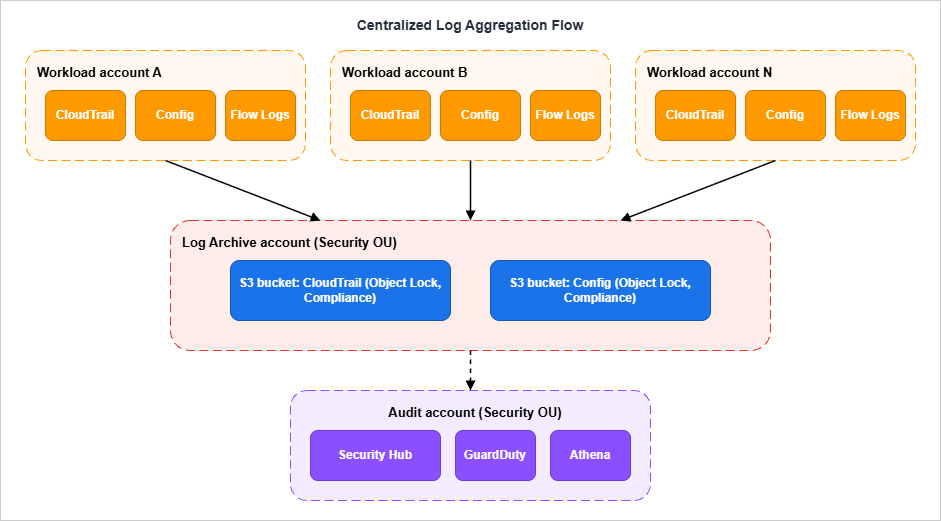
7.2 CloudTrail Organization Trail
A CloudTrail organization trail is a single trail created in the management account (or a delegated administrator) that automatically applies to every account in the organization. Member accounts can see the trail in their console but cannot modify or delete it. Logs are written to a single S3 bucket in the Log Archive account, organized by organization ID and member account ID prefixes.The organization trail replaces the older pattern where each account had its own CloudTrail trail and the central team had to ensure they were all configured identically. With an org trail, configuration drift is impossible — there is only one configuration.
A few configuration choices worth making explicitly:
- Enable management events and data events for the services you care about. Management events alone miss S3 object-level activity, Lambda invocations, and DynamoDB item-level access — all common audit requirements.
- Use CloudTrail Lake or partitioned S3 + Athena for query. Querying raw CloudTrail JSON in S3 is possible but very slow at scale. CloudTrail Lake is more expensive but dramatically faster for incident response.
- Apply S3 Object Lock in Compliance mode to the CloudTrail bucket. Even an organization-level break-glass identity cannot delete locked objects through Amazon S3. This is the single best protection against an attacker who reaches the Log Archive account itself. The one path compliance mode leaves open is closing the account, which the management account can also do, so restrict who can close the Log Archive account as well; Object Lock, Legal Holds, and Event Holds in Amazon S3 covers this and the other limits of compliance mode.
7.3 Config Aggregator
AWS Config records the configuration history of every supported AWS resource. With a Config aggregator in the Audit account, the Audit account holds a queryable view of every resource configuration across every account in the organization.The aggregator does not move the source data — it queries it. Each account still owns its own Config history; the aggregator gives the Audit account read-only visibility. This matters for auditor questions like "show me every public S3 bucket across the organization": the answer is one query against the aggregator, not one query per account.
7.4 Security Hub Delegated Administration
Security Hub is the cross-service findings aggregator (it ingests findings from GuardDuty, Inspector, Macie, IAM Access Analyzer, Config, and many third parties). Like Identity Center, it supports delegated administration: the management account designates a member account (typically the Audit account) as the delegated admin, and the delegated admin can enable Security Hub across the organization, see findings from all accounts, and apply central configuration policies.Without delegated admin, you can still enable Security Hub in every account, but you have to log into each one to see findings. With delegated admin, the Audit account becomes the single pane of glass.
The reason to use delegated admin instead of running Security Hub from the management account: keeping the management account out of routine operations. Anything an oncall engineer might need to do regularly — checking findings, modifying suppression rules, exporting reports — should not require management-account credentials.
(Verified 2026-05 at CloudTrail organization trails and Security Hub delegated administration.)
7.5 Log Archive Account SCPs
The Log Archive account has the strictest SCPs in the organization. A representative deny set:{
"Version": "2012-10-17",
"Statement": [
{
"Sid": "DenyDeletingLogBuckets",
"Effect": "Deny",
"Action": [
"s3:DeleteBucket",
"s3:DeleteBucketPolicy",
"s3:PutBucketPolicy",
"s3:PutBucketAcl",
"s3:PutObjectAcl",
"s3:DeleteObject",
"s3:DeleteObjectVersion",
"s3:PutObject"
],
"Resource": [
"arn:aws:s3:::aws-controltower-logs-*",
"arn:aws:s3:::aws-controltower-logs-*/*"
]
},
{
"Sid": "DenyCloudTrailDisable",
"Effect": "Deny",
"Action": [
"cloudtrail:StopLogging",
"cloudtrail:DeleteTrail",
"cloudtrail:UpdateTrail",
"cloudtrail:PutEventSelectors"
],
"Resource": "*"
}
]
}
The
s3:PutObject deny might look odd in a bucket whose entire purpose is receiving objects — but in this SCP, the deny applies only to actions taken by IAM principals in the Log Archive account itself (IAM users, IAM roles, and federated identities). SCPs do not evaluate calls made by AWS service principals (for example, cloudtrail.amazonaws.com writing CloudTrail logs or config.amazonaws.com writing Config snapshots) and do not apply to AWS-managed service-linked roles either. Those service-driven writes are gated by the bucket policy, not by SCPs. The net effect is that an interactive user (even an administrator) in the Log Archive account is blocked from tampering with the bucket, while CloudTrail and Config continue to deliver logs unimpeded.8. Network Hub — Transit Gateway and Network Firewall
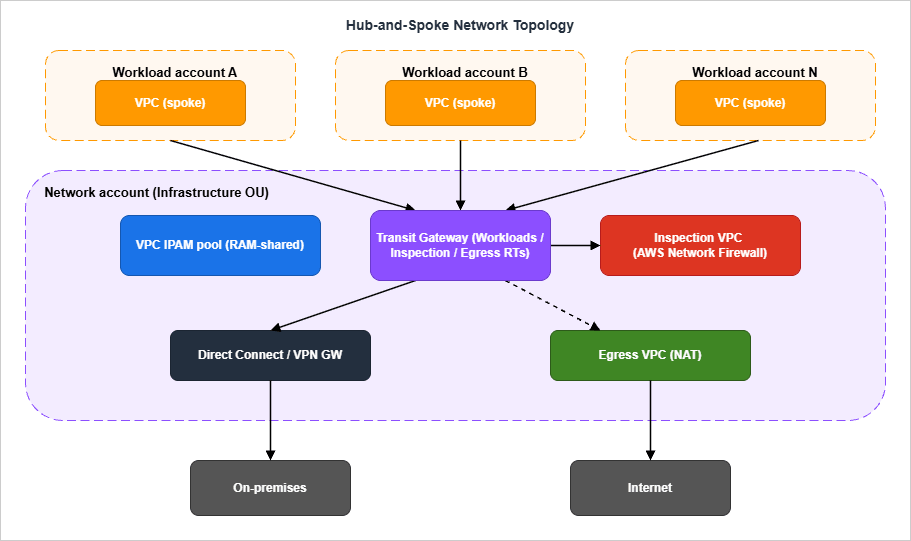
Once you have multiple workload accounts, the question of how their VPCs talk to each other (and to the internet, and to on-premises) becomes the single biggest network-design decision. The answer at any meaningful scale isAWS Transit Gateway, deployed in a dedicated Network account.8.1 Hub-and-Spoke Topology
- The Transit Gateway lives in the
Networkaccount (under the Infrastructure OU). All inter-VPC, internet-bound, and on-premises traffic flows through it. - TGW attachments to workload-account VPCs are created via Resource Access Manager (RAM): the Network account shares the TGW with the workload accounts, and each workload account creates its own attachment. This keeps the workload account's VPC ownership and its TGW attachment in the same place administratively.
- Three TGW route tables — Workloads, Inspection, and Egress — let you control the path each kind of traffic takes. Inspection routes through an Inspection VPC running AWS Network Firewall; internet-bound traffic exits via a centralized NAT in the Egress VPC; on-premises traffic exits via a Direct Connect or VPN gateway.
8.2 Centralized Inspection VPC
The Inspection VPC pattern puts anAWS Network Firewall (or third-party NGFW) in a dedicated VPC and routes all east-west and (optionally) north-south traffic through it. The advantage: one place to enforce egress allow-lists, one place to log every flow, one place to update IDS/IPS rules. What that firewall became able to inspect, and when, is dated in AWS History and Timeline regarding AWS Network Firewall.The disadvantage: every byte pays for two TGW attachments and (depending on traffic) two Network Firewall endpoint hours. For heavy data-transfer workloads, this can be material. The compromise I have seen work well is to route only north-south (internet egress) through inspection and to allow east-west traffic between vetted workload VPCs to use direct TGW routing. Whether that compromise is acceptable is a security-team decision, not a networking-team decision.
8.3 IPAM and Address Planning
The other thing the Network account owns is the VPC IPAM pool. Without central IPAM, every team picks a CIDR block when they create a VPC, the chosen blocks overlap, and the eventual cleanup is painful. With IPAM, the Network account allocates non-overlapping CIDRs to each workload VPC at creation time, and the workload account inherits the allocation through RAM-shared IPAM scopes.For a deeper treatment of the cross-account VPC connectivity options including PrivateLink (which is often a complement to TGW for service-to-service connectivity), see AWS PrivateLink and VPC Endpoints — Complete Guide.
8.4 Centralized Egress
The Egress VPC pattern deploys NAT Gateways in a single account and routes all internet-bound traffic from every workload account through it. This is a significant cost saving over per-workload NAT Gateways at scale, and it consolidates the egress firewall logs in one place.The trade-off is a single point of failure (you mitigate this with multi-AZ NAT and TGW health checks) and a slightly higher first-byte latency. For most workloads, neither is material; for latency-sensitive workloads (real-time bidding, financial trading) you might choose to keep per-workload NAT and accept the cost.
9. Migration Patterns — Single Account → Multi-Account
The single hardest part of multi-account is not the green-field design. It is the migration of an existing single-account workload into the new layout. The following is the playbook I have used several times.9.1 Wave 0 — Decide What Moves and What Stays
Before any technical work, write down for every resource in the source account: target account, target OU, migration method (CloudFormation re-deploy, AWS Transform MGN (formerly AWS Application Migration Service), S3 cross-account copy, manual recreation), and a rough timeline. The goal is not to be precise; the goal is to discover the resources that will be hard to move (long-lived stateful services, anything with hardcoded resource ARNs, anything with cross-resource IAM policies).Resources you will almost always not move:
- Route 53 hosted zones with public DNS records — moving these breaks DNS until propagation completes. Either keep them in the original account and grant cross-account write access, or use Route 53 hosted-zone authorization to delegate subdomains.
- IAM roles trusted by external SaaS — these have the original account ID baked into the trust policy. You either re-issue the trust on both sides or migrate by adding a new role and retiring the old one.
- ACM certificates that are validated against external DNS — you can re-issue, but expect a window where both certificates are valid.
9.2 Wave 1 — Foundation (Mgmt + Security OU)
The first wave creates the management account and the Security OU. No workloads are touched.- Create the new AWS account that will be the management account. Do not use an existing account; use a dedicated email and a strong root password stored in a vault.
- Enable AWS Organizations on the management account.
- Set up Control Tower (or, if not using Control Tower, manually create the Log Archive and Audit accounts and configure organization-trail CloudTrail).
- Attach the baseline SCPs from §4 to the Workloads OU (which will be empty at this point).
- Configure IAM Identity Center, with the management account as the instance owner and the Audit account as the delegated administrator.
This wave takes about a week if Control Tower is being used and longer if not. The output is a working multi-account environment with no workloads in it yet.
9.3 Wave 2 — Shared Infrastructure (Network + Shared Services)
The second wave adds the Infrastructure OU accounts.- Create the Network account. Deploy the Transit Gateway, the Inspection VPC, the Egress VPC, and the IPAM pool.
- Create the Shared Services account. Move (or create) shared resources that were not workload-specific: artifact repositories, container image registries, AD connectors, internal DNS resolvers.
- RAM-share the TGW and the IPAM scope to the (still empty) Workloads OU.
By the end of wave 2, the multi-account environment has working network plumbing, but still no workload traffic.
9.4 Wave 3 — Workload Migration
This is the longest wave and the only one that touches the source single account.For each workload:
- Create a target workload account in the appropriate Workloads OU sub-OU (Prod or Non-Prod).
- Re-deploy the workload's infrastructure into the new account from CloudFormation/Terraform code. Use a temporary new domain (e.g.,
service-v2.example.com) so that production DNS is unchanged. - Run the new workload in parallel with the old one. Replicate stateful data (RDS via cross-region or cross-account snapshots, DynamoDB via DynamoDB streams or AWS Glue, S3 via S3 Cross-Region Replication or
aws s3 sync). - Cut over DNS by changing the Route 53 record to point at the new workload. Keep both alive for at least one billing cycle so you have a tested rollback.
- Decommission the old workload by tearing down its CloudFormation/Terraform stack in the source account.
The biggest pitfall in wave 3 is hardcoded account IDs. Every IAM policy that references an account ID, every cross-account S3 bucket policy, every KMS key policy with explicit principals — all of these need to be updated when the workload moves. Greater than 80% of my time on a real migration is spent finding and updating these. A
grep -r '<old-account-id>' against your IaC repository is the most useful single command in wave 3.9.5 Wave 4 — Source Account Cleanup
The source account is now empty (or near-empty). At this point:- Move the source account into the new organization (if not already there).
- Either keep the source account empty as a forwarding/legacy holder, or schedule it for closure.
- If closing: be aware of AWS's account-closure constraints. The account must have a valid payment method, complete contact information, must not be a delegated administrator for any AWS service, and must not own resources that block closure (active Reserved Instances, certain Marketplace subscriptions). After closure, the account enters a post-closure period (up to 90 days) during which it can be reopened, then is permanently removed. AWS also enforces an organization-level rate limit on closures within a rolling 30-day period; verify the current limit values in the Closing a member account documentation before planning bulk closures, since the exact percentage and per-organization caps have been updated by AWS over time.
9.6 Common Migration Pitfalls
A short list, drawn from the most painful days I have spent on these migrations:- The DNS cutover is irreversible if you delete the source records too early. Keep both endpoints alive until you are sure the new one is healthy. Several migrations I have seen rolled forward instead of back because the team had already removed the source DNS.
- Cross-account KMS key policies block migrations more than IAM policies do. Every encrypted resource (S3, RDS, EBS, Secrets Manager) has a KMS key, and the key policy must explicitly allow the new account to use the key. Audit every encrypted resource before the cutover.
- Service quotas reset in the new account. The new account starts with default quotas, not the source account's quotas. File quota-increase requests as soon as the account is created, not at cutover time when you need them.
- Resource limits compound during parallel-running. While the old and new workloads coexist, you are paying for both, and you may hit aggregated quotas (e.g., total Elastic IPs across the organization, RDS DB instances per region per account).
- CloudFormation stack imports look easy, are not. Importing existing resources into a stack is supported, but the result is fragile. I prefer re-deploying from scratch into the new account whenever I can.
10. Operational Cadence — Periodic Reviews
Multi-account designs decay if no one looks at them. The OUs that made sense two years ago are not the OUs that make sense today; the SCPs that everyone agreed to in the design review have been progressively weakened by exception requests; the AFT customizations have drifted from the documented baseline because someone made a one-off fix and forgot to upstream it.The cadence below is what I recommend for the central operations team that owns the landing zone.
10.1 Review Cadence Table
* You can sort the table by clicking on the column name.| Cadence | Review item | Output |
|---|---|---|
| Weekly | New account vending requests in the AFT queue | Approved / declined; misrouted accounts moved |
| Weekly | New SCP exception requests | Approved as ticket-bound exception or declined |
| Monthly | Active SCP exceptions older than 30 days | Closed if obsolete; renewed if still needed; escalated if persistently long-lived |
| Monthly | Identity Center Permission Set assignments per account | Stale assignments removed; high-privilege assignments confirmed |
| Quarterly | OU layout fitness review | Proposed OU additions/removals; account re-parenting plan |
| Quarterly | SCP catalog vs current threat model | New SCPs proposed; obsolete SCPs deprecated |
| Quarterly | Centralized logging spot check | Sample CloudTrail / Config / VPC Flow Logs queries to confirm logs are flowing |
| Annually | Control Tower landing zone version | Plan upgrade to current version; schedule landing zone update |
| Annually | Cross-account network topology review | TGW route tables, Inspection VPC rules, IPAM allocation efficiency |
| As-needed | Account closures | Rate-limited per AWS quota; transition to Suspended OU first |
10.2 What These Reviews Actually Catch
The reviews are not theoretical. Each item on the table corresponds to a real failure I have seen:- Weekly account vending review catches accounts that get vended into the wrong OU. Without weekly review, an account vended into Workloads/Prod when it should be in Workloads/Non-Prod inherits the wrong SCPs and runs that way for months.
- Monthly SCP exception review prevents the slow drift toward "everyone has an exception, the SCP no longer enforces anything." Time-bounded exceptions with explicit re-review dates are the only way I have found to keep SCPs meaningful long-term.
- Quarterly OU fitness review catches OU-tag confusion. People want the OU layout to match the org chart; the org chart changes; the OU layout cannot follow without breaking SCPs. The review is when you decide whether the answer is "re-parent some accounts" or "stop using OUs for this and use tags instead."
- Annual landing zone version upgrade is the one most teams skip. Recent Control Tower landing zone versions have introduced meaningful improvements — more granular service-integration opt-ins, separated CloudTrail and Config buckets, additional preventive controls — and skipping upgrades leaves the security baseline progressively out of date. If you are not actively planning the next upgrade, you are accumulating landing zone debt.
10.3 Documentation as the Other Half
The cadence above only works if the design is documented well enough to review against. The two artifacts I keep current:- A landing zone design document — one page per OU, listing accounts, SCPs, and exceptions. Updated by the central team after every change.
- A deviation log — a chronological list of decisions that diverge from the AWS multi-account whitepaper or the Control Tower defaults, with the reason for each deviation. Read by every new member of the central team on day one.
11. Summary
If I had to compress this article to three sentences:- An OU layout aligned with function, not org chart, is the foundation; every other multi-account decision either reinforces or undermines it.
- Deny-list SCPs alongside FullAWSAccess are the workhorse policy pattern; allow-list SCPs are reserved for regulated industries.
- AFT, Identity Center, and an organization-trail CloudTrail are the three integrations that turn the OU layout into something operable; without them, the design exists only on paper.
- AWS IAM Identity Center Setup Guide — the practical walk-through for §6.
- AWS PrivateLink and VPC Endpoints — Complete Guide — for the cross-account service connectivity layer that complements §8.
- AWS Postmortem Case Studies — Design Lessons from AWS Public RCAs — for blast-radius reasoning that the §1 motivation rests on.
12. References
Official AWS documentation:- Organizing Your AWS Environment Using Multiple Accounts (AWS Whitepaper) — the canonical OU-design source. The OU layouts in §3 are directly anchored on its recommendations.
- AWS Organizations User Guide — primitives, account vending API, and policy attachment semantics.
- AWS Organizations quotas reference — the source for every limit cited in §2 and §4.
- Service Control Policies — overview and SCP evaluation logic — the underlying semantics for §4.
- AWS Control Tower User Guide — landing zone features and the controls catalog.
- Control Tower controls reference — preventive, detective, and proactive control behaviors.
- Account Factory for Terraform overview and aws-ia/terraform-aws-control_tower_account_factory on GitHub — AFT pipelines and the account-request module shape.
- CloudTrail organization trails — the org-wide CloudTrail pattern in §7.
- Security Hub delegated administration — the audit-account designation pattern in §7.
- IAM Identity Center delegated administration — the workforce-identity pattern in §6.
- Removing a member account from an organization and Closing a member account — the account-closure constraints in §9.
- AWS IAM Identity Center Setup Guide — the practical companion for §6.
- AWS PrivateLink and VPC Endpoints — Complete Guide — referenced from §8.
- AWS Postmortem Case Studies — Design Lessons from AWS Public RCAs — referenced from §1 and §9.
- AWS History and Timeline — for the chronology of Organizations, Control Tower, and AFT releases.
- AWS History and Timeline regarding AWS Organizations — the chronology of AWS Organizations (SCPs, RCPs, delegated administrator).
- AWS History and Timeline regarding AWS CloudTrail — the chronology of AWS CloudTrail (organization trails, CloudTrail Lake).
References:
Tech Blog with curated related content
Written by Hidekazu Konishi