AWS Hybrid Connectivity Decision Guide - Direct Connect, Site-to-Site VPN, and Resilient On-Premises Integration
First Published:
Last Updated:
This guide is the on-premises counterpart to the AWS VPC Connectivity Decision Guide. That guide deliberately scopes hybrid connectivity out — it covers connecting and exposing networks inside AWS (VPC peering, Transit Gateway, PrivateLink, VPC Lattice, Cloud WAN) and hands the data-center-to-AWS problem to this article. Here we go the other direction: from your premises into AWS, using AWS Direct Connect and AWS Site-to-Site VPN, and we go deep — into BGP path selection, IPsec tunnel behavior, virtual interface types, the official resiliency models, and the failure modes that decide whether a "highly available" hybrid network actually stays up.
Scope note. This is a decision and mechanics guide, not a cost guide. Direct Connect and Site-to-Site VPN have very different cost structures (port hours and data transfer for Direct Connect; hourly connection and data-processing charges for VPN), and those differences matter to a final design — but pricing changes frequently and is per-Region, so this article treats cost qualitatively and links to the official pricing pages instead of quoting numbers. AWS Client VPN — the remote-access service for individual users on OpenVPN-compatible clients — is a different problem (a person connecting from a laptop, not a site connecting a whole network) and is mentioned only to keep it out of scope. Everything below is site-to-site: joining an on-premises network to AWS.
Terminology note. Throughout, a customer gateway (CGW) is the AWS-side representation of your on-premises router; a virtual private gateway (VGW) is the VPN/Direct Connect concentrator attached to a single VPC; a Direct Connect gateway (DXGW) is a global resource that lets a Direct Connect connection reach VPCs and Transit Gateways across accounts and Regions; a virtual interface (VIF) is the logical BGP-peered interface you create on a Direct Connect connection. BGP (Border Gateway Protocol) is the routing protocol that both services use to exchange reachability and to fail over. These terms recur in every section; the AWS Networking Glossary defines them in full.
1. Why On-Premises Connectivity Is a Design Decision
A VPN tunnel can be stood up in an afternoon: create a customer gateway, create a Site-to-Site VPN connection, download the generated configuration, and paste it into your router. A Direct Connect circuit takes weeks because it involves physical cross-connects in a colocation facility. That asymmetry tempts teams to treat VPN as the default and Direct Connect as the thing you escalate to later. Sometimes that is right. But the choice is not really "fast and cheap" versus "slow and expensive" — it is a set of independent requirements that each push toward one service or the other, and frequently toward both.Four requirements dominate:
- Transport trust and consistency. Site-to-Site VPN rides the public internet, so its latency and throughput inherit the internet's variability. Direct Connect is a private, dedicated link through an AWS Direct Connect location, bypassing internet service providers, which gives consistent latency and a committed port speed. If your workload is sensitive to jitter or needs predictable throughput, that difference is decisive.
- Bandwidth. A single standard VPN tunnel carries up to 1.25 Gbps; a Direct Connect dedicated connection comes in 1, 10, 100, or 400 Gbps ports. There are ways to push VPN higher (Large Bandwidth Tunnels and ECMP, covered later), but if you need tens or hundreds of gigabits of steady throughput, Direct Connect is the natural home.
- Encryption. VPN encrypts in transit with IPsec by default. Direct Connect is private but not encrypted at layer 3 by default; if you need encryption over a dedicated link you add MACsec (on supported ports) or run a VPN over the Direct Connect (private IP VPN). The requirement for encryption-in-transit does not by itself rule out Direct Connect, but it changes how you build it.
- Resilience. The single most common production mistake is a connection with no second path. A lone VPN tunnel, or a single Direct Connect circuit into a single location, is a single point of failure. The resilient designs — multiple tunnels across Availability Zones, multiple Direct Connect connections across locations, or Direct Connect with a VPN backup — are the whole reason the later sections of this guide exist.
The useful mental model is this: decide transport first (internet-acceptable or dedicated-required), then decide resilience (how many independent paths), then decide aggregation (how the edge attaches to one VPC, a Transit Gateway, or Cloud WAN). Everything else follows from those three forks, and the rest of this guide walks them in order. The three forks do not change when the estate on the other end is a VMware one that is being carried over rather than converted, because the appliances and the migration traffic still cross this edge; what the AWS side of that edge looks like once VMware Cloud Foundation runs inside the VPC is covered in Running VMware Workloads on AWS with Amazon EVS.
2. The Hybrid Options at a Glance
Before the flowchart, it helps to see the two site-to-site options side by side. They are not interchangeable, and most mature designs use them together — Direct Connect as the primary path and Site-to-Site VPN as an encrypted backup — rather than choosing one forever.* You can sort the table by clicking on the column name.
| Attribute | AWS Site-to-Site VPN | AWS Direct Connect |
|---|---|---|
| Transport | Public internet (IPsec) | Private, dedicated fiber via a Direct Connect location |
| Provisioning time | Minutes (software) | Weeks (physical cross-connect) |
| Bandwidth | 1.25 Gbps per standard tunnel; up to 5 Gbps per Large Bandwidth Tunnel; aggregate further with ECMP | 1 / 10 / 100 / 400 Gbps dedicated; 50 Mbps–25 Gbps hosted |
| Latency / jitter | Variable (internet-dependent) | Consistent (private path) |
| Encryption | IPsec by default | Not encrypted by default; add MACsec or run VPN over it |
| Redundancy unit | Two tunnels per connection, each in a different AZ | Multiple connections across devices/locations (Resiliency Toolkit) |
| Routing | Static or dynamic (BGP) | BGP only (per virtual interface) |
| Reaches AWS public services | Yes (to AWS endpoints over the tunnel) | Public VIF reaches public AWS services globally |
| Cost characteristics | Hourly connection + data processing (qualitative) | Port hours + data transfer out (qualitative) |
A few attributes are decisive in practice and worth calling out:
- Provisioning time is a project constraint, not a footnote. If you need connectivity this week, you are using VPN, possibly as a bridge until a Direct Connect circuit is delivered. A common pattern is to launch on VPN, then add Direct Connect later and demote the VPN to backup.
- Direct Connect is private, not automatically encrypted. Teams sometimes assume a dedicated line is "secure" in the encryption sense. It is isolated from the public internet, but the bytes are not encrypted at layer 3 unless you add MACsec at the port level or tunnel a VPN through it. Treat "private" and "encrypted" as separate requirements.
- Both can terminate on a Transit Gateway. Neither service is limited to a single VPC. A VPN connection or a transit virtual interface can attach to a Transit Gateway and reach many VPCs, which is what Section 8 builds on.
The rest of this guide turns these attributes into an ordered decision and then into the per-service mechanics that determine whether your design behaves the way the table implies.
3. The Decision Flowchart
The flowchart below is the entry point. Walk it top to bottom; each branch eliminates options until one or two remain. The questions are ordered so the most decisive distinctions — transport and resilience — come first, and the aggregation question (Transit Gateway or Cloud WAN) comes last because it applies regardless of which transport you picked.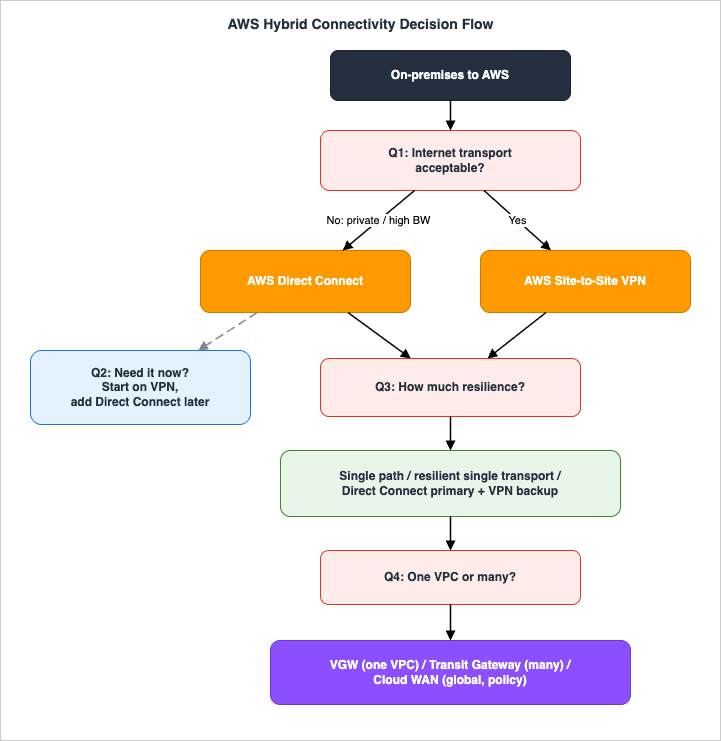
3.1 Question 1: Is internet transport acceptable?
This is the transport fork.- If your workload tolerates the internet's variable latency and throughput, and you primarily need secure reachability rather than consistent, high bandwidth, Site-to-Site VPN is the starting point. It is fast to provision, encrypted by default, and inexpensive to operate. Proceed to Question 3 (resilience) — you can make VPN highly available without ever ordering a circuit.
- If you need predictable latency, committed bandwidth at multi-gigabit scale, or a private path for compliance or performance reasons, you need Direct Connect. Proceed to Question 2.
A useful tell: if the requirement is "this must feel like an extension of our LAN, with stable performance," that is a Direct Connect signal. If it is "we need an encrypted path to AWS and the internet is fine," that is a VPN signal.
3.2 Question 2: Do you need it now, or can you wait for a circuit?
Direct Connect provisioning is measured in weeks, not minutes, because it involves a physical cross-connect.- If the timeline allows, order Direct Connect and design its resilience (Question 3 applies to it too).
- If you need connectivity immediately, start on Site-to-Site VPN and treat it as a bridge. When the Direct Connect circuit is delivered, you keep the VPN as an encrypted backup (Section 7). This "VPN first, Direct Connect later, VPN demoted to backup" path is one of the most common real-world sequences and costs you nothing to plan for up front.
3.3 Question 3: How much resilience does the workload require?
This question applies to both transports and is where most designs are won or lost. Match the topology to how much downtime the workload can absorb:- Single non-critical path — one VPN connection (still two tunnels) or one Direct Connect connection. Acceptable only for dev/test or workloads that can tolerate an outage. Note that a single Direct Connect connection carries no high-availability SLA.
- Resilient, single transport — for VPN, multiple tunnels and a customer gateway in a resilient configuration; for Direct Connect, the High Resiliency model (one connection at each of two Direct Connect locations) or Maximum Resiliency (separate connections on separate devices across multiple locations).
- Resilient, mixed transport — Direct Connect as primary with Site-to-Site VPN as backup. This is the canonical "best value" resilient design: the dedicated link carries normal traffic, and an inexpensive VPN takes over automatically if the circuit fails. Section 7 covers exactly how the failover works.
3.4 Question 4: One VPC, or many — and how do you aggregate the edge?
Once transport and resilience are settled, decide how the on-premises edge attaches to AWS:- A single VPC — terminate on a virtual private gateway (for VPN or a private VIF). Simple and sufficient when there is exactly one VPC.
- Many VPCs in a Region — terminate on a Transit Gateway (VPN attachment, or a Direct Connect transit VIF via a Direct Connect gateway). One attachment reaches all VPCs behind the hub.
- Many VPCs across many Regions, managed by policy — peer the edge into AWS Cloud WAN, which can attach VPNs and Direct Connect (via a transit VIF to a core network) and expresses global segmentation as policy. The VPC-side mechanics of Transit Gateway and Cloud WAN are covered in the AWS VPC Connectivity Decision Guide; Section 8 here covers how the hybrid edge attaches to them.
The four questions are independent: you can land on "Direct Connect, Maximum Resiliency, Transit Gateway, single Region" or "VPN, two tunnels, single VGW, one VPC," or any combination. The remaining sections give you the mechanics to implement and operate whichever combination your requirements produced.
4. AWS Site-to-Site VPN Under the Hood
A Site-to-Site VPN connection is a managed IPsec connection between your customer gateway device and an AWS gateway (a virtual private gateway, a Transit Gateway, or a Cloud WAN core network). Understanding its internals is what separates a VPN that fails over cleanly from one that drops traffic during a tunnel replacement.4.1 Two tunnels, two Availability Zones
Every Site-to-Site VPN connection provisions two tunnels, and each tunnel terminates on a different AWS endpoint with a unique public IP address, in a different Availability Zone. This is not optional redundancy you opt into — it is how the service is built, and configuring both tunnels on your customer gateway is mandatory for the connection to be highly available. If you configure only one tunnel, you have thrown away half of the service's resilience.Traffic behavior is asymmetric by design. From your network to AWS, both tunnels can carry traffic. From AWS to your network, the gateway prefers one tunnel but fails over to the other automatically if the preferred tunnel's endpoint becomes unhealthy. Because the two endpoints live in different Availability Zones, a single-AZ event on the AWS side cannot take down both tunnels at once. AWS strongly recommends customer gateway devices that support asymmetric routing, because the return path may differ from the forward path during normal operation and especially during failover.
4.2 Static versus dynamic (BGP) routing
When you create the connection you choose a routing type, and the choice shapes how failover behaves:- Static routing — you manually specify the on-premises prefixes. It is simpler and works with customer gateway devices that do not speak BGP, but it has no automatic liveness detection: if a path fails, recovery depends on tunnel-level health rather than route withdrawal, and you manage prefixes by hand. Static routes also take priority over BGP-advertised routes for the same destination, which matters when you mix the two.
- Dynamic (BGP) routing — your device and AWS exchange routes over BGP inside each tunnel. This is the recommended choice whenever your device supports it, because BGP provides robust liveness detection and automatic failover between tunnels, and it is required for ECMP across multiple connections on a Transit Gateway. Note that Site-to-Site VPN Concentrators support BGP only.
For anything beyond a small, static lab, use BGP. The automatic route withdrawal on tunnel failure is the mechanism that makes failover fast and hands-off.
4.3 Failure detection and tunnel maintenance
Two internal behaviors govern how quickly a broken tunnel is noticed and how a healthy one is kept alive:- Dead Peer Detection (DPD). Each tunnel runs DPD to detect a peer that has gone silent. The DPD timeout defaults to 40 seconds (minimum 30), after which the endpoint considers the peer dead and can take a configured action (for example, restarting the tunnel). IKEv2 is strongly recommended over IKEv1 — it is simpler, more robust, and more secure.
- Tunnel endpoint updates. AWS periodically replaces tunnel endpoints for maintenance and resilience. During an endpoint update, route priority on that tunnel changes, which is exactly why both tunnels must be configured and why BGP (with automatic failover) is preferred. A design that depends on a single tunnel will see traffic drop during these routine, expected maintenance events.
A minimal customer gateway and connection, created with the AWS CLI, looks like this:
# Register your on-premises router's public IP and BGP ASN as a customer gateway
aws ec2 create-customer-gateway \
  --type ipsec.1 \
  --public-ip 203.0.113.10 \
  --bgp-asn 65000 \
  --device-name on-prem-edge-1

# Create a dynamically routed VPN connection to a virtual private gateway
aws ec2 create-vpn-connection \
  --type ipsec.1 \
  --customer-gateway-id cgw-0123456789abcdef0 \
  --vpn-gateway-id vgw-0123456789abcdef0 \
  --options '{"StaticRoutesOnly": false}'
4.4 Pushing VPN bandwidth higher
A standard tunnel tops out at 1.25 Gbps (up to roughly 140,000 packets per second). Two features lift that ceiling:- Large Bandwidth Tunnels (LBT) raise a single tunnel to 5 Gbps (with a correspondingly higher packet-per-second ceiling than a standard tunnel). They are available only for VPN connections attached to a Transit Gateway or Cloud WAN (not a virtual private gateway), both tunnels must use the same bandwidth setting, the customer gateway must have a fixed IP, Accelerated VPN is not supported with LBT, and the MTU stays 1500. LBT is explicitly positioned as backup or overlay connectivity for high-capacity (10 Gbps+) Direct Connect circuits.
- ECMP (Equal-Cost Multi-Path) aggregates multiple VPN tunnels for higher total bandwidth, but it requires dynamic (BGP) routing and is supported only for VPN connections on a Transit Gateway, not on a virtual private gateway. For example, two LBT connections (four tunnels) under ECMP can reach 20 Gbps.
4.5 Accelerated Site-to-Site VPN
Accelerated VPN routes your traffic onto the AWS global network at the nearest edge location using AWS Global Accelerator, improving performance and reducing exposure to internet variability. The constraints are specific: acceleration is supported only on Transit Gateway attachments (not virtual private gateways), it cannot be toggled on an existing connection (you create a new connection with acceleration enabled), NAT traversal is on by default, IKE negotiation must be initiated from the customer gateway, and it is not compatible with Large Bandwidth Tunnels. It is the right tool when on-premises sites are geographically far from the target Region and the internet path is the bottleneck.5. AWS Direct Connect Under the Hood
Direct Connect gives you a private, dedicated link from your network into an AWS Direct Connect location, where AWS routers terminate your connection. On top of that physical connection you create logical virtual interfaces, and a Direct Connect gateway lets those interfaces reach VPCs and Transit Gateways across accounts and Regions. Knowing the components and their limits is what keeps a Direct Connect design from hitting a wall mid-rollout.5.1 Dedicated and hosted connections
There are two ways to obtain a connection:- Dedicated connection — a physical Ethernet port allocated to you at 1, 10, 100, or 400 Gbps, over single-mode fiber (1000BASE-LX, 10GBASE-LR, 100GBASE-LR4, or 400GBASE-LR4 respectively). You order it through AWS and complete a cross-connect at the Direct Connect location.
- Hosted connection — provisioned through an AWS Direct Connect Delivery Partner, ranging from 50 Mbps to 25 Gbps over the partner's shared link. A hosted connection supports exactly one virtual interface, which is the main structural difference from a dedicated connection.
A dedicated connection supports up to 50 private or public virtual interfaces (51 total once you include the transit VIF allowance), so it can fan out to many VPCs and services from one port.
5.2 The three virtual interface types
A virtual interface (VIF) is a BGP-peered logical interface on the connection. There are three types, each for a different destination:- Private VIF — reaches your VPC's private IP space, either through a virtual private gateway (single VPC) or through a Direct Connect gateway (multiple VPCs across accounts and Regions, except the AWS China Regions).
- Public VIF — reaches all AWS public services globally by their public IP addresses (for example, Amazon S3). You must advertise public prefixes you own, registered in the appropriate regional internet registry; transitive routing between connections is not supported.
- Transit VIF — reaches one or more Transit Gateways (or a Cloud WAN core network) associated with a Direct Connect gateway, across accounts and Regions (except China). This is how Direct Connect feeds a Regional or global hub.
Each VIF carries a unique VLAN tag (802.1Q, 1–4094) and runs its own BGP session.
5.3 The Direct Connect gateway
A Direct Connect gateway (DXGW) is a global resource that decouples where the circuit lands from which VPCs and Regions it serves. You associate a DXGW with virtual private gateways (for private VIFs) or Transit Gateways (for transit VIFs), and the association determines which prefixes are advertised on-premises.The scaling limits matter to design and were expanded in 2023:
- A dedicated connection supports up to 4 transit VIFs.
- A Transit Gateway association advertises up to 200 prefixes (combined IPv4 and IPv6) to on-premises.
- A single Direct Connect gateway can associate up to 6 Transit Gateways or 20 virtual private gateways.
- A transit VIF on a single dedicated connection can reach up to 24 AWS Regions through the gateway.
- When associating a Transit Gateway, you must specify the allowed prefixes, and the Transit Gateway's ASN must differ from the Direct Connect gateway's ASN.
These let one dedicated connection serve a large, multi-Region, multi-account footprint without a separate circuit per VPC.
Since August 20, 2026, inbound prefix controls set the inbound count per virtual interface rather than fixing it for everyone. A private or transit VIF draws its allocation from a prefix pool held by the dedicated connection and by the Direct Connect gateway: 100 per address family by default, up to 1,000 per VIF, and 10,000 in total across the VIFs attached to one gateway. You can edit the allocation on an existing VIF. Public VIFs are not managed by these controls and keep their limit of 1,000.
The Direct Connect gateway is also the AWS-side attach point for AWS Interconnect, the managed family in which AWS and the provider present the requested capacity to you as a single object instead of a circuit you order and cable yourself. What that object folds in, and what it leaves you to design, is the subject of AWS Interconnect - What One Managed Object Replaces in Multicloud and Last Mile Connectivity.
5.4 LAG, SiteLink, and MACsec
Three features round out a production Direct Connect design:- Link Aggregation Group (LAG) bundles multiple connections into one logical, higher-bandwidth interface using LACP. A LAG holds up to 4 connections when the port speed is under 100 Gbps (2 connections at 100 Gbps), and supports up to 51 virtual interfaces.
- SiteLink sends data directly between two Direct Connect locations over the AWS global network, bypassing AWS Regions, taking the fastest path across 100+ Direct Connect locations. You enable it on private or transit VIFs attached to a Direct Connect gateway; the SiteLink prefix limit is 100. It turns Direct Connect into a global WAN backbone between your own sites, not just a path into AWS.
- MACsec provides layer-2 encryption on supported dedicated connections, addressing the "Direct Connect is private but not encrypted" gap without running a VPN over the link.
5.5 Jumbo frames
By default a virtual interface uses an MTU of 1500 bytes. Jumbo frames raise that to 8500 bytes, supported on both private and transit virtual interfaces. Enabling jumbo frames can briefly disrupt connectivity (up to about 30 seconds) if the underlying physical connection needs to be updated, so plan the change. Jumbo frames help bandwidth-heavy, large-payload workloads, but every device in the end-to-end path must agree on the larger MTU or you trade fragmentation problems for black-holing — which is why Section 6 treats MTU as a first-class concern.6. BGP and Routing for Hybrid Connectivity
Both services exchange routes with BGP, and BGP is also the failover mechanism. The difference between a design that fails over cleanly and one that black-holes traffic usually comes down to a handful of BGP attributes and one MTU setting. This section is the routing core of the guide.6.1 Path selection on a Direct Connect virtual interface
For outbound traffic from an AWS Region to your premises over private or transit VIFs, AWS evaluates routes in this order:- Longest prefix match first. A more specific prefix (a /24) always beats a less specific one (a /16), regardless of any other attribute. Advertising more-specific routes on the path you want is the most deterministic way to steer traffic — AWS recommends it for active/passive designs across multiple VIFs.
- Local preference (when prefix lengths are equal). Direct Connect exposes local-preference BGP community tags you apply to the prefixes you advertise:
7224:7100(low),7224:7200(medium), and7224:7300(high). They are mutually exclusive. For active/active load sharing, tag the prefixes on all connections with the same value (for example,7224:7200); if one fails, ECMP redistributes across the survivors. For active/passive, tag the primary VIF's prefixes high (7224:7300) and the backup's low (7224:7100). - AS_PATH length (when prefix length and local preference are equal). Shorter AS_PATH wins; you can prepend your ASN on the backup path to lengthen it.
- MED (multi-exit discriminator), evaluated last. AWS does not recommend relying on MED given its low priority.
When prefixes share the same AS_PATH length and attributes across two or more private/transit VIFs, AWS uses ECMP to load-share — and notably the ASNs in the AS_PATH do not need to match for ECMP to apply.
6.2 Public VIF routing specifics
Public virtual interfaces behave differently because they touch the AWS public routing domain. AWS advertises Region prefixes with a minimum AS_PATH length of 3 and tags all routes it advertises to you with the well-known NO_EXPORT community, so you do not re-advertise AWS prefixes to the internet. You can scope how far your advertised prefixes propagate with7224:9100 (local Region), 7224:9200 (continent), or 7224:9300 (global). One critical gotcha: if you use a private ASN on a public VIF, AWS replaces it with its own ASN (7224) when advertising your prefixes externally, which strips your AS_PATH prepending and makes prepend-based traffic engineering ineffective outside AWS. Use a public ASN on public VIFs if you need prepending to be visible.6.3 How Direct Connect and VPN compose on a virtual private gateway
This is the mechanism that makes "VPN as a backup for Direct Connect" work. When a virtual private gateway has both a Direct Connect connection and a Site-to-Site VPN, the gateway selects a path for each prefix using this precedence:- Tunnel/endpoint health first. The health of an endpoint takes precedence over every routing attribute — an unhealthy path is removed from consideration before any preference is compared.
- Longest prefix match among healthy paths.
- For identical prefixes, in order of preference: BGP-propagated routes from Direct Connect → manually added static VPN routes → BGP-propagated routes from the VPN. For two BGP VPN paths with matching prefixes, the shorter AS_PATH wins, then the lower MED.
The consequence is clean and automatic: when Direct Connect is healthy, its BGP routes win and carry the traffic; when the Direct Connect path fails, its routes are withdrawn and the same prefixes are now served by the VPN. No manual cutover, no DNS change. A subtlety worth knowing: on a virtual private gateway, AWS selects a single active tunnel across all VPN connections on that gateway, so to use more than one tunnel simultaneously you move to a Transit Gateway and use ECMP. Also remember that a virtual private gateway does not support IPv6.
6.4 Avoiding asymmetric routing the hard way
Asymmetric routing — packets taking one path out and a different path back — is acceptable and even expected on VPN (which is why AWS recommends asymmetric-capable customer gateways), but on stateful inspection devices or in active/passive Direct Connect designs it causes dropped flows when the egress path changes. For customer gateways that support asymmetric routing, AWS recommends not using AS_PATH prepending so both tunnels keep an equal AS_PATH, letting AWS's MED selection during tunnel endpoint updates decide priority cleanly. For devices that cannot handle asymmetry, you use AS_PATH prepending and local preference to pin one tunnel — accepting that an egress-path change may drop traffic. The general rule across Direct Connect VIFs is the same: pick one technique (longest prefix match, or local preference) per design rather than layering several that fight each other.6.5 MTU and MSS: the silent failure
Mismatched MTU is the most common cause of "the tunnel is up, BGP is established, small pings work, but large transfers hang." Two facts drive the configuration:- Site-to-Site VPN supports a maximum MTU of 1446 bytes and a corresponding MSS of 1406, but the achievable values depend on the encryption and NAT-traversal combination. For example, AES-GCM-16 without NAT-T allows 1446/1406, while AES-CBC with SHA2-512 and NAT-T drops to 1406/1366. Set MTU/MSS to match the algorithms in use, reset the Don't-Fragment flag where possible, and fragment before encryption so AWS can reassemble before forwarding.
- Direct Connect uses 1500 by default and supports jumbo frames (8500 bytes on private and transit VIFs) only if every hop agrees.
The failure mode is the same on both: a packet larger than the smallest MTU on the path, carrying the Don't-Fragment flag, gets silently dropped, and TCP stalls. The fix is to clamp TCP MSS so sessions negotiate a segment size that fits the smallest path MTU, and to confirm MTU consistency end to end. Hybrid DNS — resolving on-premises names from AWS and vice versa — is the other half of "the network is up but it doesn't work," and is covered in depth in the Amazon Route 53 DNS Architecture Guide.
7. Designing for Resilience
A hybrid connection without a second path is a single point of failure, and AWS is explicit about it: the Well-Architected Framework's reliability pillar (REL02-BP02) treats a single connectivity provider, a single Direct Connect connection, or a single VPN path as a high-risk anti-pattern. This section turns that principle into the official topologies and the failover mechanics behind them.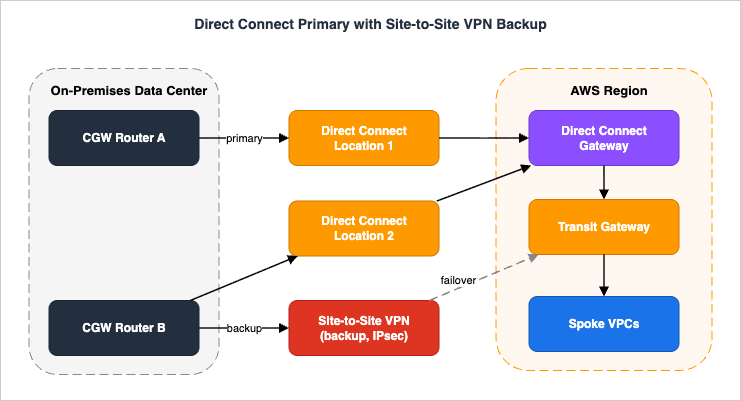
7.1 The Direct Connect resiliency models and their SLAs
AWS publishes a Direct Connect Resiliency Toolkit — a connection wizard plus failover testing — built around named models, each tied to a service-level commitment:- Maximum Resiliency (99.99% SLA) — separate connections terminating on separate devices in more than one Direct Connect location. This is the model for critical production workloads.
- High Resiliency (99.9% SLA) — one connection at each of two different Direct Connect locations. It survives a full location failure but not the loss of the single device at a location.
- Development/Test (no SLA) — separate connections on separate devices in a single location; for non-critical use.
- Classic / single connection (95% SLA) — the SLA tiers map to deployment: Multi-Site Redundant (99.99%), Multi-Site Non-Redundant (99.9%), and Single Connection (95%).
The toolkit's failover-test feature lets you deliberately bring down a BGP session to verify that traffic moves to the surviving path before a real outage proves it does not. Always run it after building a resilient design.
7.2 Active/active and active/passive across connections
With multiple Direct Connect connections you choose how traffic is distributed using the BGP techniques from Section 6:- Active/active — advertise the same prefixes with the same local-preference community (for example,
7224:7200) so AWS ECMPs across the connections. On failure, the survivors absorb the load automatically. This maximizes utilization but means every connection must be sized to carry the load that remains after one fails. - Active/passive — advertise a higher local preference (
7224:7300) on the primary and a lower one (7224:7100) on the backup, or advertise more-specific prefixes on the primary. Traffic uses the primary until it fails, then shifts to the backup. This is easier to reason about for stateful devices and avoids asymmetric flows.
7.3 Direct Connect primary with VPN backup
The best-value resilient design pairs a Direct Connect primary with a Site-to-Site VPN backup. Because of the virtual private gateway path precedence from Section 6.3 — Direct Connect BGP routes are preferred over VPN routes for the same prefix — the Direct Connect carries all traffic while healthy, and the VPN takes over automatically when Direct Connect's routes are withdrawn. The one caveat AWS calls out explicitly: a standard VPN tunnel is limited to 1.25 Gbps, so if your Direct Connect runs at 10 Gbps+, the VPN backup will be a throughput bottleneck during a failover. Large Bandwidth Tunnels (5 Gbps per tunnel, on a Transit Gateway or Cloud WAN) exist precisely to narrow that gap for high-capacity circuits. Size the backup for the traffic you must keep flowing during an outage, not for full primary throughput, and make that trade-off a conscious decision.7.4 Redundancy on the customer side
AWS-side resilience is only half the design. The on-premises edge needs its own redundancy: more than one customer gateway device, ideally in different physical locations or at least on separate power and hardware, each peering over its own tunnels or VIFs. A Maximum Resiliency Direct Connect with both circuits homed to a single on-premises router still has a single point of failure — the router. Mirror the AWS-side topology on your side: two devices, two paths, BGP liveness on each.8. Connecting at Scale: Transit Gateway and Cloud WAN
A single VPC terminates fine on a virtual private gateway, but most organizations have many VPCs, and the hybrid edge should attach to a hub rather than to each VPC. This section covers how Direct Connect and VPN attach to a Transit Gateway and to Cloud WAN; the VPC-to-VPC mechanics of those hubs are the domain of the AWS VPC Connectivity Decision Guide and the VPC Design Review Checklist.8.1 Transit Gateway as the Regional hybrid hub
A Transit Gateway is a Regional router that both transports attach to:- Site-to-Site VPN on a Transit Gateway gives you ECMP across tunnels (with dynamic routing), Large Bandwidth Tunnels, and Accelerated VPN — none of which are available on a virtual private gateway. A single VPN attachment then reaches every VPC behind the hub.
- Direct Connect via a transit VIF attaches to the Transit Gateway through a Direct Connect gateway. Remember the limits from Section 5.3: up to 200 prefixes advertised per Transit Gateway association, up to 6 Transit Gateways per Direct Connect gateway, and the requirement that the Transit Gateway ASN differs from the Direct Connect gateway ASN.
This is the standard shape for a Region with many VPCs: one Transit Gateway, a transit VIF for Direct Connect, and a VPN attachment for backup, with route tables on the Transit Gateway controlling which VPCs the on-premises network can reach.
8.2 Cloud WAN for the global, policy-driven edge
When the network spans many Regions and you want to manage segmentation centrally, Cloud WAN becomes the attachment point. A Direct Connect transit VIF can attach to a Cloud WAN core network (the advertised-prefix limit for a Cloud WAN core network Direct Connect gateway attachment to on-premises is 5,000), and VPN connections — including with Large Bandwidth Tunnels — can attach to Cloud WAN as well. The on-premises edge then participates in the same global segments (production, development, shared services) that Cloud WAN expresses as policy, instead of being wired Region by Region. Organizations with an existing Transit Gateway investment typically peer their Regional Transit Gateways into a Cloud WAN core network rather than rebuilding, as described in the VPC connectivity guide.8.3 Site-to-Site VPN Concentrator
For deployments that aggregate many remote sites, the Site-to-Site VPN Concentrator consolidates connections on a Transit Gateway — it is supported only with Transit Gateway, not with Cloud WAN or a virtual private gateway. It supports BGP only, scales to 100 remote sites per concentrator (up to 5 concentrators per Transit Gateway), and delivers 5 Gbps aggregate bandwidth with each connected site limited to 100 Mbps. It is the right tool when you have a large fan-out of branch sites rather than a few high-bandwidth data-center links.9. Observability and Diagnostics
You cannot operate a resilient hybrid network you cannot see. Both services publish CloudWatch metrics, and knowing which metric reveals which failure is the difference between a five-minute diagnosis and an hour of guessing.9.1 Site-to-Site VPN metrics
The key Site-to-Site VPN metrics, filterable by theVpnId and TunnelIpAddress dimensions, are:TunnelState— the headline health metric. For static VPNs, 0 is DOWN and 1 is UP; for BGP VPNs, 1 means the BGP session is ESTABLISHED and 0 covers all other states. A value between 0 and 1 means at least one of the two tunnels is not up — alarm on this to catch the loss of a single tunnel before the second one fails and takes the connection down.TunnelDataIn/TunnelDataOut— bytes received and sent on the AWS side (counted after decryption and before encryption, respectively). Use the Sum statistic for throughput. Note these can show nonzero values even when a tunnel is down, because of periodic status checks and background ARP/BGP traffic, so do not infer "up" from data alone — combine withTunnelState.ConcentratorBandwidthUsage— bandwidth on a VPN Concentrator connection, when you use one.
A practical alarm: trigger when
TunnelState for a connection drops below 1 (a single tunnel down), so the on-call team restores redundancy during business hours rather than discovering it during the next maintenance event.9.2 Direct Connect metrics
Direct Connect publishes metrics at a 5-minute default interval (1-minute minimum), for both physical connections and virtual interfaces:ConnectionState— 1 for up, 0 for down. The primary alarm target for a circuit.ConnectionBpsEgress/ConnectionBpsIngressandConnectionPpsEgress/ConnectionPpsIngress— bitrate and packet rate in each direction, for capacity monitoring and detecting saturation.ConnectionErrorCount— total MAC-level errors including CRC errors recorded by the AWS device (it replaces the deprecatedConnectionCRCErrorCount). Nonzero, sustained values point to a physical-layer problem on the cross-connect — the kind of slow degradation that precedes a hard failure.ConnectionLightLevelTx/ConnectionLightLevelRx— optical signal strength in dBm for the fiber, the earliest indicator of a failing or dirty optical link. Watching light levels lets you catch a degrading connection before it drops.VirtualInterfaceBgpStatus,VirtualInterfaceBgpPrefixesAdvertised/VirtualInterfaceBgpPrefixesAccepted— per-virtual-interface BGP session status and advertised/accepted prefix counts, available natively in CloudWatch. They make each session's prefix allocation (Section 11) directly observable, so you can alarm before a summarization change pushes a virtual interface over the limit and drops the session.
9.3 A diagnostic order of operations
When hybrid reachability breaks, work the layers from the bottom up:- Physical / link — for Direct Connect, check
ConnectionState, thenConnectionLightLevelRx/TxandConnectionErrorCountfor a degrading fiber. For VPN, checkTunnelStatefor each tunnel. - BGP — confirm the BGP session is established and that the expected prefixes are being advertised and received. Remember the prefix limits: advertising more routes (IPv4 or IPv6) than the allocation on a private/transit VIF — 100 per address family unless you raised it — puts that session into an idle/DOWN state — a self-inflicted outage covered in Section 11.
- Routing — verify the VPC route tables point on-premises destinations at the right gateway, and that route propagation is enabled where you rely on it. Confirm the expected path won (Direct Connect over VPN) using the precedence rules from Section 6.3.
- MTU / application — if BGP is up and routes are correct but large transfers hang, suspect MTU/MSS (Section 6.5). The AWS VPC Network Troubleshooting Guide is the companion for working reachability problems systematically.
10. End-to-End Architecture Walkthrough
To see how the pieces compose, walk a realistic production design: a data center connected to a multi-VPC AWS Region, with Direct Connect as the primary path, Site-to-Site VPN as the encrypted backup, and a Transit Gateway aggregating the VPCs. This is the shape most enterprises converge on, and tracing a packet through it — and through a failure — ties together every prior section.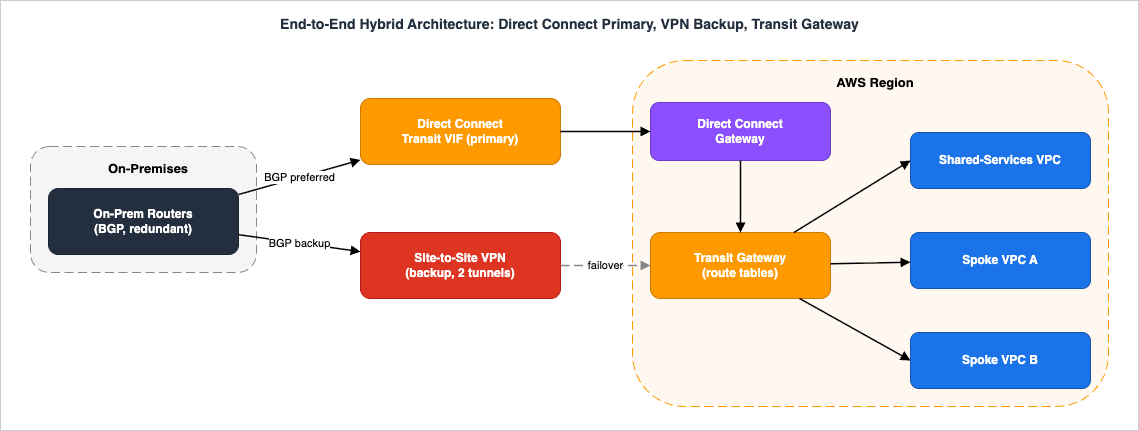
10.1 The components and how they connect
From the premises into AWS:- Two on-premises routers (for customer-side redundancy) sit in the data center. Each runs BGP.
- A Direct Connect dedicated connection (ideally two, in a High or Maximum Resiliency model) carries a transit VIF that attaches, through a Direct Connect gateway, to a Transit Gateway in the Region. The Direct Connect gateway advertises the allowed VPC prefixes (up to 200 per Transit Gateway association) on-premises, and uses an ASN distinct from the Transit Gateway's.
- A Site-to-Site VPN connection attaches to the same Transit Gateway, with dynamic BGP routing, two tunnels across two Availability Zones, and (optionally) Large Bandwidth Tunnels if the primary is a high-capacity circuit.
- The Transit Gateway route tables decide which VPCs the on-premises network reaches — for example, isolating spokes from each other while all reach a shared-services VPC.
10.2 The steady-state path
Under normal conditions, on-premises and AWS exchange the same prefixes over both the Direct Connect transit VIF and the VPN. The Transit Gateway prefers the Direct Connect path because Direct Connect BGP routes outrank VPN routes for identical prefixes (the precedence from Section 6.3 applies on the Transit Gateway just as on a virtual private gateway). Traffic from a spoke VPC to the data center leaves the originating VPC, is routed by the VPC route table to the Transit Gateway, forwarded by the Transit Gateway's route table to the transit VIF, and crosses the Direct Connect to the on-premises router that advertised the most-preferred path. Return traffic mirrors it. The VPN tunnels stay up — BGP established,TunnelState at 1 — carrying only keepalives, ready but idle.10.3 Failure and recovery
Now the primary Direct Connect circuit fails (a fiber cut, or a device failure at the Direct Connect location):- Detection. The BGP session on the transit VIF drops. The Transit Gateway stops receiving the Direct Connect-advertised prefixes; on the customer side, the router stops receiving the AWS prefixes over Direct Connect. Tunnel/endpoint health is evaluated first in path selection, so the failed path is removed before any preference comparison.
- Failover. The same prefixes are still being advertised over the VPN attachment's BGP session. With Direct Connect's routes withdrawn, the VPN routes are now the best path, and the Transit Gateway forwards traffic over the VPN tunnels automatically. No manual cutover and no DNS change are required — the route withdrawal is the trigger.
- Degraded operation. Traffic now flows over IPsec on the public internet at up to 1.25 Gbps per standard tunnel (or up to 5 Gbps per Large Bandwidth Tunnel). If the Direct Connect ran far above that, the network is up but constrained — which is why backup throughput is a deliberate design decision (Section 7.3), not an afterthought.
- Recovery. When Direct Connect is restored, its BGP session re-establishes, its routes are re-advertised, and because they outrank the VPN routes, traffic shifts back automatically. Throughout, the VPN remained the safety net.
10.4 What to watch
Operationally, this design lives or dies on three signals:ConnectionState and the light-level/error metrics on the Direct Connect (to catch a degrading circuit early), TunnelState on the VPN (to ensure the backup is actually ready, not silently down), and BGP session/prefix health on both (to confirm the same prefixes are advertised on both paths so failover has somewhere to go). A backup you have never tested is a hypothesis; use the Resiliency Toolkit's failover test and a scheduled VPN-path verification to turn it into a fact.11. Common Pitfalls
Each pitfall below is a recurring, real failure — and each maps to a mechanism covered earlier. The pattern is symptom, root cause, and the correct form.- Configuring only one VPN tunnel. Symptom: traffic drops during routine AWS tunnel-endpoint maintenance, seemingly at random. Cause: only one of the two provided tunnels was configured on the customer gateway, so there is nothing to fail over to during an endpoint update. Correct form: always configure both tunnels, prefer BGP for automatic failover, and alarm on
TunnelState < 1. - A single Direct Connect into a single location. Symptom: a location or device failure takes the whole hybrid network down, and there is no SLA credit because a single connection carries only a 95% commitment. Cause: no second path. Correct form: use the High or Maximum Resiliency model, and mirror the redundancy on the customer side with more than one router.
- Advertising too many prefixes and dropping BGP. Symptom: the BGP session on a private or transit VIF goes idle/DOWN and connectivity is lost entirely. Cause: advertising more routes (IPv4 or IPv6) over that session than the VIF's allocation (100 per address family by default), which forces the session down — often after a summarization change leaks specifics. Correct form: summarize on-premises routes, keep the advertised count inside that VIF's allocation — 100 per address family by default, and up to 1,000 if you raise it with inbound prefix controls (1,000 on a public VIF; 200 combined per Transit Gateway association) — and monitor advertised-route counts.
- MTU black-holing. Symptom: BGP is up, small pings succeed, but large transfers and TLS handshakes hang. Cause: a packet larger than the smallest path MTU carries the Don't-Fragment flag and is silently dropped. Correct form: clamp TCP MSS to fit the path (1406 or lower for VPN depending on algorithm; agree on jumbo MTU end to end for Direct Connect), reset the DF flag where possible, and fragment before encryption on VPN.
- Asymmetric routing on stateful devices. Symptom: intermittent connection resets through a firewall, worse during failover. Cause: forward and return paths differ and a stateful device sees only half a flow. Correct form: use asymmetric-capable customer gateways for VPN; for active/passive Direct Connect, pin paths with a single technique (longest prefix match or local preference) rather than layering several.
- An untested backup. Symptom: the VPN backup that "exists" does not carry traffic when Direct Connect fails. Cause: the VPN tunnels were down (expired pre-shared key, a route never advertised over the backup, a firewall rule), and nobody noticed because nothing forced traffic onto them. Correct form: advertise the same prefixes over both paths, run the Resiliency Toolkit failover test, and monitor the backup's
TunnelStatecontinuously. - Assuming Direct Connect is encrypted. Symptom: a compliance finding that data in transit is unencrypted over the "private" link. Cause: conflating "private" with "encrypted." Correct form: add MACsec on supported ports, or run a VPN over the Direct Connect (private IP VPN), when encryption in transit is required.
12. Frequently Asked Questions
Q. Do I need Direct Connect, or is Site-to-Site VPN enough?A. VPN is enough when the public internet's variable latency and throughput are acceptable and you primarily need an encrypted path — and it provisions in minutes. Direct Connect is warranted when you need consistent latency, committed multi-gigabit bandwidth, or a private path for compliance or performance. Many designs use both: VPN first (or as backup), Direct Connect for the primary, dedicated path.
Q. How do I make a Site-to-Site VPN highly available?
A. The connection already gives you two tunnels in two Availability Zones — configure both on your customer gateway and use BGP so failover is automatic. For higher availability, add a second customer gateway device, and for higher bandwidth move to a Transit Gateway and use ECMP across multiple tunnels (dynamic routing required) or Large Bandwidth Tunnels.
Q. Can I use a VPN as a backup for Direct Connect?
A. Yes — it is the canonical resilient design. When both attach to the same virtual private gateway or Transit Gateway, Direct Connect BGP routes are preferred over VPN routes for the same prefix, so Direct Connect carries traffic while healthy and the VPN takes over automatically when Direct Connect's routes are withdrawn. The caveat is throughput: a standard VPN tunnel is 1.25 Gbps, so for a 10 Gbps+ Direct Connect the VPN backup will be a bottleneck unless you use Large Bandwidth Tunnels (5 Gbps per tunnel).
Q. Static or dynamic (BGP) routing — which should I choose?
A. Use BGP whenever your device supports it. BGP provides liveness detection and automatic failover, and it is required for ECMP on a Transit Gateway. Static routing is simpler and works with non-BGP devices, but recovery is less automatic and static routes take priority over BGP routes for the same destination, which can surprise you in a mixed design.
Q. My tunnel is up and BGP is established, but large transfers hang. Why?
A. Almost always MTU/MSS. A packet larger than the smallest path MTU with the Don't-Fragment flag is silently dropped. Clamp TCP MSS to fit (1406 or lower for VPN depending on the encryption algorithm), confirm jumbo-frame MTU agreement end to end for Direct Connect, and reset the DF flag where your device allows.
Q. How do Direct Connect and VPN attach to many VPCs at once?
A. Through a Transit Gateway. A VPN attaches as a VPN attachment (gaining ECMP, Large Bandwidth Tunnels, and Accelerated VPN), and Direct Connect attaches via a transit VIF through a Direct Connect gateway. The Transit Gateway's route tables then control which VPCs the on-premises network can reach. For many Regions managed by policy, attach the edge into a Cloud WAN core network instead.
Q. Is Direct Connect traffic encrypted?
A. Not by default — it is private (isolated from the public internet) but not encrypted at layer 3. Add MACsec on supported dedicated connections, or run a VPN over the Direct Connect, when you need encryption in transit.
13. Summary
Connecting on-premises to AWS is three ordered decisions, not one:- Transport — is internet-based IPsec acceptable (Site-to-Site VPN), or do you need a private, consistent, high-bandwidth link (Direct Connect)? Provisioning time often forces VPN first and Direct Connect later.
- Resilience — how many independent paths? Two tunnels across AZs for VPN; the High or Maximum Resiliency model for Direct Connect; and, for the best value, Direct Connect primary with a VPN backup that fails over automatically because Direct Connect BGP routes outrank VPN routes.
- Aggregation — one VPC on a virtual private gateway, many VPCs on a Transit Gateway (via a transit VIF and a VPN attachment), or a global policy-driven edge on Cloud WAN.
The depth that makes a hybrid design actually resilient lives in the mechanics: BGP path selection (longest prefix match, then local-preference communities
7224:7100/7200/7300, then AS_PATH, then MED), the virtual private gateway and Transit Gateway path precedence that makes VPN-backup-for-Direct-Connect automatic, the two-tunnel/two-AZ structure of VPN with DPD-driven failover, the Direct Connect gateway limits that govern how far one circuit reaches, and the MTU/MSS settings that decide whether large transfers flow or black-hole. Watch the right CloudWatch signals — ConnectionState, light levels, and error counts on Direct Connect; TunnelState on VPN — and test failover deliberately, because an untested backup is only a hypothesis.For the AWS-internal side of connectivity — VPC peering, Transit Gateway, PrivateLink, VPC Lattice, and Cloud WAN — continue with the paired AWS VPC Connectivity Decision Guide. For how the hybrid edge interplays with load balancing and DNS-based failover, see the AWS Elastic Load Balancing Decision Guide and the Amazon Route 53 DNS Architecture Guide. When something on the network "doesn't work," the AWS VPC Network Troubleshooting Guide is the diagnostic companion, and the AWS Networking Glossary and the Amazon VPC history and timeline cover terms and how these capabilities evolved.
14. References
- AWS Direct Connect virtual interfaces and hosted virtual interfaces - AWS Direct Connect User Guide
- Direct Connect gateways - AWS Direct Connect User Guide
- Direct Connect routing policies and BGP communities - AWS Direct Connect User Guide
- AWS Direct Connect quotas - AWS Direct Connect User Guide
- Monitor with Amazon CloudWatch - AWS Direct Connect User Guide
- AWS Direct Connect Resiliency Toolkit - AWS Direct Connect User Guide
- AWS Direct Connect Service Level Agreement
- AWS Direct Connect - Create resilient hybrid networks
- Introducing AWS Direct Connect SiteLink - AWS Networking and Content Delivery Blog
- Hybrid cloud architectures using AWS Direct Connect gateway - AWS Networking and Content Delivery Blog
- Tunnel options for your AWS Site-to-Site VPN connection - AWS Site-to-Site VPN User Guide
- Static and dynamic routing in AWS Site-to-Site VPN - AWS Site-to-Site VPN User Guide
- Route tables and AWS Site-to-Site VPN route priority - AWS Site-to-Site VPN User Guide
- Best practices for an AWS Site-to-Site VPN customer gateway device - AWS Site-to-Site VPN User Guide
- Accelerated AWS Site-to-Site VPN connections - AWS Site-to-Site VPN User Guide
- AWS Site-to-Site VPN quotas - AWS Site-to-Site VPN User Guide
- Monitor AWS Site-to-Site VPN tunnels using Amazon CloudWatch - AWS Site-to-Site VPN User Guide
- REL02-BP02 Provision redundant connectivity between private networks in the cloud and on-premises environments - AWS Well-Architected Framework
- AWS Direct Connect pricing
- AWS Site-to-Site VPN pricing
Related Articles
- AWS VPC Connectivity Decision Guide - VPC Peering, Transit Gateway, PrivateLink, VPC Lattice, and Cloud WAN
The paired guide for connectivity inside AWS — the VPC-to-VPC and service-exposure decisions this article deliberately delegates. - AWS PrivateLink and VPC Endpoints Complete Guide - Interface, Gateway, and Resource Endpoint
How on-premises and VPC consumers reach AWS services privately, complementing public-VIF access over Direct Connect. - VPC Design Review Checklist - CIDR, Subnets, Transit Gateway
CIDR planning and Transit Gateway route-table design depth that underpins a clean hybrid edge. - AWS VPC Network Troubleshooting Guide
The diagnostic companion for reachability problems across hybrid and in-VPC paths. - AWS Networking Glossary
Definitions for every term used here — VIF, BGP, DXGW, VGW, and more. - AWS History and Timeline regarding Amazon VPC
When Direct Connect, VPN, Transit Gateway, and Cloud WAN capabilities launched and evolved. - AWS History and Timeline regarding AWS Transit Gateway
When the hub gained the Direct Connect gateway, VPN, and VPN Concentrator attachments that hybrid edges are built from. - AWS History and Timeline regarding AWS Direct Connect
When each connection type, virtual interface type, and gateway capability was added, and when the hosted virtual interface model closed to new integrations.
References:
Tech Blog with curated related content
Written by Hidekazu Konishi