AWS Elastic Load Balancing Decision Guide - Choosing and Operating Application, Network, and Gateway Load Balancers
First Published:
Last Updated:
This guide is a decision hub and an operations manual in one. The selection question — "ALB, NLB, or GWLB?" — is real and high-traffic, so it gets a single comparison table and one decision flowchart up front. But the official Elastic Load Balancing feature pages already answer "what are the differences" at a glance, so the bulk of this article goes where the official comparison stops: how each type actually moves a packet under the hood, how to configure target groups and health checks so deployments are zero-downtime, how TLS and mutual TLS terminate, what to watch in CloudWatch when a load balancer misbehaves, and how to migrate off Classic without a flag day. Where a topic has its own deep reference on this site — the history of ELB, VPC-level connectivity choices, DNS failover — this guide hands off rather than repeats.
This is a decision and operations guide, not a cost guide. The four types differ in cost characteristics (LCU-based versus hourly, processing-based, per-endpoint), and those differences matter to a real design — but pricing changes often and is per-Region, so cost is discussed only qualitatively here, with links to the official pricing pages. Every quota and behavior cited below was verified against AWS official documentation at the time of writing; always confirm current quotas in the Service Quotas console for your account and Region.
1. Introduction: Why Load Balancer Choice Became a Design Decision
A load balancer has one job in the abstract — accept client connections and spread them across healthy backends — but the layer at which it does that job changes everything downstream. The Application Load Balancer operates at Layer 7 and understands HTTP: it can route on path, host, header, and method, terminate TLS, authenticate users, and rewrite requests. The Network Load Balancer operates at Layer 4 and understands flows: it hashes connections to targets, preserves source IPs, offers static and Elastic IP addresses, and scales to extreme connection volumes with very low latency. The Gateway Load Balancer operates at Layer 3 and understands packets: it transparently steers all IP traffic through a fleet of third-party virtual appliances using GENEVE encapsulation. The Classic Load Balancer predates this split and straddles basic L4 and L7, which is exactly why AWS now positions it as previous-generation.Because the four occupy different layers, they are not interchangeable, and the cost of choosing wrong compounds. An NLB placed where you actually needed path-based routing forces you to bolt content routing on elsewhere. An ALB placed where you needed a static ingress IP or microsecond latency cannot grow one. A team that "just needs a firewall in the path" and reaches for routing tricks instead of a GWLB ends up with a brittle, asymmetric-flow design.
This guide turns those distinctions into a short, ordered decision and then into deep operational guidance. The selection lives in Sections 2 and 3; the mechanics live in Sections 4 through 9; Section 10 walks an end-to-end architecture that combines several types; Sections 11 and 12 collect the failure modes and the questions people actually ask.
A few deliberate scope hand-offs keep this guide focused:
- The history and launch timeline of each ELB capability belongs to the AWS History and Timeline regarding Elastic Load Balancing; this guide is about choosing and operating, not about when each feature shipped.
- VPC-level connectivity choices — peering, Transit Gateway, PrivateLink, VPC Lattice — are decided in the AWS VPC Connectivity Decision Guide. This guide handles traffic distribution within that connectivity, and intersects it where PrivateLink fronts an NLB.
- DNS-side failover (health-checked Route 53 records, latency and failover routing) is covered in Route 53 Health Check and Failover Pitfalls; load balancer health checks and DNS health checks are different mechanisms and are easy to confuse.
- Every term used here — listener, target group, flow hash, deregistration delay — is defined in the AWS Networking Glossary.
2. The Load Balancer Types at a Glance
Before the flowchart, it helps to see the four types on one axis. The deepest divide is the layer of operation, because it determines what the load balancer can and cannot see about your traffic. ALB sees HTTP semantics; NLB sees TCP/UDP flows; GWLB sees raw IP packets; CLB sees a limited mix of the first two.The table below summarizes the attributes that actually drive selection. It is sortable in the browser.
* You can sort the table by clicking on the column name.
| Attribute | Application Load Balancer | Network Load Balancer | Gateway Load Balancer | Classic Load Balancer |
|---|---|---|---|---|
| OSI layer | Layer 7 (HTTP/HTTPS) | Layer 4 (TCP/UDP/TLS) | Layer 3 (all IP packets) | Layer 4 and basic Layer 7 |
| Listener protocols | HTTP, HTTPS | TCP, UDP, TCP_UDP, TLS, QUIC, TCP_QUIC | IP (GENEVE on 6081) | TCP, SSL, HTTP, HTTPS |
| Routing intelligence | Path, host, header, method, query, source IP | Flow hash (5-tuple) | Flow stickiness (5/3/2-tuple) | Round robin / basic |
| Target types | instance, IP, Lambda | instance, IP, ALB | instance, IP (appliances) | EC2 instances |
| Static / Elastic IP | No (DNS name only) | Yes (one per AZ, EIP supported) | Via Gateway Load Balancer endpoints | No |
| TLS termination | Yes (+ mTLS, SNI, auth) | Yes (TLS listener, + SNI; no mTLS) | No (transparent) | Yes (basic) |
| Cross-zone default | Enabled | Disabled | Disabled | Enabled in the console, disabled via API/CLI (free) |
| Primary use | Web/API/microservice HTTP routing | Extreme scale, low latency, static IP, non-HTTP | Inline third-party security appliances | Legacy workloads only |
A few attributes deserve emphasis because they are decisive in practice:
- Layer dictates capability. Only the ALB can route on URL path or HTTP header, authenticate a user, or return a fixed response, because only the ALB parses HTTP. Only the NLB can hand you a static or Elastic IP and pass non-HTTP protocols straight through. Only the GWLB can transparently insert a firewall into the packet path without the appliance becoming a routed next hop you manage by hand.
- Classic is a migration target, not a choice. AWS provides a built-in migration wizard precisely because new workloads should not land on CLB. Treat any remaining CLB as technical debt with a clear exit (Section 8). Note that the EC2-Classic network platform was fully retired in 2022; the Classic Load Balancer itself remains available as previous-generation, and AWS has not published a blanket retirement date for it — so plan migrations on their own merits, not on a deadline.
- The choice is rarely "one forever." Production systems frequently combine types: a public ALB for L7, an internal NLB for a static-IP/PrivateLink-frontable ingress, and an ALB registered as a target of that NLB to get both. Section 10 builds exactly this.
3. The Decision Flowchart
The flowchart below is the fast path. Walk it top to bottom; the most decisive question comes first, and each branch removes options until one remains.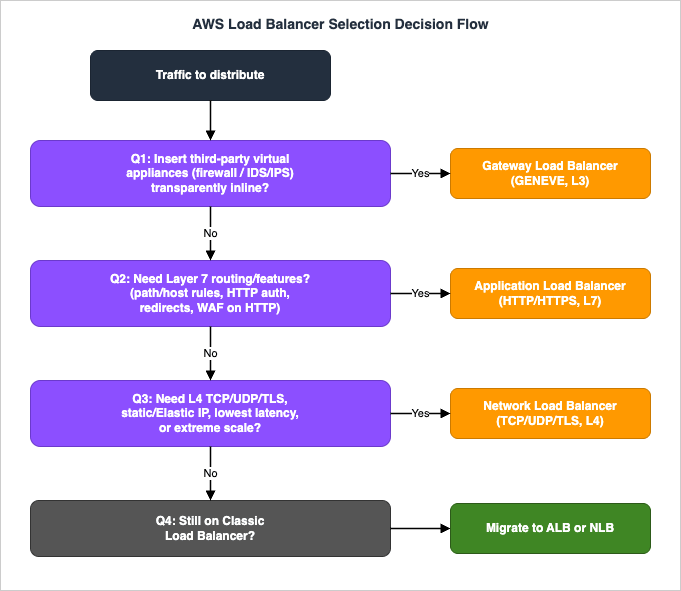
3.1 Question 1: Are you inserting transparent security appliances?
This is the cleanest cut, so it goes first. If your requirement is to run all traffic — north-south or east-west — through a fleet of third-party virtual appliances (next-generation firewalls, IDS/IPS, deep packet inspection) without making each appliance a manually managed routed hop, that is the Gateway Load Balancer's reason to exist. The GWLB and its appliances exchange traffic with GENEVE encapsulation on UDP port 6081, the appliances stay transparent (they do not terminate the flow or rewrite addresses you have to route around), and Gateway Load Balancer endpoints let you steer VPC traffic through the appliance fleet using route tables. If you are not inserting appliances, leave the GWLB behind and continue.3.2 Question 2: Do you need Layer 7?
If the traffic is HTTP or HTTPS and you need any of: routing by URL path, host, header, method, or query string; built-in user authentication via OIDC or Amazon Cognito; HTTP-to-HTTPS redirects or fixed responses; native WebSockets or HTTP/2; or per-rule WAF association — then you need the Application Load Balancer. These capabilities exist only because the ALB parses the HTTP request. The moment your design sentence contains "route/api to one service and /static to another" or "log in before reaching the app," you are in ALB territory.3.3 Question 3: Do you need Layer-4 reach, static IPs, or extreme scale?
If you are not doing L7, the question becomes what the NLB uniquely provides:- Non-HTTP protocols — raw TCP, UDP, or TLS passthrough, plus QUIC — that an ALB cannot carry.
- A static IP per Availability Zone, optionally an Elastic IP, which clients or partners can allowlist. ALBs only publish a DNS name.
- Ultra-low latency and extreme connection scale, because the NLB hashes flows and forwards at L4 rather than parsing application data.
- Source IP preservation so the backend sees the real client address.
Any of these points to the Network Load Balancer. A common compound case — you need L7 routing and a static IP — is solved not by choosing one but by combining them: front the ALB with an NLB and register the ALB as a target (Section 4.2 and Section 10).
3.4 Question 4: Are you only here because of a Classic Load Balancer?
If none of the above pulled you to a specific type and the reason you are reading is an existing Classic Load Balancer, the answer is migration, not preservation: HTTP/HTTPS workloads move to an ALB, TCP/SSL workloads move to an NLB. Section 8 covers the wizard and the cutover. Do not build new systems on Classic.4. Target Groups, Targets, and Routing Algorithms
Everything below the listener hangs off a target group: a logical set of targets plus the health-check and routing configuration that governs them. The ALB, NLB, and GWLB all use the V2 (elbv2) target-group model, and understanding its knobs is most of operating ELB well.4.1 Target types and what each load balancer accepts
A target group has a fixed target type, chosen at creation and immutable afterward:instance— register by EC2 instance ID; the load balancer sends traffic to the instance's primary private IP on the target group's port.ip— register by IP address (within the VPC's CIDR or a peered/connected range, depending on type); the standard choice for containers, multiple ports per host, or on-premises targets reachable over hybrid connectivity.lambda— register a single Lambda function (ALB only); the ALB invokes the function and maps the HTTP request and response to the Lambda event and result.alb— register an Application Load Balancer as a target (NLB only); this is the ALB-as-NLB-target pattern.
The matrix of which load balancer accepts which target type is a frequent source of confusion, so state it plainly: ALB target groups accept
instance, ip, and lambda. NLB target groups accept instance, ip, and alb. GWLB target groups accept instance and ip (the appliances). Only the ALB can call Lambda; only the NLB can front an ALB.4.2 The ALB-as-NLB-target pattern
Registering an ALB as a target of an NLB deserves its own note because it resolves the most common "I need both" requirement. You get the NLB's static IP per AZ and Elastic IP support, PrivateLink frontability, and L4 scale on the outside, and the ALB's path/host routing, authentication, and HTTP features on the inside. Traffic flows client → NLB (static IP) → ALB (L7 routing) → targets. This is the supported way to expose an HTTP service behind a fixed IP address or as a PrivateLink endpoint service, which an NLB can back but an ALB cannot.4.3 Routing algorithms (ALB)
For an ALB target group, the load balancer chooses a target per request using one of three algorithms, set by theload_balancing.algorithm.type attribute. Only one is active at a time, and it can be changed live:- Round robin (default): routes requests evenly across healthy targets in sequence. Best when requests are similar in cost and targets are similar in capacity.
- Least outstanding requests (LOR): routes each request to the healthy target with the fewest in-progress requests. Best when request cost varies or targets differ in capacity. With HTTP/2 front ends talking to HTTP/1.1 targets, the ALB counts each HTTP/2 stream as a separate request; for WebSockets, the target is chosen by LOR and then all messages use that one connection. LOR cannot be combined with slow start.
- Weighted random: routes evenly across healthy targets in random order and is the algorithm that supports Automatic Target Weights (ATW) anomaly mitigation. It cannot be combined with slow start or with sticky sessions.
Automatic Target Weights is worth understanding as a mechanism, not just a checkbox. ATW continuously performs anomaly detection on targets (for example, elevated error rates relative to peers) and, when enabled, anomaly mitigation by reducing the share of traffic sent to anomalous targets via the weighted-random algorithm. It is the ALB shifting load away from a sick-but-still-"healthy" host before a binary health check would fail it — a meaningful resilience upgrade for fleets where one bad host degrades a fraction of requests rather than failing outright.
Slow start mode addresses the opposite end of a target's life: a freshly healthy target. By default a target receives its full share the instant it passes its first health check, which can overwhelm a cold cache or a JIT-warming runtime. Slow start linearly ramps traffic to a newly healthy target over a configured duration, then releases it to full share. Note the interactions above: slow start is incompatible with LOR and weighted random.
For NLB and GWLB there is no per-request algorithm choice in the ALB sense; targets are chosen by flow hash and stay sticky for the life of the flow (Section 5).
4.4 A minimal, reproducible target group and listener
The snippet below creates an IP-type target group for an ALB, sets least-outstanding-requests routing and a 60-second deregistration delay, and wires a listener rule that routes/api/* to it. Parameter meanings are called out in comments.# Create an IP target group (HTTP/80) with a custom health check path.
aws elbv2 create-target-group \
--name svc-api-tg \
--protocol HTTP --port 80 --target-type ip --vpc-id vpc-0abc1234 \
--health-check-protocol HTTP --health-check-path /healthz \
--health-check-interval-seconds 15 --healthy-threshold-count 3 \
--unhealthy-threshold-count 3 --matcher HttpCode=200
# Tune target group behavior: LOR routing + 60s connection draining.
aws elbv2 modify-target-group-attributes \
--target-group-arn "$TG_ARN" \
--attributes \
Key=load_balancing.algorithm.type,Value=least_outstanding_requests \
Key=deregistration_delay.timeout_seconds,Value=60
# Add a listener rule: path /api/* -> the target group, priority 10.
aws elbv2 create-rule \
--listener-arn "$LISTENER_ARN" --priority 10 \
--conditions Field=path-pattern,Values='/api/*' \
--actions Type=forward,TargetGroupArn="$TG_ARN"
Resources:
  SvcApiTargetGroup:
    Type: AWS::ElasticLoadBalancingV2::TargetGroup
    Properties:
      Name: svc-api-tg
      Protocol: HTTP
      Port: 80
      TargetType: ip            # immutable after creation
      VpcId: !Ref AppVpc
      HealthCheckProtocol: HTTP
      HealthCheckPath: /healthz
      HealthCheckIntervalSeconds: 15
      HealthyThresholdCount: 3
      UnhealthyThresholdCount: 3
      Matcher:
        HttpCode: '200'
      TargetGroupAttributes:
        - Key: load_balancing.algorithm.type
          Value: least_outstanding_requests
        - Key: deregistration_delay.timeout_seconds
          Value: '60'
4.5 Cross-zone load balancing and its surprising defaults
Cross-zone load balancing decides whether a load balancer node in one Availability Zone may send traffic to healthy targets in other AZs, or only to targets in its own AZ. The defaults differ by type and routinely catch people:- ALB: cross-zone is enabled by default and can be turned off per target group (the target-group setting overrides the load balancer). Lambda target groups are an exception — you cannot disable cross-zone for them.
- NLB: cross-zone is disabled by default, and you opt in at the load balancer or override per target group.
- GWLB: cross-zone is configurable per target group as well.
The consequence is a classic skew bug: an NLB with cross-zone off, fronting an Auto Scaling group that happens to have three targets in one AZ and one in another, sends roughly half its traffic to that single lonely target. If you rely on even distribution across an uneven per-AZ target count, you must enable cross-zone — and remember that for NLB, enabling cross-zone interacts with quotas (the targets-per-load-balancer ceiling drops when cross-zone is on). The deeper VPC-design implications of zonal layout are covered in the AWS VPC Connectivity Decision Guide.
5. How Each Type Handles Traffic Under the Hood
This is the Level-300 heart of the guide. "What can it do" is the wrong question for an operator; "how does a packet actually move through it" is the right one, because that is what determines stickiness, source-IP behavior, failure modes, and scaling.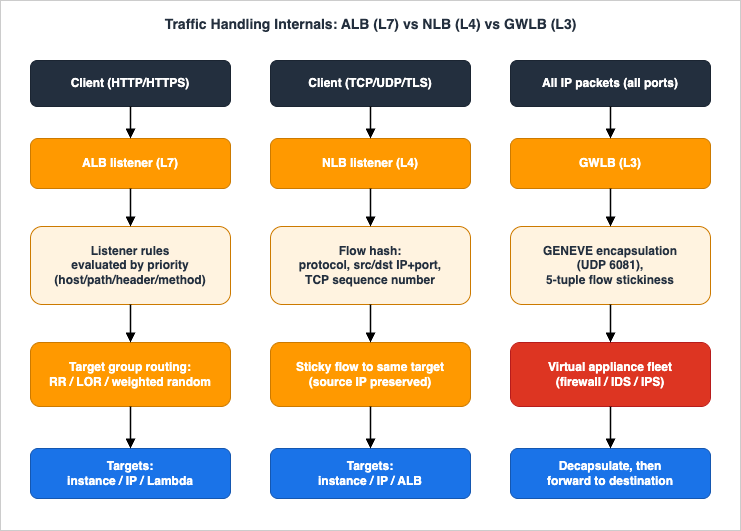
5.1 ALB: HTTP parsing and listener-rule evaluation
An ALB listener accepts HTTP or HTTPS on ports 1–65535 and, for HTTPS, terminates TLS so the rest of the pipeline works on parsed HTTP. The defining behavior is rule evaluation order. When a listener receives a request, it evaluates the request against each rule in priority order, starting with the lowest-numbered rule, and stops at the first match; the default rule is always evaluated last and cannot have conditions. Each non-default rule:- includes exactly one terminal action —
forward,redirect, orfixed-response— performed last; - may include conditions of type
host-header,path-pattern,http-request-method, orsource-ip, plus optionallyhttp-headerandquery-string; - allows up to three comparison strings per condition and up to five per rule.
Two operational implications follow directly. First, priority is a scarce, ordered resource: put the most specific rules at the lowest numbers, because a broad
path-pattern: /* placed too early will shadow everything after it. Second, the default rule is your catch-all — make it an explicit, safe action (a fixed 404, or forwarding to a maintenance target), never an accident.The ALB also natively supports WebSockets (an HTTP/1.1 connection upgraded to a persistent
ws/wss connection that then tunnels through the load balancer) and HTTP/2 on HTTPS listeners (up to 128 parallel requests per connection, with no server-push). These are not add-ons; they are properties of the L7 listener.5.2 NLB: the flow hash and connection stickiness
The NLB does not parse application data. For each connection it computes a flow hash and pins that flow to one target for the connection's life. For TCP, the hash is computed over the protocol, source IP address, source port, destination IP address, destination port, and TCP sequence number; for UDP it uses the source/destination IP and port pair (UDP being connectionless, the NLB synthesizes flow state from the 4-tuple). Because the hash includes the source port and (for TCP) the sequence number, two connections from the same client can land on different targets, while packets of a single connection always reach the same target.This mechanism explains several NLB behaviors operators must internalize:
- Connection idle timeout. The NLB tracks per-connection state. The default idle timeout for TCP flows is 350 seconds (configurable 60–6000). For TLS listeners the idle timeout is 350 seconds and cannot be changed; the NLB also generates keepalives every 20 seconds on both front-end and back-end TLS connections. For UDP flows the idle timeout is 120 seconds and cannot be changed. After idle timeout, a late TCP packet earns a
RST; a late UDP packet starts a new flow that may rehash to a different target. - Return-path establishment. An EC2 target must respond to a new connection request within 30 seconds for the return path to be established — a subtle cause of "connections that never complete" when a backend is slow to accept.
- Source IP preservation. For
instanceandiptargets, the NLB preserves the client's source IP by default, so the backend sees the real client address rather than the load balancer's. This is powerful (real client IPs in logs, security-group rules that reference clients) but means your target security groups must allow the client IP ranges, not the NLB — a frequent NLB-specific gotcha. - Zonal behavior. Because cross-zone is off by default, and because the NLB exposes one IP per AZ, the
dns_record.client_routing_policyattribute lets you bias clients toward same-AZ nodes (availability_zone_affinityat 100% orpartial_availability_zone_affinityat 85%) to minimize cross-AZ latency, complemented by zonal shift to drain an impaired AZ.
5.3 GWLB: GENEVE encapsulation and transparent insertion
The Gateway Load Balancer operates at Layer 3 and listens for all IP packets across all ports, forwarding them to its target group of appliances using the GENEVE protocol on port 6081. The crucial property is that the original packet is encapsulated, not terminated: the GWLB wraps the client packet in a GENEVE header (always an IPv4 GENEVE header, even for IPv6 client traffic) carrying TLV metadata, the appliance inspects or transforms the inner packet, and the appliance sends it back to be decapsulated and forwarded to its real destination. The appliance therefore never has to be a routed next hop you manage; it sits transparently in the path.To keep stateful appliances correct, GWLB maintains flow stickiness so both directions of a flow reach the same appliance:
- The default is 5-tuple stickiness (protocol, source/destination IP, source/destination port). You can relax it to 3-tuple (protocol, source/destination IP) or 2-tuple (source/destination IP) when an appliance needs to see both halves of a flow that uses different ports — but with 3- or 2-tuple stickiness the idle timeout reverts to its default and cannot be tuned.
- Target failover governs what happens to existing flows when a target becomes unhealthy or is deregistered:
no_rebalance(the default) keeps sending existing flows to the draining/failed target until they end, whilerebalancerehashes existing flows onto healthy targets — a deliberate trade between flow continuity and fast failover.
GWLB also handles asymmetric flows and exposes traffic to appliances via Gateway Load Balancer endpoints (GWLBe), which use AWS PrivateLink to steer traffic from consumer VPCs through the appliance fleet without exposing the appliances directly. (The PrivateLink mechanics themselves are covered in the AWS PrivateLink and VPC Endpoints Complete Guide.)
6. Health Checks and Connection Draining
A load balancer is only as good as its idea of "healthy," and zero-downtime deployments live or die on how it drains a target it is about to remove.6.1 Health check parameters and the unhealthy/healthy transition
Health checks are configured per target group. The parameters you set determine how fast a failure is detected and how jittery the signal is:- Protocol and port — for ALB target groups, HTTP/HTTPS with a path (for example
/healthz); for NLB, TCP/HTTP/HTTPS; for GWLB, the appliance health protocol. - Interval — seconds between checks.
- Healthy threshold / unhealthy threshold — the number of consecutive successes to mark a target
healthy, or failures to mark itunhealthy. - Timeout — how long to wait for a single check response.
- Matcher — for HTTP/HTTPS, the success codes (for example
200, or a range).
The transition logic is consecutive-count based: a healthy target must fail
unhealthy_threshold checks in a row to be pulled, and an unhealthy target must pass healthy_threshold in a row to return. This is why a too-aggressive interval/threshold combination produces health flapping — a target oscillating in and out of rotation on transient blips — while a too-lax combination leaves a dead target receiving traffic for too long. The design goal is the smallest detection window that does not flap under your normal latency variance.The defaults define your out-of-the-box detection window: for
instance and ip targets the interval is 30 seconds, the timeout is 5 seconds, the unhealthy threshold is 2, and the healthy threshold is 5 (Lambda targets default to a 35-second interval and a 30-second timeout). The interval is tunable from 5 to 300 seconds, the timeout from 2 to 120 seconds, and both thresholds from 2 to 10. One behavior surprises people during an outage: if every target in every enabled Availability Zone is unhealthy at once, the load balancer fails open — it routes to all targets regardless of health rather than blackholing traffic. Designing for that means not relying on the load balancer to protect a fully-down fleet; that is the job of the DNS-side and multi-Region controls. (Health checks themselves do not support WebSockets, so health-check a normal HTTP path, not the upgraded connection.)A subtle but important design choice for ALB target groups is target group health (minimum healthy targets, count or percentage): you can define what fraction of a target group must be healthy before the load balancer takes a configured action, rather than silently shrinking capacity as targets drop.
Whether an unhealthy target is also replaced is decided elsewhere: an Auto Scaling group acts on load balancer health checks only when that health check type is turned on for the group. Amazon EC2 application status checks need no load balancer, and the group replaces an instance they report as impaired with no additional group configuration; Amazon EC2 Application Status Checks compares the two.
6.2 Deregistration delay: the draining state machine
When you deregister a target — during a deployment, a scale-in, or a manual replacement — Elastic Load Balancing does not cut its connections immediately. The target enters thedraining state and the load balancer stops sending it new requests while letting in-flight requests finish, for up to the deregistration delay (default 300 seconds, configurable). The state machine is precise and worth memorizing:- The deregistering target's initial state is
draining. - If it has no in-flight requests and no active connections, deregistration completes immediately — but the target's status still shows
draininguntil the configured delay elapses, then flips tounused. - After the delay elapses, the target reaches
unusedand, if it is in an Auto Scaling group, can be terminated and replaced. - If a draining target terminates its connection before the delay elapses, the client receives a 500-level error — the canonical cause of "we got a burst of 5xx during deploy."
6.3 Wiring draining into a zero-downtime deployment
The draining contract is what makes rolling and blue/green deployments safe, but only if the surrounding timeouts agree:- Match the deregistration delay to your longest reasonable request. If requests can run 90 seconds, a 30-second delay will guillotine them into 5xx. If requests are sub-second, a 300-second default just slows your deploys; drop it (the snippet in Section 4.4 sets 60).
- Drain before you stop. Have the orchestrator (Auto Scaling lifecycle hook, ECS deployment, CodeDeploy) deregister the target and wait for
unusedbefore terminating the process, so the application is not killed mid-request. - Keep application keep-alive below the load balancer idle timeout. If your backend's HTTP keep-alive is shorter than the ALB's idle timeout, the backend can close a pooled connection the ALB still believes is open, producing sporadic 502s. Set the target's keep-alive longer than the load balancer idle timeout. This single mismatch is one of the most common intermittent-5xx causes in production.
For deployments that also shift DNS (multi-Region or blue/green at the DNS layer), pair this with the failover mechanics in Route 53 Health Check and Failover Pitfalls.
7. TLS, Listeners, and Security
TLS is where ALB and NLB diverge most in operational detail, and where several security features (mTLS, SNI, authentication) live.7.1 Termination versus passthrough
You have three structural choices for TLS:- Terminate on the ALB (HTTPS listener). The ALB decrypts, applies L7 rules, and re-encrypts (or not) to targets. This unlocks every L7 feature and offloads crypto from your backends. You attach an ACM (or imported) certificate; the listener requires at least one server certificate.
- Terminate on the NLB (TLS listener). The NLB decrypts at L4 and forwards plaintext (or re-encrypts) to targets, with a required security policy selecting ciphers/protocols. Use this when you want centralized certificate management and offload but do not need L7.
- Passthrough on the NLB (TCP listener on 443). The NLB forwards encrypted bytes untouched; the target terminates TLS. Use this when the backend must hold the private key (regulatory requirement, end-to-end encryption, or a protocol the load balancer should not parse).
7.2 Security policies, SNI, and post-quantum TLS
Both ALB HTTPS listeners and NLB TLS listeners select a security policy that fixes the supported TLS protocol versions and cipher suites for the negotiation between client and load balancer. Two points matter operationally:- SNI lets one secure listener serve many certificates. Attach multiple certificates to a single HTTPS/TLS listener and the load balancer selects the right one per the client's SNI hostname — the mechanism behind hosting many TLS hostnames on one ALB or NLB. (The certificates-per-load-balancer quota, excluding the default certificate, is one of the limits to check before consolidating.)
- Post-quantum TLS policies now exist. AWS publishes PQ-TLS security policies (for example
ELBSecurityPolicy-TLS13-1-2-Res-PQ-2025-09) that add post-quantum key exchange while staying backward-compatible with TLS 1.3 and 1.2 clients — a forward-looking choice for long-lived, sensitive traffic. The default policy differs depending on whether you create the listener in the console or via CLI/CloudFormation, so set it explicitly in IaC rather than relying on the default.
7.3 Mutual TLS (mTLS)
The ALB supports mutual TLS, where the load balancer also verifies a client certificate; the NLB does not. The ALB exposes two modes that are very different operationally:passthrough— the ALB forwards the entire client certificate chain to the target in HTTP headers (X-Amzn-Mtls-Clientcertand related), and the target does the X.509 validation. Choose this when an existing application already validates client certs.verify— the ALB itself performs X.509 client-certificate authentication against a trust store (a CA bundle you upload, optionally with certificate revocation lists) before the request ever reaches a target. This offloads client-auth from the backend entirely.
Operational constraints to plan around: mTLS uses X.509v3 client certificates, session resumption is not supported with mTLS, mTLS works with HTTP/2 in both modes, and there is a small per-load-balancer ceiling on listeners using verify mode plus quotas on trust-store size, CA-certificate count, and revocation entries. The NLB does not support mutual TLS on TLS listeners; for mTLS, the Network Load Balancer User Guide says to create a TCP listener instead so that the target implements mTLS.
Publicly trusted certificate authorities are increasingly removing the
clientAuth extended key usage from the certificates they issue. Which dates apply to which CA, and the finding that no statement about the extended key usage of client certificates was found on the ALB mutual authentication page, are covered in When Public Certificates Stop Carrying clientAuth - Where AWS Sends or Accepts Client Certificates, and What Each Path Says About Extended Key Usage.7.4 Authentication: offloading login to the ALB
Uniquely, the ALB can authenticate users before traffic reaches your application, via anauthenticate-oidc action against any OIDC-compliant identity provider, or an authenticate-cognito action against an Amazon Cognito user pool (which in turn can federate social and SAML/OIDC corporate identities). The ALB manages the auth session and only forwards authenticated requests, so your backend never implements the login dance. This is an L7-only capability — another reason a "just put a load balancer in front" requirement quietly becomes an ALB requirement.7.5 Security groups: the NLB asymmetry
ALBs always have security groups. NLBs only optionally do, and the rules are unusually strict:- An NLB's security groups can be associated only at creation time — you cannot add a security group to an NLB that was created without one. This is a one-way door; provision it with a security group from day one if you might ever want one.
- For an NLB with a security group, health checks are subject to the outbound rules only, and PrivateLink traffic can optionally be subjected to the inbound rules.
- When the NLB preserves client source IP (Section 5.2), remember that target security groups must permit the client IPs, because the backend sees the client, not the load balancer — whereas with an ALB, target security groups typically reference the ALB's security group.
8. Migration Paths
The migration that matters is off the Classic Load Balancer, and AWS provides a built-in path so it is not a rebuild.8.1 The Classic migration wizard
The Elastic Load Balancing console includes a migration wizard that reads a Classic Load Balancer's configuration and creates an equivalent Application Load Balancer (for HTTP/HTTPS workloads) or Network Load Balancer (for TCP/SSL workloads). The wizard provisions the new load balancer, listeners, and target groups based on the Classic configuration. Two realities define the migration:- You must redirect traffic yourself. The wizard builds the replacement but does not move clients to it; you cut over by updating DNS (a weighted Route 53 record set makes this gradual) or by re-pointing whatever references the old name.
- Some Classic features have no one-to-one equivalent and must be re-expressed. HTTP routing that was implicit on Classic becomes explicit ALB listener rules; backend authentication and sticky-session behaviors map onto the V2 target-group attributes (duration-based or application-based stickiness); and any reliance on the Classic-specific behavior must be validated on the new type.
8.2 A safe cutover sequence
- Run the wizard to create the ALB or NLB and verify its listeners, rules, and target groups against the Classic configuration.
- Register the same targets and confirm they pass the new target group's health checks (the health-check path/matcher may need adjustment to match what Classic used).
- Shift traffic gradually with a weighted DNS record — small percentage first — watching the new load balancer's CloudWatch metrics (Section 9) and target health.
- Decommission the Classic Load Balancer only after the new one has carried full production traffic cleanly through a representative period (including peak).
Because the two run in parallel during the shift, there is no flag day. For the DNS-weighting mechanics and the failover pitfalls to avoid during a cutover, see Route 53 Health Check and Failover Pitfalls; for when each ELB capability became available (useful when deciding whether a Classic feature has a modern equivalent), see the Elastic Load Balancing timeline.
9. Observability and Diagnostics
When a load balancer "doesn't work," the answer is almost always in three places: CloudWatch metrics, access logs, and the HTTP status code the load balancer itself returns.9.1 The metrics that matter
ALBs publish to theAWS/ApplicationELB namespace at 60-second intervals (when traffic is flowing), across load-balancer, LCU, target, Lambda, and user-authentication categories. The high-value ones for diagnosis:HTTPCode_ELB_5XX_Count— 5xx generated by the load balancer (not the target): usually no healthy targets, or the request could not be routed. Distinguish this fromHTTPCode_Target_5XX_Count, which is your application erroring.TargetResponseTime— latency from the load balancer's perspective; a rising p99 here localizes slowness to the backend.UnHealthyHostCount/HealthyHostCount— per target group; a sawtooth here is the signature of health flapping.RejectedConnectionCount— connections refused because a capacity limit was hit.TargetConnectionErrorCount— the load balancer could not open a connection to the target (often a security-group or target-process problem).
NLBs publish to
AWS/NetworkELB: ActiveFlowCount and NewFlowCount (flow-level load), ProcessedBytes, TCP_Target_Reset_Count (targets sending RSTs), and the same healthy/unhealthy host counts. Because the NLB is flow-oriented, you watch flows, not requests.9.2 Access logs
The ALB can write access logs to Amazon S3 with a rich per-request schema — including the request processing, target processing, and response processing times broken out separately, the chosen target, the matched rule, the TLS cipher and protocol, and the final status code. Splitting the three time components is the fastest way to answer "is the latency in the load balancer, the network, or the target?" The NLB writes access logs for TLS listeners. Both are off by default; turn them on before you need them, because they cannot be retroactively generated.9.3 Reading the status codes
The load balancer's own status codes are a built-in diagnostic vocabulary:- 503 Service Unavailable — the load balancer has no healthy targets in the target group for the request (or the target group is empty). Check target health and the health-check configuration first.
- 504 Gateway Timeout — the target did not respond within the idle timeout, or a connection to the target could not be established/maintained. Check target latency (
TargetResponseTime), the idle-timeout vs. application timeout relationship, and target security groups. - 502 Bad Gateway — the target returned a malformed response or closed the connection unexpectedly; the keep-alive mismatch from Section 6.3 is a classic cause.
- 460 / 463 (ALB) — the client closed the connection before the idle timeout (460), or the
X-Forwarded-Forheader had too many addresses (463).
9.4 Pinpointing an unhealthy target with describe-target-health
When a target group shows fewer healthy hosts than expected,describe-target-health tells you why, per target, instead of leaving you to guess:aws elbv2 describe-target-health \
--target-group-arn "$TG_ARN" \
--query 'TargetHealthDescriptions[].{id:Target.Id,state:TargetHealth.State,reason:TargetHealth.Reason}'
initial—Elb.RegistrationInProgress/Elb.InitialHealthChecking: the target is still completing its first checks. Wait, do not debug yet.unhealthy—Target.ResponseCodeMismatch(the health path returned a code outside the matcher → app or matcher problem),Target.Timeout(no response within the timeout → latency or a hung process), orTarget.FailedHealthChecks(connection refused/reset → wrong port or a security-group block).unused—Target.NotRegistered,Target.NotInUse(the target group is not referenced by a listener rule, or the target's AZ is not enabled),Target.InvalidState(stopped/terminated), orTarget.IpUnusable.draining—Target.DeregistrationInProgress: the deregistration delay from Section 6.2 is in effect.unavailable—Target.HealthCheckDisabled.
Reading the reason code first turns "the load balancer returns 503" from a guess into a directed fix — the difference between editing a security group and restarting the wrong service.
9.5 A worked diagnosis: intermittent 502s during deploys
Putting the mechanics together, a recurring incident: sporadic 502s that spike during deployments. The chain is almost always (1) targets being deregistered without honoring the draining window (Section 6.2), so in-flight requests are cut and surface as 5xx, compounded by (2) a backend HTTP keep-alive shorter than the ALB idle timeout (Section 6.3), so pooled connections close from under the load balancer. The fix is to lengthen the deregistration delay to cover the longest request, drain tounused before stopping the process, and set the application keep-alive longer than the load balancer idle timeout. For broader network-layer triage (is it the load balancer, the route table, or the security group?), the AWS VPC Network Troubleshooting Guide is the companion diagnostic flow.10. End-to-End Architecture Walkthrough
To see how the types compose, walk a single realistic system that uses three of them deliberately. The goal: a public web/API tier with L7 routing and user authentication, a shared internal service exposed privately to another account over PrivateLink behind a static IP, and Lambda-backed endpoints — all observable and zero-downtime.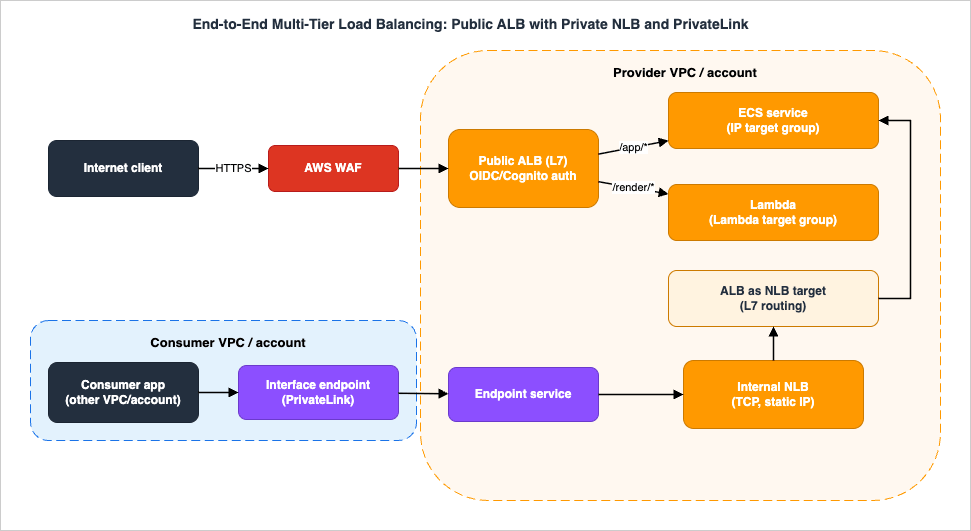
10.1 The north-south path: WAF, ALB, ECS, and Lambda
A client request from the internet first meets AWS WAF associated with the public Application Load Balancer. The ALB terminates TLS, evaluates listener rules in priority order, and — for protected routes — runs anauthenticate-oidc or authenticate-cognito action so only logged-in users proceed. Authenticated requests fan out by path:/app/*forwards to an ECS service registered asiptargets (one target per task IP), with weighted random routing so that ATW anomaly mitigation can shed a degrading task automatically (the ALB User Guide makes mitigation available only with weighted random, and slow start cannot be combined with it)./render/*forwards to a Lambda target group, where the ALB invokes the function directly and maps request to event and result to response — serverless endpoints behind the same hostname as the container service.
Cross-zone is left at its ALB default (enabled), so all healthy tasks share traffic regardless of AZ.
10.2 The east-west path: PrivateLink, internal NLB, and ALB-as-target
A second consumer — an application in another VPC or account — needs the same internal service privately, by a stable endpoint, without joining networks. The provider exposes it as a PrivateLink endpoint service backed by an internal Network Load Balancer, giving a static IP per AZ and PrivateLink frontability the ALB alone cannot provide. To keep L7 routing for that private traffic, the NLB's target is the Application Load Balancer registered as analb target (Section 4.2): consumer → interface endpoint → endpoint service → internal NLB (static IP) → ALB (L7) → ECS tasks. The consumer addresses an endpoint, never the provider's IP space, so CIDR overlap is irrelevant — the connectivity rationale belongs to the VPC Connectivity Decision Guide, while the load-balancer composition is what this guide contributes.10.3 How it fails, and where you watch
The point of designing with the mechanics in mind is predictable failure:- A task goes bad but still passes health checks → ATW's anomaly mitigation reduces its traffic share before the binary health check would; you see it as a dip in that task's share, not as user-facing 5xx.
- A whole AZ degrades → zonal shift drains the NLB's node in that AZ; the public ALB's cross-zone keeps the remaining tasks balanced.
- A deploy rolls the ECS service → the draining contract (Section 6.2) plus keep-alive alignment (Section 6.3) keeps the cutover free of 502s.
- The private consumer sees timeouts → you check
TargetConnectionErrorCountand the NLB's flow counts, and remember the NLB preserves client IP, so the ALB-as-target and ECS security groups must permit the right source.
Each component's observability is exactly the metric set from Section 9, which is why building with the internals in view makes the system debuggable rather than mysterious.
11. Common Pitfalls
The mistakes below recur across reviews and incidents; each is a symptom of operating a load balancer without matching its mechanics to the requirement.- Wrong cross-zone assumption. Expecting an NLB to spread traffic evenly across an uneven per-AZ target count — it will not, because NLB cross-zone is off by default. Enable it (and account for the quota interaction) when even distribution matters.
- NLB source-IP surprise. Forgetting that the NLB preserves the client source IP, then writing target security groups that allow only the load balancer. The backend sees the client; the rules must reflect that.
- NLB security group as an afterthought. Creating an NLB without a security group and later needing one — it cannot be added after creation. Provision it with a security group from the start if there is any chance you will want one.
- Deregistration delay unset or mismatched. Leaving the 300-second default (slow deploys) or setting it shorter than the longest request (5xx bursts during deploy). Match it to the real request distribution and drain to
unusedbefore stopping the process. - Keep-alive shorter than idle timeout. The single most common intermittent-502 cause: a backend keep-alive shorter than the load balancer idle timeout lets the backend close connections the load balancer still trusts.
- Health checks too aggressive (flapping) or too lax (dead targets served). Tune interval and thresholds to the smallest window that does not flap under normal latency variance.
- Listener-rule ordering. Placing a broad
path-patternat a low priority number, shadowing the specific rules after it. Order most-specific-first and make the default rule an explicit, safe action. - Reaching for routing tricks instead of a GWLB. Trying to thread traffic through a firewall by hand-managing routes and next hops, instead of inserting the appliance transparently with a Gateway Load Balancer and GENEVE.
- Treating Classic as a destination. Building anything new on the Classic Load Balancer. It is a migration source, not a choice.
12. Frequently Asked Questions
Q. When should I pick NLB over ALB?A. When you need something the ALB structurally cannot provide: a static or Elastic IP that clients allowlist, a non-HTTP protocol (raw TCP/UDP/TLS passthrough, QUIC), ultra-low latency and extreme connection scale, or true client source-IP preservation. If instead you need path/host routing, HTTP authentication, redirects, or WebSockets/HTTP/2 features, that is the ALB. When you need both an L7 feature and a static IP, don't choose — front an ALB with an NLB and register the ALB as a target (Sections 4.2 and 10.2).
Q. Can I terminate TLS on an NLB?
A. Yes. Create a TLS listener with a security policy and the NLB decrypts at L4 (and can re-encrypt to targets). Alternatively, use a TCP listener on 443 for passthrough, where the encrypted bytes reach the target untouched and the target terminates TLS — the right choice when the backend must hold the private key. The ALB only terminates TLS via HTTPS listeners; it cannot do TCP passthrough.
Q. Do I still need the Classic Load Balancer?
A. For new workloads, no — AWS positions it as previous-generation and provides a migration wizard to ALB (HTTP/HTTPS) or NLB (TCP/SSL). Existing Classic Load Balancers still run, but treat them as debt with a clear exit (Section 8). Note that the separate EC2-Classic network platform was retired in 2022; the Classic Load Balancer itself has no published blanket retirement date, so migrate on engineering merit, not a deadline.
Q. Can an ALB be a target of an NLB?
A. Yes — register the ALB as an
alb-type target of an NLB target group. This is the supported pattern to combine the NLB's static IP and PrivateLink frontability with the ALB's L7 routing and authentication. The reverse (an NLB as a target of an ALB) is not a target type; the ALB accepts instance, ip, and lambda.Q. Why is my traffic skewed to one Availability Zone?
A. Almost always cross-zone load balancing. NLB and GWLB have cross-zone disabled by default, so a node in an AZ only reaches targets in that AZ; an uneven per-AZ target count then produces skew. Enable cross-zone (mind the NLB quota interaction) or balance targets per AZ. The ALB has cross-zone on by default, so this is mostly an NLB story.
Q. How do I get zero-downtime deployments behind a load balancer?
A. Three things must agree: set the deregistration delay to cover your longest request; have the orchestrator drain the target to
unused before stopping the process; and keep the application keep-alive longer than the load balancer idle timeout. Together they ensure in-flight requests finish and no pooled connection closes from under the load balancer (Section 6.3).Q. What does mTLS
verify mode do that passthrough doesn't?A. In
verify mode the ALB itself authenticates the client certificate against a trust store (CA bundle, optional CRLs) before any request reaches a target, fully offloading client-auth. In passthrough mode the ALB forwards the client certificate chain to the target in headers and the target validates it. Note that session resumption is not supported with mTLS, and verify-mode listeners are capped per load balancer (Section 7.3).13. Summary
The growth of Elastic Load Balancing into four types turned "which load balancer?" into a real design decision, but the decision is short when you ask the questions in order: insert transparent appliances → GWLB; need Layer 7 → ALB; need L4 reach, static IPs, or extreme scale → NLB; stuck on Classic → migrate. That selection, though, is the smallest part of operating ELB well.What makes a load balancer reliable is the layer below the choice: knowing that the ALB evaluates listener rules by priority and authenticates at L7; that the NLB hashes flows over a 5-tuple, preserves client IPs, and ships with cross-zone off; that the GWLB encapsulates packets in GENEVE and keeps flows sticky for stateful appliances; that deregistration delay, draining state, and keep-alive alignment are what actually deliver zero-downtime deploys; and that the load balancer's own 502/503/504 codes plus the
AWS/ApplicationELB and AWS/NetworkELB metrics tell you exactly where a failure lives. Production systems combine the types — a public ALB for routing and auth, an internal NLB for a static IP and PrivateLink, an ALB registered as the NLB's target for the best of both — and migrating between them is incremental, never a flag day.For the surrounding decisions this guide deliberately hands off: choose the VPC connectivity underneath with the AWS VPC Connectivity Decision Guide; diagnose the network around the load balancer with the AWS VPC Network Troubleshooting Guide; get DNS-side failover right with Route 53 Health Check and Failover Pitfalls; trace when each capability launched with the Elastic Load Balancing timeline; and look up any term in the AWS Networking Glossary. The AWS Hybrid Connectivity Decision Guide and the Amazon Route 53 DNS Architecture Guide extend this networking cluster on the on-premises and DNS sides respectively.
14. References
- Elastic Load Balancing User Guide - How Elastic Load Balancing works
- What is a Network Load Balancer? - Elastic Load Balancing
- Network Load Balancers - connection idle timeout and attributes
- What is a Gateway Load Balancer? - Elastic Load Balancing
- Gateway Load Balancers - GENEVE, idle timeout, flow stickiness
- Flow stickiness for Gateway Load Balancers
- Listener rules for your Application Load Balancer
- Edit target group attributes for your Application Load Balancer (routing, ATW, slow start, sticky sessions, cross-zone)
- Mutual authentication with TLS in Application Load Balancer
- Security policies for your Network Load Balancer (including PQ-TLS)
- Authenticate users using an Application Load Balancer
- Update the security groups for your Network Load Balancer
- Migrate your Classic Load Balancer
- Quotas for your Application Load Balancers
- Quotas for your Network Load Balancers
- CloudWatch metrics for your Application Load Balancer
- Elastic Load Balancing pricing
Related Articles
- AWS History and Timeline regarding Elastic Load Balancing
When each ELB type and capability launched — the delegation target for everything historical. - AWS VPC Connectivity Decision Guide - VPC Peering, Transit Gateway, PrivateLink, VPC Lattice, and Cloud WAN
The connectivity layer underneath traffic distribution, and the home of the PrivateLink-fronts-NLB rationale. - AWS VPC Network Troubleshooting Guide
The diagnostic companion when "the load balancer doesn't work" is really a route table or security group. - Route 53 Health Check and Failover Pitfalls
DNS-side failover, distinct from load balancer health checks, for cutovers and multi-Region. - AWS Networking Glossary
Definitions for every term used in this guide.
References:
Tech Blog with curated related content
Written by Hidekazu Konishi