AWS Well-Architected - Practical Self-Audit Checklist by Pillar
First Published:
Last Updated:
The Framework itself defines six pillars — Operational Excellence, Security, Reliability, Performance Efficiency, Cost Optimization, and Sustainability — and ships three artifacts to evaluate against them: the framework whitepaper, the per-pillar whitepapers, and the AWS Well-Architected Tool in the AWS Management Console. That tooling is excellent at producing a long-form report, but it is not the artifact a workshop facilitator wants in front of a room. This checklist is.
The deeper background on the AWS service catalog you will be reviewing against is covered in AWS History and Timeline. The identity, network, and infrastructure decisions referenced under the Security and Reliability pillars below are themselves the subject of three companion articles linked inline.
Table of Contents:
- Introduction — Why a Self-Audit Checklist
- The Six Pillars in 60 Seconds
- How to Use This Checklist (Workshop Workflow)
- Operational Excellence Checklist
- Security Checklist
- Reliability Checklist
- Performance Efficiency Checklist
- Cost Optimization — Reference Only
- Sustainability Checklist
- Conducting Your Own Review (Templates and Cadence)
- Common Pitfalls and How to Avoid Them
- Summary
- References
1. Introduction — Why a Self-Audit Checklist
The AWS Well-Architected Framework is the closest thing the AWS ecosystem has to a constitution. Every AWS architect's mental model is shaped by it, every Solutions Architect references it, and every enterprise procurement team eventually asks for a Well-Architected Review (WAR) before they sign. The Framework ships the AWS Well-Architected Tool as a console-based questionnaire, and that tool produces a thorough report at the end. So why a separate checklist?Three reasons.
First, the Tool is optimized for completeness, not facilitation. It walks every question for every pillar in a fixed order. That is the right shape for a stand-alone evaluation, but it is the wrong shape for a 90-minute review where you need to triage what is broken now versus what is a five-year roadmap item. A facilitator running a real workshop wants a one-page-per-pillar form with Yes / No / N.A. and one column for "improvement action."
Second, a workshop checklist makes the answers comparable across reviews. When the same checklist is run quarterly with the same wording, a "No" that becomes a "Yes" three months later is unambiguous progress. When two parallel workloads are reviewed with the same checklist, their scores can be averaged into a portfolio-level posture without re-interpreting free-text answers. The Tool's narrative output cannot do either of those things easily.
Third, the Tool is not the source of truth for your own constraints. A medical workload may legitimately mark "encrypt at rest with a customer-managed KMS key" as N.A. because the regulator mandates an external HSM. A startup may legitimately mark "automated DR runbook with quarterly Game Days" as N.A. in the first six months because the company does not yet have customers. The Tool will count those as gaps; a checklist with an explicit N.A. column with a justification field will not.
This article gives you that checklist. Each pillar contains 8–18 questions phrased so that a clear Yes is operationally meaningful, a No triggers a backlog item, and an N.A. requires a written justification. Each question is followed by an evaluation criterion (what evidence makes this a Yes) and an improvement action (what to do if the answer is No), and where the action is a one-liner of code or IaC, it is included.
Out of scope deliberately: this checklist does not enumerate the questions of the Well-Architected Tool one-to-one. It also does not include cost numbers — the Cost Optimization pillar is referenced through the official AWS docs only, because price points and SKU names rotate too quickly to keep accurate in a long-lived article.
In scope: nearly 70 questions across five of the six pillars (Operational Excellence, Security, Reliability, Performance Efficiency, Sustainability), plus a workshop workflow and review templates that have survived several real annual reviews of multi-account AWS estates. Cost Optimization is intentionally excluded for the reason given above.
2. The Six Pillars in 60 Seconds
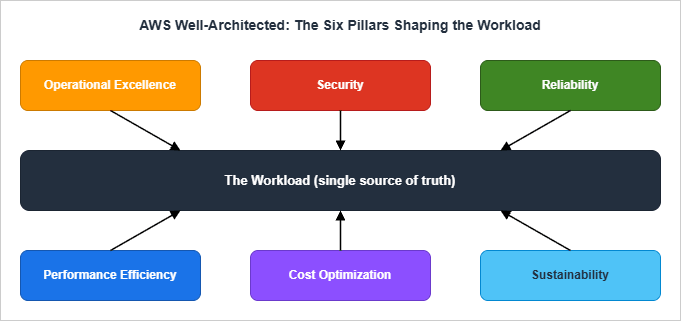
Before the checklist, a one-paragraph statement per pillar so that everyone in the room is using the same definitions. The phrasing below intentionally hugs the AWS whitepapers but compresses each pillar to its operational essence rather than its design principles.- Operational Excellence — Can you change the system safely, observe what it is doing, learn from incidents, and treat operations as code? The pillar's design principles emphasize organizing teams around business outcomes, implementing observability for actionable insights, automating safely, making frequent small reversible changes, refining procedures often, and learning from all operational events.
- Security — Are identities short-lived, blast radius bounded, data encrypted at the right layer, and incidents detectable in minutes? The pillar's seven design principles include implementing a strong identity foundation, maintaining traceability, applying security at all layers, automating security best practices, protecting data in transit and at rest, keeping people away from data, and preparing for security events.
- Reliability — When the next failure happens (and it will), does the workload recover automatically, with tested procedures, against bounded fault domains? The pillar's design principles call for automatic failure recovery, regular recovery testing, horizontal scaling for aggregate availability, capacity automation, and managing change through automation.
- Performance Efficiency — Are you using purpose-built services for the workload's data and compute shape, and do you measure performance against an actual KPI rather than a feel-good dashboard? The pillar emphasizes democratizing advanced technology, going global in minutes, using serverless, experimenting often, and considering "mechanical sympathy" — the alignment of code to underlying hardware.
- Cost Optimization — Are you spending the right amount on the right thing, measuring efficiency continuously, and avoiding undifferentiated heavy lifting? Detailed treatment is intentionally deferred to the AWS docs in section 8.
- Sustainability — Is the carbon and energy footprint of the workload visible, measured, and aligned with stated goals — including Region selection, demand alignment, and managed-service preference? The pillar adds an environmental lens to decisions you would otherwise make for cost or performance reasons alone, and is the newest of the six (added in late 2021). When each pillar was added to the Framework and to the AWS Well-Architected Tool is traced in AWS Well-Architected Framework History and Timeline.
The six pillars are not independent. Performance can be bought with cost, security can be bought with operational friction, reliability can be bought with sustainability impact (active-active across Regions doubles infrastructure). Treat the pillars as a system of trade-offs, not a checklist of independent virtues. The relationship diagram below is a useful summary to put on the workshop wall.
3. How to Use This Checklist (Workshop Workflow)
The checklist is designed for one of three formats. Pick the one that matches your time budget, then jump to the per-pillar sections.Format A — Half-day workshop (4 hours, recommended for new workloads or annual reviews). Six pillars × ~30 minutes per pillar = three hours, plus a 30-minute opening and a 30-minute closing. Bring two facilitators (one drives the form, one captures action items), the workload's tech lead, the on-call lead, and a security representative. Score each question live; do not let the room debate evidence beyond five minutes — if it is contested, mark it No with a note and resolve offline.
Format B — 90-minute lightweight review (use for change-trigger reviews, e.g., post-incident or pre-launch). Pick the three most relevant pillars based on the trigger. Post-incident: Reliability + Operational Excellence + Security. Pre-launch: Operational Excellence + Performance Efficiency + Reliability. Skip the others; mark them "deferred" rather than "passed."
Format C — 30-minute self-review (monthly hygiene by the workload owner). Pick a different pillar each month on a 6-month rotation. Skim only the questions whose answers might have changed since last month. Use this format to catch drift between full reviews.
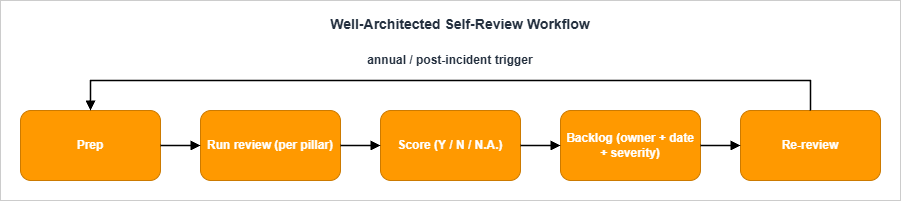
The workflow itself is the same in all three formats: Prep → Run → Score → Backlog → Re-review.
3.1 Prep (30 minutes before the workshop)
- Pull the workload's architecture diagram (current, not the one from a year ago).
- Pull the workload's CloudFormation / CDK / Terraform repo and the on-call rotation.
- Pull the last incident retrospective or, if there are none, last quarter's incident list.
- Pull the AWS Config rule compliance summary, Security Hub standards score, and Trusted Advisor findings.
- Print or share the relevant pillar's question list (each question is one row).
3.2 Run (during the workshop)
- Read the question.
- Tech lead answers Yes / No / N.A. Anyone can challenge the answer with evidence; the facilitator decides quickly.
- Capture an evidence link (a CloudFormation file, a CloudTrail query, a Runbook URL) into the form.
- If the answer is No, the facilitator names the action item, the owner, and the target date. No improvement action ships without a date.
- If the answer is N.A., the facilitator captures the justification.
3.3 Score (immediately after the workshop)
- Count Yes / No / N.A. per pillar. The headline number is (Yes / (Yes + No)) × 100, expressed as a percentage. N.A. is excluded from the denominator — answering "this question doesn't apply" should not move the score.
- Severity tiers per "No" item: S1 (security incident risk, data loss risk, or major outage risk), S2 (operational pain, scaling risk), S3 (best-practice gap with no immediate consequence).
3.4 Backlog (within one business day)
- Every "No" item becomes a backlog ticket with: title, owner, target date, severity, link to the workshop minutes, and the relevant pillar tag. Tag conventions:
WAR/OPS,WAR/SEC,WAR/REL,WAR/PERF,WAR/COST,WAR/SUS. - S1 items are surfaced into the workload's risk register and reviewed weekly until closed.
3.5 Re-review (cadence)
- Annual for the full six-pillar workshop. Pick a fixed quarter — many teams use Q1 to align with budget cycles.
- Pre-launch before any net-new workload goes to production.
- Post-incident after any S1 incident, regardless of cadence.
- Major change when the workload undergoes architectural change (new Region, new compute paradigm, new data store).
4. Operational Excellence Checklist
The Operational Excellence pillar has four best-practice areas — Organization, Prepare, Operate, Evolve — and the design principles summarized in section 2 above. The 15 questions below cover the questions that come up most often in real reviews. The numbering is local to this article (OPS-01 through OPS-15) and does not map one-to-one to the OPSxx-BPxx IDs in the AWS docs; see section 13 References for the canonical AWS whitepaper.OPS-01. Are operations procedures defined as code (Runbooks, Playbooks) and version-controlled?
- Yes if: Runbooks exist for the top 5 alerts in the workload's on-call rotation, are stored in the same repo (or a clearly cross-linked one) as the workload, and are referenced by the alert payload.
- No: improvement action: Author Runbooks for the top 5 alerts. Use AWS Systems Manager Automation documents (
AWS::SSM::Documentof typeAutomation) for any procedure that is mechanically executable; use Markdown Runbooks in the workload repo for procedures that require human judgment.
AWSTemplateFormatVersion: "2010-09-09"
Resources:
  RestartFleetRunbook:
    Type: AWS::SSM::Document
    Properties:
      DocumentType: Automation
      Name: ops-restart-tagged-fleet
      Content:
        schemaVersion: "0.3"
        description: "Restart EC2 instances tagged Workload=<workload>."
        parameters:
          Workload: { type: String }
        mainSteps:
          - name: rebootInstances
            action: aws:executeAwsApi
            inputs:
              Service: ec2
              Api: RebootInstances
InstanceIds: "{{ getInstanceIds.InstanceIds }}"- Yes if: For every CloudWatch alarm or AWS Health event that pages a human, there is a one-paragraph minimum description of what to do, in the same place as the Runbooks.
- No: improvement action: Add a mandatory "Runbook URL" field to your alert template. If an alarm has no Runbook, demote it from "page" severity to "ticket" severity until one is written.
- Yes if: Console mutations are blocked or audited in production accounts. CloudFormation, CDK, Terraform, or AWS SAM is the change channel; manual changes generate a CloudTrail anomaly that fires an alert.
- No: improvement action: Apply an SCP that denies high-blast-radius mutations from any principal not in your CI/CD role list. Start with
iam:*,kms:Delete*,s3:Delete*in the prod OU.
{
  "Version": "2012-10-17",
  "Statement": [{
    "Sid": "DenyConsoleIamMutations",
    "Effect": "Deny",
    "Action": ["iam:Create*", "iam:Delete*", "iam:Update*", "iam:Put*"],
    "Resource": "*",
    "Condition": {
      "StringNotEquals": { "aws:PrincipalTag/Channel": "cicd" }
    }
  }]
}- Yes if: A canary or blue/green is in place for stateful or customer-facing components. CodeDeploy, ECS deployment circuit breaker, or Lambda alias traffic shifting fronts the change. Rollback is a single click or a single CLI call and has been exercised in a non-production environment in the last 90 days.
- No: improvement action: Add
DeploymentConfiguration.DeploymentCircuitBreakerto ECS services. Add Lambda alias-based traffic shifting viaAWS::CodeDeploy::DeploymentGroupwith a canary configuration. Pair the canary with a CloudWatch Alarm on the workload's headline error rate as the rollback trigger.
- Yes if: Application emits structured logs to CloudWatch Logs, custom metrics to CloudWatch (or Amazon Managed Service for Prometheus (AMP) / OpenTelemetry), and X-Ray traces (or an OTel collector pipe). At least one cross-service trace exists for the most critical user journey.
- No: improvement action: Adopt the AWS-managed Lambda Powertools (or its Python / TypeScript equivalents) and emit
LOGGING_FORMAT_JSON. Stand up X-Ray on the front-door service and propagate the trace header to one downstream.
- Yes if: At least one dashboard exists where the top tile is "successful business transactions per minute" or equivalent (orders placed, conversations completed, files indexed) — not CPU, not request count.
- No: improvement action: Define one business KPI for the workload. Emit it as a CloudWatch custom metric from the application boundary. Make it the front tile of the on-call dashboard.
- Yes if: There is a written rotation, the average pages-per-shift is tracked, and a "page budget" exists above which the rotation triggers an automatic improvement-week (no feature work).
- No: improvement action: Pick a page budget (e.g., "no more than 2 pages per night, otherwise the next sprint is a stabilization sprint"). Track pages in the same dashboard as the workload metrics.
- Yes if: A scheduled exercise that intentionally fails a component (region, AZ, dependency, secret) ran in the last 12 months, with a written postmortem.
- No: improvement action: Run one Game Day per quarter. Use AWS Fault Injection Service to inject the fault deterministically. The first Game Day should be the simplest non-destructive scenario you can run in production-shaped staging — kill one instance and watch the alarms.
- Yes if: Every S1/S2 incident has a postmortem document. Action items have owners, target dates, and a closure mechanism (a ticket, a PR, an architectural change).
- No: improvement action: Adopt a postmortem template. Track action-item closure rate (target: above 80% closed within 90 days). If closure rate falls below 50%, the team has an organizational problem, not a technical one.
- Yes if: Events from CloudWatch Alarms, AWS Health, GuardDuty, Security Hub, and the workload's own application errors flow into a single triage stream (a chat channel, a SIEM, an EventBridge bus).
- No: improvement action: Build a single EventBridge bus (
workload-events) and route all sources to it. Prioritize by tagging the source and consuming events with a router Lambda that classifies severity.
- Yes if: Every account in the AWS Organization has a tag
Ownerthat resolves to a team (not a person), and every CloudFormation stack and Lambda function carries anOwnertag that matches. - No: improvement action: Apply a Tag Policy through AWS Organizations that requires
Owner,Workload, andEnvironmenttags on listed resource types. Pair it with a Config rule that flags non-compliant resources.
- Yes if: A weekly or biweekly operational review touches: SLO attainment, page count, deployment frequency, incident count, and backlog count for
WAR/OPSitems. - No: improvement action: Add a 30-minute weekly slot to the team's calendar. The agenda is fixed; the chair rotates.
- Yes if: A documented practice (a quarterly "AWS service review" or a Slack-driven "new feature" intake) exists for evaluating new AWS announcements against the workload's roadmap.
- No: improvement action: Subscribe one engineer per quarter to the AWS What's New RSS. Their deliverable is a one-page summary of relevant items and a candidate adoption list.
- Yes if: The workload's
READMEand architecture documentation are in the same repository as the code they describe, kept up to date by the same PR that changes the code. - No: improvement action: Move the architecture document into the workload repo. Add a CI check that fails if a structural source change ships without a
READMEordocs/change.
- Yes if: The pipeline (CodePipeline, GitHub Actions, GitLab CI, etc.) is defined in source-controlled YAML or IaC. Changing the pipeline requires a PR.
- No: improvement action: Convert console-built pipelines to IaC. For AWS-native pipelines,
AWS::CodePipeline::PipelineandAWS::CodeBuild::Projectare sufficient. For multi-account pipelines, store the IaC in a tooling account and assume cross-account roles to deploy.
5. Security Checklist
The Security pillar's seven design principles — strong identity foundation, traceability, security at all layers, automated security best practices, encryption in transit and at rest, keeping people away from data, and preparing for security events — translate into seven best-practice areas: Security foundations, Identity and access management, Detection, Infrastructure protection, Data protection, Incident response, and Application security. The 18 questions below cover the highest-leverage items in each area.SEC-01. Are workloads separated by AWS account?
- Yes if: Production, staging, development, sandbox, and security/audit each live in separate accounts, with a clear OU structure under AWS Organizations. The number of accounts is a feature, not a bug.
- No: improvement action: Stand up AWS Control Tower (or AWS Organizations + AWS Account Factory for Terraform) and migrate workloads into separate accounts. Single-account multi-environment is one of the most expensive architectural debts to remove later.
- Yes if: Root has a long random password stored in a vault, MFA enabled (preferably hardware), no programmatic access keys, and CloudWatch Alarms on root login events.
- No: improvement action: Rotate the root password to a vault-stored value, enable hardware MFA, delete any root access keys, and add the alarm. AWS now offers centralized root access management through IAM (with AWS Organizations integration) for member accounts in an Organization — adopt it and remove the per-account root password from human reach.
- Yes if: Workforce access is via AWS IAM Identity Center or an external IdP federated to IAM roles. The workload contains no IAM users with console passwords or access keys for human use.
- No: improvement action: Migrate to IAM Identity Center. Keep IAM users only for legacy machine identities that cannot adopt IAM roles, and put each on a rotation schedule with IAM Access Analyzer's unused-access findings.
- Yes if: IAM policies are scoped to specific actions and resources; IAM Access Analyzer is enabled with both external-access and unused-access analyzers; findings are reviewed monthly.
- No: improvement action: Enable IAM Access Analyzer at the Organization level (delegated to the security account). Triage external-access findings within 7 days and unused-access findings on a 90-day cadence.
- Yes if: SCPs deny high-risk actions in member accounts: leaving the Organization, disabling CloudTrail, disabling GuardDuty, deleting KMS keys, modifying log destinations.
- No: improvement action: Apply a baseline SCP. Example below denies disabling CloudTrail and deleting KMS keys.
{
  "Version": "2012-10-17",
  "Statement": [
    {
      "Sid": "DenyCloudTrailTampering",
      "Effect": "Deny",
      "Action": [
        "cloudtrail:DeleteTrail",
        "cloudtrail:StopLogging",
        "cloudtrail:UpdateTrail"
      ],
      "Resource": "*"
    },
    {
      "Sid": "DenyKmsKeyDeletion",
      "Effect": "Deny",
      "Action": ["kms:ScheduleKeyDeletion", "kms:DisableKey"],
      "Resource": "*"
    }
  ]
}- Yes if: Application secrets are fetched at runtime from Secrets Manager (with rotation enabled where the secret type supports it) or Parameter Store (SecureString). No secrets in repository, environment variable defaults, or container image layers.
- No: improvement action: Add a CI check that scans for high-entropy strings (e.g.,
gitleaks). Migrate detected secrets to Secrets Manager. Wire automatic rotation for RDS, Redshift, and DocumentDB secrets.
- Yes if: A CloudTrail organization trail is enabled across all Regions, including read-only data events for sensitive S3 buckets and Lambda functions; logs land in a hardened S3 bucket in the audit account with Object Lock in compliance mode and CloudTrail log file integrity validation enabled.
- No: improvement action: Create the organization trail from the management account. Apply the bucket policy that denies non-audit-account access. Turn on log file integrity validation.
- Yes if: All three are delegated to the security/audit account and enabled in every Region you operate in. Security Hub aggregates findings centrally; the AWS Foundational Security Best Practices standard is enabled at minimum.
- No: improvement action: Use the Organizations integration of each service. Enable GuardDuty Malware Protection for EC2 (which scans attached EBS volumes when suspicious behavior is detected), and GuardDuty Runtime Monitoring for ECS / EKS / EC2 if your workload runs containers.
- Yes if: Data has a classification tag (
Confidential,Internal,Publicor your house equivalent). Customer-managed KMS keys are used forConfidentialdata; bucket and database access is scoped by classification. - No: improvement action: Apply a Tag Policy that requires a
DataClassificationtag on S3 buckets, RDS clusters, DynamoDB tables, and EFS file systems. Pair with Amazon Macie to discover sensitive data already in S3 and validate the tagging.
- Yes if: TLS 1.2+ enforced on every public endpoint and most private endpoints; at-rest encryption enabled by default on all data stores; customer-managed KMS keys for sensitive data with a documented rotation policy; HTTPS-only enforced via S3 bucket policies and ALB listeners.
- No: improvement action: Apply Config rules
s3-bucket-server-side-encryption-enabled,rds-storage-encrypted,dynamodb-table-encryption-enabled. Replace ALB listeners on port 80 with redirect-to-443. Add CloudFront viewer protocol policyredirect-to-https.
- Yes if: VPC endpoints exist for the AWS services the workload calls (S3, KMS, Secrets Manager, STS, ECR, etc.). Application traffic to these services does not require a NAT Gateway. See AWS PrivateLink and VPC Endpoints Complete Guide for endpoint types and selection criteria.
- No: improvement action: Add an S3 Gateway Endpoint, then Interface Endpoints for the heavy callers (KMS, Secrets Manager, STS, SQS, SSM). Keep the NAT Gateway for genuine outbound internet, not for AWS API calls.
- Yes if: Public subnets host only ELBs and NAT Gateways; private subnets host the workload; database subnets host data; security groups grant principle-of-least-privilege by service-to-service reference, not CIDR; network ACLs are stateless backstops.
- No: improvement action: Stand up a VPC with the three-tier subnet pattern. Refactor security groups to reference each other rather than
0.0.0.0/0. Stop using "allow all" SGs.
- Yes if: ALB / CloudFront / API Gateway have an AWS WAF Web ACL with at least the AWS Managed Rules Common Rule Set, Known Bad Inputs, and a rate-based rule. Logs land in CloudWatch Logs or S3.
- No: improvement action: Attach
AWS-AWSManagedRulesCommonRuleSetandAWS-AWSManagedRulesKnownBadInputsRuleSet. Add a per-IP rate-based rule with a 5-minute window. Send WAF logs to a Kinesis Firehose into S3 for retention.
- Yes if: Container images are pushed to ECR with Enhanced Scanning (powered by Amazon Inspector) on. EC2 instances (including those launched from custom AMIs) are continuously scanned by Amazon Inspector. Findings of
CRITICALseverity block deployment in CI. - No: improvement action: Turn on ECR Enhanced Scanning. Add a CI step (
aws ecr describe-image-scan-findings) that fails the build forCRITICALfindings older than 7 days.
- Yes if: Playbooks exist for: compromised access key, public S3 bucket, public Lambda function URL, suspicious GuardDuty finding (e.g.,
UnauthorizedAccess:IAMUser/InstanceCredentialExfiltration), credential leak in source. - No: improvement action: Adopt the AWS Incident Response Playbooks as a starting point. Customize the "compromised access key" playbook first — it is the most common scenario.
- Yes if: SAST (e.g., Amazon CodeGuru Reviewer or open-source equivalents), DAST, and dependency scanning (
npm audit,pip-audit,cargo audit) run in CI. Pen testing is scheduled at least annually. - No: improvement action: Add a SAST step to CI. Add
dependabotor AWS-native equivalents for dependency updates. Schedule a third-party pen test before the next major release.
- Yes if: A standing review of: public S3 buckets, public RDS / Redshift / OpenSearch endpoints, public Lambda function URLs, public ELBs, and IAM Access Analyzer external-access findings. Anything unexpected is investigated within 24 hours.
- No: improvement action: Use AWS Resource Explorer + a saved Config rule query for public exposure. Create a recurring 30-minute calendar block for the security on-call to walk it.
- Yes if: A break-glass IAM role exists in each account, requires hardware MFA, has alerting on assumption, and is audited monthly. Standard human access cannot be used as break-glass — it would defeat the access controls already in place.
- No: improvement action: Define one break-glass role per account (
OrganizationAccountAccessRoleis not break-glass — it is too permissive and used too often). Lock it behind a separate IdP group requiring hardware MFA. Alert on any assumption.
6. Reliability Checklist
The Reliability pillar's four best-practice areas — Foundations, Workload architecture, Change management, Failure management — and five design principles (automatic recovery, recovery testing, horizontal scaling, capacity automation, change management automation) drive the 15 questions below.REL-01. Are service quotas tracked and increased ahead of need?
- Yes if: Service Quotas usage metrics emit to CloudWatch with alarms at 80% utilization on critical limits (Lambda concurrent executions, EC2 vCPU, EBS volumes, ELB count, EIP count, Route 53 query volume).
- No: improvement action: Enable the Service Quotas integration in CloudWatch. Use the AWS Solution Quota Monitor for AWS to centralize alerts across an Organization.
- Yes if: Multi-AZ is the default; the workload uses at least three AZs in any Region that exposes three; CIDRs are sized for growth; on-prem connectivity (Direct Connect, Site-to-Site VPN) has redundant tunnels or two DX connections.
- No: improvement action: Plan a CIDR refactor before the first migration is underway, not after. For DX, add a second DX connection or fall back to a Site-to-Site VPN as a tested backup.
- Yes if: A single component failure (one microservice, one queue, one dependency) does not bring down unrelated user journeys. Bulkheads exist (separate connection pools, separate concurrency budgets, separate auto-scaling groups).
- No: improvement action: Identify the user journeys. For each, list the components. Where components are shared across high-stakes journeys, split them or add a bulkhead (e.g., Lambda reserved concurrency per function, separate ECS services per journey).
- Yes if: Every outbound call has a timeout; retries use exponential backoff with jitter; circuit breakers exist for unreliable downstreams; idempotency tokens are used where the API supports them.
- No: improvement action: Adopt the AWS SDK's built-in adaptive retry mode (
AWS_RETRY_MODE=adaptive). For non-AWS dependencies, add a per-call timeout — defaulting to "no timeout" is not an architectural choice.
- Yes if: Long-running, multi-step, user-visible workflows are orchestrated with AWS Step Functions (or a comparable state machine). Catch / Retry / Fallback are configured per task.
- No: improvement action: Identify one workflow that is currently a chain of Lambda functions glued by SQS or EventBridge with ad-hoc retry logic. Migrate it to Step Functions Standard. The visibility and retry guarantees are usually worth the migration on their own.
- Yes if: CloudWatch Synthetics canaries (or third-party uptime checks) hit the public endpoints from a different Region than the workload. SLO breaches alarm independently of the workload's own metrics.
- No: improvement action: Add at least one canary that performs a representative user journey end-to-end. Run it from at least two Regions if the workload is multi-Region.
- Yes if: Auto-scaling is wired to the metric that actually correlates with load (queue depth, request count per target, CPU on a CPU-bound workload). Scaling policies are tested at least quarterly under synthetic load.
- No: improvement action: For SQS-driven workers, scale on
ApproximateNumberOfMessagesVisible. For ECS, prefer Target Tracking onALBRequestCountPerTarget. CPU-based scaling is the default but rarely the right signal.
- Yes if: CodeDeploy AppSpec hooks, ECS deployment circuit breaker, or Lambda alias traffic shifting with CloudWatch Alarms automatically halt and roll back a bad deployment.
- No: improvement action: Add a CloudWatch Alarm on the workload's headline error rate. Wire it as a stop condition in the deployment configuration.
- Yes if: AWS Backup is configured at the Organization level with backup vaults per account and per Region. Restores have been tested at least once in the last 12 months for each backed-up data store type.
- No: improvement action: Centralize backups in AWS Backup. Add a quarterly restore drill: pick one backup, restore to a test account, verify integrity, document the time-to-restore.
- Yes if: A single AZ outage does not require manual intervention; load balancing and auto-scaling absorb the loss; the workload has been tested with one AZ deliberately removed.
- No: improvement action: Use AWS Fault Injection Service with the
aws:network:disrupt-connectivityaction to simulate AZ-level network loss. The first run should be in staging; the second in production during business hours with the on-call team in the room.
- Yes if: RTO and RPO are written down, agreed with the business, and the recovery procedure has been exercised in the last 12 months. The DR pattern (Backup-and-Restore, Pilot Light, Warm Standby, Multi-Region Active-Active) matches the RTO/RPO.
- No: improvement action: Decide RTO and RPO with the business owner first. Pick the cheapest pattern that meets both. Backup-and-Restore is fine for many workloads — most teams over-engineer DR.
- Yes if: The workload is multi-Region because the business requires it (regulatory, latency, RTO), not because it sounded good in a slide. Multi-Region is the right answer rarely; single-Region multi-AZ is the right answer often. See Adding ACM Certificate, Lambda@Edge, and AWS WAF to a CloudFront Custom Origin for the constraints that come with multi-Region edge stacks (notably ACM in
us-east-1for CloudFront). - No: improvement action: Document the reason for multi-Region. If it does not pass a "would I justify this to a CFO?" test, simplify back to single-Region multi-AZ.
- Yes if: A failure of an external dependency (third-party API, payment processor, identity provider) degrades the user experience but does not cascade into a full outage. Cached fallbacks and circuit breakers exist.
- No: improvement action: Identify the critical external dependencies. For each, implement a cache (DynamoDB, ElastiCache, or in-memory) with a tolerance for serving stale data during dependency outages. Decide and document the maximum acceptable staleness.
- Yes if: Critical workloads deploy on a documented cadence with explicit change windows and rollback procedures. Lower-risk workloads deploy continuously. The cadence is matched to the actual risk, not to fear of change.
- No: improvement action: Define a change-management RACI. Pair high-risk workloads with feature flags (AWS AppConfig is the AWS-native option) so the deploy and the release are decoupled.
- Yes if: Each metric has a defined target (e.g., 99.9% availability = 43 minutes downtime/month), is reported monthly, and trends are reviewed. A regression triggers a backlog item.
- No: improvement action: Pick the four headline reliability metrics. Define a target for each. Surface them on the same dashboard as the operational KPIs from section 4.
7. Performance Efficiency Checklist
The Performance Efficiency pillar's five best-practice areas — Architecture selection, Compute and hardware, Data management, Networking and content delivery, Process and culture — drive the 13 questions below.PERF-01. Are architectural choices made with documented benchmarks rather than vendor preference?
- Yes if: Compute, storage, and database choices have a written rationale that references at least one benchmark, load test, or quantified comparison. The rationale lives next to the IaC.
- No: improvement action: Pick the highest-stakes architectural decision in the workload. Document its rationale in an Architecture Decision Record (ADR). Refuse to migrate if you cannot justify it.
- Yes if: Steady → ECS/EKS or EC2 with right-sized reservations. Bursty → Lambda or Fargate. Event-driven → Lambda. Batch → AWS Batch or EMR. The choice was deliberate, not legacy.
- No: improvement action: For each component, classify the workload shape. If a long-running container is processing one event per minute, it is event-driven and should be Lambda. If a Lambda is being invoked at 1000 RPS continuously, it might be steady and warrant Fargate.
- Yes if: AWS Compute Optimizer is enabled, recommendations are reviewed monthly, and savings opportunities are converted into either right-sizing or Savings Plans / RIs decisions.
- No: improvement action: Enable Compute Optimizer at the Organization level. Set a quarterly review with the workload tech lead. Implement the top three recommendations per quarter.
- Yes if: Scale-out is faster than scale-in; warm pools or provisioned concurrency are used where cold start matters (Lambda, ECS); scaling is not so aggressive that it amplifies traffic spikes.
- No: improvement action: For Lambda, evaluate provisioned concurrency or Lambda SnapStart (Java, Python, .NET) on cold-start-sensitive functions. For ECS, set scale-out cooldown shorter than scale-in cooldown.
- Yes if: Relational data uses RDS / Aurora; high-throughput key-value uses DynamoDB; time-series uses Timestream; graph uses Neptune; analytics uses Redshift / Athena; full-text uses OpenSearch. The choice maps to the access pattern, not to "we have always used Postgres."
- No: improvement action: For the largest data store in the workload, document the dominant access pattern. If it is "key lookup by ID at scale," it is probably DynamoDB even if it currently lives in RDS.
- Yes if: Read-heavy workloads use ElastiCache (Redis or Valkey) or DAX in front of DynamoDB; CDN caching (CloudFront) is used for static and semi-static responses; cache invalidation has a documented strategy.
- No: improvement action: Identify the top 3 read-heavy queries. Add a cache. The hardest part is invalidation — design for TTL-based invalidation first; add explicit invalidation only where TTL is insufficient.
- Yes if: DynamoDB tables have the right partition key for the access pattern; RDS queries use indexes and have explain plans on the slow ones; OpenSearch shard count matches the data volume.
- No: improvement action: For DynamoDB, run CloudWatch Contributor Insights to find hot keys. For RDS, enable Performance Insights and review the top 10 slow queries.
- Yes if: CloudFront is in front of any web-facing surface; HTTP/3 is enabled; cache TTL is set deliberately; origin requests are minimized.
- No: improvement action: Add CloudFront with the AWS Managed Cache Policy
Managed-CachingOptimizedas a baseline. Measure cache hit ratio. If hit ratio is below 80%, the cache key is wrong.
- Yes if: Long-lived connections use HTTP/2 or gRPC; large file transfer uses S3 Transfer Acceleration or multi-part upload with the right chunk size; UDP is used where the application can tolerate loss.
- No: improvement action: For large file uploads, switch to multi-part. For high-RPS internal services, evaluate gRPC over HTTP/1.1 REST. The latency improvement is often material.
- Yes if: Load tests exist as code, run in CI or on a schedule, and the results are compared against an SLO. Distributed Load Testing on AWS or k6 is wired to the workload. See Load Testing on AWS for the policy boundary, the generator-side limits, and why a one-minute metric hides part of the run.
- No: improvement action: Author one load test that hits the headline user journey. Run it nightly in staging. Track P50/P95/P99 latency and error rate over time.
- Yes if: Performance KPIs (P95 latency, throughput, error rate, cache hit ratio) are surfaced on the same dashboard as the business KPIs from section 4. Each KPI has an SLO.
- No: improvement action: Pick one performance KPI per critical user journey. Define an SLO. Create the alarm. The hard part is choosing one — resist the urge to track everything.
- Yes if: Lambda runtimes are within one version of the latest supported (the Node.js, Python, Java versions); RDS engine versions are supported (not "Extended Support"); container base images are rebuilt monthly.
- No: improvement action: Add a CI pipeline that rebuilds base images on a schedule. Subscribe to the Lambda runtime deprecation announcements. Plan engine major version upgrades during quiet periods.
- Yes if: At least one performance issue (slow query, hot Lambda, low cache hit ratio) has an automated remediation (an SSM Automation document, an EventBridge rule + Lambda).
- No: improvement action: Pick one repeating performance pain. Automate the first fix. The point is not to remove humans from the loop; it is to remove the same human action from the loop the third time it happens.
8. Cost Optimization — Reference Only
This article does not include cost numbers, comparisons, or tables. AWS pricing changes frequently enough that any table here would be wrong within a year, and the cost pillar is best read directly from AWS's authoritative documentation.For the Cost Optimization pillar's five best-practice areas — Practice Cloud Financial Management, Expenditure and usage awareness, Cost-effective resources, Manage demand and supply resources, Optimize over time — work directly through:
- The AWS Well-Architected Framework — Cost Optimization Pillar whitepaper, which is the canonical reference.
- AWS Trusted Advisor for live cost recommendations against your account.
- AWS Compute Optimizer for right-sizing recommendations.
- AWS Cost Explorer for spend analysis and Savings Plans recommendations.
- AWS Cost and Usage Reports for the data plane behind any custom cost analysis.
The five questions you should be able to answer at any review without opening a console: who owns the spend (tagging), what is the spend trend (Cost Explorer), what is allocated to which team (Cost Categories), what is over-provisioned (Compute Optimizer), and what commitments do you have (Savings Plans / RIs). The answers are workload-specific; the questions are not.
9. Sustainability Checklist
The Sustainability pillar's six best-practice areas — Region selection, Alignment to demand, Software and architecture, Data management, Hardware and services, Process and culture — drive the 8 questions below. Sustainability is the youngest pillar (added in late 2021), and the bar is deliberately set lower than the other pillars: most workloads will not score 100% here, and that is acceptable as long as the trend is improving and the intent is documented.SUS-01. Is Region selection informed by sustainability as well as latency and compliance?
- Yes if: The Region's grid carbon intensity is one of the inputs to Region choice, alongside latency and compliance. Workloads that have flexibility (e.g., batch processing) consider lower-carbon Regions.
- No: improvement action: Pull the AWS Customer Carbon Footprint Tool data for the workload. For batch workloads with no latency requirement, evaluate moving them to a Region with a lower-carbon grid.
- Yes if: Auto-scaling is the default; over-provisioning is the exception with a documented reason (e.g., regulatory requirement for fixed capacity).
- No: improvement action: Identify the largest static fleet. Convert it to auto-scaling. The performance and reliability checklists already pushed you toward this; sustainability adds an environmental rationale.
- Yes if: Stopped EC2 instances, unattached EBS volumes, idle ELBs, idle NAT Gateways, idle RDS clusters, and orphaned snapshots are retired on a recurring schedule.
- No: improvement action: Run AWS Trusted Advisor's idle-resource checks. Schedule a monthly cleanup. The first cleanup is large; subsequent ones are small if the cadence holds.
- Yes if: Aurora PostgreSQL or Aurora MySQL over self-hosted equivalents, MSK Serverless over self-hosted Kafka, OpenSearch Serverless over self-hosted Elasticsearch, Lambda over a Cron-on-EC2. The default is managed; self-hosted requires a justification.
- No: improvement action: Identify one self-hosted service that has a managed equivalent. Plan a migration. The shared infrastructure of managed services is more efficient than per-tenant infrastructure.
- Yes if: S3 Lifecycle Policies move cold data to S3 Glacier Instant Retrieval / Flexible Retrieval / Deep Archive; old log groups are deleted or archived; DynamoDB TTL is enabled where applicable.
- No: improvement action: Apply S3 Intelligent-Tiering as a default. Add a Lifecycle Policy that expires objects after a documented retention. Check DynamoDB tables for TTL eligibility.
- Yes if: Caching is used where it would reduce cross-Region calls; data is replicated only when it needs to be; compute is placed close to data.
- No: improvement action: Enable VPC Flow Logs and run CloudWatch Contributor Insights for VPC Flow Logs to find unexpected egress destinations and ports. Add caches where the same payload crosses a Region boundary repeatedly.
- Yes if: AWS Compute Optimizer is reviewed monthly; ARM (Graviton) is evaluated for new compute; instance types are upgraded to current generations during regular maintenance.
- No: improvement action: For any new compute, default to Graviton. For existing compute, schedule a Graviton evaluation each quarter. The performance-per-watt advantage compounds over time.
- Yes if: A sustainability metric (e.g., Customer Carbon Footprint Tool tonnage trend, percentage of compute on Graviton) appears in the same engineering review as availability and cost metrics.
- No: improvement action: Add one sustainability metric to the team's monthly review. Pick the one most likely to be acted on, not the one most flattering to the team.
10. Conducting Your Own Review (Templates and Cadence)
The checklist works only if its outputs become work. Below are the artifacts that survive after the workshop ends.10.1 The Findings Table
One row per "No" answer.| Field | Description |
|---|---|
Pillar | One of OPS, SEC, REL, PERF, COST, SUS |
Question ID | E.g., SEC-08, matching the local IDs in this article |
Severity | S1 / S2 / S3 |
Owner | A team, never a single person |
Target Date | A real date, not "Q3" |
Action Description | One paragraph, with a link to the relevant Runbook or PR |
Evidence Link | Where the workshop notes captured the gap |
Status | Open / In Progress / Closed / Won't Fix (justified) |
10.2 The Won't-Fix Discipline
AWon't Fix is not a failure of the review — it is a deliberate, documented trade-off. Examples: "We will not implement multi-Region active-active for this workload because the business RTO is 24 hours, not 5 minutes." A Won't Fix requires a justification and an expiry date so it is revisited next review.10.3 Cadence
- Annual full review for each production workload. Tie it to the budget cycle so backlog items have funding.
- Quarterly lightweight review focused on changed components.
- Pre-launch review before a workload reaches production. Skipping this is the most common cause of an S1 finding in the first year.
- Post-incident review immediately after any S1 incident, scoped to the affected pillars.
10.4 Tooling
Many teams capture the form in Confluence, Notion, or a markdown file in the workload's repo. The repo option has the highest review-to-action conversion because the action items can become PRs in the same commit history. AWS Well-Architected Tool's exports can be used as a parallel record for stakeholders who expect the AWS-native artifact, but they should not be the source of truth.10.5 Linking to Architecture Decision Records
When a finding leads to an architectural change, that change should produce an ADR. The ADR cites the finding (WAR/SEC-08, 2026-Q2), records the decision, and is committed to the workload repo. This converts review output into durable institutional memory.11. Common Pitfalls and How to Avoid Them
Five patterns that show up in nearly every team's first or second review.Pitfall 1 — Treating the six pillars as additive virtues. Teams write a six-row scorecard and average the percentages. The result reads like a school report card and obscures the real signal. Instead: each pillar's score should be reported separately, with a note on the most important trade-off. A workload at 95% Reliability and 60% Cost Optimization is not "78% Well-Architected" — it is intentionally over-engineered for reliability, and that may be exactly correct.
Pitfall 2 — Overusing N.A. A common failure mode is to mark questions
N.A. when they are actually No to avoid the backlog item. The discipline is: an N.A. requires a written justification, and the justification has to survive a peer challenge from another reviewer. If the justification is "we don't do that," the answer is No, not N.A.Pitfall 3 — Findings without dates. Action items that lack a target date never close. The fix is procedural, not technical: the review facilitator does not let the workshop end until every
No has a target date and an owner. Dates can slip; absent dates cannot.Pitfall 4 — One-shot reviews. A single review every two years is a vanity exercise. Re-reviews catch drift — a
Yes from last year that has slipped to No because a control was disabled, a scaling policy was changed, a Runbook stopped being maintained. Annual cadence at minimum; quarterly is better for production-critical workloads.Pitfall 5 — Reviewing in isolation from incident history. A review that does not consult the workload's incident retrospectives is reviewing the wrong document. Pull the last four quarters of S1/S2 incidents into the workshop. For each, ask: would this checklist have caught it? If no, the checklist is missing a question, and you should add it for next time. The local question IDs in this article (
SEC-09, REL-04, etc.) are deliberately decoupled from AWS's OPSxx-BPxx numbering for exactly this reason — your team's checklist can grow questions that the AWS whitepaper does not cover.12. Summary
The AWS Well-Architected Framework defines what good looks like. The Well-Architected Tool counts against it. This checklist is the working artifact in between — the form a tech lead actually fills out in a workshop, the rows that become tickets, and the trend that becomes evidence of operational maturity.Five things to take away.
- Run the workshop on a fixed cadence. Annual is the floor; quarterly for production-critical workloads is realistic.
- Score pillars separately. A composite score hides the trade-offs; the trade-offs are the point of the framework.
- Every No is a backlog ticket with an owner and a date. Findings without dates do not close.
- N.A. requires a written justification. Otherwise it is a No in disguise.
- Pull the last incidents into the workshop. Incidents are the cheapest source of new questions.
The checklist will not stay frozen — neither will AWS, neither will your workload. Treat it as a living artifact in the same repository as the IaC it audits, and update it with the same PR discipline.
13. References
- AWS Well-Architected Framework — Welcome
- AWS Well-Architected — Operational Excellence Pillar
- AWS Well-Architected — Security Pillar
- AWS Well-Architected — Reliability Pillar
- AWS Well-Architected — Performance Efficiency Pillar
- AWS Well-Architected — Cost Optimization Pillar
- AWS Well-Architected — Sustainability Pillar
- AWS Well-Architected Tool
- AWS Well-Architected Tool User Guide
- AWS Trusted Advisor
- AWS Compute Optimizer
- AWS Customer Carbon Footprint Tool
- AWS Fault Injection Service
- AWS Backup
- AWS History and Timeline
- AWS IAM Identity Center Complete Setup Guide
- AWS PrivateLink and VPC Endpoints Complete Guide
- Adding ACM Certificate, Lambda@Edge, and AWS WAF to a CloudFront Custom Origin
References:
Tech Blog with curated related content
Written by Hidekazu Konishi