AWS Data Lakehouse Architecture Guide - Building a Governed Lakehouse with S3, Lake Formation, Glue, Athena, and Apache Iceberg
First Published:
Last Updated:
This guide is the implementation companion to the streaming pipeline guide. Where streaming deals with data in motion, the lakehouse deals with data at rest: the place where streaming output and batch loads land, get organized, and become a queryable, governed asset. It is written as a single end-to-end walkthrough of one named reference architecture — the governed lakehouse — rather than a tour of each service. Deep "which service should I pick" decisions are delegated to existing decision guides; this article concentrates on assembling, operating, and diagnosing the running system.
A note on scope: this is a Level 400 architecture article, so it favors how the pieces interact over exhaustive single-service depth. Object-key and partition-naming mechanics are delegated to Amazon S3 Object Key Design Best Practices; bucket-level security and encryption are delegated to Amazon S3 Security and Access Control Guide; the way IAM and Lake Formation evaluate together is grounded in IAM Policy Evaluation Logic Step by Step. The chronology of when each of these capabilities shipped is delegated to the timeline articles: AWS History and Timeline regarding AWS Glue for the Data Catalog and the job platform, AWS History and Timeline regarding Amazon Athena for the query engine, and Cloud Data Warehouse History and Timeline for how the warehouse and the lake converged across vendors. Costs are out of scope by site policy: scan-based and storage pricing change often, so this guide describes operational and data-volume characteristics qualitatively and points to official pricing pages instead of quoting numbers.
1. Introduction
The phrase "data lakehouse" describes an architecture that combines the openness and low-cost storage of a data lake (files in S3, decoupled from compute) with the table semantics of a data warehouse (schemas, transactions, fine-grained access control, and SQL). On AWS, the canonical implementation has five moving parts:- Amazon S3 — the storage substrate, organized into zones (raw, curated, consumption).
- AWS Glue Data Catalog — the central technical metastore: which tables exist, their schemas, partitions, and where the data lives.
- AWS Glue ETL and crawlers — the machinery that ingests, transforms, and registers data.
- AWS Lake Formation — the central permission plane: who can see which databases, tables, columns, rows, and cells.
- Amazon Athena — the serverless SQL query engine that reads it all.
The table format that ties storage and catalog together is Apache Iceberg, an open table format that adds atomic commits, snapshots, time travel, schema evolution, and row-level updates on top of immutable S3 objects. Iceberg can live in a general-purpose S3 bucket that you maintain, or in Amazon S3 Tables, where the table format is fully managed (including automatic compaction and snapshot management).
The reason this is a Level 400 topic — and not "intro to Athena" — is that the interesting behavior emerges between services. A permission you grant in Lake Formation does nothing unless IAM also allows it; a query is fast or slow depending on how Glue and Iceberg laid out files three steps upstream; a schema change is safe or breaking depending on whether you used Iceberg or a Hive-style table. The rest of this guide follows one dataset through the whole chain and shows where each of those interactions is configured, where it breaks, and how to diagnose it. What starts that chain running, and on what schedule, is a layer above all five parts; Data Pipeline Orchestration on AWS covers what an orchestrator carries over from a self-managed setup and what its runtime makes you rebuild. This guide also assumes the Glue Data Catalog is the metastore; the case where it resolves a table it does not itself hold — catalog federation to a remote Iceberg catalog, the Iceberg REST protocol in both directions, and the scoped credential Lake Formation vends for the data — is covered by The Iceberg Catalog Layer on AWS - Catalog Federation, the REST Catalog API, and Scoped Credential Vending.
2. The Reference Architecture at a Glance
The reference architecture this guide implements is a layered governed lakehouse: sources land in S3, Glue catalogs and transforms them, Lake Formation governs access, and Athena queries them.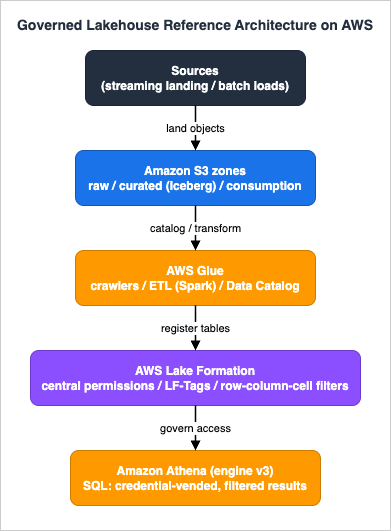
- Sources — streaming output (the landing zone of the real-time pipeline) and batch loads (database exports, file drops) write raw objects into S3.
- S3 zones —
rawholds immutable source-fidelity data;curatedholds cleaned, conformed Iceberg tables;consumptionholds query-optimized, often aggregated, datasets for analysts and BI. - AWS Glue — crawlers infer schemas and register tables; ETL jobs (Apache Spark) transform raw into curated; the Glue Data Catalog is the shared metastore every engine reads.
- AWS Lake Formation — the single place permissions are defined, enforced once and honored by every integrated engine through credential vending.
- Amazon Athena — serverless SQL; it asks Lake Formation what the caller may see, receives temporary credentials and filtered metadata, and returns only authorized rows and columns.
There are two ways to hold the Iceberg tables, and the choice shapes the rest of the architecture:
- Iceberg on general-purpose S3 buckets — you own the bucket and the maintenance (compaction, snapshot expiry), running it through Athena, Glue/EMR Spark, or the AWS Glue Data Catalog optimizer.
- Amazon S3 Tables — purpose-built table buckets that store managed Iceberg tables and run maintenance (compaction and snapshot management) automatically. Integrating table buckets with the Glue Data Catalog adds an
s3tablescatalogso the same Athena/Redshift/EMR/QuickSight engines can discover and query them.
Both options use the same Glue Data Catalog and the same Lake Formation governance model, so the rest of this guide applies to either; differences are called out where they matter.
3. Storage Layout and Zoning in S3
The storage layer is where most lakehouse performance and governance problems are caused — long before a query runs. Three design choices dominate: zoning, partitioning, and file sizing.3.1 Zoning: raw, curated, and consumption
A zoned layout (sometimes called bronze/silver/gold) separates data by how processed and how trusted it is:- raw — source-fidelity, append-only, never edited in place. This is your replayable system of record. Often compressed JSON or the source's native format. Access is restricted to ingestion/ETL roles.
- curated — cleaned, deduplicated, conformed to a stable schema, and written as Apache Iceberg tables in columnar Parquet. This is the governed layer most analysts read.
- consumption — purpose-shaped datasets: aggregates, denormalized marts, or feature tables optimized for specific query patterns or BI tools.
A common pattern is one S3 bucket per zone (or per zone-and-domain), with separate prefixes per dataset. Keeping zones in distinct buckets or prefixes makes it straightforward to apply different lifecycle, encryption, and Lake Formation data-location registrations to each. Bucket policies, default encryption, and access-control mechanics are delegated to the Amazon S3 Security and Access Control Guide.
3.2 Partitioning and the small-files problem
Partitioning controls how much data a query must scan. Classic Hive-style partitioning encodes partition values in the key path (for example,.../dt=2026-06-20/region=jp/), and the query engine prunes partitions by matching predicates against those paths. The detailed mechanics of key naming, prefix entropy, and partition cardinality are delegated to Amazon S3 Object Key Design Best Practices.Iceberg improves on this with hidden partitioning: you declare a partition transform on a column (for example
day(ts)), and Iceberg derives and tracks the partition value itself rather than storing it as an extra path component or column. Queries that filter on the source column are pruned automatically, and you can evolve the partition spec later without rewriting historical data or rewriting queries.The opposite failure is too many small files. Streaming ingestion and frequent small writes produce thousands of tiny objects; every query then pays per-file open and planning overhead, and metadata grows. The fix is compaction (Section 4.4) — combining small files into larger ones (commonly targeting files over ~100 MB) — plus avoiding over-partitioning (partitions so granular that each holds only a few rows).
3.3 Columnar storage
Curated and consumption tables should be columnar Parquet. Columnar layout lets the engine read only the columns a query references and skip the rest, and it compresses well. Iceberg further enables page- and file-level pruning through column statistics, so a selective query can skip entire files. This is why "the same data" can be much faster to query after it is rewritten from raw JSON into a partitioned, compacted, columnar Iceberg table.4. Cataloging with Glue and Table Formats (Apache Iceberg)
The catalog is what turns "objects in a bucket" into "tables you can query." On AWS that catalog is the AWS Glue Data Catalog, and the table semantics come from Apache Iceberg.4.1 The Glue Data Catalog as the shared metastore
Every analytics engine in this architecture — Athena, Glue ETL, EMR, Redshift Spectrum — reads table definitions from the Glue Data Catalog. A catalog entry records the table's schema, partitioning, table format, and the S3 location of its data and metadata. Because it is shared, defining a table once makes it queryable everywhere, and governing it once (Section 5) governs it everywhere.Tables get into the catalog three ways:
- Crawlers — AWS Glue crawlers scan an S3 path, infer schema and partitions, and create or update catalog tables. Crawlers natively support Iceberg targets (you point a crawler at the table's base location).
- ETL jobs — Glue Spark jobs read raw data and write curated Iceberg tables, registering them in the catalog as they write.
- DDL from a query engine — running
CREATE TABLEin Athena registers the table directly.
4.2 Why Apache Iceberg (and how it differs from Hive tables)
A traditional Hive-style table is just "a directory of files plus a schema in the catalog." It has real limitations: no atomic multi-file commits (readers can see partial writes), schema changes are fragile, deletes and updates require rewriting whole partitions, and listing large directories is slow.Apache Iceberg replaces the directory-listing model with a tree of metadata files (a metadata file → manifest lists → manifests → data files). That indirection buys the features that make a lakehouse behave like a warehouse:
- Atomic commits and snapshots — every write produces a new immutable snapshot; readers always see a consistent version.
- Time travel — you can query the table as of an earlier snapshot or timestamp.
- Schema evolution — add, drop, rename, or reorder columns safely, tracked by column IDs rather than position.
- Hidden partitioning and partition evolution — change the partition spec without rewriting data.
- Row-level updates and deletes — via
MERGE INTO,UPDATE, andDELETE.
A practical Athena example — creating a partitioned Iceberg table and loading it with CTAS:
-- Create an empty, hidden-partitioned Iceberg table
CREATE TABLE curated.orders (
    order_id   string,
    customer   string,
    region     string,
    amount     bigint,
    ts         timestamp)
PARTITIONED BY (day(ts))
LOCATION 's3://example-curated/orders/'
TBLPROPERTIES ('table_type' = 'ICEBERG');

-- Or create-and-load in one statement from an existing raw table
CREATE TABLE curated.orders
WITH (table_type = 'ICEBERG',
      is_external = false,
      location = 's3://example-curated/orders/')
AS SELECT order_id, customer, region, amount, ts FROM raw.orders_json;MERGE INTO. Note that Athena always uses the merge-on-read approach for UPDATE, DELETE, and MERGE INTO (it writes positional delete files rather than rewriting whole data files); if you set copy-on-write table properties, Athena ignores them. Copy-on-write rewrites and incremental queries require Apache Spark on Amazon EMR or AWS Glue. Which of those two to run Spark on, and what a move between them rewrites, is covered in Running Apache Spark on AWS - Where the Billed Clock Starts, What Gets Measured, and What You Rewrite When You Move a Job Between EMR Serverless, EMR on EKS, and AWS Glue.MERGE INTO curated.orders t
USING staging.orders_updates s
ON t.order_id = s.order_id
WHEN MATCHED THEN UPDATE SET amount = s.amount, ts = s.ts
WHEN NOT MATCHED THEN INSERT (order_id, customer, region, amount, ts)
VALUES (s.order_id, s.customer, s.region, s.amount, s.ts);4.3 Authoring Iceberg with Glue ETL and crawlers
To produce Iceberg tables from Spark in AWS Glue, enable the Iceberg framework with a job parameter. AWS Glue natively supports Iceberg across recent Glue versions (Glue 3.0 and later, each mapping to a default Iceberg release):# Glue job parameter that enables the Iceberg framework
--datalake-formats icebergaws glue create-crawler \
--name curated-iceberg-crawler \
--role AWSGlueServiceRole-Lakehouse \
--database-name curated \
--targets '{
"IcebergTargets": [
{ "Paths": ["s3://example-curated/orders/"], "MaximumTraversalDepth": 10 }
]
}'4.4 Maintenance: compaction and snapshot expiry
Because Iceberg files are immutable, every update, delete, and compaction writes new files; storage and metadata grow over time. Two maintenance operations keep tables healthy:- Compaction — combines small files into larger ones (bin packing), and can re-sort or z-order data for better pruning. In Athena, run
OPTIMIZE <table> REWRITE DATA USING BIN_PACK; with Spark on EMR or Glue, run therewrite_data_filesprocedure. For Iceberg tables in general-purpose buckets, you can also enable the AWS Glue Data Catalog compaction optimizer (strategies: binpack, sort, z-order), which is disabled by default and needs an IAM role. - Snapshot expiry and orphan cleanup — in Athena,
VACUUM <table>expires old snapshots and removes orphan files. Its behavior is controlled by table properties such asvacuum_max_snapshot_age_seconds(default 5 days),vacuum_min_snapshots_to_keep(default 1), andvacuum_max_metadata_files_to_keep(default 100). Expired snapshots can no longer be used for time travel, and the query role needss3:DeleteObjectfor files to actually be removed.
-- Compact small files
OPTIMIZE curated.orders REWRITE DATA USING BIN_PACK;

-- Expire old snapshots and remove orphan files
VACUUM curated.orders;
4.5 Amazon S3 Tables: managed Iceberg
Amazon S3 Tables provide purpose-built table buckets that store Apache Iceberg tables and perform three maintenance operations — compaction (binpack by default, targeting roughly 64–512 MB files; Auto, sort, or z-order configurable), snapshot management, and unreferenced file removal — automatically, all enabled by default, so you do not runOPTIMIZE/VACUUM yourself. To make table-bucket tables queryable by AWS analytics services, you integrate them with the Glue Data Catalog. This integration (a one-time setup per Region) adds a catalog named s3tablescatalog, under which table buckets appear as sub-catalogs, namespaces as databases, and tables as tables — a four-part hierarchy that Athena, Redshift, EMR, QuickSight, and Amazon Data Firehose can all read.# Create a table bucket and a namespace
aws s3tables create-table-bucket --name lakehouse-curated
aws s3tables create-namespace \
--table-bucket-arn arn:aws:s3tables:REGION:ACCOUNT:bucket/lakehouse-curated \
--namespace sales
# Then enable integration with the Glue Data Catalog (one-time per Region),
# which creates the s3tablescatalog federated catalog. This is automated from
# the S3 console; do it programmatically via the Glue / Lake Formation APIs.5. Governance with Lake Formation
Governance is the part of a lakehouse that most often misbehaves, because access is controlled by two systems at once. Understanding the model is the difference between "my permission isn't working" and a clean, auditable design.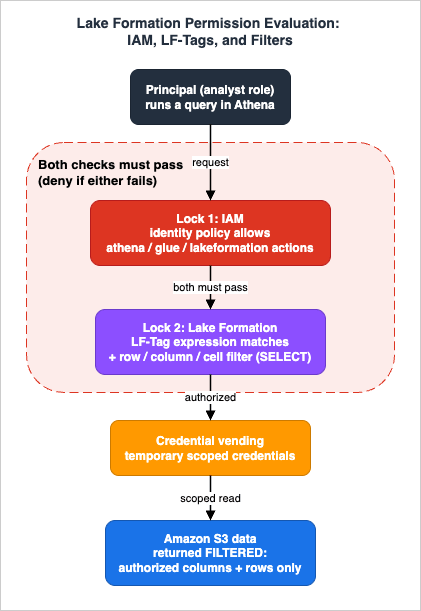
5.1 The two-lock model: Lake Formation and IAM together
Lake Formation defines two kinds of permissions:- Metadata access — creating, reading, updating, deleting Data Catalog resources (databases, tables, columns).
- Underlying data access — reading and writing the actual data in S3, and controlling where catalog resources may point (data locations).
The critical rule: a request must pass both the Lake Formation check (RDBMS-style
GRANT/REVOKE) and the IAM check (IAM policies). If either is missing, the request fails. This is why granting SELECT in Lake Formation alone does nothing if the principal's IAM policy doesn't allow the corresponding Athena/Glue/Lake Formation actions — and vice versa. The general mechanics of how IAM itself reaches an allow/deny verdict are covered in IAM Policy Evaluation Logic Step by Step.When a query runs through an integrated engine (Athena, Glue, EMR, Redshift Spectrum), Lake Formation verifies the caller's permissions, returns only the authorized metadata, and vends temporary credentials to the engine to read the S3 data with the appropriate row/column/cell filtering applied. The engine never uses the analyst's own S3 permissions to read governed data; it uses the short-lived, scoped credentials Lake Formation hands it. This is the mechanism that lets one set of grants be enforced consistently across every engine. How the analyst's own identity nevertheless reaches the grant decision, rather than collapsing into a shared role, is covered in Identity-Aware Data Access on AWS - Propagating Workforce Identity from IAM Identity Center to Lake Formation and S3 Access Grants.
5.2 Registering data locations and the data lake administrator
Two setup steps make Lake Formation authoritative for a dataset:- Designate a data lake administrator — the principal that can grant and revoke Lake Formation permissions and manage LF-Tags.
- Register the S3 location — registering a bucket/prefix with Lake Formation tells it to vend credentials for that location, taking over from raw S3 bucket policies for governed access.
# Register an S3 location with Lake Formation (service-linked role vends credentials)
aws lakeformation register-resource \
  --resource-arn arn:aws:s3:::example-curated \
--use-service-linked-role5.3 LF-Tags: tag-based access control at scale
Granting permissions table-by-table (the "named resource" method) does not scale: three principals across three databases and seven tables can require many individual grants. Lake Formation tag-based access control (LF-TBAC) replaces that with key-value LF-Tags (for examplemodule=Sales or classification=restricted) attached to catalog resources, and grants expressed against tag values.Two properties make LF-Tags powerful:
- Inheritance — tables inherit LF-Tags from their database, and columns inherit from their table; inherited values can be overridden. A handful of tag assignments can govern a large catalog.
- It is the recommended method at scale, including for federated catalogs (S3 Tables, Amazon Redshift, and federated sources such as DynamoDB, SQL Server, and Snowflake).
Importantly, LF-Tags are not IAM tags — they are a distinct concept used only for Lake Formation permissions. The broader organizational tag strategy that LF-Tags should align with is covered in AWS Tagging Strategy Complete Guide.
# 1) Create an LF-Tag with allowed values
aws lakeformation create-lf-tag \
  --tag-key module --tag-values Sales Orders Customers

# 2) Assign the tag to a database (tables/columns inherit it)
aws lakeformation add-lf-tags-to-resource \
  --resource '{ "Database": { "Name": "curated" } }' \
  --lf-tags '[{ "TagKey": "module", "TagValues": ["Sales"] }]'

# 3) Grant SELECT to a principal for everything tagged module=Sales
aws lakeformation grant-permissions \
  --principal '{ "DataLakePrincipalIdentifier": "arn:aws:iam::ACCOUNT:role/SalesAnalyst" }' \
  --permissions SELECT \
  --resource '{ "LFTagPolicy": {
      "ResourceType": "TABLE",
      "Expression": [{ "TagKey": "module", "TagValues": ["Sales"] }] } }'
5.4 Row, column, and cell-level security with data filters
For finer control than table-level grants, Lake Formation data filters restrict what aSELECT returns:- Column-level — include or exclude specific columns.
- Row-level — a row filter expression (for example
region = 'jp') returns only matching rows. - Cell-level — combine row and column filtering, so you can, for instance, hide a column only for rows where
country = 'UK'while showing it forUSrows.
Data filters apply only to read operations (the
SELECT permission). They can also be defined on nested column structures, though integrated engines such as Athena, EMR, and Redshift Spectrum have some limitations on cell-level filtering for nested tables.# A data cell filter: only 'jp' rows, and exclude the email column
aws lakeformation create-data-cells-filter \
--table-data '{
"TableCatalogId": "ACCOUNT",
"DatabaseName": "curated",
"TableName": "orders",
"Name": "jp_no_email",
"RowFilter": { "FilterExpression": "region = '"'"'jp'"'"'" },
"ColumnWildcard": { "ExcludedColumnNames": ["email"] }
}'5.5 Hybrid access mode: adopting Lake Formation incrementally
If a lake already uses IAM and S3 bucket policies, you do not have to switch everything at once. Hybrid access mode lets you enable Lake Formation permissions for specific databases, tables, and principals while existing IAM-based workloads keep working. When a query arrives, the Data Catalog checks whether the principal has opted in to Lake Formation permissions or whether the table still carriesIAMAllowedPrincipals permissions, and enforces the matching model. If the table's S3 location is registered with Lake Formation, temporary credentials are vended; otherwise access falls back to standard S3 bucket and IAM policies. Only data lake administrators can opt principals in, and the IsRegisteredWithLakeFormation table property reflects the state.6. Querying with Athena
Athena is the serverless SQL front door to the lakehouse. It runs on engine version 3, which tracks the Trino/Presto open-source projects, and it reads tables straight from the Glue Data Catalog with Lake Formation enforcement applied.6.1 Workgroups
A workgroup is the unit of query isolation and control. Use workgroups to separate teams or workloads, set the S3 query-result location, enforce settings (such as requiring encryption of results or capping bytes scanned per query), and track usage per group. A common pattern is one workgroup per team or per environment, each with its own result location and guardrails.aws athena create-work-group --name analytics-prod \
--configuration '{
"ResultConfiguration": { "OutputLocation": "s3://example-athena-results/prod/" },
"EnforceWorkGroupConfiguration": true,
"BytesScannedCutoffPerQuery": 10000000000,
"PublishCloudWatchMetricsEnabled": true
}'6.2 Iceberg DML, time travel, and pruning
Athena has built-in support for Iceberg table format version 2: DDL, DML (INSERT/UPDATE/DELETE/MERGE INTO, always merge-on-read), schema evolution, and time travel. Time travel queries read an older version of the table by timestamp or snapshot:-- Query the table as of a point in time
SELECT * FROM curated.orders
FOR TIMESTAMP AS OF TIMESTAMP '2026-06-15 00:00:00 UTC'
WHERE region = 'jp';Athena's built-in Iceberg support is limited to format version 2. Apache Iceberg has since added format version 3, Athena does not read tables that have been raised to it, and the upgrade cannot be undone. Which AWS engines do read format version 3, where the official support matrices disagree, and what to inventory before raising a table, is covered in Apache Iceberg V3 on AWS - Which Engines Read Format Version 3, Where the Official Support Matrices Disagree, and What to Check Before You Upgrade.
6.3 Federated query
When some of the data you need lives outside S3, Athena Federated Query runs SQL across relational, non-relational, object, and custom sources. There are two connector styles: Glue Data Catalog federated connectors (which support fine-grained governance through Lake Formation) and Athena data catalog connectors backed by a Lambda function (including custom connectors built with the Athena Query Federation SDK). Federated queries do not support write operations such asINSERT INTO; use them to read or to build pipelines that land data in S3 for the lakehouse. The other direction — an Amazon Aurora PostgreSQL database reading Apache Iceberg and Apache Parquet data in S3, S3 Tables, or the Glue Data Catalog through read-only PostgreSQL foreign tables, with DuckDB embedded in the PostgreSQL server executing the query — is covered in Querying Apache Iceberg and Parquet from Amazon Aurora PostgreSQL - What DuckDB Runs, What Your Transaction Sees, How Current a Read Is, and What Reaches the Writer.7. End-to-End Data Flow: From Ingestion to Query
This section follows one dataset — dailyorders — from landing to a governed analyst query, showing where state lives, what each component passes on, and where it can fail.
- Ingest. Streaming output and batch loads write raw
ordersobjects into therawS3 zone. State here is append-only and replayable. Failure point: wrong prefix or missing object means downstream sees nothing — verify with S3 inventory or the source pipeline's metrics. - Organize. A Glue Spark job reads
raw.orders_json, cleans and conforms it, and writes a partitioned, compacted Iceberg table to thecuratedzone (--datalake-formats iceberg). State becomes a consistent Iceberg snapshot. Failure point: small files or over-partitioning here become slow queries later. - Catalog. The ETL job (or a crawler) registers
curated.ordersin the Glue Data Catalog with its schema, partition spec, and location. Now every engine can see the table. Failure point: a crawler re-inferring an incompatible schema, or a table not registered, shows up as "table not found" or wrong types. - Govern. The data lake admin assigns
module=Orders(LF-Tag) to the table, grantsSELECTon that tag to theSalesAnalystrole, and attaches a data cell filter (region = 'jp', excludeemail). State is a set of grants and filters in Lake Formation. Failure point: grant present in Lake Formation but the role's IAM policy lacks the actions → the two-lock model denies the query. - Query. The analyst runs
SELECTin Athena. Athena asks Lake Formation what the role may see; Lake Formation returns authorized metadata and vends temporary credentials scoped tojprows without theemailcolumn; Athena reads only the needed Parquet columns and matching partitions and returns filtered results. Failure point: if the S3 location isn't registered with Lake Formation, filtering isn't applied and access falls back to raw S3/IAM.
The single most useful mental model: metadata flows forward (raw → catalog), and authority flows down (Lake Formation → engine via credential vending). A break in either flow shows up as the failure modes in Section 8.
8. Observability and Failure Modes
Lakehouse incidents cluster into four families. For each: the symptom, the root cause, how to triage, and the fix.8.1 "My permission doesn't work"
By far the most common. Causes and triage:- The two-lock model. The grant exists in Lake Formation but the principal's IAM policy doesn't allow the needed Athena/Glue/Lake Formation actions (or the reverse). Both must pass. Triage: check the IAM identity policy and the Lake Formation grants for the same principal and resource.
- Unregistered data location. The table's S3 location isn't registered with Lake Formation, so fine-grained filtering isn't applied and access falls back to S3/IAM. Triage: check whether the location is registered and the
IsRegisteredWithLakeFormationproperty. - Hybrid mode opt-in. In hybrid access mode the principal hasn't been opted in, so the table still honors
IAMAllowedPrincipalsinstead of your Lake Formation grant. Triage: confirm opt-in state (only a data lake admin can set it). - LF-Tag mismatch. The grant is on an LF-Tag expression that doesn't match the resource's assigned tags (or an inherited tag was overridden). Triage: inspect the effective LF-Tags on the database/table/column.
Use AWS CloudTrail as the audit backbone — Lake Formation data-access events (such as
GetDataAccess) and Glue/Athena API calls show who requested what and whether it was authorized. Athena's own error messages usually name the missing permission or unregistered location.8.2 "My query is slow (or scans too much)"
- Small files. Thousands of tiny objects inflate planning and open overhead. Fix: compact with
OPTIMIZE ... REWRITE DATA(Athena) orrewrite_data_files(Spark), or enable the Glue Data Catalog compaction optimizer; with S3 Tables, compaction is automatic. - Too many partitions / no pruning. Over-granular partitions or predicates that don't align with the partition spec force broad scans. Fix: coarser partitioning, Iceberg hidden partitioning aligned to query filters.
- No columnar benefit. Querying raw JSON instead of Parquet, or
SELECT *on wide tables. Fix: read curated Parquet, select only needed columns.
Triage with Athena query statistics (bytes scanned, planning vs execution time) and
EXPLAIN. Bytes scanned is the headline metric — almost every slow or expensive query traces back to scanning data it didn't need.8.3 "Schema doesn't match"
A crawler re-inferring types, or a producer changing the source shape, can break a Hive-style table. Iceberg's schema evolution (tracked by column ID) tolerates add/drop/rename/reorder safely; for Hive tables, prefer explicit DDL over letting a crawler overwrite types, and consider migrating volatile tables to Iceberg.8.4 "Iceberg metadata is bloating"
Frequent writes accumulate snapshots, manifests, and (with merge-on-read) delete files, slowing planning and growing storage. Fix: expire snapshots and remove orphans withVACUUM (Athena) or Spark expire_snapshots; tune retention with the vacuum table properties. With S3 Tables, snapshot management runs automatically. Remember that expiring snapshots removes the ability to time-travel to them.Symptom-to-fix summary:
* You can sort the table by clicking on the column name.
| Symptom | Likely cause | Triage | Fix |
|---|---|---|---|
| Access denied / empty result | IAM vs LF dual control; unregistered location; not opted in (hybrid) | CloudTrail data-access events; LF grants; IAM policy | Align both locks; register location; opt in principal |
| Wrong rows/columns visible | Missing/incorrect data filter or LF-Tag | Inspect data filters and effective LF-Tags | Add row/column/cell filter; fix tag expression |
| Slow / expensive query | Small files, over-partitioning, full scans | Athena query stats (bytes scanned), EXPLAIN | OPTIMIZE/compaction; partition design; columnar plus projection |
| Schema errors | Crawler re-inference; Hive fragility | Compare catalog schema vs data; crawler history | Iceberg schema evolution; explicit DDL |
| Planning slows over time | Snapshot/metadata bloat | Snapshot count, manifest size | VACUUM / expire snapshots; S3 Tables auto-maintenance |
9. Variations: Lakehouse vs Warehouse, and When to Add Redshift or EMR
The architecture above is a lake-centric lakehouse: open table format, storage decoupled from compute, query-in-place with Athena. Reshape it when the workload demands it:- Add Amazon Redshift when you need high-concurrency, low-latency BI and complex joins at scale, or a curated warehouse layer. Redshift can query the same lake data through Redshift Spectrum and read S3 Tables via the Glue Data Catalog integration, so the lakehouse and warehouse can share one catalog and one governance model.
- Add Amazon EMR (or Glue) Spark when you need copy-on-write Iceberg writes, incremental processing, or heavy transformations that exceed what Athena SQL expresses — Athena's merge-on-read and lack of incremental queries are the boundary.
- Stay Athena-only for ad hoc SQL, dashboards over curated tables, and pipelines whose transforms fit in SQL/CTAS.
These are deliberately one-paragraph pointers. The deeper "which engine, which store" selection is a separate decision; this guide's job is the governed implementation that all of them share.
10. Frequently Asked Questions
Do I need Amazon S3 Tables, or Iceberg on a general-purpose bucket?Use S3 Tables when you want managed Iceberg with automatic compaction and snapshot management and you're integrating with AWS analytics services through the
s3tablescatalog. Use Iceberg on a general-purpose bucket when you need full control of the bucket and maintenance, or you already have a lake there — you then run compaction/VACUUM yourself or via the Glue Data Catalog optimizer. Both share the same Glue Data Catalog and Lake Formation governance.Why doesn't my Lake Formation grant take effect?
Almost always the two-lock model: a request must pass both the Lake Formation check and the IAM check. Confirm the principal's IAM policy allows the needed actions, the S3 location is registered with Lake Formation, and (in hybrid access mode) the principal is opted in. CloudTrail data-access events show whether the request was authorized.
Lake Formation or IAM — which one controls access?
Both. Lake Formation governs catalog metadata and vends temporary credentials for the underlying S3 data with row/column/cell filtering; IAM governs which API actions the principal may call. Neither alone is sufficient for governed access.
How do I implement row- and column-level security?
With Lake Formation data filters: column filters include/exclude columns, row filters restrict rows by expression, and cell-level filters combine the two. They apply to
SELECT only, and are enforced for every integrated engine via credential vending.Why is my Athena query scanning so much data?
Bytes scanned is driven by partitioning, file sizing, and columnar layout. Compact small files (
OPTIMIZE), align partitioning to your query predicates (Iceberg hidden partitioning), store curated data as Parquet, and select only the columns you need. Check Athena query statistics to see bytes scanned.How do I handle schema changes safely?
Use Apache Iceberg tables: schema evolution is tracked by column ID, so add/drop/rename/reorder are safe and don't rewrite data. Avoid letting a crawler silently overwrite types on Hive-style tables; prefer explicit DDL or migrate volatile tables to Iceberg.
11. Summary
A governed lakehouse on AWS is not five services used side by side — it is five services wired into one flow. S3 zoning, partitioning, and file sizing decide query performance before a query is ever written. The Glue Data Catalog makes data discoverable once and everywhere. Apache Iceberg gives lake files warehouse semantics: snapshots, time travel, schema evolution, and row-levelMERGE — managed for you in S3 Tables, or self-maintained on general-purpose buckets. Lake Formation governs the whole thing through a two-lock (IAM + Lake Formation) model, LF-Tags that scale by inheritance, and row/column/cell filters enforced for every engine via credential vending. Athena queries it all with engine v3, where bytes scanned is the metric that ties cost and speed back to the storage decisions upstream. When you can trace one dataset from ingestion to a filtered query and name where each control lives and where it can break, you have a lakehouse you can operate — not just a bucket of files.For the data-in-motion counterpart that feeds this lake, see the streaming pipeline guide (AWS Real-Time Streaming Data Pipeline Architecture Guide); for the path that keeps operational database rows in step with the analytics side without a pipeline you write yourself, see Zero-ETL Integrations on AWS; to use a governed lake as a retrieval source for generative AI, see the production RAG guide (Production RAG Architecture on Amazon Bedrock). For the foundations this guide delegates to, see Amazon S3 Security and Access Control Guide, Amazon S3 Object Key Design Best Practices, IAM Policy Evaluation Logic Step by Step, and AWS Tagging Strategy Complete Guide.
12. References
- AWS Lake Formation Developer Guide - How it works
- AWS Lake Formation - Overview of Lake Formation permissions
- AWS Lake Formation - Tag-based access control (LF-TBAC)
- AWS Lake Formation - Data filtering and cell-level security
- AWS Lake Formation - How hybrid access mode works
- AWS Glue - Using the Iceberg framework in AWS Glue
- AWS Glue - Enabling the compaction optimizer
- AWS Glue - Integrating with Amazon S3 Tables
- Apache Iceberg on AWS - Getting started with Iceberg in Athena
- Apache Iceberg on AWS - Compaction best practices
- Apache Iceberg on AWS - Working with Iceberg tables using Athena SQL
- Amazon Athena - Optimize Iceberg tables (OPTIMIZE and VACUUM)
- Amazon Athena - Using Athena Federated Query
- Amazon Athena - Engine version 3
- Amazon S3 Tables - Integration with AWS analytics services
- AWS Pricing - Amazon Athena (see also AWS Glue, AWS Lake Formation, and Amazon S3 pricing)
References:
Tech Blog with curated related content
Written by Hidekazu Konishi