IAM Policy Evaluation Logic Step-by-Step - Explicit Deny, RCP, SCP, Resource Policy, Identity Policy, Permission Boundary, and Session Policy
First Published:
Last Updated:
Once you can trace a case by hand, the natural next step is to confirm it. For that, the article points you to the IAM policy simulator, reached from Policy simulator in the IAM console navigation pane — the official tool that tests identity-based policies, permissions boundaries, resource-based policies (for IAM users), and Organizations SCPs including their condition keys and resource scoping, against your real account and without making a live API call. Two stages still sit outside it — RCP and Session Policy — and AWS notes that results can diverge from live behavior for advanced configurations such as VPC endpoint policies, role chaining, or multiple resource-based policies on one resource. Those are exactly the cases where this article walks the reasoning by hand and shows you how to confirm the outcome with CloudTrail or a sandbox account.
If you want the evaluation order, see §2 and the IAM Decision Diamond figure. If you came here to walk twelve concrete request shapes through the Diamond, jump straight to §3. If you want to verify a policy with the official AWS IAM Policy Simulator, jump to §6.
Table of Contents:
1. Why IAM Policy Evaluation is Confusing
AWS IAM evaluation now spans seven layers — six configurable policy types (Identity-Based, Resource-Based, Permission Boundary, SCP, RCP, Session) plus the universal Explicit Deny check that fires across all of them — accumulated over fifteen years of production hardening, and each layer was added to solve a real production problem. The result is a system where a single API request — one principal, one action, one resource — is filtered through up to seven separate evaluations before the request returnsAllow or AccessDenied. The complexity is not accidental. It reflects fifteen years of layered defense-in-depth requirements. But it is unforgiving: misread any one of the seven layers and you ship a policy that looks correct in review and evaluates to the opposite of what you intended.This section addresses why the confusion persists, lists the five most common misconceptions we see in real reviews, and shows which parts of evaluation you can confirm directly in the AWS IAM Policy Simulator and which parts you have to reason through by hand.
1.1 Seven Evaluation Layers in One Request
When an AWS service evaluates an API call, every applicable layer below is checked. None is skipped, even if not configured — an unconfigured ceiling simply does not deny. The canonical evaluation order is shown in §2 and the IAM Decision Diamond figure; the list below introduces each layer category-by-category.- Identity-based policies — IAM user, group, and role policies attached to the calling principal.
- Resource-based policies — bucket policies, KMS key policies, SQS access policies, Secrets Manager resource policies, Lambda resource policies, IAM role trust policies.
- Permission Boundary — a managed policy that caps the maximum effective permissions of an IAM user or role.
- Resource Control Policy (RCP) — an Organizations-level policy that caps what can be done to resources in an account or OU. New since November 2024.
- Service Control Policy (SCP) — an Organizations-level policy that caps the maximum permissions for principals in an account or OU.
- Session policy — a policy passed at AssumeRole time as the
PolicyorPolicyArnsparameter, which intersects with the role's effective permissions for the resulting session. - Implicit / Explicit Deny check — not a policy type itself but a cross-cutting evaluation step: the request is denied implicitly when nothing allows it, or explicitly when any of the above contains a matching
"Effect": "Deny".
Boundaries of this model. These seven layers are the core allow/deny evaluation chain. Two clarifications. (1) The one IAM-level exception to the implicit-deny default is the AWS account root user, which has full access by default in a standalone account — though under AWS Organizations a member account's root user is still constrained by SCPs and RCPs, while the management account is not affected by SCPs or RCPs (SCPs do not restrict principals in the management account, and RCPs do not restrict its resources). (2) VPC endpoint policies are a conditional layer that works alongside these seven — they apply only to requests made through a VPC endpoint and do not replace identity-based or resource-based policies — and AWS Organizations declarative policies are configuration controls, not authorization. Both sit outside this model.
1.2 Five Common Misconceptions
In code review and incident review, the same five misconceptions account for more than half of all IAM-related findings:- "If I have an Allow, the request goes through." A single Allow is necessary but not sufficient. Any SCP, RCP, Permission Boundary, or Session Policy that does not include the action will quietly cause an Implicit Deny at that ceiling. Conversely, any Explicit Deny anywhere in the seven layers overrides every Allow.
- "Deny only matters when I write it." The default for AWS IAM is Implicit Deny. A statement that does not grant anything is, in effect, denying everything that is not granted elsewhere. Engineers who internalize "explicit Allow" frequently forget that "nothing matches" produces the same outcome as
"Effect": "Deny"— and the two are usually indistinguishable in CloudTrail. - "SCP Allow means access is granted." An SCP is a filter, not a grant. The default
FullAWSAccessSCP says "do not constrain the account", not "everyone in the account has full AWS access". You still need an identity policy or resource policy that grants the specific action. - "Identity policy and resource policy fight." They do not fight; they combine. In same-account access, the request is allowed if either policy allows it (union semantics). In cross-account access, both sides must allow (intersection semantics). The context-dependent switch between union and intersection is one of the largest single sources of confusion.
- "Permission Boundary is just another permission set." A Permission Boundary does not grant anything. If a role has Identity Policy
s3:PutObjectand Permission Boundarys3:GetObject, the effective permission is nothing. The intersection of{PutObject}and{GetObject}is empty. Treating the Boundary as a permission grant rather than a ceiling produces silent Implicit Denies that are extremely hard to debug.
1.3 What You Can Confirm in the Simulator, and What You Cannot
Every walk-through case in §3 includes a by-hand trace through the Diamond, so you can follow the reasoning with no tooling at all. When you then want to confirm a result, the IAM policy simulator covers most of the chain: it tests identity-based policies, permissions boundaries (one at a time), resource-based policies for IAM users, and — for accounts in an AWS Organization — the impact of SCPs on identity policies, all driven by the request context keys you supply. SCPs are evaluated including their condition keys and the resource scoping in deny statements, and cross-account simulations return a decision per policy type inEvalDecisionDetails.Two stages fall outside the simulator outright: RCPs, which it does not support, and session policies, which are not among the policy types it accepts as input. Two more need care rather than exclusion: SCP results are deliberately opaque (for security reasons the simulator does not surface the matched statements from an SCP the way it does for other policy types), and cross-account evaluation is reported per policy type rather than as a single both-sides verdict. Those are the cases — Cases 8–11 in §3.3, plus the cross-account Case 5 — where this article walks the reasoning by hand and points you to CloudTrail or a sandbox account to confirm. §6 shows how to drive the simulator end-to-end on one worked example, and lists its documented limits.
2. The IAM Decision Diamond
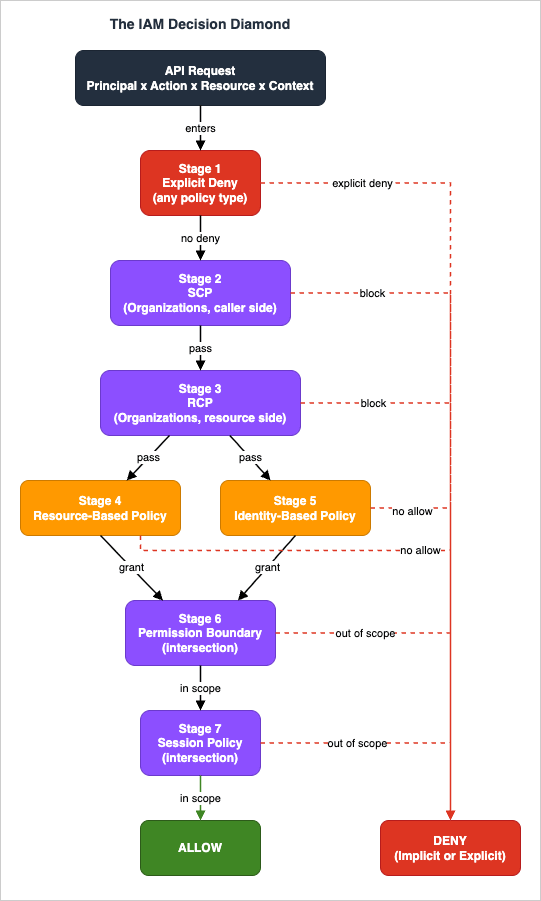
The Diamond is a single seven-stage flowchart that names every stage of AWS IAM evaluation. We use the name The IAM Decision Diamond because the overall shape of the flow is genuinely diamond-like: the request enters at a single point (a narrow top), widens in the middle where — for same-account access — either the Resource-Based or the Identity-Based policy can allow it (the union split), and converges to a single exit at the bottom, eitherAllow or Deny (Implicit or Explicit). Despite the name, the figure does not draw flowchart decision symbols (the diamond/rhombus shape): each layer is rendered as a box so that it can carry its multi-line label, and the decision at each layer is shown by the branch arrows (deny / pass). The name refers to the overall silhouette, not to individual decision symbols. At every stage, an Explicit Deny short-circuits the entire evaluation to Deny without looking at later stages.The figure below shows the canonical order. Carry this figure in your head. Most IAM debugging time is spent at one of these seven nodes.
2.1 How to Read the Diamond
Two visual conventions matter:- Vertical flow — top to bottom in the order Explicit Deny, RCP, SCP, Resource Policy, Identity Policy, Permission Boundary, Session Policy (matching the AWS official policy evaluation order, which evaluates Organizations RCPs before SCPs). Every request passes through every stage that applies.
- Side arrows to DENY — any stage can short-circuit the evaluation to
Deny. Some stages can produceImplicit Deny(no match) and some can produceExplicit Deny(a matching Deny statement). The distinction matters for debugging, even though both produceAccessDeniedin the API response.
- Intersection (ceiling) stages — SCP, RCP, Permission Boundary, Session Policy. These do not grant; they cap. The request must be allowed by every applicable ceiling.
- Union (granting) stages — Resource Policy and Identity Policy. In same-account access, either one is sufficient. In cross-account access, both are required.
2.2 Stage 1: Explicit Deny
Explicit Deny is the only universal short-circuit in the entire system. If any of the seven policy types contains a matching"Effect": "Deny" statement, the evaluation halts and returns AccessDenied immediately. There is no "Allow that overrides Deny", anywhere, ever. This is the one absolute rule in IAM.A pedagogical note: AWS does not perform a separate "Deny-only" pre-pass before evaluating other stages. Explicit Deny is checked within each of the other six stages as their policy documents are parsed. We label it Stage 1 in the Diamond because it short-circuits the rest of the evaluation the moment it matches at any layer — treating it as the first thing to look for is the right reading order when debugging an
AccessDenied.This article reads the evaluation in the order AWS performs it. The reverse direction — starting from the wording of the denial message you already have and working back to the layer that produced it — is covered in AWS IAM AccessDenied Reference, which indexes the context clauses AWS documents for each policy type and states which cases the message alone cannot settle.
The implication is that Deny is the strongest possible IAM primitive. Use it sparingly and use it precisely — a broad
"Resource": "*" Deny in an Identity policy will produce confusing failures across actions you did not intend to restrict. But a tight, narrow Explicit Deny is the most reliable way to guarantee a behavior across an organization. SCPs and RCPs are built on top of this guarantee.2.3 Stage 2: Resource Control Policy (RCP)
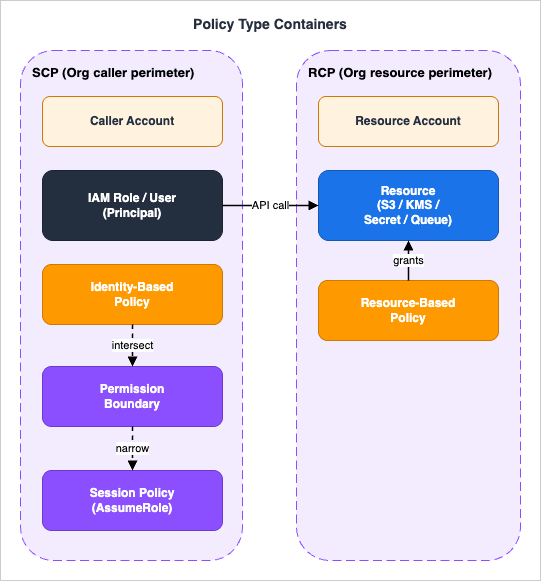
RCPs are the resource-side counterpart of SCPs, introduced in November 2024. Where SCPs constrain what principals in an Organization account can do, RCPs constrain what can be done to resources in an Organization account. The set of services that support RCPs started smaller than SCPs (S3, STS, KMS, SQS, and Secrets Manager at launch) and has been growing since — check the official List of AWS services that support RCPs for the current set. Note also that RCPs do not apply to resources in the management account, to service-linked roles, or to AWS managed KMS keys. RCPs also come with a defaultRCPFullAWSAccess policy (auto-attached to the root, every OU, and every account when RCPs are enabled, and not detachable) that provides the baseline pass-through — it does not grant access. Unlike SCPs, which support both allow-list and deny-list modes, the Effect of an RCP you author must be Deny: RCPs are deny-list only.The mental model: SCP is a perimeter around the caller; RCP is a perimeter around the resource. If the caller's account has an SCP that allows
s3:PutObject and the resource's account has an RCP that denies s3:PutObject from external principals, the request fails at the RCP stage, not the SCP stage.RCPs are particularly useful for stopping accidental public-bucket configurations across an entire OU without depending on every account's bucket policy being correct.
Evaluation order note: the AWS policy evaluation logic documentation evaluates Organizations RCPs before SCPs (Deny → RCP → SCP → Resource-based → Identity-based → Permission Boundary → Session). Because both RCP and SCP are deny-by-default ceilings and any Explicit Deny short-circuits the entire evaluation, their relative order never changes the final allow/deny outcome — but this article follows the official order for consistency.
2.4 Stage 3: Service Control Policy (SCP)
SCPs apply at the AWS Organizations level (root, OU, or account). They cap the maximum permissions for principals in the affected account: every IAM user, role, and federated identity in that account is constrained by the union of the SCPs at the root, the OU chain, and the account itself.Two SCP modes exist:
- Allow-list mode — the SCP enumerates allowed actions. Everything not listed is denied. The default
FullAWSAccesspolicy is an allow-list with"Action": "*","Resource": "*". - Deny-list mode — the SCP enumerates denied actions. Everything else passes the SCP filter. Most production SCPs are deny-list.
FullAWSAccess from an OU does not "remove the default access"; it makes every action in that OU implicitly denied at the SCP layer, regardless of what identity policies say. The first principle of SCP design: keep FullAWSAccess attached at the root unless you understand exactly which actions will become impossible.2.5 Stage 4: Resource-Based Policy
Resource-based policies attach to the resource rather than the principal. The canonical examples are S3 bucket policies, KMS key policies, SQS queue policies, Secrets Manager resource policies, Lambda resource policies, and IAM role trust policies. (The role trust policy is technically a resource policy attached to the role-as-resource.)A resource policy lists
Principal explicitly. Without an explicit Principal matching the caller, the resource policy does not grant the caller anything.The key behavior:
- Same-account access — the request is allowed if either the resource policy or the identity policy allows it. Union semantics.
- Cross-account access — the request requires both a resource policy on the resource side (the resource owner explicitly grants access to the external principal) and an identity policy on the caller side. Intersection semantics.
Which services carry a resource-based policy at all, what each service calls it, which API attaches it, and what the
Principal element can name in each are set out in Resource-Based Policies by Service on AWS - Where the Second Policy Lives, What It Can Say, and When It Is Required. This article takes the policy as given and follows the decision. That one takes the decision as given and inventories the policies.2.6 Stage 5: Identity-Based Policy
Identity-based policies attach to the principal: an IAM user, IAM group (which is a membership shortcut, not a real principal), or IAM role. Identity-based policies do not listPrincipal — the principal is the entity the policy is attached to.In same-account access, an Identity policy alone can authorize an action (no resource policy needed) for most services. The notable exception is AWS KMS: the key policy must explicitly enable IAM delegation (the "Enable IAM User Permissions" statement that grants
kms:* to arn:aws:iam::<account>:root) before any identity policy can authorize an action on that key. Always check the service's authorization documentation for the specific service-level rules.Effective permissions across multiple attached identity policies are the union of all statements. Attaching
ReadOnlyAccess plus a custom PutObject policy gives you both read-only-everywhere and PutObject on the specified resources.2.7 Stage 6: Permission Boundary
A Permission Boundary is a managed policy attached to an IAM user or role as that principal's ceiling. The effective permissions of the principal are the intersection of:- The union of all identity-based policies attached to the principal, and
- The Permission Boundary.
s3:* and the Permission Boundary grants s3:Get*, the principal can only do s3:Get*. If the identity policy grants ec2:* and the Permission Boundary grants s3:*, the principal can do neither — the intersection of {ec2:*} and {s3:*} is empty.Permission Boundaries are critical for delegated administration. The pattern is: grant developers
iam:CreateRole permission, but require that any role they create has a specified Permission Boundary attached. This bounds what the developers' roles can do without bounding what the developers can write into the identity policy.2.8 Stage 7: Session Policy
Session policies are passed at AssumeRole time. The caller invokessts:AssumeRole (or AssumeRoleWithSAML, AssumeRoleWithWebIdentity) with a Policy parameter (JSON-inline) or PolicyArns (managed policy ARNs). The resulting temporary credentials have effective permissions equal to the intersection of:- The role's identity policy and permission boundary (everything from stages 5 and 6), and
- The session policy.
3. Step-by-Step Walk-through with Concrete Examples
The twelve cases below walk through the Diamond in concrete terms. Each case is presented with the request shape (principal, action, resource, context), the policy JSON involved, a step-by-step trace through the Diamond stages, the final result, and — where it applies — how to confirm the outcome in the AWS IAM Policy Simulator or a sandbox account.We group the cases by the part of the Diamond they exercise:
- 3.1 Identity Policies and Conditions (Cases 1–4 and 6–7) — Identity Policy + Condition logic only.
- 3.2 Resource Policies and the Account Boundary (Cases 5 and 12) — resource-policy patterns that hinge on whether the caller and resource share an account.
- 3.3 Organization and Role Ceilings (Cases 8–11) — SCP, RCP, Permission Boundary, Session Policy.
3.1 Cases 1-4 and 6-7: Identity Policies and Conditions
Case 1 — Basic Allow via Identity Policy
Scenario: An IAM user in account111122223333 has an identity policy granting s3:GetObject on a specific bucket. The user invokes GetObject on that bucket. No resource policy is configured. No SCP, RCP, Permission Boundary, or Session Policy is in effect.Policy JSON (Identity):
{
  "Version": "2012-10-17",
  "Statement": [
    {
      "Sid": "AllowS3Read",
      "Effect": "Allow",
      "Action": "s3:GetObject",
      "Resource": "arn:aws:s3:::example-bucket/*"
    }
  ]
}
Diamond trace:
- Explicit Deny — no Deny statements anywhere. Pass.
- RCP — not configured. Pass.
- SCP — not configured. Pass.
- Resource Policy — not configured. Defers to identity policy.
- Identity Policy —
AllowS3Readmatches the action and resource. Allow. - Permission Boundary — not configured. Pass.
- Session Policy — not an assumed-role session. Not applicable.
Allow.Key takeaway: A simple Allow at the identity layer is the easiest case but also the one that lulls engineers into the misconception "if it works in identity policy, it works". Cases 8–11 below break that assumption.
Case 2 — Explicit Deny Overrides Allow
Scenario: The same IAM user as Case 1, but the identity policy also contains an Explicit Deny statement that overlaps the Allow. The user invokesGetObject. The Deny takes precedence.Policy JSON (Identity):
{
  "Version": "2012-10-17",
  "Statement": [
    {
      "Sid": "AllowS3Read",
      "Effect": "Allow",
      "Action": "s3:GetObject",
      "Resource": "arn:aws:s3:::example-bucket/*"
    },
    {
      "Sid": "DenyConfidential",
      "Effect": "Deny",
      "Action": "s3:GetObject",
      "Resource": "arn:aws:s3:::example-bucket/confidential/*"
    }
  ]
}
Diamond trace (request:
GetObject on arn:aws:s3:::example-bucket/confidential/secret.txt):- Explicit Deny —
DenyConfidentialmatches. Short-circuit to Deny. - The remaining stages are not evaluated.
ExplicitDeny.Key takeaway: Explicit Deny is the most reliable IAM primitive. Use it for resource subsets you want to guarantee inaccessible even if a future identity policy grants broader access.
Case 3 — MFA Condition Gate with BoolIfExists
Scenario: A role permits ec2:TerminateInstances only when the session was authenticated with MFA. Without MFA, the request must be denied. The policy uses BoolIfExists so that sessions without an MFA context (long-term access keys) are also blocked.Policy JSON (Identity):
{
  "Version": "2012-10-17",
  "Statement": [
    {
      "Sid": "AllowTerminateWithMFA",
      "Effect": "Allow",
      "Action": "ec2:TerminateInstances",
      "Resource": "*"
    },
    {
      "Sid": "DenyTerminateWithoutMFA",
      "Effect": "Deny",
      "Action": "ec2:TerminateInstances",
      "Resource": "*",
      "Condition": {
        "BoolIfExists": { "aws:MultiFactorAuthPresent": "false" }
      }
    }
  ]
}
Diamond trace (request:
TerminateInstances with aws:MultiFactorAuthPresent = false):- Explicit Deny —
DenyTerminateWithoutMFAmatches becauseMultiFactorAuthPresentisfalse. Short-circuit to Deny.
ExplicitDeny.Diamond trace (request:
TerminateInstances with aws:MultiFactorAuthPresent = true):- Explicit Deny —
DenyTerminateWithoutMFAcondition does not match (MFA is present). Pass. - Identity Policy —
AllowTerminateWithMFAmatches. Allow.
Allow.Key takeaway: The choice of
Bool vs BoolIfExists is non-trivial. Bool would not match if aws:MultiFactorAuthPresent is absent from the session context (e.g., when using long-term access keys), so a Deny guarded by plain Bool leaves an open door. The IfExists suffix changes the missing-key behavior: BoolIfExists treats the condition as matched (true) when the key is absent, so the Deny still fires on long-term-key sessions. AWS recommends "BoolIfExists": {"aws:MultiFactorAuthPresent": "false"} in Deny statements for MFA gating.Case 4 — IP Address Restriction
Scenario: A bucket should be readable only from the corporate IP range. Requests from outside that range get Implicit Deny because the Allow's condition does not match. There is no Explicit Deny — the condition failure produces no match at all.Policy JSON (Identity):
{
  "Version": "2012-10-17",
  "Statement": [
    {
      "Sid": "AllowFromCorp",
      "Effect": "Allow",
      "Action": "s3:GetObject",
      "Resource": "arn:aws:s3:::corp-bucket/*",
      "Condition": {
        "IpAddress": { "aws:SourceIp": "203.0.113.0/24" }
      }
    }
  ]
}
Diamond trace (request:
GetObject from aws:SourceIp = 198.51.100.5):- Explicit Deny — no Deny statements. Pass.
- Identity Policy —
AllowFromCorpcondition does not match (IP outside CIDR). No statements match. No Allow.
ImplicitDeny.Key takeaway: Implicit Deny is the silent killer. CloudTrail will log
AccessDenied, but the cause is "no Allow matched", not "a Deny matched". When debugging, always check whether your Allow's Condition is matching the actual context.Case 6 — ABAC with aws:ResourceTag
Scenario: A role can manage EC2 instances only when the instance's Team tag matches the role's Team session tag. This is the canonical Attribute-Based Access Control (ABAC) pattern.Policy JSON (Identity):
{
  "Version": "2012-10-17",
  "Statement": [
    {
      "Sid": "ManageMyTeamInstances",
      "Effect": "Allow",
      "Action": ["ec2:StartInstances", "ec2:StopInstances", "ec2:DescribeInstances"],
      "Resource": "*",
      "Condition": {
        "StringEquals": {
          "aws:ResourceTag/Team": "${aws:PrincipalTag/Team}"
        }
      }
    }
  ]
}
Diamond trace (request:
StartInstances with aws:PrincipalTag/Team = data and aws:ResourceTag/Team = data):- Explicit Deny — none. Pass.
- Identity Policy —
ManageMyTeamInstancesmatches; conditionaws:ResourceTag/Team == aws:PrincipalTag/Teamevaluatesdata == data. Allow.
Allow. If the resource tag were payments, the condition would not match and the result would be ImplicitDeny.Key takeaway: ABAC scales because the same policy works for every team. The policy does not enumerate teams; it correlates the caller's tag with the resource's tag. The mental model: write the policy once, tag the resources and the principals, and IAM does the rest.
Case 7 — NotAction Misuse
Scenario: An engineer wants to grant "everything except IAM", and writes aNotAction Allow statement, intending "deny IAM, allow everything else". This is the wrong reading. NotAction with Allow means "Allow everything that is not in the NotAction list".Policy JSON (Identity):
{
  "Version": "2012-10-17",
  "Statement": [
    {
      "Sid": "AllowEverythingExceptIAM",
      "Effect": "Allow",
      "NotAction": ["iam:*"],
      "Resource": "*"
    }
  ]
}
Diamond trace (request:
s3:DeleteBucket on arn:aws:s3:::production-data):- Explicit Deny — none. Pass.
- Identity Policy —
AllowEverythingExceptIAMmatches becauses3:DeleteBucketis not iniam:*. Allow.
Allow. (Likely the engineer's actual intent was to disallow IAM but keep all other actions controlled by a more restrictive policy — but NotAction with Allow and Resource: "*" is effectively "AllowAll except IAM", including destructive APIs.)Key takeaway:
NotAction paired with Allow is rarely what you want. The two correct forms are:NotActionpaired withDeny("Deny everything that is not in the list" — i.e., a default-deny allow-list inversion).- Explicit positive
Actionlist ("Allow only these actions").
NotAction + Allow + Resource: "*" in a code review, treat it as a finding.3.2 Cases 5 and 12: Resource Policies and the Account Boundary
Case 5 — Cross-Account Access via Resource Policy Only
Scenario: Account A's user wants to read an S3 bucket in Account B. The bucket policy in Account B grantss3:GetObject to Account A's user. Account A's user has no matching identity policy. Because cross-account access requires both sides to allow, the real AWS evaluation returns ImplicitDeny — the resource-side grant alone is not enough.Policy JSON (Resource, on bucket in Account B):
{
  "Version": "2012-10-17",
  "Statement": [{
    "Sid": "AllowAccountA",
    "Effect": "Allow",
    "Principal": { "AWS": "arn:aws:iam::111122223333:user/alice" },
    "Action": "s3:GetObject",
    "Resource": "arn:aws:s3:::accountB-bucket/*"
  }]
}
Diamond trace (real AWS, cross-account):
- Explicit Deny — none. Pass.
- Resource Policy (Account B side) — allows alice. Pass.
- Identity Policy (Account A side) — no identity policy grants
s3:GetObjectonaccountB-bucket. Both-sides-required fails.
ImplicitDeny (in real AWS).How to confirm: Cross-account is a case the IAM policy simulator reports in pieces rather than as one verdict. AWS documents that cross-account simulations return per-policy-type decisions in
EvalDecisionDetails, so read the identity-policy decision and the resource-policy decision separately — here the resource policy allows and the identity policy does not, which is precisely the both-sides-required failure. Because the simulator does not reproduce the aggregate cross-account rule for you, confirm in a sandbox as well: attempt the cross-account GetObject and inspect the CloudTrail event in Account A (errorCode: AccessDenied, with an errorMessage noting that no identity-based policy allows the action).Key takeaway: The same-account-vs-cross-account split is the single largest source of cross-org confusion. Memorize the rule: same-account = OR, cross-account = AND. See §4 for the full treatment.
Case 12 — Same-Account Resource Policy Allow with No Identity Policy
Scenario: An IAM user in account111122223333 has no identity policy granting s3:GetObject. The bucket (also in 111122223333) has a resource policy granting the user s3:GetObject. The user reads. In real AWS, this is Allow because same-account semantics are union: a resource-policy grant alone is sufficient when the caller and resource share an account.Policy JSON (Resource, on bucket in same account):
{
  "Version": "2012-10-17",
  "Statement": [{
    "Sid": "AllowAlice",
    "Effect": "Allow",
    "Principal": { "AWS": "arn:aws:iam::111122223333:user/alice" },
    "Action": "s3:GetObject",
    "Resource": "arn:aws:s3:::same-account-bucket/*"
  }]
}
Diamond trace (same-account):
- Explicit Deny — none. Pass.
- Resource Policy — allows alice. Pass.
- Identity Policy — no matching statement. But because this is same-account, the resource-policy Allow is sufficient.
Allow.Key takeaway: Cases 5 and 12 use almost the same resource policy and reach opposite results — the only difference is whether the principal lives in the same account as the bucket. Same-account is union (resource policy alone suffices); cross-account is intersection (both sides required). This is also why the IAM policy simulator returns Case 12 as a single verdict, while for Case 5 it returns a decision per policy type that you have to read as an intersection yourself. Hold the rule in your head: same-account = OR, cross-account = AND.
3.3 Cases 8-11: Organization and Role Ceilings
These cases involve the intersection (ceiling) stages — SCP, Permission Boundary, Session Policy, and RCP. Two of them sit outside the IAM policy simulator (RCP and session policies are unsupported), and SCP results are evaluated but reported without their matched statements, so we trace the evaluation by hand and, for each, note how to confirm it in a real AWS environment.Case 8 — SCP Blocks Despite Identity Policy Allow
Scenario: An OU-level SCP deniess3:DeleteBucket. A role in the OU has identity policy s3:* on *. The role calls DeleteBucket. Identity policy allows. SCP denies. SCP wins.Policy JSON (SCP):
{
  "Version": "2012-10-17",
  "Statement": [{
    "Sid": "DenyBucketDeletion",
    "Effect": "Deny",
    "Action": "s3:DeleteBucket",
    "Resource": "*"
  }]
}
Diamond trace:
- Explicit Deny — SCP contains an Explicit Deny matching
s3:DeleteBucket. Short-circuit to Deny at the SCP layer.
ExplicitDeny.How to confirm: If your account is in an AWS Organization, the IAM policy simulator can test the impact of SCPs on identity-based policies, and it evaluates the condition keys and resource scoping inside them — a condition-bearing SCP is handled, not skipped. A deny like this one is reported as an explicit deny attributed to AWS Organizations. Two caveats AWS documents explicitly: for security reasons the simulator does not surface the matched statements from an SCP the way it does for other policy types, and in the console you cannot set a value for a condition key that only an SCP references — use
aws iam simulate-custom-policy or simulate-principal-policy from the CLI when you need to supply those values. To see the statement itself, test in a sandbox account attached to a test OU and read CloudTrail.Reasoning shortcut: An SCP deny in a deny-list SCP is equivalent to an Explicit Deny at every principal in every affected account. There is no way around it short of removing the SCP attachment.
Key takeaway: When debugging "the role has admin permissions but the API call fails", check the SCPs attached to the account and OU chain. Use
aws organizations list-policies-for-target --target-id <account-id> --filter SERVICE_CONTROL_POLICY to enumerate the effective SCPs.Case 9 — Permission Boundary Caps a Role
Scenario: A role has identity policys3:* on * but a Permission Boundary that only allows s3:Get*. The role calls s3:PutObject. Identity policy allows. Permission Boundary does not include PutObject. The effective permission is the intersection, which is empty for PutObject.Policy JSON (Permission Boundary):
{
  "Version": "2012-10-17",
  "Statement": [{
    "Sid": "BoundReadOnly",
    "Effect": "Allow",
    "Action": "s3:Get*",
    "Resource": "*"
  }]
}
Diamond trace:
- Explicit Deny — none. Pass.
- Identity Policy —
s3:*allowsPutObject. Pass. - Permission Boundary —
s3:Get*does not includes3:PutObject. The intersection at this stage is empty.
ImplicitDeny.How to confirm: The AWS IAM Policy Simulator does evaluate permissions boundaries — one boundary at a time. From the API,
aws iam simulate-principal-policy --policy-source-arn <role-arn> respects the boundary when the role has one attached, so it returns the same implicitDeny for s3:PutObject that the live environment would.Reasoning shortcut: Permission Boundary is the intersection on top of identity policy. If you want to test "what can my role actually do?", compute
identity_policy ∩ permission_boundary by hand for the action set you care about.Key takeaway: Permission Boundaries are silent. There is no AWS API call you can make that returns "the boundary blocked this". You see
AccessDenied. The boundary is exactly the kind of failure that produces "the policy says I can but I can't" tickets.Case 10 — Session Policy Narrows AssumeRole
Scenario: A CI/CD system assumes a deployer role with identity policys3:* on *, but passes a session policy that further narrows access to a single bucket. The session can write to that bucket, but not others.Policy JSON (Session Policy, passed to AssumeRole):
{
  "Version": "2012-10-17",
  "Statement": [{
    "Sid": "ThisDeploymentOnly",
    "Effect": "Allow",
    "Action": "s3:*",
    "Resource": "arn:aws:s3:::deploy-artifacts-2026-05-13/*"
  }]
}
Diamond trace (request:
s3:PutObject on arn:aws:s3:::deploy-artifacts-2026-05-13/release.zip):- Explicit Deny — none. Pass.
- Identity Policy —
s3:*on*allows. Pass. - Session Policy — allows
s3:*ondeploy-artifacts-2026-05-13. Matches. Pass.
Allow.Diamond trace (request:
s3:PutObject on arn:aws:s3:::other-bucket/foo.zip):- Identity Policy — allows.
- Session Policy — does not match (different bucket). Intersection is empty for this resource.
ImplicitDeny.How to confirm: Session policies are a runtime artifact passed at AssumeRole time, so the policy simulator cannot model them. To confirm, call
aws sts assume-role --role-arn <role-arn> --role-session-name test --duration-seconds 900 --policy '<session-policy-json>', export the returned AccessKeyId, SecretAccessKey, and SessionToken as environment variables, and then attempt the action with those temporary credentials.Reasoning shortcut: Session policy is an intersection on top of the role's effective permissions (after identity + boundary). It can never grant beyond what the role already has.
Key takeaway: Session policies are the right tool for short-lived CI/CD blast-radius reduction. They are also the right tool for human "I'm about to do something risky, let me narrow my own permissions first" workflows.
Case 11 — RCP Blocks Public S3 Write
Scenario: An OU-level RCP deniess3:PutObject from any principal whose account is outside the Organization. An external account tries to write to a bucket in the OU. The bucket policy allows, but the RCP overrides at the resource side.Policy JSON (RCP):
{
  "Version": "2012-10-17",
  "Statement": [{
    "Sid": "DenyExternalWrite",
    "Effect": "Deny",
    "Principal": "*",
    "Action": "s3:PutObject",
    "Resource": "*",
    "Condition": {
      "StringNotEqualsIfExists": {
        "aws:PrincipalOrgID": "o-example12345"
      }
    }
  }]
}
Diamond trace:
- Explicit Deny — the RCP statement matches (the external principal's org ID is not
o-example12345). Short-circuit to Deny at the RCP layer.
ExplicitDeny.How to confirm: The AWS IAM Policy Simulator does not support RCP simulation at all, so this stage cannot be tested there. Confirm it by attempting the cross-org write against a sandbox account that has the RCP attached and observing
AccessDenied in CloudTrail.Key takeaway: RCPs are the right tool for "no S3 bucket in this OU can be written to by anyone outside our Org". You do not have to trust every bucket policy in every account; the RCP overrides at the resource side.
4. Cross-Account Evaluation Specifics
Cross-account access is the most context-dependent corner of IAM. The same Identity + Resource policy combination behaves differently depending on whether the caller and resource are in the same AWS account. Misreading this single dimension is the single largest source of confusion we see in real reviews.| Step | Same-Account (OR / union) Either side allows = pass | Cross-Account (AND / intersection) Both sides must allow |
|---|---|---|
| Resource Policy | Allows | (resource owner side) MUST Allow |
| Operator | OR | AND |
| Identity Policy | Allows | (caller side) MUST Allow |
| Result | ALLOW | ALLOW (both required) |
Fig. 2: Same-Account vs Cross-Account Evaluation — In the same account, either Resource Policy OR Identity Policy granting is sufficient (union). Across accounts, both sides must grant independently (intersection).
4.1 OR vs AND — The Switch
The rule is one line:- Same-account access: Identity Policy OR Resource Policy. Either is sufficient.
- Cross-account access: Identity Policy AND Resource Policy. Both are required.
This rule is asymmetric in a non-obvious way. Same-account is permissive (union). Cross-account is restrictive (intersection). Engineers who learn IAM in a single-account environment internalize "Identity policy is the source of truth" and then are surprised when their cross-account setup silently denies.
4.2 The "Both Sides Must Allow" Rule
In cross-account access:- The resource owner's account must have a resource policy (bucket policy, KMS key policy, role trust policy, etc.) that explicitly grants access to the external principal. Use
Principal: { "AWS": "arn:aws:iam::<external-account>:role/<role-name>" }or, for an entire account,Principal: { "AWS": "<external-account-id>" }. - The caller's account must have an identity policy attached to the calling principal that grants the action on the cross-account resource ARN.
AccessDenied. The error message will hint at which side, but reading CloudTrail in both accounts is the reliable diagnostic path.A common pitfall: the resource owner's bucket policy grants
arn:aws:iam::AAA:user/alice, but Alice's identity policy in account AAA does not grant s3:GetObject on the cross-account ARN. Alice gets AccessDenied. The administrator of account BBB (the bucket owner) sees the bucket policy looks correct and is confused. The fix is in account AAA, not BBB.4.3 SCP and RCP in Cross-Account
Both accounts' SCPs apply independently:- Caller's account SCP must allow the action (e.g.,
sts:AssumeRole,s3:GetObjecton the cross-account ARN). - Resource's account SCP must allow the resource-side actions.
The practical implication: when designing cross-account access, you have four policies to coordinate:
- Caller's account SCP allows the action.
- Caller's principal's identity policy allows the action on the cross-account ARN.
- Resource owner's account RCP allows the principal (does not deny).
- Resource owner's resource policy grants the principal.
4.4 Trust Policy Design Checklist for Cross-Account Roles
For cross-account role assumption specifically (the AssumeRole case), the trust policy on the role acts as the resource policy. A practical checklist:- Principal scoped to a specific role or user, not an entire account, unless the external account is fully trusted (e.g., another account you own).
- ExternalId is set when the caller is a third party (SaaS vendor). Not needed for first-party cross-account between your own accounts.
aws:PrincipalOrgIDCondition restricts the trust to principals in your Organization.- MFA Condition (
aws:MultiFactorAuthPresent) if a human will assume the role;sts:DurationSecondswithNumericLessThanEqualsin the trust policy (or the role'sMaxSessionDurationproperty) to bound session length. - Session tags are limited via
aws:TagKeysCondition so the assumer cannot inject arbitrary tags. - Permission Boundary is attached to the role to bound the post-assumption identity.
5. Common Pitfalls
The following eight pitfalls all stem from misreading the evaluation order itself, not from individual policy syntax errors. For a separate catalog of statement-level syntax mistakes, see the IAM Anti-Patterns - Real-World Mistakes and Their Root Causes article on this site.5.1 "Resource-Side Deny Can Be Overridden by Identity-Side Allow"
Explicit Deny is absolute, regardless of which policy type contains it. A"Effect": "Deny" in a bucket policy is just as final as one in an identity policy. Engineers who internalize "identity policy is what I control, so it wins" run into this pitfall when a bucket owner adds a Deny to the bucket policy and "their" Allow stops working. The Deny is final.5.2 "Without SCP, Permission Boundary is the Account-Level Ceiling"
A Permission Boundary applies to one principal. It is not a substitute for an SCP. An account without SCPs has no account-level ceiling; every principal's effective permissions are bounded only by their own identity policy (and their own boundary, if attached). If you want "no one in this account can disable CloudTrail", you need an SCP, not a Permission Boundary on every role.5.3 "Permission Boundary Constrains Resource Policy Too"
Permission Boundaries intersect with identity policies to cap them; they do not uniformly limit what a resource-based policy grants. The exact rule depends on the grant target: permissions a resource policy grants directly to an IAM user ARN or to a role session (the assumed-role session) are not limited by an implicit deny in the calling principal's Permission Boundary, whereas permissions a resource policy grants to a role ARN are limited by an implicit deny in a Permission Boundary (or session policy). So to reliably cap resource-policy-derived access in the same account, use a Service Control Policy or RCP rather than relying on a Permission Boundary.5.4 "Session Policy Can Add Permissions to a Role"
Session policies intersect with the role's effective permissions. They cannot add anything. If you pass a session policy that allowss3:PutObject and the role's identity policy does not include s3:PutObject, the session still cannot do PutObject. Session policies are narrowing tools, not granting tools.5.5 "Same-Account Resource Allow Cannot Be Stopped by SCP or RCP"
Same-account Resource Policy Allow is sufficient under union semantics, but Explicit Deny anywhere still wins. An SCP Deny on the caller's account will block the request even if the same-account bucket policy allows. An RCP Deny on the resource's account will block similarly. (Note: a Permission Boundary on the calling principal does not apply to a resource-policy allow path that grants directly to an IAM user ARN or role session — see §5.3 — so SCP and RCP are the right tools for capping resource-policy-derived access in same-account.) Explicit Deny is universal.5.6 "Cross-Account Resource Policy Alone Is Enough"
Cross-account requires both sides. A cross-account bucket policy alone, without a matching identity policy in the caller's account, producesAccessDenied. The bucket owner's administrator will see the policy looks correct and be confused. The fix is in the caller's account.5.7 "Explicit Deny Is Confined to the Layer It Appears In"
Explicit Deny short-circuits the entire evaluation, not just the current stage. A Deny in a Resource policy can stop a request that an Identity policy has already allowed. A Deny in an SCP at the OU level stops every principal in every account in the OU. There is no scoping of Deny to "just this layer".5.8 "RCP Applies to Identities, Like SCP Does"
RCPs apply to the resource side. They constrain what can be done to resources in the affected accounts, regardless of where the caller is. SCPs constrain what callers in the account can do. The two are complementary perimeters: SCP guards outbound permissions; RCP guards inbound resource access. They are not interchangeable, and a deployment that uses only SCPs cannot fully replicate the resource-side guarantees an RCP provides.6. Verifying Policies with the AWS IAM Policy Simulator
Once you can trace a case by hand, the official tool to confirm it is the IAM policy simulator, which you open from Policy simulator in the IAM console navigation pane. It evaluates policies against your real account without making any live API call, so you can safely test requests that would otherwise change production. It is the natural next step after the by-hand traces in §3.Note on the standalone console: the simulator used to live at its own domain,
policysim.aws.amazon.com. AWS now documents that standalone console as no longer maintained and directs you to the policy simulator in the IAM console instead. If you have the old URL bookmarked, replace it.6.1 What the Simulator Can Test
Per the IAM User Guide, the policy simulator covers most of the Diamond. It runs in one of two modes: Principal mode, where you pick an existing IAM user, role, or group and it evaluates the policies already attached to that identity, and Custom mode, where you write or paste in policies that are not attached to anything yet. What it evaluates:- Identity-based policies — policies attached to an IAM user, group, or role, or a new policy you type or copy in (used only in the simulation, never saved).
- IAM permissions boundaries — the effect of a boundary on an entity. You can simulate one boundary at a time.
- Resource-based policies — for IAM users, when you include the resource in the simulation and select its policy. In the console this covers Amazon S3 buckets, Amazon SQS queues, Amazon SNS topics, and S3 Glacier vaults. (Resource-based policy simulation is not supported for IAM roles, and Custom mode in the console cannot take a pasted resource-based policy — supply it through the CLI or API instead.)
- Service control policies (SCPs) — if your account is a member of an AWS Organization, you can test the impact of SCPs on identity-based policies. The simulator evaluates SCPs including their condition keys and the resource scoping in deny statements; an SCP deny is reported as an explicit deny attributed to AWS Organizations, which no other Allow can override.
- Condition context keys — supply values such as
aws:SourceIp, a date, oraws:MultiFactorAuthPresentto exerciseConditionelements. The simulator fills in the principal and organization keys itself (aws:PrincipalAccount,aws:PrincipalId,aws:PrincipalType,aws:Type,aws:UserId,aws:UserName,aws:PrincipalOrgID,aws:PrincipalOrgMasterAccountId,aws:PrincipalOrgPaths); you supply the rest.
6.2 Confirming Case 3 (MFA Condition Gate)
As a concrete walkthrough, here is how to confirm Case 3 in the simulator:- Open the simulator. In the IAM console navigation pane, choose Policy simulator.
- Choose Custom mode, since the Case 3 policy is one you are still drafting rather than one attached to an identity, and paste the Case 3 identity policy into the policy editor.
- Select the service and action: Amazon EC2, action
TerminateInstances. - Set the condition context: under Global request conditions, set
aws:MultiFactorAuthPresenttofalse. - Run the simulation. The result is denied, and the simulator highlights
DenyTerminateWithoutMFAas the matching statement. - Change the context to
aws:MultiFactorAuthPresent = trueand run again. The result becomes allowed, viaAllowTerminateWithMFA.
BoolIfExists semantics in concrete terms.6.3 What the Simulator Cannot Confirm
AWS is explicit that simulator results can differ from your live environment, so you should always re-check in production after testing. Two of the stages this article walks through by hand are outside the simulator entirely:- Resource Control Policies (RCPs) — AWS states plainly that the simulator does not support RCPs (Case 11).
- Session policies — a runtime artifact passed at AssumeRole time, not a stored policy, and not among the policy types the simulator accepts as input (Case 10).
- SCP results are deliberately opaque. The simulator does evaluate SCPs, condition keys and deny-statement resource scoping included, but for security reasons it does not surface the matched statements from an SCP the way it does for other policy types. You get the allow-or-deny decision without the statement that produced it. In the console you also cannot set a value for a condition key that only an SCP references — if the same key also appears in an identity policy, boundary, or resource policy, the value you set there is used across the whole evaluation; otherwise, supply it through the CLI or API. Missing context values for SCP-only keys are likewise not returned, though the decision still is.
- Cross-account evaluation is reported per policy type. Cross-account simulations return a decision for each policy type in
EvalDecisionDetailsrather than one aggregate verdict, so for Case 5 you read the identity-policy and resource-policy decisions separately and apply the both-sides-required rule yourself. - Resource-based policies for IAM roles — simulation of resource-based policies is not supported for roles, only for IAM users.
For these stages, attempt the action in a sandbox account and read the CloudTrail event (
errorCode: AccessDenied), or drive the AWS CLI directly — aws iam simulate-principal-policy for an attached boundary, and aws sts assume-role --policy for a session policy.For static analysis of overly permissive identity policies (without needing a request at all), the IAM Policy Least Privilege Analyzer on this site flags
Action: * + Resource: *, dangerous iam:PassRole, conditionless wildcard statements, and other linter-style findings before they reach review.If you would rather trace a request offline — including the RCP and session-policy stages above that the simulator does not cover, and the cross-account intersection it reports only piecewise — the IAM Policy Simulator (Offline) on this site walks a request through all seven Diamond stages in your browser. Treat it as a learning aid that approximates the evaluation logic: the AWS IAM policy simulator remains the authoritative tool for the layers it supports, and a sandbox account with CloudTrail remains the way to confirm the rest.
7. Frequently Asked Questions
7.1 What is the difference between Implicit Deny and Explicit Deny?
Implicit Deny is the default outcome when no policy statement matches the request — there is simply no Allow. Explicit Deny is an active"Effect": "Deny" statement that matches the request. Both produce AccessDenied in the API response, but they have different causes: Implicit Deny means nothing granted the request; Explicit Deny means something actively blocked it. The distinction matters when debugging: Implicit Deny points to a missing grant, while Explicit Deny points to an active blocking statement, typically in a Permission Boundary, SCP, RCP, or a Deny in an Identity or Resource policy.7.2 Does a Permission Boundary grant any permissions by itself?
No. A Permission Boundary defines the maximum allowed permission envelope, but it grants nothing on its own. The effective permissions are the intersection of the Boundary and the identity-based policies attached to the principal. If the Boundary containss3:* but no identity policy grants s3:PutObject, the action is still denied. You need both the Boundary (ceiling) and the identity policy (grant). The Boundary's role is to ensure that any future broadening of the identity policy is still capped by the Boundary.7.3 In the same AWS account, can a resource policy alone allow access without an identity policy?
Yes, with conditions. For same-account access, if a resource policy explicitly grants access to a principal in the same account and no Explicit Deny exists anywhere in the chain, the request is allowed — even without a matching identity policy. This is the union semantics for same-account access. Cross-account access is different: both the resource policy (on the resource side) and an identity policy (on the caller side) must grant access. See §4.7.4 Can an SCP be used to grant permissions?
No. SCPs define the maximum permissions available within an account or OU, but they do not grant permissions. An SCP with"Effect": "Allow" for s3:* does not allow any principal to access S3 unless that principal also has an identity policy or resource policy granting the action. Think of SCPs as a filter that can only remove permissions, not add them. The default FullAWSAccess SCP must remain attached at the root unless you understand exactly which actions will become impossible; removing it makes every action implicitly denied at the SCP layer.7.5 What happens if a Session Policy grants an action the role's identity policy does not have?
Nothing — the action remains denied. Session policies are intersected with the role's identity-based policies and Permission Boundary. If the identity policy does not includeec2:DescribeInstances, a Session Policy that grants ec2:DescribeInstances provides no additional access. Session policies can only narrow the role's existing permissions; they cannot expand them.7.6 How does RCP differ from SCP?
SCPs are applied to the caller (principal) side and restrict what IAM identities within an OU or account can do. RCPs are applied to the resource side and restrict what can be done to resources within an OU or account, regardless of where the caller is. An RCP on a production OU prevents any external principal from writing to S3 buckets in that OU, even if the caller's account has no SCP restrictions. They are complementary: SCP guards outbound caller permissions; RCP guards inbound resource access.7.7 Can the AWS IAM Policy Simulator test SCPs and Permission Boundaries?
Yes, within limits. The IAM policy simulator tests identity-based policies, permissions boundaries (one at a time), resource-based policies for IAM users, and — when your account is in an AWS Organization — the impact of SCPs on identity policies. SCPs are evaluated including their condition keys and the resource scoping in deny statements, but for security reasons the simulator does not surface the matched statements from an SCP the way it does for other policy types, so you get the decision without the statement behind it. It does not support RCPs, does not accept session policies, and does not simulate resource-based policies for IAM roles. Cross-account simulations are supported but return a decision per policy type inEvalDecisionDetails rather than one both-sides verdict. Validate the unsupported layers in a sandbox account with CloudTrail. AWS also notes that simulator results can differ from your live environment — particularly with VPC endpoint policies, role chaining, or multiple resource-based policies on one resource — so confirm in production after testing.7.8 Why does aws:MultiFactorAuthPresent evaluate differently with Bool vs BoolIfExists?
Bool requires the context key to be present. If aws:MultiFactorAuthPresent is absent from the session context (for example, when using long-term access keys), Bool treats the condition as unmatched — which for a Deny statement means the Deny does not fire, leaving an open door. The IfExists suffix changes the missing-key behavior: BoolIfExists treats the condition as matched (true) when the key is absent. So with "BoolIfExists": {"aws:MultiFactorAuthPresent": "false"} on a Deny statement, a session that has no MFA context evaluates the condition as true and the Deny fires — closing the open door. AWS recommends this exact form in Deny statements so that long-term-key sessions are blocked along with non-MFA console sessions.7.9 In cross-account role assumption, which account's SCP applies?
Both accounts' SCPs apply independently. The caller's account SCP must allowsts:AssumeRole. The target account's SCP must allow the actions the assumed role will perform. If either SCP blocks the relevant action, the request fails — even if the trust policy and identity policies are correctly configured. RCPs on the resource account also apply independently to any resource operations performed after the role assumption.7.10 If an identity policy says Allow and a resource policy says Deny, which wins?
The resource policy's Explicit Deny wins, always. Explicit Deny from any policy type overrides Allow from any other policy type, regardless of evaluation order. This is the one absolute rule in IAM evaluation. Think of Explicit Deny as a global short-circuit that fires the moment it is encountered.8. Summary
The IAM Decision Diamond is one diagram and one rule:- The diagram: seven evaluation stages — Explicit Deny, RCP, SCP, Resource Policy, Identity Policy, Permission Boundary, Session Policy — every request passes through every applicable stage.
- The rule: Explicit Deny short-circuits everywhere; ceiling stages (SCP / RCP / Boundary / Session) intersect; granting stages (Resource / Identity) union for same-account and intersect for cross-account.
The same-account-vs-cross-account split is the single largest source of confusion. Memorize one line: same-account = OR, cross-account = AND.
For statement-level syntax mistakes (separate from evaluation order misreadings), see the IAM Anti-Patterns - Real-World Mistakes and Their Root Causes catalog. For the timeline of when each of the seven stages was introduced into IAM, see AWS History and Timeline regarding AWS IAM. For 60 IAM term definitions cross-referenced with this article's sections, see the AWS IAM Glossary. For the practical setup of Identity Center, including the Session Policy and ABAC patterns Case 6 and Case 10 hint at, see the AWS IAM Identity Center Complete Setup Guide.
9. References
AWS Official Documentation
- IAM Policy Evaluation Logic — IAM User Guide. The canonical decision-flow document. (verified 2026-05 at the Policy Evaluation Logic page)
- How AWS enforcement code evaluates requests — IAM User Guide. The deny/allow short-circuit order across all policy types. (verified 2026-06 at the enforcement-code evaluation page)
- Cross-account policy evaluation logic — IAM User Guide. The same-account-vs-cross-account split. (verified 2026-05 at the Cross-account policy evaluation page)
- Service control policies (SCPs) — AWS Organizations User Guide. (verified 2026-06 at the SCPs page)
- Resource control policies (RCPs) — AWS Organizations User Guide. (verified 2026-06 at the RCPs page)
- IAM permissions boundaries — IAM User Guide. (verified 2026-05 at the Permission Boundaries page)
- Session policies — IAM User Guide and STS API Reference. (verified 2026-05 at the Session policies page)
- AWS IAM condition operators — full reference of
Bool,BoolIfExists,StringEquals,IpAddress,ArnLike,ForAllValues,ForAnyValue. (verified 2026-05 at the Condition Operators page) - IAM policy testing with the IAM policy simulator — IAM User Guide. The policy simulator, its two modes, and its documented scope and limitations. (verified 2026-08 at the policy-simulator page)
- How to simulate policies — IAM User Guide. Principal mode and Custom mode step by step, the SCP and resource-based-policy caveats, and the CLI/API equivalents. Also the source for the standalone
policysim.aws.amazon.comconsole being no longer maintained. (verified 2026-08 at the how-to-simulate-policies page)
Related Articles on This Site
- AWS History and Timeline regarding AWS IAM — the timeline of when each of the seven Diamond stages was introduced into IAM.
- AWS IAM Glossary — 60 IAM term definitions, cross-referenced with this article's sections.
- IAM Anti-Patterns - Real-World Mistakes and Their Root Causes — statement-level syntax catalog, complementary to this evaluation-order article.
- AWS IAM Identity Center Complete Setup Guide — end-to-end Identity Center setup, Permission Sets, ABAC with session tags, the practical context for Session Policy (Case 10) and ABAC (Case 6).
- Policy Engines Compared — the same reading carried across to Cedar, Rego, and Kyverno: what each engine returns when nothing matches, what happens when an input is missing, and when the engine never answers at all.
Companion Tools on This Site
- IAM Policy Least Privilege Analyzer — static linter that detects
Action: *,Resource: *, dangerousiam:PassRole, conditionless wildcard statements, and similar over-permissive patterns before they reach review. - IAM Policy Simulator (Offline) — an offline, client-side learning aid that traces a request through all seven Diamond stages, including the RCP and session-policy stages the AWS simulator does not cover and the cross-account intersection it reports only per policy type. It approximates the evaluation logic and is not authoritative — confirm with the AWS IAM policy simulator or a sandbox account.
References:
Tech Blog with curated related content
Written by Hidekazu Konishi