The glossary is designed as a Reference Aggregation Page. Each term is defined in two to four sentences, with relevant cross-references and an official AWS documentation pointer in the References section. The terms include modern primitives such as Resource Control Policy (RCP), session policies, attribute-based access control (ABAC), Cedar, and Verified Permissions alongside the foundational vocabulary (Principal, IAM Role, Permission Boundary, Service Control Policy).
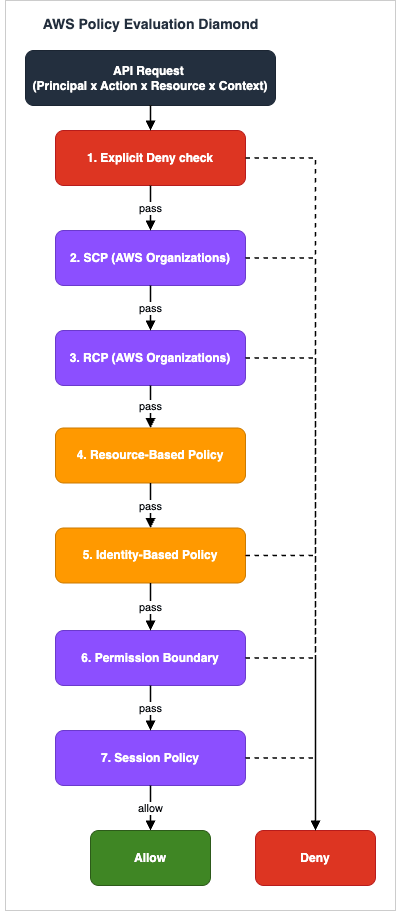
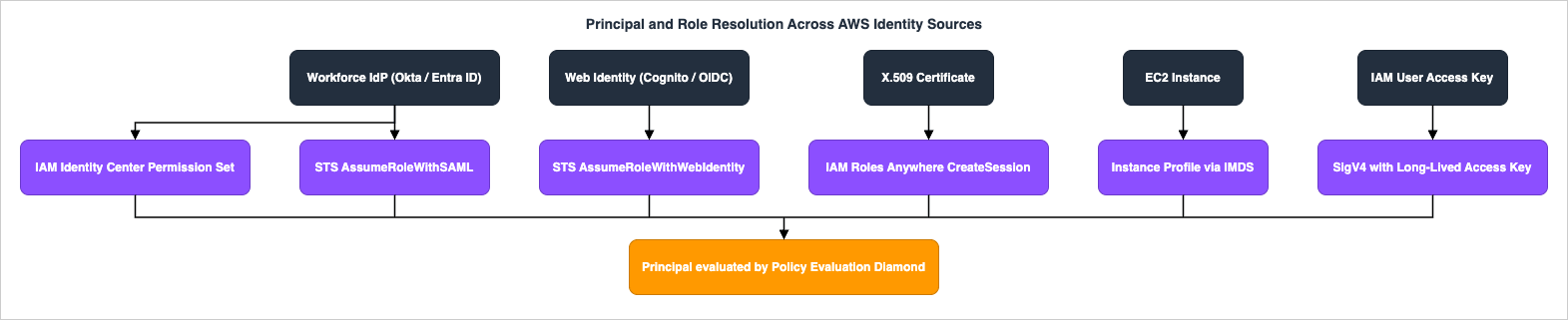
Use the Term Index below to jump directly to a category, then scan the table within that category. The "Policy Evaluation Order" section visualizes how the seven kinds of policy interact during a single API call, and how human, federated, certificate-based, and workload identities are resolved to the principal that is evaluated.
An entity that can make a request for an action or operation on an AWS resource. Principals include the AWS account root user, IAM users, IAM roles assumed by federated or AWS service principals, and anonymous users in some service-specific contexts. Each request to AWS is authenticated as exactly one principal, and authorization is evaluated against that principal's identity.
Root User
The single sign-in identity created when an AWS account is opened. The Root User has unrestricted access to every resource and billing setting in the account, cannot be constrained by IAM policies, and AWS recommends using it only for the small set of tasks that require it (such as closing the account or restoring IAM user permissions). All day-to-day work should use IAM roles or IAM Identity Center sessions.
IAM User
A long-lived identity within an AWS account that represents a person or workload and has its own credentials (password, access keys, or both). IAM Users are scoped to the account they are created in and receive permissions through directly attached policies or group membership. AWS now recommends federation through IAM Identity Center over creating new IAM Users for human access.
IAM Group
A collection of IAM Users to which the same identity-based policies are attached for batch permission management. Groups themselves cannot be principals or be nested, and an IAM User can be a member of up to ten groups. Groups exist purely as an administrative convenience for attaching policies.
IAM Role
An IAM identity with permissions defined by an attached identity-based policy and a trust policy that specifies which principals may assume it. Roles do not have permanent credentials; instead, a principal assumes the role and receives temporary security credentials issued by AWS STS. Roles are the canonical mechanism for cross-account access, AWS service-to-service access, and federated user access.
Federated and Service Identities
Term
Description
Federated User
A principal authenticated by an external identity provider - such as a SAML 2.0 IdP, an OpenID Connect (OIDC) provider, or an Amazon Cognito identity pool - who obtains temporary AWS credentials by assuming an IAM Role. Federated users do not have IAM User records inside the AWS account; their identity attributes flow into AWS as a session and can be referenced via session tags and condition keys. See also Amazon Cognito Federation Implementation Guide.
Identity Center User
A workforce identity stored in AWS IAM Identity Center, either created directly there or synchronized from an external identity source such as Microsoft Entra ID, Okta, or AWS Managed Microsoft AD. Identity Center Users sign in once to the AWS access portal and use Permission Sets to receive scoped IAM Role sessions in any accounts the administrator has assigned. See also AWS IAM Identity Center Setup Guide.
Service-Linked Role
A pre-defined IAM Role that an AWS service automatically creates and owns to call other AWS services on the customer's behalf. The role's trust policy, naming, and permissions are managed by the linked service, and deletion is constrained so the service can guarantee its own correctness. Examples include AWSServiceRoleForAutoScaling and AWSServiceRoleForElasticLoadBalancing.
Service Role
An IAM Role that a customer creates and assigns to an AWS service such as AWS Lambda, Amazon EC2, or AWS Glue so the service can act on AWS resources on the customer's behalf. Unlike Service-Linked Roles, the trust policy and permissions of a Service Role are fully managed by the customer, who is responsible for least-privilege configuration.
Instance Profile
A container that links an IAM Role to an Amazon EC2 instance so applications running on the instance can obtain temporary credentials through the instance metadata service (IMDS). Each instance can have one Instance Profile, and the profile can hold exactly one IAM Role. Instance Profiles are created automatically when a role is assigned through the EC2 console.
Cross-Account Role
An IAM Role whose trust policy permits principals from another AWS account to call STS AssumeRole and receive temporary credentials in the role's account. Cross-Account Roles are the recommended pattern for sharing access between accounts in AWS Organizations, replacing long-lived IAM Users and shared access keys. The trust policy is typically combined with an External ID condition when third parties are involved. See also AWS Multi-Account Operational Patterns.
Policy Types
Identity-Side Policies
Term
Description
Identity-Based Policy
A JSON policy attached to an IAM identity - an IAM User, IAM Group, or IAM Role - that grants the identity permissions to perform actions on resources. Identity-based policies can be managed (standalone documents attached to one or more identities) or inline (embedded directly in a single identity). They are evaluated against every request the identity makes.
Resource-Based Policy
A JSON policy attached directly to a resource such as an Amazon S3 bucket, AWS KMS key, Amazon SQS queue, or AWS Lambda function. Resource-based policies specify which principals may perform which actions on the resource and are always inline to the resource. They are the only mechanism for granting cross-account access without role assumption (subject to Organizations SCP and RCP constraints).
Session Policy
A JSON policy passed as a parameter to STS AssumeRole, AssumeRoleWithSAML, AssumeRoleWithWebIdentity, or GetFederationToken that further restricts the permissions of the resulting temporary credentials. The effective permissions of the session are the intersection of the role's identity-based policy and the session policy. Session policies cannot grant more permissions than the role already has.
Permission Boundary
An advanced feature in which an IAM managed policy is attached to an IAM User or IAM Role to set the maximum permissions the identity can ever obtain, regardless of other identity-based policies. Permission Boundaries do not grant permissions themselves; they cap effective permissions to the intersection of the identity policy and the boundary, and are commonly used for delegated administration.
Organization-Wide Controls
Term
Description
Service Control Policy (SCP)
An AWS Organizations policy that defines the maximum permissions available to IAM Users and IAM Roles in member accounts. SCPs apply at the organization root, OU, or account level and do not grant permissions themselves; they only filter what the local IAM policies are allowed to allow. The management account is exempt from SCP enforcement, but the Root User of member accounts is subject to it.
Resource Control Policy (RCP)
An AWS Organizations policy, introduced in 2024, that sets a maximum permissions guardrail on resources in member accounts in a way analogous to how SCP guardrails identities. RCPs apply to supported resource-based services (such as Amazon S3, AWS STS, AWS KMS, AWS Secrets Manager, and Amazon SQS) and let central security teams forbid actions against resources even when the resource owner attaches a permissive resource-based policy.
Trust Policy
The JSON policy attached to an IAM Role that specifies which principals are allowed to assume it and under what conditions. Unlike other identity-based policies, the Trust Policy uses the Principal element to identify the trusted entity and is evaluated by STS when AssumeRole is called. Every IAM Role requires a Trust Policy at creation time, and an AssumeRole request that does not match any allowed principal in the Trust Policy fails with AccessDenied.
Tag Policy
An AWS Organizations policy that standardizes tags across accounts in an organization. Tag Policies define case treatment and allowed values for tag keys and can be enforced for selected resource types so that non-compliant tag operations are blocked. They are separate from IAM and from SCP/RCP but combine with ABAC patterns that rely on consistent tagging.
Inline vs Managed
Term
Description
Inline Policy
A policy that is embedded directly in a single principal (an IAM User, IAM Group, or IAM Role) and has no independent existence outside that principal. Inline policies are appropriate when the policy is tightly coupled to one identity and should be deleted along with it. They cannot be reused across identities.
Managed Policy
A standalone IAM policy document that can be attached to multiple principals. Managed policies have a name, ARN, version history, and quota; they are the recommended way to grant reusable permissions and to apply Permission Boundaries. Managed policies are either AWS-managed or customer-managed.
Customer Managed Policy
A managed policy created and owned by the customer in their own account. Customer Managed Policies are versioned (up to five versions), can be attached to any IAM principal in the account, and are the preferred mechanism for codifying reusable, organization-specific permissions.
AWS Managed Policy
A managed policy created and maintained by AWS, with predefined permissions for common job functions or AWS services. AWS Managed Policies are attached by ARN such as arn:aws:iam::aws:policy/ReadOnlyAccess; AWS updates them over time to add support for new services and APIs. Customers cannot edit them but can copy and customize their contents.
Policy Evaluation Logic
Evaluation Outcomes
Term
Description
Policy Evaluation Logic
The deterministic algorithm AWS uses to decide whether a request is allowed. For requests within a single account it evaluates SCP, RCP, resource-based policies, identity-based policies, permission boundaries, and session policies; for cross-account requests it requires Allow in both the trusted and trusting accounts. Any explicit Deny in any applicable policy results in a final Deny.
Explicit Allow
A statement with Effect set to Allow that matches the request's principal, action, resource, and conditions. An Explicit Allow is required from at least one identity-based policy (or a resource-based policy in cross-account scenarios) for a request to succeed. Explicit Allows can be overridden by Explicit Denies.
Explicit Deny
A statement with Effect set to Deny that matches the request. Explicit Denies always win over any number of Explicit Allows and are the standard mechanism for guardrails such as forbidding the use of unencrypted resources or non-approved regions. They are evaluated against SCP, RCP, resource-based, identity-based, permission boundary, and session policies.
Implicit Deny
The default outcome when no policy contains a matching Allow for the request and there is no matching Explicit Deny. Implicit Deny is also called the principle of "deny by default" and is the reason that new IAM Users and IAM Roles have no permissions until policies are attached.
Effective Permissions
The set of actions a principal can actually perform on a resource after all applicable policies are evaluated. Effective Permissions equal the intersection of the identity-based policy, any permission boundary, the session policy, the SCP, and the RCP, minus any Explicit Denies, with resource-based policies contributing in cross-account scenarios. The IAM Policy Simulator and IAM Access Analyzer help compute Effective Permissions ahead of deployment.
Statement Elements
Element
Description
Action
The JSON element that lists the AWS API operations the statement applies to, in the form service:Operation such as s3:GetObject or ec2:RunInstances. Wildcards are supported (s3:Get*), and the Action element is paired with Effect, Resource, and Condition to form a single statement.
Resource
The JSON element that identifies the AWS resources the statement applies to, expressed as an ARN or wildcard. Resource is required in identity-based policies and resource-based policies; for actions that do not target a resource (such as ec2:DescribeInstances), the value is "*".
Condition
The optional JSON element that adds further constraints to a statement using condition keys such as aws:SourceIp, aws:MultiFactorAuthPresent, aws:PrincipalTag/Department, or service-specific keys. Conditions are evaluated against the request context and can implement attribute-based access control, MFA enforcement, and time-of-day restrictions.
NotAction
An element used in place of Action to specify all actions except the listed ones. NotAction is rarely needed and must be used carefully because it is interpreted as "every other action," including future actions added by AWS; the common best practice is to enumerate actions with Action instead.
NotResource
An element used in place of Resource to specify all resources except the listed ones. NotResource has the same caution as NotAction: it implicitly includes future resources and is therefore best reserved for narrow scenarios such as denying access to a small set of sensitive resources while allowing everything else.
NotPrincipal
An element used in resource-based policies and Trust Policies to identify principals to which the statement does not apply. NotPrincipal is uncommon, primarily used with Effect Deny to deny access to all principals except a listed set, and requires the listed principals to be exact identifiers because it does not perform pattern matching.
Authentication and STS
Long-Lived Credentials
Term
Description
Access Key
A pair of strings - an access key ID and a secret access key - that allows programmatic access to AWS as an IAM User. The access key ID begins with AKIA for IAM Users and ASIA for temporary STS credentials and is sent with each signed request. AWS recommends rotating access keys regularly and preferring temporary credentials issued by STS over long-lived access keys.
Secret Access Key
The private half of an access key pair, used together with the access key ID to compute the Signature Version 4 (SigV4) signature on each AWS API request. The Secret Access Key is shown only once at creation time and must be stored securely; if exposed, it must be deactivated and replaced immediately.
STS API Operations
Term
Description
STS (Security Token Service)
The AWS service that issues temporary security credentials - an access key ID, a secret access key, and a session token - for IAM Roles, federated users, and root user sessions. STS endpoints are available in every Region (with sts.amazonaws.com defaulting to us-east-1 for legacy reasons); credentials are valid from 15 minutes to 36 hours depending on the API and configuration.
AssumeRole
An STS API operation that returns temporary credentials for an IAM Role identified by ARN. The caller must already be authenticated as an IAM User, an IAM Role, or a federated identity, and must be permitted by both the role's Trust Policy and the caller's identity-based policy. AssumeRole is the foundation of cross-account access and instance-to-service access patterns.
AssumeRoleWithSAML
An STS API operation that exchanges a SAML 2.0 assertion issued by a configured SAML identity provider for temporary AWS credentials for an IAM Role. AssumeRoleWithSAML is the underlying mechanism for SAML-based single sign-on into the AWS Management Console and CLI when an external IdP is integrated directly with IAM via a SAML 2.0 trust, separate from the dedicated access portal that AWS IAM Identity Center provides through its own session-issuance flow.
AssumeRoleWithWebIdentity
An STS API operation that exchanges an OpenID Connect (OIDC) token from a web identity provider - such as Amazon Cognito, GitHub Actions OIDC, Amazon EKS IAM Roles for Service Accounts (IRSA), or any OIDC IdP - for temporary AWS credentials. The mechanism eliminates the need to embed long-lived AWS credentials in mobile, web, or CI workloads. Note that EKS Pod Identity is a separate mechanism that uses the Pod Identity Agent and the EKS Auth AssumeRoleForPodIdentity API rather than AssumeRoleWithWebIdentity.
GetSessionToken
An STS API operation that returns temporary credentials for the calling IAM User, optionally requiring MFA. GetSessionToken is used to obtain short-lived credentials for CLI or SDK calls that must be authenticated by MFA and that cannot use IAM Role assumption (such as listing root-level account information from an IAM User).
Multi-Factor Authentication
Term
Description
MFA (Multi-Factor Authentication)
A security mechanism that requires a second factor - a one-time code from a virtual or hardware authenticator, a FIDO security key, or a passkey - in addition to the password or access key. MFA-protected API access uses the aws:MultiFactorAuthPresent and aws:MultiFactorAuthAge condition keys in IAM and SCP policies to enforce its presence.
Hardware MFA
A physical multi-factor device such as a display-card OTP token or a FIDO2 security key that generates one-time codes or performs WebAuthn assertions. FIDO2 security keys in particular provide phishing-resistant authentication via WebAuthn, and because hardware MFA does not depend on a phone number it is not exposed to SIM-swap or SMS-interception risks. AWS recommends hardware MFA for highly privileged identities including the AWS account root user.
Virtual MFA
A software-based authenticator application - such as Google Authenticator, Authy, 1Password, or AWS's built-in virtual MFA - that generates time-based one-time passwords (TOTP) compatible with RFC 6238. Virtual MFA is easier to provision than hardware MFA and is the minimum bar AWS recommends for every IAM User and Identity Center user.
WebAuthn for Root
The use of WebAuthn passkeys or FIDO2 security keys as the MFA factor for the AWS account root user. AWS has enabled WebAuthn for the Root User across partitions and now requires every Root User to register at least one MFA device. Passkeys provide phishing-resistant MFA for the most sensitive identity in the account. Passkeys and WebAuthn in Practice holds the registration and authentication ceremonies behind this, and the recovery path to settle before the only registered device is lost.
Cross-Account Conditions
Term
Description
External ID
A shared secret value passed in the sts:ExternalId condition of an IAM Role's Trust Policy when the role is to be assumed by a third party such as a SaaS vendor. The External ID protects against the confused deputy problem by ensuring that the third party cannot accidentally or maliciously assume the role on behalf of another customer. AWS recommends a unique, unguessable External ID per customer and role.
Advanced / Ecosystem
ABAC and Session Tags
Term
Description
ABAC (Attribute-Based Access Control)
An authorization strategy that grants access based on attributes (tags) attached to principals, resources, and the request, rather than on enumerated permissions per identity. ABAC in AWS is implemented with IAM Condition elements that compare aws:PrincipalTag, aws:ResourceTag, and aws:RequestTag, enabling a small number of policies to scale across many users and resources.
Session Tags
Key-value tags attached to a temporary credentials session at AssumeRole, AssumeRoleWithSAML, or AssumeRoleWithWebIdentity time. Session Tags appear in aws:PrincipalTag during policy evaluation and let an IdP or federation broker propagate user attributes (such as Department, CostCenter, or Project) into AWS without requiring per-user IAM Roles.
aws:PrincipalTag
A global condition key that resolves to the tags attached to the principal making the request, including IAM User tags, IAM Role tags, and Session Tags. aws:PrincipalTag is the standard left-hand side of ABAC expressions such as aws:PrincipalTag/Project equals aws:ResourceTag/Project.
aws:RequestTag
A global condition key that resolves to the tags supplied in the request itself, used for service actions that create or tag resources. aws:RequestTag enforces that callers tag the resources they create with specific values and is typically paired with aws:TagKeys to require or forbid specific tag keys at creation time.
aws:ResourceTag
A global condition key that resolves to the tags on the resource that the request targets. aws:ResourceTag is supported by services whose resources can be tagged (such as Amazon EC2, AWS Lambda, and Amazon S3 bucket-level tags) and is the standard right-hand side of ABAC expressions that align principal and resource attributes.
Identity Center, Cedar, and Verified Permissions
Term
Description
Permission Set
A reusable bundle of identity-based managed policies, an inline policy, and a permission boundary that AWS IAM Identity Center deploys as an IAM Role into each assigned account. Permission Sets are the unit of permission management in Identity Center; they are created in the management account and provisioned automatically when an Identity Center User or group is assigned to an account.
Cedar
An open-source policy language and authorization engine, originally developed at AWS, for application-level access control. Cedar policies are concise, formally analyzable, and support fine-grained attribute-based and role-based authorization decisions; Amazon Verified Permissions is the AWS-managed Cedar service for application-level authorization.
Verified Permissions
The AWS managed service that hosts Cedar policy stores for customer applications. Amazon Verified Permissions evaluates an application's authorization request - principal, action, resource, and context - against the stored Cedar policies and returns Allow or Deny along with the determining policies. It is typically integrated with Amazon Cognito user pools for application identity.
Identity Source
The directory that AWS IAM Identity Center uses for workforce identities, configured to be the Identity Center directory itself, an external SAML/SCIM IdP (such as Microsoft Entra ID, Okta, or Ping), or AWS Managed Microsoft AD. Each Identity Center instance has exactly one Identity Source, which is the canonical source of users and groups.
Trust Anchor, Access Analyzer, and Visibility
Term
Description
Trust Anchor
A configuration object in AWS IAM Roles Anywhere that points to a certificate authority - either an AWS Private CA or a customer-supplied PEM-encoded CA bundle - whose issued X.509 certificates are trusted to obtain AWS temporary credentials. Trust Anchors define the cryptographic root of trust for workloads outside AWS, such as on-premises servers and other clouds.
IAM Roles Anywhere
A service that lets workloads running outside AWS - on-premises, in other clouds, or on edge devices - obtain temporary AWS credentials by presenting an X.509 certificate signed by a configured Trust Anchor. IAM Roles Anywhere removes the need for long-lived IAM User access keys in non-AWS environments and integrates with profiles that map certificates to IAM Roles.
IAM Access Analyzer
An AWS service that uses provable security based on automated reasoning to analyze IAM policies and surface external access, unused access, and policy issues. Access Analyzer monitors resource-based policies for S3, KMS, Lambda, SQS, IAM Roles, and other services and produces findings when a resource grants access to principals outside the configured zone of trust.
Unused Access
A category of IAM Access Analyzer findings that identifies IAM Users, IAM Roles, access keys, and permissions that have not been used over a configurable tracking period. Unused Access findings inform least-privilege reviews by highlighting credentials and permissions that can be removed without functional impact.
Last Accessed Information
Service-level and action-level usage data, also known as IAM Access Advisor, that records the most recent time a principal used a particular AWS service or action. Last Accessed Information is consumed via the IAM console and the GenerateServiceLastAccessedDetails API to drive policy right-sizing and detect dormant permissions.
Policy Evaluation Order
The Policy Evaluation Diamond figure visualizes the order in which AWS examines policies during a single API call. An Explicit Deny in any layer ends the evaluation immediately with Deny. For requests within the same account, the request must pass through the SCP, RCP, resource-based policy (if any), identity-based policy, permission boundary, and session policy layers, and at least one of these must contain an Explicit Allow for the action; for cross-account requests, both the trusted and the trusting accounts must Allow. The companion Principal and Role Resolution figure shows how a human user, a federated user, an X.509-authenticated workload, or an Amazon EC2 instance arrives at the principal that is checked against the diamond. AWS Policy Evaluation DiamondPrincipal and Role Resolution Across AWS Identity Sources
This glossary will be updated as the AWS IAM, AWS Organizations, AWS STS, AWS IAM Identity Center, AWS IAM Roles Anywhere, AWS IAM Access Analyzer, Amazon Verified Permissions, and Cedar surfaces continue to evolve.