IAM Anti-Patterns - Real-World Mistakes and Their Root Causes
First Published:
Last Updated:
The article also introduces two reusable mental frames named in §2:
- The IAM Decision Diamond — the seven-stage evaluation order that explains why an anti-pattern produces the behavior it does.
- The 5-Layer Anti-pattern Model — Policy / Identity / Trust / Boundary / Scale, the five horizontal layers under which all 25 patterns are grouped.
Table of Contents:
- How to Use This Catalog
- Why Anti-patterns Persist — The 5-Layer Anti-pattern Model
- The 25 Anti-patterns — A. Policy Statement Smells
- The 25 Anti-patterns — B. Identity and Credential Hygiene
- The 25 Anti-patterns — C. Trust, Sharing and Cross-Account
- The 25 Anti-patterns — D. Guardrails and Boundaries
- The 25 Anti-patterns — E. Modern / Scale-Out Anti-patterns
- Cross-cutting Patterns
- Frequently Asked Questions
- Summary
- References
1. How to Use This Catalog
Each of the 25 entries is structured as five blocks. Reading them in order tells you what you would see, why you would see it, how bad it is, what you should have written instead, and how to detect it in a real environment.- Symptom — the observable thing you can grep for in a policy, see in the console, or notice in CloudTrail. If you cannot tell whether an environment has the pattern from symptoms alone, the pattern is not useful.
- Root Cause — the misconception behind it. Most IAM anti-patterns are not careless mistakes; they are misreadings of the IAM evaluation model. The Root Cause block names the misreading.
- Risk — High / Medium / Low against the CIA triad. The qualifier matters: a pattern that is High-confidentiality and Low-availability has a different remediation urgency than one that is Medium across all three.
- Correct Pattern — the smallest replacement that fixes the root cause without overshooting. Where a single JSON / CloudFormation / Terraform stanza captures the fix, we show it. Where the fix is structural (architecture, lifecycle), we describe it.
- Detection — which AWS-native control surfaces the pattern at scale: IAM Access Analyzer, CloudTrail, AWS Config managed rules, IAM Access Advisor, or IAM Access Analyzer unused-access findings. For each pattern, at least one detection method is named with its specific rule ID or finding type.
For an adjacent reading on how anti-pattern catalogs work in general, see Code Review Checklist and Anti-Pattern Catalog. For the postmortem-style "what does AWS itself say went wrong" lens, see AWS Postmortem Case Studies and Design Lessons.
2. Why Anti-patterns Persist — The 5-Layer Anti-pattern Model
IAM anti-patterns persist for three reasons: people misread the evaluation order, they conflate the seven different policy types, and they do not have a layered mental model for where in the stack a control belongs. This section gives both.2.1 The IAM Decision Diamond
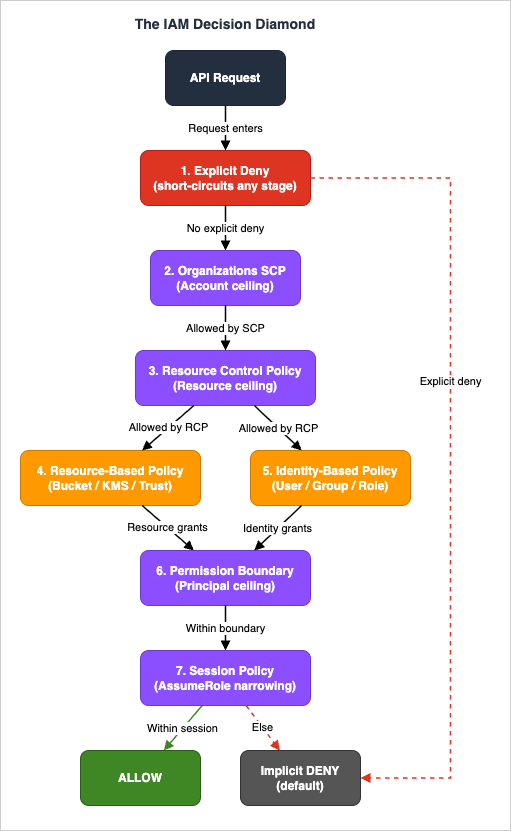
Every API call against AWS is evaluated through a fixed sequence of seven decision stages. Misunderstanding the sequence is the root cause of at least seven of the 25 patterns below. We call the sequence The IAM Decision Diamond:- Explicit Deny — checked first and at every stage below. Any matching
"Effect": "Deny"in any of the seven policy types short-circuits the evaluation toAccessDeniedimmediately, regardless of any Allow. - Resource Control Policies (RCPs) — an Organizations-level ceiling for the resource side, mirroring SCPs for resource policies. AWS evaluates RCPs immediately after the explicit-deny check and before SCPs. RCPs launched in November 2024 with Amazon S3, AWS STS, AWS KMS, Amazon SQS, and AWS Secrets Manager in scope; the supported-service list expands over time, so check the AWS Organizations - Resource control policies (RCPs) documentation for the current list before assuming a given service is in scope.
- Organizations SCPs — the maximum permission ceiling for principals, attached at the root, OU, or account level. SCPs do not grant; they bound.
- Resource-based policies — bucket policies, KMS key policies, SQS access policies, role trust policies. Cross-account access requires a Resource policy on the resource owner side.
- Identity-based policies — IAM user / group / role policies on the calling principal.
- Permission Boundaries — the maximum permission ceiling on a specific IAM principal. Like SCPs, they only bound.
- Session policies — passed at AssumeRole time. They restrict the resulting session further. Implicit Deny is the default when nothing grants.
The first figure shows the seven stages with the explicit-deny short-circuits.
2.2 The 5-Layer Anti-pattern Model
Once you understand the evaluation order, the 25 patterns fall naturally into five horizontal layers:* You can sort the table by clicking on the column name.
| Layer | Patterns | What goes wrong here |
|---|---|---|
| A. Policy Statement Smells | 01–05 | Mistakes inside the JSON of a single statement |
| B. Identity and Credential Hygiene | 06–10 | The lifecycle of principals and credentials |
| C. Trust, Sharing and Cross-Account | 11–15 | Multi-account, third-party, and resource-policy boundaries |
| D. Guardrails and Boundaries | 16–20 | Permission Boundaries, SCPs, and the policy intersections |
| E. Modern / Scale-Out | 21–25 | ABAC, Identity Center, Cedar, and operational drift at scale |
Calling the model the 5-Layer Anti-pattern Model is shorthand for code review: "this is a Layer-C problem" tells reviewers the fix is in a resource policy or a trust policy, not in an identity statement. It also gives auditors a budget: if you cannot point to a finding in at least three of the five layers, your audit is incomplete.
| Layer / Pattern | #1 | #2 | #3 | #4 | #5 |
|---|---|---|---|---|---|
| A. Policy Statement Smells | Star Action | Star Resource | NotAction Trap | NotPrincipal Foot-gun | Conditionless MFA Gate |
| B. Identity & Credential Hygiene | Eternal Access Key | Daily Root | Naked Privilege | Console-Edited Policy | Group as Vault |
| C. Trust, Sharing & Cross-Account | Confused Deputy Door | Wildcard Trust | Recycled Role | Wrong-Service Role | Bucket Policy + ACL Mashup |
| D. Guardrails & Boundaries | Boundary Vacuum | Headless Boundary | Orgless Account | Conflicting Policy Sandwich | Over-Restrictive Session Policy |
| E. Modern / Scale-Out | Tag-Auth w/o Tag-Policy | Permission Set Sprawl | Inline Policy Forest | Cedar Schema Drift | Forever Permissions |
Fig. 2: The 5-Layer Anti-pattern Model — five layers by twenty-five patterns
2.3 Why These Patterns Repeat
Three structural reasons explain why the same 25 patterns appear across every audit.First, IAM uses union/intersection semantics that are not symmetric across policy types. SCPs intersect with everything below them; identity and resource policies union for same-account access but require both sides for cross-account access; Permission Boundaries intersect only with identity policies, not with resource policies. There is no shortcut for memorizing this, and the AWS Console does not show you the merged effective permissions in one screen.
Second, the blast radius of an IAM mistake is invisible until something goes wrong. A wildcard
Resource: "*" in a developer role is invisible in normal traffic — until an EC2 instance is compromised and the attached role exfiltrates every secret in the account. Anti-patterns are latent risks. Their absence of immediate harm is what makes them persist.Third, IaC drift is normal. Engineers add inline policies in the console "just to debug", and never delete them. Trust policies grow to accept more principals after each contractor onboarding. Permission Boundaries are added to new roles but not retrofitted to existing ones. Drift is the operational mode, not the exception.
3. The 25 Anti-patterns — A. Policy Statement Smells
This section covers the mistakes inside the JSON of a single policy statement. They are the easiest to detect (most have a regex-discoverable signature) and the easiest to fix (a JSON edit). But they are also the most frequent: in dozens of reviews, more than half of the findings cluster here.3.1 Pattern 01 — The Star Action
Symptom: An IAM policy statement contains"Action": "*" or "Action": "service:*" combined with "Resource": "*". The combination grants every API in the account, including identity manipulation, role assumption, and credential rotation.Root Cause: The author wanted to "make it work" and removed every constraint to eliminate the failure mode. The misreading is treating
* as a temporary scaffold that is "fine because the role is internal". In an IAM context, every role is one compromise away from being external.Risk: High across all three CIA dimensions. The combination is equivalent to root credentials for the account. Confidentiality: full read of all data. Integrity: full write to every resource. Availability: a compromised principal can delete every resource the account owns.
Correct Pattern: Replace
"Action": "*" with the smallest necessary action prefix list. For a developer role that needs broad read but narrow write, the canonical form is:{
"Version": "2012-10-17",
"Statement": [
{
"Sid": "ReadOnly",
"Effect": "Allow",
"Action": ["s3:Get*", "s3:List*"],
"Resource": "*"
},
{
"Sid": "WriteScoped",
"Effect": "Allow",
"Action": ["s3:PutObject", "s3:DeleteObject"],
"Resource": "arn:aws:s3:::project-bucket-name/*"
}
]
}If you cannot enumerate the actions, use the AWS managed
ReadOnlyAccess and PowerUserAccess policies as upper bounds, then attach a Permission Boundary that excludes iam:*, organizations:*, kms:Schedule*, and similar high-privilege primitives.Detection: IAM Access Analyzer policy validation flags
"Action": "*" with "Resource": "*" as a SECURITY_WARNING (overly permissive). AWS Config managed rule iam-policy-no-statements-with-admin-access evaluates attached policies in every account. CloudTrail logs every API call made by the principal, so unused-action analysis via IAM Access Advisor (GetServiceLastAccessedDetails) reveals which actions in the wildcard are actually consumed; the difference between "granted" and "used" is your remediation surface.3.2 Pattern 02 — The Star Resource
Symptom: A statement contains"Action": "s3:PutObject" (or any specific write or delete action) paired with "Resource": "*". The action is scoped; the resource is not.Root Cause: The author understood that
Action: * was bad, scoped the action, but forgot that Resource also needs scoping. The misconception is that "if the action is narrow, the blast radius is narrow". For destructive actions, the blast radius is the resource set, not the action set.Risk: High on integrity and availability for write/delete APIs, Medium for read-only APIs against unscoped resources. The pattern is asymmetric:
s3:GetObject with Resource: "*" exposes every accessible bucket; s3:DeleteBucket with Resource: "*" can destroy every bucket the principal can reach.Correct Pattern: For read APIs,
Resource: "*" is often acceptable if combined with a tag-based Condition. For write/delete APIs, never. The canonical form is to scope by ARN prefix or by tag:{
"Effect": "Allow",
"Action": ["s3:PutObject", "s3:DeleteObject"],
"Resource": "arn:aws:s3:::team-${aws:PrincipalTag/Team}-*/*"
}The
${aws:PrincipalTag/Team} substitution makes the policy reusable across teams without writing one statement per team — see AWS IAM Identity Center Complete Setup Guide for ABAC patterns that pair with this.Detection: IAM Access Analyzer policy validation is the primary surface — it flags
"Resource": "*" on services that support resource-level permissions (most of S3, EC2, Lambda, DynamoDB, KMS). AWS Config has no managed rule that targets the resource-wildcard case directly, so a custom Config rule that parses each Statement for write/delete actions paired with "Resource": "*" is the typical scheduled audit. For S3 bucket policies specifically, s3-bucket-policy-grantee-check can be used to enforce a known-principals allowlist as a complementary control. For ongoing audit, IAM Access Analyzer unused-access findings highlight resources that are granted but unused.3.3 Pattern 03 — The NotAction Trap
Symptom: A statement uses"NotAction": [...] to grant a broad set of actions with a few exclusions. Reads like "allow everything except IAM and Organizations".Root Cause: The author wanted "an explicit list of forbidden actions".
NotAction is legal IAM syntax, but combined with Effect: Allow it grants every service action that AWS has ever launched, plus every future one. A new AWS service released next quarter is granted by default.Risk: High on integrity. The pattern silently expands as AWS launches services. A
NotAction policy written in 2020 today grants Bedrock, Q Developer, AgentCore, and Verified Permissions — services that did not exist when the policy was written.Correct Pattern: Use
NotAction only with Effect: Deny. The legitimate use is "deny everything except this allowlist", not "allow everything except this denylist". For broad allow with narrow exclusions, prefer two statements — one Allow with a positive Action list, one Deny with Action enumerating the forbidden — or attach a Permission Boundary that explicitly bounds the action space.{
"Effect": "Deny",
"NotAction": [
"s3:GetObject",
"s3:ListBucket"
],
"Resource": "*"
}Read as: deny everything except the two listed actions. This is the safe pattern.
Detection: There is no managed Config rule specifically for
Allow + NotAction. The detection path is custom: a Config custom rule or an IAM Access Analyzer custom check that searches policy documents for the combination. aws iam list-policies --scope Local followed by aws iam get-policy-version for each, piped through jq selecting statements where Effect == "Allow" and NotAction is present, is a one-line audit query.3.4 Pattern 04 — The NotPrincipal Foot-gun
Symptom: A resource-based policy (S3 bucket policy, KMS key policy, IAM role trust policy) uses"NotPrincipal": [...] with "Effect": "Allow". Reads like "allow access from any principal except these".Root Cause: The author treated
NotPrincipal as the inverse of Principal. The IAM evaluation model does not match that intuition. Allow + NotPrincipal grants access to every other principal in every AWS account in the world, including anonymous (no authentication) requests in some services. For S3 bucket policies in particular, the combination is one of the most common public-bucket misconfigurations.Risk: High on confidentiality. The pattern is silently public. It does not require a misconfigured ACL or Public Access Block — the policy itself opens the resource.
Correct Pattern: Never use
Allow + NotPrincipal. The legitimate use of NotPrincipal is with Effect: Deny: "deny anyone except this allowlist". For an Allow, enumerate the principals positively in Principal.{
"Effect": "Deny",
"NotPrincipal": {
"AWS": ["arn:aws:iam::123456789012:role/team-role"]
},
"Action": "s3:*",
"Resource": "arn:aws:s3:::sensitive-bucket/*"
}Detection: AWS Config managed rule
s3-bucket-public-read-prohibited and s3-bucket-public-write-prohibited catch the S3 case. For KMS and other resource policies, IAM Access Analyzer external access findings (under "unintended external access") surface any resource policy that grants access outside the zone of trust, which is exactly what an Allow + NotPrincipal produces.3.5 Pattern 05 — The Conditionless MFA Gate
Symptom: An IAM policy intended to require MFA for sensitive operations omits theaws:MultiFactorAuthPresent condition. The author believed that attaching the policy to a group named "MFAEnforced" was enough.Root Cause: Conflating attribute-based access control with IAM Conditions. Group membership is not a condition. A user can be in the MFAEnforced group and still be evaluated without MFA being present in the current session — for example, when assuming a role from an MFA-less console session, or when using a long-lived access key.
Risk: High on confidentiality and integrity. The pattern provides false assurance to auditors. The compliance attestation says "MFA enforced for admin operations" but the underlying IAM evaluation does not check MFA at all.
Correct Pattern: Use the
aws:MultiFactorAuthPresent and aws:MultiFactorAuthAge conditions, or attach an SCP/Identity policy with a Deny block when MFA is not present:{
"Sid": "DenyAllExceptListedIfNoMFA",
"Effect": "Deny",
"NotAction": [
"iam:CreateVirtualMFADevice",
"iam:EnableMFADevice",
"iam:GetUser",
"iam:ListMFADevices",
"iam:ListVirtualMFADevices",
"iam:ResyncMFADevice",
"sts:GetSessionToken"
],
"Resource": "*",
"Condition": {
"BoolIfExists": {
"aws:MultiFactorAuthPresent": "false"
}
}
}Use
BoolIfExists rather than Bool so that the condition correctly evaluates when the key is missing (which it is for unauthenticated and SAML/OIDC-without-MFA sessions).Detection: AWS Config managed rule
iam-user-mfa-enabled checks whether a device is registered (necessary but not sufficient). The behavioral detection — whether MFA was actually in the session for a privileged call — requires CloudTrail event analysis: filter userIdentity.sessionContext.attributes.mfaAuthenticated == "false" for events targeting sts:AssumeRole, iam:*, and other privileged APIs.4. The 25 Anti-patterns — B. Identity and Credential Hygiene
Where Layer A is about JSON syntax, Layer B is about the lifecycle of principals and credentials. Layer B findings are usually visible without reading any policy at all: the existence of the wrong kind of credential is the symptom.4.1 Pattern 06 — The Eternal Access Key
Symptom: IAM users have access keys older than 90 days. The IAM Credential Report showsaccess_key_1_last_rotated more than 90 days ago, often more than two years ago, with access_key_1_active = true.Root Cause: The credential never breaks, so no one rotates it. The misconception is that "if nothing has gone wrong, there is no need to rotate". In practice, the longer a key lives, the more places it has been copied to: CI logs, developer laptops, shared password vaults, Slack DMs. Each copy is a potential leak.
Risk: High on confidentiality. Leaked long-lived keys are the leading cause of public AWS credential exposure incidents. A key that has lived for two years has had two years of leakage surface area.
Correct Pattern: Replace IAM users entirely with IAM Identity Center for human access (see AWS IAM Identity Center Complete Setup Guide) and IAM Roles Anywhere or
AssumeRole for workloads, laid out in AWS IAM Inbound Workload Federation - IAM Roles Anywhere, OIDC, and SPIFFE Converging on One Trust Policy Condition. Where access keys are genuinely required (third-party SaaS integrations, legacy on-prem agents), rotate every 90 days via an SSM Automation document or AWS Secrets Manager rotation, and pin aws:SourceIp to the integration's known egress range.Detection: AWS Config managed rules
access-keys-rotated (rotation age) and iam-user-unused-credentials-check (last-used age) cover both axes. The IAM Credential Report (aws iam generate-credential-report followed by aws iam get-credential-report) is the authoritative source for credential ages. For unused keys, IAM Access Analyzer unused-access findings report unused IAM users, roles, and access keys with a configurable threshold.4.2 Pattern 07 — The Daily Root
Symptom: CloudTrail shows root user (userIdentity.type = "Root") sign-in events more than once per quarter, or root user API calls for non-billing actions. The root account does not have MFA enforced.Root Cause: The root user was used to bootstrap the account and was never decommissioned. The misconception is that "root is a regular admin account". In AWS, the root user is the only identity that cannot be deleted and cannot be restricted by Permission Boundaries; and in the management account the root user is not constrained by SCPs or RCPs either (a member account's root user, by contrast, is bounded by SCPs and RCPs). Using it daily is using the equivalent of
/etc/shadow for routine login.Risk: High across all CIA dimensions. A compromised root user can close the account, change the contact email, transfer ownership, and bypass every guardrail the organization owns. There is no IAM control that defends against the root user.
Correct Pattern: Lock the root user. Specifically: enable a hardware MFA (FIDO2 or U2F security key), remove all access keys (
aws iam delete-access-key), set a long randomly-generated password stored in a sealed envelope or organization-level secrets manager, and delegate every operational task to IAM Identity Center users with appropriate Permission Sets. AWS Organizations now allows the centralized root access feature, which removes the standing root credential from member accounts entirely — enable it.Resources:
CentralizedRootAccess:
Type: AWS::Organizations::Policy
Properties:
Name: DenyRootUserActions
Type: SERVICE_CONTROL_POLICY
Content: |
{
"Version": "2012-10-17",
"Statement": [{
"Effect": "Deny",
"Action": "*",
"Resource": "*",
"Condition": {
"StringLike": { "aws:PrincipalArn": "arn:aws:iam::*:root" }
}
}]
}Attach the SCP to all OUs except the management account.
Detection: AWS Config managed rule
root-account-mfa-enabled and root-account-hardware-mfa-enabled. CloudTrail metric filter on $.userIdentity.type = "Root" with an alarm on any event. AWS Security Hub has the dedicated control IAM.6 for "Hardware MFA should be enabled for the root user". For the centralized-root-access state, the aws organizations describe-organization output shows whether the feature is enabled.4.3 Pattern 08 — The Naked Privilege
Symptom: Privileged IAM users (members of an Admin or PowerUser group, or assuming a role with admin-equivalent permissions) do not have MFA enforced. Sign-in is password-only.Root Cause: MFA was an opt-in feature for too long, and users who never enabled it grandfathered into permanent password-only access. The misconception is that "the AWS console password is strong enough" — but password reuse, phishing, and credential stuffing make password-only privileged access untenable.
Risk: High on confidentiality and integrity. A phished password on a privileged user is a full account compromise. Modern phishing kits target the AWS console specifically.
Correct Pattern: Enforce MFA via an SCP for privileged actions, and via an IAM policy that denies non-MFA sessions. The combination handles both the case of "user does not have an MFA device" and "user has a device but did not use it this session". For human access, prefer IAM Identity Center with SAML/OIDC-side MFA enforcement, which moves the MFA gate to the identity provider and removes the AWS-side configuration entirely.
Detection: AWS Config managed rule
iam-user-mfa-enabled for IAM users; mfa-enabled-for-iam-console-access for console-enabled users. For Identity Center, the identity provider's audit log is authoritative — Okta/Entra ID/Google Workspace each export sign-in event logs that show whether MFA was satisfied. Cross-reference with CloudTrail ConsoleLogin events where additionalEventData.MFAUsed = "Yes".4.4 Pattern 09 — The Console-Edited Policy
Symptom: A policy defined in CloudFormation, CDK, or Terraform has a drift detection failure, oraws iam get-policy-version returns a policy document that does not match the source repository. Inline policies appear on roles that the IaC repository did not define.Root Cause: An engineer needed a quick fix in production, opened the console, edited the policy, and never propagated the change back to IaC. The misconception is that "the console edit will be picked up by the next CI run". CI runs do not reconcile drift unless you explicitly run a drift-detection step.
Risk: Medium on integrity (the security posture is uncertain), High on operational correctness (the next IaC deployment may revert the production fix or, worse, perform an unintended diff). The blast radius depends on what was changed.
Correct Pattern: Treat IaC as the source of truth and detect drift continuously. Two complementary controls:
Resources:
  DriftScheduler:
    Type: AWS::Events::Rule
    Properties:
      ScheduleExpression: rate(1 hour)
      Targets:
        - Arn: !GetAtt DriftLambda.Arn
          Id: drift-target
For Terraform,
terraform plan in CI on every push, with a daily scheduled plan against main that posts to Slack on non-empty diffs. AWS Config has a built-in rule (cloudformation-stack-drift-detection-check) that surfaces drift centrally. For statement-level diffs on policies after console edits, the AWS Policy Diff Tool compares two policy documents side-by-side.Detection: AWS Config managed rule
cloudformation-stack-drift-detection-check. For Terraform-managed resources, terraform plan -detailed-exitcode in scheduled CI. For inline policies, AWS Config iam-no-inline-policy-check. CloudTrail event names PutUserPolicy, PutGroupPolicy, PutRolePolicy outside of expected automation principal ARNs indicate manual edits.4.5 Pattern 10 — The Group as Vault
Symptom: IAM Groups are used as the primary mechanism to aggregate permissions, with users assigned to multiple groups and group membership being the only way to grant or revoke access. The organization has dozens of groups with overlapping policy attachments.Root Cause: IAM Groups were the only access-aggregation primitive for many years, so the operational pattern grew around them. The misconception is that groups are a governance primitive — they are not. Groups have no audit trail of why a user is in a group, no expiration, no approval workflow.
Risk: Medium on integrity. Over time, group membership accretes: users are added but rarely removed. Privilege creeps. There is no equivalent of "expire this access after 90 days" for an IAM Group.
Correct Pattern: Migrate to IAM Identity Center with Permission Sets. Permission Sets are versioned, can be expired, and the assignment is auditable through CloudTrail (
AssignAccountAccess). Where IAM Groups must remain (legacy AWS accounts not yet under Identity Center), pair each Group with a Permission Boundary that caps it, and run a quarterly review with aws iam get-account-authorization-details | jq to enumerate group-to-policy mappings. See AWS IAM Identity Center Complete Setup Guide for the migration playbook.Detection: AWS Config rule
iam-group-has-users-check finds empty groups (a sign of abandoned access). IAM Access Analyzer unused-access findings identify groups whose attached policies grant unused actions. The structural anti-pattern (over-reliance on groups) is best detected by a small audit script that counts policies-per-group and groups-per-user; values above five for either are signals.5. The 25 Anti-patterns — C. Trust, Sharing and Cross-Account
Layer C is where IAM crosses organizational boundaries: cross-account roles, third-party SaaS integrations, and resource-based policies that grant access to principals outside the immediate AWS account. The detection surface here is IAM Access Analyzer's external-access findings; the misconceptions are about trust policies.5.1 Pattern 11 — The Confused Deputy Door
Symptom: A cross-account IAM role allows AssumeRole from a third-party AWS account (a SaaS vendor) without using thests:ExternalId condition. The trust policy reads "Principal": {"AWS": "arn:aws:iam::THIRD_PARTY_ACCOUNT:root"} with no Condition clause, or with only aws:SourceAccount.Root Cause: The author did not know that the SaaS vendor's IAM principals are multi-tenant. The vendor's account hosts roles that serve all of their customers; without an ExternalId, any of the vendor's other customers can trick the vendor's role into assuming your role. This is the Confused Deputy Problem.
Risk: High on confidentiality and integrity. The vendor's IAM principal acts on behalf of customers; without ExternalId, the binding from "this AssumeRole call is for customer X" is missing, and a different customer can request access to your resources.
Correct Pattern: Always include
sts:ExternalId for third-party AssumeRole, set to a value the third party chooses and stores against your tenant record on their side. Pair it with aws:SourceAccount for IAM service integrations (like Lambda or AWS Config):{
"Effect": "Allow",
"Principal": {"AWS": "arn:aws:iam::THIRD_PARTY_ACCOUNT:root"},
"Action": "sts:AssumeRole",
"Condition": {
"StringEquals": {
"sts:ExternalId": "tenant-87a3f1e2-secret"
}
}
}The ExternalId is not a secret in the cryptographic sense (it is logged in CloudTrail), but it binds the trust to a specific vendor-side tenant record. For the multi-account guardrail patterns that pair with this, see AWS Multi-Account Operational Patterns.
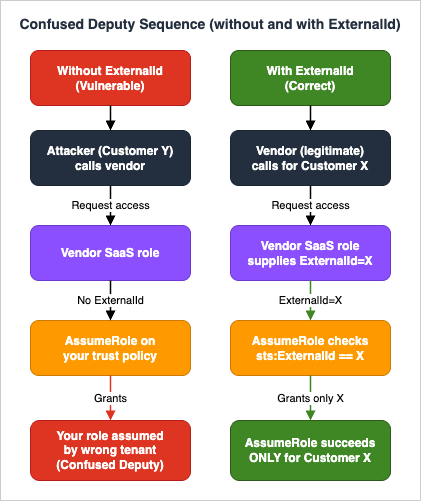
aws iam list-roles | jq scan that filters trust policies for cross-account principals lacking an sts:ExternalId condition.5.2 Pattern 12 — The Wildcard Trust
Symptom: A role trust policy contains"Principal": "*" or "Principal": {"AWS": "*"}. Reads like "any principal in any AWS account can assume this role".Root Cause: Confusion between the resource-policy form
"Principal": "*" (which means "any authenticated AWS request") and the intuition "I will restrict it with the Condition block". In practice, conditions can be forgotten, weakened over time, or bypassed by misconfiguration.Risk: High on every dimension. The pattern is one of the few that allows takeover from any AWS account in the world if conditions are weak or absent.
Correct Pattern: Enumerate the principals. If the role is for a workload, scope to the specific service principal (
"Service": "lambda.amazonaws.com"). If for cross-account, enumerate the account ARNs. Never use "Principal": "*" in a trust policy.Detection: IAM Access Analyzer external access findings surface a wildcard
Principal as a public-access finding (isPublic: true); the same wildcard in policy validation surfaces as a SECURITY_WARNING. Findings flow into AWS Security Hub continuously. There is no AWS Config managed rule that targets wildcard trust policies specifically, so a custom Config rule or a scheduled aws iam list-roles scan is required for periodic audit.5.3 Pattern 13 — The Recycled Role
Symptom: The same role name (AdminRole, DeployRole, MonitoringRole) exists in every AWS account in the organization, with trust policies that share the same broad principal set. The organization has 50 accounts and 50 copies of AdminRole, each subtly different.Root Cause: Role names are reused to make CloudFormation templates portable, but the trust boundaries drift over time. The misconception is that uniformity of name implies uniformity of permissions. In practice, the role in the production account ends up with extra inline policies, the one in the dev account ends up with a broader trust policy, and no single source of truth exists for "what AdminRole means".
Risk: Medium on integrity. The pattern does not directly create vulnerabilities, but it makes auditing intractable: a finding in one account does not propagate to others, and a fix in one account does not propagate either.
Correct Pattern: Define roles centrally with CloudFormation StackSets, Terraform with
for_each over accounts, or Identity Center Permission Sets. The role definition lives in one place; account-specific deviation is impossible. For details on multi-account role patterns, see AWS Multi-Account Operational Patterns.Detection: There is no managed rule for this — it is a structural anti-pattern. The detection script is straightforward: enumerate roles by name across all accounts via
aws organizations list-accounts | xargs -I{} aws iam list-roles --profile {}, then diff the policy documents. Where diffs exist on intended-uniform roles, you have drift.5.4 Pattern 14 — The Wrong-Service Role
Symptom: A role with a trust policy that allows"Service": "ec2.amazonaws.com" is attached to a Lambda function, or vice versa. The trust policy's Service principal does not match the consuming service.Root Cause: Copy-paste from a different role's trust policy, or a refactor where the consuming service changed but the trust policy did not. The misconception is that "the role is attached, so it works" — but AssumeRole evaluation checks the service principal in the trust policy against the calling service. A mismatch produces silent failures or, worse, allows unintended services to assume the role.
Risk: Medium. The most common outcome is a broken application (the intended service cannot assume the role). The risky outcome is allowing the wrong service to assume the role, which can happen when the trust policy is broad (
"Service": ["lambda.amazonaws.com", "ec2.amazonaws.com"]) and only one of those services is intended.Correct Pattern: Match the trust policy's
Service principal exactly to the consuming service. For multi-service roles (rare), enumerate explicitly and document why:{
"Effect": "Allow",
"Principal": {"Service": "lambda.amazonaws.com"},
"Action": "sts:AssumeRole",
"Condition": {
"StringEquals": {
"aws:SourceAccount": "123456789012"
},
"ArnLike": {
"aws:SourceArn": "arn:aws:lambda:us-east-1:123456789012:function:my-function"
}
}
}The
aws:SourceArn condition is critical for service-linked roles to prevent confused-deputy variants where another customer's resource in the same service tries to assume your role.Detection: IAM Access Analyzer policy validation flags overly broad trust policies. There is no AWS Config managed rule that targets the wrong-service mismatch directly, so custom detection is required: for each role, compare
AssumeRolePolicyDocument.Statement[].Principal.Service against the services that have actually used the role in the last 90 days (CloudTrail AssumeRole events filtered by requestParameters.roleArn).5.5 Pattern 15 — The Bucket Policy plus ACL Mashup
Symptom: An S3 bucket has both a bucket policy granting access AND legacy ACLs (PublicReadWrite, AuthenticatedRead, or grants via s3:x-amz-grant-*). The bucket has BlockPublicAcls = false or IgnorePublicAcls = false.Root Cause: ACLs predate bucket policies and were never fully retired. The misconception is "ACLs are deprecated, so they do not matter" — but if Block Public Access is not enabled, ACLs can still grant public access regardless of what the bucket policy says.
Risk: High on confidentiality. Public-write via legacy ACL is the source of the well-known S3 leak class — and the bucket policy may look entirely correct in code review.
Correct Pattern: Enable S3 Block Public Access at both the bucket and the account level. Set
ObjectOwnership to BucketOwnerEnforced, which disables ACLs entirely. Use only bucket policies and Access Points for access control.Resources:
Bucket:
Type: AWS::S3::Bucket
Properties:
OwnershipControls:
Rules:
- ObjectOwnership: BucketOwnerEnforced
PublicAccessBlockConfiguration:
BlockPublicAcls: true
BlockPublicPolicy: true
IgnorePublicAcls: true
RestrictPublicBuckets: trueFor organization-wide enforcement, attach a Service Control Policy denying
s3:PutBucketPublicAccessBlock reductions and s3:PutObjectAcl operations. For KMS-encrypted buckets, see AWS History and Timeline — AWS KMS for the encryption-side controls that pair with this.Detection: AWS Config managed rules
s3-bucket-level-public-access-prohibited, s3-bucket-public-read-prohibited, s3-bucket-public-write-prohibited, s3-account-level-public-access-blocks. IAM Access Analyzer external-access findings flag buckets accessible outside the zone of trust regardless of which mechanism granted the access.6. The 25 Anti-patterns — D. Guardrails and Boundaries
Layer D is about the ceiling controls: SCPs, RCPs, Permission Boundaries, and Session Policies. These are the intersection parts of the IAM Decision Diamond, and they are widely misunderstood because they do not grant — they only bound.6.1 Pattern 16 — The Boundary Vacuum
Symptom: The organization has delegated IAM administration to teams (developers can create their own roles in their accounts), but the IAM principal that creates roles does not have a Permission Boundary requirement. New roles in the account have no boundary attached.Root Cause: Permission Boundaries are not automatic. When a delegated administrator creates a role, the boundary is attached only if the creating IAM policy uses
iam:PermissionsBoundary as a condition. Without that condition, delegated admins can create unbounded roles.Risk: High on integrity. The whole point of delegation is that the delegated admin cannot escalate beyond the boundary. Without the boundary requirement, delegation is privilege escalation.
Correct Pattern: Add a condition to the delegated-admin policy that requires a specific boundary on every newly created role:
{
  "Effect": "Allow",
  "Action": ["iam:CreateRole", "iam:PutRolePolicy", "iam:AttachRolePolicy"],
  "Resource": "*",
  "Condition": {
    "StringEquals": {
      "iam:PermissionsBoundary": "arn:aws:iam::${aws:PrincipalAccount}:policy/DeveloperBoundary"
    }
  }
}
The condition fails the API call if a role is created without the named boundary. Pair with a Deny on
iam:DeleteRolePermissionsBoundary to prevent removal.| Identity Policy | Permission Boundary | |
|---|---|---|
| Allowed actions | s3:*ec2:*iam:GetRole | s3:*lambda:*iam:GetRole |
| Effective permissions | Identity Policy ∩ Permission Boundary = { s3:*, iam:GetRole }( ec2:* denied by Boundary; lambda:* denied by Identity Policy) | |
Fig. 4: Permission Boundary Intersection — Effective permissions are the intersection (∩) of the Identity Policy and the Permission Boundary. The boundary intersects only with the Identity Policy, not with Resource Policies.
Detection: A custom AWS Config rule iteratingaws iam list-roles and checking for the presence of a Permission Boundary on every non-AWS-managed role. CloudTrail event CreateRole without a permissionsBoundary parameter, filtered for principal ARNs that should be delegated admins, surfaces violations in near-real-time via EventBridge.6.2 Pattern 17 — The Headless Boundary
Symptom: A role has a Permission Boundary attached, but no identity-based policy. The principal can do nothing.Root Cause: Conflating Permission Boundaries with grants. A boundary bounds the maximum effective permissions, computed as the intersection of the boundary and the identity policy. With no identity policy, the intersection is empty.
Risk: Low on security (the principal cannot do anything), but Medium on operational correctness — the role exists, looks configured, but does nothing. Engineers debug for hours before noticing.
Correct Pattern: Always attach both an identity policy (the grant) and a Permission Boundary (the ceiling). The boundary is a guardrail, not a grant.
Resources:
  DeveloperRole:
    Type: AWS::IAM::Role
    Properties:
      RoleName: developer-role
      AssumeRolePolicyDocument: ...
      PermissionsBoundary: !Ref DeveloperBoundary
      ManagedPolicyArns:
- !Ref DeveloperGrants # identity policy: the grantDetection: A simple custom Config rule iterating
aws iam list-roles and checking that a role with a Permission Boundary also has at least one identity policy. CloudTrail does not surface this directly; it is a structural check.6.3 Pattern 18 — The Orgless Account
Symptom: An AWS account exists outside AWS Organizations, or is in Organizations with no SCPs attached at the root or OU level. The account is "standalone" or "early-stage". No SCP can block actions in the account.Root Cause: Organizations was treated as optional or "for later". The misconception is that SCPs are a heavyweight control, when in fact even an empty
FullAWSAccess SCP is better than no SCP because it establishes the management hierarchy. Without Organizations, root-level guardrails are impossible.Risk: High on integrity. The account has no organizational ceiling. A compromised principal in the account can act up to the full IAM evaluation surface.
Correct Pattern: Bring every AWS account into Organizations on day one. Use AWS Control Tower or AWS Account Factory for Terraform (AFT) to provision new accounts with baseline SCPs already attached. The minimum baseline SCPs are: (a) deny disabling of GuardDuty, Security Hub, Config, CloudTrail; (b) deny leaving the organization; (c) deny root user actions in member accounts (SCPs cannot restrict root in the management account; use the AWS Organizations centralized root access feature to remove standing root credentials from member accounts instead); (d) deny region access outside an approved list.
Detection: AWS Config rule
multi-region-cloudtrail-enabled indirectly signals an account without org-level controls. The structural check is aws organizations list-accounts --profile management-account versus the list of accounts the organization expects to own.6.4 Pattern 19 — The Conflicting Policy Sandwich
Symptom: An IAM principal has an identity policy that allows an action, and a resource-based policy that denies it (or vice versa). The behavior surprises engineers because they expected the more recent edit to win, or the more specific statement to win, or the one with more conditions to win.Root Cause: IAM does not have "the more specific wins" semantics. Explicit Deny always wins, regardless of where it appears. The misreading is treating IAM like Java method resolution.
Risk: Medium. The pattern usually produces operational failure (the intended action is denied) rather than security failure, but it can also mask a security control: an admin who added a Deny to "make sure no one can do X" may find that downstream
Allow statements appear to grant X — but in fact they do not, because the Deny wins.Correct Pattern: Treat the IAM evaluation model as a constraint solver, not a procedural script. Use
aws iam simulate-principal-policy before deploying policy changes:aws iam simulate-principal-policy \
--policy-source-arn arn:aws:iam::123456789012:role/my-role \
--action-names s3:PutObject \
--resource-arns arn:aws:s3:::my-bucket/keyFor an offline diff between policies, the AWS Policy Diff Tool shows the statement-level differences.
Detection: IAM Access Analyzer policy validation flags conflicting statements within a single policy. Cross-policy conflicts (identity vs resource) are flagged by the policy simulator. CloudTrail
errorCode = "AccessDenied" with errorMessage containing the policy ARN that produced the denial is the runtime signal.6.5 Pattern 20 — The Over-Restrictive Session Policy
Symptom: An application usesAssumeRole with a Policy parameter (the session policy) that is so narrow that the resulting session cannot perform the work it was created for. Or the session policy contains a typo in Resource that produces empty intersection.Root Cause: Session policies are intersections with the role's identity policy. The misreading is treating the session policy as an override (additional grant). A session policy can only narrow the role's permissions; it cannot grant anything the role does not already have.
Risk: Low on security, Medium on operational correctness. The pattern produces runtime failures, often intermittent because session policies are often constructed dynamically.
Correct Pattern: When constructing session policies in code, always include the role's full identity policy as a baseline and narrow from there. Use
aws iam simulate-custom-policy in tests to validate that the resulting session has the required permissions:import boto3
import json
sts = boto3.client('sts')
session_policy = {
"Version": "2012-10-17",
"Statement": [{
"Effect": "Allow",
"Action": "s3:GetObject",
"Resource": f"arn:aws:s3:::tenant-{tenant_id}-*/*"
}]
}
response = sts.assume_role(
RoleArn="arn:aws:iam::123456789012:role/tenant-access",
RoleSessionName=f"tenant-{tenant_id}",
Policy=json.dumps(session_policy),
DurationSeconds=900
)The
Policy parameter intersects with the role's identity policy; if the role's identity policy lacks s3:GetObject, the session cannot use it regardless of what the session policy grants. Session policies only narrow the role's existing permissions; they cannot add new ones.Detection: CloudTrail
errorCode = "AccessDenied" on actions that the role's identity policy does allow is the signal. There is no managed rule for this; it surfaces as elevated 403 rates in application logs. For preventative detection, unit-test the session policy with simulate-custom-policy.7. The 25 Anti-patterns — E. Modern / Scale-Out Anti-patterns
Layer E is the patterns that emerge once the basic IAM hygiene is in place: attribute-based access control (ABAC), IAM Identity Center, Verified Permissions with Cedar, and the operational drift that comes from running an IAM environment at scale.7.1 Pattern 21 — The Tag-Auth Without Tag-Policy
Symptom: IAM policies useaws:PrincipalTag/X or aws:ResourceTag/X conditions for ABAC, but the organization has no Tag Policy enforcing the existence, format, or values of those tags. Resources can be created with arbitrary tag values, including no tag at all.Root Cause: ABAC was adopted as a permission model, but the tag-management infrastructure was not. The misconception is that tags are self-enforcing — that "we agreed to tag every resource with
Team, so the policy is safe". In practice, tags drift: typos, missing tags, conflicting case (Team vs team vs TEAM), and intentional bypass (an engineer who needs broader access tags their resource with the admin team's tag).Risk: High on integrity. A missing or forged tag bypasses the policy. Worse, the policy appears to be effective in code review — the JSON looks correct.
Correct Pattern: Pair every ABAC policy with a Tag Policy in AWS Organizations:
{
  "tags": {
    "Team": {
      "tag_key": {"@@assign": "Team"},
      "tag_value": {"@@assign": ["platform", "data", "ml", "infra", "security"]},
      "enforced_for": {"@@assign": ["ec2:instance", "s3:bucket", "lambda:function"]}
    }
  }
}
The
enforced_for list specifies which resource types must comply; tag creation that violates the policy is blocked at API time. Combine with an SCP that denies actions on resources without the required tags:{
"Effect": "Deny",
"Action": ["ec2:*", "s3:*"],
"Resource": "*",
"Condition": {
"Null": {"aws:ResourceTag/Team": "true"}
}
}Detection: AWS Config managed rule
required-tags enforces tag presence per resource type. AWS Organizations Tag Policies surface compliance through the per-account compliance report (Resource Groups Tagging API: aws resourcegroupstaggingapi get-compliance-summary) and the organization-level compliance view in the Organizations console. CloudTrail CreateTags, TagResource, UntagResource events trace tag mutations.7.2 Pattern 22 — The Permission Set Sprawl
Symptom: IAM Identity Center has more than 30 Permission Sets, with names likeAdminAccess, AdminAccess-2, AdminAccess-readonly, AdminAccess-readonly-prod, AdminAccess-readonly-prod-temp. Multiple Permission Sets grant similar but not identical access. No clear owner for "which Permission Set should I use".Root Cause: Permission Sets are created on demand without a governance model. The misconception is that "more granular is safer" — but granularity without curation produces sprawl. Engineers pick the first Permission Set that looks right; security loses control of effective access.
Risk: Medium on integrity. The pattern does not directly create vulnerabilities, but it makes least-privilege intractable: there is no canonical answer to "who has admin in production".
Correct Pattern: Define a small fixed set of Permission Sets (typically 5–8) and enforce naming conventions. A useful starting taxonomy is
OrgAdmin, BillingViewer, DeveloperPower, DeveloperReadOnly, SecurityAuditor, BreakGlass. Forbid creating new Permission Sets without a written justification and a sunset date. For the full Identity Center design, see AWS IAM Identity Center Complete Setup Guide.Detection:
aws sso-admin list-permission-sets --instance-arn ... enumerates all Permission Sets; counts above 30 or names that match patterns like -temp, -old, -deprecated, or numeric suffixes are signals. IAM Access Analyzer unused-access findings now extend to Identity Center, surfacing Permission Sets that have not been assumed in 90 days.7.3 Pattern 23 — The Inline Policy Forest
Symptom: Most IAM roles have multiple inline policies (aws iam list-role-policies returns more than three policies per role). Inline policies are not in version control, not in a managed policy registry, and frequently duplicate one another with subtle differences.Root Cause: Inline policies are convenient — they can be edited in the console without going through Pull Request review. The misconception is that "inline policies are simpler"; in practice, they become the policy-debt forest.
Risk: Medium on integrity (the policy posture is unknown), High on operational correctness (no single source of truth).
Correct Pattern: Convert inline policies to customer-managed policies (independent IAM resources, versioned, attachable to multiple principals). Where a policy is truly unique to one role and small (under 200 characters), inline is acceptable. Where the same statement appears in two or more roles, managed policy:
Resources:
  S3ReadOnlyManagedPolicy:
    Type: AWS::IAM::ManagedPolicy
    Properties:
      ManagedPolicyName: s3-readonly-for-team
      PolicyDocument: ...
      Roles:
        - !Ref RoleA
        - !Ref RoleB
        - !Ref RoleC
Managed policies have automatic versioning (up to 5 versions retained), making policy diffs visible.
Detection: AWS Config managed rule
iam-no-inline-policy-check flags principals with inline policies. The aws iam get-account-authorization-details output enumerates every inline policy for full audit.7.4 Pattern 24 — The Cedar Schema Drift
Symptom: An AWS Verified Permissions Policy Store is used for application-layer authorization, but the Cedar schema (entity types, attributes) has drifted from the actual entities the application produces. Authorization decisions reference attributes that no longer exist, or miss attributes that the schema does not declare.Root Cause: Cedar schemas and application code evolve on different cadences. The schema is updated when policy authors need it; the application is updated when product features need it. The two diverge unless schema-update is part of the application deploy.
Risk: High on confidentiality and integrity. Authorization decisions can silently default to deny (operational failure) or, with the wrong policy shape, default to allow (security failure). Cedar's evaluation is strict on schema only if the schema is up to date.
Correct Pattern: Make the Cedar schema a build artifact of the application. Generate the schema from the application's data model (e.g., from Pydantic models in Python, or from TypeScript interfaces) and validate the schema in CI before deploying either the application or the policy store.
# Schema-as-code: derive the Cedar schema from the application model in CI.
# AWS does not ship a Pydantic-to-Cedar generator, so emit_cedar_schema()
# is a project-specific helper that walks the model fields and emits Cedar
# JSON schema. The point is to keep schema generation in the same build
# that ships the application, so the two cannot diverge.
from pydantic import BaseModel

class User(BaseModel):
    user_id: str
    department: str
    clearance: int

cedar_schema = emit_cedar_schema([User]) # produces Cedar JSON schemaDetection: The Verified Permissions service exposes
is-authorized API responses with errors populated when schema mismatches occur. Aggregate the error rate via CloudWatch metrics; spikes signal schema drift. Cedar policy validation in CI (cedar validate --schema schema.json --policies policies.cedar) catches drift at build time.7.5 Pattern 25 — The Forever Permissions
Symptom: Roles and users in the account have not been reviewed for access removal in more than 12 months. IAM Access Advisor shows multiple services with last-accessed timestamps older than 365 days for principals that still have those permissions.Root Cause: Permission removal has no forcing function. Permission grants are driven by feature requests and incidents; permission removals require a deliberate review cycle that most organizations do not run.
Risk: Medium on integrity and confidentiality. Unused permissions are unused attack surface. The risk is dormant until a credential is compromised, at which point it materializes.
Correct Pattern: Run a quarterly "unused access" review using IAM Access Analyzer unused-access findings. The findings categorize unused roles, unused permissions on roles, unused IAM users, unused access keys, and unused passwords with a configurable threshold (default 90 days). Wire the findings to a ticketing system (Jira, ServiceNow) with a 30-day SLA to either revoke or document the exception.
Resources:
  UnusedAccessAnalyzer:
    Type: AWS::AccessAnalyzer::Analyzer
    Properties:
      AnalyzerName: unused-access-90d
      Type: ACCOUNT_UNUSED_ACCESS
      Configuration:
        UnusedAccessConfiguration:
          UnusedAccessAge: 90
Combine with IAM Access Advisor's per-service last-accessed timestamps (
aws iam generate-service-last-accessed-details) to revoke permissions at the service level.Detection: IAM Access Analyzer unused-access findings (this is the control for this pattern). IAM Access Advisor
service-last-accessed-details for granular per-service analysis. AWS Config rule iam-user-unused-credentials-check for IAM users specifically.8. Cross-cutting Patterns
The 25 patterns above are each detectable in isolation. The cross-cutting principles below are what tie them into a working program rather than a checklist.8.1 Least Privilege as a Workflow, Not a Snapshot
Least privilege is not a state — it is a process. A role that is least-privilege today acquires unused permissions over six months and is no longer least-privilege. The operational pattern is:- Grant at the smallest known scope (often broader than ideal, because the exact set of needed actions is unknown).
- Observe for 30 days using IAM Access Advisor and CloudTrail to record which actions were actually used.
- Tighten the policy to the observed action set, plus a margin for known but infrequent operations.
- Repeat quarterly.
8.2 The Detection Coverage Matrix
The 25 patterns map to four AWS-native detection surfaces. The matrix below collapses to the four columns most teams care about: which patterns surface in IAM Access Analyzer (IA), AWS Config managed rules (AC), CloudTrail event filtering (CT), and IAM Access Advisor / unused-access (AAv). A pattern that has no IA / AC entry generally requires a custom Config rule or scheduled script.| Pattern Group | IA (Access Analyzer) | AC (Config Managed Rule) | CT (CloudTrail Filter) | AAv (Access Advisor) |
|---|---|---|---|---|
| Wildcard Action / Resource | Primary | Secondary | — | Secondary |
| NotAction / NotPrincipal | Primary | Custom | — | — |
| MFA gating | — | Primary | Primary | — |
| Credential / Inline policy | — | Primary | Secondary | Primary |
| Root user use | — | Primary | Primary | — |
| Group / PermSet sprawl | Secondary | Secondary | — | Primary |
| Trust policy problems | Primary | Secondary | — | — |
| Role drift / No SCP | — | Custom | Secondary | — |
| Bucket policy + ACL | Primary | Primary | — | — |
| Boundary mistakes | — | Custom | Primary | — |
| Policy / session conflicts | Primary | — | Primary | — |
| ABAC / Cedar / Unused | Primary | Primary | Secondary | Primary |
Fig. 5: Detection Coverage Matrix — 12 pattern groups by 4 detection surfaces. Primary = preferred detection; Secondary = supplementary; Custom = requires custom Config rule; — = not covered.
Reading the matrix: prefer IA-detected patterns first (lowest operational cost; runs continuously by default). Wire AC findings to Security Hub (single pane for compliance). Filter CT events through EventBridge for the real-time critical events (root use, MFA bypass, cross-region access from unexpected principals). Use AAv quarterly as a structured review surface.8.3 Where Each Anti-pattern Surfaces
In code review, in CloudFormation/Terraform planning, or in the console — each pattern has a primary surface.- CloudFormation/CDK reviewers should reject patterns 01–05, 11–14, 16–17, 23 at PR time.
- Terraform reviewers should reject the same set, and additionally watch for
countvsfor_eachpatterns that produce per-account drift (related to pattern 13). - Console-edit watchers (EventBridge on
PutUserPolicy,PutRolePolicy,PutGroupPolicy) catch pattern 09 in near-real-time. - Audit reviewers (quarterly) focus on patterns 06–10, 22, 25 — the lifecycle and hygiene set.
- Compliance attestation (annual SOC2 / ISO 27001 / PCI) is driven by the AWS Config / Security Hub rule set: patterns 02, 04, 07, 08, 15, 18 are the most visible to external auditors.
8.4 The IAM Maturity Ladder
A useful framing is to think of the 25 patterns as rungs on a maturity ladder. An organization that has fixed patterns 01–10 is at level 1 (basic hygiene). Patterns 11–15 fixed brings level 2 (cross-account trust). 16–20 brings level 3 (guardrails). 21–25 brings level 4 (scale-out maturity). Most organizations sit at level 1.5 to 2.5; reaching level 4 requires both tooling and operational discipline.9. Frequently Asked Questions
9.1 What is the difference between Permission Boundary and SCP?
Both are ceiling controls — they bound the maximum permissions of a principal — but they apply at different scopes. SCPs apply at the AWS Organizations level (root, OU, or account) and affect every principal in the account, including the root user (with exceptions). Permission Boundaries apply to a specific IAM principal (user or role) and only affect that principal. SCPs are the right tool when you want "no one in the dev OU can disable CloudTrail"; Permission Boundaries are the right tool when you want "developers can create roles but only up to a specific permission ceiling".9.2 Identity policy vs resource policy — which wins when they conflict?
In the same account, the request is allowed if either the identity or resource policy allows it (union), and no policy denies it (explicit deny overrides). For cross-account access, both sides must allow — the resource policy on the resource owner side and the identity policy on the calling principal side. Explicit Deny always wins regardless. See §6.4 (pattern 19) for the common misconception.9.3 When do I actually need ExternalId?
When you provide a third party (a SaaS vendor) with the ability to assume a role in your account. The ExternalId binds the AssumeRole call to a specific tenant record on the third party's side, preventing the Confused Deputy attack where another customer of the same vendor tricks the vendor into accessing your resources. For first-party cross-account access (between your own accounts), ExternalId is not required — useaws:PrincipalAccount or aws:PrincipalOrgID conditions instead. See §5.1.9.4 How do I enforce MFA with ABAC?
Combine theaws:MultiFactorAuthPresent condition with the aws:PrincipalTag/X condition on the same statement. For example, "allow admin actions only if the principal has Role: admin tag and MFA is present in the session". Use BoolIfExists for MFA so unauthenticated sessions are correctly evaluated as "MFA not present". See §3.5 (pattern 05).9.5 Does AWS Verified Permissions replace IAM?
No. IAM authorizes AWS API calls; Verified Permissions authorizes application-level decisions (can this user view this document, can this admin update this account). Cedar policies in Verified Permissions are a complement to IAM, not a replacement. The schema-drift anti-pattern (§7.4) is specific to Verified Permissions; IAM has no schema concept.9.6 Can I detect all 25 anti-patterns automatically in CI?
About 18 of the 25 are detectable by IAM Access Analyzer policy validation in CI (runaws accessanalyzer validate-policy against your policy documents before merge). The remaining seven (patterns 09, 10, 13, 18, 22, 24, 25) are structural or operational and require custom checks: scripts that enumerate roles across accounts, drift detection scheduled in CI, or scheduled audits. There is no single automated control that catches all 25.9.7 How do I handle the migration from IAM Users to Identity Center without breaking existing applications?
Identity Center is for human access; applications should already be using IAM Roles via instance profiles, EKS service accounts (IRSA), Lambda execution roles, or workload identity federation. The migration is therefore primarily a user migration. Run Identity Center in parallel with existing IAM users for one quarter; disable console access for IAM users in week one of the parallel period; rotate any remaining access keys in week two; delete IAM users at the end of the quarter. See AWS IAM Identity Center Complete Setup Guide for the full migration playbook.9.8 How frequently should I re-run the catalog against my environment?
A weekly automated scan via IAM Access Analyzer (which runs continuously by default) covers patterns 01, 02, 04, 11, 12. A monthly Security Hub review covers the AWS Config managed-rule patterns. A quarterly unused-access review (IAM Access Analyzer + IAM Access Advisor) covers patterns 06, 10, 22, 25. An annual full audit usingaws iam get-account-authorization-details plus custom scripts covers the remaining structural patterns.10. Summary
Twenty-five named patterns, five layers, five blocks each. The catalog is designed to be cited — drop a name like "The Star Action" or "The Confused Deputy Door" into a PR comment, and the link to this page gives the reviewer the full Symptom / Root Cause / Risk / Correct Pattern / Detection breakdown without further explanation.Three takeaways:
- Most IAM anti-patterns are misreadings of the evaluation order, not careless coding. Internalize the IAM Decision Diamond (§2.1) and roughly half of the patterns become impossible to write.
- Detection is mostly free now. IAM Access Analyzer policy validation runs continuously, unused-access findings cover the lifecycle dimension, and AWS Config managed rules cover compliance. The patterns that cannot be auto-detected (09, 13, 18, 22, 24, 25, parts of 10) are the ones where investment in custom tooling pays off.
- Least privilege is a workflow, not a state. Quarterly review against the catalog, with the 5-Layer model as the audit budget, is what keeps an IAM environment from drifting back toward over-privileged over time.
11. References
AWS Official Documentation- IAM Best Practices — IAM User Guide. (verified 2026-05 at the AWS IAM Best Practices page)
- AWS Well-Architected Framework, Security Pillar — Identity and Access Management section. (verified 2026-05 at the AWS Well-Architected Security Pillar page)
- IAM Access Analyzer — policy validation, external-access findings, unused-access findings. IAM User Guide. (verified 2026-05 at the IAM Access Analyzer page)
- Service Authorization Reference — full enumeration of actions, resources, and condition keys per AWS service. (verified 2026-05 at the Service Authorization Reference)
- AWS Organizations — Service Control Policies (SCPs) and Resource Control Policies (RCPs). (verified 2026-05 at the AWS Organizations User Guide)
- IAM Policy Evaluation Logic — IAM User Guide, the canonical decision-flow document. (verified 2026-05 at the Policy Evaluation Logic page)
- AWS Config Managed Rules —
iam-*,s3-*,root-account-*,access-keys-rotated,iam-no-inline-policy-check,cloudformation-stack-drift-detection-check,required-tags. (verified 2026-05 at the AWS Config Managed Rules list) - AWS Security Hub — IAM and S3 control sets. (verified 2026-05 at the Security Hub Controls Reference)
- IAM Identity Center documentation — Permission Sets, ABAC with session tags, trusted identity propagation. (verified 2026-05 at the IAM Identity Center User Guide)
- AWS Verified Permissions and Cedar Language Reference. (verified 2026-05 at the Verified Permissions User Guide and the Cedar Language Reference)
- AWS Organizations Tag Policies — schema, enforcement, compliance. (verified 2026-05 at the Tag Policies page)
- AWS IAM Identity Center Complete Setup Guide — Permission Set design, ABAC, migration from IAM users.
- AWS Multi-Account Operational Patterns — Organizations, SCPs, AFT, centralized logging; the structural patterns that prevent patterns 13 and 18.
- Code Review Checklist and Anti-Pattern Catalog — adjacent anti-pattern catalog for code reviewers.
- AWS Postmortem Case Studies and Design Lessons — root-cause framing that mirrors the Root Cause block of each pattern.
- AWS History and Timeline — AWS KMS — encryption-side controls that pair with §5.5 (pattern 15).
- AWS Policy Diff Tool — statement-level diff for IAM, S3 bucket, and KMS key policies; the detection companion for patterns 09 and 19.
- IAM Policy Evaluation Logic Step by Step — the underlying mechanics of how AWS evaluates a request across SCPs, RCPs, identity policies, resource policies, permission boundaries, and session policies.
- AWS Verified Permissions / Cedar Complete Guide — the Cedar policy language and AVP as the application-level authorization companion to AWS IAM.
- AWS IAM Glossary — vocabulary and concept index that complements this anti-pattern catalog.
- AWS History and Timeline regarding AWS IAM — chronology of IAM feature launches that frames why each pattern emerged.
References:
Tech Blog with curated related content
Written by Hidekazu Konishi