AWS Verified Permissions and Cedar Policy Language Complete Guide
First Published:
Last Updated:
This guide is for engineers who already understand IAM and have hit its limits when modeling application-level authorization — per-document sharing in a SaaS product, multi-tenant isolation across customer accounts, hierarchical roles inside a single tenant, time-bounded grants, attribute-based rules driven by request context, and so on. If you have ever written
if user.role == "admin" or user.id in document.shared_with: ... and watched that branch metastasize across your codebase, this article is for you.You will leave with a working mental model of Cedar's entity-action-resource-context structure, the difference between Cedar and IAM policy language at the semantic level, the architecture of an AVP policy store, an end-to-end integration with Amazon Cognito as the identity source, and four reusable patterns (document permissions, multi-tenant SaaS, hierarchical roles, time-based grants) you can adapt to production.
It assumes you are comfortable with AWS IAM, JSON, and at least one server-side runtime that calls the AVP
IsAuthorized API. Familiarity with OIDC tokens helps for the Cognito integration section but is not required. Deeper background on the workforce-identity layer that sits next to AVP is covered in AWS IAM Identity Center Complete Setup Guide. For Cognito-side federation patterns that feed an AVP identity source, see Amazon Cognito Federation Implementation Guide.Table of Contents
1. What is AWS Verified Permissions?
AVP is a fully managed authorization service that evaluates Cedar policies against principals, actions, resources, and context that your application sends with each request. The service became generally available in June 2023; the underlying Cedar language had been open-sourced about a month earlier, on May 10, 2023, a step that is unusual for AWS and matters for portability.The mental shift to make here is that AVP does not authorize calls to AWS itself. It authorizes calls inside your application. When user
alice opens a SaaS dashboard and clicks "Share this document with Bob," your application sends an IsAuthorized request to AVP, AVP evaluates the relevant Cedar policies, and returns Allow or Deny along with the determining policies. Your application then either performs the share or returns 403.1.1 Why a Separate Service When IAM Exists
IAM authorizes principals against AWS service APIs. It was never designed to express "user alice can view document doc-42 only when document doc-42 belongs to tenant alpha and alice is in group editors of tenant alpha, between 09:00 and 18:00 in alice's local timezone." You can build that logic in application code, but you then own:- A bespoke policy data model that grows organically with every feature.
- A policy evaluation engine that you have to test, audit, and prove correct.
- A migration path every time the business adds a new dimension (regions, partner organizations, parent-child accounts).
- An audit trail that auditors will eventually want, and that you will eventually have to retrofit.
1.2 Where AVP Fits
| Layer | What authorizes | Mechanism |
|---|---|---|
| AWS API plane | Calls from principals to AWS service APIs | IAM identity-based / resource-based policies, SCPs, RCPs |
| Application network plane | Whether the request can reach the application at all | Security groups, NACLs, AWS WAF |
| Application authorization plane | What an authenticated user is allowed to do inside the application | AVP + Cedar (or homegrown logic) |
In practice, AVP coexists with IAM. IAM still authorizes your Lambda function to call
verifiedpermissions:IsAuthorized. Cedar policies inside AVP then authorize what the end user can do once that Lambda accepts their request.1.3 Target Use Cases
AVP is a fit when authorization is part of your product's value, not part of its infrastructure. Concretely:- Multi-tenant SaaS where each tenant has its own roles, groups, and permission rules.
- Document-style sharing where every resource has its own owner and a list of grantees with varying capabilities.
- Hierarchical organizations with permissions that cascade by team, region, or business unit.
- Fine-grained API authorization for an Amazon API Gateway HTTP API where you want a policy decision before invoking the backend.
- Bring-your-own-IdP scenarios where users come from Cognito User Pools, an OIDC provider, or a corporate SAML directory.
IsAuthorized call in your application code.2. Cedar Policy Language Primer
Cedar's core grammar is small and deliberately readable. Every policy is an effect (permit or forbid), a scope (which principal, action, and resource the policy applies to), and an optional when or unless condition expressed in a typed expression language. The policy engine evaluates all matching policies and combines their results with a clear precedence rule.2.1 The Four Request Components
Every authorization request contains exactly four components:- Principal: who is asking. Always an entity reference like
User::"alice". - Action: what they want to do. Always an action reference like
Action::"viewDocument". - Resource: what they want to do it on. Always an entity reference like
Document::"doc-42". - Context: extra information that is not part of an entity (e.g., source IP, MFA state, request time).
parents relationships) and returns a decision.2.2 Minimal Policy
permit (
    principal == User::"alice",
    action == Action::"viewDocument",
    resource == Document::"doc-42"
);
2.3 Scope Operators
Cedar's scope (principal, action, resource) supports three relational operators each:==matches a single entity by exact identifier.inmatches any entity that is a descendant of a given parent in the entity hierarchy.ismatches any entity of a given type (introduced in Cedar language version 3.0; in Amazon Verified Permissions it is available in policy stores that use Cedar 4).
permit (
    principal in Group::"editors",
    action in [Action::"viewDocument", Action::"editDocument"],
    resource is Document
)
when {
    resource.tenant == principal.tenant
};
is operator on the resource scope (matches any entity of type Document), the list-of-actions form, and the use of dotted attribute access in the when clause.2.4 when and unless Clauses
A when clause adds a positive condition: the policy applies only if the expression evaluates to true. An unless clause adds a negative condition: the policy is skipped if the expression evaluates to true.permit (
principal,
action == Action::"deleteDocument",
resource is Document
)
when {
principal == resource.owner
}
unless {
resource.locked == true
};
when and unless clauses can be chained; they combine with logical AND.2.5 forbid Policies and the Deny Override
Cedar's evaluation rule is precise: if any forbid policy matches, the result is Deny. Otherwise, if at least one permit policy matches, the result is Allow. Otherwise, the result is the implicit Deny. This makes forbid the right tool for hard guardrails that should not be overridable by any positive grant.forbid (
principal,
action,
resource
)
when {
context.mfa_present == false
};
permit policies otherwise exist.2.6 Built-in Operators
Cedar's expression language is small but expressive. The following operators all show up in real policies:* You can sort the table by clicking on the column name.
| Operator | Meaning | Example |
|---|---|---|
== / != | Value equality | principal == User::"alice" |
< <= > >= | Numeric / datetime comparison | context.amount < 1000 |
&& || ! | Boolean logic | a && (b || !c) |
in | Entity hierarchy membership | principal in Group::"editors" |
is | Entity type check (Cedar language 3.0+; Cedar 4 policy stores in Verified Permissions) | resource is Document |
is ... in ... | Combined type + hierarchy | principal is User in Tenant::"alpha" |
has | Attribute presence test | principal has department |
like | String wildcard match | principal.email like "*@example.com" |
.contains / .containsAll / .containsAny | Set membership tests | principal.roles.contains("admin") |
The
has operator deserves its own line: Cedar attributes can be marked optional in the schema, and principal has email returns true only when the attribute is actually present on this entity, avoiding evaluation errors on access.Beyond these core operators, Cedar ships two extension types for domains where naive string or number handling would be fragile:
decimal for fixed-point arithmetic (decimal("0.01").lessThan(decimal("0.02"))) and ipaddr for IP and CIDR matching (context.source_ip.isInRange(ip("10.0.0.0/8"))). You declare a field as { "type": "Extension", "name": "ipaddr" } or { "type": "Extension", "name": "decimal" } in the schema, and the validator then ensures that policies invoke only the corresponding extension methods on it. The time-based grants pattern later in this guide uses the ipaddr extension for network filtering.2.7 Entities and the Entity Hierarchy
Entities are typed objects with attributes and aparents list. The parents list is what makes the in operator work: principal in Group::"editors" returns true when the editors group is a (transitive) parent of the principal entity.A common shape for a document-permissions app:
[
    {
        "uid": { "type": "User", "id": "alice" },
        "attrs": { "email": "alice@example.com", "department": "engineering" },
        "parents": [
            { "type": "Group", "id": "editors" },
            { "type": "Tenant", "id": "alpha" }
        ]
    },
    {
        "uid": { "type": "Document", "id": "doc-42" },
        "attrs": { "owner": { "type": "User", "id": "alice" }, "locked": false },
        "parents": [
            { "type": "Folder", "id": "f-design" },
            { "type": "Tenant", "id": "alpha" }
        ]
    }
]
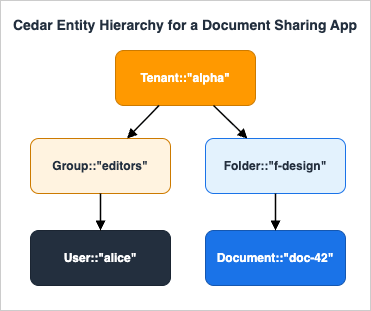
parents array is what lets the engine answer Document::"doc-42" in Tenant::"alpha" with a single positive lookup.2.8 Policy Templates
A policy template is a Cedar policy with parameter placeholders (?principal or ?resource). The template is stored in AVP, and you create a template-linked policy by binding concrete values for the placeholders.permit (
principal == ?principal,
action == Action::"viewDocument",
resource == ?resource
);
CreatePolicy with this template ID and the bindings ?principal = User::"bob", ?resource = Document::"doc-42". The resulting policy is identical in effect to writing the inline version by hand, but it is reusable, indexable, and revocable as a single unit.3. Cedar vs IAM Policy Language
Cedar and IAM JSON policies both authorize requests, but they target different layers and use different evaluation semantics. Engineers who try to apply IAM intuition to Cedar (or vice versa) routinely write policies that look correct but do the wrong thing.* You can sort the table by clicking on the column name.
| Dimension | IAM Policy Language | Cedar Policy Language |
|---|---|---|
| Primary target | AWS service API calls | Application-defined actions |
| Document format | JSON | Cedar (purpose-built syntax) |
| Open-source | No | Yes (Apache 2.0, cedarpolicy.com) |
| Subject (principal) | IAM principal (User, Role, Federated identity) | Any application entity (User, Group, Tenant, ...) |
| Resource model | ARNs | Application entity hierarchy with typed attributes and parents |
| Condition language | Condition blocks with operators per type | Typed expression language with when / unless |
| Hierarchy | Indirect (account, OU, organization) | First-class via parents and in |
| Type system | Implicit | Schema-validated entities, actions, and context |
| Evaluation rule | Explicit Deny wins, then Allow, else Deny | forbid wins, then permit, else implicit Deny |
| Storage location | IAM (per-principal or per-resource) | AVP policy store (one logical bag of policies per app) |
| Audit | CloudTrail (IAM and STS events) | CloudTrail (AVP API events) |
A few semantic differences are worth calling out explicitly.
3.1 Forbid vs Explicit Deny
IAM and Cedar both implement a "deny-overrides-allow" model, but Cedar'sforbid is more expressive because it can use the full condition language without having to fit inside a Condition block tied to a single statement. A guardrail like "no destructive action without MFA" is a one-line forbid in Cedar; in IAM, it usually requires per-service condition keys plus an explicit deny clause replicated across policies.3.2 Entity Hierarchy vs ARN Matching
IAM authorizes resources by ARN, and hierarchy is mostly cosmetic:arn:aws:s3:::my-bucket/folder/key looks hierarchical but the policy engine only does prefix and wildcard matching. Cedar authorizes resources by typed entity, and hierarchy is structural: resource in Tenant::"alpha" walks the parents graph and returns true regardless of how deeply nested the resource is. This makes multi-tenant isolation rules dramatically shorter and harder to subtly break.3.3 Context vs Condition Keys
IAM exposes a fixed set of condition keys per service (e.g.,aws:SourceIp, s3:RequestObjectTag/...). Cedar exposes whatever you put in the context object on each request, validated against the schema. If you want to authorize on "shipment value in USD," you simply add a numeric value_usd to the context and reference it in a when clause. There is no analogue in IAM short of stuffing the value into a request tag or rewriting the service.The takeaway is that Cedar's semantics are a strict superset of IAM's at the application layer. The cost is that you have to be explicit about your entity model in a schema, which we cover next.
4. Architecture Patterns
A production AVP deployment has five moving parts. Understanding which part owns which decision is the difference between a clean system and a sprawling one.
4.1 Policy Store
The policy store is the top-level container. Everything else (policies, templates, schema, identity source) lives inside one policy store. A typical mapping is one policy store per logical application, not per environment: you reuse the same policy store schema across dev / staging / prod by creating one policy store per environment but using IaC to keep them aligned.The store has a validation mode set at creation time:
OFF: no schema validation. Useful for early prototyping; you should not ship to production with this.STRICT: every policy is validated against the schema before it can be saved.
4.2 Schema
The schema is a JSON document that declares entity types, action types, the attributes each carries, and the request context shape. It is what gives Cedar its static guarantees: a policy that referencesprincipal.department when the schema says User has no department attribute will fail validation at save time, not at evaluation time.A minimal schema for a document-sharing app:
{
    "DocStore": {
        "entityTypes": {
            "User": {
                "shape": {
                    "type": "Record",
                    "attributes": {
                        "email": { "type": "String" },
                        "department": { "type": "String", "required": false }
                    }
                },
                "memberOfTypes": ["Group", "Tenant"]
            },
            "Group": { "memberOfTypes": ["Tenant"] },
            "Tenant": {},
            "Document": {
                "shape": {
                    "type": "Record",
                    "attributes": {
                        "owner": { "type": "Entity", "name": "User" },
                        "locked": { "type": "Boolean" }
                    }
                },
                "memberOfTypes": ["Folder", "Tenant"]
            },
            "Folder": { "memberOfTypes": ["Folder", "Tenant"] }
        },
        "actions": {
            "viewDocument": {
                "appliesTo": {
                    "principalTypes": ["User"],
                    "resourceTypes": ["Document"],
                    "context": {
                        "type": "Record",
                        "attributes": {
                            "mfa_present": { "type": "Boolean" }
                        }
                    }
                }
            },
            "editDocument": {
                "appliesTo": { "principalTypes": ["User"], "resourceTypes": ["Document"] }
            },
            "deleteDocument": {
                "appliesTo": { "principalTypes": ["User"], "resourceTypes": ["Document"] }
            }
        }
    }
}
DocStore here is the namespace; it groups the types so you can have multiple disjoint type universes inside one policy store. memberOfTypes declares the legal parent types for the in operator. The appliesTo block of each action declares which principal and resource types may use this action, plus the optional context shape for that action.Namespace and policy references: when a schema declares a namespace, every reference in a policy must be fully qualified. The type
User defined above is referenced from a policy as DocStore::User, an action as DocStore::Action::"viewDocument", and so on. The short forms User, Action used in the Cedar primer earlier in this article were schema-less language examples; in a namespaced policy store like DocStore, AVP rejects them at STRICT validation time. The policy snippets in the following sections use the fully qualified form.4.3 Policies
A policy is a Cedar text document. Two kinds of policies live in a policy store:- Static policies, written directly in Cedar source.
- Template-linked policies, materialized from a template by binding placeholders.
4.4 Policy Templates
Templates carry the parameterized form of a policy and allow you to create a large number of similar policies cheaply. The canonical use case is per-resource sharing: one template per "kind of share," and one template-linked policy per share. When the share is revoked, you delete the template-linked policy. The template itself stays in place.The number of template-linked policies you can store is much larger than the inline policy quota, which makes templates the only sensible mechanism for any application where users grant access dynamically (sharing a document, inviting a collaborator, etc.).
4.5 Identity Source
The identity source is what AVP needs to know about your users at evaluation time. Two modes are supported:- Amazon Cognito User Pool. AVP parses Cognito ID tokens (or access tokens) and turns the claims into a
Userentity. WhengroupConfiguration.groupEntityTypeis set on the identity source, each value in thecognito:groupsclaim is materialized as a parent entity of the configured type (see §5.4). - OIDC identity source (introduced after the Cognito-only era). Any OIDC provider whose tokens you can validate is acceptable; you tell AVP which claim is the principal ID, which claims are groups, and so on.
User entity manually on every IsAuthorized call. With an identity source configured, you instead use IsAuthorizedWithToken and pass the raw JWT.4.6 How a Request Flows
A typical request flow looks like this: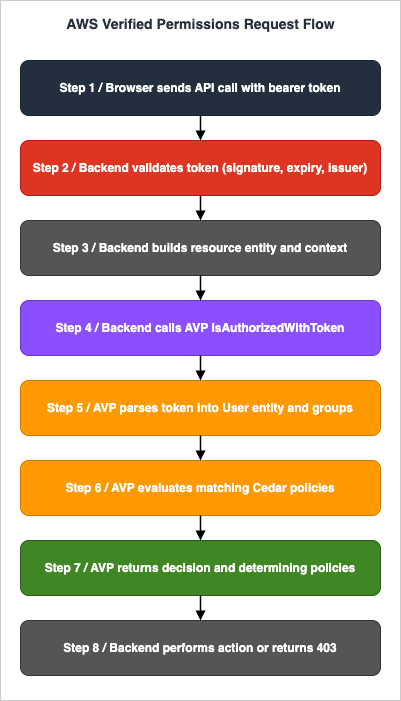
- Browser sends API call with bearer token to API Gateway / ALB / direct Lambda.
- Backend validates the token (signature, expiry, issuer).
- Backend constructs the resource entity (
Document::"doc-42") and any context (mfa_present,source_ip,hour_utc). - Backend calls AVP
IsAuthorizedWithTokenwith:{ token, action, resource, context, entities }. - AVP parses the token into a
Userentity and any group memberships. - AVP evaluates all matching policies against the request.
- AVP returns
{ decision: Allow|Deny, determiningPolicies: [...] }. - Backend either performs the action or returns 403.
5. Integration with Amazon Cognito
Cognito User Pools are the most common identity source for AVP-backed applications because both products live in the same AWS account and the wiring is purpose-built. The integration takes care of token verification, claim extraction, and group mapping. For background on the broader Cognito timeline, see AWS History and Timeline of Amazon Cognito.5.1 What AVP Does with a Cognito Token
When you callIsAuthorizedWithToken, AVP:- Verifies the token signature against the User Pool's JWKS.
- Verifies
issmatches the configured Cognito User Pool ARN. - Verifies
aud(for ID tokens) orclient_id(for access tokens) matches an allowed client ID. - Verifies
expandnbf. - Extracts the
subclaim and treats it as the principal entity ID, using the type declared inprincipalEntityTypeon the identity source. - Extracts the
cognito:groupsclaim (if present) and, whengroupConfiguration.groupEntityTypeis configured, materializes each value as a parent entity of that type. - Exposes the other claims as attributes of the principal entity, validated against the schema.
5.2 Mapping Schema
You declare which Cognito claims become which entity attributes in the policy store's schema. For example, the Cognito schema attributecustom:tenant_id can be mapped to a tenant attribute of type Entity (parent type Tenant), so that a policy can say:permit (
principal,
action in [DocStore::Action::"viewDocument", DocStore::Action::"editDocument"],
resource is DocStore::Document
)
when {
principal.tenant == resource.tenant
};
principal.tenant value is populated automatically from the token at evaluation time.5.3 Token Type: ID Token vs Access Token
Cognito issues both ID tokens and access tokens. For most application authorization scenarios you want the ID token, because it carries user attributes and group memberships. Access tokens are appropriate when authorizing machine-to-machine flows that only need scopes and the subject identifier.AVP supports both, but you must declare in the identity source which token type a given client will send: ID, access, or "both" with explicit per-call selection.
5.4 Configuring an Identity Source (CDK Example)
import * as cdk from "aws-cdk-lib";
import * as verifiedpermissions from "aws-cdk-lib/aws-verifiedpermissions";

const policyStore = new verifiedpermissions.CfnPolicyStore(this, "DocStore", {
    description: "Document sharing policy store",
    validationSettings: { mode: "STRICT" },
    schema: {
        cedarJson: JSON.stringify(schemaJson),
    },
});

new verifiedpermissions.CfnIdentitySource(this, "CognitoSource", {
    policyStoreId: policyStore.attrPolicyStoreId,
    configuration: {
        cognitoUserPoolConfiguration: {
            userPoolArn: userPool.userPoolArn,
            clientIds: [userPoolClient.userPoolClientId],
            groupConfiguration: {
                groupEntityType: "DocStore::Group",
            },
        },
    },
    principalEntityType: "DocStore::User",
});
principalEntityType controls what entity type the sub is turned into. The groupEntityType controls what entity type each Cognito group is turned into. Both default to a generic type if omitted, but specifying them up front avoids retrofitting schema later.5.5 Bringing Your Own OIDC Provider
If you are on Auth0, Okta, Microsoft Entra ID, or a homegrown OIDC service, configure an OIDC identity source instead of Cognito:new verifiedpermissions.CfnIdentitySource(this, "OidcSource", {
policyStoreId: policyStore.attrPolicyStoreId,
configuration: {
openIdConnectConfiguration: {
issuer: "https://login.example.com/",
tokenSelection: {
identityTokenOnly: {
principalIdClaim: "sub",
clientIds: ["application-client-id"],
},
},
entityIdPrefix: "ExampleIdP",
groupConfiguration: {
groupClaim: "groups",
groupEntityType: "DocStore::Group",
},
},
},
principalEntityType: "DocStore::User",
});
DocStore::Group type, policies can check group memberships uniformly via principal in DocStore::Group::"<name>" regardless of which identity source served the token; the group claim values are materialized as parent entities of the principal, exactly like Cognito groups. The fuller picture of the Cognito federation surface that feeds these tokens is in Amazon Cognito Federation Implementation Guide.6. Implementation Walkthrough
This section walks through the full lifecycle of an AVP integration. The runnable code uses Python on the Lambda side, AWS CDK (TypeScript) for the infrastructure, and Cedar text for policies. The same flow applies if you choose CloudFormation, Terraform, or pure SDK calls; the steps are the same and the API names are identical.6.1 Step 1: Create the Policy Store
import * as cdk from "aws-cdk-lib";
import * as verifiedpermissions from "aws-cdk-lib/aws-verifiedpermissions";

const policyStore = new verifiedpermissions.CfnPolicyStore(this, "DocStore", {
    description: "Document sharing policy store",
    validationSettings: { mode: "STRICT" },
    schema: {
        cedarJson: JSON.stringify(require("./schema.json")),
    },
});
validationSettings.mode to STRICT is the only acceptable choice for production. The cost is that you cannot save a policy that references an undeclared attribute or action; the benefit is that bad policies fail at deploy time, not at runtime.6.2 Step 2: Define the Schema
schema.json declares the types your application uses:{
"DocStore": {
"entityTypes": {
"User": {
"shape": {
"type": "Record",
"attributes": {
"email": { "type": "String" },
"tenant": { "type": "Entity", "name": "Tenant" }
}
},
"memberOfTypes": ["Group", "Tenant"]
},
"Group": { "memberOfTypes": ["Tenant"] },
"Tenant": {},
"Document": {
"shape": {
"type": "Record",
"attributes": {
"owner": { "type": "Entity", "name": "User" },
"tenant": { "type": "Entity", "name": "Tenant" },
"locked": { "type": "Boolean" }
}
},
"memberOfTypes": ["Folder", "Tenant"]
},
"Folder": { "memberOfTypes": ["Folder", "Tenant"] }
},
"actions": {
"viewDocument": {
"appliesTo": {
"principalTypes": ["User"],
"resourceTypes": ["Document"]
}
},
"editDocument": {
"appliesTo": {
"principalTypes": ["User"],
"resourceTypes": ["Document"]
}
},
"shareDocument": {
"appliesTo": {
"principalTypes": ["User"],
"resourceTypes": ["Document"]
}
},
"deleteDocument": {
"appliesTo": {
"principalTypes": ["User"],
"resourceTypes": ["Document"]
}
}
}
}
}
User and every Document belongs to exactly one Tenant, which is the structural enforcement of multi-tenant isolation.6.3 Step 3: Write Static Policies
Static policies live in source control, deployed alongside the rest of your infrastructure. Two examples:// p-tenant-isolation: any user may only act on resources in their own tenant.
permit (
principal,
action,
resource
)
when {
principal.tenant == resource.tenant
};
// p-owner-full: the owner of a document may do anything to it.
permit (
    principal,
    action in [DocStore::Action::"viewDocument", DocStore::Action::"editDocument", DocStore::Action::"shareDocument", DocStore::Action::"deleteDocument"],
    resource is DocStore::Document
)
when {
    resource.owner == principal
};
p-tenant-isolation is a permit, not a forbid. It says "permission may apply only when tenants match." Cross-tenant access does not get denied by this policy alone; it simply does not get granted, and falls through to the implicit deny. If you need an explicit forbid for cross-tenant traffic (a guardrail that no other policy can override), write one:// p-tenant-guardrail: hard ban on cross-tenant access.
forbid (
principal,
action,
resource
)
unless {
principal.tenant == resource.tenant
};
6.4 Step 4: Create a Template for Ad Hoc Sharing
// t-share-document: alice grants bob the ability to view doc-42.
permit (
    principal == ?principal,
    action in [DocStore::Action::"viewDocument"],
    resource == ?resource
);
CreatePolicy with:import boto3
avp = boto3.client("verifiedpermissions")
avp.create_policy(
policyStoreId=POLICY_STORE_ID,
definition={
"templateLinked": {
"policyTemplateId": SHARE_TEMPLATE_ID,
"principal": { "entityType": "DocStore::User", "entityId": "bob" },
"resource": { "entityType": "DocStore::Document", "entityId": "doc-42" },
}
},
)
avp.delete_policy(policyStoreId=POLICY_STORE_ID, policyId=share_policy_id)
6.5 Step 5: Call IsAuthorizedWithToken from the Application
The application code, running in a Lambda function fronted by API Gateway:import boto3
import json
import os
avp = boto3.client("verifiedpermissions")
POLICY_STORE_ID = os.environ["AVP_POLICY_STORE_ID"]
IDENTITY_SOURCE_ID = os.environ["AVP_IDENTITY_SOURCE_ID"]
def lambda_handler(event, context):
token = event["headers"]["authorization"].removeprefix("Bearer ")
document_id = event["pathParameters"]["documentId"]
document = load_document(document_id)
tenant_id = document["tenant_id"]
owner_id = document["owner_id"]
result = avp.is_authorized_with_token(
policyStoreId=POLICY_STORE_ID,
identityToken=token,
action={
"actionType": "DocStore::Action",
"actionId": "viewDocument",
},
resource={
"entityType": "DocStore::Document",
"entityId": document_id,
},
entities={
"entityList": [
{
"identifier": {
"entityType": "DocStore::Document",
"entityId": document_id,
},
"attributes": {
"owner": {
"entityIdentifier": {
"entityType": "DocStore::User",
"entityId": owner_id,
}
},
"tenant": {
"entityIdentifier": {
"entityType": "DocStore::Tenant",
"entityId": tenant_id,
}
},
"locked": { "boolean": document.get("locked", False) },
},
"parents": [
{
"entityType": "DocStore::Tenant",
"entityId": tenant_id,
}
],
},
]
},
)
if result["decision"] == "ALLOW":
return {
"statusCode": 200,
"body": json.dumps(document_to_dto(document)),
}
return { "statusCode": 403, "body": "Forbidden" }
entities, because AVP builds the principal entity from the token. Second, the resource's parents array is what enables resource in Tenant::"alpha" to evaluate correctly without doing a separate database lookup.6.6 Step 6: Grant the Lambda the Right IAM Permission
import * as iam from "aws-cdk-lib/aws-iam";

lambdaFn.addToRolePolicy(new iam.PolicyStatement({
    actions: ["verifiedpermissions:IsAuthorizedWithToken"],
    resources: [policyStore.attrArn],
}));
IsAuthorizedWithToken permission is scoped to a single policy store ARN, so this Lambda cannot accidentally evaluate against another team's store.7. Common Patterns
The set of policies you need in production has more structure than it looks. Most applications can be assembled from four reusable patterns. Each pattern is independently useful, and they compose naturally.7.1 Pattern 1: Document Permissions (Sharing)
The canonical model: every document has an owner who can do everything, and arbitrary users may receive specific verbs (view, edit) via per-share policies. Implementation requires:- One static policy granting the owner all actions on owned documents.
- One template for each "kind of share" (one for view-only, one for edit, one for full collaboration).
- A
CreatePolicycall when the owner shares. - A
DeletePolicycall when the owner unshares.
// Static: owner has full rights.
permit (
    principal,
    action in [DocStore::Action::"viewDocument", DocStore::Action::"editDocument", DocStore::Action::"shareDocument", DocStore::Action::"deleteDocument"],
    resource is DocStore::Document
)
when { resource.owner == principal };

// Template: view share.
permit (
    principal == ?principal,
    action in [DocStore::Action::"viewDocument"],
    resource == ?resource
);

// Template: edit share.
permit (
    principal == ?principal,
    action in [DocStore::Action::"viewDocument", DocStore::Action::"editDocument"],
    resource == ?resource
);
ListPoliciesForResource-style application query (or, more commonly, a denormalized index in your own database that mirrors what you wrote to AVP).7.2 Pattern 2: Multi-Tenant SaaS
Strict tenant isolation is a guardrail, not a permission. Express it withforbid:// Hard isolation: no action across tenants, regardless of any permit.
forbid (
principal,
action,
resource
)
unless {
resource is DocStore::Tenant ||
principal.tenant == resource.tenant
};
resource is DocStore::Tenant clause is there so that an action like DocStore::Action::"viewTenantSettings" whose resource is the Tenant itself does not get caught by the guardrail.Combine with per-tenant role policies:
// Tenant admin: full control inside own tenant.
permit (
    principal in DocStore::Group::"tenant-admin",
    action,
    resource
)
when { principal.tenant == resource.tenant };

// Tenant member: read-only inside own tenant.
permit (
    principal in DocStore::Group::"tenant-member",
    action in [DocStore::Action::"viewDocument"],
    resource is DocStore::Document
)
when { principal.tenant == resource.tenant };
7.3 Pattern 3: Hierarchical Roles
When the org chart matters (region → country → city, or company → BU → team), express the hierarchy in the entity graph and usein to walk it:// Regional VP: full control on all documents in their region.
permit (
principal,
action,
resource is DocStore::Document
)
when {
principal has region &&
resource in principal.region
};
resource in principal.region returns true if any ancestor of the resource is the principal's region entity. The schema models Document memberOfTypes ["Project", "Team", "City", "Country", "Region"], and each document's parents list includes its direct project (which is then a child of team, city, country, region). The Cedar engine handles the transitive walk.7.4 Pattern 4: Time-Based / Context-Based Grants
Cedar'scontext is the right home for properties that change per request: time, IP, MFA state, multi-factor risk score, geography.// View only during business hours, only from approved networks, only with MFA.
permit (
principal,
action == DocStore::Action::"viewDocument",
resource is DocStore::Document
)
when {
context.hour_utc >= 9 &&
context.hour_utc <= 18 &&
context.source_ip.isInRange(ip("10.0.0.0/8")) &&
context.mfa_present == true
};
context.hour_utc, context.source_ip, and context.mfa_present correctly. The schema declares source_ip with the Cedar ipaddr extension type so that isInRange and the ip() constructor work without falling back to fragile string-wildcard matching. The schema declares the context shape per action, so a policy that references context.country on an action whose context does not define country is a validation error.7.5 Pattern Composition
Patterns compose at the policy store level. A real document-sharing SaaS combines all four:- Hard tenant isolation (Pattern 2).
- Owner-has-everything (Pattern 1).
- Per-share grants via templates (Pattern 1).
- Tenant-admin and tenant-member role policies (Pattern 2).
- Context-based MFA guardrail for delete actions (Pattern 4).
forbid wins, then permit, then implicit deny) is deterministic regardless of insertion order.8. Operations
A working policy store is not finished. Three operational concerns deserve explicit thought before you reach production scale. Some of the lessons here echo the field debugging stories in AWS Postmortem Case Studies and Design Lessons: the audit trail you wish you had is the audit trail you have to build before the incident.8.1 Policy Testing with the Cedar CLI
The Cedar CLI is the local equivalent ofIsAuthorized. You can install it via cargo install cedar-policy-cli (or use the WASM-based playground at cedarpolicy.com).A typical test runs three files:
cedar authorize \
    --policies policies.cedar \
    --schema schema.json \
    --entities entities.json \
    --request-json request.json
request.json shapes the principal, action, resource, and context. entities.json is the JSON form of the entity graph (same format AVP accepts in IsAuthorized). The CLI returns Allow or Deny plus determining policies, exactly like AVP.Wire this into CI: a directory of
tests/ containing one (request, entities, expected_decision) tuple per case, and a small driver script that iterates and fails on mismatches. Every policy change goes through this gate before being deployed to AVP. AVP also exposes a IsAuthorized batch API you can use for the same purpose, but local testing is faster and works without AWS credentials.8.2 Schema Migration
Schema is versioned implicitly: any call toPutSchema overwrites the previous schema. The catch is that in STRICT validation mode, AVP re-validates every existing policy against the new schema. If your new schema removes an attribute that an existing policy still references, the PutSchema call fails.The migration recipe:
- Plan the schema change as additive first (new attributes, new actions, new entity types).
- Apply the additive schema change. Existing policies are unaffected.
- Update policies to use the new attributes. Validate locally with the Cedar CLI.
- Deploy the updated policies.
- (Optional) Apply a second schema change that removes the now-unused attributes.
8.3 Audit and Observability
Every AVP API call is recorded in CloudTrail with the policy store ID, the API name, and the caller identity. For application-level audit, the events worth wiring into your data lake are:CreatePolicy/UpdatePolicy/DeletePolicy: changes to authorization rules.CreatePolicyTemplate/UpdatePolicyTemplate/DeletePolicyTemplate: changes to templates.PutSchema: schema changes.IsAuthorized/IsAuthorizedWithToken: every authorization decision (this is noisy; consider sampling).
IsAuthorized response carries determiningPolicies in addition to the decision. Log this in your application's structured log alongside the request ID. When a security review asks "who allowed this access on Tuesday at 14:07?", the answer is a single grep against the determining-policy IDs.8.4 Cost-Aware Tips (Without Dwelling on Price)
Three operational habits keep authorization cheap and fast:- Batch authorizations where the same principal acts on many resources (e.g., loading a folder of documents). AVP has a
BatchIsAuthorizedAPI designed for this. - Cache entities you compute server-side when the application emits many requests in a short window. The same
Userentity does not need to be reconstructed per request when nothing has changed. - Push static rules into static policies (one-time write) and dynamic rules into template-linked policies (per-share, parametrized). Inline-policy churn is the enemy of clean audit trails.
9. Frequently Asked Questions
Do I need AVP if my application is single-tenant?If "authorization" in your application is one or two role checks (
if user.is_admin: ...), you do not need a separate service. AVP starts paying off when your policy set is large enough that a homegrown rule engine is becoming a maintenance burden, or when the audit trail of "who allowed what" becomes a compliance question. Multi-tenant SaaS, customer-managed permissions, and any application with delegated administration are textbook fits.Can I use Cedar without AVP?
Yes. Cedar is open-source under Apache 2.0 and has bindings for Rust (the reference implementation) and Java, with community ports for other languages. You can evaluate Cedar policies locally, embed them in your service, and use AVP only for management. The trade-off is that you become responsible for storing policies, distributing them, and auditing changes; AVP exists to take that off your plate.
Cedar vs OPA / Rego?
Both are policy-as-code languages, both have an evaluation engine, both are open-source. Cedar's distinguishing features are its first-class entity hierarchy, its small purpose-built grammar (intentionally not Turing-complete), and its formal proof of analyzability: by design, Cedar policies can be statically analyzed for properties like "does this policy ever grant more access than this other policy?" Rego is more general but harder to analyze for those properties. If your authorization domain has entities and hierarchies, Cedar's data model is more direct. If your domain is more like "evaluate any boolean predicate over arbitrary JSON," Rego is more flexible. Policy Engines Compared carries that comparison past the language and onto the evaluation model, and sets IAM and Kyverno alongside these two. It asks what each engine returns when nothing matches, what happens when an input is missing, and where the decision is actually enforced.
Does AVP support resource-based policies like S3 bucket policies?
Indirectly. AVP policies are stored centrally in a policy store; they are not attached to individual resources. You can model the equivalent (e.g., "Document::doc-42's policy is...") by writing policies whose
resource scope is bound to a specific document, but the storage location is always the policy store. This is a deliberate design choice: it makes the policy set discoverable and auditable from one place.How does AVP handle high-cardinality entities?
Two scaling techniques. First, use templates: instead of one inline policy per share, one template plus many template-linked policies. The template-linked count is much higher than the inline policy quota. Second, pass entities at request time only for the resources actually involved in the call. AVP does not require you to upload your entire entity graph; you upload the slice that the policies need.
Does Cedar support negation in scopes?
Not directly. You cannot write
principal != User::"alice" in the scope, but you can put the equivalent in a when or unless clause. The scope is intentionally restricted to make policies indexable and analyzable.Can I migrate from IAM custom authorizers to AVP?
Yes. The typical migration pattern is: keep IAM for AWS-API authorization, introduce AVP for application-level decisions previously baked into a Lambda authorizer or homegrown service. Run both in parallel for a release; log AVP's decision shadow-mode alongside the legacy decision; cut over when they agree on the test set you care about.
Is there a way to express ABAC purely with Cedar?
Yes. Cedar is essentially a typed ABAC engine. Attributes go on principals and resources, and conditions reference them in
when clauses. The only RBAC ingredients are entity types and in, which give you groups and hierarchies. Most production policy sets are a mix: roles in the scope (principal in Group::"editors") plus attribute conditions in when (when { resource.tenant == principal.tenant }).What happens to policies if I delete the policy store?
They are gone. Policy stores are not soft-deleted. Export your policies via the API (or back them up via IaC, which is the recommended pattern anyway) before deleting.
Can the application code see the Cedar AST?
No. AVP exposes the policy source as text and the decision as JSON; it does not expose the parsed AST. If you need AST-level access (e.g., for a policy visualizer), use the open-source Cedar SDK locally on the same policy text.
10. Summary
The mental model that survives contact with production AVP looks like this:- One policy store per application, with
STRICTvalidation enabled from day one. - Schema-first design: declare your entities, their
memberOfTypes, their attributes, and the actions before writing any policies. - Static policies for invariants (owner-has-all, tenant-isolation guardrail, no-MFA-no-delete).
- Templates for dynamic shares, materialized into template-linked policies at runtime and revoked by deletion.
- Identity source wired to Cognito (or OIDC) so you never re-derive the principal entity in application code.
IsAuthorizedWithTokenfrom the backend with the relevant resource entity and context attached.- Cedar CLI in CI for policy regression tests, plus CloudTrail logging of every
IsAuthorizeddecision for audit.
forbid is a sharper instrument than IAM's explicit deny. Use it deliberately for guardrails. And in is the operator that pays for everything else: every minute spent modeling your entity hierarchy correctly is a minute you do not have to spend writing nested conditions later.The next steps in this series go deeper on the wider AWS identity surface: the IAM glossary (terms you will keep meeting), the IAM history and timeline (how the platform got here), and an anti-pattern catalog so you can see what good intentions look like when they go wrong. Cedar and AVP slot into that picture as the application-layer answer that the rest of IAM was never designed to give.
11. References
- AWS Verified Permissions Documentation
- Cedar Policy Language Reference
- Cedar Open Source (GitHub)
- AWS Verified Permissions API Reference
- Amazon Cognito User Pools Developer Guide
- AWS CDK
aws-verifiedpermissionsModule Reference - Simplify How You Manage Authorization in Your Applications with Amazon Verified Permissions – Now Generally Available (AWS News Blog)
- Using Open Source Cedar to Write and Enforce Custom Authorization Policies (AWS Open Source Blog)
- Amazon Cognito Federation Implementation Guide — the upstream Cognito federation patterns that feed AVP identity sources.
- AWS IAM Identity Center Complete Setup Guide — the workforce-identity layer that sits next to AVP for human admin access.
- AWS History and Timeline of Amazon Cognito — broader timeline context for the Cognito surface that AVP integrates with.
- AWS History and Timeline regarding Amazon Verified Permissions and Cedar — the dated history of Amazon Verified Permissions and Cedar, including the move of policy stores from Cedar 2 to Cedar 4.
- AWS PrivateLink and VPC Endpoints Complete Guide — network-admission layer that complements AVP at the application authorization layer.
- AWS Postmortem Case Studies and Design Lessons — field debugging patterns whose audit-trail lessons apply directly to AVP operations.
References:
Tech Blog with curated related content
Written by Hidekazu Konishi