AWS Tagging Strategy: Complete Guide for Operations, Automation, and Security
First Published:
Last Updated:
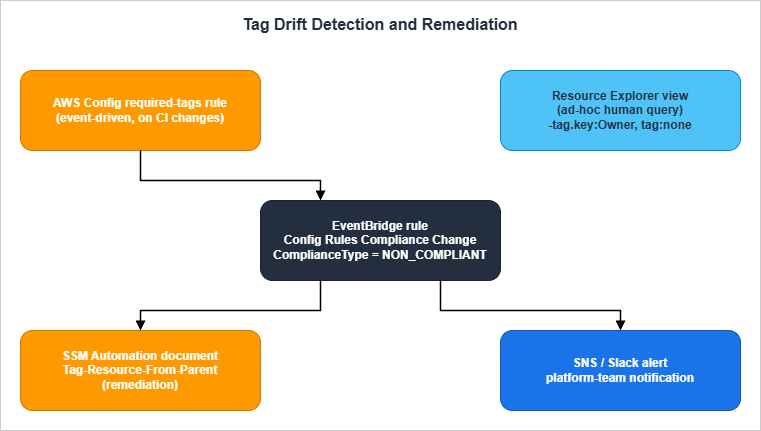
Two diagrams are referenced from the body: an auto-tagging pipeline (Section 4) and a drift-detection architecture (Section 7).
For broader AWS context the article links to The History and Timeline of AWS Services, and where tag-driven access control matters, to AWS IAM Identity Center Complete Setup Guide. For an example of how tagging interacts with security guardrails, see AWS WAF Generative AI Prompt Injection Patterns.
Table of Contents:
- Introduction — Why Tags Matter Beyond Cost
- Tag Naming Conventions
- Mandatory Tag Categories
- Auto-Tagging via CloudFormation Hooks
- Auto-Tagging via SCP and Tag Policies
- Tagging in IaC (Default Tags Patterns)
- Audit and Drift Detection
- Industry-Specific Templates
- Common Pitfalls
- Cost Allocation (Link Only)
- Summary
- References
1. Introduction — Why Tags Matter Beyond Cost
Most teams adopt AWS tagging because finance asks them to. That is a fine first step, but if cost is the only forcing function, tag coverage stalls at the line items that show up in the bill and never reaches the resources that drive operational decisions: security groups, IAM roles, KMS keys, Step Functions state machines, EventBridge rules. The result is an environment where the FinOps team can split the bill but the on-call engineer cannot answer "who owns this?" at three in the morning.This guide treats tagging as a platform contract: every taggable resource must carry a fixed set of keys, and the platform — not the resource owner — is responsible for enforcing it. Once that contract is in place, four operational capabilities become possible:
- Incident triage: Resource Explorer and Resource Groups queries return the owner, the workload, and the environment for any ARN you have, without paging the wrong team.
- Automation targeting: SSM Automation, AWS Backup, Patch Manager, and Systems Manager State Manager all support tag-based targeting. With consistent tags, a single document can backup-and-patch every database without naming each one.
- Security policy: ABAC (Attribute-Based Access Control) lets you collapse N-team-times-M-environment IAM permission sprawl into one policy parameterized on
aws:PrincipalTagandaws:ResourceTag. The tag is the policy boundary. - Audit evidence: A tag like
DataClassification=Confidentialis the cheapest way to make every relevant control — encryption, logging, network isolation — auditable from a single Config aggregator query.
Cost allocation is a fifth capability, but it is downstream of the first four. If you get tag coverage right for operations, security, and audit, the FinOps view comes for free.
The whitepaper that established the AWS-recommended approach is Best Practices for Tagging AWS Resources (March 2023). This article builds on that whitepaper but reframes it for engineers who own the platform, not the spreadsheet.
Scope statement
In scope: naming rules, mandatory categories, automated enforcement (CloudFormation Hooks, SCP, Tag Policies, IaC default tags, Lambda backstop), audit and drift detection, industry-specific templates, common pitfalls.Out of scope: pricing numbers, billing-only mechanics, regulatory compliance specifics. The reader is assumed to have basic familiarity with AWS Organizations, IAM, CloudFormation/Terraform/CDK, and AWS Config.
2. Tag Naming Conventions
A naming convention is not glamorous, but it is the part that breaks first. Two engineers writingOwner and owner create two tags; AWS Cost Allocation Tags treat them as different cost centers; AWS Config rules that look up Owner silently miss the lower-cased ones. The cheapest way to avoid this is to write the convention down and enforce it with Tag Policies (Section 5.1).2.1 Case style — decision matrix
The case style debate (snake_case vs PascalCase vs kebab-case) is religious in some teams. The pragmatic choice depends on which tooling you optimize for.* You can sort the table by clicking on the column name.
| Case style | Example | Pros | Cons | Recommended when |
|---|---|---|---|---|
PascalCase | Environment, CostCenter, DataClassification | Matches the AWS official whitepaper examples; matches CloudFormation property naming | Mixed-case keys are case-sensitive across services and easy to mistype | You start fresh and want alignment with AWS documentation |
snake_case | environment, cost_center, data_classification | Shell-friendly; matches Python/Terraform variable conventions | Diverges from AWS official examples | Your IaC pipeline and tooling are mostly Python/Terraform |
kebab-case | environment, cost-center, data-classification | URL-safe; reads well in CLI output | Many resource ARN parsers split on hyphens; not idiomatic in CloudFormation | Avoid; collides with ARN parsers |
camelCase | environment, costCenter, dataClassification | Concise | Inconsistent with AWS examples; mid-string capitals are easy to mistype | Avoid |
The team should pick one and stop. Mixing styles is worse than picking the wrong one because it makes every Config rule and every IAM condition twice as long. The de-facto AWS-friendly default is PascalCase for keys with lowercase or mixed-case values governed by allowed-value lists (see Section 5.1).
2.2 Reserved prefixes
Theaws: prefix is reserved for AWS-system tags. You cannot create a user tag whose key begins with aws: — the API rejects it. AWS uses this prefix for tags such as aws:cloudformation:stack-name, aws:autoscaling:groupName, and aws:ec2launchtemplate:id, which are added by services on your behalf and are visible in the console but not editable.For your own organization prefix, pick a short namespace and reserve it. A 2–4 character prefix in front of any internal-only key keeps the key from colliding with future AWS additions and makes it obvious which tags are organization-specific.
acme:Owner                   <- organisation tag
acme:DataClassification      <- organisation tag
Environment                  <- well-known industry-standard tag, no prefix
aws:cloudformation:stack-id  <- AWS system tag, never write this yourself
Do not use a prefix for industry-standard keys (
Environment, Project, Owner) because doing so makes existing AWS tooling — managed Config rules, AWS Backup tag policies, AWS Systems Manager parameters — unable to find them. Reserve the prefix for keys that are genuinely organization-specific.2.3 Length, character set, and value-set constraints
Per the AWS general resource-tagging documentation, tags are subject to the following limits across most services:| Constraint | Value |
|---|---|
| Maximum tags per resource | 50 user tags |
| Maximum key length | 128 Unicode characters |
| Maximum value length | 256 Unicode characters |
| Allowed characters in key | Letters, numbers, spaces, and + - = . _ : / @ |
| Case sensitivity | Keys and values are case-sensitive |
| Reserved prefix | aws: (cannot create) |
A few services impose stricter limits — notably, EC2 historically had a separate per-tag character set, and S3 has its own tagging behavior for objects vs buckets. Always check the service-specific documentation when in doubt.
The value-set constraint is the one most teams forget. Without an enforced allow-list, you end up with
Environment values like production, Production, prod, prd, Prod, and live. Section 5.1 shows how Tag Policies enforce a closed allow-list at the AWS-organization level.Recommended baseline policy:
- Keys:
PascalCase, ASCII letters and digits only,:only as namespace separator (acme:Owner), no spaces. - Values:
kebab-casefor free-form text, ISO formats for dates,lowercasefor environment levels (prd,stg,dev). - Booleans:
"true"/"false"as strings (AWS tags are always strings). - Empty values are legal but discouraged. Treat an empty value as missing; it confuses Config rules.
3. Mandatory Tag Categories
A "mandatory" tag is one your platform refuses to create resources without. Keep this list as small as you can; every additional mandatory tag is another reason for a CloudFormation deploy to fail in production. Five tags is enough for most organizations; ten is the practical maximum before fatigue sets in.The five-tag baseline below is the version this article recommends. It maps to the operational, security, and audit capabilities described in Section 1.
* You can sort the table by clicking on the column name.
| # | Tag key | Purpose | Example values | Drives |
|---|---|---|---|---|
| 1 | Owner | Single point of contact for the resource | team-platform, team-payments, alice@example.com | Incident triage, access review |
| 2 | Environment | Deployment stage | prd, stg, dev, sandbox | Automation targeting, blast-radius control |
| 3 | Workload | Logical application or service | checkout-api, data-lake-bronze, customer-portal | Cost allocation by product, service inventory |
| 4 | DataClassification | Sensitivity tier of data on the resource | public, internal, confidential, restricted | Encryption, logging, network policy |
| 5 | ManagedBy | What deploys/owns the resource lifecycle | terraform, cdk, cloudformation, manual | Drift detection, cleanup automation |
The remaining sub-sections expand each mandatory tag. The sixth and seventh tags below —
ExpiresAt and CreatedBy — are recommended optional additions for sandbox environments and audit, respectively.3.1 Owner / Contact
Owner should resolve to a single, real, queryable destination — a Slack channel, an email distribution list, a PagerDuty schedule, a Jira project key. Not a person's name. Personal-name owners rot the moment that person changes roles.Two patterns work well:
- Team-handle owners:
Owner=team-payments. Backed by a directory mapping team handle → on-call rotation. The handle is stable across personnel changes. - Distribution-list owners:
Owner=payments-eng@example.com. Backed by a corporate mail group. Slightly more verbose but unambiguous in audit reports.
Resist the temptation to encode multiple owners in one tag value. If a resource genuinely has two owners, add a second tag (
SecondaryOwner) rather than concatenating with a delimiter — concatenated values do not survive case folding or value-set enforcement.3.2 Environment
Environment is the single most operationally load-bearing tag. Every backup window, every patch maintenance group, every IAM session policy keys off of it. Keep the value list short and closed:prd— productionstg— staging / pre-production / canarydev— engineering / integrationsandbox— short-lived experimentation; auto-expiring
Avoid
qa, uat, test, int, pre-prod, and release as separate values unless your organization has a real, durable distinction between them. Each value adds a row in every targeting table and another mistake in every IAM condition.Environment should be enforced with case-locked allowed values (Section 5.1). The most common production outage caused by tagging is a typo: a Config rule looks for prd and the resource has prod, the rule reports compliant (because the tag is "present", just with a value not in the allow-list — depending on your rule definition), and the resource silently drops out of automated patching.3.3 Workload / Application / Service
Workload answers "what product or service does this resource belong to?". It is the link from the bill to the engineering org chart.A simple rule: every workload value should map to a single Git repository (or at most a small fixed set, when a microservice product spans multiple repos). If you cannot point at the source, the workload is not real and the value is a fiction.
A short, machine-friendly value beats a human description.
checkout-api is better than Checkout API (US-East payments cluster).For multi-tenant SaaS,
Workload typically names the service component (tenant-router, analytics-pipeline), and a separate Tenant tag — or an obfuscated tenant ID — captures the per-customer dimension. Do not put tenant identifiers into Workload; that explodes the value cardinality and breaks Resource Explorer queries.3.4 Compliance / DataClassification
DataClassification is the tag your security team will care about most, and the one that pays for itself in audits. It answers "if this resource is compromised, how bad is it?".A four-level scheme is enough:
public— content intended for unauthenticated viewers (marketing site, public S3 buckets serving CDN content).internal— operational data, default for most resources, no PII or customer data.confidential— customer data without direct regulatory implications, typical SaaS application data, internal financials.restricted— regulated data: PII, payment instruments, health records, secrets, encryption-key material.
The classification drives downstream controls:
restrictedresources require KMS encryption with a customer-managed key, VPC endpoint access only, S3 access logs enabled, CloudTrail data events.confidentialresources require KMS encryption (AWS-managed CMK acceptable), CloudTrail management events.internalandpublichave baseline requirements only.
Each control becomes one Config rule keyed off the tag value. This is the cleanest mapping from compliance language ("encrypt all confidential data at rest") to technical enforcement ("Config rule
s3-bucket-server-side-encryption-enabled for resources where DataClassification in confidential, restricted").3.5 Lifecycle (CreatedBy, ExpiresAt)
Two optional tags pay back their cost quickly in non-production environments:CreatedBy— the principal that created the resource. Auto-populated by an event-driven Lambda onCreateResourceCloudTrail events (Section 5.3). Useful for "who made this?" answers without spelunking CloudTrail.ExpiresAt— ISO-8601 date after which the resource may be cleaned up. Used in sandbox accounts: a nightly Lambda finds resources whereEnvironment=sandboxandExpiresAt < todayand tears them down.
Do not require
ExpiresAt in production. Production resources are not supposed to have an expiry; if they did, your environments would be confused.4. Auto-Tagging via CloudFormation Hooks
Once the convention is written, the question is how to enforce it. The cleanest answer for an Organization rooted in CloudFormation is a CloudFormation Hook: a custom validation that runs synchronously before every resource create, update, or delete operation and either approves or rejects it.Hooks invoke at three lifecycle points:
pre-create, pre-update, and pre-delete. Per the CloudFormation Hooks Developer Guide, hooks are read-only validators — they can return SUCCESS or FAILED but they cannot mutate the resource being deployed. That means they enforce tagging by failing deployments that lack the required tags, not by quietly adding the tags. This is a feature, not a limitation: it forces the IaC author to be explicit, and it produces a clean stack trace in CloudFormation events when a deploy is blocked.4.1 Pre-create hook structure
A typical pre-create tagging hook checks every resource in the changeset for the five mandatory tag keys from Section 3 and, optionally, that the values are members of the allowed-value list.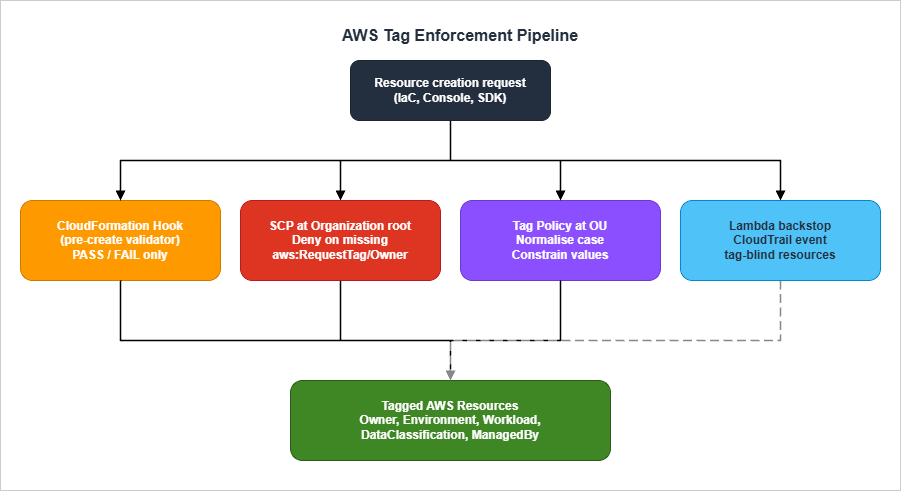
4.2 Hook code — Python sample
The Python skeleton below is what you would author with thecfn CLI (cfn init --type HOOK). The handler iterates over every targeted resource and rejects the changeset if any required tag is missing.import logging
from cloudformation_cli_python_lib import (
BaseHookHandlerRequest,
HandlerErrorCode,
Hook,
HookInvocationPoint,
OperationStatus,
ProgressEvent,
)
LOG = logging.getLogger(__name__)
TYPE_NAME = "Acme::Tagging::Required"
hook = Hook(TYPE_NAME, lambda *_args, **_kwargs: None)
REQUIRED_KEYS = {"Owner", "Environment", "Workload", "DataClassification", "ManagedBy"}
ALLOWED_ENV = {"prd", "stg", "dev", "sandbox"}
ALLOWED_DC = {"public", "internal", "confidential", "restricted"}
def _validate(tags):
tag_map = {t["Key"]: t["Value"] for t in tags or []}
missing = REQUIRED_KEYS - tag_map.keys()
if missing:
return f"Missing required tags: {sorted(missing)}"
if tag_map["Environment"] not in ALLOWED_ENV:
return f"Environment value '{tag_map['Environment']}' not in {sorted(ALLOWED_ENV)}"
if tag_map["DataClassification"] not in ALLOWED_DC:
return f"DataClassification value '{tag_map['DataClassification']}' not allowed"
return None
@hook.handler(HookInvocationPoint.CREATE_PRE_PROVISION)
def pre_create(session, request: BaseHookHandlerRequest, callback_context):
target_model = request.hookContext.targetModel
properties = target_model.get("resourceProperties") or {}
tags = properties.get("Tags") or []
error = _validate(tags)
if error:
return ProgressEvent(
status=OperationStatus.FAILED,
errorCode=HandlerErrorCode.NonCompliant,
message=error,
)
return ProgressEvent(status=OperationStatus.SUCCESS)
A few notes on the handler:
- Tag location varies by resource type. For most CloudFormation types, tags live at
properties.Tagsas a list of{Key, Value}objects. But for some types (CloudWatch Log Groups, for example) tags are a map. The hook must normalize both shapes; the simplet["Key"]/t["Value"]access above only handles the list shape. - TargetFilters at registration time scope the hook to a fixed set of resource types. A practical first-pass list:
AWS::S3::Bucket,AWS::EC2::Instance,AWS::EC2::Volume,AWS::Lambda::Function,AWS::DynamoDB::Table,AWS::RDS::DBInstance. Extend as coverage matures. - Failure mode: returning
OperationStatus.FAILEDwithHandlerErrorCode.NonCompliantcauses CloudFormation to abort the changeset with a clear, actionable message in the Events tab. The IaC author re-runs after fixing the tags.
4.3 Activation per Region and per Account
Hook registration is a CloudFormation operation in its own right. For an Organization, the deployment pattern is:- Build the hook package (
cfn submit) and publish it as a private third-party type in your management account. - Use CloudFormation StackSets with service-managed permissions to share the hook to all member accounts.
- In each member account, configure the hook with
TargetStacks=ALLandFailureMode=FAILso that the hook is invoked for every stack and missing tags cause a hard fail.
A minimal
HookConfiguration looks like this:HookTypeConfig:
Type: AWS::CloudFormation::HookTypeConfig
Properties:
TypeName: Acme::Tagging::Required
Configuration: |
{
"CloudFormationConfiguration": {
"HookConfiguration": {
"TargetStacks": "ALL",
"FailureMode": "FAIL",
"Properties": {}
}
}
}
Region-by-region rollout is necessary because hooks are region-scoped. Use a StackSet per home region; do not assume the management-account registration propagates.
5. Auto-Tagging via SCP and Tag Policies
CloudFormation Hooks (Section 4) close the IaC path. They do nothing for resources created outside IaC: a console click, an SDK call from a script, or an AWS service that auto-creates resources internally. For those, you need policy enforcement at the AWS-organization level. Two mechanisms are relevant: Tag Policies (operational normalization) and SCPs (preventive denial).The two are complementary. Tag Policies tell you what good looks like and produce compliance reports; SCPs prevent resource creation when the rules are violated.
5.1 Tag Policy JSON example — allowed values, case
A Tag Policy is a JSON document attached at the AWS Organizations OU level. It defines, per tag key, what values are allowed and what case style is canonical. Per the Tag Policy syntax reference, a typical policy looks like:{
"tags": {
"Environment": {
"tag_key": {
"@@assign": "Environment"
},
"tag_value": {
"@@assign": ["prd", "stg", "dev", "sandbox"]
},
"enforced_for": {
"@@assign": [
"ec2:instance",
"ec2:volume",
"s3:bucket",
"rds:db",
"dynamodb:table",
"lambda:function"
]
}
},
"DataClassification": {
"tag_key": {
"@@assign": "DataClassification"
},
"tag_value": {
"@@assign": ["public", "internal", "confidential", "restricted"]
},
"enforced_for": {
"@@assign": ["s3:bucket", "rds:db", "dynamodb:table"]
}
},
"Owner": {
"tag_key": {
"@@assign": "Owner"
}
}
}
}
Two important properties of Tag Policies:
tag_key.@@assignis the canonical case. AWS will generate compliance reports treatingenvironment,Environment, andENVIRONMENTas variants of the same tag key, with the@@assignvalue as the canonical form. This is how Tag Policies normalize case across the Organization.enforced_forlists the resource types for which Tag Policy compliance is enforced — meaning a tag operation (TagResource,UntagResource, and tag changes embedded in resource updates) that would violate the policy will fail. Tag Policies do not prevent the underlyingCreate*API from running — that is the SCP's job (Section 5.2). For resource types inenforced_forthat accept tags on create, a creation request carrying a non-compliant tag will fail because the embedded tag operation is rejected; for everything else, the resource is created and the violation surfaces only on the next tagging change. The list of services and operations supported by Tag Policy enforcement is published in the AWS docs and grows over time.
The policy above accomplishes three things:
- Normalizes the case of
Environment,DataClassification, andOwneracross the entire OU. - Constrains values for
EnvironmentandDataClassificationto a closed allow-list. - Enforces both for the most common workload-bearing resource types.
5.2 SCP that denies resource creation without required tags
Tag Policies fail tag operations; they don't denyCreate* API calls. To prevent resources from being created without a tag, attach an SCP that uses the aws:RequestTag and aws:TagKeys condition keys.{
"Version": "2012-10-17",
"Statement": [
{
"Sid": "DenyCreateWithoutOwnerEnvironment",
"Effect": "Deny",
"Action": [
"ec2:RunInstances",
"ec2:CreateVolume",
"s3:CreateBucket",
"rds:CreateDBInstance",
"dynamodb:CreateTable",
"lambda:CreateFunction"
],
"Resource": "*",
"Condition": {
"Null": {
"aws:RequestTag/Owner": "true"
}
}
},
{
"Sid": "DenyCreateWithBadEnvironmentValue",
"Effect": "Deny",
"Action": "*",
"Resource": "*",
"Condition": {
"StringNotEqualsIfExists": {
"aws:RequestTag/Environment": ["prd", "stg", "dev", "sandbox"]
}
}
}
]
}
Three notes on this SCP:
- The first statement uses
Nullonaws:RequestTag/Ownerwith valuetrueto mean "deny when the request does not include anOwnertag". This is the canonical SCP pattern for "tag must be present". - The second statement uses
StringNotEqualsIfExistsrather thanStringNotEqualsso that requests without anEnvironmenttag are not caught here — they are caught by the first statement (or itsEnvironment-specific equivalent). This avoids spurious double-denial. aws:RequestTagonly works for API calls that accept tags on create. Many API calls do not. For those, the Lambda backstop (Section 5.3) is the safety net.
For a deeper treatment of how tag-keyed conditions interact with permission set design, see AWS IAM Identity Center Complete Setup Guide.
5.3 Lambda backstop for tag-blind resources
A non-trivial fraction of AWS resources cannot be tagged at create time, or are created by AWS services on your behalf. EBS volumes attached to EC2 instances, ENIs created when a Lambda joins a VPC, default security groups, automatic EBS snapshots, and IAM service-linked roles are all examples.For these, the only enforcement option is post-hoc reconciliation. The pattern is:
- EventBridge rule on CloudTrail
RunInstances,AttachVolume,CreateNetworkInterface, etc. - Lambda function reads the parent resource's tags, computes the inherited tag set, and calls
CreateTags/TagResourceon the child resource. - CloudWatch alarm on Lambda errors — a backstop that fails silently is worse than no backstop.
Skeleton Lambda (Python, EBS-volume-from-EC2 example):
import boto3

ec2 = boto3.client("ec2")

INHERITED_KEYS = {"Owner", "Environment", "Workload", "DataClassification"}


def lambda_handler(event, context):
    detail = event["detail"]
    request = detail["requestParameters"]
    response = detail["responseElements"]
    instances = response["instancesSet"]["items"]
    for instance in instances:
        instance_id = instance["instanceId"]
        volumes = [
            mapping["ebs"]["volumeId"]
            for mapping in instance.get("blockDeviceMapping", [])
            if mapping.get("ebs")
        ]
        tags = ec2.describe_tags(
            Filters=[{"Name": "resource-id", "Values": [instance_id]}]
        )["Tags"]
        inherited = [
            {"Key": t["Key"], "Value": t["Value"]}
            for t in tags
            if t["Key"] in INHERITED_KEYS
        ]
        if volumes and inherited:
            ec2.create_tags(Resources=volumes, Tags=inherited)
    return {"tagged_volumes": len(volumes)}
The Lambda is idempotent: re-tagging an already-tagged resource with identical tags is a no-op. Schedule a daily reconciliation run as well as the event-driven path, in case events are dropped during a regional incident.
6. Tagging in IaC (Default Tags Patterns)
The cleanest place to enforce tags is at the IaC layer: write the tag set once at the provider/stack level, and let every resource inherit it. Each major IaC tool has a different idiom.6.1 Terraform — default_tags and provider aliases
Per the Terraform AWS Provider documentation, the provider supports a default_tags block that attaches a tag set to every resource the provider creates. This was added in provider version 3.38.0 and has been mature since the 5.x line.provider "aws" {
region = "us-east-1"
default_tags {
tags = {
Owner = var.owner
Environment = var.environment
Workload = var.workload
DataClassification = var.data_classification
ManagedBy = "terraform"
}
}
}
# Disaster-recovery alias inherits the same default tags
# but pins a Region tag for clarity.
provider "aws" {
alias = "dr"
region = "us-west-2"
default_tags {
tags = {
Owner = var.owner
Environment = var.environment
Workload = var.workload
DataClassification = var.data_classification
ManagedBy = "terraform"
Region = "us-west-2"
}
}
}
resource "aws_s3_bucket" "data" {
bucket = "acme-${var.environment}-data"
tags = {
# Resource-specific tag; merged with default_tags.
BackupTier = "daily"
}
}
Key behavioral details:
- Resource-level tags merge with default tags, with resource-level winning on key collision. Setting the same key in both places is legal but causes a perpetual diff in plan output; a known issue in providers 3.38.0–4.67.0 was particularly noisy. From v5.0.0 onward the diff is much cleaner.
default_tagsis per-provider-block, not per-region. If you need different tag sets for different regions, you need different provider aliases.aws_default_tagsdata source lets a module read the effective default tags without re-declaring them — useful when a child module needs to merge module-specific tags into atagsargument explicitly.
6.2 CDK — Tags.of(scope).add() and Aspects
Per the AWS CDK v2 Tags reference, tags are applied via the Tags class, which uses Aspects under the hood to walk the construct tree and apply the tag to every taggable construct in scope.import { App, Stack, Tags } from 'aws-cdk-lib';
const app = new App();
const stack = new Stack(app, 'PaymentsStack');
Tags.of(stack).add('Owner', 'team-payments');
Tags.of(stack).add('Environment', 'prd');
Tags.of(stack).add('Workload', 'checkout-api');
Tags.of(stack).add('DataClassification', 'confidential');
Tags.of(stack).add('ManagedBy', 'cdk');
Python equivalent:
from aws_cdk import App, Stack, Tags

app = App()
stack = Stack(app, "PaymentsStack")

Tags.of(stack).add("Owner", "team-payments")
Tags.of(stack).add("Environment", "prd")
Tags.of(stack).add("Workload", "checkout-api")
Tags.of(stack).add("DataClassification", "confidential")
Tags.of(stack).add("ManagedBy", "cdk")
Behavioral notes:
- Default priority is 100 for
Tags.add(), 50 for tags applied directly to a CFn resource, 200 forTags.remove(). Higher priority wins on conflict; ties are broken by which operation is closer to the bottom of the tree. Tagsare not applied acrossStageboundaries. If you nest stages, tag at the stage level or below.includeResourceTypes/excludeResourceTypesscope a tag to a subset of CloudFormation resource types. Useful when one tag — for example aBackupTiertag — should apply only to data-bearing resources.applyToLaunchedInstanceson theTagprops controls whether a tag attached at the Auto Scaling group level also propagates to EC2 instances launched by that group. Default istrue. The modern CDK v2 recommendation is to define instance-level tags on the Launch Template'sTagSpecifications(which scopes per-resource-type tagging cleanly toinstance,volume,network-interface) and reserve the ASG-levelTags.of()for tags that should apply to the ASG resource itself; setapplyToLaunchedInstances=falseto avoid double-tagging when the launch template already covers the instance.
For dynamic per-construct tagging — for example, applying a tag whose value comes from the construct's own path — write a custom Aspect:
import { IAspect, Tag, Aspects } from 'aws-cdk-lib';
import { IConstruct } from 'constructs';

class ConstructPathTagger implements IAspect {
  visit(node: IConstruct) {
    new Tag('CdkPath', node.node.path).visit(node);
  }
}

Aspects.of(stack).add(new ConstructPathTagger());
6.3 CloudFormation — stack-level tags and propagation
CloudFormation supports a stack-levelTags parameter that propagates to every taggable resource in the stack:AWSTemplateFormatVersion: '2010-09-09'
Description: Payments checkout API
Resources:
CheckoutTable:
Type: AWS::DynamoDB::Table
Properties:
TableName: checkout
BillingMode: PAY_PER_REQUEST
AttributeDefinitions:
- AttributeName: orderId
AttributeType: S
KeySchema:
- AttributeName: orderId
KeyType: HASH
Tags:
- Key: BackupTier
Value: daily
# Stack-level tags are passed at deploy time:
# aws cloudformation deploy --tags Owner=team-payments \
# Environment=prd Workload=checkout-api \
# DataClassification=confidential ManagedBy=cloudformation
Stack-level tags apply to most resource types. The notable exceptions are types created indirectly (e.g., default security groups, ENIs created by Lambda VPC attachment) — which is why the Lambda backstop (Section 5.3) is necessary even when CloudFormation stack tagging is in use.
6.4 SAM — Globals
AWS SAM (Serverless Application Model) inherits CloudFormation's stack-tag mechanism, but it adds aGlobals block that can apply a default tag set to every resource of a given type:AWSTemplateFormatVersion: '2010-09-09'
Transform: AWS::Serverless-2016-10-31
Globals:
Function:
Tags:
Owner: team-payments
Environment: prd
Workload: checkout-api
DataClassification: confidential
ManagedBy: sam
Resources:
HandleOrder:
Type: AWS::Serverless::Function
Properties:
CodeUri: ./src
Handler: app.handler
Runtime: python3.12
Globals works for Function, Api, HttpApi, SimpleTable, and a few others. Resource-level tags merge with and override Globals, identical to Terraform's default_tags semantics.7. Audit and Drift Detection
Enforcement at create time is necessary but not sufficient. Resources change over time, tags are renamed or stripped, and new resource types appear that the original SCP did not enumerate. The audit layer answers two questions: what is currently untagged? and what has drifted from policy?.The recommended architecture combines four AWS services.
7.1 Resource Explorer queries for missing tags
Per the Resource Explorer query syntax reference, Resource Explorer supports filter operators that surface missing tags directly. The most useful queries for a tag audit are:# Resources with no user-applied tags at all
tag:none
# Resources missing the Owner tag
-tag.key:Owner
# Resources missing Environment, in production accounts
-tag.key:Environment accountid:111111111111,222222222222
# Resources tagged Environment=prd but missing DataClassification
tag:Environment=prd -tag.key:DataClassification
# Resources of S3 type missing Owner
service:s3 resourcetype:s3:bucket -tag.key:OwnerTwo operational notes:
- The view Resource Explorer queries against must include tags as a property (
IncludeProperty: tags). Otherwise thetag.*filters fail validation. Set this once at view creation; without it, the queries above silently match nothing. - IAM resources (roles, users, policies) are not currently indexed by Resource Explorer. Tag audit for IAM principals must use IAM-specific tooling (
aws iam list-roles --query 'Roles[?Tags == null]') or AWS Config'siam-role-managed-policy-checkand similar rules.
7.2 AWS Config managed rule — required-tags
Per the AWS Config required-tags rule documentation, the managed rule REQUIRED_TAGS accepts up to six required tag keys and their allowed values, and reports per-resource compliance for a fixed list of resource types. Trigger type is Configuration changes — the rule re-evaluates whenever a resource's configuration item (CI) is updated.CloudFormation snippet to deploy the rule:
RequiredTagsRule:
  Type: AWS::Config::ConfigRule
  Properties:
    ConfigRuleName: required-tags
    Description: Resources must carry the five mandatory tags
    InputParameters:
      tag1Key: Owner
      tag2Key: Environment
      tag2Value: 'prd,stg,dev,sandbox'
      tag3Key: Workload
      tag4Key: DataClassification
      tag4Value: 'public,internal,confidential,restricted'
      tag5Key: ManagedBy
      tag5Value: 'terraform,cdk,cloudformation,sam,manual'
    Scope:
      ComplianceResourceTypes:
        - AWS::S3::Bucket
        - AWS::EC2::Instance
        - AWS::EC2::Volume
        - AWS::DynamoDB::Table
        - AWS::RDS::DBInstance
        - AWS::ElasticLoadBalancingV2::LoadBalancer
    Source:
      Owner: AWS
      SourceIdentifier: REQUIRED_TAGS
Important quirks:
- The rule supports up to 6 tags at a time. If your mandatory list grows past six, deploy two rules with disjoint key sets.
- The managed automation document
AWS-SetRequiredTagsexists and can add tags to a resource, but it does not infer the missing values from the Config rule's parameters — it expects the desired tag set to be passed as input parameters per execution. For inheritance-style remediation (copying tags from a parent resource, for example), write a custom SSM Automation document (Section 7.4). - AWS Config does not record tags for all resource types. Before relying on the rule, verify that AWS Config emits a CI containing tags for the resource types in your
ComplianceResourceTypesscope. The Config docs describe how to check this per resource type. - The rule is regional. Deploy via StackSet to every active region.
7.3 Custom Config rule — Lambda
For tag combinations the managed rule cannot express — for example "ifDataClassification=restricted then Encryption=true must also be a tag, and the resource must use a customer-managed KMS key" — write a custom rule.import json
import boto3
config = boto3.client("config")
def lambda_handler(event, context):
invoking_event = json.loads(event["invokingEvent"])
item = invoking_event["configurationItem"]
tags = item.get("tags") or {}
result = "COMPLIANT"
annotation = ""
if tags.get("DataClassification") == "restricted":
if tags.get("Encryption") != "true":
result = "NON_COMPLIANT"
annotation = "DataClassification=restricted requires Encryption=true tag"
config.put_evaluations(
Evaluations=[
{
"ComplianceResourceType": item["resourceType"],
"ComplianceResourceId": item["resourceId"],
"ComplianceType": result,
"OrderingTimestamp": item["configurationItemCaptureTime"],
"Annotation": annotation[:256] or None,
}
],
ResultToken=event["resultToken"],
)
Custom rules are heavier than managed rules — every CI update invokes the Lambda — so use them for the conditional rules the managed
REQUIRED_TAGS cannot express, not for plain key-presence checks.7.4 Remediation via SSM Automation
When a Config rule reportsNON_COMPLIANT, an EventBridge rule on the Config Rules Compliance Change event can trigger an SSM Automation document that copies inheritable tags from the resource's parent.RemediationDoc:
Type: AWS::SSM::Document
Properties:
Name: Tag-Resource-From-Parent
DocumentType: Automation
Content:
schemaVersion: '0.3'
description: Inherit tags from the EC2 instance to its volumes
parameters:
InstanceId:
type: String
AutomationAssumeRole:
type: String
mainSteps:
- name: ReadInstanceTags
action: aws:executeAwsApi
inputs:
Service: ec2
Api: DescribeTags
Filters:
- Name: resource-id
Values:
- '{{ InstanceId }}'
outputs:
- Name: Tags
Selector: '$.Tags'
Type: MapList
- name: TagAttachedVolumes
action: aws:executeScript
inputs:
Runtime: python3.11
Handler: handler
Script: |
import boto3
def handler(event, context):
ec2 = boto3.client('ec2')
inst = ec2.describe_instances(InstanceIds=[event['InstanceId']])
vols = [bd['Ebs']['VolumeId']
for r in inst['Reservations']
for i in r['Instances']
for bd in i.get('BlockDeviceMappings', [])
if bd.get('Ebs')]
inherited = [t for t in event['Tags']
if t['Key'] in {'Owner','Environment','Workload','DataClassification'}]
if vols and inherited:
ec2.create_tags(Resources=vols, Tags=inherited)
return {'tagged': vols}
InputPayload:
InstanceId: '{{ InstanceId }}'
Tags: '{{ ReadInstanceTags.Tags }}'
The remediation runs only on
NON_COMPLIANT resources, so its blast radius is bounded by Config's evaluation cadence. Pair the document with a CloudWatch dashboard counting executions per day; a sudden spike usually signals a bug in a new IaC module.8. Industry-Specific Templates
Different industries weigh the mandatory tag categories differently. The five-tag baseline (Section 3) does not change; what changes is the value list forDataClassification, the additional optional tags, and the strictness of enforcement. Three templates follow.8.1 SaaS / Multi-Tenant
Owner              = team-<service-handle>
Environment        = prd | stg | dev
Workload           = <service-name>
DataClassification = internal | confidential | restricted
ManagedBy          = terraform | cdk
Tenant             = t-<obfuscated-id>     (optional, on customer-data resources)
TenantTier         = free | growth | enterprise
RegionTier         = primary | dr
Rationale: SaaS workloads need the
Tenant axis for blast-radius control. Encoding tenant tier separately lets cost analysis distinguish enterprise-customer infrastructure from free-tier infrastructure without leaking tenant identity into bills shared with internal teams.8.2 Finance — audit-trail emphasis
Owner              = team-<service-handle>
Environment        = prd | stg | dev
Workload           = <service-name>
DataClassification = internal | confidential | restricted | regulated
ManagedBy          = terraform | cdk | cloudformation
Regulator          = sec | finra | mas | fsa | none
ChangeRecord       = CR-<jira-key>            (mandatory in prd)
RetentionTier      = 7y | 10y | indefinite
Rationale: financial services regulators care about change attribution.
ChangeRecord ties every production resource to a tracked change record. Regulator and RetentionTier make backup, log retention, and access reviews queryable in one Config aggregator.8.3 Healthcare — PHI / data classification
Owner              = team-<service-handle>
Environment        = prd | stg | dev
Workload           = <service-name>
DataClassification = internal | confidential | restricted | phi
ManagedBy          = terraform | cdk
PhiCategory        = none | demographics | clinical | genetic | imaging
DataResidency      = us | eu | apac
HipaaScope         = in-scope | out-of-scope
Rationale: HIPAA-regulated workloads must distinguish PHI categories because retention and access-control rules differ per category.
HipaaScope is the on/off switch that downstream Config rules use to scope HIPAA-specific encryption and logging requirements.These templates are starting points, not regulatory advice. The actual list of values must be reviewed with legal and compliance teams. Section 10 has a pointer to the AWS Cost Allocation docs for the financial side; this article does not cover the regulatory specifics.
9. Common Pitfalls
The pitfalls below are the ones most likely to bite a tag standard six months after rollout, when nobody is paying attention.9.1 Per-resource tag limit (50)
Most AWS resource types support up to 50 user tags per resource. It is easy to design a tag set that bumps against this limit when you combine baseline tags with workload-specific tags, multi-region tags, and tooling-injected tags (CloudFormation adds three system tags itself:aws:cloudformation:stack-id, aws:cloudformation:stack-name, aws:cloudformation:logical-id).Mitigations:
- Prefer fewer high-information tags over many low-information tags.
Workload=checkout-apiis one tag;Project=Checkout,Component=Api,Subcomponent=Webhookis three tags doing the same job. - Aggregate at the parent. Tag the VPC, not the subnets, where it makes operational sense.
- Treat the baseline as a budget. If the five mandatory tags plus three system tags plus six workload tags consume 14 of 50, that is fine. If they consume 45, redesign.
9.2 Case-sensitivity surprises
Tag keys and values are case-sensitive. Three common failures:Environment=ProductionvsEnvironment=production: cost reports show two cost centers.Owner=Alicevsowner=Alice: one is enforced, the other is invisible to the SCP.DataClassification=ConfidentialvsDataClassification=confidential: the Config rule looks for the lowercase form; the uppercase form silently passes the "tag exists" check but fails the value enforcement.
Tag Policies (Section 5.1) normalize case at the Organization level. Use them.
9.3 Resources that do not propagate tags
Stack-level CloudFormation tags do not propagate to:- Default security groups created when a VPC is created.
- ENIs (Elastic Network Interfaces) created when Lambda attaches to a VPC.
- EBS volumes attached to EC2 instances created via Auto Scaling, unless the launch template propagates tags to volumes.
- IAM service-linked roles created automatically by services.
- CloudWatch log groups auto-created by Lambda functions.
The Lambda backstop (Section 5.3) is the standard remedy. Plan for it from day one; assume that 5–10% of resources will need post-hoc tagging.
9.4 Tag-aware vs tag-blind services
Some AWS services do not currently support tagging at all, or support tagging on the parent resource but not on child resources. The list of supported services is published per service in the AWS Tagging Reference. As of 2026, common gaps are:- AWS Glue jobs: support tags, but Glue triggers and crawlers have separate, easier-to-miss tagging APIs.
- Amazon Macie findings: not user-taggable.
- AWS Backup recovery points: inherit tags from the source, not the backup plan.
- Amazon EventBridge rules in custom event buses: support tags, but rule targets do not.
Build the tag standard around the services you use most, and accept partial coverage on the rest. Track the gap in your tag-coverage dashboard explicitly.
9.5 Backfilling existing resources
When a tag standard is rolled out to an existing environment, retrofitting can take months. The recommended sequence:- Inventory: a Resource Explorer view filtered to
tag:noneplus-tag.key:Ownerproduces the work queue. - Auto-fill from CloudTrail: a Lambda reads
CreateResourceevents from the last 90 days of CloudTrail and tags the resource withCreatedBy=<userIdentity>. This recovers ownership for most recently created resources. - Manual triage: for resources older than CloudTrail retention, the platform team posts a list to each engineering channel and asks for owners. Set a 30-day deadline; resources still untagged after the deadline become candidates for cleanup.
- Block new untagged: only after backfill is at 95%+ coverage is the SCP from Section 5.2 attached. Doing it earlier blocks legitimate work and creates social friction that derails the rollout.
The inverse mistake is rolling the SCP out first and discovering that a critical batch job creates resources without
Owner tags. The deploy fails, the on-call engineer disables the SCP, and the standard is dead.10. Cost Allocation (Link Only)
Tags drive cost allocation in AWS, but the cost mechanics — what counts as a Cost Allocation Tag, when it activates, the user-defined vs AWS-generated distinction, and the propagation rules to AWS Cost Explorer and Cost and Usage Reports — change frequently and are well covered in the official documentation. This article intentionally does not cover them. Refer to:- AWS Billing User Guide — Cost Allocation Tags
- AWS Cost Explorer — Filtering by tag
- AWS Cost and Usage Reports — Tag columns
The relevant operational point for this guide: once you have activated a tag as a Cost Allocation Tag in the Billing console, any historical resource without that tag is invisible to the cost view for the period before activation. Activate the five mandatory tags from Section 3 the day they are introduced, even if the value list is incomplete; backfilling activation date is impossible.
11. Summary
A durable AWS tagging strategy is a layered system:- A small fixed standard (five mandatory tags — Owner, Environment, Workload, DataClassification, ManagedBy) that the whole organization agrees on.
- A naming convention (PascalCase keys, closed allow-list values, organization prefix for non-standard keys) enforced at the Organization level by Tag Policies.
- Preventive enforcement at create time via CloudFormation Hooks for the IaC path and SCPs for the API-call path.
- Default-tag patterns in IaC (Terraform
default_tags, CDKTags.of(scope).add(), CloudFormation stack tags, SAMGlobals) so authors get the baseline for free. - A Lambda backstop for resources that cannot be tagged at create time.
- Audit and drift detection via AWS Config
required-tags, custom Config rules, Resource Explorer queries, and EventBridge-triggered SSM Automation remediation. - Industry-aware templates for the value lists, not the keys.
- Discipline about pitfalls: the 50-tag limit, case sensitivity, non-propagating resource types, tag-blind services, and backfill order.
What separates a tagging standard that lasts from one that doesn't is the order of rollout: standard → naming → IaC defaults → audit → preventive enforcement. Each step depends on the last. Skipping straight to the SCP is the most common way to fail.
For the broader AWS service evolution that backs this guidance, see The History and Timeline of AWS Services. For the access-control side of the story — how the same tags drive permission boundaries — see AWS IAM Identity Center Complete Setup Guide. For an example of how tagging composes with AWS WAF guardrails on AI-facing workloads, see AWS WAF Generative AI Prompt Injection Patterns.
12. References
AWS Documentation
- Best Practices for Tagging AWS Resources (Whitepaper)
- AWS Organizations — Tag Policies Overview
- AWS Organizations — Tag Policy Syntax
- AWS CloudFormation Hooks Developer Guide
- AWS Config Managed Rule — required-tags
- AWS Resource Explorer — Search Query Syntax
- AWS CDK v2 Developer Guide — Tags
- Terraform AWS Provider — Documentation
- AWS Service Authorization Reference — Global Condition Keys (aws:RequestTag, aws:ResourceTag, aws:TagKeys)
- AWS Billing User Guide — Cost Allocation Tags
Related Articles on hidekazu-konishi.com
- The History and Timeline of AWS Services
- AWS IAM Identity Center Complete Setup Guide
- AWS WAF Generative AI Prompt Injection Patterns
References:
Tech Blog with curated related content
Written by Hidekazu Konishi