Amazon S3 Security and Access Control Guide - Bucket Policies, IAM, Access Points, Block Public Access, and Encryption
First Published:
Last Updated:
403 Access Denied.This guide is the security counterpart to my Amazon S3 object key design best practices article: key design is about performance and organization, this guide is about access control and encryption. It answers four questions that recur in every S3 security review:
- Who do I grant access to, and with which mechanism? (identity policies, bucket policies, access points, Object Ownership / ACLs)
- How do I prevent public exposure? (Block Public Access across four levels)
- How do I encrypt — at rest and in transit — and prove it is enforced? (SSE-S3, SSE-KMS, DSSE-KMS, bucket keys, TLS)
- How do I verify the result, instead of assuming the configuration is safe? (IAM Access Analyzer for S3, CloudTrail, access logs)
The thread that runs through all four is defense in depth. No single setting makes a bucket "secure." A public-access block, least-privilege policies, encryption, and continuous verification each cover a failure mode the others do not. I keep selection compressed into the entry sections and spend the body on how the mechanisms work internally, how to express them in reproducible policy and CLI, how they fail, and how to diagnose them. The step-by-step logic of general IAM policy evaluation is delegated to my IAM policy evaluation logic, step by step article; here I specialize that logic to S3. Key-management mechanics are delegated to AWS History and Timeline of AWS KMS, and the service's own history to AWS History and Timeline of Amazon S3.
A note on honesty, because this is a security topic: nothing below is a guarantee. The policies are defensive building blocks, shown only in the detail needed to configure and audit them. "The configuration passed" is not the same as "the data is safe," and Section 9 is built around that distinction.
It also helps to keep the shared responsibility model in view. AWS secures the S3 infrastructure, the durability of stored objects, and the encryption primitives; you are responsible for access configuration — who can reach the data, whether it is encrypted with the keys you intend, and whether public exposure is blocked. Every mechanism in this guide lives on your side of that line, which is precisely why misconfiguration, not a platform flaw, is the dominant cause of S3 incidents. The goal is not to memorize each setting but to internalize how they compose, so that a new bucket inherits a secure posture and a deviation from it stands out.
1. Introduction
S3 access control grew up in layers. In the beginning there were ACLs. Then came IAM identity policies and bucket policies. Then Block Public Access, Object Ownership, access points, and a family of policy condition keys. Each addition solved a real problem, but the cumulative result is that a singleGetObject request is evaluated against potentially six or seven different policy surfaces. The good news is that the interaction is deterministic, and the modern defaults are sane: for buckets created today, ACLs are disabled, Block Public Access is on, and objects are encrypted at rest by default.The defaults matter so much that they reframe the whole topic. A few years ago, "secure your bucket" largely meant "turn off public access and stop relying on ACLs." Today S3 does most of that for you on new buckets. The work that remains is the work this guide focuses on: writing least-privilege policies, choosing and enforcing the right encryption, restricting access to the networks and accounts that should have it, and proving — continuously — that the result matches intent.
The scope is deliberately bounded. I do not re-derive general IAM evaluation (delegated), I do not cover object key/prefix design (delegated), and I do not write any pricing numbers — for cost, follow the official pricing links in the References. Attack techniques are out of scope; everything here is detection and defensive configuration.
One way to read the guide: Sections 2 through 6 build the model (how authorization works, which policy to use, how to block public access, how access points scale sharing, how encryption works); Sections 7 and 8 are the reproducible policy reference (condition keys and cross-account); and Sections 9 through 11 are operations (auditing, pitfalls, and a full worked example). If you only have time for two, read Section 2 to understand evaluation and Section 9 to understand verification — the first tells you why a request is allowed, the second tells you whether you can trust that it still is.
2. How S3 Authorization Works
When S3 receives a request, it does not consult one policy. It assembles all relevant policies into a single set and evaluates them in a fixed order. Understanding that order is the foundation for everything else in this guide.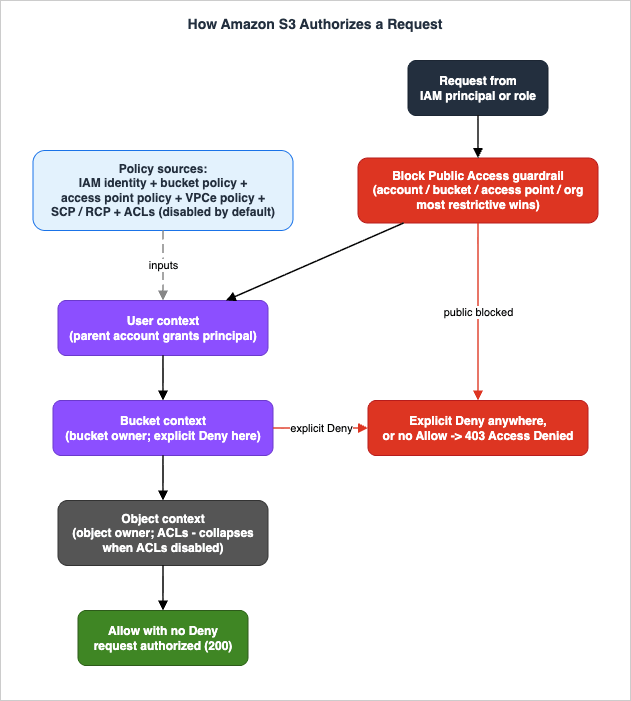
2.1 The mechanisms that can grant or deny
Several policy surfaces participate in an S3 authorization decision. Keep them distinct, because they answer different questions:- Identity-based (IAM) policies — attached to an IAM user, group, or role. They answer "what is this identity allowed to do?" Best when one principal needs access to many buckets, or when you manage permissions centrally per role.
- Resource-based policies — the bucket policy — attached to the bucket. Answers "who is allowed to touch this bucket, and under what conditions?" Required for cross-account grants that do not assume a role, and the natural home for resource-wide guardrails (enforce TLS, enforce encryption, restrict to a VPC endpoint).
- Access point policies — a resource-based policy attached to a named access point, scoping a slice of a shared bucket (Section 5).
- Access control lists (ACLs) — a legacy object/bucket-level grant mechanism. Disabled by default on new buckets via Object Ownership "Bucket owner enforced." New designs should not depend on them.
- Block Public Access (BPA) — not a grant mechanism but a guardrail that removes the effect of any policy or ACL that would make data public (Section 4).
- Object Ownership — a bucket-level setting that controls who owns uploaded objects and whether ACLs are on at all.
- Organizations SCPs and RCPs — service control policies set the maximum permissions for principals in an account; resource control policies (a newer addition) set a permissions ceiling on resources such as buckets, regardless of who owns them.
- VPC endpoint policies — attached to a gateway or interface endpoint, bounding what can be done through that network path (Sections 7 and 11).
2.2 The three evaluation contexts
For an object request, S3 converts every relevant policy into a set and evaluates that set across three sequential contexts, each with a different "context authority":- User context — the authority is the parent AWS account of the requesting IAM principal. S3 checks that the principal's own account has granted it permission (its identity policy, and any account-owned resource policy). If the request uses root credentials, this step is skipped.
- Bucket context — the authority is the account that owns the bucket. S3 evaluates the bucket owner's policies (bucket policy, and, where ACLs are enabled, the bucket ACL). This is where an explicit
Denyfrom the bucket owner stops the request, even for objects the bucket owner does not own. - Object context — the authority is the object owner. S3 evaluates the object ACL. With "Bucket owner enforced" (the default), the bucket owner owns every object and ACLs are disabled, so this context collapses into policy-only evaluation.
The decision rule is standard IAM: an explicit
Deny anywhere wins; otherwise the request needs at least one Allow and no Deny; with no applicable Allow, the default is deny and S3 returns 403 Access Denied. For the general mechanics of Deny precedence, permission boundaries, and SCP/RCP interaction, see IAM policy evaluation logic, step by step; the S3-specific addition is the three-context structure above and the BPA guardrail that runs ahead of it.2.3 Why disabling ACLs simplifies the model
When Object Ownership is set to Bucket owner enforced (the default for new buckets), the bucket owner automatically owns every object, and ACLs no longer affect access. The object context stops mattering, and access is decided entirely by policies: IAM identity policies, S3 bucket policies, access point policies, VPC endpoint policies, and Organizations SCPs and RCPs. This is the configuration AWS recommends for the majority of use cases, and the rest of this guide assumes it unless stated otherwise.A practical consequence: after you disable ACLs, S3 accepts only
PUT requests that specify no ACL or the bucket-owner-full-control canned ACL. A PUT carrying a different ACL (for example a custom grant to another account) fails with 400 AccessControlListNotSupported. That is usually a sign of an old client that still tries to set ACLs — a useful early warning that a design is leaning on a deprecated mechanism.The same three contexts apply when a request arrives through an access point or a VPC endpoint, with two extra surfaces layered in: the access point policy is evaluated alongside the bucket policy, and the VPC endpoint policy bounds what any principal can do through that network path. Critically, none of these can grant beyond what the bucket and identity policies already allow — they only narrow. So adding an access point policy or an endpoint policy can never accidentally widen access; it can only restrict it, which is what makes them safe building blocks for delegation.
3. IAM Policies vs Bucket Policies
The most common entry-level question is "should this permission live in an IAM policy or a bucket policy?" Both are evaluated together, so the choice is about ownership, scope, and which capabilities only one of them has. This is the one selection-heavy section; the rest of the guide stays in mechanism and operations.* You can sort the table by clicking on the column name.
| Question | Identity-based (IAM) policy | Resource-based (bucket / access point) policy |
|---|---|---|
| Attached to | IAM user, group, or role | The bucket (or access point) |
| Answers | What can this identity do? | Who can touch this resource, and how? |
| Cross-account grant | Only with role assumption | Yes, directly by listing the external principal |
Principal element | Implicit (the attached identity) | Explicit and required |
| Natural for | One principal, many buckets; central per-role control | One bucket, many principals; resource-wide guardrails |
| Conditions like enforce-TLS / enforce-encryption / VPCe-only | Possible but per-identity | Applied once at the resource, for every caller |
Concretely, the same read access can be expressed from either side. An identity policy in the consumer account, attached to the role that needs access:
{
  "Version": "2012-10-17",
  "Statement": [{
    "Sid": "ReadOneBucket",
    "Effect": "Allow",
    "Action": ["s3:GetObject", "s3:ListBucket"],
    "Resource": [
      "arn:aws:s3:::amzn-s3-demo-bucket",
      "arn:aws:s3:::amzn-s3-demo-bucket/*"
    ]
  }]
}Principal element a bucket policy requires and an identity policy cannot have):{
"Version": "2012-10-17",
"Statement": [{
"Sid": "AllowPartnerRole",
"Effect": "Allow",
"Principal": { "AWS": "arn:aws:iam::444455556666:role/PartnerRole" },
"Action": ["s3:GetObject", "s3:ListBucket"],
"Resource": [
"arn:aws:s3:::amzn-s3-demo-bucket",
"arn:aws:s3:::amzn-s3-demo-bucket/*"
]
}]
}ListBucket action targets the bucket ARN (no /*) while GetObject targets the object ARN (with /*) — a frequent source of "I can list but not read," or the reverse. The rules of combination:- Same account. Access is the union of identity and resource policies: an
Allowin either is sufficient (absent an explicitDeny). You can grant entirely from the IAM side, entirely from the bucket policy, or split it. - Cross-account. Access requires an
Allowon both sides: the bucket policy in the owning account must grant the external principal, and the principal's identity policy in its own account must allow the action. Missing either side yields403. This two-sided requirement is the single most common source of cross-account confusion (Section 8).
A good default: keep per-identity permissions in IAM policies (what each role may do across many buckets), and keep per-bucket guardrails and cross-account grants in the bucket policy (enforce TLS and encryption, restrict to a VPC endpoint, allow a partner account). That division keeps each policy readable and puts each rule where it has the widest, most reliable reach.
4. Blocking Public Access
Block Public Access is the guardrail that runs ahead of policy evaluation and overrides any ACL or policy that would otherwise grant public access. It is the single most important control for preventing accidental exposure, and on new buckets it is on by default. For when it became the default, and what that change did and did not do to buckets that already existed, see AWS Security Defaults History.The name is reused outside Amazon S3. Amazon EBS snapshots and AMIs carry switches called block public access as well, and manual database snapshots, SSM documents, and secrets have switches of their own under different names. What Can Be Made Public on AWS - Storage and Data, the Block Public Access Family, and What Each Switch Does Not Promise reads them side by side and shows where the same name stops meaning the same thing.
4.1 The four settings
BPA is four independent booleans. They split along two axes — ACLs vs policies, and "block new" vs "ignore/restrict existing":BlockPublicAcls— rejectsPUTrequests and bucket/AP creation that include public ACLs. Stops new public ACLs from being applied.IgnorePublicAcls— ignores all public ACLs already on the bucket and its objects, so existing public ACLs stop having any effect.BlockPublicPolicy— rejects bucket and access point policies that grant public access. Stops a public policy from being saved.RestrictPublicBuckets— if a bucket policy still grants public access, restricts that access to AWS service principals and authorized users within the bucket-owning account, blocking anonymous and cross-account public use.
You almost always want all four enabled. Enable them, then grant access deliberately through bucket or access point policies — never by removing the guardrail.
4.2 The four levels, and "most restrictive wins"
BPA exists at four scopes, and S3 enforces the most restrictive combination across all of them:- Account — applies to every bucket and access point in the account.
- Bucket — applies to one bucket.
- Access point — applies to one access point; immutable once created.
- Organization — applied through AWS Organizations as a ceiling across member accounts.
Because the most restrictive setting wins, a block at the account or organization level cannot be undone by a looser bucket setting. New buckets, access points, and objects block public access by default, and S3 Express One Zone directory buckets always have BPA enabled and cannot be made public.
The practical implication is that BPA should be set high and left there. Turn all four settings on at the account level (and, in an organization, at the organization level) so every bucket inherits the block, and treat any genuine need for public access as a per-resource exception delivered through CloudFront rather than by loosening the account-wide guardrail. A team that cannot disable BPA at an individual bucket because the account enforces it is experiencing the control working as intended, not a limitation to route around.
4.3 Reproducible configuration
Account-level (the broadest single switch), via the AWS CLI:aws s3control put-public-access-block \
--account-id 111122223333 \
--public-access-block-configuration \
BlockPublicAcls=true,IgnorePublicAcls=true,BlockPublicPolicy=true,RestrictPublicBuckets=trueaws s3api put-public-access-block \
--bucket amzn-s3-demo-bucket \
--public-access-block-configuration \
BlockPublicAcls=true,IgnorePublicAcls=true,BlockPublicPolicy=true,RestrictPublicBuckets=trueResources:
SecureBucket:
Type: AWS::S3::Bucket
Properties:
BucketName: amzn-s3-demo-bucket
PublicAccessBlockConfiguration:
BlockPublicAcls: true
IgnorePublicAcls: true
BlockPublicPolicy: true
RestrictPublicBuckets: true
OwnershipControls:
Rules:
- ObjectOwnership: BucketOwnerEnforced4.4 The legitimate "I need public access" cases
Static websites and public assets are the usual reasons teams reach for the BPA toggle. The modern pattern is to not make the bucket public at all: serve through Amazon CloudFront with Origin Access Control (OAC), keep the bucket private, and grant only the distribution's service principal read access in the bucket policy. That grant is to a service principal with a tight condition, not to the public, so all four BPA settings stay on:{
"Sid": "AllowCloudFrontOAC",
"Effect": "Allow",
"Principal": { "Service": "cloudfront.amazonaws.com" },
"Action": "s3:GetObject",
"Resource": "arn:aws:s3:::amzn-s3-demo-bucket/*",
"Condition": {
"StringEquals": {
"AWS:SourceArn": "arn:aws:cloudfront::111122223333:distribution/E1EXAMPLE"
}
}
}5. Access Points and Access Grants
A single bucket policy becomes unwieldy when one dataset is shared with many teams, applications, and networks. Access points and S3 Access Grants exist to scale access management without growing one monolithic policy.5.1 Standard access points
An access point is a named network endpoint attached to a bucket, each with its own access point policy and its own Block Public Access settings. Instead of encoding every consumer in the bucket policy, you create one access point per application or team and write a small, focused policy on each. A request through an access point is authorized against both the access point policy and the underlying bucket policy, so the bucket policy can delegate to access points while still holding the account-wide guardrails.Access points can also be restricted to a VPC, so the endpoint only works from inside a specified network — a clean way to give one application private-only access to a slice of a shared bucket. Create one bound to a VPC like this:
aws s3control create-access-point \
  --account-id 111122223333 \
  --name finance-team-ap \
  --bucket amzn-s3-demo-bucket \
--vpc-configuration VpcId=vpc-0abc123def4567890arn:aws:s3:ap-northeast-1:111122223333:accesspoint/finance-team-ap) in place of the bucket name, and the access point's own policy plus its Block Public Access settings apply on top of the bucket's. Because each access point is a separate policy surface, you can revoke one team's access by editing its access point policy without touching the bucket policy or any other team.5.2 Multi-Region Access Points
Multi-Region Access Points (MRAPs) provide a single global endpoint that routes to buckets in multiple Regions, for multi-Region applications that want one hostname and automatic routing (including failover). MRAP requests are signed with SigV4A, and all control-plane operations (creating and maintaining the MRAP) are routed through the US West (Oregon) Region. Use them when you genuinely operate multi-Region active or failover topologies; for a single-Region dataset they add signing and operational complexity without benefit. Because MRAP routing and failover depend on the underlying buckets' cross-Region replication and health, an MRAP is only as available as the replication behind it — it is a routing and signing convenience layered on top of a multi-Region design, not a substitute for one.5.3 Object Lambda Access Points — check availability first
Object Lambda Access Points let you run an AWS Lambda function to transform object data on the fly as it is retrieved (redaction, format conversion, row filtering). It is a powerful pattern, but note the current status: as of November 2025, S3 Object Lambda is available only to existing customers and select AWS Partner Network partners. Treat it as documented capability rather than something a new project can simply adopt, and confirm availability in the official docs before designing around it.5.4 S3 Access Grants — mapping identities to data
S3 Access Grants is a newer access-management layer that maps identities — IAM principals, or corporate directory identities federated through IAM Identity Center — to prefixes, buckets, or objects, and vends temporary credentials scoped to each grant. It is aimed at data-lake and end-user scenarios where the list of who-can-read-what is large and changes often, and where encoding all of it in bucket policies would not scale. The mechanics of grants, locations, and credential vending are their own topic; the point for this guide is placement: Access Grants sits alongside IAM policies, bucket policies, and access points as a way to scale identity-to-data mapping, and it does not replace the BPA, encryption, and auditing layers around it. What changes when the grantee is a corporate directory identity rather than an IAM principal — and what the vended credentials still carry — is worked through in Identity-Aware Data Access on AWS - Propagating Workforce Identity from IAM Identity Center to Lake Formation and S3 Access Grants.6. Encryption
Encryption in S3 has two halves — at rest and in transit — and the at-rest half has several options that differ in who controls the keys and how much KMS work happens per request. The key-management service mechanics themselves are covered in AWS History and Timeline of AWS KMS; here I focus on how S3 uses them.6.1 Every bucket is encrypted at rest by default
All S3 buckets have default encryption enabled, using at minimum server-side encryption with S3-managed keys (SSE-S3, AES-256). There is no "unencrypted" state to fall into; the decision is which option to use, not whether to encrypt.- SSE-S3 — S3 manages the keys entirely. No KMS involvement, no per-object KMS calls, no key policy to manage. Good when you do not need an audit trail of key usage or per-key access control.
- SSE-KMS — encryption uses an AWS KMS key, either the AWS managed
aws/s3key or a customer managed key (CMK). You gain a CloudTrail audit trail of key use and the ability to control decryption through the KMS key policy — at the cost of KMS calls and an extra policy surface to keep consistent (Section 8). - DSSE-KMS — dual-layer KMS encryption for compliance regimes that mandate multi-layer encryption (Section 6.3).
- SSE-C — you supply the encryption key on each request; S3 uses it and does not store it. Niche; it puts key custody and rotation entirely on you. Since April 2026 it is also off by default: new general purpose buckets, and existing buckets in accounts that held no SSE-C objects, reject an upload that requests SSE-C with HTTP 403
AccessDenieduntil you allow it again throughPutBucketEncryption(the FAQ for this change excepts new buckets in the Middle East (Bahrain) and Middle East (UAE) Regions).
How the same questions are answered for Amazon EBS, Amazon EFS, and Amazon FSx (what is on by default, which key you can choose, and what turning encryption on later does not re-encrypt) is set out service by service in Encryption Controls by Service on AWS Storage.
Set default encryption to SSE-KMS with a CMK like this:
aws s3api put-bucket-encryption \
  --bucket amzn-s3-demo-bucket \
  --server-side-encryption-configuration '{
    "Rules": [{
      "ApplyServerSideEncryptionByDefault": {
        "SSEAlgorithm": "aws:kms",
        "KMSMasterKeyID": "arn:aws:kms:ap-northeast-1:111122223333:key/1234abcd-..."
      },
      "BucketKeyEnabled": true
    }]
}'aws/s3 requires no setup but cannot be used for cross-account access and gives you no control over its key policy. A customer managed key (CMK) costs a managed key to operate but is the only option when you need to share encrypted objects across accounts (Section 8), set a custom key policy, scope usage with a kms:ViaService condition, or rotate on your own schedule. For any bucket that is shared, regulated, or security-sensitive, use a CMK.6.2 How SSE-KMS works, and why bucket keys exist
SSE-KMS uses envelope encryption, where a data key encrypts the object and the KMS key encrypts the data key. Without a bucket key, the per-object flow is:PutObjectarrives for an SSE-KMS bucket.- S3 calls KMS
GenerateDataKeyfor the bucket's KMS key. KMS returns a plaintext data encryption key (DEK) and an encrypted copy of it. - S3 encrypts the object with the plaintext DEK, then discards the plaintext DEK.
- S3 stores the encrypted DEK alongside the object.
- On
GetObject, S3 calls KMSDecrypton the stored encrypted DEK, recovers the plaintext DEK, decrypts the object, and discards the DEK again.
GenerateDataKey per write and one Decrypt per read. For a workload touching millions of objects, that is millions of KMS requests, which is the problem bucket keys solve.S3 Bucket Keys change the mechanics. When you enable a bucket key, S3 obtains a short-lived bucket-level key from KMS and keeps it temporarily in S3; that bucket-level key generates DEKs for new objects during its lifetime, so S3 does not call KMS for each object. This substantially reduces the volume of
GenerateDataKey, Encrypt, and Decrypt calls S3 makes to KMS (for cost characteristics, see the KMS pricing link in the References — no numbers here by site policy).Two security-relevant nuances follow from the mechanics, and they matter for diagnostics:
- By design, requests served by the cached bucket-level key do not produce a KMS API call and do not re-validate the KMS key policy. To keep an audit signal, S3 fetches a unique bucket-level key at least once per requester (different role, account, or scoping policy = different requester), so each requester's access still appears in a KMS CloudTrail event — but you will see fewer KMS events than objects accessed. Do not treat "one KMS
Decryptevent per object" as an invariant. - Bucket keys apply to new objects only. Objects already in the bucket keep their per-object keys until rewritten with
CopyObject. Bucket keys are also not supported with DSSE-KMS.
6.3 DSSE-KMS — two independent layers
DSSE-KMS applies two independent layers of AES-256 encryption to every object: the first layer uses a DEK generated by KMS, and the second re-encrypts the already-encrypted data with a separate AES-256 key managed by S3. The "dual" is literal — if one layer were ever compromised, the second still protects the data. The KMS key must be in the same Region as the bucket, the object's checksum is stored encrypted, and (as above) bucket keys do not apply. Use DSSE-KMS where a compliance standard explicitly requires multi-layer encryption; otherwise SSE-KMS with a CMK is the common choice. In practice the decision is binary: if a regulation, contract, or internal standard names "dual-layer" or "two independent layers" of encryption, use DSSE-KMS; otherwise the added latency and KMS work are cost without a matching benefit, since SSE-KMS with a customer managed key already provides key control, an audit trail, and cross-account capability. Do not reach for DSSE-KMS as a vague "more secure" default — reach for it when something specific requires it.6.4 Encryption in transit
At-rest encryption says nothing about the network. S3 supports both HTTP and HTTPS, and HTTPS uses TLS (1.2 and 1.3) to protect data in transit. You enforce HTTPS with a bucket policy condition onaws:SecureTransport, and you can require a minimum TLS version with s3:TlsVersion. Both the TLS version and cipher suite are recorded in CloudTrail and S3 server access logs, so you can verify enforcement after the fact (Section 9). The policy itself is in Section 7.Note that S3 does not reject plaintext HTTP by default — both HTTP and HTTPS endpoints exist, and it is your bucket policy that closes the HTTP door. This mirrors encryption at rest exactly: a secure default (TLS available, objects encrypted) is not the same as an enforced requirement, and the enforcement is a policy you add. Treating "S3 supports TLS" as "my bucket requires TLS" is the same category of mistake as treating default encryption as enforced encryption.
7. Policy Conditions in Practice
Condition keys are where bucket policies become real guardrails. The pattern is almost always an explicitDeny with a condition, because a Deny cannot be overridden by any Allow elsewhere — it is the strongest, most reliable way to enforce a requirement across every caller. Each snippet below is a minimal, copy-ready statement shown purely for defensive enforcement.A design note on
Allow versus Deny: grants belong in Allow statements, but requirements — "must use TLS," "must be encrypted," "must come from our network" — belong in Deny statements. The reason is reach. An Allow only affects the principals it names, so a forgotten role or a grant added next quarter can slip past it; a Deny with a condition applies to every principal and every other statement, now and in the future. That is why the guardrails below are written as Deny: they cannot be quietly undone by someone adding a permissive grant elsewhere.7.1 Require TLS (deny non-HTTPS)
{
  "Sid": "DenyInsecureTransport",
  "Effect": "Deny",
  "Principal": "*",
  "Action": "s3:*",
  "Resource": [
    "arn:aws:s3:::amzn-s3-demo-bucket",
    "arn:aws:s3:::amzn-s3-demo-bucket/*"
  ],
  "Condition": { "Bool": { "aws:SecureTransport": "false" } }
}Deny keyed on NumericLessThan of s3:TlsVersion set to 1.2.7.2 Require server-side encryption on upload
{
  "Sid": "DenyUnencryptedUploads",
  "Effect": "Deny",
  "Principal": "*",
  "Action": "s3:PutObject",
  "Resource": "arn:aws:s3:::amzn-s3-demo-bucket/*",
  "Condition": {
    "StringNotEquals": { "s3:x-amz-server-side-encryption": "aws:kms" }
  }
}Deny on s3:x-amz-server-side-encryption-aws-kms-key-id not equal to your CMK ARN. To require DSSE-KMS, set the expected value to aws:kms:dsse.7.3 Restrict to a VPC endpoint
{
  "Sid": "DenyOutsideVpce",
  "Effect": "Deny",
  "Principal": "*",
  "Action": "s3:*",
  "Resource": [
    "arn:aws:s3:::amzn-s3-demo-bucket",
    "arn:aws:s3:::amzn-s3-demo-bucket/*"
  ],
  "Condition": {
    "StringNotEquals": { "aws:SourceVpce": "vpce-0abc123def4567890" }
  }
}
7.4 Restrict to an org, or to known source IPs (data perimeter)
Lock the bucket to your AWS Organization so no principal outside it can be granted access, even by mistake:{
"Sid": "DenyOutsideOrg",
"Effect": "Deny",
"Principal": "*",
"Action": "s3:*",
"Resource": [
"arn:aws:s3:::amzn-s3-demo-bucket",
"arn:aws:s3:::amzn-s3-demo-bucket/*"
],
"Condition": {
"StringNotEquals": { "aws:PrincipalOrgID": "o-exampleorgid" }
}
}aws:SourceIp allow-list is sometimes added on top, but with an important caveat: requests that reach S3 through a gateway VPC endpoint do not traverse a public IP, so an IP-only condition can unintentionally block legitimate private traffic. Pair aws:SourceIp with aws:SourceVpce (combined with aws:ViaAWSService exceptions where needed) rather than relying on IP alone. These conditions are the bucket-policy half of a data perimeter; the organization-wide ceiling is better expressed with an Organizations resource control policy (RCP) so it applies to every bucket in the organization and cannot be edited away at any single bucket:{
"Version": "2012-10-17",
"Statement": [{
"Sid": "EnforceOrgPerimeterOnS3",
"Effect": "Deny",
"Principal": "*",
"Action": "s3:*",
"Resource": "*",
"Condition": {
"StringNotEqualsIfExists": { "aws:PrincipalOrgID": "o-exampleorgid" },
"BoolIfExists": { "aws:PrincipalIsAWSService": "false" }
}
}]
}...IfExists operators and the aws:PrincipalIsAWSService exception are what keep the RCP from blocking legitimate AWS service access (logging, replication) while still denying any principal outside the organization. Apply it once at the organization root or an OU and it covers buckets you have not even created yet.A deny-with-conditions caveat (honesty): a broad
Deny with a condition can lock out the very principals you depend on — log delivery, replication, backup, or AWS service principals that legitimately act on the bucket. Scope the Deny (for example with aws:PrincipalAccount or aws:PrincipalIsAWSService exceptions), and test against CloudTrail before treating any of these as "enforced." A guardrail you had to disable in an incident was never a guardrail.8. Cross-Account Access
Cross-account S3 access fails in predictable ways, almost always because one of three surfaces was configured and another was forgotten.8.1 The two-sided grant
As in Section 3, a cross-account request needs anAllow on both sides: the bucket policy in the owning account must name the external principal and allow the action, and the principal's identity policy in its account must allow the same action on that bucket. People frequently write the bucket policy, see 403, and assume the bucket policy is wrong — when the missing Allow is on the consuming side. When you debug cross-account 403, check both accounts before changing either policy.A useful mental model: the bucket policy is the resource owner saying "I permit this external principal," and the identity policy is the consuming account saying "I permit my principal to use that permission." Both statements must exist for access to happen, which is why a cross-account grant is never complete — or fully diagnosable — from inside one account's console alone.
8.2 Object Ownership solves the "writer owns the object" trap
The classic cross-account footgun: Account B uploads an object to Account A's bucket; with ACLs enabled, B owns that object, and A — the bucket owner paying for storage — cannot necessarily read it. Setting Object Ownership to Bucket owner enforced removes this entirely: the bucket owner automatically owns every uploaded object and ACLs are gone, so access is governed by policies you control. If you cannot disable ACLs yet, require thebucket-owner-full-control canned ACL on upload via a bucket policy condition as a stopgap.8.3 Do not forget the KMS key policy
When the bucket uses SSE-KMS with a customer managed key, the bucket policy is only half the encryption story. The KMS key policy (and/or a grant) in the key's account must allow the external principalkms:Decrypt, and for writes kms:GenerateDataKey. A bucket policy that allows s3:GetObject while the KMS key policy omits the caller produces a confusing AccessDenied that points at KMS, not S3. The statement to add to the CMK's key policy, scoped so the key is only usable through S3:{
"Sid": "AllowConsumerDecryptViaS3",
"Effect": "Allow",
"Principal": { "AWS": "arn:aws:iam::444455556666:role/AppRole" },
"Action": ["kms:Decrypt", "kms:GenerateDataKey"],
"Resource": "*",
"Condition": {
"StringEquals": { "kms:ViaService": "s3.ap-northeast-1.amazonaws.com" }
}
}9. Auditing, Observability and Diagnostics
This is the section that keeps the guide honest. Configuring the controls above is necessary but not sufficient; you also need to observe what access actually exists and what requests actually happen. A configuration passing review is not proof the data is safe.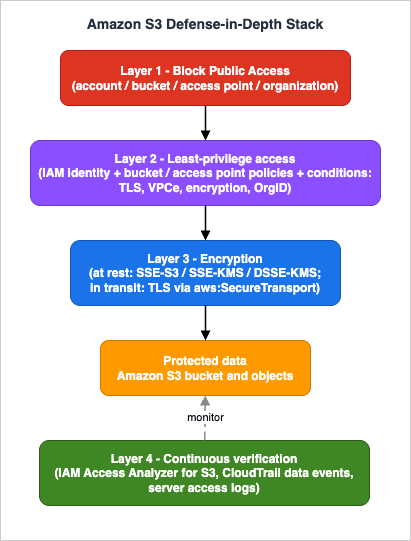
9.1 IAM Access Analyzer for S3
IAM Access Analyzer for S3 continuously reports which general-purpose buckets are publicly accessible or shared with other AWS accounts, and — crucially — why: whether the access comes from an ACL, a bucket policy, or an access point policy. From the S3 console you can block all public access to a flagged bucket in one click, drill into the granular permission, or archive a finding for a bucket that is intentionally shared. It must be enabled per Region (it relies on an account-level external-access analyzer in IAM in each Region), and it is available at no additional cost.Beyond external access, IAM Access Analyzer also offers policy validation and custom policy checks you can wire into a pipeline to catch an over-broad bucket policy before it ships — moving the audit left of deployment.
9.2 CloudTrail and server access logs
Two complementary trails record what actually happened:- CloudTrail records management events (bucket configuration changes — who turned BPA off, who changed the bucket policy) by default, and data events (object-level
GetObject/PutObject/DeleteObject) when you opt in. Data events are how you answer "who read this object, and when." Remember the bucket-key nuance from Section 6.2: with bucket keys, KMSDecryptevents are fewer than object reads. - S3 server access logs record each request with the requester, operation, response, and the TLS version and cipher — useful for proving TLS enforcement and for forensic detail that complements CloudTrail.
Data events are off by default and are scoped with advanced event selectors, so you can log only the buckets that matter rather than every object operation in the account:
aws cloudtrail put-event-selectors \
  --trail-name org-trail \
  --advanced-event-selectors '[{
    "Name": "S3 data events for one bucket",
    "FieldSelectors": [
      { "Field": "eventCategory", "Equals": ["Data"] },
      { "Field": "resources.type", "Equals": ["AWS::S3::Object"] },
      { "Field": "resources.ARN", "StartsWith": ["arn:aws:s3:::amzn-s3-demo-bucket/"] }
    ]
}]'9.3 Diagnosing 403 Access Denied
A403 from S3 is a layered question: which surface denied the request? Work through them in roughly the order S3 evaluates:- Block Public Access — is the request anonymous/public and being blocked by a guardrail? (Expected, if so.)
- Explicit
Denyin the bucket policy — a condition (TLS, VPCe, encryption, OrgID) the request did not satisfy. The most common "I granted access but it still fails" cause. - Missing
Allow— neither the identity policy nor the bucket policy grants the action (default deny). For cross-account, check both accounts. - KMS key policy — for SSE-KMS objects, the caller may lack
kms:Decrypt. The error mentions KMS. - Object Ownership / ACL — a legacy path: an object owned by another account when ACLs are still enabled.
- VPC endpoint policy, SCP, or RCP — an organization or network ceiling denying regardless of the bucket policy.
CloudTrail's record of the denied call, the requesting principal, and the source (VPCe, IP) usually pinpoints the layer faster than re-reading policies.
9.4 "Configuration passing" is not "safe"
Access Analyzer reporting no public or shared buckets means no external exposure — it does not mean your policies are least-privilege, that a broads3:* grant to an internal role is appropriate, or that data events are being logged. Treat the analyzer as one signal, combine it with CloudTrail review and policy validation, and revisit periodically. Security here is a standing process, not a one-time checkbox.9.5 Detective controls beyond Access Analyzer
Access Analyzer answers "is this bucket exposed?" Three other services answer adjacent questions and belong in a complete posture:- AWS Config managed rules continuously check bucket state against policy — for example
s3-bucket-public-read-prohibited,s3-bucket-public-write-prohibited,s3-bucket-server-side-encryption-enabled, ands3-bucket-ssl-requests-only— and can record or auto-remediate drift. - Amazon Macie discovers and classifies sensitive data (such as personal data or credentials) in buckets, so you learn not just who can reach a bucket but whether its contents warrant stricter controls.
- S3 Storage Lens gives organization-wide visibility into posture metrics such as which buckets have Object Ownership enforced, default encryption set, or Block Public Access enabled — useful for finding the one bucket out of thousands that has drifted.
Together with Access Analyzer, CloudTrail, and access logs, these turn "we configured it correctly" into "we can show it is still correct," which is the only durable form of security.
10. Common Pitfalls
Symptom → root cause → fix, drawn from the mechanisms above:- Design depends on ACLs. Symptom:
PUTfails with400 AccessControlListNotSupported, or a runbook says "grant via object ACL." Cause: leaning on a mechanism disabled by default. Fix: move grants into bucket/identity policies; keep Object Ownership "Bucket owner enforced." - Wildcard
Principalwith noCondition. Symptom: Access Analyzer flags the bucket public. Cause:"Principal": "*"on anAllowwithout scoping. Fix: never use"*"on anAllowexcept for an intentional public read behind CloudFront OAC; scope withaws:PrincipalOrgID/aws:SourceVpce; let BPA'sRestrictPublicBucketsbackstop it. - Disabling BPA "to make it work." Symptom: a deploy needs public read, so someone toggles the guardrail off. Cause: solving an access problem by removing the safety net. Fix: keep all four BPA settings on; serve public content via CloudFront OAC with a private bucket.
- KMS key policy contradicts the bucket policy. Symptom:
AccessDeniedreferencing KMS even though the bucket policy allows the action. Cause: the CMK's key policy omits the caller. Fix: align the KMS key policy (kms:Decrypt,kms:GenerateDataKey) with the bucket and identity policies — all three must agree. - Cross-account permissions granted on one side only. Symptom: persistent cross-account
403. Cause: bucket policy set but the consumer's identity policy (or vice versa) missing. Fix: grant on both sides; verify in both accounts. aws:SourceIpwithout accounting for VPC endpoints. Symptom: private traffic via a gateway endpoint is unexpectedly denied. Cause: requests through a gateway VPCe do not have a public source IP. Fix: useaws:SourceVpce, or combine IP and VPCe conditions deliberately.- Assuming default encryption equals enforced encryption. Symptom: an object lands with a weaker encryption option than intended. Cause: default encryption sets the behavior for uploads that omit an encryption header, but it does not by itself reject an upload that requests a different option. Fix: pair default encryption with the
Deny-on-s3:x-amz-server-side-encryptionpolicy from Section 7.2. - Presigned URLs outlive their purpose. Symptom: a shared link still works long after it should. Cause: a presigned URL carries the signer's permissions for its full expiry, regardless of later policy changes. Fix: keep expiries short, sign with a narrowly scoped role, and prefer access points or short-lived credentials for ongoing access.
- The log or replication destination is less protected than the source. Symptom: data is well-guarded in one bucket but copied to another that is public or unencrypted. Cause: guardrails applied to the source bucket but not its access-log target or replication destination. Fix: apply the same BPA, encryption, and policies to logging and replication destinations — they hold the same data.
11. End-to-End Secure Bucket Architecture
This is the Level 400 walkthrough: a single realistic configuration that combines the mechanisms, traced as a request flows through it and noting where each layer would deny. The scenario is a shared dataset owned by a data-producer account and read by a consumer application running privately in another account.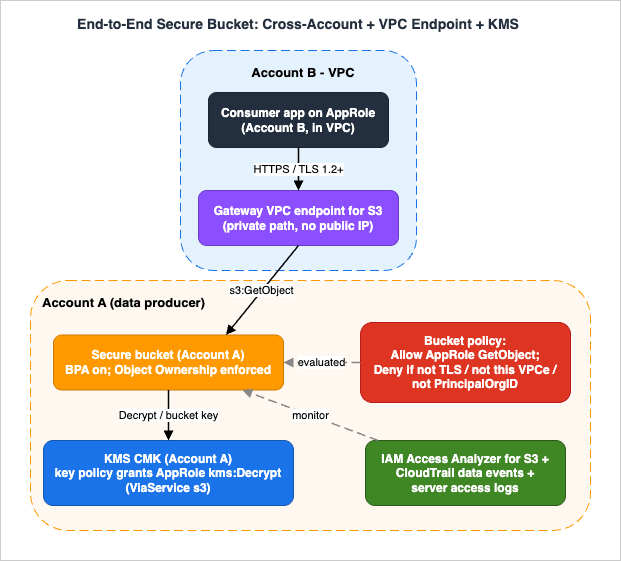
- Account A owns
amzn-s3-demo-bucket, encrypted with a customer managed KMS key, with all four BPA settings on and Object Ownership "Bucket owner enforced." - Account B runs an application on a role (
AppRole) in a VPC, reaching S3 through a gateway VPC endpoint (vpce-0abc...). - Both accounts are in the same AWS Organization (
o-exampleorgid).
The bucket policy in Account A does four things: an explicit
Deny for non-TLS requests (7.1), an explicit Deny for requests not arriving through the approved VPC endpoint (7.3), an explicit Deny for principals outside the organization (7.4), and an Allow of s3:GetObject to AppRole. Account B's identity policy allows s3:GetObject on the bucket and kms:Decrypt on the key. The KMS key policy in Account A grants AppRole kms:Decrypt, scoped with a kms:ViaService condition of s3.<region>.amazonaws.com so the key can only be used through S3.The bucket policy that combines the three guardrails and the single grant looks like this — the
Denys come first because an explicit Deny is evaluated regardless of statement order, and putting them first makes the intent obvious to a reviewer:{
"Version": "2012-10-17",
"Statement": [
{
"Sid": "DenyInsecureTransport",
"Effect": "Deny",
"Principal": "*",
"Action": "s3:*",
"Resource": [
"arn:aws:s3:::amzn-s3-demo-bucket",
"arn:aws:s3:::amzn-s3-demo-bucket/*"
],
"Condition": { "Bool": { "aws:SecureTransport": "false" } }
},
{
"Sid": "DenyOutsideVpceAndOrg",
"Effect": "Deny",
"Principal": "*",
"Action": "s3:*",
"Resource": [
"arn:aws:s3:::amzn-s3-demo-bucket",
"arn:aws:s3:::amzn-s3-demo-bucket/*"
],
"Condition": {
"StringNotEquals": { "aws:SourceVpce": "vpce-0abc123def4567890" },
"StringNotEqualsIfExists": { "aws:PrincipalOrgID": "o-exampleorgid" }
}
},
{
"Sid": "AllowAppRoleRead",
"Effect": "Allow",
"Principal": { "AWS": "arn:aws:iam::444455556666:role/AppRole" },
"Action": ["s3:GetObject", "s3:ListBucket"],
"Resource": [
"arn:aws:s3:::amzn-s3-demo-bucket",
"arn:aws:s3:::amzn-s3-demo-bucket/*"
]
}
]
}AppRoleissuesGetObjectover HTTPS, routed through the gateway VPC endpoint. (Not TLS → denied at 7.1. Not via the endpoint → denied at 7.3.)- Block Public Access evaluates first; the request is an authenticated, in-org request, not public, so the guardrail does not block it.
- User context: Account B's identity policy allows
s3:GetObjectandkms:Decrypt. (Missing here →403, fix on the consumer side.) - Bucket context: the bucket policy's
Denys are checked first — TLS satisfied, VPCe matches,aws:PrincipalOrgIDmatches — then theAllowtoAppRoleapplies. (AnyDenycondition unmet →403.) - Object context: collapses, because ACLs are disabled; the bucket owner owns the object.
- Decryption: the object is SSE-KMS, so S3 uses the bucket-level key if present, otherwise calls KMS
Decrypt; the KMS key policy must grantAppRole. (Key policy omits the caller →AccessDeniedmentioning KMS, per Section 8.3.) - The object is returned over TLS. CloudTrail data events record the read, server access logs record the TLS version, and IAM Access Analyzer for S3 continuously confirms the bucket is neither public nor shared beyond Account B.
Every requirement is enforced by an independent layer, and each layer fails closed. That is the property defense in depth buys: a mistake in any one place — a forgotten KMS grant, a dropped VPCe condition — denies access rather than silently widening it.
12. Frequently Asked Questions
Should I use a bucket policy or an IAM policy?Both are evaluated together. Put per-identity permissions in IAM policies and per-bucket guardrails plus cross-account grants in the bucket policy. Cross-account always needs an
Allow on both sides (Section 3).Do I still use ACLs?
For new designs, no. New buckets default to "Bucket owner enforced," which disables ACLs and moves access to policies. Keep them disabled unless you have a specific per-object ownership need (Section 2.3).
How do I enforce encryption?
Default encryption guarantees objects are encrypted at rest, but to require a particular option, add an explicit
Deny on s3:x-amz-server-side-encryption (Section 7.2). For HTTPS, deny aws:SecureTransport false. Default behavior and enforcement are different things (Section 10).Should I enable S3 Bucket Keys?
For SSE-KMS workloads at scale, yes — they cut the KMS calls S3 makes by serving DEKs from a cached bucket-level key. Note that they apply to new objects only and are not supported with DSSE-KMS, and that they reduce the number of KMS CloudTrail events you will see (Section 6.2).
How do I share a bucket across accounts?
Disable ACLs (Bucket owner enforced), grant the external principal in the bucket policy, grant the same action in the consumer's identity policy, and — if SSE-KMS — grant
kms:Decrypt/kms:GenerateDataKey in the KMS key policy. Use access points to scale this to many consumers (Sections 5, 8, 11).SSE-KMS or DSSE-KMS?
SSE-KMS for the common case where you want KMS-controlled keys and an audit trail. DSSE-KMS only when a compliance standard explicitly requires two independent layers of encryption (Section 6.3).
Can I restrict a bucket to a specific VPC or network?
Yes. Add a bucket policy
Deny keyed on aws:SourceVpce (or aws:SourceVpc) so only requests through your endpoint succeed, and/or bind an access point to a VPC. Remember that requests through a gateway endpoint have no public source IP, so do not gate them with aws:SourceIp alone (Sections 7.3, 10).What is the difference between Block Public Access and a bucket policy?
A bucket policy grants or denies specific access; Block Public Access is a guardrail that overrides any policy or ACL that would make data public, evaluated ahead of the policy. They are complementary: keep BPA on as a backstop and use the bucket policy for deliberate, scoped grants (Sections 2, 4).
How do I prove TLS is being enforced?
Enforce it with a
Deny on aws:SecureTransport false, then verify after the fact: both CloudTrail and S3 server access logs record the TLS version and cipher of each request, so you can confirm no plaintext requests are succeeding (Sections 6.4, 7.1, 9.2).13. Summary
S3 security is not one setting; it is a small number of independent layers that each close a different failure mode. Authorization runs through a guardrail (Block Public Access) and three evaluation contexts where an explicitDeny always wins; identity and bucket policies grant access (and cross-account needs both); Object Ownership disables ACLs by default and simplifies the whole model; encryption is always on at rest, with SSE-KMS and bucket keys trading KMS calls for control and audit, and DSSE-KMS for multi-layer compliance; condition keys turn the bucket policy into a real perimeter (TLS, VPCe, encryption, organization); and IAM Access Analyzer, CloudTrail, and access logs verify — continuously — that the result matches intent. Configure all of them, and let each one fail closed.The buckets that make the news are almost never victims of a broken algorithm; they are buckets where one layer was missing or one guardrail was switched off. That is the case for defense in depth: it makes a single mistake survivable. Lean on the modern defaults — ACLs disabled, public access blocked, encryption on — add least-privilege policies and the condition-key guardrails on top, and verify continuously so that the day a policy drifts, a detective control tells you before an attacker does.
From here, the natural next step is protecting the secrets and configuration your applications use to reach S3 and everything else — covered in AWS Secrets Manager and Parameter Store Decision Guide. For the IAM evaluation mechanics this guide delegates, see IAM policy evaluation logic, step by step and the common mistakes in IAM anti-patterns; for object/prefix design, Amazon S3 object key design best practices; and for vocabulary, the AWS IAM glossary.
14. References
- How Amazon S3 authorizes a request (Amazon S3 User Guide)
- Controlling ownership of objects and disabling ACLs for your bucket
- Blocking public access to your Amazon S3 storage
- Configuring block public access settings for your buckets
- Setting default server-side encryption behavior for Amazon S3 buckets
- Blocking or unblocking SSE-C for a general purpose bucket
- Default SSE-C setting for new buckets FAQ
- Reducing the cost of SSE-KMS with Amazon S3 Bucket Keys
- Using dual-layer server-side encryption with AWS KMS keys (DSSE-KMS)
- Protecting data in transit with encryption
- Amazon S3 condition key examples for bucket policies
- Managing access to shared datasets with access points
- Multi-Region Access Points in Amazon S3
- Transforming objects with S3 Object Lambda
- Managing access with S3 Access Grants
- Reviewing bucket access using IAM Access Analyzer for S3
- Security best practices for Amazon S3
- Logging Amazon S3 API calls using AWS CloudTrail
- Amazon S3 pricing / AWS KMS pricing
Related Articles
- IAM policy evaluation logic, step by step
- IAM anti-patterns
- Amazon S3 object key design best practices
- AWS History and Timeline of AWS KMS
- AWS History and Timeline of Amazon S3
- AWS IAM glossary
References:
Tech Blog with curated related content
Written by Hidekazu Konishi