AWS Secrets Manager and Parameter Store Decision Guide - Storing, Rotating, and Accessing Secrets and Configuration
First Published:
Last Updated:
They overlap enough to be confusing — both store named values, both encrypt with AWS KMS, both are reachable through IAM-controlled APIs — and they differ enough that picking wrong is expensive to undo. Secrets Manager is purpose-built for secrets that must be rotated, replicated, and shared across accounts. Parameter Store is a broad configuration store that also happens to hold encrypted
SecureString values, with a free standard tier that makes it the natural home for non-secret settings.This guide is a decision hub first and a deep dive second. The opening sections compress the selection into a single comparison and one flowchart; the body then goes under the hood — the four-step rotation state machine and its staging-label transitions, KMS envelope encryption, cross-account resource policies, the caching behavior of the Lambda extension, and the failure modes you will actually hit — and ends with an end-to-end architecture that wires the pieces together. It does not re-teach IAM policy evaluation or KMS internals; those are delegated to existing articles linked throughout.
This article answers four questions:
- What goes where? Which values belong in Secrets Manager, which in Parameter Store (standard or advanced), and what should not be in either.
- How do these stores actually work? What happens internally when a secret rotates, when a value is encrypted, and when an application fetches it.
- How do I secure and share access? IAM identity policies, Secrets Manager resource policies, customer-managed KMS keys, cross-account access, and VPC endpoints.
- How do I retrieve values efficiently? SDK and CLI, the Secrets Manager caching libraries, the AWS Parameters and Secrets Lambda extension, and the Parameter Store pass-through to Secrets Manager.
Scope and honesty notes. This is a decision and architecture guide, not a pricing guide. The cost difference between the two services is a real decision factor — Parameter Store's standard tier carries no additional charge, while Secrets Manager is a paid service and advanced Parameter Store features (advanced parameters, higher throughput) incur charges — but pricing changes and is per-Region, so this article states cost qualitatively and links to the official pricing pages instead of quoting numbers. Every quantitative limit below was verified against AWS documentation; always confirm current quotas in the Service Quotas console for your account and Region. No real secret values appear in any example. For the mechanics of how IAM decides whether a call is allowed, see IAM Policy Evaluation Logic Step by Step; for KMS key management depth and history, see the AWS KMS timeline; for how Systems Manager grew into the toolset it is today, see the AWS Systems Manager timeline.
1. Why "Secrets Manager or Parameter Store" Is a Real Decision
In a single application with one database, the choice barely matters — either store will hold a password. The decision becomes real at scale, where you are managing dozens of services across multiple accounts and Regions, each with database credentials, API keys, feature flags, endpoint URLs, and resource identifiers. At that size, four pressures pull the design in different directions:- Rotation. Long-lived credentials are a standing liability. You want them changed on a schedule, automatically, without a human touching production and without an application redeploy.
- Blast radius. A secret that leaks should be revocable and scoped. That means per-secret encryption keys, least-privilege access, and an audit trail of every read.
- Reach. A globally distributed application needs the same secret available with low latency in several Regions; a multi-account organization needs a secret produced in one account and consumed in another.
- Cost and volume. Configuration data — non-sensitive settings that change with environments — can run to thousands of values. Paying a per-secret fee for each one would be wasteful when they are not secrets at all.
No single store is optimal for all four. Secrets Manager is built around the first three; Parameter Store's standard tier is built around the fourth. AWS itself draws the line explicitly in its documentation: use Secrets Manager for secrets that need automatic rotation or advanced lifecycle management, use Parameter Store for configuration data, and use AWS AppConfig for dynamic configuration such as feature flags. That sentence is the seed of the entire decision, and the rest of this guide expands it into something you can apply mechanically.
The single most useful mental model is this: decide first whether the value needs to be rotated or shared like a managed secret, or simply stored and read like configuration. Almost everything else follows from that fork.
2. The Two Services at a Glance
Before the flowchart, it helps to see both services on one axis. The deepest divide is purpose: Secrets Manager treats every value as a secret with a lifecycle (versions, rotation, replication, resource policies), while Parameter Store treats values as configuration entries (types, tiers, hierarchy, history) where encryption is an opt-in property of theSecureString type rather than the reason the service exists.The table below summarizes the attributes that actually drive selection. It is sortable in the browser.
* You can sort the table by clicking on the column name.
| Attribute | AWS Secrets Manager | Parameter Store (Standard) | Parameter Store (Advanced) |
|---|---|---|---|
| Primary purpose | Secrets with a lifecycle | Configuration and secrets | Configuration and secrets at scale |
| Native automatic rotation | Yes (managed or Lambda) | No | No |
| Value types | Secret string / binary | String, StringList, SecureString | String, StringList, SecureString |
| Encryption | Always KMS envelope encryption | Plaintext by default; KMS for SecureString | Plaintext by default; KMS (envelope) for SecureString |
| Max value size | Large (see official quotas) | 4 KB | 8 KB |
| Max entries (per account/Region) | See Service Quotas | 10,000 | 100,000 |
| Resource-based policy | Yes (on the secret) | No | No |
| Cross-account sharing | Yes (resource policy and CMK) | No | Yes (shared parameters) |
| Cross-Region replication | Yes (managed replicas) | No (replicate yourself) | No (replicate yourself) |
| Parameter policies (expiration, notify) | N/A | Not supported | Supported |
| Cost characteristic | Paid service | No additional charge | Charges apply |
A few attributes are decisive in practice and deserve emphasis:
- Rotation is the bright line. Only Secrets Manager rotates values for you. Parameter Store has no native rotation at all; if a Parameter Store value must rotate, you either build the automation yourself or, more sensibly, move it to Secrets Manager and (optionally) reference it through Parameter Store. AWS's own guidance points rotation needs at Secrets Manager.
- Standard Parameter Store is free of additional charge. That single fact makes it the default home for the long tail of non-secret configuration — endpoint URLs, feature toggles that are not sensitive, AMI IDs, and the like — where paying a per-secret fee would be wasteful.
- Tier is not a security setting. A Parameter Store parameter is a
SecureString(KMS-encrypted) or not, independently of whether it is standard or advanced. Advanced unlocks larger values (8 KB vs 4 KB), a higher count ceiling (100,000 vs 10,000 per Region), parameter policies, and cross-account sharing — but it does not "make a value more secret." - Throughput is yet another independent dimension. Parameter Store's transactions-per-second ceiling is configured separately from tier; you can raise it (at additional cost) to absorb high-frequency reads. Conflating tier, type, and throughput is a frequent source of confusion, so keep them mentally separate.
One more option belongs on the map even though it is out of scope here: AWS AppConfig (part of Systems Manager) is the right tool for dynamic configuration — feature flags and operational toggles that change at runtime with validation and gradual rollout. If your "configuration" is really a feature flag system, neither Secrets Manager nor raw Parameter Store is the best fit; AppConfig is. This guide focuses on secrets and static configuration and links AppConfig only for completeness.
3. The Decision Flowchart
The flowchart below is the heart of this guide. Walk it top to bottom; each branch narrows the field until one or two answers remain. The questions are ordered so that the most decisive distinction — secret versus configuration — comes first.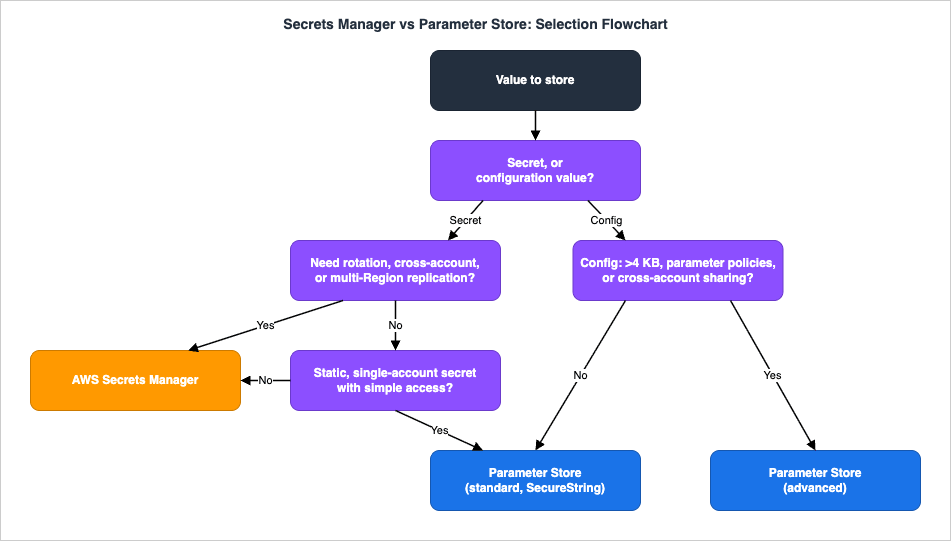
3.1 Question 1: Is it a secret, or configuration?
This is the fork everything hinges on. A secret is a credential, key, or token whose disclosure causes harm — database passwords, OAuth client secrets, private keys, third-party API keys. Configuration is operational data that shapes behavior but is not itself sensitive — endpoint URLs, region names, AMI IDs, log levels, non-sensitive feature toggles.- If it is a secret, continue to Question 2.
- If it is configuration, skip to Question 4.
A useful tell: ask "if this value appeared in a log or a screenshot, would we treat it as an incident?" If yes, it is a secret. If a value is genuinely sensitive and sometimes needs to be configuration-like (referenced by many services), it is still a secret — store it in Secrets Manager and reference it from Parameter Store (Section 9).
3.2 Question 2: Does it need rotation, cross-account sharing, or multi-Region replication?
These three capabilities are where Secrets Manager is structurally different.- If the secret must be rotated automatically (database credentials are the classic case), or shared cross-account as a managed resource, or replicated to other Regions with a single ARN, then choose Secrets Manager. None of these are native to Parameter Store.
- If none of these apply, continue to Question 3.
3.3 Question 3: Is it a static, rarely changed secret with simple access?
Not every secret needs the full Secrets Manager lifecycle. A static, rarely changed secret used by a single account — a webhook signing key you rotate by hand once a year, for instance — can live perfectly well as a Parameter StoreSecureString, which is KMS-encrypted and costs nothing extra in the standard tier.- If the secret is static, single-account, and you are comfortable rotating it manually, Parameter Store (standard, SecureString) is a legitimate, economical choice.
- If you want managed rotation, fine-grained per-secret resource policies, or expect the access pattern to grow, prefer Secrets Manager even now — retrofitting it later is more work than starting there.
3.4 Question 4: For configuration, do you need large values, parameter policies, or cross-account sharing?
Within configuration, the only remaining choice is the Parameter Store tier.- If you need values larger than 4 KB, more than 10,000 parameters per Region, parameter policies (expiration, expiration notification, no-change notification), or to share parameters across accounts, choose the advanced tier (charges apply).
- Otherwise, the standard tier (no additional charge) is the default and correct choice.
Remember that advanced is a one-way door: you can upgrade a standard parameter to advanced at any time, but you cannot revert an advanced parameter to standard — you must delete and recreate it (the downgrade would truncate the value, drop attached policies, and change the encryption mode).
4. AWS Secrets Manager — Storage, Rotation, and Replication
Secrets Manager stores a named secret as one or more versions. Each version holds either aSecretString (typically JSON, e.g. a username/password pair) or SecretBinary. Versions are tracked by version ID and tagged with staging labels — and those labels are the key to understanding rotation, because rotation is, at heart, a controlled relabeling of versions.Creating a secret is a single call:
aws secretsmanager create-secret \
  --name "prod/payments/db" \
  --description "Aurora credentials for the payments service" \
  --kms-key-id "alias/payments-secrets" \
--secret-string '{"username":"payments_app","password":"PLACEHOLDER_INITIAL_VALUE"}'--kms-key-id is optional; if omitted, Secrets Manager uses the AWS managed key aws/secretsmanager. Use a customer-managed key (CMK) when you need custom key permissions, separate auditing, or cross-account access (Section 7).4.1 The three rotation approaches
Rotation is the process of periodically updating a secret's value and the credential it represents in the target system, in lockstep. Secrets Manager offers three approaches:- Managed rotation — for secrets managed by other AWS services (for example, an Amazon RDS managed master-user password). The managing service configures and performs rotation; there is no Lambda function to write or operate. You create the secret through the managing service.
- Managed external secrets rotation — for secrets held by Secrets Manager partners; rotation updates the value on the partner's system, again without a Lambda function.
- Rotation by Lambda function — for everything else. A Lambda rotation function performs the update, and you control its logic. This is the approach you will write code for, and the one whose internals matter most.
4.2 The four-step rotation state machine
When rotation by Lambda is configured, Secrets Manager invokes the same function several times, each time with a differentStep parameter, passing the secret ARN and a ClientRequestToken that identifies the new version:{
"Step": "createSecret",
"SecretId": "arn:aws:secretsmanager:us-east-1:111122223333:secret:prod/payments/db-AbCdEf",
"ClientRequestToken": "EXAMPLE-1a2b-3c4d-5e6f-EXAMPLE",
"RotationToken": "EXAMPLE-rotation-token"
}- createSecret — The function checks whether a version already exists for the
ClientRequestToken; if not, it generates a new secret value (for example withget-random-password) and stores it withPutSecretValueunder the staging labelAWSPENDING. Storing the candidate asAWSPENDINGmakes the step idempotent: if rotation is retried, the same pending value is reused rather than regenerated. - setSecret — The function changes the credential in the target database or service to match the value now in
AWSPENDING. This is the privileged step: the function acts as a deputy with authority over both the secret and the target, so well-written functions guard against a confused-deputy attack by verifying that theAWSCURRENTcredential is still valid and that theAWSCURRENTandAWSPENDINGvalues refer to the same user and host before changing anything. - testSecret — The function verifies the
AWSPENDINGvalue by actually using it to connect to the target (template-based functions test with read access). If this fails, rotation does not advance. - finishSecret — The function moves the
AWSCURRENTlabel from the previous version to the new version withUpdateSecretVersionStage, which in the same call removesAWSPENDING. Secrets Manager then automatically appliesAWSPREVIOUSto the now-superseded version, so you always retain the last known-good value for emergency rollback.
So a healthy rotation walks a version from
AWSPENDING → AWSCURRENT, demotes the old AWSCURRENT → AWSPREVIOUS, and clears AWSPENDING. Applications that always read the default (AWSCURRENT) version never see the in-flight AWSPENDING value. If any step fails, Secrets Manager retries the entire rotation during the open rotation windows.4.3 Single-user versus alternating-users strategy
For database secrets there are two strategies, and the choice has real availability consequences:- Single-user rotation updates the password for one database user in place. It is the simplest approach and is recommended for most cases, but there is a brief window during
setSecretwhere a new connection using the still-cached old password may be refused before clients pick up the new value (already-open connections are not dropped). For many workloads this window is negligible; for latency-critical ones it is not. - Alternating-users rotation maintains two users — an original and a clone — in a single secret, alternating which user's password is rotated each cycle. Because one valid credential always exists while the other is being changed, availability is higher. The cost is complexity: it requires a second secret holding admin/superuser credentials that can clone users and change passwords, and it has database-specific constraints — for Amazon RDS for MySQL, for instance, Secrets Manager appends
_cloneto the username, so the base username must stay short enough (the clone name must not exceed the database's username length limit).
Configuring rotation can be as little as one call once the function exists, or fully declarative with CloudFormation. The hosted-rotation path lets Secrets Manager create the rotation Lambda for you from a template:
Transform: AWS::SecretsManager-2024-09-16
Resources:
  PaymentsDbSecret:
    Type: AWS::SecretsManager::Secret
    Properties:
      Name: prod/payments/db
      KmsKeyId: !Ref PaymentsSecretsKey
      GenerateSecretString:
        SecretStringTemplate: '{"username":"payments_app"}'
        GenerateStringKey: password
        ExcludePunctuation: true

  PaymentsDbRotation:
    Type: AWS::SecretsManager::RotationSchedule
    Properties:
      SecretId: !Ref PaymentsDbSecret
      HostedRotationLambda:
        RotationType: MySQLSingleUser
        VpcSecurityGroupIds: !Ref RotationLambdaSgId
        VpcSubnetIds: !Join [",", !Ref PrivateSubnetIds]
      RotationRules:
AutomaticallyAfterDays: 30Transform: AWS::SecretsManager-2024-09-16 macro is required for HostedRotationLambda. Choose the RotationType to match the engine and strategy (for example MySQLSingleUser or MySQLMultiUser). Note the warning in the AWS guidance: a rotation function's provisioned concurrency should not be set below 10, because too few execution threads can cause throttling.The rotation cadence itself is set by
RotationRules. You can specify AutomaticallyAfterDays for a simple interval, or — the approach AWS recommends for predictability — a ScheduleExpression (a cron() or rate() expression) together with a Duration that bounds the rotation window. By default, turning on rotation rotates the secret once immediately so the value is proven good; set RotateImmediatelyOnUpdate to false to skip that, and when you do, prefer cron() over rate() or AutomaticallyAfterDays so that editing the schedule does not trigger an unintended extra rotation. You can also force an on-demand rotation at any time — for example right after a suspected exposure — with rotate-secret.4.4 Cross-Region replication
Secrets Manager can replicate a secret to other Regions. A replica shares the same ARN as the primary, differing only in the Region field, and carries the encrypted value, metadata, tags, and resource policy. Rotation is managed only on the primary and propagates to replicas automatically, which keeps multi-Region credentials consistent without running rotation in each Region. Replicas can be promoted to standalone secrets if a Region must operate independently. Replication is not supported between standard AWS Regions and isolated partitions such as GovCloud or the China Regions. This is the native way to give a globally distributed application low-latency, consistent access to the same secret — a building block reused in the end-to-end architecture in Section 12.5. Systems Manager Parameter Store — Types, Tiers, and Throughput
Parameter Store stores configuration data as named parameters organized in a hierarchy. It supports versioning, labels, IAM-based access control, and integration with services that already understand parameter references (EC2, ECS, Lambda, CloudFormation, CodeBuild, CodeDeploy). It is the default home for configuration, and a fine home for static secrets viaSecureString.5.1 Parameter types
- String — a single plaintext value (an endpoint URL, a region, a flag).
- StringList — a comma-separated list of values.
- SecureString — a value encrypted with AWS KMS. The name is plaintext; only the value is encrypted. This is how Parameter Store holds secrets.
Names are hierarchical paths (up to 1011 characters), which is the organizing principle that makes Parameter Store scale operationally:
# A plaintext configuration value
aws ssm put-parameter \
  --name "/payments/prod/api-endpoint" \
  --type String \
  --value "https://api.internal.example.com"

# An encrypted secret as a SecureString (standard tier)
aws ssm put-parameter \
  --name "/payments/prod/signing-key" \
  --type SecureString \
  --key-id "alias/payments-config" \
--value "PLACEHOLDER_SIGNING_KEY"GetParametersByPath fetches an entire subtree in one call — for example, every parameter under /payments/prod/ — which lets an application load all of its configuration with a single recursive request:aws ssm get-parameters-by-path \
--path "/payments/prod/" \
--recursive \
--with-decryption--with-decryption instructs Parameter Store to decrypt SecureString values (requiring kms:Decrypt on the relevant key). Each write creates a new version; you can also attach labels to versions to pin a known-good configuration and move the label forward deliberately.5.2 Tiers and limits
Parameter Store offers two tiers, configured per parameter:| Feature | Standard | Advanced |
|---|---|---|
| Max parameters (per account/Region) | 10,000 | 100,000 |
| Max value size | 4 KB | 8 KB |
| Parameter policies | Not supported | Supported |
| Cross-account sharing | Not supported | Supported |
| Cost | No additional charge | Charges apply |
Two operational facts about tiers matter:
- Advanced is irreversible. You can promote standard → advanced any time, but you cannot demote advanced → standard (it would truncate the value to 4 KB, remove parameter policies, and change the encryption mode). If you no longer need advanced features, delete and recreate as standard. There is also an Intelligent-Tiering default-tier setting that lets Parameter Store choose the tier per request based on whether advanced features are needed.
- Parameter policies are an advanced-only feature. They let a parameter expire at a set time, notify before expiration, or notify if a parameter has not changed within a period — useful for enforcing rotation hygiene on values that Parameter Store itself does not rotate.
5.3 Throughput is independent of tier
Throughput — the transactions-per-second ceiling for parameter API operations — is configured separately from the tier. The default supports low-to-moderate volume; you can enable higher throughput (at additional cost) to handle high-frequency access and avoid throttling. Because throughput and tier are orthogonal, a standard-tier deployment can still need higher throughput if many compute nodes read parameters on every request. The better fix for that pattern is usually caching (Section 8), not raising throughput — but the lever exists when caching is not enough.5.4 What Parameter Store does not do
The defining gap is rotation: Parameter Store has no native rotation mechanism. It also has no resource-based policy (access is controlled entirely by IAM identity policies and, for cross-account, by sharing advanced parameters). When a configuration value is actually a rotating secret, the right design is not to bolt rotation onto Parameter Store — it is to keep the secret in Secrets Manager and reference it through Parameter Store (Section 9).5.5 Public parameters
Parameter Store also hosts public parameters published by AWS itself under the/aws/service/ path — the latest Amazon Linux and Windows AMI IDs, ECS- and EKS-optimized images, and global infrastructure facts such as Regions, endpoints, and Availability Zones. These let a template resolve "the current AMI" at deploy time instead of hardcoding an ID that drifts out of date. Discover them from the console's Public parameters tab or the CLI, and read them like any other parameter (not every public parameter exists in every Region):# List the AWS services that publish public parameters
aws ssm get-parameters-by-path --path "/aws/service/list"
# Resolve the latest Amazon Linux AMI ID at deploy time
aws ssm get-parameter \
--name "/aws/service/ami-amazon-linux-latest/<image-name>" \
--query "Parameter.Value" --output text6. Encryption with KMS
Both services encrypt with AWS KMS, but the way they encrypt differs, and the difference is worth understanding because it affects performance, auditing, and how key policies are written. For the deeper KMS story — key types, grants, and the service's evolution — see the AWS KMS timeline; this section covers only what is specific to these two stores.6.1 Secrets Manager always uses envelope encryption
Secrets Manager never encrypts a secret value directly under a KMS key. Instead it uses envelope encryption: whenever a secret value changes, Secrets Manager calls KMSGenerateDataKey to obtain a unique 256-bit AES data key, uses the plaintext data key to encrypt the secret value outside of KMS, immediately discards the plaintext data key from memory, and stores the encrypted data key in the secret's metadata. To read the secret, Secrets Manager calls KMS to decrypt the data key, then uses it to decrypt the value. A fresh data key per value change limits how much ciphertext is ever protected by a single key operation.Important consequences:
- Only symmetric KMS keys are supported. You can use the AWS managed key
aws/secretsmanageror a customer-managed key. - The secret value is encrypted; the name, description, rotation settings, KMS key ARN, and tags are not. Never put sensitive data in a secret's name or description.
- When you change a secret's KMS key, Secrets Manager re-encrypts the
AWSCURRENT,AWSPENDING, andAWSPREVIOUSversions, and keeps older versions decryptable under the previous key to avoid locking you out — so the previous key'skms:Decryptpermission still matters after a key change.
6.2 Parameter Store SecureString: direct vs envelope, by tier
Parameter Store'sSecureString encryption depends on the tier:- Standard
SecureString(value up to 4096 bytes) is encrypted directly under the specified KMS key. - Advanced
SecureStringuses envelope encryption via the AWS Encryption SDK, because larger values are encrypted with a local data key rather than a direct KMS call on the whole payload.
As with Secrets Manager, you can use the AWS managed key (
aws/ssm) or a customer-managed key, and asymmetric KMS keys are not supported. Reading a SecureString value requires --with-decryption and kms:Decrypt on the key.6.3 Least-privilege key policies
Because both services call KMS on the caller's behalf, scope key permissions tightly. A common pattern restrictskms:Decrypt and kms:GenerateDataKey to requests that come through the relevant service, using the kms:ViaService condition key:{
"Sid": "AllowSecretsManagerUseViaService",
"Effect": "Allow",
"Principal": { "AWS": "arn:aws:iam::111122223333:role/payments-app" },
"Action": ["kms:Decrypt", "kms:GenerateDataKey"],
"Resource": "*",
"Condition": {
"StringEquals": {
"kms:ViaService": "secretsmanager.us-east-1.amazonaws.com"
}
}
}ssm.<region>.amazonaws.com for Parameter Store SecureString access. Using a dedicated customer-managed key per sensitivity domain (rather than the shared AWS managed key) is what lets you audit and revoke at a granularity finer than "all secrets in the account." The full mechanics of key policies versus grants belong to the KMS material; the rule here is simply: prefer a CMK for anything that needs custom permissions, cross-account access, or independent auditing.7. Access Control and Cross-Account Sharing
Access to both stores is governed by IAM. This section covers what is specific to secrets and parameters; for how an IAM request is actually evaluated (identity vs resource policies, explicit deny, permission boundaries), defer to IAM Policy Evaluation Logic Step by Step and the AWS IAM Glossary.7.1 Identity policies and least privilege
The baseline is an identity policy that grants the minimum action on the minimum resource. Scopesecretsmanager:GetSecretValue to specific secret ARNs (the random suffix can be wildcarded so the policy survives recreation), and Parameter Store reads to specific name paths:{
"Version": "2012-10-17",
"Statement": [
{
"Sid": "ReadPaymentsSecret",
"Effect": "Allow",
"Action": "secretsmanager:GetSecretValue",
"Resource": "arn:aws:secretsmanager:us-east-1:111122223333:secret:prod/payments/db-*"
},
{
"Sid": "ReadPaymentsConfig",
"Effect": "Allow",
"Action": ["ssm:GetParameter", "ssm:GetParametersByPath"],
"Resource": "arn:aws:ssm:us-east-1:111122223333:parameter/payments/prod/*"
}
]
}SecureString or a Secrets Manager value also requires kms:Decrypt on the encryption key, granted via the key policy (Section 6.3) — a frequent omission that produces an AccessDeniedException referencing KMS rather than the store.7.2 Secrets Manager resource policies
Secrets Manager secrets can carry a resource-based policy attached directly to the secret, which grants principals permission to act on that secret. Resource policies are how you express cross-account access and fine-grained per-secret rules. Treat the permission to set them (secretsmanager:PutResourcePolicy) as sensitive: a principal that can rewrite a secret's resource policy can escalate its own access.A resource policy is a standard policy document attached to the secret. For example, to let a role in another account read this one secret (the identity policy in the consuming account and the shared customer-managed key are still required, per Section 7.3):
{
  "Version": "2012-10-17",
  "Statement": [
    {
      "Sid": "AllowCrossAccountRead",
      "Effect": "Allow",
      "Principal": { "AWS": "arn:aws:iam::444455556666:role/payments-consumer" },
      "Action": "secretsmanager:GetSecretValue",
      "Resource": "*"
    }
  ]
}Resource is * because the policy is already attached to a specific secret — it scopes which principals may act, not which secret.7.3 Cross-account access
Cross-account access differs by service:- Secrets Manager (cross-account) requires both a resource policy on the secret (in the owning account) and an identity policy in the consuming account — unlike same-account access, where one suffices. It is supported for a specific set of operations (such as
GetSecretValue,UpdateSecret, andRotateSecret) and requires the secret to be encrypted with a customer-managed KMS key, because the defaultaws/secretsmanagerkey cannot be shared across accounts. The consuming principal must also be grantedkms:Decrypton that CMK. This pattern fits naturally into multi-account designs — see AWS Multi-Account Operational Patterns for how a central security account can own secrets that workload accounts consume. - Parameter Store (cross-account) is supported only for advanced parameters via shared parameters; standard parameters cannot be shared across accounts.
7.4 Private access with VPC endpoints
Workloads in a VPC — especially Lambda functions and ECS tasks without internet egress — reach both services privately through interface VPC endpoints (com.amazonaws.<region>.secretsmanager and com.amazonaws.<region>.ssm). This keeps secret and parameter traffic on the AWS network and is a prerequisite for the Lambda extension when the function runs inside a VPC (Section 8). Endpoint policies on those endpoints can further constrain which secrets or parameters are reachable through them.8. Retrieving Values in Applications
How you fetch a value matters as much as where you store it. Naive code that callsGetSecretValue or GetParameter on every request adds latency, runs up API usage, and risks throttling. The mechanisms below all exist to make retrieval fast, cheap, and correct.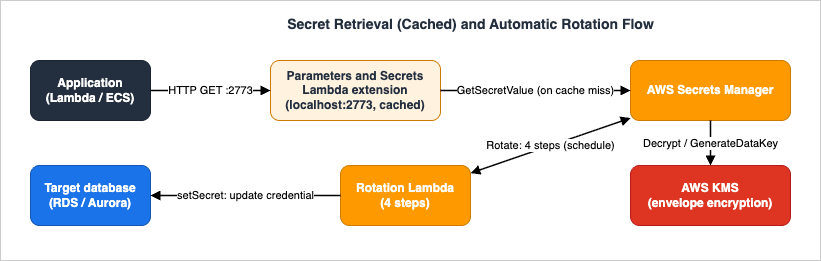
8.1 SDK and CLI
The direct path isGetSecretValue (Secrets Manager) or GetParameter / GetParameters / GetParametersByPath (Parameter Store) from the AWS SDK or CLI. This is correct for low-frequency reads — at startup, or in a configuration-load phase — but on a hot path it should always be wrapped in a cache.8.2 The Secrets Manager caching libraries
AWS publishes client-side caching libraries for Secrets Manager (for Java, Python, .NET, Go, and others) that cache the secret value in memory with a configurable refresh interval and transparently fetch the current version. They are the simplest way to stop a function from calling Secrets Manager on every invocation when you are already writing application code in a supported language. AWS Workload Credentials Provider, announced on June 11, 2026, covers the case where you are not. It is an open-source client-side tool that runs on Windows and Linux, caches Secrets Manager secrets locally, and also automates the export and deployment of AWS Certificate Manager certificates for Apache and NGINX — the work that previously needed custom Amazon EventBridge automation as public certificate lifetimes shortened. AWS states that it keeps full backward compatibility with the AWS Secrets Manager Agent, so it is an addition to this list rather than a replacement for it.8.3 The AWS Parameters and Secrets Lambda extension
For Lambda specifically, the AWS Parameters and Secrets Lambda extension is a runtime-agnostic layer that retrieves and caches both Secrets Manager secrets and Parameter Store parameters over a simple local HTTP interface — no SDK code required. You add it as a layer and callhttp://localhost:2773 from your handler, passing the function's session token in a header:import os
import json
import urllib.request
def get_secret(secret_id: str) -> dict:
endpoint = f"http://localhost:2773/secretsmanager/get?secretId={secret_id}"
req = urllib.request.Request(endpoint)
# The extension requires the Lambda session token as an auth header.
req.add_header("X-Aws-Parameters-Secrets-Token", os.environ["AWS_SESSION_TOKEN"])
with urllib.request.urlopen(req) as resp:
return json.loads(resp.read())["SecretString"]aws lambda update-function-configuration \
--function-name payments-api \
--layers "<AWS-Parameters-and-Secrets-Lambda-Extension-layer-ARN-for-your-region>" \
--environment "Variables={SECRETS_MANAGER_TTL=60,SSM_PARAMETER_STORE_TTL=300,PARAMETERS_SECRETS_EXTENSION_CACHE_SIZE=500,PARAMETERS_SECRETS_EXTENSION_HTTP_PORT=2773}"| Setting | Default | Environment variable |
|---|---|---|
| HTTP port | 2773 | PARAMETERS_SECRETS_EXTENSION_HTTP_PORT |
| Cache enabled | TRUE | PARAMETERS_SECRETS_EXTENSION_CACHE_ENABLED |
| Cache size | 1000 | PARAMETERS_SECRETS_EXTENSION_CACHE_SIZE |
| Secrets Manager TTL | 300 s | SECRETS_MANAGER_TTL |
| Parameter Store TTL | 300 s | SSM_PARAMETER_STORE_TTL |
| Log level | INFO | PARAMETERS_SECRETS_EXTENSION_LOG_LEVEL |
The layer ARN is Region-specific; look up the current ARN for your Region in the documentation rather than hardcoding one. If the function runs inside a VPC, the extension needs a route to the service — an interface VPC endpoint (Section 7.4).
The caching/rotation tradeoff is the subtle part. A 300-second cache means a function can use a secret value up to five minutes after rotation moved
AWSCURRENT. For frequently rotated secrets you have two documented levers: lower SECRETS_MANAGER_TTL (for example to 60), which trades more API calls for fresher values; or request a specific staging label so you always get the version you want:http://localhost:2773/secretsmanager/get?secretId=prod/payments/db&versionStage=AWSCURRENT8.4 Reaching a secret through Parameter Store
Parameter Store integrates with Secrets Manager through a pass-through reference. Any service that can read a Parameter Store parameter can read a Secrets Manager secret by using the reserved name prefix/aws/reference/secretsmanager/:aws ssm get-parameter \
--name "/aws/reference/secretsmanager/prod/payments/db" \
--with-decryption- It is a stateless pass-through. Parameter Store does not store the secret or any metadata about it; it forwards the request to Secrets Manager at read time.
- It honors the IAM policy on the secret. If the caller lacks access to the secret, the reference fails — Parameter Store does not widen access.
- Only
GetParameterandGetParameterswork with the reference; modification and advanced-query operations (DescribeParameters,GetParametersByPath) do not. - Referenced secrets cannot use Parameter Store versioning or history (though you may pin a Secrets Manager version stage in the reference).
This is the mechanism that lets a service standardize on "read everything from Parameter Store" while still keeping rotating secrets in Secrets Manager — the foundation of the next section.
8.5 Where caching lives, and cold starts
Caching is per execution environment, not global. The Lambda extension and the caching libraries hold values in memory inside a single function execution environment, so the first request after a cold start always incurs one real fetch (and one KMS decrypt) before the cache warms; subsequent invocations on that environment are served locally until the TTL expires. Two practical consequences follow. First, retrieve secrets and configuration during initialization — at module scope or in an init block, outside the request handler — so the fetch happens once per environment rather than once per request. Second, size the TTL against both freshness and cold-start frequency: a very short TTL on a high-traffic function multiplies fetches across every warm environment, while a long TTL on a frequently rotated secret risks staleness (Section 8.3). Because the cache is per environment, these are independent knobs rather than one global setting.9. Using Both Together
The two services are complements, not competitors. The clean production pattern is:- Configuration → Parameter Store (standard). Endpoint URLs, region names, feature toggles that are not sensitive, tuning values. Free of additional charge, hierarchical, versioned.
- Rotating or shared secrets → Secrets Manager. Database credentials, third-party API keys, signing keys — anything that needs automatic rotation, a resource policy, or cross-Region replication.
- One read path. Where it simplifies application code, expose the Secrets Manager secrets through Parameter Store's
/aws/reference/secretsmanager/prefix so the application uses a single Parameter Store client for both configuration and secrets, while the secret still lives in — and is rotated by — Secrets Manager.
A representative layout:
/payments/prod/api-endpoint            -> Parameter Store String   (config)
/payments/prod/log-level               -> Parameter Store String   (config)
/payments/prod/feature/new-checkout    -> Parameter Store String   (non-sensitive flag)
prod/payments/db                       -> Secrets Manager secret   (rotated DB credentials)
prod/payments/stripe-key -> Secrets Manager secret (rotated API key)GetParametersByPath call on /payments/prod/, and reads prod/payments/db either directly from Secrets Manager (via the Lambda extension) or through the Parameter Store reference — without ever embedding a credential in code or environment variables. For dynamic, validated runtime configuration such as gradual feature-flag rollouts, reach for AWS AppConfig rather than overloading either store.10. Observability and Diagnostics
Secrets and configuration are exactly the kind of resource where you must be able to answer "who read this, and when did it change?" — and where rotation failures are silent unless you look. This section covers what to monitor and how to diagnose the common failures.10.1 Auditing access and changes with CloudTrail
Both services log API activity to AWS CloudTrail. The events you will query most often:GetSecretValue,PutSecretValue,UpdateSecret,DeleteSecret,RotateSecret,UpdateSecretVersionStagefor Secrets Manager.GetParameter,GetParameters,PutParameter,DeleteParameter,LabelParameterVersionfor Parameter Store.- KMS
DecryptandGenerateDataKeyevents, which — because both stores call KMS on the caller's behalf — give a second, independent record of access, complete with the encryption context identifying the secret.
CloudTrail is how you answer access-audit questions ("which principal read the payments secret last week?") and how you detect anomalous reads. Rotation produces its own CloudTrail trail, so a rotation that silently stopped is visible as the absence of recent
RotateSecret / UpdateSecretVersionStage events.10.2 Diagnosing rotation failures
When rotation appears stuck, inspect the version-to-staging-label mapping directly:aws secretsmanager describe-secret --secret-id prod/payments/db \
--query 'VersionIdsToStages'AWSPENDINGpresent but not on the same version asAWSCURRENT— a rotation is (or appears) in progress. If it persists, a step is failing; any new rotation attempt will return an error assuming a previous one is still running. The fix is to find whysetSecret/testSecret/finishSecretfailed (almost always network reachability to the target, or permissions), let Secrets Manager retry, or remove the staleAWSPENDINGonly when you are certain no rotation is mid-flight.testSecretfailing — the new credential cannot connect. Check thatsetSecretactually changed the target, and that the rotation function can reach the database (VPC subnets, security groups, and — for Lambda in a VPC — a Secrets Manager VPC endpoint).- Network/permissions — rotation functions for database secrets must reach both Secrets Manager and the database. Missing VPC configuration or an under-scoped execution role are the dominant root causes.
10.3 Common diagnostic signals
- A
kms:Decrypt-flavoredAccessDeniedExceptionon an otherwise-allowedGetSecretValueorGetParameter --with-decryptionmeans the KMS key policy, not the store's IAM policy, is the missing grant. ThrottlingExceptionon Parameter Store reads points to throughput, not tier — add caching (Section 8) or raise throughput.- A function reading a "stale" password right after rotation is the cache TTL at work (Section 8.3), not a rotation bug.
11. Common Pitfalls
The mistakes below recur across reviews and incidents. Each is a symptom of using a store without matching it to the requirement.- Hardcoding secrets in code, environment variables, or images. The root anti-pattern. Plaintext environment variables and image layers are not a secret store; they cannot be rotated or audited and they leak through logs and snapshots. Move the value into Secrets Manager or a
SecureString, and fetch it at runtime. (Symptom: a credential in a repo or adocker history. Fix: externalize and rotate the exposed value immediately.) - Storing a rotating secret in Parameter Store and never rotating it. Parameter Store has no native rotation, so a "secret" there ages indefinitely unless you build automation. (Fix: move it to Secrets Manager, or reference it from Parameter Store while Secrets Manager rotates it.)
- SecureString or secret read fails with a KMS error. The IAM policy allowed the store action but the KMS key policy did not grant
kms:Decryptto the principal. (Fix: add the principal to the key policy, scoped withkms:ViaService.) - High-frequency retrieval without caching. Calling
GetSecretValue/GetParameteron every request inflates latency and triggers throttling. (Fix: use the Lambda extension, the caching libraries, or Powertools — and tune the TTL against your rotation cadence.) - Putting all configuration in Secrets Manager. Treating every value as a paid secret wastes money and obscures which values are actually sensitive. (Fix: non-sensitive configuration belongs in standard-tier Parameter Store.)
- Assuming advanced parameters are reversible. Promoting to advanced is one-way; planning to "downgrade later" fails. (Fix: choose the tier deliberately; recreate as standard if you must.)
- Cross-account access that "should work" but doesn't. Secrets Manager cross-account needs a resource policy and an identity policy and a customer-managed KMS key with
kms:Decryptgranted to the consumer — missing any one yields an opaque denial. (Fix: verify all three; the defaultaws/secretsmanagerkey can never be shared cross-account.) - Stale
AWSPENDINGblocking rotation. RemovingAWSPENDINGout of band, or a failed step leaving it mis-aligned, causes later rotations to error as "in progress." (Fix: diagnose withdescribe-secret'sVersionIdsToStagesbefore touching labels.) - Alternating-users rotation without the admin secret. The strategy requires a second secret with superuser permissions to clone users and change passwords; configuring it without that prerequisite fails at
setSecret. (Fix: provision the admin secret first, and respect engine username-length limits.)
12. End-to-End Architecture Walkthrough
To see the pieces working together, consider a realistic design: a payments service whose database credentials are rotated automatically, fetched efficiently by the application, encrypted with a dedicated key, replicated for a second Region, and accompanied by non-secret configuration in Parameter Store.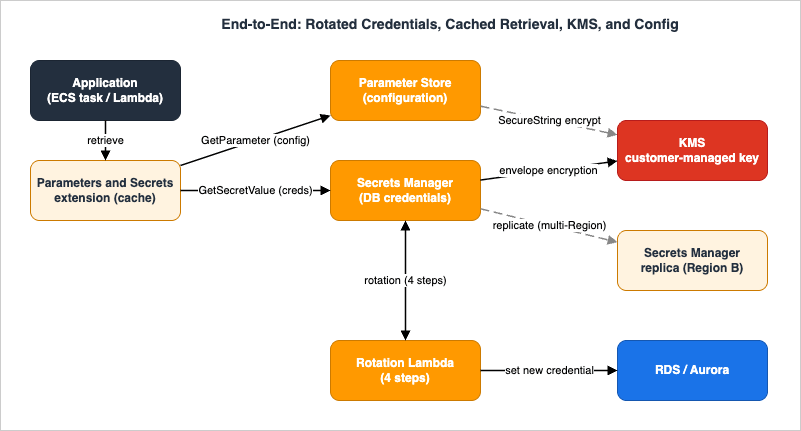
12.1 The components and their roles
- Application (ECS task or Lambda function) — needs both configuration and a database credential, and must never hold either in code.
- AWS Parameters and Secrets Lambda extension (or the caching library on ECS) — provides a cached, local retrieval path so the application reads values without an API call per request.
- Parameter Store — holds non-secret configuration under
/payments/prod/, read in oneGetParametersByPath.SecureStringconfig, if any, is encrypted under the CMK. - Secrets Manager — holds the rotated Aurora credentials at
prod/payments/db, encrypted with envelope encryption under a customer-managed key. - KMS customer-managed key — encrypts both the secret (envelope) and any
SecureStringparameters, with a key policy scoped bykms:ViaServiceand granting only the application role and the rotation function. - Rotation Lambda — runs the four-step rotation against Aurora, in the VPC, with single-user or alternating-users strategy.
- Aurora (or RDS) — the credential target; the rotation function's
setSecretstep updates the database user's password. - Secrets Manager replica in a second Region — the same ARN in Region B, kept current because rotation runs only on the primary and propagates.
12.2 The request and rotation flows
Steady-state read. On a request, the application asks the extension forprod/payments/db. On a cache hit it returns immediately; on a miss it calls GetSecretValue, Secrets Manager calls KMS to decrypt the data key, decrypts the value, and the extension caches it for the configured TTL. Configuration comes from Parameter Store the same way. No credential ever lives in the application's environment.Rotation. On schedule, Secrets Manager invokes the rotation Lambda four times —
createSecret writes a new AWSPENDING value, setSecret changes the Aurora password, testSecret connects with the new credential, finishSecret promotes AWSPENDING to AWSCURRENT and Secrets Manager demotes the old version to AWSPREVIOUS. Within one TTL window afterward, the extension's cache expires and the application transparently picks up the new credential — or immediately, if the request pins versionStage=AWSCURRENT.Failure behavior and observability. If the database is briefly unreachable during
setSecret, the step fails, Secrets Manager retries the whole rotation, and AWSPREVIOUS remains valid for rollback. CloudTrail records every GetSecretValue, every rotation step, and every KMS Decrypt / GenerateDataKey, so both access auditing and rotation health are observable. If a second Region must run independently after a regional event, the replica is promoted to standalone. This is the shape of a production secrets design: rotation automated, retrieval cached, encryption isolated to a dedicated key, configuration separated from secrets, and the whole thing replicated and audited.13. Frequently Asked Questions
Q. Secrets Manager or Parameter Store — what is the one-line rule?A. If the value needs automatic rotation, a resource-based policy, or managed cross-Region replication, use Secrets Manager. If it is configuration (or a static, single-account secret you rotate by hand), use Parameter Store — standard tier unless you need values over 4 KB, more than 10,000 parameters, parameter policies, or cross-account sharing, in which case use advanced. AWS's own guidance matches this: rotation/lifecycle → Secrets Manager, configuration → Parameter Store, dynamic config/feature flags → AppConfig.
Q. Does Parameter Store rotate secrets?
A. No. Parameter Store has no native rotation. If a value stored there must rotate, either build the automation yourself or — better — keep the secret in Secrets Manager (which rotates it) and read it through Parameter Store's
/aws/reference/secretsmanager/ pass-through reference.Q. How do I share a secret across accounts?
A. Attach a resource-based policy to the secret granting the external principal, add a matching identity policy in the consuming account, and encrypt the secret with a customer-managed KMS key whose policy grants the consumer
kms:Decrypt. The default aws/secretsmanager key cannot be shared across accounts. For Parameter Store, cross-account sharing exists only for advanced parameters.Q. How should I cache secrets in an application?
A. Use a cache, not per-request reads. On Lambda, the AWS Parameters and Secrets Lambda extension caches both secrets and parameters over
localhost:2773 (default TTL 300 s, up to 1,000 items); Powertools for AWS Lambda is the code-integrated alternative. In long-running services, use the Secrets Manager caching libraries. Tune the TTL against your rotation cadence — lower it for frequently rotated secrets, or pin versionStage=AWSCURRENT for immediate freshness.Q. Is a Parameter Store SecureString as secure as a Secrets Manager secret?
A. Both encrypt the value with AWS KMS. The differences are operational, not "more or less secret": Secrets Manager always uses envelope encryption and adds rotation, resource policies, and replication; standard
SecureString encrypts directly under the key (advanced uses envelope encryption). For a static, single-account secret, a SecureString is a sound, economical choice; for a rotating or shared one, Secrets Manager's lifecycle features are the reason to pay for it.Q. What is the difference between a parameter tier and throughput?
A. Tier (standard vs advanced) governs storage limits and features — value size, count, parameter policies, cross-account sharing. Throughput governs transactions per second and is configured independently; you can raise it for high-frequency access. A standard-tier deployment can still need higher throughput, though caching is usually the better answer.
Q. Where do staging labels come from, and which one do applications read?
A. Secrets Manager tracks versions with the labels
AWSCURRENT (the live value, what applications read by default), AWSPENDING (a candidate during rotation), and AWSPREVIOUS (the last known-good value, kept for rollback). Rotation moves AWSCURRENT from the old version to the new one and Secrets Manager applies AWSPREVIOUS automatically.14. Summary
Secrets Manager and Parameter Store look similar and serve different jobs. The decision is a short, ordered set of questions:- Secret, or configuration? — the fork that decides everything.
- Does the secret need rotation, cross-account sharing, or multi-Region replication? — if yes, Secrets Manager; these are not native to Parameter Store.
- Is it a static, single-account secret? — a Parameter Store
SecureStringis a fine, economical home. - For configuration, do you need values over 4 KB, more than 10,000 parameters, parameter policies, or cross-account sharing? — advanced tier if yes, standard otherwise.
The body then went under the hood: rotation as a four-step state machine relabeling versions through
AWSPENDING → AWSCURRENT → AWSPREVIOUS; envelope encryption with per-value data keys; cross-account access requiring a resource policy, an identity policy, and a shared CMK together; and retrieval made fast by the Lambda extension and caching libraries, with the cache-TTL-versus-rotation tradeoff handled by lowering the TTL or pinning a staging label. The end-to-end design tied them together — rotated database credentials in Secrets Manager, configuration in Parameter Store, one CMK, a replica for a second Region, all audited through CloudTrail.The discipline underneath all of it is simple: keep secrets out of code, give each store the job it is built for, and make access least-privilege and observable. For the adjacent decisions in this cluster, continue with the data-protection companion, the Amazon S3 Security and Access Control Guide; for the access-control mechanics this guide delegates, see IAM Policy Evaluation Logic Step by Step, the AWS IAM Glossary, and the multi-account context in AWS Multi-Account Operational Patterns; for KMS and Systems Manager background, the AWS KMS timeline and the AWS Systems Manager timeline.
15. References
- What is AWS Secrets Manager? - AWS Secrets Manager User Guide
- Rotate AWS Secrets Manager secrets
- Lambda rotation functions - four steps in a rotation function
- Lambda function rotation strategies - single user and alternating users
- Secret encryption and decryption in AWS Secrets Manager
- Access AWS Secrets Manager secrets from a different account
- Replicate AWS Secrets Manager secrets across Regions
- Use AWS Secrets Manager secrets in AWS Lambda functions (extension)
- AWS Systems Manager Parameter Store
- Managing parameter tiers - Systems Manager Parameter Store
- Changing Parameter Store throughput
- AWS KMS encryption for SecureString parameters
- Referencing AWS Secrets Manager secrets from Parameter Store parameters
- Use Secrets Manager secrets in Lambda functions (extension and Powertools)
- AWS Secrets Manager Pricing
- AWS Systems Manager Pricing (Parameter Store)
Related Articles
- IAM Policy Evaluation Logic Step by Step - How AWS Decides Allow or Deny
The delegation target for how identity and resource policies, explicit deny, and boundaries combine to authorize a Secrets Manager or Parameter Store call. - AWS IAM Glossary
Definitions for the identity, policy, and access-control terms used throughout this guide. - AWS Multi-Account Operational Patterns
How a central account can own secrets and share them to workload accounts — the context for cross-account access in Section 7. - AWS History and Timeline regarding AWS KMS
Background on the key-management service that encrypts both stores, and how its capabilities evolved. - AWS History and Timeline regarding AWS Systems Manager
How Parameter Store fits into the broader Systems Manager toolset and when each capability arrived.
References:
Tech Blog with curated related content
Written by Hidekazu Konishi