AWS History and Timeline regarding Amazon EFS - Overview, Functions, Features, Summary of Updates, and Introduction
First Published:
Last Updated:
On April 7, 2026, AWS announced something that challenged that assumption. It introduced Amazon S3 Files, which presents S3 buckets as a file system. The announcement describes this new thing as
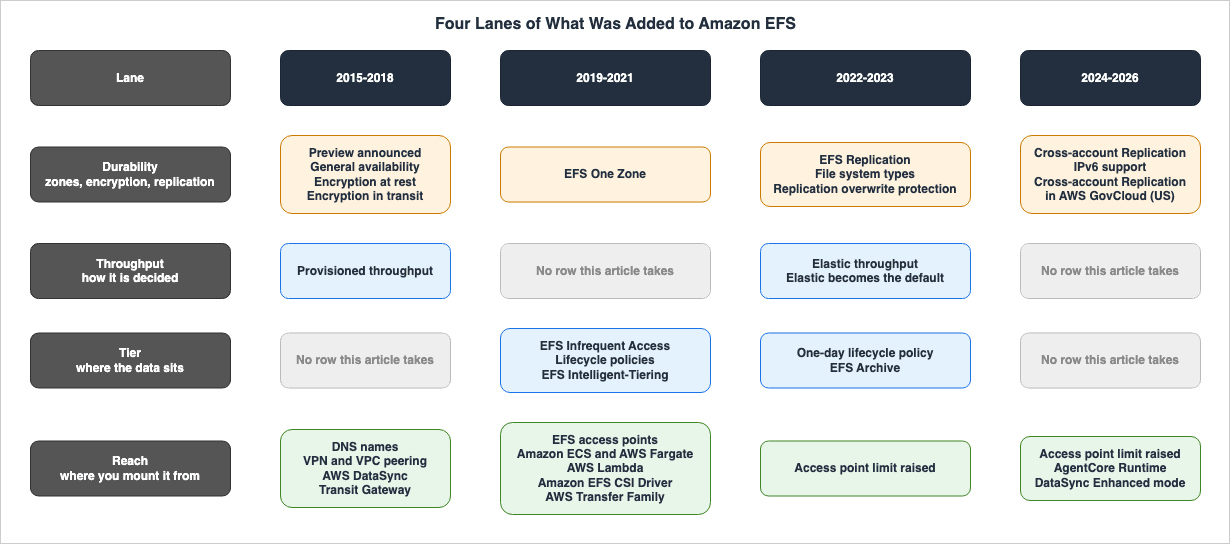
Built using Amazon EFS. The side that was supposed to do the replacing stands on top of the side it was supposed to replace.This article will outline the additions to Amazon EFS over time, split into four lanes: durability, throughput, tier, and reach. There is one question this article sets out to answer. Is the file system layer shrinking?
The answer runs in two directions, depending on the lane. The two lanes that decide what Amazon EFS itself does have both stood still for more than 1,000 days. The lane for what it guarantees and the lane for where you mount it from both carry a row from the last two months.
This article carries only dates and order. The specifics of how Amazon EFS performance is decided, and how S3 Files synchronizes buckets and file systems, are held as their subject by existing articles, and this article defers to them.
Background and Method of Creating Amazon EFS Historical Timeline
A timeline is almost finished the moment its author decides what to count. This section sets out first where the dates come from, and what became a row and what did not. All references were accessed on September 18, 2026.Why This Timeline Is Divided Into Four Lanes
What has been added to Amazon EFS falls into four groups of different kinds. Combining them into a single timeline hides the very conclusion this article reaches, which is that the four fill at different speeds.- The Durability Lane: This covers where data is placed (e.g., across how many Availability Zones), whether it is encrypted, and how it is replicated to another place. These decisions are made when the file system is created and are difficult to modify later.
- The Throughput Lane: This details how throughput is determined. No numbers go here. What goes here is only how many times the way it is decided has changed.
- The Tier Lane: This covers how many places the data can sit in, inside one file system.
- The Reach Lane: This describes from which compute resources the file system can be mounted and how.
These four lanes fill at very different speeds. The Throughput Lane carries only three rows this article takes, and 1,254 days have passed since the last of them. The Reach Lane carries 13 rows, and the last of them is 52 days old.
⚠ These lanes do not represent a formal classification documented in the official materials. AWS does not sort Amazon EFS updates into these four lanes; this article places them for readability. Which lane an item sits in does not change the underlying facts, although some items sit in only one lane. The EFS One Zone announcement from 2021-03-09 is placed in the Durability Lane, and the fact that the same announcement also introduced One Zone-Infrequent Access is covered in the prose of the Tier Lane.
Primary Sources Used in This Article
There are two main sources for the dates used in this article.The first is the Document history section of the Amazon EFS User Guide. From the first release of the user guide on May 26, 2015 to the present, a list of changes runs down the page in date order. The table splits in two, one part for before July 2018 and one for after.
⚠ The location of this page cannot be guessed. The
doc-history.html path that many other AWS user guides use redirects, for Amazon EFS, to the top of the user guide. The page itself sits at document-history.html. If you construct the URL without referencing the table of contents, you may incorrectly conclude that this page does not exist.The second is the announcements on AWS What's New. This article uses the date listed under
Posted on: for each announcement.In addition, this article draws on the
Features of Amazon EFS and Working with access points sections of the Amazon EFS User Guide, the Amazon EFS FAQ page, and the help panel in the Amazon EFS console. Although these four resources do not have dates, they show how the service is described as it now stands.The sources this article used are linked below.
- Document history - Amazon Elastic File System User Guide
- What's New with AWS?
- Features of Amazon EFS - Amazon Elastic File System User Guide
- Working with access points - Amazon Elastic File System User Guide
- Amazon EFS FAQs
The Document history Stopped 466 Days Ago
This article uses two sources because the Document history alone is not enough. This is not an abstract precaution. It falls out of the heading block at the top of that page.The Document history page has two heading lines above the table.
API version: 2015-02-01
Latest documentation update: June 9, 2025
⚠⚠ The most recent entry in the table also dates back to 2025-06-09. Despite a period of 466 days up to the retrieval date of 2026-09-18, no new entries have been added.
⇒ Nothing that happened in 2026 is reflected in the Document history. This article takes six rows dated in 2026, and all six of them appear only in AWS What's New.
⚠ What has stopped is the record, not the service. AWS put out at least six announcements about Amazon EFS in that same 466 days. Confusing these two can lead to the incorrect conclusion that Amazon EFS stopped receiving updates in mid-2025.
⚠ The oldest entry in the Document history dates back to 2015-05-26, but that is the first release of the user guide, not the launch of the service. The service was initially announced on 2015-04-09, a date that is only found in AWS What's New. ⇒ Therefore, the starting point of this timeline lies outside the scope of the Document history.
Where the Two Primary Sources Disagree
Each row in this timeline includes a column indicating which source provides the date. This article takes 36 rows, and they break down as follows:| Dated by | Rows | Meaning |
|---|---|---|
Both | 15 | Present in both sources, with matching dates. |
Both (differ) | 1 | Present in both sources, but with different dates. |
Document history only | 10 | Found only in the Document history. |
What's New only | 10 | Found only in AWS What's New. |
⇒ A total of 20 rows are found in only one of the sources, representing more than half of the total. Comparing the two sources turns up four types of disagreement.
In the first type, the two sources put different dates on the same event.
| Event | What's New | Document history | Difference | Date used in this article |
|---|---|---|---|---|
General availability | 2016-06-29 | 2016-06-28 | 1 day | 2016-06-29 |
⚠ This article identified only one instance of this discrepancy. In the remaining rows where information was present in both sources, the dates matched. ⇒ However, a match does not necessarily mean that one source copied information from the other. This article uses the
Posted on: date. Posted on: describes the day the feature became available, while the Document history describes the day the document was updated, and the latter can fall on either side.The second type is what the Document history does not hold. Of the 10 rows found only in AWS What's New, 7 describe feature additions for services other than Amazon EFS.
Amazon ECS and AWS Fargate support(2020-04-08)AWS Lambda support(2020-06-16)Amazon S3 Files(2026-04-07)AWS Lambda mounts S3 Files(2026-04-21)Amazon Bedrock AgentCore Runtime(2026-05-06)AWS DataSync Enhanced mode(2026-07-28)Amazon ECS extends S3 Files to the EC2 launch type(2026-09-16)
The Document history holds almost nothing about additions to reach, and that is not a gap in the record. Those features belong to the documentation of the other service. ⇒ The Reach Lane cannot be followed from the Amazon EFS side alone.
The remaining three rows are announcements from Amazon EFS itself: the announcement of 2015-04-09, the Amazon EFS CSI Driver of 2020-07-24, and the expansion into AWS GovCloud (US) of 2026-07-29. ⚠ The first of the three is absent from the Document history because the user guide appeared 47 days after that announcement.
The third type is what AWS What's New does not hold. Ten rows appear only in the Document history.
DNS names for file systems(2016-12-20)Encryption in transit and amazon-efs-utils(2018-04-04)VPN and inter-Region VPC peering(2018-10-23)EFS File Sync becomes part of AWS DataSync(2018-11-26)Transit Gateway to on-premises(2018-12-06)AWS Transfer Family access(2021-01-06)One-day lifecycle policy(2022-11-27)Elastic replaces Bursting as the default throughput mode(2023-04-13)File system types(2023-11-26)Replication overwrite protection(2023-11-27)
⚠⚠ Two of these ten rows are the ones where a default and a piece of vocabulary changed. Neither the change of the default throughput mode nor the arrival of the concept of
file system types came with an announcement.⇒ Read only the announcements and there is no way to learn the date on which the default for Amazon EFS changed.
⚠ This article does not state that these are absent from AWS What's New. Searching under several different terms simply did not turn up a matching announcement. This article treats these rows as
Document history only.The fourth type describes the same thing inside a different framework. How the pages count storage classes differs.
The Amazon EFS FAQ page states:
Amazon EFS offers three storage classes: EFS Standard, EFS Infrequent Access,
and EFS Archive.
In contrast, the help panel in the Amazon EFS console states:
Amazon EFS supports two types of storage classes: those that store data in
multiple Availability Zones, and those that store data in a single
Availability Zone.
⛔ This article does not say which of the two is right, and it does not count either. All it can carry is a date. The Document history entry for 2023-11-26 records the day the concept of
file system types arrived.New storage class, file system types, and lifecycle policy | Amazon EFS now offers
the EFS Archive storage class, file system types, and the Transition into Archive
lifecycle policy. | November 26, 2023⇒ The help panel still uses the framework that stood before that day. Whether the spread across Availability Zones is counted as a storage class or as a file system type changed on 2023-11-26. ⛔ What this disagreement costs in practice is held by an existing article, so this article does not take it up.
The Numbers This Timeline Does Not Carry
This timeline does not contain any performance figures. Throughput modes, IOPS ceilings, per-client limits, burst credits, and latency are all held as their subject by an existing article. What the Throughput Lane carries is only the dates on which the way throughput is decided changed, and their order.This timeline does not include any financial figures or percentages. The announcements the Tier Lane cites almost always carry a figure for savings in their own text, and this article does not reproduce it. This article quotes only dates, feature names, and supported ranges. However, the titles of the announcements appear here word for word, as citations. Altering these titles would prevent readers from finding the original source.
There is only one exception regarding maximum values. Where a change in a limit is itself the event, this article carries the value before and the value after, with the date. The two rows on which the access point limit went from 120 to 1,000 and then from 1,000 to 10,000 are where that applies. No other limit appears here as a current value. Current values are available on the official quota pages.
This timeline does not carry a list of Regions. The Document history holds more than 20 rows about Region additions, but a table that tried to cover them would go stale immediately. The official AWS Region table holds which Regions the service reaches.
This timeline does not include instructions for mounting. The installation process for the mount helper, NFS options, and the process for defining mounts from containers are outside the scope of this article.
What This Article Leaves to Other Articles
Amazon EFS is one of the densest subjects among the existing articles on this site. To keep them from overlapping, the split is as follows:- How Performance is Determined and Discrepancies in Primary Data Related to Performance — Amazon EFS Performance Engineering - Throughput Modes, IOPS Ceilings, Per-Client Limits, and Burst Credits. That article holds throughput modes, IOPS ceilings, per-client limits, burst credits, the latency of each storage class, and the choices you cannot take back.
- How Amazon S3 Files Synchronizes Buckets and File Systems — How Amazon S3 Files Keeps a Bucket and a File System in Sync - The Export Window, Close-to-Open Consistency, and Where the Losing Write Goes. That article holds the read and write paths, the consistency models, and where a write goes when two of them collide. This article carries the position and the dates.
- The Same Date, Viewed from the Perspective of S3 — AWS History and Timeline regarding Amazon S3. The S3 Files row appears in both articles. One writes it as part of the lineage of object storage, the other as something built on top of a file system.
- Choosing the Right Method for Moving Data — AWS Data Movement Decision Guide - DataSync, Transfer Family, Storage Gateway, and Data Transfer Terminal. This article keeps DataSync to a single row in the Reach Lane.
- How to Write File System Policies — Resource-Based Policies by Service on AWS.
- Block Storage and Other File Systems — AWS History and Timeline regarding Amazon EBS and AWS History and Timeline regarding Amazon FSx.
- The Same Date, Viewed from the Perspective of the Destination — AWS History and Timeline regarding Amazon ECS, AWS History and Timeline regarding Amazon EKS, and AWS History and Timeline regarding AWS Lambda.
- The Meaning of Terms Describing Lifecycle States — AWS Service Lifecycle States. AWS History and Timeline regarding AWS Direct Connect draws the line between a halt to new customers and a discontinuation, and this article refers to it.
- The Same Relation on the Compute Side — AWS History and Timeline regarding AWS Elastic Beanstalk. Cluster Mode places one managed service on top of another in the same shape, and that article holds the compute side of it.
Amazon EFS Historical Timeline (Updates from April 9, 2015)
The following four tables are central to this article. They run in this order: Durability, Throughput, Tier, and Reach. TheDated by column in each table shows how the two primary sources handle that row. Both marks rows present in both sources with the same date, Both (differ) marks rows present in both but with different dates, and Document history only and What's New only mark rows found in only one of them.Index:
- The Durability Lane - How many Availability Zones hold the data, whether it is encrypted, and where it is replicated.
- The Throughput Lane - How many times the way throughput is decided has changed.
- The Tier Lane - How many places the data can sit in, inside one file system.
- The Reach Lane - Which compute resources can mount the file system, and how.
* You can sort the table by clicking on the column name.
The Durability Lane — Availability Zones, Encryption, Replication
This lane groups together elements that are determined when the file system is created and are difficult to modify later. The initial announcement makes no mention of guarantees.Amazon EFS supports the Network File System version 4 (NFSv4) protocol, so the
applications and tools that you use today work seamlessly with Amazon EFS.
Multiple Amazon EC2 instances can access an Amazon EFS file system at the same
time, providing a common data source for workloads and applications running on
more than one instance.⚠ All this passage carries is that more than one instance can reach the file system at the same time. What was added to this lane afterward is the other side: where the data sits, and how many copies of it there are. Whether encryption at rest can be changed once a file system exists, which neither the announcement nor the Document history in the rows below states, is answered for Amazon EFS alongside Amazon S3, Amazon EBS, and Amazon FSx in Encryption Controls by Service on AWS Storage.
| Date | Update | Dated by | Summary |
|---|---|---|---|
| 2015-04-09 | Preview announced | What's New only | Amazon EFS was announced. The announcement carries the line The Amazon EFS Preview will be available soon. This was not general availability. ⚠ This date is where this timeline starts, and the Document history holds no row for it. The Document history's earliest entry dates back to the initial user guide, released on 2015-05-26. ⇒ This means there were 47 days between the service announcement and the release of the user guide. See: Introducing Amazon EFS |
| 2016-06-29 | General availability | Both (differ) | General availability began. The Document history records that Amazon EFS is now generally available to all users in the US East (N. Virginia), US West (Oregon), and Europe (Ireland) Regions. ⇒ This was 447 days after the initial announcement. ⚠ The Document history lists the same date as 2016-06-28, one day before the announcement. This entry uses the announcement date. See: Amazon Elastic File System (Amazon EFS) is Now Generally Available / Document history |
| 2017-08-14 | Encryption at rest | Both | Encryption at rest became available. The announcement described using keys managed by AWS Key Management Service, and stated that encryption and decryption would be transparent, requiring no application changes. ⚠ The announcement details a process for enabling this feature, which involves selecting it from the console or API when creating a new file system. ⇒ This is the first example in this lane of something that is decided when the file system is created. ⛔ The announcement and Document history do not mention whether this can be changed after creation. See: Amazon EFS Now Supports Encryption of Data at Rest / Document history |
| 2018-04-04 | Encryption in transit and amazon-efs-utils | Document history only | Encryption in transit and a utility to aid in mounting were introduced on the same day. The Document history describes amazon-efs-utils as a set of open-source executables and notes that the same release introduced encryption in transit using Transport Layer Security. ⇒ With both encryption at rest and encryption in transit now supported, this entry marks the completion of the encryption story. This utility would later be used with mount points. See: Document history |
| 2021-03-09 | EFS One Zone storage classes | Both | A new option to store data in a single Availability Zone was introduced. The Document history records this option as being for storing data that doesn't require the Multi-AZ resilience of the EFS Standard and Standard-IA storage classes. ⇒ This is the first time an option to reduce resilience was introduced. ⚠ Two things happened on this day. One sits on the durability side (EFS One Zone) and the other on the tier side (One Zone-Infrequent Access), and the latter is covered in the prose of the Tier Lane. ⛔ This term is a different thing from the One Zone-Infrequent Access of Amazon S3. See: Introducing Lower Cost Storage Classes for Amazon Elastic File System / Document history |
| 2022-01-25 | EFS Replication | Both | The ability to automatically replicate data to another Region was introduced. The announcement stated that this could be done without additional infrastructure or custom synchronization processes, and that recovery time objectives and recovery point objectives were designed to be measured in minutes. ⇒ This expanded the scope of protection from a single file system to encompass two. ⚠ While initially available in a limited number of regions, full support across all regions was rolled out in 2023. See: Announcing Amazon Elastic File System Replication / Document history |
| 2023-11-26 | File system types | Document history only | The concept of a file system type arrived. The Document history records that the EFS Archive storage class, file system types, and the Transition into Archive lifecycle policy all arrived on the same day. ⇒ This entry reclassifies EFS One Zone, previously introduced as a storage class in 2021, as a file system type. ⚠ This is the day the vocabulary changed, not the day the feature changed. ⛔ No announcement accompanied this change, and this single line is the only record this article could find. See: Document history |
| 2023-11-27 | Replication overwrite protection | Document history only | Overwrite protection for replication destinations was introduced, and is enabled by default. The Document history records that this protection prevents file systems from being used as replication destinations and is enabled by default. It also notes that on the same day, it became possible to designate existing file systems as destinations. ⇒ This entry introduces both a feature to increase destination flexibility and a protection mechanism to prevent file systems from being used as destinations. See: Document history |
| 2024-11-19 | Cross-account Replication | Both | The ability to replicate data to another account was introduced. The announcement stated that this supports business continuity, multi-account disaster recovery, and compliance requirements. ⇒ The destination of a replica widened from another Region to another account. This was 1,029 days after the introduction of replication in 2022. See: Amazon EFS now supports cross-account Replication / Document history |
| 2025-06-09 | IPv6 support | Both | API and mount targets now support IPv6. The Document history records that Internet Protocol Version 6 (IPv6) is supported on Amazon EFS Service APIs and mount targets. ⚠⚠ This row is the latest entry in the Document history. No row has been added in the 466 days since. See: Amazon EFS now supports Internet Protocol Version 6 (IPv6) / Document history |
| 2026-07-29 | Cross-account Replication in AWS GovCloud (US) | What's New only | Cross-account replication is now available in AWS GovCloud (US). The announcement stated that this allows replication to any account within any Region of AWS GovCloud (US). ⇒ A feature that arrived in the commercial Regions in 2024 crossed into another AWS partition on this date. ⚠ This entry is not found in the Document history. See: Amazon EFS now supports cross-account Replication in AWS GovCloud (US) |
The Throughput Lane — How Throughput Is Decided
⛔ This lane carries no numbers. How high throughput can go is held as its subject by an existing article. What this lane carries is only how many times the way it is decided has changed.The announcement of 2018 describes, in the past tense, the way it was decided at the start.
Until today, the amount of throughput an application could demand from Amazon EFS
was based on the amount of data stored in the file system.
⇒ The starting point was a shape in which the amount of data stored decided the throughput. The three rows in this lane run in the order in which that tie was undone.
| Date | Update | Dated by | Summary |
|---|---|---|---|
| 2018-07-12 | Provisioned throughput | Both | Users can now specify throughput independently of the amount of data. The announcement describes the ability to provision throughput separate from the volume of data being stored, whereas previously, the available throughput was determined by the data volume. ⇒ The method for determining throughput has changed from one to two options. ⛔ How much each of them delivers is held by an existing article. See: Amazon EFS Now Supports Provisioned Throughput / Document history |
| 2022-11-27 | Elastic throughput | Both | A new option where throughput is not explicitly specified. The announcement states you don't specify or provision throughput capacity to meet your application needs, and explains that users are charged based on the amount of data read and written. ⇒ The method for determining throughput has changed to three options. This is 1,599 days after the previous row. ⇒ It is the longest interval in this lane. ⚠ As set out below, a storage class that can be used only with this mode appears a year later. See: Announcing Elastic Throughput for Amazon Elastic File System / Document history |
| 2023-04-13 | Elastic replaces Bursting as the default throughput mode | Document history only | The default setting has changed. The Document history records, The default (and recommended) throughput mode for file systems is now Elastic instead of Bursting. ⇒ This change replaces the default setting previously referred to as This default Amazon EFS throughput bursting mode in the 2018 announcement. ⛔⛔ There is no announcement associated with this entry. The change to the default setting is only documented as a single line in the Document history. ⛔ Which path you create the file system through, and therefore where this default takes effect, is held as its subject by an existing article, so this article does not take it up. See: Document history |
This lane has remained static. From April 13, 2023, to the present, 1,254 days have passed, and there have been no changes reflected in this article.
The Tier Lane — Where the Data Sits
This lane shows the order in which the places the data can sit multiplied, inside one file system. At the time of general availability, there was only one tier, and any data placed there remained in that location.| Date | Update | Dated by | Summary |
|---|---|---|---|
| 2019-02-13 | EFS Infrequent Access and lifecycle management | Both | This introduces a location for data that is not accessed daily, along with a system that automatically moves data to that location. The announcement states that enabling lifecycle management will automatically move files that have not been accessed for 30 days from Standard to Infrequent Access. ⇒ This creates two locations within a single file system, and eliminates the need for users to manually decide where data is stored. ⚠ At this time, the feature was limited to newly created file systems. See: Amazon EFS Introduces Lower Cost Storage Class / Document history |
| 2019-07-09 | Four lifecycle policies, and lifecycle management on every file system | Both | Users can now choose the number of days of inactivity before a file is moved, and the feature is now available on existing file systems. The announcement states that users can choose between 14, 30, 60, and 90 days, whereas previously there was only one defined policy. The Document history records that the restriction based on creation date has been removed. ⇒ After 146 days, both restrictions have been lifted. See: Optimize Cost with Amazon EFS Infrequent Access Lifecycle Management / Document history |
| 2019-11-06 | Seven-day lifecycle policy | Both | The minimum number of days before a file is moved has been reduced. The announcement states that users can now choose a policy that moves files that have not been accessed for 7 days to Infrequent Access. ⇒ This is the first time that only the conditions for moving files have changed, rather than the storage location itself. See: Amazon Elastic File System Infrequent Access Now Supports a 7-day Lifecycle Management Policy / Document history |
| 2021-09-02 | EFS Intelligent-Tiering | Both | The system now supports moving data back to its original location. The announcement states that the system is designed to automatically move data back to its original location if access patterns change. ⇒ This changes the movement from a one-way process to a round trip. The announcement names EFS Standard, EFS One Zone, EFS Standard-Infrequent Access, and EFS One Zone-Infrequent Access, ⚠ and in 2021 it sets them side by side as storage classes. This description will change on November 26, 2023. See: Amazon Elastic File System introduces Intelligent-Tiering to automatically optimize storage costs / Document history |
| 2022-11-27 | One-day lifecycle policy | Document history only | The minimum number of days before a file is moved has been further reduced. The Document history records that users can now choose a policy that moves files to Infrequent Access after only one day. ⚠ This date coincides with the introduction of Elastic throughput. On the same day, there are entries related to both the speed tier and the hierarchy tier. ⛔ There is no announcement for this entry. See: Document history |
| 2023-11-26 | EFS Archive and the Transition into Archive policy | Both | A third storage location has been introduced. The announcement describes this as a location for long-term data that is accessed only a few times per year. ⇒ This is the first time a new storage location has been added since the introduction of Infrequent Access in 2019, a period of 1,747 days. ⛔⛔ This storage location has associated conditions. The user guide states The EFS Archive storage class is supported on EFS file systems with Elastic throughput. It goes on to state that a file system carrying a lifecycle policy that transitions data into Archive cannot have its throughput mode changed to Bursting or Provisioned. ⇒ The choice of the hierarchy tier now restricts the choice of the speed tier. This is the only point where these two tiers intersect. See: Announcing the new Amazon EFS Archive storage class / Document history |
This lane is also stopped at this point. 1,027 days have passed since November 26, 2023, until the current date.
The Reach Lane — Where You Mount It From
This lane alone has a different number of rows and density compared to the others. It contains 13 rows, with the last row representing data from 52 days prior to the retrieval date.| Date | Update | Dated by | Summary |
|---|---|---|---|
| 2016-12-20 | DNS names for file systems | Document history only | File systems can now be referenced by name. The Document history records that file system DNS names now automatically resolve to the IP addresses of mount targets located in the same availability zone as the connecting EC2 instances. ⇒ This is the oldest row in the Reach Lane, and it comes 174 days after general availability. See: Document history |
| 2018-10-23 | VPN and inter-Region VPC peering | Document history only | File systems are now accessible from outside the VPC. The Document history records that EFS file systems are now reachable via VPN connections and inter-Region VPC peering connections. ⇒ This is the first row on which the reach of a file system left a single VPC. See: Document history |
| 2018-11-26 | EFS File Sync becomes part of AWS DataSync | Document history only | A tool for moving data became part of a different service. The Document history records that EFS File Sync is now part of the new AWS DataSync service. ⇒ Something that had been a feature of Amazon EFS moved out to a service of its own. ⛔ How to choose a way of moving data is held by an existing article. See: Document history |
| 2018-12-06 | Transit Gateway to on-premises | Document history only | File systems are now accessible from on-premises storage. The Document history records that EFS file systems became reachable from on-premises storage systems over Transit Gateway connections. ⇒ This is 10 days after the previous entry. During the latter half of 2018, three entries related to access paths appear in sequence. See: Document history |
| 2020-01-13 | EFS access points, and IAM authorization for NFS clients | Both | Access points have been introduced. The announcement states that EFS Access Points work together with AWS IAM and enforce an operating system user and group, and a directory for every file system request made through the access point. On the same day, a feature was introduced to manage NFS client access using IAM. ⇒⇒ Every execution environment that gained the ability to mount Amazon EFS after this date names this entry point in the text of its own announcement. ⚠ This entry is the most important in this document; the reasons will be explained later. See: Amazon Elastic File System introduces EFS Access Points / Document history |
| 2020-04-08 | Amazon ECS and AWS Fargate support | What's New only | File systems can now be mounted from containers. The announcement describes how to add a volume definition to the task definition, including the file system ID and access point ID, and how to enable IAM authorization and encryption in transit. ⇒ 86 days after the entry point arrived, the first thing to use it appeared. ⚠ This entry does not appear in the Document history. A related entry, describing the same date from the perspective of the Fargate transition, can be found in AWS History and Timeline regarding Amazon ECS. See: Amazon ECS and AWS Fargate support for Amazon EFS File Systems now generally available |
| 2020-06-16 | AWS Lambda support | What's New only | File systems can now be mounted from Lambda functions. The announcement states that To use AWS Lambda with Amazon EFS, customers add an EFS Access Point ARN and the local mount path to their function configuration. ⇒ An environment that was supposed to exist only for the length of one invocation gained data that outlives the invocation. ⚠ This entry does not appear in the Document history. A related entry, describing the same date from the perspective of the Lambda transition, can be found in AWS History and Timeline regarding AWS Lambda. See: AWS Lambda support for Amazon Elastic File System now generally available |
| 2020-07-24 | Amazon EFS CSI Driver | What's New only | File systems can now be mounted from Kubernetes. The announcement states that it supports both EKS and self-managed Kubernetes clusters using a standard interface, that encryption in transit is enabled by default as of version 1.0, and that it supports access points. ⇒ 193 days after the entry point arrived, a third execution environment reached it. ⚠ This entry does not appear in the Document history. See: Amazon EFS CSI Driver is now generally available |
| 2021-01-06 | AWS Transfer Family access | Document history only | File systems are now accessible via file transfer protocols. The Document history records that it is now possible to transfer files to and from EFS file systems using AWS Transfer Family. ⇒ What joined the Reach Lane here is not a compute resource but a transfer endpoint. ⛔ How to choose a way of moving data is held by an existing article. See: Document history |
| 2023-01-17 | Access points per file system, 120 to 1,000 | Both | The maximum number of access points has been increased. The announcement states that the maximum number of access points per file system has increased from 120 to 1,000, allowing more applications to share permissions in environments with many users. ⇒ The change in the limit is itself the event on this row, so the value before it and the value after it are both given. ⛔ No other limit is given here as a current value. See: Amazon EFS increases the maximum number of Access Points per file system / Document history |
| 2025-02-10 | Access points per file system, 1,000 to 10,000 | Both | The maximum number of access points has been increased again. The announcement states that the maximum number has increased from 1,000 to 10,000, allowing thousands of users to share permissions within a single file system. ⇒ This is 755 days after the previous row. Read together, the two rows record from the side of the limit that the Reach Lane kept growing. See: Amazon EFS now supports up to 10,000 access points per EFS file system / Document history |
| 2026-05-06 | Amazon Bedrock AgentCore Runtime | What's New only | File systems can now be mounted from AgentCore Runtimes. The announcement describes how developers can pass an access point ARN, how the runtime mounts the file system to a specified location, and that neither custom mount processing nor privileged containers are required. The announcement also states that both Amazon S3 Files and EFS access points can be used. ⇒ 2,112 days after the last of the three execution environments of 2020, the way the entry point is handed over has not changed. ⚠ This entry does not appear in the Document history. See: Amazon Bedrock AgentCore Runtime now supports bring-your-own file system from Amazon S3 Files and Amazon EFS |
| 2026-07-28 | AWS DataSync Enhanced mode | What's New only | A new version of the data transfer tool now supports EFS. The announcement states that Enhanced mode now supports both EFS and FSx for Lustre as source and destination locations, whereas previously only Basic mode was available. ⇒ A tool that left EFS in 2018 has returned in a new form after 2,801 days. ⚠ This entry does not appear in the Document history. ⛔ An existing article outlines the available options. See: AWS DataSync Enhanced mode now supports Amazon EFS and Amazon FSx for Lustre |
Current Overview, Functions, Features of Amazon EFS
The previous four tables set out what was added. This section says where those additions have left things.The Four Lanes Did Not Fill at the Same Pace
The intervals between the rows this article takes vary across the four lanes. The three rows on Amazon S3 Files sit outside these four lanes, in a section further down, so the counts here come to 33 of the 36.| Lane | Rows | Period | Maximum Interval | Time from Last Entry to End of Period |
|---|---|---|---|---|
| Durability | 11 | April 9, 2015 — July 29, 2026 | 1,070 days (April 4, 2018 — March 9, 2021) | 51 days |
| Throughput | 3 | July 12, 2018 — April 13, 2023 | 1,599 days (July 12, 2018 — November 27, 2022) | 1,254 days |
| Tier | 6 | February 13, 2019 — November 26, 2023 | 666 days (November 6, 2019 — September 2, 2021) | 1,027 days |
| Reach | 13 | December 20, 2016 — July 28, 2026 | 755 days (January 17, 2023 — February 10, 2025) | 52 days |
⚠⚠ This table does not indicate periods of inactivity. The intervals represent the time between entries observed in this article, and during those periods, announcements regarding the addition of features or increases in limits may have been made. Therefore, the length of the interval simply indicates that the structure within that lane has not changed.
Furthermore, there are differences in the rightmost column. The two lanes that decide what Amazon EFS itself does, the Throughput Lane and the Tier Lane, have both stood still for more than 1,000 days. The Durability Lane and the Reach Lane both carry a row from the last two months.
⇒ What is happening at the file system level is not the addition of new features. Rather, the number of entities reaching that level continues to increase.
Each Mount Path Added Since 2020 Names the EFS Access Point
⭐ This is the strongest observation in this article.The EFS access point arrived on 2020-01-13. The user guide describes it as follows:
EFS access points are application-specific entry points into an EFS file system
that make it easier to manage application access to shared datasets.
⚠ Within the 193 days that follow this date, three execution environments gained the ability to mount Amazon EFS. The text of each of the three announcements names the access point. The table below quotes the passage on how the file system is handed over, from those three announcements and from one more in 2026.
| Date | What reaches Amazon EFS | What the announcement says about how it is handed over |
|---|---|---|
| 2020-04-08 | Amazon ECS / AWS Fargate | A volume definition includes an EFS file system ID, Access Point ID, and whether to enable IAM authorization or TLS encryption in transit. |
| 2020-06-16 | AWS Lambda | customers add an EFS Access Point ARN and the local mount path to their function configuration |
| 2020-07-24 | Kubernetes (Amazon EFS CSI Driver) | the driver now supports EFS Access Points, application-specific entry points into an EFS file system that make it easier to share a file system between multiple pods |
| 2026-05-06 | Amazon Bedrock AgentCore Runtime | To get started, developers provide an access point ARN, and the agent runtime must be configured with a VPC. |
⇒ Four separate announcements name the same entry point. The containers, the functions, and the Kubernetes clusters of 2020, and the agent runtime of 2026, hand the file system over the same way, 2,112 days after the last of the three in 2020.
⚠ Of the four, only the Amazon EFS CSI Driver sits a little apart. Its announcement states that release 1.0 added support for access points, and it does not state that an access point has to be used. ⇒ What this article shows is that four announcements put the same entry point at the center of the explanation.
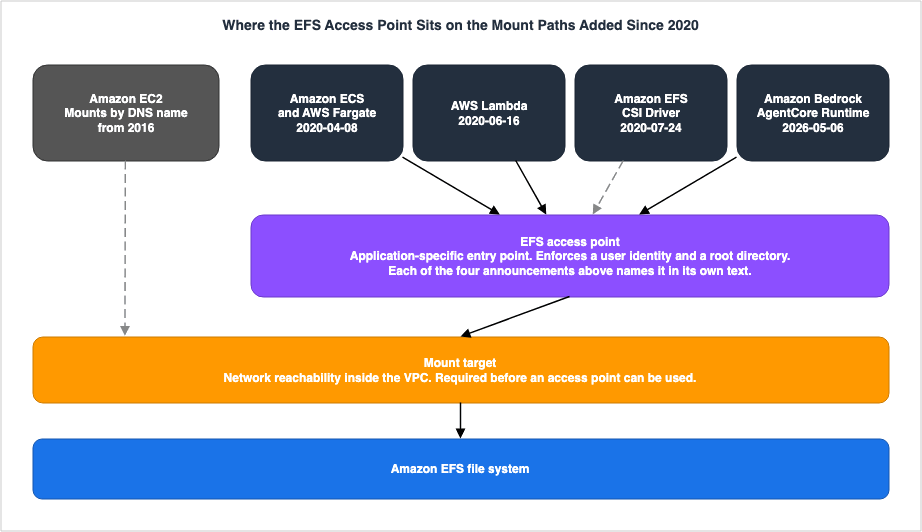
You must create at least one mount target in your VPC before using access points. It separates the mount target, which provides network reachability, from the access point, which provides access control and an application-specific entry point. ⇒ The two are stacked, one on the other.⇒ That structure is why the limit rose twice. How many applications share one file system is how many entry points there are. The two rows, 120 to 1,000 on 2023-01-17 and 1,000 to 10,000 on 2025-02-10, record from the side of the limit that the Reach Lane kept growing.
The Storage Class and the File System Type Are Different Axes
Two axes have to be kept apart here. They are easy to confuse, but they have grown in different ways.The first axis concerns how many Availability Zones the data is placed in. The user guide states,
Amazon EFS offers Regional and One Zone file system types. ⇒ This axis carries one row this article takes, dated March 9, 2021, and it has not grown in the 2,019 days since.The second axis is where the data sits inside one file system. The user guide lists these options as EFS Standard, EFS Infrequent Access, and EFS Archive. ⇒ This axis saw additions on February 13, 2019, and November 26, 2023.
⚠⚠ The framework for these descriptions has changed mid-way through. In a 2021 announcement, EFS Standard, EFS One Zone, EFS Standard-Infrequent Access, and EFS One Zone-Infrequent Access were explicitly listed as storage classes. Since the introduction of
file system types on November 26, 2023, the scope of Availability Zones is described as a file system type, while the storage location is described as a storage class.⛔ This article does not enumerate the number of storage classes. The FAQ page and the console's help panel use a different framework, and it is not for this article to determine which is correct. ⇒ This article can only record the fact that the framework changed, as documented in the Document history.
⛔ An analysis of how to handle this discrepancy in practical terms is the subject of Amazon EFS Performance Engineering - Throughput Modes, IOPS Ceilings, Per-Client Limits, and Burst Credits.
⛔⛔ EFS One Zone is distinct from Amazon S3's One Zone-Infrequent Access. They share a similar name, but one is a file system type, while the other is a storage class for object storage. AWS History and Timeline regarding Amazon S3 covers the lineage on the S3 side.
What Was Built on Top of Amazon EFS
⭐⭐ This brings the article back to where it started.This article takes six announcements from 2026. Of the six, only one widened what Amazon EFS itself does. Three are about Amazon S3 Files, which is built on Amazon EFS, and the remaining two are about paths that reach Amazon EFS.
| Date | Update | Dated by | Summary |
|---|---|---|---|
| 2026-04-07 | Amazon S3 Files | What's New only | The thing that shows an S3 bucket as a file system reached general availability. The announcement states, Built using Amazon EFS, S3 Files gives you the performance and simplicity of a file system with the scalability, durability, and cost-effectiveness of S3. ⇒ A new entry point for object storage has been built on top of a file system implementation. ⛔ Existing documentation details how buckets and file systems are synchronized. See: Announcing Amazon S3 Files, making S3 buckets accessible as file systems |
| 2026-04-21 | AWS Lambda mounts S3 Files | What's New only | AWS Lambda functions can now mount S3 buckets as a file system. The announcement repeats, word for word, the sentence the announcement of 2026-04-07 used to describe S3 Files, and it opens with Built using Amazon EFS. ⇒ Beside the path on which functions reached Amazon EFS on 2020-06-16, a second path built on the same implementation stands 2,135 days later. ⚠ That two announcements carry the same sentence shows that this description is not one writer's turn of phrase. See: AWS Lambda functions can now mount Amazon S3 buckets as file systems with S3 Files |
| 2026-09-16 | Amazon ECS extends S3 Files to the EC2 launch type | What's New only | Support for Amazon S3 Files is now available across all three container execution modes. The announcement states Amazon S3 Files, built on Amazon EFS, delivers a shared file system that connects AWS compute resources directly with data in Amazon S3, providing full file system semantics and low-latency performance without data leaving S3. It explains that S3 Files was already available with Fargate and ECS Managed Instances, and this announcement extends support to the EC2 execution mode. ⇒ This is the most recent entry at the time of retrieval, dating back two days prior to the retrieval date. See: Amazon ECS extends Amazon S3 Files support to the Amazon EC2 compute type |
⇒ Three separate announcements state the same thing. April 7, 2026 and April 21, 2026 write
Built using Amazon EFS, and September 16, 2026 writes built on Amazon EFS. ⛔ All three write built on or Built using, and none of them writes is. They do not state that Amazon S3 Files is Amazon EFS. What they state is that it is made using Amazon EFS.⚠ The fourth announcement, dated May 6, 2026, concerns AgentCore Runtime. This announcement lists both S3 Files and EFS access points as supported options, requiring a selection between the two. ⇒ The thing that was built and the thing it stands on sit side by side in one list.
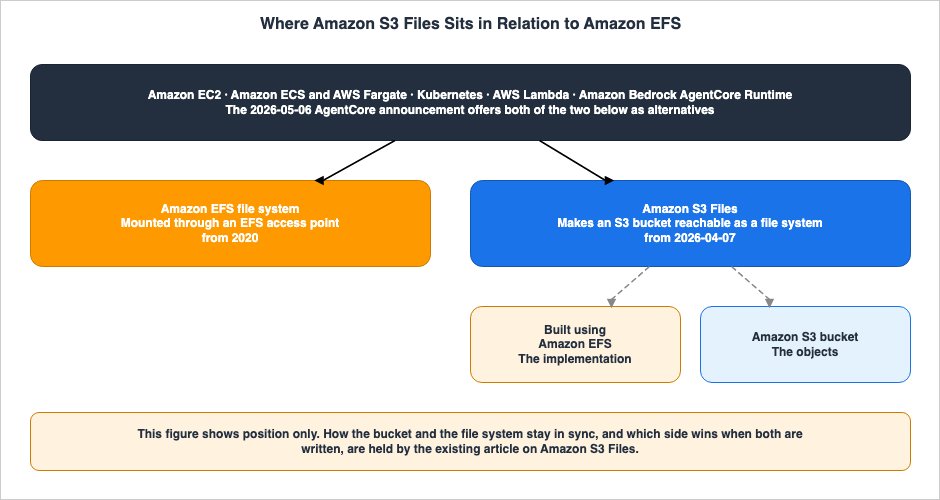
⛔ This article does not state that Amazon S3 replaced Amazon EFS, nor that Amazon EFS replaced Amazon S3. The primary sources only state that one is built upon the other.
What Is Closed
The timeline for Direct Connect shows three levels of granularity, two of which are currently closed. For Amazon EFS, nothing this article examined is closed.| Granularity | Scope | Status | Justification |
|---|---|---|---|
| Service | Amazon EFS itself | Not closed | No mention of closure appears in the first three AWS Service Availability Updates (2025-10-13 / 2026-03-31 / 2026-06-30). Furthermore, the Durability Lane and the Reach Lane each received a row in the last 52 days. |
| Feature | The features this article takes as rows | Not closed | No primary source stating a halt to new customers, a retirement, or a discontinuation was found. |
| Default | Default throughput mode | Replaced | On April 13, 2023, Elastic replaced Bursting as the default. ⚠ This is not a discontinuation. Bursting remains an available option. |
⚠ Only the third row has a different characteristic. A change in the default and the removal of an option are distinct concepts. ⇒ Even after the default was replaced, Bursting is still available, but it cannot be selected for file systems that have a policy to transition to Archive. This restriction arrived on November 26, 2023, and it is a separate event from the change of default.
⛔ Defining terms related to the service lifecycle is outside the scope of this article. The meaning of terms like
maintenance, sunset, and end of support within AWS operations is the subject of AWS Service Lifecycle States. AWS History and Timeline regarding AWS Direct Connect draws the line between a halt to new customers and a discontinuation, once.What Was Added in 2026
⭐ 2026 is the year the ground around Amazon EFS thickened, not Amazon EFS itself.- April 7, 2026 — Amazon S3 Files became generally available. It is built using Amazon EFS.
- April 21, 2026 — AWS Lambda gained the ability to mount S3 Files.
- May 6, 2026 — Amazon Bedrock AgentCore Runtime gained the ability to incorporate EFS access points and S3 Files.
- July 28, 2026 — AWS DataSync's Enhanced mode added support for Amazon EFS.
- July 29, 2026 — Cross-account replication expanded to AWS GovCloud (US).
- September 16, 2026 — Amazon ECS expanded support for S3 Files to EC2 launch types.
⇒ Out of these six additions, only one widened what Amazon EFS itself guarantees. The remaining five are about paths that reach Amazon EFS, and about what is built on top of it.
⚠ The Document history holds none of these six. If you only read the Document history, it would look as though nothing happened to Amazon EFS in 2026.
Frequently Asked Questions about Amazon EFS History
This section answers frequently asked questions about the history of Amazon EFS, drawing on primary sources. ⛔ Questions regarding performance and configuration are already addressed in an existing article.When was Amazon EFS announced, and when did it become generally available?
Amazon EFS was announced on April 9, 2015, and became generally available on June 29, 2016. There were 447 days between the announcement and general availability. The announcement carries the lineThe Amazon EFS Preview will be available soon. This was not general availability. At the time of general availability, it was available in three Regions: US East (N. Virginia), US West (Oregon), and Europe (Ireland).Why do the two primary sources give different dates for general availability?
The Document history indicates June 28, 2016, while AWS What's New states June 29, 2016, showing a one-day discrepancy. This article uses thePosted on: date from the announcement. Posted on: describes the day the feature became available, while the Document history describes the day the document was updated, and the latter can fall on either side. The only discrepancy in dates found in this article is this single instance.Has Amazon EFS been discontinued or moved to maintenance?
No. Amazon EFS appears on none of the three AWS Service Availability Updates, dated October 13, 2025, March 31, 2026, and June 30, 2026. A fourth, dated September 29, 2026, came after the retrieval date and does not list it either. Furthermore, the Durability Lane and the Reach Lane received a row 51 and 52 days before the retrieval date.Has Amazon S3 replaced Amazon EFS?
No. The primary sources do not say so. They say the opposite. The announcement of general availability for Amazon S3 Files on April 7, 2026 writesBuilt using Amazon EFS, the AWS Lambda announcement of April 21, 2026 repeats the same sentence, and the Amazon ECS announcement of September 16, 2026 writes Amazon S3 Files, built on Amazon EFS. The new entry point on the object storage side is built on top of a file system implementation.Is Amazon S3 Files the same thing as Amazon EFS?
No. What the primary sources state isbuilt on and Built using, not is. They do not state that the two are the same thing. What separates the two, and above all how a bucket and a file system stay in sync, is held as its subject by How Amazon S3 Files Keeps a Bucket and a File System in Sync.Why does this timeline not say how many storage classes Amazon EFS has?
Because the primary sources write it inside different frameworks. The Amazon EFS FAQ page statesAmazon EFS offers three storage classes: EFS Standard, EFS Infrequent Access, and EFS Archive. Meanwhile, the help panel in the Amazon EFS console states Amazon EFS supports two types of storage classes: those that store data in multiple Availability Zones, and those that store data in a single Availability Zone. This article does not attempt to determine which of these is correct. The only relevant information this article provides is the date, November 26, 2023, when the concept of file system types was introduced, as recorded in the Document history.When did Elastic become the default throughput mode?
The date is April 13, 2023. The Document history states,The default (and recommended) throughput mode for file systems is now Elastic instead of Bursting. No corresponding announcement on AWS What's New was found for this change. Which path you create the file system through, and therefore which default takes effect, is held as its subject by Amazon EFS Performance Engineering.Why does this timeline carry no throughput or IOPS numbers?
Performance numbers are held as their subject by an existing article. Information on throughput limits for each mode, IOPS ceilings, per-client limits, and burst credits can be found in Amazon EFS Performance Engineering - Throughput Modes, IOPS Ceilings, Per-Client Limits, and Burst Credits. This article carries only the dates on which the way throughput is decided changed, and their order.Why does this timeline use two different primary sources?
Neither source is enough on its own. The latest entry in the Document history is dated 2025-06-09, and no new entries have been added in the 466 days since. There are no entries for 2026. However, the switch in default throughput mode and the introduction of the concept offile system types are only documented in the Document history.Why does the Document history hold so little about where Amazon EFS can be mounted from?
Because those additions are announced as features of the other service, not of Amazon EFS. Amazon ECS, AWS Lambda, and Amazon Bedrock AgentCore Runtime each announced their own support, and Amazon EFS announced none of them. ⇒ The Reach Lane cannot be followed from the documentation on the Amazon EFS side alone.What does the EFS access point have to do with the rest of the timeline?
The EFS access point arrived on January 13, 2020, and the announcements for the mount paths added after it name that entry point in their own text. Amazon ECS on April 8, 2020, AWS Lambda on June 16, 2020, the Amazon EFS CSI Driver on July 24, 2020, and Amazon Bedrock AgentCore Runtime on May 6, 2026 all do so, although the CSI Driver announcement states that release 1.0 added support for access points rather than that one has to be used. The increase in the per file system limit, from 120 to 1,000 on January 17, 2023, and then from 1,000 to 10,000 on February 10, 2025, is a direct result of this structure.Is the Amazon EFS One Zone the same as the Amazon S3 One Zone-Infrequent Access?
No. The names are similar, but the two are different things. Amazon EFS One Zone is a file system type, and Amazon S3 One Zone-Infrequent Access is a storage class of object storage. The lineage on the S3 side is held by AWS History and Timeline regarding Amazon S3.Where can I find how to choose between Amazon EFS and the other AWS file systems?
AWS History and Timeline regarding Amazon FSx holds the lineage of the other file systems as its subject, and AWS Data Movement Decision Guide holds how to choose a way of moving data. This article carries only dates and order.Summary
Amazon EFS was announced on April 9, 2015, and became generally available in three Regions on June 29, 2016.Measured across the four lanes, the additions did not arrive at the same pace. The Throughput Lane carries only three rows this article takes, and 1,254 days have passed since the default changed on April 13, 2023. The Tier Lane has stood still for 1,027 days since EFS Archive arrived on November 26, 2023. The Durability Lane and the Reach Lane, by contrast, carry rows dated 51 and 52 days before the retrieval date.
⇒ What is moving is not what the file system does, but what reaches it. Every execution environment that gained the ability to mount Amazon EFS after the EFS access point arrived on January 13, 2020 names that entry point in the text of its own announcement, whether it is containers, functions, Kubernetes, or the agent runtime of 2026. The limit on entry points per file system has risen twice.
Nothing here is closed. Amazon EFS is not mentioned in any of the first three AWS Service Availability Updates. Only the default throughput mode changed, and the previous default remains an option.
And in 2026, AWS built a new entry point on this layer from the object storage side. Three announcements state either
Built using Amazon EFS or built on Amazon EFS. ⇒ The file system is not a layer that was replaced. It is a layer that new entry points now stand on.⚠ This article carries only dates and order. How performance is decided, how S3 Files synchronizes, and how to choose a way of moving data are all left to the existing articles. All data was obtained as of September 18, 2026, and when the Document history will start again is unknown.
References:
Tech Blog with curated related content
Written by Hidekazu Konishi