Resource-Based Policies by Service on AWS - Where the Second Policy Lives, What It Can Say, and When It Is Required
First Published:
Last Updated:
Allow statements are present. Yet, access is still being denied. The place to look next is usually on the resource side.Several AWS services allow you to attach policies directly to their resources. These are often referred to as bucket policies (for S3 buckets), key policies (for KMS keys), repository policies (for repositories), and queue policies (for queues). The names and APIs used to apply these policies vary by service, and the content you can write within them also differs. A crucial point often overlooked is that for some services, these resource-based policies are not optional additions. They are the way in for permission itself.
This article provides a single inventory outlining which services have these resource-based policies, what they are called within each service, what content you can include within them, and when they are required. This is not a detailed explanation of policy evaluation, nor is it a guide to troubleshooting based on error messages (reverse lookup). Previously published articles on this site cover both of those topics, and this article delegates to them.
Related articles on this site:
- IAM Policy Evaluation Logic Step-by-Step - Explicit Deny, RCP, SCP, Resource Policy, Identity Policy, Permission Boundary, and Session Policy
- AWS IAM AccessDenied Reference - Reading the Error and Locating the Deciding Statement
- AWS IAM Glossary - Principal, Permission Boundary, SCP, RCP, ABAC, and Cedar Explained
- AWS Organization Guardrails - Service Control Policies, Resource Control Policies, and Data Perimeter Design
- What Can Be Made Public on AWS - Storage and Data, the Block Public Access Family, and What Each Switch Does Not Promise
- Where the Logs Come From on AWS - Identity and the Control Plane, What Is On by Default, and What Is Not Recorded at All
- Amazon S3 Security and Access Control Guide - Bucket Policies, IAM, Access Points, Block Public Access, and Encryption
- AWS PrivateLink and VPC Endpoints Complete Guide - Interface, Gateway, and Resource Endpoint
- AWS Secrets Manager and Parameter Store Decision Guide - Storing, Rotating, and Accessing Secrets and Configuration
- AWS IAM Inbound Workload Federation - IAM Roles Anywhere, OIDC, and SPIFFE Converging on One Trust Policy Condition
- AWS Backup Data Protection and Governance - Backup Plans, Vault Lock, and Cross-Account Copy Design
Table of Contents
- 1. What This Article Answers, and What It Does Not
- 2. What the Second Policy Is, and What It Is Not
- 3. Five Things to Read for Every Service
- 4. The Inventory - Resource-Based Policies by Service
- 5. When One Policy Has Two Routes
- 6. What You Can Put in Principal, and Whether You Can Write Deny
- 7. When the Second Policy Is Not Optional
- 8. Crossing the Account Line
- 9. Failure Modes and Anti-Patterns
- 10. Frequently Asked Questions about Resource-Based Policies on AWS
- 11. Summary
- 12. References
1. What This Article Answers, and What It Does Not
When readers encounter this topic, they typically have one of three questions. First, they have fixed the identity-based policy and the call still fails, and they want to know where else to look. Second, they want to grant another account access to a resource, but they are unsure what to write in either account's policy. Finally, they have fixed an IAM policy for AWS KMS and still been denied, and they want to know whether that is peculiar to KMS.The answers to all three questions are there if you read the individual service documentation. However, the difficulty lies in the fact that each service uses different names for what are essentially the same types of policies, and there is no single, consolidated reference to tie them together. It often takes several attempts to realize that bucket policies, key policies, and queue policies are all part of the same family.
This article will proceed in the following order. First, it defines what the second policy is and what it is not. Next, it establishes five perspectives that can be applied consistently across all services. Following that, the article provides an inventory for each service, and then addresses three key points that emerge from that inventory. Specifically, those are situations where a single policy contains multiple routes, the limitations on what can be written in the
Principal element depending on the service, and what happens when a second policy is required. Finally, it addresses service-specific considerations that only arise when crossing account boundaries.This article does not cover everything. Policy evaluation order, the precedence of explicit
Deny statements, and the decision-making process are out of scope. IAM Policy Evaluation Logic Step-by-Step covers how a request navigates the seven layers of evaluation, and how the decision differs between the same-account and cross-account cases. Evaluation is delegated there in full.How to identify which policy is responsible for an
AccessDenied message is also out of scope. AWS IAM AccessDenied Reference details the wording that separates an explicit denial from an implicit one, which policy types appear in the message, and the APIs that read back an attached policy. The inventory provided in this article focuses on the API used to attach a policy, not the API used to read one back.The policies that come down from the organization are out of scope as well. AWS Organization Guardrails handles service control policies, resource control policies, and data perimeter design. The evaluation article mentioned earlier treats permission boundaries and session policies as layers. A resource control policy is the most confusable of these, because it does act on resources. Section 2.4 draws that line.
This article also does not discuss granting access to anyone by using wildcards in the
Principal. What Can Be Made Public on AWS lists the services that support such broad access. This article focuses on the side that names the principal being let in. While both articles mention bucket policies, they approach the topic from different perspectives.Whether the principal you named and let in actually came is not covered here either. Where the Logs Come From on AWS holds the inventory of the sources that record identity and control plane activity. When a call crosses an account line, CloudTrail delivers one event to the account that made the call and another to the account that owns the resource, and the two are tied together by the same
sharedEventID. This article stops at what the policy permits.1.1 What the Inventory Covers
The inventory includes services that have been officially confirmed to support resource-based policies, focusing on common, representative examples encountered in practical operation. These are organized into the following four categories:- Storage and Data
- Messaging and Events
- Compute, Containers, and APIs
- Security, Identity, and Management
This is not an exhaustive list. The range of supported services is constantly expanding, so any self-created list will inevitably become outdated. Section 3 outlines how to verify whether a particular service is supported. For a comprehensive list, refer to the AWS services that work with IAM section in the IAM User Guide.
A service whose lifecycle is in motion is not included in the inventory. The standalone Amazon Glacier service stopped accepting new customers on 2025-11-07. While the combination of a Vault Lock policy and a vault access policy is relevant to the subject of this article, it is not a suitable candidate for inclusion in the inventory at this time.
1.2 The Verification Date, and How Sources Are Cited
The technical information presented in this article is based on the AWS official documentation as of 2026-09-16. However, the descriptions regarding the Amazon EventBridge Custom Event Bus (available from 2026-09-24) were verified on 2026-09-25. Size limits, the number of condition keys, and compatibility information are all subject to change, so the text names the specific document behind each one.Any passages that require a direct quote are presented within English code blocks. The content within these blocks is reproduced verbatim and is not summarized. Since many service pages contain the same repeated phrases, a quote is taken from one authoritative document only, and a service page supplies nothing but the sentence specific to that service.
One note on the formatting of citations. Where the original text is a bulleted item, the item name and the dash after it are rendered as plain text. The original text (wording) has not been altered.
2. What the Second Policy Is, and What It Is Not
Before proceeding to the inventory, four clear distinctions have to be drawn. Without them, the second policy is easily confused with something else that shares part of its name.2.1 Resource-Based and Resource-Level Are Different Things
The initial distinction lies here, and the IAM User Guide explicitly notes this difference.Resource-based policies differ from resource-level permissions. You can attach
resource-based policies directly to a resource, as described in this topic. Resource-level
permissions refer to the ability to use ARNs to specify individual resources in a policy.Resource-based policies are policies attached directly to a resource. This could be a bucket, a key, or a queue.
Resource-level permissions refer to whether a policy's
Resource element can specify individual ARNs. This happens inside an identity-based policy; nothing is attached directly to the resource itself. The ability to specify a bucket's ARN in the Resource element of an identity-based policy, and the presence of a bucket policy attached to that bucket, are entirely separate facts.Because the English terminology differs by only a single word, they are easily confused in searches and documentation. Misinterpreting the applicability of one can lead to errors throughout an entire row of the inventory.
2.2 Inline Only
The second boundary relates to management. AWS managed policies and customer-managed policies, used in identity-based policies, can be applied to multiple roles. Resource-based policies do not offer this capability.Resource-based policies are inline only, not managed.The Amazon DynamoDB developer guide also describes this concept in different terms.
Resource-based policies are inline policies. There are no managed resource-based policies.Therefore, if you need to apply the same configuration to 100 resources, you must apply it 100 times. There are no other methods for centralizing this configuration, aside from using templates or code generation. The inclusion of a column for the API used to attach it in the inventory reflects the fact that this process will inevitably involve repeated API calls.
2.3 The Principal Element Is the Whole Difference
Identity-based policies do not include aPrincipal field. This is because the recipient is implicitly the principal. Resource-based policies, on the other hand, must include a Principal field.You must specify a principal in a resource-based policy. Principals can include accounts,
users, roles, federated users, or AWS services.This sentence is a standard phrase that appears in the user guides for many different services. The example above is taken from the Amazon EBS documentation, but the wording represents a common pattern across various services. This is the core difference between the two types of policies. It allows you to explicitly identify the recipient, enabling you to grant permissions to entities outside of your own account.
This article focuses on that naming side. Discussions about using wildcards in the
Principal field to grant access to anyone are the subject of a separate article and will not be covered here.2.4 Not to Be Confused With the Policies That Come Down From the Organization
The fourth boundary is the one most easily misunderstood. AWS Organizations resource control policies are policies that apply to resources. Their names include the word resource, and they affect resources. However, they are distinct from the second type of policy discussed in this article.The key difference lies in where they attach. A resource control policy attaches to the organization root, to an organizational unit, or to an account. It never attaches to a resource. Their effect is to restrict, rather than grant, permissions. In contrast, resource-based policies are attached directly to the resources themselves and grant permissions.
VPC endpoint policies are in a similar category. The IAM User Guide clearly defines them as resource-based policies.
A VPC endpoint policy is a resource-based policy that you attach to a VPC endpoint to
control which principals can use the endpoint and which resources can be accessed through it.
However, their method of operation differs. The same page explains that endpoint policies do not replace identity-based or resource-based policies on the destination service. Instead, they function as an additional layer of access control specifically for traffic passing through the endpoint. They appear as a single row in the inventory, and AWS PrivateLink and VPC Endpoints Complete Guide documents the detailed design. Which data services accept that additional layer on their endpoints, and what to narrow access with where no endpoint policy can be attached, is set out service by service in Private Connectivity by Service on AWS Data Services.
3. Five Things to Read for Every Service
The inventory sets out the same five things for every service, in the same frame. If any single column is missing, the comparison cannot be properly made.| Column | What goes in it | Why it is needed |
|---|---|---|
| Official policy name | The name the service uses to refer to this policy. | If the names are different, it is impossible to recognize them as belonging to the same family. |
| API used to attach it | The operation used to apply the policy. | Only inline policies are supported, so it will always involve API-based iteration. |
What Principal can name | The range of entities that can be specified. | There are narrower routes than the standard, and these can cause issues. |
How Deny is treated | Does the official documentation place any restrictions on explicit denials? | There are routes where denials cannot be written, and assuming you can write them can lead to design flaws. |
| Before you touch it | Does this policy exist on a resource that has not been configured? | This determines whether the policy is optional or mandatory. |
The standard named in the
Principal column refers to the collection listed in the IAM User Guide in the context of cross-account access. This article refers to it as the standard set.You can specify the entire account or its IAM users, AWS STS federated user principals,
IAM roles, or assumed-role sessions. You can also specify an AWS service as a principal.Regarding the
Principal column and the Deny column, one rule of reading applies. The information provided here reflects only what the official documentation states. A cell reading no documented restriction means that this article did not find one; it does not represent the results of actual testing.The column for what exists before you touch it is kept separate for a single reason. The generalization that resource-based policies are always optional does not hold true. There are services that require a policy to be present from the beginning, and there are services where the absence of that policy prevents the identity-based policy's
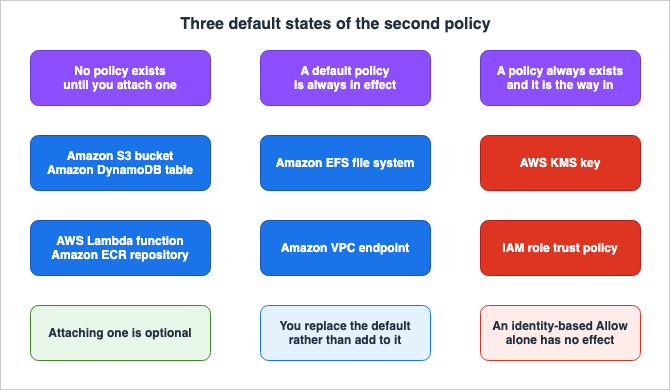
Allow statements from taking effect.Within this column, resources fall into three types. Here is the overview first; Section 7 provides the detail.
3.1 How to Check Support for Yourself
You can determine whether a service supports resource-based policies by checking the service's user guide, specifically the page detailing its integration with IAM. For example, for Amazon S3, look for the page titled How Amazon S3 works with IAM, and for Amazon EBS, the page titled How Amazon EBS works with IAM. These pages contain a section with a standardized format, including the following line:Supports resource-based policies: YesIf the service does not support resource-based policies, this line will display
No. For example, the Amazon EBS page might state:Supports resource-based policies: NoIt is only accurate to state that a service does not support resource-based policies after reviewing this specific line. You cannot conclude that a service does not support it simply because you were unable to find this line. Note also that not all services use this standardized format. Some services may instead state, in prose, that they do not support resource-based policies in the same security section. Either approach is acceptable, but you must review at least one of them. The information regarding non-supported services presented in this article is based solely on verifying the value of this standard field.
A comprehensive list lives in the IAM User Guide under AWS services that work with IAM. However, this cross-reference table may sometimes lag behind the product documentation for individual services, so it is best to verify support on a per-service basis by reviewing each service's individual page. The inventory in this article is also derived from the individual service pages.
4. The Inventory - Resource-Based Policies by Service
The following tables are all based on official documentation as of 2026-09-16. The Amazon EventBridge Custom Event Bus rows were verified on 2026-09-25. Following each table come the notes specific to that group of services. Size limits are detailed in Section 6.4.4.1 Storage and Data
| Service and resource | Official policy name | API used to attach it | What Principal can name | How Deny is treated | Before you touch it |
|---|---|---|---|---|---|
| Amazon S3 bucket | bucket policy | PutBucketPolicy | Standard set | No documented restriction | No policy exists |
| Amazon EFS file system | file system policy | PutFileSystemPolicy | Standard set | No documented restriction | A default policy is always in effect |
| Amazon DynamoDB table and stream | resource-based policy | PutResourcePolicy | Standard set | No documented restriction | No policy exists |
| AWS Glue Data Catalog | resource policy | PutResourcePolicy | Standard set | No documented restriction | No policy exists |
| AWS Backup backup vault | backup vault access policy | PutBackupVaultAccessPolicy | Standard set | No documented restriction | Unverified |
Amazon S3 has two types of policies that are related. These are the bucket policy, which attaches to the bucket, and the access point policy, which attaches to an access point. The same section also covers S3 Access Grants, but describes that as a separate mechanism for defining access permissions, not as a resource-based policy. The user guide describes the relationship between the two as follows:
Access point policies are resource-based polices that are evaluated in conjunction with
the underlying bucket policy.
The design of Amazon S3 bucket policies is primarily covered in the Amazon S3 Security and Access Control Guide, so this article will only mention it in passing.
Amazon EFS differs in what exists before you touch it. File systems always carry exactly one policy, and if no policy has been explicitly configured, the default policy is in effect. Section 7.4 takes this apart.
Amazon DynamoDB allows policies to be attached to tables, indexes, and streams. There are some restrictions on streams.
Currently, you can only attach a resource-based policy to existing streams. You can't
attach a policy to a stream while creating it.
AWS Glue resource policies apply to the entire Data Catalog, not to individual tables or databases. The developer guide describes the attach API as setting the Data Catalog resource policy for access control, and includes a note indicating that the
ResourceArn parameter is for internal use only. The same API includes PolicyHashCondition and PolicyExistsCondition; the former is used to prevent concurrent updates, while the latter is used to differentiate between new creations and updates.Regarding AWS Backup backup vaults, what exists before you touch it could not be verified from a primary source. The console's help panel defines backup vault access policy as an IAM resource-based policy, but the linked developer guide configuration page redirects to the service overview page as of the verification date. Unverified is therefore what the row says.
The purpose of the backup vault access policy differs from other entries in the inventory. Even the examples provided in the official help panel use a
Deny configuration to prevent everyone from deleting backups. It is used to enforce restrictions. It is not intended to add permissions. This site's AWS Backup Data Protection and Governance discusses that design in detail, including Vault Lock and logically air-gapped vaults. This article will remain limited to a single entry in the inventory.4.2 Messaging and Events
| Service and resource | Official policy name | API used to attach it | What Principal can name | How Deny is treated | Before you touch it |
|---|---|---|---|---|---|
| Amazon SQS queue | Amazon SQS policy | SetQueueAttributes with the Policy attribute | Standard set | No documented restriction | No policy exists |
| Amazon SQS queue, shorthand route | Same as above | AddPermission | AWS account numbers only | Allow is what gets generated | Same as above |
| Amazon SNS topic | access policy | SetTopicAttributes with the Policy attribute | Standard set | No documented restriction | Only the topic owner can publish or subscribe |
| Amazon EventBridge default event bus and Custom Event Bus - Classic | resource-based policy | PutPermission | Standard set | No documented restriction | The default event bus only accepts events from one account |
| Amazon EventBridge Custom Event Bus | resource policy (the default policy you write) | PutResourcePolicy | Standard set | Documented as supporting Deny | No default policy; sharing through AWS RAM writes AWS_RAM |
| Amazon Kinesis Data Streams stream and consumer | resource-based policy | PutResourcePolicy | Standard set | No documented restriction | No policy exists |
Amazon SQS has two routes, and the permissible values differ, so the inventory gives them separate rows. The limitations of the shorthand route are clearly documented in the API reference.
Amazon SQS AddPermission does not support adding a non-account principal.The same page also states that this route is responsible for generating policies.
AddPermission generates a policy for you. You can use SetQueueAttributes to upload your policy.The structure where there are two routes and different permissible values also exists in AWS Lambda, and Section 5 takes both together.
What exists before you touch an Amazon SNS topic is described in the API reference's explanation of the
Policy attribute.The policy that defines who can access your topic. By default, only the topic owner can
publish or subscribe to the topic.The user guide states that the policy for the Amazon EventBridge default event bus and Custom Event Bus - Classic can be configured both when the bus is created and after it has been created. In the column for the API used to attach it, only
PutPermission is listed, as that was the only one confirmed in the API reference. Regarding the column for what exists before you touch it, the description refers to the default event bus and does not discuss the Classic buses that users create themselves.The default event bus in your AWS account only allows events from one account.Since 2026-09-24, EventBridge has a separate product called the Custom Event Bus. The console shows the new bus as Custom Event Bus and the traditional buses that use rules and targets as Custom Event Bus - Classic. Both share the
events: IAM namespace and the events.amazonaws.com service principal, but they hold the second policy differently, so the inventory lists them in separate rows. What else changes when you move from Custom Event Bus - Classic to the new bus is covered in Amazon EventBridge Custom Event Bus and the Classic Bus.The new bus has two named resource policies.
A bus holds two named policies. default is the one you write, in full IAM
policy language including Deny. AWS_RAM is written only by AWS RAM and reflects
your resource shares.
Both are evaluated for a caller from another account, and an explicit
Deny in either one takes precedence over an Allow in the other. The user guide recommends AWS RAM sharing, selecting from four AWS managed permissions: publish only, subscribe only, event source access, and full access. Write your own default policy only when you need an explicit Deny, a condition key, or a grant that cannot be expressed with managed permissions.The
default policy is always checked for public access. A wildcard principal without a condition that limits the callers to specific accounts or principals is considered public, and the policy is rejected with PublicPolicyException and not attached. A condition on event content, such as events:source, does not identify the caller and therefore does not pass this check.One more caution concerns terminology. The user guide uses the term resource-based policy in connection with EventBridge in two different ways. One refers to a policy applied to an event bus, which allows it to receive events from other accounts. The other refers to a policy applied to a target resource, such as a Lambda function or an SNS topic, which allows EventBridge to invoke those resources. The latter is a policy for the target service, not an EventBridge policy. This article will focus on the former.
4.3 Compute, Containers, and APIs
| Service and resource | Official policy name | API used to attach it | What Principal can name | How Deny is treated | Before you touch it |
|---|---|---|---|---|---|
| AWS Lambda function, version, and alias | resource-based policy | PutResourcePolicy | Standard set | Documented as allowing an explicit Deny | No policy exists |
| AWS Lambda, shorthand route | Same as above | AddPermission | One principal per call | Allow is what gets generated | Same as above |
| Amazon ECR private repository | repository policy | SetRepositoryPolicy | Standard set | No documented restriction | No policy exists |
| Amazon ECR Public repository | repository policy | SetRepositoryPolicy | Standard set | Denying view and pull is not supported | No policy exists |
| Amazon API Gateway REST API | resource policy | create-rest-api and update-rest-api in the AWS CLI | Standard set | No documented restriction | No policy exists |
| AWS CodeArtifact domain and repository | resource policy | PutDomainPermissionsPolicy, PutRepositoryPermissionsPolicy | Standard set | No documented restriction | No policy exists |
The policy for Amazon ECR private repositories has one formatting exception.
In an Amazon ECR repository policy, the policy element Sid supports additional characters
and spacing not supported in IAM policies.
The same relaxation also exists for AWS KMS key policies. While the policy language is common, the implementation on the resource side is looser in places.
Amazon ECR Public is the only entry that explicitly states that
Deny is not officially supported. Policies for public repositories cannot prevent view or pull.All public repositories are visible on the Amazon ECR Public Gallery. Using a repository
policy to deny access to view or pull from a public repository is not supported.This is an inherent limitation of the resource type itself, not a restriction of the policy language. What Can Be Made Public on AWS covers what this fact means from the public-exposure side. This article simply records the fact that
Deny is not permitted as a route.Amazon API Gateway resource policies assume responsibility for authorization when applied to APIs that do not define any authentication type.
In this workflow, an API Gateway resource policy is attached to the API, but no
authentication type is defined for the API. Evaluation of the policy involves seeking an
explicit allow based on the inbound criteria of the caller. An implicit denial or any
explicit denial results in denying the caller.
Without an explicit
Allow statement, the caller is denied. This is because there are no other authorization layers in place. This is worth separating from the mandatory types discussed in Section 7. When an API is created, it does not have a resource policy attached. However, if a resource policy is added and no other authentication type is configured, that policy alone will handle authorization. Attaching a resource policy remains optional; what changes is the weight it carries once attached.AWS CodeArtifact provides a unique example where resource-based policies are nested in two layers within a single service. One policy attaches to the domain and another to the repository, each through its own API. Both APIs accept
policyRevision and support optimistic locking to prevent concurrent modifications.4.4 Security, Identity, and Management
| Service and resource | Official policy name | API used to attach it | What Principal can name | How Deny is treated | Before you touch it |
|---|---|---|---|---|---|
| AWS IAM role | role trust policy | UpdateAssumeRolePolicy, or AssumeRolePolicyDocument on CreateRole | Standard set | No documented restriction | Exactly one always exists |
| AWS KMS key | key policy | PutKeyPolicy, or Policy on CreateKey | Standard set | No documented restriction | Exactly one always exists |
| AWS Secrets Manager secret | resource-based policy | PutResourcePolicy | Standard set | No documented restriction | No policy exists |
| Amazon CloudWatch Logs log group | resource policy | PutResourcePolicy | AWS service principals only | Only two actions are supported | No policy exists |
| AWS Organizations organization | resource-based delegation policy | PutResourcePolicy | Member accounts in the organization | NotAction and NotResource are not allowed | No policy exists |
| Amazon VPC endpoint | endpoint policy | PolicyDocument on ModifyVpcEndpoint | Standard set | No documented restriction | A default policy is attached |
IAM role trust policies are a type of resource-based policy. The description of the attach API itself sets the two names side by side.
Updates the policy that grants an IAM entity permission to assume a role. This is typically
referred to as the "role trust policy".
The IAM User Guide also explicitly mentions this in the cross-account section.
In IAM, you can attach a resource-based policy to an IAM role to allow principals in other
accounts to assume that role. The role's resource-based policy is called a role trust policy.
The name differs, the handling differs, and
AccessDenied messages use different wording for it. The structure is still the same family. Identification based on error messages is available through AWS IAM AccessDenied Reference.AWS Secrets Manager secret policies are optional, as indicated in the API reference. It is a plain Type A row in the inventory. AWS Secrets Manager and Parameter Store Decision Guide covers the design for storing and distributing the secrets themselves.
The resource policy for Amazon CloudWatch Logs is unique among the resource policies, as it strictly limits both the principals and the actions. Section 6.2 takes it apart.
You create an AWS Organizations resource-based delegation policy from the organization's management account, and it delegates policy management to member accounts. They serve a completely different purpose from other resource-based policies. Since 2026-06-30, this type of policy can no longer use
NotAction or NotResource.Effective June 30, 2026, AWS Organizations no longer permits NotAction and NotResource
elements in resource-based delegation policies.The endpoint policy for Amazon VPC is initially configured to allow access.
If you do not attach a custom endpoint policy, AWS attaches a default policy that allows
full access.
The attach API also provides an argument to revert to the default configuration. Setting the
ResetPolicy parameter of ModifyVpcEndpoint to true will revert the policy to its default state. This is a reversion to the default, not a deletion. Where what exists before you touch it is not empty, the way back is not an emptying operation either.4.5 The Services That Answer No, and What to Do Instead
The rows for services that are not supported come from the values in the standard fields. Not one of them was written from inference.| Service | Standard field value |
|---|---|
| Amazon EBS | Supports resource-based policies: No |
| Amazon EC2 Auto Scaling | Supports resource-based policies: No |
| AWS Parallel Computing Service | Supports resource-based policies: No |
The IAM User Guide provides a single-sentence answer for what to do when a resource from an unsupported service has to be reached from another account.
Use a role as a proxy when you want to access resources in another account that do not
support resource-based policies.
If you cannot attach it directly to the resource, use a role as an intermediary. This scenario consistently arises whenever a service returns a
No in the inventory. Amazon EBS is one exception: a snapshot can name other accounts through its createVolumePermission attribute, and a volume can be shared through AWS RAM; Cross-Account Sharing by Service on AWS compares those routes with resource-based policies.5. When One Policy Has Two Routes
For one policy on one resource, there are two services that are split across two rows in the inventory: AWS Lambda and Amazon SQS. Both services have two routes into the same policy, and the type of information that can be written through each route differs.5.1 Full JSON and Individual Permissions in AWS Lambda
The Lambda developer guide presents two approaches side-by-side. This article calls the second one the shorthand route.Full JSON policy - Use the Lambda console, AWS CLI, or the PutResourcePolicy API action to
add a complete JSON policy document. With a full JSON policy, you can use the complete range
of IAM global condition keys, add multiple statements with multiple principals, and create
explicit Deny statements. The maximum size for a JSON resource-based policy is 20 KB.Individual permissions - Use the console or AddPermission API action to add single Allow
statements. Individual permissions support only a limited set of condition keys
(aws:SourceArn, aws:SourceAccount, and aws:PrincipalOrgID).There are three key differences. Can you specify multiple statements and multiple principals? Can you define explicit
Deny statements? And is the scope of the condition keys limited to a global set of condition keys, or restricted to just three?There is a fourth difference as well, concerning how the party is named. The API reference defines the
Principal parameter for AddPermission as follows:The AWS service, AWS account, IAM user, or IAM role that invokes the function.Only one of them can be passed per call. If you need to grant permissions to an entire organization, you should use a different parameter called
PrincipalOrgID instead of Principal. With the full JSON approach, you can list multiple principals within a single statement.The same developer guide also provides guidance on which approach to use.
We recommend that you define complete JSON policies to add resource-based permissions to
your function. Creating a complete JSON policy gives you more flexibility and fine-grained
control over your permissions.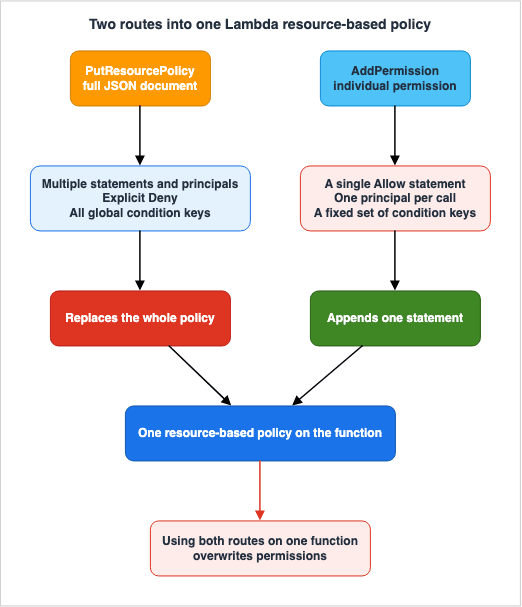
5.2 One Replaces, the Other Appends
The real danger with these two routes is not the difference in what can be written, but rather the difference in how they affect existing policies.put-resource-policy / PutResourcePolicy - Replaces the entire existing policy. Any
previously added individual permissions are overwritten.add-permission / AddPermission - Adds a statement to the existing policy without
overwriting. If you call add-permission after put-resource-policy, the new statement
appends to the existing JSON policy.In other words, one full JSON policy wipes out every permission built up through individual statements. The developer guide highlights this important point and reiterates it upfront.
Using put-resource-policy replaces any existing resource-based policy on the resource.
If the resource already has permissions defined with add-permission, put-resource-policy
overwrites them.
Mechanisms are in place to prevent accidents. The output of
GetResourcePolicy includes a RevisionId. Passing it back with the --revision-id flag makes Lambda reject an update written against an older revision. This is optimistic locking. AWS Glue's PolicyHashCondition and AWS CodeArtifact's policyRevision serve the same purpose.5.3 CloudFormation Says Not to Mix the Two Resource Types
The same conflicts that can arise when writing infrastructure as code also occur within CloudFormation. It provides two resource types,AWS::Lambda::Permission and AWS::Lambda::ResourcePolicy, and the template reference clearly prohibits their use together.You can also use the AWS::Lambda::Permission resource, however using both
AWS::Lambda::Permission and AWS::Lambda::ResourcePolicy to set permissions on a function
can result in errors. Permissions defined in AWS::Lambda::Permission can be unintentionally
overwritten, whether in a single CloudFormation stack or across multiple stacks. Don't use
both resource types to set permissions on a function.The clause about separate stacks is the one that matters. In scenarios where one team is adding permissions to the same function from a different stack, a change to one permission (e.g., upgrading to a new type) could potentially remove the permissions configured by the other team.
The same page also outlines the migration process. First, set a
Retain deletion policy on the AWS::Lambda::Permission resources, then retrieve the current policy using GetResourcePolicy, use that policy to create a new AWS::Lambda::ResourcePolicy, and finally, delete the old resource. The reason to set Retain first is to prevent statements with the same statement ID from being deleted during the deletion process.5.4 Where the Primary Sources Disagree
This CloudFormation page contains one identified inconsistency as of the verification date, concerning the property name.- The Properties section of the page lists the property that accepts an ARN as
FunctionResourceArn, with the description readingProperty description not available. - In the Examples section of the same page, the term
ResourceArnis used. - The AWS CDK L1 construct
CfnResourcePolicypublishesresourceArnand the link it provides also points to the anchor#cfn-lambda-resourcepolicy-resourcearn.
This article does not attempt to verify which name the service currently accepts. Instead, it simply documents the fact that the table and examples on the same page use different names, while the SDK uses the name found in the examples. It is recommended to always check the current page yourself before writing templates.
5.5 The Same Shape in Amazon SQS
TheAddPermission action in Amazon SQS also provides a simplified way to manage permissions without writing full JSON. By providing AWSAccountIds and Actions, SQS generates the policy document. Because the arguments do not include Effect, the resulting policy statements will always be Allow statements. As mentioned earlier, the API reference clearly states that the Principal is limited to account numbers. If you need to specify a role, you should pass the entire policy document using SetQueueAttributes.Amazon SNS also has the same two actions:
AddPermission and SetTopicAttributes. The reason SNS is not split into two rows in the inventory is that the restriction on its shorthand route could not be confirmed as an official sentence, not that the structure is different.The distinction is straightforward. If you pass a complete policy document to the API, you can specify any policy that is written in the policy language. If you pass only the principal and action components, the service will assemble
Allow statements. That is the test for telling the two routes apart.6. What You Can Put in Principal, and Whether You Can Write Deny
6.1 The Standard Set
In most services,Principal takes the standard set as defined in Section 3. This includes the entire account, IAM users, IAM roles, assumed role sessions, federated users through AWS STS, and various AWS services.The IAM User Guide provides a more extensive listing of this on a separate page.
The principals that you can specify in a resource based policy include accounts, IAM users,
AWS STS federated user principals, SAML federated principals, OIDC federated principals,
IAM roles, assumed-role sessions, or AWS services.
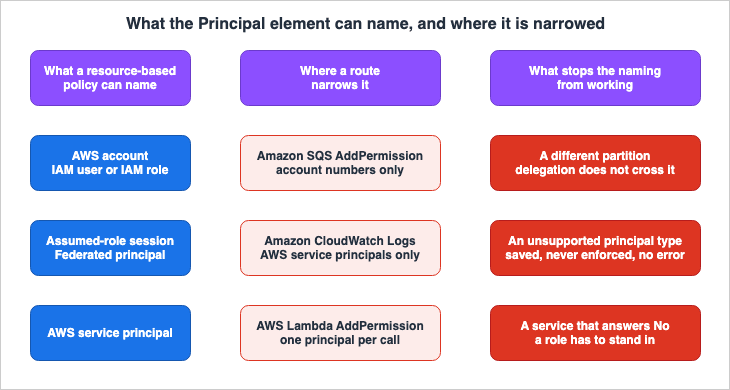
Set side by side, what can be named, where a route narrows it, and where the naming stops working:
6.2 Three Places Narrower Than the Standard Set
There are three instances where thePrincipal column does not adhere to the standard set. In all cases, without careful design, these configurations will not function as intended.The first is the shorthand route in Amazon SQS. Because it only accepts an account number, it is not possible to grant access to specific roles. The API reference explicitly states that non-account principals cannot be added.
The second is the shorthand route in AWS Lambda. This route limits the number of principals that can be specified per call to just one. Only when granting access across an entire organization is a separate argument,
PrincipalOrgID, available. Both of these fit into a single statement using the full JSON route.The third is the resource policy for Amazon CloudWatch Logs. This is not a route issue, but rather a limitation of the policy itself.
Supported principals - Policy only applies when operations are invoked by AWS service
principals (not IAM users, roles, or cross-account principals
The missing closing parenthesis remains as it appeared in the original text; it has not been corrected. The same page also describes what happens when this limitation is violated.
Resource policies with actions invoked by non-AWS service principals (such as IAM users,
roles, or other AWS accounts) will not be enforced. For access control involving these
principals, use the IAM policies.
No error is raised; it simply has no effect. That is the worst possible shape. The policy is saved successfully, passes syntax checks, and is even displayed in the console. Despite this, it has no effect on the intended recipient. The actions are limited to just two:
logs:PutLogEvents and logs:CreateLogStream.If you want to allow a different account to read a CloudWatch Logs log group, this route cannot be used. The resource policy serves as an entry point for the service to write logs, not as an entry point for users to read them.
6.3 The Routes Where Deny Is Not Available
The inability to specifyDeny statements is due to limitations related to either the route or the resource type. It is not a limitation of the policy language itself. Three such cases turned up:- AWS Lambda's
AddPermission: OnlyAllowstatements can be generated. To specify aDenystatement, you must use the full JSON route. - Amazon SQS's
AddPermission: For the same reason, onlyAllowstatements are supported. - Amazon ECR Public repository policies: Denying view and pull is not officially supported. This limitation cannot be bypassed by changing the route.
Conversely, there are instances where the official documentation describes configurations using
Deny statements. This is the case with AWS Backup backup vaults. Even inside one family of policies, the primary purpose, whether to add permissions or to add denials, varies depending on the service. The design for configurations involving denials is delegated to AWS Backup Data Protection and Governance.6.4 The Documented Limits
Size limits are values that move, so the table carries only the limits this article verified, each with its source. Services not listed in this table do not necessarily have no limit; rather, this article has not confirmed a limit for those services.| Service | Documented limit | Source document |
|---|---|---|
| AWS KMS key policy | 32 kilobytes (32,768 bytes) | KMS Developer Guide - Creating a key policy |
| Amazon EFS file system policy | 20,000 characters | EFS API Reference - PutFileSystemPolicy |
| Amazon S3 bucket policy | 20 KB | S3 User Guide - What is Amazon S3 |
| AWS Lambda resource-based policy | 20 KB | Lambda Developer Guide - Working with resource-based policies in Lambda |
| Amazon DynamoDB resource-based policy | 20 KB | DynamoDB Developer Guide - Using resource-based policies for DynamoDB |
| Amazon EventBridge default bus and Classic bus policy | 10 KB | EventBridge API Reference - PutPermission |
Amazon EventBridge Custom Event Bus default policy | 20 KB (adjustable in Service Quotas) | EventBridge User Guide - Sharing a Custom Event Bus with other accounts |
| Amazon SQS policy | 8,192 bytes | SQS Developer Guide - Amazon SQS policy quotas |
Amazon SQS has additional limits beyond the byte count. These include a limit of 10 conditions, 50 principals, 20 statements, and 7 actions per statement. It is uncommon for services to have a limit on the number of principals. Designs that individually specify a large number of accounts will reach this limit. It is more suitable for both limit compliance and operational efficiency to group accounts using condition keys such as
aws:PrincipalOrgID.The limit for Amazon DynamoDB comes with a note attached.
The maximum size supported for a resource-based policy document is 20 KB. DynamoDB counts
whitespaces when calculating the size of a policy against this limit.
Whitespace is counted. In configurations that format and save generated policies, the way a policy is formatted can cause it to reach the limit, even if the content is the same.
7. When the Second Policy Is Not Optional
This is the core of this article. However, two previously published articles on this site have already stated the fact at the center of it.IAM Policy Evaluation Logic Step-by-Step notes that, typically, identity-based policies alone are sufficient for a single account, and that AWS KMS is an exception. AWS IAM AccessDenied Reference states the same point, specifying that explicit permissions are always required in both role trust policies and KMS key policies.
The purpose of this section is not to simply memorize these two as exceptions, but rather to reframe them as specific types identified by the column in the inventory. These exceptions are not two distinct entities. They are values located at one end of a single axis, what exists before you touch it.
7.1 Three States Before You Touch Anything
When the column for what exists before you touch it is reorganized, resources fall into three categories.| Type | Before you touch it | Representative services | What it means for you |
|---|---|---|---|
| A | No policy exists | Amazon S3, Amazon DynamoDB, AWS Lambda, Amazon ECR | The second policy is an optional addition |
| B | A default policy is always in effect | Amazon EFS, Amazon VPC endpoints | You replace the default rather than add to it |
| C | Exactly one exists, and without it an identity-based Allow has no effect | AWS KMS, AWS IAM roles | The second policy is the way in |
If you only understand Type A, you will inevitably encounter problems. Symptoms such as repeatedly modifying IAM policies without success are often due to resources falling into Type C.
7.2 AWS KMS - Every Key Carries Exactly One
Taking it as known that KMS is an exception, the mechanism that explains why it appears that way is worth taking from the developer guide again. The following three statements define Type C:Every KMS key must have exactly one key policy.No AWS principal, including the account root user or key creator, has any permissions to a
KMS key unless they are explicitly allowed, and never denied, in a key policy, IAM policy,
or grant.Unless the key policy explicitly allows it, you cannot use IAM policies to allow access to
a KMS key. Without permission from the key policy, IAM policies that allow permissions have
no effect.The third statement is crucial. If the key policy does not permit it, an IAM policy's
Allow statement will not take effect. The opposite direction does hold. The same paragraph continues:(You can use an IAM policy to deny a permission to a KMS key without permission from a key
policy.)The developer guide also clearly states that this is different from other resource-based policies.
Unlike other AWS resource policies, an AWS KMS key policy does not automatically give
permission to the account or any of its identities.
In other services, the account that created the resource can automatically access it. This is not the case with KMS. To grant an account permissions, a statement must be explicitly included in the key policy.
So, why does it appear to work with only IAM policies in many environments? This is because the default key policy includes a single delegation statement. The developer guide identifies this statement with the
Sid Enable IAM User Permissions and explains its effect as follows:Without this permission, IAM policies that allow access to the key are ineffective,
although IAM policies that deny access to the key are still effective.The word default carries conditions worth pinning down. The developer guide outlines two conditions. The first is when a key policy is not specified when the key is created. The second is that the content of the default policy differs between the console and the API.
When you create a KMS key, you can specify the key policy for the new KMS key. If you don't
provide one, AWS KMS creates one for you. The default key policy that AWS KMS uses differs
depending on whether you create the key in the AWS KMS console or you use the AWS KMS API.
For keys created via the API, the default policy is a single statement holding nothing but the delegation statement. For keys created in the console, the default policy adds a key administrators statement and a key users statement, and for most key types a further statement allowing use of the key with other AWS services. In all cases, the delegation statement is present.
Therefore, as long as you are using the default key policy, nothing reveals that the key is Type C. However, the moment you rewrite the key policy and drop the delegation statement, any
Allow statements in the IAM policy will cease to function. This is the root cause of the issue where changes to IAM policies do not seem to take effect with KMS.Another aspect of KMS also has a different scope.
Unlike IAM policies, which are global, key policies are Regional. A key policy controls
access only to a KMS key in the same Region.
The site's AWS KMS Envelope Encryption and Data Key Caching Patterns provides guidance on how to write key policies in the context of envelope encryption and data key caching. This article goes as far as which type KMS occupies in the inventory.
7.3 AWS IAM Roles - The Trust Policy Is the Role's Resource-Based Policy
Roles also fall under Type C. Creating a role creates exactly one trust policy with it. Only entities listed in that trust policy can assume the role. Even if the assuming entity has an identity-based policy that includessts:AssumeRole, it will not be granted access unless the trust policy explicitly permits it.It is no coincidence that KMS and roles share the same type. Both rely on resource-based policies, but these policies do not simply add to existing permissions; they are the decision at the way in. However, the reason they appear this way differs. With KMS, the default key policy delegates to IAM, which often obscures this behavior. With roles, however, you can only specify which entities are allowed to assume the role in the resource-based trust policy, so it is visible from the outset. The former becomes apparent the moment it is modified, while the latter is visible from the beginning.
Information on designing trust policy conditions and using OIDC or federation as an entry point lives in AWS IAM Inbound Workload Federation.
7.4 Amazon EFS - Always One, Yet Reading It Returns Not Found
Amazon EFS is a representative example of Type B. The API reference documentation is clear.A file system always has exactly one file system policy, which can be the default policy or
an explicit policy set or updated using this API operation.The conditions under which the default policy is in effect are also clearly stated in the user guide.
The default policy is in effect whenever a user-configured file system policy is not in
effect, including at file system creation.
However, when you attempt to retrieve that default policy, it returns a not found response.
Whenever the default file system policy is in effect, a DescribeFileSystemPolicy API
operation returns a PolicyNotFound response.
While one always exists, attempting to read it returns a result indicating it cannot be found. This is not a contradiction. The default policy is not a stored document; rather, it defines the behavior when an explicit policy is not present. However, in automated checks, the conclusion flips depending on whether you read a
PolicyNotFound response as no restriction or as the default state.What that default policy allows matters too.
The default EFS file system policy does not use IAM to authenticate, and grants full access
to any anonymous client that can connect to the file system using a mount target.
The state without a policy is the most permissive. In Type A services, the absence of a policy typically means no permissions are granted. In Type B, this can be the opposite. That is why the column for what exists before you touch it cannot be dropped.
7.5 When Fixing the Identity Policy Is Not Enough
Section 7 comes down to this:- Type A: Can be resolved solely with identity-based policies. The second policy is optional.
- Type B: Has a default behavior when no policies are applied. The process involves replacing, rather than adding, policies.
- Type C: The second policy is the way in. Even if you adjust only the identity-based policy, it will not function correctly in principle.
Providing a way to determine the type of service can significantly reduce troubleshooting time. The column for what exists before you touch it is included for that purpose.
8. Crossing the Account Line
8.1 The Rule in One Sentence, and Where the Rest Lives
The IAM User Guide describes the cross-account rule in a single sentence.In cross account access, a principal needs an Allow in the identity policy and the
resource-based policy.Both sides are required. The IAM User Guide also explains the reason for this on a separate page. AWS performs two evaluations for cross-account requests, granting access only when both the trusting and trusted accounts return
Allow.IAM Policy Evaluation Logic Step-by-Step covers the decision flow, what happens when only one side gets fixed, and how the organization's policies enter it. This article focuses solely on the differences between services.
8.2 The Services That Say Same-Account Needs Only One Side
Here are two services listed in the inventory that explicitly state in their own user guides how they handle operations inside the same account. This is not simply a restatement of general rules; it is significant that these services themselves clearly state this.However, if a resource-based policy grants access to a principal in the same account, you
don't need additional Amazon ECR repository permissions in the identity-based policy.If the IAM principal is from the same account as the resource owner, a resource-based policy
is sufficient to specify access permissions to the resource.These are Amazon ECR and Amazon DynamoDB. Whether a service documents this information on its own page can be an indicator of where operational challenges previously occurred.
The Amazon DynamoDB page also includes a note regarding conditional permissions.
If an identity-based policy grants unconditional access to a DynamoDB table (for example,
dynamodb:GetItem with no conditions), a resource-based policy that allows access with
conditions on dynamodb:Attributes won't restrict that access.
Even if you define conditions on the resource side, you cannot override a blanket
Allow granted on the identity side. If you truly want to restrict access, you should use a Deny statement. While this conclusion can be derived from general principles, users sometimes mistakenly believe that conditional Allow statements provide sufficient restriction, which is why the service specifically includes this note.8.3 A Partition Cannot Be Crossed
There is another cross-service constraint to consider.IAM roles and resource-based policies delegate access across accounts only within a single
partition.It is impossible to grant access between accounts in the standard
aws partition and accounts in the China Regions (aws-cn), even using resource-based policies or roles. This is a limitation of the partition itself, not a regional issue. Therefore, adding new regions will not resolve this.8.4 You Cannot Read the Other Side's Policy
One operational consequence: when you are on the side requesting access to another account's resources, you have no way to read the other party's resource-based policies. You can read all of your own identity-based policies, so you can confirm that the issue is not on your side. Beyond that, you have no choice but to rely on the other party.At this point, the only information you can provide is the type of policy and whether the rejection is explicit or implicit. This site's AWS IAM AccessDenied Reference notes that rejection messages resulting from resource-based policies do not include the policy's ARN. Reading the message is delegated there.
9. Failure Modes and Anti-Patterns
Mixing full JSON and individual permissions. This occurs in services with two routes, where one involves replacement and the other addition. CloudFormation explicitly states that you should not mix two resource types. Before transitioning to a new route, first retrieve the current policy.Not using optimistic locking.
RevisionId, PolicyHashCondition, and policyRevision are all provided to prevent overwriting changes made by others during concurrent updates. There is no reason not to use them when multiple stacks or pipelines write policies to the same resource.Locking yourself out. A resource-based policy can be written so that it removes the permission to rewrite that same policy. AWS KMS prevents this by default.
The key policy must allow the calling principal to make a subsequent PutKeyPolicy request on
the KMS key. This reduces the risk that the KMS key becomes unmanageable.
This safety mechanism can be explicitly disabled. Setting
BypassPolicyLockoutSafetyCheck to true bypasses the check. Amazon ECR's SetRepositoryPolicy also has a parameter with a similar purpose.If the policy you are attempting to set on a repository policy would prevent you from
setting another policy in the future, you must force the SetRepositoryPolicy operation.
This is intended to prevent accidental repository lock outs.The direction is reversed. In KMS, setting it to true bypasses the check, while in ECR, setting it to true lets a policy that would lock you out go through. Both mechanisms require explicit consent for operations that could lock you out. When disabling it, be conscious of the fact that you are disabling it.
Forgetting to include
Principal. This can happen when directly applying the principles of identity-based policies. In resource-based policies, Principal is a mandatory element.Attempting to apply managed policies. These do not exist. If you need to distribute the same content across multiple resources, you must use templates or automation.
Misinterpreting conditional
Allow statements as restrictions. A conditional Allow statement on the resource side does not narrow the scope of an unconditional Allow statement on the identity side. If you want to restrict access, you should use a Deny statement.Confusing resource-level permissions with resource-based policies. You read a
Yes in a support table and it turns out to belong to the other column. Verify the column names.Extending the mindset of a single account to a cross-account environment. Many services within a single account allow operation from only one side. When crossing accounts, both sides are required.
Assuming that successfully saving a policy means it is effectively applied. The resource policy in Amazon CloudWatch Logs will not report an error even if you specify ineligible principals; it simply will not apply to those principals. Saving a policy successfully and having it effectively applied are two separate events.
Checking limits at the end of the design process. A design that individually specifies principals is limited to 50 in Amazon SQS. If you plan to use organizational condition keys, it is far less work to decide this at the beginning of the design process.
10. Frequently Asked Questions about Resource-Based Policies on AWS
Are there managed resource-based policies?
No. The IAM User Guide states thatResource-based policies are inline only, not managed. The Amazon DynamoDB Developer Guide also explicitly states, There are no managed resource-based policies. To apply the same content to multiple resources, you must apply it to each resource individually.What is the difference between resource-based and resource-level?
They are different concepts. Resource-based policies are policies attached directly to a resource, while resource-level permissions refer to whether a policy'sResource element allows you to specify individual ARNs. The IAM User Guide notes that Resource-based policies differ from resource-level permissions. When reading a support table, be sure to check which column you are looking at.Where do you check whether a service supports them?
Check the page in that service's user guide that covers how it works with IAM. It carries a title of the form How Amazon S3 works with IAM. On it is a standard field,Supports resource-based policies:, whose value is Yes or No. While a comprehensive list lives in the IAM User Guide under AWS services that work with IAM, a cross-service table can lag the product documentation, so treat each service's own page as authoritative.What happens if you mix AddPermission and PutResourcePolicy on a Lambda function?
They are lost.PutResourcePolicy replaces the entire existing policy, so any statements added with AddPermission disappear. Conversely, AddPermission adds statements, so they will not be removed. CloudFormation also officially prohibits mixing AWS::Lambda::Permission and AWS::Lambda::ResourcePolicy, noting that overwriting can still occur even if the stacks are separate.Can the Principal element be omitted?
No.Principal is a required element in a resource-based policy. Many service user guides state the same sentence, You must specify a principal in a resource-based policy. This is the clearest distinction between resource-based and identity-based policies.Can an AWS KMS key be used through an IAM policy alone, without touching the key policy?
Yes, it is possible to use AWS KMS keys with only IAM policies, without modifying the key policy itself. However, that works because the default key policy contains a statement that delegates permissions to IAM policies. If that statement is removed, theAllow permissions defined in the IAM policy will no longer take effect. The developer guide states Without permission from the key policy, IAM policies that allow permissions have no effect. Therefore, when you modify the key policy, be mindful of whether or not to retain the delegation statement.Reading an Amazon EFS file system policy returned PolicyNotFound. Does that mean there is no policy?
It means there is no explicit policy. File systems always carry exactly one policy, and while nothing explicit is set, the default policy is in effect. The default policy does not authenticate using IAM, and it grants full access to anonymous clients who can reach the mount target. You can consider this an environment with no restrictions.Can one resource carry more than one resource-based policy?
It depends on the service. AWS KMS keys and Amazon EFS file systems carry exactly one. With Amazon S3, bucket policies and access point policies are separate, and both are evaluated for requests going through an access point. For AWS CodeArtifact, you cannot attach more than one policy to a single resource; instead, it has nested resources, a domain and a repository, each with its own policy. Amazon EventBridge Custom Event Buses have two named policies, thedefault policy you write and the AWS_RAM policy that AWS RAM writes, and both are evaluated for calls from other accounts. First, be sure to check how many policies the specific service allows.How do you share a resource from a service that does not support resource-based policies?
To enable resources from services that do not support resource-based policies to be accessed from a different account, you can use a role as an intermediary. The IAM User Guide statesUse a role as a proxy when you want to access resources in another account that do not support resource-based policies. The route using a role as an intermediary and the route using resource-based policies differ in whether the caller retains their original permissions.Can an account in another partition be named in Principal?
You can write it, and it will not take effect. The IAM User Guide states thatIAM roles and resource-based policies delegate access across accounts only within a single partition. It is not possible to delegate access, even with resource-based policies or roles, between the standard aws partition and the aws-cn partition.11. Summary
Even after correcting the identity-based policies, you may still encounter issues. The second policy to examine sits on the resource side. The inventory in this article sets out how these policies are named for each service, which APIs they are associated with, who they can target, and whichDeny statements can be applied, all while considering what exists before you touch anything.Four conclusions come out of the inventory.
- The second policy is not necessarily an additive one. Resources fall into three categories: those without any policies, those with a default policy always present, and those where exactly one exists and it is the way in. AWS KMS keys and IAM roles are two such exceptions. As previously mentioned on this site, what is worth carrying is the axis of what exists before you touch it, not two proper nouns. When encountering a new service, first determine where it falls within this framework.
- A single policy can have multiple routes into it, and the content you can write through each route differs. This is exemplified by AWS Lambda and Amazon SQS, which utilize both full JSON and shorthand routes. With the shorthand routes, you cannot write
Denystatements. Furthermore, with AWS Lambda, only three condition keys are available. And one route replaces while the other appends, so mixing them makes statements disappear.
- There are routes where the values you can specify in the
Principalfield are more limited than the standard. Three such cases turned up: Amazon SQS's shorthand route only accepts account numbers, AWS Lambda's shorthand route only accepts a single principal at a time, and Amazon CloudWatch Logs resource policies only apply to AWS service principals. In one instance, it does not result in an error, but the policy simply is not applied.
- Crossing account boundaries requires policies on both sides. Many services within a single account can function with a policy on only one side. However, attempting to apply that same logic across boundaries will invariably fail. If the partitions are different, nothing passes across at all.
Finally, regarding the order of checks: First, verify compatibility using the standard fields. Next, determine what exists before you touch anything. Finally, select the API you will use to apply the policy. Only by following this order can you effectively account for differences between services.
12. References
- Identity-based policies and resource-based policies - AWS Identity and Access Management User Guide
- Policies and permissions in AWS Identity and Access Management - AWS Identity and Access Management User Guide
- Cross account resource access in IAM - AWS Identity and Access Management User Guide
- Cross-account policy evaluation logic - AWS Identity and Access Management User Guide
- Policy evaluation logic - AWS Identity and Access Management User Guide
- AWS services that work with IAM - AWS Identity and Access Management User Guide
- UpdateAssumeRolePolicy - AWS Identity and Access Management API Reference
- Working with resource-based policies in Lambda - AWS Lambda Developer Guide
- AddPermission - AWS Lambda API Reference
- AWS::Lambda::ResourcePolicy - AWS CloudFormation Template Reference
- Key policies in AWS KMS - AWS Key Management Service Developer Guide
- Creating a key policy - AWS Key Management Service Developer Guide
- Default key policy - AWS Key Management Service Developer Guide
- Troubleshooting AWS KMS permissions - AWS Key Management Service Developer Guide
- PutKeyPolicy - AWS Key Management Service API Reference
- How Amazon S3 works with IAM - Amazon Simple Storage Service User Guide
- What is Amazon S3? - Amazon Simple Storage Service User Guide
- PutFileSystemPolicy - Amazon Elastic File System API Reference
- Using IAM to control access to file systems - Amazon Elastic File System User Guide
- Using resource-based policies for DynamoDB - Amazon DynamoDB Developer Guide
- Authorization with IAM identity-based policies and DynamoDB resource-based policies - Amazon DynamoDB Developer Guide
- DynamoDB resource-based policy considerations - Amazon DynamoDB Developer Guide
- Security APIs in AWS Glue - AWS Glue Developer Guide
- Granting cross-account access - AWS Glue Developer Guide
- PutBackupVaultAccessPolicy - AWS Backup API Reference
- Backup vault access policy - AWS Backup console help panel
- Amazon SQS policy quotas - Amazon Simple Queue Service Developer Guide
- How Amazon Simple Queue Service works with IAM - Amazon Simple Queue Service Developer Guide
- AddPermission - Amazon Simple Queue Service API Reference
- Identity and access management in Amazon SNS - Amazon Simple Notification Service Developer Guide
- SetTopicAttributes - Amazon Simple Notification Service API Reference
- Permissions for event buses in Amazon EventBridge - Amazon EventBridge User Guide
- PutPermission - Amazon EventBridge API Reference
- Sharing a Custom Event Bus with other accounts - Amazon EventBridge User Guide
- What is the EventBridge Custom Event Bus? - Amazon EventBridge User Guide
- AWS::Kinesis::ResourcePolicy - AWS CloudFormation Template Reference
- How Amazon Elastic Container Registry works with IAM - Amazon ECR User Guide
- SetRepositoryPolicy - Amazon Elastic Container Registry API Reference
- Public repository policies in Amazon ECR Public - Amazon ECR Public User Guide
- Control access to a REST API with API Gateway resource policies - Amazon API Gateway Developer Guide
- How API Gateway resource policies affect authorization workflow - Amazon API Gateway Developer Guide
- PutDomainPermissionsPolicy - AWS CodeArtifact API Reference
- PutRepositoryPermissionsPolicy - AWS CodeArtifact API Reference
- PutResourcePolicy - AWS Secrets Manager API Reference
- PutResourcePolicy - Amazon CloudWatch Logs API Reference
- Delegated administrator for AWS Organizations - AWS Organizations User Guide
- Create a resource-based delegation policy with AWS Organizations - AWS Organizations User Guide
- Control access to VPC endpoints using endpoint policies - AWS PrivateLink Guide
- ModifyVpcEndpoint - Amazon EC2 API Reference
- How Amazon EBS works with IAM - Amazon EBS User Guide
- How Amazon EC2 Auto Scaling works with IAM - Amazon EC2 Auto Scaling User Guide
- How AWS Parallel Computing Service works with IAM - AWS Parallel Computing Service User Guide
References:
Tech Blog with curated related content
Written by Hidekazu Konishi