AWS Organization Guardrails - Service Control Policies, Resource Control Policies, and Data Perimeter Design
First Published:
Last Updated:
1. Introduction
Most IAM articles answer the question "why was this one request allowed or denied?" That is a per-request question, and it is exactly what a companion article on this site walks through stage by stage. This article answers a different question: how do you design the ceilings that apply to every request in an entire AWS organization at once?That distinction matters because the two hardest-to-reason-about policy types in AWS - AWS Organizations service control policies (SCPs) and resource control policies (RCPs) - are not attached to a user, a role, or a resource. They are attached to accounts, organizational units (OUs), and the organization root, and they silently shape the effective permissions of principals and resources several levels below them. When they interact with permission boundaries, session policies, and cross-account resource-based policies, the result is a set of overlapping guardrails that decide the security posture of the whole organization.
This article builds on our step-by-step guide to IAM policy evaluation logic. If you want the full seven-stage decision walk-through - explicit deny, RCP, SCP, resource-based, identity-based, permission boundary, and session policy - with concrete request traces and a policy simulator, read that first. Here we assume you already know that evaluation order, and we focus on the organization-scale design layer: what SCPs and RCPs each control, how they combine into a data perimeter, how the picture changes across account boundaries, and where the official documentation stops and honest uncertainty begins.
Throughout, the discipline is the same as the rest of this "under the hood" series: every claim about how AWS behaves is grounded in official AWS documentation, and where AWS has not published a detail, this article says so rather than guessing.
2. Guardrails and Grants: Where Organization Policies Sit in Evaluation
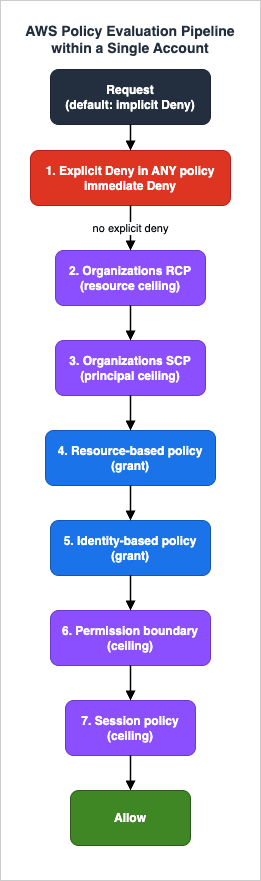
Before designing anything, it helps to place SCPs and RCPs precisely in the evaluation machinery.The AWS enforcement code that decides whether a request is allowed evaluates every policy that applies to the request context. The official summary of that logic is short but exact: all requests are denied by default; a request must be explicitly allowed by the applicable policies to succeed; and an explicit deny in any policy overrides everything. For a request within a single account, the enforcement code proceeds in this documented order:
- Explicit deny check across all policy types (SCPs, RCPs, resource-based, identity-based, permission boundaries, session policies). One matching
Denyends the evaluation immediately with a final decision of Deny. - Organizations RCPs - if no applicable
Allowis found, the decision is Deny. - Organizations SCPs - if no applicable
Allowis found, the decision is Deny. - Resource-based policies - an
Allowhere can, for some principal types, produce a final Allow. - Identity-based policies - at least one
Allowis required (unless a resource-based policy already granted it directly to the principal). - IAM permission boundaries - if present, must allow the action.
- Session policies - if present, must allow the action.
Two things in that list are worth pausing on. First, RCPs are evaluated before SCPs. Second, both are pure ceilings: neither an SCP nor an RCP ever grants a permission. As the Organizations documentation states plainly, neither SCPs nor RCPs grant any permissions - they only set the maximum permissions available to principals and resources in your organization. Because they are both deny-by-omission ceilings, their relative order never changes the final allow/deny outcome - a request has to survive both, so which is checked first is immaterial.
That gives us the vocabulary this article uses. Policy types fall into two groups:
- Grant policies - identity-based policies and resource-based policies. These are the only policy types that can turn a default deny into an allow.
- Ceiling policies - SCPs, RCPs, permission boundaries, and session policies. These can only subtract. A ceiling that is silent about an action implicitly denies it; a ceiling can never add an action that a grant policy did not already permit.
The effective permission for any request is therefore the intersection of every applicable ceiling with the union of the grants, minus any explicit deny anywhere. AWS Organizations describes the specific SCP/RCP case the same way: the effective permissions are the logical intersection between what is allowed by the RCPs and SCPs and what is allowed by the identity-based and resource-based policies.
Figure 1 places SCPs and RCPs in that pipeline and previews the fact - developed in Section 6 - that in a cross-account request the ceilings do not all live in one account.
Why this framing matters for design. If you internalize "ceilings only subtract," a whole class of mistakes disappears. You stop expecting an SCP to give a team access (it cannot), you stop attaching an RCP and wondering why nothing new works (it never grants), and you start writing guardrails as deny-lists that carve unacceptable behavior out of an otherwise-open account - which, as we will see, is exactly how AWS's own default managed policies are shaped.
3. Service Control Policies as Principal Guardrails
SCPs are the older of the two organization policy types and the more familiar. The one-line definition from the AWS Organizations documentation is that SCPs are principal-centric: they create a permissions guardrail, or set limits, on the maximum permissions available to principals in your member accounts. When an IAM user or role in a member account makes a request, an applicable SCP can cap what that principal is allowed to do - regardless of how generous the principal's identity-based policy is.3.1 What SCPs do and do not reach
An SCP applies to the principals of the account it is attached to (directly, or by inheritance from a parent OU or the root). Some important boundaries on that reach:- SCPs do not restrict the management account. Guardrails you attach at the root still leave the management account's principals unconstrained, which is one of several reasons the management account is meant to stay nearly empty.
- SCPs do not apply to service-linked roles (SLRs) or to AWS service principals. An SLR carries the permissions a service needs to act on your behalf, and an SCP cannot pare those down. This is a recurring theme: guardrails are not universal, and a design that assumes "the SCP stops everything" will be wrong at exactly the SLR-shaped holes.
- SCPs only limit; they never grant. The AWS-managed
FullAWSAccesspolicy is attached by default so that, until you author restrictive SCPs, existing IAM permissions keep working unchanged.
3.2 Allow-list versus deny-list strategy
There are two ways to write SCPs. A deny-list strategy keepsFullAWSAccess in place and adds Deny statements that carve out prohibited actions, regions, or conditions; this is the common, low-friction approach and the one AWS's examples default to. An allow-list strategy replaces FullAWSAccess with an explicit list of permitted services - more restrictive, but far more operationally demanding because every new service a team adopts must be added to the allow-list before it works.3.3 The full-IAM-policy-language upgrade
Historically, SCPs supported only a subset of the IAM policy language, which forced awkward workarounds. AWS has since updated SCPs to support the full IAM policy language, including conditions, individual resource ARNs, theNotAction element with Allow statements, and wildcards in the Action and NotResource elements. The change is backward compatible - existing SCPs keep working - but it means modern SCPs can express far more precise guardrails than older examples suggest. When you design a principal guardrail today, you can lean on conditions and resource ARNs directly in the SCP instead of approximating them.For a data perimeter specifically, SCPs primarily use the
aws:ResourceOrgID condition to enforce "my identities can access only trusted resources," and aws:SourceIp, aws:SourceVpc, and aws:ViaAWSService to enforce "my identities can access resources only from expected networks." SCPs are the right tool for those two objectives because they constrain your principals wherever they run.The observable behavior, and the design takeaway. Because an SCP is checked before identity, boundary, and session policies and can only remove permissions, the symptom of an over-broad SCP is an
AccessDenied that no amount of identity-policy editing fixes. The design implication follows directly: put organization-wide principal invariants (no principal may leave the region allow-list; no principal may touch resources outside the org) in SCPs, and leave application-specific grants to identity-based policies where the owning team can iterate. Key choices follow the same pattern: the SCP examples in the AWS Security Blog post "Quantum-resistant signing on AWS, Part 2" deny AWS KMS CreateKey when kms:KeySpec is ML_DSA_44. Which condition keys see the algorithm of keys and certificates, and which actions no such key reaches, is mapped in Enforcing an ML-DSA Policy on AWS - What kms:KeySpec and acm:KeyAlgorithm Can Stop, and What AWS Private CA and Imported Certificates Leave Open.4. Resource Control Policies: The Other Half of the Guardrail
RCPs are the newer policy type - AWS introduced them in November 2024 - and they are the mirror image of SCPs. Where an SCP is principal-centric, an RCP is resource-centric: it sets limits on the maximum permissions available for resources in your member accounts. RCPs are evaluated when your resources are accessed, irrespective of who is making the request - including principals from outside your organization, and even the account's own root user. That "regardless of who is calling" property is what makes RCPs the natural tool for protecting resources against external access.4.1 How RCPs are evaluated
RCPs behave, structurally, like SCPs turned toward resources:- They are available only in an organization with all features enabled, and must be enabled as a policy type.
- An AWS-managed
RCPFullAWSAccesspolicy is attached to the root, every OU, and every account when you enable RCPs, so existing permissions keep working until you add restrictive RCPs. You cannot detach it, which means there is always anAllowfor RCP evaluation to find - the RCP stage only ever tightens when you add aDeny. - RCPs inherit down the tree. For a permission to be denied on a resource in a given account, any RCP from the root through each OU in the direct path to that account (including the account itself) can deny it. A
Denyattached high in the hierarchy is effective for every account beneath it. - RCPs are structurally deny-only: AWS Organizations supports the
Alloweffect only in the AWS-managedRCPFullAWSAccesspolicy, so every RCP you author must useDenystatements. Like SCPs, they never grant, and the scalable pattern is to attach broadDenystatements with condition-based exceptions. - RCPs apply to the account that owns the resource. An RCP on Account A's S3 bucket governs that bucket even when the caller lives in Account B outside the organization; that same RCP does not reach into Account B's resources.
4.2 What RCPs cannot restrict
The exemptions are as important as the capabilities, because they define where an RCP-based control has holes:- Resources in the management account are not affected by RCPs.
- Service-linked roles are not restricted by RCPs - neither the SLR's calls nor a service's ability to assume the SLR (its trust policy) are affected.
- AWS managed KMS keys are not subject to RCPs, because you do not manage their permissions.
- The documentation also lists specific permissions that RCPs do not impact; that list is enumerated in the AWS Organizations User Guide and should be consulted directly rather than assumed.
Unlike SCPs, however, RCPs can limit AWS service principals. That is a meaningful asymmetry: if your control objective is "no AWS service, acting on any principal's behalf, may read this bucket unless it belongs to my organization," an RCP can express it (via
aws:PrincipalIsAWSService and related keys) where an SCP cannot.4.3 The expanding list of supported services
RCPs apply only to actions of services that support them, and this is the single most time-sensitive fact in the article. At launch in November 2024, RCPs supported five services: Amazon S3, AWS STS, AWS KMS, Amazon SQS, and AWS Secrets Manager. Since then AWS has expanded coverage repeatedly - among the confirmed additions are Amazon ECR and Amazon OpenSearch Serverless, Amazon Cognito and Amazon CloudWatch Logs, and Amazon DynamoDB, alongside a range of others such as AWS AppConfig, Amazon AppStream, Amazon EC2 Auto Scaling, AWS CodeBuild, AWS CodeCommit, Amazon Comprehend, Amazon Comprehend Medical, DynamoDB Accelerator (DAX), AWS Health, Amazon Kinesis Video Streams, AWS Sign-In, AWS Support, Amazon Textract, Amazon Transcribe, and Amazon Translate. As of 2026-07-18 the supported list had grown from the original five to more than two dozen services, and RCPs are available in all commercial AWS Regions and the AWS GovCloud (US) Regions.The design consequence is unavoidable: an RCP-based data perimeter is only as complete as the current supported-service list. For any service not yet covered, you must fall back to resource-based policies to achieve the same guardrail - which is exactly what AWS recommends for the gap. Before you rely on an RCP to protect a resource type, confirm that the service is on the official list, and re-check periodically as the list grows.
4.4 Quotas and authoring mechanics that shape policy design
The hard limits on organization policies are not trivia - they decide how you decompose guardrails. The numbers that matter, from the official AWS Organizations quotas page:- Document size. An SCP can be up to 10,240 characters; an RCP only 5,120 characters. Every character counts against the limit, including white space - with one nuance: saving from the AWS Management Console strips insignificant white space, while saving through the AWS CLI or SDKs stores the policy exactly as provided.
- Attachment limits. A root, an OU, or an account can hold at most 5 directly attached RCPs - and the undetachable
RCPFullAWSAccesscounts as one of the five, so in practice you have four usable slots per attachment point. SCPs allow up to 10 direct attachments per entity, with a minimum of one (you cannot remove the last SCP from an entity while SCPs are enabled). Policies that apply through inheritance do not count against these limits, and all of them are hard limits. - Organization-wide count. An organization can contain up to 2,000 RCPs (raised from 1,000 on 2026-07-22) and, separately, up to 10,000 SCPs.
- Action wildcards. In an RCP's
Actionelement, the AWS Organizations User Guide says you can use the wildcard characters*and?- for example,sts:Get*matches only the AWS STS actions that begin withGet. The IAM Access Analyzer policy check reference says that in an RCP a wildcard can appear only at the end of the string (s3:Get*but nots3:*Object). As of 2026-10-21 the AWS Organizations User Guide does not limit where a wildcard can appear, while the Access Analyzer reference allows one only at the end; a wildcard at the end is valid under both. What a customer-managed RCP cannot do is use a bare*as the entire action: you must spell out the service prefix you are restricting (for examples3:*).
The design implications follow directly. The 5,120-character budget - half of what SCPs get - rewards the pattern already described in Section 4.1: a small number of broad
Deny statements with condition-based exceptions, rather than long enumerations of actions and resources. The four usable attachment slots reward consolidating policies at the root or at high OUs over per-account attachment sprawl. And policy size problems surface at authoring time: IAM Access Analyzer's policy checks include a dedicated finding for oversized RCPs (POLICY_SIZE_EXCEEDS_RCP_QUOTA) whose official remediation advice is worth internalizing - split the guardrail into multiple granular policies rather than compressing one giant document.5. SCPs and RCPs Together: Designing a Data Perimeter
Individually, SCPs and RCPs are guardrails. Combined, they are the primary building blocks of a data perimeter - AWS's term for a set of coarse-grained controls that ensure access happens only between your trusted identities, your trusted resources, and your expected networks.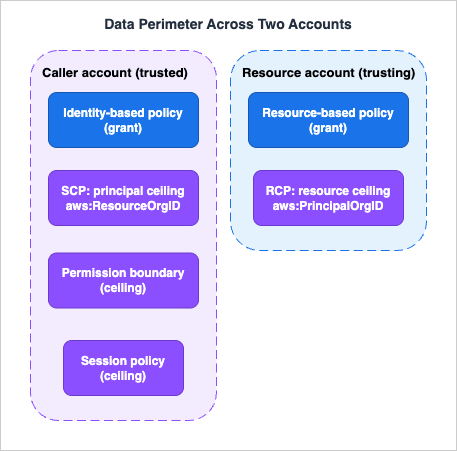
5.1 The perimeter objective
The AWS data-perimeter whitepaper states the goal as a single logical condition that must hold for access inside the perimeter:Access in the Perimeter ⇒ (Trusted Identity) ∧ (Trusted Resource) ∧ (Expected Network)Each of those three conditions expands into two concrete objectives - for example, "ensure my resources can be accessed by only trusted identities" and "ensure my identities can access only trusted resources." These are necessary but not sufficient conditions: they do not grant access, they only ensure that if access is granted, it stays inside the perimeter.
5.2 Which policy enforces which half
The whitepaper maps the objectives onto three capabilities. SCPs and RCPs cover the identity and resource dimensions; VPC endpoint policies extend the same idea to the network path:| Control objective | Primary policy | Key condition keys |
|---|---|---|
| Only trusted identities can access my resources | RCP | aws:PrincipalOrgID, aws:SourceOrgID, aws:PrincipalIsAWSService |
| My identities can access only trusted resources | SCP | aws:ResourceOrgID |
| Access only from expected networks | SCP / RCP / VPC endpoint policy | aws:SourceIp, aws:SourceVpc, aws:ViaAWSService, aws:PrincipalIsAWSService |
The symmetry is the whole point. An SCP guarantees that your principals cannot exfiltrate data to a bucket outside your organization; an RCP guarantees that your buckets cannot be read by a principal outside your organization. You need both halves, because each closes a direction the other cannot see.
5.3 A minimal RCP for the "trusted identities" objective
A canonical RCP enforces that a supported resource can only be touched by principals in your own organization, while still allowing AWS services that legitimately act on your behalf. Conceptually:{
"Version": "2012-10-17",
"Statement": [
{
"Sid": "EnforceOrgIdentities",
"Effect": "Deny",
"Principal": "*",
"Action": ["s3:*", "sqs:*", "kms:*"],
"Resource": "*",
"Condition": {
"StringNotEqualsIfExists": { "aws:PrincipalOrgID": "o-EXAMPLE" },
"BoolIfExists": { "aws:PrincipalIsAWSService": "false" }
}
}
]
}This denies any access to the covered resources unless the calling principal belongs to organization
o-EXAMPLE, with an explicit carve-out so that AWS service principals acting on your behalf are not caught by the deny. It grants nothing - your bucket policies and identity policies still have to allow the legitimate access - but it makes "only trusted identities" an invariant that no per-resource misconfiguration can break.5.4 A subtle but important VPC-endpoint caveat
When you extend the perimeter to the network with VPC endpoint policies, the whitepaper flags a trap worth repeating because it is easy to get wrong. In a VPC endpoint policy you must hardcode your organization ID in the condition rather than compare two request-context keys. A condition like"StringNotEquals": { "aws:ResourceOrgID": "${aws:PrincipalOrgID}" } fails to protect you: if an unintended principal from a different organization accesses a resource in their own organization through your endpoint, both keys resolve to that other organization's ID and the values match, so the deny never fires. SCPs behave differently here because they are attached to your accounts and evaluated against your principals - a reminder that identical-looking conditions can mean different things depending on which policy type carries them.5.5 Rolling out a perimeter: testing, impact analysis, and staged enforcement
A data perimeter is a blunt instrument if you enforce it blind. AWS's own guidance is unambiguous: do not attach RCPs to the root of your organization without thoroughly testing their impact. The recommended path is incremental - attach the policy to individual test accounts first, then to OUs low in the hierarchy, and only then work upward through the tree - and the primary observability signal is AWS CloudTrail: review logs forAccess Denied errors to see what the policy actually blocked.For the impact analysis itself, AWS's guidance on effectively implementing RCPs in a multi-account environment (AWS Security Blog) describes a repeatable method:
- Inventory external access with IAM Access Analyzer. An organization-scoped external access analyzer identifies resources - IAM roles among them - that are shared with entities outside your organization. That list is precisely the set of access paths a perimeter RCP will cut, so it tells you which exceptions to carve before enforcement rather than after.
- Analyze account activity with CloudTrail. With CloudTrail logs centralized in Amazon S3, query them (for example with Amazon Athena) for STS calls against your IAM roles made by identities outside the organization, and compare the results against your known trusted partners. Unexplained matches are either exceptions you have not yet modeled or access you want the perimeter to remove.
- Model exceptions explicitly, then enforce. The AWS pattern uses condition-based exceptions (for example, a tag that marks roles intentionally shared with partners) so that trusted integrations keep working the day the RCP attaches - and every exception stays visible in the policy itself.
The three-point connection: the mechanism is that an RCP takes effect at attachment, with no dry-run mode; the observable behavior is immediate
Access Denied on every path the policy does not except; the design implication is that discovery (IAM Access Analyzer, CloudTrail) must precede enforcement, and rollout must climb the tree from test accounts upward.5.6 The managed alternative: AWS Control Tower RCP-based controls
If your multi-account environment runs on AWS Control Tower, you do not have to author perimeter RCPs by hand. Since November 15, 2024, Control Tower has offered preventive controls implemented with RCPs, designed to establish a data perimeter across a landing zone. Two examples show the shape:CT.S3.PV.4 ("Require that the organization's Amazon S3 resources are accessible only by IAM principals that belong to the organization or by an AWS service") is the "trusted identities" half of Section 5.2 packaged as a managed control, and CT.S3.PV.3 requires requests to the organization's Amazon S3 resources to use a minimum TLS version of 1.3. The controls are configurable - you can specify exemptions for principals and resources that should not be governed - which is the managed counterpart of the condition-based exceptions above. The trade-off is the usual one: managed controls are maintained and versioned by AWS but limited to the published catalog, while hand-authored RCPs give you the full policy language at the cost of owning the testing discipline in Section 5.5 yourself.6. Cross-Account and External Access Evaluation
Everything so far has quietly assumed a single account. The moment a request crosses an account boundary, the evaluation splits - and this is where SCPs and RCPs land in different accounts.6.1 Two independent evaluations
The official cross-account logic is precise: when you make a cross-account request, AWS performs two evaluations - one in the trusting account and one in the trusted account - and the request is allowed only if both evaluations return a decision ofAllow. The account where the calling principal lives is the trusted account; the account where the resource lives is the trusting account.Mapping the seven-stage pipeline onto those two evaluations tells you exactly which ceilings apply where:
- Requesting (trusted) account - identity-based policy, plus the ceilings that constrain a principal: the SCP, the permission boundary, and any session policy.
- Resource (trusting) account - resource-based policy, plus the ceiling that constrains a resource: the RCP.
So an SCP in the caller's account can block an outbound cross-account request, and an RCP in the resource's account can block an inbound one - each side enforcing its own guardrail, neither able to override the other. This is the deeper reason the two policy types exist: they let the identity owner and the resource owner impose independent, non-negotiable limits on the same interaction.
6.2 The two exceptions that must explicitly allow
For most resources, a single explicitAllow - in either the identity-based policy or the resource-based policy - is enough to grant access within the same account, and cross-account access needs an allow on each side. There are two documented exceptions where the resource-based policy must explicitly allow the principal, and an identity-side allow alone is never sufficient:- IAM role trust policies. A role's trust policy is a resource-based policy that must name the principals allowed to assume it.
- KMS key policies. A KMS key policy must explicitly allow the principal; this is why cross-account use of a customer managed key so often fails even when identity policies look correct.
The documentation notes that other services may also require an explicit resource-side
Allow, and points you to each service's own documentation - which, as Section 8 discusses, is a place where the universal rules stop and per-service specifics begin.Both exceptions appear again in Resource-Based Policies by Service on AWS - Where the Second Policy Lives, What It Can Say, and When It Is Required, which inventories that second policy service by service and marks these two as the cases where it is required rather than optional. An RCP and a resource-based policy both act on the resource, which is what makes the two easy to confuse, and that inventory draws the same line from the resource side.
6.3 How RCPs treat external callers
RCPs shine precisely in the cross-organization case. Because an RCP applies to the resource-owner's account regardless of who calls, it can enforce "only principals in my organization may access this resource" even against a caller in a completely separate organization who has been granted access by an over-permissive bucket policy. Conversely, an RCP has no effect on resources owned by other organizations - if your principal accesses someone else's bucket, your RCP does not travel with the request. The perimeter you build with RCPs protects your resources; it does not constrain what your identities can reach elsewhere (that is the SCP's job).6.4 A worked trace: one request, two accounts, four policies
To make the split concrete, walk one request end to end. The setup: roleapp-runner in Account A calls s3:GetObject on bucket data-lake in Account B. Both accounts belong to the same organization, which has attached a perimeter RCP like Section 5.3's above Account B.Evaluation in Account A (trusted account - the caller's side):
- No explicit deny applies to the principal, so evaluation proceeds.
- The SCP in force for Account A must allow
s3:GetObject; a deny-list SCP that does not mention Amazon S3 passes this stage. - The role's identity-based policy must allow
s3:GetObjectonarn:aws:s3:::data-lake/*- cross-account access always needs an identity-side grant. - If a permissions boundary or a session policy is attached, each must also allow the action.
Evaluation in Account B (trusting account - the resource's side):
- The RCP in force for Account B is the ceiling checked here. The perimeter statement denies
s3:*unlessaws:PrincipalOrgIDmatches the organization -app-runneris in the same organization, so the deny does not fire. - The bucket policy on
data-lakemust explicitly allow the calling principal (or its account) - for a cross-account request, a resource-side allow is required.
Both evaluations return
Allow, so the request succeeds. Now vary one fact at a time. If the caller is a principal in a different organization to whom a past administrator granted generous bucket-policy access, the same RCP fires - aws:PrincipalOrgID no longer matches - and the request dies in Account B no matter what the bucket policy says: that is the perimeter doing its job. If instead the caller is in-organization but the bucket policy never named it, the request dies at the resource-policy stage with an implicit deny. And if Account A's SCP denies Amazon S3 entirely, the request never gets past the caller's side. Four policies, two accounts, one decision - and each failure mode names the policy you must fix.7. Session Policies and Role Chaining
The innermost ceilings apply only to temporary sessions, and they are where multi-account automation most often trips.7.1 Session policies are an intersection, never an addition
A session policy is passed as a parameter when you create a temporary session - for example onAssumeRole or GetFederationToken. You can pass a single inline document and up to ten managed-policy ARNs. The rule is unambiguous: the resulting session's permissions are the intersection of the role's identity-based policy and the session policies, and you cannot use session policies to grant more permissions than those allowed by the identity-based policy of the role that is being assumed. If you pass no session policy, a default one is created that does not narrow anything.That makes session policies the ideal tool for downscoping a broadly-permissioned role for a specific job - a CI/CD pipeline assuming a deploy role but restricting the session to one bucket, for instance - without editing the role itself. It also makes a common expectation wrong: a session policy can never hand a session an action the role does not already have.
7.2 Role chaining and the one-hour ceiling
Role chaining is when a principal uses the temporary credentials from one assumed role to assume a second role. It carries a hard, easily-forgotten limit: role chaining limits your AWS CLI or AWS API role session to a maximum of one hour. If you assume a role through chaining and request aDurationSeconds greater than one hour, the operation fails - regardless of the target role's configured maximum session duration (which can be up to twelve hours when the role is assumed directly). Roles assumed by other means are not considered role chaining and are not subject to this restriction.There is a second, subtler property of chaining worth knowing for multi-account auditing: a
sourceIdentity set at the start of a chain persists as one role assumes the next and cannot be changed during the session. That is what lets you trace an action taken three roles deep back to the human who started the chain - and what lets you enforce acceptable sourceIdentity values in a role's trust policy.The design implication. Long-running automation that relies on role chaining must be built to refresh credentials at least hourly; a pipeline that assumes a chain of roles and then tries to run a multi-hour job on the first set of credentials will fail partway through. Where you control the topology, prefer assuming the final role directly (which honors the role's full session duration) over chaining through intermediaries.
8. What the Documentation Does Not Specify
A defining feature of this "under the hood" series is drawing the line between what AWS documents and what it does not, rather than papering over the gap with speculation. For organization guardrails, several things are deliberately left unspecified in the public documentation:- The internal enforcement engine. AWS documents the logical evaluation order and outcome rules precisely, but it does not publish the implementation of the enforcement code, its data structures, or how policies are compiled and cached at global scale. Reasoning about performance or ordering beyond the documented logical model is not supported by any official source, so this article does not attempt it.
- The complete per-service "resource-based policy must explicitly allow" set. The documentation names IAM role trust policies and KMS key policies as universal exceptions and then says other services "may also require an explicit
Allow," deferring to each service's own docs. There is no single authoritative cross-service table; the correct move is to consult the specific service's documentation for each resource type you secure, not to assume the general rule. - Every SCP/RCP combination. AWS documents that effective permissions are the intersection of the applicable ceilings and grants, and it documents each policy type's behavior. It does not enumerate the outcome of every possible stack of RCP plus SCP plus boundary plus session plus resource policy for every principal type. For high-stakes combinations, the honest verification path is to test the exact request in a controlled account and read the result from CloudTrail, not to infer it.
- Interactions with declarative and other policy types. The RCP evaluation documentation explicitly excludes declarative policy types (such as backup, tag, chat-application, and AI-services opt-out policies) from its evaluation model. Those follow a separate inheritance model, and mixing mental models across them is a common source of error.
Stating these limits is not a hedge; it is the point. A guardrail design that quietly assumes undocumented behavior is a guardrail you cannot trust in an audit.
9. Design Implications for Organization Guardrails
Pulling the mechanics into practice, a defensible organization-guardrail design tends to follow the same principles:- Separate invariants from grants. Put organization-wide "this must always be true" rules into SCPs (principal invariants) and RCPs (resource invariants). Leave application-specific permissions to identity-based and resource-based policies that owning teams can iterate on. Ceilings are for the security team; grants are for the builders.
- Build both halves of the perimeter. An SCP-only perimeter leaves your resources open to external callers; an RCP-only perimeter leaves your principals free to reach outside resources. Use
aws:ResourceOrgIDin SCPs andaws:PrincipalOrgID/aws:SourceOrgID/aws:PrincipalIsAWSServicein RCPs so the identity and resource dimensions are both closed. - Roll out from the leaves, not the root. AWS strongly recommends against attaching RCPs (and by the same logic, restrictive SCPs) to the organization root without testing. Attach to a test account first, then to lower OUs, and work upward, using CloudTrail
AccessDeniedevents to measure impact before each promotion. A guardrail attached at the root is effective for every account beneath it - which is exactly why an untested one is dangerous. - Design around the exemptions on purpose. Guardrails are not universal: the management account, service-linked roles, and (for RCPs) AWS managed KMS keys sit outside them. Keep the management account nearly empty, and do not assume an SCP or RCP will contain an SLR. Where a control must cover an exempt path, reach for a different mechanism. For which AMIs accounts may launch, an Amazon EC2 declarative policy is one such mechanism, since it applies to service-linked roles as well; it is covered in AMI Allowed Instance Types and Launch Governance on Amazon EC2.
- Track the RCP supported-service list. Because RCP coverage is still expanding, revisit unsupported-service gaps periodically and use resource-based policies to hold the perimeter for services RCPs do not yet reach. Treat "which services support RCPs" as a value you re-verify, not one you memorize.
- Prefer deny-lists for perimeters. The scalable, low-friction pattern for both SCPs and RCPs is a broad
Denywith condition-based exceptions, layered on top of the AWS-managedFullAWSAccess/RCPFullAWSAccessdefaults. Allow-lists have their place for tightly-scoped accounts, but they impose ongoing operational cost every time a team adopts a new service.
10. Frequently Asked Questions
Are SCPs and RCPs evaluated in a fixed order, and does the order matter?The documented enforcement order evaluates RCPs before SCPs, and both before resource-based, identity-based, boundary, and session policies. But because SCPs and RCPs are both deny-by-omission ceilings that never grant, a request has to satisfy both regardless of order - so the relative order of the two never changes the final allow/deny result.
Do RCPs or SCPs ever grant permissions?
No. Neither policy type grants anything. They only set the maximum available permissions. You always still need identity-based and/or resource-based policies to actually allow an action; an account with only guardrails and no grants has no access at all.
Which services support RCPs, and how do I keep track?
RCPs launched in November 2024 with five services (S3, STS, KMS, SQS, Secrets Manager) and have expanded to more than two dozen as of 2026-07-18, including additions such as ECR, OpenSearch Serverless, Cognito, CloudWatch Logs, and DynamoDB. The authoritative, current list lives in the AWS Organizations User Guide, and you should confirm coverage there before relying on an RCP for a given service.
Do RCPs affect the management account or service-linked roles?
No to both. RCPs do not affect resources in the management account, and they do not restrict service-linked roles (nor a service's ability to assume an SLR). AWS managed KMS keys are also outside RCP control. Plan your perimeter knowing these paths are exempt.
Can an RCP restrict access by AWS services themselves?
Yes - this is a key difference from SCPs. RCPs can limit AWS service principals (using
aws:PrincipalIsAWSService and related keys), whereas SCPs do not apply to AWS service principals. That is why the "only trusted identities" objective of a data perimeter is enforced with an RCP.In a cross-account request, whose SCP and whose RCP apply?
The SCP in the caller's (trusted) account applies, together with that principal's permission boundary and session policy. The RCP in the resource's (trusting) account applies, together with the resource-based policy. Both account evaluations must return
Allow for the request to succeed.Can a session policy give a role more permissions for one job?
No. A session policy is an intersection with the role's identity-based policy; it can only narrow. It is the right tool for downscoping a broad role for a specific session, never for expanding one.
Why does my role-chained session expire after an hour?
Role chaining caps CLI/API sessions at a maximum of one hour, overriding the target role's configured maximum session duration. Assume the final role directly if you need a longer session, or refresh credentials at least hourly in chained automation.
How many RCPs can I attach, and how large can each one be?
Up to 5 RCPs can be directly attached to the root, to an OU, or to an account - and the undetachable
RCPFullAWSAccess counts as one of them. Each RCP can be at most 5,120 characters (SCPs get 10,240), and an organization can hold up to 2,000 RCPs. Inherited policies do not count against the attachment limits, and these are hard limits.How do I test an RCP before enforcing it organization-wide?
There is no dry-run mode, so AWS recommends staged rollout: attach to individual test accounts, then to lower OUs, then upward - reviewing CloudTrail for
Access Denied errors at each step. Before that, use an organization-scoped IAM Access Analyzer external access analyzer and CloudTrail activity analysis to inventory the cross-organization access paths your perimeter will cut, and model exceptions for the ones you intend to keep.11. Summary
The per-request question - "why was this one call allowed or denied?" - is answered by walking the seven-stage evaluation chain, and our step-by-step guide does exactly that. This article answered the organization-scale question that sits above it: how do you design the ceilings that shape every request at once?The core ideas are compact. SCPs and RCPs are pure ceilings that never grant - SCPs constrain your principals, RCPs constrain your resources - and together they form the two halves of a data perimeter that keeps access between trusted identities, trusted resources, and expected networks. They are evaluated as an intersection with the grant policies, they inherit down the organization tree, and in a cross-account request they land in different accounts: the SCP with the caller, the RCP with the resource. Around the edges sit the exemptions that make guardrails non-universal (the management account, service-linked roles, AWS managed KMS keys), the still-growing list of RCP-supported services, and the two resource-based policy exceptions - IAM role trust policies and KMS key policies - that always demand an explicit allow. Where the documentation stops, honest testing and per-service docs take over.
Designed with those facts in front of you, organization guardrails stop being a source of mysterious
AccessDenied errors and become what they are meant to be: security invariants you can defend in an audit.12. References
- AWS IAM User Guide - Policy evaluation logic
- AWS IAM User Guide - How AWS enforcement code logic evaluates requests to allow or deny access
- AWS IAM User Guide - Cross-account policy evaluation logic
- AWS IAM User Guide - Permissions boundaries for IAM entities
- AWS IAM User Guide - Policies and permissions in IAM (Session policies)
- AWS Organizations User Guide - Authorization policies (Differences between SCPs and RCPs)
- AWS Organizations User Guide - Service control policies (SCPs)
- AWS Organizations User Guide - Resource control policies (RCPs)
- AWS Organizations User Guide - RCP evaluation
- AWS Whitepaper - Building a data perimeter on AWS (Perimeter overview)
- AWS News Blog - Introducing resource control policies (RCPs), a new type of authorization policy in AWS Organizations
- AWS What's New - AWS expands Resource Control Policies support for Amazon Cognito and Amazon CloudWatch Logs
- AWS What's New - AWS expands Resource Control Policies support to Amazon DynamoDB
- AWS What's New - AWS Organizations supports the full IAM policy language for service control policies
- AWS STS API Reference - AssumeRole (role chaining and DurationSeconds)
- AWS Organizations User Guide - Quotas and service limits for AWS Organizations
- AWS Security Blog - Effectively implementing resource control policies in a multi-account environment
- AWS Control Tower Controls Reference - Controls implemented with resource control policies (RCPs)
Related Articles on This Site
- IAM Policy Evaluation Logic Step-by-Step - Explicit Deny, RCP, SCP, Resource Policy, Identity Policy, Permission Boundary, and Session Policy
The per-request decision walk-through this article builds on, with the seven-stage IAM Decision Diamond, twelve worked cases, and a policy simulator. - IAM Anti-Patterns - Real-World Mistakes and Their Root Causes
Statement-level IAM mistakes and how to avoid them, a companion to the evaluation-order view here. - AWS History and Timeline regarding AWS IAM
How IAM and its policy model evolved over time. - AWS History and Timeline regarding AWS Organizations
How AWS Organizations, SCPs, and RCPs arrived and matured. - AWS IAM Glossary
Precise definitions for the terminology used throughout this article. - AWS Multi-Account Operational Patterns
How organization guardrails fit into a landing-zone and multi-account operating model.
References:
Tech Blog with curated related content
Written by Hidekazu Konishi