Root Sessions in AWS Organizations - Centralized Root Access, Task Policies, and the Break-Glass You Still Need
First Published:
Last Updated:
On November 15, 2024, AWS Identity and Access Management (IAM) introduced a feature that centrally manages root access for member accounts (centralized root access). When enabled, this feature allows you to delete the root user credentials in member accounts. Following credential removal, certain tasks that were previously only accessible via the root user can now be performed using short-duration root sessions obtained through
sts:AssumeRoot, initiated from the management account or the delegated administrator for IAM.This article addresses the following questions: What can be done, what can no longer be done, and what should be retained after deleting the root user credentials? Within what the primary sources state explicitly, the answers are as follows: Root sessions are limited to one of five AWS managed policies (task policies) and expire after a maximum of 900 seconds. The work that the task policies allow is limited to auditing and deleting root user credentials, allowing password recovery, and unlocking S3 bucket policies and SQS queue policies that deny all principals. SCPs and VPC endpoint policies continue to apply during root sessions. For tasks that are not available within a task policy, a path remains that involves recovering the password and signing in as the root user. This path depends on the root user's email address inbox for that member account.
This article does not cover general information about root users, MFA methods, account creation, SCP or RCP design, or pricing. This article did not test anything on real resources. The information presented was verified on November 18, 2026.
Related articles on this site:
- What Fills an AWS STS Session Token - Session Policies, Session Tags, the Single Size Limit, and How to Measure and Test It
- AWS Organization Guardrails - Service Control Policies, Resource Control Policies, and Data Perimeter Design
- IAM Policy Evaluation Logic Step-by-Step - Explicit Deny, RCP, SCP, Resource Policy, Identity Policy, Permission Boundary, and Session Policy
- IAM Anti-Patterns - Real-World Mistakes and Their Root Causes
- AWS History and Timeline regarding AWS Organizations - Overview, Functions, Features, Summary of Updates, and Introduction
- Passkeys and WebAuthn in Practice - Discoverable Credentials, Synced Versus Device-Bound Keys, and Why Account Recovery Decides the Design
Table of Contents
- 1. Scope and Assumptions
- 2. What Centralized Root Access Changes
- 3. Enabling It - Trusted Access and the Delegated Administrator
- 4. AssumeRoot - Who Calls It, Where, and for How Long
- 5. The Five Task Policies
- 6. Controls That Still Apply to a Root Session
- 7. Tracing a Root Session in AWS CloudTrail
- 8. Root Work the Task Policies Do Not Cover - The Break-Glass Path
- 9. An Operating Model for Root Sessions
- 10. Where the Sources Disagree and What They Do Not Say
- 11. Failure Modes
- 12. Frequently Asked Questions About Root Sessions in AWS Organizations
- 13. Summary
- 14. References
1. Scope and Assumptions
This chapter defines the intended audience for this article, the terminology used, and the relevant documentation. The key conclusions are as follows:- Only IAM users and roles in the management account or in the delegated administrator account for IAM can call
AssumeRoot. It cannot be called using root user credentials. AssumeRootonly accepts requests to Regional AWS STS endpoints, and the resulting session lasts a maximum of 900 seconds (15 minutes).- A single root session is limited to one of five task policies. The four task policies whose JSON the sources publish are all written with Deny statements only.
- The work the task policies allow is auditing and deleting root user credentials, allowing password recovery, and unlocking S3 bucket policies and SQS queue policies that deny all principals.
- SCPs (Service Control Policies) and VPC endpoint policies apply to root sessions. An SCP that denies all root actions also blocks root sessions.
- For work that no task policy covers, there remains a path to sign in as the root user, accessible through Allow password recovery. This path depends on the inbox of the root user email address.
- This functionality is limited to member accounts only. The management account root user stays, with known credentials.
1.1 Who This Article Is For
This article is intended for cloud infrastructure and security professionals who manage a large number of member accounts within AWS Organizations and are looking to eliminate the management of root user passwords and MFA, or who have been asked about it in an audit. Specifically, this article is aimed at readers who believe that at least one of the following statements is true:- Eliminating root user credentials will ensure that the root user is never needed again.
- A root session can do anything that the root user can do in a member account.
- Root sessions are root users, so they are outside the reach of SCPs.
- Even with an SCP in place that denies all root user actions, centralized root access can still be used.
1.2 Four Things Called Root
This article uses the term "root" to refer to four distinct concepts. This article distinguishes them with the names in the following table.| Term Used in This Article | Refers To | Example |
|---|---|---|
| Root user | The identity used to sign in using the email address and password created when you set up your AWS account. | Password recovery, signing in as the root user. |
| Root session | A session that uses the temporary credentials returned by AssumeRoot and acts as the root user of a member account | Work scoped by a task policy |
| Organizations Root | The top-level container within the Organizational Unit (OU) hierarchy. | Applying Service Control Policies (SCPs). |
| Account principal | The principal represented by the ARN arn:aws:iam::<account-id>:root. | Policy conditions, CloudTrail logs. |
AWS documentation refers to root sessions using terms such as "root session," "privileged session," and "privileged root user session." This article will consistently use the term "root session." Furthermore, within this article, the term "Deny" refers only to explicit denials in IAM policies (
"Effect": "Deny").1.3 Sources and the Date Checked
This article is based on the following materials. The article checked them on November 18, 2026.- IAM User Guide (including the section listing tasks that require root user credentials), Centralize root access for member accounts, Perform a privileged task on an AWS Organizations member account, Track privileged tasks in AWS CloudTrail, IAM AWS managed policies page, global condition keys page.
- AWS STS API Reference (
AssumeRootandPolicyDescriptorType), IAM API Reference (ListOrganizationsFeatures), Service Authorization Reference (AWS STS page). - AWS Organizations User Guide (SCP page, RCP page, Best Practices for Member Accounts).
- What's New (November 15, 2024 and September 14, 2026), AWS News Blog, AWS Security Blog (Secure root user access for member accounts in AWS Organizations), one article from the AWS re:Post Knowledge Center.
This article did not test anything on real resources. What it writes is the text of the sources and inferences drawn from that text. Each inference is marked as an inference.
2. What Centralized Root Access Changes
2.1 Why Standing Root Credentials Become a Problem
The IAM User Guide states that each member account has its own root user, and that by default, this root user is permitted to perform all actions within that member account. Retaining root user credentials results in a large number of long-lived credentials with extensive permissions. The IAM User Guide recommends centralizing the protection of root user credentials for accounts managed through AWS Organizations, to prevent root user credential recovery and access at scale.The What's New post describes the benefit of this feature as a reduction in the number of high-privilege root user credentials that require MFA protection. This article does not delve into general best practices for securing root user credentials.
2.2 Two Capabilities
Centralized root access consists of two capabilities. The IAM console and the Security Blog call them by the following names.| Capability | What it allows | API that enables it |
|---|---|---|
| Root credentials management | Lets the management account and the delegated administrator for IAM delete root user credentials in member accounts | EnableOrganizationsRootCredentialsManagement |
| Privileged root actions in member accounts | Lets the management account and the delegated administrator for IAM perform some tasks that require root user credentials | EnableOrganizationsRootSessions |
The IAM User Guide states that to enable member accounts to recover root user credentials after they have been deleted, it is necessary to enable "Privileged root actions in member accounts." This is because allowing password recovery is one of the tasks that can be performed during a root session (Section 5.3).
You can verify which features are enabled by using the IAM
ListOrganizationsFeatures API. According to the API Reference, the possible values of EnabledFeatures in the response are RootCredentialsManagement and RootSessions.2.3 What Happens to Existing and New Member Accounts
According to the IAM User Guide, after centralizing root access, you can choose whether or not to delete the root user credentials for member accounts. You can delete passwords, access keys, and signing certificates, and MFA is deactivated.Regarding new accounts, the IAM User Guide states that new accounts created through AWS Organizations do not have root user credentials by default. A Security Blog post indicates that after enabling Root credentials management, new accounts created through AWS Organizations will not have a root user password and will not be eligible for the password recovery process until you re-enable account recovery.
Concerning member accounts where credentials have been deleted, the centralized root access page of the IAM User Guide states that these accounts will not be able to sign in as the root user, nor will they be able to recover the root user password. The root user page adds the condition "unless account recovery is enabled." Account recovery is enabled by allowing password recovery, as Section 5.3 describes.
For new accounts, the sources read describe only accounts created through AWS Organizations. They do not state the default for accounts that are invited to join the organization. It is reasonable to read that the root user credentials of an invited account remain until you delete them with the deletion task in Section 5.3 (this article's inference).
3. Enabling It - Trusted Access and the Delegated Administrator
3.1 Trusted Access for IAM
To enable centralized root access, you need to enable trusted access for IAM in AWS Organizations. The IAM User Guide outlines the following CLI steps:- If trusted access is not already enabled, run
aws organizations enable-aws-service-access. - Use
aws iam enable-organizations-root-credentials-managementto allow the deletion of root user credentials. - Use
aws iam enable-organizations-root-sessionsto allow some of the tasks that require root user credentials. - If necessary, use
aws organizations register-delegated-administratorto register the delegated administrator for IAM.
The Security Blog notes that enabling the feature in the console also enables trusted access for IAM. The IAM User Guide states that if you see "Root access management is disabled" in the console, you should enable trusted access for IAM.
The principal that enables the feature needs the following permissions (IAM User Guide):
iam:EnableOrganizationsRootCredentialsManagementiam:EnableOrganizationsRootSessionsiam:ListOrganizationsFeaturesorganizations:EnableAwsServiceAccessorganizations:ListAccountsForParentorganizations:RegisterDelegatedAdministrator
The IAM API Reference lists the following errors for
ListOrganizationsFeatures: OrganizationNotInAllFeaturesMode when the organization does not have all features enabled, and ServiceAccessNotEnabled when trusted access for IAM is not enabled.3.2 The Management Account and the Delegated Administrator for IAM
Only the management account or the delegated administrator account for IAM can start a root session. The delegated administrator is registered using the service principaliam.amazonaws.com. An example from the IAM User Guide is as follows:aws organizations register-delegated-administrator
--service-principal iam.amazonaws.com
--account-id 111111111111For the delegated administrator, the IAM User Guide recommends an account intended for security or management purposes. The Security Blog strongly recommends delegating to a dedicated member account used by the security team, and keeping it separate from accounts used for workloads and applications. The Security Blog also notes that using a delegated administrator account can help avoid unnecessary access to the management account.
There is a difference in how SCPs (Service Control Policies) apply to the management account and the delegated administrator account. The AWS Organizations User Guide states that SCPs do not apply to users and roles in the management account, but do apply to member accounts designated as delegated administrators. Therefore, the SCP applied to the delegated administrator account can also restrict IAM users and roles that call
sts:AssumeRoot from that account. Only IAM policies can restrict IAM users and roles that call from the management account (this article's inference).3.3 Permissions for Auditing and for Launching Sessions
The centralized root access page of the IAM User Guide lists the following IAM permissions as prerequisites for centralizing root access:iam:GetAccessKeyLastUsediam:GetAccountSummaryiam:GetLoginProfileiam:GetUseriam:ListAccessKeysiam:ListMFADevicesiam:ListSigningCertificatessts:AssumeRoot
The privileged task page of the IAM User Guide states that to sign in, you must use an IAM user or role that has been explicitly granted the
sts:AssumeRoot permission in the management account or the delegated administrator account. The same page also states that root user credentials cannot be used to call sts:AssumeRoot. The STS API reference makes the same point.4. AssumeRoot - Who Calls It, Where, and for How Long
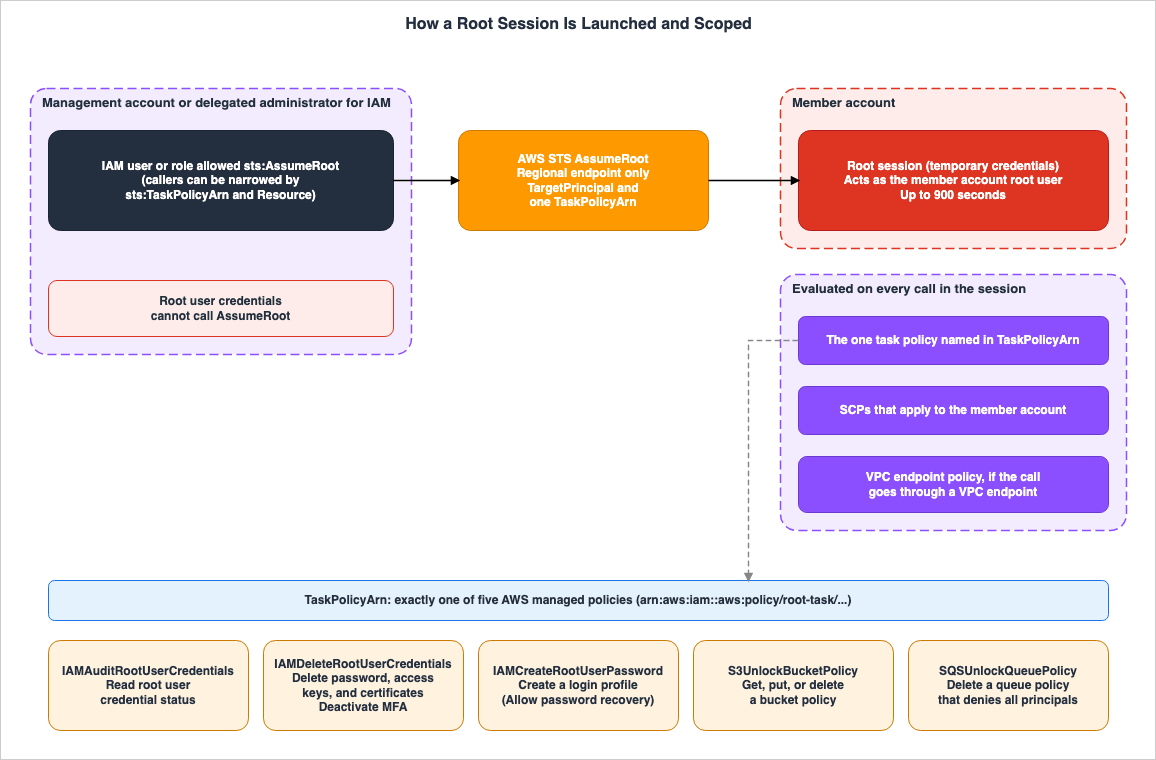
AssumeRoot request to a Regional AWS STS endpoint. The temporary credentials returned act as the root user of the targeted member account. In the session, a selected task policy, any applicable SCPs (Service Control Policies) applied to the account, and the VPC endpoint policy on the request path restrict the actions.4.1 Request Parameters
According to the STS API reference, theAssumeRoot request has the following four parameters.| Parameter | Required | Description |
|---|---|---|
TargetPrincipal | Required | The ARN of the member account's principal, or the account ID. Length: 12 to 2048 characters. |
TaskPolicyArn | Required | An AWS managed policy that restricts the session. Its type is PolicyDescriptorType, and it must be one of the five policies. |
DurationSeconds | Optional | The length of the session in seconds. Range: 0 to 900. The default value is 900. Specifying a value greater than 900 will result in an error. |
MinimumSessionTokenSize | Optional | The minimum size of the session token in bytes. Range: 0 to 4096. |
The response returns temporary credentials (Access Key ID, Secret Access Key, and Session Token), and other elements such as
SourceIdentity. The SourceIdentity represents the source identity specified by the principal that called AssumeRoot.AssumeRoot does not accept session policies (either Policy or PolicyArns) or session tags. The size of the session token and the function of MinimumSessionTokenSize are covered in the earlier article What Fills an AWS STS Session Token. This article does not delve into the contents of the token.The following is an example from the IAM User Guide's CLI section. This example demonstrates how a delegated administrator can start a session to delete the root user credentials in member account
111122223333.aws sts assume-root \
--target-principal 111122223333 \
--task-policy-arn arn=arn:aws:iam::aws:policy/root-task/IAMDeleteRootUserCredentials \
--duration-seconds 900The IAM User Guide also states that the response's
SessionToken, AccessKeyId, and SecretAccessKey can be used to perform privileged tasks in the member account. The same section notes that omitting a username and password in requests in the session will default the target to the member account.4.2 Regional Endpoints Only
The STS API reference states that the AWS STS global endpoint does not supportAssumeRoot and that requests must be sent to a Regional AWS STS endpoint. The privileged task page of the IAM User Guide and the CloudTrail page say the same.The STS API reference lists
RegionDisabled as an error for AssumeRoot. This error occurs when the account being asked to create credentials does not have AWS STS activated in the requested Region.4.3 One Task Policy per Session
TheTaskPolicyArn type is a PolicyDescriptorType. According to the STS API reference, PolicyDescriptorType only accepts one arn. Therefore, only one task policy can be specified in a single AssumeRoot call.The Security Blog notes that a root session started to unlock an S3 bucket policy can only unlock an S3 bucket policy and cannot be used for other root tasks. When the work needs two task policies, you call
AssumeRoot twice and start two sessions (this article's inference).On the other hand, the CloudTrail page states that multiple privileged tasks may be performed in a single session. It is reasonable to read this as multiple API calls within what a single task policy allows (this article's inference). For example, within an
IAMDeleteRootUserCredentials session, you can delete the password and then the access keys.4.4 Narrowing the Callers With sts:TaskPolicyArn and the Resource
The Security Blog recommends granting thests:AssumeRoot permission only to the people and automation that need it. Furthermore, AWS STS provides the condition key sts:TaskPolicyArn, which allows you to restrict the type of root sessions that the caller can start. An example from the Security Blog is as follows:{
"Sid": "AllowLaunchingRootSessionsforS3Action",
"Effect": "Allow",
"Action": "sts:AssumeRoot",
"Resource": "*",
"Condition": {
"StringEquals": {
"sts:TaskPolicyARN": "arn:aws:iam::aws:policy/root-task/S3UnlockBucketPolicy"
}
}
}In this example, the condition key is written as
sts:TaskPolicyARN. The Service Authorization Reference uses the term sts:TaskPolicyArn. The IAM User Guide notes that condition key names are case-insensitive, so both variations refer to the same key.According to the Service Authorization Reference, the resource type for
sts:AssumeRoot is root-user, and the ARN format is arn:${Partition}:iam::${Account}:root. Therefore, by specifying the principal of the target member account within the Resource element, you can also restrict the accounts in which the caller can start a root session (this article's inference). The following example, assembled from a table in the Service Authorization Reference, is not an example provided in AWS documentation.{
"Version": "2012-10-17",
"Statement": [
{
"Sid": "AllowAuditRootSessionsOnTwoAccounts",
"Effect": "Allow",
"Action": "sts:AssumeRoot",
"Resource": [
"arn:aws:iam::111122223333:root",
"arn:aws:iam::444455556666:root"
],
"Condition": {
"StringEquals": {
"sts:TaskPolicyArn": "arn:aws:iam::aws:policy/root-task/IAMAuditRootUserCredentials"
}
}
}
]
}5. The Five Task Policies
5.1 How the Task Policies Are Written
The task policies referenced in the STS API reference and the IAM user guide consist of five policies. Their ARN (Amazon Resource Name) follows the formatarn:aws:iam::aws:policy/root-task/<name>.IAMAuditRootUserCredentialsIAMCreateRootUserPasswordIAMDeleteRootUserCredentialsS3UnlockBucketPolicySQSUnlockQueuePolicy
According to the AWS managed policies page for IAM, these five policies were added on November 14, 2024. The same page states that none of the task policies can be attached to IAM entities, and that they are attached to
AssumeRoot.The IAM AWS managed policies page publishes JSON for four of the task policies. All four are written with Deny statements only. The first statement (
DenyAllOtherActionsOnAnyResource) uses NotAction to deny every action outside those the task needs. The second statement denies actions on targets other than the root user. The IAM task policies use NotResource with the value arn:aws:iam::*:root, and the S3UnlockBucketPolicy uses the condition ArnNotLike to compare aws:PrincipalArn with arn:aws:iam::*:root.The JSON for
SQSUnlockQueuePolicy is not in the sources read, but the names of its three statements all begin with Deny (Section 5.2). The four task policies whose JSON is available do not contain any Allow statements. The IAM user guide states that root users in member accounts are, by default, permitted to perform all actions. Therefore, it is reasonable to read that the permissions of a root session come from the permissions the root user already has, and that task policies remove part of them (this article's inference).5.2 What Each Task Policy Leaves Open
The operations that each of the five task policies does not deny are as follows.| Task policy | Operations not denied | How targets are narrowed | Task |
|---|---|---|---|
IAMAuditRootUserCredentials | iam:ListAccessKeys, iam:ListSigningCertificates, iam:GetLoginProfile, iam:ListMFADevices, iam:GetAccountSummary, iam:GetUser, iam:GetAccessKeyLastUsed | iam:GetAccountSummary aside, arn:aws:iam::*:root only | Auditing root user credentials |
IAMCreateRootUserPassword | iam:CreateLoginProfile, iam:GetLoginProfile | arn:aws:iam::*:root only | Allowing password recovery |
IAMDeleteRootUserCredentials | iam:DeleteAccessKey, iam:DeleteSigningCertificate, iam:DeleteLoginProfile, iam:DeactivateMFADevice, iam:ListAccessKeys, iam:ListSigningCertificates, iam:GetLoginProfile, iam:ListMFADevices, iam:GetUser, iam:GetAccessKeyLastUsed | arn:aws:iam::*:root only | Deleting root user credentials |
S3UnlockBucketPolicy | s3:DeleteBucketPolicy, s3:PutBucketPolicy, s3:GetBucketPolicy, s3:ListAllMyBuckets | Only when the calling entity's aws:PrincipalArn is arn:aws:iam::*:root | Unlocking a bucket policy that denies all principals |
SQSUnlockQueuePolicy | No JSON in the sources read (for this task, the IAM User Guide lists the CLI commands list-queues, get-queue-url, get-queue-attributes, and set-queue-attributes) | Statement names are DenyAllOtherActionsOnAnyResource, DenyGettingQueueAttributesOnNonOwnQueue, DenyActionsForNonRootUser. | Unlocking a queue policy that denies all principals |
The JSON for
SQSUnlockQueuePolicy is not on the IAM AWS managed policies page or on the AWS managed policies page of the Amazon SQS Developer Guide. The AWS Managed Policy Reference had no pages for the five task policies (their URLs redirected to the overview page). This article wrote the SQS row from the statement names and descriptions on the IAM AWS managed policies page and the CLI commands that the IAM User Guide lists.5.3 Auditing, Deleting, and Allowing Password Recovery
Auditing (IAMAuditRootUserCredentials): According to the IAM AWS managed policies page, you can see whether the root user has a password, whether it has access keys and when they were last used, whether it has signing certificates, the MFA devices associated with it, and a list of the consolidated root user credential status. The IAM User Guide states that other policies with iam:GetAccountSummary can also produce the same report.Deletion (
IAMDeleteRootUserCredentials): According to the IAM User Guide, deleting the root user credentials removes the root user password, access keys, and signing certificates, and deactivates MFA. The update history on the IAM AWS managed policies page indicates that on January 7, 2025, the iam:DeleteVirtualMFADevice permission was removed from this policy. Currently, the JSON NotAction section also does not include iam:DeleteVirtualMFADevice. Therefore, this session can deactivate MFA (iam:DeactivateMFADevice), and the deletion of virtual MFA devices is not included (this article's inference).Allowing password recovery (
IAMCreateRootUserPassword): According to the IAM User Guide, the console option Allow password recovery is only available when the member account does not have root user credentials. After performing this action, a person with access to the inbox of the member account root user email address can reset the root user's password and sign in as the root user. A Security Blog post notes that even if a root user login profile is created, previous root user settings, such as the previously configured password or associated MFA devices, will not be restored.5.4 Unlocking an S3 Bucket Policy or an SQS Queue Policy
Incorrectly configuring an S3 bucket policy or an SQS queue policy can inadvertently deny access to all principals, potentially rendering it impossible to correct. The root user page of the IAM User Guide lists editing or deleting an S3 bucket policy that denies all principals, and editing or deleting an SQS queue policy that denies all principals, as tasks that require root user credentials, and states that both can be unlocked with a privileged task.Regarding S3, the Amazon S3 API Reference page for
DeleteBucketPolicy describes the following mechanism.To ensure that bucket owners don't inadvertently lock themselves out of their own buckets, the root principal in a bucket owner's AWS account can perform the GetBucketPolicy, PutBucketPolicy, and DeleteBucketPolicy API actions, even if their bucket policy explicitly denies the root principal's access. Bucket owner root principals can only be blocked from performing these API actions by VPC endpoint policies and AWS Organizations policies.It is reasonable to read that an
S3UnlockBucketPolicy root session works on top of this mechanism, as the root principal of the account that owns the bucket (this article's inference). The final sentence on this page also connects to Chapter 6. VPC endpoint policies and AWS Organizations policies can also restrict this root principal.The console instructions in the IAM User Guide recommend selecting the bucket under Delete Amazon S3 bucket policy to delete the existing bucket policy, and then rewriting the correct policy in the S3 console. Similarly, for SQS, the instructions advise using Delete Amazon SQS policy to remove the queue policy and then rewriting it in the SQS console. The correct methods for configuring S3 bucket policies and SQS queue policies are outside the scope of this article.
6. Controls That Still Apply to a Root Session
6.1 SCPs Apply to Root Sessions
The Security Blog states that policies such as SCPs remain in effect even during root sessions.Service control policies, VPC endpoint policies, and other relevant policies remain effective during the root sessions. For example, you can restrict root sessions to only expected networks.The AWS Organizations user guide, on the SCPs page, also states that SCPs apply to the root users of member accounts.
An SCP restricts permissions for IAM users and roles in member accounts, including the member account's root user.An example on the CloudTrail page shows that actions that a root session performs in the target account are logged with a
userIdentity type of Root and an arn of arn:aws:iam::222222222222:root. In other words, actions performed during a root session are treated as actions performed by the root user of that member account (this article's inference).Consequently, SCPs that completely deny root access will also prevent root sessions. An article in the AWS re:Post Knowledge Center notes that if an SCP denies all access for root users, it is necessary to adjust the SCP to include
sts:AssumeRoot for root sessions that are limited to specific tasks. The article also states that SCPs that deny all access will prevent centrally managed root sessions.6.2 An SCP That Denies the Root User but Not Root Sessions
The IAM User Guide's page on global condition keys describes theaws:AssumedRoot key. This key is in the request context only when the principal makes the request with credentials from AssumeRoot, and its type is Boolean. The same page includes the following example SCP. According to the page, the example denies the use of the long-term credentials of the root user in a member account and does not deny AssumeRoot sessions from taking the actions that the session allows.{
"Version":"2012-10-17",
"Statement":[
{
"Effect":"Deny",
"Action":"*",
"Resource": "*",
"Condition":{
"ArnLike":{
"aws:PrincipalArn":[
"arn:aws:iam::*:root"
]
},
"Null":{
"aws:AssumedRoot":"true"
}
}
}
]
}The condition that
aws:PrincipalArn matches arn:aws:iam::*:root applies to both the root user and root sessions. Because the Null condition limits the Deny to requests without aws:AssumedRoot, the Deny applies only to the long-term credentials of the root user (this article's inference, which matches the page's description).The AWS Organizations User Guide's page on best practices for member accounts includes a different example SCP. This SCP uses
NotAction to leave only three S3 bucket policy operations and denies every other operation by the root user of a member account. When used in conjunction with centralized management, this SCP allows only those three operations on the bucket policy during S3UnlockBucketPolicy sessions, while s3:ListAllMyBuckets and the work of the IAM task policies are denied (this article's inference). Organizations that implement SCPs to restrict root user operations should verify how those SCPs handle root sessions before enabling centralized management.6.3 Not the Same as SCPs Not Applying to the Management Account
The fact that SCPs do not apply to the management account is distinct from the issue of root sessions.AssumeRootis intended for member accounts. The STS API Reference describesAssumeRootas an operation that returns short-term credentials to perform privileged tasks in a member account of the organization. The sources read do not describe starting a root session in the management account.- For the calling entity, as described in Section 3.2, SCPs apply to delegated administrator accounts but not to management accounts.
- The Security Blog states that the root user of the organization's management account must still exist with a known credential.
6.4 VPC Endpoint Policies and RCPs
The Security Blog notes that VPC endpoint policies also apply during root sessions and that you can restrict root sessions to only expected networks (quoted in Section 6.1). The S3 API Reference also states that only VPC endpoint policies and AWS Organizations policies can block the root principal of the account that owns a bucket (Section 5.4).Regarding RCPs, the IAM User Guide states that RCPs can restrict the permissions on resources within member accounts and can impact the effective permissions of identities, including the root user of an AWS account. The AWS Organizations User Guide states that RCPs do not apply to resources in the management account. No sentence in the sources read names root sessions as subject to RCPs. Given that root session operations are evaluated as root user operations (Section 6.1) and the Security Blog's wording "other relevant policies," it is reasonable to read that RCPs also apply to root sessions (this article's inference). The design of RCPs is covered in the previously published AWS Organization Guardrails.
7. Tracing a Root Session in AWS CloudTrail
7.1 Two Events in Two Accounts
The CloudTrail page of the IAM User Guide describes how to track actions performed during a root session by correlating events from two accounts.- In the calling account (the management account or the delegated administrator account), search for events with the
eventNameset toAssumeRoot. The event is recorded each time the caller gets short-term credentials fromAssumeRoot. - Verify the target member account using the
targetPrincipalwithin therequestParametersof that event, and confirm the access key ID for that session using theaccessKeyIdwithin theresponseElements. - In the CloudTrail logs of the target member account, search for the same access key ID and verify the actions performed using the
eventName.
In the example provided, the
requestParameters for the AssumeRoot event are as follows:"requestParameters": {
"targetPrincipal": "222222222222",
"taskPolicyArn": {
"arn": "arn:aws:iam::aws:policy/root-task/S3UnlockBucketPolicy"
}
}In the same example, the
DeleteBucketPolicy event in the target member account has a userIdentity with a type of Root, an arn of arn:aws:iam::222222222222:root, and an accessKeyId that matches the value found in the AssumeRoot event.7.2 What to Look For
The member account's CloudTrail records root session activity with the sametype as root user activity. What separates the two is the AssumeRoot event in the caller's account and its access key ID (this article's inference). Organizations that detect root user activity through events whose userIdentity.type is Root should assume that root session operations trigger the same detection, and should give the people who receive the alert a step for matching them against AssumeRoot events (this article's inference).The CloudTrail page states that a single session may involve multiple privileged tasks, and the maximum duration of an
AssumeRoot session is 900 seconds (15 minutes).7.3 Root User Sign-In After Password Recovery
Sign-in operations performed as the root user after a password recovery are recorded separately from root sessions. According to the What's New post of September 14, 2026, root user sign-ins are now processed in three Regions: US East (N. Virginia), US East (Ohio), and US West (Oregon). TheConsoleLogin event for root user sign-ins is logged in the Region that processed the sign-in. The What's New post recommends expanding monitoring and notification coverage to these three Regions to ensure that root user sign-ins are not missed.8. Root Work the Task Policies Do Not Cover - The Break-Glass Path
8.1 Three Kinds of Root Work
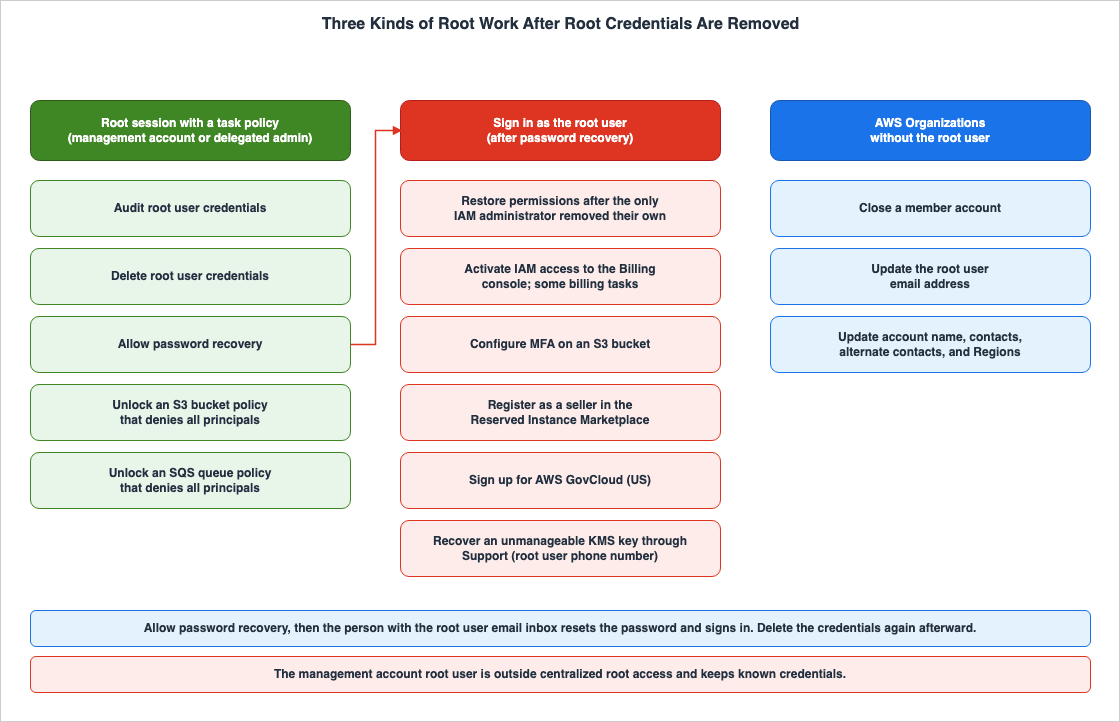
The first category includes tasks that can be performed through task policies. This means auditing and deleting root user credentials, allowing password recovery, and unlocking S3 bucket policies and SQS queue policies that deny all principals (Chapter 5).
The second category includes tasks that can only be performed when signed in as the root user. From the list on the root user page, the items that also concern member accounts are the following.
- Signing in as the root user to correct policies and restore permissions when the only IAM administrator accidentally removed their own permissions.
- Enabling IAM access to the Billing and Cost Management console. Certain billing tasks and viewing some tax invoices are restricted to root users only.
- Configuring MFA for Amazon S3 buckets.
- Registering as a seller on the Reserved Instance Marketplace.
- Signing up for AWS GovCloud (US). Requesting AWS GovCloud (US) account root user access keys from AWS Support.
- When an AWS KMS key becomes unmanageable, an administrator can recover it by contacting AWS Support. According to the root user page, AWS Support responds to the root user's primary phone number and authorizes by confirming the ticket's one-time password.
The KMS item depends on the root user's phone number, not on sign-in (this article's inference). Together with the absence of KMS work from the task policies, this item matters when you prepare for a KMS key that its key policy has made unmanageable.
The third category is work that AWS Organizations can do without the root user. According to the root user page, if all features are enabled within AWS Organizations, authorized IAM users and IAM roles within both the management account and delegated administrator accounts can close member accounts, and update the root user's email address, account name, contact information, alternate contacts, and AWS Regions. Standalone accounts, not part of AWS Organizations, require root user credentials to change the email address or close the account. However, within member accounts, these actions can be performed through AWS Organizations.
8.2 The Recovery Path
The Security Blog refers to alternative access methods, used in exceptional circumstances where root access is required, as "break glass" access. The same article states that, if the recommended procedures for break-glass access are followed, root user access is not needed, and suggests reviewing existing procedures that rely on the root user to reduce how much break-glass access depends on root credentials. Even so, the second kind of work in Section 8.1 needs the root user. A member account whose root user credentials were deleted follows the path below. This article calls it the break-glass path.- From the management account or the delegated administrator for IAM, start a root session using
IAMCreateRootUserPassword, and select Allow password recovery. This option is only available when the member account does not hold root user credentials. - An individual with access to the root user's email inbox should reset the root user's password.
- Sign in as the root user and perform the necessary tasks.
- When the work is done, start a root session with
IAMDeleteRootUserCredentialsand delete the root user credentials again. The IAM User Guide recommends deleting root user credentials after completing any tasks that require root user access.
If the SCP in Section 6.2 is attached to the member account, it also applies to the root user who signs in at step 3. This root user uses the long-term credentials that the SCP denies. Therefore, the work in step 3 is also denied, except for the tasks that the AWS Organizations User Guide states are not restricted by SCPs. Before step 3, decide how to lift this SCP for the account (this article's inference).
The root user page states that MFA is enforced for the root user by default, but that adding MFA requires customer action. The methods for MFA are covered in the previously published Passkeys and WebAuthn in Practice.
8.3 What the Path Depends On
In step 2, this path depends on the inbox of the root user email address. The IAM User Guide's root user best practices page recommends using, for the root user, a group email address that your business manages and that forwards received messages directly to a group of people, and not using that address for other purposes. The same page tells you to make sure that you have access to the root user email inbox so that you can reset the root user password.Therefore, even after deleting the root user's credentials, the email addresses associated with each member account's root user remain as the break-glass key (this article's inference). Who holds each inbox and who can open it needs the same care as who holds the root user password. As mentioned in Section 8.1, the root user's email address can be updated through AWS Organizations, even without the root user.
8.4 The Management Account Root User Stays
Centralized root access targets the root users of member accounts. The Security Blog states that organizational management accounts' root users must continue to exist with known credentials, and that best practices for root users should continue to apply to these management account root users. The IAM User Guide's best practices page states that AWS requires MFA registration for the root user of the organization's management account.9. An Operating Model for Root Sessions
This chapter presents the operational model that has been constructed based on the information gathered in the preceding sections. This is not a procedure defined by AWS.9.1 Who Gets sts:AssumeRoot
- Register a dedicated member account of the security team as the delegated administrator for IAM (the Security Blog's recommendation). Keep the principals that use
sts:AssumeRootin the management account to a minimum. SCPs apply to the delegated administrator account but not to the management account (Section 3.2). - Use a separate role for each kind of work, and use
sts:TaskPolicyArnto narrow the task policies each role can start to those the work needs. For example, the auditing role should only be grantedIAMAuditRootUserCredentials, the unlocking role should only be grantedS3UnlockBucketPolicyandSQSUnlockQueuePolicy, and the credential management role should only be grantedIAMDeleteRootUserCredentialsandIAMCreateRootUserPassword. - If necessary, restrict the target member account(s) using the
Resourceparameter (Section 4.4).
9.2 Guardrails Around Root Sessions
- Write an SCP that stops the root user so that it excludes root sessions with
aws:AssumedRoot(Section 6.2). Enabling centralized root access with an SCP that completely blocks all root operations will also prevent root sessions. - If you do not want to allow root sessions from networks outside of your expected network, restrict root sessions based on network conditions, as described in the Security Blog. Details on how to define these conditions are outside the scope of this article.
9.3 Automating Routine Unlocks
The Security Blog provides an example of automating the removal of S3 bucket policies and SQS queue policies. In a ticketing system, when a request to remove a policy is approved, an Amazon EventBridge rule associated with the delegated administrator's account invokes an AWS Lambda function. The function then deletes the policy in a root session scoped by a task policy. Apply the same narrowing as in Section 9.1 to the principal that runs the automation (this article's inference).9.4 What to Monitor
AssumeRootevents in the management account and the delegated administrator account (identifying who, which account, and under what task policy the action was initiated).- Events for member accounts where
userIdentity.typeisRoot. Match them against the access key IDs ofAssumeRootevents (Chapter 7). - Events related to
ConsoleLoginfor root users. Monitor the following three Regions: US East (N. Virginia), US East (Ohio), and US West (Oregon), starting September 14, 2026 (Section 7.3). - Status of root user credentials. Check them periodically with an
IAMAuditRootUserCredentialsroot session or withiam:GetAccountSummary(Section 5.3).
9.5 Rolling Out Credential Deletion
The Security Blog details the process for deleting root user credentials on a large scale, following these steps:- Get a summary of the root user credentials of the member accounts (with an
IAMAuditRootUserCredentialsroot session, or withGetAccountSummaryfrom an existing audit role). - Verify the usage of root user credentials and identify the accounts whose credentials can be safely removed. If credentials are in use, investigate their usage in CloudTrail and find an alternative solution. Exclude any accounts whose credentials cannot be removed at this time.
- Automate the deletion of unused root user credentials.
Put the SCP check from Section 6.2 before these steps (this article's inference). If an SCP that denies all root operations is already in place, the root sessions in step 1 are blocked from the start.
10. Where the Sources Disagree and What They Do Not Say
10.1 Where the Sources Disagree
| Section | Source A | Source B | Treatment in this Article |
|---|---|---|---|
| Deletion of Virtual MFA Devices | The Security Blog states that the script can be expanded to use deactivate-mfa-device and delete-virtual-mfa-device. | The IAM AWS managed policies page states that IAMDeleteRootUserCredentials was updated on January 7, 2025, to remove iam:DeleteVirtualMFADevice. | In accordance with the current task policy, the deletion of virtual MFA devices is not included within the scope of this session (Section 5.3). |
| Parameter Names in API Examples | The STS API Reference example uses TaskPolicyArn.arn=. | The IAM User Guide API example uses PolicyArns.arn=. | This article follows the parameter name TaskPolicyArn in the API Reference. |
| Endpoint in API Examples | The note in the STS API Reference states that it does not support global endpoints. | The same page's Sample Request uses https://sts.amazonaws.com/. | Following the note, this article uses Regional endpoints (Section 4.2). |
| Spelling of Condition Keys | The Security Blog uses sts:TaskPolicyARN. | The Service Authorization Reference uses sts:TaskPolicyArn. | Condition key names are case-insensitive (Section 4.4). This article uses sts:TaskPolicyArn. |
10.2 What the Sources Do Not Say
- The JSON for
SQSUnlockQueuePolicyis not documented in the materials reviewed (Section 5.2). - The default handling of root user credentials for accounts that are invited and added to an organization is not described in the materials reviewed (Section 2.3).
- There are no mentions in the reviewed materials stating that RCP applies to root sessions (Section 6.4).
- The materials do not specify whether or when task policies may increase. In the STS API Reference as checked on November 18, 2026, there are five task policies.
11. Failure Modes
| Symptom | Cause | Reference |
|---|---|---|
AssumeRoot fails | Sending requests to the global endpoint (sts.amazonaws.com). | Section 4.2 |
AssumeRoot returns RegionDisabled | AWS STS is not activated in the requested Region for that account. | Section 4.2 |
| Task policy is correct, but root session operations are denied | An SCP that denies all root operations is also preventing the root session. | Sections 6.1 and 6.2 |
| Unable to perform both a bucket policy unlock and password recovery within a single session | A single session can only have one task policy. | Section 4.3 |
| Allow password recovery is not displayed | The member account still has credentials for the root user. | Section 5.3 |
| The recovered root user does not have the previous password or MFA. | Even after creating a login profile, the previous settings are not restored. | Section 5.3 |
| Unable to configure MFA for an S3 bucket within a root session | No task policy includes this operation, and it requires signing in as the root user. | Section 8.1 |
| Nobody can open the root user email inbox, so the password cannot be reset | The break-glass path depends on the inbox | Section 8.3 |
| Notifications for root user sign-in are not received. | Monitoring is only checking the US East (N. Virginia) Region. | Section 7.3 |
| The console displays "Root access management is disabled." | Trusted access for IAM is not enabled. | Section 3.1 |
12. Frequently Asked Questions About Root Sessions in AWS Organizations
Can the root user of a member account call AssumeRoot?
No, that is not possible. The STS API Reference and the IAM User Guide state that theAssumeRoot action cannot be called using root user credentials. Only IAM users and roles explicitly granted the sts:AssumeRoot permission in the management account or the delegated administrator account for IAM can call AssumeRoot.Do SCPs apply to root sessions?
Yes, they do. The Security Blog states that SCPs and VPC endpoint policies apply even during root sessions. SCPs that block all root operations will also prevent root sessions. If you want to block only the root user and not root sessions, structure your SCP in the format shown in theaws:AssumedRoot example in the IAM User Guide.Can one root session perform the work of two task policies?
No, it cannot. TheAssumeRoot action only accepts one task policy, and the Security Blog states that a session can only be used for the intended task. To perform two separate tasks, you need to start two separate sessions.After the root user credentials are deleted, can anyone still sign in as the member account root user?
Not as it stands. According to the IAM User Guide, member accounts cannot sign in as the root user, nor can they recover their password. However, if the management account or the delegated administrator for IAM performs Allow password recovery, individuals who can access the root user's email inbox can reset the password and sign in as the root user.Does centralized root access cover the management account?
No, it does not. This feature targets root users for member accounts. The Security Blog states that the management account root user must still exist with a known credential.How long does a root session last?
It lasts up to 900 seconds (15 minutes). TheDurationSeconds value can range from 0 to 900, with a default value of 900.13. Summary
- Centralized root access consists of two capabilities: Root credentials management and Privileged root actions in member accounts, and is used from the management account or the delegated administrator for IAM.
AssumeRootcan only be called by IAM users and roles in the management account or the delegated administrator account for IAM, and cannot be called using root user credentials. It only accepts requests to Regional endpoints, and sessions are limited to a maximum duration of 900 seconds.- A single root session is restricted to one of five task policies. The four task policies whose JSON the sources publish are written with Deny statements only, and reduce the root user's privileges to only the operations required for the task.
- The task policies allow auditing and deleting root user credentials, allowing password recovery, and unlocking S3 bucket policies and SQS queue policies that deny all principals.
- SCPs and VPC endpoint policies also apply to root sessions. An SCP meant to stop only the root user excludes root sessions with
aws:AssumedRoot. - Operations performed during a root session are logged in the member account's CloudTrail with a
typeofRoot. You link them to the caller'sAssumeRootevent by access key ID. - For tasks not covered by the task policies, a break-glass path remains: Allow password recovery, then sign-in as the root user. This path depends on the root user's email inbox, so manage the inbox as the break-glass key.
- The management account root user is outside this feature and stays, with known credentials.
14. References
- IAM User Guide: AWS account root user
- IAM User Guide: Centralize root access for member accounts
- IAM User Guide: Perform a privileged task on an AWS Organizations member account
- IAM User Guide: Track privileged tasks in AWS CloudTrail
- IAM User Guide: Root user best practices for your AWS account
- IAM User Guide: AWS managed policies for AWS Identity and Access Management, IAM Access Analyzer, and account access manager
- IAM User Guide: AWS global condition context keys
- IAM User Guide: IAM JSON policy elements: Condition
- IAM User Guide: Policies and permissions in AWS Identity and Access Management
- AWS Security Token Service API Reference: AssumeRoot
- AWS Security Token Service API Reference: PolicyDescriptorType
- IAM API Reference: ListOrganizationsFeatures
- Service Authorization Reference: Actions, resources, and condition keys for AWS Security Token Service
- AWS Organizations User Guide: Service control policies (SCPs)
- AWS Organizations User Guide: Resource control policies (RCPs)
- AWS Organizations User Guide: Best practices for member accounts
- Amazon S3 API Reference: DeleteBucketPolicy
- AWS Security Blog: Secure root user access for member accounts in AWS Organizations
- AWS News Blog: Centrally managing root access for customers using AWS Organizations
- What's New: Centrally manage root access in AWS Identity and Access Management (IAM)
- What's New: AWS improves regional resiliency for root user sign-in
- AWS re:Post Knowledge Center: How do I set up centralized root access in IAM for member accounts?
References:
Tech Blog with curated related content
Written by Hidekazu Konishi