Passkeys and WebAuthn in Practice - Discoverable Credentials, Synced Versus Device-Bound Keys, and Why Account Recovery Decides the Design
First Published:
Last Updated:
Developing the registration process itself is relatively straightforward. You call the browser's API, send the returned object to the server, and store the public key. The real challenge lies in answering the question: Where will this key ultimately reside, and under what conditions? Will it remain on the user's device, or within their cloud account? Could it be spread across multiple devices? And if so, can we observe or control that distribution?
The recovery screen presents an even greater hurdle - it is often impossible to even begin designing it. How does your service verify that a user who has lost their key is actually who they claim to be? With passwords, you could simply send a link to their registered email address. But passkeys do not offer that option. And what to use instead is the part that explanatory articles tend to leave out.
This article addresses these two critical questions. It will not delve into the mechanics of public key cryptography, nor will it discuss the intricacies of elliptic curves or signature algorithms. The initial roadblocks are not about cryptography; they are about storage and account recovery.
Three conclusions, stated up front.
First, the elimination of passwords does not solve the authentication problem itself; it eliminates the shared secret. When the server only stores public keys, the impact of a database breach changes. However, the path for verifying a user's identity when they lose their key does not automatically become stronger. The focus of design shifts from how to protect a secret to where the key will reside and who can recover it.
Second, the moment you allow synced passkeys, your service's account recovery becomes dependent on external platforms. If a user's key is synced to a platform account, recovering that key becomes subject to the platform's account recovery process. And that recovery path is rarely one you control. In Chapter 7, this article examines actual recovery procedures, drawing from publicly available documentation. There is a real case in which the last step of that path, for a credential sold on its phishing resistance, is a reply to an SMS message.
Third,
user presence and user verification are separate flags, and a passkey is not necessarily two-factor authentication. Whether the authenticator is simply asserting that the user was present, or also verifying the user's identity, shows up in separate bits of the authenticator data. And, with the default settings, registration and authentication can succeed even without the latter. The same is true of managed identity platforms, and Chapter 5 quotes the official documentation directly.All specifications, values, and identifiers presented in this article have been verified against the primary source materials. The verification date is August 24, 2026. Web Authentication Level 3 became a W3C Recommendation on August 25, 2026, the day after that, and this article reflects the change. The source depends on the type of claim. The definitions of the ceremonies, the options, and the flags come from the W3C Web Authentication specification, the authenticator protocols and types are defined in the FIDO Alliance specifications, sync and account recovery behavior come from each platform's own documentation, and AWS behavior from the AWS documentation.
This article also states up front how it divides the ground with the existing articles. There are three instances where the same term is used with a different meaning in other articles on this site.
The term
attestation appears across several articles on this site, but the vast majority of its occurrences do not refer to the meaning used in this article. The article AWS Nitro Enclaves and Confidential Computing on AWS discusses attestation documents and PCR values related to enclaves demonstrating their measurements, which is distinct from the attestation that this article refers to, which pertains to the authenticator verifying its model. Similarly, relying party has a different meaning. Articles related to certificates, such as AWS Private CA Hierarchy Design, use relying party to refer to the X.509 validator. In this article, RP means the WebAuthn Relying Party, that is, the service that is trying to authenticate the user. And recovery in other articles on this site almost invariably refers to disaster recovery. To avoid confusion, this article consistently uses account recovery for the way a user regains access to an account, and avoids using recovery on its own to mean disaster recovery.As for who holds what, Amazon Cognito Federation Complete Implementation Guide holds the federation implementation for Cognito, and AWS IAM Identity Center Complete Setup Guide holds the setup steps for Identity Center. This article will not cover either of these setup procedures. General guidance for users regarding passkeys can be found in Protecting Your Family from Tech Support Scams and Phishing, which targets a different audience. The intended audience for this article is those responsible for implementation. Identity Lifecycle for AI Agents covers how non-human subjects - that is, agents - are registered and retired. This article focuses exclusively on human identities.
Table of Contents
- 1. The Two Questions That Stall You First - Storage and Account Recovery
- 2. What Got Replaced Was the Shared Secret
- 3. Two Ceremonies - Who Signs What, and Who Verifies What
- 4. Discoverable Versus Non-Discoverable Credentials
- 5. User Presence and User Verification Are Separate Flags
- 6. Synced Passkeys and Device-Bound Passkeys
- 7. Account Recovery Decides the Design
- 8. Where Passkeys Land in AWS
- 9. What to Decide Before You Implement
- 10. Failure Modes and Anti-Patterns
- 11. Frequently Asked Questions
- 12. Summary
- 13. References
1. The Two Questions That Stall You First - Storage and Account Recovery
1.1 Intended Audience
This article is intended for implementers and designers who have already decided to integrate passkeys into their systems.First, it targets readers who are planning to incorporate passkeys as an alternative or addition to passwords within their own web or mobile applications. They have already selected a library and have reached the point of writing code that calls
navigator.credentials.create(). Their current challenge lies in determining what to pass to the authenticatorSelection parameter and deciding what to display to users who have lost their keys.Second, it addresses readers who are looking to add passkeys to their existing login infrastructure. They need guidance on whether to maintain passwords alongside passkeys, or to transition to passkeys exclusively, and are seeking information to inform that decision.
Third, it aims to assist readers who want to understand where passkeys fit within AWS. While passkeys are available in three different AWS services - Amazon Cognito User Pools, IAM MFA, and IAM Identity Center - these services do not offer the same functionality. They fulfill different roles. Chapter 8 covers the differences.
This article is not intended for readers who are seeking a general explanation of what passkeys are. For a broader introduction to the concept, the previously mentioned article aimed at a general audience would be a more suitable starting point.
1.2 Fixing the Vocabulary - Passkey, WebAuthn Credential, and FIDO2 Security Key
These three terms are frequently used in confusing ways. The terminology in the specification also differs from the terminology used in the industry.Without clear definitions up front, the rest of this article stays ambiguous.
The W3C's Web Authentication specification defines
Passkey as a synonym for a client-side discoverable credential. The specification's terminology section lists Client-side discoverable Credential, Discoverable Credential, and Passkey as equivalent terms, while also noting that Resident Credential and Resident Key are deprecated, older terms. In strict adherence to the specification, a passkey is a credential stored on the authenticator that can be used without first prompting for a username.However, the terminology used in practical applications is broader. For example, AWS's IAM user guide describes passkeys in two categories: device-bound passkeys (security keys) and synced passkeys. In that usage, the term passkey is a broader concept, whatever the sync behavior.
This article uses the following distinctions:
WebAuthn Credentials refer to the pair of public and private keys created during a WebAuthn registration process, along with any associated state. This is the broadest term, and it does not depend on whether the credential is discoverable or synced.
Passkey refers to all keys that are presented to the user for sign-in purposes. In this article, the term passkey covers both synced and device-bound keys. Where this differs from the narrower definition in the specification, this article says
discoverable credential explicitly.FIDO2 Security Key refers to the physical form of an external authenticator that connects via USB or NFC. This is not a name for a type of key, but rather a description of the authenticator's form. A security key may hold discoverable credentials, or it may not.
The reason for this distinction is that it will become important in later chapters. Whether the requirement to use passkeys actually means mandating discoverable credentials, requiring keys that do not sync, or requiring an external authenticator will fundamentally change the implementation, the steps users must take, and the outcome in case of failure.
1.3 Which Version This Article Follows - Level 3 Became the Recommendation on August 25, 2026
A central topic of this article is defined only in Level 3. The status of each version therefore needs stating.The current W3C Recommendation for Web Authentication is Level 3, dated August 25, 2026. Level 2 held that status from April 8, 2021 until August 24, 2026, and Level 3 was a Candidate Recommendation Snapshot, dated May 26, 2026, until the day before. The latest version alias,
https://www.w3.org/TR/webauthn/, now refers to Level 3.This distinction is not merely a detail. The two flags,
BE and BS, and the term multi-device credential, which Chapter 6 discusses, do not appear anywhere in the Level 2 specification. They are introduced for the first time in Level 3.Therefore, this article will make the following distinctions: Registration and authentication processes, RP ID and origin binding, and discoverable credentials, as well as
UP and UV, were established at the Level 2 stage. These are based on specifications that have been recommended since 2021. The means of observing the sync state from the RP side became a Recommendation on August 25, 2026. When estimating implementation portability, this difference in when each part became a Recommendation must be taken into account. Becoming a Recommendation is not the same as being implemented by clients.1.4 Scope Outside This Article
This article will not detail the attacker's methods. While Chapter 3 explains the mechanism by which binding a credential to an RP ID and an origin works against phishing, it will not cover how to create fake RPs or how to bypass origin verification.This article will not provide instructions for configuring Cognito or Identity Center. This information is already available in previously published materials. This article will only address the correspondence between specific elements of the process and the configuration options within those services.
This article will not cover authorization decisions. The focus is limited to verifying a user's identity. What permissions are granted after authentication is a separate question, and it belongs to Policy Engines Compared, which lines up four engines that answer it.
2. What Got Replaced Was the Shared Secret
2.1 What Remains on the Server Changes
With password authentication, the server stored information necessary for verification. Even if it was not in plain text, it held hashes and salts. This constitutes a shared secret. The server possessed something derived from a value known to the user. Therefore, if the server's stored data were compromised, attempts to recover the user's secrets from that data could be feasible.In WebAuthn, the server only stores public keys. A public key, even if known, cannot be used to create signatures. The private key was never sent to the server and does not pass through the server at all.
To put this change precisely, it is not that the secrets have become stronger; rather, the server no longer holds any secrets. For attackers, the credential database is no longer a valuable target. It now contains only public keys, credential IDs, signature count counters, and user identifiers.
2.2 What Changes When the Database Leaks
The most concerning aspect of a password database breach is that the impact does not necessarily stay within a single service. If users reuse the same password on other platforms, the breach can spread to those as well.Public keys do not have this characteristic. This is because key pairs are generated for each service individually. As the specification states, each credential is created and scoped to a specific RP ID. Even if an attacker obtains a public key from one RP, they cannot use it to sign in to another RP.
However, this does not mean the impact of a breach is zero. The database still contains information about who uses the service. The specification also separately provides design considerations intended to reduce the traceability of users. The limitation imposed by RP IDs also stops malicious RPs from discovering the existence of credentials belonging to other RPs.
2.3 Things That Persist
There are three things that cannot be eliminated when designing authentication systems. The rest of this article is about these three.First, there is the account recovery process. Even after passwords are gone, users will still lose their keys. In fact, the loss of a password - something that resides in the user's mind and is therefore less likely to be lost - increases how much the account leans on things that can be lost.
Second, there is the verified identity at the time of registration. The assurance that the public key received is genuinely from the correct individual comes from outside of WebAuthn itself. Key registration always occurs within an already established session. The manner in which that initial session was created ultimately determines the upper limit of the key's trustworthiness.
Third, there are the sessions themselves. After a signature is successfully verified, how that fact is handled falls outside the scope of WebAuthn. Tools such as the JWT Decoder Tool and the OAuth 2.0 and OIDC Flow Visualizer and PKCE Generator cover the layer that issues and verifies tokens.
3. Two Ceremonies - Who Signs What, and Who Verifies What
WebAuthn includes two ceremonies: registration and authentication. While they share a similar structure, the difference lies in what is newly created and what is verified.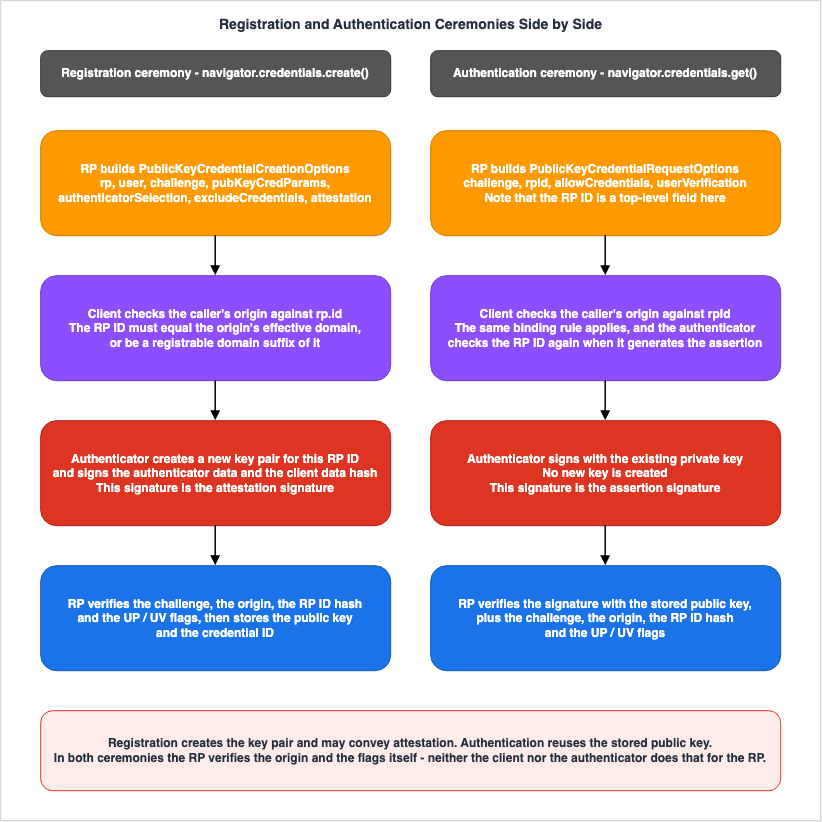
3.1 What the RP Decides at Registration
Registration begins with the call tonavigator.credentials.create(). The RP assembles and passes the PublicKeyCredentialCreationOptions object. The contents of each field within this object largely determine the subsequent operation.There are four required fields.
rp describes the RP itself, and within that, id becomes the RP ID. user describes the user. challenge is a server-generated, unpredictable value used to prevent replay attacks. pubKeyCredParams specifies the accepted public key algorithms.Among the optional fields, the following four have the most direct impact on design decisions:
authenticatorSelection specifies the desired authenticator, excludeCredentials lists already registered keys, attestation indicates the RP's preference for how attestation data should be received, and timeout sets the time limit. Level 3 also includes the hints field.// Server-side construction of registration options.
// Field names follow the W3C Web Authentication specification exactly.
const creationOptions = {
rp: { id: "example.com", name: "Example" },
user: { id: userHandle, name: userName, displayName: userDisplayName },
challenge: serverGeneratedChallenge,
pubKeyCredParams: [
{ type: "public-key", alg: -7 }, // ES256
{ type: "public-key", alg: -257 } // RS256
],
excludeCredentials: alreadyRegisteredCredentials,
authenticatorSelection: {
residentKey: "required",
userVerification: "required"
},
attestation: "none",
timeout: 60000
};A common implementation error is failing to pass the
excludeCredentials field. If this field is omitted, it becomes possible to create another key for the same user on an authenticator that already has a key registered. From the user's perspective, this results in two keys for the same service appearing on the same device. The user may no longer be able to determine which key is valid.3.2 What the RP Decides at Authentication
Authentication begins withnavigator.credentials.get(), and the RP provides a PublicKeyCredentialRequestOptions object. It is a shorter process than registration.// Server-side construction of authentication options.
// Note that the RP ID is a top-level field here, named rpId,
// whereas at registration it is the id member of the rp entity.
const requestOptions = {
challenge: serverGeneratedChallenge,
rpId: "example.com",
allowCredentials: [],
userVerification: "required",
timeout: 60000
};Here is a potential point of difficulty in implementation: there is an asymmetry. At registration you pass the RP ID as the
id inside the rp entity. At authentication you pass it as a top-level field called rpId. The name and location are different. It is helpful to understand that there are two different ways to specify the same value.The subject of Chapter 4 is determining what to include in the
allowCredentials field, or leaving it empty. If you specify particular credential IDs in this field, the authenticator will search for usable credentials within that list. If left empty, the authenticator will use only the RP ID as a reference, and present the keys it possesses.3.3 The Division of Labor Across Both Ceremonies
Separate the party that signs from the party that verifies.During registration, the authenticator creates a new key pair and signs the data containing its public key. This signature is the attestation signature. The data being signed includes authenticator data and a hash of the client data created by the client. The RP verifies that the challenge originated from itself, that the origin is its own, that the hash of the RP ID matches, and that the flag meets its requirements.
During authentication, the authenticator signs using its existing private key. This is the assertion signature. The RP verifies that the signature can be validated using the public key it previously stored, that the challenge originated from itself, that the origin and RP ID match, and that the flag meets its requirements.
In both cases, the RP must always verify the origin itself. While the client data includes the origin, it is the RP's responsibility to examine this data and confirm its validity. Omitting this step would prevent the constraints described later from being enforced.
3.4 The RP ID and Origin Binding - Where Phishing Resistance Comes From
You often see the claim that "passkeys cannot be phished." This is a conditional statement. The specification is precise about what it guarantees and what it does not.The specification states that the RP ID determines the set of origins from which the credential can be used. The condition is defined as follows: The RP ID must either be equal to the origin's effective domain, or it must be a registrable domain suffix of that effective domain.
Specifically, a credential with an RP ID of
example.com can be used with origins like https://example.com and https://login.example.com, but not with https://example.com.attacker.test. This is because example.com is not a registrable domain suffix of example.com.attacker.test, which is the effective domain of that origin.The specification also states that the authenticator itself validates this restriction. During the assertion generation process, the authenticator verifies that the RP ID associated with the requested credential precisely matches the RP ID provided by the client. In other words, the check is not a single step, but a two-step process, implemented both on the client side and in the authenticator.
Separate what can be said from what cannot.
What we can say: Even if a user is tricked into visiting a fake website and completes the sign-in process there, the credential for the legitimate website will not be presented. This is independent of how careful the user is. In this respect, passkeys differ from passwords and one-time codes, which an attacker captures as soon as the user enters them.
What we cannot say: The restriction applies to the credential itself, not the session. Pathways for attackers to steal tokens or cookies issued after authentication lie outside of WebAuthn. HTTP Security Headers Complete Reference covers the browser-side protections. Also, this does not prevent a user from registering a new passkey on a fake website. Keys created on an attacker's domain will simply be created as keys for the attacker's service.
3.5 When You Have More Than One Domain - Related Origin Requests
For organizations that hold multiple country-specific or brand-specific domains, the RP ID binding can be restrictive.example.com and example.co.jp, for instance, are considered separate registrable domains, and simply applying the binding would prevent them from sharing keys.Level 3 introduces Related Origin Requests as a mitigation for this issue. This mechanism allows clients to accept requests from origins that do not precisely match the RP ID, by allowing the RP to publish a list of related origins that clients can reference.
However, as mentioned in Section 1.3, this feature became a Recommendation only on August 25, 2026. Before designing systems that rely on multiple domains, it is necessary to verify whether the target clients have implemented this functionality. If verification is not possible, an alternative approach is to consolidate authentication to a single domain. In practice, this is the default behavior of Amazon Cognito, as described later.
3.6 Should you verify attestation?
An attestation is a claim about which model of authenticator generated the key. Since the authenticator manufacturer signs the key, the RP can verify it and establish which model the authenticator is.However, by default, verification is not performed. According to the specifications, the default value for
attestation is "none". The specification states that when "none" is specified, the client replaces any attestation statement produced by the authenticator, other than a self attestation, with a None attestation statement. Consequently, it never reaches the RP.So, what do actual services do? Two examples of managed identity platforms offer contrasting answers.
The AWS Developer Guide explicitly states that Amazon Cognito's user pools currently do not support enforcing attestation. It is a design that does not ask which model of authenticator the credential came from.
In contrast, Microsoft Entra ID allows enforcing attestation through authentication methods policies. When enforced, it requires the authenticator's metadata to be registered with the FIDO Alliance's Metadata Service, and demands that the certificate chain can be traced from there to a trusted root.
This contrast highlights that the question is not whether to verify attestations, but rather what you are trying to protect. If an organization wants to ensure that employees only use specific models of authenticators that it has procured, then verifying attestations is worthwhile. However, when dealing with a large and diverse user base, requiring specific models effectively becomes a way of selecting which users you keep. And device lists quickly become outdated.
A good way to decide is to consider whether you can answer this question: If a user's registration is rejected, what alternative options will you offer them? If you cannot answer that question, enforcing attestation is likely not a sustainable operational choice.
4. Discoverable Versus Non-Discoverable Credentials
4.1 What is the difference?
Ultimately, the distinction lies in which side - the RP or the authenticator - remembers the credential ID.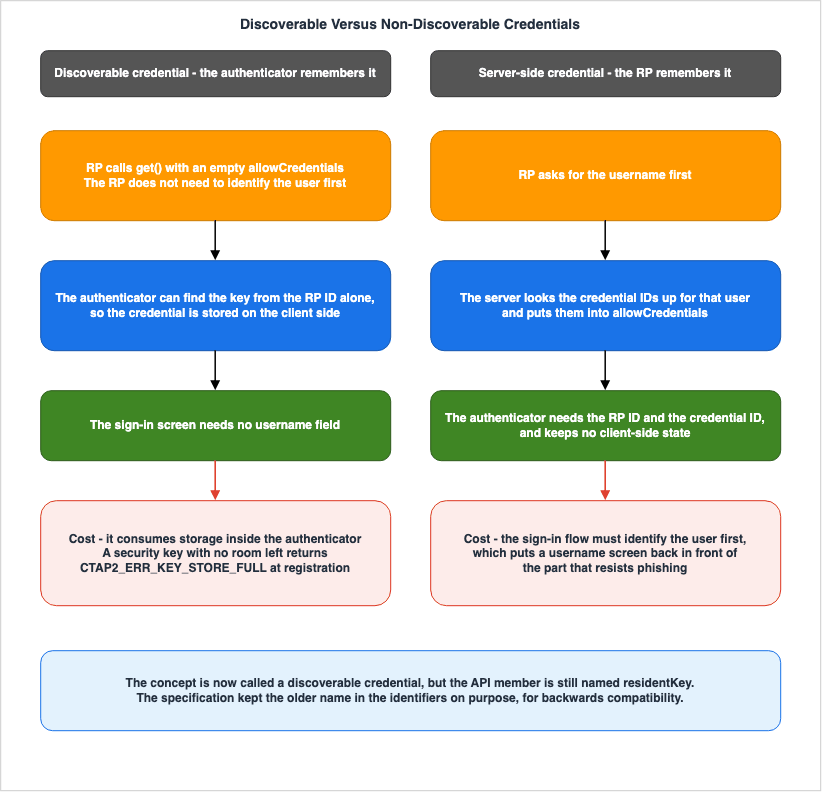
navigator.credentials.get() with an empty allowCredentials array. The specification adds that, as a result, the RP no longer needs to identify the user beforehand.Conversely, non-discoverable credentials, which the specification calls server-side credentials, require the RP to provide both the RP ID and the credential ID to the authenticator. This is because the authenticator itself does not remember these details.
The difference that users see is reflected in the appearance of the sign-in screen. With discoverable credentials, there is no need for a field where the user enters their username. When the user presses a button, the authenticator presents the keys it holds for that specific site. In contrast, with non-discoverable credentials, the system first asks for the user's username, and then the server uses that username to retrieve the credential ID, which is then passed back in the
allowCredentials array.4.2 The Cost Is Storage Inside the Authenticator
Making a credential discoverable means the authenticator has to keep state. In the words of the specification, a discoverable credential always involves maintaining some state, because it must be discoverable using only the RP ID.And because it holds data, storage capacity is limited. The FIDO Alliance's Client to Authenticator Protocol (CTAP 2.3, Proposed Standard dated February 26, 2026) defines a specific error for this situation. It stipulates that if the authenticator does not have sufficient internal storage to save a new credential, it should return
CTAP2_ERR_KEY_STORE_FULL.This is not just a theoretical concern. External security keys have a product-specific limit on the number of discoverable credentials they can store. As users begin using passkeys across multiple services, that limit is reached. And when that happens, users will encounter an error on your service's registration screen.
With authenticators built into platforms or password managers, this limitation is often less apparent. This is because storage depends on the device's capacity or the user's cloud account. In other words, the same setting,
residentKey: "required", can result in vastly different user experiences depending on the type of authenticator.4.3 The Name of the Concept Changed, the Name of the Field Did Not
There is a situation regarding terminology that can be confusing for implementers.The current name for this concept is
discoverable credential. Previously, it was referred to as resident key or resident credential. The specification explicitly marks both of these as DEPRECATED.However, the field names in the API remain
residentKey. The specification explains that this is because the terms ResidentKey and residentKey are extensively used across both the WebAuthn API and the Authenticator Model, appearing as dictionary member names, algorithm variables, and operation arguments. To maintain backward compatibility, the resident portion of the name has not been changed.Therefore, the correct usage is as follows: Use
discoverable credential in prose and in design documents. In code, use authenticatorSelection.residentKey. An older boolean field called requireResidentKey also remains, and its default value is false.If you were to mechanically avoid using the old names, you would find yourself unable to refer to existing field names. In this specification, the name of the concept and the identifier names are intentionally designed to be inconsistent.
4.4 Which one should you choose?
If you want to offer sign-in without prompting the user for a username, then discoverable is necessary. This is not only a UX requirement, but also offers benefits in terms of phishing resistance. Without a screen that asks for a username, there is no screen that can be spoofed.However, choosing this option requires accepting three considerations. First, users on external security keys spend one of a limited number of slots. Second, the authenticator retains information that identifies the user, so you need to consider how to handle shared devices. Third, even if the server deletes the key, it will not be removed from the user list. Chapter 7 takes up this third point, because the specification offers a way to handle it.
As a compromise, there is also the option of specifying
"preferred" for residentKey. However, this only asks that the credential be discoverable if possible, and the server will need to verify the outcome after registration to confirm whether it was actually enabled. If you only offer sign-in without a username, assuming it is discoverable without checking, some users may be unable to sign in.5. User Presence and User Verification Are Separate Flags
5.1 Authenticator Data Bits
In the data signed by the authenticator, there is a 1-byte field calledflags. This field records what happened during the ceremony. The bit assignments, as defined in the Level 3 specification (with bit 0 being the least significant bit), are as follows:| Bit | Abbreviation | Meaning |
|---|---|---|
| 0 | UP | User Present. Indicates the user was present. |
| 1 | RFU1 | Reserved for future use. |
| 2 | UV | User Verified. Indicates the user has been verified. |
| 3 | BE | Backup Eligibility. Indicates the credential is eligible for backup. |
| 4 | BS | Backup State. Indicates the credential is currently backed up. |
| 5 | RFU2 | Reserved for future use. |
| 6 | AT | Attested credential data included. |
| 7 | ED | Extension data included. |
This section focuses on bits 0 and 2. Bits 3 and 4 belong to Chapter 6.
5.2 What UP and UV Actually Assert
When the UP flag is set, the authenticator asserts only that a user was present. It indicates that the user touched the security key or interacted with an on-screen prompt. It does not assert who that user is.When the
UV flag is set, the authenticator asserts that the user has been verified. This indicates that the user has undergone biometric authentication, entered a PIN, or entered a device passcode.This difference decides whether the sign-in can be called two-factor authentication.
When the
UV flag is set, the process includes two factors. It combines "something you have" - the authenticator itself - and "something you know or are" - such as biometrics or a PIN. Therefore, a sign-in using a passkey alone can be described as two-factor authentication.When the
UV flag is not set, it only indicates "something you have." It only asserts that the authenticator, which holds the key, has been accessed. Anyone who possesses the authenticator can proceed.5.3 What the preferred Default Value Means
This is the area where implementation is most likely to fail silently.According to the specification, the default value for
userVerification is "preferred". This applies both to authenticatorSelection during registration and to PublicKeyCredentialRequestOptions for authentication."preferred" represents a suggestion, not a requirement. If the authenticator does not support it, the process can still succeed without verification. And if the RP does not check the flag, it will not even notice the difference.The same setting, with the same default value, also exists in managed identity platforms. The AWS developer guide, for example, states that for Amazon Cognito user pools, if a value is not provided in the API request, the setting defaults to
preferred, and that the console also defaults to preferred. It then explicitly states the consequence: when set to preferred, users can configure authenticators that do not support user verification, and registration and authentication processes can still succeed without it. The documentation continues, stating that if you want to enforce verification, you need to change it to required.Cognito also turns this distinction into a setting of its own. The
WebAuthnConfigurationType within a user pool has a FactorConfiguration. When set to MULTI_FACTOR_WITH_USER_VERIFICATION, passkey authentication with user verification fulfills the MFA requirement. When set to SINGLE_FACTOR, or if no setting is provided, the passkey counts as a single authentication factor. Whether that sign-in may be counted as two-factor is, quite literally, an API setting.In contrast, Microsoft Entra ID, according to its own documentation, requires biometric or PIN-based user verification for every FIDO2 authentication attempt.
In other words, even under the same term "passkey support," there are configurations that require multi-factor authentication and those that do not.
5.4 What should the RP do?
First, clearly define the requirements. If you intend to use the passkey as the sole sign-in method, setuserVerification to "required". Do not rely on the default setting.Second, validate the flag. This is the most important point in this section. Just because you have specified
"required" does not guarantee that the returned assertion will indicate UV is present. The setting is a request to the client and the authenticator; verifying the result that comes back is the RP's own responsibility. Specifically, check bit 2 of the authenticator data on the server.Third, ensure consistency between registration and authentication. In practice, discrepancies can occur where
UV is required during registration but remains set to preferred during authentication. Whether enough factors are present is decided at every authentication.Fourth, if you choose to allow passkeys without
UV, decide what to call them. If you intend to use them as a second factor alongside a password, the design stays consistent even without UV. However, it is inconsistent to use them as a sole sign-in method while not requiring UV.6. Synced Passkeys and Device-Bound Passkeys
6.1 What BE and BS Tell You
Whether a user's key resides solely on a single device, or whether it is distributed across multiple devices via the cloud, is crucial information for the RP. However, the RP cannot directly observe where the key is stored.The only means of observation provided by the specification are the
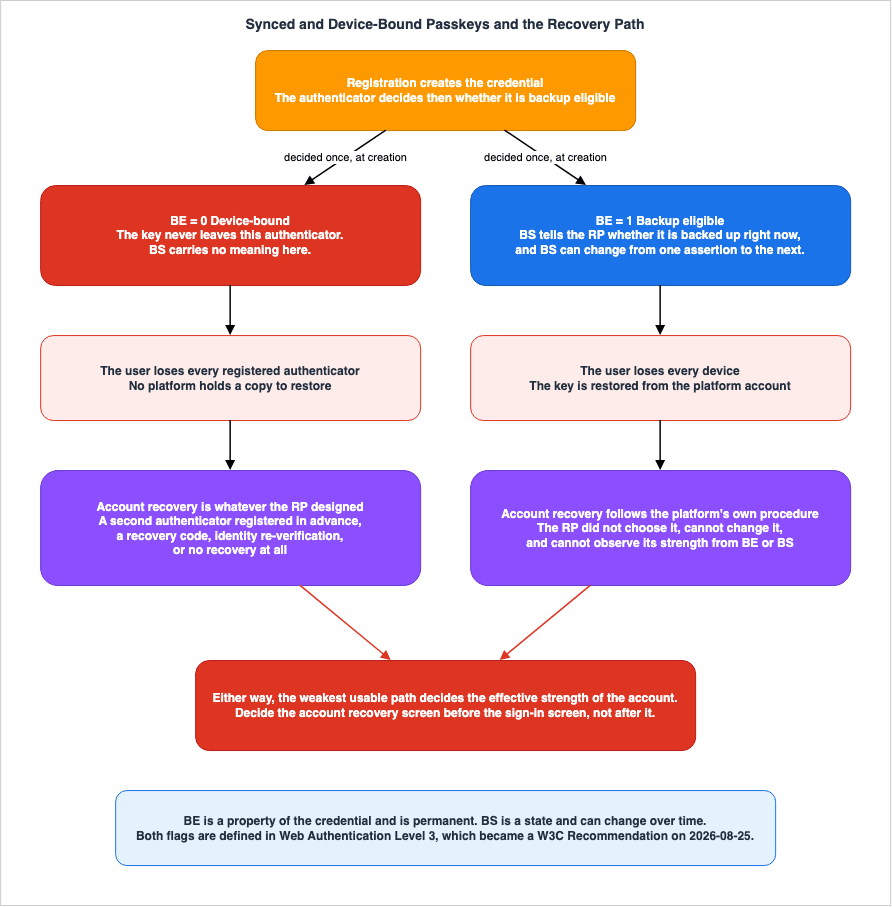
BE and BS flags listed in the table in Section 5.1.BE (Backup Eligibility) indicates whether a credential is eligible for backup. According to the specification, the generating authenticator determines, at creation time, whether that credential is allowed to be backed up. A key characteristic is that backup eligibility is an attribute of the credential and is permanent for that credential.BS (Backup State) indicates whether the credential is currently backed up. The specification clearly states that the backup state can change over time.This asymmetry is a key design element.
BE is determined at creation and never changes. BS, on the other hand, may return different values with each authentication.Here is how to interpret the combinations:
When
BE is 0, the credential remains within that authenticator. A typical example is a key created within a physical security key. In this case, BS is irrelevant.When
BE is 1 and BS is 0, the credential can be synced but is not currently synced. This corresponds to a state in which the user has not turned on cloud sync.When
BE is 1 and BS is 1, the credential already sits in the user's cloud account. The key may be present on any device accessible to that user through their cloud account.6.2 What BE and BS Do Not Tell You
Misinterpreting this flag can lead to flawed design decisions.First, the flags do not say where the credential syncs to. They do not reveal which platform holds it, which password manager it uses, or how many devices are involved.
Second, the flag does not provide information about the security of the account it syncs to. The level of protection for the cloud account itself cannot be observed through this flag. Chapter 7 will elaborate on this point.
Third, the value of
BS can revert from 1 to 0. This happens when the user turns cloud sync off. Therefore, relying solely on the value of BS to assume that a user can safely recover their account and eliminating other recovery methods can be a dangerous assumption, as that premise may later prove false.Fourth, the status indicated by the flag represents a claim made at a specific point in time. It is a value derived from an assertion, rather than a persistently stored value. Implementations that only store the value from the initial registration and never re-evaluate it risk missing critical changes.
6.3 This Means of Observation Became a Recommendation Only on August 25, 2026
Section 1.3 is worth repeating here. The termsBE, BS, and multi-device credential were introduced with Web Authentication Level 3 and do not exist in Level 2. Level 3 became the Recommendation on August 25, 2026; until then, Level 2 held that status.The practical implications are as follows: If you are writing code that relies on these flags, you should ensure that it includes a default behavior that accounts for the possibility that flags may not be set as expected on certain clients or authenticators. If a flag cannot be read, it is safest to default to the most conservative approach - that is, to treat the sync state as unknown.
6.4 Can device binding be enforced?
The requirement to accept only keys that do not sync often arises in highly regulated environments.There are two possible approaches. One is to verify that the
BE flag is 0 during registration and reject the registration if it is not. The other is to validate attestations, as described in Section 3.6, which narrows the authenticators a user can present.Both methods require users to provide an external authenticator. This naturally leads to the subject of the next chapter: keys that do not sync cannot be recovered once they are lost. Therefore, organizations that adopt this configuration must always require users to register multiple authenticators. AWS, for example, recommends registering multiple MFA devices for the root user for the same reason.
It is best not to frame this as a matter of strength or weakness. Synced passkeys and device-bound passkeys are not inherently stronger or weaker than each other. The difference lies in who carries account recovery. With synced passkeys, the platform carries it. With device-bound passkeys, the user and the RP carry it. If either party fails to provide the necessary support, a vulnerability can be created.
7. Account Recovery Decides the Design
This chapter is the core of this article. The content presented in the previous chapters, in reality, served as preparation for this one.7.1 Why This Becomes the Weakest Link
Attackers do not need to traverse the most secure path. When evaluating the robustness of an authentication system, the weakest available pathway determines its effective strength.In the age of passwords, this structure was already problematic. Even if users are required to create strong passwords and enable two-factor authentication, if the link provided to users who forget their passwords simply directs them to a page that sends an email, the account's effective strength is equivalent to the strength of that email account.
Passkeys do not change this structure. What changes is that the structure becomes harder to see. While the authentication pathway has become more resistant to phishing, the remaining vulnerable pathways become relatively more prominent.
7.2 Recovery of a Synced Passkey Is Subordinate to Platform Account Recovery
Allowing synced passkeys means entrusting the management of key availability to the platform. This is often touted as a benefit, and in many cases, it genuinely is. Even if a user loses one device, they can still sign in from another. The RP does not need to do anything.The problem arises when a user loses all their devices. In that scenario, they must go through the platform's account recovery process. And that process is not one chosen by the RP.
In Apple's case, iCloud Keychain handles the syncing. Apple's platform security documentation states that passwords and passkeys are synced across iPad, iPhone, Mac, Apple Watch, and Apple Vision Pro. On encryption, the documentation says that keychain items travel from device to device through Apple's servers, but are encrypted end to end so that neither Apple nor the other devices can read their contents. It also describes the design as able to recover keychain contents even when every one of a user's devices is inaccessible.
The core issue is how that recovery is actually carried out. The same documentation says that users need to register a phone number for their Apple Account, and that this provides a secondary level of authentication during keychain recovery. The user receives an SMS message, and has to answer it for the recovery to proceed. Where two-factor authentication is in use, the device passcode is what recovers the escrowed keychain.
To state the facts without value judgments: when a passkey, introduced for its phishing resistance, is recovered after the event of losing all devices, the recovery process includes responding to an SMS message. This is not a design flaw on Apple's part. It is an unavoidable structure: to rescue a user who has lost all their devices, you must rely on something external to those devices.
In Google's case the holder is again a cloud password manager. Google's developer documentation states that passkeys are stored within Google Password Manager and are synced between a user's Android device and Chrome browser, provided they are signed in with the same Google account. It also mentions that the passkeys are encrypted on the device before they sync. A further mechanism allows passkey usage even on devices the passkey has not synced to, allowing users to approve sign-in requests on a nearby phone and then use that approval to sign in on a laptop.
For the RP, the implication is clear. When offering synced passkeys as the sole sign-in method, the effective security strength of that account is ultimately determined by the strength of the user's platform account and the robustness of that platform's recovery procedures. The RP controls neither of these factors, and even with the
BE and BS flags, this information remains inaccessible.7.3 What the AWS Root User Shows
AWS's own design shows this structure, and shows it clearly.AWS requires MFA for the root user and recommends using passkeys and security keys. The IAM User Guide cites reasons such as greater resistance against attacks like phishing.
However, on the same page, there is a section describing what to do if MFA is lost. It instructs users to verify their account settings and contact information, ensuring they have access to their email address and phone number, and then states: "If your MFA device is lost, stolen, or not working, you can still sign in as the root user by verifying your identity using that email and phone number."
In other words, while requiring MFA, which is designed to be resistant to phishing, a bypass remains in the form of verifying your email address and phone number. This is not a flaw, but rather a deliberate choice. The requirements to avoid locking users out and to limit access routes are simply incompatible.
And AWS has a separate solution for addressing this conflict. The same page notes that for accounts managed through AWS Organizations, there is an option to centrally manage root access for member accounts, to prevent credential recovery and access at scale. When this option is enabled, the root user's credentials, including passwords and MFA, can be removed from member accounts, effectively preventing root user sign-in, password recovery, and MFA setup.
This is the most thorough answer available for an account recovery path. Rather than strengthening that path, it removes the interactive path into the account altogether. If applied to your own service, this would be equivalent to a design that does not provide any interactive sign-in paths for accounts with the highest level of permissions.
7.4 Creating the First Session - The Bootstrapping Problem
Passkeys can only be registered within an already established session. As mentioned in Section 2.3, the passkey itself cannot solve the problem of registering the first passkey for a new user.Managed platforms also have this same limitation. The AWS developer guide, for example, clearly states that with Amazon Cognito user pools, users must sign in at least once before they can register a passkey.
Therefore, any design will ultimately require choosing one of two options: either create an initial session using an alternative method before registering the passkey, or distribute an invitation to register through a different pathway.
And that alternative method will determine the baseline security level for the account. If the initial session is created through a link in an email, the account's security stops at the strength of that email account. If you claim to have eliminated passwords but are using a pathway with the same level of security as a password reset email to register the passkey, then in practice, nothing has changed.
7.5 Account Recovery Patterns and What Each One Assumes
There is no one-size-fits-all solution. The choice lies in what assumptions you make. Evaluate each pattern below not only on what it does, but on what happens when its assumption turns out to be false. This list collects patterns that are common in the field. It is not exhaustive.| Pattern | Underlying Assumption | Potential Consequences When Assumption Fails |
|---|---|---|
| Requiring Multiple Authenticators | Users will actually register a second authenticator and keep it safe. | Registration completion rates may decrease. If both authenticators are kept in the same place, the second one adds nothing. |
| Relying on Platform Sync | The user's platform account is sufficiently secure. | The effective strength becomes that of the platform account and of its account recovery procedure. |
| Issuing Recovery Codes | Users will securely store and be able to locate recovery codes when needed. | If the storage location is compromised, a code alone gets the attacker in. If the codes are lost, account recovery is impossible. |
| Combining Multiple Weak Factors for Reconfirmation | A combination of several weak pieces of evidence collectively provides a stronger level of verification. | Phishing can target the whole combination. |
| Routing to Manual Verification | Verification procedures are clearly defined, and personnel are properly trained to execute them. | This can become a target for social engineering attacks. Auditability is essential. |
| Not Providing Account Recovery | Users who lose access will create new accounts. | This option is not viable for services that hold significant user assets or historical data. |
Read this table as a set of choices, not as a ranking from strongest to weakest. For each row, evaluate whether your service can tolerate the consequences that occur when the underlying assumption fails.
A practical approach to evaluation involves answering the following questions in sequence:
First, what is the potential impact if a user loses access to their account? If the impact is minimal, choosing not to provide recovery options may be the safest approach.
Second, if you choose to offer recovery, what does an attacker gain by successfully exploiting that recovery path? If the attacker gains access equivalent to a standard login, the recovery path must have a security strength comparable to a standard login.
Third, can your service actually verify that level of security? Designs that depend on factors outside your direct control, such as the security of a user's platform account, must explicitly document those dependencies.
Fourth, can someone audit whether a recovery process was completed? Because recovery can be a primary attack vector, it requires more robust logging and notifications than a standard login process.
7.6 Deleted on the Server, Still Listed on the Device
A problem shows up once the service is in operation. Even when the RP removes a credential from its database, some users' devices and password managers may continue to store the passkey for that service.From the user's perspective, they see the passkey option on the sign-in screen, but when they select it, the attempt fails. And the user has no way of knowing why it fails. This issue arises when keys are disabled for departing employees or cancelled users, or when users themselves delete the key through the management interface.
Level 3 provides a solution to address this problem. Three methods are defined to communicate the status of credentials from the RP to the client. These are
signalAllAcceptedCredentials() to provide a list of acceptable credentials, signalCurrentUserDetails() to provide current user information, and signalUnknownCredential() to indicate that a credential is not recognized.However, this feature became a Recommendation only on August 25, 2026 and may not be implemented in all clients. Therefore, in practical terms, take a two-step approach: call these methods, and prepare an error message for the cases where the entry still lingers. Clearly informing the user that the passkey is no longer valid and that they need to remove it from their device settings will significantly reduce support inquiries.
7.7 The RP ID Cannot Be Changed Later
There are certain values that are determined during the initial design phase and cannot be modified later. One of these is the RP ID.As mentioned in Section 3.4, credentials are created and linked to the RP ID. Therefore, changing the RP ID will render all existing credentials unusable.
The AWS Developer Guide clearly states this consequence regarding Amazon Cognito user pools. It recommends that the RP ID value should be determined before the website or application is released, and states that if the RP ID is changed, users will need to re-register with the new RP ID.
There are two key decisions to be made during the design process. First, which domain do you use as the RP ID? If you intend to use a broad range, including subdomains, it is best to use the parent domain as the RP ID. Second, is there a possibility that the domain will change in the future? If you anticipate brand changes or mergers, you should first check whether Related Origin Requests (as described in Section 3.5) are applicable.
It is worth noting that Cognito allows you to specify any domain name for the RP ID, as long as it is not on the public suffix list. The default behavior is as follows: if you are using the managed login feature and have a custom domain, that custom domain becomes the RP ID; otherwise the prefix domain becomes the RP ID.
The API reference states a stricter requirement. If the user pool is configured to use passkey authentication, and the application uses a custom domain and authenticates using managed login or the classic hosted UI, the RP ID must be the fully qualified domain name of that custom domain.
8. Where Passkeys Land in AWS
8.1 The Three Places Do Not Play the Same Role
There are three places where passkeys appear within AWS, and these three locations serve different roles.| Location | Who Uses It | What the Passkey Provides |
|---|---|---|
| Amazon Cognito User Pool | Your application users | A means of sign-in in its own right, which can replace passwords. |
| IAM MFA | Root users and IAM users who directly interact with AWS | A second factor to supplement passwords. |
| IAM Identity Center | Organizational employees | One of the supported authentication methods. |
Failing to understand these distinctions can lead to misinterpretations when stating that AWS supports passkeys. Cognito passkeys can replace authentication entirely, while IAM passkeys remain a second factor used in conjunction with passwords.
8.2 Amazon Cognito User Pools
Cognito passkey sign-in does not have a dedicatedAuthFlow. According to the AWS developer guide, you must declare USER_AUTH as the AuthFlow for InitiateAuth or AdminInitiateAuth, and then either request sign-in options or select from the response received from the user pool.If you know that the user will sign in using a passkey, you must add
PREFERRED_CHALLENGE to the AuthParameters.{
"AuthFlow": "USER_AUTH",
"AuthParameters": {
"USERNAME": "testuser",
"PREFERRED_CHALLENGE": "WEB_AUTHN"
},
"ClientId": "1example23456789"
}In response, Amazon Cognito returns a
WEB_AUTHN challenge. The application must respond to this challenge. When initiating a sign-in request to the user's passkey provider, an AuthenticationResponseJSON object is returned, which you should include in your response to the challenge.{
"ChallengeName": "WEB_AUTHN",
"ChallengeResponses": {
"USERNAME": "testuser",
"CREDENTIAL": "{AuthenticationResponseJSON}"
},
"ClientId": "1example23456789",
"Session": "[Session ID from the previous response]"
}The correspondence is as follows: The
WEB_AUTHN challenge corresponds to the input for the authentication process described in Section 3.2. The AuthenticationResponseJSON included in CREDENTIAL is the result of formatting the return value of navigator.credentials.get() into a JSON format as specified. Cognito handles signature verification, so you do not need to implement your own verification process as a RP. Conversely, you also cannot implement your own verification of the flags, as described in Section 5.4; you must configure this in the settings.There are two key settings to keep in mind. First, the user verification mode, which you can select from
preferred and required. If you do not provide a value in the API request, the default is preferred, and the console also defaults to preferred. The second is the RP ID, which, as described in Section 7.7, cannot be changed later. You must ensure that the application client allows the USER_AUTH authentication flow.As a numerical limitation, each user can register a maximum of 20 passkeys (as of August 24, 2026). The limit applies to each user, not to each account.
Passkeys are an opt-in feature available with all feature plans except the Lite plan, and are only supported within selected authentication flows. Details regarding the differences and pricing for each feature plan, as well as related information, are detailed in the previously published Amazon Cognito Federation Complete Implementation Guide. The background regarding the addition of passkeys to Cognito can be found in AWS History and Timeline regarding Amazon Cognito.
8.3 IAM MFA
Passkeys are a second factor within IAM. This area is subject to a significant operational constraint: mandatory implementation.The IAM User Guide states that for all account types - standalone, management, and member - it is mandatory for root users to configure MFA. Furthermore, if MFA is not enabled, users must register MFA within 35 days of their initial sign-in attempt to the AWS Management Console (as of August 24, 2026).
AWS supports three types of MFA for root users: passkeys and security keys, virtual authenticator applications, and hardware TOTP tokens.
The maximum number of MFA devices that can be registered is eight, for both the root user and IAM users (as of August 24, 2026). This limit is also documented in the AWS Service Quotas. AWS recommends registering more than one MFA device, for the account recovery reason discussed in Section 6.4 of this article. An example would be registering a built-in authenticator alongside a security key stored in a physically secure location.
AWS explicitly differentiates between two types of passkeys. The first is synced passkeys, which utilize accounts from Google, Apple, Microsoft, or third-party credential managers. The second is device-bound passkeys, which refers to security keys. The categorization used in Chapter 6 of this article is directly adopted as AWS terminology.
The IAM User Guide clearly states that assigning passkeys or security keys to an IAM user can only be done through the AWS Management Console; it cannot be accomplished using the AWS CLI or AWS API. Similarly, for root users, the guide indicates that enabling passkeys and security keys is performed through the console. This is an important consideration when designing automation.
8.4 IAM Identity Center
Within Identity Center, WebAuthn and passkeys are recognized as one of the supported authentication methods. They serve as a means of multi-factor authentication (MFA) when employees sign in.This article does not cover the setup process. The existing AWS IAM Identity Center Complete Setup Guide provides a list of supported authentication methods and their configuration locations.
From the perspective of this article, a key point is this: organizations using Identity Center consolidate access to AWS through Identity Center. Therefore, passkey design can also be centralized there. This approach, unlike distributing MFA to individual IAM users, produces a completely different account recovery design. Regarding how machines obtain AWS credentials, see AWS IAM Inbound Workload Federation, which does not involve human authentication.
9. What to Decide Before You Implement
The following are questions that should be answered before you begin writing code. They are listed with the ones that are hardest to change later first.First, which domain will you use for RP IDs? This cannot be changed later. Consider the sub-domain structure and the possibility of future domain changes.
Second, will passkeys be a sole sign-in method, or a second factor? This choice will determine the level of requirements for
userVerification. If used as a sole method, set it to required and verify the UV bit that comes back.Third, will you require discoverability? This is necessary if you want to offer sign-in without a username. You take on the fact that it consumes storage on an external security key, and that a deletion on the server is not reflected on the user's side.
Fourth, how will you design the account recovery process? Decide which row of the table in Section 7.5 you will take before designing the main sign-in screen. Document any assumptions based on the row you choose.
Fifth, will you allow synced passkeys? If so, you must explicitly acknowledge that the effective strength of the account will depend on the platform. If not, you will need to require registration of multiple authenticators.
Sixth, will you validate attestations? If so, prepare guidance for users whose registration is rejected.
Seventh, what mechanism will you use to create the initial session before a passkey can be registered? This method will represent the minimum security level for the account.
Eighth, how will you handle key deletion and revocation? Provide a management interface that allows users to view and delete their keys. Implement a mechanism to notify the client when a key is deleted. Finally, decide whether to prevent deletion entirely, or if deletion is allowed, determine how users will sign in afterward.
10. Failure Modes and Anti-Patterns
10.1 Using a Passkey as the Sole Sign-in Method While Leaving userVerification at Its Default
This is the most common mistake. When a passkey is offered as the sole sign-in method with userVerification left at its default, some authenticators will make it a single-factor sign-in. However, it is still presented externally as a two-factor authentication method.10.2 Specifying userVerification but Never Checking the Flag
Simply writing userVerification: "required" and having the UV bit set are two different things. The setting is a request to the client and the authenticator; verifying the result is the RP's own responsibility.10.3 Omitting the Origin Check
If the RP system does not verify the origin information contained in the client data, the constraints outlined in Section 3.4 will not apply. Even when relying on a library, ensure that the library is obtaining the expected origin information from the correct source.10.4 Not Passing excludeCredentials
A second key for the same user is created on an authenticator that already holds one. From the user's perspective, the same service appears twice in the list.10.5 Reading BE and BS Only at Registration
BS values can change. An implementation that only saves the values at the time of registration and then ignores them afterward risks overlooking instances where users turn cloud sync on or off.10.6 Treating Server-Side Deletion as the End of the Job
Data will remain on the user's device. Either trigger the notification process described in Section 7.6, or at the very least, provide a clear message indicating that the action has failed.10.7 Adding the Account Recovery Path Later
If you consider recovery after creating the primary path, the added recovery path may negate the primary path's characteristics. It is best to design the recovery path first.10.8 Explaining, Without Conditions, That Passkeys Cannot Be Phished
What the binding protects is the credential, not the session and not the account recovery path. If you state it without any conditions, those responsible for operations, trusting that explanation, may neglect to implement recovery procedures.10.9 Keeping Your Own List of Supported Authenticator Models
Such lists inevitably become outdated. Even if you need to restrict supported models, it is best to design your system to reference an external, authoritative list, such as the FIDO Alliance's Metadata Service, rather than maintaining your own internal table.10.10 Changing the RP ID After Launch
Once the RP ID is put into operation, it cannot be changed. Doing so will invalidate all existing credentials, requiring all users to re-register.11. Frequently Asked Questions
11.1 Can I eliminate passwords by adding passkeys?
You can eliminate passwords from the sign-in path. You cannot eliminate them from the account recovery path automatically.You have to decide the account recovery method separately. If you keep a password or an email link on that path, that path decides the overall strength.
11.2 Is a passkey two-factor authentication?
When theUV flag is set, a single authentication process includes two factors. If the flag is not set, it carries only one factor: possession of the authenticator. And the default settings allow a configuration that succeeds without the flag being set.11.3 Is there a way to know how many devices hold a user's key?
No. You know only whatBE and BS indicate, namely whether the credential is eligible for backup and whether it is currently backed up. You do not learn which platform holds the credential, nor how many devices have it.11.4 Which is more secure: a synced passkey or a device-bound passkey?
This cannot be answered as a comparison of strength. The difference lies in who carries account recovery when a key is lost. With synced passkeys, the platform handles account recovery. With device-bound passkeys, the user and the RP do. If the responsible party does not provide support, that becomes a vulnerability.11.5 Should you verify attestation?
Verifying attestation is meaningful when an organization wants to restrict use to specific models. For a large and undefined user base, requiring specific models effectively becomes a way of selecting which users you keep. A good guideline for making this decision is whether you can clearly explain to users who have been denied registration what alternatives are available.11.6 Which term is correct, resident key or discoverable credential?
In terms of the concept, discoverable credential is the current standard, while resident key is technically deprecated according to the specifications. However, the field name in the API remains residentKey. This is intentional, designed to maintain backward compatibility. Use the new term in prose, and the existing field name in code.11.7 Is there a limit to the number of passkeys that can be registered on a security key?
Yes. Discoverable credentials consume space in the security key's internal storage, so each product has a defined limit on the number that can be stored. Once that limit is reached, the authenticator returnsCTAP2_ERR_KEY_STORE_FULL.11.8 Should users be allowed to delete their last passkey?
If you allow users to delete their last passkey, decide first how they will sign in afterwards. You have two options: either design the system to securely retain one final access method, or require users to register an alternative method immediately upon deleting the last one.11.9 Can the RP ID be changed later?
In practice, no. Changing it will invalidate existing credentials, and users will need to re-register. Decide it before launch.11.10 Does using Amazon Cognito eliminate the need for WebAuthn verification?
Cognito handles signature verification. However, you are still responsible for making design decisions such as setting the flag requirements and selecting the RP ID. And Cognito does not support attestation enforcement.11.11 Does setting up a passkey for the AWS root user secure the account?
The sign-in path gets stronger. However, if you lose your MFA device, you will still have the option to verify your identity using the registered email address and phone number. If you need the strongest posture, look at the AWS Organizations option that removes the root user's credentials from member accounts altogether.12. Summary
The first decision to make when introducing passkeys is not about encryption or libraries; it is about where the key is stored and who can recover it.In Chapter 2, what the elimination of passwords removed was the shared secret, not the problem of authentication itself. Once the secret leaves the server, the design of key storage and account recovery moves to the front.
In Chapter 3, the structure of the two ceremonies, and the binding of the RP ID to the origin, are the basis of phishing resistance. However, what is being protected is the credential itself, not the session or recovery path.
In Chapter 4, whether a credential is "discoverable" simply depends on which side remembers the credential ID. The cost of this is borne by the authenticator. The name of the concept and the name of the field are also inconsistent on purpose in the specification.
In Chapter 5,
UP and UV are distinct flags, and whether a sign-in can be called two-factor authentication is decided here. The default value of preferred is not a requirement.In Chapter 6,
BE and BS are the only means the specification gives the RP to observe how widely a key might be distributed. However, they do not provide information about where a key syncs to, or how strong that place is. Moreover, this mechanism became a Recommendation only on August 25, 2026.In Chapter 7, account recovery ultimately determines the effective strength of the entire design. The moment you allow synced passkeys, your final line of defense shifts outside of your own service. This structure is clearly evident in Apple's keychain recovery and AWS's root user recovery. The account recovery screen should be decided before the primary sign-in screen.
In Chapter 8, AWS's three locations - Cognito, IAM MFA, and Identity Center - are not simply different places to implement the same functionality. Cognito is for application users, IAM MFA is for AWS operators, and Identity Center is for organizational employees.
13. References
Specifications (W3C / FIDO Alliance)- Web Authentication: An API for accessing Public Key Credentials - Level 2 (W3C Recommendation, 8 April 2021)
- Web Authentication: An API for accessing Public Key Credentials - Level 3 (W3C Recommendation, 25 August 2026)
- Client to Authenticator Protocol (CTAP) 2.3 - FIDO Alliance (Proposed Standard, 26 February 2026)
- FIDO Alliance Metadata Service
Platforms
- iCloud Keychain security overview - Apple Support
- Secure iCloud Keychain recovery - Apple Support
- Passkeys - Google Identity
- Microsoft Entra ID attestation for FIDO2 security key vendors - Microsoft Learn
AWS
- Authentication flows - Amazon Cognito Developer Guide
- WebAuthnConfigurationType - Amazon Cognito User Pools API Reference
- Multi-factor authentication for AWS account root user - IAM User Guide
- AWS Multi-factor authentication in IAM - IAM User Guide
- Assign a passkey or security key in the AWS Management Console - IAM User Guide
- Root user best practices for your AWS account - IAM User Guide
Related Articles on This Site
- Amazon Cognito Federation Complete Implementation Guide - Google, Apple, Microsoft, OIDC, and SAML
- AWS IAM Identity Center Complete Setup Guide - Multi-Account SSO Design Patterns from Organization Structure to ABAC
- AWS IAM Glossary - Principal, Permission Boundary, SCP, RCP, ABAC, and Cedar Explained
- AWS History and Timeline regarding Amazon Cognito - Overview, Functions, Features, Summary of Updates, and Introduction
- AWS Nitro Enclaves and Confidential Computing on AWS - Attestation, PCR Measurements, and KMS Condition Keys
- AWS Private CA Hierarchy Design - Root and Subordinate CAs, Revocation, Short-Lived Mode, and mTLS on ALB
- AWS IAM Inbound Workload Federation - IAM Roles Anywhere, OIDC, and SPIFFE Converging on One Trust Policy Condition
- Identity Lifecycle for AI Agents - Registration, Delegated Authorization, Access Review, and What Retirement Leaves Behind
- AWS Service Quotas - A Practical Cheat Sheet for Major AWS Services
- HTTP Security Headers Complete Reference - CSP, HSTS, COOP, COEP, Permissions Policy
- Protecting Your Family from Tech Support Scams and Phishing - A Practical Guide for the Family IT Helper
- OAuth 2.0 and OIDC Flow Visualizer and PKCE Generator - Authorization Code, Client Credentials, and S256 Challenge Builder
- JWT Decoder Tool - JSON Web Token Inspector and Debugger
References:
Tech Blog with curated related content
Written by Hidekazu Konishi