AWS IAM Inbound Workload Federation - IAM Roles Anywhere, OIDC, and SPIFFE Converging on One Trust Policy Condition
First Published:
Last Updated:
~/.aws/credentials file. Inside are access keys that were issued several years ago, and they have no expiration date. Copies of those same keys exist in a configuration management repository, and another copy is on a developer's local machine. Time does not bound what that key costs you if it leaks. How long it takes someone to notice does.For a long time, the only way to escape this situation was to regularly rotate the keys. Shortening the rotation interval narrows the window of vulnerability, but the keys remain a shared secret, being transmitted, stored, loaded into process memory, and occasionally appearing in logs due to accidents. Even with a narrower window, the fundamental problem remains unchanged.
Currently, there are three ways to change that. One is to present an X.509 certificate to receive temporary AWS credentials. Another is to present an OIDC token to receive the same. The third carries a SPIFFE SVID, the standard for workload identity, on either of the first two. The three differ in what they present, and the party doing the verifying differs by path, but what decides who gets in, in the end, is a single condition written in the role's trust policy. This is the central focus of this article.
This is not the author's reading. The IAM Roles Anywhere user guide states it outright, in the section that defines the account trust boundary.
Certificates issued by any trust anchor in the account can be used to assume any target
role in that same account, unless you specify conditions in the role's trust policy.
The OIDC side has a matching statement. The IAM condition key reference says that some of the condition keys built from token claims can be evaluated nowhere but the role's trust policy.
When a claim is not available in session, the OIDC condition context key can only be used
in a role trust policy for the initial AssumeRoleWithWebIdentity authentication.
The intended audience is operations personnel who have workloads running on-premises or in other cloud environments and are currently distributing long-lived access keys to enable those workloads to access AWS. Alternatively, it targets those who have already implemented OIDC access from CI/CD pipelines but are unsure how much to restrict the
sub condition, and are currently using a wildcard. This article is written for readers who want to assess and refine their existing configurations, rather than those simply exploring different options.Every specification in this article was checked against a primary source, on August 21, 2026. AWS facts come from the official AWS documentation, SPIFFE facts from the official specifications published at
spiffe.io. That collation surfaced five discrepancies inside AWS's own material. Chapter 10 collects them and gives the reasoning for which side holds. This article reports no measurements. The shapes of the policies and commands reproduce the official reference pages rather than output from a test environment. No pricing appears anywhere in it.The division of labor with the existing articles comes first. This article does not address Kubernetes workload identities. Amazon EKS Pod Identity and IRSA Decision Guide holds the design for handing credentials to a Pod inside a cluster, including the choice between IRSA and EKS Pod Identity. This article also does not address human sign-in. Amazon Cognito Federation Complete Implementation Guide holds federation for end users and applications. These two documents are referenced in existing publications, which designate them as resources for delegating inbound configuration steps. Therefore, this article does not overwrite any of the information contained within those two documents; it only addresses aspects not already covered by them.
This article also does not cover the design of certificate revocation mechanisms and CA hierarchies. AWS Private CA Hierarchy Design holds the CRL and OCSP mechanisms, the split between root and subordinate CAs, path length constraints, and short-lived certificate mode. Chapter 7 of this article only addresses the consequences of certificate revocation in the IAM Roles Anywhere path — specifically, what is blocked and what remains accessible. Certificate Distribution in Kubernetes with AWS Private CA holds what happens to a certificate after issuance inside a cluster, including a connector that itself authenticates through IAM Roles Anywhere when the cluster is not Amazon EKS. IAM Policy Evaluation Logic Step-by-Step holds the order in which IAM evaluates policies, and AWS IAM Access Analyzer Deep Dive holds the machinery for detecting, by tool, whether something is reachable from outside. This article focuses solely on the design aspects. It does not cover the implementation of CI workflows themselves. Hardening GitHub Actions for AWS Deployments holds how those workflows are written.
One last limit on scope. Principals on AWS fall into three kinds: human identities, workload identities, and agent identities. This article covers workload identities only. This boundary is not one this article drew. The previously published AWS IAM Identity Center Complete Setup Guide clearly states that service accounts, or machine identities, are not supported by IAM Identity Center, and that web identity federation or IAM Roles Anywhere should be used instead. This article will address that approach. Identity-Aware Data Access on AWS takes the path a human identity travels from the corporate directory down to the data layer. Identity Lifecycle for AI Agents takes the lifecycle of an AI agent identity, from registration through retirement. AWS IAM Outbound Identity Federation holds the reverse path, where an AWS workload presents a short-lived token to an external service.
Table of Contents
- 1. Where the Long-Lived Key Still Lives
- 2. Reverse the Direction and the Decisions Change Hands
- 3. Entry Path 1 — IAM Roles Anywhere
- 4. Entry Path 2 — OIDC Federation for CI Outside of Kubernetes
- 5. Entry Path 3 — SPIFFE and SVID
- 6. Where the Three Converge — The Trust Policy Condition
- 7. Revocation and Retirement
- 8. Migration Order from Long-Lived Keys
- 9. What This Design Still Assumes
- 10. Where the Primary Sources Disagree
- 11. Failure Modes
- 12. Frequently Asked Questions
- 13. Summary
- 14. References
1. Where the Long-Lived Key Still Lives
1.1 What You Want to Remove Is the Secret, Not the Authentication
When external workloads call AWS, they need to demonstrate their identity in some way. If that method involves long-lived access keys, the information used to prove identity becomes the same information that, if compromised, would cause significant problems. This is a fundamental issue with long-lived keys, and it is not about the key's length or where it is stored.Moving to short-lived credentials pulls those two apart. What the workload presents is something only a holder of the private key can produce: a signature made with that key. AWS then returns temporary credentials that expire within minutes or hours. The information presented and the credentials are now separate, and only the credentials are short-lived.
The secret does not disappear, though. The private key remains on the workload's side. What changes is the nature of that remaining information. A long-lived key, when presented, is accepted as is. A private key is not presented at all. It is used to produce a signature. That difference is what makes hardware isolation possible. Chapter 9 returns to it.
1.2 Things That Don't Get Fixed Even with a Shorter Lifespan
Replacing a long-lived key with a short-lived credential leaves the following four things unfixed. Separate them out before you start, or you will finish the migration believing you are safe.| What gets fixed | What does not |
|---|---|
| The ability for stolen credentials to be used indefinitely | The ability for stolen credentials to be used until their expiration date |
| Operational practices involving key distribution and rotation | Operational practices regarding the initial trust establishment |
| The proliferation of copies of the secret in multiple locations | The persistence of a single copy of the secret key |
| — | Forgetting to write the condition that narrows who can get in. |
The fourth row is the subject of this article. In the world of long-lived keys, only the recipient to whom the key was granted could use it. The act of granting the key simultaneously restricted its usage. In the world of short-lived credentials, the restriction is moved to a different location. That location is the trust policy's condition. If nothing is written there, everything the issuer has issued can get in.
1.3 What This Article Calls an Entry Path
This article calls the path by which an external workload obtains temporary AWS credentials an entry path. The entry paths fall into three kinds, according to what the workload presents.| Entry path | What the workload presents | What verifies it on the AWS side | What it gets |
|---|---|---|---|
| IAM Roles Anywhere | X.509 certificate and a signature using its associated private key | IAM Roles Anywhere | IAM role session |
| OIDC federation | A JWT signed by an external identity provider | AWS STS | IAM role session |
| SPIFFE SVID | Depending on the SVID format, either of the above two | Same as above | Same as above |
The third row is not an independent entry path, and the table already shows why. SPIFFE is a standard for representing the identity of a workload, and when accessing AWS, it utilizes either the X.509 or OIDC entry path. Chapter 5 covers how an SVID rides each of them, and the condition under which it cannot.
2. Reverse the Direction and the Decisions Change Hands
2.1 Two Directions
The word federation hides an arrow. Two systems agree that one of them will vouch for identities and the other will accept that vouching, and which end AWS occupies changes the whole design.This article focuses on the inbound direction, where AWS is the side accepting the vouching. An external issuer mints a token or a certificate, you configure AWS to trust that issuer, and an external subject ends up holding AWS credentials. The trust configuration resides in the AWS account.
AWS IAM Outbound Identity Federation holds the outbound direction, where AWS is the side doing the vouching. That article uses a table to illustrate the exchanges between the two directions, so this article will not reiterate that comparison. This article will only address the decisions that AWS account administrators must make regarding the inbound side.
2.2 Responsibilities on the Inbound Side
In the inbound process, trust configuration resides within your account. The decisions therefore fall on your side too. They come in three layers.- Which issuer to trust. In IAM Roles Anywhere a trust anchor stands for this. In OIDC an IAM OIDC identity provider object does.
- Which of the things that issuer issued you will accept. The condition in the role's trust policy settles this.
- What to allow the subject you accepted. The permissions policy on the role and the session policy settle this.
Of the three, the first and the third have to be set for anything to work at all, so they never get forgotten. The second layer can be left empty and everything still works. It also passes the functional check. You can confirm that the intended subject gets in. That an unintended subject also gets in is something you learn only by producing one.
2.3 What This Article Means by Trust Anchor
In general PKI usage, a trust anchor is the key or certificate that a chain of trust starts from, and the existing articles use the term that way. In this article, trust anchor means the IAM Roles Anywhere resource type. Specifically, it refers to an object created byCreateTrustAnchor and possessing an ARN. Whenever this term appears in the subsequent chapters, it will always refer to this meaning. AWS IAM Glossary holds the formal definition, so this article carries no glossary section.3. Entry Path 1 — IAM Roles Anywhere
3.1 Three Resources and Their Functions
IAM Roles Anywhere enables servers, containers, and applications running outside of AWS to obtain temporary IAM credentials by presenting an X.509 certificate issued by their own Certificate Authority (CA). It consists of three essential components.| Resource | What it stands for | What happens if it is missing |
|---|---|---|
| Trust anchor | A reference to the trusted CA. This can be a reference to an AWS Private CA or a self-provided CA certificate. | The origin of the certificate cannot be verified, preventing authentication. |
| Profile | Names the roles that may be assumed. A session policy can be placed here. | It is a required parameter of CreateSession, so the call cannot be made. |
| Role | The IAM role that can be assumed. The role's trust policy must trust the IAM Roles Anywhere service principal. | There is no role to assume, so credentials cannot be issued. |
The user guide defines a trust anchor as follows. That it also accepts a CA certificate you bring yourself matters here: an organization that already runs a PKI only has to register that CA with AWS.
A trust anchor is a reference to either AWS Private CA or an external CA certificate.A profile carries exactly one constraint. A profile can hold many IAM roles, but only one session policy. Every role attached to the same profile is therefore capped by the same session policy. If you need a different ceiling per role, split the profile.
All three resources are region-specific. The user guide explicitly states that resources used together must be created in the same account and region. When running the same workload across multiple regions, you will need to create a trust anchor and profile in each region.
3.2 What a Trust Anchor Narrows Is the Issuer, and Only the Issuer
This is likely the most easily misunderstood section of this article. When you configure a trust anchor, only certificates issued by the Certificate Authority (CA) that the trust anchor points to will be accepted. While it is true that the set of accepted certificates is restricted, what is restricted is the issuer, not the subject.The AWS security blog fixes the size of this set in the course of discussing where to place a trust anchor.
Any valid end-entity certificate issued by your trust anchor, or a valid end-entity
certificate issued by a CA that is beneath your trust anchor in your PKI's hierarchy,
can be used with IAM Roles Anywhere.
The size of this set varies depending on where you place the trust anchor in the PKI hierarchy. If it points to the root CA, it will accept certificates issued by that root CA and all subordinate CAs beneath it. If it points to an end-entity issuing CA, it will only accept certificates issued by that specific CA. Wherever you place it, though, the set is every certificate issued by that CA and by every CA beneath it. Moving down the hierarchy shrinks the set, but it never narrows it to a single certificate.
Furthermore, the user guide directly states that the unrestricted state applies to the entire account.
Certificates issued by any trust anchor in the account can be used to assume any target
role in that same account, unless you specify conditions in the role's trust policy.
The same section adds another sentence, clarifying that organizational unit guardrails do not automatically apply.
There is no automatic integration with organization-wide controls.These two statements describe the same boundary from different perspectives. The first highlights the lack of granular boundaries in the account, while the second emphasizes the absence of automatically applied boundaries from outside the account. IAM Roles Anywhere draws its trust boundary at the account level, and nothing but a condition in the role's trust policy draws a finer one. The assertion that certificates provide protection is incompatible with these two statements.
3.3 What a Trust Policy Has to Contain
The trust policy for roles assumed from IAM Roles Anywhere must grant three actions to the service principalrolesanywhere.amazonaws.com. The user guide states the following:sts:AssumeRole
sts:SetSourceIdentity
sts:TagSessionThe reason three actions are required is because this mechanism tags sessions. Section 3.4 covers what ends up in those tags. It is a prerequisite, not a condition; if even one of these actions is missing, authentication will fail. The
Condition block refers to the element that is added on top of these three Allow statements.The user guide recommends adding conditions, but clearly states this as a suggestion.
It is also recommended to have additional condition statements to further restrict
authorization based on attributes that are extracted from the X.509 certificate.
The fact that this appears as a recommendation has to be handled accurately. It is not a requirement. Read the other way around, AWS is saying that the mechanism works without any condition at all. The gap between working and being narrowed is the subject of this article.
3.4 What of the Certificate Lands in the Session
IAM Roles Anywhere extracts values from the Subject, Issuer, and Subject Alternative Name fields of the certificate used for authentication, and uses these values to create principal tags in the session. Specific rules govern how it extracts them.Regarding the Subject and Issuer fields, each Relative Distinguished Name (RDN) will result in a separate tag. The format of the generated keys will be
aws:PrincipalTag/x509Subject/<RDN> and aws:PrincipalTag/x509Issuer/<RDN>. For certificates with multiple identical RDNs, the values will be concatenated using a forward slash. It concatenates them in the order they appear in the certificate.CN=alice, OU=Security, OU=Engineering, OU=ResearchA certificate with the Subject described above will generate the following tag for
OU."aws:PrincipalTag/x509Subject/OU": "Security/Engineering/Research"Subject Alternative Names (SANs) are handled differently. While SANs can have nine different types, IAM Roles Anywhere only maps three types: DNS names, Directory Names, and URIs. Furthermore, it only maps the first instance of each type. The generated keys will have the format
aws:PrincipalTag/x509SAN/DNS, aws:PrincipalTag/x509SAN/URI, and aws:PrincipalTag/x509SAN/Name/<RDN>. The example provided in the user guide refers to a certificate that includes all three of these types."aws:PrincipalTag/x509Subject/CN": "Alice",
"aws:PrincipalTag/x509Issuer/CN": "RolesAnywhere",
"aws:PrincipalTag/x509SAN/DNS": "example.com",
"aws:PrincipalTag/x509SAN/URI": "spiffe://example.com/workload/alice",
"aws:PrincipalTag/x509SAN/Name/CN": "Alice"The
spiffe:// scheme in that URI name example is no accident. Chapter 5 returns to it.There is one behavior here that anyone writing a condition needs to know. The user guide states that if the extracted value does not conform to the STS session tag format, that value will be ignored.
These values need to match the pattern defined in STS session tags. The service ignores
values that do not match this pattern. You cannot use these values in policy conditions.
It ignores them, as stated. No error comes back. It is possible for authentication to succeed even if a tag that a condition is referencing does not exist. A condition written with
StringEquals fails when the key is absent, so the outcome is a denial either way. But the reason for the denial is not that the value failed to match. It is that the tag was never created. This distinction is important when troubleshooting.3.5 Source Identifiers and Session Names
Each session includes two identifiers, in addition to the principal tag. Both have default values, and in certain conditions, a certificate serial number may be used.The
sourceIdentity field contains the Common Name (CN) from the certificate's Subject. However, the rules include conditional clauses, resulting in three different behaviors based on the length of the CN.| Condition | Prefix | Value |
|---|---|---|
| CN is set and 61 characters or less | CN= | The value of the CN |
| CN is not set | ID= | The certificate serial number, converted to hexadecimal, with leading zeros added to ensure an even number of digits |
| CN is set and between 62 and 256 characters | Empty string | The value of the CN |
Certificates with a CN exceeding 256 characters will result in a failure of the
CreateSession request itself. Pay close attention to the second row. For certificates without a CN, the source identifier will be a serial number rather than a human-readable name. This point becomes relevant when dealing with SPIFFE's SVIDs in Chapter 5.The default session name is always the certificate serial number, regardless of the conditions. Unless the profile side sets
acceptRoleSessionName to true, the session name specified by the requester will not be accepted. The default value is false. The API reference clearly documents the behavior when a name is specified with false.If you provide a custom role session name in the CreateSession request but custom role
session names are not accepted, you will receive an Access Denied error.Furthermore, even if
acceptRoleSessionName is set to true, if the request does not include a session name, it will revert to the default serial number. If you intend to use the session name as part of the authorization process, you must meet both of these conditions.3.6 How Long Do Sessions Last?
Two values set the lifetime of the credentialsCreateSession returns: the durationSeconds on the profile, and the durationSeconds in the request. The API reference specifies the following rules:finalDurationSeconds = min(profileDurationSeconds, createSessionDurationSeconds)If the requesting party does not provide a value, the value configured in the profile is used. The API reference for
CreateProfile states that, in the absence of a value in the request, the default is 3600 seconds. The permissible range for both the profile and the CreateSession settings is from 900 to 43200 seconds, or from 15 minutes to 12 hours. The validity period is then determined by the following formula.Expiration = CurrentTime + finalDurationSecondsThe certificate's own expiry does not appear anywhere in this formula. Furthermore, the API reference states that if
finalDurationSeconds exceeds the MaxSessionDuration configured on the role, the API will return an error. What sets the lifetime of a session, in other words, is the profile, the request, and the role. Not the certificate that was presented. The discussion on revocation in Chapter 7 begins with this point.The API reference describes the relationship between this API and
AssumeRole in a single sentence.CreateSession is an X.509 wrapper around AssumeRole.IAM Roles Anywhere verifies the X.509 certificate, and from that point forward, it operates as a standard role assumption process. Once you see that structure, it becomes clear why the condition takes the same shape on the certificate path and on the token path. Chapter 6 covers it.
3.7 Requirements for Certificates
Different requirements apply to CA certificates that can be registered as trust anchors and to end-entity certificates used for authentication. Summarized from the user guide, the requirements are as follows:| Applies to | Requirement |
|---|---|
| End-Entity Certificate | Must be X.509v3 compliant. If the Basic Constraints field contains a CA field, its value must be false. The Key Usage field must include Digital Signature. |
| Trust Anchor Certificate | The Key Usage field must include Certificate Sign. If using a Certificate Revocation List (CRL), it must also include CRL Sign. The Basic Constraints field must be CA: true. |
| Both | The signature algorithm must be SHA256 or higher. MD5 and SHA1 are rejected. |
Beyond the constraints in the user guide's table, the AWS security blog names one more restriction on trust anchors.
The certificate must not be issued by a public CA, or be a public CA.Certificates issued by public CAs cannot be used as trust anchors. This mechanism is designed for private PKIs where the issuer is under your direct control.
Publicly trusted certificate authorities are increasingly removing the
clientAuth extended key usage from the certificates they issue. What the IAM Roles Anywhere documentation says about the extended key usage of end-entity certificates (no requirement was found) is covered in When Public Certificates Stop Carrying clientAuth - Where AWS Sends or Accepts Client Certificates, and What Each Path Says About Extended Key Usage.There is also a conditional constraint. The user guide states that while RFC 5280 permits certificates with an empty Subject, IAM Roles Anywhere does not accept them.
RFC 5280 allows certificates with empty subjects if and only if the SAN extension is
present and marked critical. Certificates with empty subjects are NOT yet supported,
since IAM Roles Anywhere uses the certificate subject as the key of the Subject resource
to visualize and audit activities for certificates that are authenticated with IAM
Roles Anywhere.
The reason for this is that IAM Roles Anywhere creates a
Subject resource, keyed on the certificate subject, to track the authentication history of that certificate. An empty Subject prevents the creation of this key. This restriction directly conflicts with SPIFFE, as discussed in Chapter 5.3.8 The Credential Helper, and Where the Private Key Lives
AWS provides a credential helper as the implementation that callsCreateSession on the workload side. It is compatible with the SDK's credential_process, allowing it to be used without modifying your application's code. Where credential_process sits among the links the SDKs search, and how that order differs by language, is the subject of The AWS Credential Provider Chain Across SDKs and the CLI.Besides files, there are other options for storing the private key. The user guide lists options including the OS certificate stores on Windows and macOS, PKCS#11 tokens and HSMs, and TPMs. The user guide includes a direct warning regarding TPMs.
If you load a key into the TPM that isn't password-protected, anyone with access to the
machine can use that key.
This is one of the assumptions covered in Chapter 9. Even if you delete the long-lived key, the private key used for signing remains on the workload side, and its protection is outside of AWS.
4. Entry Path 2 — OIDC Federation for CI Outside of Kubernetes
4.1 What This Chapter Covers
OIDC federation involves presenting a JWT signed by an external Identity Provider (IdP) to AWS STS to assume a role. When a Kubernetes cluster is the IdP, Amazon EKS Pod Identity and IRSA Decision Guide holds the configuration steps. When the target is an end-user application, refer to Amazon Cognito Federation Complete Implementation Guide.This chapter focuses on scenarios not covered by those two guides: specifically, when a CI service located outside of Kubernetes acts as the IdP. The issuers in view are those that run outside AWS and mint a short-lived token per job, such as GitHub Actions, GitLab CI/CD, CircleCI, and Buildkite.
It is worth stating up front what this chapter does not cover. It does not address how to write the CI workflows themselves. Hardening GitHub Actions for AWS Deployments holds the workflow file itself, from the permissions a job receives to untrusted triggers and pinning an action to a commit SHA. Software Supply Chain Security on AWS holds artifact signing and verification, and the machinery that lets only verified artifacts deploy. This chapter focuses solely on how the workflow obtains AWS credentials.
A package registry can also be the receiving side: the same kind of CI ID token is accepted for publishing. Publishing npm and PyPI Packages Without Long-Lived Tokens covers npm and PyPI, and Trusted Publishing Beyond npm and PyPI covers RubyGems.org, NuGet.org, crates.io, pub.dev, JSR, and Open VSX.
4.2 The IAM OIDC Identity Provider Object
To trust an external Identity Provider (IdP), you must create an OIDC identity provider within IAM. This object stores the issuer URL and a list of accepted audiences.The URL is subject to certain restrictions. Summarized from the user guide, these are as follows:
| Item | Constraint |
|---|---|
| Scheme | Must begin with https://. |
| Path | Path elements are permitted. Query parameters are not allowed. |
| Port Number | Not permitted. |
| Case Sensitivity | Case-sensitive. |
| Uniqueness | In the same account, each OIDC identity provider must use a unique URL. |
On creation, AWS fetches the URL's
/.well-known/openid-configuration and checks it. What gets checked is that the discovery document contains issuer and jwks_uri, that claims_supported includes aud, iat, and iss, that response_types_supported is id_token, that subject_types_supported is public, and that id_token_signing_alg_values_supported contains a defined set of values. The user guide lists six supported signing algorithms.RS256, RS384, RS512, ES256, ES384, ES512There is also a limit on the number of keys. The JWKS must contain at least one key. A maximum of 100 RSA keys and 100 EC keys are allowed. According to the user guide, using a JWT signed with a key type exceeding this limit will result in an
InvalidIdentityToken error.4.3 The Thumbprint Is No Longer the Default Verification Path
An OIDC identity provider has a setting called the thumbprint. The user guide used to describe registering the thumbprint of the IdP's server certificate as a mandatory step. The current user guide states the behavior with conditions attached.AWS secures communication with OIDC identity providers (IdPs) using our library of
trusted root certificate authorities (CAs) to verify the JSON Web Key Set (JWKS)
endpoint's TLS certificate. If your OIDC IdP relies on a certificate that is not signed
by one of these trusted CAs, only then we secure communication using the thumbprints set
in the IdP's configuration. AWS will fall back to thumbprint verification if we are
unable to retrieve the TLS certificate or if TLS v1.3 is required.The thumbprint is a fallback, not the default verification path. For an IdP whose certificate is signed by a public CA, which covers most major CI services, the thumbprint is not used on the normal path. An OIDC identity provider takes a minimum of one and a maximum of five thumbprints.
This section matters to the argument of this article because it fixes what the thumbprint protects. The thumbprint establishes that the place AWS goes to fetch the public key is the right one. It says nothing about who the token verified with that key points at.
4.4 What AssumeRoleWithWebIdentity Validates
When a token is presented to it, AWS STS verifies three things: the issuer, the audience, and the signature. All three are checked against the role's trust policy and the OIDC identity provider configuration.Listing what is not verified gives a clearer picture of what this API is.
| Verified | Not verified |
|---|---|
| That the issuer matches a registered OIDC identity provider. | Whether the subject presenting the token is the one it was issued to. |
| That the audience is included in the registered list of audiences. | The content of the job or the legitimacy of the operation that initiated the job. |
| That the signature can be verified using a public key from the JWKS. | Values of claims that are not referenced in the trust policy. |
| The token's expiration time. | Who, on the issuer's side, is authorized to issue that token. |
The right-hand cell on the fourth row is what settles the character of this API. An issuer can hand a token to anyone it likes, by its own criteria. AWS verifies only that the token is genuine. It does not decide whether the subject holding it should be allowed in. Authorization is determined solely by the conditions specified in the trust policy.
The user guide explicitly states how claims not referenced in the trust policy are handled. After providing an example of including custom claims in a discovery document, it states:
You can include additional claims like my_custom_claim in the example below; however,
AWS STS will ignore the claim.
There is another constraint regarding account boundaries. The user guide states that the OIDC identity provider referenced in the trust policy must reside in the same account as the role.
OIDC IdPs used in a role trust policy must be in the same account as the role that
trusts it.
Therefore, when using the same CI across multiple accounts, you will need to create an OIDC identity provider for each account. The trust policy condition that Chapter 6 covers also has to be written per account.
4.5 The aud Condition Key Does Not Always Point at the aud Claim
A condition key takes its name from the OIDC identity provider and the claim, joined with a colon. When using GitHub Actions as the issuer, the condition key for the audience is token.actions.githubusercontent.com:aud.However, there are exceptions to this. The condition key reference provides a separate table for each issuer. The following table represents the default mapping, which is applied to issuers not listed in a specific issuer table. The reference states that GitHub Actions and Google are examples of issuers that use this default implementation. The entry for
aud is not straightforward.| AWS STS condition key | IdP JWT claim it maps to |
|---|---|
amr | amr |
aud | azp. It falls back to aud only when azp carries no value. |
email | email |
oaud | aud |
sub | sub |
In practice, the condition key named
aud actually checks the azp claim if one is present in the token. If you want to check the aud claim in the token, you should use the condition key oaud. This mapping is specific to the default table. Separate tables exist for each issuer; for example, the Amazon Cognito table maps the condition key aud to the token's aud claim. You need to consult the table for the issuer you are using. If you write a condition based on aud without knowing whether the issuer sets azp, you may end up comparing against an unexpected value. This behavior stems from considerations for hybrid applications, where issuers in CI environments often do not set azp. Confirm it rather than assuming it.The same claim decides what you register, not only what you compare. The IAM User Guide's console procedure for creating an OIDC identity provider states the following about the Audience field.
If your IdP JWT token includes the azp claim, enter this value as the Audience value.

If your OIDC identity provider is setting both aud and azp claims in the token, AWS STS
will use the value in the azp claim as the aud claim.
For an issuer that sets
azp, the value to register is therefore the azp value, not the aud value. Section 11.7 covers the condition that ends up comparing the wrong claim; this decision is made earlier, when the provider itself is created.4.6 The Claims That Never Reach the Session
The most crucial point in this chapter is this: the condition key reference carries a column saying whether each condition key can be used inside a session. This column is labeledAvailable in session. The section preceding this explicitly states how condition keys with a value of No in that column should be handled.When a claim is not available in session, the OIDC condition context key can only be
used in a role trust policy for the initial AssumeRoleWithWebIdentity authentication.Counting the condition keys that AWS defines specifically for CI and other cloud issuers gives the following. The count is taken from the per-issuer tabs of the condition key reference as of August 21, 2026.
| Issuer | Issuer-specific condition keys | Of those, Available in session is Yes |
|---|---|---|
| GitHub | 10 | 0 |
| GitLab.com | 9 | 0 |
| Buildkite | 7 | 0 |
| 1 | 0 | |
| CircleCI | 1 | 0 |
| Oracle Cloud Infrastructure | 1 | 0 |
| Total | 29 | 0 |
All 29 condition keys are marked as
No. Neither the repository name, the workflow name, the branch name, nor the project ID survives into authorization once a session exists. A resource-based policy cannot see them. Nor can an SCP. The only place they can be specified is in the trust policy for a single invocation of AssumeRoleWithWebIdentity.This fact transforms the arguments presented in this article from mere design recommendations into fundamental limitations. If you need to filter based on the origin of a CI request (e.g., which repository it came from), the only place you can apply that filtering is in the condition of the trust policy. Write nothing there and there is no later place to write it.
It should be noted that the condition keys
amr, aud, and sub, which are derived from the standard claims, remain usable within a session. Section 6.7 provides a breakdown of where conditions can be evaluated, organized by path.5. Entry Path 3 — SPIFFE and SVID
5.1 What SPIFFE Defines
SPIFFE is not an AWS feature. It is a specification for representing workload identity in a vendor-neutral manner, and the authoritative source is the specification document published atspiffe.io. Every fact in this chapter is sourced from that specification. AWS documentation has not been used as a stand-in for it.The specification defines three key elements:
| Term | What the specification defines | Shape |
|---|---|---|
| SPIFFE ID | A string that uniquely and specifically identifies a workload. | spiffe://<trust domain>/<workload identifier> |
| SVID | A document that a workload uses to prove its identity to resources or calling destinations. | Either an X.509 certificate or a JWT. |
| Workload API | An interface for providing a workload with an SVID, a private key, and a trust bundle. | — |
There are two formats for SVIDs: X.509-SVID, which is represented as an X.509 certificate, and JWT-SVID, which is represented as a JWT. The specification recommends X.509-SVID where possible, and states its reason for placing JWT-SVID second.
Being a bearer token, JWT-SVIDs are susceptible to replay attacks.These two formats directly correspond to the two preceding chapters of this article. X.509-SVID is used as an entry path for IAM Roles Anywhere, while JWT-SVID is used as an entry path for OIDC federation. SPIFFE does not create a third entry path; it simply brings a unified representation of identity to these existing two entry paths.
5.2 Riding an X.509-SVID into IAM Roles Anywhere
The X.509-SVID specification strictly defines where the SPIFFE ID should be placed in the certificate.An X.509 SVID MUST contain exactly one URI SAN, and by extension, exactly one SPIFFE ID.It also defines the obligations of the verification side.
Validators encountering an SVID containing more than one URI SAN MUST reject the SVID.As seen in Section 3.4, IAM Roles Anywhere maps the first URI-type Subject Alternative Name (SAN) to
aws:PrincipalTag/x509SAN/URI. Because an X.509-SVID carries exactly one URI SAN, the first-one rule resolves to a single value for an SVID. The resulting mapping takes the following form:"aws:PrincipalTag/x509SAN/URI": "spiffe://example.com/workload/alice"This is not an example constructed by the author. It is an example directly taken from the IAM Roles Anywhere user guide, used in the section that describes the mapping of SANs. The fact that an AWS page reaches for a SPIFFE ID as its example shows that this mapping is no coincidence.
The requirements for the certificate itself are also consistent between the two systems. Setting the constraints the X.509-SVID specification places on a leaf certificate beside the requirements IAM Roles Anywhere places on an end-entity certificate gives this.
| Item | X.509-SVID specification | IAM Roles Anywhere |
|---|---|---|
Basic constraints cA | A leaf must set cA to false | Must be false if the CA field is present |
| Key usage on the leaf | Must set digitalSignature | Must include Digital Signature |
| Key usage on the leaf | Must not set keyCertSign or cRLSign | Stated as no requirement on the leaf |
| Signing certificate | Must set keyCertSign, and cA must be true | Must include Certificate Sign and CA: true |
None of the four rows conflict. The signing certificate of a SPIFFE trust domain already has the shape that IAM Roles Anywhere requires of a trust anchor.
5.3 Two Specifications Have a Direct Conflict at a Single Point
Here is one combination that will not work as is. The X.509-SVID specification does not require the Subject field.The Subject field is not required, however the URI SAN extension MUST be marked as
critical if Subject is omittedAnd as mentioned in Section 3.7, IAM Roles Anywhere does not accept empty Subjects.
Certificates with empty subjects are NOT yet supportedFor a certificate of the same shape, one specification explicitly permits it and the other explicitly refuses it. What is more, the IAM Roles Anywhere user guide refuses empty Subjects while naming the RFC 5280 condition under which they are allowed, namely a SAN that is present and marked critical. This precisely matches the conditions required by the SPIFFE specification when a Subject is omitted. The two specifications intersect at a single point of conflict.
One condition therefore decides whether an X.509-SVID works with IAM Roles Anywhere: the SVID must carry a non-empty Subject. If the issuing authority can fulfill this requirement, the configuration will work; otherwise, it will not.
Even when a Subject is included, the party defining the conditions has an additional consideration. According to the rules outlined in Section 3.5, the
sourceIdentity field contains only the Subject's Common Name, not the SPIFFE ID. If the Subject does not have a Common Name, the sourceIdentity becomes the certificate serial number carrying the ID= prefix. If you need to filter by SPIFFE ID, the key that the condition should examine is not sourceIdentity, but rather aws:PrincipalTag/x509SAN/URI.5.4 Riding a JWT-SVID into an OIDC Identity Provider
The other format is designed to be integrated into an OIDC identity provider. The JWT-SVID specification mandates three essential claims:sub, aud, and exp. The specification fixes what goes into sub.The sub claim MUST be set to the SPIFFE ID of the workload to which it is issued.Regarding the
aud claim, the specification also outlines the responsibilities of the verification side.Validators MUST reject tokens without an aud claim set, or if the value that the
validator identifies with is not present as an aud element.The three required claims map one to one onto the three things AWS lets you write a condition against. The
sub claim becomes the condition key <issuer>:sub, and the aud claim becomes <issuer>:aud. AWS STS verifies the exp claim as the token's expiry.However, the JWT-SVID specification itself does not define anything about OIDC discovery documents. As seen in Section 4.2, creating an IAM OIDC identity provider requires the
/.well-known/openid-configuration endpoint. This discrepancy is not addressed by the specification but rather through implementation. The official SPIFFE documentation provides instructions for using the SPIRE OIDC Discovery Provider. The documentation explains:The SPIRE OIDC Discovery Provider provides a URL to the location of the discovery
document specified by the OIDC protocol.The same documentation also demonstrates, from AWS's perspective, the process of creating an IAM OIDC identity provider and configuring its trust policy to use
aud and sub as conditions. The value entered for sub should be the SPIFFE ID.This path therefore does not stand on the specification alone. It needs an implementation that publishes a discovery document. The two have to be kept apart when writing about it. What the SPIFFE specification guarantees is the shape of the token, not the discovery endpoint that AWS asks for.
5.5 The Set of Signature Algorithms Does Not Match
There is another point where the descriptions from both parties do not align. The JWT-SVID specification allows for nine different signature algorithms.RS256, RS384, RS512, ES256, ES384, ES512, PS256, PS384, PS512As mentioned in Section 4.2, the AWS discovery document requirements outlined six algorithms. Three of them,
PS256, PS384, and PS512, do not appear on the AWS side.AWS does not say that it rejects these three. What the IAM user guide states is that the discovery document must include six specific values. The user guide says nothing about what happens when a signer uses a value outside that list. This is where the article stops asserting. In practical terms, if you choose a configuration that uses a
PS series signature algorithm, its behavior is not settled by anything AWS publishes, so choosing from the six listed algorithms is the safer course.The collation for this article covered the AWS documentation only. An AWS re:Post Knowledge Center article lists a different set for custom OIDC providers (
RS256, RS384, RS512, HS256, HS384, and HS512), and JWT Signing Algorithms on AWS Endpoints lines it up with the user guide and the STS API reference. PS256, PS384, and PS512 appear in none of the three. The re:Post set also leaves out ES256, ES384, and ES512, so RS256, RS384, and RS512 are the only values that all three list.5.6 What SPIFFE Does Not Bring to AWS
Implementing SPIFFE unifies the representation of workload identity across multiple clouds and on-premises environments. It is worth separating what SPIFFE gives you from what it does not.| What you get | What you do not get |
|---|---|
| A unified representation of workload identity. | A single, unified authorization process within AWS. |
| A single operational process for issuance and renewal. | The elimination of the need to write trust policy conditions. |
| The structure of a SPIFFE ID makes conditions easier to write. | The trust domain boundary becoming the AWS trust boundary. |
The third row of that table is the conclusion of this chapter. Because a SPIFFE ID has a structured format, such as
spiffe://<trust domain>/<workload identifier>, prefix matching makes a condition easier to write. Easier to write and no longer needing to write are two different things. A condition that admits an entire trust domain by prefix match is, in the vocabulary of Chapter 6, no more than stage 1.One thing this article does not cover is the design for issuing SPIFFE IDs inside a Kubernetes cluster and handing them to Pods. Amazon EKS Pod Identity and IRSA Decision Guide holds workload identity inside a cluster. This chapter has covered only the path where a workload outside the cluster presents an SVID and enters AWS.
6. Where the Three Converge — The Trust Policy Condition
6.1 There Is Only One Point of Convergence
The three entry paths differ in what gets presented. The party doing the verifying differs too, and so does the shape of the values that land in the session. As the previous three chapters showed, they have little in common.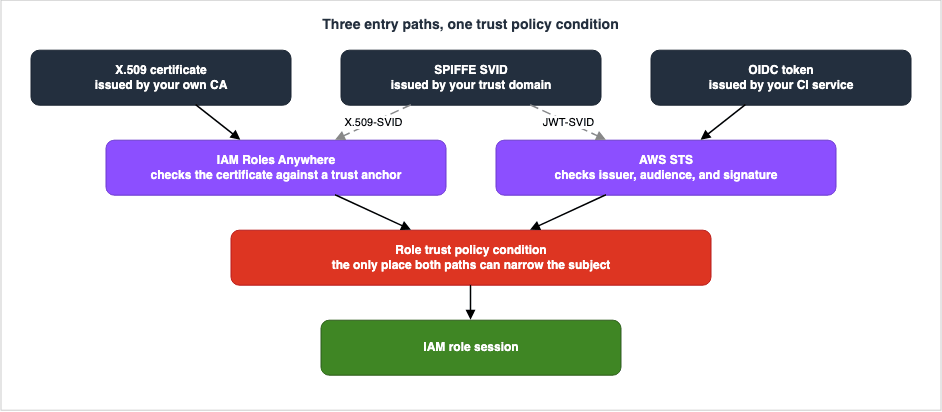
The two descriptions referenced in sections 3.2 and 4.6 support this conclusion from both sides of the diagram. On the certificate side, write no condition and any role in the same account accepts anything the trust anchor issued. On the token side, only the trust policy ever evaluates an issuer-specific claim. Neither path offers a later place to narrow.
6.2 Narrowing Happens in Four Stages
Narrowing is easiest to reason about in four stages. Each stage shrinks the set of subjects that still get in.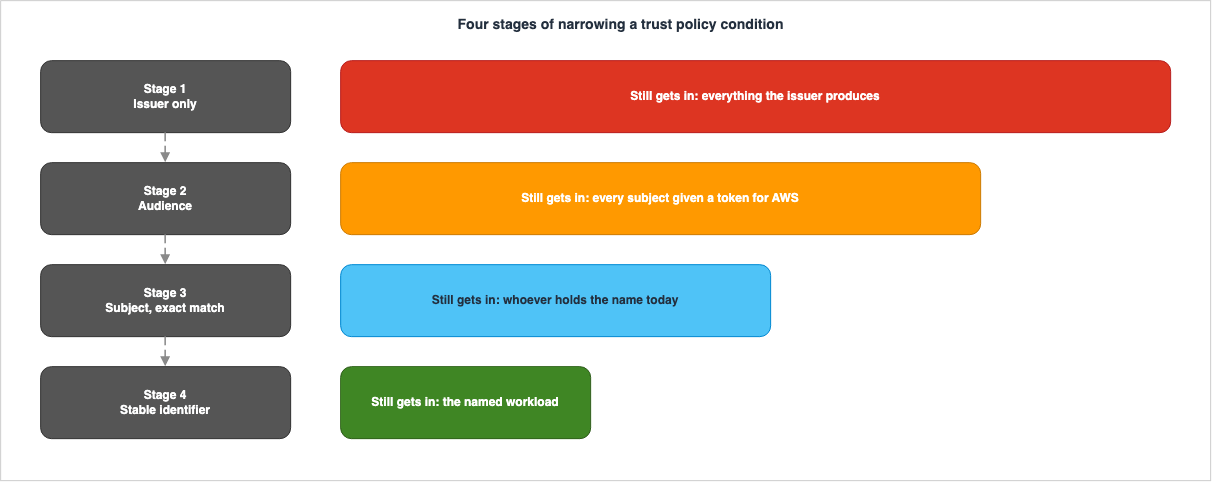
What follows walks through each stage: what writing it amounts to, and who can still get in.
6.3 Stage 1 — Naming the Issuer and Nothing Else
This initial stage involves specifying only the issuer. In IAM Roles Anywhere, this corresponds to configuring the role's trust policy to includerolesanywhere.amazonaws.com. In OIDC, it means specifying the ARN of the OIDC identity provider in the Principal section under Federated.As a configuration, this stage is finished. Authentication succeeds, credentials are vended, and the workload runs. The functional check passes.
Put into words, the subjects that can still get in at this stage are these, by path.
| Path | Subjects that can still get in |
|---|---|
| IAM Roles Anywhere | Every subject holding a valid end-entity certificate issued by any trust anchor in that account, or by any CA beneath one. |
| OIDC federation | Every subject holding a valid token issued by that issuer. |
As mentioned in Section 3.2, the first row represents AWS's specific wording. When using a CI system as the issuer, the set of subjects that can get in at this stage is every workflow in every repository in that CI organization. This includes repositories you may not directly manage, provided they are part of the same organization.
Regarding IAM Roles Anywhere, a state one step looser than this one is also possible. This involves not specifying the
aws:SourceArn condition in the role's trust policy. The user guide strongly recommends including this condition.In general, it is strongly recommended that you use the aws:SourceArn or the
aws:SourceAccount global condition keys or the sts:SourceIdentity condition key in your
role trust policies. This combination of conditions implements least privilege
permissions and prevents IAM Roles Anywhere from acting as a potential confused deputy.aws:SourceArn takes its value from the trust anchor ARN named in the CreateSession call. Specifying this condition limits the trust anchors that can assume the role to only those explicitly listed. If an account has multiple trust anchors, without this condition, any certificate from any of those trust anchors can be used to assume the role.6.4 Stage 2 — Adding the Audience
This stage adds a condition on the audience. It applies only to tokens used in the OIDC path and is not supported for IAM Roles Anywhere, due to the absence of attributes derived from the certificate that represent the intended recipient.The condition key takes the form
<issuer>:aud. When the issuer is GitHub Actions, the value shown by AWS is sts.amazonaws.com.What this stage narrows is whether the token was issued for AWS. If the same issuer also mints short-lived tokens for recipients other than AWS, this condition turns those away. Everything minted for AWS still passes.
The subjects that can still get in at this stage are every subject the issuer will hand an AWS-bound token to. In a CI environment, this often includes all repositories within an organization. This is a natural consequence, because an audience names a recipient, not a subject.
The
azp behavior from Section 4.5 starts to matter at this stage. The condition key for aud will actually prioritize the value of azp if it is present. If the issuer has configured azp, specifying a value for the aud condition will not result in a match.6.5 Stage 3 — Matching the Subject Exactly
Stage 3 is where the real boundary sits in most configurations. It is the first stage at which the condition points at a subject.In OIDC, the condition key is
<issuer>:sub. The issuer decides the structure of that value. Examining the value formats referenced by AWS reveals that the structure varies depending on the issuer.| Issuer | Shape of the sub value shown by AWS |
|---|---|
| GitHub Actions | repo:org-name/repo-name:ref:refs/heads/demo |
| GitLab.com CI/CD | project_path:mygroup/myproject:ref_type:branch:ref:main |
The GitHub Actions shape above is the one AWS shows, and it is the default that predates July 2026. GitHub's own documentation states that repositories created after July 15, 2026 use an immutable default subject format that includes the owner ID and the repository ID. The delimiter between each name and its ID is
@, which gives repo:octo-org@123456/octo-repo@456789:ref:refs/heads/main. Renames and transfers after that same date move to the format as well. Repositories that existed before it keep the earlier format until they are explicitly switched over, and GitHub Enterprise Server is not part of the rollout. An exact-match condition copied from the AWS example therefore will not match a workflow in a repository that has moved to the immutable format. Check which of the two your repository emits before you write the condition (as of August 25, 2026).Because the structure varies depending on the issuer, what will match when using a partial match also differs for each issuer. Using an exact match eliminates this uncertainty. If you omit any part of the value, everything from the point of omission becomes arbitrary. What can appear after the point of omission is settled by the issuer's specification rather than by AWS, so no amount of reading AWS pages will tell you.
In IAM Roles Anywhere, two condition keys sit at this stage:
aws:PrincipalTag/x509Subject/CN and sts:SourceIdentity. The format shown in the user guide is as follows:"Condition": {
"StringEquals": {
"aws:PrincipalTag/x509Subject/CN": "Alice"
},
"ArnEquals": {
"aws:SourceArn": [
"arn:aws:rolesanywhere:us-east-1:123456789012:trust-anchor/TA_ID"
]
}
}The
aws:SourceArn from stage 1 and the subject condition from stage 3 sit together in the same Condition block. The four stages are not mutually exclusive. A higher stage does not replace a lower one; it stacks on top of it.One thing is left over at this stage. Whether the subject string keeps pointing at the same subject over time is guaranteed by the issuer, not by AWS. That is what the next stage is about.
6.6 Stage 4 — Using an Identifier That Survives a Rename
Stage 4 narrows on a stable identifier rather than on a name. AWS explains why this is needed in its own reference. The note placed on the GitLab.com tab of the condition key reference states:On GitLab.com SaaS, deleted group or project paths could previously be recreated by
different users, which could cause policies relying solely on path-based claims (such as
sub) to grant access to unintended identities. As of June 1, 2026, GitLab has deployed a
platform-side update that prevents new CI ID tokens from being issued for project paths
that previously issued tokens, reducing this risk going forward. As an additional layer
of protection, AWS and GitLab recommend including conditions on stable, unique
identifiers — such as namespace_id or project_id — in your role trust policies or
resource control policies.The note is worth taking apart. A condition that looks only at a name-based claim, meaning
sub, can admit an unintended subject when a name is reused. While platform-level mitigation was implemented on June 1, 2026, it is still recommended to include stable identifiers in your conditions.GitHub addressed the same danger in a different place. GitLab's fix stops new tokens from being issued for a recycled path and leaves the
sub string itself alone. GitHub's fix changes the string. The immutable subject format described in Section 6.5 puts the owner ID and the repository ID inside sub, so the claim stops depending on names at all. That difference splits the work left on your side. On the GitLab side, what remains is adding stable identifiers to the condition, as the quoted note recommends. On the GitHub side, a condition you have already written may have stopped matching, and the work is to check whether the string it compares against has changed shape.This structure is not specific to GitLab.com. The principle that names can change, but identifiers remain constant, applies to all issuers. The condition key reference names, issuer by issuer, which claims are stable.
| Issuer | Condition keys the condition key reference calls stable | Condition keys it says can change |
|---|---|---|
| GitHub | repository_id, repository_owner_id, actor_id | — |
| GitLab.com | namespace_id, project_id, user_id | user_login, user_email |
| Buildkite | organization_id, pipeline_id, cluster_id | — |
On GitHub's
repository_id, the condition key reference states outright that the value does not change when the name does.Repository IDs are immutable and don't change even if the repository is renamed.However, the second row of this table has a scope limitation. The documentation clarifies that these condition keys for GitLab.com are only supported when using the company's multi-tenant SaaS as an OIDC identity provider.
These custom condition keys are only supported when using the GitLab.com multi-tenant
SaaS instance as an OIDC identity provider. You cannot use these condition keys with
GitLab Dedicated or GitLab Self-Managed instances.
When using a self-managed GitLab instance as the issuer, you will only be able to create condition keys based on standard claims. Whether you can implement filtering based on stable identifiers depends on the type of issuer.
In IAM Roles Anywhere, the equivalent of this stage is narrowing on an attribute of the certificate issuer.
aws:PrincipalTag/x509Issuer/CN indicates which Certificate Authority (CA) issued the certificate. When used with SPIFFE, aws:PrincipalTag/x509SAN/URI represents the SPIFFE ID, which is a value managed by the issuer. In the world of certificates there is no standard equivalent of GitLab's project_id, no immutable numeric identifier that the issuer guarantees. Whoever issues the certificates underwrites that stability through operational practice.6.7 Where a Condition Can Be Evaluated Depends on the Path
Every condition discussed so far lives inside a role's trust policy. Whether the subject can be narrowed anywhere outside the trust policy depends on the path.| Where it is evaluated | IAM Roles Anywhere | OIDC federation |
|---|---|---|
| Role trust policy | aws:PrincipalTag/x509Subject/* and the related tags can be used. | Issuer-specific condition keys can be used. |
| Role permission policy (after the session exists) | The same principal tags can be used. | The 29 issuer-specific condition keys cannot be used. |
| VPC endpoint policy | Condition keys with the rolesanywhere: prefix can be used. | Not applicable. |
| Profile session policy | Caps the permissions. Does not narrow the subject. | Not applicable. |
The entries in the second row are based on notes in the user guide. Principal tags extracted from the certificate can also be used in the conditions of the role's permission policy.
These tags are also available to be used in conditions in the identity-based policy
attached to the role.
The right-hand cell on that same row is the reverse. The 29 condition keys mentioned in Section 4.6 are not available after a session has been established. While certificate-based paths retain information from the initial request during the session, this is not the case with CI's OIDC paths.
The third row represents an option unique to IAM Roles Anywhere. In configurations that call
CreateSession via a VPC endpoint, the endpoint policy can also use certificate attributes as conditions. The user guide explains this as follows.When creating a VPC endpoint policy for the CreateSession action, you must specify * as
the principal, as the policy is evaluated before the certificate-based authentication is
complete. As a result, consider specifying trust anchor ARNs in the Resource element.
Additionally, condition keys are available, extracted from the X.509 certificate. These
keys follow the same format as the principal tags referenced in The IAM Roles Anywhere
trust model, but using rolesanywhere: as a prefix instead of aws:PrincipalTag/.Condition keys are named in a format like
rolesanywhere:x509Subject/CN. However, this location has two conditions. First, it only applies to requests made via a VPC endpoint. Second, as stated in the first sentence above, because this evaluation occurs before the certificate is fully authenticated, the Principal must be set to *. The user guide also clarifies the default behavior.VPC endpoint policies are supported for all IAM Roles Anywhere API methods, including
CreateSession. Full access to IAM Roles Anywhere is allowed through the endpoint by
default.Read the table as a whole and the only place available on both paths for narrowing the subject is the first row. This is the specific content of the claim made in Section 6.1.
6.8 The Subject Identifier That Travels Past the Session
As seen in Section 4.6, CI-specific condition keys do not persist across sessions. If you need to carry a subject verified at the entry path forward beyond the session, the only available mechanism issts:SourceIdentity.In IAM Roles Anywhere,
sts:SourceIdentity is automatically configured from the certificate's Common Name. On OIDC, the issuer sets it by putting a claim in a dedicated namespace into the token. The IAM user guide specifies the name of that claim.Include source identity in the https://aws.amazon.com/source_identity namespace in the
token when you submit the AssumeRoleWithWebIdentity request.This condition key possesses two unique characteristics: once set, its value cannot be changed, and it persists across role chains. The user guide describes this as follows:
After the source identity is set, the value cannot be changed. It is present in the
request for all actions that are taken by the role and persists across chained role
sessions.
These two characteristics make
sts:SourceIdentity the sole mechanism for carrying entry path information downstream. Because its value persists even as roles are assumed, it allows you to identify the original subject, even after multiple role assumption steps.6.9 The Length of the Trust Policy Can Be a Design Constraint
When you stack up to four conditions, the trust policy can become lengthy. Attempting to accept multiple repositories or multiple certificate Subject values within a single role can cause the array of values to grow. IAM imposes a limit on the length of trust policies.| Item | Default | Maximum after an increase |
|---|---|---|
| Role trust policy length | 2,048 characters | 8,192 characters |
| OIDC identity providers per account | 100 | 700 |
Both of these are eligible for automatic approval, and users can request an increase through Service Quotas, according to the user guide. When you reach the limit, you have two options: request an increase or split the role. Gather many subjects into one role and the condition grows. Split the role per subject and the condition shortens, and the permissions divide along with it. This length constraint acts as a design pressure, influencing the granularity with which you define roles.
Regarding the number of OIDC identity providers per account, the previously published Amazon EKS Pod Identity and IRSA Decision Guide discusses this in the context of Kubernetes. This article only adds the information that this value can be increased.
7. Revocation and Retirement
7.1 How Far Does Revocation Reach?
Behind the discussion of restricting access lies the possibility of preventing access altogether. This involves revoking certificates, removing issuers, and deleting roles. While each of these actions is simple in itself, their scope of impact varies significantly.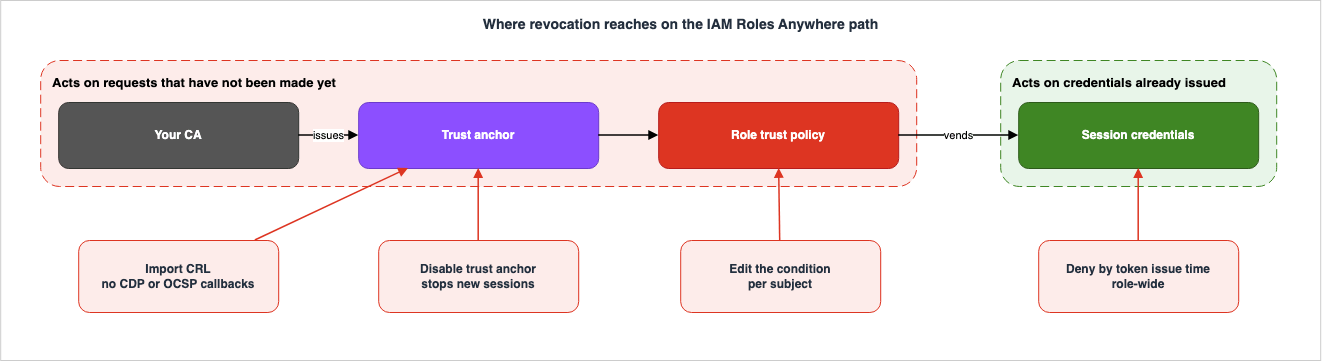
The internal structure of the CA, including the division between the root CA and subordinate CAs, as well as the design for distributing revocation information, is consolidated into a single node in the diagram. AWS Private CA Hierarchy Design holds what is inside it. This chapter focuses solely on what happens outside of that consolidated node.
7.2 Revocation on the IAM Roles Anywhere Path Is Import-Driven
On certificate revocation, the IAM Roles Anywhere mechanism departs from the usual PKI assumption. The user guide states it directly.Certificate revocation is supported through the use of imported certificate revocation
lists (CRLs). Currently, certification revocation is only supported by the API and CLI.
You can import a CRL that is generated from your CA using ImportCrl API or import-crl CLI
command. Certificates used for authentication will be checked for their revocation
status.And the following sentence continues:
Callbacks to CRL Distribution Points (CDPs) or Online Certificate Status Protocol (OCSP)
endpoints are not supported.
IAM Roles Anywhere does not actively retrieve revocation information. Even if a certificate includes a CRL distribution point, that URL will not be accessed. Stand up an OCSP responder and it never gets queried either. To make a revocation take effect, you have to push the CRL your CA generated in through
ImportCrl.The consequence of this design is that the time between revoking a certificate and the workload being shut out is set not by how often the CA issues a CRL, but by the interval at which you import one. If the CA re-issues its CRL every hour and you import once a day, the worst case before the workload is shut out is a day. This area should be automated; it does not function automatically by default.
The API reference also specifies the format for the CRLs you import. They must be in PEM format, and the length of the
crlData field is capped at 300,000. AWS records this as a length constraint and does not state the unit. A CRL grows as you revoke more certificates, so the limit belongs in the operational design.7.3 What happens when you disable a trust anchor?
When you want to stop requests based on a specific path, rather than revoking them one by one, disabling a trust anchor is an option. The API reference documentation is concise.When disabled, temporary credential requests specifying this trust anchor are
unauthorized.It stops requests. A
CreateSession call naming that trust anchor no longer gets authorized. However, this documentation doesn't address already-issued credentials. The AWS security blog puts the same behavior more plainly.You can disable the trust anchor in IAM Roles Anywhere to immediately stop new sessions
being issued to your resources outside of AWS.It stops new sessions. Existing sessions are not affected.
The trust anchor's own certificate carries a qualifying clause too. For a trust anchor that references AWS Private CA, the only property that can be changed after creation is the validity period, and once it changes you have to call
UpdateTrustAnchor to register that. The user guide provides further details on this.IAM Roles Anywhere honors certificates based on the validity period found during the
most recent TrustAnchor Create/Update event.In essence, IAM Roles Anywhere only uses the validity period that was read at the time the trust anchor was last created or updated. Even if the validity period is changed on the CA side, it won't be reflected until you call
UpdateTrustAnchor.7.4 What happens when the issuer is removed on the OIDC side?
The OIDC path offers two operations: removing an audience, and deleting the OIDC identity provider.The user guide clearly states the result of removing the audience.
If you remove an audience, identities federating with the audience cannot assume roles
associated with the audience.
Again, this action prevents the acceptance of new requests. The console operation screen prompts for the input
remove to confirm this action.Deleting the OIDC identity provider itself will prevent the acceptance of any roles that use that issuer as the
Principal. The deletion is performed at the issuer level, making it similar to disabling a trust anchor. This is not a method for blocking access to a single repository.The method for blocking access to a single repository is to remove the relevant values from the conditions in the trust policy. On the admitting side and on the shutting-out side alike, the condition is the only thing that has any granularity. This is simply a reflection of the argument presented in Chapter 6.
7.5 Nothing Reaches a Session That Is Already Running
One fact holds across all three paths. Whether you revoke the certificate, disable the trust anchor, or delete the OIDC identity provider, already issued temporary credentials will continue to function until their expiration date.Returning to the expiration formula discussed in Section 3.6, the reason becomes clear.
Expiration = CurrentTime + finalDurationSecondsThe expiration date is determined solely by the time of issuance and the configured duration. Certificate validity periods and the status of trust anchors are not factored into this formula. Once a credential has been vended, therefore, the state of the entry path has no bearing on how long that credential lives.
This single fact is what makes the session duration setting worth thinking about. Make 12 hours your default and the worst case between revoking and actually stopping becomes 12 hours. Set it to 1 hour and the worst case becomes 1 hour. The default value for the
durationSeconds setting in the profile is 3600 seconds, so at the default the worst case is 1 hour. That worst case grows only if you configure a longer duration on purpose.7.6 A Running Session Can Only Be Stopped Role-Wide
There are ways to invalidate previously issued credentials. However, the granularity differs. According to the IAM user guide, one method is to attach a policy to a role that denies access based on theaws:TokenIssueTime condition.{
"Version":"2012-10-17",
"Statement": {
"Effect": "Deny",
"Action": "*",
"Resource": "*",
"Condition": {
"DateLessThan": {"aws:TokenIssueTime": "2014-05-07T23:47:00Z"}
}
}
}The policy rejects every temporary credential issued before the time you name. The console's
Revoke active sessions function also attaches the same shape of policy to a role.The granularity is at the role level. If a single certificate is compromised, performing this action will immediately stop all sessions associated with that role. Each affected workload then fetches new credentials and resumes. While automated credential retrieval can expedite the recovery process, a brief interruption will occur.
The user guide attaches a qualifying clause to the scope of this condition key as well.
The aws:TokenIssueTime value is only present in the context of AWS requests that are
signed with temporary security credentials, so the Deny statement in the policy does not
affect requests that are signed with the long-term credentials of the IAM user.
If long-lived keys remain during a migration, this widespread shutdown will not affect calls using those long-lived keys. Until the migration is complete, emergency shutdown measures will remain isolated to individual paths. That is one of the reasons Chapter 8 treats migration order as a subject in its own right.
7.7 The Delay before a Change Takes Effect
There is one more question of timing. IAM is an eventually consistent service. The user guide puts it this way.IAM, like many other AWS services, is eventually consistent. IAM achieves high
availability by replicating data across multiple servers within Amazon's data centers
around the world. If a request to change some data is successful, the change is committed
and safely stored. However, the change must be replicated across IAM, which can take some
time.When you modify a trust policy, the changes may not immediately reflect in all evaluations across all regions. When performing an exclusion operation, treat the completion of the operation and the manifestation of its effects as separate events. You can verify the effects using CloudTrail. The rollback design outlined in Chapter 8 takes this delay into account.
Whether an IAM policy change, role session revocation with
aws:TokenIssueTime, and the deactivation of long-term credentials reach Amazon DynamoDB, DAX, Amazon Keyspaces, Amazon OpenSearch Service domains, and OpenSearch Serverless is laid out, based on the documentation, in IAM Authentication to DynamoDB, Keyspaces, and OpenSearch Service.8. Migration Order from Long-Lived Keys
8.1 What to Count
The migration process begins with an inventory. What gets counted is not the number of keys, but the number of callers using them. If the same key has been handed to several hosts, the number of things to replace is the number of hosts.The existing articles supply the counting. AWS IAM Access Analyzer Deep Dive holds the detection of unused permissions and unused access keys. The classification of why long-lived keys are considered an anti-pattern is also detailed in IAM Anti-Patterns. This section covers only what to count, and in what order to replace what you counted.
The inventory is finished when these three fields are filled in for every caller.
| Field | What to record |
|---|---|
| Caller | Which host, which repository, which job |
| What it can present | Does it already have a certificate, or an OIDC token from CI? Or neither? |
| Permissions in use | A list of the APIs actually being called. |
The third row will serve as the basis for the post-migration permission policies. If the migration and permission review are performed simultaneously, it becomes impossible to distinguish between migration failures and failures due to insufficient permissions. Therefore, the existing permissions should be migrated first, and the process of refining those permissions should be completed after the migration is successful.
8.2 Choosing an Entry Path
Decide the entry path per caller. What decides it is what the caller can present.| Situation of the caller | Entry path |
|---|---|
| Already has an internal PKI and can distribute certificates to hosts. | IAM Roles Anywhere |
| The CI service issues OIDC tokens. | OIDC federation |
| Needs to standardize ID representation across multiple environments. | SPIFFE, combined with either of the above options. |
| None of the above apply. | The task of creating an entry path should come first. Migration can follow. |
The important thing is not to force the fourth row. Building a short-lived credential path for a caller that has nothing to present ends up leaving a long-lived secret somewhere anyway. In that situation, keeping the existing key and narrowing the sources and permissions it allows leaves a clearer state than a partial migration does.
8.3 Write the Conditions First
This is the area where mistakes in the migration sequence are most frequently made. When creating a new path, the urge to check that it works pushes you to move on with only the stage 1 configuration in place. It works, after all.Instead, reverse the order. Write the condition through stage 3, and run the functional check after that. If you run the functional check at stage 1 and add conditions afterwards, two problems follow.
First, you'll need to re-verify the functionality once you've added the conditions. If the added condition is incorrect, something that was working may stop functioning. By reversing the order, you can complete the verification with a single test.
The second issue is that the task of adding conditions itself can be forgotten. Working on a system that's already running doesn't have the same sense of urgency as configuring a static system. A configuration that went to production at stage 1 tends to stay there, because nothing visible from outside says why a condition should be added.
8.4 Preparing and Switching to a Dual Path
The switchover process involves a period where both the new and old paths are active simultaneously. The sequence is as follows:- Create a new role and write the trust policy condition through stage 3. Transfer the permissions directly from the inventory results.
- Verify that the new path can successfully retrieve credentials. At this point, do not switch over any existing calls.
- Point the caller's configuration at the new path. Leave the long-lived key in place.
- Using CloudTrail, confirm that calls originating from the new role's session are being logged.
- Simultaneously, verify that calls originating from the old keys have stopped.
- After a period of observation, disable the long-lived keys. Deletion should be performed later.
The status in step 5 will be the basis for deciding whether to roll back. If calls originating from the old keys are still occurring, it means there are still calling configurations that have not been switched over. Instead of rolling back, identify and address the remaining calling configurations.
Step 6 separates disabling from deleting in order to keep a way back. A disabled access key can be re-enabled, but a deleted access key cannot be recovered. As seen in Section 7.7, there is a delay in propagation, so it is worthwhile to retain a recovery option in case issues arise immediately after disabling.
8.5 What Counts as Finished
The completion criteria for the transition are not simply the disappearance of the long-lived key. Rather, the long-lived key has to be gone and the condition has to be at stage 3 or higher.If the transition is completed while still at stage 1, the resulting state will be as follows: the long-lived key is gone, the credentials are short-lived, and everything the issuer has issued can get into the same role. The set of subjects that can get in may now be larger than it was when you were handing out keys. A long-lived key was held only by whoever you handed it to. A stage 1 condition accepts the issuer's entire population.
When determining whether the transition is complete, verify the following three points separately:
| Check | What to look at |
|---|---|
| Is the long-lived key still present? | List of access keys and their last used date. |
| Is the condition at stage 3 or higher? | The Condition block in the role's trust policy. |
| Has the session duration become excessive? | The profile's durationSeconds and the role's MaxSessionDuration. |
If you only check the first point and conclude the transition is complete, the system will record it as complete even though the second point remains empty. This state might appear as a successful elimination of the long-lived key from a purely mechanical detection perspective.
9. What This Design Still Assumes
9.1 The First Trust Has to Be Placed by Hand
Describing a design that removes long-lived keys, it is tempting to say the secret is gone. More accurately, the secret has moved. Here are the three places it moves to.| Path | Where the first trust goes | How it is placed |
|---|---|---|
| IAM Roles Anywhere | The CA private key, and registering the trust anchor | The process of registering the CA certificate in the account must be performed by a person. |
| OIDC federation | The issuer URL, and registering the OIDC identity provider | The process of registering the Issuer URL in the account must be performed by a person. |
| SPIFFE | The trust domain signing key | This must be registered with AWS using one of the methods described above. |
In all three cases, the initial setup relies on a manual operation. If the registration destination is incorrect, all subsequent operations will trust an incorrect issuer. While this process can be automated, automating the path itself only postpones the question of what basis is used to trust that automated path in the first place.
This is not a flaw in the design presented in this article. It is a characteristic of PKI and federation in general: the chain of trust ultimately rests on a foundation established by a person. It is important to note that even when long-lived keys are removed, certain elements persist.
9.2 The Private Key Still Lives in a File Somewhere
Returning to the point mentioned in Section 1.1, in the IAM Roles Anywhere path, workloads create signatures using a private key. Only a holder of the private key can produce that signature, so the private key has to sit on the workload's side.There are two key differences compared to long-lived access keys. First, the private key is never presented. Only the signature, not the key itself, is transmitted over the network. Second, the private key can live inside hardware. As seen in Section 3.8, the credential helper supports PKCS#11 tokens and TPMs. If the key is placed in a location from which it cannot be extracted, even if the host is compromised, the key itself cannot be exfiltrated.
However, simply placing it somewhere does not guarantee its security. The warning the user guide gives about TPMs generalizes.
If you load a key into the TPM that isn't password-protected, anyone with access to the
machine can use that key.
A key that cannot be extracted and a key that cannot be used are two different things. Whoever takes the host can still have signatures produced on that host, without ever getting the key out of it. Hardware protection primarily prevents the key's duplicate from being copied and moved to another location; it does not prevent its misuse on that host.
In the OIDC path, the workload possesses a token. The token is short-lived, but for as long as it lives it is a bearer value. The considerations regarding JWT-SVID outlined in the SPIFFE specification clearly illustrate this characteristic.
Being a bearer token, JWT-SVIDs are susceptible to replay attacks.9.3 The Issuer Establishes a New Blast Radius
In the world of handing out long-lived keys, leaking one key put that key's permissions into the hands of whoever it leaked to. What was lost stopped at one key. In the world of short-lived credentials the key goes away. In its place there is an issuer.Anyone who controls an issuer can assert any identity that issuer is able to issue. An entity possessing a CA's private key can create certificates for any Subject within that CA's hierarchy. An entity possessing an OIDC issuer's signing key can create tokens with any
sub claim. The conditions described in Chapter 6 only have meaning if the issuer is behaving correctly.This assumption persists even as the conditions are elaborated. Even after describing four stages, the conditions are still examining values provided by the issuer. What the condition protects is the range of what gets accepted from a correctly behaving issuer. It does not protect you from the issuer.
Therefore, one more design decision must be made: which issuers should be permitted to claim which IDs? A configuration where a single CA issues certificates for an entire organization differs significantly from a configuration where CAs are segmented by department, with separate trust anchors. The scope of impact when an issuer is compromised varies depending on this decision. This decision is fundamental to the certificate hierarchy design itself, and is held by AWS Private CA Hierarchy Design. This article only states that this decision is a prerequisite for the conditions described in this article; it does not address the decision itself.
9.4 What the Issuer Does Is Invisible from AWS
Another operational asymmetry exists. In the IAM Roles Anywhere path, a trust anchor is registered within AWS. However, AWS has no visibility into how that Certificate Authority (CA) is currently operating in terms of its issuance policies. AWS consoles do not reflect whether a certificate belonging to a former employee has been revoked, or whether certificates for decommissioned hosts have been recovered.The same applies to the OIDC path. AWS cannot see who has been granted repository permissions through the CI service. The repository names listed in the trust policy implicitly rely on the assumption that the set of users who can write to those repositories remains consistent. AWS cannot detect if that set has changed.
The only way to close this asymmetry is to split the inventory duty. Taking inventory of the conditions on the AWS side and taking inventory of permissions on the issuer side are two separate jobs, and doing one of them tells you nothing about the state of the other.
10. Where the Primary Sources Disagree
Collating the specifications for this article surfaced five discrepancies in AWS's own material: three between separate documents, and two inside a single document. All five reflect the text as of August 21, 2026. So that a reader repeating the same check is not left guessing, each one below is recorded together with a judgment on which side holds.10.1 Rate Limits for CreateSession Vary across Documentation
Two documents give different values for the same quota. Every IAM Roles Anywhere quota is per Region.| Document | Rate of CreateSession requests |
|---|---|
| IAM Roles Anywhere User Guide (Quota section) | 20 per second |
| AWS General Reference (IAM Roles Anywhere section) | 10 per second |
Both documents state that these limits are adjustable. The judgment here is to treat the service-specific user guide as authoritative. However, in practice, both values represent the default limits and not necessarily the current limits for your account. To confirm the current limits for your account, it is best to check the Service Quotas console.
10.2 Whether the CRL Limit Is Adjustable Varies
The same two documents provide conflicting information regarding the CRL limit.| Document | CRLs per trust anchor | Adjustable |
|---|---|---|
| IAM Roles Anywhere User Guide | 2 | Yes |
| AWS General Reference | 2 | No |
The values are consistent, but the information on whether the limit is adjustable differs. This discrepancy has implications for operational design. Whether the limit of two CRLs per trust anchor can be modified will impact decisions about how to structure CAs and how to consolidate CRLs. It is advisable to avoid designs that assume the limit is adjustable and instead first consider configurations that work effectively with a limit of two.
10.3 The Two Quota Tables List Different Items
Although both quota tables cover the same topics, the items included do not match.| Item | User guide | General Reference |
|---|---|---|
| Trust anchor bundle size | 25 KB | Not listed |
| Roles per profile | 250 | Not listed |
| Certificates per trust anchor | Not listed | 2 |
Reading only one of the tables can lead to overlooking existing limits. In particular, the third row, which specifies the number of certificates per trust anchor — a value directly related to the design — is not found in the service-specific user guide. When checking quotas, it is necessary to open both tables.
10.4 The Condition Key Reference Contradicts Itself on One Page
The fourth is a contradiction inside one page. In the preamble to the OIDC federation section, the IAM condition key reference states this.When a claim is not available in session, the OIDC condition context key can only be
used in a role trust policy for the initial AssumeRoleWithWebIdentity authentication.The table on the GitLab.com tab on the same page lists
namespace_id and project_id with an Available in session value of No. However, a note on the same tab states:AWS and GitLab recommend including conditions on stable, unique identifiers — such as
namespace_id or project_id — in your role trust policies or resource control policies.According to the rules outlined in the introduction, these two condition keys cannot be used in resource control policies. The note makes a recommendation that assumes they can be used. These two descriptions are irreconcilable in the same page.
The judgment here is that the introductory rule and the table hold. The reasoning behind this is twofold: first, descriptions of rules are generally more accurate than descriptions of functionality, and second, the table provides individual values for each condition key. The recommendation, on the other hand, simply uses these two condition keys as examples and does not define a comprehensive list of where they can be used. However, as this assessment is not an explicit correction from AWS, if you choose a design that restricts based on resource control policies, it is necessary to verify whether these keys are actually evaluated in your own environment.
10.5 The Prose Describes a Different Condition Than the Example Shows
The fifth is a case where the prose and the code disagree inside one page. The IAM Roles Anywhere VPC endpoint page carries an example that combinesCreateSession with the management operations in a single policy. Its condition reads as follows."Condition":{
"StringEquals":{
"rolesanywhere:x509Subject/OU":"Development"
}
}The condition checks the Subject's Organizational Unit, with a value of
Development. However, the subsequent explanatory text states something different.The first statement allows any workload with a certificate from ExampleCorp to create
sessions through the VPC endpoint, while the second statement restricts management
operations to a specific IAM role.The string
ExampleCorp does not appear anywhere in the policy. While the end of the same paragraph lists "organization name" as a value to be replaced, the example uses an organizational unit.The judgment here is that the policy itself holds. This type of discrepancy is likely to mislead readers who rely solely on the explanatory text when selecting condition keys. A user might intend to filter by organization name and mistakenly write
rolesanywhere:x509Subject/O, believing they are following the example that actually filters by organizational unit. When selecting condition keys, read the code in the example rather than the prose.11. Failure Modes
The failure modes that follow from everything above are listed here. Every one of them survives a passing functional check.11.1 Going to Production While Still at Stage 1
Symptom. The role's trust policy includes aPrincipal but lacks a Condition. Alternatively, the Condition only specifies aws:SourceArn.Why it survives. It functions with the initial configuration. Testing passes, deployments from CI are successful, and calls from on-premises hosts also succeed. The issue is that it doesn't fail due to the missing element.
The correct shape. Write through stage 3 of Chapter 6. Put the writing before the functional check, not after it.
11.2 Narrowing Down sub with Partial Matches
Symptom. The condition <issuer>:sub is being written using StringLike, allowing for arbitrary characters from a certain point onward in the value.Why it is dangerous. The issuer's specification, not AWS, decides what can appear past the point you left open. As Section 6.5 showed, the structure of the
sub value differs from issuer to issuer. If the point you expect to be a delimiter differs from the delimiter used by the issuer, a wider range of values than intended may be accepted.The correct shape. Write the condition using exact matching. If you need to allow multiple values, list them in an array. If the list becomes too long and exceeds the limit of the trust policy, separate the roles.
11.3 Filtering Based on Name Alone
Symptom. The criteria are limited to repository names or project paths.Why it is dangerous. Names change, and names get reused. When that happens, the subject the condition points at changes underneath it. AWS itself describes this risk in its documentation, as referenced in Section 6.6.
The correct shape. Include stable identifiers in the criteria. For GitHub, this is
repository_id; for GitLab.com, namespace_id and project_id; for Buildkite, organization_id and pipeline_id. The condition key reference names each of these as stable.11.4 Planning to Narrow CI-Specific Condition Keys Later
Symptom. The trust policy conditions are intentionally kept broad, with the intention of narrowing down the repository using SCP or resource-based policies.Why it does not work. As counted in Section 4.6, all 29 of the condition keys AWS defines for CI and other cloud issuers carry
Available in session as No. These values simply do not exist once a session has been established.The correct shape. Narrow down the scope earlier in the process. If a subject identifier has to survive into the session, carry it in
sts:SourceIdentity.11.5 Certificate Revoked but CRL Not Being Processed
Symptom. The CA has revoked a certificate and is re-issuing the CRL, but this change is not being reflected on the IAM Roles Anywhere side.Why it happens. As described in Section 7.2, IAM Roles Anywhere does not reference CRL distribution points. It also does not reference OCSP. Certificate revocation information is only ingested through calls to
ImportCrl. Watching only the CA side, it is easy to assume the change has landed.The correct shape. Put the CRL import on a schedule. Record that import interval in the design as the worst case between revoking a certificate and the workload being shut out.
11.6 Maximizing Session Duration
Symptom. The profile'sdurationSeconds is set to 43200 seconds. The reason for this was to reduce the frequency of credential reacquisition.Why it is dangerous. As Section 7.5 described, the session duration sets the worst case between revoking and actually stopping. Set it to 12 hours and that worst case becomes 12 hours. Used with an AWS SDK, the credential helper refreshes credentials before they expire, so extending the duration buys very little operationally.
The correct shape. Start with the default value of 3600 seconds. If you choose to extend it, document the reason for the extension and the resulting increase in maximum downtime.
11.7 Writing the aud Claim Value into the aud Condition
Symptom. The <issuer>:aud condition in the trust policy consistently fails to match.Why it happens. As described in Section 4.5, for issuers using a standard claim, the
aud condition key actually reads azp. It falls back to aud only when azp carries no value. If the issuer configures azp, the condition that attempts to write a value for the aud claim will not match.The correct shape. Verify whether the issuer has configured
azp. If you want to check the aud value of the token, the correct condition key is oaud.11.8 Sharing a Single Role across Multiple Callers
Symptom. A single role's trust policy lists numerous repositories and a large number of certificate Subjects.Why it is dangerous. There are two primary concerns. First, all the listed Subjects in the trust policy have the same level of permissions. If any one of these Subjects is compromised, the entire role's permissions can be exploited. Second, as Section 7.6 described, the emergency stop acts on the whole role. Stopping one Subject can inadvertently halt the entire role.
The correct shape. Separate roles for different purposes. The length limitations of trust policies should encourage this separation.
11.9 Calling It Done the Moment the Long-Lived Key Is Gone
Symptom. The list of access keys is empty. The condition in the trust policy remains at stage 1.Why it is dangerous. As described in Section 8.5, this state may mean the set of subjects that can get in is larger than it was before the migration. Furthermore, this state may appear successful based on automated detection methods. The machinery that detects a surviving long-lived key does not look at what stage the condition is at.
The correct shape. Make the stage of the condition part of the completion test.
11.10 Leaving the Trust Anchor on the Root CA with No Condition
Symptom. The root CA of the PKI is registered as a trust anchor. The role's trust policy does not include conditions based on the certificate's attributes.Why it is dangerous. As Section 3.2 quoted, every end-entity certificate issued by any CA beneath the trust anchor can be used. Specifying the root CA means the entire PKI is affected. If the internal PKI is shared across the entire organization, it may include certificates issued for purposes unrelated to AWS.
The correct shape. Place the trust anchor under a subordinate issuing CA, or use
aws:PrincipalTag/x509Issuer/CN to condition the role based on the issuing CA. It is safest to do both. However, changing the trust anchor's location does not constitute a configuration change. As described in Section 7.3, after a trust anchor is created referencing an AWS Private CA, only the validity period can be modified. To change the CA it points to, you must create a new trust anchor and replace the aws:SourceArn in the role's trust policy.12. Frequently Asked Questions
Can you completely remove long-lived access keys?
Yes, on the paths by which an external workload calls AWS. Neither IAM Roles Anywhere nor OIDC federation needs a long-lived AWS credential. What disappears, though, is the AWS credential and nothing else. On the IAM Roles Anywhere path the certificate's private key stays on the workload side, and on the OIDC path the issuer's signing key stays with the issuer. Chapter 9 covers this.Which should you choose: IAM Roles Anywhere or OIDC federation?
The answer depends on what you already have available. If you already have an internal PKI and can distribute certificates to your hosts, then IAM Roles Anywhere is the better choice. If your CI service issues OIDC tokens, then OIDC federation is the appropriate option. The choice does not decide how safe you are. Whichever you pick, what acts last is the condition in the trust policy.Does setting a trust anchor narrow which subjects can get in?
No. What gets narrowed is the issuer, not the subject. The IAM Roles Anywhere user guide states that a certificate issued by any trust anchor in the account can be used to assume any role in that same account unless you write a condition in the role's trust policy. Every certificate that CA has issued can get in.What happens when you use wildcards in the sub condition?
Everything past the wildcard becomes arbitrary. The issuer's specification, not AWS, decides what can appear there. As Section 6.5 described, the structure of the sub value differs from issuer to issuer, so when your idea of the delimiter and the issuer's do not agree, a wider range gets through than you intended. Write the condition as an exact match, and list an array of values when you need to allow several.Can the CI repository name be filtered by SCP?
No. The IAM condition key reference states that a claim which is not available in session can only be used in a role trust policy, for the initialAssumeRoleWithWebIdentity authentication. As of August 21, 2026, there are 29 condition keys specific to GitHub, GitLab.com, Buildkite, CircleCI, Google, and Oracle Cloud Infrastructure, and every one of them carries Available in session as No.Does implementing SPIFFE eliminate the need for configuration on the AWS side?
No. SPIFFE standardizes the representation of workload identities. On the AWS side, if using X.509-SVID, you will need to register a trust anchor; if using JWT-SVID, you will need to register an OIDC identity provider. In either case, you will need to define conditions in the role trust policies. While SPIFFE IDs have a defined structure, this does not eliminate the need to write those conditions.Can X.509-SVID be used directly with IAM Roles Anywhere?
Yes, under one condition: the SVID must carry a non-empty Subject. The SPIFFE X.509-SVID specification does not require a Subject and defines requirements for cases where it is omitted. IAM Roles Anywhere, for its part, states outright that it does not accept a certificate with an empty Subject. Both of these points are outlined in Section 5.3.If a certificate is revoked, is that workload shut out immediately?
No. Two delays sit in the way. The first is that IAM Roles Anywhere does not go and fetch the CRL. To reflect the revocation, you need to import the CRL usingImportCrl, and your import interval sets how long the workload keeps getting in. The second is that already-issued credentials will continue to function until their expiration date. The validity period of the credentials is solely determined by the time they were issued and the configured duration.Is there a way to stop a currently running session?
Yes. You can attach a deny policy to a role, withaws:TokenIssueTime as the condition, which will reject all temporary credentials issued before the specified time. The console's Revoke active sessions function performs the same operation. The scope of this action is at the role level. This will terminate all sessions for every workload using that role.How long should the sessions be?
Starting at the default of 3600 seconds is the safe choice. The reason is that the session duration sets the worst case between revoking and actually stopping. The default fordurationSeconds on an IAM Roles Anywhere profile is 3600 seconds, and the permitted range runs from 900 to 43200 seconds. Because the credential helper refreshes before expiry when used with the AWS SDK, there are limited operational benefits to extending the session duration.How do you tell that the migration is finished?
Three things get checked separately: that no long-lived key remains, that the trust policy condition names the subject exactly, and that the session duration is not excessive. Check only for the absence of long-lived keys and call it done, and a configuration whose condition is still at stage 1 gets recorded as a success. Section 8.5 covers this.Can the OIDC identity provider be shared when using the same CI across multiple accounts?
No. The IAM user guide explicitly states that the OIDC identity provider referenced in the trust policy must reside in the same account as the role. Therefore, you will need to create an OIDC identity provider for each account. The default limit is 100 per account, but you can request an increase to 700 through Service Quotas.13. Summary
An external workload has three paths into AWS: IAM Roles Anywhere, which takes an X.509 certificate; OIDC federation, which takes a token; and a path that carries a SPIFFE SVID on either of the first two. The three differ in what they present. The party doing the verifying on the AWS side differs too.All three converge on one place: the condition written in the role's trust policy. This is not a design recommendation, it is a property of the mechanism, stated in the primary sources. The IAM Roles Anywhere user guide states that, unless you write a condition in the role's trust policy, a certificate issued by any trust anchor in the account can be used to assume any role in that same account. The IAM condition key reference states that a claim which is not available in session can only be evaluated in a role trust policy. All 29 of the condition keys defined for CI and other cloud issuers carry
Available in session as No.Therefore, simply possessing a certificate does not guarantee security, nor does possessing a token. Certificates and tokens narrow the issuer. Only the condition narrows the subject. If you design your system without properly distinguishing between these two, you leave production in a state where everything the issuer has issued can get in.
A condition narrows in four stages. These are: specifying only the issuer, specifying the audience, specifying the subject with a precise match, and adding a persistent identifier that remains valid even if the name changes. As the stage rises, the set of subjects that can get in becomes smaller. At stage 1 the functional check still passes. However, functionality and proper restriction are separate concepts.
The process for revocation also follows a similar structure. Certificate revocation within IAM Roles Anywhere is an import-driven process. CRL distribution points and OCSP responders are not consulted. The time before a workload is shut out is set by the import interval, not by how the CA is run. Furthermore, credentials that have already been issued remain valid until their expiration date. The expiration is determined solely by the issuance time and the configured duration; the certificate's current state is not considered. A mechanism for killing running sessions exists, but its granularity is the whole role.
When migrating from long-lived keys, the order of operations is critical. Write the condition through stage 3, then run the functional check. If you reverse this order, the process of adding conditions becomes open-ended, and the configuration is left at stage 1. Completion of the migration cannot be determined simply by deleting the long-lived key. Judge it on three things instead: the long-lived key is gone, the condition names the subject, and the session duration is not excessive.
Four assumptions survive this design. The first trust is placed by a person. The private key stays on the workload's side. The issuer becomes the new blast radius. And what the issuer does is invisible from AWS. None of the four goes away as the condition moves up the stages. This design focuses on identifying what cannot be eliminated and then eliminating what can be.
14. References
- What is AWS Identity and Access Management Roles Anywhere? - AWS IAM Roles Anywhere
- The IAM Roles Anywhere trust model - AWS IAM Roles Anywhere
- Getting started with IAM Roles Anywhere - AWS IAM Roles Anywhere
- IAM Roles Anywhere CreateSession API - AWS IAM Roles Anywhere
- Get temporary security credentials from IAM Roles Anywhere - AWS IAM Roles Anywhere
- Quotas for AWS Identity and Access Management Roles Anywhere - AWS IAM Roles Anywhere
- IAM Roles Anywhere and interface VPC endpoints (AWS PrivateLink) - AWS IAM Roles Anywhere
- CreateTrustAnchor - AWS IAM Roles Anywhere API Reference
- DisableTrustAnchor - AWS IAM Roles Anywhere API Reference
- CreateProfile - AWS IAM Roles Anywhere API Reference
- ImportCrl - AWS IAM Roles Anywhere API Reference
- AWS Identity and Access Management Roles Anywhere endpoints and quotas - AWS General Reference
- Create an OpenID Connect (OIDC) identity provider in IAM - AWS Identity and Access Management
- IAM and AWS STS condition context keys - AWS Identity and Access Management
- IAM and AWS STS quotas - AWS Identity and Access Management
- Monitor and control actions taken with assumed roles - AWS Identity and Access Management
- Revoke IAM role temporary security credentials - AWS Identity and Access Management
- What is IAM? - AWS Identity and Access Management
- AssumeRoleWithWebIdentity - AWS Security Token Service API Reference
- Planning for your IAM Roles Anywhere deployment - AWS Security Blog
- Extend AWS IAM roles to workloads outside of AWS with IAM Roles Anywhere - AWS Security Blog
- IAM Roles Anywhere now enforces VPC endpoint policies for the CreateSession API
- AWS IAM now provides higher maximum quotas for roles, role trust policies, instance profiles, managed policies, and identity providers
- SPIFFE Concepts - SPIFFE
- The X.509 SPIFFE Verifiable Identity Document - SPIFFE
- The JWT SPIFFE Verifiable Identity Document - SPIFFE
- OIDC federation with AWS - SPIFFE
References:
Tech Blog with curated related content
Written by Hidekazu Konishi