The AWS Credential Provider Chain Across SDKs and the CLI - What Each Link Supplies, Where the Order Differs by Language, and Why Precedence Is a Separate Mechanism
First Published:
Last Updated:
sts:GetCallerIdentity can come back with a different identity in each of the three. Locally, it might return your profile; in CI, it might use the pipeline role; and in production, it might use a task role. While this works well, when things go wrong, what begins is the work of reading back the result of a search that nobody wrote down.What you end up reading back is the credential provider chain. Both the AWS SDKs and the AWS CLI decide on their own which identity to call as before a request goes out. The official documentation covers how they do it, but the way it is written can mislead the reader.
A commonly circulated summary states that SDKs search for credentials in a predetermined order, using the first one they find. Environment variables take precedence over profiles, and profiles take precedence over instance profiles. This summary is broadly correct, but the primary sources explicitly state that the order varies between SDKs. In reality, when you compare the developer guides for each SDK, the steps and their order don't align.
This article focuses on this discrepancy. It is not an introduction to the feature itself, but rather an examination of the process by which the identity is determined, across different languages. The intended audience is those who work with multiple AWS accounts from a single development machine, a CI environment, and production workloads, and who may use more than one language. The audience includes developers who write both Python and TypeScript, and teams that mix Java and Go.
To begin with, the key takeaway in this area is not about memorizing the order. It is about understanding that there are two distinct mechanisms at play, which are often mistakenly conflated. One is the search order, which works from top to bottom and stops once credentials are found. The other is the precedence of settings, which determines which setting takes effect when multiple layers define the same value. The arrow for the former runs top-down; the arrow for the latter runs bottom-up. Any attempt to combine these two into a single diagram will inevitably result in conflicting arrows somewhere.
One more point belongs up front. The search order is not a fixed historical fact. One SDK swapped two steps of its search order in a minor version update. In another SDK, newly added providers have different levels of support depending on the major version. When documenting the order, it is essential to always specify which version was verified.
All specifications presented in this article have been verified against official AWS documentation. The verification date is September 19, 2026. Several discrepancies turned up within AWS's own documentation during that process. Chapter 8 summarizes them with citations, separating the ones where a single source can be confirmed as correct from the ones where it cannot.
The division of labor with the earlier articles belongs up front as well. This article covers only the receiving side, where the SDKs and the CLI take credentials in, and not the design of what delivers them. The mechanism for delivering credentials to Pods is described in Amazon EKS Pod Identity and IRSA Decision Guide, while the design for workloads outside of AWS that obtain credentials is detailed in AWS IAM Inbound Workload Federation, and the multi-account design within AWS IAM Identity Center is covered in AWS IAM Identity Center Complete Setup Guide. This article touches each of them as one link in the chain and hands the design question to the linked articles.
Table of Contents
- 1. The Same Code, a Different Identity
- 2. What the Chain Is, and What Stops the Search
- 3. What Each Link Supplies, and Who Keeps It Fresh
- 4. Where the Chains Actually Differ
- 5. Precedence Is a Separate Mechanism
- 6. The Link That Was Added Most Recently
- 7. Reading the Failure
- 8. Where the Primary Sources Disagree
- 9. Failure Modes and Anti-Patterns
- 10. Frequently Asked Questions
- 11. Summary
- 12. References
1. The Same Code, a Different Identity
Before the definition of the chain, here is one concrete situation a reader can actually hit. This article returns to it later.1.1 An Identity You Never Configured
Consider an application running within an Amazon EKS Pod. It is assigned an IAM role using IRSA. The cluster is correctly configured, and inside the Pod two environment variables –AWS_ROLE_ARN and AWS_WEB_IDENTITY_TOKEN_FILE – are present. This is consistent regardless of the programming language used.However, suppose that, as a remnant of ongoing development, the container image includes a
~/.aws/credentials file. This file contains an access key under the [default] profile. In this scenario, which identity will the application use to access AWS?The answer depends on the language. As detailed in Chapter 4, the AWS SDK for Java 2.x, the AWS SDK for Kotlin, and the AWS SDK for Python (Boto3) check the web identity token passed through environment variables before a shared
credentials file. With this configuration, the IRSA role will be used. Conversely, the AWS SDK for C++, the AWS SDK for Ruby, and the AWS SDK for JavaScript 3.x check the shared credentials file first. In this case, the embedded access key will be used.The cluster configuration is identical. The manifest is also the same. The only difference is the language of the SDK.
1.2 Where the Summary of One Shared Order Breaks Down
A difference of this kind stays invisible as long as you carry the search order in your head as one shared table. The AWS SDKs and Tools Reference Guide states, right after the paragraph that defines the chain:Although the distinct chain used by each SDK varies, they most often include sources such as the following:The phrase
most often include says these sources are commonly present. It does not say the order is the same. A stronger qualifier sits at the very top of the same page.Not all SDKs support all providers, or even all aspects within a provider.In other words, the primary sources set out a common skeleton and then state up front that the actual implementation varies for each SDK. This article examines what lies beyond that initial disclaimer.
1.3 What This Article Covers
What the chain resolves is only the identity to call as. The resolved credentials are then used for signing and sent to the resolved destination. The mechanics of the signing process itself are covered in AWS Signature Version 4 Request Signer and Explainer. Endpoint Resolution in the AWS SDKs and CLI covers how the destination gets resolved. This article stops short of that point.There is one further area that falls outside the scope of this article. This article does not describe how credentials are retrieved. Regarding instance metadata services and container credential endpoints, this article only describes what is provided to the SDK; it does not detail the steps required to access them directly.
2. What the Chain Is, and What Stops the Search
The definition of the chain itself is short. The AWS SDKs and Tools Reference Guide carries the canonical wording, so it comes first.2.1 The Definition and the Stop Condition
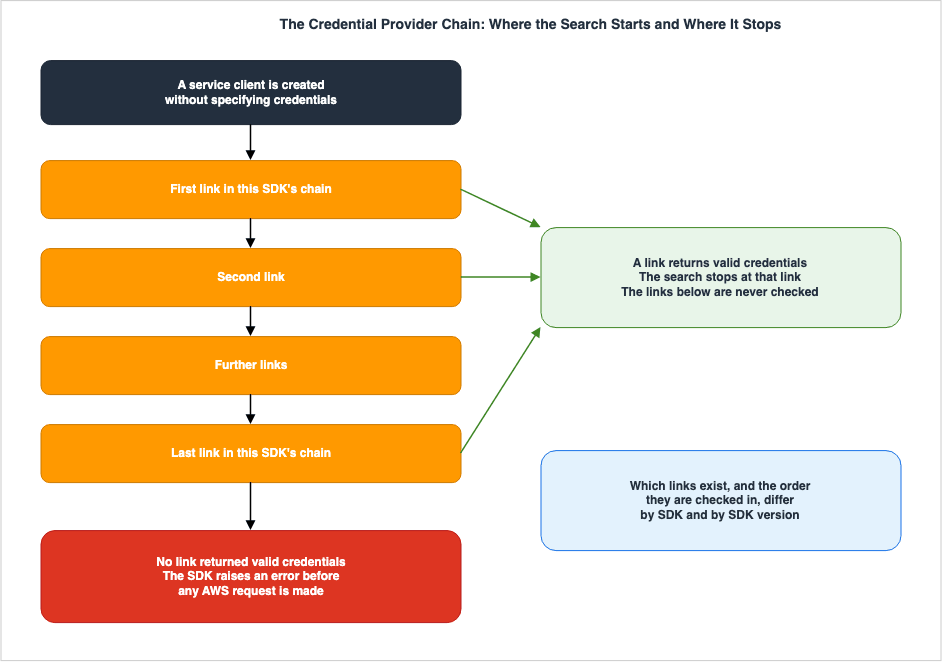
All SDKs have a series of places (or sources) that they check in order to find valid credentials to use
to make a request to an AWS service. After valid credentials are found, the search is stopped.
This systematic search is called the credential provider chain.
There are two key points to understand. First,
in order, meaning that the search process has a specific sequence. Second, After valid credentials are found, the search is stopped, meaning that the search ends as soon as the first set of valid credentials is found.The fact that the search terminates upon finding the first valid set of credentials has a practical consequence. Providers located later in the chain only come into play if the preceding provider returns nothing. Therefore, even when you want a specific provider to be used, it is never reached as long as valid credentials sit somewhere earlier. Adding a new configuration on its own will not cause a switch.
This consequence is also noted in the official documentation, specifically on the IMDS credential provider page.
However, the IMDS credential provider is only checked after several other providers that are in this series.
Therefore, if you want your program use this provider's credentials, you must remove other valid credential
providers from your configuration or use a different profile.
A similar note can be found on the process credential provider page. It's almost identical text, with only the provider name changed. Both pages also include a third option. This allows you to stop the chain search and explicitly specify which provider to use through code. There are three options for using a provider located later in the chain: remove the valid credentials found by a provider earlier in the chain, use a different profile, or name the provider explicitly in code. Adding a new configuration on its own will not cause a switch. This is a fundamental characteristic of the chain mechanism.
2.2 Who Keeps the Credentials Fresh
Chains often provide credentials with a limited lifespan. When that expiry arrives, something has to fetch new ones. The AWS SDKs and Tools Reference Guide covers this on the same page as the definition.When using one of the standardized credential providers, the AWS SDKs always attempt to renew credentials
automatically when they expire. The built-in credential provider chain provides your application with the
ability to refresh your credentials regardless of which provider you are using in the chain.
No additional code is required for the SDK to do this.Refreshing credentials is not the responsibility of the application. As long as you're using a standardized provider, the SDK handles the refresh on its own. This single sentence has a direct impact on the design of long-running processes. There's no reason to write your own code to monitor token expiration if you're using a standard provider.
However, there are exceptions. The process credential provider behaves differently depending on whether the external program returns a JSON object containing an
Expiration field.If the Expiration key isn't present in the tool's output, the SDK assumes that the credentials are long-term
credentials that don't refresh.If the expiration date is not specified, the SDK treats the credential as having no expiration. Consequently, no refresh happens. If you're using a custom script designated as
credential_process and it starts failing after running for a while, you should first suspect this particular behavior.2.3 The Standardized Providers
The AWS SDKs and Tools Reference Guide lists common providers, often found in chains, in a table format. This table highlights frequently used providers, but does not indicate a specific order that all SDKs follow.| Provider | What it Supplies |
|---|---|
| AWS access keys | Access keys for IAM users, such as those provided by AWS_ACCESS_KEY_ID and AWS_SECRET_ACCESS_KEY. |
| Federate with web identity or OpenID Connect | Permissions for roles assumed by passing JWTs from external IdPs to AWS STS. |
| Login credentials provider | Credentials associated with a logged-in console session. |
| IAM Identity Center credential provider | Credentials obtained from IAM Identity Center. |
| Assume role credential provider | Temporary credentials obtained by assuming an IAM role. |
| Container credential provider | Credentials for containers used with Amazon ECS and Amazon EKS. |
| Process credential provider | Credentials obtained from external programs or processes. |
| IMDS credential provider | Credentials from an Amazon EC2 instance profile. |
The same guide also provides separate entries for specific chain entry points for each SDK, including AWS CLI, C++, Go, Java, JavaScript, Kotlin, .NET, PHP, Python (Boto3), Ruby, Rust, Swift, and Tools for PowerShell. The inclusion of these separate entries demonstrates a design consideration recognizing that a single, general list is not sufficient.
3. What Each Link Supplies, and Who Keeps It Fresh
Before the question of order, it helps to pin down what each link supplies and who keeps it fresh. The lifetime of what is supplied, and what happens once that lifetime ends, differ from provider to provider. Chapter 6 covers the login provider that joined in 2025 in full, so this chapter does not repeat it.3.1 AWS Access Keys
The access key provider reads theaws_access_key_id and aws_secret_access_key, and optionally aws_session_token. These can be read from environment variables, shared credentials files, and shared config files. In Java and Kotlin, JVM system properties such as aws.accessKeyId can also be used.The provider's documentation explicitly recommends specific usage practices.
It is recommended to always use the aws_session_token so that the credentials are temporary and no longer
valid after they expire. Using long-term credentials is not recommended.
Earlier on the same page, there is a further warning.
To avoid security risks, don't use IAM users for authentication when developing purpose-built software
or working with real data.
This article will only reproduce these recommendations verbatim. It does not extend what the official documentation says about where long-term access keys lead.
Differences in support are already emerging between different SDKs. The AWS SDK for C++ support table notes that shared
config files are not supported. The entry for AWS Tools for PowerShell V4 indicates that environment variables are not supported. Even when referring to the same access key, the locations from which it can be read vary depending on the SDK.3.2 Web Identity and Assumed Roles
The process involves passing a JWT issued by an external Identity Provider (IdP) to AWS STS, usingAssumeRoleWithWebIdentity to obtain temporary credentials. When passing these via environment variables, use AWS_WEB_IDENTITY_TOKEN_FILE and AWS_ROLE_ARN. When configuring within a profile, use role_arn and web_identity_token_file.Amazon EKS IRSA automatically provides these environment variables to Pods. The design of IRSA and Amazon EKS Pod Identity, and the comparison between them, belongs to the Amazon EKS Pod Identity and IRSA Decision Guide. The key point for this article is that from the SDK's perspective, IRSA is nothing more than an environment variable, and the SDK decides where in the chain it gets read.
The assume role provider takes several settings in the profile. The default value for
duration_seconds is 3600 seconds, and the valid range is from 900 seconds to the maximum session time configured on the role, which can be up to 43200 seconds. To specify the source of the credentials, use source_profile and credential_source. The valid values for credential_source are Environment, Ec2InstanceMetadata, and EcsContainer. source_profile and credential_source cannot both appear in one profile.3.3 IAM Identity Center
IAM Identity Center providers obtain credentials using tokens acquired throughaws sso login. These tokens are cached in the ~/.aws/sso/cache directory. There are two methods for configuring the provider. The recommended SSO token provider configuration refreshes sessions automatically. The legacy configuration does not support automatic refresh, and sessions are fixed at an eight-hour duration.This provider is an unusual example where the documentation itself explicitly addresses potential naming discrepancies.
In the AWS SDK API documentation, the IAM Identity Center credential provider is called the SSO credential provider.In the SDK API documentation it is called the SSO credential provider instead. Class names carry
sso as well, as in Aws::SSOCredentials and SsoCredentialsProvider. A common issue arises when users consult the documentation, memorize the name, and then search the API reference only to find it missing.The behavior when a session expires is also a characteristic worth noting.
Any code that creates a new client will fail authentication as soon as the IAM Identity Center session expires.
This is because the permission set credentials are not cached.
Existing clients keep working, and only newly created clients fail. This can be the cause of long-running processes suddenly being unable to access specific services. The AWS IAM Identity Center Complete Setup Guide covers building Identity Center and designing permission sets.
3.4 Container Credentials
The container credential provider retrieves credentials by sending a GET request to an HTTP endpoint specified via an environment variable. When using Amazon ECS task roles, ECS sets theAWS_CONTAINER_CREDENTIALS_RELATIVE_URI environment variable. This value is appended to the default host, 169.254.170.2. When using Amazon EKS Pod Identity, EKS sets the AWS_CONTAINER_CREDENTIALS_FULL_URI and AWS_CONTAINER_AUTHORIZATION_TOKEN_FILE environment variables.These two environment variables have a precedence relationship.
AWS_CONTAINER_CREDENTIALS_FULL_URI is only used if AWS_CONTAINER_CREDENTIALS_RELATIVE_URI is not set. Therefore, in environments where ECS task roles and a custom endpoint coexist, the custom endpoint will not be used.This provider depends on the environment variables being there at all. If they are not set, the search moves on to the next step. Running inside a container is not by itself enough for this provider to fire.
On AWS Lambda, functions with SnapStart activated also use this provider. The SnapStart activation page of the Lambda developer guide states:
When SnapStart is activated, the Lambda runtime automatically uses the container credentials (AWS_CONTAINER_CREDENTIALS_FULL_URI and AWS_CONTAINER_AUTHORIZATION_TOKEN) instead of the access key environment variables.How these credential endpoints and the Instance Metadata Service check the caller on the platform side, and what the sources say about closing them, is compared across EC2, ECS, EKS, and Lambda in Metadata Endpoints Across AWS Compute.
3.5 Process Credentials
The process credential provider executes an external program specified in the sharedconfig file under the credential_process setting, and reads the JSON output from its standard output. The JSON keys are Version, AccessKeyId, SecretAccessKey, SessionToken, Expiration, and AccountId. As of this writing the Version key must be set to 1.AccountId is an optional key, and the primary sources give the effect of supplying it in one line.AccountId is optional so credentials work without it, but providing it enables optimized endpoint resolution
for services that support it. When the SDK knows which account the credentials belong to, certain AWS services
can use account-specific endpoints.The result of credential resolution can influence how the destination is resolved. There is a qualifier, though. It applies only to services that support account-specific endpoints. That connection is the subject of Endpoint Resolution in the AWS SDKs and CLI itself, so this article hands it off here.
There are also important considerations regarding caching.
The SDK does not cache external process credentials the way it does assume-role credentials.
If caching is required, you must implement it in the external process.
Resolved role credentials are cached, but credentials obtained from the external process are not cached. It is necessary to design the system with the assumption that the external program will run every time it is called. Furthermore, the external program can inform the SDK of a retrieval failure by returning a non-zero exit code.
IAM Roles Anywhere utilizes this provider to obtain temporary credentials. AWS IAM Inbound Workload Federation covers the design of Roles Anywhere, OIDC, and SPIFFE.
3.6 The Instance Metadata Service
The IMDS credential provider retrieves credentials for the role assigned to an EC2 instance from the instance metadata. The default endpoint ishttp://169.254.169.254 when ec2_metadata_service_endpoint_mode is IPv4, and http://[fd00:ec2::254] when it is IPv6. The default value of ec2_metadata_service_endpoint_mode is IPv4.On the version used by default, the primary sources say this.
Instance Metadata Service Version 2 (IMDSv2), a more secure version of IMDS that uses a session token,
is used by default. If that fails due to a non-retryable condition (HTTP error codes 403, 404, 405),
IMDSv1 is used as a fallback.
This fallback is not available in all SDKs. The corresponding table on the same page includes notes indicating that the AWS SDK for Kotlin and AWS SDK for Rust do not perform a fallback to IMDSv1. The settings page that controls the fallback adds
New SDKs don't support IMDSv1 and, thus, don't support this setting. This article only addresses the current default, as the history of IMDSv2 becoming the default is documented in AWS Security Defaults History.It is possible to configure this provider to be disabled. The default value for
AWS_EC2_METADATA_DISABLED is false, and setting it to true will prevent the use of IMDS for credential retrieval. Furthermore, the following statement applies:AWS SDK clients configured with valid credentials will never use IMDS to retrieve credentials,
regardless of any of these settings.If valid credentials already exist, IMDS will not be called. This restates the stop condition from Chapter 2, and shows the chain behaving exactly as defined.
4. Where the Chains Actually Differ
This is the core of the article. Putting the search order published in each SDK's developer guide side by side shows where they agree and where they do not.4.1 How the Steps Are Counted
Before any comparison, the unit being counted has to be defined. The step count in this chapter is the number of items each SDK's developer guide lists at the top level that name a source of credentials. The item some lists place at the end, describing what happens when nothing is found anywhere, is not counted. Nested sub-items are not counted either. The definition matters because the apparent number of steps in the same chain moves with the granularity you choose.The verification date is September 19, 2026 in every case.
| SDK or Tool | Top-Level Steps | Source Page |
|---|---|---|
| AWS CLI v2 | 10 | Authentication and access credentials for the AWS CLI |
| AWS SDK for Python (Boto3) | 12 | Credentials |
| AWS SDK for JavaScript 3.x | 6 | Credential providers |
| AWS SDK for Java 2.x | 6 | Default credentials provider chain in the AWS SDK for Java 2.x |
| AWS SDK for Go V2 | 4 | Configure the SDK |
| AWS SDK for .NET 4.x | 9 | Credential and profile resolution |
| AWS SDK for Ruby 3.x | 8 | Using AWS SDK for Ruby credential providers |
| AWS SDK for Kotlin | 6 | Credentials providers |
| AWS SDK for C++ | 7 | Using AWS SDK for C++ credential providers |
The step count ranges from 4 to 12. Differences in granularity alone do not account for that. The actual set of providers included and their order differ.
A note is required for the JavaScript entry. The developer guide for AWS SDK for JavaScript 3.x does not present the v3 search order as a standalone numbered list. The order appears instead on the page that explains the migration from v2 to v3. That page lists the order for v2 and then states
The credential sources and fallback order does not change in v3. The 6 in the table above is the count of items in that list.4.2 Chains Nested Inside Chains
Part of the spread in step counts comes from the chain not being flat. Both the AWS SDK for Java 2.x and the AWS SDK for Kotlin carry a smaller chain inside the step that reads a profile from the shared files.In Java 2.x, the fourth top-level step reads the shared
credentials file and the shared config file. Within that, the ProfileCredentialsProvider delegates to different providers based on the settings defined in the profile. These delegated providers include web identity tokens, SSO, roles with a source_profile, roles with a credential_source, console logins, processes, session credentials, and basic credentials. So the same web identity token is handled at step 3 when it arrives through environment variables, and inside step 4 when it is written in the profile.Kotlin carries the same structure. Its fourth top-level step is the profile, and inside it the defined order runs access keys, assume role, web identity, SSO token, legacy SSO, login, and process.
This nesting is unreadable from a flat list of the search order. When a profile carries several settings at once, the nested order inside that step decides which one wins.
4.3 Which Comes First, the Shared Files or the Web Identity Token
The most problematic discrepancies often occur in the scenarios mentioned in Chapter 1. When a web identity token passed through environment variables and an access key in the sharedcredentials file are both present, which one wins?| SDK or Tool | Checked First | Where the Order Comes From |
|---|---|---|
| AWS CLI v2 | Web identity | Step 4 is assume role with web identity; step 6 is the credentials file. |
| AWS SDK for Python (Boto3) | Web identity | Step 5 is the assume role with web identity provider; step 7 is the shared credential file. |
| AWS SDK for Java 2.x | Web identity | Step 3 is the web identity token and IAM role ARN; step 4 is the shared files. |
| AWS SDK for Go V2 | Web identity | The web identity token sits inside step 1, the environment variables; step 2 is the shared files. |
| AWS SDK for .NET 4.x | Web identity | Step 4 is AWS_WEB_IDENTITY_TOKEN_FILE and AWS_ROLE_ARN; steps 5 through 7 are profiles. |
| AWS SDK for Kotlin | Web identity | Step 3 is the web identity token; step 4 is the profile. |
| AWS SDK for C++ | Shared files | Step 1 covers both the environment variables and the shared credentials file; step 2 is web identity. |
| AWS SDK for Ruby 3.x | Shared files | Step 1 maps to Aws::Credentials and Aws::SharedCredentials; step 2 is web identity. |
| AWS SDK for JavaScript 3.x | Shared files | Step 2 is the shared credentials file; step 5 is the OIDC token. |
The behavior is inconsistent. Neither the age of the SDK nor the split between compiled and scripting languages accounts for which side an SDK lands on. In the order each publishes, the AWS SDK for Rust and the AWS SDK for Swift both place the shared files ahead of the web identity token.
This difference becomes apparent not in environments where only one option exists, but in those where both options are present. For example, within a Pod where IRSA is configured, but the image still contains
~/.aws/credentials. Or, in a CI runner, where after configuring OIDC federation, older access keys remain configured. Neither situation is rare.The earlier Amazon EKS Pod Identity and IRSA Decision Guide covers the fact that IRSA and Pod Identity insert themselves ahead of the instance profile in the chain. That description is correct and does not contradict the content of this chapter. The instance profile, that is IMDS, sits near the end of the chain in every SDK named in this chapter. This chapter is about a point much earlier in the chain, where the shared files are a separate link altogether.
4.4 The Order Changes with the Version
The tables presented so far represent specific points in time. The search order can change with the SDK version. This is not speculation; it is explicitly stated in the primary sources.The AWS SDK for Kotlin developer guide includes a warning at the beginning of the credentials provider page.
The order in which the default credential provider chain resolves credentials changed with version 1.4.0.
For details, see the note below.
Further down the same page, the guide spells out what changed.
The ordering of credentials resolution described above is current for the 1.4.x+ release of the SDK for Kotlin.
Before the 1.4.0 release, items number 3 and 4 were switched and the current 4a item followed the current 4g item.
The swap of steps 3 and 4 means that prior to version 1.4.0, the AWS SDK for Kotlin would look for profiles before examining web identity tokens. In the table from the previous section, Kotlin moved from one group to another at version 1.4.0.
A minor version bump can change the identity that gets resolved. This is why every row in this article names the version it was checked against. A table of the search order that does not name a version can turn false the month after it is written.
4.5 Support Also Splits by Version
It is not only the order that splits by version. Whether a provider is supported at all does too. The AWS SDKs and Tools Reference Guide provides tables for each provider detailing their compatibility. In the table covering login providers (discussed in Chapter 6), it states that AWS SDK for Java 2.x is supported, while AWS SDK for Java 1.x is not. Similarly, AWS SDK for JavaScript 3.x is supported, but 2.x is not. AWS Tools for PowerShell V5 is supported, while V4 is not.One row in the same table runs the other way. It indicates that AWS SDK for Go V2 is not supported, while AWS SDK for Go 1.x is. It reads as the newer major version being the one without support. Chapter 8 returns to this row.
Some rows also specify conditions for compatibility. The row for AWS SDK for Python (Boto3) indicates support, but includes the note
Requires CRT. This means that AWS Common Runtime is required.Saying that an SDK supports a provider therefore does not hold up unless the major version and any extra dependency come with it. This is why this article does not attempt to create its own comprehensive compatibility table, instead deferring to the official table. The canonical source for per-provider support is the
Support by AWS SDKs and tools table on each provider's page in the AWS SDKs and Tools Reference Guide.5. Precedence Is a Separate Mechanism
Everything so far has been about the search order. This chapter addresses a different mechanism. What happens when multiple layers attempt to set the same value – which one takes precedence? The two mechanisms get conflated easily, and the primary sources show why.5.1 The Settings Lookup Has Six Levels
The settings reference in the AWS SDKs and Tools Reference Guide has a section calledPrecedence of settings. These are the six levels it lists.| Level | What Is Checked |
|---|---|
| 1 | Values explicitly configured in code or service clients |
| 2 | JVM system properties (Java and Kotlin only) |
| 3 | Environment variables |
| 4 | Shared credentials file |
| 5 | Shared config file |
| 6 | Default values within the SDK's source code |
Level 1 carries a clarification. Certain settings can be set per operation. In the AWS CLI and AWS Tools for PowerShell, these are the command-line arguments. In the SDK, these are the arguments passed when creating clients or configuration objects.
Level 5 carries a clarification too. Which profile gets read comes from the
AWS_PROFILE environment variable, or in Java and Kotlin from the aws.profile system property.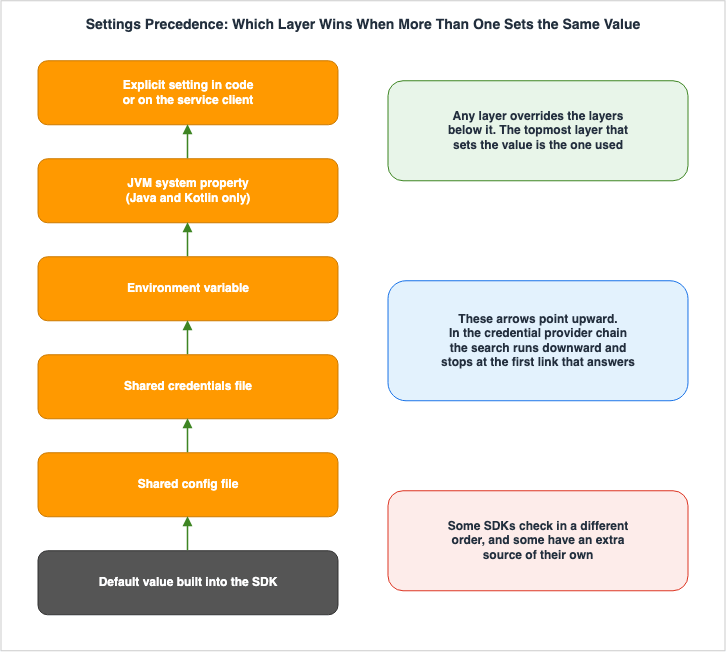
5.2 The Arrow Runs the Other Way
Draw the chain from Chapter 2 and the precedence from this chapter, and the arrows point in opposite directions.The chain searches from top to bottom, stopping as soon as a match is found. What comes first wins because the search never reaches what comes after. To use a link further down, you remove the ones above it.
Precedence overrides from the bottom up. Even when a lower layer holds a value, a value in a higher layer is the one that gets used. To use a value from a higher layer, put the value in that layer. There's no need to remove values from lower layers.
The primary sources make the difference explicit as well. The section on precedence puts it this way.
If you configure an environment variable with a setting and value, it would override that setting in both
the credentials and config files. And finally, a setting on the individual operation (AWS CLI command-line
parameter or API parameter) or in code would override all other values for that one command.
The word used here is
override. The chain's definition says the search is stopped instead. Although the results may appear similar, the underlying mechanisms for overwriting and stopping are different. The diagram was split into two parts because attempting to represent this difference in a single diagram would result in contradictory arrow directions.5.3 Why the Two Get Confused
There is a reason the two get conflated so readily. The primary sources use nearly identical phrasing for both.The chain definition was as follows:
All SDKs have a series of places (or sources) that they check in order to find valid credentials to use
to make a request to an AWS service.
The precedence definition reads as follows.
All SDKs have a series of places (or sources) that they check in order to find a value for global settings.The opening runs identical word for word as far as
All SDKs have a series of places (or sources) that they check in order to find, and diverges only after that. One searches for valid credentials, while the other searches for global settings values. It's natural to interpret these two mechanisms as being the same, given that they are described using such similar sentence structures.The AWS CLI User Guide, for its part, places its own chain under the heading
Configuration and credential precedence. The heading says precedence, yet the ten items listed mix settings layers, such as command-line options and environment variables, with credential sources, such as role assumption and container credentials. The same word points at a different mechanism depending on which guide you are reading.5.4 What Changes When You Switch Profiles
TheAWS_PROFILE variable determines which profile is read at the fifth level of precedence. However, profiles within shared config files can contain settings beyond credentials. You can specify regions, and configure settings on a per-service basis.Switching
AWS_PROFILE therefore changes more than the identity you call as. It can change the destination at the same time. Endpoint Resolution in the AWS SDKs and CLI covers the destination side. What matters here is that one profile spans both mechanisms.You can also change the location of the shared files themselves. You can specify the location of the
config file using AWS_CONFIG_FILE, and the location of the credentials file using AWS_SHARED_CREDENTIALS_FILE. In Java 2.x and Kotlin, you can also use system properties called aws.configFile and aws.sharedCredentialsFile. The AWS SDK for Java 1.x does not support these system properties. This is another example of version-specific differences.There are also SDK-specific settings. The AWS SDK for Ruby has an environment variable called
AWS_SDK_CONFIG_OPT_OUT. If this variable is set, the shared config file will no longer be read for credentials. This environment variable is unique to that SDK.5.5 The Caveat the Primary Sources Attach
The six levels of precedence carry a note at the end.Some SDKs and tools might check in a different order. Also, some SDKs and tools support other methods of
storing and retrieving parameters. For example, the AWS SDK for .NET supports an additional source called
the SDK Store.The same caveat attached to the search order is attached to precedence as well. The six levels are the standard, but they are not a guarantee that every SDK behaves this way. The SDK Store, which is mentioned as an example, is a specific storage location for the AWS SDK for .NET and does not exist for other SDKs.
When reviewing the AWS SDK for .NET profile resolution documentation, you will see that if
AWSProfilesLocation is not configured, it first searches the SDK Store, then searches for a shared credentials file in the default location, and only if it cannot find it there, does it search for a config file. There is one more layer ahead of the fourth and fifth of the six levels.6. The Link That Was Added Most Recently
The chain is not a fixed historical fact, as the introduction said. The subject of this chapter is its most recent example.6.1 What Was Added, and When
On November 19, 2025, a mechanism was announced for obtaining credentials for programmatic access from AWS Management Console sign-in credentials. What's New states the following.This feature is available in all commercial AWS regions.Using it carries a version requirement on the AWS CLI. The prerequisites in the AWS CLI User Guide put it this way.
A minimum version of 2.32.0 is required to use the aws login command.IAM permissions are also required. While no additional permissions are needed when using the root user, the same page indicates that when using IAM users, roles, or groups, you must attach the
SignInLocalDevelopmentAccess managed policy.When each major version of the AWS CLI and the AWS SDKs became generally available, and which phase of the maintenance policy each is in, is listed in AWS History and Timeline regarding AWS SDKs and the AWS CLI on this site.
6.2 What Happens When You Run It
When you runaws login, a browser window opens, and you are authenticated. On completion the CLI writes a login_session setting into the profile you named. The value is the console session ID selected during the login process.[profile console]
login_session = arn:aws:iam::123456789012:user/username
region = us-west-2The actual credentials are not stored in this file. Short-term credentials and refresh tokens are stored as JSON files in a separate directory. On Linux and macOS, this is
~/.aws/login/cache; on Windows, it's %USERPROFILE%\.aws\login\cache. The location can be modified using the AWS_LOGIN_CACHE_DIRECTORY environment variable.There are also options for devices without a browser. Using
aws login --remote displays a URL. You then authenticate in a browser on another device, copy and paste the authorization code, and complete the process. Same-device and cross-device authentication take separate IAM controls. The corresponding resource ARNs are arn:aws:signin:region:account-id:oauth2/public-client/localhost and arn:aws:signin:region:account-id:oauth2/public-client/remote.Commands are also available to terminate sessions.
aws logout clears the cache for the default profile. aws logout --profile clears the cache for the specified profile. aws logout --all clears the cache for all profiles that use login credentials.6.3 Lifetime and Refresh
Three pages describe the lifetime, and the AWS CLI User Guide is the most specific of them.The AWS CLI and SDKs will automatically refresh the cached credentials every 15 minutes as needed.
The overall session will be valid for up to the set session duration of the IAM principal
(maximum of 12 hours), after which you must run aws login again.Credentials are refreshed every fifteen minutes, and the session as a whole stays valid up to the session duration set on the IAM principal, with twelve hours as the ceiling. Fifteen minutes and twelve hours refer to two different things. The former is the lifetime of one set of credentials. The latter is the total span before a fresh login is required.
6.4 Bridging to Environments That Do Not Support It
The new link is not present in every SDK. As Chapter 4 showed, support splits by major version. The AWS CLI User Guide carries an official workaround for environments that do not support it.Older versions of the AWS SDKs or other development tools may not support console credentials yet.
As a workaround, you can configure the AWS CLI to serve as a process credentials provider.In concrete terms, you add a second profile whose
credential_process points back at the profile you logged in with.[profile signin]
login_session = arn:aws:iam::123456789012:user/username
region = us-east-1
[profile process]
credential_process = aws configure export-credentials --profile signin --format process
region = us-east-1The newest link in the chain is delivered by way of one of its oldest links. The process credential provider from Chapter 3 is what bridges the gap here. It is a clear example of the links not being independent of one another.
6.5 The Name Is Not Settled
This feature carries several names across the primary sources. The ones confirmed so far follow.| Document | Name Used |
|---|---|
| AWS SDKs and Tools Reference Guide (Table of Contents) | Login provider |
| Same guide (Page Titles and List) | Login credentials provider |
| AWS SDK for Ruby Developer Guide | Login credential provider |
| AWS SDK for C++ Developer Guide | Login credential identity resolver with AWS Signin |
| AWS SDK for Java 2.x Developer Guide | Console login credentials |
| AWS SDK for Kotlin Developer Guide | Login configuration |
There are six different names used. Class and function names are also inconsistent. Ruby uses
Aws::LoginCredentials, Java uses LoginCredentialsProvider, JavaScript uses fromLoginCredentials(), and PHP uses LoginCredentialProvider.This article will refer to the command as
aws login and align the provider name with the page title in the AWS SDKs and Tools Reference Guide. The other names stay in this section, because any of them can be the reason a search comes back empty.7. Reading the Failure
There are two ways the chain fails. Whether you can distinguish between these two failure modes will determine what you should investigate next.7.1 Nothing Was Found
When the chain runs to the end without finding valid credentials, the SDK fails there. The way this failure manifests varies depending on the language.The AWS SDK for Java 2.x throws an exception. The output described in the developer guide looks like this:
software.amazon.awssdk.core.exception.SdkClientException: Unable to load credentials from any of the providers
in the chain AwsCredentialsProviderChain(credentialsProviders=[SystemPropertyCredentialsProvider(),
EnvironmentVariableCredentialsProvider(), WebIdentityTokenCredentialsProvider(), ProfileCredentialsProvider(),
ContainerCredentialsProvider(), InstanceProfileCredentialsProvider()])
It is worth knowing two things about this message before reading it. The names inside the parentheses cover only the top-level providers. As seen in Chapter 4, the profile reading stage has another chain nested within it, but the details of that chain are not reflected in the message. Providers such as
LoginCredentialsProvider and SsoCredentialsProvider, which the same guide lists as delegates for ProfileCredentialsProvider, do not appear here. The absence of names in the message does not mean that those providers were not attempted. Rather, it may indicate that a corresponding configuration for that profile was not found.The AWS SDK for Rust fails in a different way. The developer guide states that if credentials cannot be resolved, the operation will panic. The AWS SDK for Kotlin states that client creation will fail with an exception. For the AWS SDK for JavaScript, the developer guide describes the v2 chain as throwing an error once every provider has failed.
What they all have in common is that these failures occur before any calls are made to AWS. This is independent of the network or service involved.
7.2 Something Was Found, but It Lacks Permissions
Another scenario is when the credentials are found, but the identity they belong to lacks the permission being asked for. In this case, the chain is successful. The failure occurs within AWS's authorization process.The locations to investigate differ in these two cases. When credentials are not found, the issue typically stems from a local environment problem, so you should examine environment variables, shared files, and the contents of your profiles. Conversely, when the failure is due to insufficient permissions, it indicates an IAM issue, and you should trace which statement ultimately resulted in the denial. Information on how to investigate the latter scenario can be found in the AWS IAM AccessDenied Reference.
7.3 Checking Which Identity Is Resolved
To tell the two failures apart, the fastest route is to look at the resolved identity. The AWS CLI provides theaws sts get-caller-identity command. The AWS CLI User Guide also uses this command to verify identity after logging in.When you run the command specifying a profile, you can see the identity that profile resolves to. Comparing the results with and without environment variables set allows you to determine which configuration layer is taking effect. That means walking the six levels from Chapter 5 one at a time to find where the value is being decided.
8. Where the Primary Sources Disagree
Writing this article surfaced several inconsistencies within AWS's own documentation. They are set out below, separating the ones where a single source can be confirmed as correct from the ones where it cannot. All information was verified on September 19, 2026.8.1 The AWS SDK for Go V2 and the Login Provider
The AWS SDKs and Tools Reference Guide has a table detailing supported login providers. In that table the row forSDK for Go V2 (1.x) reads No, and the row for SDK for Go 1.x (V1) reads Yes.The AWS SDK for Go V2 developer guide, meanwhile, carries a section titled
Login credentials. It walks through running aws --profile dev-profile login and passing config.WithSharedConfigProfile("dev-profile") to config.LoadDefaultConfig.These two pieces of information appear to contradict each other directly. This article does not attempt to determine which is correct. The AWS SDKs and Tools Reference Guide carries the support table, and the AWS SDK for Go V2 developer guide carries the procedure. If you are actually using AWS SDK for Go V2, it is best to verify this information with the version you have.
8.2 The Login Provider Is Absent from the AWS CLI Precedence List
The authentication page of the AWS CLI User Guide carries two things side by side. One is a table listing the recommended order of authentication methods, with AWS Management Console credentials at the top, marked(Recommended). The other is a list of ten items defining the configuration and credential precedence.The login provider does not appear in this list of ten items. The list includes command-line options, environment variables, role assumption, web identity role assumption, IAM Identity Center, the
credentials file, custom processes, the config file, container credentials, and EC2 instance profiles.This article points out only that the authentication method listed at the top of the recommended table on the same page is not included in the list on that same page. Where in the order the resolution happens is not something the list lets you read off.
8.3 How the Lifetime of Login Credentials Is Described
Three different documents describe the lifetime of login credentials, each at a different level of detail.| Document | Description |
|---|---|
| AWS SDKs and Tools Reference Guide | Short-term credentials expire after fifteen minutes, and the CLI and SDK automatically refresh them, up to a maximum of twelve hours as needed. |
| AWS CLI User Guide | Cached credentials are refreshed every fifteen minutes, and the overall session remains valid for the IAM principal's session time, up to a maximum of twelve hours. |
| AWS SDK for JavaScript Developer Guide | Credentials are automatically refreshed five minutes before expiration, and a single set of credentials remains valid for up to twelve hours. |
Only the third attaches the twelve hours to something different. In the first two, twelve hours is the length of the whole session. In the third, it reads as the validity of one set of credentials.
This article will follow the style of the AWS CLI User Guide. That description is the only one that states what each of the two numbers refers to. The five minutes named in the AWS SDK for Kotlin developer guide is SDK-side behavior, an attempt to refresh once expiry is under five minutes away, and it lines up with what the AWS SDK for JavaScript guide describes.
8.4 Names for the Same Feature
As mentioned in Chapter 6, six different names for the login provider appear across the primary sources alone. For the IAM Identity Center provider, the primary sources state the discrepancy themselves. The SDK API documentation calls it theSSO credential provider.There are documented discrepancies, as well as undocumented ones. The latter can lead to situations where searches yield no results.
9. Failure Modes and Anti-Patterns
This chapter turns everything above into things the reader actually does. Each one reads as correct on the page, and fails when followed.9.1 Memorizing a Single Table of the Search Order
The most basic mistake is taking the order you confirmed in one language and applying it to the others. As Chapter 4 showed, even the order of the shared files and the web identity token splits.If you're working with multiple languages, open the developer guide for each language individually. The standardized list in the AWS SDKs and Tools Reference Guide is intended to provide a common framework. However, the guide itself explicitly states that the actual order can differ for each SDK, and it provides separate entry points to dedicated pages for each SDK.
9.2 Writing Down the Order Without the Version
The AWS SDK for Kotlin swapped two steps of its search order in version 1.4.0. If an order table goes into your team's runbook, put the version you consulted and the date you consulted it in that same table. This will help identify it as a document to review when the SDK is updated.9.3 Adding Settings to Reach a Later Provider
The chain searches from the front and stops at the first hit. Adding the settings for a provider further down the chain will not switch anything over. As the primary sources state, you either remove the valid credentials sitting earlier in the chain, use a different profile, or name the provider explicitly in code.9.4 Assuming That Running in a Container Is Enough
The container credential provider assumes that environment variables are configured. If those environment variables are not set, the process will proceed to the next step. Furthermore,AWS_CONTAINER_CREDENTIALS_FULL_URI is only used when AWS_CONTAINER_CREDENTIALS_RELATIVE_URI is not configured. There's a possibility that a configuration exists where both are set, but the user is unaware that the latter is taking effect.9.5 Omitting the Expiration from the External Process Output
If thecredential_process returns a JSON object without an Expiration field, the SDK will treat it as a credential with no expiration date and will not attempt to refresh it. If the external process is returning short-lived credentials but not specifying an expiration date, it may function correctly for a while, but eventually fail. Furthermore, the SDK does not cache credentials obtained from external processes. Caching, where it is needed, belongs in the external process itself.9.6 Leaving Old Credentials in an Image or a Runner
This applies to scenarios described in Chapter 1 and Chapter 4. Even if you configure a new authentication method, if older settings remain, depending on the language, those older settings might take precedence. During transitions, you'll need to remove settings with the same effort you put into adding them. To verify that settings have been removed, quickly check the identity returned byaws sts get-caller-identity.9.7 Drawing Both Mechanisms in One Diagram
The chain's arrows run from top to bottom, and precedence's arrows run from bottom to top. When combined into a single diagram, one of the directions will inevitably be incorrect. When explaining, it's best to present them in separate diagrams.10. Frequently Asked Questions
The answers provided in this section are all based on the primary sources discussed throughout this text. The answers are concise, so following an answer back to its evidence means reading the chapter it came from.Is the search order the same in every SDK?
No. The AWS SDKs and Tools Reference Guide statesAlthough the distinct chain used by each SDK varies, and gives each SDK its own dedicated page. As outlined in Chapter 4 of this article, the top-level step count ranges from four to twelve, and the order of the shared files and the web identity token splits as well.Are the search order and the settings precedence the same thing?
No. The search order is the mechanism that looks for valid credentials from the front and stops at the first hit. Settings precedence is the mechanism that decides which value is used when several layers carry the same setting. In the former, the first one encountered wins; in the latter, the higher layer overrides the lower layer. The primary sources treat the two on separate pages.Can upgrading an SDK change which identity is resolved?
Yes. The AWS SDK for Kotlin swapped two steps of its search order in version 1.4.0, and the developer guide states so. Where several configurations are present at once, a change of order can change the identity that gets resolved. When documenting the order, be sure to include the version number and the date of verification.Does the application have to handle credential expiration?
No. As long as you are using a standardized provider, the SDK attempts the refresh on its own. The primary sources stateNo additional code is required for the SDK to do this. The process credential provider is the exception: it does not refresh unless the external program returns an Expiration value.Can aws login be used in every environment?
No. The AWS CLI has version requirements, and at a minimum, version 2.32.0 is required. The SDK also has different compatibility based on its major version. The row for the AWS SDK for Python (Boto3) carries a note that the AWS Common Runtime is required. For environments that are not supported, there is an official workaround that allows you to use the AWS CLI as a process credential provider.Why does a Pod run as a different identity even though IRSA is configured?
One likely cause is a sharedcredentials file left inside the container image or on the runner. As Chapter 4 showed, the AWS SDK for C++, the AWS SDK for Ruby, and the AWS SDK for JavaScript 3.x check the shared files before the web identity token. Verify the resolved identity using aws sts get-caller-identity and remove any remaining configurations.How do you stop the SDK from using the instance metadata service for credentials?
SettingAWS_EC2_METADATA_DISABLED to true stops IMDS from being used for credential retrieval. The default value is false. The primary sources also note that clients already configured with valid credentials will never use IMDS, regardless of this setting.Does switching profiles change anything besides the credentials?
Yes. The profiles in the sharedconfig file can also include settings specific to regions and services. Switching AWS_PROFILE moves those along with it. The identity you call as and the destination you call sit in one unit.11. Summary
This article outlines key points, presented in a way that can aid in decision-making.The chain searches from the front and stops the moment it finds something. To reach a provider further down the chain, you either remove the valid credentials found earlier, use a different profile, or name the provider explicitly in code. Adding new settings on its own will not trigger a switch. The primary sources name the same three.
The order in which providers are checked varies depending on the SDK. While the AWS SDKs and Tools Reference Guide outlines a common framework, it states that the specific implementation differs between SDKs. The top-level step count ranges from four to twelve. The order of the shared files and the web identity token splits as well.
The order can also change depending on the version. The AWS SDK for Kotlin swapped two steps in version 1.4.0. Support for specific providers may also be version-dependent. If you document the order, be sure to include the version and the date you verified it.
The search order and settings precedence are separate mechanisms. The primary sources describe both in nearly the same sentence frame, which is where the confusion starts. A helpful clue to differentiate them is the direction of the arrows.
The chain keeps gaining new links. Some SDKs support the console sign-in credentials added in November 2025 and others do not. The official workaround is to route through the process credential provider, one of the oldest links.
Failures can be categorized in two ways. Failures due to credentials not being found indicate a local issue that occurs before AWS is contacted, while failures related to insufficient permissions point to an IAM issue. Examining the resolved identity can help with troubleshooting.
One last note on what this article left out. How the resolved credentials decide the destination is the subject of Endpoint Resolution in the AWS SDKs and CLI. How a signature is attached to them is the subject of AWS Signature Version 4 Request Signer and Explainer. The observation that SDK defaults differ by language appeared on this blog earlier, applied to retry defaults. That is the ground LLM Inference Resilience Patterns on AWS covers, and this article applies the same observation to a different mechanism.
12. References
The primary sources this article draws on follow. The verification date is September 19, 2026 throughout.- AWS SDKs and Tools standardized credential providers - AWS SDKs and Tools Reference Guide
- AWS SDKs and tools settings reference - AWS SDKs and Tools Reference Guide
- AWS access keys - AWS SDKs and Tools Reference Guide
- Assume role credential provider - AWS SDKs and Tools Reference Guide
- IAM Identity Center credential provider - AWS SDKs and Tools Reference Guide
- How IAM Identity Center authentication is resolved for AWS SDKs and tools - AWS SDKs and Tools Reference Guide
- Login credentials provider - AWS SDKs and Tools Reference Guide
- Using console credentials to authenticate AWS SDKs and tools - AWS SDKs and Tools Reference Guide
- Container credential provider - AWS SDKs and Tools Reference Guide
- Process credential provider - AWS SDKs and Tools Reference Guide
- IMDS credential provider - AWS SDKs and Tools Reference Guide
- Using environment variables to globally configure AWS SDKs and tools - AWS SDKs and Tools Reference Guide
- Finding and changing the location of the shared config and credentials files of AWS SDKs and tools - AWS SDKs and Tools Reference Guide
- Authentication and access credentials for the AWS CLI - AWS Command Line Interface User Guide
- Login for AWS local development using console credentials - AWS Command Line Interface User Guide
- Credentials - AWS SDK for Python (Boto3) Documentation
- Default credentials provider chain in the AWS SDK for Java 2.x - AWS SDK for Java Developer Guide
- SDK authentication with AWS - AWS SDK for JavaScript Developer Guide
- Credential providers - AWS SDK for JavaScript Developer Guide
- Configure the SDK - AWS SDK for Go V2 Developer Guide
- Credential and profile resolution - AWS SDK for .NET Developer Guide
- Using AWS SDK for Ruby credential providers - AWS SDK for Ruby Developer Guide
- Credentials providers - AWS SDK for Kotlin Developer Guide
- Using AWS SDK for C++ credential providers - AWS SDK for C++ Developer Guide
- Using AWS SDK for Rust credential providers - AWS SDK for Rust Developer Guide
- Using AWS SDK for Swift credential providers - AWS SDK for Swift Developer Guide
- AWS enables developers to use console credentials for AWS CLI and SDK authentication - AWS What's New
References:
Tech Blog with curated related content
Written by Hidekazu Konishi