Endpoint Resolution in the AWS SDKs and CLI - How One Region Name Becomes One URL, Which Layer Wins, and Why the Precedence Lists Do Not Match
First Published:
Last Updated:
What handles that assembly is endpoint resolution. Both the AWS SDKs and the AWS CLI decide the destination on their own, immediately before a request goes out. How they decide is published, and the primary sources carry it. The problem is that more than one list answers the same question, and their contents differ.
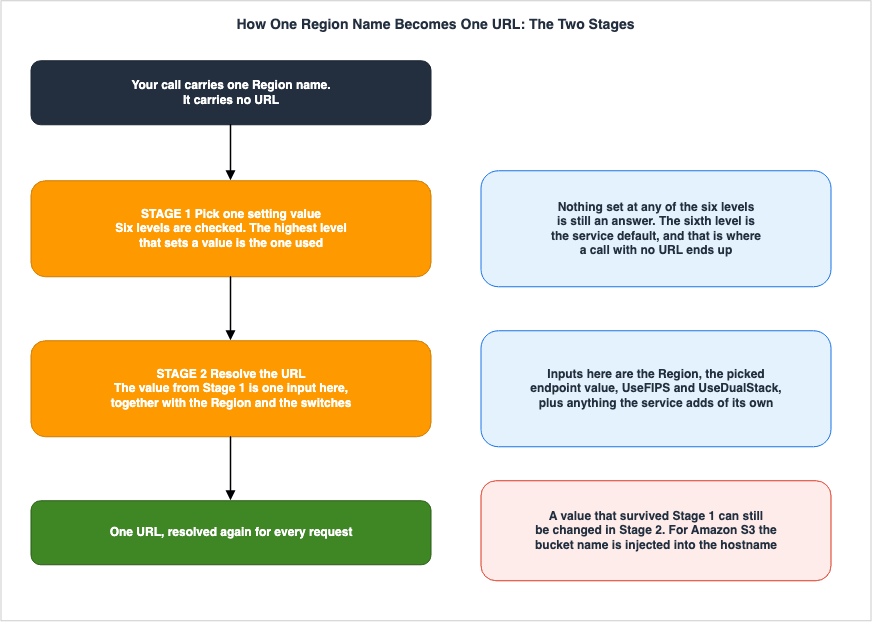
A commonly circulated understanding runs roughly like this. Put one URL in an environment variable, and that is the destination. The understanding is only half right. Settling a destination takes two stages, and an environment variable carrying a URL acts on Stage 1 alone. The value picked in Stage 1 is not necessarily the value used in Stage 2.
This article takes those two stages as its subject. It is not an introduction to the feature itself, but rather an examination of how one region name becomes one URL, read one layer at a time. The intended audience is those who have pointed a destination at a local emulator or an S3-compatible service, and those who turned on the FIPS or dual-stack switch and did not get the URL they expected.
To begin with, the key takeaway in this area is this. Stage 1 only decides which setting value to take, and the URL itself is not settled there. Stage 2 takes that value, together with the region and the switches, and assembles the actual hostname. Read as one mechanism, neither the case where an environment variable is set and the destination does not move, nor the case where nothing is set and it does, can be accounted for.
One more point belongs up front. A matching count of six does not make two lists the same list. The precedence for settings in general has six levels, the precedence for endpoints has six levels, and their contents are not the same. At least five places carry a list answering the same question, and neither the number of levels nor the scope lines up across them. Memorizing the count without checking which list is in front of you applies the order from a different list.
All specifications presented in this article have been verified against official AWS documentation. The verification date is September 19, 2026. Several discrepancies turned up within AWS's own documentation during that process. Chapter 9 sets them out with citations, placed side by side without declaring which one is correct.
The division of labor with the earlier articles belongs up front as well. This article covers only how the destination is settled, and covers neither which identity the call is made as nor what happens once the request arrives. Which identity the call is made as belongs to The AWS Credential Provider Chain Across SDKs and the CLI, and what breaks in the default checksum once the destination is moved off AWS belongs to Default Checksums and Data Integrity in Amazon S3. An endpoint inside a VPC carries the same name but sits at a different layer, and AWS PrivateLink and VPC Endpoints Complete Guide covers it.
Table of Contents
- 1. The Destination You Never Configured
- 2. Two Things Are Called an Endpoint
- 3. Stage 1 - Which Setting Value Is Picked
- 4. Different Answers to the Same Question, Depending on the Source Material
- 5. Stage 2 - Building the URL from the Picked Value
- 6. The Switches
- 7. Pointing Somewhere Else
- 8. How to Analyze Failures
- 9. Where the Primary Sources Disagree
- 10. Failure Modes and Anti-Patterns
- 11. Frequently Asked Questions
- 12. Summary
- 13. References
1. The Destination You Never Configured
A region name alone is enough for the AWS SDK to settle on a destination. No URL was written anywhere. The request still goes somewhere. And at some point that somewhere turns out not to be what was expected.1.1 The Same Code Goes Somewhere Else
The code works in one environment but fails in another. Or it goes through, and what answers at the other end is not AWS. This type of discrepancy is difficult to diagnose simply by reading the code, because the code itself doesn't specify the destination.The destination is determined by a value located outside the code. This could be an environment variable, a single line in a shared
config file, or a profile selection. Regardless, these external factors, none of which are defined within the calling code, ultimately dictate the destination.1.2 The Destination Is Settled in Two Stages
One thing is worth settling first. Deciding a destination takes two stages. Stage 1 decides which value to take when settings exist in more than one place. Stage 2 assembles the actual URL out of the value taken, the region, and the other inputs.The two are separate mechanisms. Looking only at Stage 1 and concluding that setting an environment variable settles the destination misses what Stage 2 does. Looking only at Stage 2 leaves no account of how those inputs came to be. This article takes them one at a time.
1.3 What This Article Covers
This article discusses the process by which the AWS SDK and AWS CLI determine the destination for requests. Which identity the call is made as is covered by The AWS Credential Provider Chain Across SDKs and the CLI. How a signature is finally attached to the resolved destination and the headers is covered by AWS Signature Version 4 Request Signer and Explainer.There are three areas that this article does not cover: network path design, IPv6 network design, and validation of cryptographic modules. Each is held as the subject of an earlier article, so this article only separates the terms and hands them over. That separation comes first, in the next chapter.
2. Two Things Are Called an Endpoint
Before any of that, one piece of vocabulary has to be cleared up. The term "endpoint" refers to two different things in the AWS context. Because the word is the same, it's possible to be reading about one while inadvertently encountering documentation related to the other.2.1 The URL the SDK Resolves
The first is the one this article covers. The AWS SDK for Kotlin developer guide defines the process directly.When the AWS SDK for Kotlin calls an AWS service, one of its first steps is to determine
where to route the request. This process is known as endpoint resolution.The definitions in the AWS General Reference also align with this understanding.
An endpoint is the URL of the entry point for an AWS web service.Therefore, in this context, the "endpoint" refers to the URL itself, and "endpoint resolution" is the process of determining that URL. This process is completed within the SDK before a request is sent.
2.2 Network Entry Points
Secondly, these are network entry points located within the VPC. There are various types, including interface endpoints, gateway endpoints, and resource endpoints, all of which involve endpoint policies and DNS resolution.Although these two are referred to by the same term, they operate at different levels. After the SDK resolves a URL and sends a request, it may sometimes resolve the name through a VPC endpoint. However, this process falls outside the scope of this article. The design, the types, and the policies of VPC endpoints are covered by AWS PrivateLink and VPC Endpoints Complete Guide.
As a helpful distinction, if you encounter terms like
endpoint_url or AWS_ENDPOINT_URL in the configuration, that indicates a topic within the scope of this article. An ID beginning with vpce-, or an endpoint policy, belongs to the other one.2.3 Dual-Stack Also Has Two Meanings
The term "dual-stack" in the context of VPCs refers to a design where subnets have both IPv4 and IPv6 addresses. In the case of endpoints, "dual-stack" means that the URL resolved by the SDK can reach a different hostname that is accessible via both IPv4 and IPv6.This article only addresses the latter meaning. Network design that involves IPv6-only subnets, DNS64 and NAT64 is covered by IPv6-First VPC Design on AWS. This article focuses on the capability for endpoints to resolve to IPv6 addresses, and will not extend beyond that scope.
3. Stage 1 - Which Setting Value Is Picked
The configuration settings might not be defined in a single location. They could be specified in the code itself, in environment variables, or in a sharedconfig file. If these settings are defined in multiple places, which one takes precedence? The primary sources state that order explicitly.3.1 Endpoint Configuration by Service: Six Levels
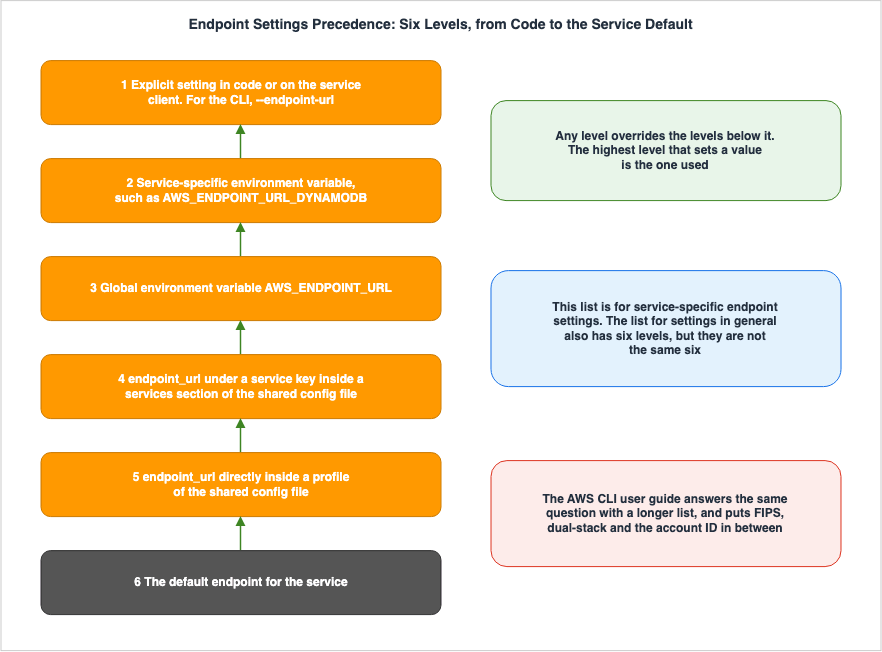
TheService-specific endpoints chapter of the AWS SDKs and Tools Reference Guide has a section titled Precedence of settings. This section outlines six levels:The settings for this feature can be used at the same time but only one value will take priority
per service. For API calls made to a given AWS service, the following order is used to select a value:| Level | What is considered |
|---|---|
| 1 | Values explicitly configured in the code or service client. |
| 2 | Service-specific environment variables, such as AWS_ENDPOINT_URL_<SERVICE> (for Amazon DynamoDB, it would be AWS_ENDPOINT_URL_DYNAMODB). |
| 3 | The global environment variable AWS_ENDPOINT_URL. |
| 4 | The endpoint_url value located under the service identifier key within the services section of a shared config file. |
| 5 | The endpoint_url value located directly under a profile within a shared config file. |
| 6 | The default endpoint URL for that service. |
Level 1 has an additional note: In the AWS CLI, this corresponds to the
--endpoint-url command-line parameter. In SDKs, it corresponds to the arguments used when creating a client or configuration object.Level 6 is worth a second look, because it is the service default. If the caller has not configured anything, and Levels 1 through 5 are all empty, the system will reach Level 6. The scenario mentioned earlier – "the destination is determined without any recollection of having specified a URL" – refers to this Level 6.
3.2 A Service-Specific Setting Beats a Global One
The relationship between levels two and three is stated in another place as well. The description of environment variables for service-specific configurations states:This service-specific endpoint overrides any global endpoint set in AWS_ENDPOINT_URL.A corresponding statement can also be found in the AWS CLI User Guide.
Service-specific endpoints and the --endpoint-url command line option override any global endpoints.In essence, setting
AWS_ENDPOINT_URL will change the destination for all services, but services with service-specific configurations will be excluded from this change. It's possible to configure the overall system using a single environment variable, while then individually reverting the settings for specific services as exceptions.3.3 The Service Identifier Is Spelled Differently in Each Layer
Levels 2 and 4 are both service-specific, but the spellings used to refer to the service itself differ. The primary sources give the rule for building both spellings.For environment variables, the format is as follows:
The AWS service identifier is based on the API model's serviceId by replacing all spaces with
underscores and uppercasing all letters.
For the shared
config file, it is:The AWS service identifier is based on the API model's serviceId by replacing all spaces with
underscores and lowercasing all letters.The only difference is the last word. Environment variable names are in uppercase, while the keys in the
config file are lowercase. Two different spellings are derived from the same serviceId.serviceId | config Key | Environment Variable |
|---|---|---|
DynamoDB | dynamodb | AWS_ENDPOINT_URL_DYNAMODB |
Elastic Beanstalk | elastic_beanstalk | AWS_ENDPOINT_URL_ELASTIC_BEANSTALK |
ACM PCA | acm_pca | AWS_ENDPOINT_URL_ACM_PCA |
API Gateway | api_gateway | AWS_ENDPOINT_URL_API_GATEWAY |
ApiGatewayManagementApi | apigatewaymanagementapi | AWS_ENDPOINT_URL_APIGATEWAYMANAGEMENTAPI |
Bedrock Runtime | bedrock_runtime | AWS_ENDPOINT_URL_BEDROCK_RUNTIME |
The
serviceId does not always match the service name in everyday use. Some include spaces, while others are concatenated. Comparing the last two rows in the table above demonstrates that the presence or absence of a space can affect the result. Check the actual spelling against the list of identifiers in the primary sources before writing it. Do not attempt to guess the spelling.3.4 The Setting That Ignores Every Custom Endpoint
In addition to the individual settings, there is a switch that allows you to globally disable all configured custom endpoints. The primary sources describe it as follows:This setting is used to ignore all custom endpoints configurations.
Note that any explicit endpoint set in the code or on a service client itself is used regardless of
this setting. For example, including the --endpoint-url command line parameter with an AWS CLI command
or passing an endpoint URL into a client constructor will always take effect.It reaches levels 2 through 5 and does not touch level 1. It allows you to disable only the settings from environment variables and the shared
config file, while preserving settings specified in the code and via the --endpoint-url flag. This is useful when you want to override an AWS_ENDPOINT_URL that may have been set in a shared development environment.The default value is
false. The environment variable name is AWS_IGNORE_CONFIGURED_ENDPOINT_URLS. The key name for the shared config file is spelled differently from one document to another, so it is taken up again in Chapter 9.3.5 A Role-Chained Profile Does Not Inherit the Setting
There is another behavior that the table of six levels does not show on its own. When a profile takes a role throughsource_profile, only the service settings of the profile named are used.If your profile has role-based credentials configured through a source_profile parameter for IAM
assume role functionality, the SDK only uses service configurations for the specified profile.
It does not use profiles that are role chained to it.An example given in the primary sources shows a profile
A with an endpoint_url defined, and profile B referencing A with source_profile = A. In this scenario, even when using profile B to call services other than Amazon EC2, the global endpoint defined in A will not be used.If your code makes a request to any other service, the endpoint resolution will not follow any custom
logic. The endpoint does not resolve to the global endpoint defined in profile A.If you want the global endpoint to apply when using profile
B, you must define the endpoint_url directly within profile B. Discrepancies can arise from this situation, where settings are configured but do not take effect.4. Different Answers to the Same Question, Depending on the Source Material
The six points discussed in the previous chapter are taken from the section on service-specific endpoint configurations in the AWS SDKs and Tools Reference Guide. There is one thing worth checking here. Do the primary sources have only one answer to the question of which setting wins? They do not.4.1 Five Listings
A list serving the same purpose sits in at least the following five places. Neither the scope nor the number of levels lines up across them.| Document | Scope | Levels |
|---|---|---|
| AWS SDKs and Tools Reference Guide - settings reference | Settings in general | 6 |
| The same guide - service-specific endpoints chapter | Endpoints | 6 |
| AWS CLI User Guide - endpoints chapter | Endpoints | 10 |
| AWS SDK for Java 2.x Developer Guide - endpoint configuration | Endpoints | 6 |
| AWS SDK for Ruby Developer Guide - client configuration | Settings in general | 5 |
The top two both have six levels, and the contents are not the same. The six levels for settings in general run through the kinds of layer from top to bottom: code, the JVM system property, the environment variable, the shared
credentials file, the shared config file, and the SDK default. The six levels for endpoints split the service-specific environment variable from the global one into separate levels, and carry no level for the JVM system property.Two lists having six levels each does not make them the same list. The AWS Credential Provider Chain Across SDKs and the CLI, published earlier, refers to the former, while this article addresses the latter.
4.2 The Number of Levels Differs
The list in the AWS CLI User Guide has ten levels. The skeleton is the same as the six, but other mechanisms sit in between.| Level | What is considered |
|---|---|
| 1 | --endpoint-url command-line option |
| 2 | Settings to ignore custom endpoints |
| 3 | Environment variables specific to each service |
| 4 | The environment variables AWS_USE_DUALSTACK_ENDPOINT, AWS_USE_FIPS_ENDPOINT, and AWS_ENDPOINT_URL |
| 5 | Resolution by account ID (on the environment variable side) |
| 6 | The endpoint_url within the services section of the shared config file |
| 7 | The endpoint_url directly under the profile in the shared config file |
| 8 | The file settings for use_dualstack_endpoint, use_fips_endpoint, and endpoint_url |
| 9 | Resolution by account ID (on the file setting side) |
| 10 | The default endpoint URL for that service |
Three things that never appeared in the six levels are in here. They are the setting that ignores custom endpoints, the FIPS and dual-stack switches, and resolution by account ID. In the AWS SDKs and Tools Reference Guide each of these sits on a page of its own, and none of them is placed anywhere within the six levels.
4.3 Environment Variables and System Properties Are Written in Opposite Order
There's another area where the order itself is inconsistent. Regarding the AWS SDK for Java 2.x, two documents reverse the order of environment variables and JVM system properties.The
Precedence of settings section of the settings reference in the AWS SDKs and Tools Reference Guide reads:2. Java/Kotlin only: The JVM system property for the setting is checked. If it's set, that value is
used to configure the client.
3. The environment variable is checked. If it's set, that value is used to configure the client.The
Configuration precedence section of the AWS SDK for Java 2.x developer guide reads:1. Request-level overrides (when applicable)
2. Client-level configuration via endpointOverride
3. Environment variables
4. JVM system properties
5. Shared AWS config file
6. Default endpoints based on the configured AWS RegionThe former lists system properties before environment variables, while the latter lists environment variables before system properties. Because the scope differs – one covers settings in general and the other covers endpoints – this cannot immediately be called a contradiction. From a reader's position, though, which of the two to trust is not settled by these two documents, for the same kind of setting in the same SDK.
The latter also has a level the others do not. Its first level, request-level overrides, appears neither in the six levels for endpoints nor in the six levels for settings in general.
4.4 How to Read This
How should you handle situations where multiple lists are present? Here are three practical approaches to interpretation.First, make sure which list is in front of you. The list for settings in general and the list for endpoints are different lists. Having the same number of levels does not make their contents the same.
Second, read the developer guide for the SDK in use last. The cross-SDK reference guide writes the common skeleton, and the guide for each language writes that language's implementation. Which one matches the actual behavior is not settled by reading the primary sources alone. Before adopting a design that depends on the order, it has to be confirmed at hand.
Third, avoid a design that leans on the order. Putting different values in two layers and expecting the upper one to win breaks exactly where the sources disagree. Put the value in one layer only, and the result is the same whichever list turns out to be right.
5. Stage 2 - Building the URL from the Picked Value
The previous chapters are Stage 1. What has been settled up to this point is which setting value to take, but the URL is not yet finalized. The value taken is passed to Stage 2 together with the region and the other inputs.5.1 Input to Resolution Rules
The SDK passes several parameters to the resolution rules. The AWS SDK for Kotlin developer guide lists the parameters that are common to all services in a table.| Name | Type | Description |
|---|---|---|
region | String | The AWS region for the client. |
endpoint | String | A string representation of the value configured for endpointUrl. |
useFips | Boolean | Indicates whether the client is configured to use FIPS endpoints. |
useDualStack | Boolean | Indicates whether the client is configured to use dual-stack endpoints. |
The AWS SDK for Ruby API reference also lists
EndpointParameters, which includes the same four: Region, UseDualStack, UseFIPS, and Endpoint.Some services may include additional, service-specific parameters. For example, Amazon S3 includes parameters for the bucket name and a setting to enforce path-style access. AWS STS includes one additional parameter:
UseGlobalEndpoint. This parameter will be discussed in Chapter 6.What matters here is that the
endpoint value taken in Stage 1 is only one of the inputs at this point. It is not the answer.5.2 A Base URL and a Final URL Are Not the Same Thing
The AWS SDK for Kotlin developer guide directly addresses this difference, explicitly stating that two different approaches will not result in the same behavior.It is important to understand that the following two statements do NOT produce clients with equivalent
endpoint resolution behaviorThe guide explains this difference as follows:
The statement that sets the endpointUrl property specifies a base URL that is passed to the (default)
provider, which can be modified as part of endpoint resolution.

The statement that sets the endpointProvider specifies the final URL the S3Client uses.
The value passed to
endpointUrl is a "base" and may be modified during the resolution process. Conversely, when you replace the endpointProvider, the value it returns becomes the final URL. Even if you pass the same string, the resulting URL will differ depending on whether it's passed to endpointUrl or the endpointProvider.The guide also discusses which option is more commonly used by developers.
As a general SDK user, you most often provide an endpointUrl value5.3 The Hostname Is Assembled
The guide explains, using the example of Amazon S3, how this "changeable" element works.As an example, if you specify an endpointUrl value for an Amazon Simple Storage Service (Amazon S3)
client and perform a GetObject operation, the default endpoint provider implementation injects
the bucket name into the hostname value.The bucket name is inserted into the hostname. Nothing in the table for Stage 1 shows this movement. Although you configure one hostname, the actual hostname used for connection is different.
The construction rules are also evident in the standard endpoint format. The AWS General Reference describes the general format as follows:
protocol://service-code.region-code.amazonaws.comRegion-specific endpoints are created from the service code and the region code. The ability to determine the destination simply by specifying a region name is due to this rule.
There are exceptions. The same reference lists Amazon EC2, Amazon EC2 Auto Scaling, and Amazon EMR as services that have a general endpoint carrying no region, and also provides information on the routing destinations for these services.
When you use a general endpoint, AWS routes the API request to US East (N. Virginia) (us-east-1),
which is the default Region for API calls.
Furthermore, some services have global endpoints that span regions. The list includes AWS Cloud WAN, Amazon CloudFront, AWS Global Accelerator, AWS Identity and Access Management, AWS Organizations, Amazon Route 53, AWS Shield Advanced, and AWS WAF Classic. Therefore, the rule that "the URL is created from the region name" doesn't apply uniformly to all services.
5.4 Resolved Again for Every Request
There's another characteristic that's easy to overlook. Resolution isn't performed just once when a client is created.A service client calls the resolveEndpoint method for every request.Because it's called for each request, the content of the request can potentially be used as input for the resolution process. The bucket name, as mentioned in the previous section, is an example of this. Two requests originating from the same client might be directed to different hosts.
6. The Switches
That is the skeleton. Sitting on top of it are several switches that change the inputs to resolution. Each of them moves the destination without any change to the calling code, so each is an easy source of a destination nobody configured.6.1 FIPS
The FIPS switch controls theUseFIPS setting for resolution rules. It can be configured in three locations:| Layer | Setting |
|---|---|
Shared config file | use_fips_endpoint |
| Environment variable | AWS_USE_FIPS_ENDPOINT |
| JVM system property (Java and Kotlin only) | aws.useFipsEndpoint |
The default value is
false. The primary sources describe what this switch controls as follows:Unlike standard AWS endpoints, FIPS endpoints use a TLS software library that is validated against
FIPS 140.This is a matter of requirement, not of one being better than the other. The same page also says who needs it.
Government agencies, partners, and those wanting to do business with the federal government are
required to adhere to FIPS guidelines.
The validation of the cryptographic module itself is covered by Cryptography Glossary for Engineers.
This switch loses to a destination set in Stage 1. The primary sources state it explicitly.
Service-specific endpoints and the --endpoint-url option for the AWS Command Line Interface override
this setting.
Therefore, even if FIPS is enabled, if a service-specific endpoint or
--endpoint-url is configured, those will take precedence. The situation where FIPS is enabled but the system is not connecting to the FIPS endpoint can be explained by this order of precedence.6.2 Dual-Stack
The dual-stack switch can also be configured within the same three layers. These settings areuse_dualstack_endpoint, AWS_USE_DUALSTACK_ENDPOINT, and aws.useDualstackEndpoint. The default value for all is false.The primary sources attach a qualifier about how far the support reaches.
Dual-stack endpoints are available for some services in some regions.The shape of the hostname that gets assembled is also different from the FIPS one. The AWS General Reference describes the general format as follows:
protocol://service-code.region-code.api.awsThe domain changes from
amazonaws.com to api.aws. However, there are exceptions; the same document notes that Amazon S3 uses a different format.protocol://service-code.dualstack.region-code.amazonaws.comThe shape taken when FIPS and dual-stack are both on is carried by the documentation for each service. For example, the Amazon EBS direct API page lists the FIPS IPv4 endpoint as
ebs-fips.region.amazonaws.com and the FIPS dual-stack endpoint as ebs-fips.region.api.aws. The two switches affect different parts of the hostname.6.3 Account ID in the URL
The third switch handles elements other than the region, incorporating them into the hostname. The account ID, which can be determined from the credentials, becomes part of the resolved hostname.Account-based endpoints help ensure high performance and scalability by using your AWS account ID to
route requests for services that support this feature.This is used only with services that support it. The form given in the primary sources is as follows:
https://<account-id>.ddb.<region>.amazonaws.comThere are two settings available: one to provide the account ID directly, and another to determine whether or not to use this resolution.
| Purpose | Shared config | Environment Variable | JVM System Property |
|---|---|---|---|
| Account ID | aws_account_id | AWS_ACCOUNT_ID | aws.accountId |
| Whether to use it | account_id_endpoint_mode | AWS_ACCOUNT_ID_ENDPOINT_MODE | aws.accountIdEndpointMode |
The default value is
preferred. There are three possible values.preferred – The endpoint should include account ID if available.
disabled – A resolved endpoint doesn't include account ID.
required – The endpoint must include account ID. If the account ID isn't available, the SDK throws an error.The meaning of the default being
preferred is that it automatically becomes active if the conditions are met. The primary sources also describe what happens when they are not met.If the account ID isn't visible to the SDK client, the client will use the regional endpoint.This is where credential resolution and destination resolution meet. Which credentials were used decides whether the account ID is visible at all, and that decides what goes into the URL. The credential side is covered by The AWS Credential Provider Chain Across SDKs and the CLI.
The version in which this arrived differs from one SDK to the next. A statement about a default value needs the version it starts from attached to it.
| SDK | Supported Version |
|---|---|
| AWS CLI v2 | 2.25.0 |
| AWS CLI v1 | 1.38.0 |
| SDK for Python (Boto3) | 1.37.0 |
| SDK for Java 2.x | v2.28.4 |
| SDK for Java 1.x | v1.12.771 |
| SDK for JavaScript 3.x | v3.656.0 |
| SDK for Go V2 (1.x) | v1.35.0 |
| SDK for Ruby 3.x | v1.123.0 |
| SDK for Kotlin | v1.3.37 |
| SDK for .NET 4.x | 4.0.0 |
| SDK for PHP 3.x | v3.318.0 |
| SDK for Rust | release-2025-04-24 |
| SDK for Swift | 1.2.0 |
The way the versions are written is not uniform either. The AWS SDK for Rust alone is given as a release date rather than a version number.
The primary sources also list the SDKs that do not support it. These include the AWS SDK for C++, AWS SDK for Go 1.x (V1), AWS SDK for JavaScript 2.x, AWS SDK for .NET 3.x, and versions V4 and V5 of AWS Tools for PowerShell.
6.4 STS Global and Regional Endpoints
AWS Security Token Service (AWS STS) alone carries one more parameter into the resolution rules:UseGlobalEndpoint. The AWS SDK for Ruby API reference demonstrates in code where this value originates.use_global_endpoint: config.sts_regional_endpoints == 'legacy',UseGlobalEndpoint becomes true when sts_regional_endpoints is legacy. The setting takes two values.legacy – Uses the global AWS STS endpoint, sts.amazonaws.com.
regional – The SDK or tool always uses the AWS STS endpoint for the currently configured Region.The primary sources also describe how to send a request to the global endpoint while
regional is in effect.To send a request to the global endpoint while this setting is enabled, you can set the Region to aws-global.The default value for this setting differs by SDK. Chapter 9 takes it up. Furthermore, AWS has made changes to the behavior of the global endpoint itself.
AWS STS requests to the global endpoint are automatically served in the same AWS Region as your
workloads. These changes will not be deployed to opt-in Regions.
The behavior of the global endpoint differs between enabled regions and opt-in regions. The primary sources also state a recommendation.
It is an AWS best practice to use Regional endpoints whenever possible and to configure your AWS Region.Since the design for sending tokens from AWS to external systems is covered by AWS IAM Outbound Identity Federation, this article focuses solely on the resolution side.
7. Pointing Somewhere Else
Up to this point the subject has been how to read a destination that was not intended. This chapter turns that around and looks at which layer to touch when the destination is changed on purpose. The primary sources list three uses.These settings provide flexibility to support local endpoints, VPC endpoints, and third-party local
AWS development environments.7.1 Local Development
When implementing services that run locally, it's often straightforward to use either global environment variables or service-specific environment variables. An example is as follows:export AWS_ENDPOINT_URL=http://localhost:4567
export AWS_ENDPOINT_URL_DYNAMODB=http://localhost:5678When both of these are used together, only calls to Amazon DynamoDB will be directed to the latter, while everything else will go to the former. The relationship between levels 2 and 3 in Chapter 3 shows up directly here.
The same thing can be done in the shared
config file. The example in the primary sources sends Amazon S3 somewhere of its own and everything else to a shared destination.[profile dev-s3-specific-and-global]
endpoint_url = http://localhost:1234
services = s3-specific
[services s3-specific]
s3 =
endpoint_url = https://play.min.io:9000A
services section can be referenced from more than one profile. The primary sources carry an example where two profiles differing only in output format share one destination definition.To change a single command only, use level 1.
aws s3 ls --endpoint-url http://localhost:45677.2 Services That Offer the Same API as Amazon S3
Pointing at another service that offers the same API as Amazon S3 uses the same mechanism. The example from the primary sources in the previous section is exactly that shape.However, a challenge arises that falls outside the scope of this article. Once the destination is moved off AWS, something else the SDK does by default may not be understood at the other end. What breaks, and how, is covered by Default Checksums and Data Integrity in Amazon S3. This article carries it as far as the destination being replaceable.
7.3 The Region Is Still Needed, for Signing
Even if you change the destination, a region setting is still required. The AWS SDK for Java 2.x developer guide explains the reason for this.When using endpointOverride, you must still specify a region for the client, even though the endpoint
is being explicitly set. The region is used for signing requests.The same guide also makes this point in its examples regarding connections to local Amazon DynamoDB instances.
// The region is meaningless for DynamoDB local but required for the client builder.A signature is attached last, to the URL that was resolved. Signing needs a region, so fixing the destination does not remove the need for one. The AWS Signature Version 4 Request Signer and Explainer details the signature mechanism itself.
The primary sources also attach a caution to changing the destination at all.
Endpoint resolution is an advanced SDK topic. If you change the default settings, you risk breaking
your code. The default settings should apply to most users in production environments.
8. How to Analyze Failures
Failures around the destination fall into two kinds. Those that end inside resolution, and those where resolution succeeded but the destination cannot be reached. The two are handled differently, so telling them apart comes first.8.1 No Matching Endpoint Exists
Some failures end inside Stage 1 and Stage 2. This happens when a switch is enabled, but there is no matching endpoint for the specific service and region combination.The primary sources do address this case, but they are not written the same way. For dual-stack, they read:
If a dual-stack endpoint does not exist for the service and/or AWS Region, the request will fail.For FIPS, they read:
If this setting is enabled and a FIPS endpoint does not exist for the service in your AWS Region,
the AWS call may fail.
One document writes
will fail, and the other writes may fail. In another document the two strengths are the other way around. Chapter 9 takes this up again.In practice the way to narrow it down is the same either way. If the same call goes through once the switch is turned off, the switch was the thing affecting resolution. The AWS CLI User Guide also provides guidance on how to address this.
In this case, manually specify the endpoint to use in the command using the --endpoint-url option or
use service-specific endpoints.
When using account ID-based resolution, a failure only occurs when
required is selected. Left at preferred, a call falls back to the regional endpoint even when the account ID is not visible, so it never surfaces as a failure.8.2 The Name Cannot Be Reached
Resolution can succeed and the name still not be reachable, or what answers at that name is not what was expected. This occurs outside the scope of this article. It may involve name resolution, routing, or policies.A key indicator to determine the issue is whether the resolved URL matches the expected outcome. If the URL is as expected, the problem lies outside the resolution process, and you should consult network-related documentation. If the URL is different from what was expected, the cause is inside resolution itself, and the path to follow is Stage 1 and Stage 2 of this article.
8.3 Check Where the Call Is Going Right Now
So the first thing to establish is the URL that was actually resolved. With that in hand, the split above follows at once.The method for verification varies depending on the SDK, but the underlying principle is the same. Look at the value taken in Stage 1 and the value returned by Stage 2 separately. The AWS SDK for Kotlin developer guide carries an example that wraps the default resolution and looks inside it. To check the settings alone, read both the environment variables and the shared
config file, working down the six levels of Chapter 3 to see which one holds a value.Checking the environment variables alone is not enough. Two of those six levels sit in the shared
config file, and this is where the AWS_PROFILE setting determines which profile is being used. The structure of this system is what allows changing the profile to potentially change the destination.9. Where the Primary Sources Disagree
Comparing the primary sources while preparing this article turned up several places where they say different things about the same setting. Each of them is something a reader runs into when actually working, so both versions are set side by side here, without declaring which one is correct. The reference date for all of them is September 19, 2026.9.1 Configuration Key Spelling
As mentioned in Chapter 3, the "ignore custom endpoints" setting has a discrepancy in the configuration key name across two different documentation sources.| Document | Spelling |
|---|---|
| AWS SDKs and Tools Reference Guide | ignore_configured_endpoint_urls |
| AWS CLI User Guide | ignore_configure_endpoint_urls |
The environment variable name, however, is consistent:
AWS_IGNORE_CONFIGURED_ENDPOINT_URLS. Only the file configuration key name differs. The AWS CLI User Guide uses this specific spelling in three separate instances on the same page.Incorrectly spelled configuration keys will be silently ignored. If the setting isn't working as expected, it's best to try the spelling listed in the documentation for the specific implementation you are using.
9.2 System Property Naming
The JVM system properties for service-specific endpoints also have different formats across the two documentation sources.| Document | Format |
|---|---|
| AWS SDKs and Tools Reference Guide | aws.endpointUrl<ServiceName> |
| AWS SDK for Java 2.x Developer Guide | aws.endpointUrl.s3 |
The first format uses a continuous name, while the second uses a dot to separate components and uses lowercase letters. Additionally, there are four settings that appear only in the AWS SDK for Java 2.x developer guide:
AWS_ENDPOINT_URL_PREFIX, AWS_ENDPOINT_URL_SUFFIX, aws.endpointUrl.prefix, and aws.endpointUrl.suffix. Nothing answering to them was found in the cross-SDK reference guide.9.3 How Strongly Each Document States What Happens
As mentioned in Chapter 8, the level of certainty varies between documents when dealing with FIPS and dual-stack configurations.| Document | Dual-Stack | FIPS |
|---|---|---|
| AWS SDKs and Tools Reference Guide | the request will fail | the AWS call may fail |
| AWS SDK for Ruby API Reference | dispatching the request MAY return an error | dispatching the request will return an error |
For the same two features, the two documents present the information with reversed levels of certainty. Both documents use less definitive language when describing the other feature.
9.4 The Default for AWS STS
The default value forsts_regional_endpoints is not consistently defined. The AWS SDKs and Tools Reference Guide states:Default value: regional, see exceptions in the following table.In contrast, the page for AWS CLI v1 configuration variables states:
By default, this configuration option is set to legacy.Furthermore, the table within that guide itself has two columns. One is
Default setting value, the other Default service client target STS Endpoint. The guide defines the latter as follows:Default service client target STS Endpoint: What default endpoint is used by the client even if the
setting to change it is not available.These two columns do not align. The AWS SDK for Python (Boto3) lists the first as
regional and the second as Global endpoint.The question of which one is the default does not fit the shape of this table. The table differentiates between whether a setting is supported, the setting's default value, the endpoint the client defaults to, and how it behaves when a region is not specified. You need to read all four columns for your specific SDK.
The primary sources also say where this setting is headed.
All new SDK major versions releasing after July 2022 will default to regional. New SDK major versions
might remove this setting and use regional behavior.
9.5 The Six Levels Have No Step for System Properties
This was touched on in Chapter 4. The six levels for service-specific endpoint settings carry no level for the JVM system property. Yet the same chapter listsaws.endpointUrl and aws.endpointUrl<ServiceName> among the places a value can be set.They are written as settable, and where they fall among the six levels is not written. In the six levels for settings in general they sit at level 2, but that list covers a different scope. In the list in the AWS SDK for Java 2.x developer guide they are at level 4, which puts them on the other side of the environment variable from the reference guide.
10. Failure Modes and Anti-Patterns
Every disagreement raised so far has a concrete failure attached to it. What follows is the part that can be avoided at design and operation time.10.1 Memorizing Only One Precedence List
Remembering only the phrase six levels, without checking which list it came from, applies the wrong list. The six levels for settings in general and the six levels for endpoints have the same count and different contents. Check which table it is before using it.10.2 Putting Different Values in Two Layers and Trusting the Order
Avoid configurations that place different values in both environment variables and the sharedconfig file, assuming "the higher one wins." Where the sources disagree on the order, a change of implementation changes the result. Put the value in one layer only.10.3 Guessing Service Identifiers
Do not attempt to construct the spelling ofserviceId yourself. Whitespace can affect the results, and incorrect environment variables will be silently ignored. Always verify the actual spelling using the official list of identifiers.10.4 Promoting Global Overrides to Production
TheAWS_ENDPOINT_URL setting applies to all services. If a setting configured for development remains in the production environment, all requests may be routed to unintended destinations. The AWS SDK for Java 2.x developer guide also highlights a similar concern. Either narrow it to a service-specific setting, or cancel it with the setting that ignores custom endpoints.10.5 Assuming a Switch Beats Stage 1
Even if FIPS is enabled, if service-specific endpoints or the--endpoint-url are provided, those will take precedence. It is not stated that FIPS endpoints will always be used simply because it has been enabled.10.6 Assuming a Fixed Destination Makes the Region Unnecessary
Signatures require a region. The AWS SDK for Java 2.x developer guide states that even when an endpoint is explicitly specified, the client still needs to be configured with a region.10.7 Stating a Default Without Saying Which Version
A default arrives in a particular version. Account-based resolution landed in a different version in each SDK, andsts_regional_endpoints is written as defaulting to regional in new major versions released after July 2022. When discussing default values, be sure to specify which version you are referring to.11. Frequently Asked Questions
This chapter addresses common questions that readers may have based on the material covered so far. Each question and answer summarizes key points discussed throughout the text.11.1 Does One Environment Variable Settle the Destination?
It does not. An environment variable is only one level inside Stage 1, and an explicit setting in code or on the service client beats it. Even once Stage 1 settles on a value, the resolution rules in Stage 2 can still change it.11.2 Do All Documents That Say Endpoint Mean the Same Thing?
No. The term "endpoint" can refer to either a URL resolved by the SDK, or an entry point within a VPC network. If the configuration name includesendpoint_url, it refers to the former.11.3 Which List Should You Refer to?
Read the list whose scope matches. The general settings list and the endpoint list are separate, even if they have the same number of entries. After that, consult the developer guide for the SDK you are using.11.4 Is a FIPS Endpoint More Secure?
The primary sources do not put it that way. They describe it as an endpoint that uses a TLS software library validated against FIPS 140. Who needs that is decided on the requirements side.11.5 Does Every Service Have FIPS and Dual-Stack Endpoints?
No. The primary sources state that dual-stack isavailable for some services in some regions. Enabling the switch when it is not available may result in failure.11.6 Do I Need to Turn On Account-Based Resolution Myself?
By default, it is set topreferred, and will be automatically used if the conditions are met. However, the supported version varies depending on the SDK. If you do not want to use it, set it to disabled.11.7 Does Switching Profiles Also Change the Destination?
Changing the profile may also change the destination. The sharedconfig file's profiles can contain settings beyond just credentials. Two of the six levels live in that file, so switching profiles can carry a change of destination with it.11.8 What Should I Check After Changing the Destination?
Establish the URL that was actually resolved. If it is what was expected, what is left lies outside resolution. If it differs, work down the six levels and find which one holds a value.12. Summary
Turning one region name into one URL takes two stages. Stage 1 picks a single value out of several settings, and Stage 2 assembles the actual URL from that value together with the region and the other inputs. Setting an environment variable acts on Stage 1 alone, and Stage 2 works separately from it.The order within Stage 1 is stated explicitly in the primary sources. But more than one list answers the same question, and neither the scope nor the number of levels lines up. The list for settings in general and the list for endpoints have the same count and different contents, the list in the AWS CLI User Guide has ten levels, and the AWS SDK for Java 2.x developer guide puts the environment variable and the JVM system property on opposite sides of each other from the cross-SDK reference guide.
Stage 2 assembles the URL. The bucket name is inserted into the hostname, while FIPS and dual-stack configurations affect different parts of the hostname, and the account ID is placed at the beginning of the hostname. This account ID can be provided in the configuration, or it can be used even if it's not explicitly provided, as long as the SDK can detect it. Resolution is performed on a request-by-request basis, so requests originating from the same client may sometimes be directed to different hostnames.
The spelling of a configuration key, the shape of a system property, what is written for a missing endpoint, and the default of
sts_regional_endpoints – each of these is written differently from one source to another. This article does not attempt to determine which is correct. The practical approach is to avoid configurations that rely on a specific order, instead placing settings in a single layer and verifying the spelling against the documentation for the specific implementation you are using.13. References
The primary sources referenced in this article are listed below. All sources were verified on September 19, 2026.- Service-specific endpoints - AWS SDKs and Tools Reference Guide
- Identifiers for service-specific endpoints - AWS SDKs and Tools Reference Guide
- Dual-stack and FIPS endpoints - AWS SDKs and Tools Reference Guide
- Account-based endpoints - AWS SDKs and Tools Reference Guide
- AWS STS Regional endpoints - AWS SDKs and Tools Reference Guide
- AWS SDKs and tools settings reference - AWS SDKs and Tools Reference Guide
- Configure client endpoints - AWS SDK for Kotlin Developer Guide
- Configuring client endpoints in the AWS SDK for Java 2.x - AWS SDK for Java Developer Guide
- Configuring service clients in the AWS SDK for Ruby - AWS SDK for Ruby Developer Guide
- Class: Aws::STS::EndpointParameters - AWS SDK for Ruby V3 API Reference
- Using endpoints in the AWS CLI - AWS Command Line Interface User Guide
- AWS CLI Configuration Variables - AWS CLI v1 Command Reference
- AWS service endpoints - AWS General Reference
- Service endpoints for EBS direct APIs - Amazon EBS User Guide
References:
Tech Blog with curated related content
Written by Hidekazu Konishi