IPv6-First VPC Design on AWS - IPv6-Only Subnets, DNS64 and NAT64, and Dual-Stack Migration
First Published:
Last Updated:
/24 here, the /22 there, the reclaimed-and-reissued ranges, and eventually the two facts every large AWS estate collides with — you have run out of private IPv4 space inside your allocation, and the ranges you did assign now overlap with a network you have to connect to.This guide is about designing a VPC where IPv6 is the primary address family rather than an afterthought. It covers how IPv6 CIDRs are allocated to VPCs and subnets, what actually changes when a subnet is IPv6-only rather than dual-stack, how routing and egress differ, how DNS64 and NAT64 let IPv6-only workloads reach IPv4-only services, why security groups and network ACLs need explicit IPv6 rules, which services support what, how IPv6 behaves across Transit Gateway, peering, Direct Connect and Site-to-Site VPN, and how to migrate an existing estate in stages without breaking it.
Service facts in this article were verified against official AWS documentation and What's New announcements as of 2026-07-31. IPv6 support is one of the faster-moving areas of AWS — several services added support during 2025 and 2026 — so treat every service-level claim here as a dated snapshot and confirm the current state in the official documentation before you build.
This article deliberately stays in the address-and-protocol lane. Choosing between connectivity options (peering, Transit Gateway, PrivateLink, VPC Lattice, Cloud WAN) is covered in the AWS VPC Connectivity Decision Guide; the broader design-review process, CIDR allocation discipline, and subnet-layout review questions are covered in the VPC Design Review Checklist; the VPC CNI, prefix delegation, and EKS IPv6 clusters are covered in Amazon EKS Networking Deep Dive; and protocol-level term definitions live in the AWS Networking Glossary. Where those topics intersect IPv6 design, this guide links out rather than duplicating them.
Table of Contents
- 1. Introduction — Why IPv6 Now, and What This Guide Covers
- 2. Address Planning Fundamentals
- 3. Dual-Stack versus IPv6-Only
- 4. Routing and Egress
- 5. DNS64 and NAT64
- 6. Security Controls in IPv6
- 7. Service Support Matrix
- 8. Hybrid and Multi-VPC Connectivity
- 9. Container and Serverless Workloads
- 10. Migration Strategy
- 11. Operations and Troubleshooting
- 12. Failure Modes and Anti-Patterns
- 13. Frequently Asked Questions
- 14. Summary
- 15. References
1. Introduction — Why IPv6 Now, and What This Guide Covers
1.1 The technical drivers
There are five recurring, purely technical reasons teams reach for IPv6 on AWS. None of them is "we ran out of ideas."Private IPv4 exhaustion inside your own allocation. RFC 1918 gives you roughly 17.9 million addresses in
10.0.0.0/8, which sounds infinite until an organization allocates a /16 per VPC, runs several hundred VPCs across accounts and Regions, reserves ranges for future acquisitions, and leaves ranges stranded when projects end. The constraint is rarely the theoretical size of 10.0.0.0/8; it is the allocation policy built on top of it, which cannot be rewritten without renumbering live workloads.Overlapping CIDRs that block connectivity. This is the one that hurts most, because it surfaces at the worst possible moment — during an acquisition, a partner integration, or a datacenter migration. AWS is explicit about the consequence: you cannot create a VPC peering connection between two VPCs whose IPv4 CIDRs overlap, even if their IPv6 CIDRs do not overlap. Amazon-provided IPv6 addresses are globally unique, so an IPv6 addressing plan structurally cannot collide the way a privately-chosen IPv4 plan does.
Address consumption at container and serverless scale. A large Kubernetes cluster consumes IP addresses at a rate that IPv4 subnet math was never designed for — one address per Pod, plus warm pools, plus load balancer targets. AWS positions IPv6-only subnets specifically at "workloads, such as serverless and container applications, that consume a large number of IP addresses."
Interconnection requirements. Partner networks, carrier networks, and mobile networks increasingly present IPv6-only or IPv6-preferred endpoints. If a counterparty can only reach you over IPv6, no amount of IPv4 planning helps.
IPv6 as a stated requirement. Some organizations are under an explicit mandate to operate IPv6-capable environments. AWS calls this out directly in the IPv6-only subnet launch material: the capability lets you "meet the requirements for adoption of IPv6-only network environments set by US federal government agencies."
Notice what is not on that list. This guide does not discuss cost, and that is deliberate — this site does not cover pricing. Every design trade-off below is expressed in technical terms: address space, routing reachability, quota and limit behavior, blast radius of a misconfiguration, and operational complexity.
1.2 Who this is for
You are designing or reviewing a VPC and one of the following is true: your IPv4 allocation policy is at or near its limit; you have hit an overlapping-CIDR wall; a container platform is consuming addresses faster than you can allocate them; or someone has handed you an IPv6 requirement and you need to know what actually works.You are assumed to know what a VPC, subnet, route table, security group, and network ACL are. You are not assumed to know IPv6 addressing beyond the basics.
1.3 The three modes, stated precisely
AWS frames IPv6 adoption around three operating modes for an elastic network interface:- IPv4-only — the resource communicates over IPv4; reaching an IPv6 node requires an interoperability layer.
- IPv6-only — the resource has no IPv4 address at all; reaching an IPv4 node requires an interoperability layer, which on AWS means DNS64 plus NAT64.
- Dual-stack — the resource has both; no interoperability layer is required.
The whole of this guide is really about two questions: which mode does each subnet run in, and what breaks at the boundaries between them.
1.4 Scope and non-scope
In scope: IPv6 address planning for VPCs and subnets, IPAM for IPv6, dual-stack versus IPv6-only selection, routing and egress design, DNS64 and NAT64, security group and network ACL design for IPv6, a dated service-support snapshot, hybrid and multi-VPC behavior, container and serverless considerations at the VPC level, phased migration, and operations.Out of scope: how to choose between connectivity options in general (delegated to the AWS VPC Connectivity Decision Guide and the AWS Hybrid Connectivity Decision Guide); EKS networking internals (delegated to Amazon EKS Networking Deep Dive); the IPv6 protocol itself (delegated to the AWS Networking Glossary); how an SDK decides whether to call the dual-stack endpoint for a service (delegated to Endpoint Resolution in the AWS SDKs and CLI); pricing; and comparisons with other cloud providers.
No live testing was performed for this article. Every statement below is sourced from AWS documentation, the IPv6 on AWS whitepaper, or AWS What's New announcements, each cited in the References. There are no latency, throughput, or capacity measurements here, because none were taken.
2. Address Planning Fundamentals
2.1 What AWS gives you, and in what shape
An IPv4 CIDR is mandatory for a VPC; an IPv6 CIDR is optional and additive. You can associate a single IPv6 CIDR block when you create a VPC, or associate up to five IPv6 CIDR blocks with netmask lengths from/44 to /60 in increments of /4.The Amazon-provided option is deliberately rigid. The
associate-vpc-cidr-block API documents --amazon-provided-ipv6-cidr-block as requesting "an Amazon-provided IPv6 CIDR block with a /56 prefix length for the VPC," and adds that you cannot specify the range or the size. You also cannot expect to get the same range back if you disassociate and re-associate later. There are three sources for a VPC's IPv6 CIDR:| Source | What you control | Typical use |
|---|---|---|
| Amazon-provided IPv6 CIDR block | Nothing but the network border group | Fastest path; fine when route summarization does not matter |
| IPAM-allocated IPv6 CIDR block | Pool hierarchy, allocation rules, contiguity | Multi-account, multi-Region estates that want summarizable ranges |
| IPv6 CIDR owned by you (BYOIP) | The entire plan, and whether AWS advertises it | Organizations with existing IPv6 allocations and on-premises routing policy |
The practical consequence of the Amazon-provided path is stated plainly in the IPv6 on AWS whitepaper: because the range is service-assigned, "you can't assign contiguous IPv6 CIDR blocks to VPCs in the same Region or based on other custom-defined criteria." If summarization matters to you — and at Transit Gateway, Direct Connect, or firewall-rule scale it usually does — that is the reason to use IPAM or BYOIPv6 rather than the default.
For BYOIPv6, the whitepaper gives the size floors: the smallest range you can bring is a
/48 for CIDRs that AWS advertises publicly, and a /56 for CIDRs that AWS does not advertise. You can bring a /48 and mark it non-advertisable, keeping advertisement under your own control on-premises.2.2 Subnet sizing, and why the IPv4 instinct is wrong
Possible IPv6 netmask lengths for a subnet are between/44 and /64 in increments of /4. In practice the conventional choice is /64, which is the prefix length the IPv6 unicast address format assumes for the interface identifier, and which divides an Amazon-provided /56 into 256 subnets.That number — 256 — is the one that should drive your planning, not host counts. A
/64 holds 2^64 addresses; you will never fill one. The design question becomes "how many subnets do I need, and how do I lay them out so they summarize cleanly," which is a categorically easier question than IPv4 subnet sizing. The whitepaper makes the point directly: techniques like variable-length subnet masking, which existed to match subnet size to host count, are "unnecessary and obsolete in IPv6."AWS reserves addresses in each IPv6 subnet the same way it does for IPv4 — the first four addresses and the last address of every subnet CIDR are unavailable. In a subnet with CIDR
2001:db8:1234:1a00::/64 that means ::, ::1 (the VPC router), ::2, ::3, and ...:ffff:ffff:ffff:ffff. Two additional addresses are reserved for the default VPC router: a link-local address in FE80::/10 generated using EUI-64, and the link-local address FE80:ec2::1.One more constraint that surprises people: a subnet's CIDR cannot be changed after creation. Combined with the rule in section 10 that there is no migration path from an IPv4-only subnet to an IPv6-only subnet, this means your subnet layout decisions are effectively immutable. Get the layout right before you build; the VPC CIDR and Subnet Planner and IP Subnet Calculator exist for exactly this stage.
2.3 Public IPv6, private IPv6, and why the distinction matters
This is the single most under-appreciated part of IPv6 design on AWS, because it has no clean IPv4 analogue.Public IPv6 addresses — including all Amazon-provided ones — are always advertised on the internet from AWS. They are globally unique and therefore reachable over the internet. AWS is explicit that whether a given resource is actually reachable is controlled by subnet routing, security groups, and network ACLs — not by the address being "private." There is no such thing as a private IPv6 address in the RFC 1918 sense in the Amazon-provided path, and Amazon VPC does not support Elastic IP addresses for IPv6.
Private IPv6 addresses are a separate, opt-in construct: addresses that are not and cannot be advertised on the internet from AWS. There are two kinds:
- ULA ranges (RFC 4193), which start with
fcorfd. AWS documents valid ULA space as anything underfd00::/8that does not overlap the Amazon-reservedfd00::/16, and gives the valid provisioning range as/9to/60starting withfd80::/9. - GUA ranges (RFC 3587) used privately. This option is disabled by default and must be explicitly enabled on your IPAM, and AWS requires that the GUA range be one you own.
Three properties of private IPv6 addresses are worth committing to memory:
- They are only available through IPAM. There is no console path that hands you a ULA without an IPAM.
- AWS does not allow direct egress to the public internet from a private IPv6 range even if an internet gateway or egress-only internet gateway exists in the VPC — the packets are dropped at the internet gateway edge. This is an enforced property, not a routing convention.
- They work across Direct Connect, VPC peering, Transit Gateway, and VPN connections, and can be used with IPv6-only and dual-stack subnets, Elastic Load Balancing, and AWS Global Accelerator endpoints.
The design decision this creates is genuinely new. In IPv4 you chose "private range plus NAT" by default. In IPv6 you must consciously decide, per workload: does this resource need a globally-routable address that is reachable only because a route and a security group permit it, or does it need an address that AWS structurally refuses to route to the internet? For a data tier under a strict "must never be internet-reachable" requirement, the private IPv6 path is a materially stronger control than a route table entry, because it is enforced at the gateway rather than by configuration you can accidentally change.
2.4 IPAM as the control plane for IPv6 planning
Amazon VPC IP Address Manager is the piece that turns an IPv6 addressing plan from a spreadsheet into an enforced system. For IPv6 specifically it does two things that matter.First, it gives you contiguity. AWS documents this as the point of IPv6 pools: contiguously-allocated CIDRs "enable you to simplify your security and networking rules; the IPv6 CIDRs can be aggregated in a single entry across networking and security constructs like access control lists, route tables, security groups, and firewalls." One aggregate route instead of 200 is not a cosmetic improvement when you are near a prefix limit on a Direct Connect gateway association.
Second, it gives you allocation rules. When you create an IPAM pool you can require a specific netmask length for allocations, require specific tags on resources, and require a locale (Region). Allocations that violate the rules are marked noncompliant, which turns "the addressing standard" into something you can monitor rather than something you enforce by code review.
The documented pool hierarchy for IPv6 is three levels deep, with each level provisioned from a portion of the level above it:
- IPAM (operating in Region 1 and Region 2)
- Scope (public or private)
- Regional pool in Region 1 —
2001:db8::/52- Development pool —
2001:db8::/54- Allocation for a VPC —
2001:db8::/56
- Allocation for a VPC —
- Development pool —
- Regional pool in Region 1 —
- Scope (public or private)
Note the scope choice. AWS's guidance is explicit: "If you want your private networks to support IPv6 and have no intention of routing traffic from these addresses to the internet, create your IPv6 pool in a private scope." That single decision — public scope versus private scope — determines whether the resulting addresses are internet-advertised or structurally non-advertisable, and it is much easier to make correctly at pool-creation time than to unwind later.
3. Dual-Stack versus IPv6-Only
3.1 What a dual-stack VPC actually is
Every VPC with IPv6 is, at the VPC level, dual-stack. AWS states it without qualification: "You cannot disable IPv4 support for your VPC and subnets; this is the default IP addressing system for Amazon VPC and Amazon EC2."The IPv6-only decision therefore happens at the subnet level, inside a VPC that still has an IPv4 CIDR. A single VPC can contain IPv4-only subnets, dual-stack subnets, and IPv6-only subnets simultaneously. This is not a limitation to work around — it is the mechanism that makes phased adoption possible, and it is the reason section 10's migration strategy works at all.
3.2 What an IPv6-only subnet changes
An IPv6-only subnet has no IPv4 CIDR, its available-IPv4-address count is zero, and resources launched into it receive only IPv6 addresses via DHCPv6. The concrete consequences:Instance eligibility narrows. You can launch only instances based on the Nitro System into an IPv6-only subnet. This is a hard constraint, and it means an IPv6-only subnet is not a drop-in replacement for a subnet running an older instance family.
Naming changes. Resource-based naming (RBN) is used automatically for instances launched in IPv6-only subnets, configuring the guest OS hostname from the instance ID in the form
ec2-instance-id.region.compute.internal. RBN supports private DNS hostnames only — public DNS hostnames are not supported. For RBN-based private hostnames you can configure whether DNS A and/or AAAA queries are answered, which you cannot do for IP-based naming.Local instance services move to ULA endpoints. On Nitro instances with IPv6, AWS exposes the same well-known services it exposes on IPv4 link-local addresses, but from the
fd00:ec2:: ULA space:| Service | IPv4 endpoint | IPv6 endpoint (Nitro) |
|---|---|---|
| Instance Metadata Service (IMDS) | 169.254.169.254 | fd00:ec2::254 |
| Route 53 Resolver (VPC DNS) | 169.254.169.253 and VPC CIDR base + 2 | fd00:ec2::253 |
| Amazon Time Sync Service (NTP) | 169.254.169.123 | fd00:ec2::123 |
The IMDS one has a trap in it that is worth stating loudly: the IMDS IPv6 endpoint is disabled by default, even when you launch an instance into an IPv6-only subnet. You must enable it explicitly, at launch with
--metadata-options "HttpEndpoint=enabled,HttpProtocolIpv6=enabled" or afterwards with modify-instance-metadata-options --http-protocol-ipv6 enabled --http-endpoint enabled. The requirements are a Nitro-based instance type and a subnet that supports IPv6. Enabling the IPv6 endpoint leaves the IPv4 endpoint enabled. Any bootstrap script, agent, or SDK credential path that reads IMDS will fail on a fresh IPv6-only instance until this is done — and the failure looks like a timeout, not a permission error.Reaching IPv4-only services requires translation. This is the defining property, and it is the whole subject of section 5.
3.3 The selection criteria
Use this as the decision frame rather than a preference:| Question | Answer that points to IPv6-only | Answer that points to dual-stack |
|---|---|---|
| Is address consumption the binding constraint? | Yes — containers, large fleets, per-Pod addressing | No — the subnet holds tens of resources |
| Are all instance types in scope Nitro-based? | Yes | No — older families are in the mix |
| Does the workload depend on services with no IPv6 support in the data path? | No, or only through NAT64 for outbound calls | Yes — inbound or agent-based dependencies on IPv4-only services |
| Does anything in the subnet need a Transit Gateway attachment ENI? | No | Yes — attachment ENIs cannot live in IPv6-only subnets |
| Is a NAT gateway needed in this subnet? | No — the NAT gateway belongs in a dual-stack public subnet | — |
| Is the interoperability surface understood and bounded? | Yes — the IPv4 dependencies are known and outbound-only | No — unknown IPv4 dependencies |
The last row is the one that decides most real cases. Dual-stack is the low-risk default because it changes nothing about existing IPv4 paths; IPv6-only is the high-value option precisely because it removes IPv4 entirely, which is also why it demands that you know every IPv4 dependency in advance.
A pragmatic pattern that works well: keep shared infrastructure subnets (load balancers, NAT, Transit Gateway attachments, interface endpoints for IPv4-only consumers) dual-stack, and make the high-density workload subnets IPv6-only. That confines the translation boundary to a small number of subnets you can reason about. A subnet can also be pinned to IPv4 by the service that occupies it rather than by its own dependencies: Amazon EVS states that it does not support IPv6 at this time, so the part of a VPC that hosts a carried-over VMware estate stays outside this migration. Running VMware Workloads on AWS with Amazon EVS covers what else that environment fixes about the surrounding VPC.
4. Routing and Egress
4.1 Three gateways, three different jobs
The most common IPv6 design error is treating the egress-only internet gateway as "the NAT gateway for IPv6." It is not, and the difference matters.| Component | Address family | What it does | Stateful? | Security group attachable? |
|---|---|---|---|---|
| Internet gateway (IGW) | IPv4 and IPv6 | Bidirectional internet reachability | n/a | No |
| Egress-only internet gateway (EIGW) | IPv6 only | Outbound-only; blocks externally-initiated IPv6 connections | Yes | No — use network ACLs |
| NAT gateway | IPv4, plus NAT64 for IPv6 to IPv4 | IPv4 source translation; IPv6-to-IPv4 protocol translation | Yes | Yes |
The egress-only internet gateway exists because IPv6 addresses on AWS are public by default. AWS's framing is precise: "IPv6 addresses are globally unique, and are therefore public by default. If you want your instance to be able to access the internet, but you want to prevent resources on the internet from initiating communication with your instance, you can use an egress-only internet gateway." It is stateful — it forwards outbound traffic and returns the responses — but you cannot associate a security group with it; the only subnet-level control at that boundary is a network ACL.
The NAT gateway keeps its IPv4 job and gains a second one. NAT64 translation is built into every NAT gateway, existing or new: "It's not a feature you enable or disable." Crucially, "the subnet that the NAT gateway is in does not need to be a dual-stack subnet for NAT64 to work" — but the NAT gateway itself does need an IPv4 path outward, which in the standard pattern means it sits in a public subnet with a
0.0.0.0/0 route to the internet gateway.4.2 The canonical dual-stack route tables
AWS's own dual-stack example gives the reference layout. Public subnet:| Destination | Target |
|---|---|
| VPC IPv4 CIDR | local |
| VPC IPv6 CIDR | local |
0.0.0.0/0 | internet gateway |
::/0 | internet gateway |
Private subnet:
| Destination | Target |
|---|---|
| VPC IPv4 CIDR | local |
| VPC IPv6 CIDR | local |
0.0.0.0/0 | NAT gateway |
::/0 | egress-only internet gateway |
AWS attaches an explicit warning to the public-subnet
::/0-to-IGW entry: it is "necessary only if you plan to launch EC2 instances with IPv6 addresses in the public subnet," and pointing ::/0 at the internet gateway "will allow external IPv6 hosts (outside the VPC) to initiate connection over IPv6." That sentence is the whole security argument of section 6 in miniature. In IPv4 a private subnet is private partly as a side effect of address translation. In IPv6 the difference between "private" and "internet-reachable" for a given subnet is one route table entry — ::/0 to EIGW versus ::/0 to IGW — plus your security groups. There is no NAT layer silently absorbing your mistake.4.3 The IPv6-only subnet route table
An IPv6-only subnet that needs to reach both IPv6 and IPv4 destinations outside itself needs three routes, which AWS enumerates directly:- An IPv4 route (if any) pointing to the NAT gateway.
- A
64:ff9b::/96route pointing to the NAT gateway — this is what carries traffic destined for DNS64-synthesized addresses into NAT64. - An IPv6
::/0route pointing to the egress-only internet gateway, or to the internet gateway if inbound IPv6 is intended.
The
64:ff9b::/96 route is the one people forget, and its failure mode is unhelpful: DNS resolution succeeds (the synthesized AAAA is returned), the connection attempt goes nowhere, and the application reports a timeout rather than a name-resolution error.The corresponding CLI, taken from the AWS documentation:
aws ec2 create-route --route-table-id rtb-34056078 \
  --destination-cidr-block 0.0.0.0/0 --nat-gateway-id nat-05dba92075d71c408

aws ec2 create-route --route-table-id rtb-34056078 \
  --destination-ipv6-cidr-block 64:ff9b::/96 --nat-gateway-id nat-05dba92075d71c408

aws ec2 create-route --route-table-id rtb-34056078 \
  --destination-ipv6-cidr-block ::/0 --egress-only-internet-gateway-id eigw-c0a643a9
4.4 Where the NAT gateway goes
The NAT gateway must sit in a separate subnet from the IPv6-only workloads, and that subnet needs a0.0.0.0/0 route to the internet gateway. In practice this means your "IPv6-first" VPC still contains a small dual-stack public tier whose only job is to host the NAT gateways (and typically the load balancers). That is not a design failure; it is the translation boundary, and keeping it small and explicit is the point.If your organization has standardized on centralized egress through a shared services VPC, the same logic applies one level up: NAT64 happens where the NAT gateway is, and each spoke VPC still needs its own IPv6 egress path, because an egress-only internet gateway is a VPC-scoped component. Choosing between per-VPC and centralized egress is a connectivity-architecture decision covered in the AWS VPC Connectivity Decision Guide.
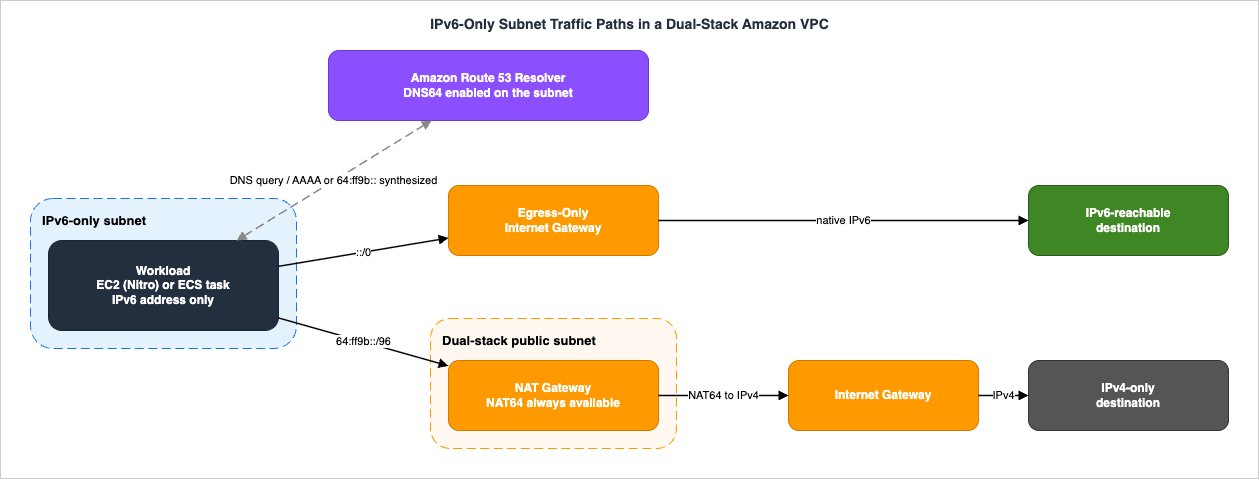
::/0 route to the egress-only internet gateway, with no translation anywhere. IPv4-only destinations are reached only because Route 53 Resolver synthesized a 64:ff9b:: address, the subnet route table sends that prefix to the NAT gateway, and the NAT gateway performs NAT64 before the packet leaves through the internet gateway. Break any one of those three links and only the IPv4 path fails — which is exactly why the symptom is so often "some destinations work and some do not."5. DNS64 and NAT64
5.1 The mechanism, end to end
DNS64 and NAT64 are two halves of one interoperability layer, and they are configured in two different places.DNS64 is a subnet-level attribute. When enabled, it applies to all AWS resources in that subnet. Route 53 Resolver looks up the record for the queried name and does one of two things:
- If the record contains an IPv6 address, it returns the original record unchanged and the connection is established over IPv6 with no translation at all.
- If there is no IPv6 address in the record, it synthesizes one by prepending the well-known
/96prefix defined in RFC 6052 —64:ff9b::/96— to the IPv4 address.
You toggle it with
aws ec2 modify-subnet-attribute --subnet-id subnet-1a2b3c4d --enable-dns64, or in the console under Actions → Edit subnet settings.NAT64 is always on at the NAT gateway. When a packet destined for a
64:ff9b::/96 address arrives, the NAT gateway recognizes from the prefix that the true destination is IPv4 and rewrites the packet: the source IPv6 becomes the gateway's own private IPv4 address (which the internet gateway then translates to the Elastic IP address), and the destination IPv6 becomes IPv4 by truncating the 64:ff9b::/96 prefix. The translated packet leaves through the internet gateway, virtual private gateway, or transit gateway. On the return path the gateway de-NATs — replacing its own address with the host's IPv6 address and prepending 64:ff9b::/96 back onto the source — and the packet follows the local route to the instance.Two things follow from this that are easy to miss. First, the whole mechanism is connection-oriented and outbound-initiated: the NAT gateway "initiates a connection" and then "accepts the response IPv4 packets from the external hosts." There is no inbound equivalent — an IPv4-only client cannot reach an IPv6-only workload through NAT64. Second, because the IPv6 half of the destination address literally contains the IPv4 address, anything you do with
64:ff9b::/96 in a security group or network ACL applies to all NAT64 destinations at once; you cannot allow a single IPv4 destination through NAT64 by CIDR alone without matching the embedded address.5.2 What you must allow
AWS states the requirement explicitly at the end of its configuration walkthrough: "Configure your security group and NACLs appropriately to allow egress and ingress traffic to64:ff9b::/96 traffic." If your subnet uses restrictive network ACLs — which stateless controls at the subnet boundary usually are — the 64:ff9b::/96 prefix needs rules in both directions, because network ACLs do not track connection state.5.3 Reaching IPv4-only services on-premises
DNS64 also works for names resolved through Route 53 Resolver outbound endpoints, which is how IPv6-only subnets reach IPv4-only on-premises systems. The documented flow:- You create a Route 53 Resolver outbound endpoint in a VPC and assign it IPv4 addresses — these are the addresses your on-premises resolver sees queries arriving from, so they must be IPv4.
- You create forwarding rules naming the domains to forward and the IPv4 addresses of the on-premises resolvers.
- You enable DNS64 on the subnet containing the IPv6-only workloads, and route data destined for on-premises through a NAT gateway.
At query time, the DNS query from the IPv6-only resource reaches Route 53 Resolver over IPv6; Resolver matches the forwarding rule, converts the query to IPv4, and forwards it via the outbound endpoint ENI. The on-premises resolver answers over IPv4. Because the query came from a DNS64-enabled subnet, Resolver checks the response — if it contains an IPv6 address it passes it through unchanged; if it contains only an IPv4 record it synthesizes the
64:ff9b::/96 form — and returns the result to the resource over IPv6.For a fully private path to on-premises IPv4 systems, the NAT function is served by a private NAT gateway, with the
64:ff9b::/96 route in the workload subnet pointing at it. Route 53 Resolver endpoints themselves support dual-stack and IPv6-only configurations, so the resolver tier does not have to be the thing that forces a subnet to stay dual-stack. Broader Route 53 architecture — hosted zones, resolver rule sharing, hybrid resolution topologies — is covered in the Amazon Route 53 DNS Architecture Guide.5.4 The limits of the translation layer
DNS64 and NAT64 solve exactly one problem: an IPv6-only client initiating an outbound connection to an IPv4-only service that is reachable by name. They do not solve:- Inbound. Nothing lets an IPv4-only client originate a connection to an IPv6-only workload. If you need to serve IPv4 clients, the IPv4 entry point has to exist somewhere — typically a dual-stack load balancer with IPv6 targets.
- Literal IPv4 addresses in configuration. DNS64 only intervenes in DNS answers. An application configured with
10.0.5.42rather than a hostname gets no synthesis and no translation, and simply fails. Section 12 treats this as its own anti-pattern because it is the most common cause of a "working" migration falling over in production. - Non-DNS discovery. Service discovery mechanisms that hand out IPv4 literals — hard-coded peer lists, some cluster gossip protocols, certain agent registration flows — bypass DNS64 entirely.
- Agent-based dependencies on IPv4-only control planes. AWS's own guidance is direct here: resources managed by AWS Systems Manager "must have IPv4 connectivity to Systems Manager's endpoints," which means an instance you want to reach with Session Manager must run dual-stack with IPv4 connectivity to the internet or to a PrivateLink VPC endpoint. Verify the current state of this and any similar dependency before designing it out.
6. Security Controls in IPv6
6.1 The central point: NAT was never a security control, but it acted like one
In an IPv4 VPC, a resource in a private subnet is unreachable from the internet for two independent reasons: there is no route from the internet to its address, and its address is not globally routable in the first place. Even a misconfigured security group cannot fully undo the second reason.In IPv6 with Amazon-provided addresses, the second reason does not exist. Every address is globally unique and, absent controls, globally reachable. AWS says so in as many words: Amazon-provided IPv6 addresses "are always advertised on the internet. They are globally unique, and therefore reachable over the internet. You can control whether resources such as EC2 instances are reachable using their IPv6 addresses by controlling routing for your subnets, or by using security groups and network ACLs."
That is a complete list of your controls: routing, security groups, network ACLs — plus, if you use them, private IPv6 ranges that AWS refuses to route (section 2.3). The implicit protection that address translation provided is gone. This is not an argument against IPv6; it is an argument for making the controls explicit and verifying them, because a route table typo that would have been harmless in IPv4 is now the difference between an internal service and an internet-exposed one.
6.2 Security groups need new rules — they are not inherited
Security groups default to denying all inbound traffic, and IPv4 rules do not cover IPv6. The whitepaper gives the canonical example: "a web server security group that currently permits0.0.0.0/0 on port 80 doesn't permit IPv6 traffic... if you wanted to allow all IPv6 traffic you would need an additional rule allowing traffic from ::/0."This applies to every inbound rule you have. Enabling IPv6 on a VPC does not silently duplicate your IPv4 rule set. In a mature estate with hundreds of security groups, this is the single largest piece of work in an IPv6 migration, and it is the reason section 10 puts "audit and duplicate security group rules" ahead of "assign addresses."
Outbound is different. The default security group's outbound rules are
0.0.0.0/0 and ::/0, but AWS notes the IPv6 rule "is added only if your VPC has an associated IPv6 CIDR block." Custom security groups with explicit egress rules — which any well-designed estate has — get no such treatment. If you have replaced allow-all egress with scoped destinations, every one of those needs an IPv6 counterpart, including the 64:ff9b::/96 prefix if the workload uses NAT64.6.3 Network ACLs: automatic for the default, manual for yours
Network ACLs behave differently, and the difference is worth stating precisely because it produces a false sense of safety.The default network ACL gets IPv6 rules automatically. AWS documents rule 101 — all IPv6 traffic,
::/0, ALLOW — as being added on both the inbound and outbound sides, along with the catch-all * DENY rules for both families. But there is a conditional: "if you've modified the inbound rules of a default network ACL, we do not add the rule that allows all inbound IPv6 traffic when you associate an IPv6 block with the VPC." So a default network ACL you have touched will not be updated — and the default DENY for ::/0 will silently drop all IPv6.Custom network ACLs get nothing. Every rule you wrote for IPv4 needs an IPv6 equivalent, in both directions, including the ephemeral-port return-traffic rules that stateless filtering requires. And if the subnet uses NAT64, the
64:ff9b::/96 prefix needs rules of its own.The combination that catches teams: a custom network ACL that has never been reviewed for IPv6 sits in front of an EIGW-routed subnet whose security groups were correctly updated. Traffic dies at the subnet boundary, security group logs show nothing, and the egress-only internet gateway — which cannot have a security group attached and is controlled only by network ACLs — offers no other place to look.
6.4 Prefix lists: the aggregation lever, with a family constraint
Managed prefix lists are how you keep IPv6 rule sets maintainable. The rule that governs their use is unambiguous: "A prefix list supports a single type of IP addressing only (IPv4 or IPv6). You cannot combine IPv4 and IPv6 CIDR blocks in a single prefix list." The CloudFormation resource makes the same point structurally —AddressFamily is required and takes IPv4 or IPv6.So a dual-stack estate needs paired prefix lists — a
corp-networks-v4 and a corp-networks-v6 — referenced together in every rule where you previously referenced one. That is more objects to manage, but it is far better than the alternative of hand-maintaining parallel CIDR lists across hundreds of security groups.Two quota behaviors to design around, both documented in the Amazon VPC quotas:
- When you reference a prefix list in a resource, the maximum number of entries counts against that resource's quota, not the current number of entries. A prefix list created with
MaxEntries: 20and referenced in a security group rule consumes 20 security group rules whether it holds 20 entries or 2. SizeMaxEntriesdeliberately. - The default quotas are 100 prefix lists per Region, 1,000 versions per prefix list, and 1,000 maximum entries per prefix list. These are adjustable, but not through the Service Quotas console — they require a support case.
This is where contiguous IPAM-allocated IPv6 space pays for itself: a well-summarized plan needs a handful of aggregate entries where a fragmented one needs dozens.
6.5 The rest of the security stack
- AWS WAF evaluates IP set match statements against IPv4 or IPv6 addresses, and IP sets support all IPv4 and IPv6 CIDR ranges except
0.0.0.0/0and::/0. If you are using a WAF allow-list model, the IPv6 ranges need to be added explicitly, and you cannot express "everything." - AWS Shield Standard and Advanced detection and mitigation work with IPv4 and IPv6, per the whitepaper, with no impact to performance, scalability, or availability. The Shield Advanced developer guide states the opposite in so many words —
Shield Advanced supports IPv4, and does not support IPv6.Both statements are official; they are quoted side by side in the AWS Network and Application Protection Decision Guide, which recommends designing against the narrower one. - AWS Network Firewall endpoints can filter both IPv4 and IPv6 traffic in dual-stack subnets — note "dual-stack subnets," which is a reason the inspection tier stays dual-stack even in an IPv6-first design. When NAT64 is in the path, the firewall endpoint subnets need a
64:ff9b::/96route toward the NAT gateway for translation to work. - VPC Traffic Mirroring mirrors both IPv4 and IPv6 traffic with no special configuration, but the mirrored traffic is encapsulated in IPv4 packets and reaches the target via the source VPC's IPv4 route table. Your mirroring path therefore stays IPv4 even when the mirrored traffic is entirely IPv6.
For where these controls sit in a broader segmentation model, see the AWS Zero Trust Network Architecture Guide.
7. Service Support Matrix
7.1 Inclusion criteria — read this before the table
This table is not a complete list, and it is a dated snapshot. The criteria are stated explicitly so you can judge what it does and does not cover:- Single source. Every value is taken from one canonical AWS page — AWS services that support IPv6 in the Amazon VPC User Guide — read on 2026-07-31. No values are inferred, aggregated from blog posts, or carried over from memory.
- Columns are the source's columns, unchanged: Dual stack support, IPv6 only support, Public endpoints support IPv6, and Private endpoints support IPv6. These are four distinct questions and the source deliberately keeps them separate; conflating them is the most common error in third-party IPv6 tables. An empty Private endpoints cell in the source means the service does not integrate with AWS PrivateLink.
- Rows are a subset. The source lists roughly 190 services. Reproduced here are only the services that appear in the VPC data-path design decisions this guide discusses, grouped into five families. Everything else is omitted, not judged.
Partialis reproduced asPartial. Where the source saysPartial, this table saysPartialand does not resolve it into Yes or No. Check the service's own documentation for the specifics.- No claim of completeness or permanence. IPv6 support is added frequently. Verify against the source page before you commit a design.
7.2 The table (verified 2026-07-31)
* You can sort the table by clicking on the column name.| Service | Dual stack | IPv6 only | Public endpoints support IPv6 | Private endpoints support IPv6 |
|---|---|---|---|---|
| Networking | ||||
| Amazon VPC | Yes | Yes | Yes | No |
| AWS PrivateLink | Yes | Yes | Yes | no PrivateLink integration |
| AWS Transit Gateway | Yes | No | Yes | No |
| AWS Cloud WAN | Yes | No | Yes | No |
| Direct Connect | Yes | Yes | No | Yes |
| AWS Site-to-Site VPN | Yes | No | Yes | No |
| Amazon VPC Lattice | No | No | Yes | Yes |
| AWS Global Accelerator | Yes | No | Yes | no PrivateLink integration |
| Compute and containers | ||||
| Amazon EC2 | Yes | Yes | Yes | No |
| AWS Lambda | Yes | No | Yes | Yes |
| Amazon ECS | Yes | Yes | Yes | Yes |
| Amazon EKS | Partial | Partial | Yes | Yes |
| AWS Fargate | Yes | No | Yes | Yes |
| Amazon ECR | Yes | No | Yes | No |
| Ingress: load balancing, edge, DNS | ||||
| Elastic Load Balancing | Partial | Partial | Yes | No |
| Amazon CloudFront | Yes | Yes | Yes | no PrivateLink integration |
| Amazon API Gateway | Yes | No | Yes | Yes |
| Amazon Route 53 | Yes | Yes | Yes | Yes |
| Data | ||||
| Amazon S3 | Yes | No | Yes | No |
| Amazon RDS | Yes | No | Yes | No |
| Amazon Aurora | Yes | No | Yes | No |
| Amazon ElastiCache | Yes | Yes | No | Yes |
| Security and operations | ||||
| AWS Network Firewall | Yes | Yes | No | Yes |
| AWS WAF | Yes | Yes | No | no PrivateLink integration |
| AWS WAFV2 | No | No | Yes | Yes |
| Amazon CloudWatch | Yes | Yes | Yes | Yes |
| Amazon CloudWatch Logs | Yes | Yes | Yes | Yes |
| AWS Systems Manager | No | No | Yes | Yes |
Three rows deserve comment because they change designs.
Elastic Load Balancing is
Partial in both columns. That is not evasion — it reflects that behavior differs by load balancer type and configuration. For Application Load Balancers the IP address type is ipv4, dualstack, or dualstack-without-public-ipv4, the last of which requires clients to connect over IPv6 while the load balancer still uses IPv4 to reach targets. The dualstack requirements are concrete: the VPC and subnets must have IPv6 CIDR blocks, the route tables must route IPv6, and the security groups and network ACLs must allow IPv6.AWS Systems Manager is
No / No for dual stack and IPv6-only (highlighted above). Combined with the whitepaper's statement that Systems Manager-managed resources need IPv4 connectivity to Systems Manager endpoints, this is the most likely reason a subnet you wanted to make IPv6-only has to stay dual-stack. Check the current documentation — this is exactly the kind of entry that changes.Amazon EKS is
Partial in both columns, which matches the feature-level constraints in section 9.7.3 IPv6 support added during 2025 and 2026
Because the pace of change is the main risk in a table like the one above, here is what AWS announced recently. All dates are from AWS What's New announcements; verified 2026-07-31.| Date | Announcement |
|---|---|
| 2025-07 | Amazon CloudWatch adds IPv6 support for metric ingestion and query, alarms, dashboards, and Observability Access Manager settings |
| 2025-09 | Amazon ECS announces IPv6-only support for tasks and services across awsvpc, bridge, and host networking modes |
| 2025-10 | AWS Directory Service introduces IPv6 support for Managed Microsoft AD and AD Connector, including IPv6-only configurations |
| 2025-11 | Amazon S3 supports IPv6 for gateway and interface VPC endpoints |
| 2026-01 | AWS IAM Identity Center supports IPv6 through dual-stack endpoints |
| 2026-01 | Amazon RDS supports IPv6 for VPC endpoints of RDS Service APIs |
| 2026-03 | Amazon CloudFront supports BYOIP for IPv6 through VPC IPAM integration, for Anycast Static IP lists |
| 2026-06 | Amazon Neptune announces dual-stack support with private and public dual-stack modes |
The pattern is worth reading as a design signal rather than a news feed: the additions cluster around control-plane and endpoint reachability (CloudWatch, IAM Identity Center, RDS Service APIs, S3 endpoints) rather than data-plane fundamentals, which have been in place since the IPv6-only subnet launch. If a design was blocked in the past by "the management path needs IPv4," it is worth re-testing that assumption.
8. Hybrid and Multi-VPC Connectivity
8.1 VPC peering
Peering is the simplest case because, as the whitepaper puts it, "the peering itself is IP protocol agnostic." Both IPv4 and IPv6 prefixes can be routed across the same peering connection, and the route tables decide which prefixes are actually reachable. You can route only the IPv6 CIDRs of the peered VPCs, giving you IPv6-only connectivity across an otherwise dual-stack pair.The constraint is the one from section 1.1, restated here because it is the single most useful fact in this article for anyone fighting an overlap problem: you cannot peer two VPCs whose IPv4 CIDRs overlap, even if their IPv6 CIDRs do not. The address families are not evaluated independently for the purpose of establishing the peering. For that case you need Transit Gateway.
8.2 Transit Gateway
Transit Gateway attachments are also protocol-agnostic in principle — the same attachment can carry IPv4 and IPv6 prefixes — but there are three operational details that decide whether IPv6 actually works.The
Ipv6Support attachment option defaults to disable. Enabling it does two specific things: it assigns an IPv6 address to the transit gateway network interface in the attachment subnet, and it propagates IPv6 VPC CIDRs to the transit gateway route table when route propagation is configured. AWS is careful to state what it does not do: when disabled, you can still create static IPv6 routes targeting the attachment, and IPv6 traffic can still enter the transit gateway from the VPC if the VPC route table points at it and the network ACLs and security groups permit it. "This setting controls only network interface addressing and route propagation — it does not filter packets."That last clause is a security-relevant nuance.
Ipv6Support=disable is not an IPv6 block. If you were relying on it as one, you are relying on something AWS explicitly says it is not.Retrofitted VPCs need the ENI addressed explicitly. The whitepaper flags this: "If you retrofit IPv6 into an existing VPC with a Transit Gateway attachment, its elastic network interfaces won't be auto-assigned IPv6 addresses; you need to explicitly configure assignment for the elastic network interfaces. If you don't, IPv6 traffic cannot use the attachment." This is a classic migration failure — the VPC has IPv6, the routes exist, and traffic still does not cross the Transit Gateway.
Attachment subnets cannot be IPv6-only. The whitepaper states it flatly: "You cannot create a transit gateway attachment using IPv6-only subnets." Practically, this means every VPC attached to a Transit Gateway keeps at least one small dual-stack subnet per Availability Zone for the attachment ENIs. Plan for it in your subnet layout rather than discovering it during a build.
For Transit Gateway Connect attachments to third-party appliances, IPv6 is supported over Multi-Protocol BGP using a
/125 from the well-known fd00::/8 unique local address range.8.3 Direct Connect
Direct Connect natively supports both families. A virtual interface — private, public, or transit — can carry a BGP peering session for IPv4, IPv6, or both, so a single VIF can be dual-stack rather than requiring a second circuit. For the IPv6 session, Amazon automatically assigns a/125 for the BGP peering. On public VIFs you must advertise /64 prefixes or larger.Watch the prefix budget. The allowed-prefixes list for a Transit Gateway association with a Direct Connect gateway has a combined IPv4-plus-IPv6 limit, so adding IPv6 prefixes consumes the same allowance as IPv4. This is another place where a summarizable IPAM-allocated IPv6 plan is worth more than a set of unrelated Amazon-provided
/56 blocks.8.4 Site-to-Site VPN
Site-to-Site VPN is the sharpest edge in the hybrid story, and the shape of the constraint is not obvious.A Site-to-Site VPN connection on a Transit Gateway supports either IPv4 or IPv6 traffic inside the tunnels — not both. For dual-stack connectivity you create two VPN connections: one for IPv4 and one for IPv6. The IPv4 connection's tunnels each get a
/30 from 169.254.0.0/16. The IPv6 connection's tunnels each get two blocks: a /30 from 169.254.0.0/16 and a /126 from fd00::/8.Separately, the outside tunnel addresses on the AWS side are IPv4, and the customer gateway's public address must also be IPv4. So even a fully IPv6 inside-tunnel design still depends on IPv4 for the tunnel's outer transport. If your requirement is "no IPv4 anywhere in the path," Site-to-Site VPN as configured this way does not satisfy it, and that is a design input rather than a detail.
8.5 PrivateLink and VPC endpoints
PrivateLink has the most precisely specified IPv6 model of any of these, and it is the mechanism that makes IPv6-only subnets viable for private service consumption.An interface endpoint has an IP address type with three values, and each has a subnet precondition:
IpAddressType | Supported when |
|---|---|
ipv4 | All selected subnets have IPv4 address ranges |
ipv6 | All selected subnets are IPv6-only subnets |
dualstack | All selected subnets have both IPv4 and IPv6 address ranges |
There is a separate DNS record IP type (
ipv4, ipv6, dualstack, or service-defined) that controls whether A records, AAAA records, or both are created for the private, Regional, and zonal DNS names, and it must be compatible with the endpoint's IP address type. The two settings are independent knobs, and getting them out of alignment is a common cause of "the endpoint exists but resolves to the wrong family."Two properties are worth highlighting. First, AWS services can support IPv6 through their private endpoints even when they do not support it through their public endpoints — which is exactly why the support matrix in section 7 keeps those as separate columns. Second, the IPv6 address on an endpoint network interface is unreachable from the internet; if you describe the ENI you will see
denyAllIgwTraffic enabled. That is an enforced property of the endpoint ENI, not something you configure.On the provider side, enabling IPv6 for your own endpoint service requires that the VPC and subnets have IPv6 CIDR blocks and that all Network Load Balancers for the service use the dualstack IP address type — but the targets behind them do not need to support IPv6. One caveat AWS calls out: if your service reads source IP addresses from the proxy protocol v2 header, it must handle IPv6 addresses. Full endpoint design is covered in the AWS PrivateLink and VPC Endpoints Complete Guide.
VPC sharing works unchanged: dual-stack subnets can be shared across accounts exactly as IPv4-only subnets are, and IPv6 resources in a shared subnet behave identically to those in a non-shared one.
9. Container and Serverless Workloads
Container platforms are the workloads that most often justify IPv6-only subnets, because per-Pod and per-task addressing is where IPv4 exhaustion actually bites. This section covers the VPC-level design implications only; the internals of the VPC CNI, prefix delegation, warm pools, and IPv6 cluster behavior are covered in Amazon EKS Networking Deep Dive.9.1 Amazon EKS
EKS appears asPartial in both support columns for good reason — IPv6 mode is supported, but with a specific set of exclusions that AWS documents together:- Nitro-based EC2 or Fargate nodes only.
- No Windows support — Windows Pods and services are not supported.
- No AWS Outposts support.
- Amazon FSx for Lustre is not supported.
- Custom networking cannot be used with IPv6. This one is a genuine either/or: if you adopted custom networking specifically to relieve IP exhaustion, IPv6 replaces it; but if you adopted it for network isolation, you may need to stay on custom networking with IPv4.
- Security groups for Pods are supported with IPv6 on both EC2 and Fargate nodes.
The VPC-design takeaway: an EKS IPv6 cluster still lives in a dual-stack VPC, and you still need dual-stack subnets for the pieces that require them (load balancers, Transit Gateway attachments, any interface endpoints consumed over IPv4). The IPv6 decision is about the Pod address space, not about eliminating IPv4 from the VPC.
9.2 Amazon ECS
Amazon ECS announced IPv6-only support in September 2025, covering tasks and services that run exclusively with IPv6 addresses, across theawsvpc, bridge, and host networking modes. AWS's framing of the problem is precisely the one in section 1.1: previously ECS tasks required IPv4 addresses even in dual-stack subnets, which was a constraint for large containerized fleets. To use it you create IPv6-only subnets and launch services or tasks into them; ECS detects and provisions the networking. Regional availability is documented per launch type — check it before you design around it.9.3 AWS Lambda
Lambda functions attached to a VPC can send outbound IPv6 traffic when connected to dual-stack subnets — the setting isIpv6AllowedForDualStack, and a dual-stack VPC is a prerequisite. This is an outbound-IPv6 capability for VPC-attached functions, not IPv6-only operation: the support matrix lists Lambda as dual-stack Yes, IPv6-only No.If a VPC-attached function needs to reach IPv4-only services from a subnet where you are minimizing IPv4, the NAT64 path applies to it exactly as it does to an EC2 instance: the subnet needs DNS64 enabled and a
64:ff9b::/96 route to a NAT gateway.10. Migration Strategy
10.1 The constraint that shapes everything
Before planning anything, internalize the single hardest constraint in this article, which AWS states without qualification in the IPv6 support considerations: "There is no migration path from IPv4-only subnets to IPv6-only subnets."Combined with the rule that a subnet's CIDR cannot be changed after creation, this means:
- You can add IPv6 to an existing subnet, making it dual-stack. That is an additive, non-disruptive change.
- You cannot convert an existing IPv4-only subnet into an IPv6-only subnet. IPv6-only subnets are always new subnets, and workloads move into them.
So the migration is not "flip the VPC to IPv6." It is "make the VPC dual-stack, then place new or relocated workloads into new IPv6-only subnets." Every plan that ignores this ends up rebuilding subnets under time pressure.
10.2 The four phases
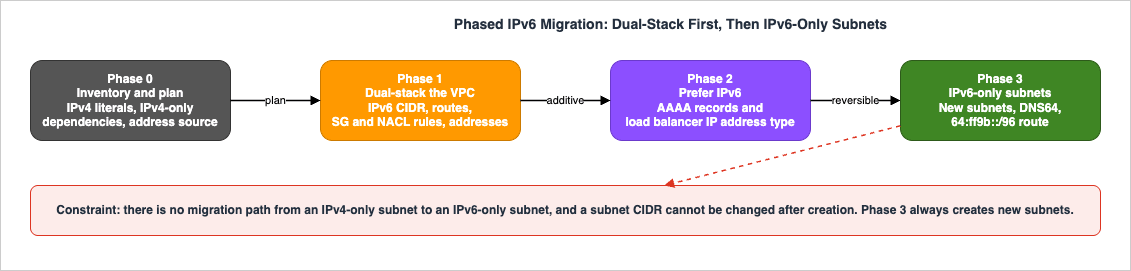
Phase 1 — Make the VPC dual-stack. AWS's documented sequence is four steps, and the order matters:
- Associate an IPv6 CIDR block with the VPC and with the subnets. Amazon-provided, IPAM-allocated, or BYOIP.
- Update the route tables. For a public subnet, a route sending IPv6 traffic to the internet gateway; for a private subnet, a route sending internet-bound IPv6 traffic to an egress-only internet gateway.
- Update the security group rules to include IPv6 rules, and any custom network ACL rules likewise.
- Assign IPv6 addresses to the instances from the subnet's IPv6 range.
The risk is concentrated in steps 2 and 3, and the ordering protects you: routes and rules should be in place before addresses appear, so that the moment a resource becomes IPv6-reachable, the controls governing that reachability already exist. Doing step 4 first creates a window in which resources have globally-routable addresses and unreviewed rules.
Also in this phase: enable
Ipv6Support on Transit Gateway VPC attachments, and — for VPCs that already had attachments — explicitly configure IPv6 address assignment on the attachment ENIs (section 8.2).Phase 2 — Make IPv6 the preferred path. Nothing about phase 1 causes traffic to actually use IPv6. Two changes do:
- Publish AAAA records for the services that should be reached over IPv6. Most modern operating systems, when a query returns both A and AAAA, prefer the AAAA record. That is why the whitepaper warns about the corresponding misconfiguration: hosts resolving FQDNs to IPv6 addresses with "no end-to-end IPv6 routable path existing between source and destination." Publish AAAA only after the path is verified end to end. Happy Eyeballs (fast fallback) mitigates this for clients that implement it, but do not design on the assumption that every client does.
- Change load balancer IP address types. For an Application Load Balancer, moving from
ipv4todualstacklets clients connect over either family. Verify the four documented prerequisites first — IPv6 CIDRs on the VPC and subnets, route tables routing IPv6, security groups allowing IPv6, and network ACLs allowing IPv6 — because three of the four are things phase 1 should have handled and the fourth (network ACLs) is the one most often missed.
Rollback for this phase is genuinely clean, which is why it is a separate phase: remove the AAAA record, or set the load balancer IP address type back to
ipv4. Both are single, reversible operations that take effect for new connections. That is the phase boundary you want before anything irreversible.Phase 3 — Introduce IPv6-only subnets for new capacity. Now the address-space win arrives. Create new IPv6-only subnets, enable DNS64 on them, add the three routes from section 4.3, verify NAT64 reachability for the known IPv4 dependencies, and place new or relocated workloads there. Keep a dual-stack tier for load balancers, NAT gateways, Transit Gateway attachment ENIs, and any interface endpoints that IPv4 consumers still need.
Rollback here is workload placement, not network surgery: if something does not work in the IPv6-only subnet, move the workload back to a dual-stack subnet. That is exactly why creating new subnets rather than converting existing ones is the right shape, quite apart from AWS's rule forbidding conversion.
10.3 Testing, and what to test
Because there is no in-place conversion, testing happens in a parallel subnet rather than on the live one. A useful order, moving outward from the resource:- Address assignment and local services. Does the resource get an IPv6 address? Can it reach the Route 53 Resolver at
fd00:ec2::253? Is the IMDS IPv6 endpoint enabled if anything depends on it? - Intra-VPC IPv6. Can it reach a dual-stack resource in another subnet over IPv6? This isolates security group and network ACL problems from routing problems.
- DNS64 synthesis. Does a lookup of a known IPv4-only name return a
64:ff9b::-prefixed AAAA? If not, DNS64 is not enabled on the subnet. - NAT64 reachability. Does a connection to that synthesized address succeed? If synthesis works and the connection does not, suspect the
64:ff9b::/96route or the security group and network ACL rules for that prefix. - Native IPv6 egress. Does a connection to an IPv6-reachable destination succeed via the egress-only internet gateway?
- Cross-VPC and hybrid. Transit Gateway, peering, on-premises paths — each of which has its own IPv6 enablement flag per section 8.
Two rules for the whole exercise. Change one thing at a time; the interaction between DNS64, routing, security groups, and stateless network ACLs makes multi-variable changes very hard to unpick. And do not run destructive experiments on a production VPC — adding a CIDR is additive and safe, but changing route tables on a live subnet is not, and a rollback plan for a route table change should be written down before the change is made.
11. Operations and Troubleshooting
11.1 VPC Flow Logs with IPv6
Flow Logs work the same way for IPv6 as for IPv4 — VPC level, subnet level, or network interface level — and IPv6 addresses appear in thesrcaddr and dstaddr fields of the default format. ICMPv6 shows up as protocol 58, which is worth knowing when you are looking for ping traffic and filtering on protocol 1.There is one behavior specific to multi-address interfaces: if a network interface has multiple IPv6 addresses and traffic is sent to a secondary IPv6 address, the default-format
dstaddr field shows the primary IPv6 address. To capture the actual destination you need a custom-format flow log including pkt-dstaddr; the same applies to pkt-srcaddr on the source side. In an IPv6 design where multiple addresses per ENI are common — and they are, because address scarcity is no longer a reason to avoid them — the default format will mislead you. Define the custom format with pkt-srcaddr and pkt-dstaddr up front; flow log configuration cannot be changed after creation, so getting it wrong means deleting and recreating the flow log.The general limitations still apply: you see no data until there is active traffic, and on Nitro-based instances the aggregation interval is always one minute or less regardless of the configured maximum.
11.2 A reachability checklist for IPv6
When IPv6 traffic does not flow, work the layers in this order. Each step isolates a different class of cause:- Does the resource have an IPv6 address at all? In a dual-stack subnet, address assignment is per-ENI and may simply not have been enabled.
- Is there a route? Check for
::/0to the egress-only internet gateway or internet gateway, and — for NAT64 — for64:ff9b::/96to the NAT gateway. A missing64:ff9b::/96route is the most common single cause of "DNS resolves but nothing connects." - Do the security groups have IPv6 rules? Remember that
0.0.0.0/0does not imply::/0, in either direction, and that scoped egress rules need IPv6 counterparts. - Do the network ACLs have IPv6 rules, in both directions? Custom network ACLs get nothing automatically, and a default network ACL you previously modified will not have had rule 101 added.
- Is DNS returning what you expect? Distinguish three cases: an AAAA that is a real address, an AAAA with the
64:ff9b::prefix (DNS64 synthesis), and no AAAA at all (DNS64 not enabled, or the subnet is not the one you think it is). - Is the far end actually IPv6-reachable? Verify a path exists before assuming the near end is at fault — this is where the "AAAA published, no routable path" failure shows up.
- For Transit Gateway paths, is
Ipv6Supportenabled on the attachment, and does the attachment ENI have an IPv6 address? Retrofitted VPCs will not have the address automatically.
VPC Reachability Analyzer and Network Access Analyzer, and the general methodology for driving them, are covered in the AWS VPC Network Troubleshooting Guide.
11.3 Operational habits worth adopting
- Treat the
::/0route target as a reviewed control. Egress-only internet gateway and internet gateway differ by one field and produce completely different exposure. Whatever mechanism you use for configuration review, this belongs in it. - Audit paired rules. For every security group rule with an IPv4 source or destination, ask whether an IPv6 counterpart should exist — and whether the absence of one is intentional. Paired prefix lists (section 6.4) make this reviewable at scale.
- Verify the interoperability boundary, not just the workload. Most IPv6-only incidents happen at the translation edge, not inside the IPv6 subnet.
- Record the verification date of any service-support assumption in your design documents, the same way section 7 does. "Amazon S3 endpoints do not support IPv6" was true and then stopped being true; an undated assumption in a design document is indistinguishable from a current fact.
12. Failure Modes and Anti-Patterns
Adding IPv6 addresses before adding IPv6 rules. Assigning addresses in step 4 of a migration before completing steps 2 and 3 creates a window in which resources hold globally-routable addresses under rules that were never reviewed for IPv6. Follow the documented order.Assuming
0.0.0.0/0 covers IPv6. It does not, inbound or outbound. A security group permitting 0.0.0.0/0 on port 443 permits no IPv6 traffic whatsoever. This is the highest-volume finding in any IPv6 readiness review.Assuming network ACLs updated themselves. The default network ACL adds
::/0 rules automatically — unless you have already modified it. Custom network ACLs never do. And because the egress-only internet gateway cannot have a security group attached, the network ACL is the only subnet-boundary control at that gateway.Pointing
::/0 at the internet gateway in a subnet meant to be private. In IPv4 this mistake is partly absorbed by the absence of a public address. In IPv6 it directly exposes every resource in the subnet to externally-initiated connections, limited only by security groups. AWS flags this explicitly in the DNS64 configuration steps.Forgetting the
64:ff9b::/96 route. DNS64 synthesizes the address, the packet has nowhere to go, and the application reports a connection timeout. Nothing in the DNS layer indicates the problem.Hard-coded IPv4 literals. DNS64 only rewrites DNS answers. Configuration files, environment variables, allow-lists, peer lists, and database connection strings that contain IPv4 literals get no translation and simply fail in an IPv6-only subnet. The inventory step of phase 0 exists for this.
Publishing AAAA records before the path is verified. Dual-stack hosts prefer IPv6. Publishing an AAAA without an end-to-end IPv6 path produces connection failures or, at best, Happy Eyeballs fallback latency for clients that implement it. The whitepaper names this as a commonly observed misconfiguration.
Depending on a service that is IPv4-only in the data path. AWS Systems Manager is the canonical example — an instance you intend to manage with Session Manager needs IPv4 connectivity to Systems Manager endpoints. Discovering this after building an IPv6-only subnet is expensive because there is no conversion path back.
Treating
Ipv6Support=disable on a Transit Gateway attachment as a security control. AWS states that the setting controls network interface addressing and route propagation only, and does not filter packets. IPv6 can still traverse the attachment via static routes or VPC route table entries.Building an IPv6-only subnet where a Transit Gateway attachment is needed. Attachment ENIs cannot live in IPv6-only subnets. Reserve a small dual-stack subnet per Availability Zone for them.
Trying to convert an existing subnet to IPv6-only. There is no such path, and a subnet's CIDR cannot be changed after creation. Create new subnets.
Assuming a single Site-to-Site VPN connection carries both families. It carries one. Dual-stack requires two connections, and the outer tunnel transport remains IPv4 regardless.
Reading secondary-address flows from default-format Flow Logs. With multiple IPv6 addresses per ENI, the default format reports the primary address. Use a custom format with
pkt-srcaddr and pkt-dstaddr — and decide this before creating the flow log, because the format cannot be changed afterwards.Leaving the IMDS IPv6 endpoint disabled on IPv6-only instances. It is disabled by default even in an IPv6-only subnet, and everything that depends on instance metadata fails with a timeout until you enable it.
Sizing prefix lists carelessly.
MaxEntries — not the current entry count — is what consumes the referencing resource's quota. An over-sized prefix list referenced across many security groups can exhaust rule quotas long before the list itself is full.13. Frequently Asked Questions
Can I run a VPC without any IPv4 at all?
No. A VPC always has an IPv4 CIDR, and AWS states that you cannot disable IPv4 support for your VPC and subnets. What you can do is make individual subnets IPv6-only, inside a VPC that retains an IPv4 CIDR. In practice an "IPv6-first" design means most workload subnets are IPv6-only while a small dual-stack tier remains for load balancers, NAT gateways, and Transit Gateway attachment ENIs.Can I convert an existing IPv4-only subnet to IPv6-only?
No. AWS documents that there is no migration path from IPv4-only subnets to IPv6-only subnets, and a subnet's CIDR cannot be changed after creation. You add IPv6 to make a subnet dual-stack, or you create a new IPv6-only subnet and move workloads into it.Do I still need a NAT gateway if I go IPv6?
For IPv6 egress, no — that is the egress-only internet gateway's job. But you still need a NAT gateway if IPv6-only workloads must reach IPv4-only services, because NAT64 is implemented in the NAT gateway. NAT64 is automatically available on every NAT gateway with no setting to enable, and the NAT gateway must be in a different subnet from the IPv6-only workloads, with an IPv4 path outward.Why does DNS resolve but the connection time out from an IPv6-only subnet?
Almost always the missing64:ff9b::/96 route to the NAT gateway, or security group and network ACL rules that do not permit traffic to that prefix. DNS64 synthesis happens in Route 53 Resolver and succeeds independently of whether the data path exists, so a successful lookup tells you nothing about reachability.Is an egress-only internet gateway the IPv6 equivalent of a NAT gateway?
Functionally similar in intent — outbound allowed, inbound blocked — but not equivalent. The egress-only internet gateway performs no address translation, works only for IPv6, and cannot have a security group associated with it; its only subnet-boundary control is the network ACL. It is stateful, so return traffic for outbound connections is permitted.Are Amazon-provided IPv6 addresses private?
No. Amazon-provided IPv6 addresses are always advertised on the internet and are globally unique and reachable. Reachability is governed by your subnet routing, security groups, and network ACLs — not by the address type. If you need addresses AWS structurally will not route to the internet, use private IPv6 (ULA or private GUA) through IPAM; those are dropped at the internet gateway edge even if a gateway exists.Can I use Elastic IP addresses with IPv6?
No. Amazon VPC does not support Elastic IP addresses for IPv6. Stable addressing for IPv6 comes from the address plan itself — an IPAM-allocated or BYOIP range you control — rather than from a detachable address object.Which instance types can run in an IPv6-only subnet?
Only instances based on the Nitro System. This is a hard requirement, and it also applies to enabling the IMDS IPv6 endpoint and to using IPv6 with Amazon EKS nodes.How do I keep IPv6 security group rules manageable?
Use managed prefix lists, but note that a prefix list supports a single address family — you cannot mix IPv4 and IPv6 CIDRs in one list. Maintain paired IPv4 and IPv6 prefix lists and reference both. SizeMaxEntries deliberately, because the maximum (not the current count) is what consumes the referencing resource's quota.Does IPv6 change anything about VPC Flow Logs?
The mechanism is the same and IPv6 addresses appear insrcaddr and dstaddr. The difference that matters: with multiple IPv6 addresses on an interface, the default format reports the interface's primary IPv6 address rather than the actual destination. Use a custom format with pkt-srcaddr and pkt-dstaddr, and decide this at creation time because the format cannot be changed afterwards.14. Summary
An IPv6-first VPC design comes down to a handful of decisions that are easy to state and expensive to change later.Choose the address source before you build. Amazon-provided
/56 blocks are the fastest path and give you nothing to summarize; IPAM-allocated or BYOIPv6 ranges are what let you aggregate routes and firewall rules at Transit Gateway and Direct Connect scale. Decide whether any workload needs private IPv6 (ULA or private GUA through IPAM), because that is a structurally stronger non-routability guarantee than any route table entry — and it is only available through IPAM.Decide IPv6-only at the subnet level, not the VPC level. The VPC keeps IPv4. Put high-density workloads in IPv6-only subnets and keep a deliberately small dual-stack tier for load balancers, NAT gateways, Transit Gateway attachment ENIs, and IPv4-facing endpoints. That tier is your translation boundary; keeping it small is what makes the design reviewable.
Make the controls explicit, because NAT is no longer doing it for you. Amazon-provided IPv6 addresses are globally routable by construction. Security groups need new IPv6 rules —
0.0.0.0/0 covers nothing. Custom network ACLs need IPv6 rules in both directions, and a default network ACL you have already modified will not be updated for you. The difference between a private subnet and an internet-exposed one is one route table entry.Understand exactly what DNS64 and NAT64 do and do not solve. They handle outbound, name-resolved, IPv6-to-IPv4 connections. They do nothing for inbound, for hard-coded IPv4 literals, or for agent-based dependencies on IPv4-only control planes.
Migrate in reversible phases. Dual-stack the VPC additively; make IPv6 preferred with AAAA records and load balancer IP address types, both of which roll back in one operation; then create new IPv6-only subnets, because there is no conversion path from an IPv4-only subnet and a subnet's CIDR is immutable.
Date your assumptions. Service support for IPv6 is the fastest-moving part of this topic — Amazon CloudWatch, Amazon ECS IPv6-only, AWS Directory Service, Amazon S3 VPC endpoints, AWS IAM Identity Center, Amazon RDS Service API endpoints, Amazon CloudFront BYOIPv6, and Amazon Neptune all changed between 2025 and 2026. The service table in section 7 carries a verification date of 2026-07-31 for that reason, and your design documents should carry one too.
For the decisions this guide deliberately delegated: connectivity option selection is in the AWS VPC Connectivity Decision Guide, the review process is in the VPC Design Review Checklist, container networking internals are in Amazon EKS Networking Deep Dive, and the diagnostic methodology is in the AWS VPC Network Troubleshooting Guide.
15. References
- Amazon VPC User Guide — IP addressing for your VPCs and subnets
- Amazon VPC User Guide — VPC CIDR blocks
- Amazon VPC User Guide — Subnet CIDR blocks
- Amazon VPC User Guide — IPv6 support for your VPC
- Amazon VPC User Guide — Add IPv6 support for your VPC
- Amazon VPC User Guide — Example dual-stack VPC configuration
- Amazon VPC User Guide — DNS64 and NAT64
- Amazon VPC User Guide — Enable outbound IPv6 traffic using an egress-only internet gateway
- Amazon VPC User Guide — Default security groups for your VPCs
- Amazon VPC User Guide — Default network ACL for a VPC
- Amazon VPC User Guide — Consolidate and manage network CIDR blocks with managed prefix lists
- Amazon VPC User Guide — Amazon VPC quotas
- Amazon VPC User Guide — Flow log limitations
- Amazon VPC User Guide — AWS services that support IPv6
- Amazon VPC IPAM User Guide — Create IPv6 address pools in your IPAM
- Amazon VPC IPAM User Guide — Create a Regional IPv6 address pool in your IPAM
- AWS Transit Gateway — Amazon VPC attachments (IPv6 support)
- AWS PrivateLink — Access AWS services through AWS PrivateLink (IP address types)
- AWS PrivateLink — Share your services through AWS PrivateLink (IP address types)
- AWS CLI Reference — associate-vpc-cidr-block
- Amazon EC2 User Guide — Configure instance metadata options for new instances (IMDS IPv6 endpoint)
- Amazon EC2 User Guide — Modify instance metadata options for existing instances
- Elastic Load Balancing — Update the IP address types for your Application Load Balancer
- Amazon EKS User Guide — Learn about IPv6 addresses to clusters, Pods, and services
- AWS CloudFormation — AWS::EC2::PrefixList (AddressFamily)
- IPv6 on AWS (AWS Whitepaper)
- IPv6 on AWS — Planning IPv6 adoption in the AWS Cloud network
- IPv6 on AWS — Supporting Amazon VPC services
- IPv6 on AWS — Designing DNS for IPv6
- IPv6 on AWS — Amazon VPC connectivity options for IPv6
- IPv6 on AWS — IPv6 security and monitoring considerations
- Amazon CloudWatch adds IPv6 support (What's New, 2025-07)
- Amazon ECS announces IPv6-only support (What's New, 2025-09)
- AWS Directory Service introduces IPv6 support for Managed Microsoft AD and AD Connector (What's New, 2025-10)
- Amazon S3 now supports IPv6 for gateway and interface VPC endpoints (What's New, 2025-11)
- AWS IAM Identity Center now supports IPv6 (What's New, 2026-01)
- Amazon RDS now supports IPv6 for VPC endpoints of RDS Service APIs (What's New, 2026-01)
- Amazon CloudFront now supports BYOIP for IPv6 through VPC IPAM integration (What's New, 2026-03)
- Amazon Neptune announces dual stack support with IPv6 (What's New, 2026-06)
- Introducing IPv6-only subnets and EC2 instances (AWS Networking and Content Delivery Blog)
- Dual-stack IPv6 architectures for AWS and hybrid networks
- Introducing dual-stack and IPv6-only support for Amazon Route 53 Resolver Endpoints
- Expedite your IPv6 adoption with PrivateLink services and endpoints
- IPv6 deployment models for AWS Network Firewall
- AWS VPC Connectivity Decision Guide - VPC Peering, Transit Gateway, PrivateLink, VPC Lattice, and Cloud WAN
- VPC Design Review Checklist - CIDR, Subnets, Transit Gateway
- AWS VPC Network Troubleshooting Guide
- Amazon EKS Networking Deep Dive - VPC CNI, IP Address Management, Security Groups for Pods, and Pod Connectivity
- AWS Networking Glossary
- AWS PrivateLink and VPC Endpoints Complete Guide
- AWS Hybrid Connectivity Decision Guide
- Amazon Route 53 DNS Architecture Guide
- AWS Elastic Load Balancing Decision Guide
- AWS Zero Trust Network Architecture Guide
- AWS VPC Lattice Complete Guide
- AWS History and Timeline regarding Amazon VPC
- VPC CIDR and Subnet Planner
- IP Subnet Calculator
- IP Range to CIDR Converter
References:
Tech Blog with curated related content
Written by Hidekazu Konishi