Running VMware Workloads on AWS with Amazon EVS - What Carries Over, What the VPC Makes You Rebuild, and Who Installs VCF
First Published:
Last Updated:
This architecture has a subtle but important consequence. While you can migrate the hypervisor layer without modification, the underlying network becomes part of your VPC. Design and maintenance work that you never had to think about now appears explicitly as your own. The official Amazon EVS documentation goes further, and states of several of these conditions that the deployment fails if you do not meet them.
This article, based solely on official AWS sources, sets out what carries over and what must be rebuilt, in pairs. It also examines how the boundary of responsibility between AWS and you moves depending on whether Amazon EVS deploys VCF for you or you install it yourself with the VCF Installer in Self-deployed mode. All information presented in this article was verified on September 3, 2026.
Table of Contents
- 1. Introduction - The Decisions This Article Supports
- 2. Where is Amazon EVS actually located?
- 3. What Carries Over
- 4. Address Space - The One Decision You Cannot Redo
- 5. Route Table Association - Implicit at Creation, Explicit Afterward
- 6. Name Resolution and Time - Prerequisites for Deployment Failure
- 7. Route Advertisement - VPC Route Server and NSX Edge Peering
- 8. Traffic Control - Where Security Groups Stop Applying
- 9. Choosing a VCF Version, and Who Installs It
- 10. Migrating Workloads with VMware HCX
- 11. What Does Not Carry Over
- 12. Failure Modes and Anti-Patterns
- 13. Frequently Asked Questions
- 14. Summary
- 15. References
1. Introduction - The Decisions This Article Supports
Moving VMware to AWS can refer to at least two different pieces of work.One is the refactoring path. This involves migrating virtual machines to Amazon EC2 instances and moving applications to AWS managed services. The previous article, What AWS Transform Automates and What Stays Human, discusses what can be automated and what remains a manual process within this path, while Summary of AWS Application Migration Service (AWS MGN) Architecture and Lifecycle Relationships, Usage Notes covers rehosting using block-level replication. This article will not cover the steps involved in this refactoring path.
The other is the non-refactoring path. This involves continuing to use vCenter Server, NSX, and vSAN as they are, simply changing the underlying infrastructure to AWS. Where those products came from, and who has owned the company behind them along the way, is traced in VMware History and Timeline. Amazon EVS falls under this approach. The user guide explains that it lets you extend your on-premises network and migrate workloads to AWS without changing IP addresses, retraining staff, or rewriting operational runbooks.
These two paths have different objectives, so it's not appropriate to compare them to determine which is superior. The key consideration for making a decision is understanding what truly remains unchanged when choosing the non-refactoring path, and what still requires rebuilding. This article focuses solely on that aspect.
The intended audience for this article is infrastructure engineers who have experience managing vSphere and VCF environments. The assumption is that terms like vCenter, NSX, SDDC Manager, and HCX are part of their daily vocabulary, but that associating a VPC route table with a subnet is something they think about for the first time on the AWS side.
1.1 How Amazon EVS Got Here, and Where VMware Cloud on AWS Stands
AWS launched Amazon EVS as a public preview on June 9, 2025, and made it generally available on August 5, 2025. AWS has since added Regions, and has changed the maximum number of hosts per environment, the supported instance types, and the supported versions of VMware Cloud Foundation (VCF). This article does not provide a comprehensive list of versions or limits; instead, it aims to show you how to verify this information.Regarding the adjacent VMware Cloud on AWS, it is important to state the facts accurately. The official AWS page states the following.
As of April 30, 2024, VMware Cloud on AWS is no longer resold by AWS or its channel partners.
The service will continue to be available through Broadcom.
The FAQ on the same page states that the service is still available to existing customers. On renewals, it reports that Broadcom has stated that subscriptions can be renewed directly from Broadcom or an authorized Broadcom reseller. In other words, what changed is whether AWS is the sales channel. The service has not been discontinued. For how AWS names service lifecycle states, see AWS Service Lifecycle States.
2. Where is Amazon EVS actually located?
Amazon EVS environments are created inside a VPC that you specify. ESX hosts run on Amazon EC2 bare metal instances, and the VCF management components and workloads run on top of them.2.1 A Single, Consolidated Domain
Amazon EVS adopts the VCF consolidated architecture model. Management components and user workloads coexist within a single domain, with vSphere resource pools responsible for separating these functions. Management is performed through a single vCenter Server.An Amazon EVS consolidated domain includes ESX hosts, a vCenter Server instance, SDDC Manager, a vSAN datastore, a three-node NSX Manager cluster, a vSphere cluster, and an NSX Edge cluster.
The hosts are ESX hosts running on Amazon EC2 bare metal instances, and the vSAN datastore uses local NVMe instance store volumes. There is a warning attached to this.
Instance store volumes are ephemeral. Data stored on these volumes do not persist if the underlying
EC2 instance is stopped or terminated. Stopping or terminating Amazon EC2 instances used by Amazon EVS
without decomissioning within VCF can result in data loss.
Being visible in the AWS console does not make these hosts something you can operate with EC2 habits. Each host that Amazon EVS adds carries a tag beginning with
DoNotDelete-EVS-, and the user guide warns against deleting, stopping, or shutting these hosts down outside of Amazon EVS.2.2 What Amazon EVS Creates, and What You Provide
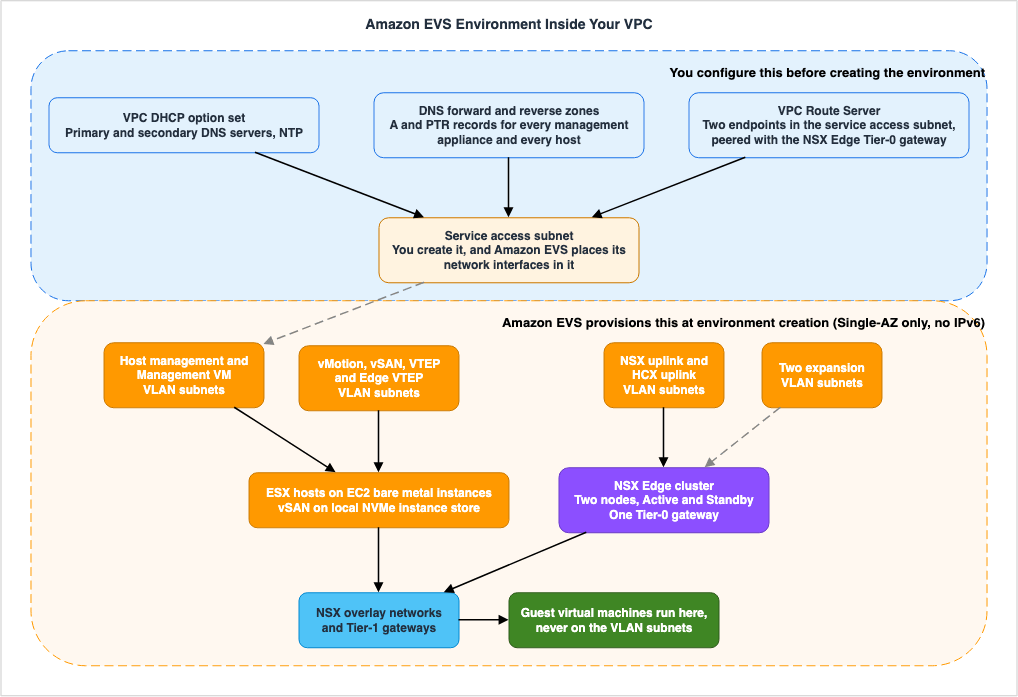
When creating an environment, Amazon EVS creates three things inside the VPC. It creates the elastic network interfaces (ENIs) that carry connectivity to the VCF appliances and hosts, the ESX hosts on EC2 bare metal instances, and the VLAN subnets that connect the VPC to the VCF appliances. The user guide cautions that modifying these resources outside of the Amazon EVS console and API can impact the environment's availability and stability.What you provide beforehand is the VPC itself, the service access subnet, the DNS and NTP entries in the DHCP option set, the VPC Route Server together with its endpoints and peers, the CIDR blocks for the VLAN subnets, and the network ACL. This aspect will be discussed in Section 4 and beyond.
The service access subnet is a standard VPC subnet that Amazon EVS uses to connect to the VCF deployment. During environment creation, Amazon EVS creates ENIs in this subnet and establishes management connectivity to the VCF appliances and the ESX hosts. Without this connection, Amazon EVS cannot deploy, manage, or monitor the VCF deployment.
2.3 Connectors - How Amazon EVS Learns the State of VCF
Connectors provide a mechanism for Amazon EVS to communicate with VCF management appliances in the environment. Each connector corresponds to a single management appliance and authenticates using a fully qualified domain name (FQDN) and credentials stored in AWS Secrets Manager.There are three types of connectors:
| Connector Type | API Value | Purpose |
|---|---|---|
| Operations Manager | OPERATIONS_MANAGER | Management connector for VCF 9.x. Connects to VMware deployments and maintains synchronization. |
| SDDC Manager | SDDC_MANAGER | Management connector for VCF 5.2.x. Verifies the number of hosts and license key compliance. |
| vCenter | VCENTER | Monitors virtual machine lifecycle events, such as Windows Server license entitlements. |
There is a prerequisite for handling secrets. The user guide instructs you to apply the
EvsAccess=true tag to both the secret and the AWS KMS key used to encrypt it. If this tag is missing, Amazon EVS will be unable to access the secret, and connector creation will fail. This single tag is critical for successful connector creation.Through the connectors, Amazon EVS periodically performs reachability checks for each appliance. If the necessary management connectors are not created, or if a connector loses reachability, Amazon EVS will be unable to verify the environment's license and entitlement compliance, and will report through AWS Health notifications that the environment's health is impaired.
2.4 The Windows Server Entitlement Depends on a Connector
Amazon EVS has a mechanism that lets virtual machines in an environment use Windows Server licenses supplied by AWS. This section focuses solely on how that entitlement system integrates with the components of an Amazon EVS environment.To establish entitlement, a connector must first be created for the vCenter Server appliance, and that connector must pass reachability checks. Amazon EVS uses this connector to monitor lifecycle events for virtual machines that have been granted entitlement. If the connector loses reachability, the corresponding entitlement status will transition to "at risk." If reachability is not restored within an eight-hour grace period, Amazon EVS will revoke the entitlement and cease tracking license usage from the point at which the status became "at risk." Supported guest operating systems are Windows Server 2016 and later.
In essence, functionality related to Windows Server licensing depends on network and DNS configuration. If the connector can no longer resolve the FQDN of the vCenter appliance, monitoring is not the only thing that stops. For the license eligibility conditions, how physical cores are counted, and how dedicated hardware is chosen, see Running Windows Server Workloads on AWS.
3. What Carries Over
This section confirms, within the scope of what the official documentation says, what it means for Amazon EVS to be the path that does not rebuild. The following diagram provides an overview of the topics that will be discussed in pairs in the subsequent sections.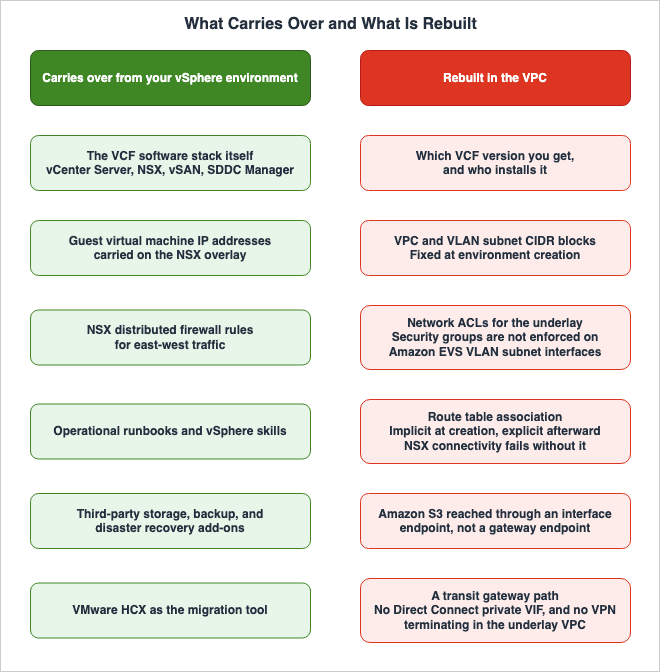
3.1 The VCF Software Stack
What runs is VCF itself. The components, including vCenter Server, NSX, vSAN, and SDDC Manager, are the same products that were previously run on-premises. The user guide highlights that a key feature of Amazon EVS is the ability to maintain complete control over the VMware architecture in the cloud, letting you optimize the virtualization stack to meet application requirements, including the integration of add-ons and third-party solutions.This is why the same choices remain open for external storage, backup, and disaster recovery products, as long as they support VCF. For choosing among the AWS file services you run alongside the environment, see Amazon FSx Family Decision Guide.
3.2 IP Addresses and Operational Procedures
What the user guide explicitly lists is that you do not have to change IP addresses, retrain staff, or rewrite operational runbooks. Because the network visible from the virtual machines is an NSX overlay, you can carry over the existing address scheme that was used on-premises.However, this perspective is from the virtual machines. The address space in the VPC, underlying the overlay, will need to be designed anew. This asymmetry is the central focus of this article.
3.3 Administrative Privileges
In an Amazon EVS environment, administrative rights over the VCF management appliances sit with you. The general availability announcement states that complete administrative access to the environment lets you optimize the virtualization stack. The other side of that is that patching and upgrading VCF, configuring authentication and authorization, and hardening the management network are also your work. This division of responsibilities is further expanded in Self-deployed mode, which will be discussed in Section 9.4. Address Space - The One Decision You Cannot Redo
From here, this article moves to the side that must be rebuilt. The first item is the address space, and this one cannot be redone.4.1 The Environment Cannot Be Changed After It Is Created
The user guide states that the environment can only be configured during its initial creation and cannot be changed afterward. For VLAN subnets, the wording is stronger still.Amazon EVS VLAN subnets can only be created during Amazon EVS environment creation, and cannot be
modified after the environment is created. You must ensure that the VLAN subnet CIDR blocks are
properly sized before creating the environment. You will not be able to add VLAN subnets after the
environment is deployed.The user guide also specifies that the VPC's CIDR block cannot be modified after the environment is created. The minimum size is a
/22 netmask.4.2 The Set of VLAN Subnets That Amazon EVS Creates
VLAN subnets are VPC subnets managed by Amazon EVS, each associated with a VLAN tag, logically segmenting VLAN traffic. You specify the CIDR blocks, with a minimum of/28 and a maximum of /24. They must not overlap with any existing CIDR block associated with the VPC.The parameter names passed to the environment creation API tell you what each VLAN subnet is for. The following example from the user guide is for Self-deployed mode, but Amazon EVS creates the VLAN subnets on either path, so the set is the same.
aws evs create-environment \
    --environment-name my-self-deployed-env \
    --vpc-id vpc-0abcdef1234567890 \
    --service-access-subnet-id subnet-0fdd7dcd7f1dc0fb4 \
    --vcf-version SELF_DEPLOYED \
    --terms-accepted \
    --initial-vlans '{
      "vmkManagement":   { "cidr": "10.10.0.0/24" },
      "vmManagement":    { "cidr": "10.10.1.0/24" },
      "vMotion":         { "cidr": "10.10.2.0/24" },
      "vSan":            { "cidr": "10.10.3.0/24" },
      "vTep":            { "cidr": "10.10.4.0/24" },
      "edgeVTep":        { "cidr": "10.10.5.0/24" },
      "nsxUplink":       { "cidr": "10.10.6.0/24" },
      "hcx":             { "cidr": "10.10.7.0/24" },
      "expansionVlan1":  { "cidr": "10.10.8.0/24" },
      "expansionVlan2":  { "cidr": "10.10.9.0/24" }
    }' \
    --region us-west-2
The roles of these subnets are as follows:
| VLAN Subnet | What it Carries |
|---|---|
host management (vmkManagement) | Separates management traffic from user traffic, enabling remote management of the host. The management vmkernel interface for the ESX host connects here. |
Management VM (vmManagement) | Management of virtual appliances such as NSX Manager, vCenter Server, and SDDC Manager. |
vMotion (vMotion) | vMotion traffic, used during the process of migrating virtual machines between hosts. |
vSAN (vSan) | Traffic related to storage operations within vSAN. |
VTEP (vTep) | NSX's virtual tunnel endpoint, which encapsulates and decapsulates overlay traffic for the ESX hosts. |
Edge VTEP (edgeVTep) | A VTEP dedicated to NSX Edge appliances. Used for overlay communication between NSX Edge and ESX hosts. |
NSX uplink (nsxUplink) | Connects NSX's overlay network to the remainder of the VPC and external networks. Configured on the uplink of NSX Edge nodes. |
HCX uplink (hcx) | Communication between HCX Interconnect (HCX-IX) and HCX Network Extension (HCX-NE) appliances, and for creating uplinks for the HCX service mesh. |
expansion (expansionVlan1 / expansionVlan2) | Can be used for additional features supported by VCF, such as NSX Federation. Amazon EVS creates two of them during environment creation. |
The user guide provides sizing guidelines in the Self-deployed mode section. This information pertains to the VLAN subnets themselves. For host management, plan for the maximum number of hosts in that environment, using one IP address per host. vMotion, vSAN, and VTEP require one or more per host, depending on the VCF configuration. The Management VM VLAN needs one address for each management appliance you plan to deploy. The expansion VLANs should be reserved for future features, such as NSX Federation. As a starting point, it recommends a
/24 for each VLAN unless you have a specific reason to choose otherwise.4.3 Guest Virtual Machines Cannot Be Placed on VLAN Subnets
This is where the structural line is drawn.Amazon EVS VLAN subnets are used to facilitate VCF underlay communication only. Guest virtual machines
running customer workloads must be deployed on NSX overlay networks. Deployment of guest virtual
machines on the Amazon EVS VLAN subnet underlay network is not supported.While VLAN subnets appear as VPC subnets in the AWS console, they are not intended to host workloads. Workloads sit on the NSX overlay, and the VLAN subnets are the plumbing that runs beneath it.
5. Route Table Association - Implicit at Creation, Explicit Afterward
Associating VPC route tables with subnets is an everyday operation in AWS. In Amazon EVS, this association transitions from implicit to explicit during the environment's lifecycle.5.1 At Creation - Implicit Association with the Main Route Table
The user guide states:Amazon EVS VLAN subnets are implicitly associated to the VPC main route table.To successfully deploy an environment, this main route table must be configured to route traffic to its dependencies, such as DNS and on-premises systems. The main route table must include routes for the VPC's CIDR block.
Custom route tables cannot be used at this point. The user guide explains that Amazon EVS only supports the use of custom route tables after the environment has been created, and that using them during environment creation can lead to connection issues.
Therefore, during environment creation, the main route table determines the actual routing. That runs against the usual guidance on the AWS side, which is to keep the main route table minimal and assign custom route tables per subnet.
5.2 After Creation, the Association Must Be Explicit
Following environment deployment, the process reverses.After your environment deploys, you must explicitly associate each of the Amazon EVS VLAN subnets with
a route table in your VPC. NSX connectivity fails if your VLAN subnets are not explicitly associated
with a VPC route table.The user guide goes on to strongly recommend that you explicitly associate your subnets with a custom route table.
Checking which of the two states you are in is straightforward. Open the Subnet associations tab in the VPC console and verify that all EVS VLAN subnets are listed under "Explicit subnet associations." The user guide explains that if a VLAN subnet is not listed here, it is implicitly associated with the main route table. While it stays implicit, the console simply shows no association at all.
To explicitly associate, use the following command:
aws ec2 associate-route-table \
--route-table-id rtb-0123456789abcdef0 \
--subnet-id subnet-01234a1b2cde1234f
5.3 Explicit Association Is Also a Prerequisite for BGP
This operation matters in one more place: it is a condition for enabling VPC Route Server propagation.When enabling Route Server propagation, you must ensure that all route tables being propagated have at
least one explicit subnet association. BGP route advertisement fails if propagated route tables do not
have an explicit subnet association.The same operation serves as a prerequisite for two distinct functions: NSX connectivity and BGP route advertisement. For choosing the VPC connectivity method, see AWS VPC Connectivity Decision Guide. For the term definitions, see AWS Networking Glossary.
6. Name Resolution and Time - Prerequisites for Deployment Failure
The Amazon EVS user guide opens its DNS and NTP section with an unusually strong sentence. The way this section is written differs from the others.6.1 Six Conditions the Deployment Fails Without
Your environment deployment fails if you don’t meet these Amazon EVS requirements:

- Include a primary DNS server IP address and a secondary DNS server IP address in the DHCP option set.
- Include a DNS forward lookup zone with A records for each VCF management appliance and Amazon EVS
  host in your deployment.
- Include a DNS reverse lookup zone with PTR records for each VCF management appliance and Amazon EVS
  host in your deployment.
- Configure the VPC’s main route table to ensure a route to your DNS servers exist.
- Ensure that your domain name registration is valid and unexpired, and no duplicate hostnames or IP
  addresses exist.
- Configure your security groups and network access control lists (ACLs) to allow Amazon EVS to
  communicate with:
  - DNS servers over TCP/UDP port 53.
  - Host management VLAN subnet over HTTPS and SSH.
  - Management VLAN subnet over HTTPS and SSH.
The key point is that both forward and reverse lookups are required. One alone is not sufficient. Furthermore, the targets are all VCF management appliances and all Amazon EVS hosts, so each time a host is added, a new record must also be added. The user guide states that if the records cannot be resolved, the host will transition to a
CREATE_FAILED state.There are also timing requirements. The IP addresses of both DNS servers must be reachable and responsive to queries at the moment the Amazon EVS connector starts up. At that same point, the necessary forward A records and reverse PTR records must also be resolvable.
6.2 FQDNs Have a Length Limit
There's a constraint that's easy to overlook. The user guide states that the FQDN for each host and VCF management appliance must not exceed 62 characters. Since an FQDN combines the hostname with the domain name from the VPC DHCP option set, planning hostnames means accounting for the length of the domain name as well. If the FQDN exceeds 62 characters, theCreateEnvironment call will return a ValidationException.Separately, the user guide recommends limiting hostnames to 15 characters or less as a best practice for NetBIOS compatibility. However, it explicitly states that exceeding this limit will not cause deployment failures. These two limits carry different significance.
6.3 DNS Design Options
When connecting to an on-premises environment, the user guide recommends using Amazon Route 53's private hosted zones and inbound resolvers. This approach involves managing the VPC's internal DNS within Route 53 and integrating it with the existing on-premises DNS infrastructure. If necessary, you can also use your own DNS servers in conjunction with Route 53's outbound resolvers.There is a caution attached, however. The documentation states that using both Route 53 and a custom DNS server within a DHCP option set can lead to unexpected behavior. Furthermore, when using custom domain names within Route 53's private hosted zones, or when using private DNS through interface VPC endpoints, you must ensure that both the
enableDnsHostnames and enableDnsSupport attributes are set to true.For troubleshooting name resolution that involves a DHCP option set, see AWS VPC Network Troubleshooting Guide.
6.4 Time Synchronization
NTP is also obtained from the DHCP option set. VPC DHCP option sets can accommodate up to four NTP server IPv4 addresses. By default, the Amazon EC2 instances that Amazon EVS deploys use the Amazon Time Sync Service at the IPv4 address169.254.169.123. The user guide recommends using the Amazon Time Sync Service. Who defines that second, who decides when a leap second is inserted, and how each major cloud handles the insertion are covered in Computer Time and Leap Seconds History and Timeline - UT1, TAI, UTC, Leap Smearing, and Who Decides When a Second Is Added.According to the user guide, time synchronization is crucial for many tasks and processes within a VCF environment, citing system logging and auditing, security operations, distributed system management, and troubleshooting as examples.
7. Route Advertisement - VPC Route Server and NSX Edge Peering
Two network layers inside the VPC, the VPC underlay and the NSX overlay, need to exchange routing information. Amazon EVS facilitates this exchange through the Amazon VPC Route Server.7.1 What to Prepare, and How Many
The user guide lists the network prerequisites as an Amazon VPC Route Server instance with Route Server propagation enabled, two Route Server endpoints in the service access subnet, and two Route Server peers that pair with the NSX Edge nodes that Amazon EVS provisions.Four requirements are listed, and the deployment fails if they are not met:
- Configure at least two Route Server endpoints in the service access subnet.
- When configuring BGP for the Tier-0 gateway, make the peer ASN value on the VPC Route Server match the peer ASN value on the NSX Edge.
- When creating the two Route Server peers, use a unique IP address from the NSX uplink VLAN for each endpoint. Amazon EVS assigns these two IP addresses to the NSX Edge nodes during environment deployment.
- When enabling Route Server propagation, confirm that every route table being propagated has at least one explicit subnet association.
Regarding redundancy, a minimum of two peers is required. Furthermore, the user guide recommends creating four Route Server peers to establish a full mesh configuration, so that each of the two NSX Edge nodes peers with both Route Server endpoints. A full mesh keeps routes propagating even if one Route Server endpoint goes into maintenance. The required two and the recommended four are different numbers.
7.2 Choosing Addresses from a Subnet That Does Not Yet Exist
The order here has a quirk. When setting up a Route Server peer, the NSX uplink VLAN subnet does not yet exist. This is because Amazon EVS creates it during environment creation. The user guide instructs you to select the IP addresses for the two peers from the CIDR block that you are planning for the NSX uplink VLAN, specifically theinitialVlans.nsxUplink value. These two IP addresses must fall within the planned CIDR block and remain unused.Essentially, you will be reserving two unused addresses from a subnet that currently does not exist. If you have not already completed the address space design, you will be unable to proceed with this step.
7.3 BGP Details
There are a few points that differ from the default settings. On Route Server peer liveness detection, the user guide states that Amazon EVS supports only the default BGP keepalive mechanism and does not support multi-hop Bidirectional Forwarding Detection (BFD). Amazon VPC Route Server itself offers BFD-based failover, but in Amazon EVS it comes with a condition.Furthermore, the user guide recommends enabling persistent routes with a persist duration between 1 and 5 minutes for the Route Server instance. When enabled, these routes will remain in the Route Server's routing database even if all BGP sessions terminate.
7.4 The NSX Structure That Sits on Top
This is not about the VPC side, but laying it out makes clear where the routes end up. An Active/Standby NSX Edge cluster of two NSX Edge nodes connects the two network layers. The NSX Edge nodes enable communication across the VPC between virtual machines in the VLANs, internet connectivity, and private connectivity using Direct Connect or AWS Site-to-Site VPN with a transit gateway.The Tier-0 gateway handles all north-south traffic between the logical and physical networks and is created as part of the Amazon EVS deployment. There is a ceiling here. Amazon EVS supports only one Tier-0 gateway for an Active/Standby NSX Edge cluster with two NSX Edge nodes. This Tier-0 gateway connects to and advertises all overlay networks configured for use with Amazon EVS. Tier-1 gateways handle east-west traffic between routed network segments in the environment and can be created and configured as needed.
8. Traffic Control - Where Security Groups Stop Applying
When controlling network traffic in AWS, security groups are often the first tool people turn to. On Amazon EVS VLAN subnets, they are not enforced.8.1 Security Groups Do Not Apply to ENIs on VLAN Subnets
The user guide repeats the same warning across several pages.EC2 security group rules are not enforced on Amazon EVS elastic network interfaces that are attached to
VLAN subnets. To control traffic to and from VLAN subnets, you must use a network access control list.The same warning appears on the concepts page, on the network ACL configuration page, in the getting started guide, and in the HCX migration procedure. The AWS networking blog also states that AWS security groups do not apply to Amazon EVS ENIs on Amazon EVS VLAN subnets, but that security groups can still be used to control traffic to workloads on interface endpoints or subnets outside of Amazon EVS.
In other words, security groups are not rendered useless. Their reach is confined to what sits outside the VLAN subnets. If you set up your own DNS server on an EC2 instance, security groups will apply to that instance.
8.2 Both Still Have to Be Configured
This section is easy to misinterpret. The conditions quoted in Section 6 said to configure both security groups and network ACLs. The network ACL configuration page likewise states that Amazon EVS requires access to your VCF deployment, and that if security groups and network ACLs do not permit this access, the Amazon EVS environment deployment will fail, and existing environments may fall out of compliance.This isn't a contradiction. Security groups take effect on the elastic network interfaces that Amazon EVS places in the service access subnet, and on resources you place in other subnets of your VPC. Network ACLs take effect on the VLAN subnet side. You end up opening the two ends of the same path with two different mechanisms. There is also a setting that allows you to specify up to two security groups when creating an environment; if you do not specify any, the default security group is used.
8.3 Layered Responsibilities
AWS's networking blog describes Amazon EVS security as being built through multiple layers. The NSX distributed firewall is applied directly to virtual machine network interfaces in the hypervisor kernel, responsible for controlling east-west traffic between NSX logical segments and providing microsegmentation. Network ACLs handle underlay hygiene on the VLAN subnets, allowing traffic for protocols such as DNS, SSH, HCX, and the BGP used for Route Server peering. At the VPC ingress and egress points, the blog offers AWS Network Firewall or partner products behind a Gateway Load Balancer as options for north-south inspection.If you have been writing distributed firewall rules on-premises, that part carries over. What gets rebuilt is what you open, and how, in the underlay beneath it.
9. Choosing a VCF Version, and Who Installs It
When setting up an Amazon EVS environment, you need to specify a VCF version. That one choice settles two things at once: which version of VCF runs, and who installs it.9.1 Three Options, and Status as a Second Axis
Using theaws evs get-versions command, you can retrieve the available versions of VCF and ESX offered by Amazon EVS.aws evs get-versions --region <region-name>The response provides, for each VCF version, the status, the default ESX version, and the EC2 instance types supported by that version. The following is an example of the response, specifically the
vcfVersions section, as listed in the user guide.{
"vcfVersions": [
{
"vcfVersion": "VCF-5.2.1",
"status": "RESTRICTED",
"defaultEsxVersion": "ESXi-8.0U3b-24280767",
"instanceTypes": [
"i4i.metal",
"i7i.metal-24xl"
]
},
{
"vcfVersion": "VCF-5.2.2",
"status": "AVAILABLE",
"defaultEsxVersion": "ESXi-8.0U3g-24859861",
"instanceTypes": [
"i4i.metal",
"i7i.metal-24xl",
"i7i.metal-48xl"
]
}
]
}According to the API reference, the valid values for
vcfVersion are VCF-5.2.1, VCF-5.2.2, and SELF_DEPLOYED. The valid values for instanceTypes are i4i.metal, i7i.metal-24xl, and i7i.metal-48xl. For status, AVAILABLE means the version is available to you, and RESTRICTED means the version has limited availability.As of September 3, 2026, the user guide lists the following:
SELF_DEPLOYED is AVAILABLE, VCF-5.2.2 is AVAILABLE, and VCF-5.2.1 is RESTRICTED. Because the list keeps moving, the thing to check is the response from get-versions, not a list reproduced in an article, including this one.Status is an axis that carries the same weight as the version itself. Saying that Amazon EVS supports VCF 5.2.x drops the fact that
VCF-5.2.1 is RESTRICTED. If you require a RESTRICTED version, you will need to contact AWS Support, providing your AWS account ID, AWS Region, the required VCF version, and a justification for your use case and business need. AWS Support reviews the request, and on approval the status of that version changes to AVAILABLE in the console and in the get-versions response.9.2 There Is Only One Place Where You Choose the ESX Version
The VCF version is associated with a default ESX version, based on the Broadcom VCF Bill of Materials (BOM). The user guide states that when creating a new environment, you cannot select a specific ESX version; instead, the default ESX version associated with the selected VCF version is automatically applied.The one place you can choose is when you add a host. There you select from the ESX versions available for the instance type you picked. If you do not specify one, Amazon EVS uses the default ESX version associated with the environment's VCF version.
However, the process changes after you add a host.
After a host has been added, its ESX version can only be upgraded using vCenter Lifecycle Manager.You provision the host through the AWS API, and from then on you update it with the VMware tooling.
9.3 The Amazon EVS Version List Alone Does Not Settle Compatibility
AWS itself points somewhere else for the compatibility decision.Amazon EVS does not provide all versions of VCF and ESX released by Broadcom. For software
interoperability information, refer to the Broadcom Interoperability Matrix. For full hardware
compatibility with AWS EC2 instances, refer to the Broadcom Compatibility Guide.Even when adding hosts in Self-deployed mode, the process requires verifying that the selected ESX version is compatible with your VCF release using the Broadcom Interoperability Matrix. A version missing from the Amazon EVS version list does not automatically mean you cannot use it. The determination of compatibility rests with Broadcom.
Note also that the product is VMware and the publisher is Broadcom. AWS documentation uses both phrasings:
released by VMware and Broadcom's Bill Of Materials.9.4 VCF 9.0 and 9.1 Are on the Self-Deployed Mode Path
This is the point most likely to cause confusion. On July 6, 2026, AWS announced that Amazon EVS supports VCF 9.0 and 9.1. However, the VCF versions available for selection during environment creation remainVCF-5.2.2, VCF-5.2.1, and SELF_DEPLOYED. This isn't a contradiction; it's a different path.The announcement describes the ability to run VCF 9.0 and the newly released VCF 9.1, with complete control over installation, operation, and management. On the same day, the Migration and Modernization blog explained that Amazon EVS provisions EC2 bare metal instances running ESX 9.x into your VPC, and that you download and deploy the Broadcom VCF Installer and complete the VCF installation using Broadcom's native workflow.
The connector types confirm this divergence. As seen in Section 2, VCF 9.x requires the Operations Manager connector, while VCF 5.2.x requires the SDDC Manager connector. The user guide's Self-deployed mode procedure also states that the VCF version determines the connector type you create, and lists the same pairing.
The list of ESX versions returned by
get-versions also includes a range of ESX 9.x builds, available for selection when adding hosts.aws evs create-environment-host \
--environment-id env-0123456789abcdef0 \
--esx-version ESXi-9.0.2.0.25148076 \
--host '{
"hostName": "esx01",
"keyName": "my-ec2-key-pair",
"instanceType": "i4i.metal"
}' \
--region us-west-29.5 Where the Boundary Moves in Self-Deployed Mode
In Self-deployed mode, Amazon EVS provisions the AWS networking and the VLAN subnets, and you install VCF with the VCF Installer or your own Infrastructure as Code, then connect it back to Amazon EVS with connectors. The user guide outlines seven steps: environment creation, DNS record creation, host addition, VCF installation, NSX network configuration, connector creation, and environment validation.Placing the two paths side by side shows where the boundary moves.
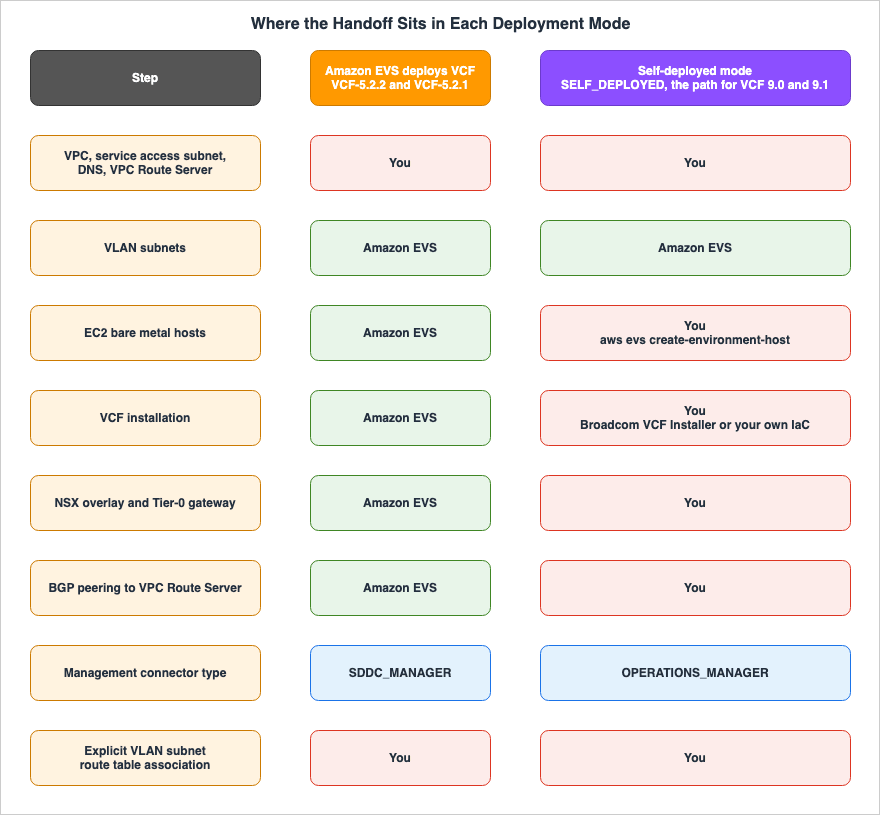
--license-info, --hosts, --vcf-hostnames, --site-id, and --connectivity-info as parameters not supported in Self-deployed mode, noting that specifying them will result in a validation error.What matters most for the subject of this article is that route advertisement moves into your work. In Self-deployed mode, the VPC Route Server peer is not selected during environment creation. After installing VCF, you configure the BGP peering between the NSX Edge Tier-0 gateway and the VPC Route Server yourself. The configuration described in Section 7 moves from Amazon EVS's hands into yours.
The split of responsibilities is stated explicitly. In Self-deployed mode you install and operate the VCF software stack, so securing it is your responsibility, and AWS secures the underlying AWS infrastructure that Amazon EVS provisions. Your side covers installing, patching, and upgrading VCF components including vCenter Server, NSX, SDDC Manager or Operations Manager, and ESX. It covers configuring VCF authentication, role-based access control, and password rotation. It covers hardening the VCF management network in line with Broadcom guidance and your own organization's requirements, rotating the Secrets Manager secrets that the Amazon EVS connectors use, monitoring your VCF deployment for security events, and maintaining valid VCF licenses.
Regarding billing, the user guide states that once you add hosts to an environment, charges accrue for the EC2 bare metal instances even if you have not yet installed VCF. It also states that if you create an environment in Self-deployed mode but have not gone on to add hosts or install VCF, AWS may reach out to the email address associated with the account and ask you either to complete the setup or to remove the environment.
10. Migrating Workloads with VMware HCX
After deploying Amazon EVS, you can deploy VMware HCX, using either a private connection or a public internet connection, to facilitate the migration of workloads. The specifics of using HCX belong to Broadcom's documentation, so this section covers only what HCX requires on the VPC side.10.1 Two Connection Methods
Private connectivity uses only private connections inside the VPC, and optionally AWS Direct Connect or AWS Site-to-Site VPN with a transit gateway for external networks. Public connectivity uses internet connectivity with Elastic IP addresses, which allows migration without a dedicated private connection.The user guide highlights scenarios where internet-based HCX migration is generally not recommended, such as applications sensitive to network jitter and latency, time-critical vMotion operations, and large-scale migrations with stringent performance requirements. For those cases the user guide recommends HCX private connectivity, on the grounds that a dedicated private connection delivers more consistent performance than an internet-based one.
For choosing the on-premises connectivity method itself, see AWS Hybrid Connectivity Decision Guide.
10.2 Limitations on Connection Types
There is a clear limitation here.Amazon EVS does not support connectivity via an AWS Direct Connect private virtual interface (VIF), or
via an AWS Site-to-Site VPN connection that terminates directly into the underlay VPC.On the setup prerequisites side, a transit gateway is required for on-premises connectivity over both AWS Direct Connect and AWS Site-to-Site VPN. If you connect to on-premises, you go through a transit gateway. Pointing an existing private VIF straight at the environment is not an option.
After creating the environment, you will also need to update the transit gateway's route table with the CIDR blocks of the VPCs created within the Amazon EVS environment.
10.3 What a Public Connection Additionally Requires
When using a public internet connection, specific requirements must be met. You create an IPAM and a public IPv4 IPAM pool whose CIDR has a minimum netmask length of/28. Allocate at least two Elastic IP addresses from this IPAM pool for the HCX Manager and HCX Interconnect (HCX-IX) appliances. Additionally, allocate one Elastic IP address for each HCX network appliance you deploy. Finally, add this public IPv4 CIDR block as an additional CIDR to the VPC.The user guide states that if you do not associate at least two Elastic IP addresses from the IPAM pool with the HCX public VLAN subnet, the HCX public internet connection will fail.
Certain addresses are unavailable. The first two Elastic IP addresses and the last Elastic IP address in the public IPAM CIDR block are reserved for the network address, default gateway, and broadcast address, and therefore cannot be associated with a VLAN subnet. Attempting to do so will result in an Amazon EVS validation error. Three addresses out of a
/28 are therefore off limits, so the number you can actually allocate is smaller than the size of the block suggests.Furthermore, routing is essential. For HCX internet connectivity, the HCX public VLAN subnet must be explicitly associated with a public route table in the VPC that provides routing to the internet gateway. The explicit association from Section 5 is a prerequisite here as well.
11. What Does Not Carry Over
Finally, this section sets out what cannot be carried over, and what has to take a different form on the AWS side.11.1 Availability Zones and IPv6
The user guide states two limitations, each qualified with the wordsat this time.Amazon EVS only supports Single-AZ deployments at this time. All VPC subnets that Amazon EVS uses must
exist in a single Availability Zone in a Region where the service is available.Amazon EVS does not support IPv6 at this time.Fault tolerance that spans multiple Availability Zones is not something you can carry over from an on-premises design. If you have been designing the VPC side around IPv6, that approach is not available in the scope of Amazon EVS. For VPC designs that put IPv6 first, see IPv6-First VPC Design on AWS.
11.2 Cross-Account Sharing
The VPC, subnets, and Amazon EVS environment must all be created in the same account. Amazon EVS does
not support cross-account sharing of VPC subnets or Amazon EVS environments.
If you have been consolidating networking into a shared account, the Amazon EVS environment does not fit that shape.
11.3 A Few AWS-Side Capabilities
A set of small but consequential limitations sits here. Gateway VPC endpoints for Amazon S3 are not currently supported. To enable connections to Amazon S3, you will need to configure an interface VPC endpoint using AWS PrivateLink. Additionally, Amazon EVS does not support the use of instance profiles to pass IAM roles to EC2 instances. While outbound connections to the internet are optional, if enabled, Amazon EVS requires the use of a NAT gateway.11.4 The Support Plan Prerequisite
This is a form of prerequisite that other AWS services rarely impose. The user guide states that to ensure continuous access to technical support and architectural guidance, you must be enrolled in an AWS Business, AWS Enterprise On-Ramp, or AWS Enterprise Support plan, with AWS Business Support as the minimum tier that meets the requirement. Furthermore, it states:Amazon EVS environment creation fails if you do not sign up for an AWS Business, AWS Enterprise
On-Ramp, or an AWS Enterprise Support plan.How AWS Support plan names have changed over time, including the three plans announced on December 2, 2025, is traced in AWS History and Timeline regarding AWS Support Plans.
11.5 Quotas
As of September 3, 2026, the default settings are 3 environments per account and 5 hosts per environment, both of which are adjustable. The maximum number of hosts was increased from 16 to 32 in May 2026. If you request an increase, you can extend a single environment to a total of 32 hosts. The user guide states that if the quota for the number of hosts per environment is insufficient for the topology of your VCF deployment, creating an environment will fail.This number, 32, directly relates to the sizing outlined in Section 4. The host management VLAN subnet consumes one IP address per host, and this VLAN subnet cannot be expanded after the environment is created. Therefore, you should determine the maximum number of hosts you plan to add before creating the environment.
In addition, you will also need to consider the EC2 quotas. Bare metal instances consume a significant amount of vCPU. The user guide states that each
i4i.metal instance uses 128 vCPUs. You need to check that your EC2 Running On-Demand Standard Instance quota reflects the number of vCPUs you require.12. Failure Modes and Anti-Patterns
This section restates the preceding material in the shape it actually takes.Create the environment before designing the address space and DNS. This is the heaviest of the failures. VLAN subnets can only be created during environment creation and cannot be modified or added afterward. VPC CIDR blocks are also immutable. The environment itself cannot be altered once created. To make changes, you must delete the environment and start over.
After deploying the environment, fail to explicitly associate route tables. Implicit associations are not visible in the VPC console under "Explicit subnet associations," making it easy to overlook missing associations. It surfaces as NSX connectivity failing.
Only configure forward (A) records, neglecting reverse (PTR) records. Both A and PTR records are required, and they must be configured for all VCF management appliances and all hosts. The number of records increases with each new host. Hosts that fail to resolve will transition to a
CREATE_FAILED state.Attempt to restrict traffic for VLAN subnets using security groups. While rules can be configured, they are not applied. Network ACLs should be used for VLAN subnets. Conversely, if you only configure network ACLs and not security groups, a path may remain over which Amazon EVS cannot reach the VCF deployment.
Read that Amazon EVS supports VCF 5.2.x and plan around
VCF-5.2.1. VCF-5.2.1 carries the RESTRICTED status and requires a request to AWS Support and approval before it can be selected. Check the status of the version during the planning phase.Assume that VCF 9.0 or 9.1 can be picked in the environment creation wizard. VCF 9.x is on the Self-deployed mode path, and installing it with the VCF Installer is your work. That changes how you estimate the effort for deployment and for ongoing operations.
Examine only the list of Amazon EVS versions and conclude that a particular combination of VCF and ESX is incompatible. The Broadcom Interoperability Matrix is where software interoperability is determined, and the Broadcom Compatibility Guide is where hardware compatibility is determined.
Stop or terminate Amazon EVS hosts from the EC2 console. Hosts carry a tag that begins with
DoNotDelete-EVS-. If you stop or terminate a host without decommissioning it within VCF, Amazon EVS may lose track of the host, potentially impairing the environment and resulting in data loss from the instance store.Point an existing Direct Connect private VIF straight at the environment for on-premises connectivity. This is not supported. The connection goes through a transit gateway instead.
13. Frequently Asked Questions
Can the CIDR for VLAN subnets in Amazon EVS be expanded after the environment is created?No. VLAN subnets can only be created during environment creation and cannot be modified afterward. It is also not possible to add VLAN subnets after the environment is deployed. The CIDR block for the VPC also cannot be changed after the environment is created. Proper sizing should be completed before creating the environment.
Can virtual machines for workloads be placed within VLAN subnets?
No. VLAN subnets are used only for VCF underlay communication. Workload virtual machines must be deployed on the NSX overlay networks.
Can traffic for VLAN subnets be controlled using security groups?
No. EC2 security group rules are not enforced on the Amazon EVS elastic network interfaces attached to VLAN subnets. Use a network ACL instead. Security groups still take effect on resources in the service access subnet and in other subnets of the VPC, so you end up configuring both.
Can I choose the ESX version when creating an environment?
No. The default ESX version associated with the selected VCF version is automatically applied. You can choose a version when adding hosts, and after that the ESX version can only be upgraded using vCenter Lifecycle Manager.
What if I want to use VCF 9.0 or 9.1?
Use Self-deployed mode. Amazon EVS provisions EC2 bare metal instances running ESX 9.x, along with the VLAN subnets, into your VPC. You then download and deploy the Broadcom VCF Installer and complete the VCF installation using Broadcom's native workflow. After that you create an Operations Manager connector to link the deployment back to Amazon EVS. You also configure the BGP peering yourself.
How do I get access to a VCF version marked
RESTRICTED?Contact AWS Support and provide your AWS account ID, AWS Region, the required VCF version, and a justification for your use case and business need. If AWS Support approves your request after review, the status of that version will change to
AVAILABLE in the console and in the response from the get-versions command.Has VMware Cloud on AWS been discontinued?
No. The official AWS page states that as of April 30, 2024, VMware Cloud on AWS is no longer resold by AWS or its channel partners, and that the service will continue to be available through Broadcom. The FAQ on the same page states that the service is still available to existing customers, and that Broadcom has stated that subscriptions can be renewed directly from Broadcom or an authorized Broadcom reseller.
Does Amazon EVS span multiple Availability Zones?
No. The user guide states that Amazon EVS only supports Single-AZ deployments at this time. All VPC subnets used by Amazon EVS must reside within a single Availability Zone.
Can I use VPC subnets from another account?
No. The VPC, subnets, and the entire Amazon EVS environment must all be created in the same account. Amazon EVS does not support sharing VPC subnets or environments across accounts.
Do I need an AWS Support plan to use Amazon EVS?
Yes. You are required to have either an AWS Business, AWS Enterprise On-Ramp, or AWS Enterprise Support plan. AWS Business Support is the minimum required tier. If you do not have a plan, environment creation will fail.
14. Summary
Amazon EVS runs VCF on EC2 bare metal instances inside your own VPC. This architecture decides what carries over and what must be rebuilt.What carries over is the VCF software stack itself, IP addresses as seen by the virtual machines, and operational procedures based on VCF. Within the NSX overlay, the same address design and distributed firewall rules used on-premises can be applied.
The VPC layer beneath the overlay requires rebuilding. The VPC CIDR must be a minimum of
/22, VLAN subnets must range from /28 to /24 without overlap, and these settings can only be defined during environment creation. VLAN subnets are implicitly associated with the main route table upon creation; after creation, you must explicitly associate each subnet with a route table, or NSX connectivity will fail. The DHCP option set must include primary and secondary DNS servers, and you must provide both forward (A) records and reverse (PTR) records for all management appliances and hosts. Failure to meet these requirements will result in deployment failure. The VPC Route Server requires two endpoints and peers that pair with the NSX Edge. The peer IP addresses are chosen from the CIDR of a subnet that does not yet exist. Security groups do not take effect on the VLAN subnets, and the network ACL is the control that does.The line between the two also moves along a second axis. On the path where Amazon EVS deploys VCF, the versions are VCF 5.2.x, while VCF 9.0 and 9.1 sit on the Self-deployed mode path. On that path, installing VCF itself and configuring the BGP peering between the NSX Edge and the VPC Route Server both become your work. How much gets rebuilt depends on how much of the stack AWS builds for you.
What does not carry over is equally clear. Deployments are Single-AZ only, IPv6 is not supported, VPC subnets and environments cannot be shared across accounts, and S3 gateway endpoints cannot be used. Enrollment in AWS Business Support or higher is a prerequisite, and without it environment creation fails.
There is one ordering that matters: finish the address space and the DNS design first. Those two are the ones you either cannot redo, or pay the most to redo.
For how Windows Server licenses are counted for workloads running in this environment, see Running Windows Server Workloads on AWS. For carrying over the jobs that run on top once the platform itself is in place, see Data Pipeline Orchestration on AWS.
15. References
- What is Amazon Elastic VMware Service?
- Concepts and components of Amazon EVS
- Amazon EVS architecture
- Setting up Amazon Elastic VMware Service
- Getting started with Amazon Elastic VMware Service
- VCF versions and EC2 instance types provided by Amazon EVS
- Configure a custom route table for Amazon EVS subnets
- Configure a network access control list to control Amazon EVS VLAN subnet traffic
- Migrate workloads to Amazon EVS using VMware HCX
- Amazon EVS API Reference: VcfVersionInfo
- Amazon Elastic VMware Service endpoints and quotas
- AWS launches public preview of Amazon Elastic VMware Service (Amazon EVS)
- AWS announces general availability of Amazon Elastic VMware Service (Amazon EVS)
- Amazon EVS now supports VCF and VMware ESX software version selection
- Amazon EVS enables support for 32 hosts per environment
- Amazon EVS VCF 9.0 and 9.1 support
- Amazon EVS now supports i7i.metal-48xl Amazon EC2 instance type
- VMware Cloud Foundation (VCF) 9.0 and 9.1 on Amazon EVS
- Building a modern network for your VMware workloads using Amazon Elastic VMware Service
- VMware Cloud on AWS
References:
Tech Blog with curated related content
Written by Hidekazu Konishi