AWS Service Lifecycle States - Maintenance, Sunset, Full Shutdown, and What Each One Takes Away
First Published:
Last Updated:
This page is a reference for that moment. It answers one question in as much detail as the official record allows: when AWS puts a service or feature into a lifecycle state, what exactly stops being possible, and when. It is deliberately not a list of which services are in which state today — AWS keeps that list itself, a companion article records its history, and a third copy here would only drift from both.
Every fact below was last verified against AWS official documentation on 2026-09-30, with the specific page linked at the point of use; the AWS Panorama and AWS Proton end-of-support pages were rechecked on 2026-10-11 (the Panorama page, no longer on the AWS documentation site, is linked as an Internet Archive capture from 2026-10-06). This article reports no measurements and makes no predictions: no future end-of-support date is forecast, and no service is judged. Where AWS's own pages use different words for the same thing, both are shown rather than reconciled by guesswork. No pricing figures appear anywhere in this article.
The First Published and Last Updated dates shown above indicate the currency of this page. This page is reviewed and updated quarterly, and whenever AWS publishes a service availability update. Lifecycle states change, dates move, and the vocabulary itself has already shifted once, so always confirm the current state on the official pages linked in each section before acting on anything here.
Table of Contents
- 1. Introduction: The Decision This Article Supports
- 2. Why the Vocabulary Matters
- 3. The Three States AWS Defines
- 4. What Each State Takes Away
- 5. Where the Vocabulary Drifts
- 6. How These Announcements Arrive
- 7. Building a Watch
- 8. Mapping to Successors and Finding the Migration Gap
- 9. Representative Examples
- 10. Turning This Into an Internal Inventory
- 11. Failure Modes
- 12. Frequently Asked Questions
- 13. Summary
- 14. References
1. Introduction: The Decision This Article Supports
The decision is narrow and it recurs: an availability change has been announced for something you depend on, and you have to say what it requires of your organization and by when. That is the step before deciding whether to migrate, and it is the step people skip, because the announcement appears to answer it and does not.Skipping it produces two symmetrical errors. Over-reacting turns a state that removes only new sign-ups into an emergency migration, spending a quarter of engineering capacity on work that had no deadline. Under-reacting files a state carrying a firm shutoff date as informational, and the deadline arrives with the workload still on it. Both come from the same root cause: the words in the announcement were never mapped to consequences.
1.1 Scope, and what this article delegates
In scope: the three lifecycle states and the exact text of each definition; what each removes, along five operational dimensions; the labels that circulate without being defined states; the announcement channels; how to build a watch that does not depend on a person reading email; how to read an official migration guide for the gaps the successor does not cover; a few representative cases; and how to turn all of it into an internal inventory.Out of scope, with delegation:
- Which services are currently in which state, and when each entered it. That is a register, and it changes with every announcement wave. AWS keeps one itself, as the lifecycle lists described in section 6.1, and the history of those changes, with dates and sources for each entry, is in AWS Retired Services History and Timeline - Discontinued, Sunset, and Closed-to-New-Customer Services. This article reproduces neither.
- Version-level end of support for runtimes and engines — Lambda runtimes, Amazon EKS Kubernetes versions, Amazon RDS and Aurora engine versions. Those follow published per-service schedules unrelated to the service-availability states discussed here. See AWS End-of-Support and EOL Reference - Lambda, EKS, RDS and Aurora, ElastiCache, and OpenSearch Service.
- Forced events that land on running resources — instance retirements, scheduled maintenance, grace periods. That is the closest neighbor, and the boundary is worth stating precisely: a lifecycle state changes what the service offers, while a forced event changes a resource you are already running. See Surviving Forced Maintenance on AWS.
- Model deprecation across AI vendors, which has its own vocabulary and cadence. See AI Model Deprecation and Lifecycle Calendar - Anthropic, OpenAI, Google, and Amazon Bedrock.
- Operating system generations and their support dates — the Amazon Linux generations, their two support phases, and the AMI-level and kernel-level clocks that run alongside them. Those follow the distribution's own published schedule rather than the service-availability states discussed here. See Amazon Linux History and Timeline - Amazon Linux AMI, Amazon Linux 2, AL2023, AL2027, and the Clocks That Do Not Move Your Instances.
Put plainly: the retired-services timeline is the register of what happened, and this page is the manual for what it means and what to do about it.
1.2 Currency and update cadence
This is a living reference, and it commits to a maintenance schedule rather than pretending to be finished. It is reviewed and updated quarterly, and additionally whenever AWS publishes a service availability update. The facts most likely to age are the announcement history in section 6, the channel behavior in section 7, and the representative cases in section 9; each carries its own confirmation date in the text. Sections 3, 4, and 5 are least likely to age, because they describe definitions and structural relationships rather than a moving inventory. That asymmetry is intentional: it is the reason this page can be maintained at all, and why it contains no per-service table.1.3 How the facts were established
Every statement about AWS behavior below comes from an AWS-owned page: the AWS General Reference, service user guides and API references, the AWS News Blog, and What's New posts. Community trackers and news coverage were not used. Claims about the absence of something — for example that the lifecycle definitions say nothing about billing — are based on reading the whole page rather than on a keyword search; the one search-based collection, of What's New posts in section 6.2, is labeled there as not guaranteed to be exhaustive. Three things were checked by direct HTTP request rather than by reading prose: whether a URL still resolves and where it redirects to, what a feed actually contains, and which feed a page declares in its metadata. All three turned out to matter, and all three are reported in sections 6 and 7.2. Why the Vocabulary Matters
Each state implies a different amount of work, a different deadline, and a different owner, and getting the state wrong misassigns all three.Consider the same workload under each of the three states AWS defines. Under one, nothing about the running system changes and you lose only the ability to start using the service somewhere new; the correct response is a policy decision about future architecture, owned by whoever governs standards, on no deadline. Under another, a firm date exists on which the service stops operating; the correct response is a funded migration project with a critical path, owned by the team that runs the workload. Under the third, the service is already gone, and there is nothing to plan beyond confirming that nothing still references it.
Those three responses differ by roughly an order of magnitude in effort, and the announcement that triggers them is a paragraph of prose. That is the whole problem, and it has a second-order effect: a team that cannot tell the states apart either turns every announcement into an incident, burning credibility until people stop reading them, or treats every announcement as noise and misses the one with a hard date. A vocabulary that maps cleanly to consequences prevents that collapse, which is why the rest of this article is mostly about establishing one.
3. The Three States AWS Defines
As of the 2026-09-30 confirmation date, AWS publishes its lifecycle vocabulary in the AWS General Reference, on a page titled AWS Lifecycle Changes. That page defines exactly three terms. Its own documentation history records a single entry, dated March 23, 2026, describing the page as information to "review this information to see if an AWS service is in maintenance, sunset, or full shutdown."Three terms, and the definitions are short enough to quote in full.
3.1 Maintenance
AWS defines Maintenance as follows: "Customers can't on-board to these services and features. Customers already using these services and features can continue to do so. AWS will continue to operate and support these services and features but won't enhance or add functionality to them. We recommend that customers learn about and explore the alternatives suggested in the product pages and documentation."Read it as three commitments: new onboarding stops, existing use continues with operation and support alongside it, and functionality freezes. No date appears in the definition at all — Maintenance is a state, not a countdown, and a service can sit in it indefinitely.
3.2 Sunset
AWS defines Sunset as follows: "Customers already using these services and features should plan to migrate to alternatives as recommended in the product pages and documentation. Sunset services have a sunset time line (typically 12 months). The sunset date is the date AWS will end operations and support of the service."Here a date is the defining feature. The word "typically" is doing real work: twelve months is the norm AWS describes, not a guarantee, and the actual window is whatever the per-service announcement states. The sunset date is a statement about AWS's obligations and, as section 4.5 shows, not automatically a statement about what happens to things you already deployed.
3.3 Full Shutdown
AWS defines Full Shutdown as follows: "Full shutdown represents the final stage in the lifecycle of a service or feature. Services and features in full shutdown are completely removed from the AWS portfolio and are no longer available or supported in any capacity. This state is reached after careful planning and execution of the preceding phases so that there is minimal disruption to customer operations."This is terminal and unambiguous. The operationally useful part is the last sentence, which describes Full Shutdown as reached "after careful planning and execution of the preceding phases" — that is, as the end of a sequence rather than as an event that can arrive without warning.
3.4 What the definitions do not say
The whole page is short enough to read in under a minute, which is the fastest way to see the shape of the gaps. Four are worth naming, because each is a question people ask in the first hour after an announcement.- Billing. The definitions say nothing about charges in any of the three states. Whatever happens to your bill follows from the service's own pricing and from how much of it you keep using, not from the lifecycle state.
- Your deployed resources. The Sunset definition speaks of AWS ending operations and support. It does not say what becomes of resources the service provisioned on your behalf, and that varies by service in ways that materially change migration plans.
- Data retention. Nothing addresses how long data survives, or whether it is exported, retained, or deleted.
- Regional scope. The definitions are written globally, but an availability change can in practice be scoped to particular Regions.
Every one of these is answered per service, in that service's own documentation. This is the single most important structural fact about AWS lifecycle states, and section 4 is built on it.
4. What Each State Takes Away
The definitions in section 3 describe states. What an operator needs is the complement: for each state, the list of things that are no longer possible. Five dimensions cover essentially every question that comes up in practice.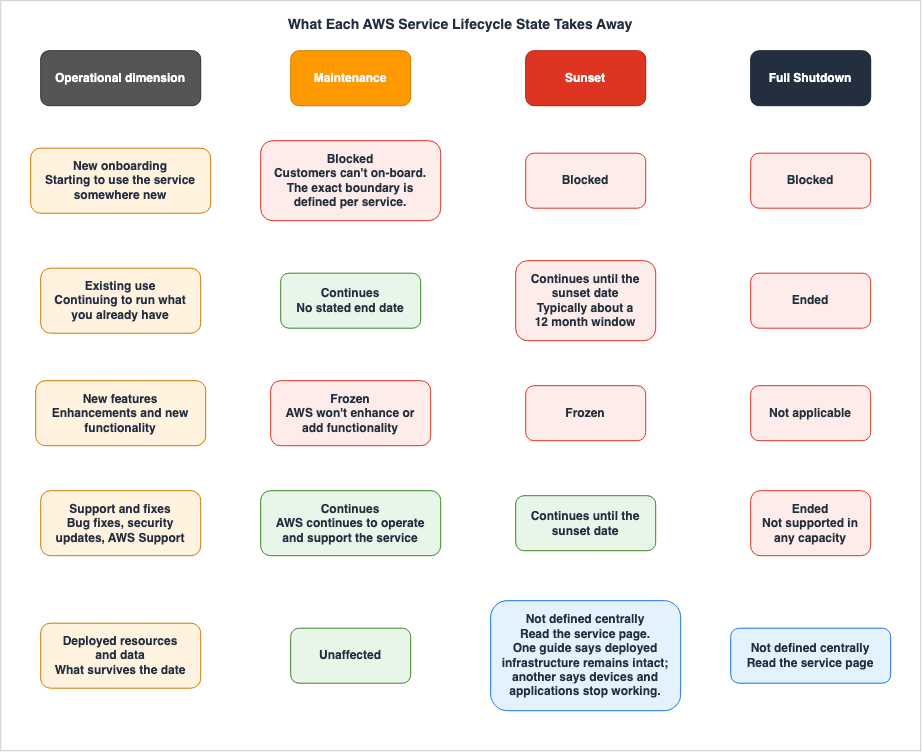
4.1 New onboarding
This is what Maintenance is fundamentally about, and it is the dimension most often misread as harmless.The official definition is that customers "can't on-board." Per-service documentation defines the boundary of "on-board" in more than one way, and section 5.2 works through three documented variants. The operational consequence is the same in every variant: a capability that exists in your estate today becomes unavailable to parts of the organization that have not adopted it yet — a component in the reference architecture has quietly become non-reproducible for new consumers, and account vending may now produce accounts that cannot use something your standards assume.
Sunset and Full Shutdown both include this restriction implicitly; they take away more.
4.2 Existing use
Under Maintenance, existing use continues and AWS commits to continuing to operate and support the service, with no stated end. This is the difference that determines whether an announcement is a deadline or a policy input, and it is the single most valuable distinction in the vocabulary.Under Sunset, existing use continues until the sunset date and not past it. The migration window is real but bounded, and the bound is published per service. Under Full Shutdown, existing use has already ended.
4.3 New features
Maintenance freezes functionality: AWS "won't enhance or add functionality." Per-service pages restate this in their own words — the Amazon Kendra availability change page says that during Maintenance Mode "new feature requests will no longer be considered."The practical reading is broader than the phrase suggests, and this is where teams get surprised. A frozen service does not gain support for capabilities arriving elsewhere in AWS, so integrations that would have come for free stop coming. If your architecture assumed this component would keep pace with the platform around it, that assumption has expired even though nothing has broken yet. Sunset carries the same freeze, on a clock; Full Shutdown makes the question moot.
4.4 Support and fixes
This dimension is where the states are most similar and the reassurance is most genuine. Under Maintenance, AWS states that it will "continue to operate and support" the service, and the Kendra page is more specific: the service "remains fully supported and AWS will continue to provide bug fixes and security updates for existing customers." Under Sunset, per-service pages are typically explicit about maintaining that level until the date — the AWS Proton Service Deprecation and Migration Guide enumerates four commitments: security patches and critical bug fixes, service availability and performance, support through AWS Support channels, and no new features. Under Full Shutdown, the service is "no longer available or supported in any capacity."The takeaway for risk assessment is that a service in Maintenance is not an unpatched service. Treating it as a security liability on the strength of the state alone is an over-reaction, and the official text is the evidence against it.
4.5 Deployed resources and data
This is the dimension the general definitions do not address at all, and it decides how expensive a migration actually is. It has to be answered per service, and the answers genuinely differ.Two documented cases sit at opposite ends. The AWS Proton guide states that after the end-of-support date "you will no longer be able to access the AWS Proton console or AWS Proton resources," and then adds: "Your deployed infrastructure will remain intact." Proton is a delivery mechanism, so what it deployed outlives it and what disappears is the ability to manage that infrastructure through Proton. Its FAQ also answers the data question: data is retained until the end-of-support date, and "after this date, all data will be deleted."
The AWS Panorama end of support page (no longer available on the AWS documentation site when checked on 2026-10-11; linked here as an Internet Archive capture from 2026-10-06) is the opposite case. Asked whether an edge application will keep functioning after the service ends, its FAQ answers with a flat "No," explaining that the device and applications depend on connectivity to the cloud service; once it is discontinued, "neither the Panorama application nor the Panorama device will continue to function."
Same lifecycle vocabulary, opposite outcome for things you have already deployed. Never infer this dimension from the state name. Read the service's own page.
4.6 Turning the matrix into a decision
Three questions, asked in order, resolve most announcements in a few minutes.- Is there a date on which the service stops operating? If no, this is a governance item rather than a project. If yes, it is a project whose deadline is the published date, not the date you find out.
- What happens to what we have already deployed when that date passes? Read the service's own page specifically for this. The answer sets the true scope: replacing a control plane is a different project from replacing a running system.
- Who else is about to adopt this? Because new onboarding is the first thing every state removes, the highest-value immediate action is usually not migration but stopping the next team from starting. Section 10.3 covers the mechanism.
5. Where the Vocabulary Drifts
If the three states were the only words in circulation, sections 3 and 4 would be the whole article. The gap between the defined vocabulary and the words that actually appear in announcements is a recurring source of misreading.5.1 Three labels that are not defined states
The following terms appear constantly in AWS material about lifecycle changes. As of the confirmation date, none is defined on the AWS Lifecycle Changes page.- Maintenance Mode. Used by service documentation — the Kendra availability change page says AWS decided "to put Amazon Kendra into Maintenance Mode." It corresponds to the defined state Maintenance, but also names a completely different lifecycle elsewhere in AWS, as section 5.3 shows.
- Closed to new customers. The descriptive phrasing in announcements, which say services moving to maintenance "will no longer be accessible to new customers." It names the most visible consequence of Maintenance rather than the state.
- End of support. The most consequential, because it is simultaneously everywhere and undefined: it titles per-service documentation pages, it is the third bucket in the recurring What's New announcements, it appears in product-page banners, and it heads a date column in the Sunset and Full Shutdown lifecycle lists described in section 6.1. The defined terminal state is Full Shutdown, and the Sunset definition describes the sunset date as when AWS "will end operations and support" — the same idea, without adopting the phrase as a state name.
There is also a historical layer. When AWS introduced the lifecycle page on 2025-05-20, the announcement blog described three categories that are not the current three states: "services closing access to new customers," "services that have announced end of support," and "services that have reached their end of support date." Material written before the current vocabulary uses that older framing, and it is still findable, still accurate for its date, and no longer aligned with the reference page.
5.2 "New customer" means three different things
This finding has the most direct operational consequence, and it can only be seen by comparing service pages against each other. Every announcement of a Maintenance transition says new customers lose access. Three services, all documented, define the cutoff differently.| Service | What the official page states | Practical boundary |
|---|---|---|
| Amazon Timestream for LiveAnalytics | Existing customers with an active payer account currently using the service may continue to add new users and linked accounts under that payer account | The payer account. New accounts inside the same organization can still adopt it |
| AWS Panorama | Only customers who are active users have access; a customer without prior usage will not be granted access. Accounts with prior usage may request access through a support case | Prior usage per account. Accounts that never used it lost access on the announcement date |
| Amazon Kendra | Maintenance Mode is effective June 30, 2026, with no new feature development from that date; the service is no longer open to new customers as of July 30, 2026 | Two boundaries on two different dates, one month apart |
The Amazon Timestream for LiveAnalytics availability change case is the one most likely to be misjudged in a multi-account estate, and it cuts in the reassuring direction: an organization that already uses the service can keep vending accounts under the same payer and keep using it. Assuming the opposite triggers an unnecessary migration.
The Panorama case cuts the other way and harder: an account with no prior usage lost the ability to start on the announcement date itself, with no window at all. The Kendra case is a reminder that "the date" may not be a single date, since the functionality freeze and the closure to new customers fell a month apart — Kendra's document history records both as separate availability-change entries.
The rule that follows: never answer "are we still allowed to use this" from the announcement. Answer it from the service's own availability-change page, in terms of your specific account and payer structure.
5.3 The same words describe a different lifecycle for SDKs
AWS runs a second, older lifecycle that shares vocabulary with the first and has nothing to do with it. The AWS SDKs and Tools maintenance policy defines five phases for major versions of SDKs and tools: Developer Preview, General Availability, Maintenance Announcement, Maintenance, and End-of-Support. Maintenance and End-of-Support appear in both systems and mean different things.| Aspect | Service lifecycle states | SDK major version lifecycle |
|---|---|---|
| Subject | An AWS service or feature | A major version of an SDK or tool |
| Where defined | AWS Lifecycle Changes, in the AWS General Reference | AWS SDKs and Tools maintenance policy |
| Meaning of Maintenance | Closed to new onboarding, existing use continues, no new functionality | Releases limited to critical bug fixes and security issues; no API updates and no new Region support |
| Stated durations | Sunset timeline typically 12 months; Maintenance has none | GA at least 24 months; Maintenance announced at least 6 months ahead and lasting 12 months by default |
| What ends | The service stops operating for you | The version stops receiving releases; published artifacts stay in package managers and the code stays on GitHub |
Both systems are legitimate and official. The failure mode is a search that lands on the wrong one — someone reads that Maintenance means twelve months and applies it to a service, or reads that existing use continues indefinitely and applies it to an SDK version their build pins. Check which lifecycle a page belongs to before you take a number from it.
The SDK policy also documents its notification channels explicitly: an email announcement to affected accounts, updates to SDK documentation, an AWS blog post, and deprecation warnings added to the SDKs themselves.
When each major version of the AWS SDKs and the AWS CLI entered each phase of this lifecycle, and where the sources give different dates, is listed in AWS History and Timeline regarding AWS SDKs and the AWS CLI on this site.
Two other shapes fall outside both systems and are easy to file wrongly. One is an offering that stops being resold through one channel while remaining available through another, which is not a state change in this vocabulary at all; Running VMware Workloads on AWS with Amazon EVS works through a case of that kind. The other is a version calendar inside a service that itself continues, where the date removes some operations and leaves others; Data Pipeline Orchestration on AWS follows one of those in detail.
5.4 What to do about the drift
Three habits absorb almost all of it.- Resolve every label to one of the three defined states before circulating it internally. If the announcement says "end of support," decide whether it means a sunset date or a state already reached, and write the resolved state in your own summary.
- Quote the service's page, not the announcement, in anything that becomes a plan. Announcement prose is a pointer; the service page is the specification.
- Record the date you checked. A summary without a confirmation date is indistinguishable from a stale one.
6. How These Announcements Arrive
Knowing the vocabulary is only useful if the announcement reaches you. This section describes the channels as they exist on the 2026-09-30 confirmation date, including the parts that are less convenient than they look.6.1 The lifecycle page, and where it moved
The May 2025 announcement introduced the AWS Product Lifecycle page as a marketing-site resource and told readers to bookmark it. That URL still resolves and now redirects to the AWS General Reference page linked in section 3: the canonical location of the lifecycle vocabulary has moved from the product side of the site into the documentation set. Link the documentation URL, not the product URL, in runbooks and internal wikis — redirects are not guaranteed to persist, and the documentation page is the one carrying a documentation history and a feed.The second consequence is easy to miss. The page itself is a definitions page; the lists of affected services sit one level below it in the same guide, as Services in Maintenance, Services in Sunset, and Services in Full Shutdown (together, the lifecycle lists). Each is a table with one row per service or feature and its dates, and the Maintenance and Sunset tables link a page about each change. The definitions text does not link to them — they are reached through the guide's navigation — so bookmark the lists as well as the definitions. Treat them as an index rather than as the specification: on 2026-09-30 they already carried rows dated September 29, 2026, but did not agree in every detail with the 2026-09-29 availability update, and the rule in section 5.4 about quoting the service's own page applies to them as well.
6.2 The recurring availability updates
Each wave is announced under What's New, in a recurring series of posts. As of 2026-09-30, searching What's New for these posts yields five, and their publication dates are as follows.| Published | Post | Vocabulary used |
|---|---|---|
| 2025-05-20 | AWS service changes | Closing to new customers; announced end of support; reached end of support |
| 2025-10-13 | AWS Service Availability Updates | Moving to maintenance; entering sunset; reached end of support |
| 2026-03-31 | AWS Service Availability Updates | Moving to maintenance; entering sunset; reached end of support |
| 2026-06-30 | AWS Service Availability Updates | Moving to maintenance; entering sunset; reached end of support |
| 2026-09-29 | AWS Service Availability Updates | Moving to maintenance; entering sunset; reached end of support |
Collection criterion for that table: posts located under What's New whose subject is a portfolio-wide availability update. The first four were found on 2026-08-09; on 2026-09-30, the body text of every What's New post dated from 2025-05-01 onward was searched for the state vocabulary, which surfaced the fifth and no other portfolio-wide update. It is still not guaranteed to be exhaustive — a post that described a wave in other words would not have surfaced — and it excludes the many per-service end-of-support announcements published individually.
Two observations follow. First, the vocabulary shift is visible in the sequence itself: the first post predates the Maintenance and Sunset framing, and every post from 2025-10-13 onward uses it consistently. Second, and more important for your process, AWS has not published a cadence for these posts. The intervals between the five are roughly five months, then about five and a half, then three, then three again. The three most recent posts fell on 2026-03-31, 2026-06-30, and 2026-09-29, each on or just before the last day of a calendar quarter. That is a pattern in the dates, not a published schedule, so any internal process built on "the next batch will arrive at the end of the quarter" still rests on an inference, not a commitment. Build the watch to be event-driven instead.
6.3 Per-service documentation
Every case examined for this article had a dedicated page in the affected service's own documentation, under a predictable name — an availability change page or an end-of-support page — and those pages are where the answers to section 4's five dimensions actually live. Two further signals in the same documentation set are easy to overlook: the service's document history table records the availability change as a dated row, which makes it a machine-readable record of when the state changed, and the product page and API reference often carry a banner repeating the notice, so a developer sees it even if they never read an announcement. The same document history tables are also where a changed quota default is recorded, and where those records disagree with the What's New archive is examined in AWS Service Quotas History and Timeline - From Service Limits to Quotas, the Defaults That Moved, and Where Each Change Was Recorded.6.4 What AWS has not committed to
Stating the absences plainly is what keeps a watch honest.- No published cadence for the availability update posts, as above.
- No feed that tracks the lifecycle lists in section 6.1. They are tables written for people to read, and on 2026-09-30, with rows dated September 29, 2026, already in them, the feed their pages declare still carried only its March 2026 item (section 7.1). Noticing a change to the lists means fetching them and comparing.
- No documented AWS Health event type code for a service moving to Maintenance or entering Sunset. Health carries a substantial class of planned lifecycle events, but as section 7.4 shows, that class is defined around resources rather than around the service portfolio.
None of these is a criticism; they are the boundary conditions any watch has to be designed around.
7. Building a Watch
The goal is a watch that does not depend on one person noticing an email. Each subsection describes a channel, what it reliably catches, and what it does not.7.1 The lifecycle documentation feed
The AWS General Reference publishes a feed for lifecycle documentation changes athttps://docs.aws.amazon.com/general/latest/gr/service-lifecycle-changes.rss, and the documentation history page points readers to it. Fetching it on 2026-08-09, and again on 2026-09-30, returned a valid feed containing exactly one item: the March 23, 2026 entry announcing that the lifecycle information is available. It is the documentation history feed for the lifecycle pages.This is the most important gap in the whole watch, because the feed looks like exactly what you want and is not. Subscribing tells you when AWS adds an entry to that documentation history. It will not tell you that a service you run entered Maintenance. Subscribe anyway, but do not let it be the thing you rely on.
The lifecycle lists in section 6.1 show why. Every page of the lifecycle documentation, the lists included, declares this feed in its page metadata, yet on 2026-09-30, with rows dated September 29, 2026, already in the lists, the feed still carried only its March 2026 item. The availability update posts from 2026-03-31 onward close by telling readers to visit the lifecycle page "and subscribe to the RSS feed for future updates," without naming or linking a feed.
7.2 The What's New feed
What's New publishes a feed athttps://aws.amazon.com/about-aws/whats-new/recent/feed/, and the shorter https://aws.amazon.com/new/feed/ redirects to it.This is the channel that carries the availability update posts, and it is high volume, since it carries everything else AWS announces too. Filtering on titles is fragile given that the first post in the series was titled differently from the posts that followed; a more durable filter matches the body text for the state vocabulary and routes anything matching to a human for triage rather than parsing the list of services in the post automatically. It catches portfolio-wide waves on the day they are published, and misses per-service announcements outside the batch format as well as any change communicated only through documentation.
7.3 Per-service documentation history feeds
Service documentation sets publish their own document history feeds. Since an availability change lands in the document history as a dated row, subscribing to the feeds for the services you actually depend on catches the change at the most specific source, without waiting for a portfolio-wide post. This is the highest-precision channel available, and its cost is maintenance: the subscription list is your dependency list, and it goes stale exactly as fast as your architecture changes. Section 10 is about generating that list from evidence rather than from memory.7.4 AWS Health, and what it actually covers
AWS Health is the right place to look for changes that require action on your resources, and the boundary is worth stating precisely.Planned lifecycle events for AWS Health is a well-defined class with real guarantees. Its type category is Scheduled change and its event type code follows the pattern
AWS_{SERVICE}_PLANNED_LIFECYCLE_EVENT. AWS states these events are designed to have a minimum lead time of 180 days for major versions or changes and 90 days for minor ones, where possible. Affected resources attach to the event as entities in ARN format with a status of PENDING or RESOLVED that updates as you do the work — a burndown you can query rather than a spreadsheet you maintain. If everything resolves before the date the event closes; if resources remain, it stays open for four years after the later of its start or end date and is then deleted. Two documented caveats matter for automation: resource state updates are asynchronous and periodic and can lag by up to 72 hours in rare cases, and they are not supported in the AWS GovCloud (US) and China Regions.The scope, however, is open source software end of support and changes affecting AWS-owned resources — the examples AWS gives are Amazon RDS for MySQL engine version end of support, Amazon EKS Kubernetes version end of support, and Amazon RDS certificate authority expiration. That is the version-level domain delegated to the companion end-of-support reference, not the service-availability domain this article is about. No Health event type code for a service entering Maintenance or Sunset is documented as of the confirmation date.
⚠ Rechecked on 2026-10-08: on 2026-10-02, after this article's confirmation date, AWS Health added a version catalog, which the User Guide describes as a service-wide view of supported versions and their timelines. You view it in the Health Dashboard or retrieve it with the
DescribeServiceLifecycle API. The examples the User Guide gives are versions such as AWS Lambda runtimes, Amazon RDS engine versions, and Amazon EKS Kubernetes versions, which belong to the same version-level domain as above. When the catalog was added is recorded in AWS History and Timeline regarding AWS Health. How far the catalog's dates can be matched to each service's own version calendar is covered in Where AWS Publishes Version End Dates - The AWS Health Version Catalog, DescribeServiceLifecycle, and the Calendars of RDS, Aurora, EKS, Lambda, OpenSearch Service, and ElastiCache.Two more constraints shape what you can build. Health events are viewable in the dashboard and the API for up to 90 days. And the AWS Health API requires a support plan. Concepts for AWS Health names AWS Business Support+, AWS Enterprise Support, or AWS Unified Operations and states that calling the API without one returns
SubscriptionRequiredException, while Integrating AWS Health with other systems using the AWS Health API adds that an account in a Region that does not offer those plans, or one that has not transitioned to them, can use the API with "a Business, Enterprise On-Ramp, or Enterprise Support plan." If your watch is built on the API, that is a prerequisite, not a detail.For routing Health events to automation, the documented EventBridge pattern shape is a source filter plus the event type category. Broadening the documented example by removing its service filter matches scheduled changes for every service:
{
  "source": ["aws.health"],
  "detail-type": ["AWS Health Event"],
  "detail": {
    "eventTypeCategory": ["scheduledChange"]
  }
}
Health also exposes fields that make routing far less crude than a single firehose. Concepts for AWS Health documents an actionability field with the values
ACTION_REQUIRED, ACTION_MAY_BE_REQUIRED, and INFORMATIONAL, and a personas field with the values OPERATIONS, SECURITY, and BILLING. Routing on those two fields, rather than on service names, is what turns the feed into something teams will keep reading.7.5 Routing inside your organization
Two changes to how Health reaches humans are worth building around.The first is organizational view. Aggregating AWS Health events across accounts lets one place see events for every account in the organization, and AWS calls out delegating that access to a member account as a best practice so operations teams get visibility without the management account being opened up. The documented constraint is hard: organizational events are available for 90 days before deletion and that quota cannot be increased, so anything you need past 90 days has to be copied out.
The second is the email path, which changed recently enough that many internal automations still assume the old shape. Manage AWS Health notifications in AWS User Notifications records that AWS Health migrated email delivery to AWS managed notifications, and that since December 15, 2025 emails come from managed notifications. The sender changed from
no-reply-aws@amazon.com to health@aws.com, the format changed, and plain text emails are disabled after the migration. AWS states directly that anyone who routed on sender ID or scraped email content must update that setup, and recommends EventBridge instead for automation. Two further limits: aggregation across an organization requires trusted access between the management account and the User Notifications service, granted per service so that enabling it for AWS Health does not enable it for User Notifications, and public service events are not available through managed notifications at all.7.6 A watch that closes each gap
No single channel is sufficient. The useful design is the one where each channel's blind spot is covered by another.| Channel | Catches | Misses |
|---|---|---|
| Lifecycle documentation feed | Entries in the lifecycle documentation history | Every actual service state change |
| Lifecycle lists in the General Reference | The services AWS lists in each state, with their dates | When a row is added, unless you fetch and compare the pages |
| What's New feed | Portfolio-wide waves on publication day | Per-service announcements outside the batch format |
| Per-service document history feeds | The change to a service you depend on, at the source | Anything for a service not on your subscription list |
| AWS Health scheduled changes | Version-level and resource-level planned lifecycle events, with a burndown | Service availability state changes, which have no documented event type |
| Product pages and API reference banners | A developer meeting the notice at the moment of use | Anyone not currently reading the documentation |
The minimum viable watch is three items: subscribe to the What's New feed with a body-text filter for the state vocabulary, subscribe to document history feeds for the services on your actual dependency list, and route Health scheduled changes by actionability and persona. The first catches the waves, the second catches what the waves omit, and the third catches the version-level work delegated elsewhere. Fetching the lifecycle lists in section 6.1 on a schedule and comparing each copy with the last adds a cross-check on the first.
8. Mapping to Successors and Finding the Migration Gap
Once a state is understood and a deadline is known, the next question is what you move to — and the expensive part is not identifying the successor but discovering what the successor cannot do.8.1 Start from the official migration guide
In every case examined for this article, AWS published a migration guide alongside the availability change, and those guides are unusually candid about limitations. That candor is the resource. The fastest way to find a migration gap is to read the sections of the official guide where AWS names its own limitations — a feature-by-feature comparison, an explicit gaps section, per-alternative limitations, and any statement about what has to be rebuilt rather than reconfigured.8.2 When the successor is missing features
The Kendra migration guide is the clearest example of a gap documented by AWS itself. It recommends Amazon Bedrock Managed Knowledge Base as the successor and then states directly that "not all Kendra features are directly available" in it.The specifics decide a project estimate. Native connector coverage drops from more than thirty to seven. Query suggestions, faceted search, custom synonyms, spell checking, incremental learning, and document enrichment are listed as features requiring workarounds, each with a suggested approach. The successor always performs hybrid search and offers no semantic-only mode, and semantic chunking is not supported for managed knowledge bases. Read that as a scope statement rather than a verdict: a migration keeping feature parity is a larger project than one accepting the successor's model, and the guide gives you enough to price both before committing.
8.3 When the successor is a set of alternatives
The Proton guide takes a different shape. Rather than one successor it presents four alternatives — CloudFormation Git sync, a partner developer portal, AWS CodePipeline with AWS CodeBuild, and GitHub Actions — each with a "best for" statement, key benefits, and limitations.The limitations are the useful part and they are concrete. For CloudFormation Git sync the guide lists no concept of environments, no advanced pipeline features, and reliance on features that may not be available in other Git providers. That is a direct statement that a capability of the outgoing service has no equivalent in that successor — exactly what a decision needs, and what a comparison written by anyone else would be guessing at.
What rebuilding that layer actually involves once the alternatives have been read — what a catalog narrows, what enforces the permissions, and what still gets around both — is worked through in Internal Developer Platforms on AWS.
8.4 When the successor is not a service at all
Panorama is the case where the migration is not a service swap. Its guide describes replacing the hardware appliance with an off-the-shelf edge device, rewriting the application to eliminate service-specific API calls, and implementing edge management and security — including credential storage — that the managed service previously provided.The lesson generalizes. When a managed service ends, the parts of it you never had to think about become work. Enumerating those parts is most of the estimate, and the official guide is usually the only place they are enumerated at all. Whatever you find, record it — section 10.4 covers where.
9. Representative Examples
These four cases are representative, not exhaustive. They illustrate the dimensions in section 4 rather than surveying the portfolio, and this article deliberately maintains no per-service inventory. For the register of which services are in which state, see the lifecycle lists described in section 6.1, and for the history, with dates and sources for each change, see AWS Retired Services History and Timeline - Discontinued, Sunset, and Closed-to-New-Customer Services.Inclusion criteria: the service has a dedicated availability-change or end-of-support page in its own AWS documentation, that page answers at least one section 4 dimension explicitly, and the four together cover distinct combinations. All four were confirmed on 2026-08-09 and again on 2026-09-30, and the dates below are those stated on both days (the AWS Proton page was also rechecked on 2026-10-11).
| Case | What the official page states | Dimension it illustrates |
|---|---|---|
| Amazon Kendra | Maintenance Mode effective June 30, 2026 with no new feature development; not open to new customers as of July 30, 2026; remains fully supported with bug fixes and security updates | Two boundaries on two dates, and support continuing under Maintenance |
| Amazon Timestream for LiveAnalytics | New customer access closed effective 6/20/25; existing customers with an active payer account may continue to add new users and linked accounts under that payer; AWS continues to invest in security, availability, and performance improvements | The payer-account boundary of new onboarding |
| AWS Proton | Support ends October 7, 2026 (the page still read this on 2026-10-11, after that date); new sign-ups closed after October 7, 2025; console and resources inaccessible after the date, but deployed infrastructure remains intact; all data deleted after the date | Deployed resources surviving the end date, with data that does not |
| Amazon WorkSpaces Thin Client | Customers who purchased and registered before March 31, 2026 can continue using the service as normal until March 31, 2027, with focus on stability and critical fixes and no new features | A long tail measured in years, with eligibility fixed at a past date |
Three things are visible when the four are read side by side, and none is visible in any single case.
First, the interval between a closure to new customers and an actual end of service ranges from about a year to no announced end at all. Kendra has no announced end date, Proton's closure and end are twelve months apart, and WorkSpaces Thin Client gives existing customers a year beyond the registration cutoff.
Second, eligibility is frequently anchored to a date in the past — the WorkSpaces Thin Client entitlement depends on having purchased and registered before a specific date, and Panorama's on prior usage. By the time you read the announcement, whether you qualify has usually already been decided.
Third, the most decision-relevant sentence on each page is rarely the headline. On the Timestream and Kendra pages, "may continue to add new users and linked accounts under that payer account" and "the service remains fully supported" sit in body text; on the Proton page, "Your deployed infrastructure will remain intact" sits in the end-of-support notice printed above the page title, not in the title itself. Each is worth more than the state name.
The AWS Panorama end of support page discussed in section 4.5 is a fifth case, showing the opposite outcome on deployed resources.
10. Turning This Into an Internal Inventory
Everything above is reactive. This section is the proactive half: knowing what you depend on before an announcement forces you to find out.10.1 Which services does the organization actually use
The dependency list most organizations have is an architecture diagram, which records intent rather than usage. Evidence-based alternatives exist.IAM service last accessed data can be generated for an entire organization rather than per account.
GenerateOrganizationsAccessReport accepts an entity path identifying the organization root, an organizational unit, or an account, and optionally an Organizations policy identifier; it returns a job identifier that GetOrganizationsAccessReport uses to retrieve the report. In the CLI those are generate-organizations-access-report and get-organizations-access-report.Two documented constraints determine whether this works for you: the operation must be called with Organizations management account credentials with service control policies enabled for the organization root, and the data includes all attempts to access AWS services rather than only successful ones, so an entry does not prove production use. That bias is the right one here — a list that is too long is a triage problem, while a list that is too short is a missed deadline.
Combine rather than choose. Resource-level inventory across accounts and Regions comes from a configuration recorder and aggregator, covered in AWS Config Rules and Conformance Packs - Compliance Detection, Automated Remediation, and Organizations Deployment. A consistent tagging scheme is what lets you go from an affected service to the owning team without a search, the subject of AWS Tagging Strategy: Complete Guide for Operations, Automation, and Security.
10.2 From affected service to affected workload
The inventory answers whether you use a service. The next question is which workloads would stop working, and it determines the size of the project.Section 4.5 is why this cannot be answered generically. Where the service is a control plane and deployed infrastructure survives, the affected workload is the delivery process and the teams that operate it. Where the service is in the runtime path, the affected workload is everything that calls it. The same lifecycle state produces two completely different blast radii, and only the service's own page distinguishes them. A practical shortcut: for each service on your inventory, record one sentence answering "if this became unavailable tonight, what stops." Doing it before an announcement takes minutes per service; doing it during one takes days, because the people who know are busy.
10.3 Preventing new onboarding
Since every lifecycle state removes new onboarding first, the fastest risk reduction available is usually to stop new adoption rather than to migrate existing use. AWS closes the door for genuinely new customers; it does not close it inside an organization that already qualifies.A service control policy is the mechanism. Because a deny in any policy on the path from the root through each organizational unit to an account denies the permission for that account, a single deny attached at the right level stops new adoption across everything beneath it, and exceptions can be carved out by condition for teams already running the service. See AWS Multi-Account Operational Patterns - Control Tower, Organizations, SCPs for how this fits a wider guardrail set.
This is a change to a preventive control and it will break things if the exception is wrong. Model it first, apply it to a non-production organizational unit before anywhere else, and be explicit that the goal is to stop new adoption rather than to disable running workloads.
10.4 Recording the decision
Two outcomes need a written home: a conclusion that no action is needed, which is often right for Maintenance and will otherwise be re-litigated at every architecture review, and a migration gap found in section 8 — which alternative was chosen, which capabilities were knowingly given up, and what was built to compensate.Both belong in the decision record for the change. See Architecture Decision Records: Templates and Operational Patterns for Teams That Actually Maintain Them for the format, and add three fields for a lifecycle-driven decision: the state, the date it was assessed, and what would change it. The last one is what makes the record useful later — for a service in Maintenance the trigger is typically the announcement of a sunset date, which is precisely what the watch in section 7 is designed to catch.
11. Failure Modes
Six recurring failures, each with the state distinction that prevents it.- Treating every announcement as an emergency. A Maintenance transition with no sunset date has no deadline. Escalating it consumes capacity and trains the organization to discount the next announcement — which may be the one with a date.
- Treating every announcement as informational. The mirror image. A sunset date is a hard deadline set by someone else, typically about twelve months out, for a migration that may involve rewriting applications. Filing it for later consumes the window.
- Assuming the successor is feature-equivalent. AWS's own migration guides document gaps in detail: missing features, reduced connector coverage, capabilities that require workarounds. A plan that assumes parity has omitted the expensive part of the work.
- Assuming what you deployed survives, or that it does not. Both assumptions are wrong for some services. One official guide states deployed infrastructure remains intact; another states devices and applications stop functioning entirely.
- Depending on a person to read email. Email delivery moved to managed notifications, the sender address changed, and plain text emails were disabled — AWS itself recommends moving automation to EventBridge. Any watch whose critical path runs through an inbox has a single point of failure that has already failed once.
- Subscribing to the lifecycle feed and considering the watch done. That feed carries documentation history, not service state changes. It is the most plausible-looking wrong answer in this entire domain.
12. Frequently Asked Questions
How many service lifecycle states does AWS define?
Three: Maintenance, Sunset, and Full Shutdown, defined on the AWS Lifecycle Changes page in the AWS General Reference. Other terms in announcements and service documentation — Maintenance Mode, closed to new customers, end of support — are descriptive phrasings rather than defined states, though they map onto the three consistently enough to be resolved case by case.Does a service in Maintenance still get security updates?
Yes. The Maintenance definition states that AWS will continue to operate and support the service, and per-service pages are more specific. Amazon Kendra's availability change page states the service remains fully supported with bug fixes and security updates for existing customers, while new feature requests will no longer be considered. A service in Maintenance is a frozen service, not an unpatched one.If a service closes to new customers, can we still use it in a new account?
It depends on the service, and the documented answers differ. For Amazon Timestream for LiveAnalytics, existing customers with an active payer account may continue to add new users and linked accounts under that payer account. For AWS Panorama, only accounts with prior usage retained access, and accounts without it were excluded from the announcement date. Check the service's availability change page against your own payer and account structure rather than generalizing.What happens to resources we already deployed when a service reaches its end date?
It varies and must be checked per service. The AWS Proton guide states that after the end-of-support date the console and Proton resources become inaccessible while deployed infrastructure remains intact, and that all data is deleted after that date. The AWS Panorama FAQ states the opposite: after the service is discontinued, neither the application nor the device continues to function. The lifecycle definitions do not address this dimension at all.Is there an RSS feed that tells me when a service enters Maintenance or Sunset?
Not as such. The AWS General Reference publishes a feed for lifecycle documentation changes, but when checked on 2026-08-09 and again on 2026-09-30 it contained a single item recording that the lifecycle documentation had been published — it tracks the lifecycle documentation history, not service state changes. The practical substitutes are the What's New feed for portfolio-wide waves, the document history feeds of the services you depend on, and AWS's lifecycle lists of the services in each state, fetched and compared on a schedule.How often does AWS publish these availability updates?
AWS has not published a cadence, so treat the arrival as event-driven and do not assume a quarterly rhythm. Five portfolio-wide posts were locatable under What's New as of 2026-09-30, published on 2025-05-20, 2025-10-13, 2026-03-31, 2026-06-30, and 2026-09-29, with intervals of roughly five months, five and a half months, three months, and three months. The last three fell on or just before the last day of a calendar quarter; that is a pattern in past dates, not a published schedule.Does AWS Health notify me when a service moves to Maintenance?
AWS Health carries planned lifecycle events with strong guarantees, but their documented scope is open source software end of support and changes affecting AWS-owned resources, such as Amazon RDS engine version end of support, Amazon EKS Kubernetes version end of support, and Amazon RDS certificate authority expiration. No Health event type code for a service moving to Maintenance or entering Sunset is documented as of 2026-09-30. Use Health for resource-level and version-level work, and the announcement channels for service availability changes.Is the Maintenance in the SDK maintenance policy the same thing?
No. The AWS SDKs and Tools maintenance policy defines a separate five-phase lifecycle for major versions of SDKs and tools, in which Maintenance means releases limited to critical bug fixes and security issues with no API updates and no new Region support, with a default duration of 12 months. That is about a version of a client library, not an AWS service. Confirm which lifecycle a page describes before taking a duration or a guarantee from it.13. Summary
AWS defines exactly three service lifecycle states, and they are worth learning precisely because each implies a different amount of work on a different deadline. Maintenance closes new onboarding and freezes functionality while existing use, operation, and support continue with no stated end. Sunset does the same on a clock, with a published date — typically about twelve months out — on which AWS ends operations and support. Full Shutdown is terminal.The definitions are silent on four things people ask about immediately: billing, what happens to resources you already deployed, data retention, and regional scope. All four are answered on the affected service's own page, and the answers genuinely differ — one official guide states that deployed infrastructure remains intact after the end date, another that devices and applications stop working entirely. The state name predicts neither, so read the service page rather than the announcement.
The vocabulary itself drifts. Maintenance Mode, closed to new customers, and end of support all circulate without being defined states; the categories used when the lifecycle page launched in May 2025 are not the categories used now; and "new customer" has at least three documented meanings, anchored variously to the payer account, to prior usage, and to a pair of dates a month apart. Resolving every label to one of the three defined states, quoting the service page rather than the announcement, and recording the date you checked absorbs almost all of that confusion.
For the watch, the important finding is a negative one. The feed that appears to be built for this purpose carries documentation history rather than service state changes, AWS has published no cadence for the availability update posts, and Health's planned lifecycle events are scoped to resources and versions rather than to the service portfolio. A watch that works combines the What's New feed cross-checked against AWS's lifecycle lists, the document history feeds of the services you actually depend on, and Health routed by actionability and persona — with an inventory built from evidence rather than an architecture diagram, and a service control policy to stop new adoption while the migration question is open.
For which services are currently in which state, see the lifecycle lists described in section 6.1; for the history, with dates and sources, see AWS Retired Services History and Timeline - Discontinued, Sunset, and Closed-to-New-Customer Services. For version-level schedules for runtimes and engines, see AWS End-of-Support and EOL Reference - Lambda, EKS, RDS and Aurora, ElastiCache, and OpenSearch Service. For the launch history that these states are the other end of, see AWS History and Timeline - Almost All AWS Services List, Announcements, General Availability(GA).
This page is reviewed and updated quarterly, and whenever AWS publishes a service availability update.
14. References
- AWS Lifecycle Changes - AWS General Reference
- AWS Lifecycle documentation history - AWS General Reference
- Service lifecycle changes feed - AWS General Reference
- Services in Maintenance - AWS General Reference
- Services in Sunset - AWS General Reference
- Services in Full Shutdown - AWS General Reference
- Introducing the AWS Product Lifecycle page and AWS service availability updates - AWS News Blog
- AWS service changes - What's New with AWS, 2025-05-20
- AWS Service Availability Updates - What's New with AWS, 2025-10-13
- AWS Service Availability Updates - What's New with AWS, 2026-03-31
- AWS Service Availability Updates - What's New with AWS, 2026-06-30
- AWS Service Availability Updates - What's New with AWS, 2026-09-29
- What's New with AWS feed
- Amazon Kendra availability change - Amazon Kendra Developer Guide
- Document history for Amazon Kendra
- Amazon Timestream for LiveAnalytics availability change
- AWS Proton Service Deprecation and Migration Guide
- AWS Panorama end of support - AWS Panorama Developer Guide (Internet Archive, 2026-10-06)
- Amazon WorkSpaces Thin Client end of support
- Planned lifecycle events for AWS Health
- Concepts for AWS Health
- Integrating AWS Health with other systems using the AWS Health API
- Aggregating AWS Health events across accounts
- Manage AWS Health notifications in AWS User Notifications
- AWS Health planned lifecycle events for AWS Batch - EventBridge pattern example
- AWS SDKs and Tools maintenance policy
- GenerateOrganizationsAccessReport - AWS Identity and Access Management API Reference
- GetOrganizationsAccessReport - AWS Identity and Access Management API Reference
- SCP evaluation - AWS Organizations User Guide
- AWS Retired Services History and Timeline - Discontinued, Sunset, and Closed-to-New-Customer Services
- AWS End-of-Support and EOL Reference - Lambda, EKS, RDS and Aurora, ElastiCache, and OpenSearch Service
- AI Model Deprecation and Lifecycle Calendar - Anthropic, OpenAI, Google, and Amazon Bedrock
- AWS History and Timeline - Almost All AWS Services List, Announcements, General Availability(GA)
- AWS Multi-Account Operational Patterns - Control Tower, Organizations, SCPs
- AWS Config Rules and Conformance Packs - Compliance Detection, Automated Remediation, and Organizations Deployment
- AWS Tagging Strategy: Complete Guide for Operations, Automation, and Security
- Architecture Decision Records: Templates and Operational Patterns for Teams That Actually Maintain Them
References:
Tech Blog with curated related content
Written by Hidekazu Konishi