AWS Config Rules and Conformance Packs - Compliance Detection, Automated Remediation, and Organizations Deployment
First Published:
Last Updated:
This guide walks the full loop: how AWS Config records and evaluates resource state, how managed and custom rules differ (including the AWS Lambda versus CloudFormation Guard decision), how to wire automated remediation through AWS Systems Manager Automation, how to package controls as conformance packs, and how to deploy all of it across an organization from a delegated administrator account. It closes with the operational discipline that separates a healthy compliance program from an alert-fatigue machine, and with the boundary between AWS Config, AWS Security Hub, and AWS Audit Manager.
Service facts in this article were verified against official AWS documentation and What's New announcements as of 2026-07-18. AWS Config evolves quickly — recording modes, service-linked behavior, and supported resource types have all changed recently — so treat version-specific claims as a snapshot and confirm the current model in the official documentation before you build.
This article deliberately stays in the AWS Config lane. Account structure, organizational units (OUs), service control policies (SCPs), and landing-zone design are covered in AWS Multi-Account Operational Patterns; central log and audit-account placement is covered in AWS Centralized Logging and Audit Architecture Guide. Where those decisions intersect Config, this guide links out rather than duplicating them.
Table of Contents
- 1. Introduction — Detect, Remediate, Deploy
- 2. How AWS Config Records and Evaluates
- 3. Managed Rules and Evaluation Modes
- 4. Custom Rules — Lambda vs Guard
- 5. Automated Remediation with SSM Automation
- 6. Conformance Packs
- 7. Deploying across an Organization
- 8. Operating the Compliance Loop
- 9. Boundaries with Security Hub and Audit Manager
- 10. Frequently Asked Questions
- 11. Summary
- 12. References
1. Introduction — Detect, Remediate, Deploy
The mental model for this article is three connected verbs.- Detect. AWS Config records the configuration of your resources as configuration items (CIs) and evaluates them against rules that encode your desired state. The output is a compliance status per resource, per rule.
- Remediate. A rule on its own only tells you something is wrong. Remediation actions attach an SSM Automation runbook to a rule so that non-compliant resources can be fixed — automatically or on demand.
- Deploy. Detection and remediation only matter if they exist everywhere. Conformance packs bundle rules and remediations into a single deployable unit, and organization conformance packs push that unit into every member account from a delegated administrator.
Most teams get the first verb working and stall on the second and third. They end up with hundreds of rules reporting non-compliance and no consistent way to fix or scale them. Detection-only governance has a predictable failure mode: the dashboard fills with red, nobody has time to fix each finding by hand, the team starts ignoring the noise, and the whole program loses credibility. The fix is not more rules — it is closing the loop with remediation and pushing the same controls uniformly to every account so that "compliant" is the default state a new workload inherits, not something a human has to chase after the fact. The rest of this guide is organized so that each verb builds on the previous one, and so that the design decisions — recording scope, evaluation mode, which rules to auto-remediate, how to package and delegate — are explicit rather than accidental.
One framing note on cost. AWS Config is priced primarily on the volume of configuration items recorded and rule evaluations run. This guide does not quote prices, but recording scope and recording frequency are the two biggest levers on that volume, so they are treated here as first-class design decisions rather than an afterthought.
2. How AWS Config Records and Evaluates
2.1 The Configuration Recorder
Everything in AWS Config starts with the configuration recorder, which stores configuration changes to in-scope resource types as configuration items. There are two kinds of recorder, and the distinction matters more than it used to.- Customer managed configuration recorder. The recorder you create and control. You decide which resource types are in scope. By default it records all supported resource types in the Region where AWS Config runs.
- Service-linked configuration recorder. A recorder managed by another AWS service, which sets the in-scope resource types. This type was introduced in December 2024; for example, enabling the service-linked recorder from Amazon CloudWatch provides centralized visibility into service-specific configurations such as Amazon VPC Flow Logs, Amazon EC2 detailed metrics, and AWS Lambda traces. A service-linked recorder operates independently of your customer managed recorder, so it does not change or consume your own recording scope.
For governance work you configure the customer managed recorder. The recorder writes configuration items to a delivery channel, which points at an Amazon S3 bucket (and optionally an Amazon SNS topic for notifications).
The delivery channel produces two kinds of artifact. A configuration history is a collection of the configuration items for a given resource type over a period, delivered to S3 on a schedule; a configuration snapshot is a point-in-time capture of all recorded resources. In a multi-account setup, both are typically delivered to a central Log Archive account so that the evidence lives outside the account that produced it. This is the plumbing that later lets an aggregator and an auditor answer "what did this look like last Tuesday?" — AWS Config keeps the history, not just the current state.
2.2 Recording Scope — Which Resource Types to Record
By default, AWS Config records all current and future supported resource types in the Region, excluding the global IAM resource types (IAM users, groups, roles, and customer managed policies). If you want those global types, you set theIncludeGlobalResourceTypes flag — but only when you are recording all supported types.If you do not want to record everything, there are two explicit recording strategies:
- Record all current and future resource types with exclusions (
EXCLUSION_BY_RESOURCE_TYPES) — record everything except a named list. - Record specific resource types (
INCLUSION_BY_RESOURCE_TYPES) — record only a named list.
Recording scope is a genuine design decision, not a checkbox. Recording every type gives you the broadest inventory and the ability to answer questions you have not thought of yet; a narrow inclusion list keeps the configuration-item volume down and focuses the recorder on the resource types your rules actually evaluate. AWS regularly expands the list of supported resource types — dozens were added across 2025 — and if you record all supported types, new types are picked up automatically.
Resources:
  ConfigRecorder:
    Type: AWS::Config::ConfigurationRecorder
    Properties:
      Name: default
      RoleARN: !GetAtt ConfigServiceRole.Arn
      RecordingGroup:
        # INCLUSION strategy: record only the types your rules evaluate.
        AllSupported: false
        ResourceTypes:
          - AWS::S3::Bucket
          - AWS::EC2::SecurityGroup
          - AWS::IAM::Role
          - AWS::RDS::DBInstance
      RecordingMode:
        RecordingFrequency: CONTINUOUS
        RecordingModeOverrides:
          - Description: Daily recording for high-churn compute in non-production
            RecordingFrequency: DAILY
            ResourceTypes:
              - AWS::EC2::Instance
Under the inclusion strategy, global IAM types are only recorded if you list them explicitly; IncludeGlobalResourceTypes applies to the all-supported strategy.2.3 Recording Frequency — Continuous vs Daily
Since the November 2023 launch of periodic recording, the recorder supports two frequencies:- Continuous recording captures every configuration change as it happens, giving real-time visibility.
- Daily (periodic) recording delivers one configuration item representing the most recent state of a resource over the last 24 hours, and only if it differs from the previously recorded state. If a resource is created and deleted within the same 24-hour window, no configuration item is generated for it.
You can set a default frequency and override it per resource type, as the
RecordingModeOverrides block above shows. The design guidance is straightforward: use continuous recording for resource types where compliance and security depend on real-time detection (IAM, security groups, S3 buckets, KMS keys), and consider daily recording for high-churn, lower-risk types in non-production accounts (for example, ephemeral EC2 instances in a sandbox). The trade-off is detection latency: with daily recording, a misconfiguration that appears and is corrected within the same 24-hour window may never produce a configuration item at all, and a genuine drift is caught at the next daily capture rather than the instant it happens. For a resource type where a few hours of undetected exposure is unacceptable, that latency is the reason to stay on continuous recording. One hard constraint: AWS Firewall Manager depends on continuous recording, so keep continuous frequency for the types it monitors.2.4 Configuration Items and Compliance
Each recorded change produces a configuration item — a point-in-time snapshot that captures more than a resource's own attributes. A configuration item also records the resource's relationships (for example, that a security group is attached to a particular network interface), its metadata, and the tags in effect at that moment. This relationship graph is what makes AWS Config useful for blast-radius questions that a flat inventory cannot answer.Rules evaluate these configuration items and assign a compliance status to each resource:
COMPLIANT, NON_COMPLIANT, NOT_APPLICABLE, or INSUFFICIENT_DATA. That status is the raw material for everything that follows — remediation, conformance-pack scoring, and organization-wide aggregation. AWS Config even records its own governance objects: AWS::Config::ConformancePack became a supported resource type in 2025, so the packs you deploy are themselves inventoried and queryable like any other resource.3. Managed Rules and Evaluation Modes
3.1 Managed Rules
AWS Config provides managed rules: predefined, customizable rules that evaluate whether your resources comply with common best practices. They cover a large fraction of everyday controls — encryption enabled, public access blocked, logging turned on, approved instance types — and most accept input parameters so you can tune thresholds. Managed rules are the fastest path to coverage; reach for a custom rule only when no managed rule expresses your control. S3EncryptionRule:
Type: AWS::Config::ConfigRule
Properties:
ConfigRuleName: s3-bucket-server-side-encryption-enabled
Source:
Owner: AWS
SourceIdentifier: S3_BUCKET_SERVER_SIDE_ENCRYPTION_ENABLED
Scope:
ComplianceResourceTypes:
- AWS::S3::Bucket
Two properties do most of the tuning. InputParameters passes the values a managed rule accepts (a required tag key, a maximum key-rotation age, an approved AMI list), so the same rule enforces different thresholds in different accounts. Scope narrows what the rule evaluates — by ComplianceResourceTypes, by a specific resource ID, or by a tag key and value — which keeps evaluations (and their volume) focused on the resources the control actually governs. Managed rules also participate in remediation exactly like custom rules, so most baseline "detect and fix" controls need no code at all.3.2 Triggers — Configuration Change vs Periodic
Every rule has a trigger that decides when AWS Config evaluates it:- Configuration change triggers evaluate a resource whenever it is created, modified, or deleted. You narrow which resources trigger the rule by defining the rule's scope — by resource type, resource ID, or tag.
- Periodic triggers evaluate on a schedule you choose with
MaximumExecutionFrequency— one ofOne_Hour,Three_Hours,Six_Hours,Twelve_Hours, orTwentyFour_Hours— independent of any change.
Change-triggered rules give near-real-time feedback; periodic rules are the right choice for controls that are not tied to a single resource change (for example, "at least one approved GuardDuty detector exists").
3.3 Evaluation Modes — Detective and Proactive
Rules also have an evaluation mode that determines when in the lifecycle they run:- Detective evaluation checks a resource after it is provisioned. This is the classic AWS Config behavior — find drift that already exists.
- Proactive evaluation checks resource properties before provisioning, so you can catch a non-compliant configuration at deploy time (for example, by evaluating a resource with the
StartResourceEvaluationAPI in a pipeline). Proactive evaluation is not supported for every rule. - Detective and proactive enables both for rules that support it.
The two modes are complementary. Proactive evaluation shifts a control left into the deployment pipeline; detective evaluation is the safety net for everything that reaches production by another path. You invoke a proactive check by calling
StartResourceEvaluation with the proposed resource configuration — for example, from a CI/CD stage that validates an infrastructure-as-code template before it deploys — and AWS Config returns whether that configuration would be compliant, without recording anything or changing the resource's state. A mature program uses proactive mode where it can, so that non-compliant resources are caught before they exist, and always keeps detective mode as the backstop for the ones that slip through.4. Custom Rules — Lambda vs Guard
When no managed rule fits, AWS Config supports two kinds of custom rule. Choosing between them is one of the more consequential decisions in a Config program because it determines who can author and maintain your controls.4.1 Custom Lambda Rules
A custom Lambda rule points at an AWS Lambda function — typically Python or Java — that contains your evaluation logic. AWS Config invokes the function with the configuration item (for change-triggered rules) or on a schedule (for periodic rules), and the function returns a compliance result. Because it is arbitrary code, a Lambda rule can do anything: call other AWS APIs, evaluate relationships between resources, apply logic that depends on external systems. The cost is operational — you own a Lambda function, its runtime, its permissions, and its lifecycle.A custom Lambda rule declares its source with
Owner: CUSTOM_LAMBDA and the function ARN, plus SourceDetails describing the trigger: EbsIopsRule:
Type: AWS::Config::ConfigRule
Properties:
ConfigRuleName: ebs-volume-iops-defined
Source:
Owner: CUSTOM_LAMBDA
SourceIdentifier: !GetAtt EbsIopsCheckFunction.Arn
SourceDetails:
- EventSource: aws.config
MessageType: ConfigurationItemChangeNotification
Scope:
ComplianceResourceTypes:
- AWS::EC2::Volume
The contract the function must honor is specific: every Lambda invoked by a Config rule has to call the PutEvaluations API to deliver its results, passing back the ResultToken from the invoking event. Each evaluation reports a ComplianceResourceType, a ComplianceResourceId, and a ComplianceType — and note that from a Lambda rule the compliance type can only be COMPLIANT, NON_COMPLIANT, or NOT_APPLICABLE; a custom Lambda rule cannot return INSUFFICIENT_DATA. The optional Annotation string is where you record why the resource was judged the way it was, which shows up in the console next to the finding.import json
import boto3
config = boto3.client("config")
def lambda_handler(event, context):
invoking_event = json.loads(event["invokingEvent"])
item = invoking_event["configurationItem"]
resource_id = item["resourceId"]
# Example control: EBS volumes must define a provisioned IOPS value.
iops = item.get("configuration", {}).get("iops")
compliance = "COMPLIANT" if iops else "NON_COMPLIANT"
config.put_evaluations(
Evaluations=[{
"ComplianceResourceType": item["resourceType"],
"ComplianceResourceId": resource_id,
"ComplianceType": compliance,
"Annotation": "IOPS is set" if iops else "IOPS is not defined",
"OrderingTimestamp": item["configurationItemCaptureTime"],
}],
ResultToken=event["resultToken"],
)
4.2 Custom Policy Rules (CloudFormation Guard)
A custom policy rule lets you write the same kind of control in the AWS CloudFormation Guard domain-specific language (DSL) — policy-as-code — with no Lambda function to build or operate. Guard is an open-source DSL and CLI for keeping AWS resources in compliance, and AWS Config's custom policy rules run Guard for you. This is the right tool for teams that are comfortable with declarative property checks but do not want to write and maintain Lambda functions in Python or Java.A minimal Guard rule that flags S3 buckets without versioning looks like this:
rule s3_bucket_versioning_enabled {
    # Evaluated against AWS::S3::Bucket configuration items.
    supplementaryConfiguration.BucketVersioningConfiguration.status == "Enabled"
    <<
        result: NON_COMPLIANT
        message: S3 bucket versioning must be enabled.
    >>
}
You select an evaluation mode (detective by default) and a resource-type scope when you create the rule, exactly as with any other rule.Guard also supports conditional rules with a
when clause, so a single policy can gate its checks on the resource type or on another property. The rule below only fires for EBS volumes and requires encryption at rest:rule ebs_volumes_encrypted when resourceType == "AWS::EC2::Volume" {
configuration.encrypted == true
<<
result: NON_COMPLIANT
message: EBS volumes must be encrypted at rest.
>>
}
Because Guard policies are plain text, they live naturally in a Git repository and go through the same review and pull-request workflow as any other policy-as-code, which is a large part of their appeal for platform teams.4.3 Choosing Between Them
| Consideration | Custom Lambda rule | Custom policy rule (Guard) |
|---|---|---|
| Language | Python, Java, etc. (full programming language) | Guard DSL (declarative) |
| Operational overhead | You own and maintain a Lambda function | None — no Lambda to run |
| Best for | Complex logic, cross-resource checks, external API calls | Property-level checks expressed as policy-as-code |
| Who authors it | Developers | Compliance and platform teams familiar with policy-as-code |
The rule of thumb: reach for Guard first for straightforward "this property must equal that value" checks, and fall back to a Lambda rule only when the logic genuinely needs a general-purpose language. Both types can be mixed freely inside the same conformance pack.
5. Automated Remediation with SSM Automation
A rule that only reports non-compliance shifts work onto humans. Remediation actions close the loop by attaching an AWS Systems Manager (SSM) Automation runbook to a rule, so a non-compliant resource can be fixed.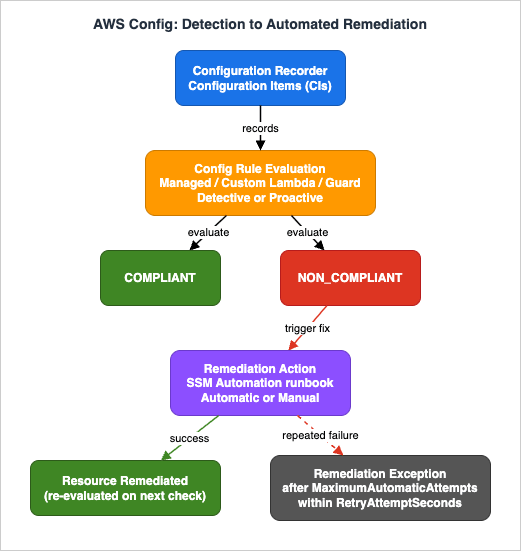
5.1 How Remediation Works
You create a remediation configuration that binds a Config rule to an SSM Automation document (the target). The Config rule must already exist, and the target document must exist and have permission to act on your resources. Remediation can be manual — you select non-compliant resources in the console and choose Remediate — or automatic, where AWS Config invokes the runbook for non-compliant resources without human action. The actual fix is whatever the SSM Automation runbook does: disable public sharing, enable encryption, attach a required tag, or open a ticket for investigation. S3PublicWriteRule:
Type: AWS::Config::ConfigRule
Properties:
ConfigRuleName: s3-bucket-public-write-prohibited
Source:
Owner: AWS
SourceIdentifier: S3_BUCKET_PUBLIC_WRITE_PROHIBITED
Scope:
ComplianceResourceTypes:
- AWS::S3::Bucket
S3PublicWriteRemediation:
Type: AWS::Config::RemediationConfiguration
Properties:
ConfigRuleName: !Ref S3PublicWriteRule
TargetType: SSM_DOCUMENT
TargetId: AWS-DisableS3BucketPublicReadWrite # AWS-owned Automation runbook
Automatic: true
MaximumAutomaticAttempts: 5 # default 5, range 1-25
RetryAttemptSeconds: 60 # default 60
ExecutionControls:
SsmControls:
ConcurrentExecutionRatePercentage: 25
ErrorPercentage: 10
Parameters:
AutomationAssumeRole:
StaticValue:
Values:
- !GetAtt RemediationRole.Arn
S3BucketName:
ResourceValue:
Value: RESOURCE_ID
Two details in that template are worth calling out. First, the target can be an AWS-owned runbook (the many AWS-* Automation documents such as AWS-DisableS3BucketPublicReadWrite or AWS-ConfigureS3BucketVersioning) or a custom runbook you author for a fix AWS does not ship. Second, remediation parameters come in two shapes: a StaticValue is a fixed value you supply (the role ARN), while a ResourceValue with the special RESOURCE_ID keyword injects the identifier of the non-compliant resource so the runbook knows what to fix. Pin a specific TargetVersion when you want deterministic behavior across runbook updates.A minimal custom runbook is an SSM Automation document (schema version
0.3) that assumes the passed role and calls an AWS API:description: Enable default encryption on an S3 bucket
schemaVersion: '0.3'
assumeRole: '{{ AutomationAssumeRole }}'
parameters:
BucketName:
type: String
AutomationAssumeRole:
type: String
mainSteps:
- name: EnableBucketEncryption
action: 'aws:executeAwsApi'
inputs:
Service: s3
Api: PutBucketEncryption
Bucket: '{{ BucketName }}'
ServerSideEncryptionConfiguration:
Rules:
- ApplyServerSideEncryptionByDefault:
SSEAlgorithm: aws:kms
5.2 The Remediation IAM Model
Remediation runs under an IAM role that SSM Automation assumes to perform the fix, passed asAutomationAssumeRole. The rules around this role are specific:- For manual remediation, you provide a value for
automationAssumeRoleor use theassumeRolefield — the SSM document can use either as long as it maps to a valid parameter. - For automatic remediation, the only valid
assumeRolevalue isAutomationAssumeRole, and you must provide it.
Scope this role tightly. It needs exactly the permissions the runbook requires to fix the resource — no more. Because automatic remediation can act on many resources without human review, an over-broad remediation role is a real blast-radius risk.
5.3 Retries, Exceptions, and Failure Behavior
Two parameters bound how hard AWS Config tries before giving up:MaximumAutomaticAttempts— the maximum number of failed auto-remediation attempts (default 5, range 1–25).RetryAttemptSeconds— the time window used to decide whether to stop (default 60 seconds).
If
MaximumAutomaticAttempts failures occur within RetryAttemptSeconds, AWS Config records a remediation exception on the resource to prevent infinite remediation attempts. Remediation exceptions are also how you deliberately exclude a resource from remediation — an approved deviation gets an exception instead of a disabled rule.Two behaviors surprise teams the first time. First, automatic remediation relies on a periodic compliance-data snapshot, so it can be initiated even for resources that are already compliant again (the snapshot may be stale), and there can be a lag between a change and its remediation. Second, if you make a backward-incompatible change to the target SSM document, you must re-apply the remediation configuration for remediations to keep running.
5.4 The Service-Linked Rule Constraint
There is one constraint that shapes multi-account design more than any other: you cannot attach a stand-alone remediation configuration to a service-linked Config rule. That category includes organization Config rules, rules deployed by conformance packs, and rules deployed by AWS Security Hub. The implication is direct — if you want remediation to travel with a rule that is deployed at organization scale, you put theAWS::Config::RemediationConfiguration inside the conformance pack template alongside the rule, rather than calling PutRemediationConfigurations against the deployed rule afterward. This is exactly what the next two sections build toward.6. Conformance Packs
6.1 What a Conformance Pack Is
A conformance pack is a collection of AWS Config rules and remediation actions packaged as a single entity that you deploy into an account and Region, or across an organization. Instead of managing dozens of rules individually, you manage one pack. AWS publishes many sample conformance packs mapped to well-known frameworks (operational best practices for CIS, PCI DSS, and others) that you can deploy as-is or customize.The value of a pack is not just convenience — it is that a control set becomes a versioned, reviewable artifact. Instead of a rule here and a remediation there, accumulated by hand over months, you have one template that spells out the entire "data-protection baseline" or "IAM hardening" control set, kept in source control and deployed as a unit. Starting from an AWS sample pack and trimming or extending it is almost always faster than assembling the equivalent rules one at a time, and it gives you a documented lineage for why each rule is present — which is exactly what an auditor will ask.
6.2 Template Structure
A conformance pack is defined by a YAML template with two sections —Parameters and Resources — and it may contain only two resource types: AWS::Config::ConfigRule and AWS::Config::RemediationConfiguration. The Parameters section holds the rule parameters, using a naming convention of NameOfRule + Param + NameOfRuleParameter. Rules in a pack can be managed, custom Lambda, or custom policy — mixed freely.Parameters:
IamPasswordPolicyParamMinimumPasswordLength:
Default: '14'
Type: String
Resources:
S3BucketVersioningEnabled:
Type: AWS::Config::ConfigRule
Properties:
ConfigRuleName: s3-bucket-versioning-enabled
Source:
Owner: AWS
SourceIdentifier: S3_BUCKET_VERSIONING_ENABLED
Scope:
ComplianceResourceTypes:
- AWS::S3::Bucket
IamPasswordPolicy:
Type: AWS::Config::ConfigRule
Properties:
ConfigRuleName: iam-password-policy
Source:
Owner: AWS
SourceIdentifier: IAM_PASSWORD_POLICY
InputParameters:
MinimumPasswordLength:
Fn::Sub: '${IamPasswordPolicyParamMinimumPasswordLength}'
MaximumExecutionFrequency: TwentyFour_Hours
You deploy a pack either by passing the full template body (TemplateBody, maximum 51,200 bytes) or by pointing at a template in Amazon S3 (TemplateS3Uri, maximum 300 KB, in the same Region). Rules deployed to member accounts through a conformance pack are immutable in those accounts — member-account users cannot edit or delete them, which is what makes a pack a governance guarantee rather than a suggestion.6.3 Packaging Judgment
A few limits shape how you carve up packs. A single conformance pack can hold up to 130 rules, and an account can hold up to 50 conformance packs per Region. Critically, rules inside conformance packs still count toward the limit of 1,000 AWS Config rules per Region per account — so a sprawling set of packs can quietly consume your rule budget. Group rules by control domain or framework (a "data-protection" pack, an "IAM-baseline" pack), keep each pack focused, and remember that remediations belong in the pack template when you need them to deploy at scale (see section 5.4).Operationally, a pack is a managed unit with a lifecycle: AWS Config moves it through
CREATE_IN_PROGRESS and UPDATE_IN_PROGRESS states, and you cannot update a pack while it is in progress. Each pack also exposes a compliance score as an Amazon CloudWatch metric — the percentage of rule-plus-resource combinations that are compliant — which is a far better management signal than a raw count of findings and lets you track a control domain's posture as a trend line rather than a number that resets every time a resource changes.6.4 Packaging Remediation with the Rule
Section 5.4 established the key constraint: you cannot attach a stand-alone remediation to a service-linked rule, and rules deployed by a pack are service-linked. The resolution is to declare the remediation as a resource inside the pack, so rule and fix travel together to every account the pack reaches. A pack fragment that both detects public S3 buckets and remediates them looks like this:Resources:
S3PublicReadProhibited:
Type: AWS::Config::ConfigRule
Properties:
ConfigRuleName: s3-bucket-public-read-prohibited
Scope:
ComplianceResourceTypes:
- AWS::S3::Bucket
Source:
Owner: AWS
SourceIdentifier: S3_BUCKET_PUBLIC_READ_PROHIBITED
S3PublicReadRemediation:
DependsOn: S3PublicReadProhibited
Type: AWS::Config::RemediationConfiguration
Properties:
ConfigRuleName: s3-bucket-public-read-prohibited
ResourceType: AWS::S3::Bucket
TargetType: SSM_DOCUMENT
TargetId: AWS-DisableS3BucketPublicReadWrite
TargetVersion: '1'
Automatic: true
MaximumAutomaticAttempts: 10
RetryAttemptSeconds: 600
ExecutionControls:
SsmControls:
ConcurrentExecutionRatePercentage: 10
ErrorPercentage: 10
Parameters:
AutomationAssumeRole:
StaticValue:
Values:
- arn:aws:iam::<ACCOUNT_ID>:role/S3RemediationRole
S3BucketName:
ResourceValue:
Value: RESOURCE_ID
The DependsOn makes CloudFormation create the rule before its remediation, and the whole pack deploys as one immutable unit into each member account.7. Deploying across an Organization
7.1 Organization Conformance Packs
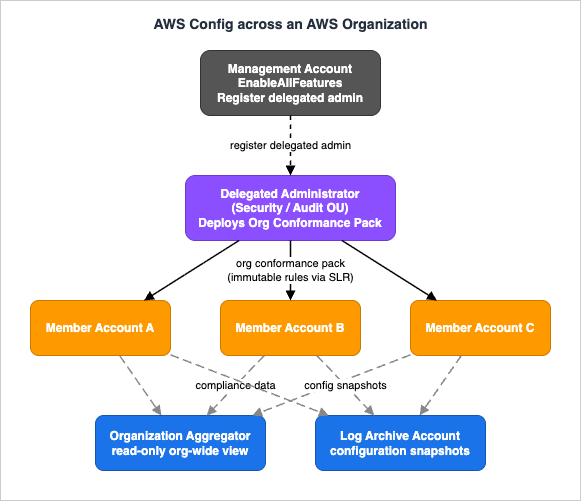
PutOrganizationConformancePack deploys a conformance pack across the member accounts of an AWS Organization. Only the management account or a delegated administrator can call it, and an organization can have up to 3 delegated administrators. Deploying at organization level requires that all features are enabled in the organization (EnableAllFeatures).The mechanics are worth understanding because they explain why organization packs are so robust. When you deploy an organization conformance pack, AWS Config uses the
AWSServiceRoleForConfigConforms service-linked role in each member account to create the pack's rules and remediation actions — and it can do so even if member-account IAM policies explicitly deny config:PutConfigRule or config:PutRemediationConfigurations. The operation also enables organization service access for config-multiaccountsetup.amazonaws.com and creates the AWSServiceRoleForConfigMultiAccountSetup service-linked role in the management or delegated administrator account. You can skip specific accounts with ExcludedAccounts.7.2 Delegated Administrator
Deploying organization Config resources was originally possible only from the organization's management account. Because many organizations reserve the management account for consolidated billing and run security and compliance from dedicated accounts, AWS Config supports registering a delegated administrator account to manage organization-wide Config deployments instead. Register it against theconfig-multiaccountsetup.amazonaws.com service principal, and when you call the API as the delegated administrator, ensure the organizations:ListDelegatedAdministrator permission is present.# Run from the management account or a registered delegated administrator. aws configservice put-organization-conformance-pack \ --organization-conformance-pack-name baseline-security-pack \ --template-s3-uri s3://awsconfigconforms-baseline/security-pack.yaml \ --delivery-s3-bucket awsconfigconforms-baseline \ --excluded-accounts 111122223333The delivery bucket for an organization pack must be prefixed with
awsconfigconforms.The same delegated administrator that deploys organization conformance packs can also own the organization aggregator, which makes it the single operational home for governance: it pushes controls down into member accounts and pulls compliance data up for org-wide reporting, all without touching the management account day to day. Registering the delegated administrator is a one-time setup from the management account (enable trusted access for AWS Config's multi-account service principal, then register the account); after that, the security or platform team operates entirely from their own account. This separation is not just tidy — it means a compromise or misconfiguration in a workload account cannot disable the controls that govern it, because those controls are created and re-applied centrally through service-linked roles.
7.3 Aggregators — Organization-Wide Visibility
Deploying rules is only half of scale; you also need to see compliance across every account and Region. An aggregator collects AWS Config configuration and compliance data from multiple source accounts and Regions into a single aggregator account. There are two kinds:- Individual account aggregator — you must authorize each source account and Region (both external accounts and organization member accounts).
- Organization aggregator — authorization for organization member accounts is not required, because it is integrated with AWS Organizations.
Two properties are essential to internalize. An aggregator provides a read-only view: it replicates data from source accounts so you can query it centrally (for example, "show me every public S3 bucket across the organization" through an advanced query), but you cannot deploy rules or push data through an aggregator — it does not grant mutating access to source accounts. And an aggregator does not enable AWS Config on your behalf; AWS Config must already be enabled in each source account and Region for data to exist to aggregate.
aws configservice put-configuration-aggregator \
  --configuration-aggregator-name org-aggregator \
  --organization-aggregation-source \
      RoleArn=arn:aws:iam::444455556666:role/AWSConfigRoleForOrganizations,AllAwsRegions=true
The payoff of an aggregator is advanced queries: a SQL-like SELECT language that runs across the aggregated inventory. A single query against an organization aggregator answers questions that would otherwise mean logging into hundreds of accounts — for example, every S3 bucket without public-access block, organization-wide:SELECT accountId, awsRegion, resourceId WHERE resourceType = 'AWS::S3::Bucket' AND configuration.publicAccessBlockConfiguration.blockPublicAcls = falseYou run these with
SelectAggregateResourceConfig for an aggregator (or SelectResourceConfig for a single account) and can save up to 300 queries per account per Region for reuse.7.4 The Common Shape
Putting sections 7.1–7.3 together, a typical organization-scale deployment looks like this: a dedicated delegated administrator account (living in a Security or Audit OU — see the multi-account guide for OU design) deploys organization conformance packs into every member account and hosts an organization aggregator for read-only, org-wide compliance queries. The configuration snapshots themselves are delivered to a central Log Archive account. Placement of that Log Archive/Audit account, and the CloudTrail organization trail that usually accompanies it, is a centralized-logging decision covered in the AWS Centralized Logging and Audit Architecture Guide.8. Operating the Compliance Loop
Turning AWS Config on is easy. Running it so that it produces trustworthy signal instead of noise is the actual work.8.1 Exception Management
Not every non-compliant finding is a bug to fix. Some are approved, documented deviations. The right tool is a remediation exception (a resource-level, optionally time-bounded exclusion) or a narrowly scoped rule, not a disabled rule. Disabling a rule blinds you everywhere; an exception records a deliberate, reviewable decision for one resource. AWS Config rules can be scoped by resource tag, and the 2025 addition of tag recording for IAM policies extended tag-based scoping and aggregation to that resource type as well.The
PutRemediationExceptions API makes this concrete. It takes a rule name, a list of ResourceKeys (up to 100 resources), an optional Message explaining the exception, and — importantly — an optional ExpirationTime after which the exception is automatically deleted. A time-bounded exception forces the deviation to be revisited instead of becoming a permanent blind spot: the resource re-enters the compliance loop the moment the exception expires. That single property is the difference between a governed exception process and a graveyard of forgotten suppressions.8.2 Noise Control
Alert fatigue kills compliance programs. A few levers keep the signal high:- Scope rules narrowly — by resource type or tag — so a rule only evaluates the resources it is meant to govern.
- Match recording frequency to risk — continuous for security-critical types, daily for high-churn non-production types (see section 2.3) — so you are not drowning in configuration items that no rule acts on.
- Prefer exceptions to disabling — record accepted deviations explicitly rather than turning rules off.
- Track posture over time — conformance packs expose a compliance score as an Amazon CloudWatch metric, which is a better management signal than a raw count of findings.
8.3 Which Rules Should Auto-Remediate
Automatic remediation is powerful and, applied carelessly, dangerous. The decision of whether a rule should auto-remediate comes down to the blast radius of its runbook.| Auto-remediate (generally safe) | Keep manual (higher risk) |
|---|---|
| Idempotent, reversible, non-destructive fixes | Fixes that delete or replace resources |
| Enable default encryption on a bucket or volume | Detach or modify networking (security groups, routes) that could cause an outage |
| Enable versioning or logging | Changes to IAM that could lock out access |
| Add a required tag; block public access | Anything whose failure mode is worse than the non-compliance it fixes |
Practical safeguards: bound retries with
MaximumAutomaticAttempts and RetryAttemptSeconds; throttle concurrency in large accounts with ExecutionControls so a fleet-wide remediation does not stampede; remember that auto-remediation can fire on already-compliant resources from a stale snapshot (see section 5.3); and test every remediation runbook in a sandbox account or OU before enabling it in production. The safe default is manual remediation with a human in the loop, promoted to automatic only for fixes you would be comfortable running unattended thousands of times.8.4 Rolling Out Safely
A new set of rules — especially with automatic remediation — should never go straight to every production account. A staged rollout keeps the blast radius small while you build confidence:- Detect only. Deploy the rules with no remediation attached and let them report for a cycle. This surfaces how much of your estate is non-compliant before anything changes it, and often reveals rules that are mis-scoped or too noisy.
- Remediate manually. Add the remediation configurations but leave them manual. Run fixes on a handful of resources by hand and confirm the runbooks behave and the assume-role permissions are correct.
- Automate in a pilot OU. Turn on automatic remediation in a sandbox or non-production OU first, using
ExcludedAccountson the organization pack to keep production out until the pilot is clean. - Expand. Once the pilot is stable, widen the pack to the remaining accounts and watch the conformance-pack compliance score trend upward as the fleet converges.
Because organization conformance packs are immutable in member accounts and are re-applied centrally, this progression is managed entirely from the delegated administrator — you change one template and one deployment, not hundreds of accounts by hand.
9. Boundaries with Security Hub and Audit Manager
AWS Config sits underneath several higher-level services, and knowing the boundary keeps you from duplicating work or misattributing responsibility.- AWS Config is the substrate. It records configuration state, evaluates rules, and runs remediation. It is where the raw configuration inventory and the rule-evaluation engine live.
- AWS Security Hub CSPM is a security and compliance posture-management service that uses AWS Config and AWS Config rules as its primary mechanism to evaluate resource configurations for most controls, then maps results to standards (AWS Foundational Security Best Practices, CIS, PCI DSS) and produces a security score. A June 2026 change introduced internal service-linked rules, which let AWS services such as Security Hub CSPM manage their own rule evaluations independently of your customer-managed AWS Config recorders and rules. The design implication is that Security Hub's checks are increasingly decoupled from your own Config rule budget and recorder scope — you continue using AWS Config for inventory, governance, compliance, and auditing while Security Hub manages its service-specific evaluations. You still enable AWS Config in the accounts and Regions where Security Hub runs.
- AWS Audit Manager collects and organizes evidence mapped to compliance frameworks. It can consume AWS Config rule evaluations as an evidence source, so Config rule results flow up into an audit assessment rather than being re-implemented.
- AWS Control Tower and AWS Firewall Manager also consume AWS Config rules under the hood. Control Tower's detective controls (formerly "detective guardrails") are implemented as AWS Config rules deployed across the enrolled accounts, which is why Control Tower requires AWS Config to be enabled in the accounts it governs. Firewall Manager's dependency has the same shape but a different purpose: it does not detect and remediate, it distributes policies, and AWS Config is what tells it that a new resource exists. The division of labor between detecting a drift and distributing a defense is set out in the AWS Network and Application Protection Decision Guide.
Seeing the layering this way prevents the most common waste: re-implementing in AWS Config a control that Security Hub or Control Tower already runs for you, or vice versa. If Security Hub's AWS Foundational Security Best Practices standard already checks that S3 buckets block public access, you do not also need to hand-author that rule — you add your own controls in AWS Config for the things the managed standards do not cover, and let the managed services carry the standard baseline. Audit Manager sits at the top of the stack: it does not evaluate anything itself, it collects the evaluation results (from AWS Config, among other sources) as evidence and maps them to the control sets of a framework such as SOC 2 or PCI DSS, turning day-to-day compliance data into audit artifacts.
The takeaway: build your detective and remediation controls in AWS Config, and let Security Hub, Audit Manager, and Control Tower consume that foundation for their respective jobs — posture scoring, evidence collection, and landing-zone guardrails. This guide stays on the Config side of that line; the security-posture and audit-evidence domains are their own topics.
10. Frequently Asked Questions
Do the rules inside a conformance pack count against my 1,000-rule limit?
Yes. AWS Config rules deployed through single-account or organization conformance packs count toward the maximum of 1,000 AWS Config rules per Region per account. Track your total rule count, packs included, so a large pack rollout does not exhaust the budget.Can I auto-remediate a rule that a conformance pack deployed?
Not by attaching a separate remediation configuration to the deployed rule — rules deployed by conformance packs (and organization Config rules and Security Hub rules) are service-linked, and stand-alone remediation configurations cannot be added to them. Instead, define theAWS::Config::RemediationConfiguration inside the conformance pack template so the remediation is deployed together with the rule.Continuous or daily recording — how do I choose?
Use continuous recording for resource types where real-time detection matters for security and compliance (IAM, security groups, S3, KMS), and consider daily recording for high-churn, lower-risk types in non-production accounts. Keep continuous recording for any type monitored by AWS Firewall Manager, which depends on it. This is a coverage-and-signal decision; it also affects recorded volume.Should I deploy organization packs from the management account or a delegated administrator?
Prefer a dedicated delegated administrator account (typically in a Security or Audit OU) so the management account stays reserved for billing and organization management. An organization can register up to three delegated administrators for AWS Config, registered againstconfig-multiaccountsetup.amazonaws.com.What is the difference between an individual account aggregator and an organization aggregator?
An individual account aggregator requires you to authorize each source account and Region explicitly. An organization aggregator does not require member-account authorization because it integrates with AWS Organizations. Both are read-only and both require AWS Config to already be enabled in the source accounts and Regions.When should I write a custom Lambda rule instead of a Guard custom policy rule?
Use a Guard custom policy rule for declarative, property-level checks when you do not want to operate a Lambda function. Use a custom Lambda rule when the evaluation needs a general-purpose programming language — complex logic, relationships across resources, or calls to external systems.Does AWS Config remediate detected drift instantly?
No. Automatic remediation relies on a periodic compliance-data snapshot, so there can be a lag between a change and its remediation, and remediation can even be initiated for resources that have already returned to compliance. Design runbooks to be idempotent so that acting on an already-compliant resource is harmless.11. Summary
AWS Config turns continuous change in a multi-account environment into a loop you can operate: detect with a recorder whose scope and frequency you deliberately tune; evaluate with managed rules for common controls and custom rules — Guard for declarative policy-as-code, Lambda for complex logic — across detective and proactive modes; remediate through SSM Automation runbooks with a tightly scoped role, bounded retries, and a clear-eyed judgment about which fixes are safe to automate; package controls as conformance packs; and deploy them across an organization from a delegated administrator, with an organization aggregator for read-only, org-wide visibility.The decisions that matter most are the ones this guide made explicit: record what your rules actually evaluate; keep remediation inside the pack when it must travel at organization scale, because you cannot bolt it onto a service-linked rule afterward; auto-remediate only fixes you would run unattended thousands of times; and let Security Hub, Audit Manager, and Control Tower build on the Config foundation rather than duplicating it. Get those right and AWS Config stops being a wall of red findings and becomes the governance engine the rest of your compliance program depends on.
For the surrounding decisions this guide deliberately delegated — account and OU structure, SCPs, and landing-zone design — see AWS Multi-Account Operational Patterns and, for where compliance data lands, the AWS Centralized Logging and Audit Architecture Guide. To place these controls in a broader review framework, see the AWS Well-Architected Practical Checklist.
12. References
- AWS Config Developer Guide — Working with the configuration recorder
- AWS Config Developer Guide — Terminology and concepts (recorder, aggregator, authorization)
- AWS Config Developer Guide — Changing the recording frequency
- AWS Config now supports periodic recording (What's New, 2023-11)
- AWS Config now supports a service-linked recorder (What's New, 2024-12)
- Announcing AWS Config Custom Rules using Guard Custom policy
- Streamline compliance management with AWS Config custom rules and conformance packs
- AWS::Config::RemediationConfiguration (CloudFormation reference)
- Creating templates for custom conformance packs
- put-organization-conformance-pack (AWS CLI reference)
- Deploy AWS Config Rules and Conformance Packs using a delegated admin
- Service Limits for AWS Config
- AWS Config API Reference — PutEvaluations (custom Lambda rules)
- AWS Config API Reference — PutRemediationExceptions
- Remediate noncompliant AWS Config rules with AWS Systems Manager Automation runbooks
- Deploy Conformance Packs across an Organization with Automatic Remediation
- AWS Config now supports internal service linked rules (What's New, 2026-06)
- AWS Config FAQs (relationship to Security Hub CSPM)
- AWS Multi-Account Operational Patterns - Control Tower, Organizations, SCPs
- AWS Centralized Logging and Audit Architecture Guide
- AWS Well-Architected Practical Checklist
- AWS History and Timeline regarding AWS Organizations
- AWS History and Timeline regarding AWS Identity and Access Management (AWS IAM)
References:
Tech Blog with curated related content
Written by Hidekazu Konishi