AWS Network and Application Protection Decision Guide - Where AWS WAF, AWS Shield, AWS Network Firewall, and AWS Firewall Manager Sit on the Request Path and What Each One Does Not Stop
First Published:
Last Updated:
AWS WAF, AWS Shield, AWS Network Firewall, and AWS Firewall Manager are not replacements for one another. Instead, they are layers positioned at different points along the path of a single request. Where a layer sits changes what it can see, and it changes what it cannot see. So there is no answer to "which one is better." There is only an answer to "where is it placed, and what can it not protect because of where it sits."
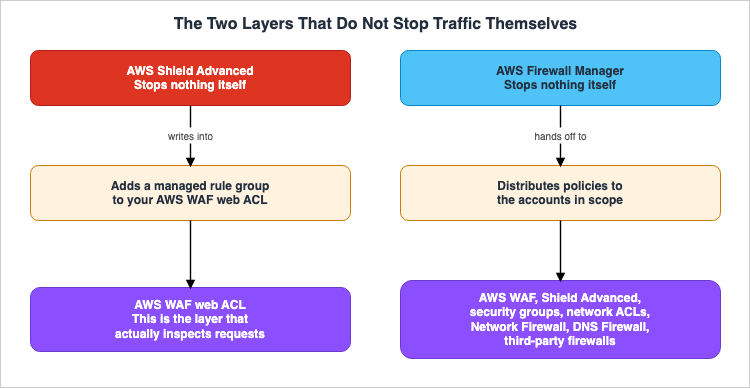
Worse, two of these four stop nothing themselves. AWS Shield Advanced works by writing its application-layer mitigation into AWS WAF as a rule group, and AWS Firewall Manager works by distributing other defenses across an organization. Deploy them without knowing that asymmetry and the failure takes a predictable shape: a Shield Advanced subscription sitting behind an empty web ACL, or Firewall Manager enabled with nothing protected.
This article deals only with the placement of these four layers and with what each one does not stop. It is not a survey of features, and it is not a set of configuration steps. It is written for two readers: the person running a public application on AWS who cannot decide whether to subscribe to Shield Advanced, and the security engineer in a multi-account environment where some accounts have protection and others do not, who needs the same answer everywhere.
The specifications in this article were confirmed against the official AWS documentation on August 31, 2026. Only Section 9.6, on AWS Network Security Manager, was confirmed on September 25, 2026. The migration covered in Chapter 9 in particular is still under way, so the state of these services will move after this article is published. Confirm against primary sources before you make a design decision.
Table of Contents
- 1. Why You Cannot Line These Four Up and Compare Them
- 2. Where Each Layer Sits on the Request Path
- 3. AWS WAF - The Layer That Reads the Content
- 4. AWS Shield - The Always-On Tier and the Opt-In Tier
- 5. AWS Network Firewall - The Only Layer Inside the VPC
- 6. AWS Firewall Manager - The Layer That Stops Nothing Itself
- 7. What Each Layer Does Not Stop
- 8. Where to Start
- 9. What Is Changing Right Now
- 10. Frequently Asked Questions
- 11. Summary
- 12. References
1. Why You Cannot Line These Four Up and Compare Them
1.1 AWS Itself Groups Them as Three Plus One
There is something to check before you build a comparison table. AWS itself does not treat these four services as one unit.The title of the introductory page in the AWS WAF Developer Guide is
What are AWS WAF, AWS Shield Advanced, AWS Shield network security director and AWS Firewall Manager? The guide begins by stating:You can use AWS WAF, AWS Shield, and AWS Firewall Manager together to create a comprehensive security solution.
There are three services. AWS Network Firewall is not included in this guide. It has its own separate developer guide, and when that guide references AWS Firewall Manager, it does so as an external document titled
AWS WAF, AWS Firewall Manager, and AWS Shield Advanced Developer Guide.Therefore, while "four" services are presented as a comprehensive overview in this article, AWS's own documentation groups them into three and one. This is not trivia. The three are tightly coupled enough to cross-reference each other in one guide. In contrast, Network Firewall exists in a separate layer and in a different document. Placing all four in a single comparison table obscures this structural difference.
1.2 Two of Them Stop Nothing Themselves
There is one more thing a comparison table erases. Two of the four are not the ones that stop traffic.AWS WAF and AWS Network Firewall inspect requests and packets themselves, deciding whether to allow or block them. They are the services that actively block traffic.
AWS Shield Advanced and AWS Firewall Manager operate differently. Shield Advanced's application layer protection is effective when configured as a rule group within an AWS WAF web ACL. Firewall Manager is effective by deploying policies from other services to accounts within an organization. Both of these services drive other layers of security.
When the list of features is presented side-by-side, these two services are often grouped together at the same level of detail. Readers might assume, "If I purchase Shield Advanced, my Layer 7 traffic will be protected," or "If I implement Firewall Manager, my organization will be secure." Neither reading is correct as it stands.
1.3 What This Article Does Not Cover
This article focuses solely on layer configuration and limitations. The following topics will not be addressed:The historical development and timelines of individual services. The historical development of AWS WAF is documented in AWS History and Timeline regarding AWS WAF. The evolution of AWS Shield and AWS Firewall Manager is detailed in AWS History and Timeline regarding AWS Shield and AWS Firewall Manager, while the history and features of inspection layers within a VPC are covered in AWS History and Timeline regarding AWS Network Firewall.
Specific reference architectures for combining AWS WAF and AWS Shield at the CloudFront edge. This is held by the existing article Secure Web Application Reference Architecture on AWS, which outlines a single request path from CloudFront to RDS.
The design process for VPC segmentation and inspection. This is held by the existing article AWS Zero-Trust Network Architecture Guide, which focuses on Network Firewall.
How to write AWS WAF rules. The design of rules for generative AI applications is held by the existing article AWS WAF for Generative AI.
General principles regarding containment boundaries. This is held by the existing article Agent Sandboxing and Blast-Radius Isolation on AWS, which outlines five boundaries: execution environment, credentials, network, data, and time. This article is limited to network and application security.
Finally, this article will not discuss pricing, attack execution procedures, or comparisons with competing products. While it will mention the billing structure as a system, it will not provide specific pricing details.
2. Where Each Layer Sits on the Request Path
2.1 The Four Places
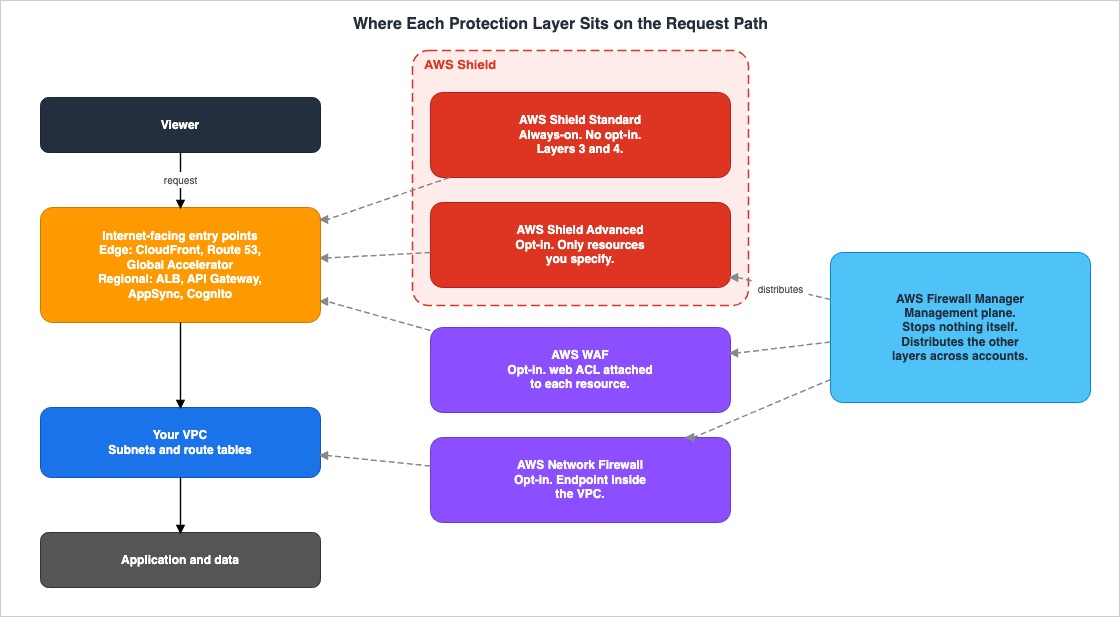
A single request, originating from a user's browser, travels to the application and receives a response. During this process, four layers operate at distinct points.| Layer | Location | Unit of Effect |
|---|---|---|
| AWS Shield Standard | AWS network boundary | Every AWS account, automatically |
| AWS WAF | web ACL associated with the protected resource | Resource-based |
| AWS Shield Advanced | Specifically designated protected resource | Resource-based |
| AWS Network Firewall | Firewall endpoint created within a VPC | Subnet and route table-based |
| AWS Firewall Manager | Management plane of the organization | Account and policy scope-based |
There are five rows because AWS Shield is divided into two tiers: Standard, which is always active, and Advanced, which requires a subscription. While these two tiers share the same service name, their locations and activation methods are different. Chapter 4 separates them.
2.2 There Are Constraints on Where You Can Put Each Layer
Placement matters in practice for one reason: sometimes you cannot put a layer where you want it.AWS WAF can only be associated with specific resource types that support web ACLs. Shield Advanced can only protect the resources you designate as protected resources. These two lists are not identical. You can put AWS WAF in front of an Amazon Cognito user pool, but you cannot protect one with Shield Advanced. A Network Load Balancer becomes a Shield Advanced protected resource through an Elastic IP address, but you cannot associate an AWS WAF web ACL with it at all.
Beyond the list of resource types, AWS WAF has three additional limitations that are not obvious from that list alone. The Region in which you create a web ACL depends on the resource you attach it to. A web ACL for a CloudFront distribution has to be created in the US East (N. Virginia) Region, and a web ACL for an AWS Amplify app has to be created in the Global CloudFront Region as well. The official documentation states outright that an existing Regional web ACL is not compatible with Amplify. You cannot associate web ACLs with Application Load Balancers running on AWS Outposts. Furthermore, a single web ACL can cover more than one resource, but each resource can carry only one web ACL. If a web ACL is associated with a CloudFront distribution, it cannot be reused with other resource types.
Network Firewall has even stricter limitations. You must create a dedicated subnet within your VPC for the firewall and modify the route table to direct traffic to that subnet. Adding it to an existing VPC is a change to your network design, not a setting.
Firewall Manager requires AWS Organizations. It cannot be used with a single account.
Therefore, before considering "which option to choose," you must first determine "whether it can even be placed." The decision flow outlined in Chapter 8 begins with this initial filtering process.
3. AWS WAF - The Layer That Reads the Content
3.1 What does it look at?
AWS WAF inspects HTTP and HTTPS requests. It examines IP addresses, the country of origin, header values, strings and regular expression patterns that appear in the request, the request length, and potential structures indicative of SQL injection or cross-site scripting. Based on these criteria, for each request, it can either allow, block, count, or apply a CAPTCHA or challenge.Of the four layers, this layer is the only one that interprets communication as an HTTP request and assesses it based on its individual components. While AWS Network Firewall also inspects packet payloads, it does so at the level of flows and protocols, and does not provide a mechanism for individually evaluating web request headers, bodies, or query strings.
3.2 The Resource Types It Can Be Attached To
As of August 31, 2026, the developer guide lists nine resource types that an AWS WAF web ACL can be associated with: one global and eight Regional.| Resource type | Scope |
|---|---|
| Amazon CloudFront distribution | Global |
| Amazon API Gateway REST API | Regional |
| Application Load Balancer | Regional |
| AWS AppSync GraphQL API | Regional |
| Amazon Cognito user pool | Regional |
| AWS App Runner service | Regional |
| Amazon Bedrock AgentCore Gateway | Regional |
| AWS Verified Access instance | Regional |
| AWS Amplify | Listed as Regional, but its web ACL is created in the Global CloudFront Region |
This list is subject to change. The inclusion of Amazon Bedrock AgentCore Gateway, a foundation for generative AI execution, demonstrates that AWS WAF is evolving from a solution that sits "in front of websites" to one that can be placed "in front of any HTTP endpoint." When you design, read the current list from the official documentation rather than this one.
3.3 What It Cannot See
As a reflection of the layer that processes content, there are aspects that AWS WAF cannot see.There is a limit to the amount of data within a request body that can be inspected. According to official documentation, this limit is fixed at 8 KB for Application Load Balancer and AWS AppSync. For CloudFront, API Gateway, Amazon Cognito, App Runner, Verified Access, and Amazon Bedrock AgentCore Gateway, the default is 16 KB, and it can be increased in 16 KB increments up to 64 KB. Any portion of the request body exceeding this limit will not be forwarded to AWS WAF for inspection.
When a web request body is larger than the limit, the underlying host service only forwards the contents that are within the limit to AWS WAF for inspection.
Your configuration decides what happens to the part that goes over. By default, AWS WAF inspects whatever part of the body fits under the limit and does not block a request just because it went over. For routes that accept large request bodies, it is a design consideration whether to maintain this default behavior.
AWS WAF cannot inspect the request bodies of gRPC requests. The official documentation explicitly states:
AWS WAF does not support request body inspection rules for gRPC traffic.
While other rules apply to gRPC traffic, only the body inspection rules are ignored. If you are using gRPC with CloudFront or Application Load Balancer and have implemented security measures that rely on body inspection, those measures will not be fully effective.
Furthermore, AWS WAF does not inspect traffic that does not use HTTP. This includes database connections, communication within a VPC (east-west traffic), and outbound communication. This layer does not see any of this traffic.
4. AWS Shield - The Always-On Tier and the Opt-In Tier
4.1 Shield Standard Is Already Working
AWS Shield Standard is automatically applied to all AWS customers without any additional cost. No activation steps are required.All AWS customers benefit from the automatic protections of AWS Shield Standard at no additional charge.
Shield Standard performs always-on network flow monitoring and absorbs common, frequently occurring network and transport layer DDoS events through inline mitigation. Used together with Amazon CloudFront and Amazon Route 53, AWS states that you receive comprehensive availability protection against all known infrastructure layer attacks.
What matters here is what Shield Standard does not do.
Shield Standard sets static thresholds for each AWS resource type but doesn't provide custom protections to your applications.
The thresholds are fixed values specific to each resource type; it does not learn the typical traffic patterns of your applications and detect deviations from those patterns.
4.2 Shield Advanced Only Protects Resources You Have Explicitly Specified
Shield Advanced is a subscription-based tier. And here is the sentence this article finds most often overlooked.Shield Advanced protects only resources that you have specified either in Shield Advanced or through an AWS Firewall Manager Shield Advanced policy. It doesn't automatically protect your resources.
Simply subscribing to the service does not provide any protection. You must either individually specify the resources you want to protect, or define them within an AWS Firewall Manager Shield Advanced policy. Half the reason the distribution layer covered in Chapter 6 exists is right here. Its job is to take over that manual, explicit designation on an organization-wide basis.
As of August 31, 2026, the resource types that can be protected are as follows:
| Resource Type | Protection Method |
|---|---|
| Amazon CloudFront distribution | Directly specified. For CloudFront continuous deployment, a staging distribution associated with a protected primary distribution is also protected. |
| Amazon Route 53 hosted zone | Directly specified |
| AWS Global Accelerator standard accelerator | Directly specified |
| Amazon EC2 Elastic IP address | Directly specified. Associated resources are also protected. |
| Amazon EC2 instance | Through association with an Elastic IP address. |
| Application Load Balancer | Directly specified |
| Classic Load Balancer | Directly specified |
| Network Load Balancer | Through association with an Elastic IP address. |
That a Network Load Balancer is only ever protected through an Elastic IP address is a branch point in the design. Network Load Balancers that do not have an Elastic IP address are outside of this tier.
Furthermore, the official documentation provides examples that clarify resources not included in the list.
You can't use Shield Advanced to protect any other resource type. For example, you can't protect AWS Global Accelerator custom routing accelerators or Gateway Load Balancers.
It's inaccurate to state simply that "Global Accelerator is protected," as this can be misleading. Gateway Load Balancers are excluded too, so if you sandwich a third-party appliance behind one, Shield Advanced does not cover that layer.
The default limit for the number of resources that can be protected per account is 1,000 per resource type. You can request an increase through Service Quotas.
4.3 It Only Looks at Inbound Traffic
Shield Advanced focuses solely on inbound traffic. On the same page, the official documentation names what lies outside that boundary.NAT Gateways handle outbound traffic only, whereas Shield Advanced protects against inbound DDoS. For outbound traffic protection, use AWS Network Firewall.
This is AWS itself drawing the boundary between the layers. It states that protecting outbound traffic is not Shield Advanced's responsibility, and that users should instead utilize AWS Network Firewall. Chapter 5 is the continuation of that one sentence.
4.4 Two Official Statements Exist About IPv6
There are two official descriptions concerning IPv6 and its relationship with Shield Advanced within AWS documentation, and they contain differing information. This article will present both, with citations, without favoring one over the other.The AWS WAF Developer Guide, on the page listing resources protected by Shield Advanced, states:
Shield Advanced supports IPv4, and does not support IPv6.
In contrast, the chapter on security in the IPv6 on AWS whitepaper states:
All of the AWS Shield detection and mitigations work with IPv4 and IPv6 without any impact to performance, scalability, or availability of the service.
The first sentence sits in a passage describing which resources Shield Advanced protects. The second describes the detection and mitigation machinery of AWS Shield as a whole. AWS documentation does not explicitly state whether these two scopes are identical.
In practice, if you are designing Shield Advanced protection for IPv6 endpoints, build on the narrower statement in the developer guide and confirm your specific configuration with AWS. Relying solely on one of these descriptions without acknowledging the existence of both can lead to discrepancies during design reviews.
Network design that assumes IPv6 from the start is the subject of the existing article IPv6-First VPC Design on AWS.
4.5 Shield Advanced Does Not Replace AWS WAF
Shield Advanced's application-layer protection is delivered using AWS WAF web ACLs, rules, and rule groups. The official capability list for Shield Advanced opens with this statement.Shield Advanced uses AWS WAF web ACLs, rules, and rule groups as part of its application layer protections.
This relationship is already stated in the existing article Secure Web Application Reference Architecture on AWS, in the context of the CloudFront edge.
Shield Advanced builds on WAF rather than replacing it; rate-based rules and managed groups remain your application-layer controls, and Shield Advanced raises the protection and response level around them.
This article will not reiterate that claim. Shield Advanced is built on top of AWS WAF; it does not replace it. This article places the four layers on top of that premise.
The mechanism behind that relationship changes between late 2026 and early 2027. Chapter 9 covers it.
4.6 The network security director Is in Neither Tier
AWS Shield offers a feature called network security director. It analyzes network topology and security configuration, finds network security services that are missing or misconfigured, rates what it finds by severity, and returns specific remediation steps. It can be queried using Amazon Q Developer through natural language.This feature does not stop traffic. It evaluates configuration. There are two important points to note.
First, as of August 31, 2026, it is in public preview and subject to change. The official documentation states:
AWS Shield network security director is in public preview release and is subject to change.
Second, it is not included in either Shield Standard or Shield Advanced. The AWS Shield pricing page explicitly states both
AWS Shield Standard does not include AWS Shield network security director. and AWS Shield Advanced does not include AWS Shield network security director. Even if you subscribe to Shield Advanced, this feature is not included.The list of supported Regions has grown from the two available when the preview opened. That list changes, so this article does not reproduce it. Read the current list from the official service-linked role page.
5. AWS Network Firewall - The Only Layer Inside the VPC
5.1 What It Is
AWS Network Firewall is a stateful, managed, network firewall and intrusion detection and prevention service for your virtual private cloud (VPC) that you create in Amazon Virtual Private Cloud (Amazon VPC).
Network Firewall filters traffic at the perimeter of your VPC, covering traffic that enters and leaves through an internet gateway, a NAT gateway, VPN, or Direct Connect. For stateful inspection it uses Suricata, the open source intrusion prevention system, and it accepts Suricata compatible rules as written.
Of the four layers, this is the only one that resides within your VPC. It exists as a firewall endpoint within a subnet of your VPC. The other three either attach to the resource being protected or sit on the management plane.
5.2 It Is the Layer That Requires a Route Table Change
This is fundamentally different from the other three options. While AWS WAF and Shield Advanced become effective based on resource association or specification, Network Firewall actually alters the network's routing.In its default operating mode, the firewall receives traffic from the VPC endpoint, inspects it with the stateful rules engine, and sends the filtered traffic back through the VPC endpoint to its destination. The original source and destination IP addresses survive the inspection. Getting the traffic to pass through the firewall at all is your configuration, not the service's.
Traffic is steered to the firewall through VPC route tables.
To use the firewall, you need to provision subnets in each Availability Zone and then modify the route tables to direct traffic to the firewall endpoint. When adding it to an existing VPC, this is a change to your network architecture, not simply a configuration adjustment.
There is one limitation:
A firewall endpoint cannot filter traffic coming into or going out of the subnet in which it resides, so do not use your firewall subnets for anything other than Network Firewall.
The firewall endpoint cannot inspect traffic entering or leaving the subnet it sits in. Using those subnets for other purposes will create areas that are not inspected.
There is another mode, which attaches to a NAT gateway and acts as an explicit forward proxy, but as of August 31, 2026 it is in preview and available only in the US East (Ohio) Region. It is not something to build a design on yet.
5.3 Stateless and Stateful Are Separate Rule Groups
Network Firewall rule groups come in two types: stateless and stateful. Stateless rules evaluate each packet in isolation, making decisions based solely on the information contained within that single packet. They do not reference other packets within a flow, the direction of communication, or any other information not present in the packet itself. Stateful rules judge a packet in the context of its traffic flow.The distinction shows up in operations. Traffic matching a stateful rule is recorded as a flow in the firewall's state table. These entries remain active until the flow naturally terminates, times out due to inactivity, or is explicitly removed through a flush operation. Changing a rule does not by itself change how an already-established flow is handled.
5.4 The Layer That Can Inspect Outbound Traffic
As mentioned in Chapter 4, AWS is directing outbound traffic protection from the Shield Advanced page to this layer. The Network Firewall documentation also highlights the ability to perform deep packet inspection on traffic entering and leaving the VPC, as well as the option to only allow traffic through endpoints associated with known, legitimate service domains and IP addresses.The wording here has to be exact. Of the four, AWS Network Firewall is the only one that inspects outbound traffic. However, Firewall Manager can deploy security group and network ACL policies for the VPC, which control outbound communication. The distinction is that Firewall Manager does not inspect anything itself. It distributes the mechanisms that control the outbound direction.
The network architecture, including outbound traffic control, is discussed in detail in the existing article AWS Zero-Trust Network Architecture Guide. This article will only address the positioning of this layer.
6. AWS Firewall Manager - The Layer That Stops Nothing Itself
6.1 It Is the Layer That Distributes
AWS Firewall Manager centralizes the management of security controls across multiple accounts and resources. It allows you to configure protections such as AWS WAF, AWS Shield Advanced, Amazon VPC security groups and network ACLs, AWS Network Firewall, and Amazon Route 53 Resolver DNS Firewall, and automatically applies these configurations to new accounts and resources.This layer does not sit on the request path at all. It sees neither packets nor requests. Instead, it operates at a management level, distributing configurations to other layers across various accounts. Therefore, it is entirely possible to have AWS Firewall Manager enabled and nothing protected - this can be a normal outcome. If you have not defined the policies to distribute, there is nothing to distribute.
On September 24, 2026, AWS Network Security Manager became generally available as the service that replaces this layer. For the time being, the two services operate side by side. Section 9.6 covers the details.
6.2 Counting How Many Policy Types It Can Distribute
How many policy types Firewall Manager offers depends on which document you read. This is a place to check both sources before writing a number down as a claim.The user guide lists seven categories: AWS WAF policies, Shield Advanced policies, Amazon VPC security group policies, Amazon VPC network ACL policies, Network Firewall policies, Amazon Route 53 Resolver DNS Firewall policies, and third-party firewall policies.
In contrast, the
fms API's SecurityServicePolicyData object has eleven possible values for the Type field.WAF | WAFV2 | SHIELD_ADVANCED | SECURITY_GROUPS_COMMON | SECURITY_GROUPS_CONTENT_AUDIT | SECURITY_GROUPS_USAGE_AUDIT | NETWORK_FIREWALL | DNS_FIREWALL | THIRD_PARTY_FIREWALL | IMPORT_NETWORK_FIREWALL | NETWORK_ACL_COMMONThe two numbers do not contradict each other. The user guide is a descriptive document that groups functionalities into categories, while the API lists implementation units. The correspondence is as follows:
| User Guide Category | API Enumerated Value |
|---|---|
| AWS WAF policies | WAFV2 and WAF (the latter is for AWS WAF Classic) |
| Shield Advanced policies | SHIELD_ADVANCED |
| Amazon VPC security group policies | SECURITY_GROUPS_COMMON, SECURITY_GROUPS_CONTENT_AUDIT, and SECURITY_GROUPS_USAGE_AUDIT |
| Amazon VPC network ACL policies | NETWORK_ACL_COMMON |
| Network Firewall policies | NETWORK_FIREWALL and IMPORT_NETWORK_FIREWALL |
| DNS Firewall policies | DNS_FIREWALL |
| Third-party firewall policies | THIRD_PARTY_FIREWALL |
The seven categories correspond to eleven values. This distinction has practical implications. Security group policies, for example, serve three distinct purposes: applying common rules, auditing existing rules, and auditing unused resources. The API treats each of these as a separate type. If a design is based solely on a single line in the user guide stating "create one security group policy," it does not say which of the three purposes is meant.
When stating "N types" in an article or design document, it's safest to explicitly clarify which counting method is being used.
6.3 On the Third-Party Policy Type
A third-party firewall policy distributes the protections of a product you have subscribed to through AWS Marketplace. The user guide mentions two such products: Palo Alto Networks Cloud NGFW and Fortigate Cloud Native Firewall (CNF) as a Service.This article does not discuss the features or merits of these products. It records only that such a policy type exists for Firewall Manager to distribute.
6.4 The AWS WAF Classic Policy Type Is Still There
The API enumeration includesWAF, and the user guide's description of the AWS WAF policy mentions AWS WAF Classic alongside AWS WAF. That pairing needs care.AWS WAF Classic is inside a planned end-of-life process. AWS's official documentation clearly states that
AWS WAF Classic support will end on September 30, 2025. As of the time of writing this article (August 31, 2026), that date has already passed.Being listed as a Firewall Manager policy type and being a live option for a new design are two different things. There is no reason to pick AWS WAF Classic for anything new. The dates for each migration milestone differ by Region, so check your own account on the AWS Health dashboard.
6.5 Three Prerequisites Are Needed Before It Can Distribute Anything
Firewall Manager stops nothing itself. It also will not start working at all until three prerequisites are in place.First, AWS Organizations. You create an organization and turn on all features. Firewall Manager cannot be used from a single standalone account.
Second, designate one account in the organization as the administrator.
Third, you need AWS Config. It has to be enabled on every account in the organization. AWS Config is the mechanism that allows Firewall Manager to detect newly created resources.
On top of that, distributing Network Firewall and DNS Firewall policies requires AWS Resource Access Manager, and distributing third-party policies requires a subscription through AWS Marketplace.
Many instances of "Firewall Manager is enabled, but nothing is being protected" are due to one of these prerequisites being missing, or because the policy scope is not pointing at the range you intended.
6.6 How It Differs from SCPs and AWS Config
Firewall Manager is not the only mechanism that makes something uniform across an organization. The three are easy to confuse, so here is the line between them.| Mechanism | Function |
|---|---|
| Service Control Policy | Allows or denies API calls. It is the mechanism for not letting something happen |
| AWS Config rules and remediation | Detects configuration that has drifted from a baseline, and fixes what has drifted |
| AWS Firewall Manager | Distributes the protection resources and policies themselves, and applies them automatically to new accounts and resources in scope |
Service Control Policy prevents actions, AWS Config corrects deviations, and Firewall Manager deploys and standardizes. Firewall Manager can also be used simply to display accounts and resources that are not compliant, without making any corrections. While this usage resembles AWS Config's detection capabilities, it differs in that it focuses on the deployment status of security resources.
The design of cross-organizational policies is covered in the existing article AWS Organization Guardrails. Detection and automated remediation are covered in the existing article AWS Config Rules and Conformance Packs.
7. What Each Layer Does Not Stop
This is the core of the article. For each layer, here are the limits: the ones the official documentation states outright, and the ones that follow from where the layer sits. If you combine layers without understanding these limitations, you risk concluding that a system is secure when vulnerabilities remain unaddressed.7.1 What AWS WAF Does Not Stop
| What it does not stop | Why |
|---|---|
| Anything that is not HTTP or HTTPS | This layer inspects web requests and nothing else |
| Traffic to resource types a web ACL cannot attach to | Only the listed resource types accept an association |
| The part of a request body past the inspection limit | Fixed at 8 KB for Application Load Balancer and AppSync. Default 16 KB, maximum 64 KB, for the others |
| The body of a gRPC request | Body inspection rules are skipped for gRPC |
| Traffic to an Application Load Balancer on AWS Outposts | No web ACL can be associated |
| Traffic inside the VPC and outbound traffic leaving it | This layer never appears on that path |
7.2 What AWS Shield Does Not Stop
The limitations differ between Standard and Advanced tiers.| Tier | What it does not stop |
|---|---|
| Shield Standard | Anything that needs protection tuned to your own application. The thresholds are static values set per resource type |
| Shield Advanced | Resources you have not specified. Subscribing alone protects nothing |
| Shield Advanced | Resource types outside the supported list. AWS names AWS Global Accelerator custom routing accelerators and Gateway Load Balancers as excluded |
| Shield Advanced | Outbound DDoS. AWS sends outbound protection to Network Firewall |
| Shield Advanced | Misconfiguration itself. The network security director, which reviews configuration, is included in neither tier |
Regarding IPv6, this table does not include any rows as there are two official descriptions, as detailed in Section 4.4.
7.3 What AWS Network Firewall Does Not Stop
| What it does not stop | Why |
|---|---|
| Traffic with no route to the firewall | VPC route tables steer the traffic, apart from the preview mode in Section 9.3 |
| Traffic in and out of the subnet the firewall endpoint itself sits in | AWS states outright that the subnet must not be used for anything else |
| Attacks that only show up when you judge a web request component by component | It inspects payloads, but it is not a web ACL that evaluates headers, body, and query strings one at a time |
| Attacks that complete outside the VPC | Traffic terminated at the edge never reaches this layer |
7.4 What AWS Firewall Manager Does Not Stop
| What it does not stop | Why |
|---|---|
| Everything. This layer never inspects traffic itself | It distributes the policies of the other layers |
| Accounts and resources outside the policy scope | Coverage is exactly what the policy scope selects, and nothing else |
| Environments where the prerequisites are missing | Organizations, an administrator account, and AWS Config all have to be in place |
7.5 What Remains After You Add All Four
Even after you add all four, what you have done is place inspection at a limited number of points along the path and automate its distribution. It does not mean you have inspected the whole path.A flaw in your application's authorization passes through all four layers as a legitimate-looking request. Leaked credentials behave the same way. Errors in data store permission design fall outside the jurisdiction of any of these four layers.
These four are defenses at the network and at the application's front door, not defenses inside the application. The existing articles AI Agent Defense in Depth Model (AIDDM) and Agent Sandboxing and Blast-Radius Isolation on AWS address these external aspects.
None of the four notices the request it let through, either. Detecting after the fact is a design of its own, and it begins with the requirements a log has to satisfy before a rule can be written against it. Detection Engineering on AWS works through them.
8. Where to Start
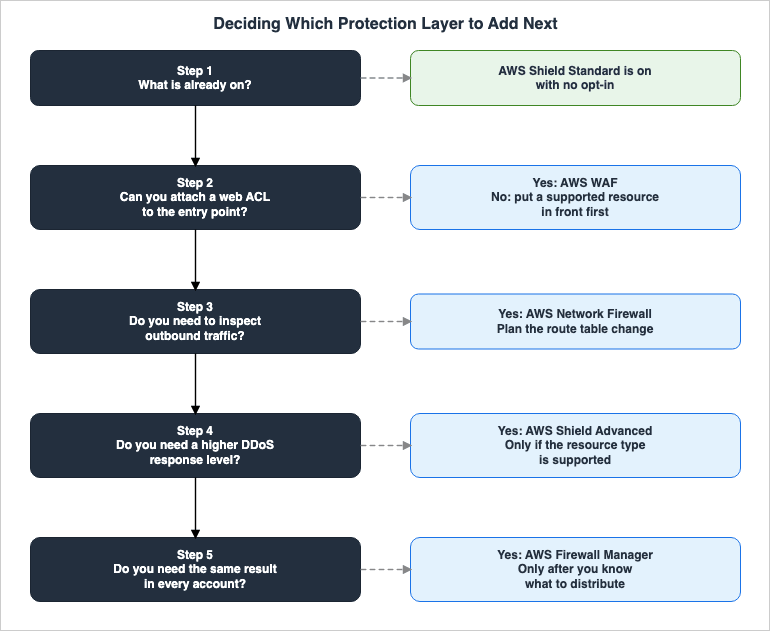
8.1 The Order of the Decisions
Instead of comparing and selecting, prioritize based on the most restrictive constraints.First, verify what is already in effect. AWS Shield Standard is already operating without any configuration. If you are already using CloudFront and Route 53, the infrastructure layer is likely already providing some protection. Starting here will clarify what additional measures are needed.
Second, determine where it can be implemented. If the publicly exposed endpoints are resource types that can be associated with AWS WAF, this layer should be the first consideration. There is no other layer that reads the content.
Third, check whether you need to inspect outbound traffic. If you do, the answer is Network Firewall, and that comes with a route table change. Plan it as a change to your network design.
Fourth, determine if you need to enhance your DDoS protection capabilities. Shield Advanced offers a higher level of detection and response, but only for resources you explicitly designate. First, confirm that the resources you want to protect are included in the supported resource types. If not, this layer is not a viable option.
Fifth, determine if a centralized approach is required across your organization. In environments with a growing number of accounts, if you are facing issues with "accounts that have it" versus "accounts that don't," Firewall Manager is the solution. However, you must first define what you intend to deploy before considering this layer. This layer should not be the first choice; it should be implemented after you have clearly defined the scope of what you are deploying.
8.2 Looking It Up from the Problem You Have
The table below lets you look up that same order from the situation you are actually in.| What you are up against | The layer to look at | What to check first |
|---|---|---|
| Malicious requests are reaching a public web application | AWS WAF | Whether that entry point is a resource type a web ACL can attach to |
| The application stops responding under a flood of requests | The AWS WAF Anti-DDoS managed rule group | It is available without a Shield Advanced subscription. Read Chapter 9 |
| You want expert help while a DDoS event is under way | Shield Advanced | Whether your resource is one of the supported types. Reaching the Shield Response Team also requires a Business or Enterprise support plan |
| You are worried about the bill spiking during an attack | Shield Advanced | Shield Advanced issues any cost protection as service credits |
| You want to restrict what leaves a VPC | AWS Network Firewall | Whether you can change the route tables |
| You want to inspect traffic moving inside a VPC | AWS Network Firewall | Whether you can place a subnet for inspection |
| Protection is applied unevenly from account to account | AWS Firewall Manager | Whether Organizations, an administrator account, and AWS Config are all in place |
| Newly created resources keep slipping out of protection | AWS Firewall Manager | Whether you have decided what to distribute |
This table is not a list of solutions. Instead, it outlines the areas to investigate and the conditions that must be met to utilize those resources. If the conditions are not met, you may need to adjust your overall configuration.
8.3 The Always-On Layer and the Opt-In Layers
Activation can also be categorized into two types. As seen in Section 2.1, the four services can be divided into five layers from the perspective of activation. Only AWS Shield Standard is always active. AWS WAF, Shield Advanced, Network Firewall, and Firewall Manager all require explicit activation and configuration.This asymmetry can lead to misunderstandings. The perception that "AWS Shield is included" is correct for Standard but incorrect for Advanced. Sharing the same service name contributes to this confusion.
8.4 How do you confirm it is actually working?
For each layer, it's important to distinguish between "being implemented" and "being effective." Here are verification points for each:Regarding AWS WAF, verify that the web ACL is associated with the protected resources. A web ACL that is simply created, without being associated, will not perform any inspection.
For Shield Advanced, check the list of resources designated for protection. It's important to verify the designation itself, not just whether a subscription is active.
Regarding Network Firewall, review the route tables. Simply creating a firewall does not mean traffic will automatically pass through it.
For Firewall Manager, verify the scope of the policies and review the list of accounts that are not compliant.
9. What Is Changing Right Now
All four layers now have a change in progress or a feature in preview. There were three at the time of writing; the AWS Firewall Manager layer joined them on September 24, 2026 (Section 9.6). They are collected here as the places to re-check against primary sources before you commit to a design.9.1 Shield Advanced's Automatic Application-Layer Mitigation Moves to an AWS WAF Rule Group
This is the largest of them. The mechanism described in Section 4.5, where Shield Advanced drives AWS WAF, is being replaced.In June 2025, AWS released the AWS WAF Anti-DDoS managed rule group, built specifically for application-layer DDoS protection, and Shield Advanced is adopting it as its default application-layer protection. The transition runs in phases.
| Period | Details |
|---|---|
| July 27 to August 7, 2026 | The Anti-DDoS managed rule group is added automatically to eligible web ACLs in Count mode. |
| July 27 to September 30, 2026 | Free evaluation period. The existing automatic application-layer mitigation and the new rule group run side by side. |
| October 1, 2026 | The automatic upgrade begins for eligible web ACLs. |
| July 27 to December 31, 2026 | A guided migration is available for the web ACLs the automatic upgrade cannot cover. |
| January 1, 2027 | Shield Advanced's automatic application-layer mitigation is no longer available. |
Technically, the changes include the addition of "Challenge" as a mitigation action, the ability to select sensitivity levels (Low, Medium, High), a reduction in web ACL capacity consumption from 150 to 50, and the removal of the requirement for Route 53 health checks.
Here is the part that matters for the relationship between the layers.
AWS Shield Advanced isn't required to use any of these features.
Application-layer DDoS protection has become something any AWS WAF user can turn on, subscription or not. That changes the premise behind buying Shield Advanced. After the transition, what Shield Advanced adds leans on managing protected resources, on detection and visibility, and on the level of response the Shield Response Team provides.
The dates and the eligibility rules for each phase can move. Check the official announcements to see whether your own web ACL is in scope.
9.2 The network security director Is in Preview
As stated in Section 4.6, it is currently in public preview and the official documentation explicitly states that it may be subject to change. The list of supported Regions keeps growing. It is not at the stage where you build it into a design as a generally available feature.9.3 The Network Firewall Proxy Mode Is in Preview
The mode, discussed in Section 5.2, which connects to a NAT gateway and functions as an explicit forward proxy, is currently in preview and is only available in the US East (Ohio) Region. Its behavior differs from the default operating mode, particularly in how it handles source IP addresses.9.4 AWS WAF Classic Is on Its Way Out
This is as described in Section 6.4. Still being listed as a Firewall Manager policy type is not the same as still being a current option.9.5 The Name for a web ACL Is Changing
As the AWS WAF console transitions to a new experience, many pages in the developer guide are being updated to refer to aweb ACL as a protection pack (web ACL). For example, the title of the page outlining the steps to create a web ACL is now Creating a protection pack (web ACL) in AWS WAF.The two names point at the same thing, and the API name has not changed. The
wafv2 API still calls the resource WebACL. The rename is still in progress, and some pages of that same developer guide still say web ACL on its own.This article uses
web ACL, to stay aligned with the API. When you meet the term protection pack in the console, read it as the same thing.9.6 A Service Replacing AWS Firewall Manager Is Generally Available
On September 24, 2026, AWS Network Security Manager became generally available in the US East (N. Virginia) Region. The developer guide positions this service asAWS Network Security Manager is the service that is replacing AWS Firewall Manager. and also states the plan ahead: At some point, AWS Firewall Manager will stop being sold and then stop operating.The property described in Section 6, a layer that stops nothing itself, does not change. What changes is which service carries that layer. Firewall Manager users do not need to take any action. According to the official documentation, firewalls and policies created with Firewall Manager continue to operate unless you terminate them, and this remains true even after Firewall Manager is retired.
The handling of situations where both services target the same resources has also been defined. If the scope of a Network Security Manager policy includes resources already addressed by a Firewall Manager policy, the Network Security Manager policy and scope override the existing Firewall Manager firewalls and policies during remediation. While a method for migrating Firewall Manager policies is planned, it was not yet available as of September 25, 2026.
At the time of general availability, Network Security Manager supports AWS WAF and AWS Shield Advanced, with support for AWS Network Firewall announced to follow. If you are designing a new, organization-wide deployment, verify three things in the official documentation before deciding which service to begin with: the supported firewall types, the Regions, and whether a migration path is available. The policy model of Network Security Manager, what happens to existing web ACLs, and what stays on the Firewall Manager side are covered in AWS Network Security Manager and AWS Firewall Manager.
10. Frequently Asked Questions
Q. If I have AWS WAF enabled, is AWS Shield Advanced no longer necessary?A. They serve different purposes, so one does not render the other unnecessary. AWS WAF controls traffic based on the content of requests, while Shield Advanced enhances the detection and response capabilities against DDoS attacks targeting protected resources. However, application-layer DDoS protection is now available through AWS WAF's Anti-DDoS managed rule group even without subscribing to Shield Advanced, and a transition running from the latter half of 2026 moves Shield Advanced's own automatic mitigation onto that rule group. The basis for that decision has shifted, so read Chapter 9 before deciding.
Q. If I subscribe to AWS Shield Advanced, are all resources within my account automatically protected?
A. No. AWS officially states
It doesn't automatically protect your resources. You must individually specify the resources you want to protect within Shield Advanced, or define a Shield Advanced policy within AWS Firewall Manager.Q. If I enable AWS Firewall Manager, does it protect the entire organization?
A. No. Firewall Manager itself does not inspect traffic; it is the layer that distributes the policies of other services. If you have not defined the policies to distribute, there is nothing to distribute. Furthermore, it requires AWS Organizations, a Firewall Manager administrator account, and the activation of AWS Config across the entire organization.
Q. Which service should I use if I want to inspect outbound traffic?
A. AWS Network Firewall. AWS's official documentation, on the Shield Advanced page, states
For outbound traffic protection, use AWS Network Firewall. While Firewall Manager can distribute policies for security groups and network ACLs that control outbound traffic, Firewall Manager does not inspect anything itself.Q. Can I protect Network Load Balancers with Shield Advanced?
A. Yes, but only indirectly. Shield Advanced protects a Network Load Balancer through its association with an Amazon EC2 Elastic IP address. You do not specify the load balancer itself. A configuration without an Elastic IP address cannot use this route.
Q. Can AWS Global Accelerator be protected with Shield Advanced?
A. Standard accelerators can be protected. Custom routing accelerators cannot. The official documentation names them explicitly:
you can't protect AWS Global Accelerator custom routing accelerators or Gateway Load Balancers.Q. How many types of policies can AWS Firewall Manager deploy?
A. It depends on how you count. The user guide's categories give seven. The
Type field of SecurityServicePolicyData in the fms API gives eleven. This difference is because the user guide groups classifications, while the API expands them based on implementation units. A detailed comparison is provided in Section 6.2.Q. Does AWS Shield network security director come included with Shield Advanced?
A. No, it is not included. The AWS Shield pricing page clearly states that network security director is not included for either Standard or Advanced tiers. Additionally, as of August 31, 2026, it is currently in public preview.
11. Summary
AWS WAF, AWS Shield, AWS Network Firewall, and AWS Firewall Manager are layers of defense, each positioned at different points along the path of a single request. They are not meant to be compared directly.Where a layer sits decides what it can protect. AWS WAF is the only layer that reads a request as HTTP and judges it component by component, but it does not see traffic that is not HTTP, the part of a body beyond the inspection limit, or the body of a gRPC request. AWS Shield Standard is always on but does not tune itself to your application. Shield Advanced only protects resources that are explicitly specified, the resource types it covers are limited, and it looks only at inbound traffic. Network Firewall is the only layer that puts its own substance inside the VPC and the only one that inspects outbound traffic, but nothing reaches it unless you rewrite the route table. Firewall Manager stops nothing itself.
Two of these four services function by driving other layers. Shield Advanced takes effect by placing its application-layer mitigation inside an AWS WAF web ACL, and Firewall Manager takes effect by distributing the other defenses across the organization. For these two, the distance between "being implemented" and "being effective" is the greatest.
Finally, two of the relationships discussed in this article are currently in transition. Shield Advanced's automatic application-layer mitigation goes away on January 1, 2027, and the AWS WAF Anti-DDoS managed rule group takes over that job. Cutting application-layer DDoS protection loose from the Shield Advanced subscription changes how you choose among these four. Understanding the placement of these layers is valuable because it allows you to determine what is functioning and what is not when changes like this occur.
The other is the distribution layer. AWS Network Security Manager became generally available on September 24, 2026, and the official documentation describes it as the service replacing AWS Firewall Manager. For the time being, both services operate side by side, and firewalls and policies created with Firewall Manager continue to operate even after Firewall Manager is retired, unless you terminate them.
How each of these services arrived at its present shape is left to the timeline articles on this site.
12. References
- What are AWS WAF, AWS Shield Advanced, AWS Shield network security director and AWS Firewall Manager?
- List of resources that AWS Shield Advanced protects
- List of AWS resources that AWS Shield Advanced protects
- AWS Shield Advanced capabilities and options
- Resource protections in AWS Shield Advanced
- AWS Shield network security director (preview)
- Using service-linked roles for AWS Shield network security director
- Using AWS Firewall Manager policies
- AWS Firewall Manager prerequisites
- SecurityServicePolicyData
- Resources that you can protect with AWS WAF
- Considerations for managing body inspection in AWS WAF
- Creating a protection pack (web ACL) in AWS WAF
- What is AWS Network Firewall?
- IPv6 security and monitoring considerations
- AWS Shield Advanced is embracing the AWS WAF Anti-DDoS managed rule group: What changes and how to prepare
- Managed DDoS Protection - AWS Shield Features
- AWS Shield Pricing
- Migrating your rules from AWS WAF Classic to the new AWS WAF
- Secure Web Application Reference Architecture on AWS
- AWS Zero-Trust Network Architecture Guide
- AWS History and Timeline regarding AWS WAF
- Agent Sandboxing and Blast-Radius Isolation on AWS
- AWS WAF for Generative AI
- AI Agent Defense in Depth Model (AIDDM)
- AWS Organization Guardrails
- AWS Config Rules and Conformance Packs
- IPv6-First VPC Design on AWS
- AWS Networking Glossary
- AWS VPC Connectivity Decision Guide
References:
Tech Blog with curated related content
Written by Hidekazu Konishi