AWS History and Timeline regarding AWS Network Firewall - Overview, Functions, Features, Summary of Updates, and Introduction
First Published:
Last Updated:
Several AWS layers protect the same request, but only Network Firewall sits inside the VPC. AWS WAF is a layer you associate with a protected resource, AWS Shield Advanced protects resources you have specified from outside them, and AWS Firewall Manager is the layer that distributes other services' defenses across an organization. Network Firewall differs from all three: it places something of its own, a firewall endpoint, inside the VPC.
This difference explains the order in which features arrived, all by itself. Network Firewall operates within the data plane; therefore, it only takes action when traffic reaches it. The developer guide succinctly states:
You modify your VPC route tables in Amazon VPC to direct traffic through your firewalls for filtering.
The history of Network Firewall, therefore, has two primary axes: the evolution of its inspection capabilities and the methods for routing traffic to it. These two aspects are not independent. For example, enabling the use of AWS managed rule groups within a centralized inspection VPC required a way to override the Suricata
HOME_NET variable. Similarly, using a single firewall across multiple VPCs required several VPC endpoints. An addition to what the firewall can inspect usually arrives together with a change in where the firewall can sit.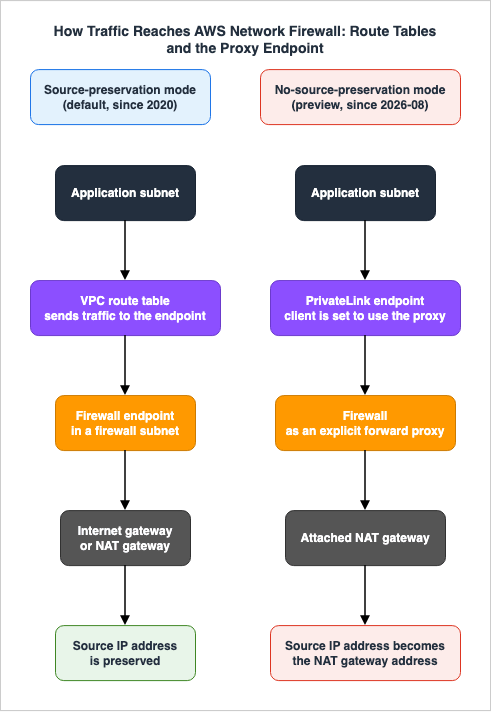
The previously published AWS Network and Application Protection Decision Guide holds where the four protection layers sit on a request path and what each one does not stop. The previously published AWS History and Timeline regarding AWS Shield and AWS Firewall Manager holds the feature histories of those two services. The day Firewall Manager could start distributing Network Firewall policies belongs to that timeline. This article focuses solely on the feature additions to Network Firewall itself.
This article does not discuss pricing. It gives no figures, and no sizes of price reductions. It also avoids detailing attack execution procedures or methods for evading detection.
The specifications outlined in this article were verified against the official AWS documentation as of August 31, 2026. Two of the features it covers are in preview, so the state of the service will move after this article is published. Confirm against primary sources before you make a design decision.
Background and Method of Creating AWS Network Firewall Historical Timeline
There are three reasons for creating this timeline.First, a historical timeline for Network Firewall does not currently exist. AWS combines AWS WAF, AWS Shield, and AWS Firewall Manager into a single developer guide, whose Document history carries changes for several services at once. Network Firewall is not in it. It has a developer guide and a Document history of its own, and no readily available document lays those changes out in chronological order.
Second, the scope of TLS inspection capabilities was not defined in a single announcement. Announcements for inbound and outbound TLS inspection were made on different dates, and each initially rolled out to two Regions before expanding to all Regions. Matching the
TLS.SNI keyword against decrypted traffic came later still. A single line saying that TLS inspection is supported does not tell you what is visible now.Third, the way the constraint on placement loosened carries meaning of its own. Network Firewall was initially released in 2020, requiring modifications to route tables. In 2025, it became possible to use a single firewall across multiple VPCs, and later that same year, it gained a direct attachment to AWS Transit Gateway. And in August 2026, a mode that does not require rewriting route tables entered preview.
This article compiles information from three primary sources:
- AWS What's New
- The Document history of the AWS Network Firewall Developer Guide
- The individual chapters of that guide, and the AWS Network Firewall API Reference
The dates listed for each entry are aligned with the dates provided by the source they reference. AWS What's New and the Document history sometimes give different dates for the same change, and the entry then carries both. The year and month found in the URL path for AWS What's New are not used to determine the publication date.
Filtering by tags, What's New returns 75 items related to AWS Network Firewall. Tags alone drop announcements, though. For example, the announcement regarding rule hit counts on August 17, 2026, does not have this tag. Conversely, 7 of those 75 tagged items announce AWS Firewall Manager features, which belong to the Shield and Firewall Manager timeline instead. Tag-based collection is a preliminary effort and is not comprehensive.
This article does not list every update for Network Firewall. As a general rule, it drops announcements that only add Regions. For the same reason, announcements indicating that a service has been added to a compliance program are also excluded (PCI DSS on July 27, 2021, HIPAA on September 7, 2021, SOC on November 16, 2021, ISO on November 17, 2021, FedRAMP High on March 14, 2022, and FedRAMP Moderate on April 6, 2022). What is kept is the entries where what the firewall can inspect changed, where the way traffic gets delivered to it changed, and where what it emits changed. However, regarding TLS inspection, both the initial availability date and the date when it became available across all Regions are listed. This is because functionality available in only two Regions is distinct from functionality available everywhere.
Amazon Route 53 Resolver DNS Firewall is not included in this article. While the names are similar, it is a separate service, and its history belongs to the previously published AWS History and Timeline regarding Amazon Route 53 and Amazon Route 53 DNS Architecture Guide.
AWS Network Firewall was announced on November 19, 2020. Amazon VPC itself arrived in 2009, so a service dedicated to inspecting traffic inside a VPC took 11 years to appear. The previously published AWS History and Timeline regarding Amazon VPC carries the feature history of VPC itself.
AWS Network Firewall Historical Timeline (Updates from November 19, 2020)
The following is a timeline of AWS Network Firewall features, marking its sixth year since initial announcement.Use the following index to navigate to specific years:
- 2020 - A layer that inspects traffic inside a VPC appears
- 2021 - Rule evaluation order becomes selectable, and AWS starts supplying rules
- 2022 - Threat signatures, and the settings that make a central inspection VPC work
- 2023 - TLS inspection opens, inbound first and outbound second
- 2024 - The engine moves to Suricata 7.0, and a third log type arrives
- 2025 - One firewall reaches many VPCs, and Amazon threat intelligence arrives
- 2026 - The default drop action changes, and a way to deploy without changing route tables appears
| Date | Summary |
|---|---|
| 2020-11-19 | AWS Network Firewall was announced. This managed firewall, designed for Amazon VPCs, performs traffic inspection and filtering. At launch, it supported importing rules written in common open-source rule formats, integrating threat intelligence feeds from AWS partners, and applying policies across the organization through integration with AWS Firewall Manager. Initially, it was available in only three Regions: US East (N. Virginia), US West (Oregon), and Europe (Ireland). The Developer Guide's Document history records this initial release as November 16, 2020. References: Introducing the AWS Network Firewall - a new managed service to deploy network security across your Amazon VPCs with just a few clicks |
| 2021-04-28 | Support for JA3 keywords was added. On the same day, the documentation, with an example, clarified that rules entered through a simplified form are converted into Suricata compatible rule strings. Previously, the documentation did not reflect this correspondence. The simplified form is intended as an easy entry point for writing Suricata compatible rules, and is not a separate pathway. References: Document history for AWS Network Firewall |
| 2021-06-10 | The capacity limit for stateless rule groups was increased from 10,000 to 30,000. References: Document history for AWS Network Firewall |
| 2021-10-06 | Rules could now be evaluated in exactly the order you specify, and the firewall could drop non-matching traffic by default without extra rules. Previously, the order of evaluation was determined by the rule action type. All pass rules were evaluated first, followed by drop, and then alert. As of this date, you can choose a system that evaluates rules in the order you specify, regardless of the action type. This choice is still not the default. The API's RuleOrder parameter accepts two values: DEFAULT_ACTION_ORDER and STRICT_ORDER. While STRICT_ORDER is recommended, the default remains DEFAULT_ACTION_ORDER. The Document history records this change as October 1, 2021. References: AWS Network Firewall Adds New Configuration Options for Rule Ordering and Default Drop |
| 2021-12-09 | Support for AWS managed rule groups arrived. The first thing offered was the managed domain list. It blocks HTTP and HTTPS traffic to domains with a poor reputation, and to domains known or suspected to be associated with malware or botnets. This is the day a layer supplied by AWS joined the layer where you write and maintain your own rules. References: AWS Network Firewall now supports AWS Managed Rules |
| 2022-04-26 | AWS KMS customer managed keys became usable for encryption at rest. References: Document history for AWS Network Firewall |
| 2022-04-28 | AWS Managed Threat Signatures arrived. You can now enable managed rule groups containing intrusion detection and prevention signatures for malware, botnets, web attacks, and other emerging threats. There were 11 categories at the time of the announcement. The content of the rules is publicly available and can be copied and modified for your own use. This marks a shift from managed rules examining only domain names to inspecting the content of traffic using signatures. References: AWS Network Firewall now supports AWS Managed Threat Signatures |
| 2022-06-14 | The documentation stated plainly that the stateful rules engine inspects the inner packets of tunneling protocols. You write rules against the tunnel layer, or against the inner packet. References: Document history for AWS Network Firewall |
| 2022-06-17 | The network bandwidth per firewall endpoint rose to 100 Gbps. References: Document history for AWS Network Firewall |
| 2022-07-21 | Rules could now reference Amazon VPC prefix lists. A mechanism called IP set referencing gathers several CIDR blocks into one object, and a stateful rule group references that object. This is the first mechanism that updates what a rule points at without touching the rule itself. References: AWS Network Firewall now supports VPC prefix lists |
| 2022-07-29 | Managed threat signatures gained categories for coin mining, credential phishing, and malware for mobile operating systems. The number of categories went from 11 to 16. References: AWS Network Firewall adds coin mining, phishing, and mobile operating systems categories to AWS Managed Threat Signatures |
| 2022-10-05 | A stream exception setting joined the firewall policy. You choose how a connection is handled when it breaks midstream. The StreamExceptionPolicy in the API takes three values, DROP, CONTINUE, and REJECT, and the default is DROP. How traffic is treated after a connection breaks is itself a defensive setting. References: Document history for AWS Network Firewall |
| 2022-12-21 | Evaluation order became configurable for the stateful domain list rule groups you build yourself. References: Document history for AWS Network Firewall |
| 2022-12-29 | A message joined the state of a firewall endpoint. Until then only the state itself showed, such as Creating, Deleting, Scaling, or Ready, and a failure left no way to tell why. From this date the reason for the failure and the steps to recover appear as a status message. References: Announcing firewall status message for AWS Network Firewall |
| 2023-01-09 | The reject action joined the stateful rule actions. Previously, the available actions were pass, drop, and alert. With drop, the TCP session remains open until its timeout expires, without sending any response to the sender. The reject action drops the packet and sends a TCP RST back. On the same day, a RejectedPackets CloudWatch metric was also added. References: AWS Network Firewall adds support for reject action for TCP traffic |
| 2023-01-17 | IPv6 traffic on dual-stack subnets became inspectable. Both IPv4 and IPv6 flows could be filtered. References: AWS Network Firewall announces IPv6 support |
| 2023-02-15 | Stateful rules could now reference resource groups built from tags. You tag Amazon EC2 instances and elastic network interfaces, gather them into a resource group, and reference that group from a rule group. If the resources referenced by the resource group change, the IP addresses and CIDR ranges associated with the rule group are automatically updated. References: AWS Network Firewall now supports tag-based resource groups |
| 2023-03-30 | Inbound TLS inspection arrived. TLS sessions are decrypted, inspected, and re-encrypted. Decryption and re-encryption happen on the same firewall instance, so the traffic never crosses a network boundary. On this date it worked in two Regions only, Asia Pacific (Sydney) and Europe (Ireland). Also included on this date were updates to a CloudWatch metric called TLSReceivedPackets, and an updated managed policy that allows referencing ACM certificates for TLS inspection configurations. References: AWS Network Firewall announces support for ingress TLS inspection |
| 2023-04-05 | IPv6-only subnets became supported. Alongside dual-stack subnets, the firewall could now inspect subnets that carry IPv6 alone. References: AWS Network Firewall now supports IPv6-only subnets |
| 2023-05-03 | The Suricata HOME_NET variable became overridable. This entry is about the centralized deployment. Previously, HOME_NET held the CIDR of the VPC the firewall was placed in. With a central inspection VPC, what lands there is the CIDR of the inspection VPC, not the CIDR of the application VPCs you actually want to protect. Managed rule groups therefore did not take effect as expected in a centralized deployment. From this date, you can name the CIDR of every VPC you want inspected in the policy instead. This entry adds nothing to what the firewall can inspect. It removes a constraint on where the firewall can sit. References: AWS Network Firewall now supports Suricata HOME_NET variable override |
| 2023-05-09 | Inbound TLS inspection reached every Region where Network Firewall runs, AWS GovCloud (US) included. Two Regions became all Regions about 40 days after the first announcement. References: AWS Network Firewall ingress TLS inspection is now available in all regions |
| 2023-10-12 | A tls_inspected field joined the logs. The logs now show that TLS traffic crossed a firewall with TLS inspection turned on. The description of a firewall policy's stream exception policy entered the documentation the same day. References: Document history for AWS Network Firewall |
| 2023-10-26 | Outbound TLS inspection arrived. TLS traffic bound for the internet, another VPC, or another subnet is decrypted, inspected, and re-encrypted. On this date it worked in two Regions only, Israel (Tel Aviv) and Europe (Ireland). That is about seven months after the inbound direction. This is where a way to see inside encrypted traffic leaving a VPC first existed. References: AWS Network Firewall announces support for egress TLS inspection in 2 regions |
| 2023-11-02 | An analyzer for stateless rule groups arrived. It finds stateless rules that produce asymmetric routing. Stateful inspection does not hold together unless the outbound and return paths cross the same firewall. References: Document history for AWS Network Firewall |
| 2023-12-19 | Outbound TLS inspection reached every Region where Network Firewall runs, AWS GovCloud (US) included. This came about two months after the first announcement. References: AWS Network Firewall egress TLS inspection is now available in all regions |
| 2024-05-28 | The quota on stateful rules per firewall policy became adjustable. The default stays at 30,000, and you can request an increase up to 50,000. The Document history records this change as May 22, 2024. References: AWS Network Firewall increases quota for stateful rules |
| 2024-06-25 | The TLS.SNI keyword in stateful rules began matching traffic that TLS inspection had decrypted. Network Firewall ends the TLS connection the client opened and decrypts it before it reaches the stateful inspection engine, so TLS-based keywords do not match as a rule. TLS.SNI is the single exception to that rule. References: Document history for AWS Network Firewall |
| 2024-07-25 | A TLS log type arrived, the third one. Until then there were two: alert and flow. The TLS log records TLS errors, and outbound traffic that failed a TLS inspection server certificate revocation check. References: Document history for AWS Network Firewall |
| 2024-08-16 | QUIC protocol detection became supported. A note saying it was not supported had entered the documentation in May 2023, and this is the date that note was removed. References: Document history for AWS Network Firewall |
| 2024-08-28 | Geographic IP filtering arrived. Suricata's geoip keyword filters on the country code that an IP address carries. This feature works for both inbound and outbound traffic. References: AWS Network Firewall introduces Geographic IP Filtering to inspect traffic based on geographic location |
| 2024-09-12 | AWS PrivateLink support arrived. PrivateLink here means the path you manage Network Firewall over, not the path of the traffic being inspected. This allows management and control traffic to avoid traversing the internet. References: AWS Network Firewall now supports AWS PrivateLink |
| 2024-10-30 | The TCP idle timeout became configurable. Previously, this was a fixed value of 350 seconds, which could result in connections being terminated for applications with long-running flows. As of this date, users can now specify a value between 60 and 6000 seconds. To maintain backward compatibility, the default value remains 350 seconds. References: AWS Network Firewall now supports configurable TCP idle timeout |
| 2024-11-24 | The stateful engine moved from Suricata 6.0 to 7.0. The Document history states plainly that this update might require changes in how you use Network Firewall. This is an update to the engine itself, and existing rules do not necessarily carry over as written. References: Document history for AWS Network Firewall |
| 2024-11-26 | The protocols the firewall can detect and the keywords rules can use both grew. HTTP2, QUIC, and PostgreSQL became detectable, and new keywords became available in TLS, SNMP, DHCP, and Kerberos rules. References: AWS Network Firewall expands the list of supported protocols and keywords in firewall rules |
| 2024-12-20 | The management API gained dual-stack endpoints. IPv6, IPv4, and dual-stack clients can all connect. The existing endpoints stay for backward compatibility. References: AWS Network Firewall now supports IPv6 Service Endpoints |
| 2025-02-19 | Traffic analysis reports arrived, along with the domain lists you build from them. The reports analyze the last 30 days of HTTP and HTTPS logs and show which domains are used often. The hard part of writing an allowlist is knowing what belongs on it, so being able to raise rules from traffic that actually flowed matters a great deal. References: AWS Network Firewall introduces automated domain lists and insights |
| 2025-03-20 | Flow management arrived. Flow Capture takes a point-in-time snapshot of the active flows in the firewall's state table, and Flow Flush picks flows by criteria and terminates them. Updating a rule leaves an already established connection flowing, and this is where a way to cut that connection deliberately appeared. References: AWS Network Firewall introduces new flow management feature |
| 2025-03-27 | Traffic matching a pass action rule could now raise an alert, and JA4 fingerprints became usable in rules. Until then, recording traffic you had let through meant placing an alert rule ahead of the pass rule. References: AWS Network Firewall adds pass action rule alerts and JA4 filtering |
| 2025-05-28 | A single firewall could now hold several VPC endpoints. A new resource type, the VPC endpoint association, adds endpoints in the VPC the firewall sits in and in other VPCs alike. A firewall takes up to 50 of them per Availability Zone, and that quota is fixed. An account takes up to 300 per Region, and that one is adjustable. This entry opens the way to sharing one firewall policy across many VPCs, and it is the second entry where the constraint on where the firewall can sit loosened. References: AWS Network Firewall Adds Support for Multiple VPC Endpoints |
| 2025-06-04 | A monitoring dashboard joined the console. It shows the top traffic flows, the TLS Server Name Indication, the HTTP Host header, long-lived TCP flows, and flows whose TCP handshake failed. The documentation also gained a note the same day: displaying logging metrics requires added CloudWatch and Amazon S3 permissions. References: AWS Network Firewall launches new monitoring dashboard |
| 2025-06-16 | Native integration with AWS Transit Gateway arrived. The firewall attaches to a Transit Gateway directly, which removes the need to build a complicated VPC arrangement for inspection. At the time of this announcement it worked in five Regions only: Africa (Cape Town), Asia Pacific (Hyderabad), Europe (Stockholm), Europe (Zurich), and Middle East (UAE). The hub side of this change is recorded in AWS History and Timeline regarding AWS Transit Gateway. References: AWS Network Firewall now supports AWS Transit Gateway native integration |
| 2025-06-17 | The active threat defense managed rule group arrived. AWS updates these rules continuously from threat activity observed across its own infrastructure. Its source differs from the existing domain list, IP, and threat signature managed rule groups: it rests on Amazon threat intelligence. This represents a shift from a focus on classifying known threats to addressing currently observed threat activity. References: AWS Network Firewall launches support for active threat defense |
| 2025-09-17 | Session holding joined TLS inspection. The TCP and TLS establishment packets are held back from the destination server until the TLS protocol rules that match on Server Name Indication have been evaluated. Until then, the handshake reached the destination before any rule reached a decision. The monitoring dashboard also began showing traffic bound for AWS services through PrivateLink endpoints the same day. References: AWS Network Firewall enhances console, monitoring, and security features |
| 2025-09-25 | A firewall policy using strict ordering could now choose a default action for established application-layer connections. They are Application Layer alert established and Application Layer drop established. The addition exists so that a TLS client hello or a large HTTP request spanning several packets can be handled without writing complicated rules. References: Document history for AWS Network Firewall |
| 2025-09-29 | The REJECT and ALERT actions became usable in stateful domain list rule groups. The Document history records this change as September 26, 2025. References: AWS Network Firewall adds Reject and Alert actions for stateful domain list rule groups |
| 2025-11-18 | Creating a new firewall policy in the console now turns on active threat defense by default, in alert mode. You can switch it to block mode, or turn it off. A managed rule group went from something you choose to add to something that comes with the policy. References: Active threat defense now enabled by default in AWS Network Firewall |
| 2025-11-19 | Managed rules from AWS Marketplace partners became usable. A third source joined the rules AWS writes and the rules you write yourself. References: AWS Network Firewall Now Supports Managed Rules from AWS Partners available in AWS Marketplace |
| 2025-11-25 | AWS Network Firewall Proxy was announced in public preview. As an explicit proxy it filters the traffic leaving your applications and the responses that come back. It deals with spoofing of the domain name and of the Server Name Indication, and it gives fine-grained control over HTTP header attributes. At that point it was a separate product from Network Firewall, with a policy of its own. The preview Region was US East (Ohio) only. References: Introducing AWS Network Firewall Proxy in preview |
| 2026-01-27 | Filtering on web categories arrived. Traffic could now be identified and controlled by predefined URL category, covering generative AI services, social media, and streaming platforms among others. Combine it with TLS inspection and you can see the URL path as well. Rules utilize the keywords aws_url_category and aws_domain_category. The Document history records this change as January 16, 2026. References: AWS Network Firewall now supports GenAI traffic visibility and enforcement with Web category-based filtering |
| 2026-02-27 | The firewall could now send state change notifications to Amazon EventBridge. This includes updates to configurations and changes in endpoint status, providing visibility into AWS-managed rules, partner-managed rules, and changes to the firewall's configuration. References: AWS Network Firewall now supports firewall state change notifications through Amazon EventBridge |
| 2026-04-22 | The managed rule groups from AWS Marketplace partners grew. One rule group could now carry up to 10 million domain name indicators and 1 million IP addresses. References: Enhancements to AWS Network Firewall Managed Rules from AWS Marketplace Partners |
| 2026-06-18 | Default actions that are server-directed only were added. They are Application drop established (server-directed only) and Application alert established (server-directed only), and a policy that uses strict ordering can select them. The drop action drops only the TCP and IP packets traveling from client to server, and lets the packets traveling from server to client through. References: Document history for AWS Network Firewall |
| 2026-06-22 | The default stateful action for newly created firewall policies changed to Application drop established (server-directed only). The default until then was Application drop established (bidirectional), the action named Application Layer drop established when it arrived in September 2025. This previous default could occasionally drop legitimate packets traveling from the server to the client, such as TCP window updates, keep-alives, and resets, which could manifest as intermittent connection failures. Existing policies are not affected. References: AWS Network Firewall updates default drop action for improved connection reliability |
| 2026-06-30 | Rules could now be written against container attributes on Amazon EKS and Amazon ECS. Amazon EKS offers Namespace, cluster name, and labels; Amazon ECS offers cluster name and container instance attributes. This removes the need for IP-based rules that break every time Pods scale or restart. The maximum number of container associations per account and Region is 100, and this limit is adjustable. References: AWS Network Firewall now supports container attribute-based inspection for Amazon EKS and Amazon ECS |
| 2026-07-20 | The stateful engine moved again, from Suricata 7.0 to 8.0.3. The Document history repeats the warning it gave for the previous engine change: the update might require changes in how you use Network Firewall. The change it singles out is that WebSocket is now identified as its own protocol, separate from HTTP. Once an HTTP Upgrade to WebSocket completes, the flow is reclassified from http to websocket, so rules written as app-layer-protocol:!http to catch non-HTTP traffic on HTTP ports now match WebSocket traffic as well. This is the second time the engine itself moved, and rules that ran on the previous version do not necessarily carry over as written. References: Document history for AWS Network Firewall |
| 2026-08-04 | An explicit forward proxy returned in preview, this time as a function of AWS Network Firewall itself. Previously, the November 2025 proxy was a standalone product with its own policies. However, feedback from users who tested the preview indicated a desire to use the same policies and functionality as AWS Network Firewall. The announcement on this date introduced a new deployment mode called no-source-preservation, in which an existing firewall policy can be used as it stands. This mode does not rewrite the route table. Clients are directed to the PrivateLink endpoint through proxy environment variables. The Document history records this change as August 3, 2026. It is in public preview, and US East (Ohio) is the only Region. References: Re-introducing Forward Proxy as AWS Network Firewall Functionality |
| 2026-08-17 | Stateful rule hit counts arrived. Each stateful rule in a firewall policy shows how often it matched traffic. The counts come on by default across custom rule groups and managed rule groups alike, and the refresh interval goes as low as 5 minutes. You can now identify rules that have not matched any traffic at all. Available in all Regions except Middle East (UAE) and Middle East (Bahrain). References: AWS Network Firewall Now Supports Stateful Rule Hit Counts |
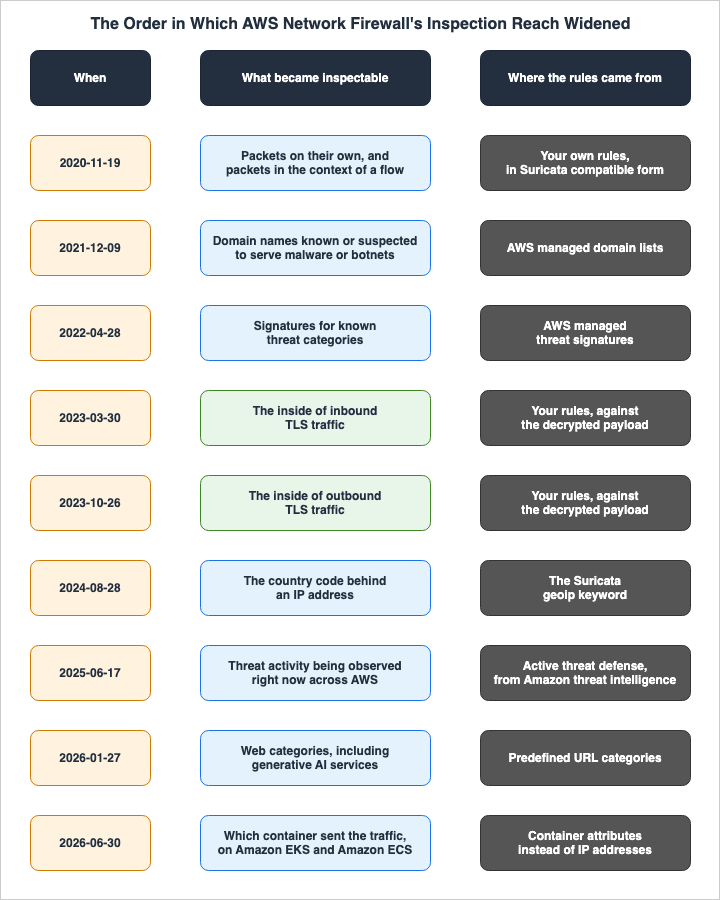
Looking at the timeline, the scope of inspection has expanded in a layered fashion. Initially, 5-tuple and flow information became visible, then the content itself, through Suricata compatible rules. Next came the signatures AWS supplies, then the contents of TLS connections, and finally, web categories and container attributes. At each stage, what became visible moved one layer up.
Current Overview, Functions, Features of AWS Network Firewall
What AWS Network Firewall Is Now
The developer guide opens its description of Network Firewall like this:AWS Network Firewall is a stateful, managed, network firewall and intrusion detection and prevention service for your virtual private cloud (VPC) that you create in Amazon Virtual Private Cloud (Amazon VPC).
It is the layer that filters traffic at the perimeter of your VPC, covering traffic that enters and leaves through an internet gateway, a NAT gateway, VPN, or AWS Direct Connect. For stateful inspection it uses Suricata, the open source intrusion prevention system, and it accepts Suricata compatible rules as written.
Network Firewall manages four resource types. Firewall holds the filtering substance for a VPC, VpcEndpointAssociation defines firewall endpoints beyond the primary ones, FirewallPolicy gathers the rules and the other settings, and RuleGroup holds the criteria to match against and the action to take on a match. Rule groups come in two types, stateless and stateful, and each type has its own ARN.
Two Deployment Modes
As of August 31, 2026, Network Firewall has two modes of operation.The default mode is source-preservation. The firewall receives traffic from the VPC endpoint, inspects it using the stateful rules engine, and forwards it to the destination through the VPC endpoint. Both the source and destination IP addresses are preserved throughout the inspection process. Traffic is directed to the firewall via route tables. It supports TCP, UDP, and ICMP and can be used in both east-west and north-south traffic flows.
The other mode is no-source-preservation mode, currently in preview. The official documentation states:
There is another mode of operation, currently in preview, called no-source-preservation mode, where the firewall functions as an explicit forward proxy.
In this mode, the firewall is attached to a NAT gateway and operates as an explicit forward proxy. Clients are explicitly configured to send traffic to the proxy through a PrivateLink endpoint. For permitted traffic, the firewall establishes new connections to the destination using the NAT gateway's IP address as the source. Because the original source IP address is hidden, it is called no-source-preservation mode.
Three points separate the two modes. A no-source-preservation firewall gets a fully qualified domain name that clients connect to. No route table changes are needed, because clients use proxy environment variables instead. And the stateless rules engine does not inspect explicit proxy traffic — HTTP CONNECT requests go straight to the stateful rules engine. You cannot change the deployment mode of a firewall after you create it.
As of August 31, 2026, this mode is only available in US East (Ohio). It is in preview, so read the current state from the official documentation before you build it into a design.
Rule Groups
Rule groups divide into two types, stateless and stateful. A stateless rule group evaluates each packet on its own. It does not look at the other packets in the flow, the direction of the traffic, or anything else the packet itself does not carry. A stateful rule group evaluates a packet in the context of its traffic flow.Stateful rule groups come in three categories, according to how you write the rules:
| How the rules are written | What it defines |
|---|---|
| Standard stateful rules | Defines standard network connection attributes used to evaluate packets within the flow context. |
| Domain list | Defines a list of domain names and the protocol types to be inspected. This can also be created from traffic analysis reports. |
| Suricata compatible rule strings | Defines matching and action logic in a format compatible with Suricata. All stateful rules can be written in this format. |
These three are not separate engines. Every stateful rule group is handed to the rules engine as a Suricata compatible string. The first two are simply easy entry forms for writing that string.
Rule Evaluation Order
There are two methods for evaluating stateful rules. TheRuleOrder setting within the API's StatefulEngineOptions accepts two values: DEFAULT_ACTION_ORDER and STRICT_ORDER.This is a place to read to the end of the conditional clause. The API reference gives
STRICT_ORDER as the recommendation while stating that the default is DEFAULT_ACTION_ORDER.STRICT_ORDERis the recommended option, butDEFAULT_ACTION_ORDERis the default option.
With
DEFAULT_ACTION_ORDER, the Suricata action specification takes the highest precedence in deciding the order. The order in which rules are processed is pass, drop, reject, and alert. Within one action group, Suricata's priority keyword sets the processing order, and Suricata works from the lowest number up. So however you set the priority values, every pass rule is evaluated before any drop, reject, or alert rule. Note that the priority keyword is only effective when using this method.With
STRICT_ORDER, rule groups are evaluated by priority starting from the lowest number, and the rules inside each rule group are processed in the order they are written. When you choose this method, you can select one or more default actions for packets that match no rule. For the drop action you choose none or exactly one. For the alert action you choose none, one, or Alert all plus any of the others.Firewall policies and rule group configurations must be consistent. The existence of two types of managed rule group names,
StrictOrder and ActionOrder, is due to this requirement. If a policy uses strict ordering, you can only add rule groups with the StrictOrder designation.The
StreamExceptionPolicy decides what happens to a connection that breaks midstream. The possible values are DROP, CONTINUE, and REJECT, and the default is DROP, which fails closed.TLS Inspection and What It Does Not See
When you configure TLS inspection and associate it with a firewall policy, Network Firewall decrypts, inspects, and re-encrypts SSL/TLS traffic. The configuration includes certificates for both inbound and outbound directions, a scope that selects which traffic to decrypt, and optionally an AWS KMS customer managed key and a certificate revocation check. Adding a single scope automatically creates a corresponding scope with the source and destination reversed. Decrypting both directions is necessary because two-way decryption is required to properly terminate TLS.The understanding that "enabling TLS inspection will reveal everything" is incorrect. Here are some limitations, as documented by AWS, that are relevant to design considerations:
| What You Cannot See, or What Is Not Supported | Description |
|---|---|
| Keyword matching based on TLS-related fields | Because Network Firewall decrypts traffic before passing it to the stateful inspection engine, TLS-related keywords will not match, with the exception of TLS.SNI. Application-layer rules that act on the decrypted payload, such as HTTP keywords, do work. |
| UDP-based transport protocols such as QUIC | Not supported by TLS inspection. |
| TLS 1.0 and earlier SSL versions | Not supported. |
| Encrypted SNI and Encrypted Client Hello | Not supported. When Network Firewall cannot find an SNI in the client hello, it will return an RST packet and close the connection. |
| Protocols that rely on StartTLS | Not supported for decryption. |
| WebSockets over HTTP2 | Not supported; traffic will be dropped. WebSockets over HTTP1.1 are supported. |
| Inbound TLS terminated by an Application Load Balancer | When Network Firewall sits behind an Application Load Balancer, it cannot inspect inbound TLS traffic that the load balancer has already terminated. |
| Self-signed certificates | Cannot be used for inbound inspection. |
| Cross-signed root certificates | Not supported in TLS inspection configurations. AWS Certificate Manager public certificates are cross-signed, but they can be used for TLS inspection. |
On top of that, non-TLS traffic that does match the scope conditions is dropped. For example, if the scope includes port 80 for plain text HTTP, Network Firewall drops it because the service cannot identify it as TLS. This also applies when the client hello does not include a server name, or when the server name in the client hello does not match the SNI indicated in the downstream server certificate.
The supported TLS versions are 1.1, 1.2, and 1.3. At the network layer, it supports both IPv4 and IPv6. In addition to HTTPS, it can inspect TCP-based application protocols that use TLS, such as SMTPS and POP3s, in both request and response directions.
Managed Rule Groups
In addition to rules you write yourself, you can choose managed rule groups created and maintained by AWS. Each set of managed rule groups counts as a single rule group toward the maximum number of stateful rule groups per firewall policy.| Type | Description |
|---|---|
| Active threat defense | Protects against active threats that AWS threat intelligence tracks. It draws on MadPot, an internal AWS threat intelligence and disruption service. |
| Domain and IP | Protects against domains known or suspected to be associated with malware or bots. |
| Threat signature | Inspects for signatures that represent known categories of threat. |
You can also use rule groups provided by AWS Marketplace partners.
Currently, the only active threat defense rule group available is
AttackInfrastructure, which has two names: AttackInfrastructureStrictOrder and AttackInfrastructureActionOrder. The rule capacity is fixed at 15,000, and this is a separate limit from other rule groups.Logging
You configure logging for the firewall's stateful engine. Only the traffic that stateless rule actions and stateless default actions forward to the stateful engine ever reaches the logs.There are three log types, with the
LogType values in the API being ALERT, FLOW, and TLS.| Type | Description |
|---|---|
FLOW | Standard network traffic flow logs. |
ALERT | Traffic that matches a stateful rule whose action sends an alert. The rule actions that send alerts are DROP, ALERT, and REJECT. |
TLS | Events related to TLS inspection. The firewall must be configured to use TLS inspection. |
The logs go to one of three destinations, and the
LogDestinationType values in the API are S3, CloudWatchLogs, and KinesisDataFirehose. You can send each log type to a different destination.Architectures That Are Not Supported
The official documentation lists three architectures and traffic types that Network Firewall does not support. They are VPC peering, inspection of AWS Global Accelerator traffic, and inspection of AmazonProvidedDNS traffic for Amazon EC2.The firewall subnet carries a constraint of its own. A firewall endpoint cannot filter the traffic coming into or going out of the subnet it sits in, so do not use a firewall subnet for anything other than Network Firewall.
Distributing It Across an Organization
AWS Firewall Manager distributes Network Firewall policies across an organization. It supports both distributed and centralized deployment models and also monitors route tables. The history of the distributing side belongs to the previously published AWS History and Timeline regarding AWS Shield and AWS Firewall Manager.Frequently Asked Questions about AWS Network Firewall History
When was AWS Network Firewall announced, and what capabilities did it offer at that time?
AWS Network Firewall was announced on November 19, 2020. As a managed firewall for Amazon VPC, it inspected traffic using both stateless and stateful rule groups. At the time of its launch, it was capable of importing rules written in common open-source rule formats, integrating threat intelligence feeds from AWS partners, and applying policies across an organization when used in conjunction with AWS Firewall Manager. Initially, it was available in only three Regions: US East (N. Virginia), US West (Oregon), and Europe (Ireland). The Developer Guide's Document history records this initial release as November 16, 2020.When did AWS Network Firewall introduce TLS inspection?
TLS inspection for inbound traffic was introduced on March 30, 2023, while TLS inspection for outbound traffic became available on October 26, 2023. Initially, each was available in only two Regions. On May 9, 2023, inbound inspection reached every Region where Network Firewall runs, and outbound inspection followed on December 19, 2023.Does enabling TLS inspection mean that AWS Network Firewall can see everything within the encrypted traffic?
No. Decryption happens before the traffic reaches the stateful inspection engine, so TLS-related keywords do not match, with the single exception ofTLS.SNI. UDP-based transport protocols such as QUIC, TLS 1.0 and earlier SSL versions, Encrypted SNI and Encrypted Client Hello, protocols that rely on StartTLS, and WebSockets over HTTP2 are not supported. Inbound TLS that an Application Load Balancer terminates cannot be inspected either, when Network Firewall sits behind that load balancer. Application-layer rules based on the decrypted payload do still work.By default, what order does AWS Network Firewall use to evaluate rules?
DEFAULT_ACTION_ORDER is the default. The recommendation and the default are two different things. The API reference gives STRICT_ORDER as the recommended option while stating outright that the default is DEFAULT_ACTION_ORDER. A strict evaluation order became selectable on October 6, 2021, and from that day to this one it has stayed a method you can choose rather than the one you get.Does AWS Network Firewall always require a route table change?
No. As of August 31, 2026, a route table change is no longer the only way. In the default source-preservation mode, traffic is directed to the firewall by the route table. With the no-source-preservation mode, which entered preview on August 4, 2026, the firewall functions as an explicit forward proxy, and no changes to the route table are required. Clients are directed to the PrivateLink endpoint using proxy environment variables. This mode is currently in preview and is only available in the US East (Ohio) Region. Once created, the mode cannot be changed.How many log types does AWS Network Firewall support, and where can these logs be stored?
AWS Network Firewall has three log types. The possible values for theLogType in the API are ALERT, FLOW, and TLS. TLS was added on July 25, 2024; previously, only ALERT and FLOW were available. Logs can be sent to three destinations: S3, CloudWatchLogs, and KinesisDataFirehose, and you can choose a different destination for each log type.Where did AWS Network Firewall's managed rules come from, and how did they change?
The rule groups AWS supplies arrived in three waves: AWS managed domain lists on December 9, 2021, AWS Managed Threat Signatures on April 28, 2022, and active threat defense, which draws on Amazon threat intelligence, on June 17, 2025. Then, on November 19, 2025, managed rules from AWS Marketplace partners became usable, which made partners a third supplier of rules, alongside AWS and you. Since November 18, 2025, active threat defense is on by default in alert mode when you create a new policy in the console.Why does this article not cover Amazon Route 53 Resolver DNS Firewall?
It is a different service, however similar the name looks. The history of Amazon Route 53 Resolver DNS Firewall belongs to the previously published Amazon Route 53 timeline and DNS architecture guide. What this article covers is the feature additions to AWS Network Firewall itself.Summary
This article presents a timeline of AWS Network Firewall, outlining its evolution to its current state.Network Firewall is the sole inspection layer within a VPC. AWS WAF is a layer you associate with a resource, AWS Shield Advanced protects resources you have specified from outside them, and AWS Firewall Manager is the layer that distributes other services' defenses. None of the three puts anything of its own inside a VPC. Only Network Firewall places a firewall endpoint in a subnet.
This positioning explains the order in which features were added. An addition to what the firewall can inspect usually arrives together with a change in where the firewall can sit. Making managed rule groups take effect in a central inspection VPC needed a way to override the Suricata
HOME_NET variable (May 2023). Using a single firewall across many VPCs needed several VPC endpoints (May 2025). Attaching straight to a Transit Gateway needed an integration built for it (June 2025). None of the three changed what the firewall can inspect. All three changed how traffic gets delivered to it.The scope of inspection has gradually expanded. Starting in 2020 with 5-tuple and flow inspection, it became possible to inspect content using Suricata compatible rules. From December 2021, AWS began providing domain lists, and threat signatures were added in April 2022. In 2023, inspection of TLS traffic became available, first for inbound traffic in March and then for outbound traffic in October, each initially in two Regions. In 2024, the engine was upgraded to Suricata 7.0, and a new log type for TLS was added. In 2025 active threat defense arrived, drawing on Amazon threat intelligence, and in 2026 rules could be written against web categories and container attributes, while the engine moved again, to Suricata 8.0.3.
However, even with TLS inspection enabled, certain data remains invisible. Because decryption happens before the traffic reaches the stateful inspection engine, TLS-related keywords do not match, with the single exception of
TLS.SNI. QUIC, TLS 1.0 and earlier SSL versions, Encrypted SNI and Encrypted Client Hello, and protocols that rely on StartTLS are not supported. VPC peering, AWS Global Accelerator traffic, and AmazonProvidedDNS traffic for Amazon EC2 fall outside inspection altogether.What is moving right now is the placement side. The no-source-preservation mode that entered preview in August 2026 is a way to deploy the firewall without rewriting the route table. It is the proxy that appeared in preview as a separate product in November 2025, reissued as a function of Network Firewall itself. The constraint that has run through this whole timeline, that nothing reaches the layer unless you rewrite the route table, is the constraint now being lifted. It is in preview, so it should not be treated as settled.
Designing what to inspect inside a VPC belongs to the previously published AWS Zero-Trust Network Architecture Guide. How the four protection layers relate to one another, and what each one does not stop, belongs to the previously published AWS Network and Application Protection Decision Guide. This article will be updated as AWS Network Firewall continues to evolve.
There are other timelines covering the broader set of AWS services and related topics.
- AWS History and Timeline - Almost All AWS Services List, Announcements, General Availability(GA)
- AWS History and Timeline regarding Amazon VPC - Overview, Functions, Features, Summary of Updates, and Introduction
- AWS History and Timeline regarding AWS Shield and AWS Firewall Manager - Overview, Functions, Features, Summary of Updates, and Introduction
- AWS History and Timeline regarding AWS WAF - Overview, Functions, Features, Summary of Updates, and Introduction
- AWS History and Timeline regarding Amazon Route 53 - Overview, Functions, Features, Summary of Updates, and Introduction
References:
Tech Blog with curated related content
Written by Hidekazu Konishi