Detection Engineering on AWS - What a Custom Source Must Satisfy Before a Detection Can Be Written, and What the Detection Still Does Not See
First Published:
Last Updated:
The reason is not a lack of motivation or budget. It is because collecting logs and writing detection rules are separate tasks. The endpoint of log collection is simply having objects arranged in S3. The starting point for writing detection rules is ensuring that the data within those objects conforms to a known schema, can be referenced by field names, and is visible to the query engine. There is a significant design effort that sits between these two points.
This article covers the work in that gap. It adds one custom source to Amazon Security Lake, writes detection rules on data normalized to the Open Cybersecurity Schema Framework (OCSF), puts those detection rules under version control, and reduces false positives, checking against the primary sources what has to be satisfied at each step.
The goal is not to showcase how to use Security Lake. It is to let you look at your own environment and name the reason you cannot write a detection rule yet.
Table of Contents
- 1. Where the Conversation Stops After the Logs Are Collected
- 2. The Unit of a Source Is an Event Class
- 3. The Acceptance Requirements Reach Inside the Physical File
- 4. What Appears in Your Account When You Turn It On
- 5. The Two Subscriber Types Split How You Write a Detection
- 6. Where a Detection Rule Actually Runs
- 7. Version Control for Detection Rules, and What Reducing False Positives Means
- 8. Six Places Where the Primary Sources Do Not Agree
- 9. Failure Modes and Anti-Patterns
- 10. Frequently Asked Questions
- 11. Summary
- 12. References
1. Where the Conversation Stops After the Logs Are Collected
1.1 Who This Article Is For
This article is for someone whose log aggregation is already done and whose GuardDuty and Security Hub findings are already arriving, but who is stuck on the question of who writes the detections for their own organization's attack scenarios, and where. It assumes experience running a SIEM, and no experience adding a custom source to Security Lake.It is not written for someone new to security operations. Findings, delegated administrators, and OUs are used without explanation.
1.2 What This Article Does Not Cover
To focus on creating detection rules, related topics will be passed on to existing articles.This article does not cover the construction of aggregated architectures and query foundations. The collection of logs using organizational CloudTrail and AWS Config, the immutability of the Log Archive account, Athena table definitions and partition projections, and ingestion into OpenSearch are all covered in Centralized Logging and Audit Architecture on AWS. This article assumes that this foundation is already in place. Please note that AWS CloudTrail Lake, which is covered in the aforementioned article, will no longer be available to new customers after May 31, 2026. Therefore, it is not a viable option for building a new detection infrastructure, and will not be addressed in this article.
This article also does not cover managed detection services. Details on GuardDuty's attack sequences, Runtime Monitoring, findings pipelines, and tuning using suppression rules are found in Amazon GuardDuty Extended Threat Detection Architecture. In particular, the section "Tuning Without Going Blind" in that article addresses a specific pitfall: that overly broad GuardDuty suppression rules can inadvertently eliminate the correlation inputs that trigger attack sequences. This article will only address false positives resulting from detection rules that you create yourself.
Detection specific to AI workloads is also outside the scope of this article. Information on what GuardDuty AI Protection detects and does not detect, and how to interpret findings, can be found in Threat Detection for AI Workloads on AWS.
This article does not cover procedures to be followed after an incident occurs. The order of steps for credential revocation, containment, and evidence preservation are detailed in AWS Security Incident Response Playbooks. The purpose of this article is to conclude before handing off to those processes.
The design of delegated administrators and Organizational Units (OUs) is also beyond the scope of this article. Control Tower, Organizations, and Service Control Policies (SCPs) are covered in AWS Multi-Account Operational Patterns. While Section 8 touches on the roles of the Log Archive account and the Security Tooling account, the design aspects themselves will be addressed in other resources.
This article does not address where the defense layers sit. Where AWS WAF, AWS Shield, AWS Network Firewall, and AWS Firewall Manager sit on the request path, and what each one does not stop, is held by AWS Network and Application Protection Decision Guide. The list of things that guide names as not stopped is the entry point for this article. What follows here is the view from the side that notices when something was not stopped.
This article also does not rebuild the mapping between threat classifications and AWS controls. This information is contained in OWASP Top 10 for Agentic Applications Mapped to AWS Controls.
It also does not address spending limits or execution boundaries. Agentic Payments on AWS details where to restrict the amount of money agents are allowed to use, while Workload Isolation Levels on Amazon EKS specifies the extent to which workload isolation can be achieved on Amazon EKS. These two documents focus on establishing boundaries, whereas this article concerns recognizing when those boundaries have been breached. Even with strong isolation measures in place, it is not guaranteed that breaches will be detected.
This article also does not discuss attack procedures, Proof of Concepts (PoCs), payloads, and techniques for evading detection. Even when providing examples of detection rules, it does not include the corresponding steps to reproduce the associated attacks. This article focuses solely on the acceptance requirements published in primary source materials, and the design considerations for deploying detection rules in a production environment.
It does not compare third-party SIEM products against one another, and it gives no figures for pricing or billing models. It limits its observations to the structural relationship where increasing the number of detection rules increases the volume of scans.
1.3 The Normalization Target Holds Still, but the Platform Under It Is Moving
Before diving into the main topic, there is one premise of this article that needs to be clarified.Detection rules are written against fields. For example, you would write something like:
api.operation is DeleteTrail, or actor.user.uid has this value. Therefore, detection rules depend on the schema, not the service itself. In the case of AWS, that schema is OCSF.The problem is that AWS now has two paths that normalize log data into OCSF, and the two are pinned to different versions of the OCSF schema.
| What the version applies to | The OCSF version the primary source gives |
|---|---|
| Custom sources in Amazon Security Lake | 1.3 and earlier |
| The OCSF processor in Amazon CloudWatch pipelines | 1.5 (version must be 1.5, mapping_version must be 1.5.0) |
| The OCSF standard itself, latest release | 1.9.0 (August 3, 2026) |
On top of that, the AWS Security Reference Architecture (AWS SRA) has two pages that prioritize CloudWatch as the primary recommendation for cross-organizational log collection, presenting Security Lake as a secondary option. However, another page in the same AWS SRA still recommends Security Lake as a standard option. The primary sources do not agree with each other. Section 8 collects the six places where they diverge.
This article will focus on Security Lake for two reasons. First, there are no lifecycle announcements related to Security Lake. As of September 3, 2026, there are no announcements regarding the end of new registrations, end-of-life plans, or transitions to maintenance mode in the AWS Service Availability Updates. Second, the requirements for custom sources and the design of subscribers are the most clearly documented aspects of the process for those writing detection rules.
There is one sentence to take away from this, though: Detection rules are written against the schema, not the underlying infrastructure. And the version of the schema varies depending on the normalization path. While Sections 2 through 7 of this article will discuss Security Lake, the design considerations discussed there are of a type that will remain valid even if the normalization paths change.
2. The Unit of a Source Is an Event Class
2.1 The Definition of a Source Already Contains the Event Class
The Security Lake user guide defines a source as follows:Sources are logs and events generated from a single system that match a specific
event class in the Open Cybersecurity Schema Framework (OCSF) in Security Lake schema.While potentially difficult to read, this is the starting point for the design. A source is not the logs a system produces. It is the logs a system produces that match a specific event class. If a single system produces three different types of events, that would constitute three separate sources.
The requirements for accepting custom sources explicitly demand this.
For sources that contain multiple categories of data, you should deliver each unique
Open Cybersecurity Schema Framework (OCSF) event class as a separate source.
The same requirement holds inside an object.
The same OCSF event class should apply to each record within a Parquet-formatted object.Both requirements are worded as
should, and neither is enforced by the API. What they rule out in practice is pushing records from different event classes into a single source, and Section 2.2 shows what that costs you.2.2 Why the Event Class Ends Up Being the Unit
The reason becomes clear when you see what is automatically created later. Security Lake assigns a unique S3 prefix for each source, creates a separate AWS Lake Formation table for each source, and sets up an AWS Glue crawler for each source. Each table corresponds one-to-one with a source. And a table holds one schema.Different event classes carry different fields in OCSF. For example,
DNS Activity and Authentication have distinct fields. If you try to force these into a single table, you will end up with a sparse, wide table where most fields are NULL. This presents challenges for those writing detection rules in two ways. First, they will need to write conditions based on whether a particular field exists. Second, the amount of data that needs to be scanned increases unnecessarily due to the inclusion of these unused columns.The requirement to distribute data by event class is not driven by storage format considerations; it is a necessity to enable the creation of effective detection rules.
2.3 There Are 71 Usable Event Classes, and the Ceiling Is OCSF 1.3
When creating custom sources, you decide which event classes to declare ineventClasses. The available values are the same ones published in the user guide, presented in the form of Java enums.As of September 3, 2026, this enum lists 71 entries. This includes 46 basic classes, 21 classes marked with the comment
// 1.3 OCSF event classes, and 4 classes marked with the comment // 1.3 OCSF event classes (Win extension).The API reference defines the pattern for these values as
[A-Z_0-9]*. This means that instead of using a human-readable notation like DNS Activity, you must use the uppercase and underscore notation, such as DNS_ACTIVITY. Both notations appear in the user guide, so read which one the context calls for.# Two event classes are declared on one custom source only when the source
# genuinely emits both, and each object still carries a single class.
# The source name is kept at 20 characters or fewer. See Section 3.5.
aws securitylake create-custom-log-source \
--source-name EDR_AGENT_TELEMETRY \
--event-classes '["DNS_ACTIVITY", "NETWORK_ACTIVITY"]' \
--configuration crawlerConfiguration={"roleArn=arn:aws:iam::111122223333:role/service-role/RoleName"},providerIdentity={"externalId=ExternalId,principal=principal"}The comments within this enum indicate the limit. No event classes newer than OCSF 1.3 are included. The user guide explicitly states this elsewhere.
For custom sources, Security Lake supports OCSF version 1.3 and earlier.The latest release of the OCSF core is 1.9.0 (released on August 3, 2026). Since version 1.3.0 was released on August 1, 2024, the maximum version your custom source can reach is approximately two years older than the standard core, representing six minor versions.
For those writing detection rules, this means two things. First, any data that corresponds to event classes added after version 1.3 will need to be mapped to existing classes. Second, you cannot use fields added after version 1.3 in your detection conditions. Write down what you mapped where. Without that, the next person to read the detection rule cannot reconstruct why.
2.4 There Are Six Native AWS Sources, and S3 and Lambda Sit Inside One of Them
Before discussing custom sources, let us accurately count the sources that can be ingested by default. The user guide lists six:- AWS CloudTrail management events and data events (including S3 and Lambda)
- Amazon Elastic Kubernetes Service (Amazon EKS) Audit Logs
- Amazon Route 53 resolver query logs
- AWS Security Hub CSPM findings
- Amazon Virtual Private Cloud (Amazon VPC) Flow Logs
- AWS WAFv2 logs
S3 and Lambda are not independent sources; they are subsets of CloudTrail's data events.
There is a reason why this can be confusing. Counted as sources there are six, but CloudTrail alone lands in three separate tables. The AWS source version 1 table names listed on the user guide's query examples page are as follows, and both S3 and Lambda have their own independent tables. EKS Audit Logs and AWS WAFv2 logs are absent here because they arrived with source version 2:
| Table Name (AWS source version 1) | Contents |
|---|---|
cloud_trail_mgmt_1_0 | CloudTrail management events |
lambda_execution_1_0 | Lambda CloudTrail data events |
s3_data_1_0 | S3 CloudTrail data events |
route53_1_0 | Route 53 resolver query logs |
sh_findings_1_0 | Security Hub CSPM findings |
vpc_flow_1_0 | VPC Flow Logs |
For those writing detection rules, the number of tables is a more accurate reflection of the actual workload. When you describe coverage, say which of the two you are counting.
Note that for CloudTrail management events, and only those, you have to configure logging in CloudTrail before enabling the source in Security Lake. For the other five sources, Security Lake directly ingests them as independent, duplicate streams, so there is no need to change the existing logging configuration.
That prerequisite is a question about the source rather than about Security Lake. What each source emits, whether it emits before you configure anything, and what it structurally never records are inventoried in Where the Logs Come From on AWS - Identity and the Control Plane, What Is On by Default, and What Is Not Recorded at All, which covers identity and control plane sources including ones that never reach a lake.
2.5 When the Source Version Changes, the Fields Change Underneath Your Detection Rules
AWS native sources have different versions. The values of OCSF fields can change depending on the version.| Source | Version 1 metadata.version | Version 2 metadata.version |
|---|---|---|
| CloudTrail Management Events | 1.0.0-rc.2 | 1.1.0 |
| Route 53 | 1.0.0-rc.2 | 1.1.0 |
| VPC Flow Logs | 1.0.0-rc.2 | 1.1.0 |
| Security Hub CSPM | 1.0.0-rc.2 | 1.1.0 |
| EKS Audit Logs | (Not available in Version 1) | 1.1.0 |
| AWS WAFv2 Logs | (Not available in Version 1) | 1.1.0 |
The inclusion criteria are based on comparing two tables (Version 1 and Version 2) listed on the OCSF page in the user guide, and only the row for Management Events from CloudTrail is retained as a representative. Verification date: September 3, 2026. This is not exhaustive. Rows for Lambda and S3 data events have been omitted.
Changes are not limited to
metadata.version. For Security Hub CSPM, in Version 1, metadata.product.name was a fixed string, Security Hub CSPM. However, in Version 2, it aligns with the ProductName value in the AWS Security Finding Format (ASFF), and class_name has been divided from a single value, Security Finding, into three categories: Vulnerability Finding, Compliance Finding, and Detection Finding.Detection rules written with the condition
metadata.product.name = 'Security Hub CSPM' will silently stop matching as soon as the source version is upgraded. No errors will be reported; the number of findings will simply drop to zero.And this is not just a superficial issue. The user guide includes a separate page with query examples for each version, and the same detection rule — "filter CloudTrail activity for the last 7 days by source IP" — often becomes significantly different when moving between versions.
| Detection Rule Dependencies | AWS Source Version 1 | AWS Source Version 2 |
|---|---|---|
| Table Name | ..._cloud_trail_mgmt_1_0 | ..._cloud_trail_mgmt_2_0 |
| Time-Based Filtering | eventDay (compared as a string in YYYYMMDD format) | time_dt (compared as a timestamp) |
| Invoking Principal | actor.user.uuid | actor.user.uid |
| Response Content | unmapped['responseElements'] | api.response.data |
Because the table names include the version number, raising the source version means rewriting the detection rule from its
FROM clause onward. And actor.user.uuid and actor.user.uid differ by a single character. The time-based filtering changes from a string comparison to a timestamp comparison, altering the data type entirely.Upgrading the source version is a comprehensive revision of the detection rules. Treating it as a simple configuration change will inevitably lead to missed updates.
Switching versions also takes changes in two places. Simply selecting a version on the source side is not enough; the subscriber's configuration must also be updated. Otherwise, the subscriber will not incorporate the selected version. Those who maintain the detection rules are caught between these two updates.
⇒ The source version belongs under version control in the same repository as the detection rules. (See Section 7.)
3. The Acceptance Requirements Reach Inside the Physical File
The requirements a custom source has to meet are not only about the schema. They reach into the internal structure of the Parquet file. Without this understanding, ETL processes may function, but will likely be inefficient and ultimately fail.3.1 The Physical Constraints on Parquet
The user guide states the requirements as follows.Format – Each S3 object that's collected from the custom source should be formatted
as an Apache Parquet file.
Schema – The same OCSF event class should apply to each record within a
Parquet-formatted object. Security Lake supports versions 1.x and 2.x of Parquet.
Data page size should be limited to 1 MB (uncompressed). Row group size should be
no larger than 256 MB (compressed). For compression within the Parquet object,
zstandard is preferred.These two values are subject to conditions, and those conditions differ.
| What is measured | Upper limit | The state it is measured in |
|---|---|---|
| Data page size | 1 MB or less | Measured uncompressed |
| Row group size | 256 MB or less | Measured after compression |
Even if the units are correct, omitting the condition can lead to errors. The 1 MB limit for data pages refers to the uncompressed size; you should not determine compliance based on the number of bytes after compression. Conversely, the 256 MB limit for row groups refers to the compressed size, so you should not determine compliance based on the uncompressed size. These two conditions are essentially inverse of each other.
The zstandard compression method is recommended. Parquet supports both versions 1.x and 2.x.
3.2 Partitioning
Objects are partitioned based on the source location, AWS region, AWS account, and date. The path format is defined as follows:/ext/custom-source-name/region=region/accountId=accountID/eventDay=YYYYMMDDThere are a couple of important considerations for two of these elements.
accountId: When records belong to accounts outside of AWS, it is recommended to use strings such as external or external_externalAccountId. This is to avoid conflicts with AWS account IDs or external account IDs managed by other systems.eventDay: This is the UTC date as an eight-digit string (YYYYMMDD). If an event's timestamp is in a different time zone, it must be converted to UTC for this partition key. Failure to convert the timestamp will result in records near date boundaries being placed in partitions that are one day apart. This can lead to missed records if detection rules filter by date range.3.3 How Often, and How Large
Object size and rate – Files sent to Security Lake should be sent in increments
between 5 minutes and 1 event day. Customers may send files more often than
5 minutes if files are larger than 256MB in size.
Send at intervals between 5 minutes and 1 event day. The only case in which you may send at intervals shorter than 5 minutes is when the file is larger than 256 MB. This carries a condition as well.
Read as a detection requirement, this sets the floor on detection latency. If data is sent at 5-minute intervals, the detection system can react at the earliest after 5 minutes. If there is a requirement for near real-time detection, this requirement cannot be met using Security Lake's custom data sources. You will need to consider an alternative method or re-evaluate the requirement.
Records inside each object should also be ordered by time. This will help reduce query costs.
3.4 The Storage Format Itself Is Moving
The discussion so far has been about Parquet, but the format of the tables that sit on top of it is still moving. And there is a particular quirk to where this fact is documented.On the Security Lake product page's feature list, you will find the following line:
Security Lake supports Apache Iceberg tables in AWS Glue catalog to help you easily
transition your analytics tools to run queries with increased performance.
In contrast, the user guide's section on source management simply states that data is converted to Apache Parquet format and OCSF schema, then stored in S3 and organized into separate AWS Lake Formation tables for each source, without mentioning Iceberg at all.
The places where Iceberg appears in the user guide are hard to find. One appears in the Document history, on November 18, 2025, within a description of a managed policy update.
This allows Security Lake to clean up deprecated Lambda functions as part of the
migration to v2 sources and iceberg format.
Another instance is in the query examples section, which explains how to specify time conditions based on the retention period. After providing an example that filters data down to 59 days for a 60-day retention period, it explains the reasoning:
This clause uses 59 days (rather than 60) to avoid any data or time overlap
between Amazon S3 and Apache Iceberg.
For those implementing detection rules, this single sentence serves as a direct implementation instruction. Filtering by the exact retention period could lead to time overlaps between S3 and Iceberg. Therefore, it is necessary to filter data one day short of the retention period.
The way this information is presented is itself quite revealing. The fact that the underlying physical format of the tables is changing is documented not in a feature description, but in a query writing note and a single line in the Document history. Regardless of whether the SQL you write will actually run, the impact on partitioning and scan volume could change. This is the part of the article most likely to go stale first, so check the product page, the user guide, and the Document history before implementing.
3.5 Three Limits
| Limit | Value | Condition |
|---|---|---|
| Number of custom log sources | 50 | Per account |
| Number of sources that can be added to a single subscriber | 10 | Total of AWS and custom sources |
Length of sourceName | 20 characters or less | The API reference says you must. The field limit is 64 characters. |
The third limit requires further explanation. The API reference for
sourceName defines a minimum length of 1 and a maximum of 64 characters. However, the description on the same page instructs users to keep it at 20 characters or less.You must use a CustomLogSource name that is shorter than or equal to 20 characters.
This ensures that the LogProviderRole name is below the 64 character limit.The reason for this is that the name is used to generate an IAM role name in the format
AmazonSecurityLake-Provider-{name of the custom source}-{region}. With the prefix and region name included, a longer sourceName will exceed the 64-character limit for the role name.While the field validation passes with 64 characters, issues arise beyond that. When creating a naming convention for custom sources, it is important to document this limitation.
The extent to which this limitation is difficult to adhere to is evident from the source material itself. The user guide page for adding custom sources provides a CLI example that uses
EXAMPLE_CUSTOM_SOURCE as the source name, which is 21 characters long. The example in that service's own documentation is one character over its own recommendation. Without automated character count checks, it is unlikely users will accurately track this.The first limit also multiplies against the requirement from Section 2, which specifies a limit per event class. If a single system emits five different event classes, that alone consumes five slots. The limit of 50 per account is therefore consumed by the number of "system × event class" combinations, not simply the number of systems. When planning to add custom sources, it is crucial to calculate this based on the product.
4. What Appears in Your Account When You Turn It On
4.1 What Gets Created When You Add One Custom Source
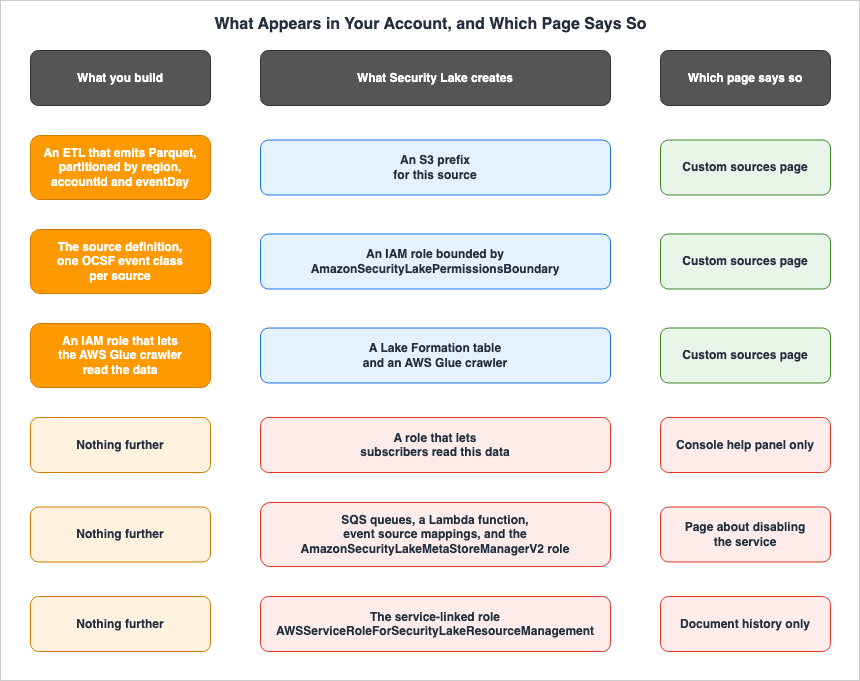
When you create one custom source, Security Lake handles four things.- It creates a unique prefix within an S3 bucket specifically for that source.
- It creates an IAM role that allows the custom source to write data to the data lake. The permissions boundary for this role is set using the
AmazonSecurityLakePermissionsBoundaryAWS managed policy. - It creates an AWS Lake Formation table to organize the objects written by the source.
- It configures an AWS Glue crawler to partition the source data. The crawler registers the table in the AWS Glue Data Catalog and also discovers new source data and extracts schema definitions.
In other words, the single action of creating one custom source adds four kinds of resource. Three of them, the IAM role, the Lake Formation table, and the Glue crawler, are resources you did not set out to create.
The fact that the permissions boundary is set using a managed policy is significant from a permissions management perspective. What this role can do is the intersection of the policies Security Lake attaches and
AmazonSecurityLakePermissionsBoundary. Adding permissions to it as though it were a role you built yourself does not take it past that boundary.If the data lake is encrypted using a customer-managed AWS KMS key, a policy granting
kms:Decrypt and kms:GenerateDataKey permissions will also be attached to this role.4.2 The Complete List Lives Only on the Page About Turning It Off
This is the most crucial practical point to understand from this article.The four items listed on the "Custom Sources" page increase individually for each custom source. However, that is not all that is added to your account when you enable the service. And the page that provides a complete list of these additions is not the one that describes how to enable the service; it is the page that details how to deactivate it.
The deactivation page primarily focuses on deleting Glue resources, but it also lists other resources that might need to be removed, including:
These additional resources include: Security Lake SQS Queues
(AmazonSecurityLakeManager-xxx), the Security Lake Lambda function,
event source mappings, and related IAM roles such as the
AmazonSecurityLakeMetaStoreManagerV2 role.
An Amazon SQS queue, a Lambda function, an event source mapping, and an IAM role named
AmazonSecurityLakeMetaStoreManagerV2. These items are not visible on the "Custom Sources" page or in the console's help panel.The Document history holds one more. The entry dated April 24, 2025, notes that Security Lake now automatically creates a service-linked role named
AWSServiceRoleForSecurityLakeResourceManagement when a data lake is created. This, too, is not listed on the enablement instructions page.Therefore, to obtain a complete list of items added to your account, you need to consult the "Custom Sources" page, the console's help panel, the deactivation page, and the Document history. No single resource provides a complete picture.
However, there is one potential pitfall when creating this list: the names of the AWS managed policies and IAM roles differ by only one character (case sensitivity).
| Type | Name |
|---|---|
| AWS Managed Policy | AmazonSecurityLakeMetastoreManager (lowercase 's') |
| IAM Role | AmazonSecurityLakeMetaStoreManager / AmazonSecurityLakeMetaStoreManagerV2 (uppercase 'S') |
The Document history entry from February 23, 2024, uses the policy name when referring to the "role." If you are creating detection rules that match based on identifiers, be sure not to confuse these two. Detection rules that use the role name as a condition will fail to match due to this single-character difference in spelling.
The reason the list lives only there has the same shape as a principle stated, on a different subject, in AI-Assisted Security Testing on AWS. Documents written to define limitations are more precise than those written to describe functionality. The deactivation page defines a limitation of that kind: leave the Glue resources behind, and querying will not work properly the next time you enable the service. That gives the page a clear motivation to list every resource that exists. Functionality description pages lack this motivation.
⇒ If you want to know what is created, consult the deactivation page, not the page describing how it is created.
4.3 What Does Not Stop When You Disable the Service
The same page provides an accurate definition of "disabling." Even when disabled, existing settings and resources created within your account will remain. Data within S3 buckets will also persist, following the S3 lifecycle configurations.However, there are two things that will continue to operate even when disabled.
If you configured one or more custom sources in Security Lake and you disable the
service, you must also disable each source independently from Security Lake.
Otherwise, the custom source will continue to send logs to Amazon S3.
Additionally, you must disable a subscriber integration or the subscriber will
still be able to consume data from Security Lake.
Custom sources will continue to send logs to S3 unless explicitly disabled. Similarly, subscribers will continue to receive data unless their integration is explicitly disabled. This can create a situation where you believe the service is stopped, but both components are still running.
When re-enabling, the behavior also impacts data continuity. Upon re-enabling, a new S3 bucket will be created, and a new data lake will be built within it. New data will be directed to this new bucket. The data from before the disabling process will remain in the original bucket, so if you need to retrieve older data, you will need to move it using
aws s3 sync. If any Glue tables were deleted, they will also be recreated.Any tables referenced by detection rules will be treated as separate entities during this process.
4.4 The Crawler Does Not Follow Along on Its Own
There is one more behavior that bears directly on how long a detection rule stays correct.We recommend manually running the crawler to keep your custom source schema up to
date and maintain query functionality in Athena and other querying services.The user guide recommends manually running the crawler when either of the following occurs in the input data:
- One or more new top-level columns are added to the dataset.
- One or more new fields are added within a
structcolumn.
In other words, even if a custom source's ETL process begins outputting new fields, Data Catalog will not automatically keep up. This can result in a situation where the data contains these fields, but they are not visible in Athena.
From the detection perspective, this is often the most difficult failure to detect. Existing detection rules will not generate any errors. The columns being referenced still exist, so queries will succeed and results will be returned. However, events that should have been distinguished based on these newly added fields will instead pass undetected. The detection net quietly becomes coarser.
It is only when someone attempts to write a new detection rule that utilizes these fields that they will discover the column is missing in the catalog. Therefore, the trigger for realizing this issue is essentially "when someone tries to write a new detection rule."
Security Lake also cannot delete or update an existing crawler in your account. If you plan to recreate a custom source with the same name, it is recommended that you manually delete the corresponding crawler when deleting the custom source.
5. The Two Subscriber Types Split How You Write a Detection
Security Lake subscribers have two different access types, and the type you choose will determine where and how you write your detection rules.5.1 Data Access - Being Told That an Object Arrived
Subscribers for data access receive notifications when new objects are written to the data lake. By default, these notifications are sent to an HTTPS endpoint configured by the subscriber. Alternatively, subscribers can choose to poll an Amazon Simple Queue Service (Amazon SQS) queue. Subscribers directly access the S3 objects.The
CreateSubscriber API includes the accessTypes parameter, with the value S3 corresponding to this type of access.The thing that runs the detection sits on the subscriber side. The arrival of an object is the trigger, and the subscriber's own processing engine reads the data and decides. This approach resembles stream processing, and latency is primarily determined by the interval at which objects are delivered. As described in Section 3.3, for custom sources, the minimum interval is 5 minutes.
5.2 Query Access - Querying the Tables
Subscribers to query access can query the data collected by Security Lake. They can directly submit queries to tables within S3 buckets, using services like Amazon Athena. While Athena is the primary query engine, services that integrate with the AWS Glue Data Catalog, such as Amazon Redshift Spectrum and Spark SQL, can also be used.The
accessTypes parameter has a value of LAKEFORMATION.The responsibility for initiating queries lies with the querying party, and someone must determine when those queries are executed. Queries do not run automatically; a scheduler is required.
5.3 The Choice Follows From the Kind of Detection
Data Access (S3) | Query Access (LAKEFORMATION) | |
|---|---|---|
| How you are notified | An HTTPS endpoint, or polling an SQS queue | You are not. You issue the query yourself |
| How the detection rule is written | In whatever the subscriber's own engine uses | SQL |
| What runs it | The arrival of an object | A scheduler you provide |
| Suits detections that | Can be decided from a single event | Aggregate or correlate across a period |
| Does not suit | Aggregation over a long time window | Reacting within minutes of arrival |
Detection rules that can be determined by examining a single event are best suited for data access. Detection rules that require aggregation and correlation across a time period are best suited for query access. For example, detecting "the first API call within a 30-day period" requires examining data from the past 30 days, so this is best handled with query access. Conversely, detecting "whether the
src_endpoint.ip of this single event is listed in threat intelligence" is well-suited for data access.A design that utilizes both methods is feasible. However, as described in Section 3.5, a single subscriber can only support a total of 10 sources, combining AWS sources and custom sources. If you plan to separate subscribers based on their purpose, you will need to factor in how these limits are utilized as part of your design.
Note that a subscriber can only reach source data in the AWS Region selected when the subscriber was created. If you need a subscriber to access data from multiple regions, designate one region as the "rollup" region and the other regions as "contributing" regions. If you intend to write detection rules that span multiple regions, you should first determine the design of the rollup region before creating the subscriber.
6. Where a Detection Rule Actually Runs
6.1 There Are Three Places, and They Correspond to the Subscriber Types
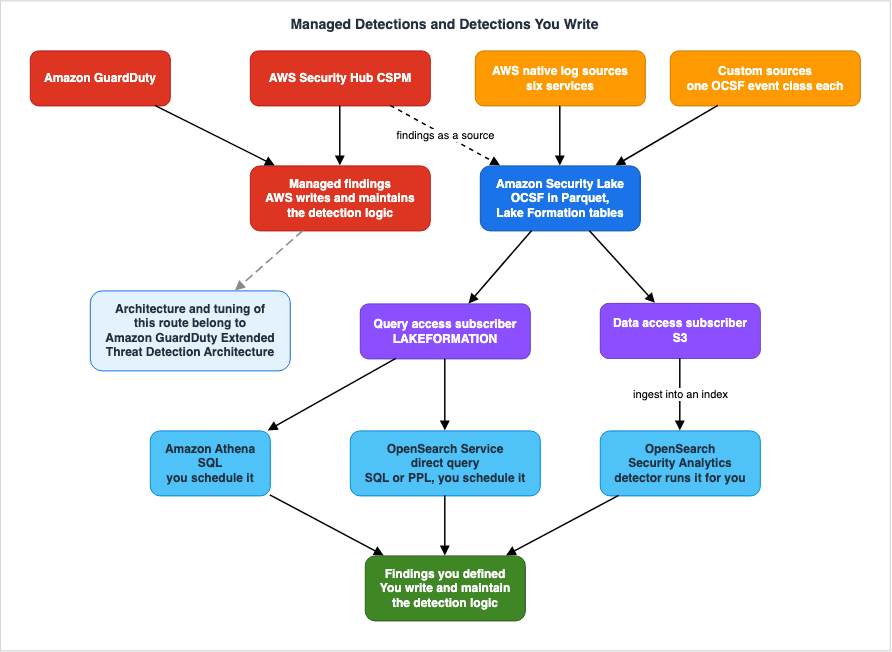
The two subscriber types discussed in Section 5 directly correspond to the location where detection rules are executed. These can be categorized into three options:| Where It Runs | Subscriber Type | How the Detection Rule Is Written | What Runs It |
|---|---|---|---|
| Amazon Athena | Query access (LAKEFORMATION) | SQL | You provide it |
| OpenSearch Service zero-ETL direct query | Query access | OpenSearch SQL or PPL | You provide it |
| OpenSearch Security Analytics | Ingested through data access (S3) | Sigma, or your own detection rules | The detector already has it |
The first two options query data without moving it. The third option ingests data into an index. This difference determines latency, cost, and who is responsible for providing the mechanism that executes the detection rules.
6.2 Amazon Athena - You Can Write the SQL, but Something Else Has to Run It
When you choose the query access option, the detection rules are expressed in SQL. Because they are normalized according to OCSF, you can write them using the same field names across different sources. This is the benefit of normalization.As noted above, the SQL does not run by itself. You will need to create separate mechanisms to run it regularly and to evaluate the results and send notifications. In reality, the majority of the work involved in building a detection platform is actually in this part. How to assemble those components is not covered here, because it is held by Centralized Logging and Audit Architecture on AWS.
This article will focus on the decision that comes before that: whether to build your own system or to use an existing solution.
6.3 OpenSearch Service Zero-ETL Direct Query - Asking Without Moving the Data
Amazon OpenSearch Service provides a way to query data from Security Lake directly, without any data movement. The Security Lake user guide explicitly identifies this type of integration as a Subscriber (Query), effectively acting as a subscriber for query access as described in Section 5.2.This approach allows you to query Security Lake data using OpenSearch SQL or OpenSearch Piped Processing Language (PPL) without building any ingestion pipelines. No data is moved or duplicated. Queries are performed through OpenSearch Service Dashboards, specifically using the Discover feature. Behind the scenes, OpenSearch Serverless collections are utilized for direct querying.
When you want to move from querying in place to monitoring continuously, you build an indexed view on the query results and ingest that into an OpenSearch Service index. It is at this stage that data duplication first occurs.
There are two key practical considerations for those writing detection rules:
First, the prerequisites change depending on whether you query from the same account as Security Lake or from a different account. The Amazon OpenSearch Service documentation advises creating a query access subscriber when querying from an account separate from the Security Lake administrator account. Conversely, it directs users to review messages related to S3 bucket registration with Lake Formation when querying from the same account.
Secondly, the partitioning methods used to filter queries are defined, and these differ depending on the version. The Security Lake user guide, for AWS source version 1, states that Security Lake implements partitioning through the
eventDay, region, and accountid parameters. In contrast, the Amazon OpenSearch Service documentation lists accountid, region, and time_dt as the partitioning keys used to improve the performance of direct queries. The date key has changed from eventDay to time_dt. This difference in versions, which we observed in Section 2.5, is evident here as well.A detection rule written as SQL that runs on a schedule has to filter on the key that belongs to the version you are on. Detection rules that do not include filtering will scan the entire data lake with each execution.
Note that the zero-ETL integration with Security Lake is offered only on collections that have an OpenSearch UI, not on clusters.
6.4 OpenSearch Security Analytics - The Machinery for Running Rules Is Already There
Amazon OpenSearch Service's Security Analytics includes built-in components for writing and running detection rules. These components consist of five key elements:| Component | Role |
|---|---|
| Log Type | Defines the mapping for corresponding fields. Specified when creating a detector. |
| Detector | Specifies the log type and index, and runs detection rules at a defined interval. |
| Rule | Defines the conditions that constitute a security event. Can be ingested, created, and customized. |
| Finding | Generated when a detector identifies an event that matches a detection rule. |
| Alert | Sends notifications to platforms like Slack or email for findings that meet specific criteria. |
The functionality previously mentioned as requiring custom development — the ability to run rules on a schedule and then evaluate and notify based on the results — is already built in as the detector and alert components.
On top of that, Security Analytics ships pre-packaged, open-source Sigma detection rules. The OpenSearch 2.16 release announcement states that there are over 3,300 such rules. This represents a significant advantage, as it eliminates the need to write detection rules from scratch.
6.5 Where It Binds Is the Mapping From OCSF to ECS
This is the part of the article to read most carefully. Where a detection rule binds to the data is here.Security Lake normalizes data into OCSF. However, the default field mapping schema for Security Analytics is ECS. The OpenSearch project documentation states:
OpenSearch supports ingestion of log data from Security Lake in the OCSF format,
and Security Analytics can automatically map fields from OCSF to ECS
(the default field mapping schema).
Automatically mapped. While convenient, it means that a translation you did not write sits between the field names your detection rule refers to and the field names the data actually carries. When a Sigma detection rule looks for
process.name, you need to understand which OCSF field that value originates from. If you do not establish this understanding, you will not be able to troubleshoot detection mismatches or identify the root cause of false positives.And the automatic mapping only covers so much.
The Security Lake log types that can be used as log sources for detector creation
include AWS CloudTrail, Amazon Route 53, and Amazon VPC Flow Logs.
Of the sources within Security Lake, only three are listed as log sources for detectors. While Section 2.4 counted six AWS native sources, and there are 71 event classes available for custom sources, only three are initially connected through this pathway.
Route 53 requires special consideration. Because Route 53 captures DNS activity, the log type you specify when defining a detector should be
dns. The service name and log type name do not match.For everything else, you will need to create custom log types and define your own mappings. It is not enough to simply normalize to OCSF and then just load detection rules. You only realize the benefit of normalization after you have completed your mappings.
6.6 How Managed Detections and Your Own Detections Divide the Work
The discussion so far has been about writing your own detections, but the design should not put them in competition with the detections AWS already provides. Their roles are distinct.| Managed Detection | Custom-Written Detection | |
|---|---|---|
| Examples | Amazon GuardDuty, AWS Security Hub CSPM | SQL in Athena, a detector in OpenSearch |
| What it detects | Broad, widely applicable threats and deviations that AWS observes | Attack scenarios specific to your organization, and normal behavior specific to your organization |
| Detection logic | AWS maintains it, and you do not see it. | You write it, and you maintain it. |
| How false positives are reduced | Through what the service provides, such as suppression rules | By changing the detection rule itself |
| What comes out | Findings | Findings you defined |
What managed detections cannot hold is your organization's own definition of normal. AWS does not know that this batch account calls this API in this time window, or that this path is only ever reached from inside the company. The value of custom-written detection lies in addressing these specific scenarios.
Conversely, attempting to rewrite detection for widely applicable threats will only create technical debt. The architecture and tuning considerations for Amazon GuardDuty are documented in Amazon GuardDuty Extended Threat Detection Architecture. It is particularly important to understand that overly broad suppression rules can eliminate correlation between attack sequences, a behavior that custom-written detection lacks. That article is where to read it.
Security Hub CSPM findings are themselves a native source for Security Lake, which means the output from managed detection can be used as input for custom-written detection. Detection that correlates findings with other events can be implemented through this approach.
7. Version Control for Detection Rules, and What Reducing False Positives Means
7.1 What Sigma States, and What It Does Not
Sigma describes itself as follows:a generic and open signature format that allows you to describe relevant log events
in a straightforward mannerSigma places itself alongside Snort for network traffic and YARA for files, and calls its detection rules vendor agnostic. The specifications are available in the
SigmaHQ/sigma-specification repository, and as of September 3, 2026, the version listed in the specifications is 2.1.0 (August 2, 2025). The Sigma CLI is the official command-line converter, and pySigma is recommended for integration into custom toolchains.The specifications state that Sigma aims to enable the conversion of detection rules written once into formats compatible with different SIEM platforms. However, it does not guarantee that the accuracy of the converted detections will remain the same. The converter may not fully absorb the differences between target search engines, the differences in field mapping, or the variations in how each one handles a time window.
Therefore, the benefits of adopting Sigma can be summarized as follows:
- Valuable: Detection rules can be version-controlled and managed as text, allowing for review of changes. They can serve as a starting point during migrations and leverage existing rule sets.
- Do not expect too much: There is no guarantee that conversions will result in the same level of accuracy across all platforms. It is necessary to test and validate the rules in each environment after migration.
7.2 Mapping to ATT&CK Is an Index, Not Coverage
OpenSearch's Security Analytics maps many of its detection rules to MITRE ATT&CK.Security Analytics maps many rules to an ever-growing knowledge base of adversary
tactics and techniques maintained by the MITRE ATT&CK organization.It says
many rules. Not all of them. ATT&CK itself is constantly being updated. As of September 3, 2026, the latest version is v19.2 (released August 6, 2026), described as a more frequent release schedule focused on updates to Groups, Software, and Campaigns, rather than the traditional twice-yearly updates.The practical use of the mapping is as an index for finding the holes in your coverage. By aligning your detection rules with specific ATT&CK techniques, you can easily see which tactics lack any associated detection rules. That is useful, but two things should not be confused with it:
First, one detection rule mapped to a technique does not mean that technique is detected. The rule may only cover a specific implementation of that technique.
Second, the number of mapped techniques is not a measure of detection quality. It is possible to artificially inflate this number by mapping a single detection rule to multiple techniques.
7.3 Detection Rules Are Not the Only Thing to Version
Many environments manage to get detection rules into a repository. But as this article has shown, a detection rule depends on four other things. Any change to these dependencies can silently break detection.| What to keep under version control | What changes when it moves | Where this article covers it |
|---|---|---|
| The detection rule itself | The change you intended | — |
| Source Versions (Version 1 / Version 2) | Table names, timestamp keys, and field names can all change simultaneously, requiring modifications to the FROM clause. | Section 2.5 |
| OCSF Versions | Fields may be added or their meaning altered. The ceiling in Security Lake is OCSF 1.3 and earlier. | Section 2.3 |
| Data Catalog Schema | New columns may not be visible. The crawler must be run manually before changes are reflected. | Section 4.4 |
| Field Mappings (from OCSF to ECS) | The source field that the detection rule is observing may change. | Section 6.5 |
Put all five under version control in one repository, and route their changes through the same review. If only the detection rules are versioned, the same investigation recurs: findings stopped appearing, and nobody changed a detection rule.
For each detection rule, clearly document the basis for its matches. Include the OCSF name of the referenced field, the corresponding source and its version, and the date the information was last verified. Without that note, there is no way to tell which of the four moved.
7.4 What Reducing False Positives Actually Changes
The phrase "reduce false positives" is vague and does not provide concrete direction. There are five things that can be adjusted, and each adjustment carries different consequences.| Adjustment | Example | What You Might Lose |
|---|---|---|
| 1. Add Conditions | Exclude traffic originating from this CIDR block. | You might miss genuine incidents originating from that CIDR. |
| 2. Narrow the Scope | Apply this detection rule only to this specific account. | You might miss similar activity occurring on other accounts. |
| 3. Raise the Threshold | Only trigger alerts when the event occurs more than 10 times within a 5-minute period. | An attacker who stops at nine goes unnoticed. |
| 4. Modify the Time Window | Count events over a 24-hour period instead of 1 hour. | Response time will be slower, and you might miss events that conclude within 1 hour. |
| 5. Correct the Input Data | Add a distinguishing marker to events generated by legitimate operations. | There are no drawbacks. However, this requires work from the operations team. |
Option 5 is generally the most valuable, but also the least frequently chosen. For example, if API calls from a backup job trigger the detection rule, adding an exception to the detection rule is option 1. Creating a dedicated role and tags for that job, allowing the detection rule to identify it as legitimate, is option 5. Option 1 leaves behind technical debt in the form of a condition in the detection rule whose reason nobody wrote down. Option 5 does not.
When choosing options 1 through 4, always document the potential losses in the comments of the detection rule. The recommended approach is as follows:
# Detection: unusual DeleteTrail outside the change window
# Fields: api.operation, actor.user.uid, time
# Source: CloudTrail management events (source version 2.0, OCSF 1.1.0)
# Tuning applied: excluded the automation role used by the pipeline
# What this tuning gives up: a DeleteTrail issued by that role is not detected
# Last verified against the schema: 2026-09-03
Any adjustment will inevitably obscure something. Adjustments without a record of what has been obscured cannot be safely reversed later.
And whenever an adjustment is made, measure the difference between what the original detection rule matched and what the adjusted one matches. Without measurement, you might intend to exclude only specific events, but in reality, the detection system might stop identifying any relevant events at all.
8. Six Places Where the Primary Sources Do Not Agree
8.1 Why These Belong in One Section
The preceding sections have each touched a place where the primary sources contradict one another. Rather than focusing on each individual discrepancy, the patterns they create are more significant, so they are presented together.The verification date is September 3, 2026.
8.2 The Six, Side by Side
| # | What one source says | What the other says | How this article treats it |
|---|---|---|---|
| 1 | The AWS SRA phases page lists Security Lake as a standard recommendation in three sections: Phase 3, Phase 4, and Phase 6, but does not mention CloudWatch options. | The AWS SRA log-archive and security-tooling pages recommend CloudWatch as the primary option for cross-organizational log collection, listing Security Lake as a secondary option. | Treat both as current, and do not settle on one (see 8.3). |
| 2 | The log-archive page refers to the primary recommendation as Amazon CloudWatch Unified Data Experience (using this term in the section heading) and specifies the location as a dedicated Monitoring account. | The security-tooling page refers to the same functionality as Amazon CloudWatch Unified Data Store and specifies the location as a Security Tooling account. | The name the Amazon CloudWatch documentation uses for this set of capabilities is CloudWatch pipelines. Neither of the two names used in the AWS SRA appears there. |
| 3 | The user guide states that Security Lake supports OCSF version 1.3 and earlier. | The console help panel states that the OCSF Validation tool confirms compatibility with OCSF Schema 1.0.0-rc.2. | Take the user guide as authoritative. In the user guide, 1.0.0-rc.2 is the metadata.version value for Version 1 AWS log sources. |
| 4 | The user guide's custom sources page lists 4 items that Security Lake handles. | The console help panel lists 5 items, adding Creating a role to allow subscribers to access this data. The page about disabling lists SQS queues, Lambda functions, event source mappings, and the AmazonSecurityLakeMetaStoreManagerV2 role. | Treat the page about disabling as the most complete listing (Section 4.2). |
| 5 | The console instructions for adding a custom source state that the name must be a globally unique name. | The same page's API section and API reference state that the value must be a Regionally unique value. | Take the API reference as authoritative. Enumerations and constraint values are what the API reference gets right. |
| 6 | The CreateCustomLogSource Length Constraints define the maximum length for sourceName as 64 characters. | The same page's description instructs that the length should be 20 characters or less (due to the maximum length of 64 characters for the generated IAM role name). | Treat 20 characters or fewer as an operational constraint. Field validation passes at 64. |
8.3 Rules for Deciding Which Source Wins
From these six items, four rules can be reused.First, API references are considered the authoritative source for enumerations and constraints. Items #5 and #6 fall under this category. Pages that describe a feature drop the conditional clause when they summarize a constraint.
Second, for lists of existing resources, the page describing how to delete them is considered the authoritative source, rather than the page describing how to create them. Item #4 exemplifies this. A page that defines the limitation that leftovers will break the next operation has a motive to list everything that exists. A page describing a feature does not.
Third, the console's help panel tends to be outdated. Both items #3 and #4 show the help panel to be less current. Because the help panel contains short snippets of text intended for use during operation, details are often omitted and remain that way.
Fourth, when two pages present conflicting information, determine which one was updated more recently. Items #1 and #2 illustrate this. Functionality additions on the CloudWatch side were announced in December 2025, and two pages within AWS SRA — log-archive and security-tooling — were updated to reflect this. The "phases" page was not updated. However, this does not mean that the "phases" page is incorrect. There is no lifecycle announcement for Security Lake, and it is explicitly stated as a supported option, even as a secondary choice.
The same user guide shows this fourth rule clearly. The "Document history" page prominently displays "Latest documentation update: April 24, 2025" at the top. However, the same page's table includes entries dated September 25, 2025, and November 18, 2025. The summary row on the page is older than the content of the page itself. This is the same phenomenon: summaries are often overlooked during updates.
This article does not make a definitive statement about item #1. As of September 3, 2026, the accurate description is that it is up to the reader to open those three pages and verify where AWS SRA positions its primary recommendation for cross-organization log collection.
8.4 This Article Will Go Stale Too
The same rules apply to this article as well. The maximum values, the number of supported event classes, the OCSF version, and the AWS SRA description mentioned here are all accurate as of September 3, 2026.In particular, the following five areas are likely to change:
- The OCSF version supported by custom sources (currently, this article references versions prior to 1.3).
- The number of items in the
eventClassesenum (currently, this article lists 71). - The number of natively supported log sources (currently, this article mentions 6 services).
- The three-page description in the AWS SRA.
- The physical format of the tables (the "Document history" section references the migration to v2 sources and the Iceberg format — Section 3.4).
For limit values and enumerated values, go to the API reference and the user guide rather than to this article.
9. Failure Modes and Anti-Patterns
9.1 Mixing Several Event Classes Into One Source
When consolidating logs from a single system into a single custom source, Lake Formation creates a single table. This often results in a sparse table where most fields contain NULL values. Detection rules typically start with conditions that verify the existence of fields, and the volume of data being scanned increases. It is best to distribute events by event class.9.2 Implementing the Physical Constraints Without Their Conditions
1 MB of the data page is uncompressed, while 256 MB of the row group is compressed. Applying one condition to the other can lead to errors in either direction. Please document the conditions in the ETL configuration using comments.9.3 Using sourceName Up to the Field Limit
While thesourceName field accepts up to 64 characters, exceeding 20 characters will result in an IAM role name that reaches the 64-character limit. It is recommended to define a naming convention that limits the length to 20 characters or less.9.4 Assuming That Disabling the Service Stopped Everything
Even after the service is disabled, a custom source keeps sending logs to S3 until that source is disabled on its own, and a subscriber keeps consuming data until its integration is disabled. For each item you want to stop, confirm that it has actually stopped.9.5 Assuming the Crawler Follows Along on Its Own
When new top-level columns are added to the input data, or when new fields are added within astruct type column, it will be necessary to manually run the crawler. Put the question of whether the crawler was run into the review for any ETL change.9.6 Versioning Only the Detection Rules
Detection rules depend on four other elements: the source version, the OCSF version, the Data Catalog schema, and field mappings. Keep all five in the same repository and put them through the same review.9.7 Tuning Without Writing Down What You Gave Up
Adding conditions, narrowing the scope, increasing thresholds, or changing the time window — any of these adjustments will inevitably obscure something. Record in the detection rule's comments what stopped being detected as a result. Adjustments that are not documented cannot be safely reversed later.9.8 Trusting Sigma Portability Without Checking the Mapping
Sigma guarantees the existence of a common format and converters, but not that the resulting data will have the same accuracy in the destination. And the path from Security Lake to OpenSearch has an automatic mapping from OCSF to ECS in it. Check, per environment, where the fields your detection rule reads actually come from.9.9 Trying to Replace Managed Detections With Your Own
Attempting to rewrite broadly applicable threat detection often leads to technical debt. Custom-built detection should define "normal" based on your organization's specific environment.9.10 Setting Requirements Without Looking at the Floor on Detection Latency
Custom source files are sent at intervals between 5 minutes and 1 event day. Files may only be sent at intervals shorter than 5 minutes if they are larger than 256 MB. If you require near real-time responsiveness, this method cannot fulfill that requirement.9.11 Scheduling Detection Rules That Do Not Filter on a Partition
Detection rules run on data each time they are executed. Without proper scoping, they will scan the entire data lake. The partition keys vary depending on the version; for AWS source version 1, they areeventDay, region, and accountid. The recommended keys for direct query are accountid and region, along with time_dt. When reviewing detection rules, include a check that they are scoped on the keys for the version you are on.And do not scope on exactly the number of days in the retention period. The user guide provides an example of scoping based on 59 days for a 60-day retention period, explaining that this is to avoid time overlap between Amazon S3 and Apache Iceberg.
10. Frequently Asked Questions
Once Security Lake is enabled, can detections be written right away?For the six natively supported AWS services, tables normalized to OCSF appear, so SQL can be written against them almost immediately. However, to actually operate these as detections, you will need separate mechanisms to regularly run queries and notify you of the results. For your own proprietary logs, you will first need to create an ETL process that meets the requirements for accepting custom sources.
If the data is normalized to OCSF, can a detection rule be carried to another environment as is?
It can be carried as a format, but nothing guarantees it will run at the same accuracy elsewhere. What the Sigma specification sets out is a common format and the existence of converters. The path into OpenSearch Security Analytics also has an automatic mapping from OCSF to ECS in it, so you have to verify the origin of the fields that your detection rules are examining in each environment.
For custom sources, is one source per system sufficient?
No. The user guide asks you to deliver each OCSF event class as a separate source. If a single system emits five different event classes, that means five separate sources. The account limit of 50 applies to the number of "system × event class" combinations, not the number of systems.
Does the 1 MB for a data page refer to the compressed size?
No, it refers to the uncompressed size. The 256 MB for a row group, on the other hand, is the compressed size. These two values are inversely related, so it is easy to get them mixed up.
Has Security Lake been deprecated?
No. As of September 3, 2026, there have been no announcements regarding the end of new registrations, end-of-life plans, or a transition to maintenance mode. But two of the three AWS SRA pages put the primary recommendation for organization-wide log collection on the CloudWatch side and call Security Lake a secondary option, while the remaining page still recommends it as standard. Stated accurately, the answer is that the primary sources do not agree with one another. Please refer to Section 8.
GuardDuty findings are already arriving. Is there still a reason to write detections by hand?
They serve different roles. What a managed detection cannot hold is your own organization's definition of normal. AWS has no way of knowing that this batch account calls this API in this time window. Conversely, it is not recommended to rewrite commonly applicable threat detections.
Findings stopped appearing even though nobody changed a detection rule. What should be suspected first?
There are four things it rests on. The source version, where moving from Version 1 to Version 2 changes the table name from
..._1_0 to ..._2_0, the time key from eventDay to time_dt, and the principal field from actor.user.uuid to actor.user.uid. The OCSF version. The AWS Glue Data Catalog schema, where a new column stays invisible until the crawler is run by hand. And the field mapping. If you version control these four items along with the detection rules, you can identify the cause of the difference.What is the best way to reduce false positives?
Correct the input itself. Add a marker to the events that normal operations produce that the detection rules can identify as normal. Unlike adding exception conditions to the detection rules, this method does not involve any loss. However, it requires work on the operations team, so it is not always the preferred approach.
What is the detection latency?
Files from a custom source are sent at intervals between 5 minutes and 1 event day, so five minutes is the floor unless the file is larger than 256 MB. Only a file over that size may go out at a shorter interval.
With strong isolation in place, is detection still necessary?
Isolation is designed to define boundaries, but it does not provide a mechanism to detect when those boundaries are crossed. As discussed in Workload Isolation Levels on Amazon EKS, every level has something it does not stop. This article addresses how to detect those events that cannot be prevented.
11. Summary
Collecting logs and writing detection rules are separate tasks. Below is the work in that gap, in the order it was checked against the primary sources.First, the fundamental unit is the event class. The user guide asks that the same OCSF event class apply to every record within a single Parquet object, and that sources containing several categories of data deliver each event class as a separate source. This requirement is not due to storage format limitations, but rather to facilitate the creation of detection rules. There are 71 available event classes, with an upper limit consistent with OCSF 1.3 and earlier versions.
Second, the acceptance criteria extend down to the physical files. Data pages should be 1 MB or less (uncompressed), row groups should be 256 MB or less (after compression), zstandard is the recommended compression method, and Parquet versions 1.x and 2.x are supported. Files should be sent at intervals ranging from 5 minutes to one event day. This sets the lower limit for detection latency.
Third, enabling this feature will create additional resources that you may not have explicitly intended. For each custom source, the following resources are created: an S3 prefix, an IAM role with
AmazonSecurityLakePermissionsBoundary as the permissions boundary, a Lake Formation table, and a Glue crawler. Crucially, a complete list of these resources is not displayed on the activation page, but rather on the deactivation page, which also includes an SQS queue, a Lambda function, an event source mapping, and the AmazonSecurityLakeMetaStoreManagerV2 role.Fourth, two types of subscribers dictate how detection rules are written. Data access (using
S3) is suitable for detection based on individual events, while query access (using LAKEFORMATION) is better suited for detection that aggregates data over a period of time. A subscriber can handle a total of 10 sources.Fifth, there are three locations where detection rules run, and they correspond to the subscriber types. Athena and OpenSearch Service's zero-ETL direct query allow querying data without moving it, but you need to build your own mechanism to regularly run these detection rules. OpenSearch Security Analytics includes detectors and alerts from the start, ingesting them into the index. And where it binds is the automatic mapping from OCSF to ECS, with three of Security Lake's sources wired up as detector log sources.
Sixth, version control is not limited to detection rules alone. It encompasses four elements: the data source version, the OCSF version, the Data Catalog schema, and the field mappings. In particular, raising the source version swaps the table name, the time key, and the principal field name all at once. This is a large-scale modification of the entire set of detection rules, not individual adjustments. When findings stop appearing even though nobody changed a detection rule, the cause is one of these four.
Seventh, every adjustment that reduces false positives hides something. Adding conditions, narrowing the scope, increasing thresholds, or changing the time window all come with a cost. The only cost-free method is to directly address the input itself, but this requires operational effort and is therefore less frequently chosen. An adjustment that does not record what it hid cannot be safely reversed later.
And there are six places where the primary sources do not agree with each other. Two of the three AWS SRA pages put the primary recommendation for organization-wide log collection on the CloudWatch side, and those two pages themselves contain discrepancies in product names and locations. The OCSF version is different across the user guide, the console, and the core product. Even the list of resources the service creates for you varies across the user guide, the console help panel, and the page about disabling. Security Lake has not been deprecated. There is no lifecycle announcement regarding its status. But that AWS's own pages do not line up is something a reader should know.
Finally, one sentence runs through this whole article. You write a detection rule against a schema, not against a platform. And the version of that schema differs from platform to platform. Security Lake custom sources sit at OCSF 1.3 and earlier, the OCSF processor in CloudWatch pipelines is pinned to 1.5, and the standard itself is at 1.9.0. A detection rule that does not record which version it was written against will, sooner or later, stop matching for reasons nobody can reconstruct.
12. References
- What is Amazon Security Lake?
- Source management in Security Lake
- Collecting data from AWS services in Security Lake
- Collecting data from custom sources in Security Lake
- Adding a custom source in Security Lake
- Open Cybersecurity Schema Framework (OCSF) in Security Lake
- Subscriber management in Security Lake
- Managing data access for Security Lake subscribers
- Managing query access for Security Lake subscribers
- Managing Regions in Security Lake
- Disabling Security Lake
- Integration with Amazon OpenSearch Service zero-ETL direct query
- Document history for the Amazon Security Lake User Guide
- Security Lake queries for AWS source version 1 (OCSF 1.0.0-rc.2)
- Example Security Lake queries for CloudTrail data (AWS source version 2)
- AWS managed policies for Amazon Security Lake
- Amazon Security Lake Features
- CreateCustomLogSource - Amazon Security Lake API Reference
- Custom sources - Amazon Security Lake console help panel
- Security OU - Log Archive account - AWS Security Reference Architecture
- Security OU - Security Tooling account - AWS Security Reference Architecture
- Building your security architecture - a phased approach - AWS Security Reference Architecture
- CloudWatch pipelines
- Parser processors - Amazon CloudWatch
- Security Analytics for Amazon OpenSearch Service
- Creating detectors - OpenSearch Documentation
- Directly querying Amazon Security Lake data in OpenSearch Service
- Configuring and querying a Security Lake data source in OpenSearch Dashboards
- OCSF Schema - GitHub
- Sigma - Generic Signature Format for SIEM Systems
- Sigma Specification
- MITRE ATT&CK
- Centralized Logging and Audit Architecture on AWS - Multi-Account Log Aggregation, Detection, and Query with CloudTrail, Config, Security Hub, and OpenSearch
- Amazon GuardDuty Extended Threat Detection Architecture - Attack Sequences, Runtime Monitoring, and Response Automation
- Threat Detection for AI Workloads on AWS - What GuardDuty AI Protection Detects, What It Does Not, and How to Read a Finding
- AWS Security Incident Response Playbooks - First-Response Runbooks for Common Scenarios
- AWS Multi-Account Operational Patterns - Control Tower, Organizations, SCPs
- AWS Network and Application Protection Decision Guide - Where AWS WAF, AWS Shield, AWS Network Firewall, and AWS Firewall Manager Sit on the Request Path and What Each One Does Not Stop
- OWASP Top 10 for Agentic Applications Mapped to AWS Controls - What Each Control Mitigates and What Residual Risk Remains
- AI-Assisted Security Testing on AWS - What You Approve, What You Can Only Stop, and What the Findings List Hides by Default
- Agentic Payments on AWS - Where the Spending Limit Is Enforced, and What It Does Not Stop
- Workload Isolation Levels on Amazon EKS - Which Level You Stopped At, and What That Level Does Not Stop
References:
Tech Blog with curated related content
Written by Hidekazu Konishi