Threat Detection for AI Workloads on AWS - What GuardDuty AI Protection Detects, What It Does Not, and How to Read a Finding
First Published:
Last Updated:
But can you answer this crucial question: When an attack actually happens, what fires?
This question is distinct from designing your defenses. When it comes to your own defenses, you know what you put in place, so you can answer it. Detection, however, is different. Whether anything fires depends on the settings you put in place and on what the AWS detectors treat as grounds for firing. Knowing one side of it does not produce an answer.
This article focuses on designing the detection layer for AI workloads on AWS. Rather than simply introducing features, it addresses this key point: What will remain undetected even when enabled, and what has to be added to see it?
The stance of this article comes first. Amazon GuardDuty introduced AI Protection in general availability on July 14, 2026, bringing three threat types specific to AI workloads. All three are valuable. However, all three have prerequisites that must be met for them to function correctly. When a prerequisite is not met, the attack is under way and no finding appears. And nothing on any screen tells you that a finding failed to appear. Designing effective detection involves carefully verifying these prerequisites, and documenting any gaps that remain.
All specifications mentioned in this article have been verified against official AWS documentation, as of August 18, 2026. That verification turned up two places where AWS's own documents are not written consistently. Both bear directly on how a reader sizes up the detection scope, so section 2.4 sets them side by side and gives the reason for treating one side as correct.
This article covers what fires on its own during operation. It does not cover proactive security testing using AI – a separate topic covered in AI-Assisted Security Testing on AWS.
Table of Contents
- 1. The Detection Surface Has Four Components
- 2. What AI Protection Reads and Does Not Read
- 3. What Each of the Three Finding Types Rests On
- 4. Do Not Mistake What the Finding Points At
- 5. Prompt Injection Detection Depends on the Guardrail
- 6. What the Other Plans Cover
- 7. How Security Hub Bundles the Results
- 8. Three Questions to Answer First When a Finding Fires
- 9. The Blind Spots: What This Setup Does Not Catch
- 10. Design Checklist
- 11. Frequently Asked Questions
- 12. Conclusion
- 13. References
1. The Detection Surface Has Four Components
1.1 Only the Defensive Side Is Well Covered
The vast majority of materials concerning the security of generative AI are overwhelmingly focused on the defensive side. Inspecting inputs, inspecting outputs, restricting permissions, establishing boundaries – all of these are necessary measures. However, they are all designed to prevent attacks from succeeding in the first place.What is often lacking in real-world operations is what happens next. If an attack succeeds, or nearly succeeds, will anyone notice? And if someone does notice, will enough material remain to explain what happened?
These two aspects are not automatically achieved, no matter how meticulously the defensive measures are designed. Detection requires a separate, independent design approach.
1.2 Four Components
Four components make up the detection surface for AI workloads on AWS. This article works through all four.| Component | Role | Activation |
|---|---|---|
| GuardDuty AI Protection | Detects the three threat types specific to AI workloads | A protection plan you enable explicitly |
| GuardDuty Foundational | Analyzes management events, including operations on AI services | Runs as soon as GuardDuty is on |
| GuardDuty Lambda Protection | Watches Lambda network activity, which is where agent-related threats surface | A protection plan you enable explicitly |
| AWS Security Hub | Bundles the results above and matches them against assets | A separate service you enable |
There is a reason for this categorization. Which component catches an attack changes the shape of the finding, the prerequisites it needs, and its severity. For example, a single event such as the theft of credentials that allow access to a model can manifest in different ways: as an anomalous call detected by AI Protection, as a management event detected by Foundational, or as network activity detected by Lambda Protection. It is equally possible that none of them fires.
1.3 Plans May Not Be Active
Before any discussion of detection, one blunt premise needs confirming. On an existing account, AI Protection is quite likely not running.The GuardDuty user guide states the default behavior as follows:
For a new GuardDuty account, some of the available protection types that are supported in an
AWS Region are enabled and included in the 30-day free trial period by default. You can opt out
of any or all of them. If you've an existing AWS account with GuardDuty enabled, you can choose
to enable any or all of the protection plans that are available in your Region.
Pay particular attention to the latter part. For existing accounts it says
you can choose to enable, and it nowhere says that the plan turns on by itself. AWS only mentions automatic enablement for newly created GuardDuty accounts.The operational consequence that follows is stated here as a deduction, and labeled as one. AI Protection became generally available on July 14, 2026. AWS has not stated that existing accounts that had already enabled GuardDuty would be automatically enabled. Therefore, you should not assume that AI Protection is running on existing accounts. You need to verify its status by checking the configuration.
This is not specific to AI Protection, but applies to all protection plans added later. The published Amazon GuardDuty Extended Threat Detection Architecture documents the mechanism that lets the enablement status of a plan differ from account to account and Region to Region, and how to run the resulting audit as a standing operational task. This article builds upon the assumptions established in that document.
You configure organization-wide enablement from the delegated administrator account. The API is
UpdateOrganizationConfiguration.The value is easy to get wrong here. The API reference defines three values for
autoEnable.| Value | Scope |
|---|---|
NEW | Only accounts that newly join the organization get the feature automatically. |
ALL | Every account in the organization is enabled automatically. This includes newly joined accounts, as well as accounts that may have previously been stopped or excluded from GuardDuty. |
NONE | No account gets the feature automatically. The administrator manages it account by account. |
The user guide example uses the
NEW value. If you simply replicate that example, existing member accounts will remain outside the scope. As the opening of this section showed, the accounts most likely to lack AI Protection are the existing ones. If you want to include existing accounts, you should specify ALL.aws guardduty update-organization-configuration \
--detector-id <detector-id> \
--region <region> \
--auto-enable \
--features '[{"Name": "AI_PROTECTION", "AutoEnable": "ALL"}]'Applying
ALL is not instantaneous. The API reference states:It may take up to 24 hours to update the configuration for all the member accounts.Check every account immediately after applying the setting and the change may not have landed yet. Leave time before you verify.
One more thing to note. The organization settings let you enable the plan; they do not let you configure the detector's behavior. AI Protection does not offer settings to adjust thresholds or select the models to be monitored. Organization policies can only control whether or not this plan is active for a given account.
1.4 Division of Labor with Existing Articles
This website contains several articles addressing the security of generative AI. All of these articles focus on the defensive side; this is the first to focus on detection methods. The areas that could overlap are set out first.| Published Article | What That Article Owns | Relationship to This Article |
|---|---|---|
| Amazon GuardDuty Extended Threat Detection Architecture | The definitive guide to attack sequences and runtime monitoring. Includes a list of protection plans, signal types, and an inventory of enabled states. | This article does not re-explain the Extended Threat Detection mechanism. It only addresses the possibility of AI Protection contributing to correlation in section 6.4. |
| Threat Modeling Generative AI Applications on AWS | The definitive guide to threat modeling during the design phase. Covers STRIDE, asset identification, and mitigation assignment. | This article does not cover activities performed during the design phase. It covers only what fires during operation. The MITRE ATLAS mapping in section 3.1 provides a point of connection. |
| Amazon Bedrock Guardrails Implementation Deep Dive | The definitive guide to guardrail configuration. Covers policy-based approaches, the ApplyGuardrail API, detection modes, and safeguard tiers. | This article does not describe how to configure guardrails. Chapter 5 takes up one dependency only: without a guardrail intervention, the prompt injection finding does not fire. |
| Amazon Bedrock Security and Governance | The definitive guide to audit logs. Draws the line between model invocation logging (the record of content) and CloudTrail (the record of activity). | This article does not describe the design of logs. It addresses which of these GuardDuty monitors in section 2.5. |
| AI Bill of Materials on AWS | The definitive guide to discovering AI assets. Covers three discovery pathways and what each pathway might miss. | This article does not re-list discovery pathways. It only references them in section 7.2 when associating detection results with assets. |
| AWS Security Incident Response Playbooks | The definitive guide to initial response playbooks. Includes procedures for responding to credential compromises. | This article does not provide playbooks. It indicates the entry point for response in section 8.1, directing users to the playbook itself. |
| OWASP Top 10 for Agentic Applications Mapped to AWS Controls | The definitive guide to mapping risks to AWS controls. | This article does not re-map the OWASP Top 10. |
| AI Agent Defense in Depth Model | The definitive guide to layered defense. Covers the arrangement of WAF, guardrails, inference sandboxes, and output filters. | This article does not cover the design of layered defense. It only addresses which layer is a prerequisite for detection. |
| Agent Sandboxing and Blast-Radius Isolation on AWS | The definitive guide to containment boundaries. Covers the selection of boundary units and what each boundary fails to prevent. | This article does not cover the design of the agent execution environment. It only touches upon the scope of Lambda Protection in section 6.3. |
What fires on its own during operation and what you go looking for before release are two different things. The latter, meaning how to accept security testing that uses AI, falls outside the scope of this article and is covered in AI-Assisted Security Testing on AWS.
2. What AI Protection Reads and Does Not Read
2.1 Data Ingestion: GuardDuty Creates the Entry Point
When AI Protection is enabled, GuardDuty creates a CloudTrail service-linked channel in each monitored account. The user guide describes this as follows:When you enable AI Protection for an account or across your organization, GuardDuty
automatically begins collecting AWS CloudTrail data events from the AI services in the
monitored accounts. You don't need to create a trail, enable data event logging, or make
any changes to your AI applications.This design has two operational implications.
First, detection is independent of the account owner's configuration. The user guide explicitly states that GuardDuty configures the data event settings for the channel, and the account owner cannot modify them. This prevents the common failure scenario where detection stops due to missing CloudTrail log configurations.
Second, the channel is visible from the account side. You can verify the channel's status through the CloudTrail console, in the list of service-linked channels, or by using the
ListChannels API. If you have any doubts about whether AI Protection is actually working, you can confirm this not only through the GuardDuty console, but also through this method.2.2 It Reads Both Data Events and Management Events
Regarding the analysis targets for AI Protection, the user guide begins as follows:When you enable AI Protection, GuardDuty analyzes AWS CloudTrail data events from Amazon Bedrock,
Amazon Bedrock AgentCore, and Amazon SageMaker AI, along with AWS CloudTrail management events.Both data events and management events are the subjects of analysis. Hold on to that; it matters later.
2.3 Bedrock Inference Calls Are Management Events
This is the point in the article that is easiest to get wrong.The product page, the FAQ, and the official blog all describe AI Protection as analyzing
CloudTrail data events. Based solely on these descriptions, one might assume that model invocations are logged as data events and that GuardDuty reads those.However, this understanding is incorrect when it comes to Bedrock. The Amazon Bedrock user guide clarifies the logging categories for the inference API as follows:
Amazon Bedrock logs Amazon Bedrock Runtime API operations (InvokeModel,
InvokeModelWithResponseStream, Converse, and ConverseStream) as management events.
Inference calls made via the
bedrock-runtime endpoint are logged as management events, not data events.What follows is an inference, and this article says so plainly. AI Protection analyzes both management events and data events. Inference calls made through
bedrock-runtime are recorded as management events. Put those two together and it follows that, for the representative model invocations on Bedrock, what AI Protection reads is the management event side. AWS never states that conclusion as a sentence of its own.So what is the data event collection in AI Protection for? Certain AI-related operations really are recorded as data events.
| Logging Category | Target | Source |
|---|---|---|
| Management Event | Inference API via bedrock-runtime | Amazon Bedrock User Guide |
| Data Event | Inference operations via bedrock-mantle | Amazon Bedrock User Guide |
| Data Event | Calls to AgentCore Runtime | Amazon Bedrock AgentCore Developer Guide |
| Data Event | Calls to SageMaker AI endpoints | Amazon SageMaker AI Developer Guide |
AI Protection reads both because one action, inference, lands in different categories depending on the path it took. The user guide is the precise one here; the product page and the FAQ are the loose ones.
The difference is not a matter of wording. When building your own detection and auditing systems, these different logging categories directly translate into different configuration requirements. The Bedrock user guide includes the following note regarding
bedrock-mantle:Inference is a data event on bedrock-mantle, a management event on bedrock-runtime. The
bedrock-runtime endpoint logs Converse, ConverseStream, InvokeModel, and
InvokeModelWithResponseStream as management events at no additional cost. The bedrock-mantle
endpoint logs CreateInference and the other inference operations as data events, which incur
CloudTrail data event charges. If you require an audit trail of inference calls on
bedrock-mantle, you must explicitly enable data event capture on your trail or event data store.The same page goes further and notes that a difference in event source can carry activity straight past your detection logic.
CloudTrail Lake queries, Athena views, and detective controls that filter on
bedrock.amazonaws.com or bedrock-runtime.amazonaws.com will not capture bedrock-mantle activity.
If a detection query you wrote yourself filters on
bedrock.amazonaws.com, inference that goes through bedrock-mantle never enters that query. While AI Protection itself handles this distinction, if you add your own detection mechanisms around AI Protection, you may encounter this potential pitfall. Which eventSource each endpoint writes, and the field that marks a call made with a Bedrock API key on each, are laid out in Amazon Bedrock Inference Endpoints and API Keys.2.4 Discrepancies Between Documents
Cross-referencing the primary sources turned up two places where AWS documents are not written consistently. Both matter when a reader sizes up the detection scope, so this article states which side it treats as correct.Discrepancy 1: Whether AgentCore is included in the list of services being analyzed.
The overview page for AI Protection lists three data event sources: Amazon Bedrock, Amazon Bedrock AgentCore, and Amazon SageMaker AI. However, the finding type page does not mention AgentCore.
When you enable AI Protection, GuardDuty analyzes AWS CloudTrail management events and data events
from Amazon Bedrock and Amazon SageMaker AI.
This article treats the overview page as correct. The reason: the overview page describes the data collection mechanism, and it names AgentCore where it lists the services whose data the channel streams. The finding type page describes what each finding rests on, and in practice, the three existing finding types relate to model invocations for Bedrock and SageMaker AI. The scope of collection and the scope a finding applies to are two different things, and each page is correct in its own context.
The conclusion that matters to a reader is narrower. AgentCore Runtime invocations being collected as data is not the same as a finding type existing for AgentCore. The second does not exist.
Discrepancy 2: Treatment of Data Events and Management Events.
As seen in section 2.3, both the product page and the FAQ only mention
CloudTrail data events, and the official blog uses the same wording. Both the overview page and the finding type page in the user guide include management events. This article treats the user guide as correct. The general principle applies: a document written to state limits and scope is more accurate than one written to convey what a feature does.2.5 The Content Never Arrives
AI Protection analyzes CloudTrail events, regardless of the classification. CloudTrail events do not include the full text of prompts or the full text of model responses.A separate mechanism exists to record model inputs and outputs: Amazon Bedrock model invocation logs. The user guide states:
With invocation logging, you can collect the full request data, response data, and metadata
associated with supported calls performed in your account in a Region.
And by default, this feature is disabled.
Model invocation logging is disabled by default.AI Protection does not read these logs. The GuardDuty user guide lists only CloudTrail events as subjects for analysis, and makes no mention of model invocation logs. So when a finding fires and you want to know what was actually submitted, whether that record exists at all depends on whether model invocation logging was on before the incident.
The design of the model invocation logs themselves – specifically, how it separates the record of content from the record of activity – is held by the published Amazon Bedrock Security and Governance. This article adds only one point from the detection side: model invocation logs also have limitations on their scope.
Model invocation logging is only supported for calls made through the bedrock-runtime endpoint.
This includes the OpenAI-compatible Responses and Chat Completions APIs on that endpoint. Calls
made through other endpoints, such as the same APIs on bedrock-mantle, are not currently captured
by invocation logging.
Combining this information with the discussion in section 2.3, for invocations made through
bedrock-mantle, the facts of the inference can be recorded as data events, but the content is not retained in the model invocation logs.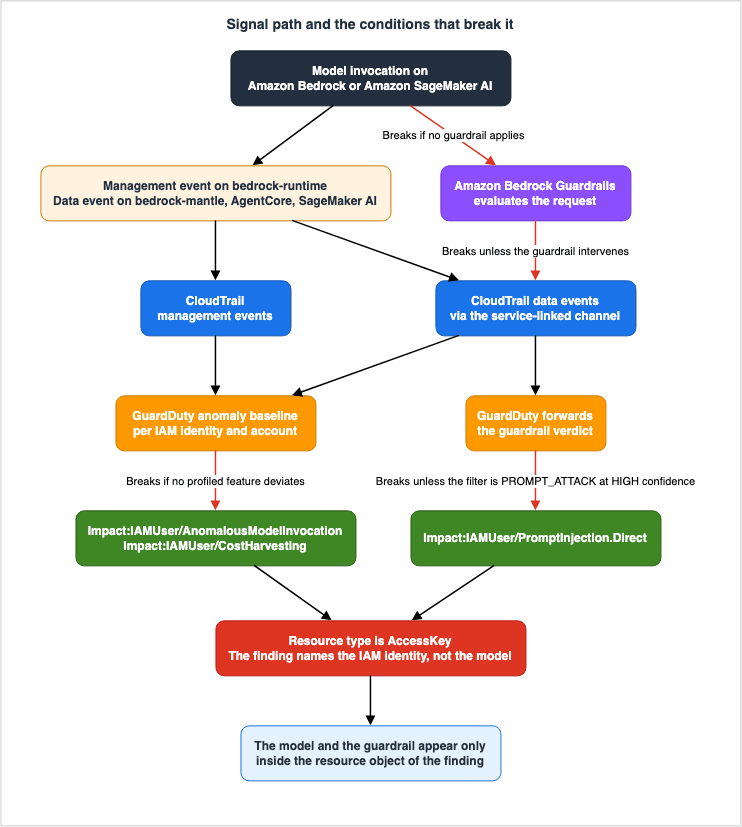
3. What Each of the Three Finding Types Rests On
3.1 Three Finding Types and Three Common Properties
AI Protection generates three finding types.| Finding Type | What is Detected | Target Service |
|---|---|---|
Impact:IAMUser/AnomalousModelInvocation | A model invocation that deviates from the established baseline | Amazon Bedrock and Amazon SageMaker AI |
Impact:IAMUser/CostHarvesting | An invocation carrying anomalous token volumes | Amazon Bedrock and Amazon SageMaker AI |
Impact:IAMUser/PromptInjection.Direct | A direct prompt injection that a guardrail detected | Amazon Bedrock workloads that use guardrails |
These three finding types share three common properties, all of which have a direct impact on operations.
Common Property 1: The
Resource type for all of them is AccessKey. Chapter 4 takes this up in detail.Common Property 2: The default severity for all of them is Low. Each finding type page in the user guide states
Default severity: Low for all three. GuardDuty cuts a 1.0 to 10.0 scale into four levels, Critical, High, Medium, and Low, and Low sits at the bottom.One point needs stating precisely. The severity page notes that the same finding type can carry a different severity depending on context.
A finding of a particular type may have a different severity depending on the context specific
to the finding.
So it cannot be said that an AI Protection finding is always Low. All that can be said is that the default is Low.
Why that matters in operation is straightforward. Most teams filter notifications and ticket creation by severity. Where the filter starts at Medium, an AI Protection finding that came out at its default never reaches the notification path. Enable the plan and the findings can sit there, seen by nobody.
Filtering by severity is a legitimate operational choice. The problem is the mismatch: you added detection for AI workloads and left the existing filter untouched. Enabling AI Protection and creating a pathway for findings to reach the right people are separate tasks.
Common Property 3: All three are mapped to MITRE ATLAS techniques. AWS shows the following mapping on each finding type page:
| Finding Type | MITRE ATLAS Technique That AWS Cites |
|---|---|
Impact:IAMUser/AnomalousModelInvocation | AML.T0040 AI Model Inference API Access |
Impact:IAMUser/CostHarvesting | AML.T0034 Cost Harvesting |
Impact:IAMUser/PromptInjection.Direct | AML.T0051 LLM Prompt Injection |
That mapping is the joint between what threat modeling produces and what detection produces, because it lets you line up the threats identified at design time and the techniques you have detection for at run time in the same vocabulary. As the detailed threat modeling for this topic is already documented in the published Threat Modeling Generative AI Applications on AWS, this article does not rebuild the mapping table.
3.2 What is an anomalous model invocation measured against?
Impact:IAMUser/AnomalousModelInvocation is a machine learning-based anomaly detection system. The user guide states the unit of the baseline and the features it profiles.GuardDuty establishes a baseline of normal model invocation activity for each IAM identity
and AWS account that invokes Amazon Bedrock or Amazon SageMaker AI.GuardDuty builds the baseline for each IAM identity and for each AWS account. It profiles four features:
| Profiled Feature |
|---|
| The model invocation API called by the identity |
| The model the identity invoked |
| The originating IP address and the associated autonomous system number (ASN) organization |
| The user agent that initiated the request |
The deviations it names are a previously unseen IP address, a previously unseen user agent, and a model the identity has never invoked.
Three conditions under which this finding does not fire follow from that.
Condition 1: When the deviation shows up in none of the profiled features. If an attacker works from inside a legitimate execution environment, with the usual user agent, calling a model the identity already uses, none of the four features moves. While unusual call volumes or token usage might fall under
CostHarvesting, that feature has its own separate threshold.Condition 2: When a baseline does not exist. GuardDuty builds a baseline per IAM identity. If an attacker creates a new role and then calls a model using that role, there is no historical data to compare against. The user guide does not specify how GuardDuty behaves for identities that do not have established baselines. Therefore, this article will not make any definitive statements on that behavior. For design purposes, however, you should not assume that a permission created moments ago is already subject to anomaly detection.
Condition 3: When the call is not logged in CloudTrail. Requests to model serving endpoints running on self-hosted infrastructure, such as Amazon EC2 or Amazon EKS, are not AWS API calls. Because CloudTrail never records them, they fall outside what AI Protection analyzes. Chapter 9 returns to this.
3.3 Cost Harvesting Turns on Two Averages and a Correlation
Impact:IAMUser/CostHarvesting focuses on the volume of tokens. The user guide states the following:GuardDuty establishes a baseline of average input token volume and average output token volume
for each IAM identity and account that invokes Amazon Bedrock or Amazon SageMaker AI models. When
GuardDuty observes invocations with token counts that exceed this baseline, and correlates the
volume anomaly with other unusual signals, GuardDuty generates this finding.The second half is easy to read past. Simply exceeding the baseline volume is not sufficient. GuardDuty generates findings only after correlating that volume with other anomalous signals. What those signals are is not publicly disclosed.
Two things follow from this structure.
First, legitimate load increases are unlikely to set this finding off repeatedly. The correlation requirement stands in the way, so a rise in traffic on its own rarely meets the conditions.
Second, conversely, events with unusually high token volumes may be missed. To catch a cost anomaly reliably, pair detection with something on the budget side. The user guide itself suggests using AWS Budgets and AWS Cost Anomaly Detection as solutions for addressing this finding. Read that as AWS conceding that AI Protection alone does not catch every cost anomaly.
One point about the body of the finding. It reports the observed invocation and token volumes in a
service.detection object. The values judged anomalous sit at that position in the finding JSON.3.4 The Prompt Injection Finding Has an Exceptional Structure
The third finding type,Impact:IAMUser/PromptInjection.Direct, is built on a completely different principle from the other two.GuardDuty itself judges the first two, building a baseline with machine learning. This one is different. GuardDuty receives assessments from Amazon Bedrock Guardrails via CloudTrail data events. The user guide describes this as follows:
For the Impact:IAMUser/PromptInjection.Direct finding type, GuardDuty generates a finding when
Amazon Bedrock Guardrails evaluates a prompt and detects a prompt attack, based on the resulting
AWS CloudTrail data event.
In this finding, then, GuardDuty acts not as the judge but as the carrier. The guardrail is what makes the judgment.
The consequence is heavy. Unless a guardrail intervenes, this finding never fires. A prompt injection can succeed outright, and if no guardrail evaluated it, nothing reaches GuardDuty.
This dependency is the subject of Chapter 5, which takes the conditions apart one at a time.
4. Do Not Mistake What the Finding Points At
4.1 The Resource type Is AccessKey
This chapter is the core of this article.The user guide describes the three AI Protection finding types this way:
The Resource type for these findings is AccessKey, and the finding identifies the IAM identity
that invoked the model.
The finding refers not to the attacked model, but to the IAM identity that invoked the model.
Misinterpreting this can completely derail initial response efforts. Read the finding as an attack on Bedrock and you will go and inspect the Bedrock configuration, but what the finding names is the credential. Treat it as a credential compromise and it drops straight into the incident response you already run.
This design is not a unique specification of AI Protection. The GuardDuty IAM findings already work this way. The user guide's page on IAM finding types states:
The following findings are specific to IAM entities and access keys and always have a
Resource Type of AccessKey.
The right way to read it is that AWS added the three AI Protection findings to that family as AI-specific threat types. No new resource types have been introduced specifically for AI workloads.
4.2 The Model Goes into resource.modelDetails
So, where can you determine which models were invoked? According to the user guide:The Impact:IAMUser/AnomalousModelInvocation and Impact:IAMUser/CostHarvesting findings include a
resource.modelDetails list that identifies the invoked Amazon Bedrock or Amazon SageMaker AI models.resource.modelDetails is a list, not a single item. A single finding may involve multiple models.The user guide lists what the
modelId of each element can hold.Possible values for modelId |
|---|
| Foundation models from Amazon Bedrock |
| Inference profiles |
| ARNs for provisioned models, custom models, and imported models |
| Endpoints from the Amazon Bedrock Marketplace |
| Prompt resources |
| Endpoint names from Amazon SageMaker AI |
This listing is relevant when processing findings programmatically. The value of
modelId does not follow a single format. Foundation model identifiers, ARNs, and endpoint names share one field, so a parser that assumes a shape will break.4.3 The Guardrail Goes into a Different Field
Only the third type of finding contains information about the guardrails, rather than the model itself.The Impact:IAMUser/PromptInjection.Direct finding includes a resource.bedrockGuardrailDetails
object that describes the Amazon Bedrock Guardrail that intervened.resource.bedrockGuardrailDetails is an object, not a list. The fields of this object are the material for reading the finding.| Field | Description |
|---|---|
guardrails | A list of guardrails that evaluated the call. Each element contains an ARN and a version. |
guardrailAction | The action taken by the guardrail. A finding is generated when the action is GUARDRAIL_INTERVENED. |
guardrailSource | The content being evaluated. INPUT refers to the prompt sent to the model, while OUTPUT refers to the model's response. |
contentPolicyFilters | The list of content policy filters the guardrail applied. |
Three of these fields require special consideration when interpreting the finding.
The
guardrails field can contain multiple entries. The user guide explains that multiple entries appear when an account-enforced or organization-enforced guardrail and a request-level guardrail both evaluate the same invocation. Do not settle on a single guardrail as the one that intervened.The
guardrailSource is not necessarily the input. OUTPUT refers to the model's response. Even when a prompt attack filter fires on the output side, this finding can appear. Read this finding as being about the input alone and you will misread what happened.The contents of
contentPolicyFilters are the conditions this finding has to meet. The user guide states:A list of the content policy filters that the guardrail applied. For this finding type, an entry
has a type of PROMPT_ATTACK and a confidence of HIGH. The action is BLOCKED if the guardrail
blocked the content, or NONE if the guardrail detected the prompt attack but was configured only
to report it.Three things can be read from this.
First, the
type must be PROMPT_ATTACK. A guardrail can also carry denied topics, word filters, and sensitive information filters, but an intervention by those alone never produces this finding.Second, the
confidence level must be HIGH. A prompt attack detection that falls short of HIGH confidence never produces this finding.Third, the
action is not necessarily BLOCKED. If you run the guardrail in detect-only mode, the action is NONE, and the finding still fires. So this finding does not mean the attack was blocked. Under a detect-only setting, the prompt reached the model.That third point matters most in practice. Whoever receives the finding is wrong to conclude that there was no real harm because the guardrail stopped it. Until you read the value of
action, you do not know whether there was harm.4.4 Avoiding Confusion Between Similar Finding Types
GuardDuty includes finding types with very similar names but different content.| Finding Type | Associated With | What it Detects |
|---|---|---|
Impact:IAMUser/AnomalousModelInvocation | AI Protection | Deviations in model invocation patterns |
Impact:IAMUser/AnomalousBehavior | Foundational, as an IAM finding type | Deviation across API requests in general |
Both finding types begin with
Impact:IAMUser/, both have Resource type set to AccessKey, and both indicate anomalies. What differs is the enablement each one requires and the range of what it watches. The former only appears when AI Protection is enabled. The latter appears when GuardDuty is enabled.If your response procedures branch based on the beginning of the finding type name, these two types may be routed to the same branch. Worth checking whether that is what you intended.
5. Prompt Injection Detection Depends on the Guardrail
5.1 Establishing a Chain of Dependencies
As section 3.4 showed,Impact:IAMUser/PromptInjection.Direct is a mechanism that carries a guardrail judgment forward. Before this finding can fire, there are several knots along the way, and any of them can come untied. Here they are in order:| # | Condition Required for Triggering | Result of Failure |
|---|---|---|
| 1 | The call is subject to a guardrail. | No assessment is performed, and nothing is recorded. |
| 2 | The guardrail has a prompt attack content filter configured. | Another policy may intervene, but it falls outside this finding. |
| 3 | The content under attack falls inside the guardrail's evaluation scope. | Content outside that scope is never evaluated. |
| 4 | The guardrail intervenes, and guardrailAction becomes GUARDRAIL_INTERVENED. | Without intervention, the conditions for this finding are not met. |
| 5 | The filter's type is PROMPT_ATTACK. | An intervention of another kind falls outside this finding. |
| 6 | The confidence is HIGH. | Anything short of that falls outside this finding. |
| 7 | AI Protection is enabled for that account. | The data is not collected. |
| 8 | Bedrock Guardrails is available in that Region. | This finding type itself does not exist. |
If even one of these eight conditions is missing, the prompt injection will not result in a finding. Furthermore, there is no mechanism to report when a condition is missing.
Row 3 gets a section of its own, because it is the one that rarely registers as a setting.
5.2 The Evaluation Scope Is Not the Whole Input by Default
A guardrail lets you control which parts of the input it evaluates. The Amazon Bedrock user guide describes the function of input tags in this way.Input tags allow you to mark specific content within the input text that you want to be processed
by guardrails. This is useful when you want to apply guardrails to certain parts of the input,
while leaving other parts unprocessed.The user guide itself lists a typical use case: the retrieval-augmented generation (RAG) configuration.
For example, the input prompt in RAG applications may contain system prompts, search results from
trusted documentation sources, and user queries. As system prompts are provided by the developer
and search results are from trusted sources, you may just need the guardrails evaluation only on
the user queries.
The reasoning AWS offers runs like this: the search results come from a trusted source, so evaluating the user query alone is enough. On cost and latency that is a sound design, and it is AWS's own example.
However, from a detection perspective, this configuration has implications. The guardrail never evaluates instructions planted in the retrieved content. Because nothing is evaluated, nothing intervenes, and so
Impact:IAMUser/PromptInjection.Direct never fires.The API makes a difference here too. The user guide states:
Input tagging with XML tags applies only to the InvokeModel and InvokeModelWithResponseStream APIs.
If you are using the Converse API, use the guardrailConfiguration field in the content blocks to
control which parts of your messages are evaluated by guardrails.
The method for specifying the evaluation scope varies depending on the API. If your application uses
Converse, the guardrailConfiguration in the content blocks sets the evaluation scope. Looking for input tags will turn up nothing.From a detection design perspective, instead of examining the guardrail's configuration screen, you should verify, through code, what your application is actually passing as the evaluation target. A guardrail being enabled and the content open to attack being evaluated are two different things.
5.3 The Word Direct Limits the Scope
The name of the finding type is PromptInjection.Direct. The term Direct refers to direct prompt injection. According to the user guide's definition:In a direct prompt injection attack, a threat actor crafts a malicious prompt as input to a
foundation model. The prompt makes the model ignore its original instructions and follow the
attacker's instructions instead.This type represents attacks where the attacker directly provides input. The attack in section 5.2, which plants instructions in retrieved content, does not sit directly under that definition. It is more accurate to understand that the name of the finding type itself defines a specific scope.
Two things were confirmed separately here: that AWS signals the scope through the name, and that attacks outside that scope go undetected. The first comes from the name and definition of the finding type. The second comes from the evaluation-scope mechanism in section 5.2. Because the two point the same way, this article treats such attacks as out of scope.
5.4 Broad Enforcement Is the Prerequisite for Detection
Based on the above, the design required to enable this finding is limited to one approach: Enforce the guardrail broadly instead of leaving it to each application.The user guide also recommends the same approach.
To ensure that the guardrail evaluates invocations across your environment, enforce it broadly
instead of relying on individual applications to attach it to each request.
The mechanism for this is cross-account safeguards in Amazon Bedrock Guardrails. The Bedrock user guide lists three units of enforcement:
| Unit of enforcement | What it does |
|---|---|
| Organization-level enforcement | Applies a guardrail across organizational units, individual accounts, or the whole organization, using Amazon Bedrock policies in AWS Organizations. |
| Account-level enforcement | Designates a particular version of a guardrail for every Bedrock model invocation from that account. |
| Layered protection | When an organization-level and an application-specific guardrail are both present, the effective control is the union of the two. Where the same control appears in both, the more restrictive one takes precedence. |
This returns to the distinction drawn in Chapter 1 between enabling and configuring. For GuardDuty AI Protection, an organization policy could only enable the plan. However, this is different with guardrails. An organization's Bedrock policy can enforce the configuration itself, meaning which guardrail and which version applies, across the organization.
So making the prompt injection detection work across a whole organization takes two moves. On the GuardDuty side, automate the enablement of AI Protection organization-wide. On the Bedrock side, enforce the guardrail through an organization policy. Neither one alone produces a finding.
Existing documentation, specifically the Amazon Bedrock Guardrails Implementation Deep Dive, covers the configuration of guardrails themselves – including policy type selection, the use of the
ApplyGuardrail API, detection mode selection, and the differences in safeguard tiers. This article covers only the dependencies that decide whether a finding fires.6. What the Other Plans Cover
6.1 AI Protection Is Only Part of the Detection Surface
Enabling AI Protection alone does not assemble the detection an AI workload needs. AWS itself, on the AI Protection page of the user guide, provides a section detailing additional threat detection capabilities, outlining the scope covered by other plans.In addition to the AI Protection plan, the Amazon GuardDuty Foundational and Lambda Protection
plans offer detections to help you secure and detect threats to AI workloads built on AWS.The three plans read different data sources, so they cover different ground.
| Plan | Primary Data Source | Responsibilities Regarding AI Workloads |
|---|---|---|
| Foundational | CloudTrail management events, VPC Flow Logs, Route 53 Resolver DNS query logs | Detection of anomalous activity related to AI services |
| AI Protection | CloudTrail data and management events | Detection of anomalies in model invocations themselves |
| Lambda Protection | Lambda network activity logs | Monitoring communication from agent execution environments |
6.2 Foundational Covers the Operating Side
The Foundational plan functions when GuardDuty is enabled. The user guide lists five activities that Foundational can identify related to AI workloads.| Activities Foundational Can Identify |
|---|
| Unusual removal of Amazon Bedrock security guardrails |
| A change to a model training data source that can lead to a data poisoning attack |
| Disabled logging for Amazon Bedrock model invocations, which might indicate an attempt to evade detection |
| Unusual notebook instance or training job creation in Amazon SageMaker AI |
| Exfiltrated Amazon EC2 credentials that might have been used to call APIs in Amazon Bedrock, Amazon SageMaker AI, or self-managed AI workloads on EC2 instances, EKS clusters, or ECS tasks |
Lining up these five activities shows that what Foundational covers is not the act of invoking a model but the act of operating on the configuration around it. Removing a guardrail, replacing training data, stopping logging. Every one of them is a management event.
The first and third items bear directly on the dependency chain in Chapter 5. Remove the guardrail and the prompt injection finding stops firing. The act of removing it, however, is something Foundational can catch. In other words, the moment detection breaks is itself observable, through a different plan.
Regarding the third item, disabling model invocation logs, a corresponding finding type exists:
DefenseEvasion:IAMUser/BedrockLoggingDisabled. However, the user guide's Region availability page notes that this finding type is not supported in the Asia Pacific (Hong Kong) Region. Therefore, detection capabilities are not uniform across all Regions.6.3 Lambda Protection Monitors Agent Communication
Regarding Lambda Protection, the AI Protection page states:GuardDuty Lambda Protection can help detect potential threats related to Amazon Bedrock agents.
This might include suspicious network activity such as cryptomining, and communication with
malicious command and control servers. These threats can be caused by a supply chain attack or
complex prompting.Notably, two potential causes are listed: supply chain attacks and complex prompts. The detection rests on the premise that an attack on an agent eventually shows up as network traffic.
The GuardDuty foundational data sources page covers the data source.
Presently, Lambda Network Activity Monitoring includes Amazon VPC flow logs from all Lambda
functions for your account, even those logs that don't use VPC networking.
Every Lambda function in the account is covered, including those that use no VPC networking. This applies to environments where agent orchestration is implemented using Lambda.
The same sentence also draws the boundary. If the agent does not run on Lambda, Lambda Protection has nothing to do with it. If the agent is running in a container, it falls under the responsibility of Runtime Monitoring. If it is a custom implementation on EC2, the VPC flow logs and DNS query logs in Foundational carry it. The design question of which unit to draw the containment boundary around is held by the published Agent Sandboxing and Blast-Radius Isolation on AWS.
6.4 The Correlation Vocabulary Has No Value for AI
GuardDuty has a mechanism that connects multiple signals over time and consolidates them into a single, high-severity finding – Extended Threat Detection. A crucial design consideration is how this mechanism handles AI Protection findings.The material for the judgment sits in the API reference, but that page needs reading with care. The descriptions and the content listed under
Valid Values do not align.The description lists three values:
* FINDING - Individually generated GuardDuty finding.
* CLOUD_TRAIL - Activity observed from CloudTrail logs
* S3_DATA_EVENTS - Activity observed from CloudTrail data events for S3.
The same page lists seven values under
Valid Values:Valid Values: FINDING | CLOUD_TRAIL | S3_DATA_EVENTS | EKS_AUDIT_LOGS | FLOW_LOGS | DNS_LOGS | RUNTIME_MONITORINGIf you only read the description, you will miss four values. If you handle the signal type mechanically, treat the
Valid Values list as the authority.Furthermore, what is important for this article is the breakdown of those seven values:
Signal type | Corresponding Data Source |
|---|---|
FINDING | Individually generated GuardDuty findings |
CLOUD_TRAIL | Activity observed from CloudTrail logs |
S3_DATA_EVENTS | CloudTrail data events for Amazon S3 |
EKS_AUDIT_LOGS | EKS audit logs |
FLOW_LOGS | VPC flow logs |
DNS_LOGS | DNS query logs |
RUNTIME_MONITORING | Runtime events from Runtime Monitoring |
The enum gives each protection plan a value of its own. S3 data events have one. So do EKS audit logs and Runtime Monitoring. AI Protection is the one without.
That absence is not the result of a loose enumeration. It sits in a list that is otherwise careful to name a source per plan.
Therefore, any contribution that AI Protection can make to correlating attack sequences can only be through
FINDING – that is, as already established findings. The raw activity of a model invocation never becomes correlation material the way an S3 data event does.The attack sequence finding types are worth checking from the other side. The user guide lists five types, each with a clearly defined data source.
| Attack Sequence Type | Data Sources Listed in the User Guide |
|---|---|
AttackSequence:EKS/CompromisedCluster | EKS audit logs, EKS Runtime Monitoring, EC2 malware detection, S3 data events, management events, VPC flow logs, DNS query logs |
AttackSequence:ECS/CompromisedCluster | ECS Fargate and EC2 Runtime Monitoring, EC2 malware protection |
AttackSequence:EC2/CompromisedInstanceGroup | EC2 Runtime Monitoring, EC2 malware detection, VPC flow logs, DNS query logs |
AttackSequence:IAM/CompromisedCredentials | CloudTrail management events |
AttackSequence:S3/CompromisedData | S3 data events and management events |
Not one of the five lists an AI Protection data source. Nor is there an attack sequence type that targets AI workloads.
One distinction has to be kept: the user guide states that Extended Threat Detection evaluates signals from every protection plan enabled in an account by default. Therefore, it is not possible to definitively state that AI Protection signals will never be correlated. What can be stated is that AI Protection is not included in the list of data sources explicitly listed by AWS, there are no attack sequence types specific to AI, and there are no signal types that represent AI data events.
The operational conclusion is this: Do not expect anomalous model invocations to automatically correlate with other indicators of compromise, resulting in a high-severity finding. If correlation does occur, it will likely be in the form of a
Impact:IAMUser/AnomalousModelInvocation finding (severity Low) serving as one component of an AttackSequence:IAM/CompromisedCredentials. The mechanism of the attack sequence itself is held by the published Amazon GuardDuty Extended Threat Detection Architecture.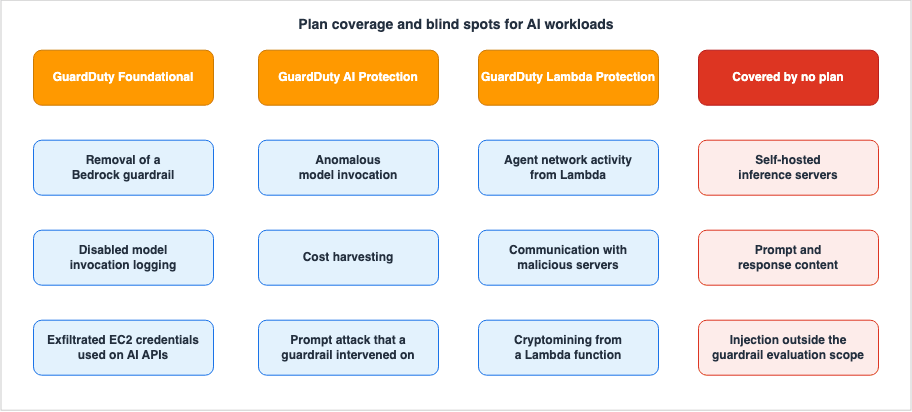
7. How Security Hub Bundles the Results
7.1 Findings Flow In Automatically
Turn Security Hub on and GuardDuty delivers its findings there by itself. The Security Hub user guide states:If you enable GuardDuty, GuardDuty automatically begins sending data to Security Hub in the OCSF
format.The integration on the CSPM side works in the same way.
After you enable Security Hub CSPM, this integration is automatically activated. GuardDuty
immediately begins to send findings to Security Hub CSPM.
No additional configuration is required. However, the Security Hub mentioned here involves two separate services: AWS Security Hub and AWS Security Hub CSPM. While the relationship between these two services, and their deployment in multi-account environments, is detailed in the published Centralized Logging and Audit Architecture on AWS, this article will focus only on aspects related to AI workloads.
7.2 Correlating with Asset Information
Security Hub has an AI inventory. It continuously discovers the AI assets across an organization and lists them, and it reached general availability in July 2026, the same month as the AI Protection findings.The real value emerges when you correlate these two sources. Findings identify specific credentials, while the inventory identifies specific assets. Individually, neither provides a complete picture; there is no way to tell which assets a compromised credential can reach.
However, there are three structural limitations to consider when performing this correlation, all set out in the Considerations section of the user guide.
Self-hosted AI resources don't have findings in this release. Security Hub shows finding counts
for managed AI resources only.

Security Hub doesn't attribute Amazon ECR images to a parent host in this release, so the host
AI counts don't include them.

Security Hub detects external endpoints from GuardDuty DNS activity on Amazon EC2 only.
In order: no finding attaches to a self-hosted asset, no ECR image maps to a host, and external endpoint detection reaches only EC2 instances.
The first limitation directly impacts detection operations. A self-hosted inference server appears in the inventory, but no finding is attached to it. Sort assets by finding count and the self-hosted ones sink to the bottom every time. Furthermore, self-hosted assets often lack the configuration controls that managed services provide. Relying solely on the number of findings to prioritize assets can lead to an incorrect order of importance.
The published AI Bill of Materials on AWS provides detailed information on how the inventory discovers assets and the limitations of each discovery path. This article focuses solely on using the inventory to correlate detection results with specific assets.
7.3 An Exposure Finding Takes a Resource as Its Subject
Security Hub generates exposure findings by correlating multiple signals. According to the user guide definition:An exposure finding in Security Hub represents the correlation of multiple security signals that
identify potential security risks in your AWS environment.GuardDuty is one of the sources of these signals. So an AI Protection finding can become material for an exposure finding.
However, exposure findings have a specific subject requirement.
A resource can be the primary resource in, at most, one exposure finding.An exposure finding takes a resource as its subject. An AI Protection finding takes
AccessKey, that is, an IAM identity. The two have subjects of different kinds.The nature of an exposure finding matters as well. The user guide is explicit about when one is not generated.
If a resource does not have any exposure traits or has insufficient traits, Security Hub does not
generate an exposure finding for that resource.
If sufficient traits are not present, exposure findings will not be created. One threat detection result on its own does not produce an exposure finding.
There is also a prerequisite on the CSPM side. The Security Hub recommendations page states that disabling basic controls can prevent the receipt of exposure findings.
You can disable any of the controls in this list. However, if you disable any of these controls,
you cannot receive exposure findings for supported resources.
Operational practices that restrict CSPM controls can negatively impact the generation of exposure findings. That side effect is easy to miss when you settle the operating policy for the standards.
7.4 The AI Standard Looks Only at Configuration
Security Hub CSPM includes an AI Security Best Practices standard. The ARN format is as follows:arn:aws:securityhub:region::standards/ai-security-best-practices/v/1.0.0As of August 18, 2026, this standard carries 31 controls: 1 for Amazon Bedrock, 7 for Amazon Bedrock AgentCore, and 23 for Amazon SageMaker. AWS publishes the list of controls in this standard, and that page carries the current composition. What matters here is not the count but the nature of the controls.
The user guide describes the scope of this standard as follows:
The controls cover security domains including but not limited to network isolation, encryption at
rest and in transit, VPC placement, AWS KMS key usage, and private registry requirements.
Network isolation, encryption at rest and in transit, placement in a VPC, KMS key usage, private registry requirements. Every one of them is configuration.
Even if you review the entire list, there is not a single control that evaluates whether detection is enabled. An account with AI Protection disabled can still achieve a perfect score according to this standard.
This is not a flaw in the standard itself. CSPM detects configuration drift; it does not evaluate whether detection is running. But read enabling this standard as watching AI security and the score will hide the detection gaps.
7.5 Network Scanning Answers a Different Question
Security Hub includes an optional feature called network scanning. According to the user guide:Control-plane analysis evaluates security groups, Network Access Control Lists (NACLs), and route
tables to determine what could be reachable. Network Scanning goes further by detecting what is
actually reachable. It probes your resources from outside your accounts to identify open ports and
running services.It does not ask what could be reachable. It asks what is actually reachable. Where you run a self-hosted inference server on EC2, this feature answers whether that endpoint is reachable from the internet.
This is not detection, though. It answers a different question.
| Mechanism | Question Answered |
|---|---|
| AI Protection | Has someone invoked the model in an unusual way? |
| AI inventory | Where is what running? |
| Network Scanning | Is it reachable from outside? |
| Exposure finding | Taken together, which resource comes first? |
These four features complement each other, but cannot replace one another. Here are three operational characteristics of network scanning:
It is opt-in. You enable it through a configuration policy, the console, or the
EnableSecurityHubFeatureV2 API. If enabled through a configuration policy, member accounts cannot disable it.The scan only uses TCP and targets a subset of known ports. The user guide also notes that the list of targeted ports may change in the future.
Exclusions are specified using tags. Applying the
SecurityHubNetworkScanExclusion tag key to a resource will stop subsequent scans and close any existing findings. Apply the tag to the resource that actually holds the public IP.8. Three Questions to Answer First When a Finding Fires
8.1 Question 1: Whose credentials are these?
When you receive an AI Protection finding, the first step is to identify the credentials involved. As Chapter 4 showed, theResource type is AccessKey, and the finding identifies the IAM identity that invoked the model.From here the work is not AI-specific. Treat it as a credential compromise. The GuardDuty user guide itself instructs users to refer to the procedure for potentially compromised AWS credentials when addressing any of the three finding types. The specific steps for initial response are detailed in the published AWS Security Incident Response Playbooks, so they are not repeated here.
What is specific to AI is the assessment of what capabilities that credential possessed. As part of the response, the user guide lists eight model invocation APIs to narrow access to.
bedrock:InvokeModel
bedrock:InvokeModelWithResponseStream
bedrock:Converse
bedrock:ConverseStream
bedrock-mantle:CreateInference
sagemaker:InvokeEndpoint
sagemaker:InvokeEndpointAsync
sagemaker:InvokeEndpointWithResponseStream
Use those eight directly as the scope of the audit. Check which of them the possibly compromised identity was allowed to call. Keep in mind that
bedrock-mantle:CreateInference belongs to a different endpoint and may be missed if you only search for APIs with the bedrock: prefix.8.2 Question 2: Which model?
Next, pin down which model was involved. As section 4.2 showed, that comes fromresource.modelDetails. This is a list, so it may contain multiple entries.As section 4.2 confirmed, the
modelId value has no single format. The same field may hold a foundation model identifier, an inference profile, a model ARN of several kinds, a Marketplace endpoint, a prompt resource, or a SageMaker AI endpoint name. If you are processing this value programmatically as part of a procedure, it is safer to use it directly for asset matching without assuming a specific format.For the third type of finding, the information pertains to guardrails, not the model itself. Read
resource.bedrockGuardrailDetails as seen in section 4.3, and specifically check the value of action in contentPolicyFilters, whether it is BLOCKED or NONE. If the value is NONE, the prompt is reaching the model.8.3 Question 3: What actually happened?
In most cases this question has no answer.As seen in section 2.5, AI Protection analyzes CloudTrail events, and those events carry neither the prompt text nor the model response. The model invocation logs, which record the content of interactions, are disabled by default, and GuardDuty does not read them.
Whether the question can be answered at all, then, is settled before the incident. Enabling model invocation logs after receiving a finding will not retrieve information about past requests.
The correct approach for detection design is to make this determination in advance. Deciding whether or not to record content is not a simple on/off decision. If the assumption is that users may input sensitive information, the record itself widens what you have to protect. If you decide not to log, document that decision and the reasons behind it. Then nobody has to argue from scratch, in the middle of an incident, about why the logs are not there.
The three questions gathered into one table:
| Question | Location to Check | Should be Determined in Advance |
|---|---|---|
| Whose credentials were used? | Finding's Resource type and AccessKey details | Initial response procedures for credential compromise |
| Which model was used? | resource.modelDetails or resource.bedrockGuardrailDetails | Method for matching against the asset inventory |
| What actually happened? | Model invocation logs (disabled by default) | Policy regarding whether to record content |
Only the third question cannot be answered without a prior decision. The first two are in the finding itself.
9. The Blind Spots: What This Setup Does Not Catch
This chapter lists the conditions under which nothing fires, as confirmed against primary sources up to this point. It is not exhaustive. It is a list of what could be confirmed, and what could not be confirmed is written down as such.9.1 Blind Spots on the Prompt Injection Side
| # | Situation in Which Nothing Fires | Basis |
|---|---|---|
| 1 | An attack on an invocation that no guardrail covers | The finding requires a guardrail intervention |
| 2 | No prompt attack content filter configured | contentPolicyFilters has to carry a type of PROMPT_ATTACK |
| 3 | Instructions planted in content that sits outside the evaluation scope | Input tags and guardrailConfiguration set that scope |
| 4 | The guardrail detects something, but the confidence does not reach HIGH | confidence has to be HIGH |
| 5 | An intervention by denied topics, word filters, or sensitive information filters | This finding covers PROMPT_ATTACK only |
| 6 | A Region where Bedrock Guardrails is unavailable | The finding type is not offered there |
Scenario #3 is particularly likely to occur in practical applications. A common design, as demonstrated by AWS itself in its user guides, evaluates only the user query in a retrieval-augmented generation configuration. Following the recommended design can create this blind spot.
9.2 Blind Spots on the Anomaly Detection Side
| # | Situation in Which Nothing Fires | Basis |
|---|---|---|
| 7 | An invocation that moves none of the four profiled features | The baseline is built from the invocation API, the model, the source IP and its ASN organization, and the user agent |
| 8 | Token volume alone is anomalous, with no other unusual signal | The user guide states correlation as a condition |
| 9 | An invocation that CloudTrail never records | A request to a self-hosted inference server is not an AWS API call |
Number 9 represents the broadest blind spot. Attacks targeting self-hosted inference servers running on EC2, EKS, or ECS are outside the scope of AI Protection. This is the designed scope of AI Protection, not a defect. Self-hosted workloads fall to Runtime Monitoring and to the network-side detections in Foundational. What those watch, however, is processes and traffic, not the semantics of a model invocation. What the Runtime Monitoring agent actually observes on an EKS node, and which compute types it does not reach at all, are covered in eBPF on Amazon EKS.
9.3 Blind Spots Arising from Operation and Configuration
| # | Situation in Which Nothing Fires | Basis |
|---|---|---|
| 10 | An account where AI Protection was never enabled | An existing account is not enabled automatically |
| 11 | A notification path filtered by severity, when the finding came out at its default | All three finding types default to Low |
| 12 | Anything that would have come from a Bedrock invocation, in a Region where Bedrock is unavailable | There, the two finding types come only from SageMaker AI invocations |
| 13 | The window after a guardrail is removed | Foundational can catch the removal itself, but invocations after it are never evaluated |
Row 11 always remains when enablement alone is treated as the finished job. Enabling a plan and ensuring that findings reach a person are separate processes.
9.4 Blind Spots Regarding Content and Correlation
| # | What You Cannot Learn | Basis |
|---|---|---|
| 14 | What went in and what came out, read from the finding | CloudTrail events do not carry the body |
| 15 | The content of an invocation made through bedrock-mantle, after the fact | Model invocation logging covers bedrock-runtime only |
| 16 | The request parameters of a SageMaker endpoint invocation | The data event does not record request parameters |
| 17 | An attack sequence finding specific to AI | No such finding type exists |
Item 16 refers to the following excerpt from the SageMaker AI Developer Guide:
The InvokeEndpoint, InvokeEndpointAsync, Sample, and SampleWithResponseStream API calls don't log
the request parameters.
When building your own detection or auditing systems on top of SageMaker data events, you can only identify which endpoint was called.
9.5 Blind Spots on the Aggregation Side
| # | What the Aggregation Does Not Show | Basis |
|---|---|---|
| 18 | A finding count on a self-hosted AI asset | In the current release no finding is attached to one |
| 19 | A call to an external AI endpoint from anything other than EC2 | Detection is limited to DNS activity on EC2 |
| 20 | A CSPM control that would tell you detection is off | The AI standard evaluates configuration only |
9.6 Items That Could Not Be Verified
Items that could not be traced to a primary source are written down as such.| Item | Status |
|---|---|
| Handling of new identities without an established baseline | Not described in the user guide. This article does not make definitive statements. |
Details of other anomalous signals used by CostHarvesting for correlation | Not publicly available. |
| Whether findings from AI Protection actually contribute to correlating attack sequences | Based on the lists of signal and finding types, it appears unlikely, but AWS has not explicitly stated this. |
| Latency in generating findings | No publicly available information regarding AI Protection. |
Build these four into the design as gaps. That is safer than designing as though they were closed.
The gaps in this list are gaps in a managed detector. Closing one of them means writing a detection yourself, and the first obstacle is not the rule but the source: the log has to be accepted before anything can be written against it. Detection Engineering on AWS works through those requirements.
10. Design Checklist
The checklist is written as questions. Anything you cannot answer is the next piece of work.10.1 Enablement and Reach
- Have you confirmed, through settings rather than assumptions, that AI Protection is enabled in the target accounts and Regions?
- Is the organization-wide auto-enable setting still left at
NEW? If you want to cover existing accounts, is it set toALL? - After applying
ALL, did you mistake a change that had not propagated yet for a setting that was never applied? - Have you confirmed, from the monitored accounts, that the CloudTrail service-linked channel is enabled?
- Are the notification channels, filtered by severity, not dropping findings with a default severity of Low?
- Have you finished building the path that puts an AI Protection finding in front of a person, as a task separate from enablement?
10.2 Conditions for Prompt Injection Detection
- Is the application of guardrails enforced at the organizational or account level, rather than leaving it to the application itself?
- Does the guardrail have a prompt attack content filter configured?
- Have you verified, through code rather than just the configuration interface, what the application is actually passing for evaluation?
- In retrieval-augmented generation configurations, is the retrieved content being excluded from the evaluation scope? If so, is that decision being logged?
- Is the guardrail being operated in detection-only mode? If so, does the response procedure state that the
actionincontentPolicyFilterswill beNONE?
10.3 How to Read a Finding
- Does the response procedure treat the subject of the finding as an IAM identity rather than the model?
- Is the procedure assuming that
resource.modelDetailsis a list? - Does the procedure make any assumptions about the format of the
modelIdvalue? - Do
Impact:IAMUser/AnomalousModelInvocationandImpact:IAMUser/AnomalousBehaviorbranch the way you intended in the response procedure? - Does the inventory of model permission checks include
bedrock-mantle:CreateInference?
10.4 Recording Guidelines
- Have you determined in advance whether records of input and output are required in the event of an incident?
- If you decided not to keep records, have you documented that decision and the reasons behind it?
- Is your custom detection query looking beyond
bedrock.amazonaws.comalone? - Have you built in that a SageMaker data event yields no request parameters?
10.5 Consolidation and Prioritization
- Are you ordering the asset list by something other than finding count alone?
- Does your prioritization account for a self-hosted asset carrying no finding?
- Has narrowing the set of CSPM controls stopped exposure findings from being generated?
- Are you keeping the score of the AI standard out of any argument that detection is enabled?
11. Frequently Asked Questions
Does enabling AI Protection make attacks against generative AI visible?
No. What becomes visible is limited to three threat types: anomalous model invocation, cost harvesting, and the direct prompt injection that a guardrail detected. AI Protection does not see the rest: an attack on a self-hosted inference server, or instructions planted outside the guardrail's scope.Does the finding point at the model?
No, it points at the IAM identity. The user guide clearly states that theResource type is AccessKey and that the finding identifies the IAM identity that invoked the model. The model sits in a separate field, resource.modelDetails.Does a prompt injection always result in a finding?
No, a finding does not always follow. This one requires an Amazon Bedrock Guardrails intervention. If no guardrail covers the invocation, if no prompt attack filter is configured, or if the content under attack sits outside the evaluation scope, nothing intervenes and nothing fires.If the guardrail intervened, does that mean the attack was blocked?
No, not necessarily. When the guardrail intervenes, theaction field in contentPolicyFilters reads BLOCKED if it blocked the content. However, if it detected the prompt attack but is configured only to report, the value is NONE. If the value is NONE, the prompt is still reaching the model.Does AI Protection turn on by itself on an existing GuardDuty account?
No, it does not. The user guide states that for existing GuardDuty accounts, you can choose to enable the protection plans available in each Region. AI Protection reached general availability on July 14, 2026, so any account that turned GuardDuty on before that date needs an explicit action.Can an organization policy standardize what AI Protection detects?
No, enablement is as far as it goes. AI Protection does not have publicly configurable settings for specifying thresholds or what to monitor. Amazon Bedrock Guardrails is the other way around: an Amazon Bedrock policy in AWS Organizations enforces which guardrail and which version applies, across the organization.Do AI Protection findings roll up into an attack sequence?
No, and do not plan around it. The seven signal types defined in the GuardDuty API reference include dedicated values for S3 data events, EKS audit logs, and Runtime Monitoring, but there is no value that represents data from AI Protection. Furthermore, none of the five finding types associated with attack sequences list AI Protection as a data source. AI Protection can contribute only as a finding that has already fired. AWS, for its part, never writes that it does not contribute.Can you determine what prompts were sent?
No, you cannot. AI Protection analyzes CloudTrail events, and those do not carry the text of the prompt or of the model response. Amazon Bedrock model invocation logging does record that content, but it is disabled by default and GuardDuty does not read it. Whether the record exists at all is settled by a decision made before the incident.Do you get the same finding type in all Regions?
No, you do not. Two of them, anomalous model invocation and cost harvesting, require Amazon Bedrock or Amazon SageMaker AI. In a Region without Bedrock, they come from SageMaker AI model invocations only. The direct prompt injection finding type requires Amazon Bedrock Guardrails, and a Region without Guardrails does not offer it. The list of supported Regions sits on the official page for each service.Does enabling the AI standard in Security Hub also evaluate the detection settings?
No, it does not. The AI Security Best Practices standard focuses on configuration areas such as network isolation, encryption at rest and in transit, placement in a VPC, KMS key usage, and private registry requirements. It does not include controls that evaluate whether detection is enabled. Even if AI Protection is disabled, accounts can still achieve a perfect score against this standard.Will self-hosted inference servers be detected?
No, self-hosted inference servers are not subject to AI Protection. AI Protection analyzes the AWS API calls that CloudTrail records, and a request to a server you stood up yourself is not one of them. On the host and network side, the flow logs and DNS query logs in Foundational cover part of it, and Runtime Monitoring covers the rest. What they watch, however, is processes and traffic, not the semantics of a model invocation.12. Conclusion
This article has set out the detection surface for AI workloads on AWS from the side of the conditions each finding needs before it fires. Five points carry the argument.First, the finding refers to an IAM identity. All three finding types carry a
Resource type of AccessKey and name the identity that invoked the model. The model sits in resource.modelDetails, and the guardrail that intervened sits in resource.bedrockGuardrailDetails. The first move of the response follows from that.Second, detecting prompt injection relies on guardrail intervention. In this finding GuardDuty acts as the carrier, not the judge. If instructions sit in content the guardrail never evaluated, no finding appears, even when the attack succeeds. And narrowing the evaluation scope is a design AWS itself puts forward as an example.
Third, enablement and reach are separate jobs. AWS documents automatic enablement only for new GuardDuty accounts, so you cannot assume an existing account has it. Even if activated, all three finding types have a default severity of Low. Consequently, a notification route whose filter starts above Low never carries a finding that came out at its default.
Fourth, the content is not there. A CloudTrail event does not carry the body, and model invocation logging, which would record it, is off by default. Whether you can answer that question during an incident was settled by an earlier decision.
Fifth, aggregation does not fill detection gaps. Security Hub aggregates findings, matches them to assets, and prioritizes them based on exposure. But no finding is attached to a self-hosted asset, and the AI standard evaluates configuration only. The aggregation mechanism will not create anything if there is nothing to aggregate.
Designing a detection system is not just about increasing the number of alerts. It is also the work of listing what will not fire and then deciding, deliberately, to leave it that way. Chapter 9 is the starting point for that list. It also explicitly states that four gaps remain.
13. References
- Amazon GuardDuty User Guide - GuardDuty AI Protection
- Amazon GuardDuty User Guide - GuardDuty AI Protection finding types
- Amazon GuardDuty User Guide - Enabling AI Protection in multiple-account environments
- Amazon GuardDuty User Guide - GuardDuty IAM finding types
- Amazon GuardDuty User Guide - GuardDuty attack sequence finding types
- Amazon GuardDuty User Guide - GuardDuty Extended Threat Detection
- Amazon GuardDuty User Guide - GuardDuty foundational data sources
- Amazon GuardDuty User Guide - Severity levels of GuardDuty findings
- Amazon GuardDuty User Guide - Amazon GuardDuty Regions and endpoints
- Amazon GuardDuty User Guide - Getting started with GuardDuty
- Amazon GuardDuty User Guide - Auto-enable options
- Amazon GuardDuty API Reference - Signal
- Amazon GuardDuty API Reference - Sequence
- Amazon Bedrock User Guide - Monitor Amazon Bedrock API calls using CloudTrail
- Amazon Bedrock User Guide - Monitor bedrock-mantle API calls using CloudTrail
- Amazon Bedrock User Guide - Monitor model invocation using CloudWatch Logs and Amazon S3
- Amazon Bedrock User Guide - Apply tags to user input to filter content
- Amazon Bedrock User Guide - Apply cross-account safeguards with Amazon Bedrock Guardrails enforcements
- Amazon Bedrock User Guide - Safeguard tiers for guardrails policies
- Amazon SageMaker AI Developer Guide - Logging Amazon SageMaker AI API calls using AWS CloudTrail
- AWS Security Hub User Guide - Exposure findings in Security Hub
- AWS Security Hub User Guide - AI Inventory in Security Hub
- AWS Security Hub User Guide - Network Scanning in Security Hub
- AWS Security Hub User Guide - Security Hub recommendations
- AWS Security Hub CSPM User Guide - AI Security Best Practices standard in Security Hub CSPM
- AWS Security Hub CSPM User Guide - AWS service integrations with Security Hub CSPM
- AWS What's New - Introducing Amazon GuardDuty AI Protection for AWS AI workloads
- AWS Security Blog - Security Hub adds AI workload protection and multicloud support for Microsoft Azure
References:
Tech Blog with curated related content
Written by Hidekazu Konishi