Amazon Bedrock Guardrails Implementation Deep Dive - Policy Types, ApplyGuardrail API, Detection Modes, and Cross-Region Guardrail Profiles
First Published:
Last Updated:
ApplyGuardrail call, or as the resource-less InvokeGuardrailChecks call for agent loops. Two guardrails with the same six policies enabled can behave completely differently depending on those knobs.This article is a reference implementation at the configuration-value and API level. It covers what each policy type actually configures, the block-versus-detect-versus-mask action model, the three ways to attach a guardrail to your traffic, how versions and drafts work, and how cross-region guardrail profiles fit in. The goal is that you can read one page and set the right values, apply them at the right point, and confirm the effect from the intervention trace — without reading the whole developer guide first.
What this article intentionally leaves to other articles, so it does not re-explain them:
- The multi-layer defense architecture and the rationale for treating safety as an independent control layer are covered in Responsible-AI Guardrails Architecture on AWS. This article is the settings-and-API companion to that architecture article.
- Prompt-injection defenses at the network edge (AWS WAF rate rules, pattern matching, two-layer WAF plus Guardrails) are covered in AWS WAF for Generative AI - Prompt Injection Defense Implementation Patterns.
- The end-to-end PII lifecycle (Amazon Comprehend, Amazon Macie, storage-side redaction) is covered in PII Detection and Redaction Patterns for Generative AI on AWS.
- Data residency and the geographic meaning of cross-region inference are covered in Amazon Bedrock Cross-Region Inference and Data Residency Design.
- Retrieval-side grounding (the RAG mechanics behind a good grounding source) is covered in Amazon Bedrock Knowledge Bases Retrieval Quality Engineering.
One honesty note governs the whole article: every guardrail policy is probabilistic and content-dependent. A configuration that passes your test cases is a control, not a proof. Do not read "the guardrail is enabled" as "the application is safe." Guardrails reduces the likelihood and blast radius of undesirable content; it does not eliminate it, which is exactly why the layered architecture in the responsible-AI article matters.
Because Guardrails evaluates content independently of the model that produced it, the model identifiers in the code below are shown as
<model-id> placeholders. Guardrails is model-agnostic — the same policy configuration applies whether the model is a current Anthropic Claude model on Bedrock or any other supported model, and ApplyGuardrail works even when the text did not come from a Bedrock model at all.1. Introduction: What a Guardrail Actually Is
A guardrail is a named, versioned Bedrock resource. Its configuration is a bag of up to six policy types plus a few global fields (the messages returned on a block, the safeguard tier, and the optional cross-region profile). Nothing about a guardrail is "on" or "off" globally — each policy is independently enabled per direction and assigned an action.Amazon Bedrock Guardrails currently supports six policy types:
- Content filters — configurable-strength detection across harmful categories (Hate, Insults, Sexual, Violence, Misconduct) plus Prompt Attack.
- Denied topics — natural-language definitions of conversation topics to keep out of the application.
- Word filters — exact-match blocking of specific words and phrases, plus a managed profanity list.
- Sensitive information filters — detection of PII entities and custom regex patterns, with block or mask actions.
- Contextual grounding checks — scoring of a response against a provided source (grounding) and against the user query (relevance) to catch hallucinations.
- Automated Reasoning checks — logic-based verification of claims against a structured policy of known facts. This article treats it only as a complementary check and does not go deep; see the References for the official material. One thing is worth knowing before you dismiss it on authoring cost: on 2026-06-23 AWS added two refinement workflows that shrink the manual effort of writing the policy in the first place. The iterative policy improvement workflow takes the natural-language tests you have written for a policy and deduces the policy changes needed to make them pass; the ambiguity reduction workflow refines variable descriptions and type definitions so that ambiguous translation results occur less often. Both are reachable from the Amazon Bedrock APIs and from Refine policy on the policy page in the console.
The rest of this article walks each policy type at the configuration-value level (sections 3–7), then the action model that ties them together (section 8), the three ways to apply a guardrail (section 9), versioning and cross-region profiles (section 10), and trace-driven diagnostics (section 11). If you want the "why" and the surrounding architecture, read the responsible-AI article; if you want the "which value do I set," keep reading here.
2. The Configuration Model: Policies, Actions, and Evaluation Order
Before the individual policies, fix the mental model. A guardrail evaluates content at up to two points and applies a per-policy action at each.Two evaluation points. A guardrail can evaluate the input (the user prompt / request content) and the output (the model response). Every policy is independently switchable on input and on output via
inputEnabled and outputEnabled. Disabling a direction skips the evaluation entirely for that policy — which also means there is no trace for it and no charge for that evaluation. Contextual grounding is the exception: it is an output-side check, because it scores a generated response against a source.The per-policy action model. When a policy detects something, what happens is governed by
inputAction / outputAction:BLOCK— the content is blocked and replaced with your configured blocked message. For a coupled model invocation, the model call is short-circuited.NONE— take no action, but return the detection in the trace. This is how "detect mode" is expressed (see section 8).- For sensitive information filters only, a third action
ANONYMIZE(mask) replaces the detected entity in place instead of blocking the whole request.
When any policy takes a blocking or masking action, the top-level response action is
GUARDRAIL_INTERVENED; otherwise it is NONE. This single field is the first thing to read in any diagnostic.Requirement-to-policy mapping. Choosing the right policy type is a matching exercise. The table below maps the requirement you have to the policy that expresses it and the key knobs you will set.
| Requirement | Policy type | Key configuration knobs |
|---|---|---|
| Block broad harmful content by category | Content filters | Category, inputStrength/outputStrength (NONE/LOW/MEDIUM/HIGH), modalities, tier |
| Detect jailbreaks / prompt injections | Content filters (Prompt Attack) | Prompt Attack category, strength (prompt leakage sub-type requires Standard tier) |
| Keep the assistant off a subject | Denied topics | name, definition, type: DENY, action, tier |
| Block specific words / competitor names | Word filters | Managed word lists, custom text (exact match), action |
| Detect or redact PII | Sensitive information filters | Entity type or custom regex, action (BLOCK/ANONYMIZE/NONE) |
| Catch hallucinations against a source | Contextual grounding checks | GROUNDING/RELEVANCE threshold (0–0.99), action |
| Verify claims against known facts | Automated Reasoning checks | Automated Reasoning policy (see References) |
The evaluation pipeline — where each policy acts on the input side and the output side — is shown below.
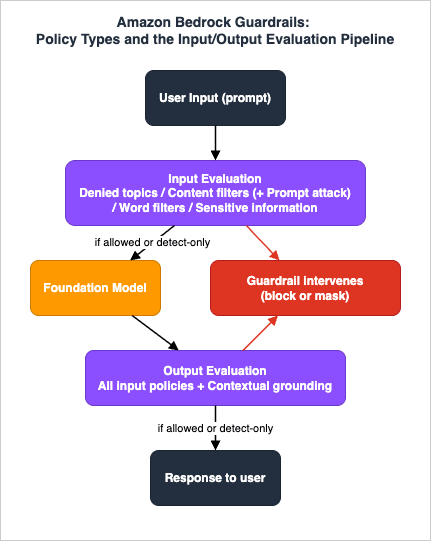
blockedInputMessaging and blockedOutputsMessaging, are returned to the caller when a block occurs on input or output respectively. The safeguard tier (section 3) and the optional cross-region config (section 10) are also guardrail-level. Everything else lives inside the individual policy configs described next.3. Content Filters and Prompt Attacks
Content filters are the category-based moderation layer. They detect harmful text and image content across predefined categories and let you dial a strength per category and per direction.Categories. Hate, Insults, Sexual, Violence, Misconduct, and — as a distinct category — Prompt Attack (jailbreaks, prompt injections, and prompt leakage). Prompt Attack detection applies to input content; jailbreak and prompt injection detection work on both safeguard tiers, while the prompt leakage sub-type is available on the Standard tier only.
Strength. Each category takes an
inputStrength and outputStrength from NONE, LOW, MEDIUM, HIGH. Increasing the strength increases the likelihood of filtering harmful content and decreases the likelihood of harmful content passing — and, symmetrically, increases the chance of false positives. Strength is a probability dial, not a switch with a guaranteed cutoff.Modalities. Content filters support text and image content.
inputModalities and outputModalities select which modalities the filter evaluates, so you can, for example, moderate images on input while moderating text on both sides.Safeguard tiers. Content filters (and denied topics) can each be configured with a tier:
- Classic tier — the original behavior and language coverage.
- Standard tier — expanded language coverage, detection extended into code elements (comments, variable and function names, string literals), and the prompt leakage sub-type of Prompt Attack detection (jailbreak and prompt injection detection are available on both tiers). The Standard tier requires a cross-region guardrail profile (section 10); a Standard-tier guardrail without
crossRegionConfigis rejected.
Content filters and denied topics can carry different tiers within the same guardrail, so you can run content filtering on Standard while keeping denied topics on Classic if that fits your needs.
A create-time content policy configuration looks like this (Python, boto3, on the
bedrock control-plane client):import boto3
bedrock = boto3.client("bedrock") # control plane
response = bedrock.create_guardrail(
name="support-assistant-guardrail",
# Standard tier requires a cross-region guardrail profile:
crossRegionConfig={"guardrailProfileIdentifier": "us.guardrail.v1:0"},
contentPolicyConfig={
"filtersConfig": [
{"type": "SEXUAL", "inputStrength": "HIGH", "outputStrength": "HIGH"},
{"type": "VIOLENCE", "inputStrength": "HIGH", "outputStrength": "MEDIUM"},
{"type": "HATE", "inputStrength": "HIGH", "outputStrength": "HIGH"},
{"type": "INSULTS", "inputStrength": "MEDIUM", "outputStrength": "MEDIUM"},
{"type": "MISCONDUCT", "inputStrength": "MEDIUM", "outputStrength": "MEDIUM"},
{"type": "PROMPT_ATTACK", "inputStrength": "HIGH", "outputStrength": "NONE"},
],
"tierConfig": {"tierName": "STANDARD"},
},
blockedInputMessaging="I can't help with that request.",
blockedOutputsMessaging="I can't provide that information.",
)
PROMPT_ATTACK uses outputStrength: NONE — prompt attacks are an input-side concern, so evaluating the output for them adds cost with little benefit. The exact category enum values, per-tier language lists, and any per-guardrail quotas (number of policies, request size limits) change over time; check the official quotas page rather than hardcoding assumptions.4. Denied Topics
Denied topics express boundaries that categories cannot: a subject you do not want the assistant to engage with, defined in your own words. A healthcare assistant that must not offer diagnoses or treatment decisions, or a customer-support assistant that must not give legal advice, is a denied-topics problem, not a harmful-content problem.Each topic is configured with:
name— a short identifier.definition— a natural-language description of the topic to avoid. The quality of this definition drives detection quality more than any other knob.type—DENY.inputEnabled/outputEnabledandinputAction/outputAction.- A tier (
CLASSICorSTANDARD); Standard extends topic detection into code domains and raises the definition length limit to 1,000 characters (Classic caps it at 200), leaving room for the sample phrasings and boundary clarifications discussed below.
topicPolicyConfig = {
    "topicsConfig": [
        {
            "name": "MedicalDiagnosis",
            "definition": (
                "Providing a medical diagnosis, treatment decision, or medication "
                "dosage recommendation for an individual's specific condition or symptoms."
            ),
            "type": "DENY",
            "inputEnabled": True,
            "inputAction": "BLOCK",
            "outputEnabled": True,
            "outputAction": "BLOCK",
        }
    ],
    "tierConfig": {"tierName": "STANDARD"},
}
5. Word Filters
Word filters are the exact-match layer. They do not reason about meaning — they match specific strings — which makes them precise and predictable, and useless for paraphrase.Two sources feed a word filter:
- Managed word lists — a ready-to-use profanity list you can enable.
- Custom words and phrases — your own
textentries (exact match), each up to a modest length, for things like competitor names, product names, or internal code words.
Each word or the managed list takes
inputAction / outputAction of BLOCK or NONE, with inputEnabled / outputEnabled per direction:wordPolicyConfig = {
"wordsConfig": [
{"text": "CompetitorProductName",
"inputAction": "BLOCK", "outputAction": "BLOCK",
"inputEnabled": True, "outputEnabled": True},
],
"managedWordListsConfig": [
{"type": "PROFANITY",
"inputAction": "BLOCK", "outputAction": "BLOCK",
"inputEnabled": True, "outputEnabled": True},
],
}
6. Sensitive Information Filters: Block versus Mask
Sensitive information filters are where the action model earns its keep, because here you usually do not want to block — you want to redact and keep going. This policy detects PII in standard formats and custom patterns via regex, and it is a probabilistic, context-dependent ML detection, not a fixed pattern list for the managed entities.Two detection sources:
- Managed PII entities — a large set of standard entity types (names, email addresses, phone numbers, addresses, national identifiers, financial identifiers, credentials such as access keys, and more). The set spans generic and country-specific identifiers; consult the API reference for the current enumeration rather than memorizing it.
- Custom regex — named patterns (
name,regex, action) for industry-specific identifiers the managed entities do not cover.
The action choice per entity is the design decision:
BLOCK— if this entity is detected, block the whole request or response. Appropriate for entities that should never appear at all (for example, a credential).ANONYMIZE— mask the entity in place (replaced with a type tag) and let the rest through. Appropriate for summarization or transcript workflows where a name or phone number should be scrubbed but the surrounding text is still useful.NONE— detect and report only.
sensitiveInformationPolicyConfig = {
    "piiEntitiesConfig": [
        {"type": "EMAIL",  "action": "ANONYMIZE"},
        {"type": "PHONE",  "action": "ANONYMIZE"},
        {"type": "NAME",   "action": "ANONYMIZE"},
        {"type": "AWS_ACCESS_KEY", "action": "BLOCK"},
        {"type": "AWS_SECRET_KEY", "action": "BLOCK"},
    ],
    "regexesConfig": [
        {"name": "InternalCaseId", "regex": r"CASE-\d{8}", "action": "ANONYMIZE"},
    ],
}
ANONYMIZE for low-severity entities with BLOCK for credentials in one policy is the common and correct pattern — block what must never appear, mask what should be scrubbed. Second, a guardrail-level sensitive-information filter is one point in a PII program, not the whole thing: source-side detection with Amazon Comprehend, data-store scanning with Amazon Macie, and storage/logging redaction are all separate concerns. The end-to-end design belongs to the PII Detection and Redaction Patterns for Generative AI on AWS article.7. Contextual Grounding and Relevance: Threshold Configuration
Contextual grounding is the score-based hallucination check: it runs on the output and produces two independent scores in the range 0 to 1 — grounding (is the response supported by the reference source you provided?) and relevance (does it answer the user's query?). What these scores mean conceptually, and why hallucination control needs a source-anchored check in the first place, is covered in the Responsible-AI Guardrails Architecture article; this section covers only the configuration surface.You configure a threshold per check — the documented configuration range runs from 0 (blocks nothing) to 0.99 (blocks almost everything); there is no valid setting that blocks all content unconditionally. A response whose score falls below the threshold is flagged as detected, and the configured action (
BLOCK or NONE) applies:contextualGroundingPolicyConfig = {
"filtersConfig": [
{"type": "GROUNDING", "threshold": 0.75, "action": "BLOCK"},
{"type": "RELEVANCE", "threshold": 0.5, "action": "BLOCK"},
]
}
ApplyGuardrail call this is done with content qualifiers (grounding_source, query, and guard_content); in a coupled Converse call, the source and query are provided as qualified content. Without a source, there is nothing to ground against.Threshold selection is a false-block-versus-missed-hallucination tradeoff, and there is no universally correct value. A higher grounding threshold blocks more unsupported responses but also blocks more borderline-but-acceptable ones; a lower threshold does the opposite. Tune it against your own content with tracing on (section 11), and treat 0.7–0.75 as a starting point to move from, not a recommendation to adopt.
The retrieval side — how you build a grounding source good enough that a real answer scores high — is retrieval-quality engineering, not guardrail configuration, and is covered in Amazon Bedrock Knowledge Bases Retrieval Quality Engineering. The broader hallucination-control architecture, including where Automated Reasoning checks fit as a logic-based complement, is in the Responsible-AI Guardrails Architecture article.
8. Block versus Detect: Choosing the Action per Policy
The action model from section 2 is where staged rollout lives. Restating it: each policy has, per direction, an enabled flag and an action. Setting a policy's action toNONE while leaving it enabled is detect mode — the guardrail evaluates all content and reports what it found in the trace, but takes no blocking or masking action.Detect mode is the safe way to introduce or retune a guardrail on live traffic:
- Deploy the guardrail with the policies you want but with actions set to
NONE. - Enable tracing and route real traffic through it.
- Read the trace to measure how often each policy would have fired, and on what.
- Analyze false positives and false negatives against real content, and adjust strengths, topic definitions, and thresholds.
- Once the behavior matches your intent, flip the relevant actions from
NONEtoBLOCK(orANONYMIZEfor PII) and, ideally, promote to a numbered version (section 10).
The honesty point is unavoidable here: detect mode does not protect anything. It is an instrument for measurement, not a control. A guardrail running entirely in detect mode is a monitoring configuration, and anyone who reads "the guardrail is deployed" as "the traffic is protected" in that state is wrong.
Detect mode still feeds the detection side, though. GuardDuty AI Protection raises
Impact:IAMUser/PromptInjection.Direct when a guardrail intervenes on an invocation after matching a prompt attack filter with high confidence, and it records the guardrail action as NONE when the guardrail only reported the match rather than blocking it — so a guardrail that was never attached produces neither the block nor the finding. Threat Detection for AI Workloads on AWS covers what that finding rests on.The
inputEnabled/outputEnabled flags are a different lever. Disabling a direction means the guardrail does not evaluate that direction at all — no action, no trace, no charge for that evaluation. Detect mode (action: NONE, enabled) still evaluates and still reports; a disabled direction does neither. Use disable to permanently exclude a direction, and detect mode to observe a direction you intend to enforce later.Putting requirement selection and action selection together gives the decision flow below: first match the requirement to a policy type, then choose the action based on whether you are measuring or enforcing.
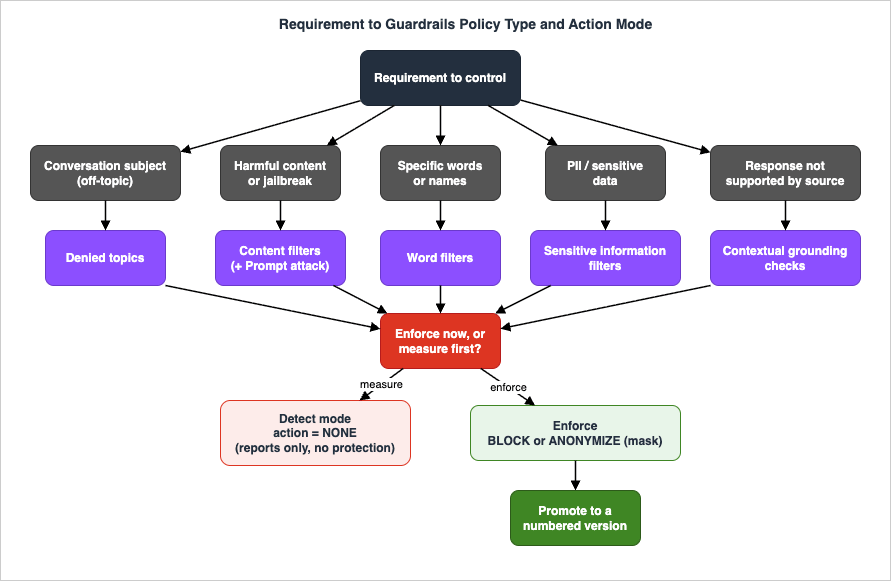
9. Applying Guardrails: Invocation Integration, ApplyGuardrail, and InvokeGuardrailChecks
A configured guardrail does nothing until content flows through it. There are three ways to make that happen, and choosing among them is an architecture decision as much as the policies are.9.1 Coupled to a model invocation
The simplest integration attaches the guardrail to a Bedrock model call so the guardrail evaluates the input before the model runs and the output before it is returned.Conversetakes aguardrailConfig(guardrailIdentifier,guardrailVersion, andtrace). Content you want grounded is tagged asguardContent.
brt = boto3.client("bedrock-runtime")  # data plane

resp = brt.converse(
    modelId="<model-id>",
    guardrailConfig={
        "guardrailIdentifier": "<guardrail-id>",
        "guardrailVersion": "3",     # a numbered version, not DRAFT
        "trace": "enabled",
    },
    messages=[{"role": "user", "content": [{"text": "..."}]}],
)
ConverseStreamtakes aGuardrailStreamConfiguration, which addsstreamProcessingMode.sync(the default) completes the guardrail assessment before returning response chunks;asyncstreams chunks while the guardrail continues evaluating in the background, trading a small window of un-evaluated output for lower time-to-first-token. Choosesyncwhen no unfiltered token may reach the user,asyncwhen latency matters more and a late intervention is acceptable.InvokeModel/InvokeModelWithResponseStreamattach the guardrail via request fields and enable tracing with theX-Amzn-Bedrock-Trace: ENABLEDheader; the trace comes back in theamazon-bedrock-tracefield.
9.2 Standalone with ApplyGuardrail
ApplyGuardrail (on the bedrock-runtime data plane) evaluates content against a guardrail with no model call at all — the decoupling primitive. The architectural patterns it unlocks (guarding non-Bedrock models, pipeline checkpoints, tool inputs and outputs) are explored in the Responsible-AI Guardrails Architecture article; here is the API surface itself.Its inputs are
guardrailIdentifier, guardrailVersion, source (INPUT or OUTPUT), and content blocks whose text carries qualifiers (grounding_source, query, guard_content). outputScope can be set to FULL to return all detected and non-detected entries for debugging — with the documented caveat that the full scope does not apply to word filters or to the regex entries of sensitive information filters. Note also that a guardrail named in the request is not necessarily the only one evaluated: if your account or organization has enforced guardrails configured centrally (via the AWS Organizations Bedrock policy type or account-level safeguards), those are applied in union with the guardrail in the request.resp = brt.apply_guardrail(
guardrailIdentifier="<guardrail-id>",
guardrailVersion="3",
source="OUTPUT",
content=[
{"text": {"text": "<the model response to evaluate>",
"qualifiers": ["guard_content"]}},
{"text": {"text": "<the reference source>",
"qualifiers": ["grounding_source"]}},
{"text": {"text": "<the user query>",
"qualifiers": ["query"]}},
],
)
if resp["action"] == "GUARDRAIL_INTERVENED":
handle_intervention(resp["assessments"])
action (GUARDRAIL_INTERVENED or NONE), actionReason, assessments (the per-policy detail: content filters, topic policy, word policy, sensitive information policy, contextual grounding scores), outputs (the modified content, for example with PII masked), and usage/coverage metrics. assessments is the object you read when tuning (section 11). A worked (abridged) intervened response makes the shape concrete:{
"action": "GUARDRAIL_INTERVENED",
"actionReason": "Guardrail blocked.",
"assessments": [
{
"topicPolicy": {
"topics": [
{"name": "medical-diagnosis", "type": "DENY",
"action": "BLOCKED", "detected": true}
]
},
"sensitiveInformationPolicy": {
"piiEntities": [
{"type": "EMAIL", "match": "jane.doe@example.com",
"action": "ANONYMIZED", "detected": true}
]
},
"invocationMetrics": {
"guardrailProcessingLatency": 240,
"guardrailCoverage": {"textCharacters": {"guarded": 1450, "total": 1450}},
"usage": {"topicPolicyUnits": 1, "contentPolicyUnits": 1,
"wordPolicyUnits": 1, "sensitiveInformationPolicyUnits": 1,
"contextualGroundingPolicyUnits": 0}
}
}
],
"outputs": [{"text": "Sorry, the model cannot answer this question."}],
"usage": {"topicPolicyUnits": 1, "contentPolicyUnits": 1,
"wordPolicyUnits": 1, "sensitiveInformationPolicyUnits": 1,
"contextualGroundingPolicyUnits": 0}
}detected and action are separate facts per entry — a policy in detect mode reports detected: true with action NONE, which is exactly what you want when measuring a candidate configuration on live traffic. Second, outputs is only populated when the guardrail produced replacement content (the blocked-message text, or the input with PII masked) — when masking, your application must use outputs, not the original text. Third, invocationMetrics.usage counts the policy units each evaluation consumed per policy type; these unit counts are what guardrail quotas meter, so logging them gives you a capacity model for free. Fourth, each assessment carries appliedGuardrailDetails (guardrail ID, version, origin, and ownership) identifying which guardrail produced it — the field to check once account- or organization-enforced guardrails (section 9.2 above) participate in the evaluation alongside the one named in your request.9.3 Resource-less detect-only with InvokeGuardrailChecks
InvokeGuardrailChecks is the newest of the three and is aimed at agentic workflows. It runs specific safeguards — content filters, prompt attack detection, and sensitive information filters — without creating a guardrail resource first, and it is detect-only: it returns a numeric score (0 to 1) per check and takes no action. You own the block/bypass/retry/route-to-human decision in your own code.resp = brt.invoke_guardrail_checks(
checks={
"contentFilter": {"categories": [{"category": "VIOLENCE"},
{"category": "HATE"}]},
"promptAttack": {"categories": [{"category": "PROMPT_INJECTION"},
{"category": "JAILBREAK"}]},
"sensitiveInformation": {"entities": [{"type": "EMAIL"},
{"type": "US_SOCIAL_SECURITY_NUMBER"}]},
},
messages=[{"role": "user", "content": [{"text": "..."}]}],
)
# resp contains numeric scores; your code decides the action per its own thresholds.
ApplyGuardrail are easy to miss. First, prompt attack detection is its own safeguard in this API, requested separately from content filters — whereas in a guardrail resource (and therefore in ApplyGuardrail) prompt attacks are a category inside the content filter policy. Second, because the API is detect-only, it never rewrites content: there is no outputs equivalent, so if you act on a sensitive-information score by masking, the masking code is yours. Note also that the API is available in a limited set of AWS Regions — smaller than Guardrails itself — so check the supported-Regions list before designing an agent loop around it.In an agent loop, different steps need different safety postures — a prompt attack check before the model call, a PII check after a tool returns — and this API serves them without standing up a guardrail resource per step. Because it is detect-only, it is a scoring service you build enforcement logic on top of; the agent-safety architecture around it is delegated to the Responsible-AI Guardrails Architecture article.
9.4 Choosing among the three
| Integration | Model call | Resource needed | Action taken | Best for |
|---|---|---|---|---|
Coupled (Converse / InvokeModel) | Yes | Guardrail (versioned) | Enforced by the service | Guarding a single Bedrock model call inline |
ApplyGuardrail | No | Guardrail (versioned) | Enforced (block/mask) per config | Decoupled evaluation, non-Bedrock models, tool I/O, arbitrary pipeline points |
InvokeGuardrailChecks | No | None | Detect-only scores | Per-turn agent checks with custom action logic |
The full defense-in-depth pipeline that combines these with WAF, IAM, and logging is the subject of the Responsible-AI Guardrails Architecture article; here the point is only which call to reach for.
10. Versions, Drafts, and Cross-Region Guardrail Profiles
10.1 Versions and the working draft
When you create a guardrail, Bedrock automatically creates a single version labeled DRAFT (the "Working draft" in the console).UpdateGuardrail edits the DRAFT in place. To freeze a configuration, call CreateGuardrailVersion, which produces an immutable numbered snapshot (version 1, 2, and so on, auto-incremented). Later edits to the DRAFT do not affect existing numbered versions.The operational rule is to run production on a numbered version, not DRAFT. Two failure modes make DRAFT unsafe for production:
- Service interruption during updates. When an operator modifies the DRAFT with
UpdateGuardrail, the guardrail enters anUPDATINGstate, and inference calls that reference the DRAFT during that window can fail with aValidationExceptionuntil the guardrail returns toREADY. A numbered version is unaffected by DRAFT edits. - Inconsistent protection. Any change to the DRAFT immediately affects every caller pinned to DRAFT, so a mid-tuning edit can silently change production behavior.
A safe rollout is therefore: iterate on the DRAFT (optionally in detect mode) →
CreateGuardrailVersion when satisfied → point production traffic at that number → validate → promote the next number when you next change policies. In ApplyGuardrail or guardrailConfig, set guardrailVersion to the number ("3"), reserving "DRAFT" for development.ver = bedrock.create_guardrail_version(
guardrailIdentifier="<guardrail-id>",
description="Raise grounding threshold to 0.75 after shadow evaluation",
)
production_version = ver["version"] # e.g. "4"
10.2 Cross-region guardrail profiles
A cross-region guardrail profile lets a guardrail's evaluation be served across a set of regions rather than pinned to one, which improves capacity and resilience for the guardrail's own processing. It is configured withcrossRegionConfig.guardrailProfileIdentifier — a system-defined profile such as us.guardrail.v1:0 — whose availability depends on your region.crossRegionConfig = {"guardrailProfileIdentifier": "us.guardrail.v1:0"}
us.guardrail.v1:0 as an example.The data-residency implications of evaluating across a region set — what leaves which region, and how that interacts with SCPs and residency requirements — are a residency-design topic, covered in Amazon Bedrock Cross-Region Inference and Data Residency Design. This article only establishes the mechanism and the Standard-tier dependency.
11. Diagnostics: Trace-Driven Tuning
Every tuning decision starts from the trace, so enable it:trace: "enabled" in guardrailConfig for Converse/ConverseStream, the X-Amzn-Bedrock-Trace: ENABLED header for InvokeModel, or read the assessments directly from an ApplyGuardrail response. The workflow is always the same: read action, then read the assessments to find which policy fired and why.Over-blocking (false positives). The response was blocked but should not have been. In the assessments, identify the responsible policy and adjust its specific knob:
Fired policy (assessments field) | What to read | Knob to adjust |
|---|---|---|
contentPolicy | type, filterStrength, confidence | Lower the strength for that category, or move it to detect mode while gathering examples |
topicPolicy | The matched topic name | Narrow the definition so it stops matching the benign case, or add sample phrasings that clarify the boundary |
wordPolicy | The matched term | Remove or scope the custom word |
sensitiveInformationPolicy | Entity type and action | Switch BLOCK to ANONYMIZE, or ANONYMIZE to NONE, depending on whether losing the whole request or masking the field is the problem |
contextualGroundingPolicy | score versus threshold | If good answers score just under the threshold, lower it; if the grounding source is the real problem, fix retrieval, not the guardrail |
Under-blocking (false negatives). Undesirable content passed. Raise the relevant content-filter strength, tighten or add a denied topic (with sample phrasings), add the exact string to a word filter if applicable, or raise a grounding threshold. Confirm the change with the same trace, on the same inputs.
ValidationException — guardrail not READY. If inference intermittently fails with a not-READY error, you are calling the DRAFT while it is being updated. Pin production to a numbered version (section 10).Latency. If the guardrail adds too much latency, disable directions you do not evaluate (rather than leaving them in detect mode), consider
async streaming where a brief window of un-evaluated output is acceptable, and remove policies you are not actually using.Quota errors on decoupled checkpoints. A pipeline that calls
ApplyGuardrail at several checkpoints multiplies guardrail evaluations per user request, and the failure shows up as ServiceQuotaExceededException or throttling on the ApplyGuardrail call itself — distinct from model-invocation throttling, and easy to misattribute. Isolate by reading the error's source API in CloudTrail, and by summing the per-policy usage units from your responses to see which policy type is consuming capacity. Then reduce calls rather than content: content accepts multiple blocks per request, so batch the pieces you were checking in separate calls into one evaluation, drop checkpoints that duplicate a check the coupled invocation already performs, and request a quota increase through Service Quotas for what remains.An intervention you cannot attribute. The response says
GUARDRAIL_INTERVENED, but the guardrail you configured should not have fired — and with account- or organization-level enforced guardrails in play (section 9.2), the intervention may not have come from the guardrail named in your request at all. Read appliedGuardrailDetails in each assessment: it identifies the guardrail ID, version, origin, and ownership behind that assessment. If the intervening guardrail is centrally enforced, the fix is a governance conversation (or a change request to the central policy), not a change to your own guardrail's knobs — tuning your guardrail cannot loosen an organization-enforced one.The deeper failure-mode taxonomy — the reasoning behind over- versus under-blocking tradeoffs, grounding misjudgments, tier and language mismatches, and throttling behavior — is developed in the Responsible-AI Guardrails Architecture article's tuning section. This section is the mechanical procedure: read the trace, find the policy, adjust the specific knob, re-measure.
12. Frequently Asked Questions
Is a guardrail a replacement for the model's own safety training?No. A guardrail is an independent, configurable control that you own and version; the model's built-in behavior is neither configurable by you nor auditable in the same way. They are layers, and the value of Guardrails is that the control is yours to tune and inspect. Neither layer, alone or together, makes an application "safe" in an absolute sense.
Is it safe to run a guardrail in detect mode in production?
Detect mode (
action: NONE) evaluates and reports but takes no blocking or masking action. It protects nothing. It is the correct way to measure a new configuration on live traffic, but a guardrail left entirely in detect mode is monitoring, not enforcement.When do I use
InvokeGuardrailChecks instead of ApplyGuardrail?Use
InvokeGuardrailChecks for agent loops where different steps need different, ad-hoc safety checks and you do not want to create and version a guardrail resource for each. It is detect-only and returns scores; you write the action logic. Use ApplyGuardrail when you want the service to enforce a configured guardrail's actions (including masking) against an existing versioned guardrail.DRAFT or a numbered version in production?
A numbered version. Editing the DRAFT puts the guardrail into an
UPDATING state during which DRAFT-pinned inference can fail with a ValidationException, and any DRAFT change takes effect immediately for all DRAFT callers. Numbered versions are immutable snapshots.Do I have to configure a cross-region guardrail profile?
It is required for the Standard safeguard tier. If you use Classic-tier content filters and denied topics only, it is not required. Profile availability is region-dependent.
Block or mask for PII?
Block entities that must never appear (for example, credentials such as access keys). Mask (
ANONYMIZE) entities that should be scrubbed while keeping the surrounding text usable (names, emails, phone numbers in a summarization workflow). Mixing both in one policy is normal.Can one
ApplyGuardrail call evaluate several pieces of content at once?Yes.
content is an array of content blocks, and the qualifiers (guard_content, grounding_source, query) tell the guardrail what role each block plays. Batching the model response, its grounding source, and the originating query into one call is both how contextual grounding is meant to be used and cheaper in call volume than evaluating each piece separately.13. Summary
Amazon Bedrock Guardrails is configured, not toggled. The leverage is in the values: content-filter strengths per category and direction, denied-topic definitions, exact-match word lists, per-entity block/mask/detect choices for sensitive information, and grounding/relevance thresholds — all governed by one action model where every policy is enabled per direction and assignedBLOCK, ANONYMIZE, or NONE. Detect mode (NONE while enabled) is how you measure a configuration on live traffic before enforcing it, and it protects nothing on its own.Applying a guardrail is a separate choice with three answers: couple it to a
Converse/InvokeModel call for inline protection of one model, use ApplyGuardrail to evaluate content decoupled from any model, or use InvokeGuardrailChecks for resource-less detect-only scoring inside an agent loop. Run production on immutable numbered versions rather than the DRAFT, and remember that the Standard safeguard tier requires a cross-region guardrail profile. When something blocks too much or too little, the answer is in the trace: read action, find the policy in assessments, adjust that specific knob, and re-measure.For the architecture that surrounds these settings — why safety is an independent layer, how Guardrails composes with WAF and Comprehend, and the full failure-mode taxonomy — read the Responsible-AI Guardrails Architecture on AWS article. This article is the settings-and-API reference you keep open while you build.
14. References
- Amazon Bedrock Guardrails components
- Safeguard tiers for guardrails policies
- Use ApplyGuardrail independently of model invocation
- Amazon Bedrock policies (AWS Organizations)
- Options for handling harmful content detected by Amazon Bedrock Guardrails (detect mode)
- ApplyGuardrail API reference
- InvokeGuardrailChecks API reference
- Use the InvokeGuardrailChecks API in your application
- Include a guardrail with the Converse API
- CreateGuardrailVersion API reference
- Create a version of a guardrail
- GuardrailCrossRegionConfig API reference
- Tailor responsible AI with new safeguard tiers in Amazon Bedrock Guardrails (AWS Machine Learning Blog)
- Build safe generative AI applications like a Pro: Best Practices with Amazon Bedrock Guardrails (AWS Machine Learning Blog)
- Amazon Bedrock Pricing (for Guardrails pricing structure)
- Responsible-AI Guardrails Architecture on AWS - Independent Content Safety with Bedrock Guardrails, Comprehend, and WAF
- AWS WAF for Generative AI - Prompt Injection Defense Implementation Patterns
- Amazon Bedrock Glossary
- PII Detection and Redaction Patterns for Generative AI on AWS
- Amazon Bedrock Cross-Region Inference and Data Residency Design
- Amazon Bedrock Security and Governance
- Amazon Bedrock Knowledge Bases Retrieval Quality Engineering
References:
Tech Blog with curated related content
Written by Hidekazu Konishi