Agent Sandboxing and Blast-Radius Isolation on AWS - Choosing the Unit of Each Containment Boundary and What Each One Does Not Stop
First Published:
Last Updated:
Many implementations reach production without a design that answers this question. You put guardrails in, validate prompts, and inspect outputs. All of that is preventive design. Preventive design says nothing about what happens once prevention fails.
This article focuses solely on the "containment" side. Assuming a breach, it covers how to choose the unit of each boundary and what remains after that boundary holds. It addresses five boundaries: execution environment, credentials, network, data, and time.
It is worth stating up front what this article does not cover. It is not a list of controls. Existing articles already hold that. Section 1.2 gives the full list of what is out of scope.
The specifications presented in this article were verified against the official AWS documentation as of August 17, 2026. Given the rapid pace of change in agent execution platforms, verify any design decision against the primary source documentation before implementation.
Table of Contents
- 1. Preventive Design and Containment Design Are Different Things
- 2. What It Means to Assume a Breach
- 3. Boundary 1 Execution Environment - What Ends Up in the Same Box
- 4. Boundary 2 Credentials - Who the Agent Acts As
- 5. Boundary 3 Network - Does the Traffic Pass Through a Place Where Your Controls Apply
- 6. Boundary 4 Data - Is the Boundary the Key or the Identifier
- 7. Boundary 5 Time - The Three Lifetimes Are Different Things
- 8. What Remains When a Boundary Is Broken
- 9. How to Confirm That Containment Worked
- 10. Design Checklist
- 11. Frequently Asked Questions
- 12. Summary
- 13. References
1. Preventive Design and Containment Design Are Different Things
1.1 The Two Design Approaches Cannot Be Interchanged
Preventive design keeps harmful input from reaching the model and keeps harmful output from leaving it. Containment design decides in advance how far the impact of a harmful action travels once that action has already happened.While these two approaches are complementary, they cannot be substituted for one another. Stack preventive design as deep as you like and the blast radius of a failure does not shrink. Stack containment design as deep as you like and failures do not become less frequent.
In practice, the latter is almost always lacking. The reason is simple: preventive design shows you that it is working, and containment design shows you nothing. An implementation with no defined boundaries will function identically to one with multiple layers of boundaries until an incident occurs.
1.2 Questions Addressed and Not Addressed in This Article
This article answers the following two questions:- What unit should each boundary use? Sessions, requests, instances, or tenants?
- What reach is left over even after that boundary holds?
This article does not address the following: a mapping table of which controls are effective against which threats, the process for threat modeling, pre-execution skill vetting, attack methodologies and methods for escaping the sandbox, and pricing. Existing articles already cover all of these, or this article excludes them by policy.
It also does not cover agents that AWS itself runs against your account rather than agents you run. The control points there are different, and AI-Assisted Security Testing on AWS covers them.
1.3 How the Work Is Divided with the Existing Articles
Four articles on this site sit next to this one. Here is how to tell them apart.| Existing article | Question it answers | Relationship to this article |
|---|---|---|
| AI Agent Defense in Depth Model (AIDDM) | What needs to be protected? A four-layered approach, outlining threats and defenses for edge, input, reasoning, and output. | This article addresses how to contain the damage. The fourth AIDDM layer, Output / Egress, inspects the content of the generated response, while the third boundary in this article covers the communication path out of the execution environment. Although they use the same terminology, they address different layers. |
| OWASP Top 10 for Agentic Applications Mapped to AWS Controls | Which controls address which risks? It maps ASI01 through ASI10, correlating controls with residual risks. | This article focuses on the design of the boundaries themselves. The existing article provides the list of controls, while this article defines the granularity those controls sit on. The platform specifications stay with the existing article and are not repeated here. |
| Agent Skills Security Vetting Guide | What should be vetted before execution? It covers static analysis of SKILL.md and bundled scripts. | The timing differs. The existing article focuses on pre-execution, while this article addresses the execution phase. |
| Threat Modeling Generative AI Applications on AWS | How to identify threats. It applies STRIDE to RAG and agents. | This article focuses on the process of defining the scope of impact for the identified threats. |
There are also two existing articles on the data side. Multi-Tenant Generative AI SaaS Architecture on AWS details how to implement encryption boundaries using KMS, and AI Agent Memory Design Guide covers the design of memory namespace separation and retention periods. The fourth boundary and the fifth boundary here do not re-explain those two patterns; they address only the conditions under which such a pattern holds as a boundary.
As supporting information, How AWS Lambda Execution Environments Work provides details on the internal structure of the execution environment, and AWS SaaS Multi-Tenant Architecture Guide provides general information on tenant boundaries. This article assumes familiarity with these resources.
The model-layer counterpart of the agentic mapping in the table above is OWASP Top 10 for Large Language Model Applications Mapped to AWS Controls, which maps
LLM01 through LLM10 to named AWS controls and states the residual risk each one leaves. It stands in the same relationship to this article as the agentic mapping does: it supplies the controls and their limits, and this article decides the granularity those controls sit on.2. What It Means to Assume a Breach
2.1 The Three Facts Taken as Given
As a slogan, "assume a breach" is empty. To turn it into a design, you have to state explicitly which assumptions you are making. This article establishes the following three assumptions:Assumption 1: Agents may take unintended actions in the scope of their granted permissions. This is a characteristic of the system, not a vulnerability. The output of the base model is probabilistic, and nothing guarantees the same output for the same input. A design that assumes the system "functions correctly" therefore rests on a premise that does not hold.
Assumption 2: The code executed by the agent is not code that you have written yourself. This includes code generated by the model, tool definitions obtained from external sources, and expressions entered by the user. The content of any of these elements is not finalized until the point of execution. AWS explicitly acknowledges this assumption, and the role of Lambda MicroVMs is to provide a foundation for executing code generated by either the user or AI.
Assumption 3: At least one boundary will inevitably be breached. The probability of a breach cannot be driven to zero, so the design turns instead on what the next boundary stops once one happens. This is why a layered approach is necessary.
By establishing these three assumptions, the design question shifts from "What should the agent not do?" to "Where will the impact be contained, regardless of what the agent does?"
2.2 The Concept of Boundary Units
The design for containment does not come together by listing features; what you list instead is units.A unit is a definition of what ends up in the same box. For the execution boundary, the question is whether two sessions end up in the same box, whether two tenants do, and whether two agents do. If that question has no answer, there is no boundary.
Each unit is also decided independently of the others. Scope the execution environment to the session, and if credentials stay scoped to the application, the credential boundary still does not tell one session from another. The weakest unit decides the effective blast radius.
A single agent operation traverses five boundaries in sequence.
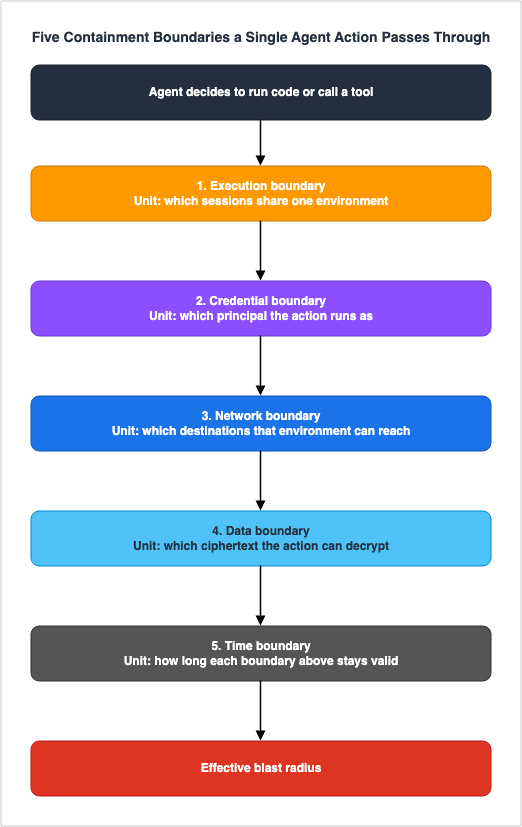
The following five sections will address these units in that order. Each section closes with what that boundary does not stop. That closing item becomes the design input for the next boundary.
3. Boundary 1 Execution Environment - What Ends Up in the Same Box
3.1 Decide the Unit First
The execution boundary is not a question of whether to isolate processes. It is a question of what unit you isolate on.AWS currently has several platforms for isolating agent code execution, each with a different default unit. When the unit differs, the same word "isolated" points at different things. Get this wrong and every design decision after it misses.
The platforms covered below are AWS Lambda MicroVMs, Lambda tenant isolation mode, the Lambda function default, the two compute types of Amazon Bedrock AgentCore Runtime, and the AgentCore built-in tools.
3.2 AWS Lambda MicroVMs - The Unit Is the MicroVM Itself
AWS Lambda MicroVMs, announced on June 22, 2026, are a compute primitive designed specifically for isolating and executing code, whether generated by users or AI. Each MicroVM is built on Firecracker virtualization and holds its own kernel, file system, and network namespace.In the context of this article, four key characteristics are particularly relevant.
The fundamental unit is the MicroVM itself. You launch a MicroVM per user or per session and terminate it when the work finishes. MicroVMs do not share execution environments, so your implementation gets to decide, completely, who ends up in the same box.
The lifetime has a ceiling you set at launch. The
--maximum-duration-in-seconds parameter for run-microvm defines the maximum time a MicroVM can be running or suspended, ranging from 1 second to 28,800 seconds (8 hours). An idle policy can also suspend the MicroVM once it goes quiet and resume it when traffic arrives. While suspended, the MicroVM's memory and disk state are preserved. AWS presents this as removing a trade-off, with isolation and state preservation holding at the same time.Execution roles are optional. An execution role grants the MicroVM permissions to access AWS services and resources, and AWS documentation explicitly states that this can be omitted. Omitting the execution role has two consequences: runtime logs no longer reach CloudWatch, and that MicroVM cannot reach other AWS services at all. In other words, a sandbox that holds no AWS credentials at all is a supported configuration. That changes the design of the second boundary from the ground up. If an execution role is provided, its permissions become usable inside the MicroVM. Note that the IAM role used to build the MicroVM image is separate from the execution role, so build-time and runtime permissions can differ. The build role is optional in the same way, and omitting it means build logs no longer reach CloudWatch.
Outbound communication is, by default, open to the public internet. Closing it means creating a Lambda Network Connector and attaching it to a VPC. The third boundary covers that.
Availability is limited to five Regions: US East (N. Virginia), US East (Ohio), US West (Oregon), Asia Pacific (Tokyo), and Europe (Ireland). Check that against your Region requirements before you settle the design.
3.3 Lambda Tenant Isolation Mode - Switching the Unit to the Tenant
Lambda's tenant isolation mode was announced on November 19, 2025. When making a request, you provide a tenant identifier, and Lambda routes the request to an execution environment associated with that identifier. In the same tenant, execution environments are reused; across different tenants, they are not.The unit drops from the function version to the tenant. Work that used to mean one function per tenant collapses into a single function.
However, there are design constraints that cannot be circumvented later. Four of them are configuration properties.
| Constraint | Description |
|---|---|
| Immutable property | Tenant isolation can only be enabled when the function is created. Existing functions cannot be switched to this mode later. |
| Identifier required | Functions using tenant isolation mode must be invoked with the tenant-id parameter. Omitting this parameter will result in a failed invocation. |
| Incompatible features | This mode is not compatible with Function URLs, provisioned concurrency, and SnapStart. |
| Execution environment ceiling | For every 1,000 concurrent executions configured on the function, Lambda allows up to 2,500 tenant-isolated execution environments, active and idle combined. |
The mode is available in every AWS Region except Asia Pacific (New Zealand), AWS GovCloud (US), and China.
And the most important constraint is that execution roles are not isolated. AWS documentation states outright that invocations from every tenant use the permissions of the same execution role. Tenant isolation mode only separates execution environments, not permissions. Unless you design the second boundary separately, code running in the context of tenant A will continue to have the permissions necessary to access data from tenant B.
3.4 Lambda Function Defaults - The Unit Is the Function Version
For Lambda functions where tenant isolation is not enabled, the default unit is function version.An execution environment is never reused across different function versions or across different AWS accounts, but it is reused across invocations of the same function version. State may persist for several hours. Files written to
/tmp survive for the lifetime of that execution environment and are not shared across environments.The default unit becomes a problem when it is mistaken for "invocation." If your code is written assuming that a new environment is created with each invocation, remnants of the previous invocation stay readable from the next one. AWS recommends that if you do not want state to carry over, avoid writing to
/tmp or clear it on each invocation, and consider creating separate functions for different states.The internals themselves belong to How AWS Lambda Execution Environments Work. The point to keep from here is that the default unit is not an invocation.
3.5 Amazon Bedrock AgentCore Runtime - The Unit Changes with the Compute Type
AgentCore Runtime has two compute types, and the unit differs between them. The default serverless compute type assigns a dedicated microVM to each session, while the Instances compute type maps each session one-to-one onto a single Amazon EC2 managed instance. The specifications of the compute type itself - session lifetime, persistent volumes, and the absence of isolation between agents on one instance - are detailed in OWASP Top 10 for Agentic Applications Mapped to AWS Controls. This article uses them only as material for deciding the unit of a boundary. How the orchestration loop that runs inside that unit is itself folded into configuration, and what the export back to code gives you, is the subject of Amazon Bedrock AgentCore Harness - The Managed Agent Loop and the Export-to-Code Boundary.What this article adds is that the unit you choose decides how you have to handle session identifiers.
AgentCore Runtime performs authorization based on the resource ARN of the agent runtime, not on the session ID itself. AWS documentation states that AgentCore validates the format of the
runtimeSessionId it receives, but does not verify that the ID belongs to the caller.In deployments where a single IAM principal invokes on behalf of multiple end users,
the platform does not enforce that a sessionId belongs to the calling user.
You are responsible for ensuring your backend passes the correct sessionId per user.The implication is clear. In configurations where a single IAM principal makes calls on behalf of multiple users, an authenticated user can pass another user's session ID and get into that session. Per-session isolation works exactly as designed; what is unprotected is the decision about which session you enter.
AWS gives two mitigations. First, hold the mapping between sessions and users in your application and treat the
runtimeSessionId you pass as a server-side value derived from the authenticated user. Second, where the deployment allows it, invoke through a separate IAM principal per user or per tenant. With the second, IAM itself enforces the session scope, and the whole shared-principal class of problem disappears.This lands back on the question of units. Once the execution environment is scoped to the session, the calling principal has to be scoped the way the session is, or the boundary exists in name only.
3.6 The Unit for the Built-In Tools
When you let an agent execute code or interact with a browser, each AgentCore built-in tool runs in its own isolated execution environment. Here too, the unit is the session.AgentCore Code Interpreter assigns a dedicated microVM to each tool session, isolating the CPU, memory, and file system. The default session timeout is 900 seconds, and you can raise it to 8 hours at creation. Multiple sessions can run concurrently within a single Code Interpreter, each maintaining its own state and environment.
AgentCore Browser is also per session, with a default timeout of 15 minutes and a maximum of 8 hours. These sessions are disposable and are reset upon termination.
What gets missed about these two is that a tool session and an agent session are different things. A tool session ends on the timeout configured for that tool. It does not end when the agent session ends, so you design the two lifetimes separately. That belongs to the fifth boundary.
3.7 Comparing the Units Side by Side
Everything so far goes into one table. The validation date is August 17, 2026, and the scope is limited to AWS platforms that can be used to isolate agent code execution and tool execution. This is not an exhaustive list.| Execution platform | Default isolation unit | What ends up in the same box | How to change the unit |
|---|---|---|---|
| Lambda function (default) | Function version | Later calls to the same function version | Enable the tenant isolation mode when creating the function. |
| Lambda function (tenant isolation mode) | Tenant | Later calls from the same tenant | Cannot be changed; fixed at creation time. |
| Lambda MicroVMs | The MicroVM itself | Only the sessions you attach to the same MicroVM | Your implementation decides, through the launch and terminate calls. |
| AgentCore Runtime (Serverless) | Session | Later exchanges in the same session | Determined by how the caller assigns session IDs. |
| AgentCore Runtime (Instances) | Session | Multiple agents placed in one session | Do not put agents that distrust each other in one session. |
| AgentCore Code Interpreter | Tool session | Later executions in the same tool session | Separate the session. |
| AgentCore Browser | Tool session | Later operations in the same tool session | Separate the session. |
The selection guidelines are straightforward: If you are executing code that you did not write, the isolation unit should be the session or finer. Tenant-level isolation is only sufficient when the users inside one tenant trust each other.
3.8 What This Boundary Does Not Stop
Even if the boundary of the execution environment holds, the following four things cannot be stopped:Everything in the same box is visible. AgentCore Runtime's security best practices explicitly state that regarding command execution, commands have complete access to the container's file system and to credentials and secrets configured inside the microVM. The isolation boundary is the microVM itself, and inside the microVM there is no boundary.
File system permissions do not constitute a boundary. In AgentCore's persistent file system, permissions are stored, but are not enforced within a session. While
chmod and stat function correctly, access checks always succeed because the agent is the only user inside the microVM. A design that partitions the inside with file permissions does not hold.Which session a process enters is determined outside of the execution environment boundary. Section 3.5 covered that.
localhost is not outside. Each AgentCore Runtime's microVM has a platform server running on localhost, which manages the VM's session lifecycle and storage operations. AWS states that the impact is limited to the current VM session and does not extend to other sessions or isolation boundaries, adding that unauthorized access may disrupt the VM's lifecycle for that session or hand out shell access inside that session. AWS recommends applying URL filtering or an allowlist at the tool level so the tools you hand the agent cannot reach localhost.
On Amazon EKS the same question has more than one answer, because the separation there comes in levels rather than as a single box. Workload Isolation Levels on Amazon EKS works through four of them and names what each level leaves shared.
4. Boundary 2 Credentials - Who the Agent Acts As
4.1 The Credentials Sit Inside the Execution Environment
Even with the first boundary designed correctly, if AWS credentials sit inside the box, any code running in that box can use them.In AgentCore Runtime, any code or actor running inside the microVM can read execution role credentials from the metadata endpoint. That fact is where OWASP Top 10 for Agentic Applications Mapped to AWS Controls starts.
Starting from that fact, what this article adds is how far the execution role can be narrowed, and what cannot be narrowed at all.
The metadata service version in AgentCore now carries a deadline of its own. From June 30, 2026, an agent runtime must have MMDSv2 enabled. A runtime without it cannot be invoked and returns a
ValidationException. To enable it, call UpdateAgentRuntime with requireMMDSV2 set to true in metadataConfiguration.4.2 What a Session Policy Can Narrow
When you create a temporary session and pass a session policy, you narrow the permissions of that session. The resulting permissions are the intersection of the role's identity-based policies and the session policy. A session policy cannot add a permission the role does not already have.You can pass one inline session policy and up to 10 managed policy ARNs. Their combined plaintext cannot exceed 2,048 characters, and that ceiling decides how much per-task scoping you can express. OWASP Top 10 for Agentic Applications Mapped to AWS Controls identifies this as a residual risk. Even within that plaintext limit, the session policy and any session tags also add to the size of the session token, and a request fails if the token exceeds its size limit; what fills the token and how to measure it is covered in What Fills an AWS STS Session Token.
In an agent context, this is effective when using a single execution role, but restricting its permissions in different ways for each task. Give the execution role the permissions several kinds of work need, then start each task by passing a session policy that leaves only the part that task needs.
Specifically, you can restrict based on: actions, resources, and any constraints expressed through condition keys. This also includes attribute-based controls, such as including a tenant identifier in a session tag and matching it with resource tags. For the general shape of a tenant boundary, see AWS SaaS Multi-Tenant Architecture Guide.
4.3 What a Session Policy Cannot Narrow
This is the heart of the section. A session policy does not narrow every source of permissions.The IAM User Guide explicitly states that the behavior changes depending on what a resource-based policy identifies as a principal.
A resource-based policy can specify the ARN of the user or role as a principal.
In that case, the permissions from the resource-based policy are added to the role
or user's identity-based policy before the session is created. The session policy
limits the total permissions granted by the resource-based policy and the
identity-based policy.

A resource-based policy can specify the ARN of the session as a principal.
In that case, the permissions from the resource-based policy are added after the
session is created. The resource-based policy permissions are not limited by the
session policy.
To rephrase, if a resource-based policy identifies a role ARN, those permissions fall inside the intersection the session policy takes. However, if the resource-based policy identifies a session ARN, those permissions are added after the session is created and the session policy does not limit them.
This becomes relevant in agent design when resource-based policies, such as S3 bucket policies, KMS key policies, and Lambda resource-based policies, are written on a per-session basis. The assumption that something is "safe" because it is narrowed by a session policy is not valid unless you verify who the resource-based policy is identifying. For the order in which each policy type is evaluated, and how the final decision falls out, see IAM Policy Evaluation Logic Step by Step.
There is one more thing it does not narrow. A session policy only lowers the ceiling of the execution role itself; it does not make up for a ceiling you forgot to lower. AWS asks you to confirm that the permissions of the execution role are equal to or less than those of the principals that can invoke that runtime. An agent holding stronger permissions than whoever called it is itself a path to privilege escalation.
A common place for that oversight is when you connect Lambda to a VPC. Permissions related to EC2 network interfaces, granted to the execution role for VPC connectivity, are intended for use by the Lambda service, but are also implicitly granted to the function code. As clearly stated in AWS documentation, the function code can call those EC2 APIs.
4.4 Do Not Put Credentials There in the First Place
The discussion so far has been about narrowing. The strongest design is to keep AWS credentials out of the execution environment altogether.As mentioned in section 3.2, Lambda MicroVMs can run without an execution role. That configuration holds for work that just runs the generated code and returns the result. Without any credentials present, the environment cannot access AWS services, regardless of what is read from the metadata endpoint.
Even when an agent has to reach an external service, you can keep credentials out of the execution environment. The AgentCore Identity token vault securely stores OAuth 2.0 access and refresh tokens, API keys, and OAuth client secrets, encrypting them with keys managed in AWS KMS. A customer managed key can be used here as well. Retrieval sits behind strict access control that limits it to the individual agent. For user-specific credentials, agents can only access them while acting on behalf of the corresponding user.
The design implication is to keep "the credentials usable inside the execution environment" and "the scope the agent may act on behalf of" in different places. The first sits inside the first boundary, where everyone in the box can use it. The second sits outside the box, and every retrieval passes through an authorization check.
4.5 What This Boundary Does Not Stop
Actions taken inside the permissions you granted are not stopped. That reads as a tautology, but it matters for design. Destruction an agent can carry out with the permissions it legitimately needs is not stopped by the credential boundary. A human approval gate stops that, and this article does not cover approval gates.Assuming another role carries permissions across. Once an agent assumes the next role in a chain, everything past that point runs on the permissions of that next role. The trust policy closes this path, not the session policy.
Credentials already issued cannot be revoked. The fifth boundary covers that.
The confused deputy problem remains. AWS recommends adding
aws:SourceArn and aws:SourceAccount conditions to the trust policy of the AgentCore execution role, so that only the intended AgentCore resources can assume it. If these conditions are not implemented, a potential pathway remains open for third parties to have another entity assume that role through the service principal.5. Boundary 3 Network - Does the Traffic Pass Through a Place Where Your Controls Apply
5.1 By Default, the Traffic Does Not Pass Through a Place Where Your Controls Apply
Many designs skip the first step on the network boundary. Before you work out how to filter, check whether that traffic passes through the place where your filters sit.The AgentCore Runtime network mode has two options:
PUBLIC and VPC. By default, the serverless compute type uses PUBLIC. The CloudFormation resource definition allows the same two values for NetworkMode, and the AWS CDK documentation states that the default is PUBLIC. The Instances compute type only operates within a VPC, so this default does not apply to it.AWS diagrams the traffic flow in
PUBLIC mode. Calls originate from a user's VPC or internet-based clients, pass through an internet gateway, and then travel over the public internet to reach the public endpoint of the agent hosted on the AWS service account. When the agent then calls AWS services, it connects to the service's public IP address, and the traffic flows over the public internet.The consequence is clear: in this mode, the agent's outbound traffic never passes through your VPC. The Network Firewall, the Route 53 Resolver DNS Firewall, and the VPC endpoint policies you placed in that VPC have not seen one byte of it.
Lambda MicroVMs have the same shape. By default, they have access to the public internet for outbound traffic. To connect them to resources within your VPC, you must create a Lambda Network Connector and configure the VPC settings.
On both platforms, the default state is one with no network boundary at all. Before working out how to narrow egress, you have to switch that first.
5.2 Routing Traffic Through Your VPC and Restricting Access
When you configure a VPC connection on AgentCore Runtime, AgentCore uses a service-linked role to create an elastic network interface (ENI) in the subnets you name. Those subnets have to sit in an Availability Zone that AgentCore supports; name an unsupported one and resource creation fails. AWS also recommends two or more private subnets in different Availability Zones, for availability.What changes is the egress side. When the agent reaches a private resource, the traffic passes through that ENI in your subnet. The security group you named in the VPC connection attaches to the ENI and controls which resources in your VPC the agent can reach. The security group on the destination side must also allow inbound traffic from the security group associated with the AgentCore Runtime's ENI.
Calls to public AWS services go through the ENI as well. A public subnet gives AgentCore Runtime no internet access, so the ENI has to sit in a private subnet whose route table points out through a NAT gateway.
One misunderstanding runs the other way and is worth closing here. Configuring a VPC connection does not stop the agent from being reachable from the internet. Public endpoints remain active. To restrict inbound traffic, apply resource-based policies and use condition keys such as
aws:SourceVpc or aws:SourceIp to limit the source. The primary purpose of a VPC connection is to control outbound traffic, not inbound.When running containerized agents in VPC mode, you also configure VPC endpoints for Amazon ECR (
dkr and api), the Amazon S3 gateway endpoint, and CloudWatch Logs. These are required if your VPC does not have internet connectivity and are recommended even if you have a NAT gateway. For S3, AWS recommends scoping the policy to only the bucket ECR uses for image layer storage.Lambda MicroVMs keep separate network connectors for inbound and outbound traffic. To direct outbound traffic to a VPC, you must create a VPC egress connector and reference it in the
run-microvm command. To block HTTPS access to your application, you can specify the NO_INGRESS connector provided by Lambda. The run-microvm call fixes the network connectors, and nothing changes them while the MicroVM runs. You cannot re-narrow the path after launch, so the parameters you pass at launch are the boundary.On the inbound side, there is one more layer. Requests to the MicroVM's endpoint require a valid authentication token in the
X-aws-proxy-auth header. This token is encrypted as a JWE and is scoped to three things: a specific MicroVM, a set of permitted ports, and an expiration. Requests to ports not included in the token's allowedPorts will receive a 403 error. Being able to narrow the reachable target down to the port and to attach an expiration makes this a fairly fine-grained boundary on the inbound side.However, there is more than one way in. Debug shell access goes through a separate token API and requires the target MicroVM to have been launched with the
SHELL_INGRESS network connector. Attempting to issue a shell access token for a MicroVM launched without this connector will result in a ValidationException. Therefore, blocking HTTPS access with NO_INGRESS and blocking shell access are distinct configurations. Both are determined at the time run-microvm is called, meaning whether or not shell access is enabled is a setting that must be configured before launching the MicroVM.5.3 ENIs Are Shared
One specification here is easy to overlook. AgentCore Runtime ENIs are shared across agents that use the same subnet and security group configuration.This directly impacts designs that rely on security groups as boundaries. Give two agents the same subnet and the same security group and they share one ENI, which puts them inside the same network boundary. To give them separate network reach, the subnet and security group combination itself has to differ. You cannot tell the two apart while assigning the same security group and adjusting only the rules inside it.
Even if you segment the execution environment per session at the first boundary, this configuration decides the unit at the third one. This is the most concrete example of the principle in section 2.2, that each boundary decides its unit independently.
The two boundaries are independent in lifetime as well. When you delete an agent, the corresponding ENI can stay in your VPC for up to 8 hours before it is removed automatically. Deleting the execution environment and removing the resources that make up the network boundary are not the same event.
5.4 The Layer That Blocks by Name and the Layer That Blocks by Route
Only once the traffic passes through a VPC does filter design start to mean anything.Egress filters split into two kinds: the ones that block by name and the ones that block by route. Route 53 Resolver DNS Firewall filters DNS queries originating from the VPC that pass through Route 53 Resolver, based on domain names. AWS Network Firewall performs inspection at layers 3 through 7, matching domains found in HTTP host headers and TLS SNIs. How the two divide the work, and the constraint that DNS Firewall reads only domain names and never resolves them to IP addresses, belong to OWASP Top 10 for Agentic Applications Mapped to AWS Controls.
What this article adds is the order in which you place those two. DNS Firewall and Network Firewall do not inspect the same traffic paths. AWS's security blog explicitly states that DNS queries passing through Route 53 VPC Resolver do not traverse the exit paths inspected by Network Firewall or third-party firewalls. Install only one and the path the other one watches is left wide open.
API traffic also has a layer of its own, separate from the network. VPC endpoint policies only apply to requests passing through that endpoint, and instead of granting permissions, they restrict the reachable scope. By using conditions such as
aws:PrincipalOrgID and aws:ResourceOrgID, you can configure the policy to only allow calls from principals within your organization to resources within your organization.There is one pitfall specific to agents here. VPC endpoint policies can only restrict the source of calls based on IAM principals; they do not work with OAuth users. When AgentCore handles requests based on OAuth, the
Principal of the endpoint policy has to be *. A design that uses endpoint policies as a per-user boundary stops working right there.5.5 What This Boundary Does Not Stop
What goes to an allowed destination in an allowed shape is not stopped. A filter that reads domain names cannot detect information tucked inside a legitimate request to an external API on the allowlist.Exfiltration over DNS gets through unless you handle DNS itself. AWS calls out this pathway in the context of agents, noting that agents with code execution capabilities could be instructed to encode sensitive information into DNS queries and send it to external name servers. Without a DNS Firewall, this route completely bypasses egress inspection.
Every external tool an agent depends on loosens the allowlist by that much. Because agents call external APIs as part of operating correctly, designing that allowlist is harder than it is for other workloads. AWS recommends opening only the specific endpoints an agent actually needs, rather than a broad category.
Closing the way in does not close the way out, and the reverse holds too. As section 5.2 showed, they are separate settings.
6. Boundary 4 Data - Is the Boundary the Key or the Identifier
6.1 The Key Boundary Works Only When the Condition Values Are Decided Outside the Box
There are multiple layers involved in defining data boundaries: buckets, tables, rows, and keys. Multi-Tenant Generative AI SaaS Architecture on AWS covers two patterns, a customer managed key per tenant and a shared key with an encryption context attached, along with thekms:EncryptionContext: and kms:EncryptionContextKeys condition keys. None of that is repeated here.This article adds the consideration of where those values used in the condition are determined.
The advantage of a key boundary is that it does not depend on the application behaving correctly. However, that advantage holds only when the code inside the box cannot freely choose the values used in the condition. In an agent context, this assumption is often broken. The code that performs the decryption runs inside the sandbox, and that code decides everything in the request it sends. If the code can choose the values included in the encryption context, it can also include values belonging to a different tenant.
Therefore, the key design principle is this: The values used in the condition must be finalized outside of the first boundary and brought in in a form that cannot be modified from within. A session tag is set by the caller at
AssumeRole, so code inside the sandbox cannot change it. Require in the key policy that the encryption context value match that session tag, and the condition values are then fixed outside the box.Conversely, in an implementation that assembles an identifier inside the sandbox and puts it straight into the encryption context, the key layer is there in form only. A key does not lie, but if the value handed to the key was made inside the box, that value can.
The limits belong here too. An encryption context cannot be specified for an asymmetric KMS key or an HMAC KMS key. Condition key values also have to follow the character rules of the policy document. Some values that are valid as an encryption context cannot be expressed in a policy at all.
AgentCore also has places that take a customer managed key. AgentCore Memory allows you to specify a customer-managed KMS key using the
encryptionKeyArn at creation. Without one, the service encrypts the data with a service-managed key. By default, AgentCore Runtime encrypts what it stores with an AWS owned KMS key.6.2 Do Not Call an Identifier the Caller Supplies a Boundary
This is the heart of the section.AgentCore Memory organizes short-term memory events under a hierarchy of
actorId and sessionId. That structure keeps one actor's conversation in one session apart from other sessions and other actors.But
actorId is a parameter the caller passes. AgentCore Memory stores events and records under whatever actorId it receives. The caller's code decides that value, not the platform. So actorId is a filter for retrieval, not an authorization boundary, until something evaluates it.There are two ways to perform this evaluation.
First, there is IAM. When the caller uses AWS credentials to access Memory, Memory condition keys restrict the request scope to a given actor, session, and namespace on top of the action and the Memory resource. Binding a namespace with IAM condition keys is the subject of AI Agent Memory Design Guide.
The second is fine-grained access control in Memory, which closes the gap left by callers that are not IAM principals. OWASP Top 10 for Agentic Applications Mapped to AWS Controls covers why the feature exists; what matters here is only how it behaves as a boundary. You attach a policy engine to the gateway that fronts Memory, and it evaluates Cedar policies on every request. By default, the evaluation results in a denial; the
forbid policy overrides any permit policy. A common example is requiring that the actorId in the request matches the sub claim in the caller's JWT.The same pattern from section 6.1 appears again here. This shape holds as a boundary only because the JWT
sub is issued outside the box and the code inside the box cannot rewrite it. If the value being compared were made inside the box, requiring a match guarantees nothing.AWS recommends running in
LOG_ONLY first, which evaluates without blocking, and switching to ENFORCE once you have confirmed that no unintended denials appear.6.3 What This Boundary Does Not Stop
Batch operations sit outside fine-grained access control. AWS documentation explicitly states thatBatchCreateMemoryRecords, BatchUpdateMemoryRecords, and BatchDeleteMemoryRecords are not provided as Cedar actions and cannot be controlled within fine-grained access control. This is because these operations involve multiple records within a single request, preventing the policy engine from evaluating them individually. While IAM policies can permit or deny batch operations as a whole, they cannot apply conditions based on individual records or namespaces.If a request does not carry the fields a policy references, nothing happens at creation time. AWS warns that it validates a policy referencing a context field against the schema for the actions in that policy's scope, but not against every operation the request might reach at runtime. If the request does not include the referenced fields, the policy will be successfully created and transition to an
ACTIVE state, only to be denied with a 403 error at evaluation time. This condition is not reported during the creation process.Long-term memory represents an intentional exception to session isolation. Carrying information across sessions is the purpose of long-term memory, which makes it the one path that crosses sessions inside the platform. AI Agent Memory Design Guide covers this point.
The key boundary does not stop a read from a party holding the correct encryption context. The path by which a session carries data it decrypted legitimately out of that session belongs to the third boundary and the fifth boundary.
7. Boundary 5 Time - The Three Lifetimes Are Different Things
7.1 Three Lifetimes
Three lifetimes are easy to confuse when you design time as a boundary.- The lifetime of credentials - when the temporary credentials that were issued stop working.
- The lifetime of the execution environment - when a session or a MicroVM is torn down.
- The lifetime of data - when what was written gets deleted.
The three move independently. Shorten the execution environment while credentials remain valid, and the credential lifetime becomes the effective window. Shorten the credentials while written data sits for the 365 days that AgentCore Memory allows at most, and the value of what was taken out does not fall with the credential lifetime.
Designing time as a boundary means setting these three separately and knowing which one is longest.
7.2 The Lifetime of Credentials
You set the validity period of the temporary credentials fromAssumeRole with DurationSeconds, and the default is 3,600 seconds. The permissible range is from 900 seconds to the maximum session duration set for the role, which can be a value between 1 and 12 hours.When using role chains, the maximum duration is 1 hour. That limit applies to role sessions obtained through the AWS CLI and API. Pass a
DurationSeconds above that and the call itself fails.In agent design this turns into cutting the credential lifetime to the time the task is expected to take. Even if the agent session can run for 8 hours, there is no reason to leave the credentials valid for 8 hours when the task inside it finishes in minutes.
And the most important property sits here. No operation revokes credentials that have already been issued. The only action possible is to add a denial after the fact, keyed on the time of issue. As described in the IAM User Guide, this involves attaching a policy that denies all permissions for temporary credentials issued before a specified date and time, using a
DateLessThan condition on aws:TokenIssueTime. Because aws:TokenIssueTime only exists in the context of requests signed with temporary credentials, this denial does not affect requests signed with long-term credentials.The design implication is that a short credential lifetime is the only substitute for responding after the fact. Revocation is an operational task, the addition of a deny policy, and the window that stays open until it lands is set by how long the credentials had left.
7.3 The Lifetime of the Execution Environment
The lifetime of an execution environment differs by platform, and so does the range you can configure.| Execution platform | Default lifetime | Maximum | What remains after termination |
|---|---|---|---|
| Lambda function | Not publicly disclosed | Not publicly disclosed | The state may persist for several hours before being discarded through normal lifecycle management. |
| AgentCore Runtime (Serverless) | Terminates after 15 minutes of inactivity | 8 hours | The microVM is terminated, and memory is cleared. |
| AgentCore Runtime (Instances) | The instance is kept until the session is stopped | 14 days | Persistent volumes are retained, and the same session ID reconnects to them. |
| AgentCore Code Interpreter | 900 seconds | 8 hours | Session data is deleted. The retention policy is a separate setting; see section 7.4. |
| AgentCore Browser | 15 minutes | 8 hours | The session is disposable and resets upon termination. |
| Lambda MicroVMs | Set through the idle policy; the default before an idle suspend is 300 seconds | 28,800 seconds (8 hours) | Memory and disk state are preserved while suspended. |
There are three key takeaways from the table.
The Lambda function execution environment has no published lifetime. The AWS whitepaper says data and state can remain for several hours until the environment is torn down by normal lifecycle management. It is stated as a property rather than a number, so it cannot serve as a time boundary. If you run on Lambda functions, you cut the lifetime at the other two, credentials and data.
Only the serverless AgentCore Runtime ends and erases at the same moment. Upon session termination, the entire microVM is shut down, and memory is sanitized. A later request with the same session ID gets a new execution environment.
Everywhere else, the end of the lifetime is not the end of the state. With the Instances compute type, AgentCore will terminate the instance when the session reaches the maximum lifetime, but persistent volumes are retained. When called again with the same session ID, a new instance is provisioned and the volume is reconnected, leaving the data intact. Lambda MicroVMs also exhibit this same behavior when suspended and resumed. State retention is a feature, not a time limit.
7.4 The Lifetime of Data
The lifetime of data is decided independently of the two lifetimes above.AgentCore Code Interpreter session data carries a 30-day TTL retention policy. The session itself ends after at most 8 hours, and the data it produced carries its own retention period.
For AgentCore Memory, the retention period for raw events is set at creation with
eventExpiryDuration. How to design that retention period belongs to AI Agent Memory Design Guide. What this article looks at is how the setting behaves once you treat it as a boundary.eventExpiryDuration is applied per event at write time. Updating it affects only
events created after the change. Previously stored events keep their original
expiration and cannot be extended, and expired events cannot be recovered.The retention period is fixed per event at write time. Change the setting later and it reaches only the events created after that change. Events already stored keep their original expiration and cannot be extended, and expired events cannot be recovered.
Shorten the retention period after an incident and what was already written does not get shorter. You settle the retention period when you create the memory resource, not after something goes wrong.
7.5 What This Boundary Does Not Stop
What has already left cannot be erased by a lifetime. The time boundary shortens the window that is still usable, not the content that left while that window was open.Shortening a lifetime breaks some operations. The long sessions and persistent volumes of the Instances compute type exist for long-running automation and for work that stops and resumes. Deciding to shorten that lifetime is deciding to give up that use. To keep both, narrow the reach at the other four boundaries instead of at the lifetime.
Revocation is not immediate. As section 7.2 showed, the actual mechanism is the addition of a deny policy. There is a delay in policy propagation, and existing clients must also handle cached credentials. When you initiate a revocation through the IAM console, the
AWSRevokeOlderSessions policy it attaches denies past sessions plus roughly 30 seconds into the future. That window absorbs propagation delay, and it is the one place where AWS puts a number on the fact that propagation is not instant.A lifetime is not the only ceiling a session can carry. A payment session on Amazon Bedrock AgentCore is bounded by an expiry and, optionally, by an amount, and the two are not symmetric. Agentic Payments on AWS works through which of the two you get by default.
8. What Remains When a Boundary Is Broken
8.1 Walking One Session Through in Order
This combines the five boundaries covered so far. The situation assumed here is that an agent in one session takes an incorrect action and arbitrary code is running inside that session. The method of attack is left open. Only the resulting state is fixed, and from there each boundary is examined for what it removes.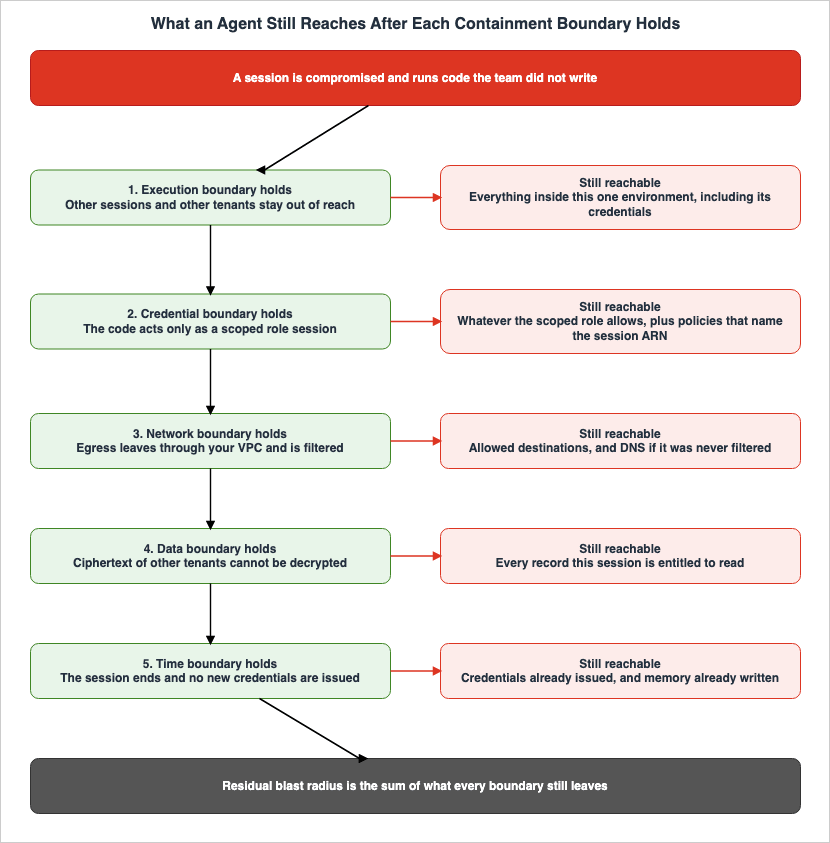
8.2 When Not a Single Boundary Was Designed
When an implementation lacks explicitly defined boundaries, the default settings result in the following state:The execution environment is scoped to the function version, so work belonging to several tenants passes through the same environment one call after another. The execution role holds, in one place, every permission the whole workload needs. The network mode is
PUBLIC, so outbound traffic never passes through your own VPC and none of the filters you placed there can see it. Service-managed keys encrypt the data, but no key condition distinguishes one tenant from another. Credentials last the default hour, sessions run up to eight hours, and the memory retention period is whatever was set at creation.Compromise a single session in that state and the reach is everything the execution role can do. Nothing separates one tenant from another, nothing constrains the egress destination, and exfiltration does not even register as something to detect.
In other words, for an implementation without defined boundaries, the blast radius is equivalent to the permissions granted to the execution role.
8.3 What Remains When All Five Are in Place
With the five boundaries designed, here is what remains. This section is the conclusion of this article.| What remains | Why |
|---|---|
| The data that session was legitimately working with | The work needs it, so the permission exists. No boundary stops the work itself. |
| Information that can go to an allowed destination in an allowed shape | A name-based filter does not inspect the content of a legitimate request to an allowed destination. |
| Whatever the leftover permissions of the execution role can reach | A session policy takes an intersection, but what you forgot to narrow stays. |
| Permissions granted by resource-based policies that explicitly reference the session ARN | The session policy does not limit them. |
| The period during which issued credentials remain valid | Revocation is the addition of a deny policy, and is not immediate. |
| The retention period of memory that has already been written | Fixed at write time and cannot be shortened afterward. |
| Information carried across sessions by long-term memory | Carrying information across sessions is what long-term memory is for. The five boundaries leave it in place on purpose. |
| Other agents placed on the same instance | Agents sharing an instance have no boundary between them. |
| The time until detection fires | Detection is always after the fact. |
What the table shows is that containment design is not the work of getting to zero. It is the work of making the residue known. A design is finished when you can write a concrete answer for your own environment against every row above.
9. How to Confirm That Containment Worked
9.1 Define "It Worked" First
Confirming containment is difficult because nothing happens while it is working. So you have to translate it into something observable first.Define "it worked" per boundary and you get the following.
- Execution environment - no unintended co-tenancy has occurred.
- Credentials - the permissions the execution role actually uses are narrower than the permissions it was granted.
- Network - attempts to reach destinations you did not allow are showing up in the logs.
- Data - requests carrying an identifier or an encryption context you did not expect are being denied.
- Time - no credential or execution environment outlives the task it serves.
"Not a single denial has appeared" is not evidence that it is working. Something else may be stopping those requests before they reach the boundary, and the boundary itself may never be evaluated. This is where the
LOG_ONLY mode from section 6.2 earns its place: it records the evaluation without denying anything, so you can see what the policy actually looks at under production traffic.9.2 Checking Each Boundary
The execution environment, and which session was entered. AWS states, in the security model for Runtime Instances, that CloudTrail records both the authenticated principal and the targetsessionId in the same InvokeAgentRuntime event, and that this is used to detect a principal that has entered a session another principal created. It is the one direct detection available for the session-routing problem in section 3.5.Command execution is also logged. AgentCore Runtime sends the request ID and the command entered to the agent's CloudWatch Logs log group. CloudTrail identifies who called the API, while CloudWatch Logs records which commands were executed. Correlate the two by request ID.
Credentials, and who an action is attributed to. To trace an action taken under an assumed role back to the original user, use
sts:SourceIdentity. If configured, sourceIdentity is recorded in both the STS invocation that assumed the role and in the API calls made by that role for each service.In an agent setting, what matters is that this attribute survives role chaining. However, there is a condition. If a role session, configured with SourceIdentity, assumes a second role, both the assuming role's permissions policy and the second role's trust policy must grant the
sts:SetSourceIdentity permission. Otherwise, the second role cannot be assumed.The limits are worth holding on to. The value runs from 2 to 64 characters, drawn from alphanumerics and a set of symbols, and no value may begin with
aws:. AWS controls the value of neither sts:SourceIdentity nor aws:SourceIdentity, so you decide what gets set there, through conditions in the trust policy. And an action an AWS service or a service-linked role takes on behalf of a federated identity does not record SourceIdentity in CloudTrail.When the agent reaches AWS through the AWS MCP Server, AWS adds condition keys to the downstream requests, and CloudTrail may record the MCP server in fields such as
invokedBy; in calls the agent makes directly with the AWS CLI or an SDK, neither indicates an MCP server. Which calls those signals tell apart, and where they are absent, is covered in Agent Toolkit for AWS and the AWS MCP Server.Network, and where the communication went. For runtimes connected to a VPC, enable VPC flow logs to identify unexpected communication patterns. Centralize flow logs and alert logs from Network Firewall as well.
On the detection side, common signals include
Trojan:EC2/DNSDataExfiltration for data exfiltration via DNS, and Exfiltration:S3/MaliciousIPCaller for S3 data API calls originating from IP addresses identified in threat intelligence feeds. GuardDuty Extended Threat Detection correlates multiple events, treating multi-stage exfiltration attempts as a single sequence, such as with AttackSequence:S3/CompromisedData. For configuring GuardDuty itself, see Amazon GuardDuty Extended Threat Detection Architecture.9.3 What Cannot Be Confirmed
You cannot prove that nothing is sharing a box. Whether the unit of the execution environment is right can be confirmed only by reading the configuration. A log never records the event "this session did not read another tenant's data." So this one belongs to configuration inspection, not to detection.What happens inside a boundary is invisible from outside it. Nothing survives about what code inside a microVM did unless that code recorded it itself. That is the point of isolation, so it is a consequence of the design rather than a trade-off.
Detection is always after the fact. An agent acts before the record is written. Detection buys you a settled scope and a way to stop the next occurrence, not the suppression of this one. Suppressing the damage is the job of the boundaries.
10. Design Checklist
Here are the items to check when you review an implementation, boundary by boundary. Treat each item not as yes or no, but as something you can write a concrete answer to for your own environment.Boundary 1: Execution Environment
- Have you listed all code sections that you did not write?
- For each of those sections, can you clearly define the isolation unit (session, tenant, or function version)?
- Have you listed what ends up in the same box? Does that list include parties that do not trust each other?
- If you use tenant isolation mode, have you designed around the fact that it can only be enabled when the function is created?
- If you put multiple agents in one session, have you confirmed that those agents trust each other?
Boundary 2: Credentials
- What credentials can be obtained from the execution environment?
- Are the permissions associated with those credentials equivalent to or less than those of the principal that can invoke the runtime?
- Are you narrowing permissions with a session policy for each task? Have you listed the permissions you could not narrow?
- Have you verified that there are no resource-based policies that explicitly reference session ARNs?
- Have you considered whether there are any use cases that can function in an execution environment without any credentials?
- Have you included conditions for
aws:SourceArnandaws:SourceAccountin the trust policy for the execution role?
Boundary 3: Network
- Have you verified the network mode? Is it inadvertently set to
PUBLICby default? - Does outbound traffic pass through your own VPC? If it does not, the filters you installed are seeing nothing.
- When you want two agents to reach different destinations, did you give them different subnet and security group configurations?
- Have you covered both the layer that blocks by name and the layer that blocks by route?
- Have you configured ingress restrictions separately from outbound settings?
- Have you determined whether to open an ingress point for a debugging shell, independent of the application's ingress settings?
Boundary 4: Data
- Are you including tenant and session identifiers in the encryption context and matching them against key policies?
- Have you checked that no identifier supplied by the caller is being treated as an authorization boundary?
- If using fine-grained access control, have you evaluated the policy using
LOG_ONLYand confirmed its behavior before enablingENFORCE? - Have you set the permitted scope knowing that batch operations cannot be controlled per record?
Boundary 5: Time
- Have you written out the three lifetimes separately: credentials, execution environment, and data?
- Do you know which of the three is the longest?
- Was the memory retention period settled at the moment the resource was created?
- Have you documented the process for revoking issued credentials in advance?
Detection
- Can you correlate the principal and the session ID from a CloudTrail event?
- Have you configured
sts:SourceIdentityand includedsts:SetSourceIdentityin the permissions and trust policies for all roles in the chain? - Are you centralizing VPC flow logs and firewall logs?
- For each boundary, have you written what "it worked" means, in a form you can observe?
11. Frequently Asked Questions
11.1 If You Can Choose Only One of the Five Boundaries, Which One
The execution environment. The other four take on meaning only once the unit of the execution environment is fixed. If the execution environment is scoped to the tenant, then even when you narrow credentials to a session, another session in the same box can still see those credentials. Scope the execution environment to the session and the other four boundaries can be added later.And the unit of the execution environment is the hardest one to change afterward. Lambda tenant isolation mode can only be enabled at function creation, and the AgentCore Runtime compute type cannot be changed once the runtime exists. The thing you have to decide first happens to be the thing that is hardest to walk back.
11.2 Does a Managed Sandbox Remove the Need to Design Boundaries
No. A managed sandbox only provides the first boundary.AWS itself defines this boundary as part of the shared responsibility model. AWS is responsible for the infrastructure, hardware-level microVM isolation, OS kernel patching, network infrastructure security, and service availability. You are responsible for the agent code and its dependencies, IAM access controls and resource policies, the security of the commands executed in runtime sessions, enforcing the session-to-user mapping, keeping container images updated, input validation, and network configuration.
The second through fifth boundaries all sit on your side of that line.
11.3 Is Separating Agents into Containers Enough
It is not enough when the code the agent runs is code you did not write.The security model for AgentCore Runtime Instances explicitly states that whether agents are running within containers or as direct processes on the same instance, neither provides a security boundary between workloads on that same instance. Therefore, all agents sharing the same instance must inherently trust each other.
If you need to execute untrusted code, the boundary should be placed at the VM level. Lambda MicroVMs provide this through Firecracker, and the serverless compute type of AgentCore Runtime assigns a dedicated microVM to each session.
11.4 A Session Policy Will Not Fit in 2,048 Characters
Instead of trying to fit everything in, break it down.You can pass up to 10 managed policy ARNs, so define the constraints you reuse as managed policies and keep only the task-specific part inline. However, the 2,048-character limit for plaintext applies to the combined total of inline and managed policy ARNs, so simply listing ARNs will consume that space.
If it still does not fit, the granularity you are aiming for probably does not match the granularity of your execution roles. In many cases, splitting the role is a better design than carving up a single role with condition expressions.
11.5 Can AgentCore Runtime Reach the Internet in VPC Mode
Yes, it can. However, the route changes.In VPC mode, even calls to public AWS services are routed through an ENI in the VPC. So the subnet route table needs a route out through a NAT gateway. A public subnet gives AgentCore Runtime no internet access, so the combination you need is a private subnet plus a NAT gateway.
Only with that configuration do the filters start doing anything. You are not cut off from the internet; the way out comes under your control.
11.6 Does a Sandbox Without an Execution Role Work in Production
It depends on the use case.Sandboxes can be viable for work that executes generated code and returns the results. This includes applications like data analysis, test execution, builds, and transformation processes. AWS documentation notes two consequences of omitting the execution role: no runtime logs in CloudWatch, and no access from that microVM to other AWS services. Neither of these limitations is problematic in these types of use cases.
However, sandboxes are not suitable when the agent needs to directly call AWS services. Even in these scenarios, instead of parking credentials inside the execution environment, the necessary operations can be moved to an outer layer. A configuration that routes tool calls through a gateway, where authorization is evaluated, falls into this category. Amazon Bedrock AgentCore Implementation Guide Part 2 covers how to implement that authorization with a gateway and Cedar.
11.7 Where to Start
The first step is to understand the current state. Before implementing any new controls, list the following three items:First, create a list of all the code sections you did not write yourself. Second, for each of those sections, document its current isolation level. Third, identify the scope of permissions associated with the AWS credentials that can be accessed from those sections.
Once those three are written down, you can see how close your environment is to the state in section 8.2. More often than not, the first thing to do is not to add a control but to check the network mode. Left at its default, the filters you are about to install will be looking at nothing.
12. Summary
Containment design is not simply an extension of preventive design. It starts from the state in which the breach has already happened and decides in advance how far, and to what, the damage travels from there.The unit of the work is not a feature but a boundary. For each boundary, you decide what ends up in the same box. Execution environment, credentials, network, data, and time are each decided independently, and the weakest unit decides the effective blast radius.
Every boundary has something it does not stop. The execution environment does not partition the inside of the box. A session policy does not restrict a resource-based policy that names the session ARN. Where
PUBLIC is the default, the outbound traffic never passes through your own VPC, so the filters you installed are seeing nothing. Identifiers passed by the caller are not authorization boundaries until something evaluates them. And credentials already issued cannot be revoked, while the retention period of memory already written cannot be shortened after the fact.Therefore, a completed containment design does not mean eliminating all residual risk. It means identifying all remaining risks and being able to define, within your own environment, the appropriate response to each one.
OWASP Top 10 for Agentic Applications Mapped to AWS Controls details which controls address which risks, while AI Agent Defense in Depth Model describes the layered approach to security. The five boundaries discussed in this article define the granular level that underlies both of those frameworks.
13. References
- Security best practices for AgentCore Runtime - Amazon Bedrock AgentCore
- microVMs - Amazon Bedrock AgentCore
- Use isolated sessions for agents - Amazon Bedrock AgentCore
- Instances - Amazon Bedrock AgentCore
- Security model and permissions for Runtime Instances - Amazon Bedrock AgentCore
- Session management - AgentCore Code Interpreter
- Resource management - AgentCore Code Interpreter
- Interact with web applications using Amazon Bedrock AgentCore Browser
- Create an AgentCore Memory - Amazon Bedrock AgentCore
- Fine-grained access control for Memory - Amazon Bedrock AgentCore
- Configure Amazon Bedrock AgentCore Runtime and tools for VPC - Amazon Bedrock AgentCore
- AWS::BedrockAgentCore::Runtime NetworkConfiguration - AWS CloudFormation
- Network connectivity patterns for agents deployed on Amazon Bedrock AgentCore Runtime - AWS Networking and Content Delivery Blog
- AWS Lambda MicroVMs - AWS Lambda Developer Guide
- Running and using MicroVMs - AWS Lambda Developer Guide
- Networking - AWS Lambda MicroVMs
- Security and permissions - AWS Lambda MicroVMs
- Monitoring - AWS Lambda MicroVMs
- Troubleshooting - AWS Lambda MicroVMs
- Execution role - AWS Lambda MicroVMs console help
- Idle policy - AWS Lambda MicroVMs console help
- AWS introduces Lambda MicroVMs for isolated execution of user and AI-generated code
- Secure code execution for AI agents with AWS Lambda MicroVMs - AWS Compute Blog
- Tenant isolation - AWS Lambda Developer Guide
- AWS Lambda announces new tenant isolation mode to simplify building tenant-aware applications
- Lambda isolation technologies - Security Overview of AWS Lambda
- Giving Lambda functions access to resources in an Amazon VPC
- Policies and permissions in AWS Identity and Access Management
- Revoke IAM role temporary security credentials - AWS Identity and Access Management
- Monitor and control actions taken with assumed roles - AWS Identity and Access Management
- CloudTrail userIdentity element - AWS CloudTrail
- Can I increase the duration of the IAM role chaining session - AWS re:Post
- Encryption context - AWS Key Management Service
- AWS KMS condition keys - AWS Key Management Service
- How Resolver DNS Firewall works - Amazon Route 53
- Prevent data exfiltration - AWS egress controls for cloud workloads - AWS Security Blog
- Establishing a data perimeter on AWS - Allow only trusted resources from my organization - AWS Security Blog
- Securing AI agents with Amazon Bedrock AgentCore Identity - AWS Security Blog
- AI Agent Defense in Depth Model (AIDDM)
- OWASP Top 10 for Agentic Applications Mapped to AWS Controls
- Agent Skills Security Vetting Guide
- Threat Modeling Generative AI Applications on AWS
- How AWS Lambda Execution Environments Work
- IAM Policy Evaluation Logic Step by Step
- AWS SaaS Multi-Tenant Architecture Guide
- Multi-Tenant Generative AI SaaS Architecture on AWS
- AI Agent Memory Design Guide
- Amazon Bedrock AgentCore Implementation Guide Part 2
- Amazon GuardDuty Extended Threat Detection Architecture
References:
Tech Blog with curated related content
Written by Hidekazu Konishi